
Point Cloud Library
Soubhi Hadri
Department of Electrical and Computer Engineering
University of Oklahoma
March, 2018
Computer Vision
Outline:
• Introduction
• Point Cloud Overview
• PCL (Point Cloud Library) Structure
• PCL Walkthrough
• MeshLab
• PCL Installation
• Example
Introduction :
1/37
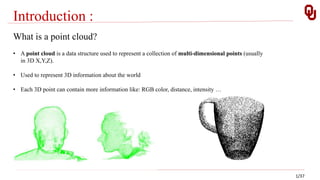
What is a point cloud?
• A point cloud is a data structure used to represent a collection of multi-dimensional points (usually
in 3D X,Y,Z).
• Used to represent 3D information about the world
• Each 3D point can contain more information like: RGB color, distance, intensity …
Introduction :
2/37
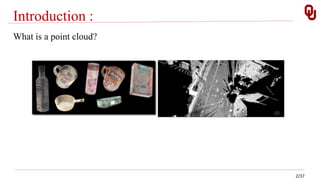
What is a point cloud?
Introduction :
3/37
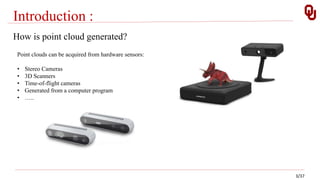
How is point cloud generated?
Point clouds can be acquired from hardware sensors:
• Stereo Cameras
• 3D Scanners
• Time-of-flight cameras
• Generated from a computer program
• …..
PCL Overview:
4/37
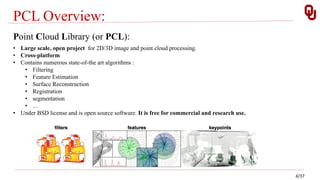
Point Cloud Library (or PCL):
• Large scale, open project for 2D/3D image and point cloud processing.
• Cross-platform
• Contains numerous state-of-the art algorithms :
• Filtering
• Feature Estimation
• Surface Reconstruction
• Registration
• segmentation
• …
• Under BSD license and is open source software. It is free for commercial and research use.
PCL Overview:
5/37
Who is developing PCL:
• Many organizations all around the world including :
PCL Overview:
6/37
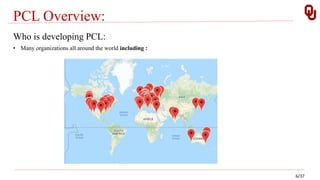
Who is developing PCL:
• Many organizations all around the world including :
PCL Overview:
7/37
Who is financially supporting PCL:
• Toyota , Google, Nvidia, Intel, ….
PCL Structure :
8/37
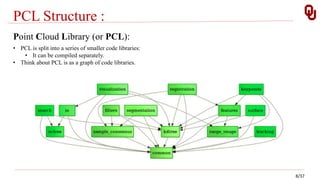
Point Cloud Library (or PCL):
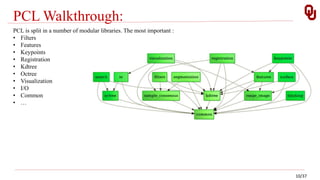
• PCL is split into a series of smaller code libraries:
• It can be compiled separately.
• Think about PCL is as a graph of code libraries.
PCL Structure:
9/37
Point Types in PCL:
• PointXYZ - Members: float x, y, z; most used.
• PointXYZI - Members: float x, y, z, intensity; Simple XYZ + intensity.
• PointXYZRGBA - Members: float x, y, z; uint32_t rgba; RGBA information packed into a
single integer.
• PointXYZRGB - float x, y, z, rgb; RGBA information packed into a float.
• PointNormal - float x, y, z; float normal[3], curvature; surface normals and curvatures.
• ……..
• Not enough! Defining your own custom PointT type.
PCL Walkthrough:
10/37
PCL is split in a number of modular libraries. The most important :
• Filters
• Features
• Keypoints
• Registration
• Kdtree
• Octree
• Visualization
• I/O
• Common
• …
PCL Walkthrough: Filters
11/37
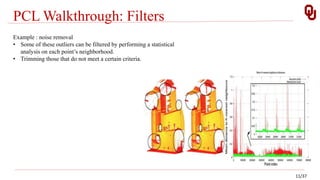
Example : noise removal
• Some of these outliers can be filtered by performing a statistical
analysis on each point’s neighborhood.
• Trimming those that do not meet a certain criteria.
PCL Walkthrough: Filters
12/37
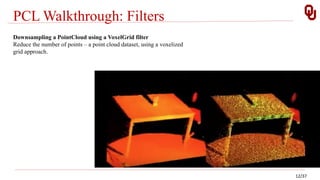
Downsampling a PointCloud using a VoxelGrid filter
Reduce the number of points – a point cloud dataset, using a voxelized
grid approach.
PCL Walkthrough: Filters
13/37
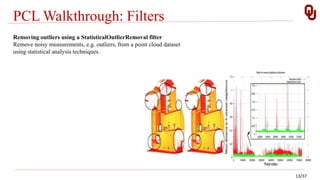
Removing outliers using a StatisticalOutlierRemoval filter
Remove noisy measurements, e.g. outliers, from a point cloud dataset
using statistical analysis techniques.
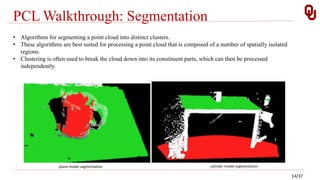
PCL Walkthrough: Segmentation
14/37
• Algorithms for segmenting a point cloud into distinct clusters.
• These algorithms are best suited for processing a point cloud that is composed of a number of spatially isolated
regions.
• Clustering is often used to break the cloud down into its constituent parts, which can then be processed
independently.
plane model segmentation cylinder model segmentation
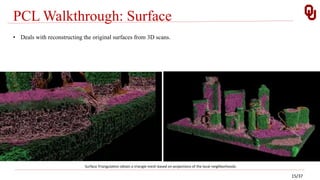
PCL Walkthrough: Surface
• Deals with reconstructing the original surfaces from 3D scans.
Surface Triangulation obtain a triangle mesh based on projections of the local neighborhoods.
15/37
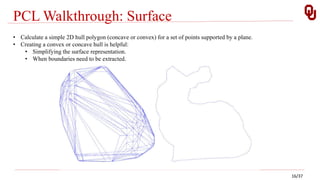
PCL Walkthrough: Surface
• Calculate a simple 2D hull polygon (concave or convex) for a set of points supported by a plane.
• Creating a convex or concave hull is helpful:
• Simplifying the surface representation.
• When boundaries need to be extracted.
16/37
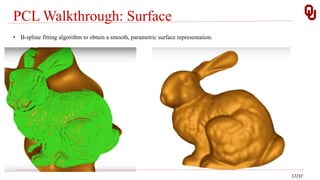
PCL Walkthrough: Surface
• B-spline fitting algorithm to obtain a smooth, parametric surface representation.
17/37
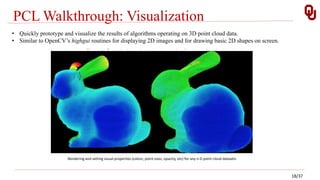
PCL Walkthrough: Visualization
• Quickly prototype and visualize the results of algorithms operating on 3D point cloud data.
• Similar to OpenCV’s highgui routines for displaying 2D images and for drawing basic 2D shapes on screen.
Rendering and setting visual properties (colors, point sizes, opacity, etc) for any n-D point cloud datasets
18/37
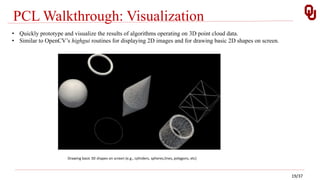
PCL Walkthrough: Visualization
Drawing basic 3D shapes on screen (e.g., cylinders, spheres,lines, polygons, etc)
• Quickly prototype and visualize the results of algorithms operating on 3D point cloud data.
• Similar to OpenCV’s highgui routines for displaying 2D images and for drawing basic 2D shapes on screen.
19/37
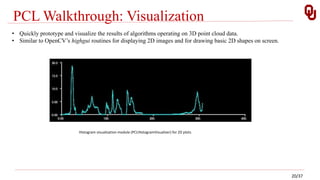
PCL Walkthrough: Visualization
Histogram visualization module (PCLHistogramVisualizer) for 2D plots
• Quickly prototype and visualize the results of algorithms operating on 3D point cloud data.
• Similar to OpenCV’s highgui routines for displaying 2D images and for drawing basic 2D shapes on screen.
20/37
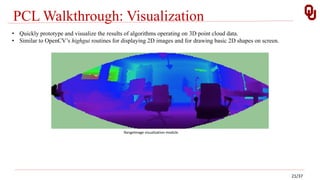
PCL Walkthrough: Visualization
RangeImage visualization module
• Quickly prototype and visualize the results of algorithms operating on 3D point cloud data.
• Similar to OpenCV’s highgui routines for displaying 2D images and for drawing basic 2D shapes on screen.
21/37
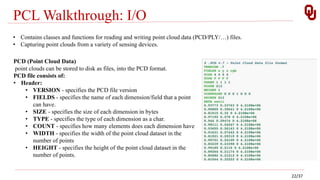
PCL Walkthrough: I/O
• Contains classes and functions for reading and writing point cloud data (PCD/PLY/…) files.
• Capturing point clouds from a variety of sensing devices.
PCD (Point Cloud Data)
point clouds can be stored to disk as files, into the PCD format.
PCD file consists of:
• Header:
• VERSION - specifies the PCD file version
• FIELDS - specifies the name of each dimension/field that a point
can have.
• SIZE - specifies the size of each dimension in bytes
• TYPE - specifies the type of each dimension as a char.
• COUNT - specifies how many elements does each dimension have
• WIDTH - specifies the width of the point cloud dataset in the
number of points
• HEIGHT - specifies the height of the point cloud dataset in the
number of points.
22/37
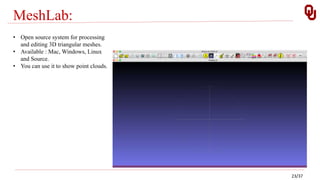
MeshLab:
• Open source system for processing
and editing 3D triangular meshes.
• Available : Mac, Windows, Linux
and Source.
• You can use it to show point clouds.
23/37
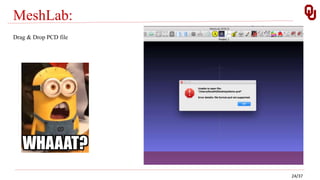
MeshLab:
Drag & Drop PCD file
24/37
PCL Installation:
• Depends on 3rd party libraries:
1. Boost
2. Eigen
3. FLANN
4. VTK
• Prebuilt binaries are available for Linux, Windows, and Mac OS X.
• To build PCL out of sources:
1. Clone code from github.
2. PCL relies on CMake as a build tool.
25/37
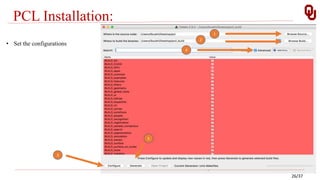
PCL Installation:
26/37
• Set the configurations
3
5
1
2
4
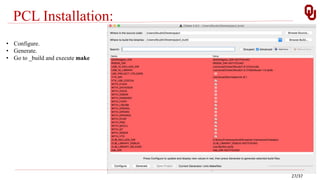
PCL Installation:
• Configure.
• Generate.
• Go to _build and execute make
27/37
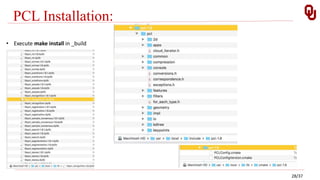
PCL Installation:
• Execute make install in _build
28/37
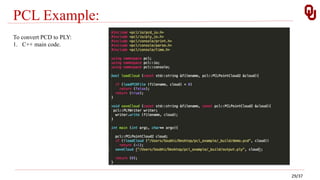
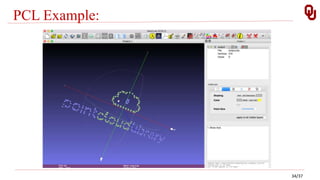
PCL Example:
To convert PCD to PLY:
1. C++ main code.
29/37
PCL Example:
To convert PCD to PLY:
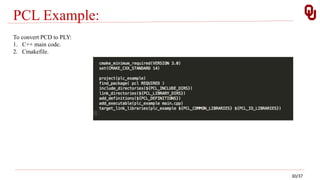
1. C++ main code.
2. Cmakefile.
30/37
PCL Example:
To convert PCD to PLY:
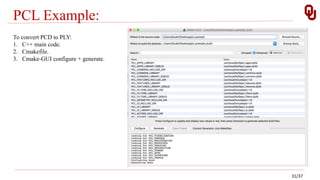
1. C++ main code.
2. Cmakefile.
3. Cmake-GUI configure + generate.
31/37
PCL Example:
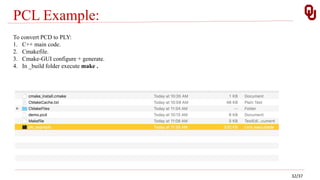
To convert PCD to PLY:
1. C++ main code.
2. Cmakefile.
3. Cmake-GUI configure + generate.
4. In _build folder execute make .
32/37
PCL Example:
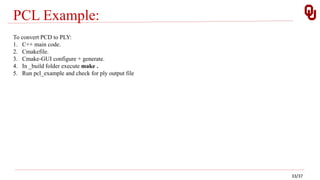
To convert PCD to PLY:
1. C++ main code.
2. Cmakefile.
3. Cmake-GUI configure + generate.
4. In _build folder execute make .
5. Run pcl_example and check for ply output file
33/37
PCL Example:
34/37
Resources:
PCL official website : pointclouds.org.
MeshLab : meshlab.net.
35/37
Script on GitHub: PCD-2-PLY
36/37
Thank you
37/37

PCL (Point Cloud Library)

  • 1.
    Point Cloud Library SoubhiHadri Department of Electrical and Computer Engineering University of Oklahoma March, 2018 Computer Vision
  • 2.
    Outline: • Introduction • PointCloud Overview • PCL (Point Cloud Library) Structure • PCL Walkthrough • MeshLab • PCL Installation • Example
  • 3.
    Introduction : 1/37 What isa point cloud? • A point cloud is a data structure used to represent a collection of multi-dimensional points (usually in 3D X,Y,Z). • Used to represent 3D information about the world • Each 3D point can contain more information like: RGB color, distance, intensity …
  • 4.
  • 5.
    Introduction : 3/37 How ispoint cloud generated? Point clouds can be acquired from hardware sensors: • Stereo Cameras • 3D Scanners • Time-of-flight cameras • Generated from a computer program • …..
  • 6.
    PCL Overview: 4/37 Point CloudLibrary (or PCL): • Large scale, open project for 2D/3D image and point cloud processing. • Cross-platform • Contains numerous state-of-the art algorithms : • Filtering • Feature Estimation • Surface Reconstruction • Registration • segmentation • … • Under BSD license and is open source software. It is free for commercial and research use.
  • 7.
    PCL Overview: 5/37 Who isdeveloping PCL: • Many organizations all around the world including :
  • 8.
    PCL Overview: 6/37 Who isdeveloping PCL: • Many organizations all around the world including :
  • 9.
    PCL Overview: 7/37 Who isfinancially supporting PCL: • Toyota , Google, Nvidia, Intel, ….
  • 10.
    PCL Structure : 8/37 PointCloud Library (or PCL): • PCL is split into a series of smaller code libraries: • It can be compiled separately. • Think about PCL is as a graph of code libraries.
  • 11.
    PCL Structure: 9/37 Point Typesin PCL: • PointXYZ - Members: float x, y, z; most used. • PointXYZI - Members: float x, y, z, intensity; Simple XYZ + intensity. • PointXYZRGBA - Members: float x, y, z; uint32_t rgba; RGBA information packed into a single integer. • PointXYZRGB - float x, y, z, rgb; RGBA information packed into a float. • PointNormal - float x, y, z; float normal[3], curvature; surface normals and curvatures. • …….. • Not enough! Defining your own custom PointT type.
  • 12.
    PCL Walkthrough: 10/37 PCL issplit in a number of modular libraries. The most important : • Filters • Features • Keypoints • Registration • Kdtree • Octree • Visualization • I/O • Common • …
  • 13.
    PCL Walkthrough: Filters 11/37 Example: noise removal • Some of these outliers can be filtered by performing a statistical analysis on each point’s neighborhood. • Trimming those that do not meet a certain criteria.
  • 14.
    PCL Walkthrough: Filters 12/37 Downsamplinga PointCloud using a VoxelGrid filter Reduce the number of points – a point cloud dataset, using a voxelized grid approach.
  • 15.
    PCL Walkthrough: Filters 13/37 Removingoutliers using a StatisticalOutlierRemoval filter Remove noisy measurements, e.g. outliers, from a point cloud dataset using statistical analysis techniques.
  • 16.
    PCL Walkthrough: Segmentation 14/37 •Algorithms for segmenting a point cloud into distinct clusters. • These algorithms are best suited for processing a point cloud that is composed of a number of spatially isolated regions. • Clustering is often used to break the cloud down into its constituent parts, which can then be processed independently. plane model segmentation cylinder model segmentation
  • 17.
    PCL Walkthrough: Surface •Deals with reconstructing the original surfaces from 3D scans. Surface Triangulation obtain a triangle mesh based on projections of the local neighborhoods. 15/37
  • 18.
    PCL Walkthrough: Surface •Calculate a simple 2D hull polygon (concave or convex) for a set of points supported by a plane. • Creating a convex or concave hull is helpful: • Simplifying the surface representation. • When boundaries need to be extracted. 16/37
  • 19.
    PCL Walkthrough: Surface •B-spline fitting algorithm to obtain a smooth, parametric surface representation. 17/37
  • 20.
    PCL Walkthrough: Visualization •Quickly prototype and visualize the results of algorithms operating on 3D point cloud data. • Similar to OpenCV’s highgui routines for displaying 2D images and for drawing basic 2D shapes on screen. Rendering and setting visual properties (colors, point sizes, opacity, etc) for any n-D point cloud datasets 18/37
  • 21.
    PCL Walkthrough: Visualization Drawingbasic 3D shapes on screen (e.g., cylinders, spheres,lines, polygons, etc) • Quickly prototype and visualize the results of algorithms operating on 3D point cloud data. • Similar to OpenCV’s highgui routines for displaying 2D images and for drawing basic 2D shapes on screen. 19/37
  • 22.
    PCL Walkthrough: Visualization Histogramvisualization module (PCLHistogramVisualizer) for 2D plots • Quickly prototype and visualize the results of algorithms operating on 3D point cloud data. • Similar to OpenCV’s highgui routines for displaying 2D images and for drawing basic 2D shapes on screen. 20/37
  • 23.
    PCL Walkthrough: Visualization RangeImagevisualization module • Quickly prototype and visualize the results of algorithms operating on 3D point cloud data. • Similar to OpenCV’s highgui routines for displaying 2D images and for drawing basic 2D shapes on screen. 21/37
  • 24.
    PCL Walkthrough: I/O •Contains classes and functions for reading and writing point cloud data (PCD/PLY/…) files. • Capturing point clouds from a variety of sensing devices. PCD (Point Cloud Data) point clouds can be stored to disk as files, into the PCD format. PCD file consists of: • Header: • VERSION - specifies the PCD file version • FIELDS - specifies the name of each dimension/field that a point can have. • SIZE - specifies the size of each dimension in bytes • TYPE - specifies the type of each dimension as a char. • COUNT - specifies how many elements does each dimension have • WIDTH - specifies the width of the point cloud dataset in the number of points • HEIGHT - specifies the height of the point cloud dataset in the number of points. 22/37
  • 25.
    MeshLab: • Open sourcesystem for processing and editing 3D triangular meshes. • Available : Mac, Windows, Linux and Source. • You can use it to show point clouds. 23/37
  • 26.
    MeshLab: Drag & DropPCD file 24/37
  • 27.
    PCL Installation: • Dependson 3rd party libraries: 1. Boost 2. Eigen 3. FLANN 4. VTK • Prebuilt binaries are available for Linux, Windows, and Mac OS X. • To build PCL out of sources: 1. Clone code from github. 2. PCL relies on CMake as a build tool. 25/37
  • 28.
    PCL Installation: 26/37 • Setthe configurations 3 5 1 2 4
  • 29.
    PCL Installation: • Configure. •Generate. • Go to _build and execute make 27/37
  • 30.
    PCL Installation: • Executemake install in _build 28/37
  • 31.
    PCL Example: To convertPCD to PLY: 1. C++ main code. 29/37
  • 32.
    PCL Example: To convertPCD to PLY: 1. C++ main code. 2. Cmakefile. 30/37
  • 33.
    PCL Example: To convertPCD to PLY: 1. C++ main code. 2. Cmakefile. 3. Cmake-GUI configure + generate. 31/37
  • 34.
    PCL Example: To convertPCD to PLY: 1. C++ main code. 2. Cmakefile. 3. Cmake-GUI configure + generate. 4. In _build folder execute make . 32/37
  • 35.
    PCL Example: To convertPCD to PLY: 1. C++ main code. 2. Cmakefile. 3. Cmake-GUI configure + generate. 4. In _build folder execute make . 5. Run pcl_example and check for ply output file 33/37
  • 36.
  • 37.
    Resources: PCL official website: pointclouds.org. MeshLab : meshlab.net. 35/37
  • 38.
    Script on GitHub:PCD-2-PLY 36/37
  • 39.