Production Reflection
Joseph Sam Fulton
Process
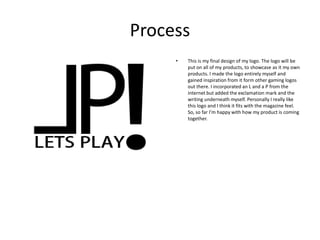
• This is my final design of my logo. The logo will be
put on all of my products, to showcase as it my own
products. I made the logo entirely myself and
gained inspiration from it form other gaming logos
out there. I incorporated an L and a P from the
internet but added the exclamation mark and the
writing underneath myself. Personally I really like
this logo and I think it fits with the magazine feel.
So, so far I’m happy with how my product is coming
together.
Process
• Here in this screenshot it shows I am starting to
make my cover of my magazine, I have decided of
what I am going to be included in this front cover.
All I really need to do now is to put everything in.
The front cover like other gaming magazines in my
genre, will be themed with a game of my choice. So
far I’m happy with my timing and how everything so
far is going right.
Process
• In this screenshot I am showing that my product is
half finished and only a few little touches need to
be done until the product is fully finished. I have
added my logo, the title of the game and the image
in the background, amongst other things. The logo
was imported in, from myself creating it, the title of
the game was written out and the image was
gathered from the internet. So far I’m pleased with
the looks of my product and the way everything is
going.
Process
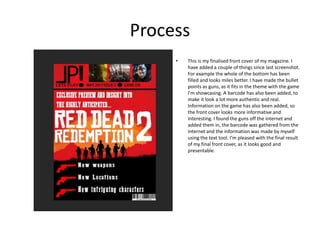
• This is my finalised front cover of my magazine. I
have added a couple of things since last screenshot.
For example the whole of the bottom has been
filled and looks miles better. I have made the bullet
points as guns, as it fits in the theme with the game
I’m showcasing. A barcode has also been added, to
make it look a lot more authentic and real.
Information on the game has also been added, so
the front cover looks more informative and
interesting. I found the guns off the internet and
added them in, the barcode was gathered from the
internet and the information was made by myself
using the text tool. I’m pleased with the final result
of my final front cover, as it looks good and
presentable.
Process
• This is the starting stage of my contents page for my
magazine. Not much has been added yet, apart
form telling you what I have showcased on my front
cover. I have also chosen a plain back as the
background as I think its smart and it looks
professional. I’m happy with how its looking so far.
Process
• In this screen shot I am showing that I have
completed my contents page and put in the all the
things that I wanted to for this certain spread. I
have added a few more game images and have
placed the page number and the name of the game
on the image as well. The game images that I found
were off the internet, the page number I produced
myself via the text tool, which was the same of the
text above the image.
Process
• This screenshot shows me starting my first review
of the games that I have reviewed. I have added a
background image to this showcasing the game and
the preview into it. I gathered the image of the
internet and I’m pleased with the result of how it
looks. So far I like the background image as it suits
and fits the game I’m reviewing.
Process
• This screenshot shows that I have added much
more since the last screenshot. In this particular
shot I have added a title, the game cover and a lot
of the writing to show my thoughts on the game in
hand. I have done the writing via the text tool, apart
from the text of the title, as for that I downloaded
that off the internet. The image was drafted off the
internet. The writing about the game is all my own
work and hasn’t been taken from anywhere. So far I
am pleased with how things are turning out and I’m
happy with how everything looks.
Process
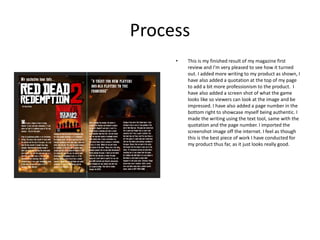
• This is my finished result of my magazine first
review and I’m very pleased to see how it turned
out. I added more writing to my product as shown, I
have also added a quotation at the top of my page
to add a bit more professionism to the product. I
have also added a screen shot of what the game
looks like so viewers can look at the image and be
impressed. I have also added a page number in the
bottom right to showcase myself being authentic. I
made the writing using the text tool, same with the
quotation and the page number. I imported the
screenshot image off the internet. I feel as though
this is the best piece of work I have conducted for
my product thus far, as it just looks really good.
Process
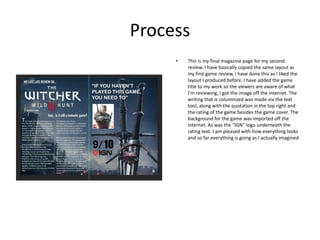
• This is my final magazine page for my second
review. I have basically copied the same layout as
my first game review, I have done this as I liked the
layout I produced before. I have added the game
title to my work so the viewers are aware of what
I’m reviewing, I got the image off the internet. The
writing that is columnized was made via the text
tool, along with the quotation in the top right and
the rating of the game besides the game cover. The
background for the game was imported off the
internet. As was the “IGN” logo underneath the
rating text. I am pleased with how everything looks
and so far everything is going as I actually imagined.
Process
• This is my starting piece for my third game review I
have introduced a title, imported from the internet
and included a game themed background that was
also taken from the internet. I have also created a
subtitle and a paragraph beneath it using the text
tool and have sized them all to the appropriate
sizing. I am pleased with the start of how its looking
and it should turn out as well as the others.
Process
• In this particular process stage I have added loads
more text than that of the one before. The text is
informing the viewer about the contents of the
game I’m showcasing. Annoying I didn’t paragraph
my work, so it looks a bit disordered than the
others so far. The text was made using the text tool
like the rest of the text.
Process
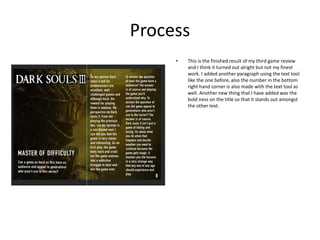
• This is the finished result of my third game review
and I think it turned out alright but not my finest
work. I added another paragraph using the text tool
like the one before, also the number in the bottom
right hand corner is also made with the text tool as
well. Another new thing that I have added was the
bold ness on the title so that it stands out amongst
the other text.
Process
• This is my final page of my magazine, so far not
finished but its already starting to look good. I have
decide to make this page of a different layout as I
thought since its my last page it should look slightly
different in appearance. The image on the left hand
side was taken from the internet, as was the logo
image on the right. So far I like the colours and the
background I have put in, as I think that any dark
schemed colours will look good and appropriate
with it and contrast well.
Process
• This is my finalised page for my FMP and I’m overall
pleased with how it looks. Since the previous screen
shot I have added a title text and a couple of
paragraphs of text, along with a pale blue
background to compliment the other side of the
page. The writing is coloured black so that it suits
the background and goes well with it. I tried to
make the font as similar as I could to that of the
grand theft auto font and its safe to say its close
enough to it. I made the text like always using the
text tool, same with the page number and the little
subtitle at the top. The background was made using
the fill bucket tool and I managed to get the
coloured I wanted by copying the colour from the
left side of the page. Overall I’m really happy with
the whole of the magazine and I think it looks really
good, I think I managed my time quite well in doing
it and I think that it looks professional and suits the
audience I was looking to go for.

6. fmp production reflection

  • 1.
  • 2.
    Process • This ismy final design of my logo. The logo will be put on all of my products, to showcase as it my own products. I made the logo entirely myself and gained inspiration from it form other gaming logos out there. I incorporated an L and a P from the internet but added the exclamation mark and the writing underneath myself. Personally I really like this logo and I think it fits with the magazine feel. So, so far I’m happy with how my product is coming together.
  • 3.
    Process • Here inthis screenshot it shows I am starting to make my cover of my magazine, I have decided of what I am going to be included in this front cover. All I really need to do now is to put everything in. The front cover like other gaming magazines in my genre, will be themed with a game of my choice. So far I’m happy with my timing and how everything so far is going right.
  • 4.
    Process • In thisscreenshot I am showing that my product is half finished and only a few little touches need to be done until the product is fully finished. I have added my logo, the title of the game and the image in the background, amongst other things. The logo was imported in, from myself creating it, the title of the game was written out and the image was gathered from the internet. So far I’m pleased with the looks of my product and the way everything is going.
  • 5.
    Process • This ismy finalised front cover of my magazine. I have added a couple of things since last screenshot. For example the whole of the bottom has been filled and looks miles better. I have made the bullet points as guns, as it fits in the theme with the game I’m showcasing. A barcode has also been added, to make it look a lot more authentic and real. Information on the game has also been added, so the front cover looks more informative and interesting. I found the guns off the internet and added them in, the barcode was gathered from the internet and the information was made by myself using the text tool. I’m pleased with the final result of my final front cover, as it looks good and presentable.
  • 6.
    Process • This isthe starting stage of my contents page for my magazine. Not much has been added yet, apart form telling you what I have showcased on my front cover. I have also chosen a plain back as the background as I think its smart and it looks professional. I’m happy with how its looking so far.
  • 7.
    Process • In thisscreen shot I am showing that I have completed my contents page and put in the all the things that I wanted to for this certain spread. I have added a few more game images and have placed the page number and the name of the game on the image as well. The game images that I found were off the internet, the page number I produced myself via the text tool, which was the same of the text above the image.
  • 8.
    Process • This screenshotshows me starting my first review of the games that I have reviewed. I have added a background image to this showcasing the game and the preview into it. I gathered the image of the internet and I’m pleased with the result of how it looks. So far I like the background image as it suits and fits the game I’m reviewing.
  • 9.
    Process • This screenshotshows that I have added much more since the last screenshot. In this particular shot I have added a title, the game cover and a lot of the writing to show my thoughts on the game in hand. I have done the writing via the text tool, apart from the text of the title, as for that I downloaded that off the internet. The image was drafted off the internet. The writing about the game is all my own work and hasn’t been taken from anywhere. So far I am pleased with how things are turning out and I’m happy with how everything looks.
  • 10.
    Process • This ismy finished result of my magazine first review and I’m very pleased to see how it turned out. I added more writing to my product as shown, I have also added a quotation at the top of my page to add a bit more professionism to the product. I have also added a screen shot of what the game looks like so viewers can look at the image and be impressed. I have also added a page number in the bottom right to showcase myself being authentic. I made the writing using the text tool, same with the quotation and the page number. I imported the screenshot image off the internet. I feel as though this is the best piece of work I have conducted for my product thus far, as it just looks really good.
  • 11.
    Process • This ismy final magazine page for my second review. I have basically copied the same layout as my first game review, I have done this as I liked the layout I produced before. I have added the game title to my work so the viewers are aware of what I’m reviewing, I got the image off the internet. The writing that is columnized was made via the text tool, along with the quotation in the top right and the rating of the game besides the game cover. The background for the game was imported off the internet. As was the “IGN” logo underneath the rating text. I am pleased with how everything looks and so far everything is going as I actually imagined.
  • 12.
    Process • This ismy starting piece for my third game review I have introduced a title, imported from the internet and included a game themed background that was also taken from the internet. I have also created a subtitle and a paragraph beneath it using the text tool and have sized them all to the appropriate sizing. I am pleased with the start of how its looking and it should turn out as well as the others.
  • 13.
    Process • In thisparticular process stage I have added loads more text than that of the one before. The text is informing the viewer about the contents of the game I’m showcasing. Annoying I didn’t paragraph my work, so it looks a bit disordered than the others so far. The text was made using the text tool like the rest of the text.
  • 14.
    Process • This isthe finished result of my third game review and I think it turned out alright but not my finest work. I added another paragraph using the text tool like the one before, also the number in the bottom right hand corner is also made with the text tool as well. Another new thing that I have added was the bold ness on the title so that it stands out amongst the other text.
  • 15.
    Process • This ismy final page of my magazine, so far not finished but its already starting to look good. I have decide to make this page of a different layout as I thought since its my last page it should look slightly different in appearance. The image on the left hand side was taken from the internet, as was the logo image on the right. So far I like the colours and the background I have put in, as I think that any dark schemed colours will look good and appropriate with it and contrast well.
  • 16.
    Process • This ismy finalised page for my FMP and I’m overall pleased with how it looks. Since the previous screen shot I have added a title text and a couple of paragraphs of text, along with a pale blue background to compliment the other side of the page. The writing is coloured black so that it suits the background and goes well with it. I tried to make the font as similar as I could to that of the grand theft auto font and its safe to say its close enough to it. I made the text like always using the text tool, same with the page number and the little subtitle at the top. The background was made using the fill bucket tool and I managed to get the coloured I wanted by copying the colour from the left side of the page. Overall I’m really happy with the whole of the magazine and I think it looks really good, I think I managed my time quite well in doing it and I think that it looks professional and suits the audience I was looking to go for.

Editor's Notes

  • #3 Discuss the tools and processes used in your production. Log your thoughts and feelings about your work.
  • #4 Discuss the tools and processes used in your production. Log your thoughts and feelings about your work.
  • #5 Discuss the tools and processes used in your production. Log your thoughts and feelings about your work.
  • #6 Discuss the tools and processes used in your production. Log your thoughts and feelings about your work.
  • #7 Discuss the tools and processes used in your production. Log your thoughts and feelings about your work.
  • #8 Discuss the tools and processes used in your production. Log your thoughts and feelings about your work.
  • #9 Discuss the tools and processes used in your production. Log your thoughts and feelings about your work.
  • #10 Discuss the tools and processes used in your production. Log your thoughts and feelings about your work.
  • #11 Discuss the tools and processes used in your production. Log your thoughts and feelings about your work.
  • #12 Discuss the tools and processes used in your production. Log your thoughts and feelings about your work.
  • #13 Discuss the tools and processes used in your production. Log your thoughts and feelings about your work.
  • #14 Discuss the tools and processes used in your production. Log your thoughts and feelings about your work.
  • #15 Discuss the tools and processes used in your production. Log your thoughts and feelings about your work.
  • #16 Discuss the tools and processes used in your production. Log your thoughts and feelings about your work.
  • #17 Discuss the tools and processes used in your production. Log your thoughts and feelings about your work.