Department of Electronics & Telecommunication Engineering, H. R. H. The Prince of
Wales Institute of Engineering & Technology, Jorhat.
CONTENT
 INTRODUCTION
 COMPUTER NETWORK ARCHITECTURE
 EVOLUTION OF NETWORKING
 TERMINOLOGIES
 SWITCHING BASIC
 NETWORK DEVICES
 TRANSMISSION MEDIA
 NETWORK TOPOLOGIES
 WIRELESS NETWORKING TECHNOLOGIES
 TYPES OF NETWORK
 IEEE
 COMPUTER NETWORK MODELS
 NETWORK PROTOCOLS
 TYPES OF SERVERS
 CONCLUSION
INTRODUCTION
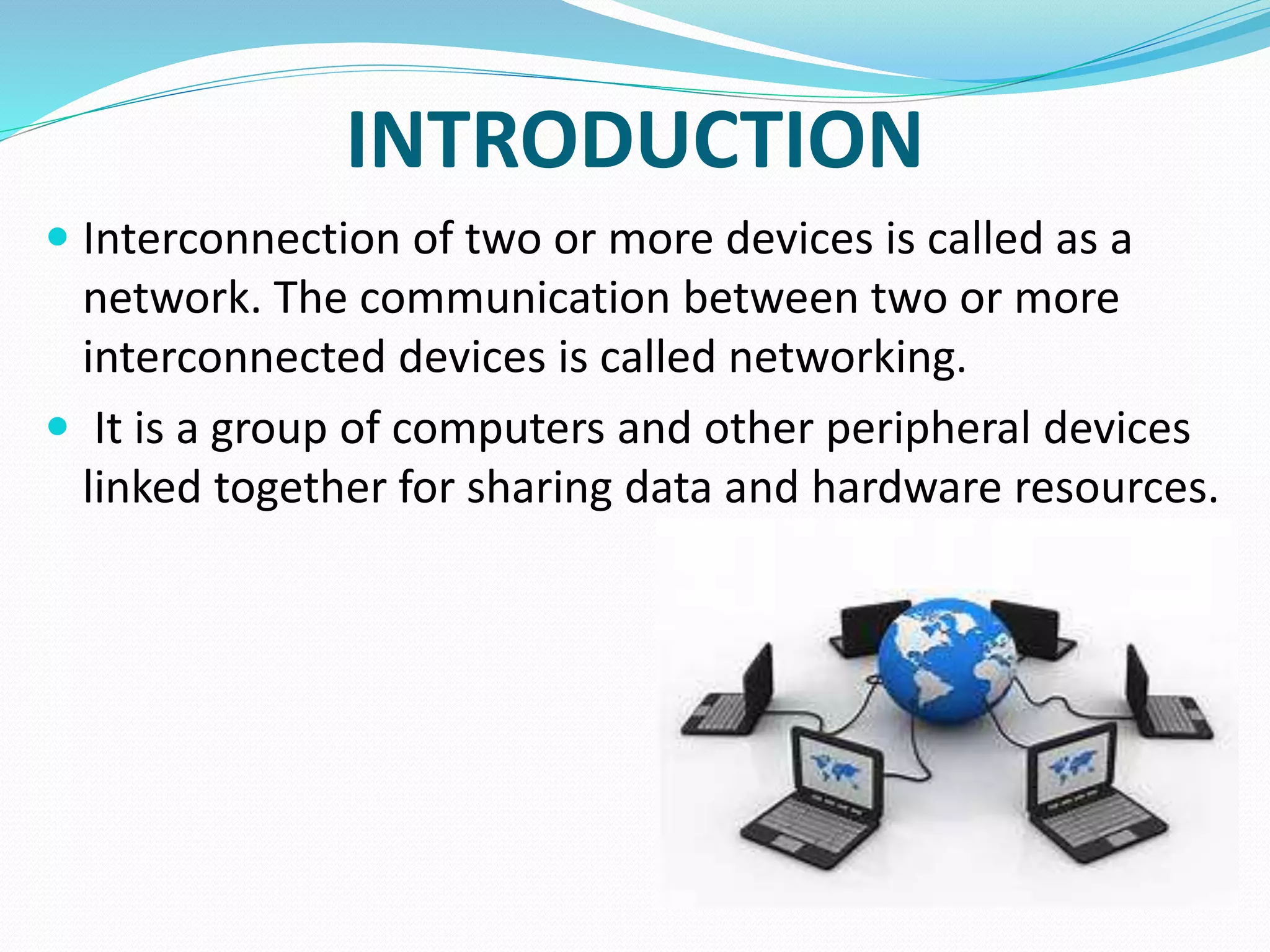
 Interconnection of two or more devices is called as a
network. The communication between two or more
interconnected devices is called networking.
 It is a group of computers and other peripheral devices
linked together for sharing data and hardware resources.
COMPUTER NETWORK ARCHITECTURE
 Computer Network Architecture is defined as the physical and logical design
of the software, hardware, protocols, and media of the transmission of data.
 The two types of network architectures are used:
 Peer-To-Peer network
 Client/Server network.
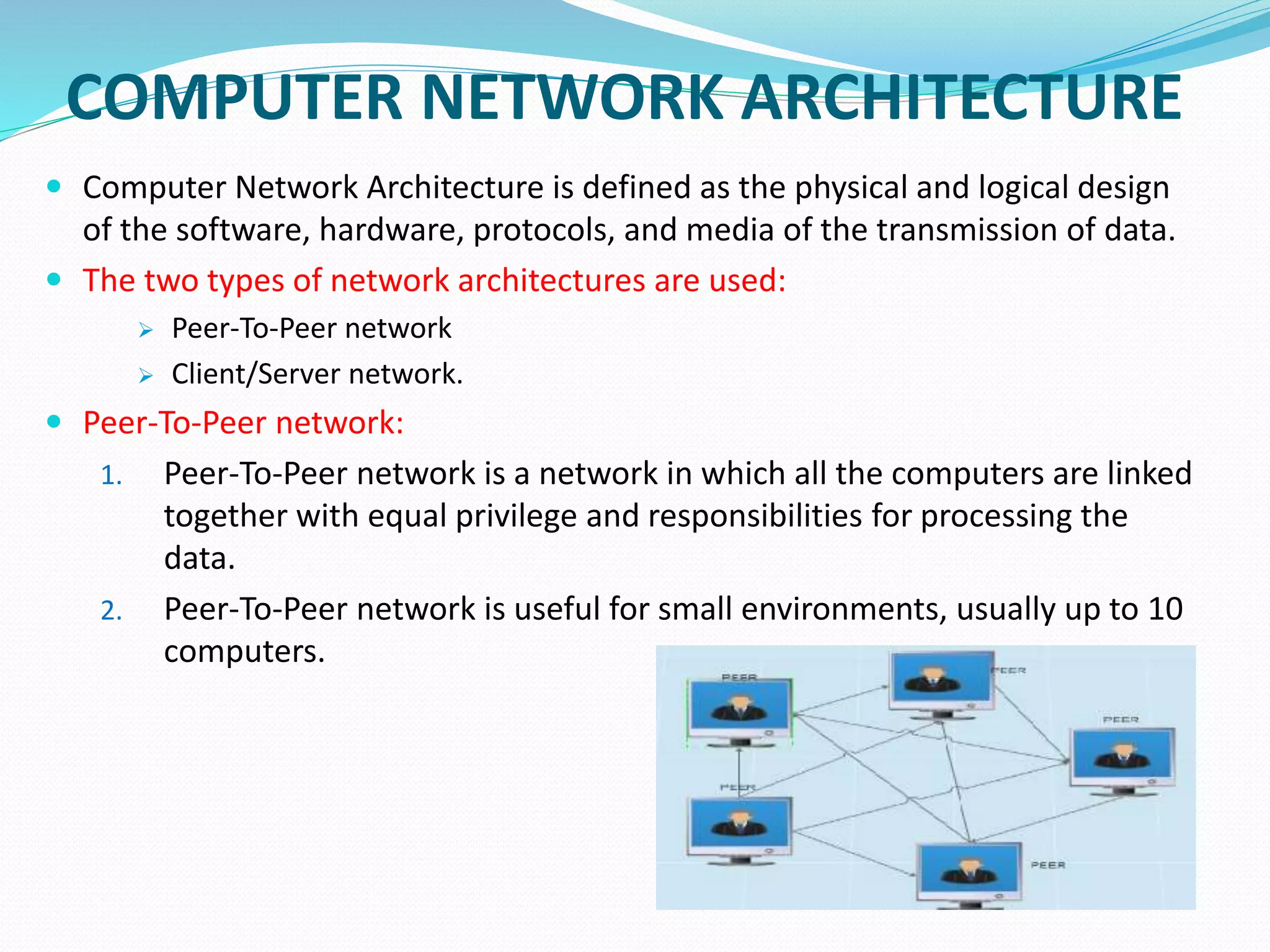
 Peer-To-Peer network:
1. Peer-To-Peer network is a network in which all the computers are linked
together with equal privilege and responsibilities for processing the
data.
2. Peer-To-Peer network is useful for small environments, usually up to 10
computers.
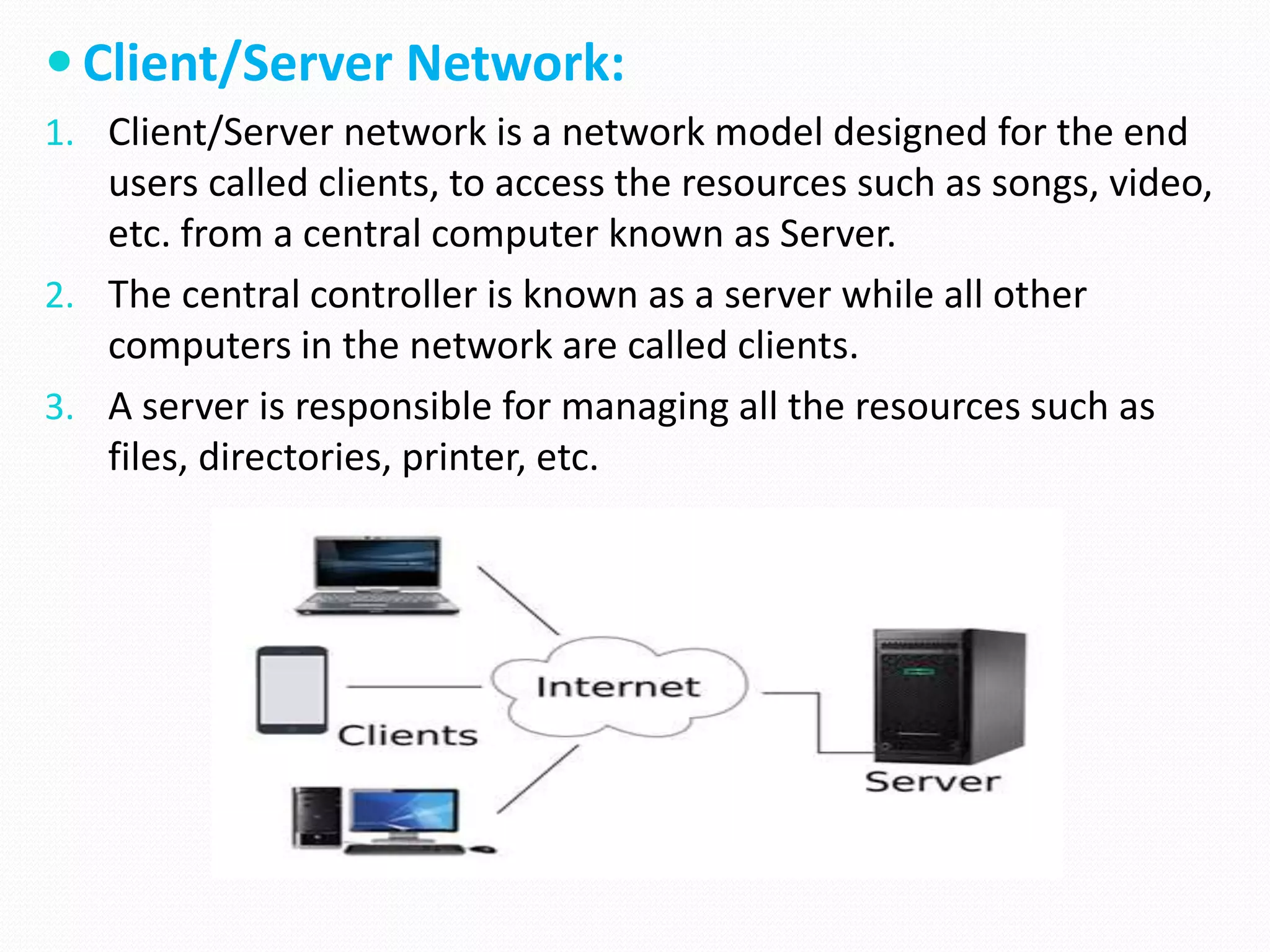
 Client/Server Network:
1. Client/Server network is a network model designed for the end
users called clients, to access the resources such as songs, video,
etc. from a central computer known as Server.
2. The central controller is known as a server while all other
computers in the network are called clients.
3. A server is responsible for managing all the resources such as
files, directories, printer, etc.
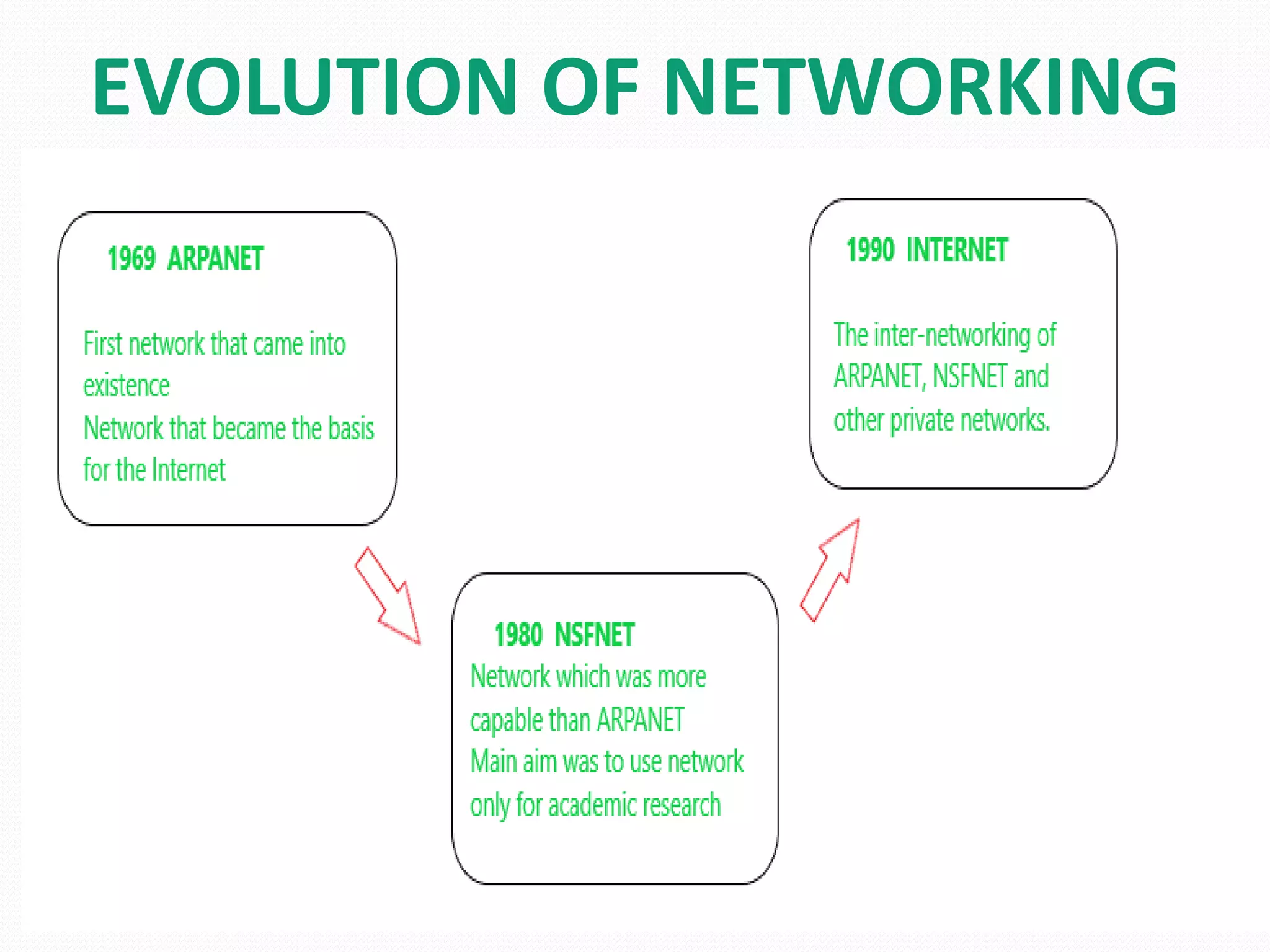
EVOLUTION OF NETWORKING
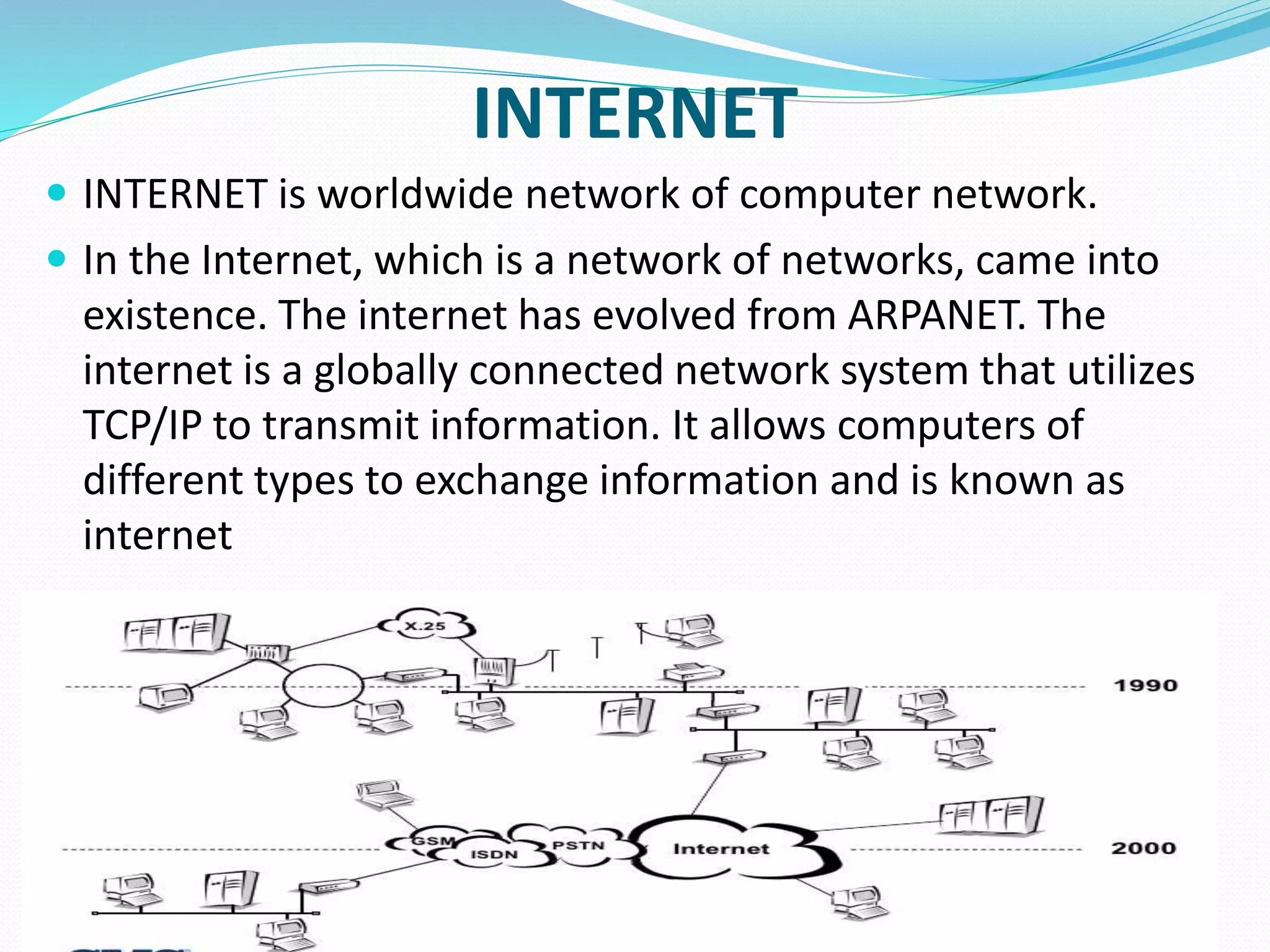
INTERNET
 INTERNET is worldwide network of computer network.
 In the Internet, which is a network of networks, came into
existence. The internet has evolved from ARPANET. The
internet is a globally connected network system that utilizes
TCP/IP to transmit information. It allows computers of
different types to exchange information and is known as
internet
TELNET
 Telenet was the first commercial adaptation of
ARPANET introduced in 1974. With this the concept
of Internet Service Provider (ISP) was also introduced.
 The TELNET protocol is based upon the notion of a
virtual teletype, employing a 7-bit ASCII character set.
WORLD WIDE WEB
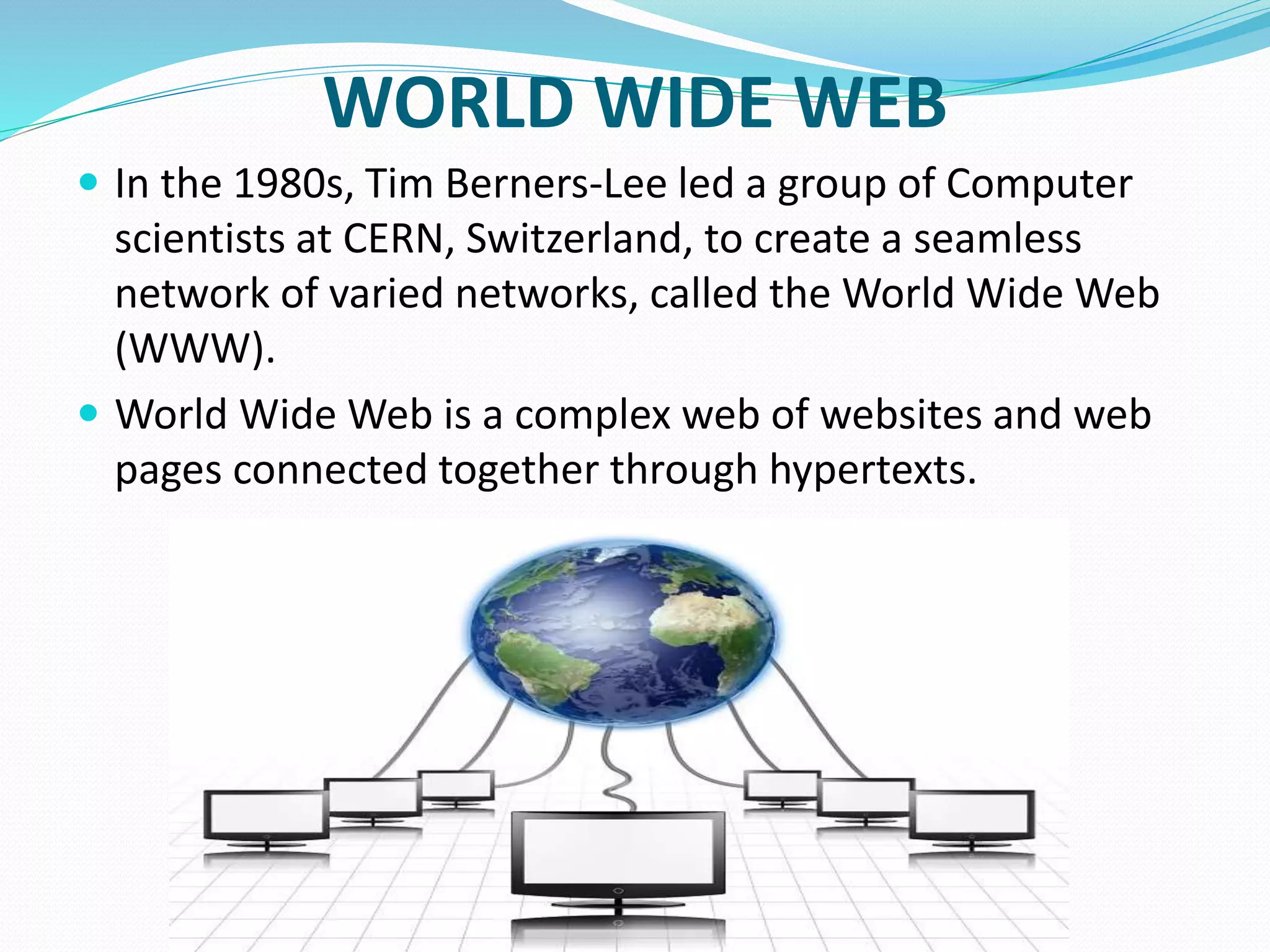
 In the 1980s, Tim Berners-Lee led a group of Computer
scientists at CERN, Switzerland, to create a seamless
network of varied networks, called the World Wide Web
(WWW).
 World Wide Web is a complex web of websites and web
pages connected together through hypertexts.
TERMINOLOGIES
 Channel -Physical medium like cables over which information is
exchanged is called channel. Transmission channel may be analog
or digital.
 Data Transfer Rate - The speed of data transferred or received over
transmission channel, measured per unit time is called data
transfer rate. The smallest unit of measurement is bits per second
(bps). 1 bps means 1 bit (0 or 1) of data is transferred in 1 second.
 Here are some commonly used data transfer rates −
1. 1 Bps = 1 Byte per second = 8 bits per second
2. 1 kbps = 1 kilobit per second = 1024 bits per second
3. 1 Mbps = 1 Megabit per second = 1024 Kbps
4. 1 Gbps = 1 Gigabit per second = 1024 Mbps.
 Bandwidth - Data transfer rates that can be supported by a
network are called its bandwidth.
 Throughput - Throughput is the actual speed with
which data gets transferred over the network.
 Protocol - Protocol is a set of rules and regulations
used by devices to communicate over the
network.
1. Some common protocols used over the Internet are −
2. Transmission Control Protocol
3. Internet Protocol
4. Point to Point Protocol
5. File Transfer Protocol
6. Hypertext Transfer Protocol
7. Internet Message Access Protocol
SWITCHING BASICS
 Selecting a path that data must take out of the available
options is called switching.
 Switching in computer network helps in deciding the best
route for data transmission if there are multiple paths in larger
network.
 There are 3 popular switching techniques – circuit switching,
message switching and packet switching.
CIRCUIT SWITCHING
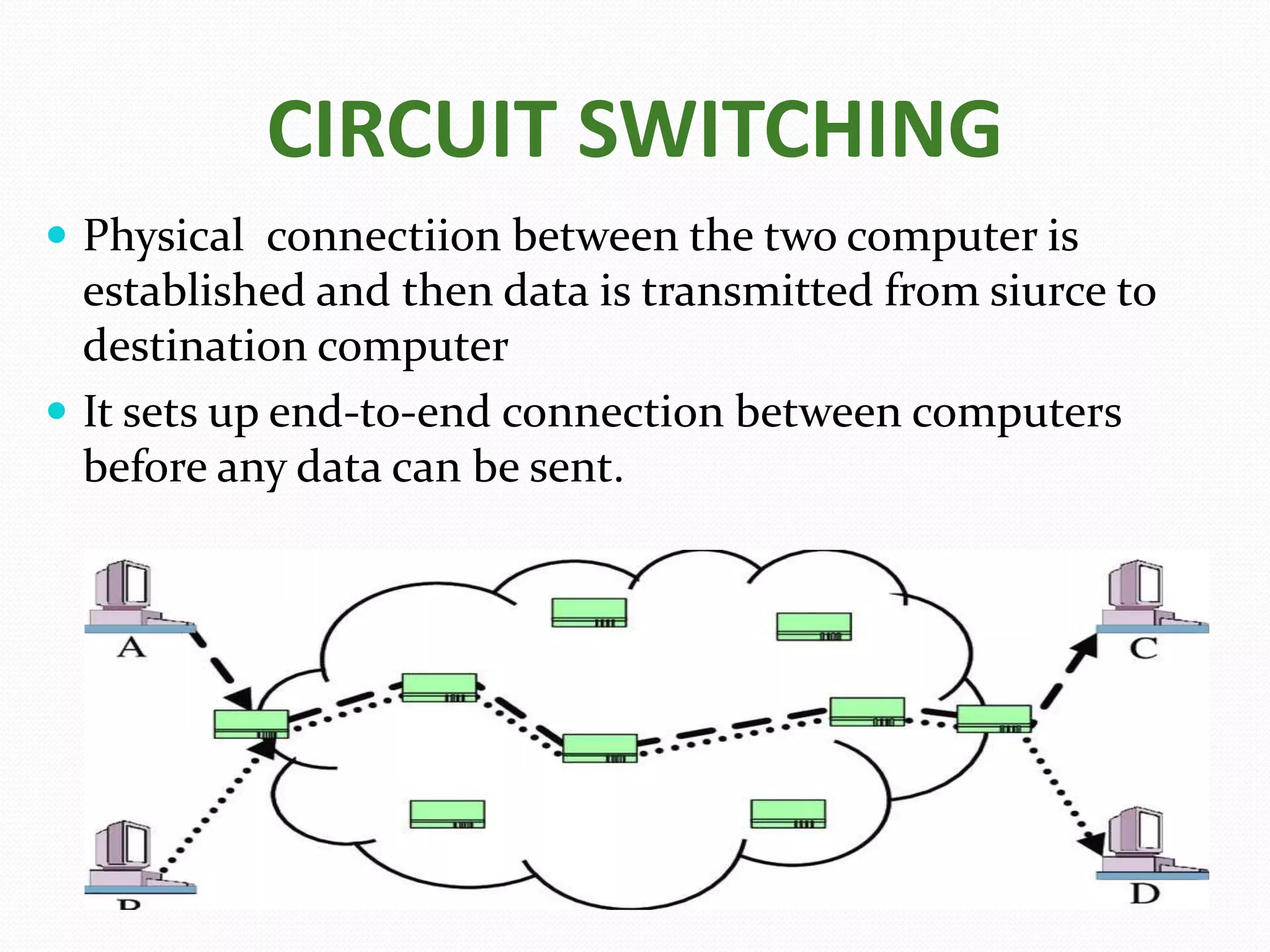
 Physical connectiion between the two computer is
established and then data is transmitted from siurce to
destination computer
 It sets up end-to-end connection between computers
before any data can be sent.
MESSAGE SWITCHING
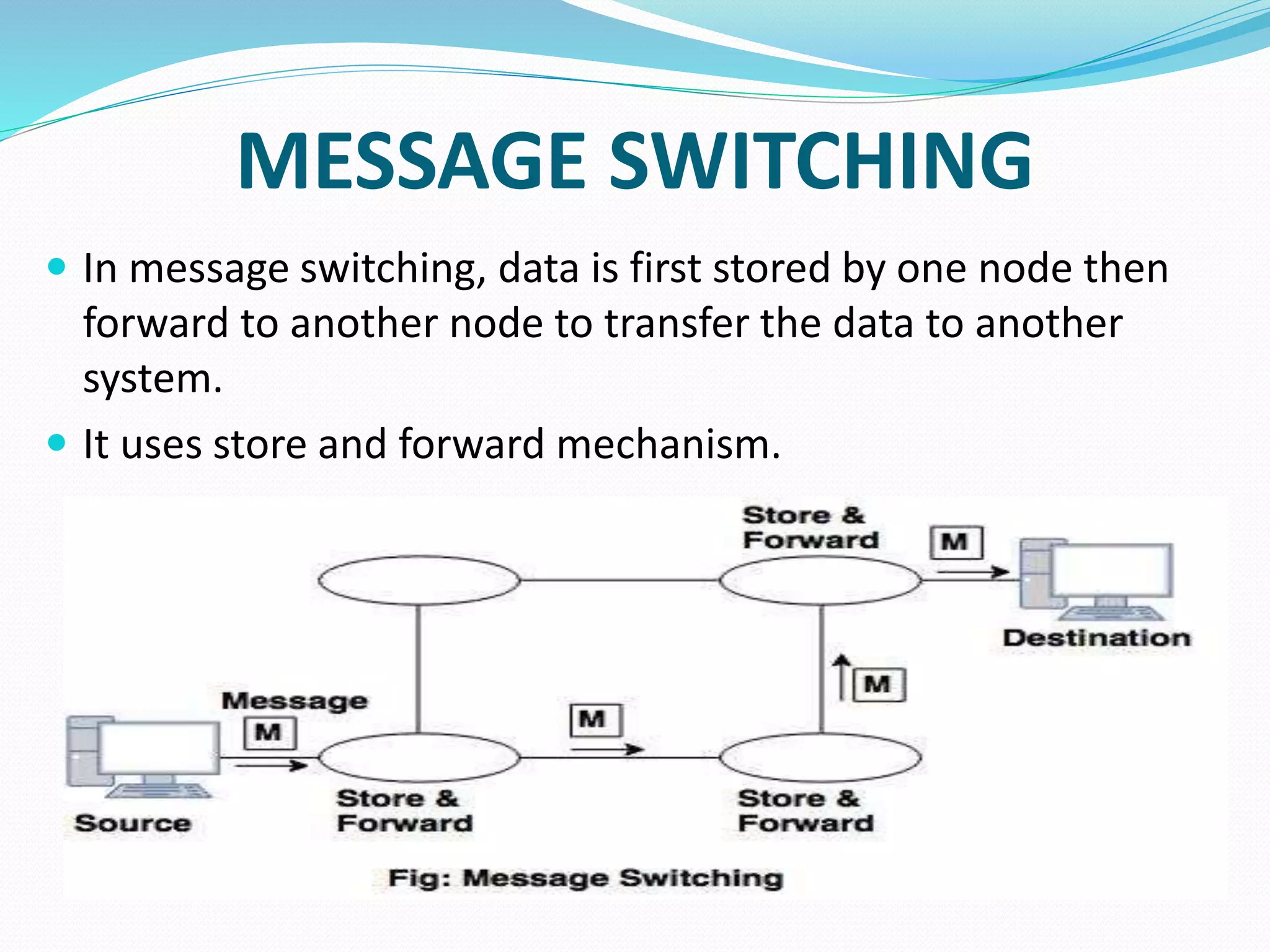
 In message switching, data is first stored by one node then
forward to another node to transfer the data to another
system.
 It uses store and forward mechanism.
PACKET SWITCHING
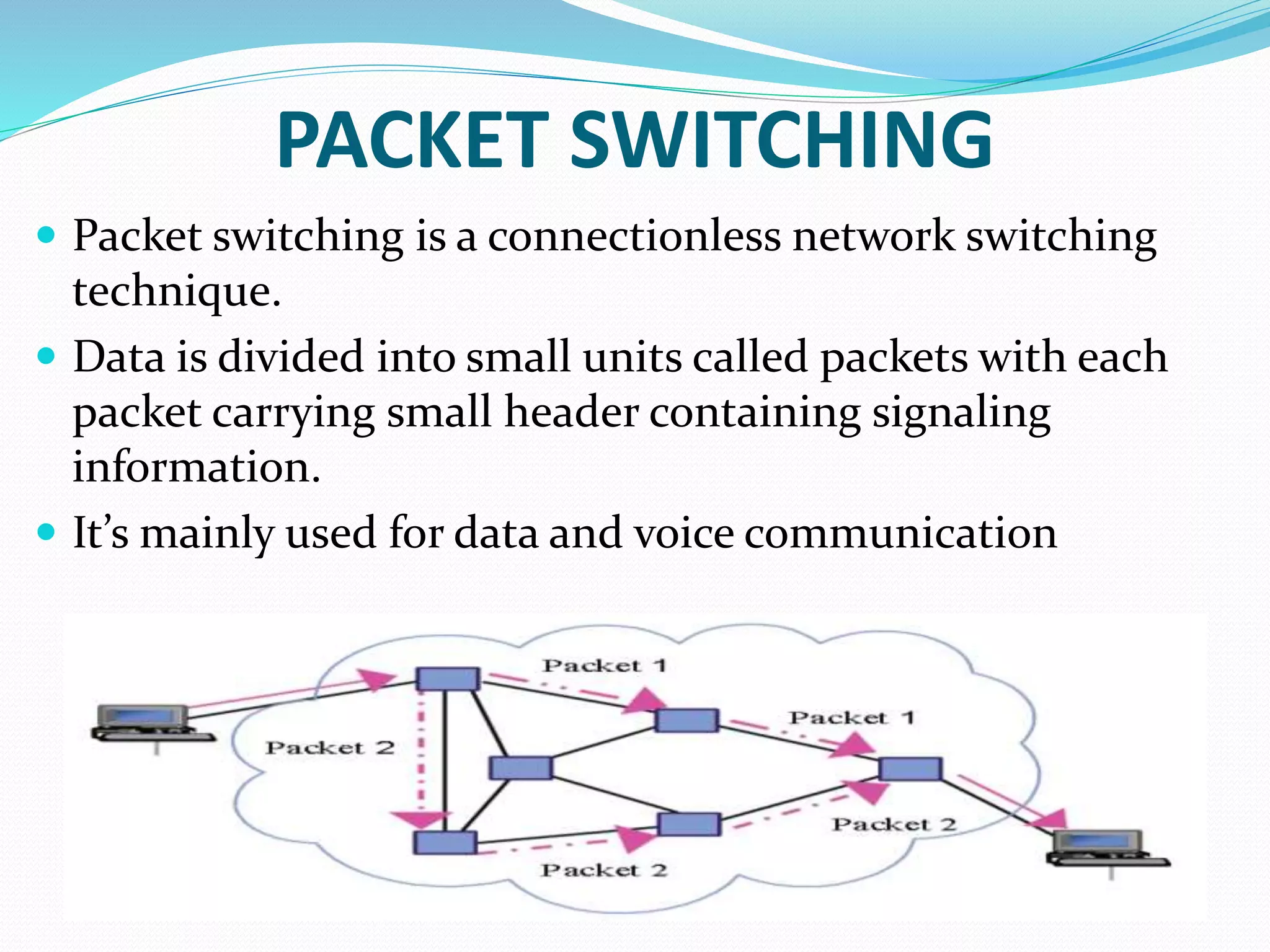
 Packet switching is a connectionless network switching
technique.
 Data is divided into small units called packets with each
packet carrying small header containing signaling
information.
 It’s mainly used for data and voice communication
NETWORK DEVICES
 Hardware devices that are used to connect computers, printers, fax
machines and other electronic devices to a network are called
network devices. Some devices are installed on the device, like NIC
card or RJ45 connector,whereas some are part of the network, like
router, switch, etc.
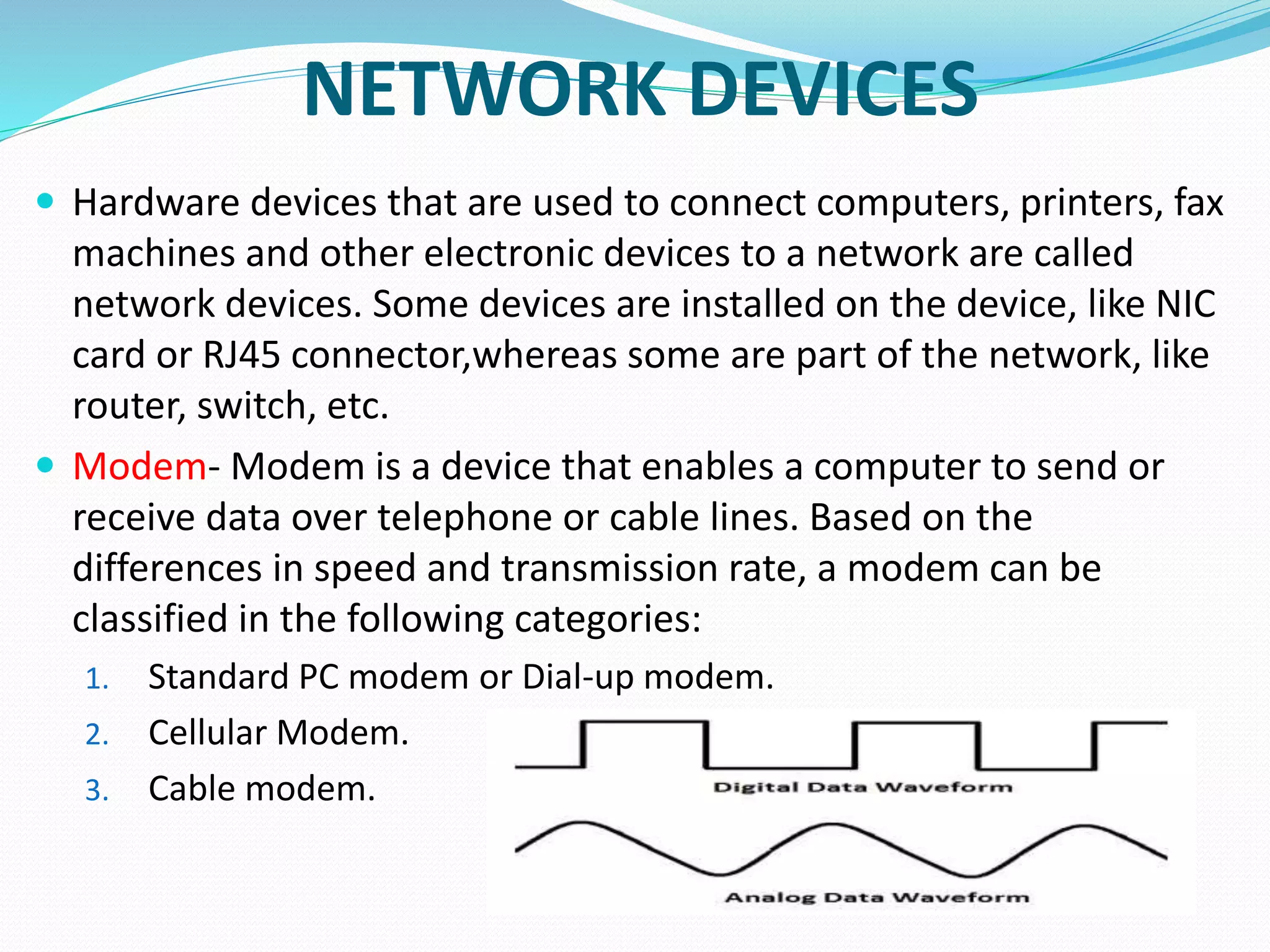
 Modem- Modem is a device that enables a computer to send or
receive data over telephone or cable lines. Based on the
differences in speed and transmission rate, a modem can be
classified in the following categories:
1. Standard PC modem or Dial-up modem.
2. Cellular Modem.
3. Cable modem.
 Hub – A hub is basically a multiport repeater. A hub connects multiple
wires coming from different branches.For example;the connector in
star topology which connects different stations.
 Types of Hub – (1)Active Hub (2) Passive Hub
 Bridge – A bridge operates at data link layer. A bridge is a repeater,
with add on the functionality of filtering content by reading the MAC
addresses of source and destination.
 Ethernet Card - Ethernet card, also known as network interface card
(NIC), is a hardware component used by computers to connect to
Ethernet LAN and communicate with other devices on the LAN.
 Router-A router is a network layer hardware device that transmits
data from one LAN to another if both networks support the same set
of protocols.
 Switch -Switch is a network device that connects other devices to
Ethernet networks through twisted pair cables.
 Gateway -Gateway is a network device used to connect two or more
dissimilar networks.
 Repeaters- is an electronic device that receives a weak
or low-level signal and retransmits it at a higher level
or higher power, so that the signal can cover longer
distances without degradation.
 Workstation - Another critical component of a
network is the workstation or a client. A workstation
is an individual computer with capabilities to
communicate with other machines. A workstation can
communicate with other workstations or to the
server.
 SERVERS - It is the most powerful computer in the
network. In a local area network, usually, a powerful
microcomputer or a super microcomputer with the
power of a minicomputer is used as a server.
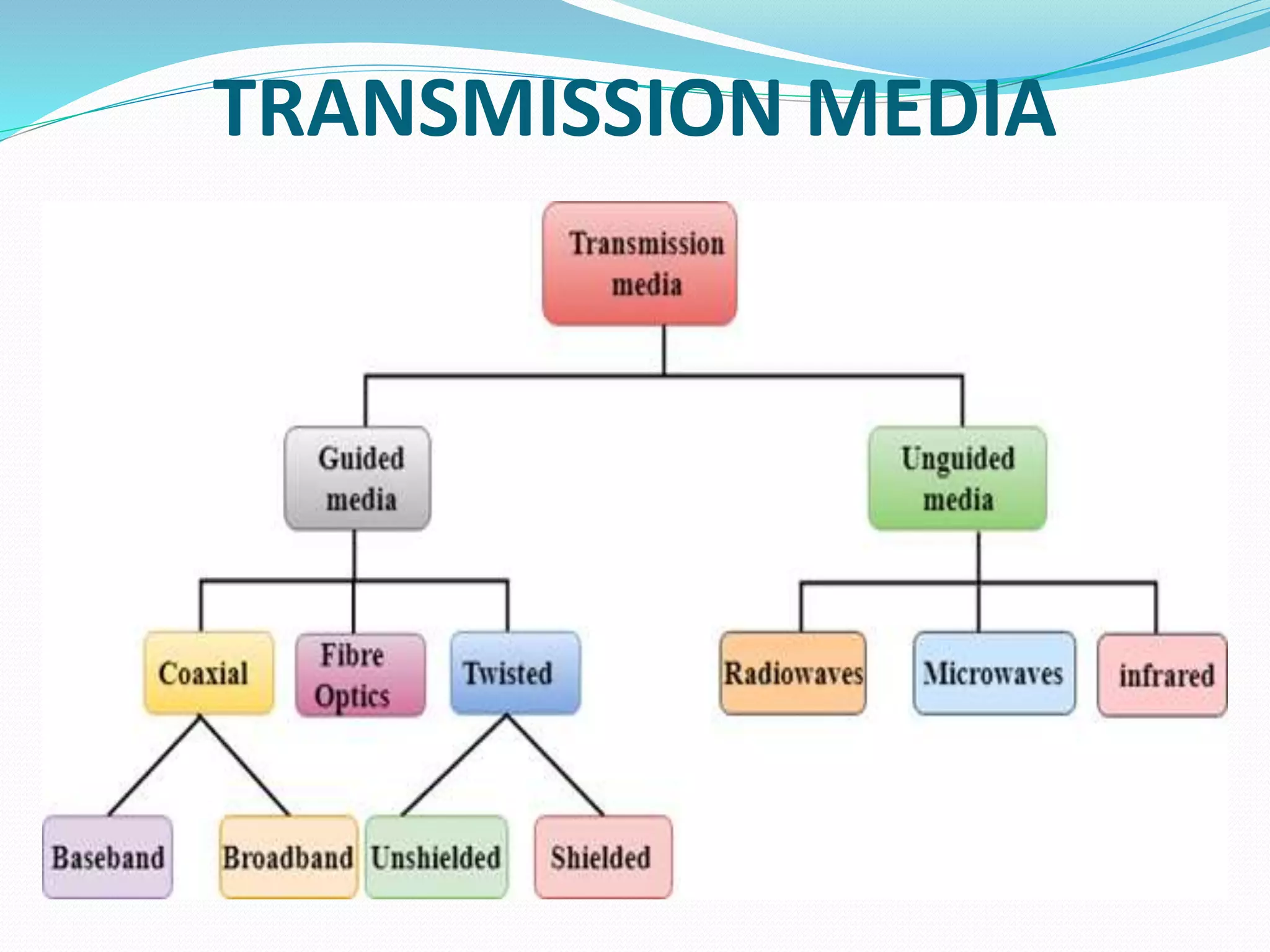
TRANSMISSION MEDIA
TWISTED PAIR
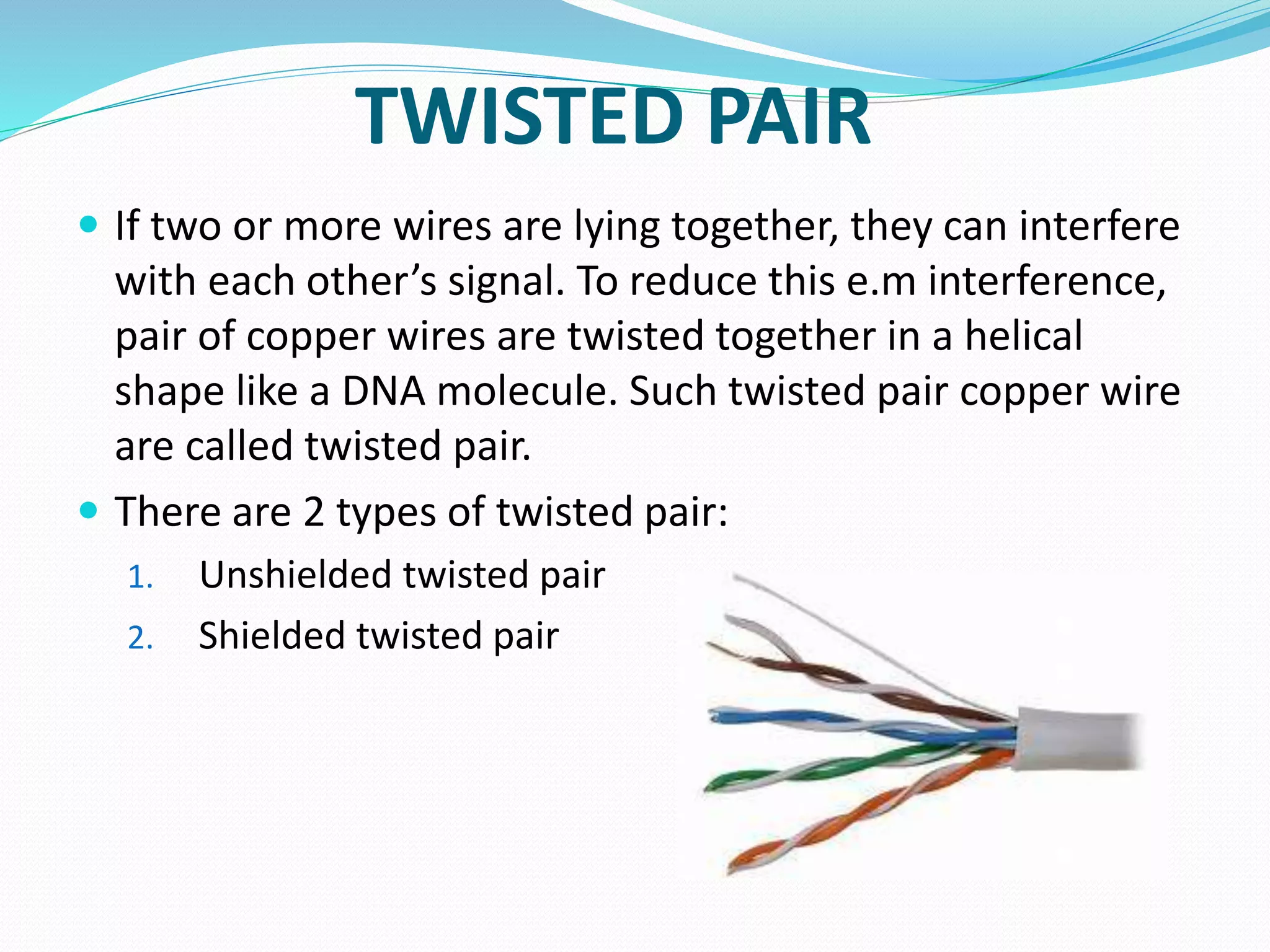
 If two or more wires are lying together, they can interfere
with each other’s signal. To reduce this e.m interference,
pair of copper wires are twisted together in a helical
shape like a DNA molecule. Such twisted pair copper wire
are called twisted pair.
 There are 2 types of twisted pair:
1. Unshielded twisted pair
2. Shielded twisted pair
COAXIAL CABLE
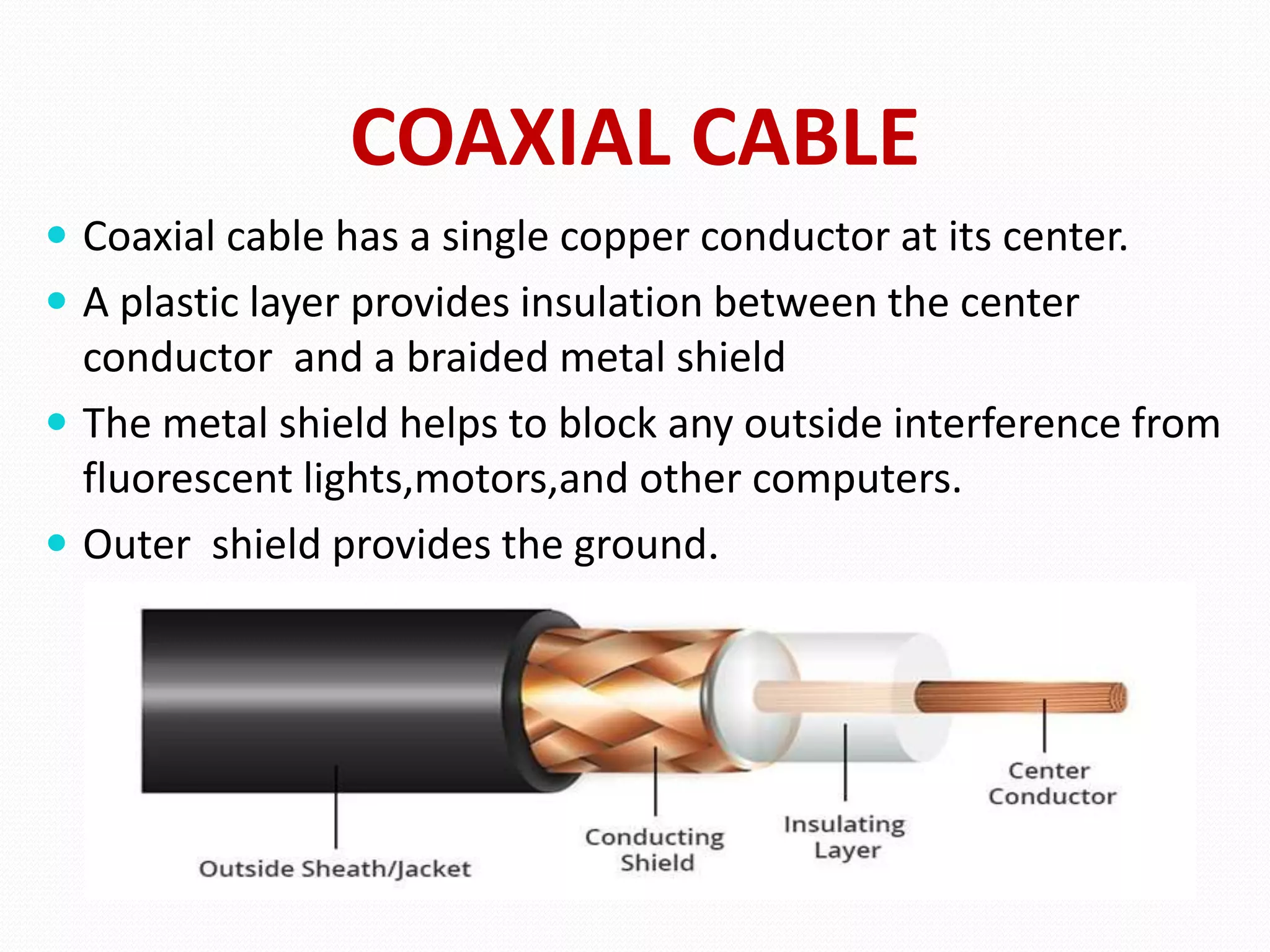
 Coaxial cable has a single copper conductor at its center.
 A plastic layer provides insulation between the center
conductor and a braided metal shield
 The metal shield helps to block any outside interference from
fluorescent lights,motors,and other computers.
 Outer shield provides the ground.
OPTICAL FIBER CABLE
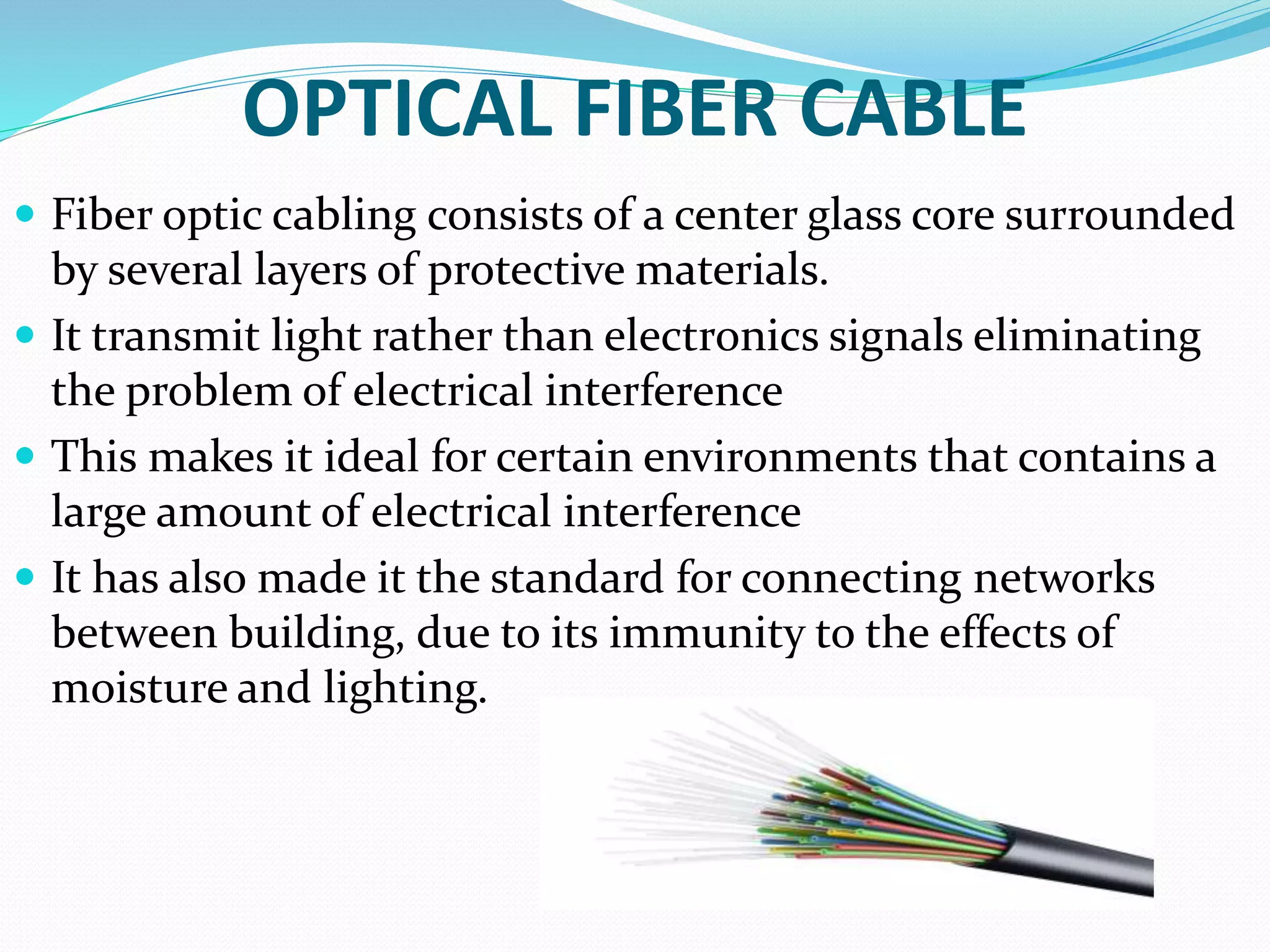
 Fiber optic cabling consists of a center glass core surrounded
by several layers of protective materials.
 It transmit light rather than electronics signals eliminating
the problem of electrical interference
 This makes it ideal for certain environments that contains a
large amount of electrical interference
 It has also made it the standard for connecting networks
between building, due to its immunity to the effects of
moisture and lighting.
NETWORK TOPOLOGIES
 The way in which devices are interconnected to form a
network is called network topology.
 Different types of topologies are -
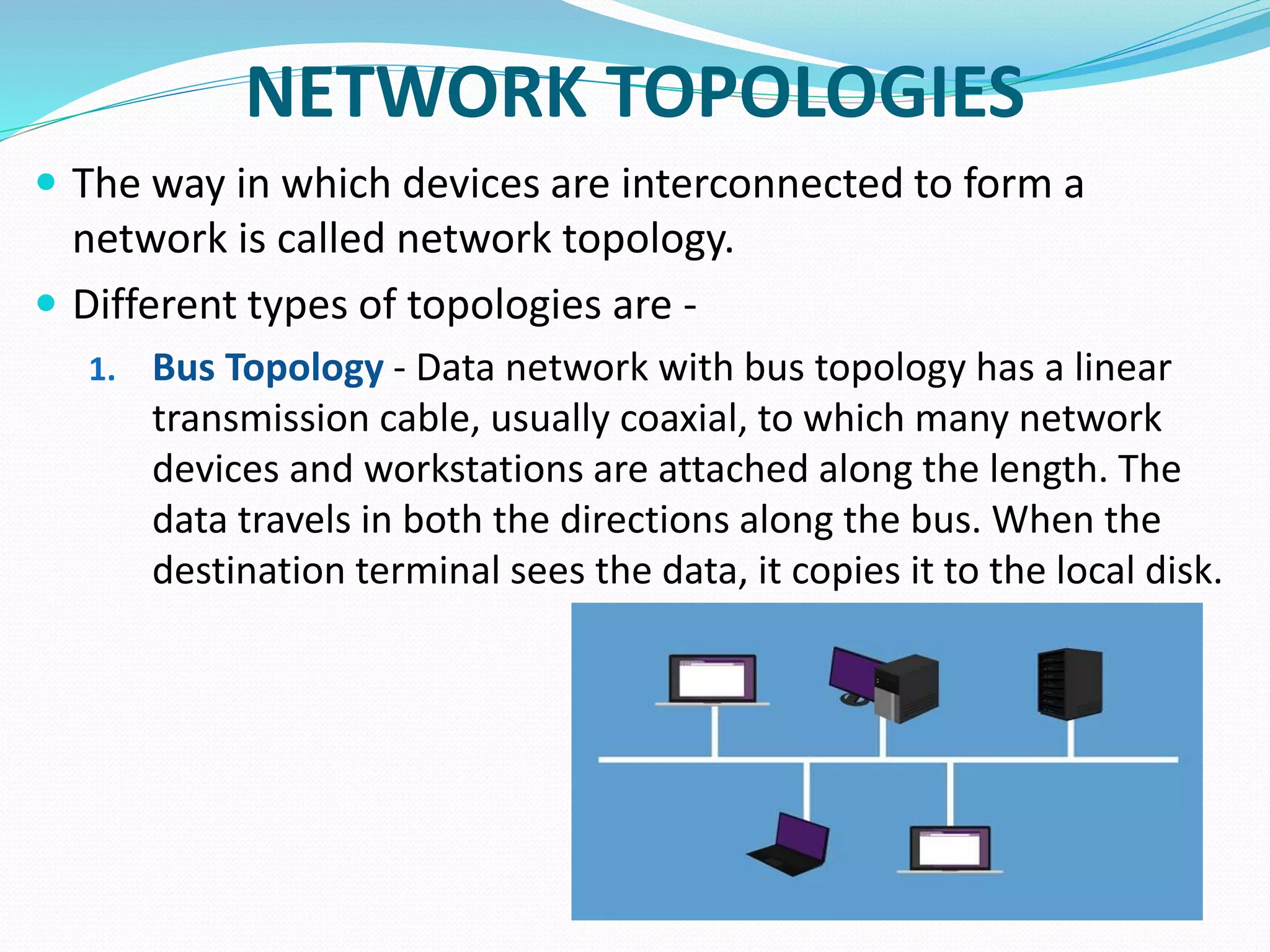
1. Bus Topology - Data network with bus topology has a linear
transmission cable, usually coaxial, to which many network
devices and workstations are attached along the length. The
data travels in both the directions along the bus. When the
destination terminal sees the data, it copies it to the local disk.
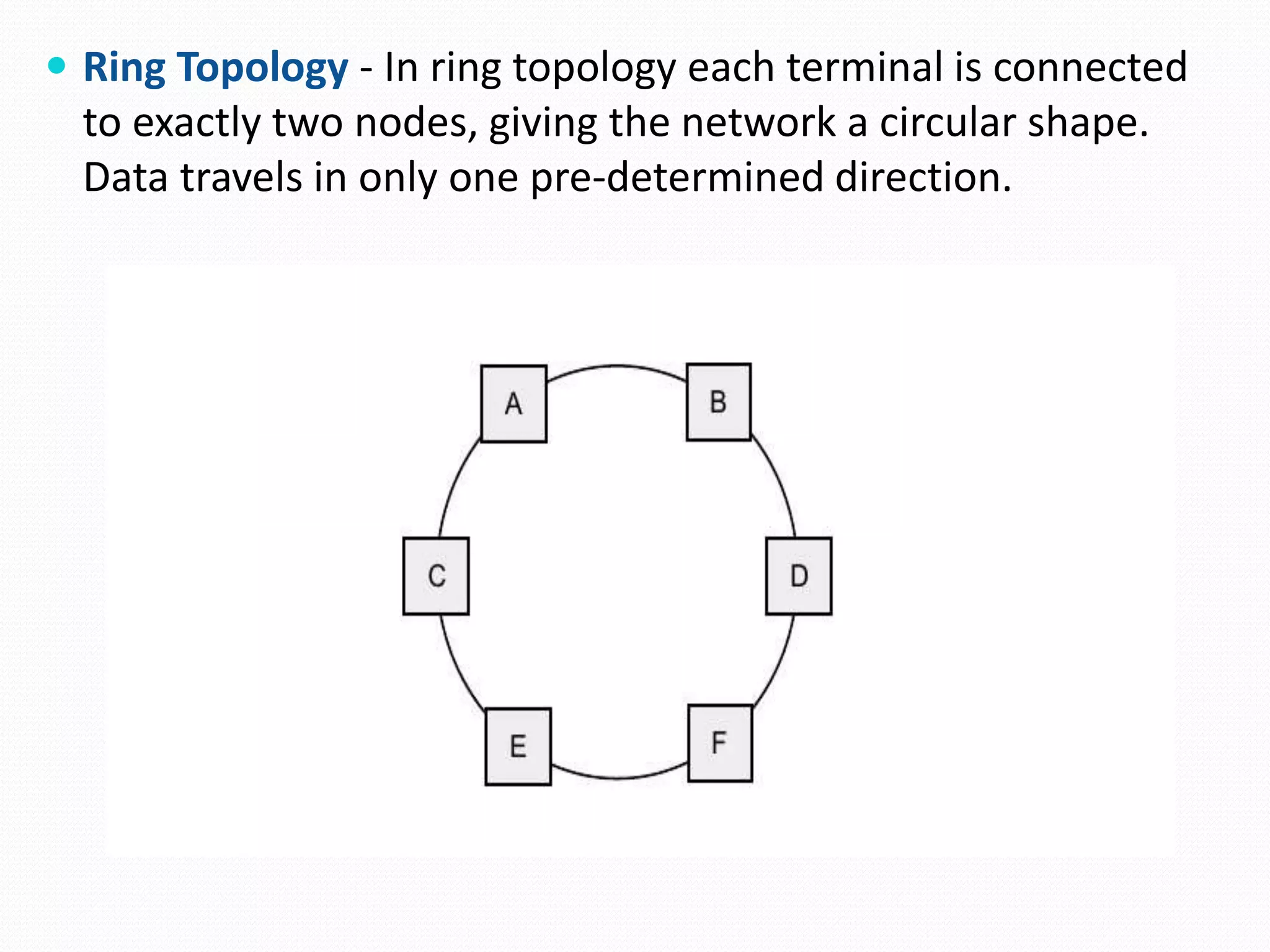
 Ring Topology - In ring topology each terminal is connected
to exactly two nodes, giving the network a circular shape.
Data travels in only one pre-determined direction.
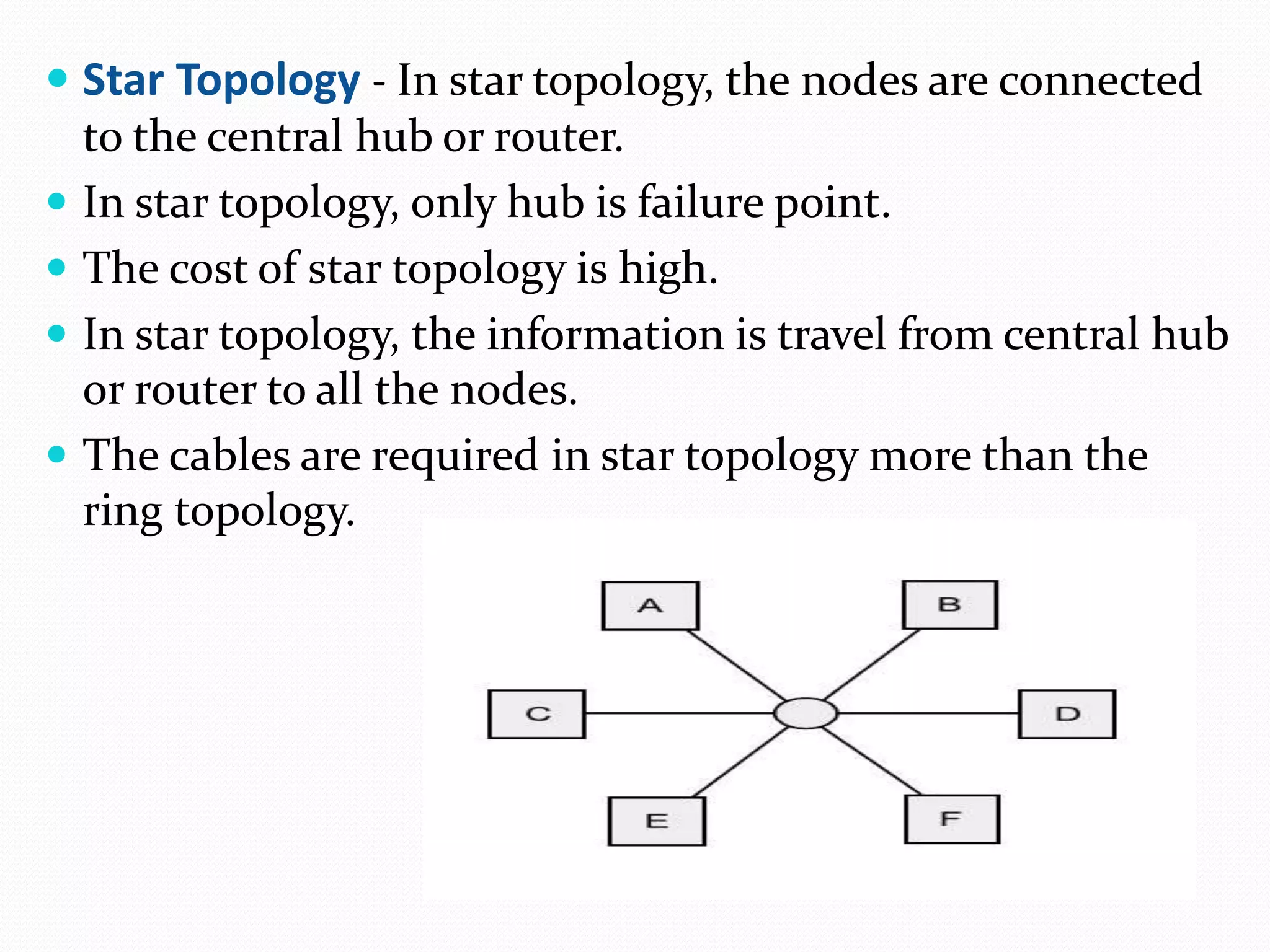
 Star Topology - In star topology, the nodes are connected
to the central hub or router.
 In star topology, only hub is failure point.
 The cost of star topology is high.
 In star topology, the information is travel from central hub
or router to all the nodes.
 The cables are required in star topology more than the
ring topology.
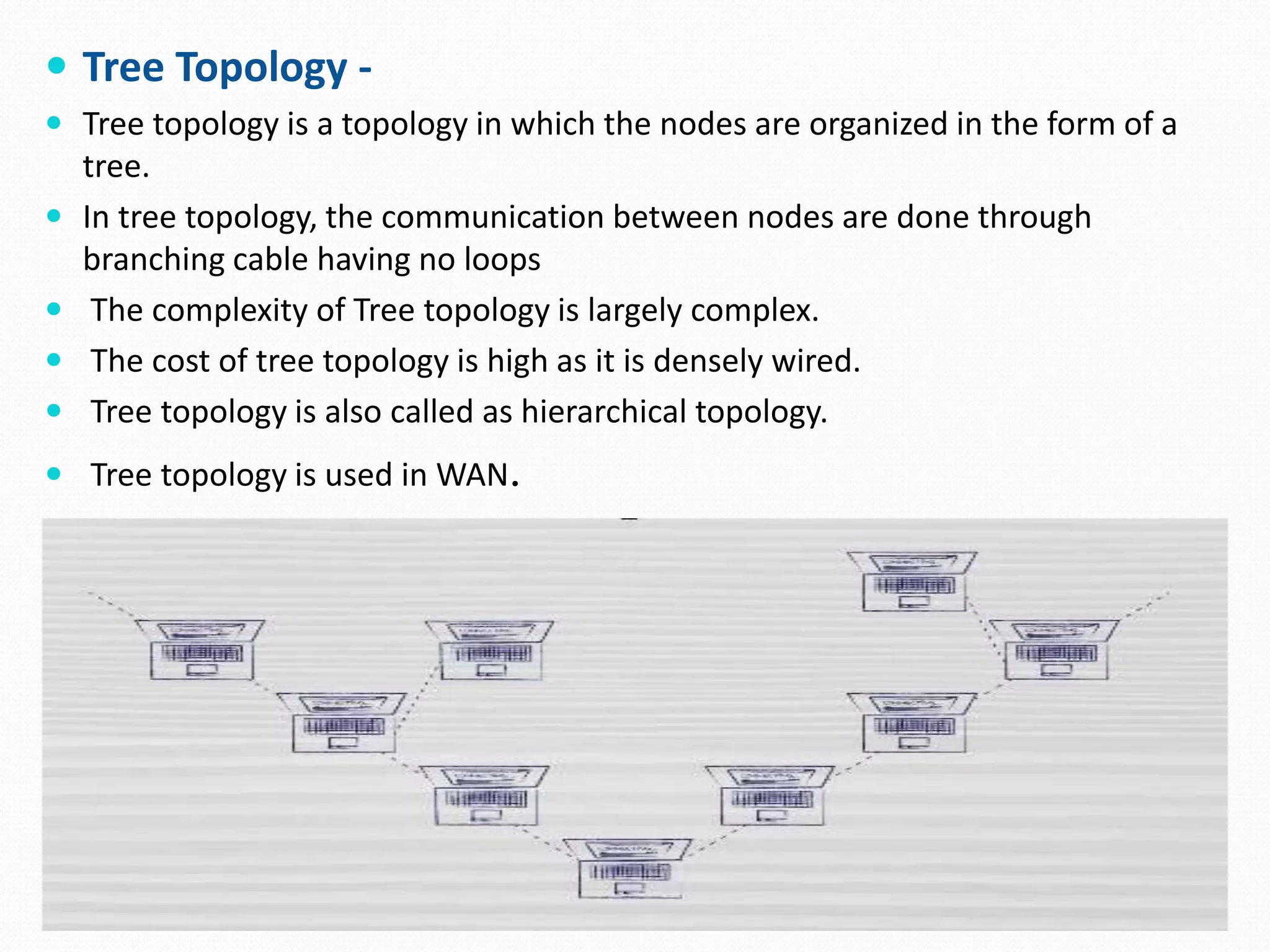
 Tree Topology -
 Tree topology is a topology in which the nodes are organized in the form of a
tree.
 In tree topology, the communication between nodes are done through
branching cable having no loops
 The complexity of Tree topology is largely complex.
 The cost of tree topology is high as it is densely wired.
 Tree topology is also called as hierarchical topology.
 Tree topology is used in WAN.
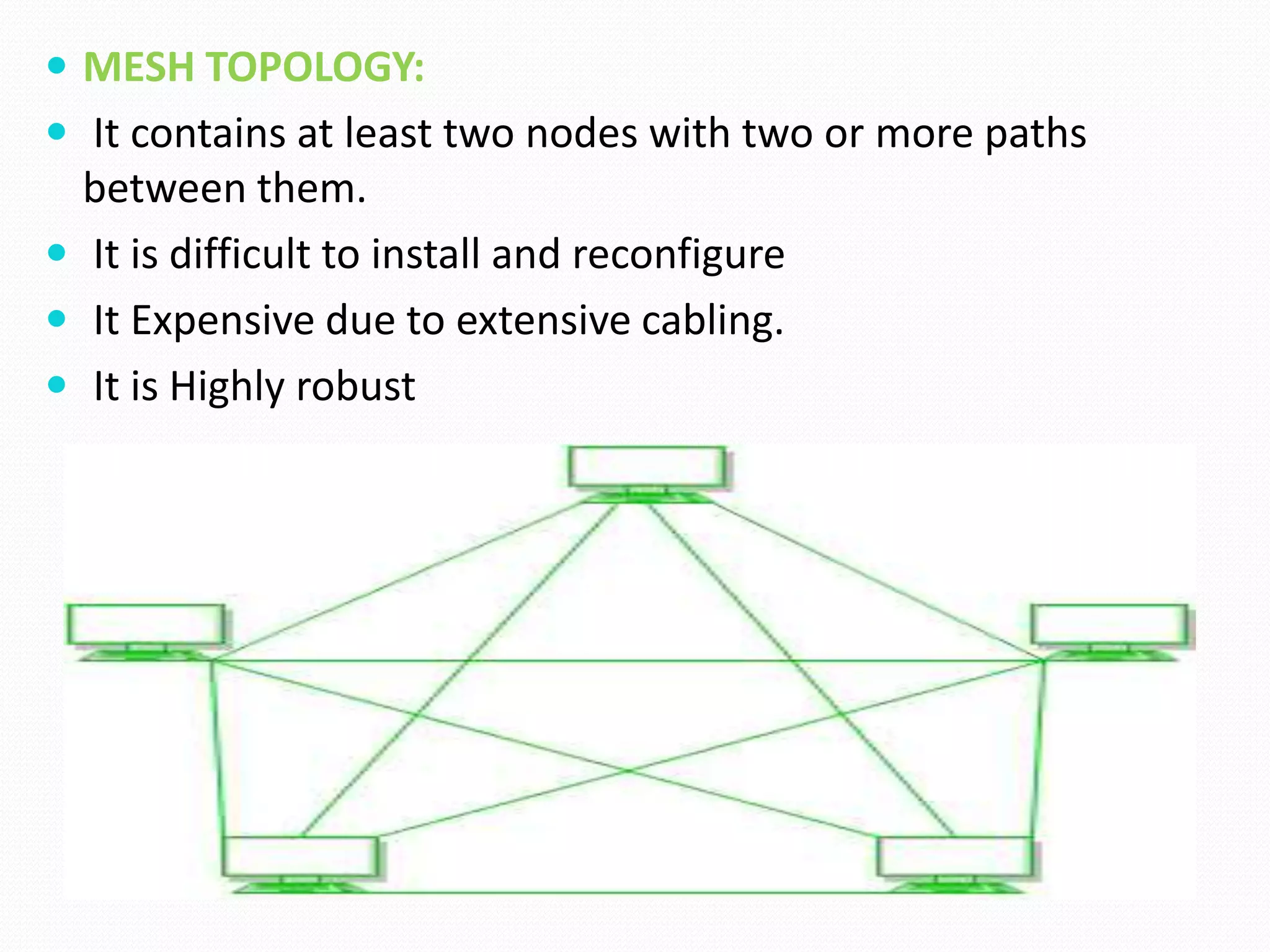
 MESH TOPOLOGY:
 It contains at least two nodes with two or more paths
between them.
 It is difficult to install and reconfigure
 It Expensive due to extensive cabling.
 It is Highly robust
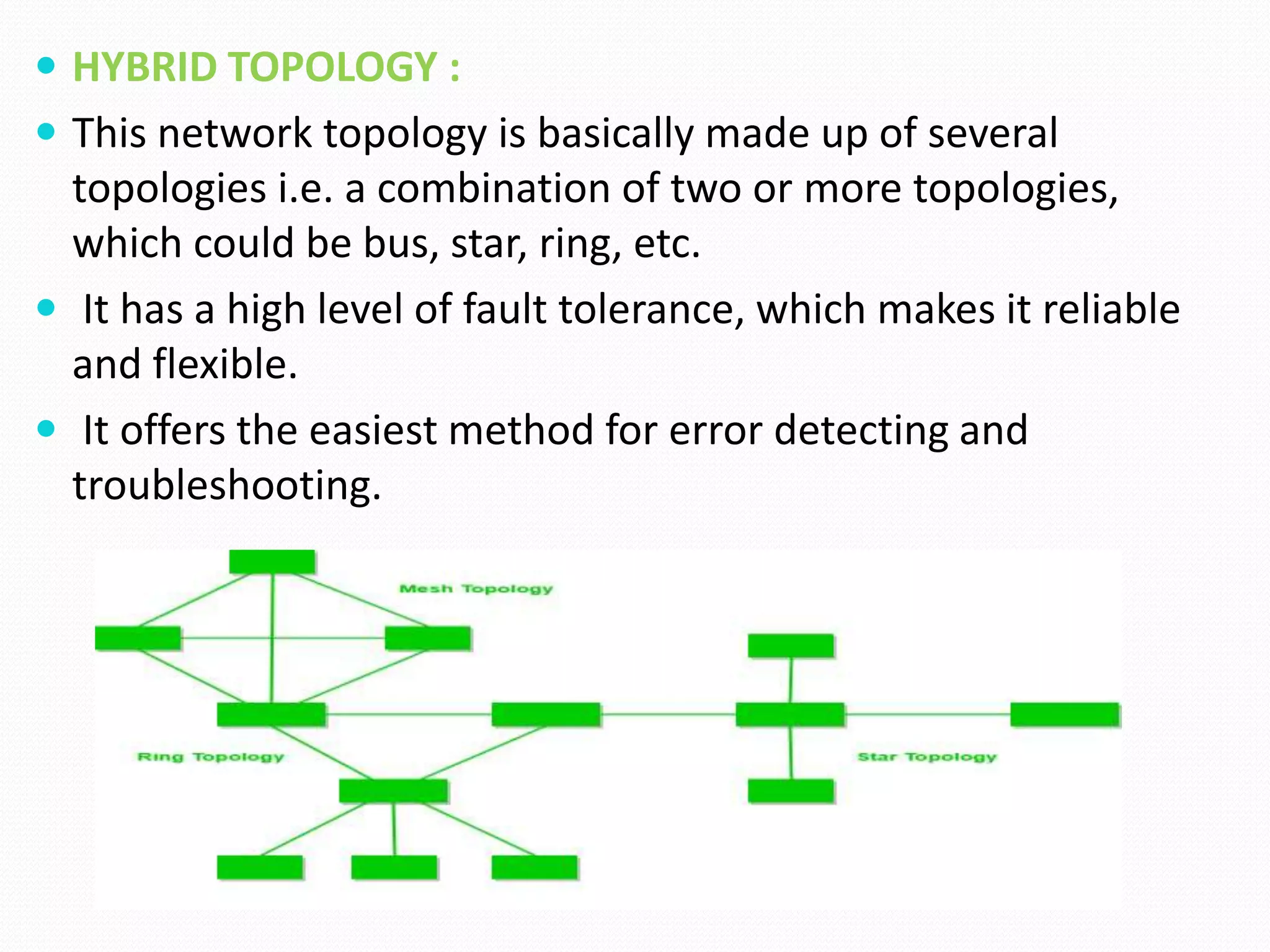
 HYBRID TOPOLOGY :
 This network topology is basically made up of several
topologies i.e. a combination of two or more topologies,
which could be bus, star, ring, etc.
 It has a high level of fault tolerance, which makes it reliable
and flexible.
 It offers the easiest method for error detecting and
troubleshooting.
WIRELESS NETWORKING TECHNOLOGIES
 A wireless network is a computer network that uses wireless
data connections between network nodes.
 Types of Wireless Network Technologies: Mainstream
wireless technologies include:
1. Wi-Fi, especially popular in home networks and as a
wireless hotspot technology.
2. Li- fi
3. Bluetooth, for low-power and embedded applications.
4. 5G, 4G, and 3G cellular internet.
WIRELESS FIDELITY (Wi-Fi)
 Wi-Fi is a family of wireless network protocols, based on the
IEEE 802.11 family of standards, which are commonly used
for local area networking of devices and Internet access.
 Wi-Fi uses multiple parts of the IEEE 802 protocol family and
is designed to interwork seamlessly with its wired sibling
Ethernet
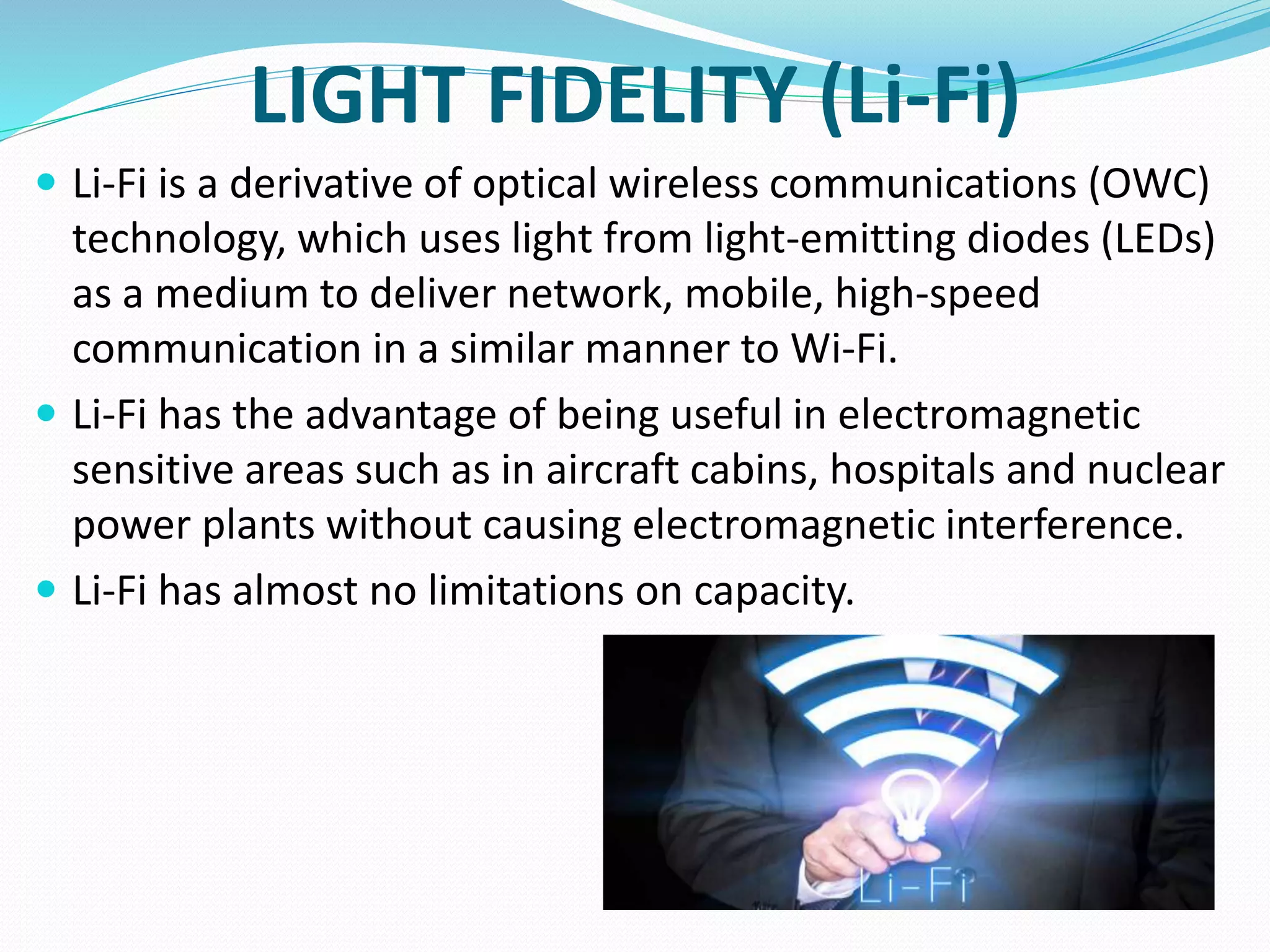
LIGHT FIDELITY (Li-Fi)
 Li-Fi is a derivative of optical wireless communications (OWC)
technology, which uses light from light-emitting diodes (LEDs)
as a medium to deliver network, mobile, high-speed
communication in a similar manner to Wi-Fi.
 Li-Fi has the advantage of being useful in electromagnetic
sensitive areas such as in aircraft cabins, hospitals and nuclear
power plants without causing electromagnetic interference.
 Li-Fi has almost no limitations on capacity.
BLUETOOTH
 Bluetooth is a wireless technology standard used for
exchanging data between fixed and mobile devices over
short distances using short-wavelength UHF radio waves.
 It was originally conceived as a wireless alternative to RS-232
data cables.
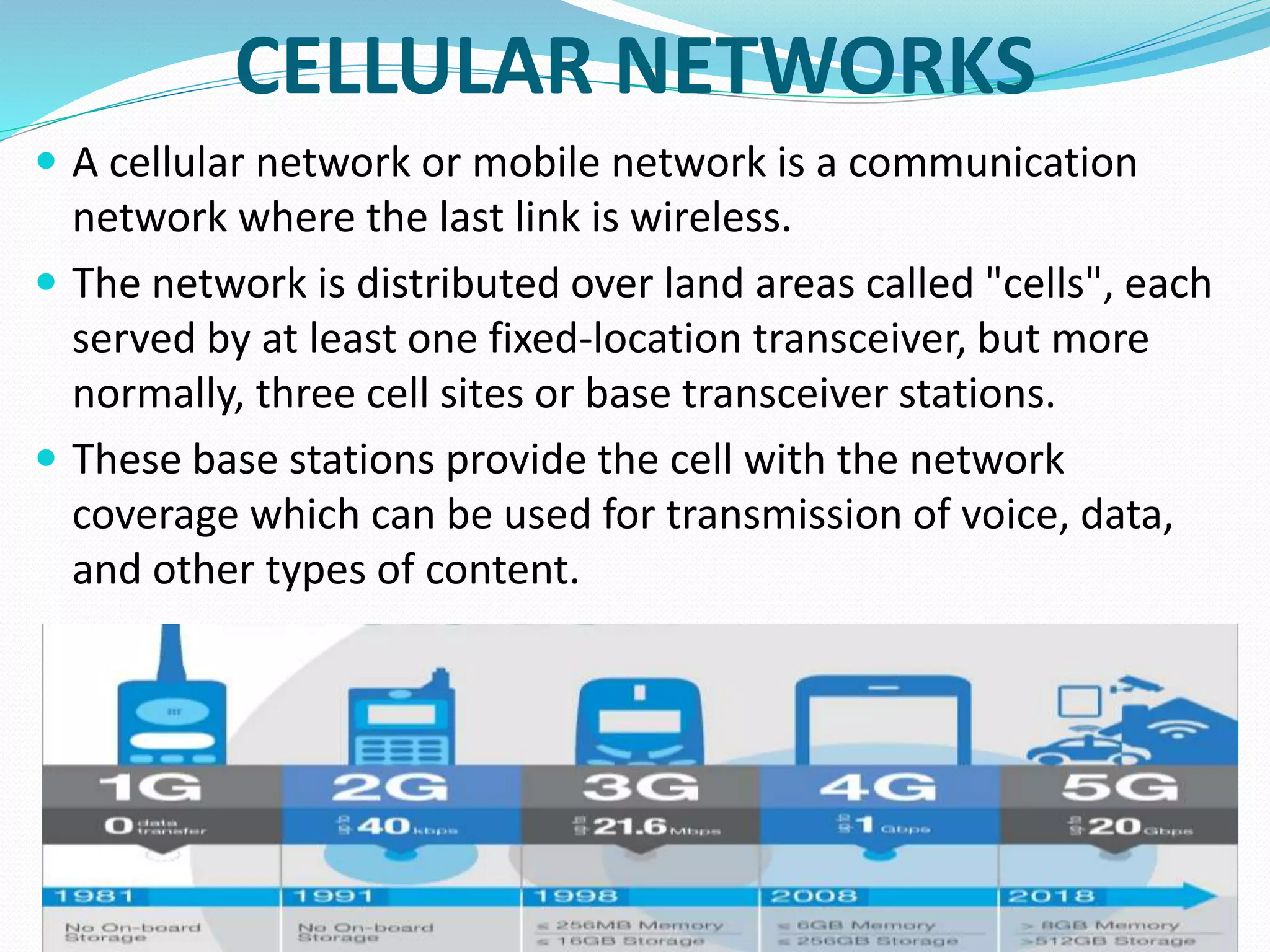
CELLULAR NETWORKS
 A cellular network or mobile network is a communication
network where the last link is wireless.
 The network is distributed over land areas called "cells", each
served by at least one fixed-location transceiver, but more
normally, three cell sites or base transceiver stations.
 These base stations provide the cell with the network
coverage which can be used for transmission of voice, data,
and other types of content.
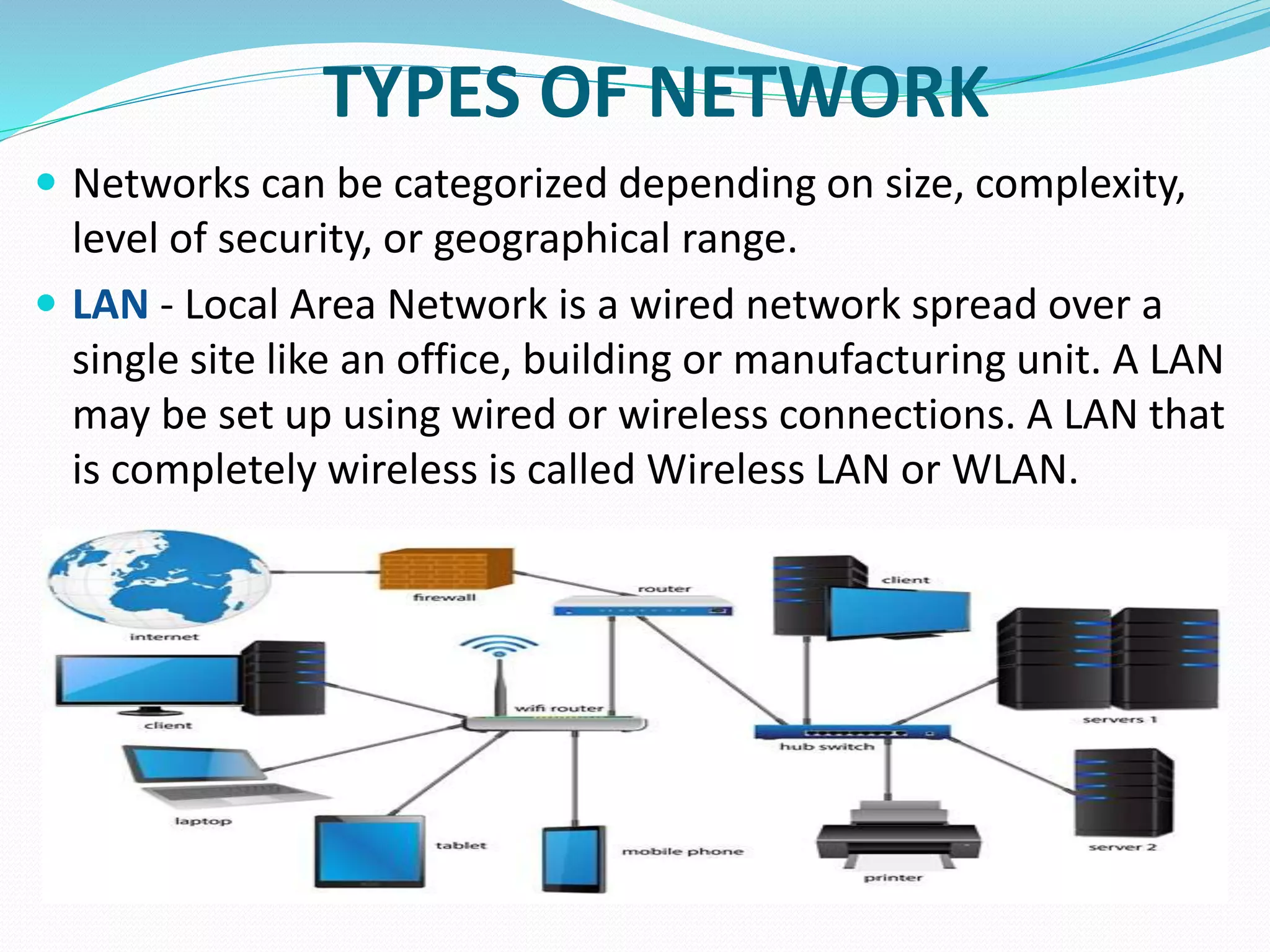
TYPES OF NETWORK
 Networks can be categorized depending on size, complexity,
level of security, or geographical range.
 LAN - Local Area Network is a wired network spread over a
single site like an office, building or manufacturing unit. A LAN
may be set up using wired or wireless connections. A LAN that
is completely wireless is called Wireless LAN or WLAN.
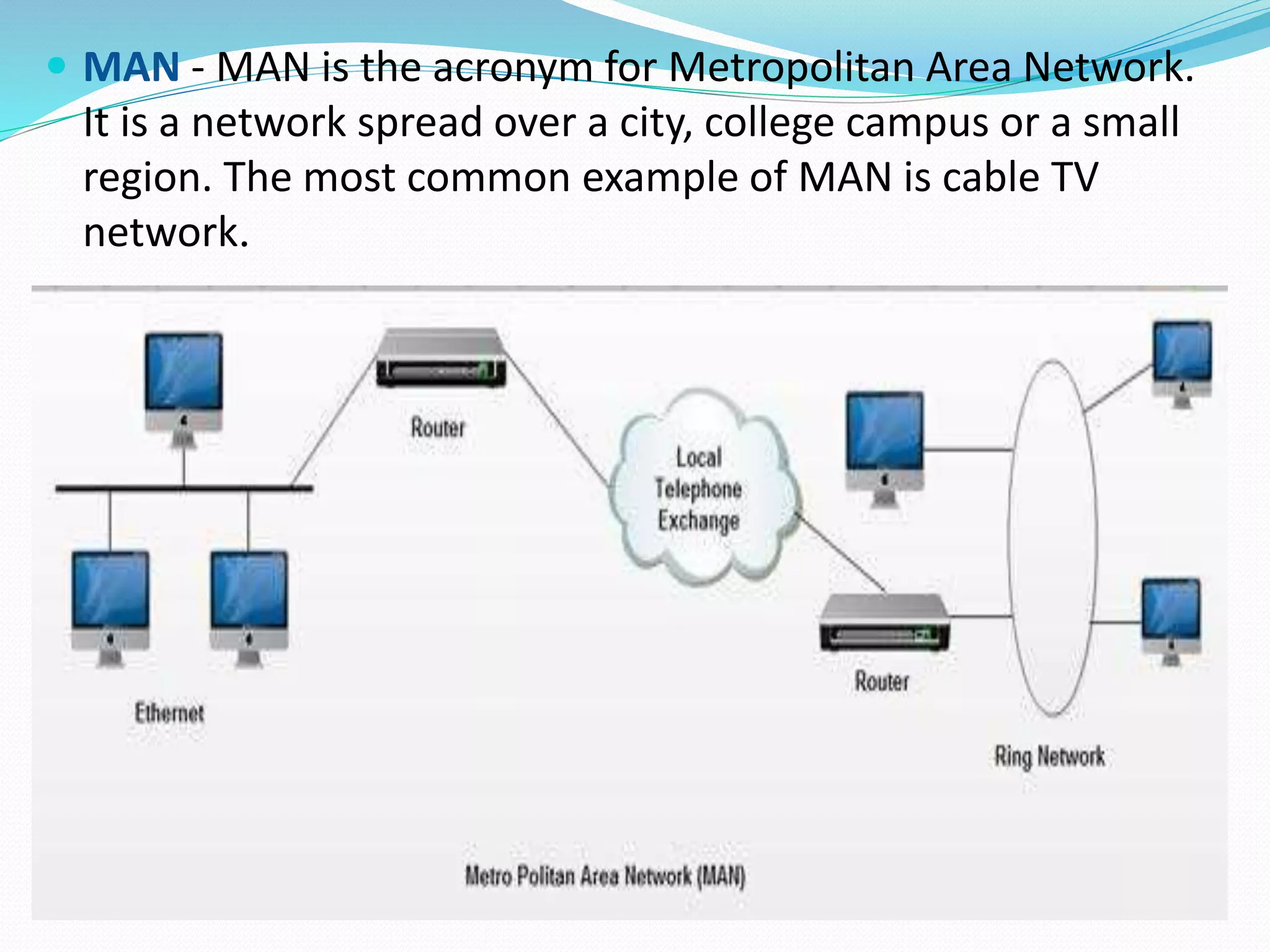
 MAN - MAN is the acronym for Metropolitan Area Network.
It is a network spread over a city, college campus or a small
region. The most common example of MAN is cable TV
network.
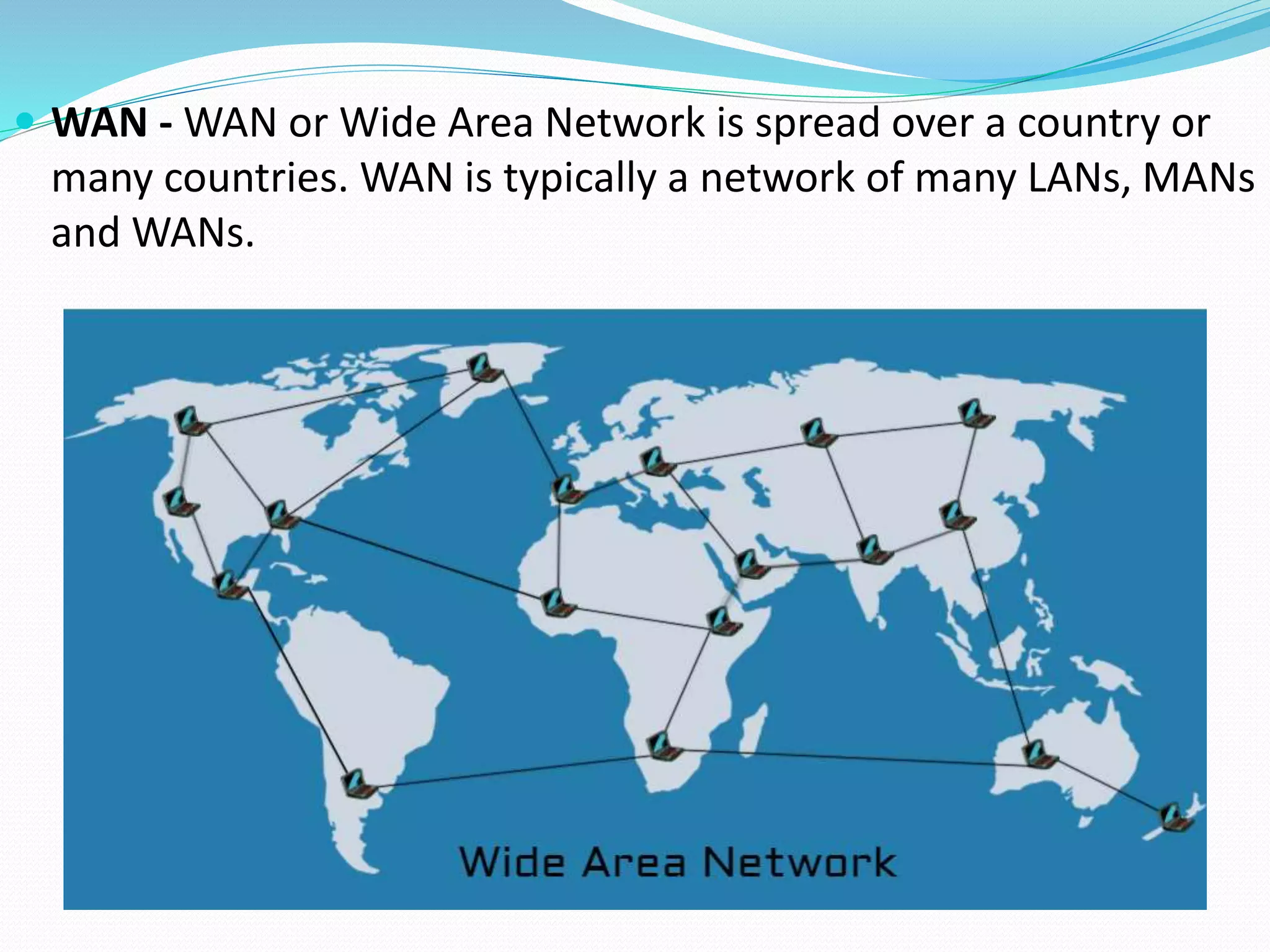
 WAN - WAN or Wide Area Network is spread over a country or
many countries. WAN is typically a network of many LANs, MANs
and WANs.
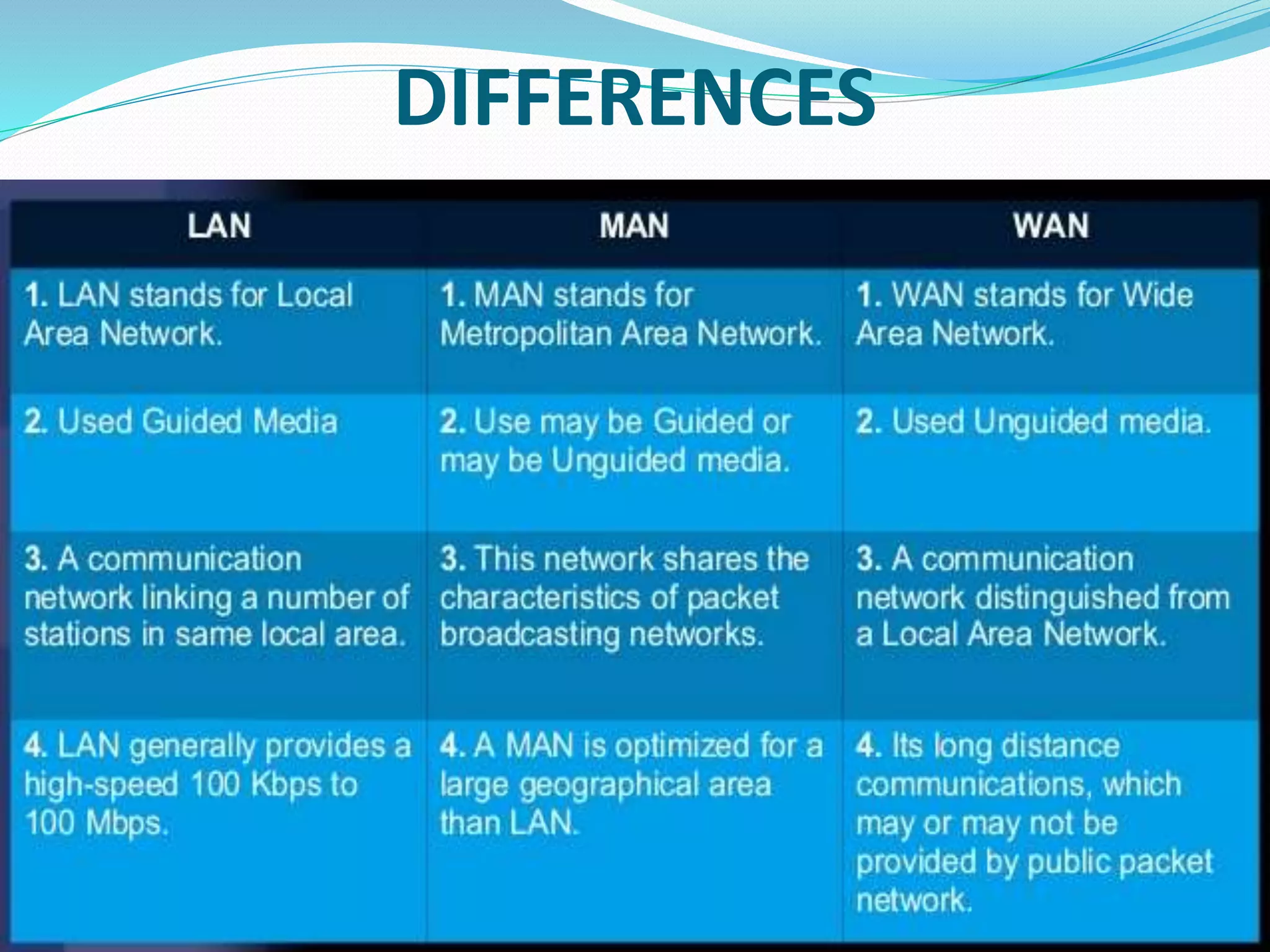
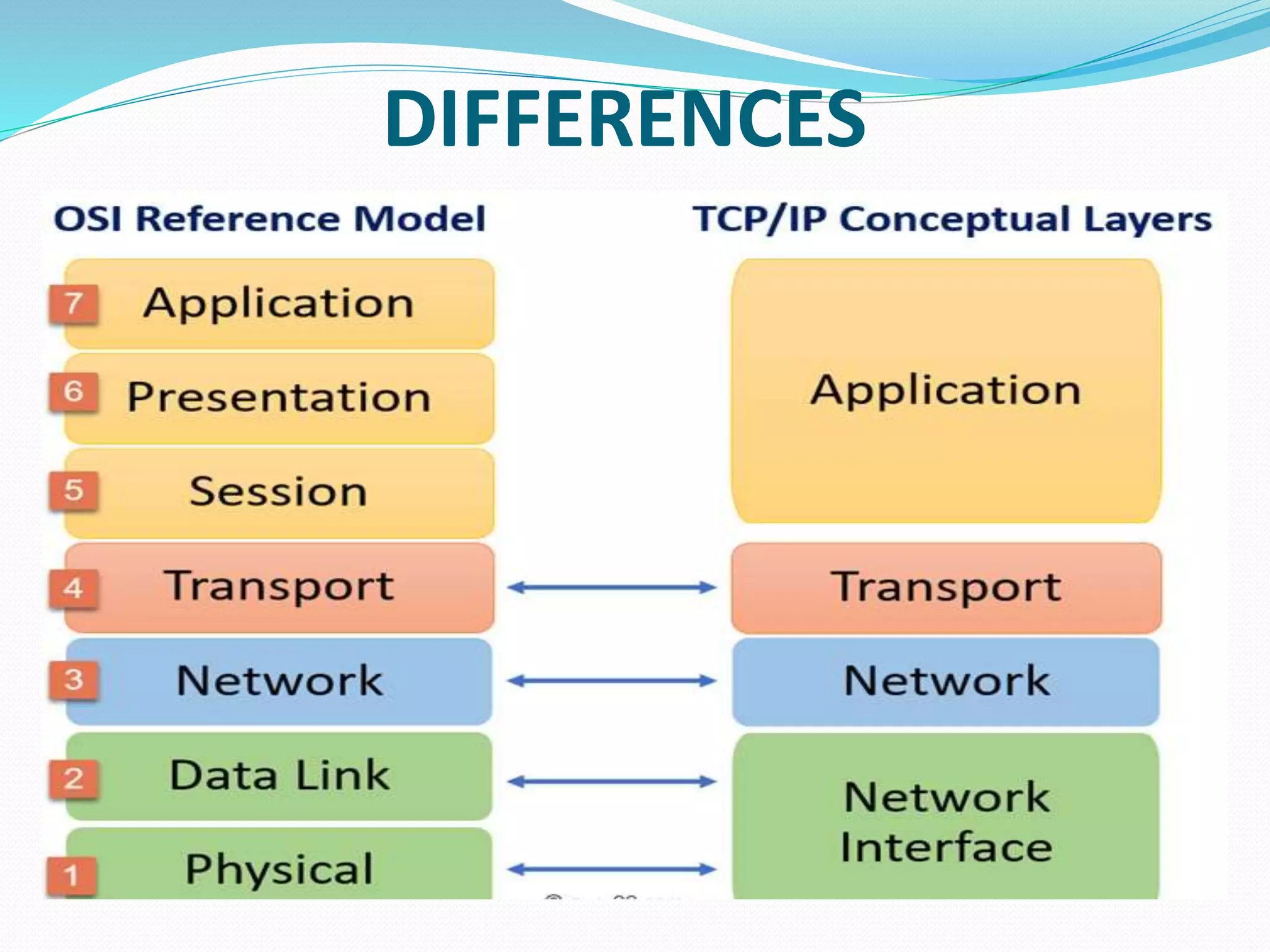
DIFFERENCES
IEEE (Institute of Electrical and Electronics
Engineers )
 The Institute of Electrical and Electronics Engineers (IEEE) is a
professional body for electrical and electronic engineering that
defines the standards for electrical and electronic engineering.
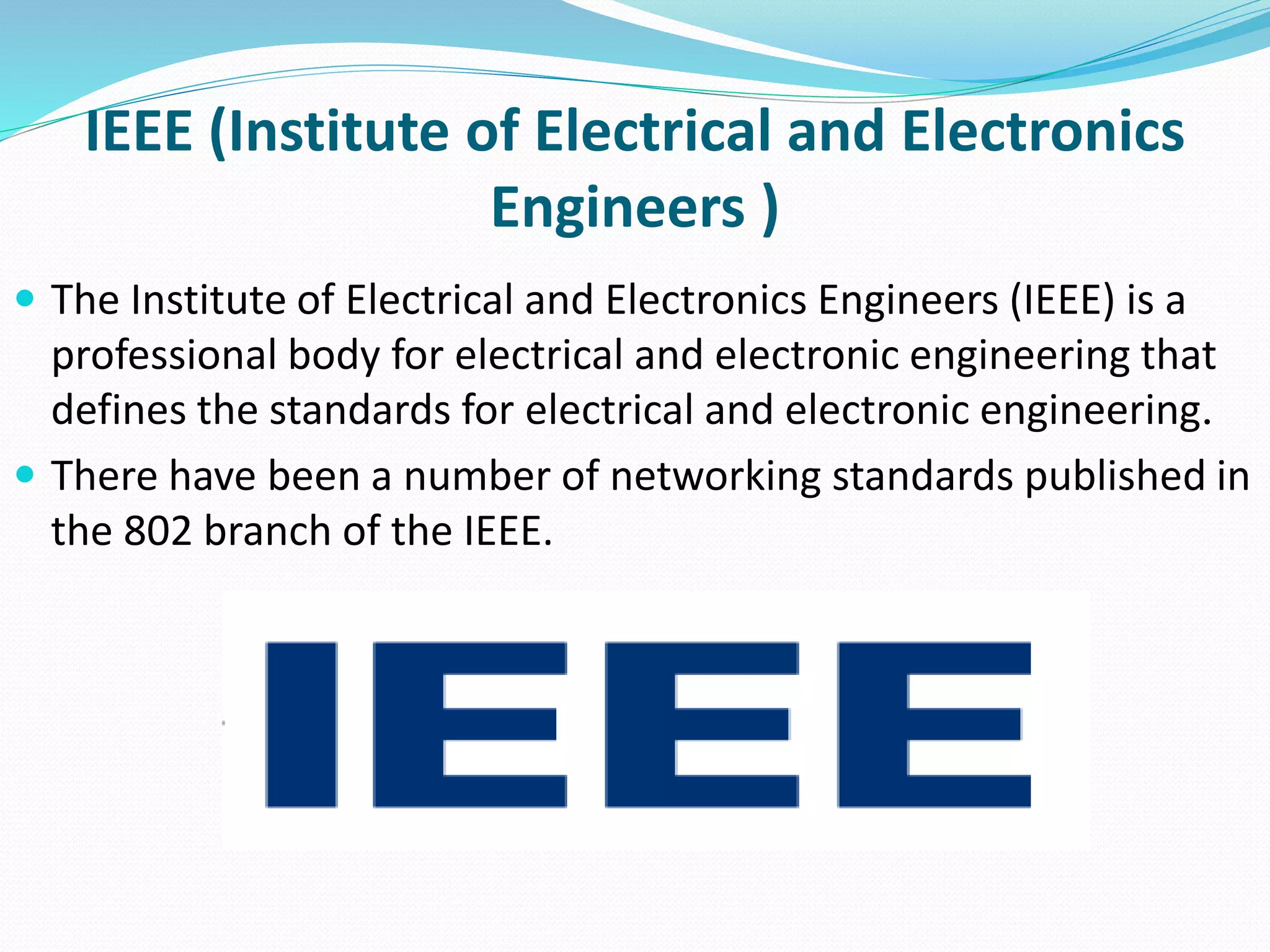
 There have been a number of networking standards published in
the 802 branch of the IEEE.
IEEE 802 SPECIFICATIONS
COMPUTER NETWORK MODELS
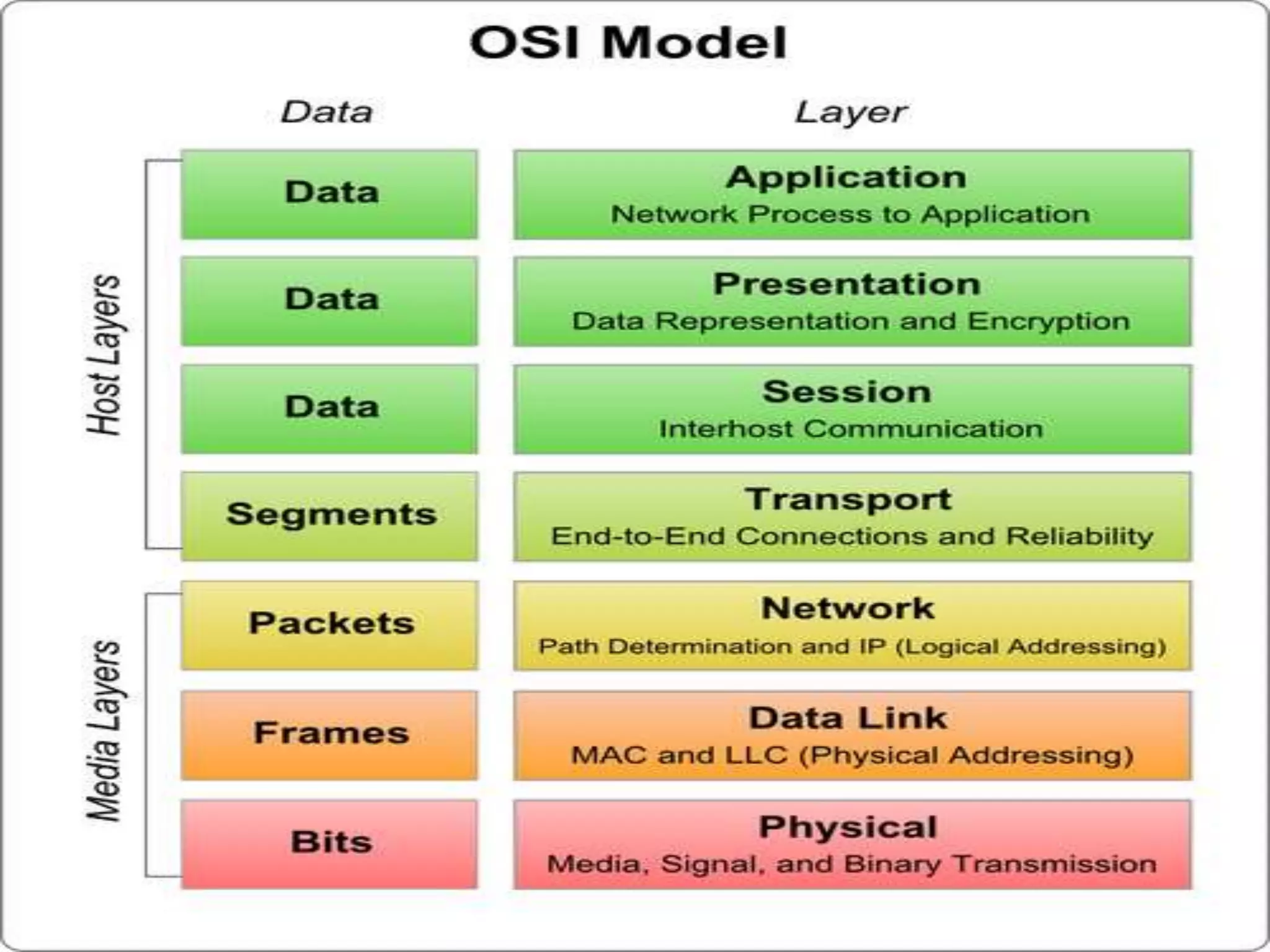
 OSI Model (OPEN SYSTEM INTERCONNECTION):
 The OSI model is a reference tool for understanding data
communication between hosts with help of seven layers
approach in communication process.
 Each layer performs specific functions support the layers above
it and uses services of the layers.
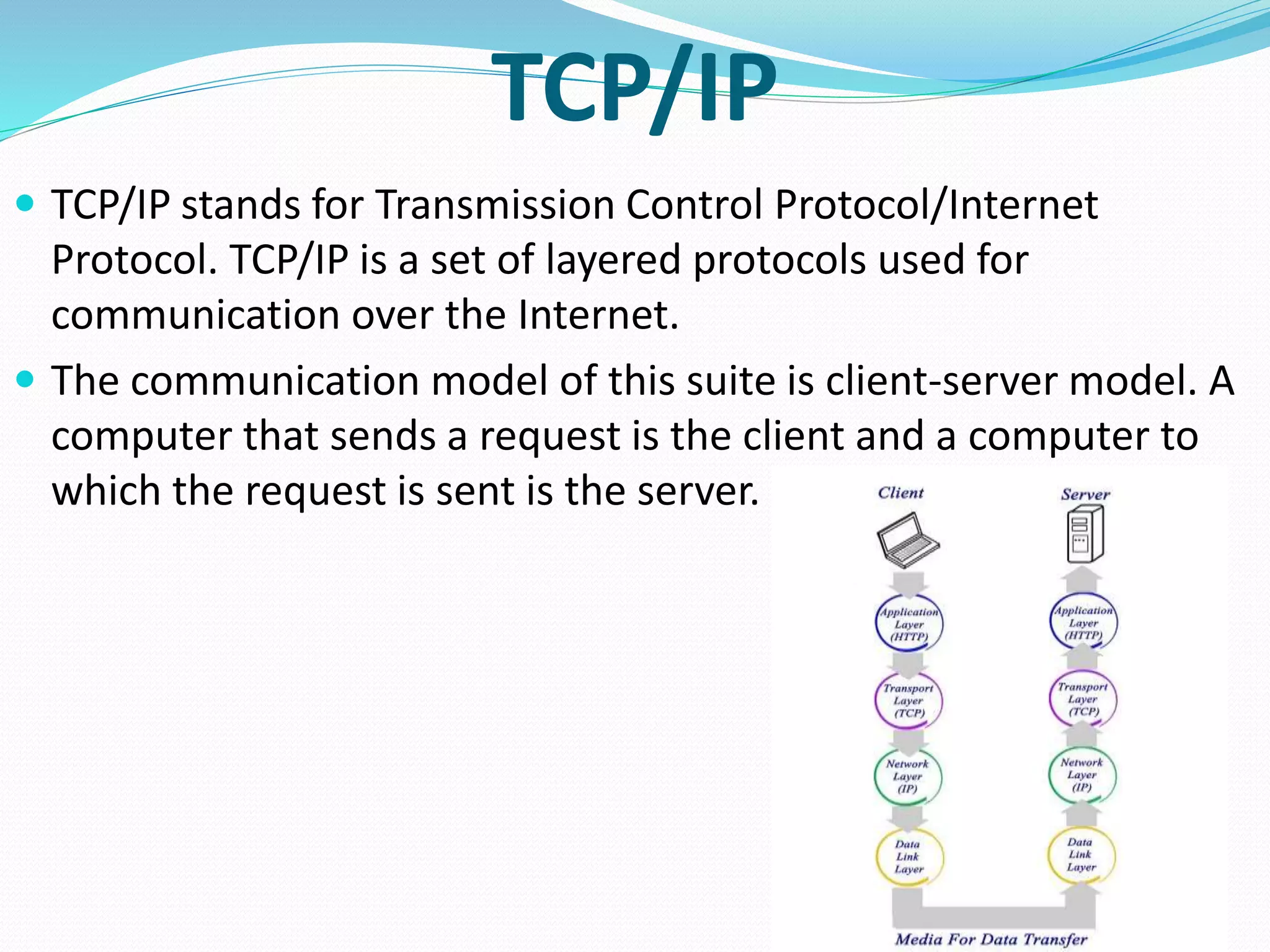
TCP/IP
 TCP/IP stands for Transmission Control Protocol/Internet
Protocol. TCP/IP is a set of layered protocols used for
communication over the Internet.
 The communication model of this suite is client-server model. A
computer that sends a request is the client and a computer to
which the request is sent is the server.
DIFFERENCES
NETWORK PROTOCOLS
 Network Protocols are a set of rules governing exchange of
information in an easy, reliable and secure way.
 User Datagram Protocol (UDP) -
 User Datagram Protocol (UDP) is a Transport Layer protocol. UDP
is a part of Internet Protocol suite, referred as UDP/IP suite.
 User Datagram Protocol (UDP) is more efficient in terms of both
latency and bandwidth.
Following implementations uses UDP as a transport layer
protocol:
 NTP (Network Time Protocol)
 DNS (Domain Name Service)
 BOOTP, DHCP.
 NNP (Network News Protocol)
Simple Mail Transfer Protocol (SMTP)
 SMTP is a set of communication guidelines that allow software
to transmit an electronic mail over the internet is called
Simple Mail Transfer Protocol.
 The main purpose of SMTP is used to set up communication
rules between servers.
 The SMTP model is of two type :
 End-to- end method
 Store-and- forward method
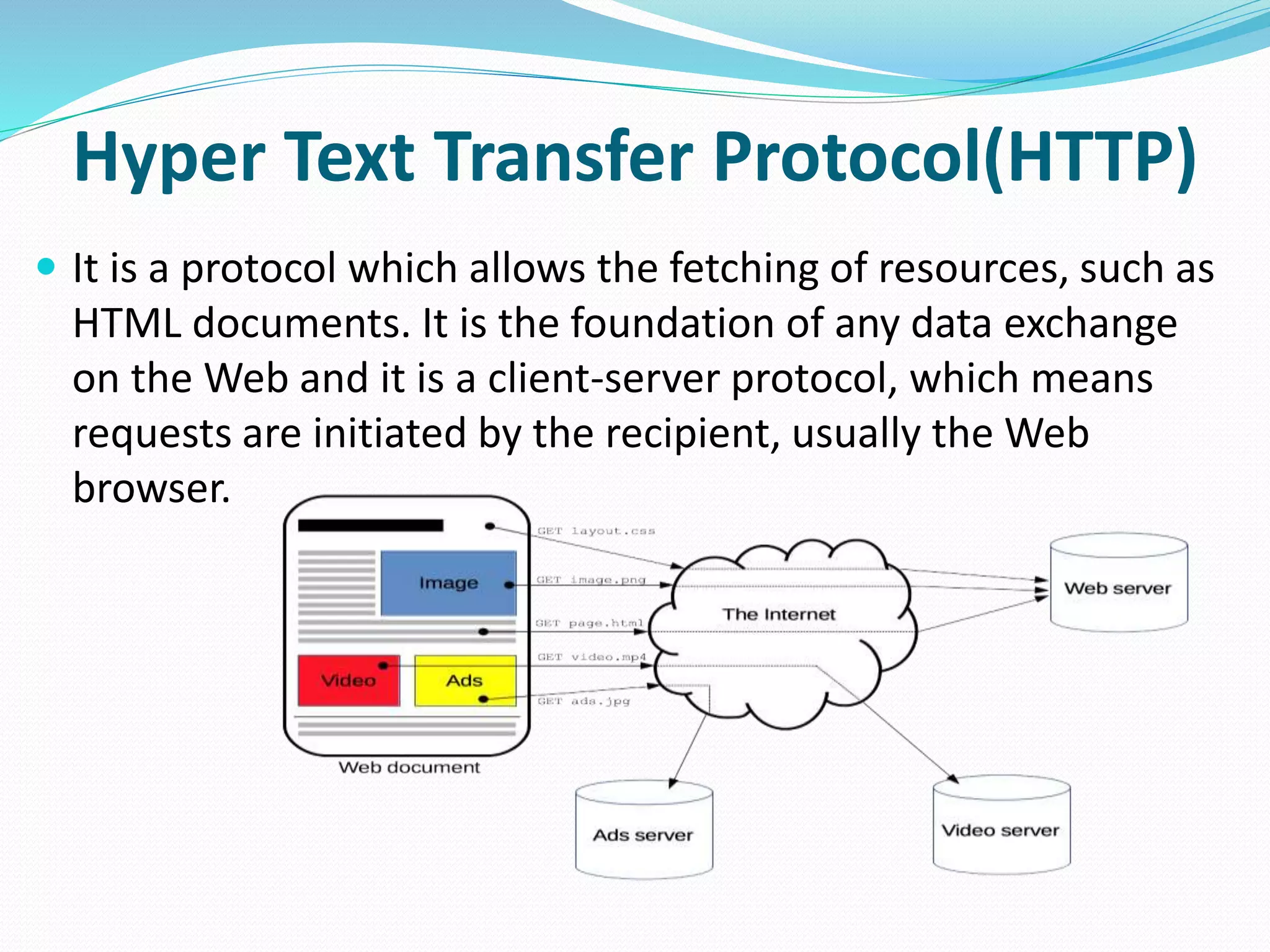
Hyper Text Transfer Protocol(HTTP)
 It is a protocol which allows the fetching of resources, such as
HTML documents. It is the foundation of any data exchange
on the Web and it is a client-server protocol, which means
requests are initiated by the recipient, usually the Web
browser.
SNMP
 SNMP stands for Simple Network Management Protocol.
 SNMP is a framework used for managing devices on the
internet.
 SNMP has two components Manager and agent.The
manager is a host that controls and monitors a set of
agents such as routers.
 It is used in a heterogeneous network made of different
LANs and WANs connected by routers or gateways.
FILE TRANSFER PROTOCOL(FTP)
 File transfer remains one of the most used facilities. The
protocol that handles these requests is File Transfer
Protocol or FTP.
 The need for network came up primarily to facilitate
sharing of files between researchers
 Using FTP to transfer files is helpful in these ways −
 Easily transfers files between two different networks
 Can resume file transfer sessions even if connection is
dropped, if protocol is configure appropriately
 Enables collaboration between geographically separated
teams
DNS
 An application layer protocol defines how the application
processes running on different systems, pass the messages to
each other.
 DNS stands for Domain Name System
 DNS is a directory service that provides a mapping between
the name of a host on the network and its numerical address.
 The domain name space is divided into three different
sections:- generic domains, country domains, and inverse
domain.
PPP
 Point to Point Protocol or PPP is a data link layer protocol that
enables transmission of TCP/IP traffic over serial connection,
like telephone line.
 To do this, PPP defines these three things −
 A framing method to clearly define end of one frame and start
of another, incorporating errors detection as well.
 Link control protocol (LCP) for bringing communication lines up,
authenticating and bringing them down when no longer
needed.
 Network control protocol (NCP) for each network layer protocol
supported by other networks.
 Using PPP, home users can avail Internet connection over
telephone lines.
TYPES OF SERVERS
 A computer may need many services to work. As such, there are
different types of servers available.
 File Server: A file server is a server that contains files which are
made accessible to other clients on the network.
 Print Server: A print server is a server which has a dedicated
printer connected to it which is accessible by other clients through
it on the same network.
 Web Server: A web server is a server equipped with HTTP
(Hypertext Transfer Protocol) that serves web pages in response to
requests submitted by clients.
 Application Server : An application server stores and manages all
applications between an organization's users and its databases or
backend business applications.
CONCLUSION
 In conclusion, a network is two or more computers
connected together using a telecommunication system for
the purpose of communicating and sharing resources.
 Without having a network, Companies would not be able to
share resources and increase productivity more
effectively.The WAN network allowed companies to use the
Internet over large areas. This provided the company to have
meetings overseas by video conferencing and sharing data
over the network.
 As we can see, Networks have many benefits to the end user.
Weather our Network is Wired or Wireless, Networks are an
important part of technology.
COMPUTER NETWORKING SYSTEM

COMPUTER NETWORKING SYSTEM

  • 1.
    Department of Electronics& Telecommunication Engineering, H. R. H. The Prince of Wales Institute of Engineering & Technology, Jorhat.
  • 2.
    CONTENT  INTRODUCTION  COMPUTERNETWORK ARCHITECTURE  EVOLUTION OF NETWORKING  TERMINOLOGIES  SWITCHING BASIC  NETWORK DEVICES  TRANSMISSION MEDIA  NETWORK TOPOLOGIES  WIRELESS NETWORKING TECHNOLOGIES  TYPES OF NETWORK  IEEE  COMPUTER NETWORK MODELS  NETWORK PROTOCOLS  TYPES OF SERVERS  CONCLUSION
  • 3.
    INTRODUCTION  Interconnection oftwo or more devices is called as a network. The communication between two or more interconnected devices is called networking.  It is a group of computers and other peripheral devices linked together for sharing data and hardware resources.
  • 4.
    COMPUTER NETWORK ARCHITECTURE Computer Network Architecture is defined as the physical and logical design of the software, hardware, protocols, and media of the transmission of data.  The two types of network architectures are used:  Peer-To-Peer network  Client/Server network.  Peer-To-Peer network: 1. Peer-To-Peer network is a network in which all the computers are linked together with equal privilege and responsibilities for processing the data. 2. Peer-To-Peer network is useful for small environments, usually up to 10 computers.
  • 5.
     Client/Server Network: 1.Client/Server network is a network model designed for the end users called clients, to access the resources such as songs, video, etc. from a central computer known as Server. 2. The central controller is known as a server while all other computers in the network are called clients. 3. A server is responsible for managing all the resources such as files, directories, printer, etc.
  • 6.
  • 7.
    INTERNET  INTERNET isworldwide network of computer network.  In the Internet, which is a network of networks, came into existence. The internet has evolved from ARPANET. The internet is a globally connected network system that utilizes TCP/IP to transmit information. It allows computers of different types to exchange information and is known as internet
  • 8.
    TELNET  Telenet wasthe first commercial adaptation of ARPANET introduced in 1974. With this the concept of Internet Service Provider (ISP) was also introduced.  The TELNET protocol is based upon the notion of a virtual teletype, employing a 7-bit ASCII character set.
  • 9.
    WORLD WIDE WEB In the 1980s, Tim Berners-Lee led a group of Computer scientists at CERN, Switzerland, to create a seamless network of varied networks, called the World Wide Web (WWW).  World Wide Web is a complex web of websites and web pages connected together through hypertexts.
  • 10.
    TERMINOLOGIES  Channel -Physicalmedium like cables over which information is exchanged is called channel. Transmission channel may be analog or digital.  Data Transfer Rate - The speed of data transferred or received over transmission channel, measured per unit time is called data transfer rate. The smallest unit of measurement is bits per second (bps). 1 bps means 1 bit (0 or 1) of data is transferred in 1 second.  Here are some commonly used data transfer rates − 1. 1 Bps = 1 Byte per second = 8 bits per second 2. 1 kbps = 1 kilobit per second = 1024 bits per second 3. 1 Mbps = 1 Megabit per second = 1024 Kbps 4. 1 Gbps = 1 Gigabit per second = 1024 Mbps.  Bandwidth - Data transfer rates that can be supported by a network are called its bandwidth.
  • 11.
     Throughput -Throughput is the actual speed with which data gets transferred over the network.  Protocol - Protocol is a set of rules and regulations used by devices to communicate over the network. 1. Some common protocols used over the Internet are − 2. Transmission Control Protocol 3. Internet Protocol 4. Point to Point Protocol 5. File Transfer Protocol 6. Hypertext Transfer Protocol 7. Internet Message Access Protocol
  • 12.
    SWITCHING BASICS  Selectinga path that data must take out of the available options is called switching.  Switching in computer network helps in deciding the best route for data transmission if there are multiple paths in larger network.  There are 3 popular switching techniques – circuit switching, message switching and packet switching.
  • 13.
    CIRCUIT SWITCHING  Physicalconnectiion between the two computer is established and then data is transmitted from siurce to destination computer  It sets up end-to-end connection between computers before any data can be sent.
  • 14.
    MESSAGE SWITCHING  Inmessage switching, data is first stored by one node then forward to another node to transfer the data to another system.  It uses store and forward mechanism.
  • 15.
    PACKET SWITCHING  Packetswitching is a connectionless network switching technique.  Data is divided into small units called packets with each packet carrying small header containing signaling information.  It’s mainly used for data and voice communication
  • 16.
    NETWORK DEVICES  Hardwaredevices that are used to connect computers, printers, fax machines and other electronic devices to a network are called network devices. Some devices are installed on the device, like NIC card or RJ45 connector,whereas some are part of the network, like router, switch, etc.  Modem- Modem is a device that enables a computer to send or receive data over telephone or cable lines. Based on the differences in speed and transmission rate, a modem can be classified in the following categories: 1. Standard PC modem or Dial-up modem. 2. Cellular Modem. 3. Cable modem.
  • 17.
     Hub –A hub is basically a multiport repeater. A hub connects multiple wires coming from different branches.For example;the connector in star topology which connects different stations.  Types of Hub – (1)Active Hub (2) Passive Hub  Bridge – A bridge operates at data link layer. A bridge is a repeater, with add on the functionality of filtering content by reading the MAC addresses of source and destination.  Ethernet Card - Ethernet card, also known as network interface card (NIC), is a hardware component used by computers to connect to Ethernet LAN and communicate with other devices on the LAN.  Router-A router is a network layer hardware device that transmits data from one LAN to another if both networks support the same set of protocols.  Switch -Switch is a network device that connects other devices to Ethernet networks through twisted pair cables.  Gateway -Gateway is a network device used to connect two or more dissimilar networks.
  • 18.
     Repeaters- isan electronic device that receives a weak or low-level signal and retransmits it at a higher level or higher power, so that the signal can cover longer distances without degradation.  Workstation - Another critical component of a network is the workstation or a client. A workstation is an individual computer with capabilities to communicate with other machines. A workstation can communicate with other workstations or to the server.  SERVERS - It is the most powerful computer in the network. In a local area network, usually, a powerful microcomputer or a super microcomputer with the power of a minicomputer is used as a server.
  • 19.
  • 20.
    TWISTED PAIR  Iftwo or more wires are lying together, they can interfere with each other’s signal. To reduce this e.m interference, pair of copper wires are twisted together in a helical shape like a DNA molecule. Such twisted pair copper wire are called twisted pair.  There are 2 types of twisted pair: 1. Unshielded twisted pair 2. Shielded twisted pair
  • 21.
    COAXIAL CABLE  Coaxialcable has a single copper conductor at its center.  A plastic layer provides insulation between the center conductor and a braided metal shield  The metal shield helps to block any outside interference from fluorescent lights,motors,and other computers.  Outer shield provides the ground.
  • 22.
    OPTICAL FIBER CABLE Fiber optic cabling consists of a center glass core surrounded by several layers of protective materials.  It transmit light rather than electronics signals eliminating the problem of electrical interference  This makes it ideal for certain environments that contains a large amount of electrical interference  It has also made it the standard for connecting networks between building, due to its immunity to the effects of moisture and lighting.
  • 23.
    NETWORK TOPOLOGIES  Theway in which devices are interconnected to form a network is called network topology.  Different types of topologies are - 1. Bus Topology - Data network with bus topology has a linear transmission cable, usually coaxial, to which many network devices and workstations are attached along the length. The data travels in both the directions along the bus. When the destination terminal sees the data, it copies it to the local disk.
  • 24.
     Ring Topology- In ring topology each terminal is connected to exactly two nodes, giving the network a circular shape. Data travels in only one pre-determined direction.
  • 25.
     Star Topology- In star topology, the nodes are connected to the central hub or router.  In star topology, only hub is failure point.  The cost of star topology is high.  In star topology, the information is travel from central hub or router to all the nodes.  The cables are required in star topology more than the ring topology.
  • 26.
     Tree Topology-  Tree topology is a topology in which the nodes are organized in the form of a tree.  In tree topology, the communication between nodes are done through branching cable having no loops  The complexity of Tree topology is largely complex.  The cost of tree topology is high as it is densely wired.  Tree topology is also called as hierarchical topology.  Tree topology is used in WAN.
  • 27.
     MESH TOPOLOGY: It contains at least two nodes with two or more paths between them.  It is difficult to install and reconfigure  It Expensive due to extensive cabling.  It is Highly robust
  • 28.
     HYBRID TOPOLOGY:  This network topology is basically made up of several topologies i.e. a combination of two or more topologies, which could be bus, star, ring, etc.  It has a high level of fault tolerance, which makes it reliable and flexible.  It offers the easiest method for error detecting and troubleshooting.
  • 29.
    WIRELESS NETWORKING TECHNOLOGIES A wireless network is a computer network that uses wireless data connections between network nodes.  Types of Wireless Network Technologies: Mainstream wireless technologies include: 1. Wi-Fi, especially popular in home networks and as a wireless hotspot technology. 2. Li- fi 3. Bluetooth, for low-power and embedded applications. 4. 5G, 4G, and 3G cellular internet.
  • 30.
    WIRELESS FIDELITY (Wi-Fi) Wi-Fi is a family of wireless network protocols, based on the IEEE 802.11 family of standards, which are commonly used for local area networking of devices and Internet access.  Wi-Fi uses multiple parts of the IEEE 802 protocol family and is designed to interwork seamlessly with its wired sibling Ethernet
  • 31.
    LIGHT FIDELITY (Li-Fi) Li-Fi is a derivative of optical wireless communications (OWC) technology, which uses light from light-emitting diodes (LEDs) as a medium to deliver network, mobile, high-speed communication in a similar manner to Wi-Fi.  Li-Fi has the advantage of being useful in electromagnetic sensitive areas such as in aircraft cabins, hospitals and nuclear power plants without causing electromagnetic interference.  Li-Fi has almost no limitations on capacity.
  • 32.
    BLUETOOTH  Bluetooth isa wireless technology standard used for exchanging data between fixed and mobile devices over short distances using short-wavelength UHF radio waves.  It was originally conceived as a wireless alternative to RS-232 data cables.
  • 33.
    CELLULAR NETWORKS  Acellular network or mobile network is a communication network where the last link is wireless.  The network is distributed over land areas called "cells", each served by at least one fixed-location transceiver, but more normally, three cell sites or base transceiver stations.  These base stations provide the cell with the network coverage which can be used for transmission of voice, data, and other types of content.
  • 34.
    TYPES OF NETWORK Networks can be categorized depending on size, complexity, level of security, or geographical range.  LAN - Local Area Network is a wired network spread over a single site like an office, building or manufacturing unit. A LAN may be set up using wired or wireless connections. A LAN that is completely wireless is called Wireless LAN or WLAN.
  • 35.
     MAN -MAN is the acronym for Metropolitan Area Network. It is a network spread over a city, college campus or a small region. The most common example of MAN is cable TV network.
  • 36.
     WAN -WAN or Wide Area Network is spread over a country or many countries. WAN is typically a network of many LANs, MANs and WANs.
  • 37.
  • 38.
    IEEE (Institute ofElectrical and Electronics Engineers )  The Institute of Electrical and Electronics Engineers (IEEE) is a professional body for electrical and electronic engineering that defines the standards for electrical and electronic engineering.  There have been a number of networking standards published in the 802 branch of the IEEE.
  • 39.
  • 40.
    COMPUTER NETWORK MODELS OSI Model (OPEN SYSTEM INTERCONNECTION):  The OSI model is a reference tool for understanding data communication between hosts with help of seven layers approach in communication process.  Each layer performs specific functions support the layers above it and uses services of the layers.
  • 42.
    TCP/IP  TCP/IP standsfor Transmission Control Protocol/Internet Protocol. TCP/IP is a set of layered protocols used for communication over the Internet.  The communication model of this suite is client-server model. A computer that sends a request is the client and a computer to which the request is sent is the server.
  • 43.
  • 44.
    NETWORK PROTOCOLS  NetworkProtocols are a set of rules governing exchange of information in an easy, reliable and secure way.  User Datagram Protocol (UDP) -  User Datagram Protocol (UDP) is a Transport Layer protocol. UDP is a part of Internet Protocol suite, referred as UDP/IP suite.  User Datagram Protocol (UDP) is more efficient in terms of both latency and bandwidth. Following implementations uses UDP as a transport layer protocol:  NTP (Network Time Protocol)  DNS (Domain Name Service)  BOOTP, DHCP.  NNP (Network News Protocol)
  • 45.
    Simple Mail TransferProtocol (SMTP)  SMTP is a set of communication guidelines that allow software to transmit an electronic mail over the internet is called Simple Mail Transfer Protocol.  The main purpose of SMTP is used to set up communication rules between servers.  The SMTP model is of two type :  End-to- end method  Store-and- forward method
  • 46.
    Hyper Text TransferProtocol(HTTP)  It is a protocol which allows the fetching of resources, such as HTML documents. It is the foundation of any data exchange on the Web and it is a client-server protocol, which means requests are initiated by the recipient, usually the Web browser.
  • 47.
    SNMP  SNMP standsfor Simple Network Management Protocol.  SNMP is a framework used for managing devices on the internet.  SNMP has two components Manager and agent.The manager is a host that controls and monitors a set of agents such as routers.  It is used in a heterogeneous network made of different LANs and WANs connected by routers or gateways.
  • 48.
    FILE TRANSFER PROTOCOL(FTP) File transfer remains one of the most used facilities. The protocol that handles these requests is File Transfer Protocol or FTP.  The need for network came up primarily to facilitate sharing of files between researchers  Using FTP to transfer files is helpful in these ways −  Easily transfers files between two different networks  Can resume file transfer sessions even if connection is dropped, if protocol is configure appropriately  Enables collaboration between geographically separated teams
  • 49.
    DNS  An applicationlayer protocol defines how the application processes running on different systems, pass the messages to each other.  DNS stands for Domain Name System  DNS is a directory service that provides a mapping between the name of a host on the network and its numerical address.  The domain name space is divided into three different sections:- generic domains, country domains, and inverse domain.
  • 50.
    PPP  Point toPoint Protocol or PPP is a data link layer protocol that enables transmission of TCP/IP traffic over serial connection, like telephone line.  To do this, PPP defines these three things −  A framing method to clearly define end of one frame and start of another, incorporating errors detection as well.  Link control protocol (LCP) for bringing communication lines up, authenticating and bringing them down when no longer needed.  Network control protocol (NCP) for each network layer protocol supported by other networks.  Using PPP, home users can avail Internet connection over telephone lines.
  • 51.
    TYPES OF SERVERS A computer may need many services to work. As such, there are different types of servers available.  File Server: A file server is a server that contains files which are made accessible to other clients on the network.  Print Server: A print server is a server which has a dedicated printer connected to it which is accessible by other clients through it on the same network.  Web Server: A web server is a server equipped with HTTP (Hypertext Transfer Protocol) that serves web pages in response to requests submitted by clients.  Application Server : An application server stores and manages all applications between an organization's users and its databases or backend business applications.
  • 52.
    CONCLUSION  In conclusion,a network is two or more computers connected together using a telecommunication system for the purpose of communicating and sharing resources.  Without having a network, Companies would not be able to share resources and increase productivity more effectively.The WAN network allowed companies to use the Internet over large areas. This provided the company to have meetings overseas by video conferencing and sharing data over the network.  As we can see, Networks have many benefits to the end user. Weather our Network is Wired or Wireless, Networks are an important part of technology.