© 2016 MapR Technologies 1© 2016 MapR Technologies
Putting Apache Drill into Production
Neeraja Rentachintala, Sr. Director, Product Management
Aman Sinha, Lead Software Engineer, Apache Drill & Calcite PMC
© 2016 MapR Technologies 2
Topics
• Apache Drill –What & Why
– Use Cases
– Customer Examples
• Considerations & Best Practices for Production Deployments
– Deployment Architecture
– Storage Format Selection
– Query Performance
– Security
• Product Roadmap
• Q&A
© 2016 MapR Technologies 3© 2016 MapR Technologies
Apache Drill –What & Why
© 2016 MapR Technologies 4
Schema-Free SQL engine for Flexibility & Performance
Rapid time to insights
• Query data in-situ
• No Schemas required
• Easy to get started
Access to any data type, any data source
• Relational
• Nested data
• Schema-less
Integration with existing tools
• ANSI SQL
• BI tool integration
• User Defined Functions
Scale in all dimensions
• TB-PB of scale
• 1000s of users
• 1000s of nodes
Granular security
• Authentication
• Row/column level controls
• De-centralized
© 2016 MapR Technologies 5
MapR-DB MapR Streams
Database Event Streaming
Real-time dashboardsBI/Ad-hoc queriesData Exploration
Unified SQL Layer for The MapR Converged Data Platform
Global
Sources
Web scale Storage
MapR-FS
Batch Processing
(MapReduce, Spark, Pig)
Stream Processing
(Spark Streaming, Storm)
© 2016 MapR Technologies 6
Use Cases for Drill
Data
Exploration
Adhoc queries Dashboards/
BI reporting
ETL
Primary
Purpose
Data discovery &
Model
development
Investigative analytics Operational reporting Data prep for
downstream needs
Usage Internal Internal Internal and external
facing apps
Internal
Typical
Users
Data scientists,
Technical analysts,
General SQL users
Business analysts,
General SQL users
Business analysts, End
users
ETL/DWH developers
Tools
involved
Command Line,
SQL/BI tools, R,
Python, Spark..
Command line , SQL/BI
tools
BI tools, Custom apps ETL/DI tools , Scripts
Critical
requirement
Flexibility
(File format
variety, nested
data, UDFs..)
Flexibility
(File format variety ) ,
Interactive
performance – ok up to
10s of seconds
Performance Fault tolerance
Type of
datasets
Raw datasets Raw datasets,
Processed datasets (via
Hive and Spark).
Processed datasets ,
OK to structure data
layout for optimized
performance
Raw datasets
Query
patterns
Unknown models
& unknown query
patterns
Known models ,
Unknown query
patterns
Known models, known
query patterns
Predefined queries
Traditional and New Types of BI on Hadoop
More raw data
More real time
More Agility &
Self Service
More Users
More Cost
Effectively
+
© 2016 MapR Technologies 7
Customer examples
https://www.mapr.com/blog/happy-anniversary-apache-
drill-what-difference-year-makes
© 2016 MapR Technologies 8
Agile and Iterative Releases
Drill 1.0
(May’15)
Drill 1.1
(July’15)
Drill 1.2
(Oct’15)
Drill 1.3
(Nov’15)
Drill 1.4
(Jan’16)
Drill 1.5
(Feb’16)
Drill 1.6
(April’16)
Drill 1.7
(Jul’16)
Drill 1.8
Just released
• 14 releases since Beta in Sep’14
• 50+ contributors (MapR, Dremio, Intuit, Microsoft, Hortonworks...)
• 1000’s of sandbox downloads since GA
• 6,000+ Analyst and developer certifications through MapR ODT
• 14,000+ email threads on Drill Dev and User forums
• Lot of new contributions: JDBC/Mongo-DB/Kudu storage plugins, Geospatial
functions..
© 2016 MapR Technologies 9
Drill Product Evolution
Drill 1.0 GA
•Drill GA
Drill 1.1
•Automatic
Partitioning for
Parquet Files
•Window Functions
support
•- Aggregate
Functions: AVG,
COUNT, MAX, MIN,
SUM
•-Ranking Functions:
CUME_DIST,
DENSE_RANK,
PERCENT_RANK,
RANK and
ROW_NUMBER
•Hive impersonation
•SQL Union support
•Complex data
enhancements·
and more
Drill 1.2
•Native parquet
reader for Hive
tables
•Hive partition pruning
•Multiple Hive
versions support
•Hive 1.2.1 version
support
•New analytical
functions (Lead, lag,
Ntiile etc)
•Multiple window
Partition By clauses
support
•Drop table syntax
•Metadata caching
•Security support for
web UI
•INT 96 data type
support
•UNION distinct
support
Drill 1.3/1.4
•Improved Tableau
experience with
faster Limit 0 queries
•Metadata
(INFORMATION_SC
HEMA) query speed
ups on Hive
schemas/tables
•Robust partition
pruning (more data
types, large # of
partitions)
•Optimized metadata
cache
•Improved window
functions resource
usage and
performance
•New & improved
JDBC driver
Drill 1.5/1.6
•Enhanced Stability &
scale
•New memory
allocator
•Improved uniform
query load
distribution via
connection pooling
•Enhanced query
performance
•Early application of
partition pruning in
query planning
•Hive tables query
planning
improvements
•Row count based
pruning for Limit N
queries
•Lazy reading of
parquet metadata
caching
•Limit 0 performance
•Enhanced SQL
Window function
frame syntax
•Client impersonation
•JDK 1.8 support
Drill 1.7
•Enhanced
MaxDir/MinDir
functions
•Access to Drill logs
in the Web UI
•Addition of
JDBC/ODBC client
IP in Drill audit logs
•Monitoring via JMX
•Hive CHAR data
type support
•Partition pruning
enhancements
•Ability to return file
names as part of
queries
ANSI SQL
Window
Functions
Enhanced
Hive
Compatibility
Query
Performanc
e & Scale
Drill on
MapR-DB
JSON tables
Easy
Monitoring &
Security
© 2016 MapR Technologies 10© 2016 MapR Technologies
Considerations & Best Practices for Production
Deployments
© 2016 MapR Technologies 11© 2016 MapR Technologies
Deployment
© 2016 MapR Technologies 12
Drill is a scale-out MPP query engine
Zookeeper
DFS/HBase/H
ive
DFS/HBase/H
ive
DFS/HBase/H
ive
Drillbit Drillbit Drillbit
Client apps
• Install Drill on all the data nodes on cluster
• Improves performance w/ data locality
• Client tools must communicate with Drill via Zookeeper
quorum
• Direct connections to Drillbit are not recommended for prod
deployments
• When installing Drill on a client/edge node, make sure the
node has the network connection to zookeeper+all drillbit
nodes.
© 2016 MapR Technologies 13
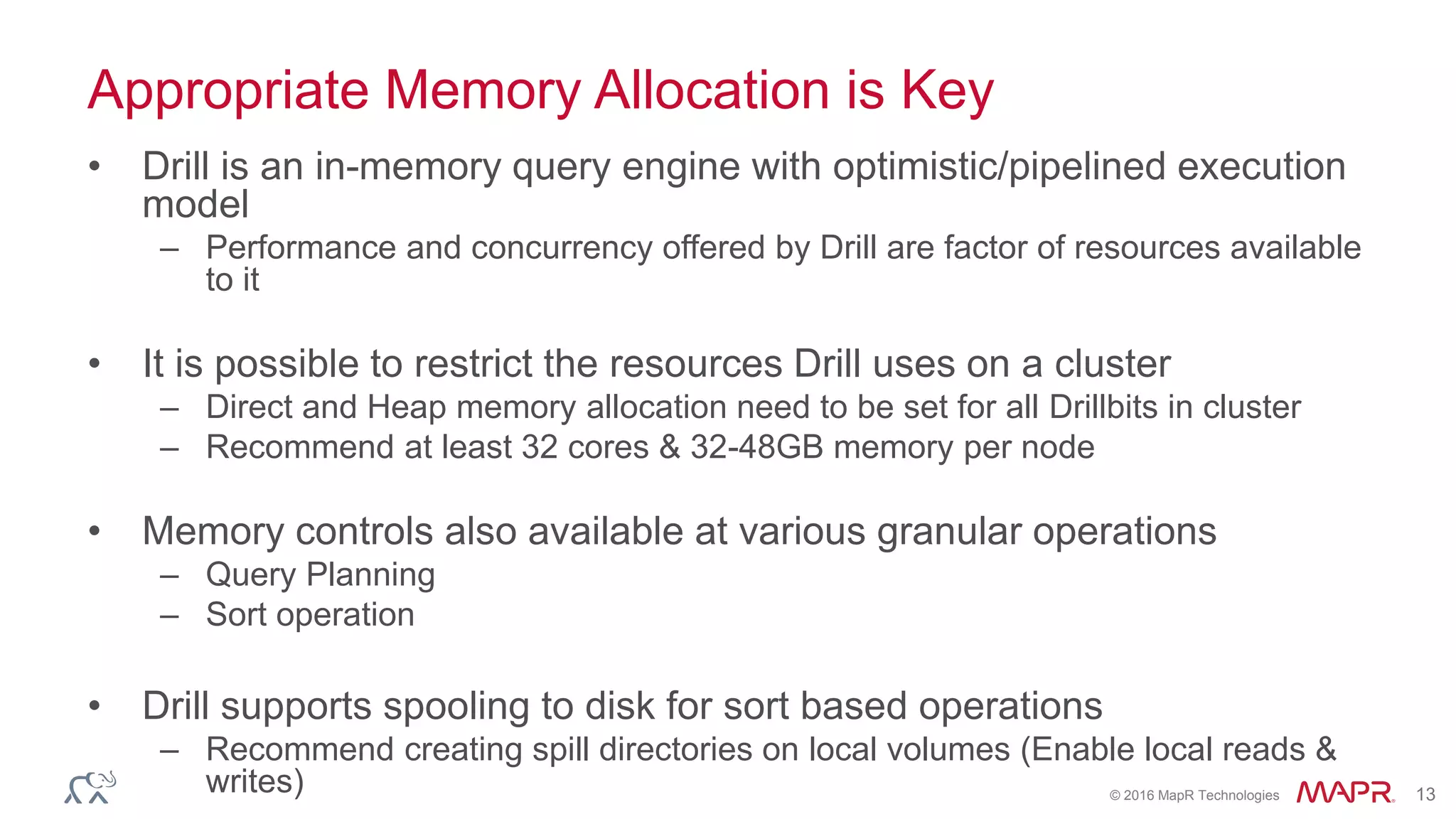
Appropriate Memory Allocation is Key
• Drill is an in-memory query engine with optimistic/pipelined execution
model
– Performance and concurrency offered by Drill are factor of resources available
to it
• It is possible to restrict the resources Drill uses on a cluster
– Direct and Heap memory allocation need to be set for all Drillbits in cluster
– Recommend at least 32 cores & 32-48GB memory per node
• Memory controls also available at various granular operations
– Query Planning
– Sort operation
• Drill supports spooling to disk for sort based operations
– Recommend creating spill directories on local volumes (Enable local reads &
writes)
© 2016 MapR Technologies 14© 2016 MapR Technologies
Storage Format Selection
© 2016 MapR Technologies 15
Choosing the Right Storage Format is Vital
• Format Selection
– Data Exploration/Ad-hoc queries: Any file formats : Text, JSON, Parquet, Avro
..
– SLA Critical BI & Analytics workloads : Parquet
– BI/Ad-hoc queries on changing data : MapR-DB/HBase
• Regarding Parquet
– Drill can generate Parquet data using CTAS syntax or read data generated by
other tools such as Hive/Spark
– Types of Parquet compression - Snappy (default), Gzip
– Parquet block size considerations
• For MapR , recommend to set Parquet block size to match MFS chunk
size
• When generating data through Drill CTAS, use parameter
– ALTER <SYSTEM or SESSION> SET `store.parquet.block-size` = 268435456;
© 2016 MapR Technologies 16© 2016 MapR Technologies
Query Performance
© 2016 MapR Technologies 17
How Drill Achieves Performance
➢ Execution in Drill
➢ Scale-out MPP
➢ Hierarchical “JSON like” data
model
➢ Columnar processing
➢ Optimistic & pipelined execution
➢ Runtime code generation
➢ Late binding
➢ Extensible
➢ Optimization in Drill
➢ Apache Calcite+ Parallel optimizations
➢ Data locality awareness
➢ Projection pruning
➢ Filter pushdown
➢ Partition pruning
➢ CBO & pluggable optimization rules
➢ Metadata caching
© 2016 MapR Technologies 18
Partition Your Data Layout for Reducing I/O
Sales
US
2016
Jan
1
2
3
4
..
Feb
..
2015
Jan
Feb
..
2014
Jan
Feb
..…
Europe
• Partition pruning allows a query
engine to determine and retrieve the
smallest needed dataset to answer a
given query
• Data can be partitioned
– At the time of ingestion into the cluster
– As part of ETL via Hive or Spark or
other batch processing tools
– Drill support CTAS with PARTITION BY
clause
• Drill does partition pruning for queries
on partitioned Hive tables as well as
file system queries
Select * from Sales
Where dir0=‘US’ and dir1 =‘2015’
© 2016 MapR Technologies 19
Partitioning Examples
Create partitioned table
Create table dfs.tmp.businessparquet
partition by(state,city,stars) as
select state, city, stars, business_id,
full_address,hours,name, review_count
from `business.json`;
Queries on partitioned keys
 select name, city, stars from
dfs.tmp.businessparquet where state='AZ'
and city = 'Fountain Hills' limit 5;
 select name, city, stars from
dfs.tmp.businessparquet where state='AZ'
and city = 'Fountain Hills' and stars=
'3.5' limit 5;
How to determine the
right partitions?
 Determine the common access
patterns from SQL queries
 Columns frequently used in the
WHERE clause are good
candidates for partition keys.
 Balance total # of partitions with
optimal query planning
performance
© 2016 MapR Technologies 20
Run EXPLAIN PLAN to check if Partition Pruning is Applied
00-00 Screen : rowType = RecordType(ANY name, ANY city, ANY stars): rowcount = 5.0, cumulative cost = {40.5 rows,
145.5 cpu, 0.0 io, 0.0 network, 0.0 memory}, id = 1005
00-01 Project(name=[$0], city=[$1], stars=[$2]) : rowType = RecordType(ANY name, ANY city, ANY stars): rowcount
= 5.0, cumulative cost = {40.0 rows, 145.0 cpu, 0.0 io, 0.0 network, 0.0 memory}, id = 1004
00-02 SelectionVectorRemover : rowType = RecordType(ANY name, ANY city, ANY stars): rowcount = 5.0,
cumulative cost = {40.0 rows, 145.0 cpu, 0.0 io, 0.0 network, 0.0 memory}, id = 1003
00-03 Limit(fetch=[5]) : rowType = RecordType(ANY name, ANY city, ANY stars): rowcount = 5.0, cumulative
cost = {35.0 rows, 140.0 cpu, 0.0 io, 0.0 network, 0.0 memory}, id = 1002
00-04 Project(name=[$3], city=[$1], stars=[$2]) : rowType = RecordType(ANY name, ANY city, ANY stars):
rowcount = 30.0, cumulative cost = {30.0 rows, 120.0 cpu, 0.0 io, 0.0 network, 0.0 memory}, id = 1001
00-05 Project(state=[$1], city=[$2], stars=[$3], name=[$0]) : rowType = RecordType(ANY state, ANY city,
ANY stars, ANY name): rowcount = 30.0, cumulative cost = {30.0 rows, 120.0 cpu, 0.0 io, 0.0 network, 0.0 memory}, id
= 1000
00-06 Scan(groupscan=[ParquetGroupScan [entries=[ReadEntryWithPath
[path=/tmp/businessparquet/0_0_114.parquet]], selectionRoot=file:/tmp/businessparquet, numFiles=1,
usedMetadataFile=false, columns=[`state`, `city`, `stars`, `name`]]]) : rowType = RecordType(ANY name, ANY state,
ANY city, ANY stars): rowcount = 30.0, cumulative cost = {30.0 rows, 120.0 cpu, 0.0 io, 0.0 network, 0.0 memory}, id
= 999
Scan(groupscan=[ParquetGroupScan
[entries=[ReadEntryWithPath
[path=/tmp/businessparquet/0_0_114.parquet]],
selectionRoot=file:/tmp/businessparquet, numFiles=1,
© 2016 MapR Technologies 21
Create Parquet Metadata Cache to Speed up Query Planning
• Helps reduce query planning time significantly when working with large # of
Parquet files (thousands to millions)
• Highly optimized cache with the key metadata from parquet files
– Column names, data types, nullability, row group size…
• Recursive cache creation at root level or selectively for specific directories or files
– Ex: REFRESH TABLE METADATA dfs.tmp.BusinessParquet;
• Metadata caching is better suited for large amounts of data with moderate rate of
change
• Applicable for only direct queries on parquet data in file system
– For queries via Hive tables enable meta store caching instead in storage plugin config
• "hive.metastore.cache-ttl-seconds": "<value>”,
• "hive.metastore.cache-expire-after": "<value>"
© 2016 MapR Technologies 22
Run Explain Plan to Check if Metadata Cache is Used
00-00 Screen : rowType = RecordType(ANY name, ANY city, ANY stars): rowcount = 5.0, cumulative cost = {40.5
rows, 145.5 cpu, 0.0 io, 0.0 network, 0.0 memory}, id = 1279
00-01 Project(name=[$0], city=[$1], stars=[$2]) : rowType = RecordType(ANY name, ANY city, ANY stars):
rowcount = 5.0, cumulative cost = {40.0 rows, 145.0 cpu, 0.0 io, 0.0 network, 0.0 memory}, id = 1278
00-02 SelectionVectorRemover : rowType = RecordType(ANY name, ANY city, ANY stars): rowcount = 5.0,
cumulative cost = {40.0 rows, 145.0 cpu, 0.0 io, 0.0 network, 0.0 memory}, id = 1277
00-03 Limit(fetch=[5]) : rowType = RecordType(ANY name, ANY city, ANY stars): rowcount = 5.0, cumulative
cost = {35.0 rows, 140.0 cpu, 0.0 io, 0.0 network, 0.0 memory}, id = 1276
00-04 Project(name=[$3], city=[$1], stars=[$2]) : rowType = RecordType(ANY name, ANY city, ANY stars):
rowcount = 30.0, cumulative cost = {30.0 rows, 120.0 cpu, 0.0 io, 0.0 network, 0.0 memory}, id = 1275
00-05 Project(state=[$1], city=[$2], stars=[$3], name=[$0]) : rowType = RecordType(ANY state, ANY
city, ANY stars, ANY name): rowcount = 30.0, cumulative cost = {30.0 rows, 120.0 cpu, 0.0 io, 0.0 network, 0.0
memory}, id = 1274
00-06 Scan(groupscan=[ParquetGroupScan [entries=[ReadEntryWithPath
[path=/tmp/BusinessParquet/0_0_114.parquet]], selectionRoot=/tmp/BusinessParquet, numFiles=1,
usedMetadataFile=true, columns=[`state`, `city`, `stars`, `name`]]]) : rowType = RecordType(ANY name, ANY state,
ANY city, ANY stars): rowcount = 30.0, cumulative cost = {30.0 rows, 120.0 cpu, 0.0 io, 0.0 network, 0.0 memory},
id = 1273Scan(groupscan=[ParquetGroupScan
[entries=[ReadEntryWithPath
[path=/tmp/businessparquet/0_0_114.parquet]],
selectionRoot=file:/tmp/businessparquet, numFiles=1, ,
usedMetadataFile=true
© 2016 MapR Technologies 23
Create Data Sources & Schemas for Fast Metadata Queries by BI
Tools
• Metadata queries are very commonly
used by BI/Visualization tools
– INFORMATION_SCHEMA (Show Schemas,
Show tables..)
– Limit 0/1 queries
• Drill is a schema-less system , so
metadata queries at scale might need
careful consideration
• Drill provides optimized query paths to
provide fast schema returns wherever
possible
• User level Guidelines
– Disable unused Drill storage plugins
– Restrict schemas via IncludeSchemas &
ExcludeSchemas flags from ODBC/JDBC
connections
– Give Drill explicit schema information via views
– Enable metadata caching
CREATE or REPLACE VIEW
dfs.views.stock_quotes AS
SELECT CAST(columns[0] as VARCHAR(6))
as symbol,
CAST(columns[1] as VARCHAR(20)) as
`name`,
CAST((to_date(columns[2],
'MM/dd/yyyy')) as date) as `date`,
CAST(columns[3] as FLOAT) as
trade_price,
CAST(columns[4] as INT) as
trade_volume
from dfs.csv.`/stock_quotes`;
Sample view definition
with schemas
© 2016 MapR Technologies 24
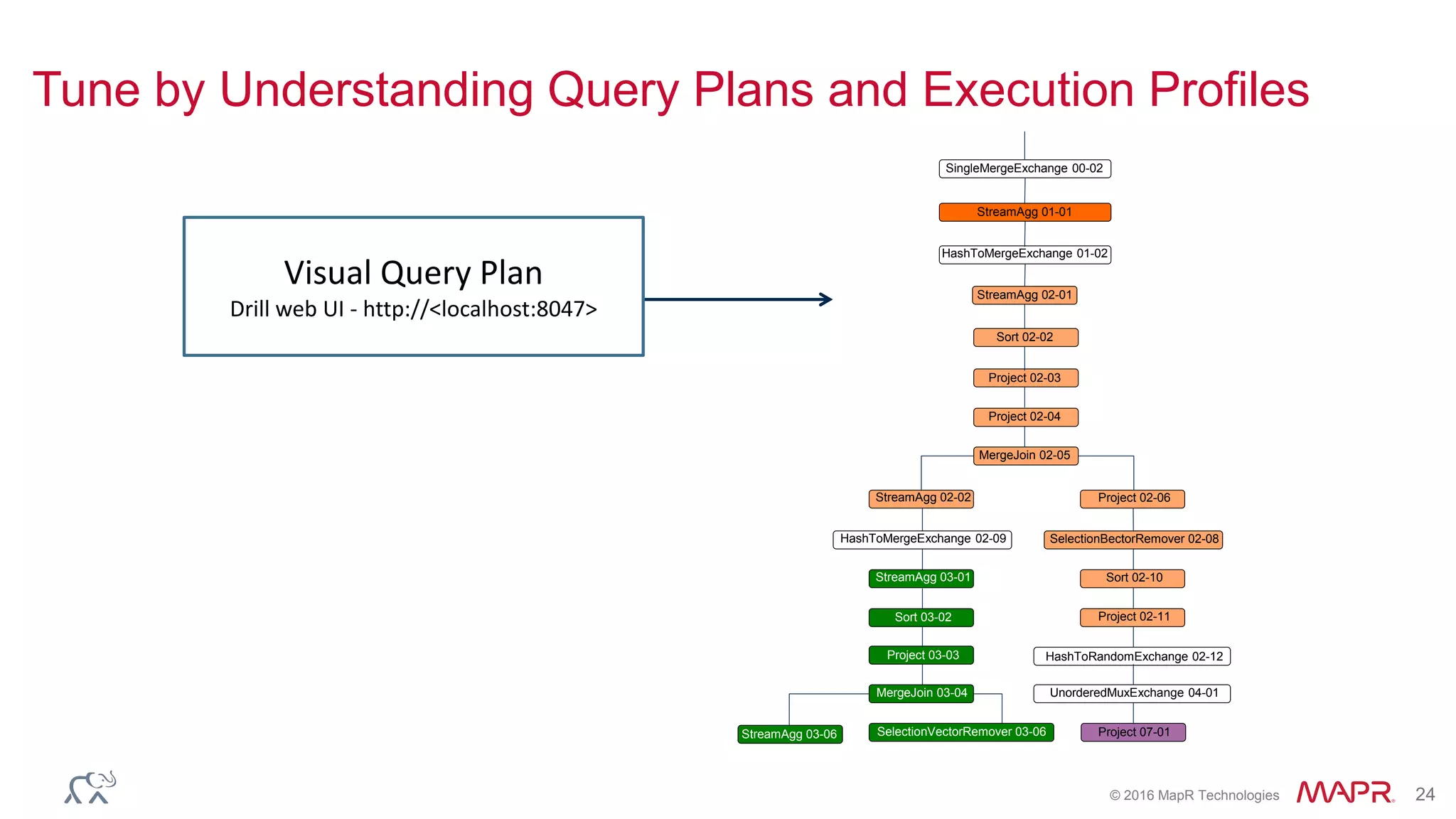
Tune by Understanding Query Plans and Execution Profiles
SingleMergeExchange 00-02
StreamAgg 01-01
HashToMergeExchange 01-02
StreamAgg 02-01
Sort 02-02
Project 02-03
Project 02-04
MergeJoin 02-05
StreamAgg 02-02 Project 02-06
HashToMergeExchange 02-09 SelectionBectorRemover 02-08
StreamAgg 03-01 Sort 02-10
Sort 03-02 Project 02-11
Project 03-03 HashToRandomExchange 02-12
MergeJoin 03-04 UnorderedMuxExchange 04-01
SelectionVectorRemover 03-06 Project 07-01StreamAgg 03-06
StreamAgg 01-01
Visual Query Plan
Drill web UI - http://<localhost:8047>
© 2016 MapR Technologies 25
Tune by Understanding Query Plans and Execution Profiles
Visual Query Plan
Drill web UI - http://<localhost:8047>
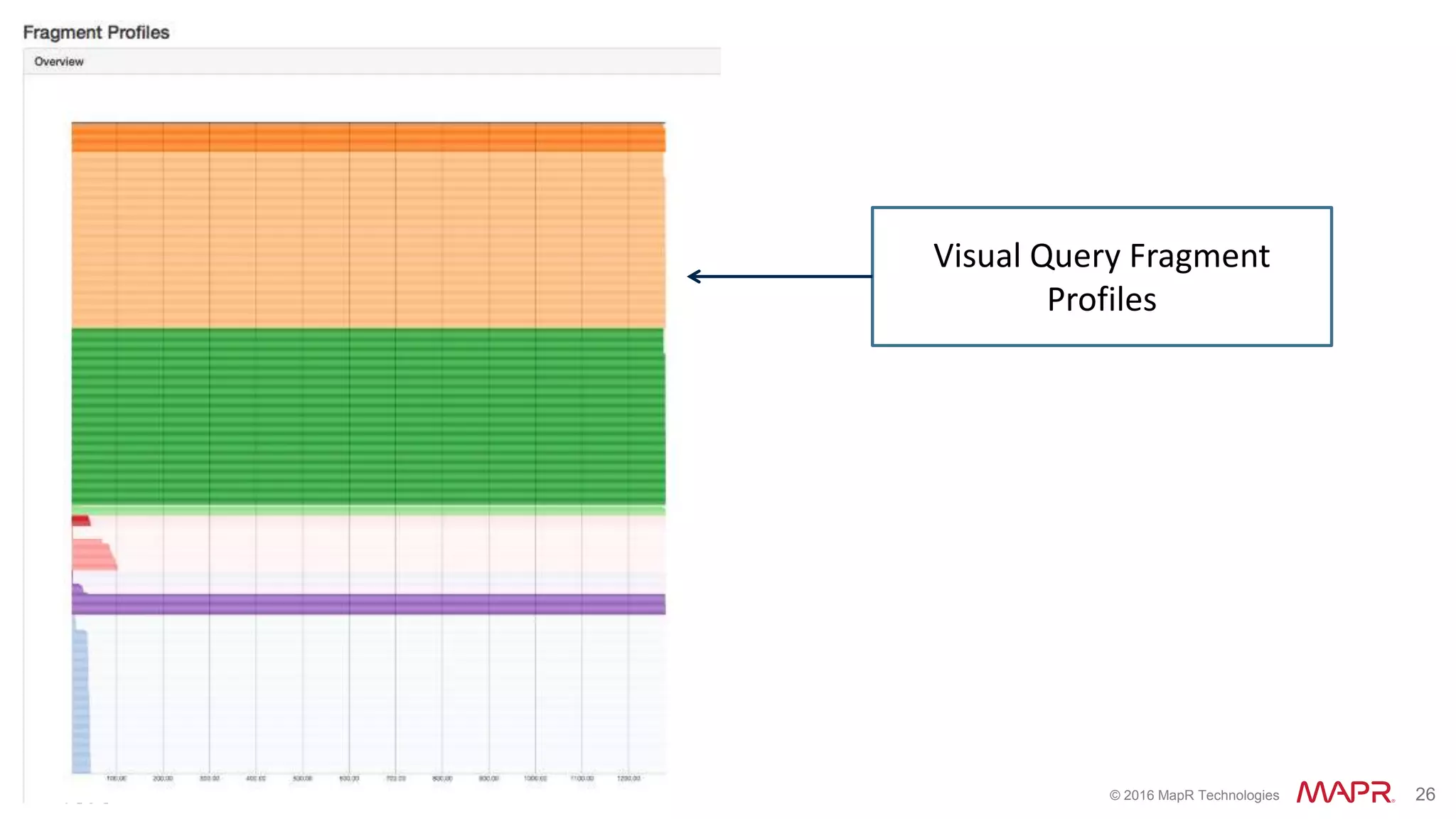
© 2016 MapR Technologies 26
Visual Query Fragment
Profiles
© 2016 MapR Technologies 27
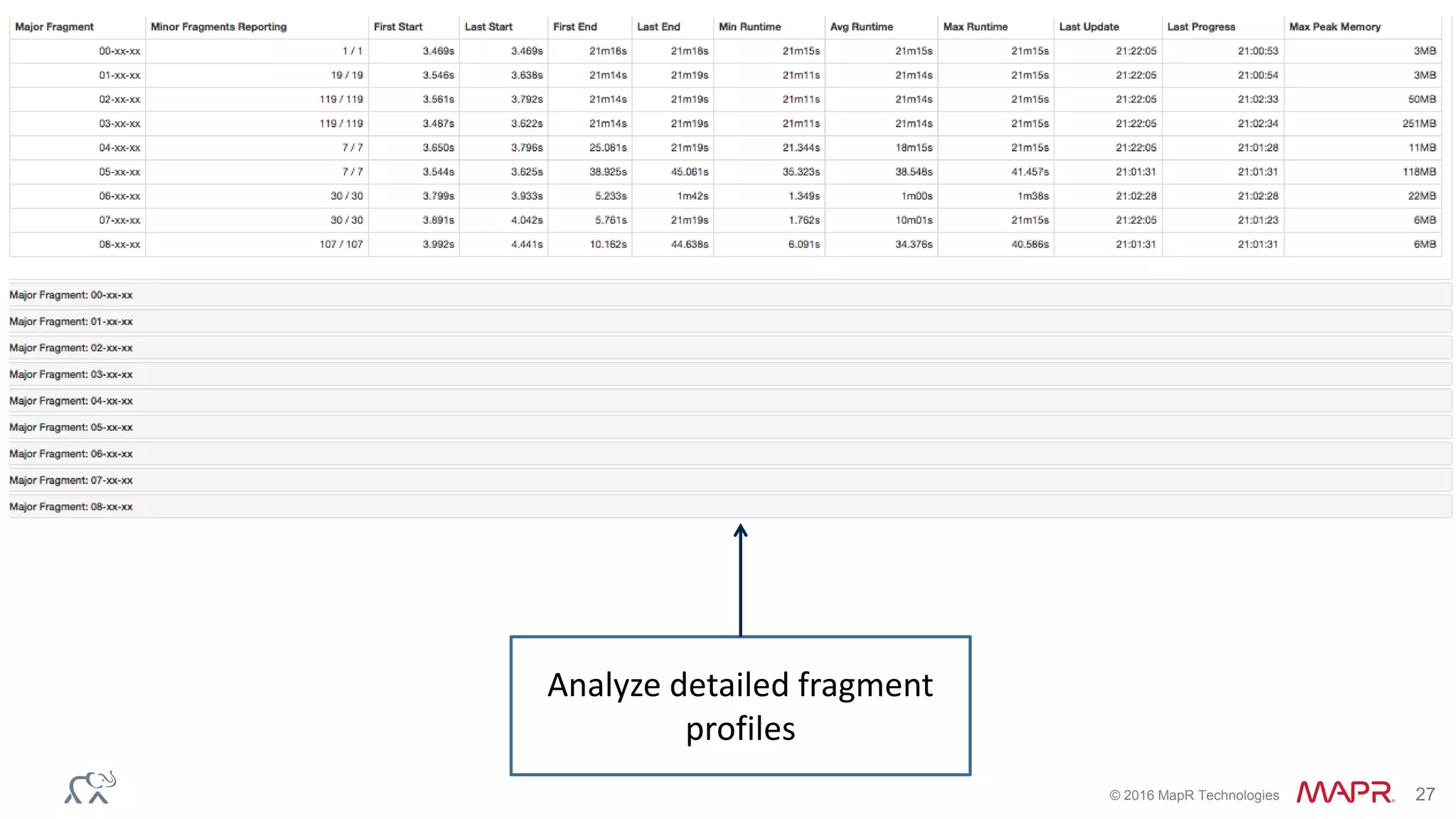
Analyze detailed fragment
profiles
© 2016 MapR Technologies 28
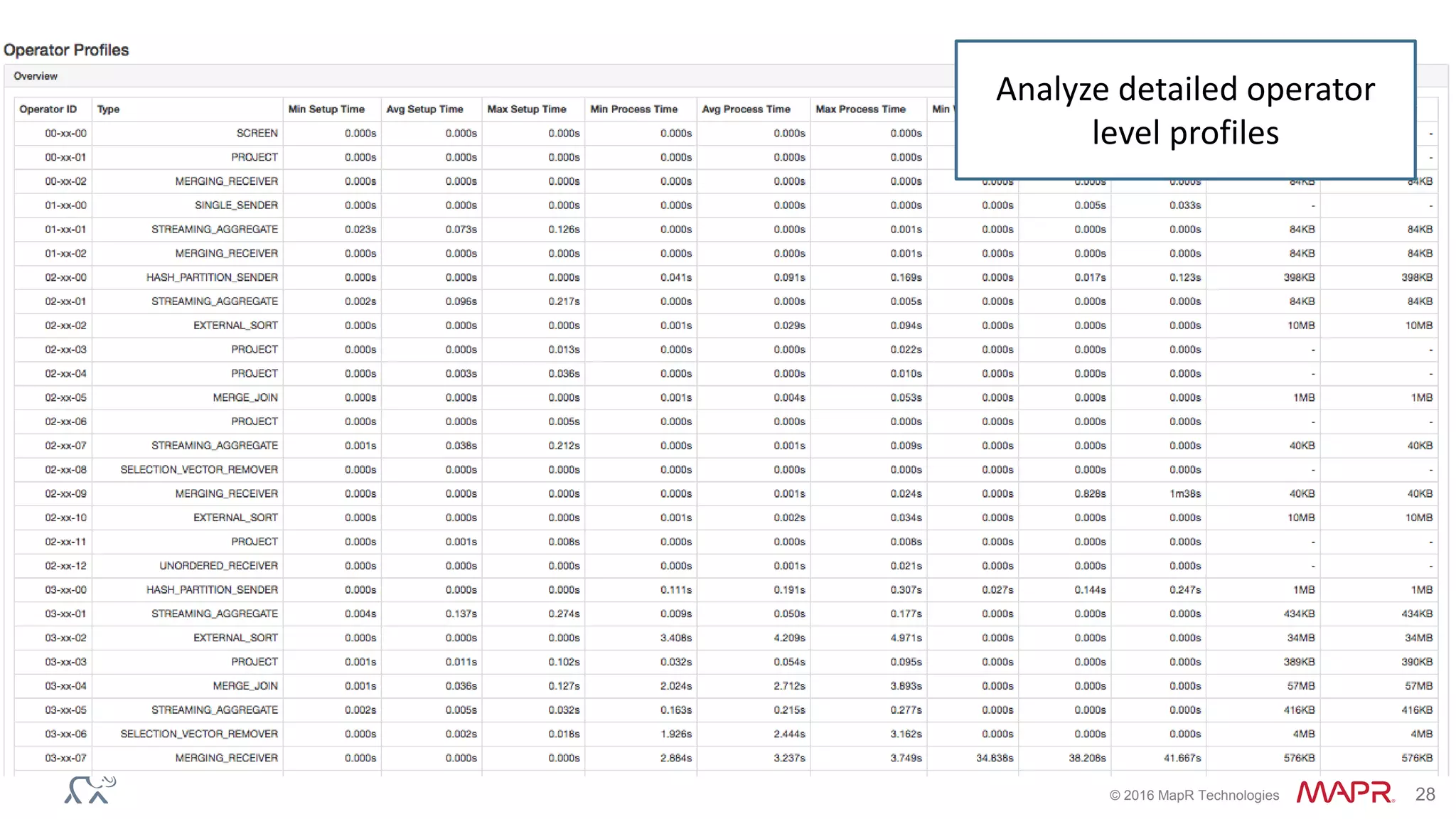
Analyze detailed operator
level profiles
© 2016 MapR Technologies 29
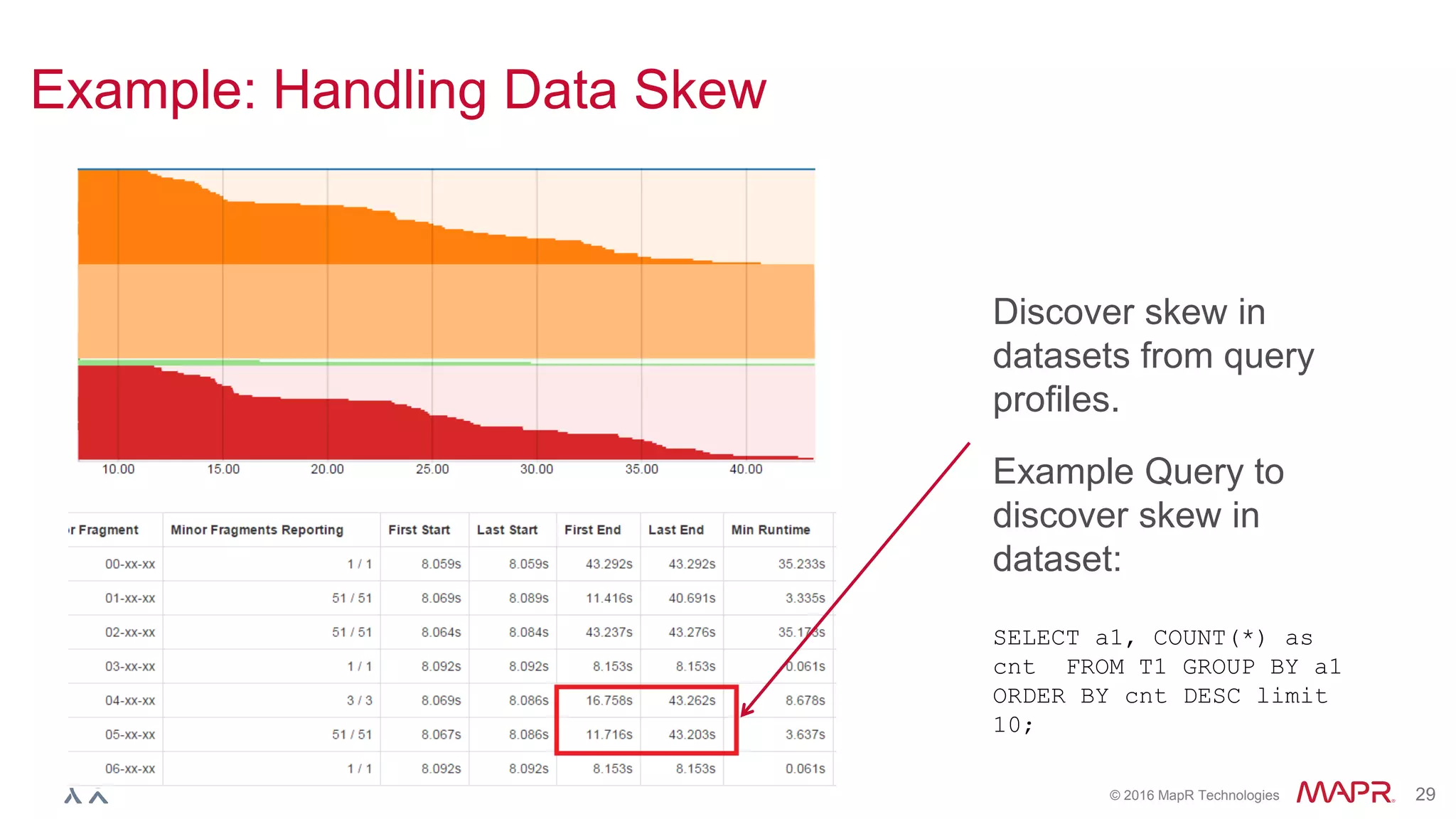
Example: Handling Data Skew
Discover skew in
datasets from query
profiles.
Example Query to
discover skew in
dataset:
SELECT a1, COUNT(*) as
cnt FROM T1 GROUP BY a1
ORDER BY cnt DESC limit
10;
© 2016 MapR Technologies 30
Use Drill Parallelization Controls to Balance Single Query
Performance with Concurrent Usage
Key setting to look for:
planner.width.max_per_node
• The maximum degree of
distribution of a query
across cores and cluster
nodes.
Interpreting parallelization from query
profiles
© 2016 MapR Technologies 31
Use Monitoring as a first step for Drill Cluster Management
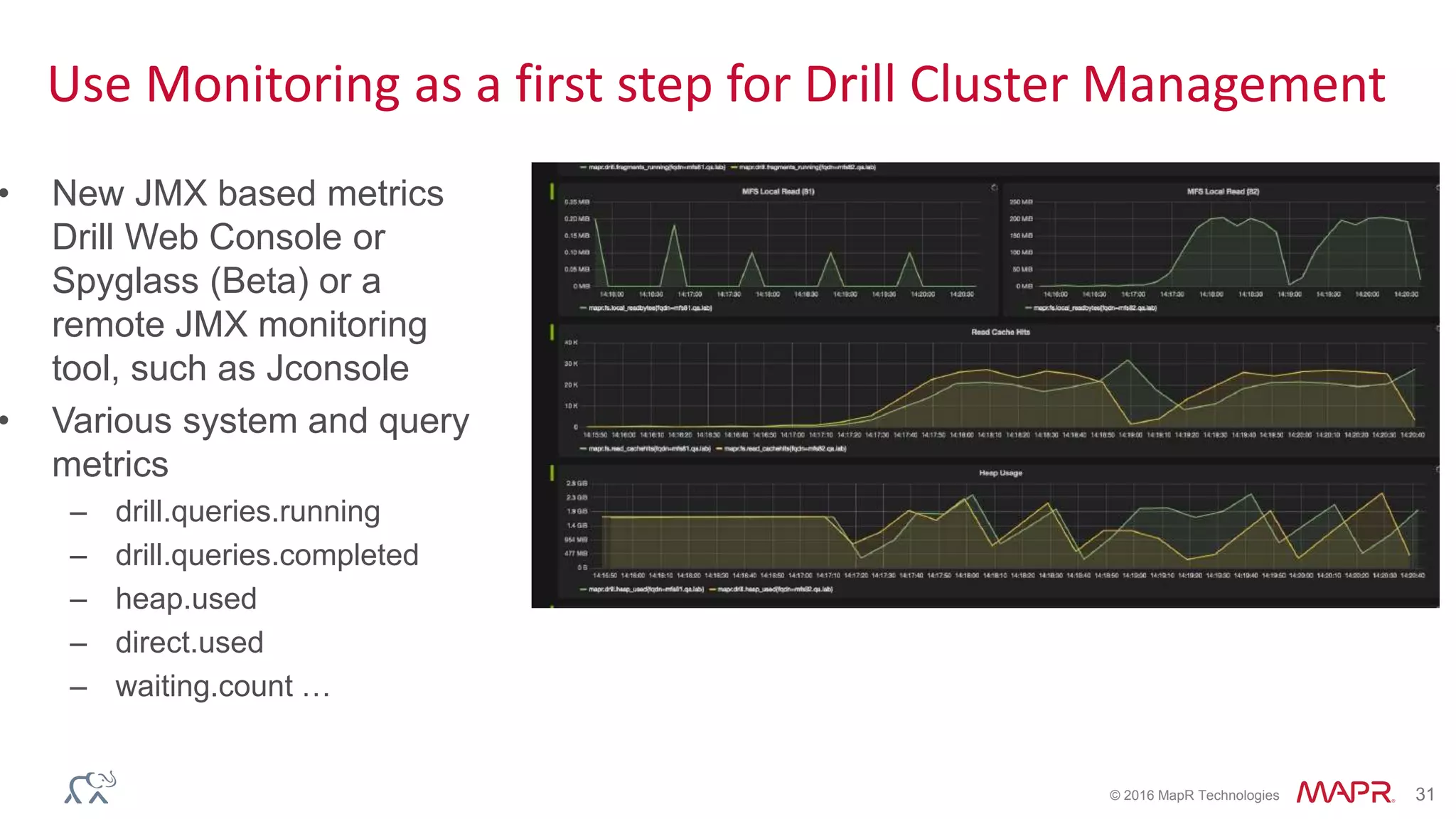
• New JMX based metrics
Drill Web Console or
Spyglass (Beta) or a
remote JMX monitoring
tool, such as Jconsole
• Various system and query
metrics
– drill.queries.running
– drill.queries.completed
– heap.used
– direct.used
– waiting.count …
© 2016 MapR Technologies 32© 2016 MapR Technologies
Security
© 2016 MapR Technologies 33
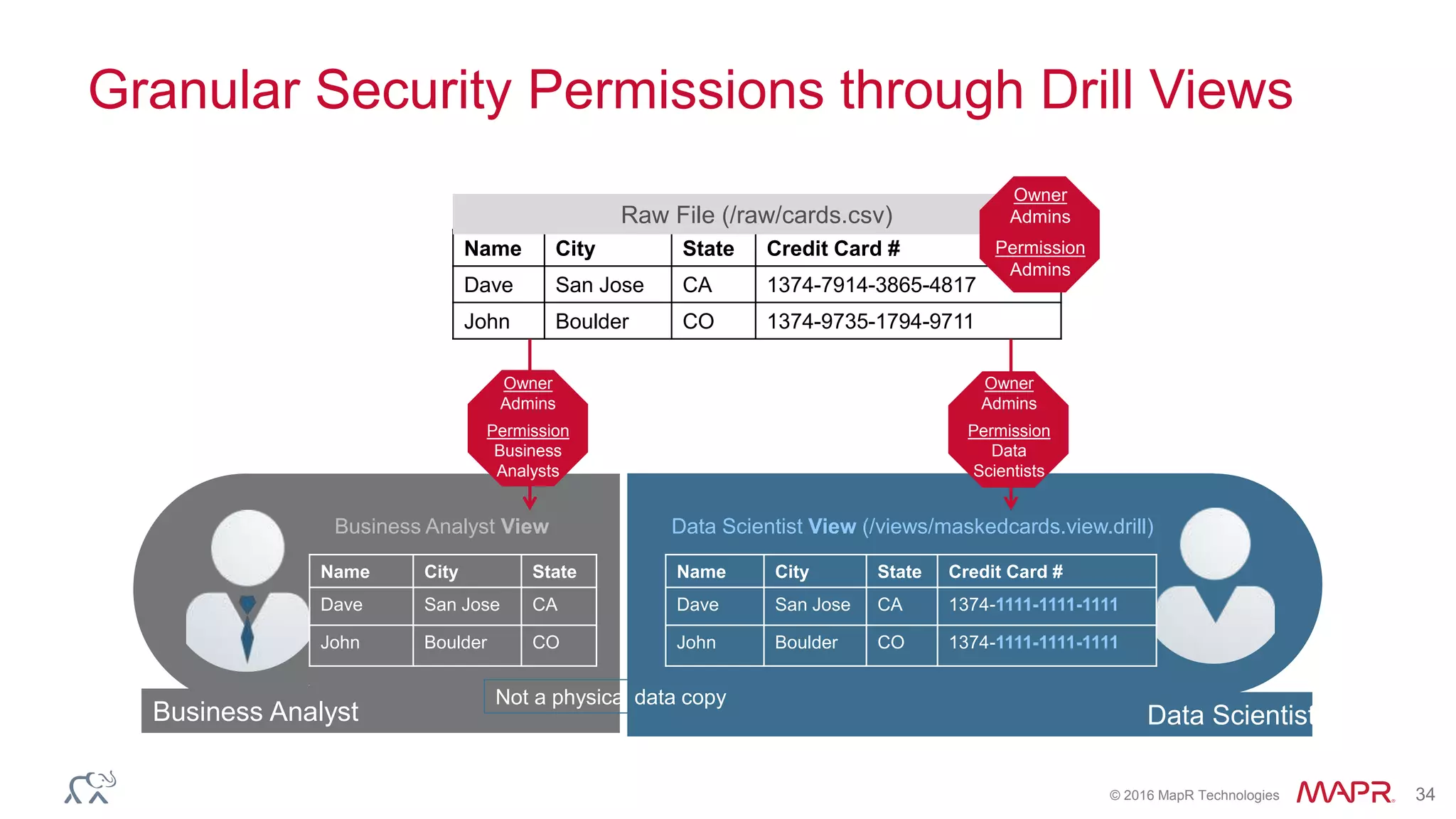
Use Drill Security Controls to Provide Granular Access
➢ End to end security from BI
tools to Hadoop
➢ Standard based PAM
Authentication
➢ 2 level user Impersonation
➢ Drill respects storage level
security permissions
➢ Ex: Hive authorization (SQL
and Storage based), File
system permissions, MapR-DB
table ACEs
➢ More Fine-grained row and
column level access control
with Drill Views – no
centralized security repository
required
© 2016 MapR Technologies 34
Granular Security Permissions through Drill Views
Name City State Credit Card #
Dave San Jose CA 1374-7914-3865-4817
John Boulder CO 1374-9735-1794-9711
Raw File (/raw/cards.csv)
Owner
Admins
Permission
Admins
Business Analyst Data Scientist
Name City State Credit Card #
Dave San Jose CA 1374-1111-1111-1111
John Boulder CO 1374-1111-1111-1111
Data Scientist View (/views/maskedcards.view.drill)
Not a physical data copy
Name City State
Dave San Jose CA
John Boulder CO
Business Analyst View
Owner
Admins
Permission
Business
Analysts
Owner
Admins
Permission
Data
Scientists
© 2016 MapR Technologies 35
Drill Best Practices on the MapR Converge Community
https://community.mapr.com/docs/DOC-1497
© 2016 MapR Technologies 36© 2016 MapR Technologies
Roadmap
© 2016 MapR Technologies 37
Roadmap for 2016
• YARN Integration
• Kerberos/SASL support
• Parquet Reader Improvements
• Improved Statistics
• Query Performance Improvements
• Enhanced Concurrency & Resource Management
• Deeper Integrations with MapR-DB & MapR Streams
• A variety of SQL & Usability Features
© 2016 MapR Technologies 38
Get started with Drill today
• Learn:
– http://drill.apache.org
– https://www.mapr.com/products/apache-drill
• Download MapR Sandbox
– https://www.mapr.com/products/mapr-sandbox-hadoop/download-sandbox-drill
• Ask questions:
– Ask Us Anything about Drill in the MapR Community from Wed- Fri
– https://community.mapr.com/
– user@drill.apache.org
• Contact us:
– nrentachintala@maprtech.com
– asinha@maprtech.com

Putting Apache Drill into Production

  • 1.
    © 2016 MapRTechnologies 1© 2016 MapR Technologies Putting Apache Drill into Production Neeraja Rentachintala, Sr. Director, Product Management Aman Sinha, Lead Software Engineer, Apache Drill & Calcite PMC
  • 2.
    © 2016 MapRTechnologies 2 Topics • Apache Drill –What & Why – Use Cases – Customer Examples • Considerations & Best Practices for Production Deployments – Deployment Architecture – Storage Format Selection – Query Performance – Security • Product Roadmap • Q&A
  • 3.
    © 2016 MapRTechnologies 3© 2016 MapR Technologies Apache Drill –What & Why
  • 4.
    © 2016 MapRTechnologies 4 Schema-Free SQL engine for Flexibility & Performance Rapid time to insights • Query data in-situ • No Schemas required • Easy to get started Access to any data type, any data source • Relational • Nested data • Schema-less Integration with existing tools • ANSI SQL • BI tool integration • User Defined Functions Scale in all dimensions • TB-PB of scale • 1000s of users • 1000s of nodes Granular security • Authentication • Row/column level controls • De-centralized
  • 5.
    © 2016 MapRTechnologies 5 MapR-DB MapR Streams Database Event Streaming Real-time dashboardsBI/Ad-hoc queriesData Exploration Unified SQL Layer for The MapR Converged Data Platform Global Sources Web scale Storage MapR-FS Batch Processing (MapReduce, Spark, Pig) Stream Processing (Spark Streaming, Storm)
  • 6.
    © 2016 MapRTechnologies 6 Use Cases for Drill Data Exploration Adhoc queries Dashboards/ BI reporting ETL Primary Purpose Data discovery & Model development Investigative analytics Operational reporting Data prep for downstream needs Usage Internal Internal Internal and external facing apps Internal Typical Users Data scientists, Technical analysts, General SQL users Business analysts, General SQL users Business analysts, End users ETL/DWH developers Tools involved Command Line, SQL/BI tools, R, Python, Spark.. Command line , SQL/BI tools BI tools, Custom apps ETL/DI tools , Scripts Critical requirement Flexibility (File format variety, nested data, UDFs..) Flexibility (File format variety ) , Interactive performance – ok up to 10s of seconds Performance Fault tolerance Type of datasets Raw datasets Raw datasets, Processed datasets (via Hive and Spark). Processed datasets , OK to structure data layout for optimized performance Raw datasets Query patterns Unknown models & unknown query patterns Known models , Unknown query patterns Known models, known query patterns Predefined queries Traditional and New Types of BI on Hadoop More raw data More real time More Agility & Self Service More Users More Cost Effectively +
  • 7.
    © 2016 MapRTechnologies 7 Customer examples https://www.mapr.com/blog/happy-anniversary-apache- drill-what-difference-year-makes
  • 8.
    © 2016 MapRTechnologies 8 Agile and Iterative Releases Drill 1.0 (May’15) Drill 1.1 (July’15) Drill 1.2 (Oct’15) Drill 1.3 (Nov’15) Drill 1.4 (Jan’16) Drill 1.5 (Feb’16) Drill 1.6 (April’16) Drill 1.7 (Jul’16) Drill 1.8 Just released • 14 releases since Beta in Sep’14 • 50+ contributors (MapR, Dremio, Intuit, Microsoft, Hortonworks...) • 1000’s of sandbox downloads since GA • 6,000+ Analyst and developer certifications through MapR ODT • 14,000+ email threads on Drill Dev and User forums • Lot of new contributions: JDBC/Mongo-DB/Kudu storage plugins, Geospatial functions..
  • 9.
    © 2016 MapRTechnologies 9 Drill Product Evolution Drill 1.0 GA •Drill GA Drill 1.1 •Automatic Partitioning for Parquet Files •Window Functions support •- Aggregate Functions: AVG, COUNT, MAX, MIN, SUM •-Ranking Functions: CUME_DIST, DENSE_RANK, PERCENT_RANK, RANK and ROW_NUMBER •Hive impersonation •SQL Union support •Complex data enhancements· and more Drill 1.2 •Native parquet reader for Hive tables •Hive partition pruning •Multiple Hive versions support •Hive 1.2.1 version support •New analytical functions (Lead, lag, Ntiile etc) •Multiple window Partition By clauses support •Drop table syntax •Metadata caching •Security support for web UI •INT 96 data type support •UNION distinct support Drill 1.3/1.4 •Improved Tableau experience with faster Limit 0 queries •Metadata (INFORMATION_SC HEMA) query speed ups on Hive schemas/tables •Robust partition pruning (more data types, large # of partitions) •Optimized metadata cache •Improved window functions resource usage and performance •New & improved JDBC driver Drill 1.5/1.6 •Enhanced Stability & scale •New memory allocator •Improved uniform query load distribution via connection pooling •Enhanced query performance •Early application of partition pruning in query planning •Hive tables query planning improvements •Row count based pruning for Limit N queries •Lazy reading of parquet metadata caching •Limit 0 performance •Enhanced SQL Window function frame syntax •Client impersonation •JDK 1.8 support Drill 1.7 •Enhanced MaxDir/MinDir functions •Access to Drill logs in the Web UI •Addition of JDBC/ODBC client IP in Drill audit logs •Monitoring via JMX •Hive CHAR data type support •Partition pruning enhancements •Ability to return file names as part of queries ANSI SQL Window Functions Enhanced Hive Compatibility Query Performanc e & Scale Drill on MapR-DB JSON tables Easy Monitoring & Security
  • 10.
    © 2016 MapRTechnologies 10© 2016 MapR Technologies Considerations & Best Practices for Production Deployments
  • 11.
    © 2016 MapRTechnologies 11© 2016 MapR Technologies Deployment
  • 12.
    © 2016 MapRTechnologies 12 Drill is a scale-out MPP query engine Zookeeper DFS/HBase/H ive DFS/HBase/H ive DFS/HBase/H ive Drillbit Drillbit Drillbit Client apps • Install Drill on all the data nodes on cluster • Improves performance w/ data locality • Client tools must communicate with Drill via Zookeeper quorum • Direct connections to Drillbit are not recommended for prod deployments • When installing Drill on a client/edge node, make sure the node has the network connection to zookeeper+all drillbit nodes.
  • 13.
    © 2016 MapRTechnologies 13 Appropriate Memory Allocation is Key • Drill is an in-memory query engine with optimistic/pipelined execution model – Performance and concurrency offered by Drill are factor of resources available to it • It is possible to restrict the resources Drill uses on a cluster – Direct and Heap memory allocation need to be set for all Drillbits in cluster – Recommend at least 32 cores & 32-48GB memory per node • Memory controls also available at various granular operations – Query Planning – Sort operation • Drill supports spooling to disk for sort based operations – Recommend creating spill directories on local volumes (Enable local reads & writes)
  • 14.
    © 2016 MapRTechnologies 14© 2016 MapR Technologies Storage Format Selection
  • 15.
    © 2016 MapRTechnologies 15 Choosing the Right Storage Format is Vital • Format Selection – Data Exploration/Ad-hoc queries: Any file formats : Text, JSON, Parquet, Avro .. – SLA Critical BI & Analytics workloads : Parquet – BI/Ad-hoc queries on changing data : MapR-DB/HBase • Regarding Parquet – Drill can generate Parquet data using CTAS syntax or read data generated by other tools such as Hive/Spark – Types of Parquet compression - Snappy (default), Gzip – Parquet block size considerations • For MapR , recommend to set Parquet block size to match MFS chunk size • When generating data through Drill CTAS, use parameter – ALTER <SYSTEM or SESSION> SET `store.parquet.block-size` = 268435456;
  • 16.
    © 2016 MapRTechnologies 16© 2016 MapR Technologies Query Performance
  • 17.
    © 2016 MapRTechnologies 17 How Drill Achieves Performance ➢ Execution in Drill ➢ Scale-out MPP ➢ Hierarchical “JSON like” data model ➢ Columnar processing ➢ Optimistic & pipelined execution ➢ Runtime code generation ➢ Late binding ➢ Extensible ➢ Optimization in Drill ➢ Apache Calcite+ Parallel optimizations ➢ Data locality awareness ➢ Projection pruning ➢ Filter pushdown ➢ Partition pruning ➢ CBO & pluggable optimization rules ➢ Metadata caching
  • 18.
    © 2016 MapRTechnologies 18 Partition Your Data Layout for Reducing I/O Sales US 2016 Jan 1 2 3 4 .. Feb .. 2015 Jan Feb .. 2014 Jan Feb ..… Europe • Partition pruning allows a query engine to determine and retrieve the smallest needed dataset to answer a given query • Data can be partitioned – At the time of ingestion into the cluster – As part of ETL via Hive or Spark or other batch processing tools – Drill support CTAS with PARTITION BY clause • Drill does partition pruning for queries on partitioned Hive tables as well as file system queries Select * from Sales Where dir0=‘US’ and dir1 =‘2015’
  • 19.
    © 2016 MapRTechnologies 19 Partitioning Examples Create partitioned table Create table dfs.tmp.businessparquet partition by(state,city,stars) as select state, city, stars, business_id, full_address,hours,name, review_count from `business.json`; Queries on partitioned keys  select name, city, stars from dfs.tmp.businessparquet where state='AZ' and city = 'Fountain Hills' limit 5;  select name, city, stars from dfs.tmp.businessparquet where state='AZ' and city = 'Fountain Hills' and stars= '3.5' limit 5; How to determine the right partitions?  Determine the common access patterns from SQL queries  Columns frequently used in the WHERE clause are good candidates for partition keys.  Balance total # of partitions with optimal query planning performance
  • 20.
    © 2016 MapRTechnologies 20 Run EXPLAIN PLAN to check if Partition Pruning is Applied 00-00 Screen : rowType = RecordType(ANY name, ANY city, ANY stars): rowcount = 5.0, cumulative cost = {40.5 rows, 145.5 cpu, 0.0 io, 0.0 network, 0.0 memory}, id = 1005 00-01 Project(name=[$0], city=[$1], stars=[$2]) : rowType = RecordType(ANY name, ANY city, ANY stars): rowcount = 5.0, cumulative cost = {40.0 rows, 145.0 cpu, 0.0 io, 0.0 network, 0.0 memory}, id = 1004 00-02 SelectionVectorRemover : rowType = RecordType(ANY name, ANY city, ANY stars): rowcount = 5.0, cumulative cost = {40.0 rows, 145.0 cpu, 0.0 io, 0.0 network, 0.0 memory}, id = 1003 00-03 Limit(fetch=[5]) : rowType = RecordType(ANY name, ANY city, ANY stars): rowcount = 5.0, cumulative cost = {35.0 rows, 140.0 cpu, 0.0 io, 0.0 network, 0.0 memory}, id = 1002 00-04 Project(name=[$3], city=[$1], stars=[$2]) : rowType = RecordType(ANY name, ANY city, ANY stars): rowcount = 30.0, cumulative cost = {30.0 rows, 120.0 cpu, 0.0 io, 0.0 network, 0.0 memory}, id = 1001 00-05 Project(state=[$1], city=[$2], stars=[$3], name=[$0]) : rowType = RecordType(ANY state, ANY city, ANY stars, ANY name): rowcount = 30.0, cumulative cost = {30.0 rows, 120.0 cpu, 0.0 io, 0.0 network, 0.0 memory}, id = 1000 00-06 Scan(groupscan=[ParquetGroupScan [entries=[ReadEntryWithPath [path=/tmp/businessparquet/0_0_114.parquet]], selectionRoot=file:/tmp/businessparquet, numFiles=1, usedMetadataFile=false, columns=[`state`, `city`, `stars`, `name`]]]) : rowType = RecordType(ANY name, ANY state, ANY city, ANY stars): rowcount = 30.0, cumulative cost = {30.0 rows, 120.0 cpu, 0.0 io, 0.0 network, 0.0 memory}, id = 999 Scan(groupscan=[ParquetGroupScan [entries=[ReadEntryWithPath [path=/tmp/businessparquet/0_0_114.parquet]], selectionRoot=file:/tmp/businessparquet, numFiles=1,
  • 21.
    © 2016 MapRTechnologies 21 Create Parquet Metadata Cache to Speed up Query Planning • Helps reduce query planning time significantly when working with large # of Parquet files (thousands to millions) • Highly optimized cache with the key metadata from parquet files – Column names, data types, nullability, row group size… • Recursive cache creation at root level or selectively for specific directories or files – Ex: REFRESH TABLE METADATA dfs.tmp.BusinessParquet; • Metadata caching is better suited for large amounts of data with moderate rate of change • Applicable for only direct queries on parquet data in file system – For queries via Hive tables enable meta store caching instead in storage plugin config • "hive.metastore.cache-ttl-seconds": "<value>”, • "hive.metastore.cache-expire-after": "<value>"
  • 22.
    © 2016 MapRTechnologies 22 Run Explain Plan to Check if Metadata Cache is Used 00-00 Screen : rowType = RecordType(ANY name, ANY city, ANY stars): rowcount = 5.0, cumulative cost = {40.5 rows, 145.5 cpu, 0.0 io, 0.0 network, 0.0 memory}, id = 1279 00-01 Project(name=[$0], city=[$1], stars=[$2]) : rowType = RecordType(ANY name, ANY city, ANY stars): rowcount = 5.0, cumulative cost = {40.0 rows, 145.0 cpu, 0.0 io, 0.0 network, 0.0 memory}, id = 1278 00-02 SelectionVectorRemover : rowType = RecordType(ANY name, ANY city, ANY stars): rowcount = 5.0, cumulative cost = {40.0 rows, 145.0 cpu, 0.0 io, 0.0 network, 0.0 memory}, id = 1277 00-03 Limit(fetch=[5]) : rowType = RecordType(ANY name, ANY city, ANY stars): rowcount = 5.0, cumulative cost = {35.0 rows, 140.0 cpu, 0.0 io, 0.0 network, 0.0 memory}, id = 1276 00-04 Project(name=[$3], city=[$1], stars=[$2]) : rowType = RecordType(ANY name, ANY city, ANY stars): rowcount = 30.0, cumulative cost = {30.0 rows, 120.0 cpu, 0.0 io, 0.0 network, 0.0 memory}, id = 1275 00-05 Project(state=[$1], city=[$2], stars=[$3], name=[$0]) : rowType = RecordType(ANY state, ANY city, ANY stars, ANY name): rowcount = 30.0, cumulative cost = {30.0 rows, 120.0 cpu, 0.0 io, 0.0 network, 0.0 memory}, id = 1274 00-06 Scan(groupscan=[ParquetGroupScan [entries=[ReadEntryWithPath [path=/tmp/BusinessParquet/0_0_114.parquet]], selectionRoot=/tmp/BusinessParquet, numFiles=1, usedMetadataFile=true, columns=[`state`, `city`, `stars`, `name`]]]) : rowType = RecordType(ANY name, ANY state, ANY city, ANY stars): rowcount = 30.0, cumulative cost = {30.0 rows, 120.0 cpu, 0.0 io, 0.0 network, 0.0 memory}, id = 1273Scan(groupscan=[ParquetGroupScan [entries=[ReadEntryWithPath [path=/tmp/businessparquet/0_0_114.parquet]], selectionRoot=file:/tmp/businessparquet, numFiles=1, , usedMetadataFile=true
  • 23.
    © 2016 MapRTechnologies 23 Create Data Sources & Schemas for Fast Metadata Queries by BI Tools • Metadata queries are very commonly used by BI/Visualization tools – INFORMATION_SCHEMA (Show Schemas, Show tables..) – Limit 0/1 queries • Drill is a schema-less system , so metadata queries at scale might need careful consideration • Drill provides optimized query paths to provide fast schema returns wherever possible • User level Guidelines – Disable unused Drill storage plugins – Restrict schemas via IncludeSchemas & ExcludeSchemas flags from ODBC/JDBC connections – Give Drill explicit schema information via views – Enable metadata caching CREATE or REPLACE VIEW dfs.views.stock_quotes AS SELECT CAST(columns[0] as VARCHAR(6)) as symbol, CAST(columns[1] as VARCHAR(20)) as `name`, CAST((to_date(columns[2], 'MM/dd/yyyy')) as date) as `date`, CAST(columns[3] as FLOAT) as trade_price, CAST(columns[4] as INT) as trade_volume from dfs.csv.`/stock_quotes`; Sample view definition with schemas
  • 24.
    © 2016 MapRTechnologies 24 Tune by Understanding Query Plans and Execution Profiles SingleMergeExchange 00-02 StreamAgg 01-01 HashToMergeExchange 01-02 StreamAgg 02-01 Sort 02-02 Project 02-03 Project 02-04 MergeJoin 02-05 StreamAgg 02-02 Project 02-06 HashToMergeExchange 02-09 SelectionBectorRemover 02-08 StreamAgg 03-01 Sort 02-10 Sort 03-02 Project 02-11 Project 03-03 HashToRandomExchange 02-12 MergeJoin 03-04 UnorderedMuxExchange 04-01 SelectionVectorRemover 03-06 Project 07-01StreamAgg 03-06 StreamAgg 01-01 Visual Query Plan Drill web UI - http://<localhost:8047>
  • 25.
    © 2016 MapRTechnologies 25 Tune by Understanding Query Plans and Execution Profiles Visual Query Plan Drill web UI - http://<localhost:8047>
  • 26.
    © 2016 MapRTechnologies 26 Visual Query Fragment Profiles
  • 27.
    © 2016 MapRTechnologies 27 Analyze detailed fragment profiles
  • 28.
    © 2016 MapRTechnologies 28 Analyze detailed operator level profiles
  • 29.
    © 2016 MapRTechnologies 29 Example: Handling Data Skew Discover skew in datasets from query profiles. Example Query to discover skew in dataset: SELECT a1, COUNT(*) as cnt FROM T1 GROUP BY a1 ORDER BY cnt DESC limit 10;
  • 30.
    © 2016 MapRTechnologies 30 Use Drill Parallelization Controls to Balance Single Query Performance with Concurrent Usage Key setting to look for: planner.width.max_per_node • The maximum degree of distribution of a query across cores and cluster nodes. Interpreting parallelization from query profiles
  • 31.
    © 2016 MapRTechnologies 31 Use Monitoring as a first step for Drill Cluster Management • New JMX based metrics Drill Web Console or Spyglass (Beta) or a remote JMX monitoring tool, such as Jconsole • Various system and query metrics – drill.queries.running – drill.queries.completed – heap.used – direct.used – waiting.count …
  • 32.
    © 2016 MapRTechnologies 32© 2016 MapR Technologies Security
  • 33.
    © 2016 MapRTechnologies 33 Use Drill Security Controls to Provide Granular Access ➢ End to end security from BI tools to Hadoop ➢ Standard based PAM Authentication ➢ 2 level user Impersonation ➢ Drill respects storage level security permissions ➢ Ex: Hive authorization (SQL and Storage based), File system permissions, MapR-DB table ACEs ➢ More Fine-grained row and column level access control with Drill Views – no centralized security repository required
  • 34.
    © 2016 MapRTechnologies 34 Granular Security Permissions through Drill Views Name City State Credit Card # Dave San Jose CA 1374-7914-3865-4817 John Boulder CO 1374-9735-1794-9711 Raw File (/raw/cards.csv) Owner Admins Permission Admins Business Analyst Data Scientist Name City State Credit Card # Dave San Jose CA 1374-1111-1111-1111 John Boulder CO 1374-1111-1111-1111 Data Scientist View (/views/maskedcards.view.drill) Not a physical data copy Name City State Dave San Jose CA John Boulder CO Business Analyst View Owner Admins Permission Business Analysts Owner Admins Permission Data Scientists
  • 35.
    © 2016 MapRTechnologies 35 Drill Best Practices on the MapR Converge Community https://community.mapr.com/docs/DOC-1497
  • 36.
    © 2016 MapRTechnologies 36© 2016 MapR Technologies Roadmap
  • 37.
    © 2016 MapRTechnologies 37 Roadmap for 2016 • YARN Integration • Kerberos/SASL support • Parquet Reader Improvements • Improved Statistics • Query Performance Improvements • Enhanced Concurrency & Resource Management • Deeper Integrations with MapR-DB & MapR Streams • A variety of SQL & Usability Features
  • 38.
    © 2016 MapRTechnologies 38 Get started with Drill today • Learn: – http://drill.apache.org – https://www.mapr.com/products/apache-drill • Download MapR Sandbox – https://www.mapr.com/products/mapr-sandbox-hadoop/download-sandbox-drill • Ask questions: – Ask Us Anything about Drill in the MapR Community from Wed- Fri – https://community.mapr.com/ – user@drill.apache.org • Contact us: – nrentachintala@maprtech.com – asinha@maprtech.com