I N T R O D U C T I O N T O A P P D E V E L O P M E N T
&
F L U T T E R
N A R AYA N V YA S
S R . D E V E LO P E R , F L E X X I T E D
MOBILE APP DEVELOPMENT
Mobile application development is the process of creating software applications that run
on a mobile device, and a typical mobile application utilizes a network connection to
work with remote computing resources.
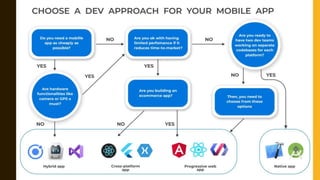
APP DEVELOPMENT APPROACHES
Various Technologies are used for Mobile App Development which are classified as –
• Native Approach
• Hybrid Approach
• Cross-Platform Approach
WHAT IS FLUTTER?
• Flutter is an open-source UI software development kit created by Google. It is used to
develop cross platform applications for Android, iOS, Linux, Mac, Windows, Google
Fuchsia, and the web from a single codebase.
• The first version of Flutter was known as codename "Sky" and ran on the Android
operating system.
• Initial release date of Flutter was May 2017.
WHAT IS DART?
• Dart is a programming language designed for client development, such as for the web
and mobile apps.
• It is developed by Google and can also be used to build server and desktop
applications.
• Dart is an object-oriented, class-based, garbage-collected language
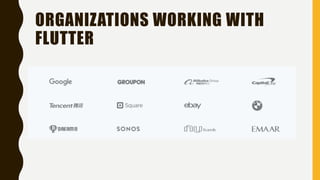
ORGANIZATIONS WORKING WITH
FLUTTER
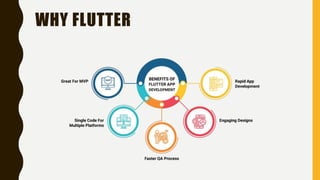
WHY FLUTTER
WHAT ARE WIDGETS?
• Flutter widgets are built using a modern framework that takes inspiration from React.
The central idea is that you build your UI out of widgets.
• Widgets describe what their view should look like given their current configuration and
state. When a widget’s state changes, the widget rebuilds its description.
• Examples – Container, Row, Column, Image, Icon etc.
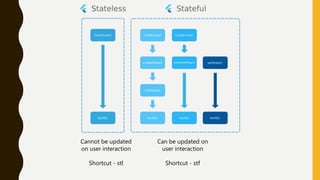
Cannot be updated
on user interaction
Shortcut - stl
Can be updated on
user interaction
Shortcut - stf
MATERIAL APP
• MaterialApp is a predefined class in a flutter.
• It is likely the main or core component of flutter. We can access all the other
components and widgets provided by Flutter SDK.
• MaterialApp is a widget that introduces many interesting tools such as Navigator or
Theme to help you develop your app. Material is, on the other hand, a widget used to
define a UI element respecting Material rules.
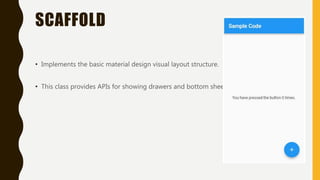
SCAFFOLD
• Implements the basic material design visual layout structure.
• This class provides APIs for showing drawers and bottom sheets.
APPBAR WIDGET
• A material design app bar consists of a toolbar and potentially other widgets, such as a
TabBar and a FlexibleSpaceBar.
• App bars typically expose one or more common actions with IconButtons
CONTAINER WIDGET
• The Container widget lets you create a rectangular visual element. A container can be
decorated with a BoxDecoration, such as a background, a border, or a shadow.
• A Container can also have margins, padding, and constraints applied to its size. In
addition, a Container can be transformed in three dimensional space using a matrix.
ROW, COLUMN WIDGETS
• These flex widgets let you create flexible layouts in both the horizontal (Row) and
vertical (Column) directions.
• The design of these objects is based on the web’s flexbox layout model.
• Row is widget that displays its children in a horizontal array.
• Column is a widget that displays its children in a vertical array.
TEXT WIDGET
• The Text widget displays a string of text with single style.
• The string might break across multiple lines or might all be displayed on the same line
depending on the layout constraints.
• The style argument is optional.
ICONS
• A graphical icon widget drawn with a glyph from a font described in an IconData such
as material's predefined IconDatas in Icons.
• Icons are not interactive. For an interactive icon, consider material's IconButton.
IMAGE WIDGET
• A widget that is used to display images in the application.
• Several constructors are provided for the various ways that an image can be specified:
– new Image, for obtaining an image from an ImageProvider.
– new Image.asset, for obtaining an image from an AssetBundle using a key.
– new Image.network, for obtaining an image from a URL.
– new Image.file, for obtaining an image from a File.
– new Image.memory, for obtaining an image from a Uint8List.
DRAWER WIDGET
• In apps that use Material Design, there are two primary options for navigation: tabs
and drawers. When there is insufficient space to support tabs, drawers provide a handy
alternative.
• In Flutter, use the Drawer widget in combination with a Scaffold to create a layout with
a Material Design drawer. This recipe uses the following steps:
PACKAGES IN FLUTTER
• Flutter supports using shared packages contributed by other developers to the Flutter
and Dart ecosystems.
• This allows quickly building an app without having to develop everything from scratch.
• Website to check all the packages available – https://pub.dev
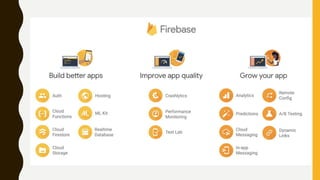
FIREBASE
• Firebase is a platform developed by Google for creating mobile and web applications.
It was originally an independent company founded in 2011.
• In 2014, Google acquired the platform and it is now their flagship offering for app
development.
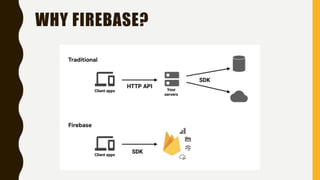
WHY FIREBASE?
NOSQL DATABASES
• A NoSQL database provides a mechanism for storage and retrieval of data that is
modeled in means other than the tabular relations used in relational databases.
• NoSQL, also referred to as “not only SQL” or “non-SQL,” is an approach to database
design that enables the storage and querying of data outside the traditional structures
found in relational databases.
CLOUD FIRESTORE VS REALTIME
DATABASE
• Cloud Firestore is Firebase's newest database for mobile app development. It builds on
the successes of the Realtime Database with a new, more intuitive data model. Cloud
Firestore also features richer, faster queries and scales further than the Realtime
Database.
• Realtime Database is Firebase's original database. It's an efficient, low-latency solution
for mobile apps that require synced states across clients in realtime.
THANK YOU
GitHub URL - https://github.com/narayanvyas/flutter_workshop
Narayan Vyas
Sr. Developer, Flexxited, Bangalore
www.narayanvyas.org

Flutter workshop

  • 1.
    I N TR O D U C T I O N T O A P P D E V E L O P M E N T & F L U T T E R N A R AYA N V YA S S R . D E V E LO P E R , F L E X X I T E D
  • 2.
    MOBILE APP DEVELOPMENT Mobileapplication development is the process of creating software applications that run on a mobile device, and a typical mobile application utilizes a network connection to work with remote computing resources.
  • 3.
    APP DEVELOPMENT APPROACHES VariousTechnologies are used for Mobile App Development which are classified as – • Native Approach • Hybrid Approach • Cross-Platform Approach
  • 5.
    WHAT IS FLUTTER? •Flutter is an open-source UI software development kit created by Google. It is used to develop cross platform applications for Android, iOS, Linux, Mac, Windows, Google Fuchsia, and the web from a single codebase. • The first version of Flutter was known as codename "Sky" and ran on the Android operating system. • Initial release date of Flutter was May 2017.
  • 6.
    WHAT IS DART? •Dart is a programming language designed for client development, such as for the web and mobile apps. • It is developed by Google and can also be used to build server and desktop applications. • Dart is an object-oriented, class-based, garbage-collected language
  • 7.
  • 8.
  • 9.
    WHAT ARE WIDGETS? •Flutter widgets are built using a modern framework that takes inspiration from React. The central idea is that you build your UI out of widgets. • Widgets describe what their view should look like given their current configuration and state. When a widget’s state changes, the widget rebuilds its description. • Examples – Container, Row, Column, Image, Icon etc.
  • 10.
    Cannot be updated onuser interaction Shortcut - stl Can be updated on user interaction Shortcut - stf
  • 11.
    MATERIAL APP • MaterialAppis a predefined class in a flutter. • It is likely the main or core component of flutter. We can access all the other components and widgets provided by Flutter SDK. • MaterialApp is a widget that introduces many interesting tools such as Navigator or Theme to help you develop your app. Material is, on the other hand, a widget used to define a UI element respecting Material rules.
  • 12.
    SCAFFOLD • Implements thebasic material design visual layout structure. • This class provides APIs for showing drawers and bottom sheets.
  • 13.
    APPBAR WIDGET • Amaterial design app bar consists of a toolbar and potentially other widgets, such as a TabBar and a FlexibleSpaceBar. • App bars typically expose one or more common actions with IconButtons
  • 14.
    CONTAINER WIDGET • TheContainer widget lets you create a rectangular visual element. A container can be decorated with a BoxDecoration, such as a background, a border, or a shadow. • A Container can also have margins, padding, and constraints applied to its size. In addition, a Container can be transformed in three dimensional space using a matrix.
  • 15.
    ROW, COLUMN WIDGETS •These flex widgets let you create flexible layouts in both the horizontal (Row) and vertical (Column) directions. • The design of these objects is based on the web’s flexbox layout model. • Row is widget that displays its children in a horizontal array. • Column is a widget that displays its children in a vertical array.
  • 16.
    TEXT WIDGET • TheText widget displays a string of text with single style. • The string might break across multiple lines or might all be displayed on the same line depending on the layout constraints. • The style argument is optional.
  • 17.
    ICONS • A graphicalicon widget drawn with a glyph from a font described in an IconData such as material's predefined IconDatas in Icons. • Icons are not interactive. For an interactive icon, consider material's IconButton.
  • 18.
    IMAGE WIDGET • Awidget that is used to display images in the application. • Several constructors are provided for the various ways that an image can be specified: – new Image, for obtaining an image from an ImageProvider. – new Image.asset, for obtaining an image from an AssetBundle using a key. – new Image.network, for obtaining an image from a URL. – new Image.file, for obtaining an image from a File. – new Image.memory, for obtaining an image from a Uint8List.
  • 19.
    DRAWER WIDGET • Inapps that use Material Design, there are two primary options for navigation: tabs and drawers. When there is insufficient space to support tabs, drawers provide a handy alternative. • In Flutter, use the Drawer widget in combination with a Scaffold to create a layout with a Material Design drawer. This recipe uses the following steps:
  • 20.
    PACKAGES IN FLUTTER •Flutter supports using shared packages contributed by other developers to the Flutter and Dart ecosystems. • This allows quickly building an app without having to develop everything from scratch. • Website to check all the packages available – https://pub.dev
  • 21.
    FIREBASE • Firebase isa platform developed by Google for creating mobile and web applications. It was originally an independent company founded in 2011. • In 2014, Google acquired the platform and it is now their flagship offering for app development.
  • 22.
  • 24.
    NOSQL DATABASES • ANoSQL database provides a mechanism for storage and retrieval of data that is modeled in means other than the tabular relations used in relational databases. • NoSQL, also referred to as “not only SQL” or “non-SQL,” is an approach to database design that enables the storage and querying of data outside the traditional structures found in relational databases.
  • 25.
    CLOUD FIRESTORE VSREALTIME DATABASE • Cloud Firestore is Firebase's newest database for mobile app development. It builds on the successes of the Realtime Database with a new, more intuitive data model. Cloud Firestore also features richer, faster queries and scales further than the Realtime Database. • Realtime Database is Firebase's original database. It's an efficient, low-latency solution for mobile apps that require synced states across clients in realtime.
  • 26.
    THANK YOU GitHub URL- https://github.com/narayanvyas/flutter_workshop Narayan Vyas Sr. Developer, Flexxited, Bangalore www.narayanvyas.org