What ways does your media
product use, develop or
challenge forms and conventions
of real media products?
What have I learnt about
the conventions of
digipaks?
By conducting internet research into the forms and conventions of digipaks I
have learnt what the standard features of them are. It was important that I
knew what these forms and conventions were before beginning to plan and
create my own digipak. This is because I needed to know how to make the
media product appear as professional and legitimate as possible.
Digipak Conventions: Front Cover
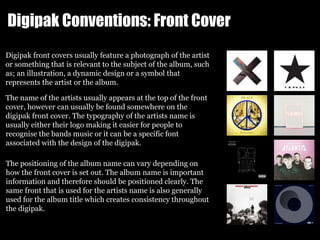
Digipak front covers usually feature a photograph of the artist
or something that is relevant to the subject of the album, such
as; an illustration, a dynamic design or a symbol that
represents the artist or the album.
The name of the artists usually appears at the top of the front
cover, however can usually be found somewhere on the
digipak front cover. The typography of the artists name is
usually either their logo making it easier for people to
recognise the bands music or it can be a specific font
associated with the design of the digipak.
The positioning of the album name can vary depending on
how the front cover is set out. The album name is important
information and therefore should be positioned clearly. The
same front that is used for the artists name is also generally
used for the album title which creates consistency throughout
the digipak.
Digipak Conventions: Back Cover
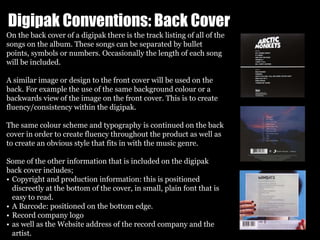
On the back cover of a digipak there is the track listing of all of the
songs on the album. These songs can be separated by bullet
points, symbols or numbers. Occasionally the length of each song
will be included.
A similar image or design to the front cover will be used on the
back. For example the use of the same background colour or a
backwards view of the image on the front cover. This is to create
fluency/consistency within the digipak.
The same colour scheme and typography is continued on the back
cover in order to create fluency throughout the product as well as
to create an obvious style that fits in with the music genre.
Some of the other information that is included on the digipak
back cover includes;
• Copyright and production information: this is positioned
discreetly at the bottom of the cover, in small, plain font that is
easy to read.
• A Barcode: positioned on the bottom edge.
• Record company logo
• as well as the Website address of the record company and the
artist.
Digipak Conventions: CD
On the CD it is likely that the track listing from the back of the digipak
will appear. Being separated by the same numbers, bullet points or
symbols as found on the back cover.
Copyright notices are also found on the CD to protect its contents. This
information is curved around the edge of the disk.
On the CD you will also find the name of the artist and the album
name in the same font style and colour as the rest of the digipak. This
is to create fluency across the whole of the digipak.
Some of the other information that is found on the CD includes:
• Manufacture information
• Record label and artists website
• Record label logo.
Indie Rock CDs are usually very simple in design and keep to the
colour scheme of the rest of the digipak. They usually use the colour
black for the CD as it is contemporary and sleek.
Digipak Conventions: Inside Cover
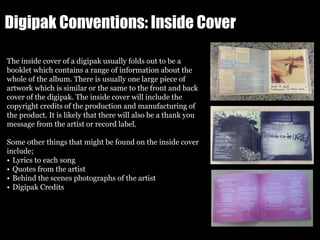
The inside cover of a digipak usually folds out to be a
booklet which contains a range of information about the
whole of the album. There is usually one large piece of
artwork which is similar or the same to the front and back
cover of the digipak. The inside cover will include the
copyright credits of the production and manufacturing of
the product. It is likely that there will also be a thank you
message from the artist or record label.
Some other things that might be found on the inside cover
include;
• Lyrics to each song
• Quotes from the artist
• Behind the scenes photographs of the artist
• Digipak Credits
Digipak Conventions: Spine
On the spine of a digipak you will find the name of the artists and the album. This
will be in the same font style to the rest of the digipak in order to create fluency
across the whole of the digipak. You will also find the catalogue number which
enables the product to be identified. Sometimes you will also find the record
company name however not its logo.
Conventions of an Album Advert/Poster:
Artists often have album adverts made in order to promote
their albums when they are released. These adverts often
using the same fonts and images as the digipak in order to
create familiarity between the products. The name of the
artist is usually the largest font on the advert and is
positioned near the top.
The background of the advert is the same as the digipak. It
may include a photograph from the same photoshoot as the
digipak or the same background colour.
Some of the other features that are often found on album
adverts/posters include;
• Release/download date
• Website links
• Record label logo
• Star ratings and quoted reviews from trusted newspapers
or magazines
• A small image of the digipak front cover
• Where the album is available
• What platforms/mediums you can listen to the album on
Conventions of an Indie Rock Music Video:
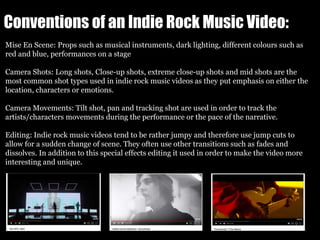
Mise En Scene: Props such as musical instruments, dark lighting, different colours such as
red and blue, performances on a stage
Camera Shots: Long shots, Close-up shots, extreme close-up shots and mid shots are the
most common shot types used in indie rock music videos as they put emphasis on either the
location, characters or emotions.
Camera Movements: Tilt shot, pan and tracking shot are used in order to track the
artists/characters movements during the performance or the pace of the narrative.
Editing: Indie rock music videos tend to be rather jumpy and therefore use jump cuts to
allow for a sudden change of scene. They often use other transitions such as fades and
dissolves. In addition to this special effects editing it used in order to make the video more
interesting and unique.
What conventions have I
followed and subverted?
Comparing and contrasting my own media products to those that are
professional and are real media products.
Front Cover
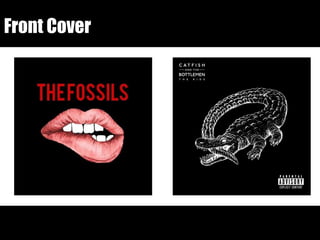
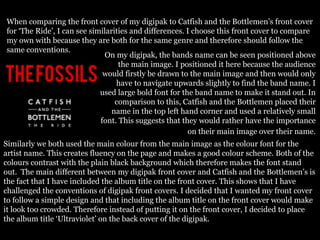
When comparing the front cover of my digipak to Catfish and the Bottlemen’s front cover
for ‘The Ride’, I can see similarities and differences. I choose this front cover to compare
my own with because they are both for the same genre and therefore should follow the
same conventions.
On my digipak, the bands name can be seen positioned above
the main image. I positioned it here because the audience
would firstly be drawn to the main image and then would only
have to navigate upwards slightly to find the band name. I
used large bold font for the band name to make it stand out. In
comparison to this, Catfish and the Bottlemen placed their
name in the top left hand corner and used a relatively small
font. This suggests that they would rather have the importance
on their main image over their name.
Similarly we both used the main colour from the main image as the colour font for the
artist name. This creates fluency on the page and makes a good colour scheme. Both of the
colours contrast with the plain black background which therefore makes the font stand
out. The main different between my digipak front cover and Catfish and the Bottlemen’s is
the fact that I have included the album title on the front cover. This shows that I have
challenged the conventions of digipak front covers. I decided that I wanted my front cover
to follow a simple design and that including the album title on the front cover would make
it look too crowded. Therefore instead of putting it on the front cover, I decided to place
the album title ‘Ultraviolet’ on the back cover of the digipak.
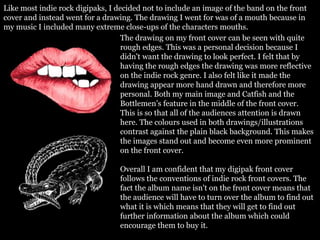
Like most indie rock digipaks, I decided not to include an image of the band on the front
cover and instead went for a drawing. The drawing I went for was of a mouth because in
my music I included many extreme close-ups of the characters mouths.
The drawing on my front cover can be seen with quite
rough edges. This was a personal decision because I
didn't want the drawing to look perfect. I felt that by
having the rough edges the drawing was more reflective
on the indie rock genre. I also felt like it made the
drawing appear more hand drawn and therefore more
personal. Both my main image and Catfish and the
Bottlemen’s feature in the middle of the front cover.
This is so that all of the audiences attention is drawn
here. The colours used in both drawings/illustrations
contrast against the plain black background. This makes
the images stand out and become even more prominent
on the front cover.
Overall I am confident that my digipak front cover
follows the conventions of indie rock front covers. The
fact the album name isn't on the front cover means that
the audience will have to turn over the album to find out
what it is which means that they will get to find out
further information about the album which could
encourage them to buy it.
Back Cover
When comparing the back cover of my digipak to The Vaccines cover for ‘What did you
expect from the vaccines?’, I can see similarities and differences. I choose this bank cover
to compare my own with because they are both for the same genre and therefore should
follow the same conventions. Another reasons to why I choose this back cover was because
like my own, it included the name of the album on the back. Showing that some indie rock
artists go against the conventions to show how they are different from the rest.
I have conformed to the conventions of digipak
back covers by including the track listing for the
album. I also used symbols like The Vaccines in
order to separate each track to make the difference
between them obvious. However unlike The
Vaccines I separated the tracks into different
sections by placing an image between them. I used
the same colour for the album name for all of the
track listing as well as the band name on the front
cover, this creates fluency within my digipak. This shows that I am following the
conventions of a digipak back cover because I want the product to be fluent and consistent
so that it appears ascetically pleasing.
I have displayed my track listing like a list so that it is obvious what order the songs go
in. By comparing the track names to The Vaccines, you can tell that they are similar in
tone and include both one word as well as multiple word songs. By not included the
track numbers the back cover has a more minimalistic style and looks less crowded.
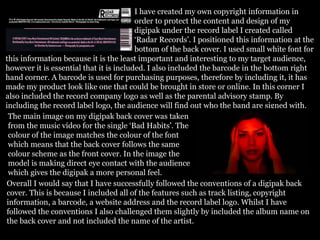
I have created my own copyright information in
order to protect the content and design of my
digipak under the record label I created called
‘Radar Records’. I positioned this information at the
bottom of the back cover. I used small white font for
this information because it is the least important and interesting to my target audience,
however it is essential that it is included. I also included the barcode in the bottom right
hand corner. A barcode is used for purchasing purposes, therefore by including it, it has
made my product look like one that could be brought in store or online. In this corner I
also included the record company logo as well as the parental advisory stamp. By
including the record label logo, the audience will find out who the band are signed with.
The main image on my digipak back cover was taken
from the music video for the single ‘Bad Habits’. The
colour of the image matches the colour of the font
which means that the back cover follows the same
colour scheme as the front cover. In the image the
model is making direct eye contact with the audience
which gives the digipak a more personal feel.
Overall I would say that I have successfully followed the conventions of a digipak back
cover. This is because I included all of the features such as track listing, copyright
information, a barcode, a website address and the record label logo. Whilst I have
followed the conventions I also challenged them slightly by included the album name on
the back cover and not included the name of the artist.
Inside Cover, Spine, CD and CD back
cover
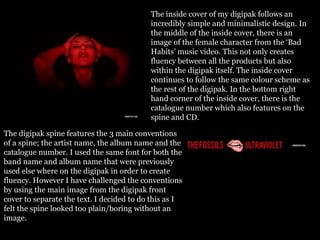
The inside cover of my digipak follows an
incredibly simple and minimalistic design. In
the middle of the inside cover, there is an
image of the female character from the ‘Bad
Habits’ music video. This not only creates
fluency between all the products but also
within the digipak itself. The inside cover
continues to follow the same colour scheme as
the rest of the digipak. In the bottom right
hand corner of the inside cover, there is the
catalogue number which also features on the
spine and CD.
The digipak spine features the 3 main conventions
of a spine; the artist name, the album name and the
catalogue number. I used the same font for both the
band name and album name that were previously
used else where on the digipak in order to create
fluency. However I have challenged the conventions
by using the main image from the digipak front
cover to separate the text. I decided to do this as I
felt the spine looked too plain/boring without an
image.
For the CD back cover (CD tray) I made it all text. I used the
same font that I used across the rest of the digipak, however
made the font all white. As well as the copyright
reservations for the band, song writers, record label and
location of recording, I also decided to include a thank you
message from the band to the audience. This was because I
wanted to make the album come across more personally
produced by the band. To increase this, I included the
signatures of the band members to make it look as if the band had hand signed each copy of the
album. Usually these conventions are seen on the inside cover of the digipak but I thought that
they would work nicely behind the CD as then it would be seen when the CD was being used. I
wanted to make sure to include this information on my digipak though as I felt it held importance
to how real the digipak would look.
On my CD I followed all of the conventions. I used the
same black background that was used consistently
throughout the digipak. In addition to this, I used the
same font style and colour for the same fluency purposes.
I conformed to the conventions by including the
copyright information such as record company name and
catalogue number. However I did challenge the
conventions by not including the record company logo on
my CD. I did this because I felt like it didn't look right on
the CD as it didn't match the colour scheme and the fact
the record company name had already been mentioned
twice on the CD.
Poster
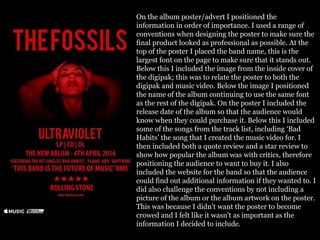
On the album poster/advert I positioned the
information in order of importance. I used a range of
conventions when designing the poster to make sure the
final product looked as professional as possible. At the
top of the poster I placed the band name, this is the
largest font on the page to make sure that it stands out.
Below this I included the image from the inside cover of
the digipak; this was to relate the poster to both the
digipak and music video. Below the image I positioned
the name of the album continuing to use the same font
as the rest of the digipak. On the poster I included the
release date of the album so that the audience would
know when they could purchase it. Below this I included
some of the songs from the track list, including ‘Bad
Habits’ the song that I created the music video for. I
then included both a quote review and a star review to
show how popular the album was with critics, therefore
positioning the audience to want to buy it. I also
included the website for the band so that the audience
could find out additional information if they wanted to. I
did also challenge the conventions by not including a
picture of the album or the album artwork on the poster.
This was because I didn't want the poster to become
crowed and I felt like it wasn't as important as the
information I decided to include.
By comparing my album advert/poster to a real album advert/poster by The Vaccines
I can conclude that I have followed the conventions of a music advertisement poster.
There are many similarities between the two posters such as the place you can listen to
the album, the quote and star reviews, a website address and the release date. Both of
the posters follow a simple and minimalistic design/layout similar to their digipaks,
this therefore suggests that layout of an album poster is reflective of the structure of
the digipak it is promoting. The poster for The Vaccines, uses the main image from
their album front cover as the background for the poster whereas I use the same
colour. This shows that I go against the conventions however to a degree do still follow
them.
The conventions which I used in my
music video are explained in the next
blogpost, where I narrated over my
music video. (Question 1, Part Two)

Question 1 // PART ONE

  • 1.
    What ways doesyour media product use, develop or challenge forms and conventions of real media products?
  • 2.
    What have Ilearnt about the conventions of digipaks? By conducting internet research into the forms and conventions of digipaks I have learnt what the standard features of them are. It was important that I knew what these forms and conventions were before beginning to plan and create my own digipak. This is because I needed to know how to make the media product appear as professional and legitimate as possible.
  • 3.
    Digipak Conventions: FrontCover Digipak front covers usually feature a photograph of the artist or something that is relevant to the subject of the album, such as; an illustration, a dynamic design or a symbol that represents the artist or the album. The name of the artists usually appears at the top of the front cover, however can usually be found somewhere on the digipak front cover. The typography of the artists name is usually either their logo making it easier for people to recognise the bands music or it can be a specific font associated with the design of the digipak. The positioning of the album name can vary depending on how the front cover is set out. The album name is important information and therefore should be positioned clearly. The same front that is used for the artists name is also generally used for the album title which creates consistency throughout the digipak.
  • 4.
    Digipak Conventions: BackCover On the back cover of a digipak there is the track listing of all of the songs on the album. These songs can be separated by bullet points, symbols or numbers. Occasionally the length of each song will be included. A similar image or design to the front cover will be used on the back. For example the use of the same background colour or a backwards view of the image on the front cover. This is to create fluency/consistency within the digipak. The same colour scheme and typography is continued on the back cover in order to create fluency throughout the product as well as to create an obvious style that fits in with the music genre. Some of the other information that is included on the digipak back cover includes; • Copyright and production information: this is positioned discreetly at the bottom of the cover, in small, plain font that is easy to read. • A Barcode: positioned on the bottom edge. • Record company logo • as well as the Website address of the record company and the artist.
  • 5.
    Digipak Conventions: CD Onthe CD it is likely that the track listing from the back of the digipak will appear. Being separated by the same numbers, bullet points or symbols as found on the back cover. Copyright notices are also found on the CD to protect its contents. This information is curved around the edge of the disk. On the CD you will also find the name of the artist and the album name in the same font style and colour as the rest of the digipak. This is to create fluency across the whole of the digipak. Some of the other information that is found on the CD includes: • Manufacture information • Record label and artists website • Record label logo. Indie Rock CDs are usually very simple in design and keep to the colour scheme of the rest of the digipak. They usually use the colour black for the CD as it is contemporary and sleek.
  • 6.
    Digipak Conventions: InsideCover The inside cover of a digipak usually folds out to be a booklet which contains a range of information about the whole of the album. There is usually one large piece of artwork which is similar or the same to the front and back cover of the digipak. The inside cover will include the copyright credits of the production and manufacturing of the product. It is likely that there will also be a thank you message from the artist or record label. Some other things that might be found on the inside cover include; • Lyrics to each song • Quotes from the artist • Behind the scenes photographs of the artist • Digipak Credits
  • 7.
    Digipak Conventions: Spine Onthe spine of a digipak you will find the name of the artists and the album. This will be in the same font style to the rest of the digipak in order to create fluency across the whole of the digipak. You will also find the catalogue number which enables the product to be identified. Sometimes you will also find the record company name however not its logo.
  • 8.
    Conventions of anAlbum Advert/Poster: Artists often have album adverts made in order to promote their albums when they are released. These adverts often using the same fonts and images as the digipak in order to create familiarity between the products. The name of the artist is usually the largest font on the advert and is positioned near the top. The background of the advert is the same as the digipak. It may include a photograph from the same photoshoot as the digipak or the same background colour. Some of the other features that are often found on album adverts/posters include; • Release/download date • Website links • Record label logo • Star ratings and quoted reviews from trusted newspapers or magazines • A small image of the digipak front cover • Where the album is available • What platforms/mediums you can listen to the album on
  • 9.
    Conventions of anIndie Rock Music Video: Mise En Scene: Props such as musical instruments, dark lighting, different colours such as red and blue, performances on a stage Camera Shots: Long shots, Close-up shots, extreme close-up shots and mid shots are the most common shot types used in indie rock music videos as they put emphasis on either the location, characters or emotions. Camera Movements: Tilt shot, pan and tracking shot are used in order to track the artists/characters movements during the performance or the pace of the narrative. Editing: Indie rock music videos tend to be rather jumpy and therefore use jump cuts to allow for a sudden change of scene. They often use other transitions such as fades and dissolves. In addition to this special effects editing it used in order to make the video more interesting and unique.
  • 10.
    What conventions haveI followed and subverted? Comparing and contrasting my own media products to those that are professional and are real media products.
  • 11.
  • 12.
    When comparing thefront cover of my digipak to Catfish and the Bottlemen’s front cover for ‘The Ride’, I can see similarities and differences. I choose this front cover to compare my own with because they are both for the same genre and therefore should follow the same conventions. On my digipak, the bands name can be seen positioned above the main image. I positioned it here because the audience would firstly be drawn to the main image and then would only have to navigate upwards slightly to find the band name. I used large bold font for the band name to make it stand out. In comparison to this, Catfish and the Bottlemen placed their name in the top left hand corner and used a relatively small font. This suggests that they would rather have the importance on their main image over their name. Similarly we both used the main colour from the main image as the colour font for the artist name. This creates fluency on the page and makes a good colour scheme. Both of the colours contrast with the plain black background which therefore makes the font stand out. The main different between my digipak front cover and Catfish and the Bottlemen’s is the fact that I have included the album title on the front cover. This shows that I have challenged the conventions of digipak front covers. I decided that I wanted my front cover to follow a simple design and that including the album title on the front cover would make it look too crowded. Therefore instead of putting it on the front cover, I decided to place the album title ‘Ultraviolet’ on the back cover of the digipak.
  • 13.
    Like most indierock digipaks, I decided not to include an image of the band on the front cover and instead went for a drawing. The drawing I went for was of a mouth because in my music I included many extreme close-ups of the characters mouths. The drawing on my front cover can be seen with quite rough edges. This was a personal decision because I didn't want the drawing to look perfect. I felt that by having the rough edges the drawing was more reflective on the indie rock genre. I also felt like it made the drawing appear more hand drawn and therefore more personal. Both my main image and Catfish and the Bottlemen’s feature in the middle of the front cover. This is so that all of the audiences attention is drawn here. The colours used in both drawings/illustrations contrast against the plain black background. This makes the images stand out and become even more prominent on the front cover. Overall I am confident that my digipak front cover follows the conventions of indie rock front covers. The fact the album name isn't on the front cover means that the audience will have to turn over the album to find out what it is which means that they will get to find out further information about the album which could encourage them to buy it.
  • 14.
  • 15.
    When comparing theback cover of my digipak to The Vaccines cover for ‘What did you expect from the vaccines?’, I can see similarities and differences. I choose this bank cover to compare my own with because they are both for the same genre and therefore should follow the same conventions. Another reasons to why I choose this back cover was because like my own, it included the name of the album on the back. Showing that some indie rock artists go against the conventions to show how they are different from the rest. I have conformed to the conventions of digipak back covers by including the track listing for the album. I also used symbols like The Vaccines in order to separate each track to make the difference between them obvious. However unlike The Vaccines I separated the tracks into different sections by placing an image between them. I used the same colour for the album name for all of the track listing as well as the band name on the front cover, this creates fluency within my digipak. This shows that I am following the conventions of a digipak back cover because I want the product to be fluent and consistent so that it appears ascetically pleasing. I have displayed my track listing like a list so that it is obvious what order the songs go in. By comparing the track names to The Vaccines, you can tell that they are similar in tone and include both one word as well as multiple word songs. By not included the track numbers the back cover has a more minimalistic style and looks less crowded.
  • 16.
    I have createdmy own copyright information in order to protect the content and design of my digipak under the record label I created called ‘Radar Records’. I positioned this information at the bottom of the back cover. I used small white font for this information because it is the least important and interesting to my target audience, however it is essential that it is included. I also included the barcode in the bottom right hand corner. A barcode is used for purchasing purposes, therefore by including it, it has made my product look like one that could be brought in store or online. In this corner I also included the record company logo as well as the parental advisory stamp. By including the record label logo, the audience will find out who the band are signed with. The main image on my digipak back cover was taken from the music video for the single ‘Bad Habits’. The colour of the image matches the colour of the font which means that the back cover follows the same colour scheme as the front cover. In the image the model is making direct eye contact with the audience which gives the digipak a more personal feel. Overall I would say that I have successfully followed the conventions of a digipak back cover. This is because I included all of the features such as track listing, copyright information, a barcode, a website address and the record label logo. Whilst I have followed the conventions I also challenged them slightly by included the album name on the back cover and not included the name of the artist.
  • 17.
    Inside Cover, Spine,CD and CD back cover
  • 18.
    The inside coverof my digipak follows an incredibly simple and minimalistic design. In the middle of the inside cover, there is an image of the female character from the ‘Bad Habits’ music video. This not only creates fluency between all the products but also within the digipak itself. The inside cover continues to follow the same colour scheme as the rest of the digipak. In the bottom right hand corner of the inside cover, there is the catalogue number which also features on the spine and CD. The digipak spine features the 3 main conventions of a spine; the artist name, the album name and the catalogue number. I used the same font for both the band name and album name that were previously used else where on the digipak in order to create fluency. However I have challenged the conventions by using the main image from the digipak front cover to separate the text. I decided to do this as I felt the spine looked too plain/boring without an image.
  • 19.
    For the CDback cover (CD tray) I made it all text. I used the same font that I used across the rest of the digipak, however made the font all white. As well as the copyright reservations for the band, song writers, record label and location of recording, I also decided to include a thank you message from the band to the audience. This was because I wanted to make the album come across more personally produced by the band. To increase this, I included the signatures of the band members to make it look as if the band had hand signed each copy of the album. Usually these conventions are seen on the inside cover of the digipak but I thought that they would work nicely behind the CD as then it would be seen when the CD was being used. I wanted to make sure to include this information on my digipak though as I felt it held importance to how real the digipak would look. On my CD I followed all of the conventions. I used the same black background that was used consistently throughout the digipak. In addition to this, I used the same font style and colour for the same fluency purposes. I conformed to the conventions by including the copyright information such as record company name and catalogue number. However I did challenge the conventions by not including the record company logo on my CD. I did this because I felt like it didn't look right on the CD as it didn't match the colour scheme and the fact the record company name had already been mentioned twice on the CD.
  • 20.
  • 21.
    On the albumposter/advert I positioned the information in order of importance. I used a range of conventions when designing the poster to make sure the final product looked as professional as possible. At the top of the poster I placed the band name, this is the largest font on the page to make sure that it stands out. Below this I included the image from the inside cover of the digipak; this was to relate the poster to both the digipak and music video. Below the image I positioned the name of the album continuing to use the same font as the rest of the digipak. On the poster I included the release date of the album so that the audience would know when they could purchase it. Below this I included some of the songs from the track list, including ‘Bad Habits’ the song that I created the music video for. I then included both a quote review and a star review to show how popular the album was with critics, therefore positioning the audience to want to buy it. I also included the website for the band so that the audience could find out additional information if they wanted to. I did also challenge the conventions by not including a picture of the album or the album artwork on the poster. This was because I didn't want the poster to become crowed and I felt like it wasn't as important as the information I decided to include.
  • 22.
    By comparing myalbum advert/poster to a real album advert/poster by The Vaccines I can conclude that I have followed the conventions of a music advertisement poster. There are many similarities between the two posters such as the place you can listen to the album, the quote and star reviews, a website address and the release date. Both of the posters follow a simple and minimalistic design/layout similar to their digipaks, this therefore suggests that layout of an album poster is reflective of the structure of the digipak it is promoting. The poster for The Vaccines, uses the main image from their album front cover as the background for the poster whereas I use the same colour. This shows that I go against the conventions however to a degree do still follow them.
  • 23.
    The conventions whichI used in my music video are explained in the next blogpost, where I narrated over my music video. (Question 1, Part Two)