Project Report
Project Title: Sonali Bank Networking System
Course Code: CSE 318
Course Title: Computer Network Lab
Submitted To
Pranab Bandhu Nath
Senior Lecturer, Department of CSE
City University
Submitted By
Hasibul Islam Nirob
BSc in CSE (Day)
Batch: 49th
ID: 182482526
Date Of Submission: 13/07/2021
Introduction: ………………………………………………………………………………………………….…………… 3
Key Features: ………………………………………………………………………………………………….…………… 3
Physical Diagram: ….………………………………………………………………………. 4
1 Floor-1: …………………………………………………………………………4
2 Floor-2:……………………………………..…………………………………………………………………5
3 Floor-3: …………………………………………………………………………………………………………. 5
4 Floor-4: …………………………………………………………………………………………………………. 6
Logical Diagram: ……………………………………………………………………………………………………………. 7
Estimated Cost for this project: …………………………………………………………..…………………………. 9
NETWORK PROTOCOLS USED IN THIS NETWORK DESIGN ……………………………………………….10
Computer Assemble and Disassemble: …………………………………………………………………………. 13
Introduction:
A networking topic is important and popular in every sector, whether it is a company, organization, bank or any
other type of business. All CSE students must learn about networking concepts and logical design of real-life
scenarios. The problem is that there is a very popular software solution known as Cisco packet tracer that is
helping millions of people to design and simulate different networks and network devices. I also had to use
packet tracer for my project concerning Sonali bank's network design. During my work experience, I used and
configured various network devices like Router, Switches, etc., and I also had to understand IP classes, IP
configurations, topologies, and protocols, depending on the situation. In my Bank project, I worked with a variety
of servers, which include a Mail Server, Web Server, DNS, DHCP, and an IoT Server. There is a difference in
functionality between each of the networks individually. There are some that are intended to connect PCs,
others that are intended for IoT devices, and still others to maintain servers. The network is thus protected, yet it
can be easily troubleshooted.
Key Features:
• There is a different network for each floor.
• Our network can be extended up to 254 hosts.
• I will find troubleshooting much easier.
• Fixing will not be difficult.
• Even if any network loses connectivity, others will remain online.
• If necessary, we can secure the floor or block access to the network.
• We can remotely control our home devices with the use of smart devices.
• The purpose of some devices is to monitor and protect banks.
• Some of the devices can be programmed to automatically detect danger so that it alerts us when it comes.
• Depending on the purpose of the bank work, we use different types of servers.
• The network is designed for resource sharing so that money and resources can be saved.
• All hosts are automatically configured using DHCP.
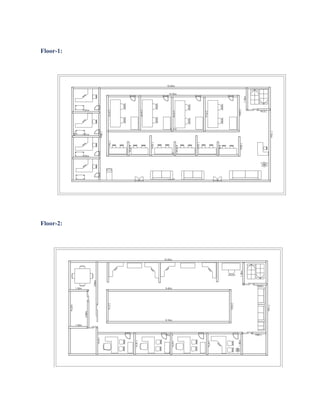
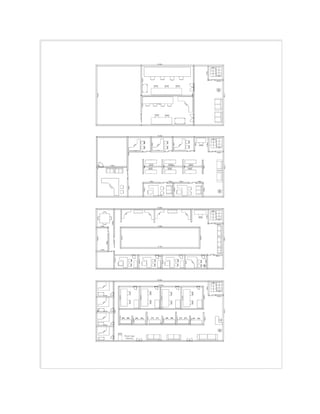
Physical Diagram
Floor-1:
Floor-2:
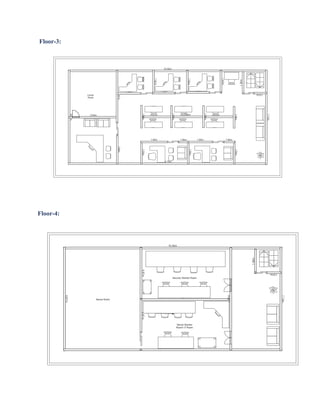
Floor-3:
Floor-4:
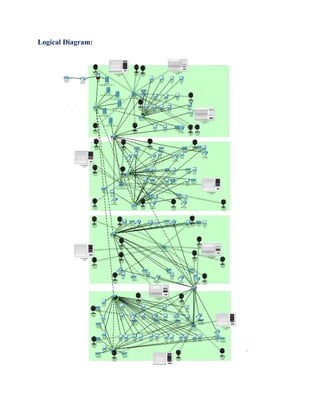
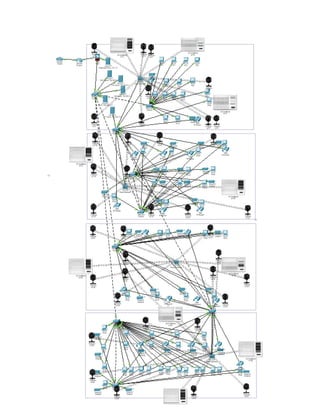
Logical Diagram:
Estimated Cost for this project
NETWORK PROTOCOLS USED IN THIS NETWORK DESIGN:
Routing
1. Static Routing
– Static routes are configured on gateway/core routers of each branch
• In the main site, traffic is routed to another branch network from the inside network.
• each branch network's next hop address (IP) can be used. Since this is a small
• A static routed network is easy to use. It’s secure because no any routing
• advertising takes place between neighbors and computing resources are conserved
• there is no routing algorithm or update mechanism.
2. Default routing
– This is configured on core routers to route the traffic from inside
• network to ISP router for unknown traffic (towards internet)
3. Inter VLAN routing
– Core routers are configured to route the traffic between different
• Networks can be divided into VLANs. Core routers are reached by traffic
generated on core switches
• This is connected by a trunk link. Routes directly connected to all VLANs will be
shown
• A routing table (using sub-interfaces)
DNS (Domain Name System)
• On the top floor of the building is the server room that contains the DNS server.
The hosts of this show
• Assume that network and domain are connected. They are all present on every
host (workstation)
• Name of the domain. Then, you can connect to your host using its specific
domain name
• It can be done remotely. Computers, however, do not understand the name. To
convert it into numbers, you'll need to:
• The IP address. So, DNS servers maintain the mapping of domains of each host
to their IP addresses
• IP address of the corresponding computer. So, network complexity and
management are reduced.
FTP (File Transfer Protocol)
• The top floor server room has an FTP server installed. This is used to transfer
files between computers
• A network's insides. Uploading the files needed for sharing is done on the FTP
server. In other words,
• A special FTP client can be used to link clients to the shared files. This is the
main point
• The FTP server can be used to transfer data within a network for several
reasons, including the ability to access
• Transfers multiple files, including multiple formats, efficiently
• The ability to transfer files between multiple directories at once.
SMTP (Simple Mail Transfer Protocol)
• SMTP Mail server is placed in the ground floor server room. SMTP servers are more
reliable when sending mails to clients. They deliver mail to recipients quickly, they offer
reliability in
• sending email messages (SMTP server will always try to re-send the same email until the
Security Requirements
• A firewall will be used so unauthorized use will be restricted. Part of the security will be
user accounts and passwords that will give limited access. There will be different access
capabilities for network managers and users,
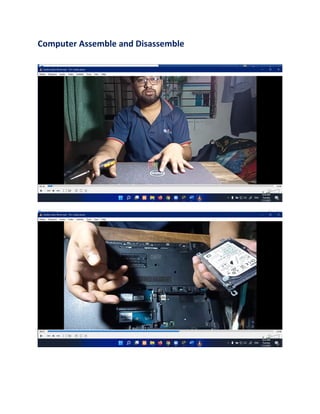
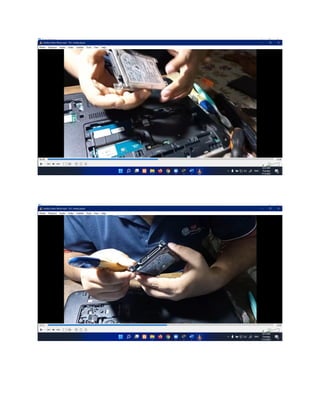
Computer Assemble and Disassemble
Sonali Bank Network Design Project Report

Sonali Bank Network Design Project Report

  • 1.
    Project Report Project Title:Sonali Bank Networking System Course Code: CSE 318 Course Title: Computer Network Lab Submitted To Pranab Bandhu Nath Senior Lecturer, Department of CSE City University Submitted By Hasibul Islam Nirob BSc in CSE (Day) Batch: 49th ID: 182482526 Date Of Submission: 13/07/2021
  • 2.
    Introduction: ………………………………………………………………………………………………….…………… 3 KeyFeatures: ………………………………………………………………………………………………….…………… 3 Physical Diagram: ….………………………………………………………………………. 4 1 Floor-1: …………………………………………………………………………4 2 Floor-2:……………………………………..…………………………………………………………………5 3 Floor-3: …………………………………………………………………………………………………………. 5 4 Floor-4: …………………………………………………………………………………………………………. 6 Logical Diagram: ……………………………………………………………………………………………………………. 7 Estimated Cost for this project: …………………………………………………………..…………………………. 9 NETWORK PROTOCOLS USED IN THIS NETWORK DESIGN ……………………………………………….10 Computer Assemble and Disassemble: …………………………………………………………………………. 13
  • 3.
    Introduction: A networking topicis important and popular in every sector, whether it is a company, organization, bank or any other type of business. All CSE students must learn about networking concepts and logical design of real-life scenarios. The problem is that there is a very popular software solution known as Cisco packet tracer that is helping millions of people to design and simulate different networks and network devices. I also had to use packet tracer for my project concerning Sonali bank's network design. During my work experience, I used and configured various network devices like Router, Switches, etc., and I also had to understand IP classes, IP configurations, topologies, and protocols, depending on the situation. In my Bank project, I worked with a variety of servers, which include a Mail Server, Web Server, DNS, DHCP, and an IoT Server. There is a difference in functionality between each of the networks individually. There are some that are intended to connect PCs, others that are intended for IoT devices, and still others to maintain servers. The network is thus protected, yet it can be easily troubleshooted. Key Features: • There is a different network for each floor. • Our network can be extended up to 254 hosts. • I will find troubleshooting much easier. • Fixing will not be difficult. • Even if any network loses connectivity, others will remain online. • If necessary, we can secure the floor or block access to the network. • We can remotely control our home devices with the use of smart devices. • The purpose of some devices is to monitor and protect banks. • Some of the devices can be programmed to automatically detect danger so that it alerts us when it comes. • Depending on the purpose of the bank work, we use different types of servers. • The network is designed for resource sharing so that money and resources can be saved. • All hosts are automatically configured using DHCP. Physical Diagram
  • 4.
  • 5.
  • 7.
  • 10.
    Estimated Cost forthis project NETWORK PROTOCOLS USED IN THIS NETWORK DESIGN: Routing 1. Static Routing – Static routes are configured on gateway/core routers of each branch • In the main site, traffic is routed to another branch network from the inside network. • each branch network's next hop address (IP) can be used. Since this is a small • A static routed network is easy to use. It’s secure because no any routing • advertising takes place between neighbors and computing resources are conserved • there is no routing algorithm or update mechanism. 2. Default routing – This is configured on core routers to route the traffic from inside • network to ISP router for unknown traffic (towards internet)
  • 11.
    3. Inter VLANrouting – Core routers are configured to route the traffic between different • Networks can be divided into VLANs. Core routers are reached by traffic generated on core switches • This is connected by a trunk link. Routes directly connected to all VLANs will be shown • A routing table (using sub-interfaces) DNS (Domain Name System) • On the top floor of the building is the server room that contains the DNS server. The hosts of this show • Assume that network and domain are connected. They are all present on every host (workstation) • Name of the domain. Then, you can connect to your host using its specific domain name • It can be done remotely. Computers, however, do not understand the name. To convert it into numbers, you'll need to: • The IP address. So, DNS servers maintain the mapping of domains of each host to their IP addresses • IP address of the corresponding computer. So, network complexity and management are reduced. FTP (File Transfer Protocol) • The top floor server room has an FTP server installed. This is used to transfer files between computers • A network's insides. Uploading the files needed for sharing is done on the FTP server. In other words, • A special FTP client can be used to link clients to the shared files. This is the main point • The FTP server can be used to transfer data within a network for several reasons, including the ability to access • Transfers multiple files, including multiple formats, efficiently • The ability to transfer files between multiple directories at once.
  • 12.
    SMTP (Simple MailTransfer Protocol) • SMTP Mail server is placed in the ground floor server room. SMTP servers are more reliable when sending mails to clients. They deliver mail to recipients quickly, they offer reliability in • sending email messages (SMTP server will always try to re-send the same email until the Security Requirements • A firewall will be used so unauthorized use will be restricted. Part of the security will be user accounts and passwords that will give limited access. There will be different access capabilities for network managers and users,
  • 13.