


Patrick Lucas
patrick@data-artisans.com
@theplucas
Flink in Containerland
Deploying Apache Flink on Kubernetes
What’s this talk about?
Lessons learned based on…
▪ getting a Flink cluster working in Docker
▪ creating the Flink image for Docker Hub
▪ deploying Flink on Kubernetes (K8s)
▪ tying it all together for dA Platform 2
2
Why containerized Flink?
▪ Fits our ideal deployment model (more
about this later)
▪ Efficient dynamic resource allocation and
scaling
▪ Application-oriented instead of machine-
oriented philosophy
3
Why Kubernetes?
▪ Principled API design
▪ Resource-oriented
▪ Disciplined about the layer of infrastructure
it occupies
▪ Provides all the necessary parts to effectively
run containerized applications at scale
4
Agenda
▪ Part 1: Setting the Stage
▪ Background of Flink and Kubernetes
▪ Part 2: Challenges and Solutions
▪ Discussion of and solutions for various challenges
with containerized Flink
▪ Part 3: Conclusion
▪ Part 4: Q&A
5
Part 1 — Setting the Stage
6
Agenda (Part 1)
▪ Introduction
▪ Recap of Flink architecture
▪ One job per cluster
▪ Kubernetes intro and terminology
▪ Flink-on-K8s example
7
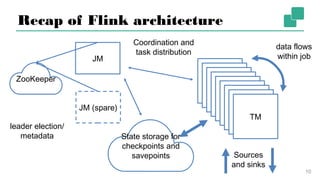
Recap of Flink architecture
▪ 1 active JobManager (JM)
▪ central coordinator for cluster/jobs
▪ orchestrates task distribution and
checkpointing
▪ serves UI and HTTP API
8
Recap of Flink architecture
▪ 1 or more TaskManagers (TM)
▪ execute user code
▪ configured with address of JM
9
Recap of Flink architecture
10
JM
JM (spare)
ZooKeeper
TM
TM
TM
TM
TM
TM
TM
TM
TM
Coordination and
task distribution
leader election/
metadata
data flows
within job
Sources
and sinks
State
storage for
checkpoints and
savepoints
Agenda (Part 1)
▪ Introduction
▪ Recap of Flink architecture
▪ One job per cluster
▪ Kubernetes intro and terminology
▪ Flink-on-K8s example
11
One job per cluster
▪ Evolving job deployment philosophy
▪ Tie cluster lifecycle to job lifecycle
▪ Ideally, the job is first-class
▪ think about running a job on a platform
like Kubernetes, not a running Flink
cluster first then submitting the job
12
One job per cluster
▪ Early versions of Flink heavily inspired by
Hadoop
▪ have a cluster comprised of nodes
having different roles (JM, TMs)
▪ FLIP-6, ongoing project to improve and
modernize this aspect of Flink
13
Agenda (Part 1)
▪ Introduction
▪ Recap of Flink architecture
▪ One job per cluster
▪ Kubernetes intro and terminology
▪ Flink-on-K8s example
14
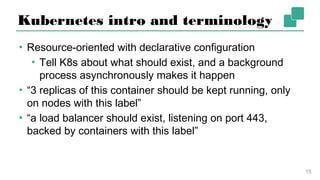
Kubernetes intro and terminology
▪ Resource-oriented with declarative configuration
▪ Tell K8s about what should exist, and a background
process asynchronously makes it happen
▪ “3 replicas of this container should be kept running,
only on nodes with this label”
▪ “a load balancer should exist, listening on port 443,
backed by containers with this label”
15
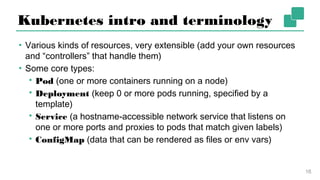
Kubernetes intro and terminology
▪ Various kinds of resources, very extensible (add your own
resources and “controllers” that handle them)
▪ Some core types:
▪ Pod (one or more containers running on a node)
▪ Deployment (keep 0 or more pods running, specified by a
template)
▪ Service (a hostname-accessible network service that listens on
one or more ports and proxies to pods that match given labels)
▪ ConfigMap (data that can be rendered as files or env vars)
16
Agenda (Part 1)
▪ Introduction
▪ Recap of Flink architecture
▪ One job per cluster
▪ Kubernetes intro and terminology
▪ Flink-on-K8s example
17
Flink-on-K8s example
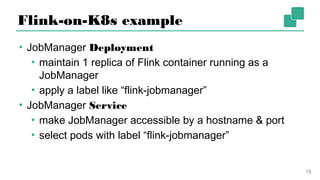
▪ JobManager Deployment
▪ maintain 1 replica of Flink container running as a
JobManager
▪ apply a label like “flink-jobmanager”
▪ JobManager Service
▪ make JobManager accessible by a hostname & port
▪ select pods with label “flink-jobmanager”
18
Flink-on-K8s example
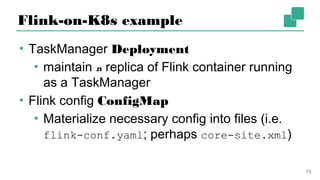
▪ TaskManager Deployment
▪ maintain n replica of Flink container
running as a TaskManager
▪ Flink config ConfigMap
▪ Materialize necessary config into files (i.e.
flink-conf.yaml; perhaps core-site.xml)
19
Simple Flink-on-Kubernetes
20
Unfortunately, no one can
be told what Kubernetes is.
You have to use it for
yourself.
“
Morpheus, The Matrix
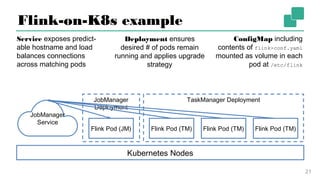
TaskManager DeploymentJobManager
Deployment
Flink-on-K8s example
21
Kubernetes Nodes
Flink Pod (JM) Flink Pod (TM) Flink Pod (TM) Flink Pod (TM)
JobManager
Service
ConfigMap including
contents of flink-conf.yaml
mounted as volume in each
pod at /etc/flink
Service exposes predict-
able hostname and load
balances connections
across matching pods
Deployment ensures
desired # of pods remain
running and applies
upgrade strategy
Part 2 — Challenges and Solutions
22
Agenda (Part 2)
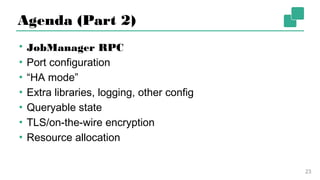
▪ JobManager RPC
▪ Port configuration
▪ “HA mode”
▪ Extra libraries, logging, other config
▪ Queryable state
▪ TLS/on-the-wire encryption
▪ Resource allocation
23
JobManager RPC
▪ Networking is the source of most challenges with
Flink-on-Kubernetes
▪ 5 of 7 sections in Part 2 are networking-related
▪ If you run a simple deployment on Kubernetes as
I described above… it just doesn’t work (or rather
it doesn’t “just work”)
24
JobManager RPC
▪ Most visible issue: use of Akka for Flink CLI RPC (including
job submission)
▪ Akka requires that the “name” (hostname or IP) used to
address the JM matches the name the JM itself is
configured with
▪ If connecting from outside the K8s environment, such
via port-forwarding or over a load balancer, messages
are silently dropped
25
JobManager RPC
▪ JM running in pod my-flink-cluster-jobmanager-3063995c2t0
▪ JM Service my-flink-cluster-jobmanager, listening on Flink RPC,
blob server, and UI ports
▪ JM/TMs configured with jobmanager.rpc.address: my-flink-
cluster-jobmanager
▪ TMs work fine, as they talk to the JM with the same name as it sees
itself (i.e. the name of the Service)
▪ But if you forward the JM RPC port locally or access it via a proxy…
26
JobManager RPC
From my laptop, having forwarded port 6123 to a running cluster on K8s:
$ flink run -m localhost:6123 examples/batch/WordCount.jar
Cluster configuration: Standalone cluster with JobManager at localhost/127.0.0.1:6123
Using address localhost:6123 to connect to JobManager.
. . .
Submitting job with JobID: ff86d06802fc69554ee0a5f726204db5. Waiting for job
completion.
… which hangs until a timeout. In the JobManager’s log:
2017-09-08 09:42:26,082 ERROR akka.remote.EndpointWriter
[] - dropping message [class akka.actor.ActorSelectionMessage] for non-local recipient
[Actor[akka.tcp://flink@localhost:6123/]] arriving at [akka.tcp://flink@localhost:
6123] inbound addresses are [akka.tcp://flink@my-flink-cluster-jobmanager:6123]
27
JobManager RPC
▪ One solution is to submit the job from within the K8s
environment
▪ e.g. run a pod that contains your job jar, use the
Flink CLI to submit
▪ Another solution is to use the HTTP API (or the UI)
▪ Not subject to “addressability” problems
▪ Cons: hard to secure, not well specified
28
Agenda (Part 2)
▪ JobManager RPC
▪ Port configuration
▪ “HA mode”
▪ Extra libraries, logging, other config
▪ Queryable state
▪ TLS/on-the-wire encryption
▪ Resource allocation
29
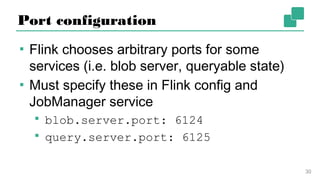
Port configuration
▪ Flink chooses arbitrary ports for some
services (i.e. blob server, queryable state)
▪ Must specify these in Flink config and
JobManager service
▪ blob.server.port: 6124
▪ query.server.port: 6125
30
Agenda (Part 2)
▪ JobManager RPC
▪ Port configuration
▪ “HA mode”
▪ Extra libraries, logging, other config
▪ Queryable state
▪ TLS/on-the-wire encryption
▪ Resource allocation
31
“HA mode”
▪ A misnomer—always use HA mode in production,
even with 1 JobManager
▪ JM stores critical state in ZooKeeper that allows
it to recover if the JM dies
▪ On K8s and other resource managers, should only
need to run a single JobManager as the manager
will re-launch it upon failure
32
“HA mode”
▪ If you do run >1 JM, accessing the UI becomes difficult
▪ If you expose both JMs in a Service, but your request
routes to the non-leader, will be redirected to internal
hostname of leader
▪ One solution seen on the mailing list, have non-leader
fail “readiness probe”, so doesn’t receive traffic
▪ Possible improvement to Flink: proxy non-leader requests
to leader
33
Agenda (Part 2)
▪ JobManager RPC
▪ Port configuration
▪ “HA mode”
▪ Extra libraries, logging, other config
▪ Queryable state
▪ TLS/on-the-wire encryption
▪ Resource allocation
34
Extra libraries, logging, other config
▪ For code dependencies, easiest to build a “fat jar”
that includes them
▪ Notable exceptions are state backend, logging, and
metrics dependencies, for example…
▪ S3 state storage requires extra AWS, Hadoop jars
▪ SLF4J and Graylog’s GELF appender require
additional jars
35
Extra libraries, logging, other config
▪ For these, easiest to build your own Flink image
▪ See https://github.com/docker-flink/docker-flink
to see how the public image is built
▪ Alternatively, an advanced solution is to build an
image containing your jars and use Kubernetes’
“init-containers” feature to load them in before Flink
starts
36
Agenda (Part 2)
▪ JobManager RPC
▪ Port configuration
▪ “HA mode”
▪ Extra libraries, logging, other config
▪ Queryable state
▪ TLS/on-the-wire encryption
▪ Resource allocation
37
Queryable state
▪ Currently somewhat tricky
▪ Only works out-of-the-box if all TMs are addressable and routable
▪ For most setups, this means you must be in the same K8s
environment
▪ Also suffer from Akka addressability issue
▪ Possible improvement to Flink: enable TMs to proxy queries to the
correct TM, à la Cassandra
▪ Then, create another Service in front of all TMs listening on the
query server port
38
Queryable state
▪ A more cumbersome solution that would work today is to
create a service yourself that runs in the same K8s
environment and proxies requests
▪ This has some added advantages, such as…
▪ horizontal scalability
▪ an opportunity for caching
▪ a way to maintain partial availability while the
underlying Flink job is down, e.g. during upgrades
39
Agenda (Part 2)
▪ JobManager RPC
▪ Port configuration
▪ “HA mode”
▪ Extra libraries, logging, other config
▪ Queryable state
▪ TLS/on-the-wire encryption
▪ Resource allocation
40
TLS/on-the-wire encryption
▪ Also a bit tricky, as Pods inherently don’t have predictable
hostnames or IPs
▪ One solution: generate a trustStore/keyStore when launching
cluster
▪ Which contain a single key pair and certificate that all JMs/TMs
in the cluster use and verify against
▪ Essentially symmetric encryption in the “convenient” wrapper
of TLS
▪ I haven’t actually tried this
41
TLS/on-the-wire encryption
▪ Another possibility: use an overlay network in
Kubernetes that magically does on-the-wire encryption
▪ Encryption supported in some fashion by some
overlay networks
▪ Whether or not this is acceptable to you depends
on your requirements
▪ I haven’t actually tried this
42
Agenda (Part 2)
▪ JobManager RPC
▪ Port configuration
▪ “HA mode”
▪ Extra libraries, logging, other config
▪ Queryable state
▪ TLS/on-the-wire encryption
▪ Resource allocation
43
Resource allocation
▪ How many slots should each TM have?
▪ >1 slot per TM can save some overhead
▪ But fewer slots/TM could theoretically reduce
time to recovery (restoring from checkpoint)
▪ But more machines means a higher chance
of some failure
44
Resource allocation
▪ How much CPU/RAM should each TM get?
▪ Ideally, each slot should have one CPU
▪ Within a slot, processing is serial, so >1
CPU/slot shouldn’t matter much
▪ RAM/slot ratio is application-dependent;
1GB is a decent minimum to start with
45
Resource allocation
▪ Check out Robert Metzger’s talk about Flink
operations to some deeper discussion and insight
about this
▪ Keep It Going — How to Reliably and Efficiently
Operate Apache Flink
▪ Available on the FlinkForward YouTube channel
before the end of the day
46
Part 3 — Conclusion
47
Conclusion
▪ Containerization/resource management
platforms have a bright future
▪ Flink well-positioned, but has plenty of
room for improvement
48
Conclusion
▪ My most-wanted Flink improvement vis-à-vis Flink-on-K8s
▪ Establish a specified HTTP API for all management
and monitoring functions
▪ Rewrite the CLI to use this API exclusively
▪ Provide health-check endpoints for JobManagers and
TaskManagers that can be used for Liveness/
ReadinessChecks
49
See Also
▪ FLINK-6369 - Better support for overlay networks
▪ for discussion about the networking-/overlay network-
related issues discussed in this presentation
▪ The Flink User mailing list
▪ plenty of posts about the topics I covered today
▪ FLIP-6 - Flink Deployment and Process Model
▪ ongoing work to improve how Flink interacts with
resource managers, notably Mesos and YARN
50
51
52
Thank you!
@theplucas
@ApacheFlink
@dataArtisans
We are hiring!
data-artisans.com/careers
Part 3 — Q & A
54

Flink Forward Berlin 2017: Patrick Lucas - Flink in Containerland

  • 1.
    Patrick Lucas patrick@data-artisans.com @theplucas Flink inContainerland Deploying Apache Flink on Kubernetes
  • 2.
    What’s this talkabout? Lessons learned based on… ▪ getting a Flink cluster working in Docker ▪ creating the Flink image for Docker Hub ▪ deploying Flink on Kubernetes (K8s) ▪ tying it all together for dA Platform 2 2
  • 3.
    Why containerized Flink? ▪Fits our ideal deployment model (more about this later) ▪ Efficient dynamic resource allocation and scaling ▪ Application-oriented instead of machine- oriented philosophy 3
  • 4.
    Why Kubernetes? ▪ PrincipledAPI design ▪ Resource-oriented ▪ Disciplined about the layer of infrastructure it occupies ▪ Provides all the necessary parts to effectively run containerized applications at scale 4
  • 5.
    Agenda ▪ Part 1:Setting the Stage ▪ Background of Flink and Kubernetes ▪ Part 2: Challenges and Solutions ▪ Discussion of and solutions for various challenges with containerized Flink ▪ Part 3: Conclusion ▪ Part 4: Q&A 5
  • 6.
    Part 1 —Setting the Stage 6
  • 7.
    Agenda (Part 1) ▪Introduction ▪ Recap of Flink architecture ▪ One job per cluster ▪ Kubernetes intro and terminology ▪ Flink-on-K8s example 7
  • 8.
    Recap of Flinkarchitecture ▪ 1 active JobManager (JM) ▪ central coordinator for cluster/jobs ▪ orchestrates task distribution and checkpointing ▪ serves UI and HTTP API 8
  • 9.
    Recap of Flinkarchitecture ▪ 1 or more TaskManagers (TM) ▪ execute user code ▪ configured with address of JM 9
  • 10.
    Recap of Flinkarchitecture 10 JM JM (spare) ZooKeeper TM TM TM TM TM TM TM TM TM Coordination and task distribution leader election/ metadata data flows within job Sources and sinks State storage for checkpoints and savepoints
  • 11.
    Agenda (Part 1) ▪Introduction ▪ Recap of Flink architecture ▪ One job per cluster ▪ Kubernetes intro and terminology ▪ Flink-on-K8s example 11
  • 12.
    One job percluster ▪ Evolving job deployment philosophy ▪ Tie cluster lifecycle to job lifecycle ▪ Ideally, the job is first-class ▪ think about running a job on a platform like Kubernetes, not a running Flink cluster first then submitting the job 12
  • 13.
    One job percluster ▪ Early versions of Flink heavily inspired by Hadoop ▪ have a cluster comprised of nodes having different roles (JM, TMs) ▪ FLIP-6, ongoing project to improve and modernize this aspect of Flink 13
  • 14.
    Agenda (Part 1) ▪Introduction ▪ Recap of Flink architecture ▪ One job per cluster ▪ Kubernetes intro and terminology ▪ Flink-on-K8s example 14
  • 15.
    Kubernetes intro andterminology ▪ Resource-oriented with declarative configuration ▪ Tell K8s about what should exist, and a background process asynchronously makes it happen ▪ “3 replicas of this container should be kept running, only on nodes with this label” ▪ “a load balancer should exist, listening on port 443, backed by containers with this label” 15
  • 16.
    Kubernetes intro andterminology ▪ Various kinds of resources, very extensible (add your own resources and “controllers” that handle them) ▪ Some core types: ▪ Pod (one or more containers running on a node) ▪ Deployment (keep 0 or more pods running, specified by a template) ▪ Service (a hostname-accessible network service that listens on one or more ports and proxies to pods that match given labels) ▪ ConfigMap (data that can be rendered as files or env vars) 16
  • 17.
    Agenda (Part 1) ▪Introduction ▪ Recap of Flink architecture ▪ One job per cluster ▪ Kubernetes intro and terminology ▪ Flink-on-K8s example 17
  • 18.
    Flink-on-K8s example ▪ JobManagerDeployment ▪ maintain 1 replica of Flink container running as a JobManager ▪ apply a label like “flink-jobmanager” ▪ JobManager Service ▪ make JobManager accessible by a hostname & port ▪ select pods with label “flink-jobmanager” 18
  • 19.
    Flink-on-K8s example ▪ TaskManagerDeployment ▪ maintain n replica of Flink container running as a TaskManager ▪ Flink config ConfigMap ▪ Materialize necessary config into files (i.e. flink-conf.yaml; perhaps core-site.xml) 19
  • 20.
    Simple Flink-on-Kubernetes 20 Unfortunately, noone can be told what Kubernetes is. You have to use it for yourself. “ Morpheus, The Matrix
  • 21.
    TaskManager DeploymentJobManager Deployment Flink-on-K8s example 21 KubernetesNodes Flink Pod (JM) Flink Pod (TM) Flink Pod (TM) Flink Pod (TM) JobManager Service ConfigMap including contents of flink-conf.yaml mounted as volume in each pod at /etc/flink Service exposes predict- able hostname and load balances connections across matching pods Deployment ensures desired # of pods remain running and applies upgrade strategy
  • 22.
    Part 2 —Challenges and Solutions 22
  • 23.
    Agenda (Part 2) ▪JobManager RPC ▪ Port configuration ▪ “HA mode” ▪ Extra libraries, logging, other config ▪ Queryable state ▪ TLS/on-the-wire encryption ▪ Resource allocation 23
  • 24.
    JobManager RPC ▪ Networkingis the source of most challenges with Flink-on-Kubernetes ▪ 5 of 7 sections in Part 2 are networking-related ▪ If you run a simple deployment on Kubernetes as I described above… it just doesn’t work (or rather it doesn’t “just work”) 24
  • 25.
    JobManager RPC ▪ Mostvisible issue: use of Akka for Flink CLI RPC (including job submission) ▪ Akka requires that the “name” (hostname or IP) used to address the JM matches the name the JM itself is configured with ▪ If connecting from outside the K8s environment, such via port-forwarding or over a load balancer, messages are silently dropped 25
  • 26.
    JobManager RPC ▪ JMrunning in pod my-flink-cluster-jobmanager-3063995c2t0 ▪ JM Service my-flink-cluster-jobmanager, listening on Flink RPC, blob server, and UI ports ▪ JM/TMs configured with jobmanager.rpc.address: my-flink- cluster-jobmanager ▪ TMs work fine, as they talk to the JM with the same name as it sees itself (i.e. the name of the Service) ▪ But if you forward the JM RPC port locally or access it via a proxy… 26
  • 27.
    JobManager RPC From mylaptop, having forwarded port 6123 to a running cluster on K8s: $ flink run -m localhost:6123 examples/batch/WordCount.jar Cluster configuration: Standalone cluster with JobManager at localhost/127.0.0.1:6123 Using address localhost:6123 to connect to JobManager. . . . Submitting job with JobID: ff86d06802fc69554ee0a5f726204db5. Waiting for job completion. … which hangs until a timeout. In the JobManager’s log: 2017-09-08 09:42:26,082 ERROR akka.remote.EndpointWriter [] - dropping message [class akka.actor.ActorSelectionMessage] for non-local recipient [Actor[akka.tcp://flink@localhost:6123/]] arriving at [akka.tcp://flink@localhost: 6123] inbound addresses are [akka.tcp://flink@my-flink-cluster-jobmanager:6123] 27
  • 28.
    JobManager RPC ▪ Onesolution is to submit the job from within the K8s environment ▪ e.g. run a pod that contains your job jar, use the Flink CLI to submit ▪ Another solution is to use the HTTP API (or the UI) ▪ Not subject to “addressability” problems ▪ Cons: hard to secure, not well specified 28
  • 29.
    Agenda (Part 2) ▪JobManager RPC ▪ Port configuration ▪ “HA mode” ▪ Extra libraries, logging, other config ▪ Queryable state ▪ TLS/on-the-wire encryption ▪ Resource allocation 29
  • 30.
    Port configuration ▪ Flinkchooses arbitrary ports for some services (i.e. blob server, queryable state) ▪ Must specify these in Flink config and JobManager service ▪ blob.server.port: 6124 ▪ query.server.port: 6125 30
  • 31.
    Agenda (Part 2) ▪JobManager RPC ▪ Port configuration ▪ “HA mode” ▪ Extra libraries, logging, other config ▪ Queryable state ▪ TLS/on-the-wire encryption ▪ Resource allocation 31
  • 32.
    “HA mode” ▪ Amisnomer—always use HA mode in production, even with 1 JobManager ▪ JM stores critical state in ZooKeeper that allows it to recover if the JM dies ▪ On K8s and other resource managers, should only need to run a single JobManager as the manager will re-launch it upon failure 32
  • 33.
    “HA mode” ▪ Ifyou do run >1 JM, accessing the UI becomes difficult ▪ If you expose both JMs in a Service, but your request routes to the non-leader, will be redirected to internal hostname of leader ▪ One solution seen on the mailing list, have non-leader fail “readiness probe”, so doesn’t receive traffic ▪ Possible improvement to Flink: proxy non-leader requests to leader 33
  • 34.
    Agenda (Part 2) ▪JobManager RPC ▪ Port configuration ▪ “HA mode” ▪ Extra libraries, logging, other config ▪ Queryable state ▪ TLS/on-the-wire encryption ▪ Resource allocation 34
  • 35.
    Extra libraries, logging,other config ▪ For code dependencies, easiest to build a “fat jar” that includes them ▪ Notable exceptions are state backend, logging, and metrics dependencies, for example… ▪ S3 state storage requires extra AWS, Hadoop jars ▪ SLF4J and Graylog’s GELF appender require additional jars 35
  • 36.
    Extra libraries, logging,other config ▪ For these, easiest to build your own Flink image ▪ See https://github.com/docker-flink/docker-flink to see how the public image is built ▪ Alternatively, an advanced solution is to build an image containing your jars and use Kubernetes’ “init-containers” feature to load them in before Flink starts 36
  • 37.
    Agenda (Part 2) ▪JobManager RPC ▪ Port configuration ▪ “HA mode” ▪ Extra libraries, logging, other config ▪ Queryable state ▪ TLS/on-the-wire encryption ▪ Resource allocation 37
  • 38.
    Queryable state ▪ Currentlysomewhat tricky ▪ Only works out-of-the-box if all TMs are addressable and routable ▪ For most setups, this means you must be in the same K8s environment ▪ Also suffer from Akka addressability issue ▪ Possible improvement to Flink: enable TMs to proxy queries to the correct TM, à la Cassandra ▪ Then, create another Service in front of all TMs listening on the query server port 38
  • 39.
    Queryable state ▪ Amore cumbersome solution that would work today is to create a service yourself that runs in the same K8s environment and proxies requests ▪ This has some added advantages, such as… ▪ horizontal scalability ▪ an opportunity for caching ▪ a way to maintain partial availability while the underlying Flink job is down, e.g. during upgrades 39
  • 40.
    Agenda (Part 2) ▪JobManager RPC ▪ Port configuration ▪ “HA mode” ▪ Extra libraries, logging, other config ▪ Queryable state ▪ TLS/on-the-wire encryption ▪ Resource allocation 40
  • 41.
    TLS/on-the-wire encryption ▪ Alsoa bit tricky, as Pods inherently don’t have predictable hostnames or IPs ▪ One solution: generate a trustStore/keyStore when launching cluster ▪ Which contain a single key pair and certificate that all JMs/TMs in the cluster use and verify against ▪ Essentially symmetric encryption in the “convenient” wrapper of TLS ▪ I haven’t actually tried this 41
  • 42.
    TLS/on-the-wire encryption ▪ Anotherpossibility: use an overlay network in Kubernetes that magically does on-the-wire encryption ▪ Encryption supported in some fashion by some overlay networks ▪ Whether or not this is acceptable to you depends on your requirements ▪ I haven’t actually tried this 42
  • 43.
    Agenda (Part 2) ▪JobManager RPC ▪ Port configuration ▪ “HA mode” ▪ Extra libraries, logging, other config ▪ Queryable state ▪ TLS/on-the-wire encryption ▪ Resource allocation 43
  • 44.
    Resource allocation ▪ Howmany slots should each TM have? ▪ >1 slot per TM can save some overhead ▪ But fewer slots/TM could theoretically reduce time to recovery (restoring from checkpoint) ▪ But more machines means a higher chance of some failure 44
  • 45.
    Resource allocation ▪ Howmuch CPU/RAM should each TM get? ▪ Ideally, each slot should have one CPU ▪ Within a slot, processing is serial, so >1 CPU/slot shouldn’t matter much ▪ RAM/slot ratio is application-dependent; 1GB is a decent minimum to start with 45
  • 46.
    Resource allocation ▪ Checkout Robert Metzger’s talk about Flink operations to some deeper discussion and insight about this ▪ Keep It Going — How to Reliably and Efficiently Operate Apache Flink ▪ Available on the FlinkForward YouTube channel before the end of the day 46
  • 47.
    Part 3 —Conclusion 47
  • 48.
    Conclusion ▪ Containerization/resource management platformshave a bright future ▪ Flink well-positioned, but has plenty of room for improvement 48
  • 49.
    Conclusion ▪ My most-wantedFlink improvement vis-à-vis Flink-on-K8s ▪ Establish a specified HTTP API for all management and monitoring functions ▪ Rewrite the CLI to use this API exclusively ▪ Provide health-check endpoints for JobManagers and TaskManagers that can be used for Liveness/ ReadinessChecks 49
  • 50.
    See Also ▪ FLINK-6369- Better support for overlay networks ▪ for discussion about the networking-/overlay network- related issues discussed in this presentation ▪ The Flink User mailing list ▪ plenty of posts about the topics I covered today ▪ FLIP-6 - Flink Deployment and Process Model ▪ ongoing work to improve how Flink interacts with resource managers, notably Mesos and YARN 50
  • 51.
  • 52.
  • 53.
  • 54.
    Part 3 —Q & A 54