5 Tips for Using TIA Portal V14 to
Decrease Safety Development
Time
Automation Summit
Boca Raton, FL, June 26-28, 2017
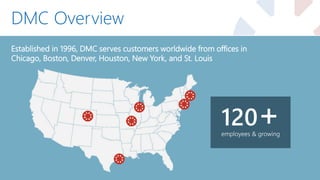
DMC Overview
Established in 1996, DMC serves customers worldwide from offices in
Chicago, Boston, Denver, Houston, New York, and St. Louis
employees & growing
120+
Siemens Expertise
31 Siemens Certified Engineers
DMC Customers
Automotive Chemical & Food Processing
Consumer Goods Defense Contracting Energy & Utilities Food & Beverage
Packaging Pharmaceutical Printing & Textiles Semiconductor
Special Machinery Telecommunications Test & Measurement
Industries Served
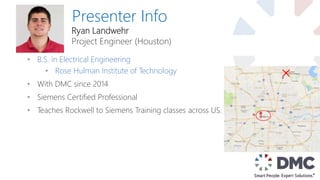
Presenter Info
• B.S. in Electrical Engineering
• Rose Hulman Institute of Technology
• With DMC since 2014
• Siemens Certified Professional
• Teaches Rockwell to Siemens Training classes across US.
Ryan Landwehr
Project Engineer (Houston)
1. Converting to V14 Safety – How and Why?
2. Shared Device with Safety
3. Reusable Function Blocks and PLC data types
4. Safety I-Device Communication
5. Safety Program Do’s & Don’t’s
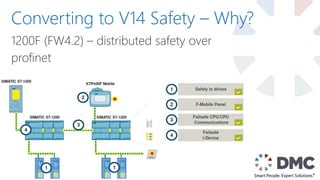
1200F (FW4.2) – distributed safety over
profinet
Converting to V14 Safety – Why?
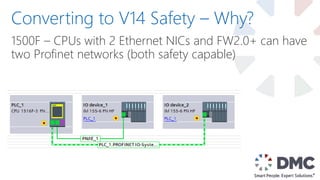
1500F – CPUs with 2 Ethernet NICs and FW2.0+ can have
two Profinet networks (both safety capable)
Converting to V14 Safety – Why?
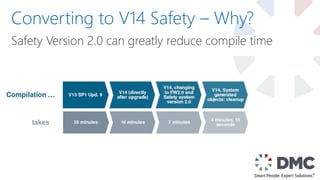
Safety Version 2.0 can greatly reduce compile time
Converting to V14 Safety – Why?
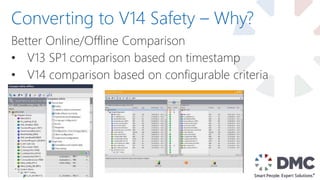
Better Online/Offline Comparison
• V13 SP1 comparison based on timestamp
• V14 comparison based on configurable criteria
Converting to V14 Safety – Why?
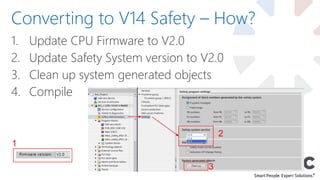
1. Update CPU Firmware to V2.0
2. Update Safety System version to V2.0
3. Clean up system generated objects
4. Compile
Converting to V14 Safety – How?
1
2
3
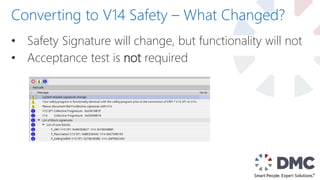
• Safety Signature will change, but functionality will not
• Acceptance test is not required
Converting to V14 Safety – What Changed?
1. Converting to V14 Safety – How and Why?
2. Shared Device with Safety
3. Reusable Function Blocks and PLC data types
4. Safety I-Device Communication
5. Safety Program Do’s & Don’t’s
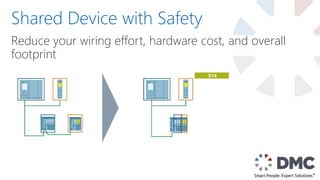
Reduce your wiring effort, hardware cost, and overall
footprint
Shared Device with Safety
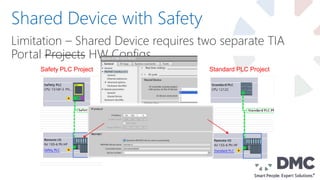
Limitation – Shared Device requires two separate TIA
Portal Projects HW Configs
Shared Device with Safety
Safety PLC Project Standard PLC Project
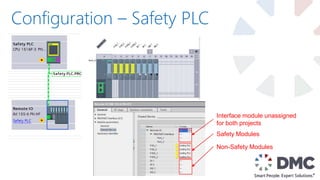
Configuration – Safety PLC
Interface module unassigned
for both projects
Safety Modules
Non-Safety Modules
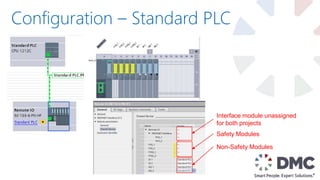
Configuration – Standard PLC
Interface module unassigned
for both projects
Safety Modules
Non-Safety Modules
Typical Use Cases:
• One F-CPU, one Standard CPU sharing one (or
multiple) ET200 Remote IO Racks
• One F-CPU, one Standard CPU sharing a G120
• Implementing Safety in a motion project: one F-CPU,
one Simotion Controller
Shared Device Notes
1. Converting to V14 Safety – How and Why?
2. Shared Device with Safety
3. Reusable Function Blocks and PLC data types
4. Safety I-Device Communication
5. Safety Program Do’s & Don’t’s
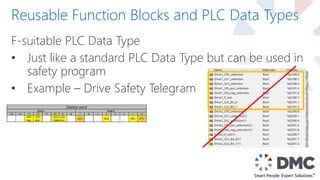
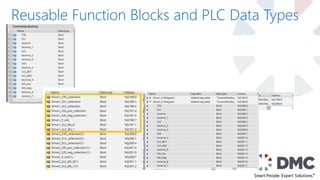
F-suitable PLC Data Type
• Just like a standard PLC Data Type but can be used in
safety program
• Example – Drive Safety Telegram
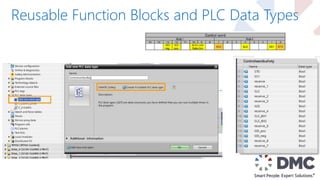
Reusable Function Blocks and PLC Data Types
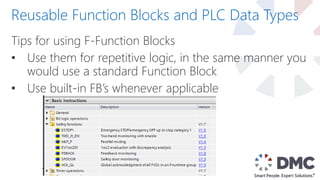
Tips for using F-Function Blocks
• Use them for repetitive logic, in the same manner you
would use a standard Function Block
• Use built-in FB’s whenever applicable
Reusable Function Blocks and PLC Data Types
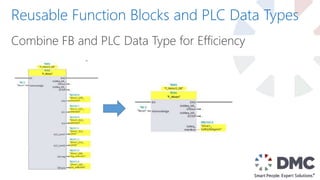
Combine FB and PLC Data Type for Efficiency
Example: ESTOP1
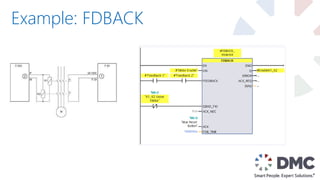
Example: FDBACK
1. Converting to V14 Safety – How and Why?
2. Shared Device with Safety
3. Reusable Function Blocks and PLC data types
4. Safety I-Device Communication
5. Safety Program Do’s & Don’t’s
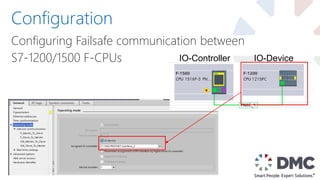
Configuring Failsafe communication between
S7-1200/1500 F-CPUs
Configuration
IO-Controller IO-Device
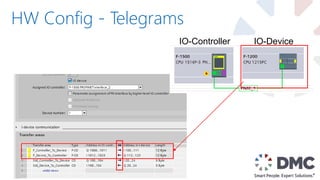
HW Config - Telegrams
IO-Controller IO-Device
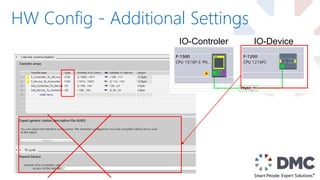
HW Config - Additional Settings
IO-Controler IO-Device
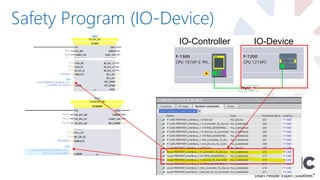
Safety Program (IO-Device)
IO-Controller IO-Device
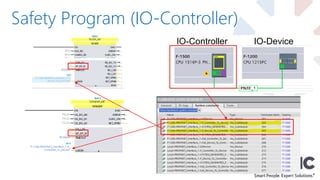
Safety Program (IO-Controller)
IO-Controller IO-Device
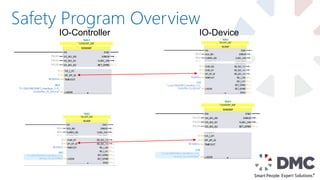
Safety Program Overview
IO-Controller IO-Device
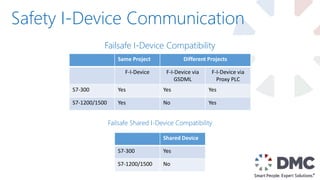
Safety I-Device Communication
Same Project Different Projects
F-I-Device F-I-Device via
GSDML
F-I-Device via
Proxy PLC
S7-300 Yes Yes Yes
S7-1200/1500 Yes No Yes
Shared Device
S7-300 Yes
S7-1200/1500 No
Failsafe I-Device Compatibility
Failsafe Shared I-Device Compatibility
1. Converting to V14 Safety – How and Why?
2. Shared Device with Safety
3. Reusable Function Blocks and PLC data types
4. Safety I-Device Communication
5. Safety Program Do’s & Don’t’s
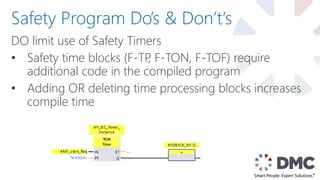
DO limit use of Safety Timers
• Safety time blocks (F-TP, F-TON, F-TOF) require
additional code in the compiled program
• Adding OR deleting time processing blocks increases
compile time
Safety Program Do’s & Don’t‘s
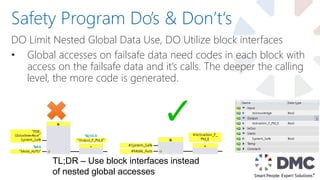
DO Limit Nested Global Data Use, DO Utilize block interfaces
• Global accesses on failsafe data need codes in each block with
access on the failsafe data and it’s calls. The deeper the calling
level, the more code is generated.
Safety Program Do’s & Don’t‘s
TL;DR – Use block interfaces instead
of nested global accesses
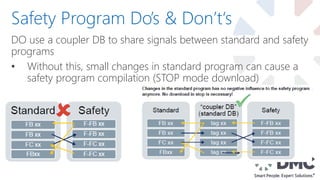
DO use a coupler DB to share signals between standard and safety
programs
• Without this, small changes in standard program can cause a
safety program compilation (STOP mode download)
Safety Program Do’s & Don’t‘s
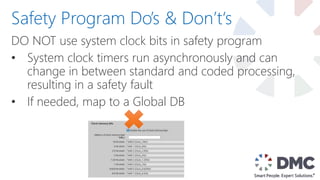
DO NOT use system clock bits in safety program
• System clock timers run asynchronously and can
change in between standard and coded processing,
resulting in a safety fault
• If needed, map to a Global DB
Safety Program Do’s & Don’t‘s
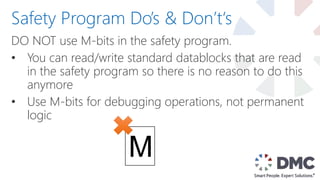
DO NOT use M-bits in the safety program.
• You can read/write standard datablocks that are read
in the safety program so there is no reason to do this
anymore
• Use M-bits for debugging operations, not permanent
logic
Safety Program Do’s & Don’t‘s
M
DO use AlwaysTRUE and AlwaysFALSE system memory
bits in safety program
• These are valid to use in the safety program.
• Can also map them to local memory if desired
Safety Program Do’s & Don’t‘s
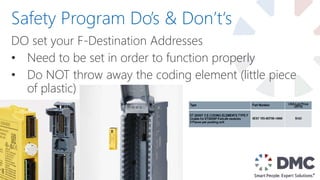
DO set your F-Destination Addresses
• Need to be set in order to function properly
• Do NOT throw away the coding element (little piece
of plastic)
Safety Program Do’s & Don’t‘s
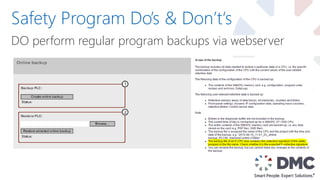
DO perform regular program backups via webserver
Safety Program Do’s & Don’t‘s
Last, but not least…
DO
• Use block interfaces instead of global data access
• Use Coupler DBs
• Use built-in AlwaysFALSE/AlwaysTRUE
• Assign F-Destination Address
• Keep it simple
DON’T
• Use F-Timers unless necessary
• Use M-memory unless necessary
• Use system clock byte in safety program EVER
Do’s and Don’t’s Recap
1. Converting to V14 Safety – How and Why?
2. Shared Device with Safety
3. Reusable Function Blocks and PLC data types
4. Safety I-Device Communication
5. Safety Program Do’s & Don’t’s
End Presentation
Questions?

5 Tips for Using TIA Portal V14 to Decrease Safety Development Time

  • 1.
    5 Tips forUsing TIA Portal V14 to Decrease Safety Development Time Automation Summit Boca Raton, FL, June 26-28, 2017
  • 2.
    DMC Overview Established in1996, DMC serves customers worldwide from offices in Chicago, Boston, Denver, Houston, New York, and St. Louis employees & growing 120+
  • 3.
    Siemens Expertise 31 SiemensCertified Engineers
  • 4.
  • 5.
    Automotive Chemical &Food Processing Consumer Goods Defense Contracting Energy & Utilities Food & Beverage Packaging Pharmaceutical Printing & Textiles Semiconductor Special Machinery Telecommunications Test & Measurement Industries Served
  • 6.
    Presenter Info • B.S.in Electrical Engineering • Rose Hulman Institute of Technology • With DMC since 2014 • Siemens Certified Professional • Teaches Rockwell to Siemens Training classes across US. Ryan Landwehr Project Engineer (Houston)
  • 7.
    1. Converting toV14 Safety – How and Why? 2. Shared Device with Safety 3. Reusable Function Blocks and PLC data types 4. Safety I-Device Communication 5. Safety Program Do’s & Don’t’s
  • 8.
    1200F (FW4.2) –distributed safety over profinet Converting to V14 Safety – Why?
  • 9.
    1500F – CPUswith 2 Ethernet NICs and FW2.0+ can have two Profinet networks (both safety capable) Converting to V14 Safety – Why?
  • 10.
    Safety Version 2.0can greatly reduce compile time Converting to V14 Safety – Why?
  • 11.
    Better Online/Offline Comparison •V13 SP1 comparison based on timestamp • V14 comparison based on configurable criteria Converting to V14 Safety – Why?
  • 12.
    1. Update CPUFirmware to V2.0 2. Update Safety System version to V2.0 3. Clean up system generated objects 4. Compile Converting to V14 Safety – How? 1 2 3
  • 13.
    • Safety Signaturewill change, but functionality will not • Acceptance test is not required Converting to V14 Safety – What Changed?
  • 14.
    1. Converting toV14 Safety – How and Why? 2. Shared Device with Safety 3. Reusable Function Blocks and PLC data types 4. Safety I-Device Communication 5. Safety Program Do’s & Don’t’s
  • 15.
    Reduce your wiringeffort, hardware cost, and overall footprint Shared Device with Safety
  • 16.
    Limitation – SharedDevice requires two separate TIA Portal Projects HW Configs Shared Device with Safety Safety PLC Project Standard PLC Project
  • 17.
    Configuration – SafetyPLC Interface module unassigned for both projects Safety Modules Non-Safety Modules
  • 18.
    Configuration – StandardPLC Interface module unassigned for both projects Safety Modules Non-Safety Modules
  • 19.
    Typical Use Cases: •One F-CPU, one Standard CPU sharing one (or multiple) ET200 Remote IO Racks • One F-CPU, one Standard CPU sharing a G120 • Implementing Safety in a motion project: one F-CPU, one Simotion Controller Shared Device Notes
  • 20.
    1. Converting toV14 Safety – How and Why? 2. Shared Device with Safety 3. Reusable Function Blocks and PLC data types 4. Safety I-Device Communication 5. Safety Program Do’s & Don’t’s
  • 21.
    F-suitable PLC DataType • Just like a standard PLC Data Type but can be used in safety program • Example – Drive Safety Telegram Reusable Function Blocks and PLC Data Types
  • 22.
    Reusable Function Blocksand PLC Data Types
  • 23.
    Reusable Function Blocksand PLC Data Types
  • 24.
    Reusable Function Blocksand PLC Data Types Tips for using F-Function Blocks • Use them for repetitive logic, in the same manner you would use a standard Function Block • Use built-in FB’s whenever applicable
  • 25.
    Reusable Function Blocksand PLC Data Types Combine FB and PLC Data Type for Efficiency
  • 26.
  • 27.
  • 28.
    1. Converting toV14 Safety – How and Why? 2. Shared Device with Safety 3. Reusable Function Blocks and PLC data types 4. Safety I-Device Communication 5. Safety Program Do’s & Don’t’s
  • 29.
    Configuring Failsafe communicationbetween S7-1200/1500 F-CPUs Configuration IO-Controller IO-Device
  • 30.
    HW Config -Telegrams IO-Controller IO-Device
  • 31.
    HW Config -Additional Settings IO-Controler IO-Device
  • 32.
  • 33.
  • 34.
  • 35.
    Safety I-Device Communication SameProject Different Projects F-I-Device F-I-Device via GSDML F-I-Device via Proxy PLC S7-300 Yes Yes Yes S7-1200/1500 Yes No Yes Shared Device S7-300 Yes S7-1200/1500 No Failsafe I-Device Compatibility Failsafe Shared I-Device Compatibility
  • 36.
    1. Converting toV14 Safety – How and Why? 2. Shared Device with Safety 3. Reusable Function Blocks and PLC data types 4. Safety I-Device Communication 5. Safety Program Do’s & Don’t’s
  • 37.
    DO limit useof Safety Timers • Safety time blocks (F-TP, F-TON, F-TOF) require additional code in the compiled program • Adding OR deleting time processing blocks increases compile time Safety Program Do’s & Don’t‘s
  • 38.
    DO Limit NestedGlobal Data Use, DO Utilize block interfaces • Global accesses on failsafe data need codes in each block with access on the failsafe data and it’s calls. The deeper the calling level, the more code is generated. Safety Program Do’s & Don’t‘s TL;DR – Use block interfaces instead of nested global accesses
  • 39.
    DO use acoupler DB to share signals between standard and safety programs • Without this, small changes in standard program can cause a safety program compilation (STOP mode download) Safety Program Do’s & Don’t‘s
  • 40.
    DO NOT usesystem clock bits in safety program • System clock timers run asynchronously and can change in between standard and coded processing, resulting in a safety fault • If needed, map to a Global DB Safety Program Do’s & Don’t‘s
  • 41.
    DO NOT useM-bits in the safety program. • You can read/write standard datablocks that are read in the safety program so there is no reason to do this anymore • Use M-bits for debugging operations, not permanent logic Safety Program Do’s & Don’t‘s M
  • 42.
    DO use AlwaysTRUEand AlwaysFALSE system memory bits in safety program • These are valid to use in the safety program. • Can also map them to local memory if desired Safety Program Do’s & Don’t‘s
  • 43.
    DO set yourF-Destination Addresses • Need to be set in order to function properly • Do NOT throw away the coding element (little piece of plastic) Safety Program Do’s & Don’t‘s
  • 44.
    DO perform regularprogram backups via webserver Safety Program Do’s & Don’t‘s
  • 45.
    Last, but notleast…
  • 46.
    DO • Use blockinterfaces instead of global data access • Use Coupler DBs • Use built-in AlwaysFALSE/AlwaysTRUE • Assign F-Destination Address • Keep it simple DON’T • Use F-Timers unless necessary • Use M-memory unless necessary • Use system clock byte in safety program EVER Do’s and Don’t’s Recap
  • 47.
    1. Converting toV14 Safety – How and Why? 2. Shared Device with Safety 3. Reusable Function Blocks and PLC data types 4. Safety I-Device Communication 5. Safety Program Do’s & Don’t’s
  • 48.

Editor's Notes

  • #2 Emphasize the title
  • #4 We are Siemens Solutions partners with the Factory Automation Group and with WinCC OA and as WinCC Specialists. We are certified with the Control Systems Integrators Association.
  • #6 Here are some of DMC’s customers
  • #7 Our diverse experience in technology, industry and processes allows us to bring best practices from many areas.  We deliver solutions not available from singularly focused organizations. Our experience is broad and deep.  We have a proven track record in a wide range of industries.
  • #8 That’s a lot about DMC and myself, how about y’all? How many of you have programmed a safety PLC before? Never even heard of one? How many integrators do we have here? End users? Siemens? Hopefully there’s a little something for everyone here, feel free to ask questions along the way and I’ll try to tailor this presentation towards what y’all want to know.
  • #9 Going to keep this at a high level, if anyone wants more detail please come see me afterwards Tip #1!
  • #16 The next tip we’re going to talk about is…
  • #17 NOTE: this requires two HW configurations If you saw the LSI presentation yesterday, they used this to cut their commissioning and development time down by working independently in parallel
  • #18 NOTE: this requires two projects. This could also be two safety PLCs, or even two standard PLCs. Both Remote IO instances should have the same IP address and profinet name
  • #19 In the LSI project they assigned the Profinet interface to the controlling PLC…seems like this is not as important
  • #21 If you saw LSI’s, you’ll already be familiar with one of the typical use cases Talk about Wrigley sheeting machine…Simotion controller, F-CPU Complex motion application, multiple real and virtual axes, gearing and camming
  • #22 The next tip we’re going to talk about is…
  • #26 Built-in FB’s for Estops, Two Hand Enable PBs, Muting, 1oo2 DI Evaluation, Feedback monitoring (motor starters), Safety Doors, and Ack Global
  • #28 Talk about rewriting AIT’s safety program from scratch, 50 lines of code & multiple JMP/LBL statements shrunk to 15 lines I E_STOP – NC Signals ACK_NEC – 1=positive edge on ACK/0=no ACK needed ACK – Reset input TIME_DEL – delay before Q_DELAY turns off Q Q drops instantly Q_DELAY drops after time delay ACK_REQ ready to be acknowledged
  • #29 Does Q match inverse of FEEDBACK, typically used for motor starters
  • #30 The next tip we’re going to talk about is…
  • #33 Cannot currently use Export GSD or Shared Device with failsafe communication, this is due to the F-CD type of transfer area, but presumably this is coming
  • #35 NOTE: make sure our telegram matches our RCVDP/SENDDP blocks, also note that we swapped the order of the DP_DP_IDs
  • #36 NOTE: make sure our telegram matches our RCVDP/SENDDP blocks, also note that we swapped the order of the DP_DP_IDs
  • #37 This limitation is mostly due to extra overhead with the F-CD telegram configuration. I believe this feature is coming, but it’s not here yet so we need to be aware of it
  • #38 The next tip we’re going to talk about is…
  • #45 ET200M still have DIP switches
  • #47 ET200M still have DIP switches
  • #48 ET200M still have DIP switches
  • #49 The next tip we’re going to talk about is…