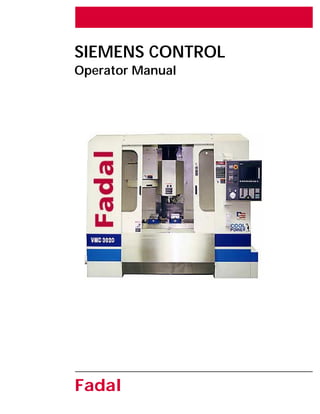
SIEMENS CONTROL
Operator Manual
Fadal
2 : October 2000
SIEMENS CONTROL
Operator Manual
Fadal
Table of Contents
Siemens Manual Safety Notices . . . . . . . . . . . . . . . . . . . . . . . . . . . . 3
Safety Warnings . . . . . . . . . . . . . . . . . . . . . . . . . . . . . . . . . . . . . . . . 6
Power On . . . . . . . . . . . . . . . . . . . . . . . . . . . . . . . . . . . . . . . . . . . . . . . 9
Pre-start-up Checks . . . . . . . . . . . . . . . . . . . . . . . . . . . . . . . . . . . . . 9
Pendant Layout . . . . . . . . . . . . . . . . . . . . . . . . . . . . . . . . . . . . . . . . . . 11
Pendant Hard Keys Function Guide . . . . . . . . . . . . . . . . . . . . . . . . . . . 12
Finding Machine Reference (Cold Start) . . . . . . . . . . . . . . . . . . . . . 16
Operating Modes . . . . . . . . . . . . . . . . . . . . . . . . . . . . . . . . . . . . . . 19
Manual Data Automatic (Submode of Manual display) . . . . . . . . . . 19
Jog Modes Of Operation . . . . . . . . . . . . . . . . . . . . . . . . . . . . . . . . . . . 20
Position Readout Display In Jog Mode. . . . . . . . . . . . . . . . . . . . . . 20
Incremental Jog Using The MPG Or JOG Keys . . . . . . . . . . . . . . . . 21
Setting the Increment . . . . . . . . . . . . . . . . . . . . . . . . . . . . . . . . . . 21
Using MPG hand wheel . . . . . . . . . . . . . . . . . . . . . . . . . . . . . . . . . 22
Jog and Rapid Jog . . . . . . . . . . . . . . . . . . . . . . . . . . . . . . . . . . . . . 24
Tool, Manually Loading & Unloading a Holder. . . . . . . . . . . . . . . . 25
Tools, Loading a Holder from the ATC . . . . . . . . . . . . . . . . . . . . . . 26
Establishing Spindle RPM . . . . . . . . . . . . . . . . . . . . . . . . . . . . . . . . 27
Spindle Start . . . . . . . . . . . . . . . . . . . . . . . . . . . . . . . . . . . . . . . . . 28
Spindle Off . . . . . . . . . . . . . . . . . . . . . . . . . . . . . . . . . . . . . . . . . . 28
Settable Frames - Workpiece Offsets . . . . . . . . . . . . . . . . . . . . . . . . . . 29
Machine Coordinate System vs. Work Coordinate System: . . . . . . . 29
Definitions of Offsets . . . . . . . . . . . . . . . . . . . . . . . . . . . . . . . . . . . . . . 31
Base Offset . . . . . . . . . . . . . . . . . . . . . . . . . . . . . . . . . . . . . . . . . . 31
Zero Offset . . . . . . . . . . . . . . . . . . . . . . . . . . . . . . . . . . . . . . . . . . 31
Tool Offset . . . . . . . . . . . . . . . . . . . . . . . . . . . . . . . . . . . . . . . . . . . 31
Using the SET BASE soft key to set the Base Offset . . . . . . . . . . . . . 33
Using the MEASURE WORKPIECE soft key to set Base/Zero Offsets . 36
Using the MEASURE TOOL soft key to set the Tool Offset . . . . . . . 41
Using the ZERO OFFSET soft key to set the Base and Zero Offsets . . 44
Using the TOOL soft key to set the Tool Offsets . . . . . . . . . . . . . . . 46
Setting Tool Length Offset . . . . . . . . . . . . . . . . . . . . . . . . . . . . . . . 48
Tool Diameter Input . . . . . . . . . . . . . . . . . . . . . . . . . . . . . . . . . . . . 50
Tool Wear Table . . . . . . . . . . . . . . . . . . . . . . . . . . . . . . . . . . . . . . . 51
Magazine Table . . . . . . . . . . . . . . . . . . . . . . . . . . . . . . . . . . . . . . . 52
R Parameter Table . . . . . . . . . . . . . . . . . . . . . . . . . . . . . . . . . . . . . 53
Coolant, Using the Coolant 1 and Coolant 2 Buttons . . . . . . . . . . . 53
To Create a New Program for Auto. . . . . . . . . . . . . . . . . . . . . . . . 55
Editing an Existing Program . . . . . . . . . . . . . . . . . . . . . . . . . . . . . . 56
Choosing a Program to Run in Auto . . . . . . . . . . . . . . . . . . . . . . . . 57
Auto, Running a Program . . . . . . . . . . . . . . . . . . . . . . . . . . . . . . . 58
Mid-tape (Program) Start . . . . . . . . . . . . . . . . . . . . . . . . . . . . . . . . 59
Power Off . . . . . . . . . . . . . . . . . . . . . . . . . . . . . . . . . . . . . . . . . . . 60
Emergency Stop . . . . . . . . . . . . . . . . . . . . . . . . . . . . . . . . . . . . . . . 61
Dual Arm Tool Changer . . . . . . . . . . . . . . . . . . . . . . . . . . . . . . . . . 62
October 2000 Important Safety Information: Siemens Manual Safety Notices 3
SIEMENS CONTROL
Operator Manual
Fadal
Important Safety Information
Siemens Manual Safety Notices
Warning The following notes are given to ensure your safety and to prevent any risk
of damage to the product described or other units connected to the
machine.
Warning When electrical equipment is in operation, certain parts are bound to
reach hazardous voltage levels.
The intermediate circuit of all SIMODRIVE modules remains at a hazardous
voltage level for 5 minutes after all voltages have been disconnected. See
the Instruction Manual for more details.
Only qualified personnel should perform maintenance on the device/
system. Failure to comply with warnings can result in severe injury or
material damage. Only suitably qualified personnel trained in the setup,
installation, commissioning or operation of the product should work on
the device/system.
Further Notes Whenever measuring or testing has to be performed on live equipment,
the regulations of Safety Code VBG 4.0 must be observed, in particular §
8 “Permissible Deviations when Working on Live Parts”. Suitable
electronic tools should be used.
Danger This symbol appears whenever death, severe bodily injury or substantial
material damage will occur if the appropriate precautions are not taken.
Warning This symbol appears whenever death, severe body injury or substantial
material damage could occur if the appropriate precautions are not taken.
Caution This symbol appears whenever minor body injury or material damage can
occur if the appropriate precautions are not taken.
4 Important Safety Information: Siemens Manual Safety Notices October 2000
SIEMENS CONTROL
Operator Manual
Fadal
Important This symbol appears in the documentation whenever attention has to be
paid to something of particular importance.
Note This symbol appears in the documentation whenever a reference is made
to another subject.
Warning Repairs on equipment supplied by Fadal may only be carried out by Fadal
Service or repair centers authorized by Fadal using authorized genuine
Fadal supplied parts. Any defective parts or components are to be
replaced only by parts contained in the relevant spare parts list.
Disconnect the power supply before opening the equipment.
Emergency Stop facilities according to EN 60204 IEC 204 (VDE 0113) must
remain operative in all operating modes of the automation equipment.
Any disengaging of the Emergency Stop facility must not lead to
uncontrolled or undefined restart.
Whenever faults occurring in the automation equipment can lead to
substantial material damage or even grievous bodily injury, (i.e. are
potential dangerous faults), additional external precautions must be taken
or facilities must be provided ensuring or enforcing safe operation even
when a fault occurs (e.g. independent limit switches, mechanical
interlocks, etc.)
Caution Connecting and signal lines must be installed so as to safely prevent
inductive and capacitive interference from affecting automation functions.
Warning Correct transport, storage, erection and mounting as well as careful
operation and maintenance are essential for proper and safe operation of
the equipment. Non–compliance with warnings can result in severe bodily
injury or material damage.
Warning The modules contain electrostatically sensitive components. Before
touching an electronic module, it is necessary to be electro-statically
discharged. The simplest way of doing this is to touch an electrically
conducting grounded object (e.g. a bare metal part of a switchboard or a
plug socket protective conductor) before touching an electronic module.
October 2000 Important Safety Information: Electrostatically Sensitive Modules 5
SIEMENS CONTROL
Operator Manual
Fadal
ESD notes Electrostatically Sensitive Modules
Important!
Handling of ESD modules:
When handling electrostatically sensitive devices, make sure that operator,
workplace and packing material are properly grounded.
Generally, electronic modules must not be touched unless work has to be
carried out on them. When handling PC boards make absolutely sure that
you do not touch component pins or printed conductors.
Touch components only if
–you are permanently grounded by means of an antistatic chain,
–you are wearing ESD (Electro Static Device) boots or ESD boots
with grounding strips in conjunction with ESD flooring.
Modules may only be placed on electrically conductive surfaces (tables
with ESD tops, conductive ESD foam plastic, ESD packing bags, and/or
ESD transport containers).
Keep modules away from visual display units, monitors or TV sets (the
minimum distance from screen must be more than 10 cm).
Modules must not be allowed to come into contact with electrically
insulating materials such as plastic films, insulating table tops or clothing
made of synthetic fibers.
Measurements on modules are allowed only if:
–the measuring instrument is properly grounded (e.g. equipment
grounding conductor), or
–the probe is briefly discharged before measuring with a potential-
free measuring instrument (e.g. touch the unpainted metal parts
of the control housing)
The equipment may be used only for the applications stated in the manual
and only in conjunction with devices and components recommended and
authorized by Fadal.
6 Important Safety Information: Important! October 2000
SIEMENS CONTROL
Operator Manual
Fadal
Should any questions or problems arise in studying this manual, please
contact the Fadal Service Department.
Safety Warnings
1) WARNING! WEAR ANSI OR CE APPROVED SAFETY GLASSES AT ALL
TIMES. Everyday glasses are not designed for protection. Only ANSI or CE
approved safety glasses have impact resistant lenses. Hearing protection
must be worn when operations exceed 90 decibels (85 decibels-CE) .
2) KEEP DOORS CLOSED WHILE MACHINING.
3) WEAR PROPER APPAREL. Do not wear loose clothing, gloves, neckties,
rings, bracelets, or other jewelry that might get caught in moving parts or
areas of potential electric shock. Non-slip footwear is recommended.
4) CONTAIN LONG HAIR. Tie long hair back and wear protective hair
covering to contain long hair.
5) USE A NIOSH OR CE APPROVED DUST MASK OR RESPIRATOR.
Protection is recommended when cutting operations are dusty, or exceed
the permissible exposure limit.
6) KEEP WORK AREA CLEAN. Good housekeeping practices encourage
safety.
7) Read SPINDLE, MANUALLY LOADING & UNLOADING A HOLDER in the
Operator’s Manual.
8) DO NOT OPERATE THE MACHINE UNDER THE INFLUENCE OF DRUGS
OR ALCOHOL, PRESCRIBED OR OTHERWISE.
9) READ THE SAFETY WARNINGS SUPPLIED WITH ALL TOOLING.
10) MAINTAIN TOOLS WITH CARE. Keep tools sharp and clean for best
performance and to reduce the risk of injury. Follow instructions for
lubrication and for changing accessories.
11) REMOVE ADJUSTING KEYS AND WRENCHES. Always check that keys
and wrenches are removed from tools and tooling before starting the
machine.
12) DO NOT EXCEED THE MANUFACTURER’S RECOMMENDED
MAXIMUM RPM FOR THE TOOL. When tools are placed in the spindle,
October 2000 Important Safety Information: Important! 7
SIEMENS CONTROL
Operator Manual
Fadal
verify the current RPM commanded in the control before starting the
spindle.
13) SECURE TOOLS PROPERLY IN THEIR HOLDERS.
14) SECURE WORK. Use common machining practices for holding
(fixturing) material to be machined.
15) REMOVE ALL TOOLS FROM THE SPINDLE AND TOOL CHANGER before
servicing and changing accessories such as tooling, fixtures, indexers, the
tail stock of a fourth axis and any fourth axis or fourth-fifth axis
combination, etc.
16) ALWAYS DEBUG A NEW PROGRAM before running it in the AUTO
mode. (See DEBUG PROGRAM in the User’s Manual.)
17) The machine tool MUST be connected to a grounded, metal,
permanent wiring system, or to a system having an equipment-grounding
conductor.
18) DO NOT OPERATE THE MACHINE IN AN UNSAFE ENVIRONMENT. Do
not use the machine in damp or wet locations, or expose to rain. Keep the
work area well lighted.
19) DO NOT FORCE TOOL. Tools are designed to perform properly and
safely at proper rates. Keep tools sharp.
20) USE THE CORRECT TOOL. Do not attempt to use tools or attachments
to perform a job for which they were not designed.
21) DON’T OVERREACH. Keep proper footing and balance at all times.
Use a steady object for support when reaching over the machine.
22) REDUCE THE RISK OF UNINTENTIONAL STARTING. Power off the
machine at the main disconnect switch and use the proper lockout/tagout
procedures while working within the chip enclosure, or when there is
potential for a release of energy.
23) POWER OFF THE MACHINE AT THE MAIN DISCONNECT SWITCH AND
LOCK OUT WHEN WORKING INSIDE ANY OF THE ELECTRONIC CABINETS.
24) USE RECOMMENDED ACCESSORIES. Refer to the User’s Manual for
FADAL recommended accessories. Unapproved accessories increase the
risk of injury.
8 Important Safety Information: Important! October 2000
SIEMENS CONTROL
Operator Manual
Fadal
25) NEVER STAND ON OR IN THE MACHINE. Besides the risk of slipping or
falling, serious injury could occur if a tool is unintentionally contacted.
26) CHECK FOR DAMAGED PARTS. Always check all parts for binding,
breakage, and any other condition that will affect the proper operation of
the machine and/or increase the risk of injury. Damaged or missing parts
must be repaired or replaced BEFORE operating the machine.
27) NEVER LEAVE THE MACHINE UNATTENDED. Turn the power off to the
machine when leaving the machine unattended. Never leave the machine
until it comes to a complete stop.
28) DO NOT DISCONNECT THE FRONT DOOR SAFETY SWITCHES.
29) WIPE UP SPILLS. Immediately cover with absorbent material and wipe
up coolant and oil spills around the machine. Correct the cause of the
leakage to prevent any hazards.
30) ELECTRICAL INSTALLATION OF THE MACHINE MUST BE DONE BY A
QUALIFIED ELECTRICIAN.
31) ONLY FADAL OR FADAL DISTRIBUTOR FACTORY AUTHORIZED
INDIVIDUALS MAY INSTALL THE MACHINE.
32) USE PROPER SAFETY GLOVES WHEN HANDLING SHARP OR JAGGED
EDGES. Do not wear gloves around rotating machinery.
33) DO NOT USE AIR HOSES TO BLOW CHIPS OFF YOUR BODY OR
CLOTHES. Serious injury to your eyes, hearing, and skin could result. Do
not blow towards others.
October 2000 Fadal/Sinumerik 810D CNC: Power On 9
SIEMENS CONTROL
Operator Manual
Fadal
Fadal/Sinumerik 810D CNC
Power On
Pre-startup Checks
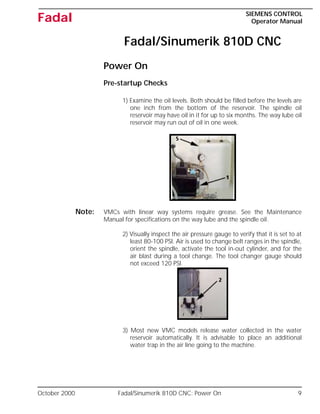
1) Examine the oil levels. Both should be filled before the levels are
one inch from the bottom of the reservoir. The spindle oil
reservoir may have oil in it for up to six months. The way lube oil
reservoir may run out of oil in one week.
Note: VMCs with linear way systems require grease. See the Maintenance
Manual for specifications on the way lube and the spindle oil.
2) Visually inspect the air pressure gauge to verify that it is set to at
least 80-100 PSI. Air is used to change belt ranges in the spindle,
orient the spindle, activate the tool in-out cylinder, and for the
air blast during a tool change. The tool changer gauge should
not exceed 120 PSI.
3) Most new VMC models release water collected in the water
reservoir automatically. It is advisable to place an additional
water trap in the air line going to the machine.
10 Fadal/Sinumerik 810D CNC: Power On October 2000
SIEMENS CONTROL
Operator Manual
Fadal
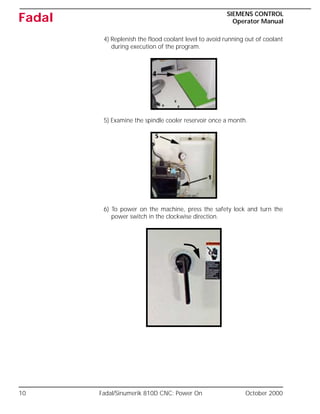
4) Replenish the flood coolant level to avoid running out of coolant
during execution of the program.
5) Examine the spindle cooler reservoir once a month.
6) To power on the machine, press the safety lock and turn the
power switch in the clockwise direction.
October 2000 Fadal/Sinumerik 810D CNC: Pendant Layout 11
SIEMENS CONTROL
Operator Manual
Fadal
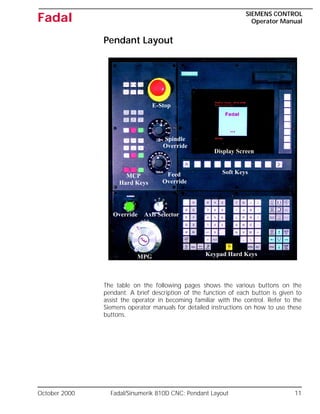
Pendant Layout
The table on the following pages shows the various buttons on the
pendant. A brief description of the function of each button is given to
assist the operator in becoming familiar with the control. Refer to the
Siemens operator manuals for detailed instructions on how to use these
buttons.
MCP
Display Screen
Soft Keys
Keypad Hard Keys
MPG
Axis Selector
Override
E-Stop
Spindle
Override
Feed
Override
Hard Keys
12 Fadal/Sinumerik 810D CNC: Pendant Hard Keys Function Guide October 2000
SIEMENS CONTROL
Operator Manual
Fadal
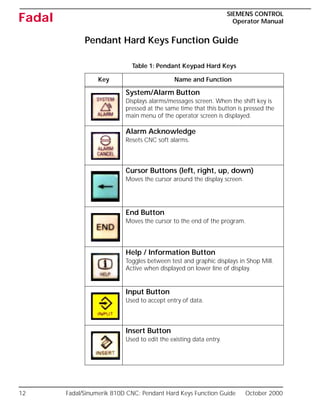
Pendant Hard Keys Function Guide
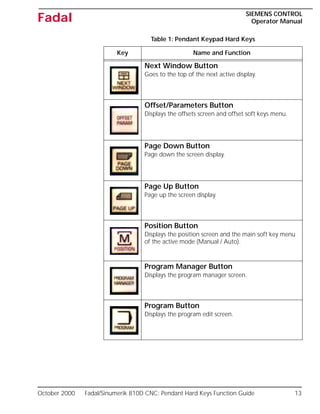
Table 1: Pendant Keypad Hard Keys
Key Name and Function
System/Alarm Button
Displays alarms/messages screen. When the shift key is
pressed at the same time that this button is pressed the
main menu of the operator screen is displayed.
Alarm Acknowledge
Resets CNC soft alarms.
Cursor Buttons (left, right, up, down)
Moves the cursor around the display screen.
End Button
Moves the cursor to the end of the program.
Help / Information Button
Toggles between test and graphic displays in Shop Mill.
Active when displayed on lower line of display.
Input Button
Used to accept entry of data.
Insert Button
Used to edit the existing data entry.
October 2000 Fadal/Sinumerik 810D CNC: Pendant Hard Keys Function Guide 13
SIEMENS CONTROL
Operator Manual
Fadal
Next Window Button
Goes to the top of the next active display.
Offset/Parameters Button
Displays the offsets screen and offset soft keys menu.
Page Down Button
Page down the screen display.
Page Up Button
Page up the screen display.
Position Button
Displays the position screen and the main soft key menu
of the active mode (Manual / Auto).
Program Manager Button
Displays the program manager screen.
Program Button
Displays the program edit screen.
Table 1: Pendant Keypad Hard Keys
Key Name and Function
14 Fadal/Sinumerik 810D CNC: Pendant Hard Keys Function Guide October 2000
SIEMENS CONTROL
Operator Manual
Fadal
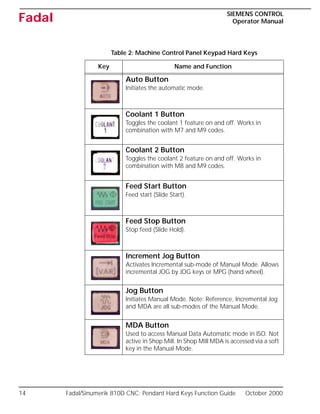
Table 2: Machine Control Panel Keypad Hard Keys
Key Name and Function
Auto Button
Initiates the automatic mode.
Coolant 1 Button
Toggles the coolant 1 feature on and off. Works in
combination with M7 and M9 codes.
Coolant 2 Button
Toggles the coolant 2 feature on and off. Works in
combination with M8 and M9 codes.
Feed Start Button
Feed start (Slide Start).
Feed Stop Button
Stop feed (Slide Hold).
Increment Jog Button
Activates Incremental sub-mode of Manual Mode. Allows
incremental JOG by JOG keys or MPG (hand wheel).
Jog Button
Initiates Manual Mode. Note: Reference, Incremental Jog
and MDA are all sub-modes of the Manual Mode.
MDA Button
Used to access Manual Data Automatic mode in ISO. Not
active in Shop Mill. In Shop Mill MDA is accessed via a soft
key in the Manual Mode.
October 2000 Fadal/Sinumerik 810D CNC: Pendant Hard Keys Function Guide 15
SIEMENS CONTROL
Operator Manual
Fadal
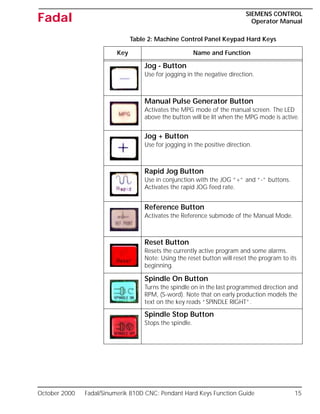
Jog - Button
Use for jogging in the negative direction.
Manual Pulse Generator Button
Activates the MPG mode of the manual screen. The LED
above the button will be lit when the MPG mode is active.
Jog + Button
Use for jogging in the positive direction.
Rapid Jog Button
Use in conjunction with the JOG “+” and “-” buttons.
Activates the rapid JOG feed rate.
Reference Button
Activates the Reference submode of the Manual Mode.
Reset Button
Resets the currently active program and some alarms.
Note: Using the reset button will reset the program to its
beginning.
Spindle On Button
Turns the spindle on in the last programmed direction and
RPM, (S-word). Note that on early production models the
text on the key reads “SPINDLE RIGHT”.
Spindle Stop Button
Stops the spindle.
Table 2: Machine Control Panel Keypad Hard Keys
Key Name and Function
16 Fadal/Sinumerik 810D CNC: Pendant Hard Keys Function Guide October 2000
SIEMENS CONTROL
Operator Manual
Fadal
Finding Machine Reference (Cold Start)
The FADAL machine tool has software limits and does not contain position
limit switches. Therefore, the machine tool must be physically located at
set alignment marks. The Siemens control automatically powers on in the
machine reference mode. It is recommended that the machine be shut
down at its axis alignment position to simplify the Power On procedure.
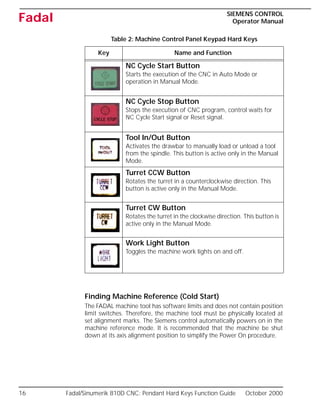
NC Cycle Start Button
Starts the execution of the CNC in Auto Mode or
operation in Manual Mode.
NC Cycle Stop Button
Stops the execution of CNC program, control waits for
NC Cycle Start signal or Reset signal.
Tool In/Out Button
Activates the drawbar to manually load or unload a tool
from the spindle. This button is active only in the Manual
Mode.
Turret CCW Button
Rotates the turret in a counterclockwise direction. This
button is active only in the Manual Mode.
Turret CW Button
Rotates the turret in the clockwise direction. This button is
active only in the Manual Mode.
Work Light Button
Toggles the machine work lights on and off.
Table 2: Machine Control Panel Keypad Hard Keys
Key Name and Function
October 2000 Fadal/Sinumerik 810D CNC: Pendant Hard Keys Function Guide 17
SIEMENS CONTROL
Operator Manual
Fadal
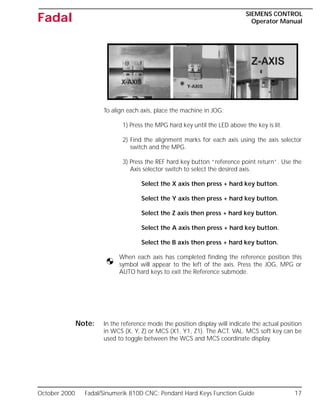
To align each axis, place the machine in JOG:
1) Press the MPG hard key until the LED above the key is lit.
2) Find the alignment marks for each axis using the axis selector
switch and the MPG.
3) Press the REF hard key button “reference point return”. Use the
Axis selector switch to select the desired axis.
Select the X axis then press + hard key button.
Select the Y axis then press + hard key button.
Select the Z axis then press + hard key button.
Select the A axis then press + hard key button.
Select the B axis then press + hard key button.
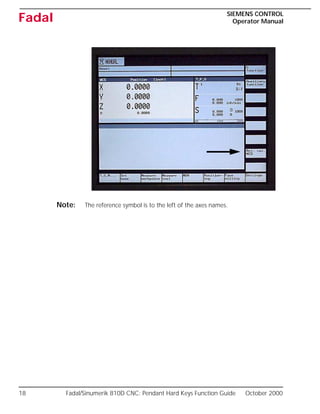
When each axis has completed finding the reference position this
symbol will appear to the left of the axis. Press the JOG, MPG or
AUTO hard keys to exit the Reference submode.
Note: In the reference mode the position display will indicate the actual position
in WCS (X, Y, Z) or MCS (X1, Y1, Z1). The ACT. VAL. MCS soft key can be
used to toggle between the WCS and MCS coordinate display.
18 Fadal/Sinumerik 810D CNC: Pendant Hard Keys Function Guide October 2000
SIEMENS CONTROL
Operator Manual
Fadal
Note: The reference symbol is to the left of the axes names.
October 2000 Fadal/Sinumerik 810D CNC: Operating Modes 19
SIEMENS CONTROL
Operator Manual
Fadal
Operating Modes
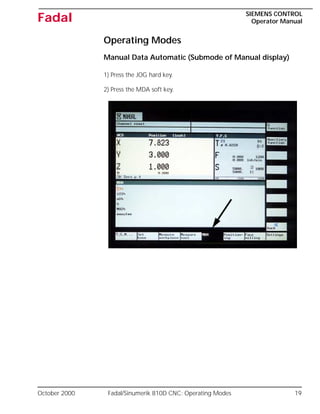
Manual Data Automatic (Submode of Manual display)
1) Press the JOG hard key.
2) Press the MDA soft key.
20 Fadal/Sinumerik 810D CNC: Jog Modes Of Operation October 2000
SIEMENS CONTROL
Operator Manual
Fadal
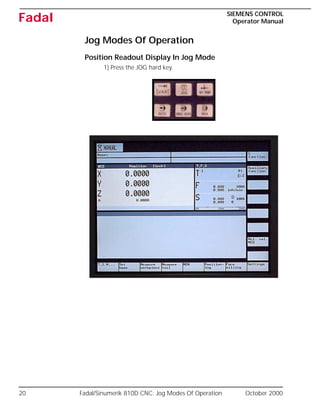
Jog Modes Of Operation
Position Readout Display In Jog Mode
1) Press the JOG hard key.
October 2000 Fadal/Sinumerik 810D CNC: Jog Modes Of Operation 21
SIEMENS CONTROL
Operator Manual
Fadal
Incremental Jog Using the MPG or JOG Keys
Setting the Increment
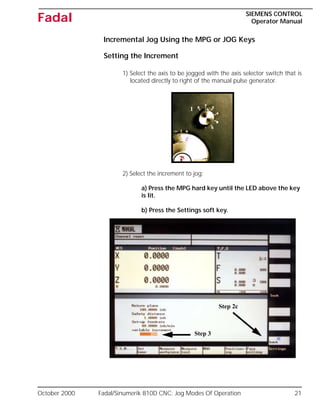
1) Select the axis to be jogged with the axis selector switch that is
located directly to right of the manual pulse generator.
2) Select the increment to jog:
a) Press the MPG hard key until the LED above the key
is lit.
b) Press the Settings soft key.
1
Step 2c
Step 3
22 Fadal/Sinumerik 810D CNC: Jog Modes Of Operation October 2000
SIEMENS CONTROL
Operator Manual
Fadal
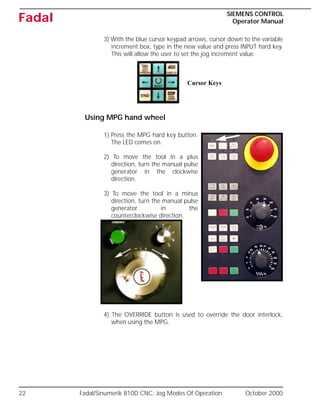
3) With the blue cursor keypad arrows, cursor down to the variable
increment box, type in the new value and press INPUT hard key.
This will allow the user to set the jog increment value.
Using MPG hand wheel
1) Press the MPG hard key button.
The LED comes on.
2) To move the tool in a plus
direction, turn the manual pulse
generator in the clockwise
direction.
3) To move the tool in a minus
direction, turn the manual pulse
generator in the
counterclockwise direction.
4) The OVERRIDE button is used to override the door interlock,
when using the MPG.
Cursor Keys
October 2000 Fadal/Sinumerik 810D CNC: Jog Modes Of Operation 23
SIEMENS CONTROL
Operator Manual
Fadal
Note: If the feed rate override is at 0% then the motion
will stop when using the manual pulse generator
and a message is generated.
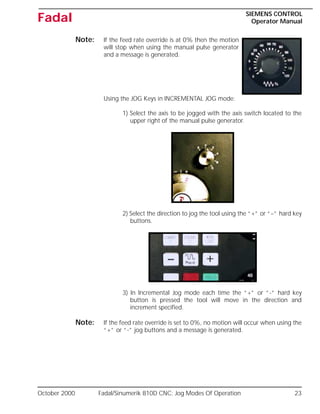
Using the JOG Keys in INCREMENTAL JOG mode:
1) Select the axis to be jogged with the axis switch located to the
upper right of the manual pulse generator.
2) Select the direction to jog the tool using the “+” or “–” hard key
buttons.
3) In Incremental Jog mode each time the “+” or “-” hard key
button is pressed the tool will move in the direction and
increment specified.
Note: If the feed rate override is set to 0%, no motion will occur when using the
“+” or “-” jog buttons and a message is generated.
24 Fadal/Sinumerik 810D CNC: Jog Modes Of Operation October 2000
SIEMENS CONTROL
Operator Manual
Fadal
Jog and Rapid Jog
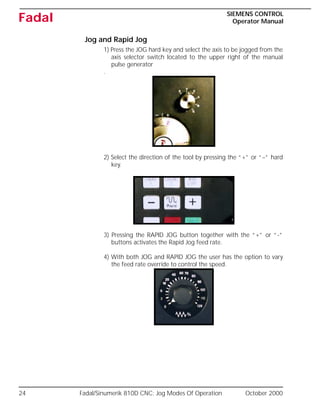
1) Press the JOG hard key and select the axis to be jogged from the
axis selector switch located to the upper right of the manual
pulse generator
.
2) Select the direction of the tool by pressing the “+” or “–” hard
key.
3) Pressing the RAPID JOG button together with the “+” or “-”
buttons activates the Rapid Jog feed rate.
4) With both JOG and RAPID JOG the user has the option to vary
the feed rate override to control the speed.
October 2000 Fadal/Sinumerik 810D CNC: Jog Modes Of Operation 25
SIEMENS CONTROL
Operator Manual
Fadal
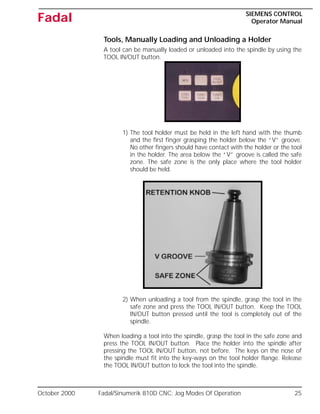
Tools, Manually Loading and Unloading a Holder
A tool can be manually loaded or unloaded into the spindle by using the
TOOL IN/OUT button.
1) The tool holder must be held in the left hand with the thumb
and the first finger grasping the holder below the “V” groove.
No other fingers should have contact with the holder or the tool
in the holder. The area below the “V” groove is called the safe
zone. The safe zone is the only place where the tool holder
should be held.
2) When unloading a tool from the spindle, grasp the tool in the
safe zone and press the TOOL IN/OUT button. Keep the TOOL
IN/OUT button pressed until the tool is completely out of the
spindle.
When loading a tool into the spindle, grasp the tool in the safe zone and
press the TOOL IN/OUT button. Place the holder into the spindle after
pressing the TOOL IN/OUT button, not before. The keys on the nose of
the spindle must fit into the key-ways on the tool holder flange. Release
the TOOL IN/OUT button to lock the tool into the spindle.
26 Fadal/Sinumerik 810D CNC: Jog Modes Of Operation October 2000
SIEMENS CONTROL
Operator Manual
Fadal
Note: When loading a holder into the spindle, inspect the taper for chips and
dents. Remove any chips or dents from the taper with a flat stone.
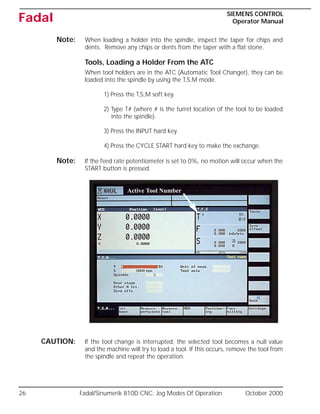
Tools, Loading a Holder From the ATC
When tool holders are in the ATC (Automatic Tool Changer), they can be
loaded into the spindle by using the T,S,M mode.
1) Press the T,S,M soft key.
2) Type T# (where # is the turret location of the tool to be loaded
into the spindle).
3) Press the INPUT hard key.
4) Press the CYCLE START hard key to make the exchange.
Note: If the feed rate potentiometer is set to 0%, no motion will occur when the
START button is pressed.
CAUTION: If the tool change is interrupted, the selected tool becomes a null value
and the machine will try to load a tool. If this occurs, remove the tool from
the spindle and repeat the operation.
Active Tool Number
October 2000 Fadal/Sinumerik 810D CNC: Jog Modes Of Operation 27
SIEMENS CONTROL
Operator Manual
Fadal
M11 can be used to set the current magazine location as T1. Note that
this does not change the active T #.
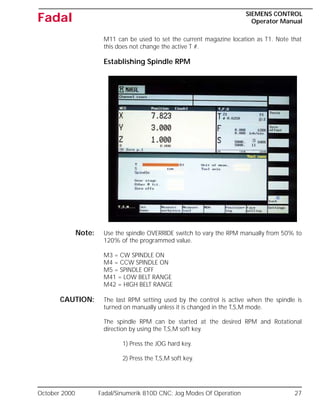
Establishing Spindle RPM
Note: Use the spindle OVERRIDE switch to vary the RPM manually from 50% to
120% of the programmed value.
M3 = CW SPINDLE ON
M4 = CCW SPINDLE ON
M5 = SPINDLE OFF
M41 = LOW BELT RANGE
M42 = HIGH BELT RANGE
CAUTION: The last RPM setting used by the control is active when the spindle is
turned on manually unless it is changed in the T,S,M mode.
The spindle RPM can be started at the desired RPM and Rotational
direction by using the T,S,M soft key.
1) Press the JOG hard key.
2) Press the T,S,M soft key.
28 Fadal/Sinumerik 810D CNC: Jog Modes Of Operation October 2000
SIEMENS CONTROL
Operator Manual
Fadal
3) With the blue cursor keypad arrows, cursor down to RPM box,
type in the new value and press the INPUT hard key.
4) With the blue cursor keypad arrows, cursor down to the spindle
box. Use the Alternate soft key to toggle to CW and CCW
direction.
5) Press the CYCLE START hard key to activate.
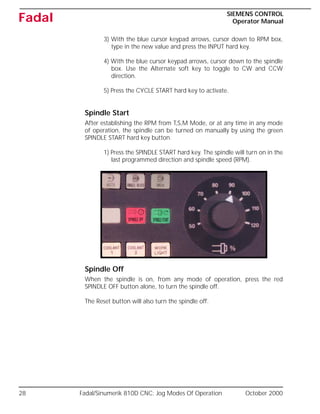
Spindle Start
After establishing the RPM from T,S,M Mode, or at any time in any mode
of operation, the spindle can be turned on manually by using the green
SPINDLE START hard key button.
1) Press the SPINDLE START hard key. The spindle will turn on in the
last programmed direction and spindle speed (RPM).
Spindle Off
When the spindle is on, from any mode of operation, press the red
SPINDLE OFF button alone, to turn the spindle off.
The Reset button will also turn the spindle off.
October 2000 Fadal/Sinumerik 810D CNC: Settable Frames - Workpiece Offsets 29
SIEMENS CONTROL
Operator Manual
Fadal
Settable Frames - Workpiece Offsets
The machine tool will establish the Reference position (COLD START). This
point is also known as machine zero or machine origin.
Machine Coordinate System vs. Work Coordinate System:
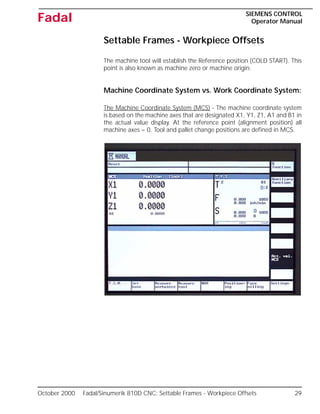
The Machine Coordinate System (MCS) - The machine coordinate system
is based on the machine axes that are designated X1, Y1, Z1, A1 and B1 in
the actual value display. At the reference point (alignment position) all
machine axes = 0. Tool and pallet change positions are defined in MCS.
30 Fadal/Sinumerik 810D CNC: Settable Frames - Workpiece Offsets October 2000
SIEMENS CONTROL
Operator Manual
Fadal
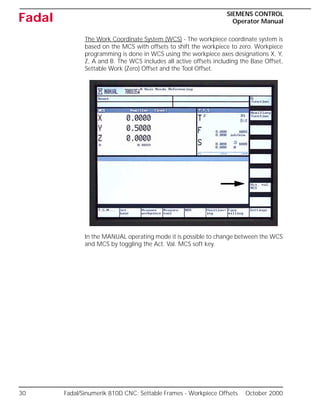
The Work Coordinate System (WCS) - The workpiece coordinate system is
based on the MCS with offsets to shift the workpiece to zero. Workpiece
programming is done in WCS using the workpiece axes designations X, Y,
Z, A and B. The WCS includes all active offsets including the Base Offset,
Settable Work (Zero) Offset and the Tool Offset.
In the MANUAL operating mode it is possible to change between the WCS
and MCS by toggling the Act. Val. MCS soft key.
October 2000 Fadal/Sinumerik 810D CNC: Definition of Offsets 31
SIEMENS CONTROL
Operator Manual
Fadal
Definition of Offsets
The most commonly used offsets are the Base Offset, Zero (Work) Offset,
and Tool Offset. These offsets are combined together to define the WCS
relative to the MCS Machine Zero (Cold Start) position.
Base Offset
The Base Offset is always active unless G153 is programmed in the
movement block (non-modal command). The Base Offset can be set to
zero. The Base Offset is used to set the “Home” position relative to the
Machine Zero. Based on the current axis position the Base Offset can be
calculated and entered into the CNC via the SET Base or Measure
Workpiece soft keys in the Manual screens (X, Y and Z only, no A or B).
The Base Offset can also be manually entered for all the axes via the Zero
Offset screen.
Zero Offset
Zero Offsets (Fixture Offset) 1-8 (ZO1,ZO2,..., ZO8) are programmed via
commands G54 - G57 and G505 - G508, the active ZO (example ZO3) is
displayed in the light blue field below the axis actual value display. Based
on the current axis position, Zero Offsets can be calculated and entered
into the CNC via the Measure Workpiece soft keys in the main Manual
screens (X, Y & Z only, no A and B). Zero Offsets can also be entered
manually for all axes via the Zero offset screen.
Tool Offset
The tool changer allows for 21 tools each with its own offset for tool
length and diameter, and tool wear settings for length and diameter. Tool
Offsets for the active Tool number (e.g. T3) are activated with the
command D1, the offset is deactivated with the command D0. The tool
offset D1 is always activated as part of a tool change. Tool offset values for
both length and diameter based on measured values can be calculated
and entered into the CNC via the measure Tool screens in the main
Manual screens. Tool offsets can also be entered manually via the Tool List
screen.
32 Fadal/Sinumerik 810D CNC: Definition of Offsets October 2000
SIEMENS CONTROL
Operator Manual
Fadal
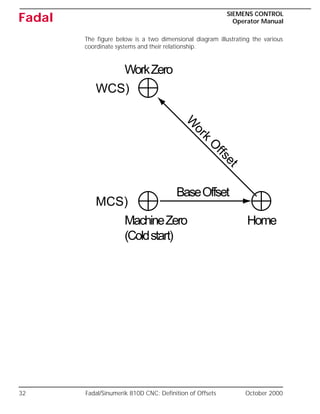
The figure below is a two dimensional diagram illustrating the various
coordinate systems and their relationship.
MCS)
WCS)
MachineZero
(Coldstart)
BaseOffset
Home
WorkZero
W
ork
O
ffset
October 2000 Fadal/Sinumerik 810D CNC: Definition of Offsets 33
SIEMENS CONTROL
Operator Manual
Fadal
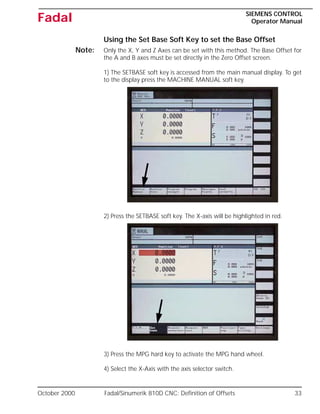
Using the Set Base Soft Key to set the Base Offset
Note: Only the X, Y and Z Axes can be set with this method. The Base Offset for
the A and B axes must be set directly in the Zero Offset screen.
1) The SETBASE soft key is accessed from the main manual display. To get
to the display press the MACHINE MANUAL soft key.
2) Press the SETBASE soft key. The X-axis will be highlighted in red.
3) Press the MPG hard key to activate the MPG hand wheel.
4) Select the X-Axis with the axis selector switch.
34 Fadal/Sinumerik 810D CNC: Definition of Offsets October 2000
SIEMENS CONTROL
Operator Manual
Fadal
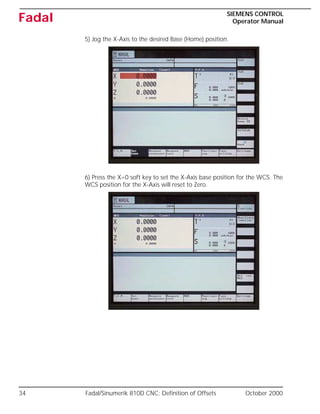
5) Jog the X-Axis to the desired Base (Home) position.
6) Press the X=0 soft key to set the X-Axis base position for the WCS. The
WCS position for the X-Axis will reset to Zero.
October 2000 Fadal/Sinumerik 810D CNC: Definition of Offsets 35
SIEMENS CONTROL
Operator Manual
Fadal
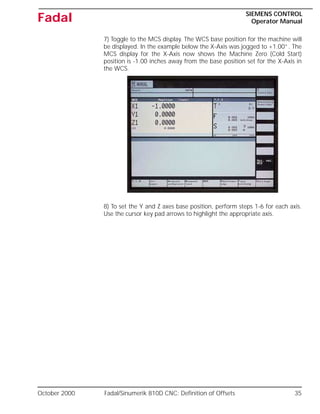
7) Toggle to the MCS display. The WCS base position for the machine will
be displayed. In the example below the X-Axis was jogged to +1.00”. The
MCS display for the X-Axis now shows the Machine Zero (Cold Start)
position is -1.00 inches away from the base position set for the X-Axis in
the WCS.
8) To set the Y and Z axes base position, perform steps 1-6 for each axis.
Use the cursor key pad arrows to highlight the appropriate axis.
36 Fadal/Sinumerik 810D CNC: Definition of Offsets October 2000
SIEMENS CONTROL
Operator Manual
Fadal
Using the MEASURE WORKPIECE soft key to set the Base
and Zero Offsets
Note: Only the X, Y and Z Axes can be set with this method, the Base Offset for
the A and B axes must be set directly in the Zero Offset screen.
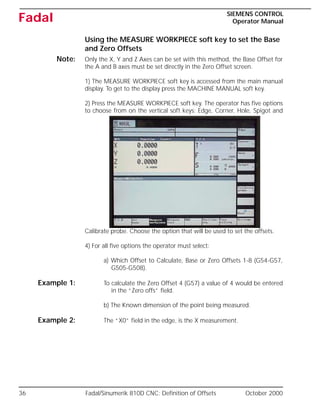
1) The MEASURE WORKPIECE soft key is accessed from the main manual
display. To get to the display press the MACHINE MANUAL soft key.
2) Press the MEASURE WORKPIECE soft key. The operator has five options
to choose from on the vertical soft keys: Edge, Corner, Hole, Spigot and
Calibrate probe. Choose the option that will be used to set the offsets.
4) For all five options the operator must select:
a) Which Offset to Calculate, Base or Zero Offsets 1-8 (G54-G57,
G505-G508).
Example 1: To calculate the Zero Offset 4 (G57) a value of 4 would be entered
in the “Zero offs” field.
b) The Known dimension of the point being measured.
Example 2: The “X0” field in the edge, is the X measurement.
October 2000 Fadal/Sinumerik 810D CNC: Definition of Offsets 37
SIEMENS CONTROL
Operator Manual
Fadal
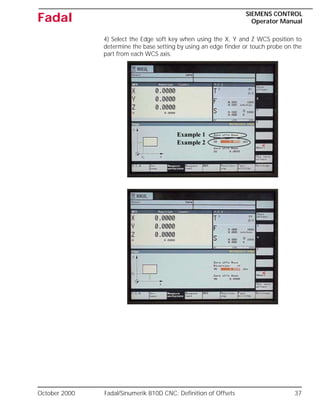
4) Select the Edge soft key when using the X, Y and Z WCS position to
determine the base setting by using an edge finder or touch probe on the
part from each WCS axis.
Example 1
Example 2
38 Fadal/Sinumerik 810D CNC: Definition of Offsets October 2000
SIEMENS CONTROL
Operator Manual
Fadal
Note: An edge finder or probe can be used for these procedures.
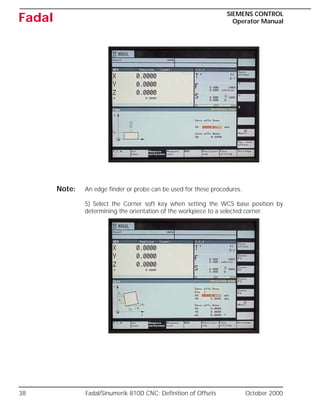
5) Select the Corner soft key when setting the WCS base position by
determining the orientation of the workpiece to a selected corner.
October 2000 Fadal/Sinumerik 810D CNC: Definition of Offsets 39
SIEMENS CONTROL
Operator Manual
Fadal
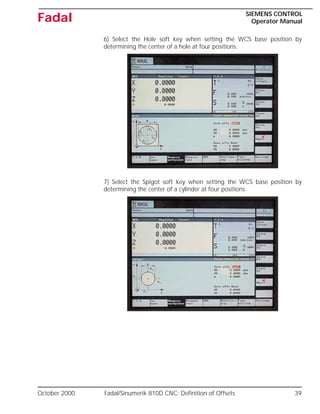
6) Select the Hole soft key when setting the WCS base position by
determining the center of a hole at four positions.
7) Select the Spigot soft key when setting the WCS base position by
determining the center of a cylinder at four positions.
40 Fadal/Sinumerik 810D CNC: Definition of Offsets October 2000
SIEMENS CONTROL
Operator Manual
Fadal
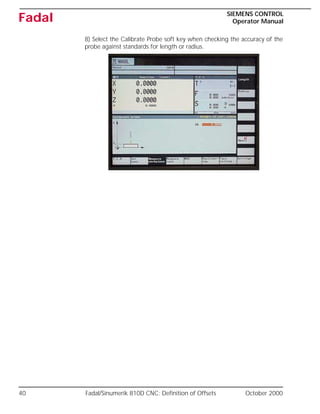
8) Select the Calibrate Probe soft key when checking the accuracy of the
probe against standards for length or radius.
October 2000 Fadal/Sinumerik 810D CNC: Definition of Offsets 41
SIEMENS CONTROL
Operator Manual
Fadal
Using the MEASURE TOOL Soft Key to set the Tool Offset
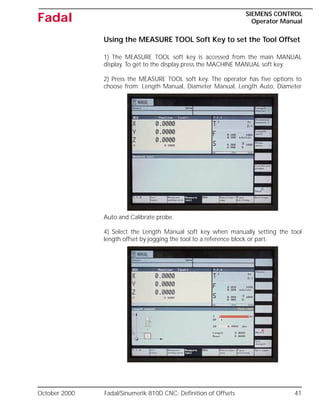
1) The MEASURE TOOL soft key is accessed from the main MANUAL
display. To get to the display press the MACHINE MANUAL soft key
2) Press the MEASURE TOOL soft key. The operator has five options to
choose from: Length Manual, Diameter Manual, Length Auto, Diameter
Auto and Calibrate probe.
4) Select the Length Manual soft key when manually setting the tool
length offset by jogging the tool to a reference block or part.
42 Fadal/Sinumerik 810D CNC: Definition of Offsets October 2000
SIEMENS CONTROL
Operator Manual
Fadal
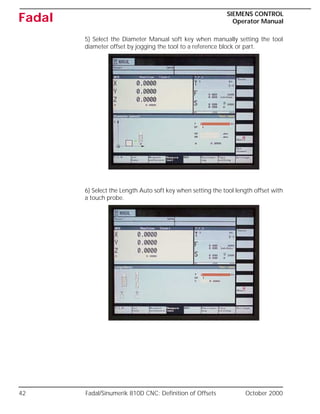
5) Select the Diameter Manual soft key when manually setting the tool
diameter offset by jogging the tool to a reference block or part.
6) Select the Length Auto soft key when setting the tool length offset with
a touch probe.
October 2000 Fadal/Sinumerik 810D CNC: Definition of Offsets 43
SIEMENS CONTROL
Operator Manual
Fadal
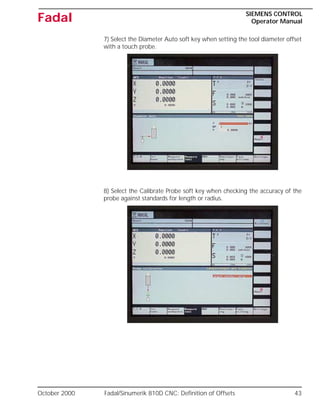
7) Select the Diameter Auto soft key when setting the tool diameter offset
with a touch probe.
8) Select the Calibrate Probe soft key when checking the accuracy of the
probe against standards for length or radius.
44 Fadal/Sinumerik 810D CNC: Definition of Offsets October 2000
SIEMENS CONTROL
Operator Manual
Fadal
Using the ZERO OFFSET Soft Key to set the Base and Zero
Offsets
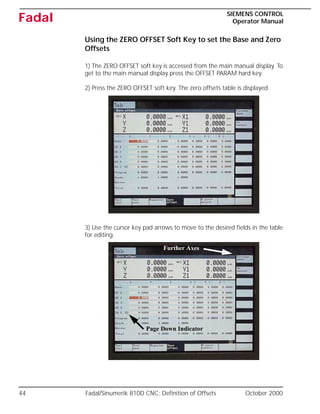
1) The ZERO OFFSET soft key is accessed from the main manual display. To
get to the main manual display press the OFFSET PARAM hard key.
2) Press the ZERO OFFSET soft key. The zero offsets table is displayed.
3) Use the cursor key pad arrows to move to the desired fields in the table
for editing.
Page Down Indicator
Further Axes
October 2000 Fadal/Sinumerik 810D CNC: Definition of Offsets 45
SIEMENS CONTROL
Operator Manual
Fadal
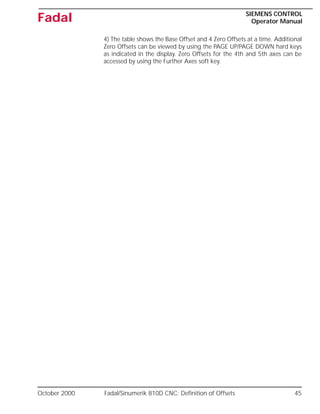
4) The table shows the Base Offset and 4 Zero Offsets at a time. Additional
Zero Offsets can be viewed by using the PAGE UP/PAGE DOWN hard keys
as indicated in the display. Zero Offsets for the 4th and 5th axes can be
accessed by using the Further Axes soft key.
46 Fadal/Sinumerik 810D CNC: Definition of Offsets October 2000
SIEMENS CONTROL
Operator Manual
Fadal
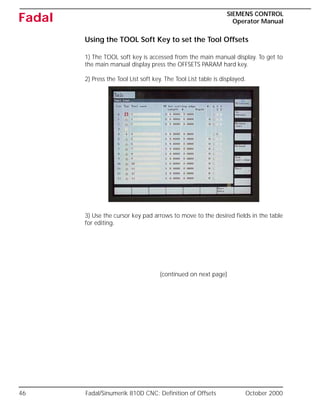
Using the TOOL Soft Key to set the Tool Offsets
1) The TOOL soft key is accessed from the main manual display. To get to
the main manual display press the OFFSETS PARAM hard key.
2) Press the Tool List soft key. The Tool List table is displayed.
3) Use the cursor key pad arrows to move to the desired fields in the table
for editing.
(continued on next page)
October 2000 Fadal/Sinumerik 810D CNC: Definition of Offsets 47
SIEMENS CONTROL
Operator Manual
Fadal
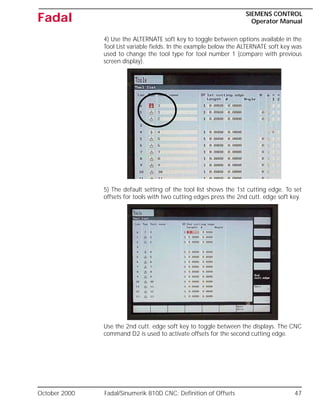
4) Use the ALTERNATE soft key to toggle between options available in the
Tool List variable fields. In the example below the ALTERNATE soft key was
used to change the tool type for tool number 1 (compare with previous
screen display).
5) The default setting of the tool list shows the 1st cutting edge. To set
offsets for tools with two cutting edges press the 2nd cutt. edge soft key.
Use the 2nd cutt. edge soft key to toggle between the displays. The CNC
command D2 is used to activate offsets for the second cutting edge.
48 Fadal/Sinumerik 810D CNC: Definition of Offsets October 2000
SIEMENS CONTROL
Operator Manual
Fadal
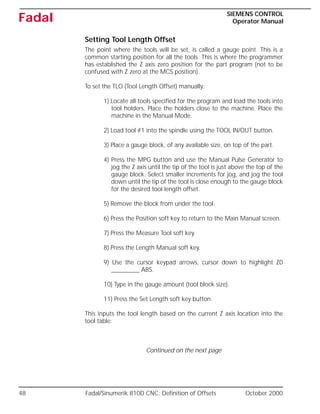
Setting Tool Length Offset
The point where the tools will be set, is called a gauge point. This is a
common starting position for all the tools. This is where the programmer
has established the Z axis zero position for the part program (not to be
confused with Z zero at the MCS position).
To set the TLO (Tool Length Offset) manually:
1) Locate all tools specified for the program and load the tools into
tool holders. Place the holders close to the machine. Place the
machine in the Manual Mode.
2) Load tool #1 into the spindle using the TOOL IN/OUT button.
3) Place a gauge block, of any available size, on top of the part.
4) Press the MPG button and use the Manual Pulse Generator to
jog the Z axis until the tip of the tool is just above the top of the
gauge block. Select smaller increments for jog, and jog the tool
down until the tip of the tool is close enough to the gauge block
for the desired tool length offset.
5) Remove the block from under the tool.
6) Press the Position soft key to return to the Main Manual screen.
7) Press the Measure Tool soft key.
8) Press the Length Manual soft key.
9) Use the cursor keypad arrows, cursor down to highlight Z0
_________ ABS.
10) Type in the gauge amount (tool block size).
11) Press the Set Length soft key button.
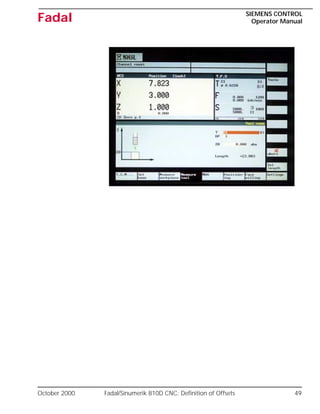
This inputs the tool length based on the current Z axis location into the
tool table:
Continued on the next page
October 2000 Fadal/Sinumerik 810D CNC: Definition of Offsets 49
SIEMENS CONTROL
Operator Manual
Fadal
50 Fadal/Sinumerik 810D CNC: Definition of Offsets October 2000
SIEMENS CONTROL
Operator Manual
Fadal
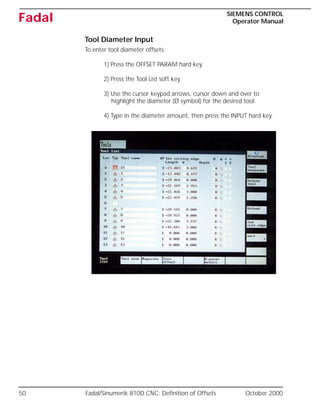
Tool Diameter Input
To enter tool diameter offsets:
1) Press the OFFSET PARAM hard key.
2) Press the Tool List soft key.
3) Use the cursor keypad arrows, cursor down and over to
highlight the diameter (Ø symbol) for the desired tool.
4) Type in the diameter amount, then press the INPUT hard key.
October 2000 Fadal/Sinumerik 810D CNC: Definition of Offsets 51
SIEMENS CONTROL
Operator Manual
Fadal
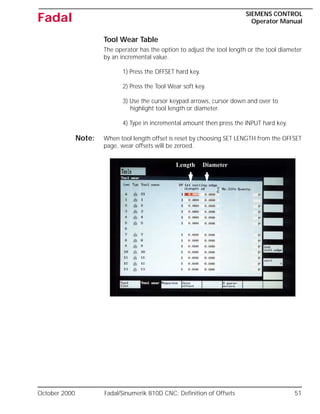
Tool Wear Table
The operator has the option to adjust the tool length or the tool diameter
by an incremental value.
1) Press the OFFSET hard key.
2) Press the Tool Wear soft key.
3) Use the cursor keypad arrows, cursor down and over to
highlight tool length or diameter.
4) Type in incremental amount then press the INPUT hard key.
Note: When tool length offset is reset by choosing SET LENGTH from the OFFSET
page, wear offsets will be zeroed.
Length Diameter
52 Fadal/Sinumerik 810D CNC: Definition of Offsets October 2000
SIEMENS CONTROL
Operator Manual
Fadal
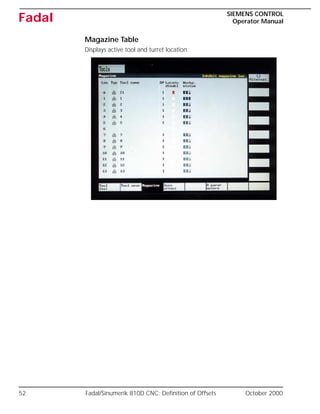
Magazine Table
Displays active tool and turret location.
October 2000 Fadal/Sinumerik 810D CNC: Definition of Offsets 53
SIEMENS CONTROL
Operator Manual
Fadal
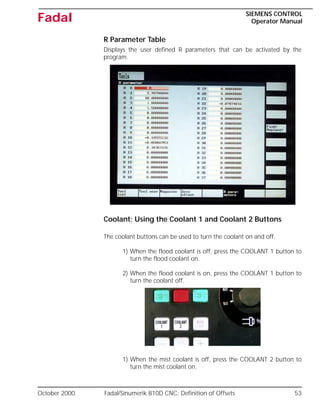
R Parameter Table
Displays the user defined R parameters that can be activated by the
program.
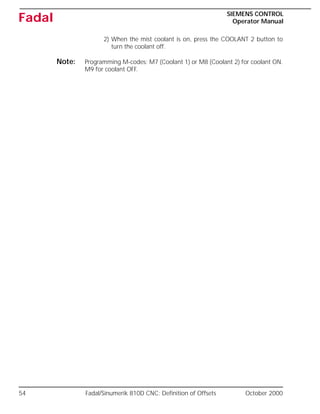
Coolant; Using the Coolant 1 and Coolant 2 Buttons
The coolant buttons can be used to turn the coolant on and off.
1) When the flood coolant is off, press the COOLANT 1 button to
turn the flood coolant on.
2) When the flood coolant is on, press the COOLANT 1 button to
turn the coolant off.
1) When the mist coolant is off, press the COOLANT 2 button to
turn the mist coolant on.
54 Fadal/Sinumerik 810D CNC: Definition of Offsets October 2000
SIEMENS CONTROL
Operator Manual
Fadal
2) When the mist coolant is on, press the COOLANT 2 button to
turn the coolant off.
Note: Programming M-codes: M7 (Coolant 1) or M8 (Coolant 2) for coolant ON.
M9 for coolant OFF.
October 2000 Fadal/Sinumerik 810D CNC: Definition of Offsets 55
SIEMENS CONTROL
Operator Manual
Fadal
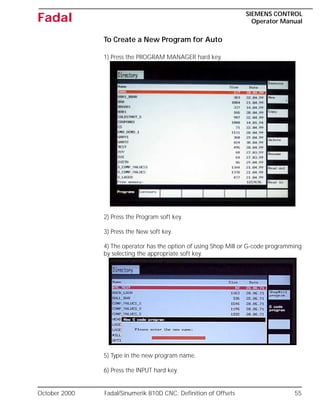
To Create a New Program for Auto
1) Press the PROGRAM MANAGER hard key.
2) Press the Program soft key.
3) Press the New soft key.
4) The operator has the option of using Shop Mill or G-code programming
by selecting the appropriate soft key.
5) Type in the new program name.
6) Press the INPUT hard key.
56 Fadal/Sinumerik 810D CNC: Definition of Offsets October 2000
SIEMENS CONTROL
Operator Manual
Fadal
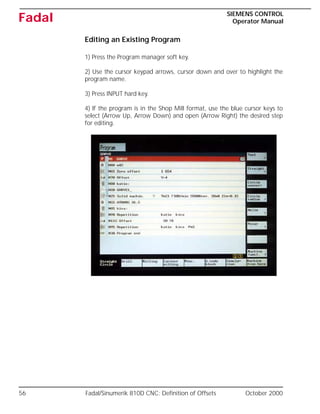
Editing an Existing Program
1) Press the Program manager soft key.
2) Use the cursor keypad arrows, cursor down and over to highlight the
program name.
3) Press INPUT hard key.
4) If the program is in the Shop Mill format, use the blue cursor keys to
select (Arrow Up, Arrow Down) and open (Arrow Right) the desired step
for editing.
October 2000 Fadal/Sinumerik 810D CNC: Definition of Offsets 57
SIEMENS CONTROL
Operator Manual
Fadal
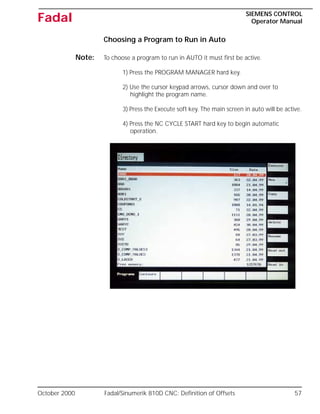
Choosing a Program to Run in Auto
Note: To choose a program to run in AUTO it must first be active.
1) Press the PROGRAM MANAGER hard key.
2) Use the cursor keypad arrows, cursor down and over to
highlight the program name.
3) Press the Execute soft key. The main screen in auto will be active.
4) Press the NC CYCLE START hard key to begin automatic
operation.
58 Fadal/Sinumerik 810D CNC: Definition of Offsets October 2000
SIEMENS CONTROL
Operator Manual
Fadal
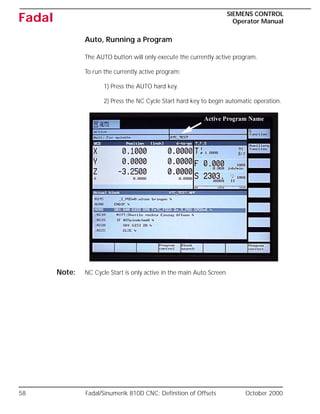
Auto, Running a Program
The AUTO button will only execute the currently active program.
To run the currently active program:
1) Press the AUTO hard key.
2) Press the NC Cycle Start hard key to begin automatic operation.
Note: NC Cycle Start is only active in the main Auto Screen.
Active Program Name
October 2000 Fadal/Sinumerik 810D CNC: Definition of Offsets 59
SIEMENS CONTROL
Operator Manual
Fadal
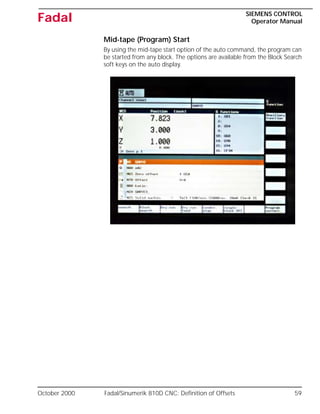
Mid-tape (Program) Start
By using the mid-tape start option of the auto command, the program can
be started from any block. The options are available from the Block Search
soft keys on the auto display.
60 Fadal/Sinumerik 810D CNC: Definition of Offsets October 2000
SIEMENS CONTROL
Operator Manual
Fadal
Power Off
The Siemens Control is equipped with a battery-backed memory board
and can be turned off at any time without loss of memory.
The “POWER ON” procedure requires aligning the axis markers before the
referencing procedure is used. Alignment can be accomplished by jogging
the axes until the markers are in line.
However these markers can be aligned before the power is switched off,
making the “POWER ON” procedure much quicker.
Power Off Procedure:
1) From the MDA mode, type SETCS.
2) Press the CYCLE START hard key.
3) Leave the machine at this display.
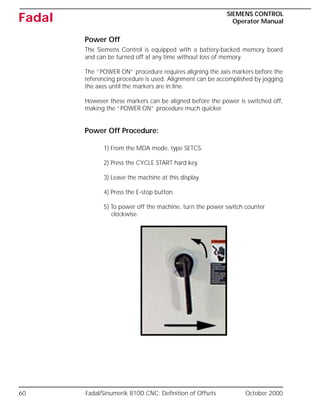
4) Press the E-stop button.
5) To power off the machine, turn the power switch counter
clockwise.
October 2000 Fadal/Sinumerik 810D CNC: Definition of Offsets 61
SIEMENS CONTROL
Operator Manual
Fadal
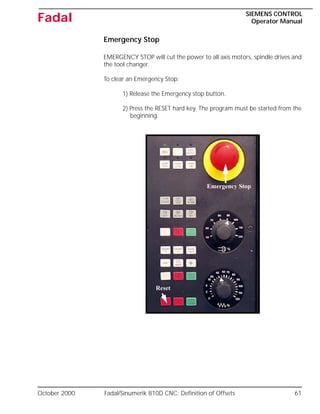
Emergency Stop
EMERGENCY STOP will cut the power to all axis motors, spindle drives and
the tool changer.
To clear an Emergency Stop:
1) Release the Emergency stop button.
2) Press the RESET hard key. The program must be started from the
beginning.
Emergency Stop
Reset
62 Fadal/Sinumerik 810D CNC: Bucket Up-Bucket Down October 2000
SIEMENS CONTROL
Operator Manual
Fadal
Dual Arm Tool Changer
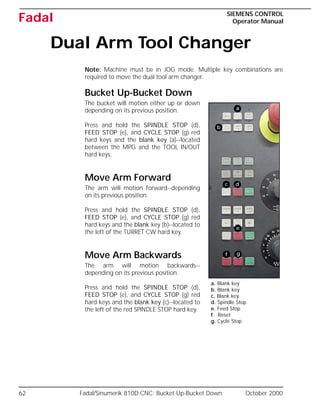
Note: Machine must be in JOG mode. Multiple key combinations are
required to move the dual tool arm changer.
Bucket Up-Bucket Down
The bucket will motion either up or down
depending on its previous position.
Press and hold the SPINDLE STOP (d),
FEED STOP (e), and CYCLE STOP (g) red
hard keys and the blank key (a)--located
between the MPG and the TOOL IN/OUT
hard keys.
Move Arm Forward
The arm will motion forward--depending
on its previous position.
Press and hold the SPINDLE STOP (d),
FEED STOP (e), and CYCLE STOP (g) red
hard keys and the blank key (b)--located to
the left of the TURRET CW hard key.
Move Arm Backwards
The arm will motion backwards--
depending on its previous position.
Press and hold the SPINDLE STOP (d),
FEED STOP (e), and CYCLE STOP (g) red
hard keys and the blank key (c)--located to
the left of the red SPINDLE STOP hard key.
a. Blank key
b. Blank key
c. Blank key
d. Spindle Stop
e. Feed Stop
f. Reset
g. Cycle Stop
a
d
e
b
c
f g

Fadal Siemens Control Operator Manual.pdf

  • 1.
  • 2.
    2 : October2000 SIEMENS CONTROL Operator Manual Fadal Table of Contents Siemens Manual Safety Notices . . . . . . . . . . . . . . . . . . . . . . . . . . . . 3 Safety Warnings . . . . . . . . . . . . . . . . . . . . . . . . . . . . . . . . . . . . . . . . 6 Power On . . . . . . . . . . . . . . . . . . . . . . . . . . . . . . . . . . . . . . . . . . . . . . . 9 Pre-start-up Checks . . . . . . . . . . . . . . . . . . . . . . . . . . . . . . . . . . . . . 9 Pendant Layout . . . . . . . . . . . . . . . . . . . . . . . . . . . . . . . . . . . . . . . . . . 11 Pendant Hard Keys Function Guide . . . . . . . . . . . . . . . . . . . . . . . . . . . 12 Finding Machine Reference (Cold Start) . . . . . . . . . . . . . . . . . . . . . 16 Operating Modes . . . . . . . . . . . . . . . . . . . . . . . . . . . . . . . . . . . . . . 19 Manual Data Automatic (Submode of Manual display) . . . . . . . . . . 19 Jog Modes Of Operation . . . . . . . . . . . . . . . . . . . . . . . . . . . . . . . . . . . 20 Position Readout Display In Jog Mode. . . . . . . . . . . . . . . . . . . . . . 20 Incremental Jog Using The MPG Or JOG Keys . . . . . . . . . . . . . . . . 21 Setting the Increment . . . . . . . . . . . . . . . . . . . . . . . . . . . . . . . . . . 21 Using MPG hand wheel . . . . . . . . . . . . . . . . . . . . . . . . . . . . . . . . . 22 Jog and Rapid Jog . . . . . . . . . . . . . . . . . . . . . . . . . . . . . . . . . . . . . 24 Tool, Manually Loading & Unloading a Holder. . . . . . . . . . . . . . . . 25 Tools, Loading a Holder from the ATC . . . . . . . . . . . . . . . . . . . . . . 26 Establishing Spindle RPM . . . . . . . . . . . . . . . . . . . . . . . . . . . . . . . . 27 Spindle Start . . . . . . . . . . . . . . . . . . . . . . . . . . . . . . . . . . . . . . . . . 28 Spindle Off . . . . . . . . . . . . . . . . . . . . . . . . . . . . . . . . . . . . . . . . . . 28 Settable Frames - Workpiece Offsets . . . . . . . . . . . . . . . . . . . . . . . . . . 29 Machine Coordinate System vs. Work Coordinate System: . . . . . . . 29 Definitions of Offsets . . . . . . . . . . . . . . . . . . . . . . . . . . . . . . . . . . . . . . 31 Base Offset . . . . . . . . . . . . . . . . . . . . . . . . . . . . . . . . . . . . . . . . . . 31 Zero Offset . . . . . . . . . . . . . . . . . . . . . . . . . . . . . . . . . . . . . . . . . . 31 Tool Offset . . . . . . . . . . . . . . . . . . . . . . . . . . . . . . . . . . . . . . . . . . . 31 Using the SET BASE soft key to set the Base Offset . . . . . . . . . . . . . 33 Using the MEASURE WORKPIECE soft key to set Base/Zero Offsets . 36 Using the MEASURE TOOL soft key to set the Tool Offset . . . . . . . 41 Using the ZERO OFFSET soft key to set the Base and Zero Offsets . . 44 Using the TOOL soft key to set the Tool Offsets . . . . . . . . . . . . . . . 46 Setting Tool Length Offset . . . . . . . . . . . . . . . . . . . . . . . . . . . . . . . 48 Tool Diameter Input . . . . . . . . . . . . . . . . . . . . . . . . . . . . . . . . . . . . 50 Tool Wear Table . . . . . . . . . . . . . . . . . . . . . . . . . . . . . . . . . . . . . . . 51 Magazine Table . . . . . . . . . . . . . . . . . . . . . . . . . . . . . . . . . . . . . . . 52 R Parameter Table . . . . . . . . . . . . . . . . . . . . . . . . . . . . . . . . . . . . . 53 Coolant, Using the Coolant 1 and Coolant 2 Buttons . . . . . . . . . . . 53 To Create a New Program for Auto. . . . . . . . . . . . . . . . . . . . . . . . 55 Editing an Existing Program . . . . . . . . . . . . . . . . . . . . . . . . . . . . . . 56 Choosing a Program to Run in Auto . . . . . . . . . . . . . . . . . . . . . . . . 57 Auto, Running a Program . . . . . . . . . . . . . . . . . . . . . . . . . . . . . . . 58 Mid-tape (Program) Start . . . . . . . . . . . . . . . . . . . . . . . . . . . . . . . . 59 Power Off . . . . . . . . . . . . . . . . . . . . . . . . . . . . . . . . . . . . . . . . . . . 60 Emergency Stop . . . . . . . . . . . . . . . . . . . . . . . . . . . . . . . . . . . . . . . 61 Dual Arm Tool Changer . . . . . . . . . . . . . . . . . . . . . . . . . . . . . . . . . 62
  • 3.
    October 2000 ImportantSafety Information: Siemens Manual Safety Notices 3 SIEMENS CONTROL Operator Manual Fadal Important Safety Information Siemens Manual Safety Notices Warning The following notes are given to ensure your safety and to prevent any risk of damage to the product described or other units connected to the machine. Warning When electrical equipment is in operation, certain parts are bound to reach hazardous voltage levels. The intermediate circuit of all SIMODRIVE modules remains at a hazardous voltage level for 5 minutes after all voltages have been disconnected. See the Instruction Manual for more details. Only qualified personnel should perform maintenance on the device/ system. Failure to comply with warnings can result in severe injury or material damage. Only suitably qualified personnel trained in the setup, installation, commissioning or operation of the product should work on the device/system. Further Notes Whenever measuring or testing has to be performed on live equipment, the regulations of Safety Code VBG 4.0 must be observed, in particular § 8 “Permissible Deviations when Working on Live Parts”. Suitable electronic tools should be used. Danger This symbol appears whenever death, severe bodily injury or substantial material damage will occur if the appropriate precautions are not taken. Warning This symbol appears whenever death, severe body injury or substantial material damage could occur if the appropriate precautions are not taken. Caution This symbol appears whenever minor body injury or material damage can occur if the appropriate precautions are not taken.
  • 4.
    4 Important SafetyInformation: Siemens Manual Safety Notices October 2000 SIEMENS CONTROL Operator Manual Fadal Important This symbol appears in the documentation whenever attention has to be paid to something of particular importance. Note This symbol appears in the documentation whenever a reference is made to another subject. Warning Repairs on equipment supplied by Fadal may only be carried out by Fadal Service or repair centers authorized by Fadal using authorized genuine Fadal supplied parts. Any defective parts or components are to be replaced only by parts contained in the relevant spare parts list. Disconnect the power supply before opening the equipment. Emergency Stop facilities according to EN 60204 IEC 204 (VDE 0113) must remain operative in all operating modes of the automation equipment. Any disengaging of the Emergency Stop facility must not lead to uncontrolled or undefined restart. Whenever faults occurring in the automation equipment can lead to substantial material damage or even grievous bodily injury, (i.e. are potential dangerous faults), additional external precautions must be taken or facilities must be provided ensuring or enforcing safe operation even when a fault occurs (e.g. independent limit switches, mechanical interlocks, etc.) Caution Connecting and signal lines must be installed so as to safely prevent inductive and capacitive interference from affecting automation functions. Warning Correct transport, storage, erection and mounting as well as careful operation and maintenance are essential for proper and safe operation of the equipment. Non–compliance with warnings can result in severe bodily injury or material damage. Warning The modules contain electrostatically sensitive components. Before touching an electronic module, it is necessary to be electro-statically discharged. The simplest way of doing this is to touch an electrically conducting grounded object (e.g. a bare metal part of a switchboard or a plug socket protective conductor) before touching an electronic module.
  • 5.
    October 2000 ImportantSafety Information: Electrostatically Sensitive Modules 5 SIEMENS CONTROL Operator Manual Fadal ESD notes Electrostatically Sensitive Modules Important! Handling of ESD modules: When handling electrostatically sensitive devices, make sure that operator, workplace and packing material are properly grounded. Generally, electronic modules must not be touched unless work has to be carried out on them. When handling PC boards make absolutely sure that you do not touch component pins or printed conductors. Touch components only if –you are permanently grounded by means of an antistatic chain, –you are wearing ESD (Electro Static Device) boots or ESD boots with grounding strips in conjunction with ESD flooring. Modules may only be placed on electrically conductive surfaces (tables with ESD tops, conductive ESD foam plastic, ESD packing bags, and/or ESD transport containers). Keep modules away from visual display units, monitors or TV sets (the minimum distance from screen must be more than 10 cm). Modules must not be allowed to come into contact with electrically insulating materials such as plastic films, insulating table tops or clothing made of synthetic fibers. Measurements on modules are allowed only if: –the measuring instrument is properly grounded (e.g. equipment grounding conductor), or –the probe is briefly discharged before measuring with a potential- free measuring instrument (e.g. touch the unpainted metal parts of the control housing) The equipment may be used only for the applications stated in the manual and only in conjunction with devices and components recommended and authorized by Fadal.
  • 6.
    6 Important SafetyInformation: Important! October 2000 SIEMENS CONTROL Operator Manual Fadal Should any questions or problems arise in studying this manual, please contact the Fadal Service Department. Safety Warnings 1) WARNING! WEAR ANSI OR CE APPROVED SAFETY GLASSES AT ALL TIMES. Everyday glasses are not designed for protection. Only ANSI or CE approved safety glasses have impact resistant lenses. Hearing protection must be worn when operations exceed 90 decibels (85 decibels-CE) . 2) KEEP DOORS CLOSED WHILE MACHINING. 3) WEAR PROPER APPAREL. Do not wear loose clothing, gloves, neckties, rings, bracelets, or other jewelry that might get caught in moving parts or areas of potential electric shock. Non-slip footwear is recommended. 4) CONTAIN LONG HAIR. Tie long hair back and wear protective hair covering to contain long hair. 5) USE A NIOSH OR CE APPROVED DUST MASK OR RESPIRATOR. Protection is recommended when cutting operations are dusty, or exceed the permissible exposure limit. 6) KEEP WORK AREA CLEAN. Good housekeeping practices encourage safety. 7) Read SPINDLE, MANUALLY LOADING & UNLOADING A HOLDER in the Operator’s Manual. 8) DO NOT OPERATE THE MACHINE UNDER THE INFLUENCE OF DRUGS OR ALCOHOL, PRESCRIBED OR OTHERWISE. 9) READ THE SAFETY WARNINGS SUPPLIED WITH ALL TOOLING. 10) MAINTAIN TOOLS WITH CARE. Keep tools sharp and clean for best performance and to reduce the risk of injury. Follow instructions for lubrication and for changing accessories. 11) REMOVE ADJUSTING KEYS AND WRENCHES. Always check that keys and wrenches are removed from tools and tooling before starting the machine. 12) DO NOT EXCEED THE MANUFACTURER’S RECOMMENDED MAXIMUM RPM FOR THE TOOL. When tools are placed in the spindle,
  • 7.
    October 2000 ImportantSafety Information: Important! 7 SIEMENS CONTROL Operator Manual Fadal verify the current RPM commanded in the control before starting the spindle. 13) SECURE TOOLS PROPERLY IN THEIR HOLDERS. 14) SECURE WORK. Use common machining practices for holding (fixturing) material to be machined. 15) REMOVE ALL TOOLS FROM THE SPINDLE AND TOOL CHANGER before servicing and changing accessories such as tooling, fixtures, indexers, the tail stock of a fourth axis and any fourth axis or fourth-fifth axis combination, etc. 16) ALWAYS DEBUG A NEW PROGRAM before running it in the AUTO mode. (See DEBUG PROGRAM in the User’s Manual.) 17) The machine tool MUST be connected to a grounded, metal, permanent wiring system, or to a system having an equipment-grounding conductor. 18) DO NOT OPERATE THE MACHINE IN AN UNSAFE ENVIRONMENT. Do not use the machine in damp or wet locations, or expose to rain. Keep the work area well lighted. 19) DO NOT FORCE TOOL. Tools are designed to perform properly and safely at proper rates. Keep tools sharp. 20) USE THE CORRECT TOOL. Do not attempt to use tools or attachments to perform a job for which they were not designed. 21) DON’T OVERREACH. Keep proper footing and balance at all times. Use a steady object for support when reaching over the machine. 22) REDUCE THE RISK OF UNINTENTIONAL STARTING. Power off the machine at the main disconnect switch and use the proper lockout/tagout procedures while working within the chip enclosure, or when there is potential for a release of energy. 23) POWER OFF THE MACHINE AT THE MAIN DISCONNECT SWITCH AND LOCK OUT WHEN WORKING INSIDE ANY OF THE ELECTRONIC CABINETS. 24) USE RECOMMENDED ACCESSORIES. Refer to the User’s Manual for FADAL recommended accessories. Unapproved accessories increase the risk of injury.
  • 8.
    8 Important SafetyInformation: Important! October 2000 SIEMENS CONTROL Operator Manual Fadal 25) NEVER STAND ON OR IN THE MACHINE. Besides the risk of slipping or falling, serious injury could occur if a tool is unintentionally contacted. 26) CHECK FOR DAMAGED PARTS. Always check all parts for binding, breakage, and any other condition that will affect the proper operation of the machine and/or increase the risk of injury. Damaged or missing parts must be repaired or replaced BEFORE operating the machine. 27) NEVER LEAVE THE MACHINE UNATTENDED. Turn the power off to the machine when leaving the machine unattended. Never leave the machine until it comes to a complete stop. 28) DO NOT DISCONNECT THE FRONT DOOR SAFETY SWITCHES. 29) WIPE UP SPILLS. Immediately cover with absorbent material and wipe up coolant and oil spills around the machine. Correct the cause of the leakage to prevent any hazards. 30) ELECTRICAL INSTALLATION OF THE MACHINE MUST BE DONE BY A QUALIFIED ELECTRICIAN. 31) ONLY FADAL OR FADAL DISTRIBUTOR FACTORY AUTHORIZED INDIVIDUALS MAY INSTALL THE MACHINE. 32) USE PROPER SAFETY GLOVES WHEN HANDLING SHARP OR JAGGED EDGES. Do not wear gloves around rotating machinery. 33) DO NOT USE AIR HOSES TO BLOW CHIPS OFF YOUR BODY OR CLOTHES. Serious injury to your eyes, hearing, and skin could result. Do not blow towards others.
  • 9.
    October 2000 Fadal/Sinumerik810D CNC: Power On 9 SIEMENS CONTROL Operator Manual Fadal Fadal/Sinumerik 810D CNC Power On Pre-startup Checks 1) Examine the oil levels. Both should be filled before the levels are one inch from the bottom of the reservoir. The spindle oil reservoir may have oil in it for up to six months. The way lube oil reservoir may run out of oil in one week. Note: VMCs with linear way systems require grease. See the Maintenance Manual for specifications on the way lube and the spindle oil. 2) Visually inspect the air pressure gauge to verify that it is set to at least 80-100 PSI. Air is used to change belt ranges in the spindle, orient the spindle, activate the tool in-out cylinder, and for the air blast during a tool change. The tool changer gauge should not exceed 120 PSI. 3) Most new VMC models release water collected in the water reservoir automatically. It is advisable to place an additional water trap in the air line going to the machine.
  • 10.
    10 Fadal/Sinumerik 810DCNC: Power On October 2000 SIEMENS CONTROL Operator Manual Fadal 4) Replenish the flood coolant level to avoid running out of coolant during execution of the program. 5) Examine the spindle cooler reservoir once a month. 6) To power on the machine, press the safety lock and turn the power switch in the clockwise direction.
  • 11.
    October 2000 Fadal/Sinumerik810D CNC: Pendant Layout 11 SIEMENS CONTROL Operator Manual Fadal Pendant Layout The table on the following pages shows the various buttons on the pendant. A brief description of the function of each button is given to assist the operator in becoming familiar with the control. Refer to the Siemens operator manuals for detailed instructions on how to use these buttons. MCP Display Screen Soft Keys Keypad Hard Keys MPG Axis Selector Override E-Stop Spindle Override Feed Override Hard Keys
  • 12.
    12 Fadal/Sinumerik 810DCNC: Pendant Hard Keys Function Guide October 2000 SIEMENS CONTROL Operator Manual Fadal Pendant Hard Keys Function Guide Table 1: Pendant Keypad Hard Keys Key Name and Function System/Alarm Button Displays alarms/messages screen. When the shift key is pressed at the same time that this button is pressed the main menu of the operator screen is displayed. Alarm Acknowledge Resets CNC soft alarms. Cursor Buttons (left, right, up, down) Moves the cursor around the display screen. End Button Moves the cursor to the end of the program. Help / Information Button Toggles between test and graphic displays in Shop Mill. Active when displayed on lower line of display. Input Button Used to accept entry of data. Insert Button Used to edit the existing data entry.
  • 13.
    October 2000 Fadal/Sinumerik810D CNC: Pendant Hard Keys Function Guide 13 SIEMENS CONTROL Operator Manual Fadal Next Window Button Goes to the top of the next active display. Offset/Parameters Button Displays the offsets screen and offset soft keys menu. Page Down Button Page down the screen display. Page Up Button Page up the screen display. Position Button Displays the position screen and the main soft key menu of the active mode (Manual / Auto). Program Manager Button Displays the program manager screen. Program Button Displays the program edit screen. Table 1: Pendant Keypad Hard Keys Key Name and Function
  • 14.
    14 Fadal/Sinumerik 810DCNC: Pendant Hard Keys Function Guide October 2000 SIEMENS CONTROL Operator Manual Fadal Table 2: Machine Control Panel Keypad Hard Keys Key Name and Function Auto Button Initiates the automatic mode. Coolant 1 Button Toggles the coolant 1 feature on and off. Works in combination with M7 and M9 codes. Coolant 2 Button Toggles the coolant 2 feature on and off. Works in combination with M8 and M9 codes. Feed Start Button Feed start (Slide Start). Feed Stop Button Stop feed (Slide Hold). Increment Jog Button Activates Incremental sub-mode of Manual Mode. Allows incremental JOG by JOG keys or MPG (hand wheel). Jog Button Initiates Manual Mode. Note: Reference, Incremental Jog and MDA are all sub-modes of the Manual Mode. MDA Button Used to access Manual Data Automatic mode in ISO. Not active in Shop Mill. In Shop Mill MDA is accessed via a soft key in the Manual Mode.
  • 15.
    October 2000 Fadal/Sinumerik810D CNC: Pendant Hard Keys Function Guide 15 SIEMENS CONTROL Operator Manual Fadal Jog - Button Use for jogging in the negative direction. Manual Pulse Generator Button Activates the MPG mode of the manual screen. The LED above the button will be lit when the MPG mode is active. Jog + Button Use for jogging in the positive direction. Rapid Jog Button Use in conjunction with the JOG “+” and “-” buttons. Activates the rapid JOG feed rate. Reference Button Activates the Reference submode of the Manual Mode. Reset Button Resets the currently active program and some alarms. Note: Using the reset button will reset the program to its beginning. Spindle On Button Turns the spindle on in the last programmed direction and RPM, (S-word). Note that on early production models the text on the key reads “SPINDLE RIGHT”. Spindle Stop Button Stops the spindle. Table 2: Machine Control Panel Keypad Hard Keys Key Name and Function
  • 16.
    16 Fadal/Sinumerik 810DCNC: Pendant Hard Keys Function Guide October 2000 SIEMENS CONTROL Operator Manual Fadal Finding Machine Reference (Cold Start) The FADAL machine tool has software limits and does not contain position limit switches. Therefore, the machine tool must be physically located at set alignment marks. The Siemens control automatically powers on in the machine reference mode. It is recommended that the machine be shut down at its axis alignment position to simplify the Power On procedure. NC Cycle Start Button Starts the execution of the CNC in Auto Mode or operation in Manual Mode. NC Cycle Stop Button Stops the execution of CNC program, control waits for NC Cycle Start signal or Reset signal. Tool In/Out Button Activates the drawbar to manually load or unload a tool from the spindle. This button is active only in the Manual Mode. Turret CCW Button Rotates the turret in a counterclockwise direction. This button is active only in the Manual Mode. Turret CW Button Rotates the turret in the clockwise direction. This button is active only in the Manual Mode. Work Light Button Toggles the machine work lights on and off. Table 2: Machine Control Panel Keypad Hard Keys Key Name and Function
  • 17.
    October 2000 Fadal/Sinumerik810D CNC: Pendant Hard Keys Function Guide 17 SIEMENS CONTROL Operator Manual Fadal To align each axis, place the machine in JOG: 1) Press the MPG hard key until the LED above the key is lit. 2) Find the alignment marks for each axis using the axis selector switch and the MPG. 3) Press the REF hard key button “reference point return”. Use the Axis selector switch to select the desired axis. Select the X axis then press + hard key button. Select the Y axis then press + hard key button. Select the Z axis then press + hard key button. Select the A axis then press + hard key button. Select the B axis then press + hard key button. When each axis has completed finding the reference position this symbol will appear to the left of the axis. Press the JOG, MPG or AUTO hard keys to exit the Reference submode. Note: In the reference mode the position display will indicate the actual position in WCS (X, Y, Z) or MCS (X1, Y1, Z1). The ACT. VAL. MCS soft key can be used to toggle between the WCS and MCS coordinate display.
  • 18.
    18 Fadal/Sinumerik 810DCNC: Pendant Hard Keys Function Guide October 2000 SIEMENS CONTROL Operator Manual Fadal Note: The reference symbol is to the left of the axes names.
  • 19.
    October 2000 Fadal/Sinumerik810D CNC: Operating Modes 19 SIEMENS CONTROL Operator Manual Fadal Operating Modes Manual Data Automatic (Submode of Manual display) 1) Press the JOG hard key. 2) Press the MDA soft key.
  • 20.
    20 Fadal/Sinumerik 810DCNC: Jog Modes Of Operation October 2000 SIEMENS CONTROL Operator Manual Fadal Jog Modes Of Operation Position Readout Display In Jog Mode 1) Press the JOG hard key.
  • 21.
    October 2000 Fadal/Sinumerik810D CNC: Jog Modes Of Operation 21 SIEMENS CONTROL Operator Manual Fadal Incremental Jog Using the MPG or JOG Keys Setting the Increment 1) Select the axis to be jogged with the axis selector switch that is located directly to right of the manual pulse generator. 2) Select the increment to jog: a) Press the MPG hard key until the LED above the key is lit. b) Press the Settings soft key. 1 Step 2c Step 3
  • 22.
    22 Fadal/Sinumerik 810DCNC: Jog Modes Of Operation October 2000 SIEMENS CONTROL Operator Manual Fadal 3) With the blue cursor keypad arrows, cursor down to the variable increment box, type in the new value and press INPUT hard key. This will allow the user to set the jog increment value. Using MPG hand wheel 1) Press the MPG hard key button. The LED comes on. 2) To move the tool in a plus direction, turn the manual pulse generator in the clockwise direction. 3) To move the tool in a minus direction, turn the manual pulse generator in the counterclockwise direction. 4) The OVERRIDE button is used to override the door interlock, when using the MPG. Cursor Keys
  • 23.
    October 2000 Fadal/Sinumerik810D CNC: Jog Modes Of Operation 23 SIEMENS CONTROL Operator Manual Fadal Note: If the feed rate override is at 0% then the motion will stop when using the manual pulse generator and a message is generated. Using the JOG Keys in INCREMENTAL JOG mode: 1) Select the axis to be jogged with the axis switch located to the upper right of the manual pulse generator. 2) Select the direction to jog the tool using the “+” or “–” hard key buttons. 3) In Incremental Jog mode each time the “+” or “-” hard key button is pressed the tool will move in the direction and increment specified. Note: If the feed rate override is set to 0%, no motion will occur when using the “+” or “-” jog buttons and a message is generated.
  • 24.
    24 Fadal/Sinumerik 810DCNC: Jog Modes Of Operation October 2000 SIEMENS CONTROL Operator Manual Fadal Jog and Rapid Jog 1) Press the JOG hard key and select the axis to be jogged from the axis selector switch located to the upper right of the manual pulse generator . 2) Select the direction of the tool by pressing the “+” or “–” hard key. 3) Pressing the RAPID JOG button together with the “+” or “-” buttons activates the Rapid Jog feed rate. 4) With both JOG and RAPID JOG the user has the option to vary the feed rate override to control the speed.
  • 25.
    October 2000 Fadal/Sinumerik810D CNC: Jog Modes Of Operation 25 SIEMENS CONTROL Operator Manual Fadal Tools, Manually Loading and Unloading a Holder A tool can be manually loaded or unloaded into the spindle by using the TOOL IN/OUT button. 1) The tool holder must be held in the left hand with the thumb and the first finger grasping the holder below the “V” groove. No other fingers should have contact with the holder or the tool in the holder. The area below the “V” groove is called the safe zone. The safe zone is the only place where the tool holder should be held. 2) When unloading a tool from the spindle, grasp the tool in the safe zone and press the TOOL IN/OUT button. Keep the TOOL IN/OUT button pressed until the tool is completely out of the spindle. When loading a tool into the spindle, grasp the tool in the safe zone and press the TOOL IN/OUT button. Place the holder into the spindle after pressing the TOOL IN/OUT button, not before. The keys on the nose of the spindle must fit into the key-ways on the tool holder flange. Release the TOOL IN/OUT button to lock the tool into the spindle.
  • 26.
    26 Fadal/Sinumerik 810DCNC: Jog Modes Of Operation October 2000 SIEMENS CONTROL Operator Manual Fadal Note: When loading a holder into the spindle, inspect the taper for chips and dents. Remove any chips or dents from the taper with a flat stone. Tools, Loading a Holder From the ATC When tool holders are in the ATC (Automatic Tool Changer), they can be loaded into the spindle by using the T,S,M mode. 1) Press the T,S,M soft key. 2) Type T# (where # is the turret location of the tool to be loaded into the spindle). 3) Press the INPUT hard key. 4) Press the CYCLE START hard key to make the exchange. Note: If the feed rate potentiometer is set to 0%, no motion will occur when the START button is pressed. CAUTION: If the tool change is interrupted, the selected tool becomes a null value and the machine will try to load a tool. If this occurs, remove the tool from the spindle and repeat the operation. Active Tool Number
  • 27.
    October 2000 Fadal/Sinumerik810D CNC: Jog Modes Of Operation 27 SIEMENS CONTROL Operator Manual Fadal M11 can be used to set the current magazine location as T1. Note that this does not change the active T #. Establishing Spindle RPM Note: Use the spindle OVERRIDE switch to vary the RPM manually from 50% to 120% of the programmed value. M3 = CW SPINDLE ON M4 = CCW SPINDLE ON M5 = SPINDLE OFF M41 = LOW BELT RANGE M42 = HIGH BELT RANGE CAUTION: The last RPM setting used by the control is active when the spindle is turned on manually unless it is changed in the T,S,M mode. The spindle RPM can be started at the desired RPM and Rotational direction by using the T,S,M soft key. 1) Press the JOG hard key. 2) Press the T,S,M soft key.
  • 28.
    28 Fadal/Sinumerik 810DCNC: Jog Modes Of Operation October 2000 SIEMENS CONTROL Operator Manual Fadal 3) With the blue cursor keypad arrows, cursor down to RPM box, type in the new value and press the INPUT hard key. 4) With the blue cursor keypad arrows, cursor down to the spindle box. Use the Alternate soft key to toggle to CW and CCW direction. 5) Press the CYCLE START hard key to activate. Spindle Start After establishing the RPM from T,S,M Mode, or at any time in any mode of operation, the spindle can be turned on manually by using the green SPINDLE START hard key button. 1) Press the SPINDLE START hard key. The spindle will turn on in the last programmed direction and spindle speed (RPM). Spindle Off When the spindle is on, from any mode of operation, press the red SPINDLE OFF button alone, to turn the spindle off. The Reset button will also turn the spindle off.
  • 29.
    October 2000 Fadal/Sinumerik810D CNC: Settable Frames - Workpiece Offsets 29 SIEMENS CONTROL Operator Manual Fadal Settable Frames - Workpiece Offsets The machine tool will establish the Reference position (COLD START). This point is also known as machine zero or machine origin. Machine Coordinate System vs. Work Coordinate System: The Machine Coordinate System (MCS) - The machine coordinate system is based on the machine axes that are designated X1, Y1, Z1, A1 and B1 in the actual value display. At the reference point (alignment position) all machine axes = 0. Tool and pallet change positions are defined in MCS.
  • 30.
    30 Fadal/Sinumerik 810DCNC: Settable Frames - Workpiece Offsets October 2000 SIEMENS CONTROL Operator Manual Fadal The Work Coordinate System (WCS) - The workpiece coordinate system is based on the MCS with offsets to shift the workpiece to zero. Workpiece programming is done in WCS using the workpiece axes designations X, Y, Z, A and B. The WCS includes all active offsets including the Base Offset, Settable Work (Zero) Offset and the Tool Offset. In the MANUAL operating mode it is possible to change between the WCS and MCS by toggling the Act. Val. MCS soft key.
  • 31.
    October 2000 Fadal/Sinumerik810D CNC: Definition of Offsets 31 SIEMENS CONTROL Operator Manual Fadal Definition of Offsets The most commonly used offsets are the Base Offset, Zero (Work) Offset, and Tool Offset. These offsets are combined together to define the WCS relative to the MCS Machine Zero (Cold Start) position. Base Offset The Base Offset is always active unless G153 is programmed in the movement block (non-modal command). The Base Offset can be set to zero. The Base Offset is used to set the “Home” position relative to the Machine Zero. Based on the current axis position the Base Offset can be calculated and entered into the CNC via the SET Base or Measure Workpiece soft keys in the Manual screens (X, Y and Z only, no A or B). The Base Offset can also be manually entered for all the axes via the Zero Offset screen. Zero Offset Zero Offsets (Fixture Offset) 1-8 (ZO1,ZO2,..., ZO8) are programmed via commands G54 - G57 and G505 - G508, the active ZO (example ZO3) is displayed in the light blue field below the axis actual value display. Based on the current axis position, Zero Offsets can be calculated and entered into the CNC via the Measure Workpiece soft keys in the main Manual screens (X, Y & Z only, no A and B). Zero Offsets can also be entered manually for all axes via the Zero offset screen. Tool Offset The tool changer allows for 21 tools each with its own offset for tool length and diameter, and tool wear settings for length and diameter. Tool Offsets for the active Tool number (e.g. T3) are activated with the command D1, the offset is deactivated with the command D0. The tool offset D1 is always activated as part of a tool change. Tool offset values for both length and diameter based on measured values can be calculated and entered into the CNC via the measure Tool screens in the main Manual screens. Tool offsets can also be entered manually via the Tool List screen.
  • 32.
    32 Fadal/Sinumerik 810DCNC: Definition of Offsets October 2000 SIEMENS CONTROL Operator Manual Fadal The figure below is a two dimensional diagram illustrating the various coordinate systems and their relationship. MCS) WCS) MachineZero (Coldstart) BaseOffset Home WorkZero W ork O ffset
  • 33.
    October 2000 Fadal/Sinumerik810D CNC: Definition of Offsets 33 SIEMENS CONTROL Operator Manual Fadal Using the Set Base Soft Key to set the Base Offset Note: Only the X, Y and Z Axes can be set with this method. The Base Offset for the A and B axes must be set directly in the Zero Offset screen. 1) The SETBASE soft key is accessed from the main manual display. To get to the display press the MACHINE MANUAL soft key. 2) Press the SETBASE soft key. The X-axis will be highlighted in red. 3) Press the MPG hard key to activate the MPG hand wheel. 4) Select the X-Axis with the axis selector switch.
  • 34.
    34 Fadal/Sinumerik 810DCNC: Definition of Offsets October 2000 SIEMENS CONTROL Operator Manual Fadal 5) Jog the X-Axis to the desired Base (Home) position. 6) Press the X=0 soft key to set the X-Axis base position for the WCS. The WCS position for the X-Axis will reset to Zero.
  • 35.
    October 2000 Fadal/Sinumerik810D CNC: Definition of Offsets 35 SIEMENS CONTROL Operator Manual Fadal 7) Toggle to the MCS display. The WCS base position for the machine will be displayed. In the example below the X-Axis was jogged to +1.00”. The MCS display for the X-Axis now shows the Machine Zero (Cold Start) position is -1.00 inches away from the base position set for the X-Axis in the WCS. 8) To set the Y and Z axes base position, perform steps 1-6 for each axis. Use the cursor key pad arrows to highlight the appropriate axis.
  • 36.
    36 Fadal/Sinumerik 810DCNC: Definition of Offsets October 2000 SIEMENS CONTROL Operator Manual Fadal Using the MEASURE WORKPIECE soft key to set the Base and Zero Offsets Note: Only the X, Y and Z Axes can be set with this method, the Base Offset for the A and B axes must be set directly in the Zero Offset screen. 1) The MEASURE WORKPIECE soft key is accessed from the main manual display. To get to the display press the MACHINE MANUAL soft key. 2) Press the MEASURE WORKPIECE soft key. The operator has five options to choose from on the vertical soft keys: Edge, Corner, Hole, Spigot and Calibrate probe. Choose the option that will be used to set the offsets. 4) For all five options the operator must select: a) Which Offset to Calculate, Base or Zero Offsets 1-8 (G54-G57, G505-G508). Example 1: To calculate the Zero Offset 4 (G57) a value of 4 would be entered in the “Zero offs” field. b) The Known dimension of the point being measured. Example 2: The “X0” field in the edge, is the X measurement.
  • 37.
    October 2000 Fadal/Sinumerik810D CNC: Definition of Offsets 37 SIEMENS CONTROL Operator Manual Fadal 4) Select the Edge soft key when using the X, Y and Z WCS position to determine the base setting by using an edge finder or touch probe on the part from each WCS axis. Example 1 Example 2
  • 38.
    38 Fadal/Sinumerik 810DCNC: Definition of Offsets October 2000 SIEMENS CONTROL Operator Manual Fadal Note: An edge finder or probe can be used for these procedures. 5) Select the Corner soft key when setting the WCS base position by determining the orientation of the workpiece to a selected corner.
  • 39.
    October 2000 Fadal/Sinumerik810D CNC: Definition of Offsets 39 SIEMENS CONTROL Operator Manual Fadal 6) Select the Hole soft key when setting the WCS base position by determining the center of a hole at four positions. 7) Select the Spigot soft key when setting the WCS base position by determining the center of a cylinder at four positions.
  • 40.
    40 Fadal/Sinumerik 810DCNC: Definition of Offsets October 2000 SIEMENS CONTROL Operator Manual Fadal 8) Select the Calibrate Probe soft key when checking the accuracy of the probe against standards for length or radius.
  • 41.
    October 2000 Fadal/Sinumerik810D CNC: Definition of Offsets 41 SIEMENS CONTROL Operator Manual Fadal Using the MEASURE TOOL Soft Key to set the Tool Offset 1) The MEASURE TOOL soft key is accessed from the main MANUAL display. To get to the display press the MACHINE MANUAL soft key 2) Press the MEASURE TOOL soft key. The operator has five options to choose from: Length Manual, Diameter Manual, Length Auto, Diameter Auto and Calibrate probe. 4) Select the Length Manual soft key when manually setting the tool length offset by jogging the tool to a reference block or part.
  • 42.
    42 Fadal/Sinumerik 810DCNC: Definition of Offsets October 2000 SIEMENS CONTROL Operator Manual Fadal 5) Select the Diameter Manual soft key when manually setting the tool diameter offset by jogging the tool to a reference block or part. 6) Select the Length Auto soft key when setting the tool length offset with a touch probe.
  • 43.
    October 2000 Fadal/Sinumerik810D CNC: Definition of Offsets 43 SIEMENS CONTROL Operator Manual Fadal 7) Select the Diameter Auto soft key when setting the tool diameter offset with a touch probe. 8) Select the Calibrate Probe soft key when checking the accuracy of the probe against standards for length or radius.
  • 44.
    44 Fadal/Sinumerik 810DCNC: Definition of Offsets October 2000 SIEMENS CONTROL Operator Manual Fadal Using the ZERO OFFSET Soft Key to set the Base and Zero Offsets 1) The ZERO OFFSET soft key is accessed from the main manual display. To get to the main manual display press the OFFSET PARAM hard key. 2) Press the ZERO OFFSET soft key. The zero offsets table is displayed. 3) Use the cursor key pad arrows to move to the desired fields in the table for editing. Page Down Indicator Further Axes
  • 45.
    October 2000 Fadal/Sinumerik810D CNC: Definition of Offsets 45 SIEMENS CONTROL Operator Manual Fadal 4) The table shows the Base Offset and 4 Zero Offsets at a time. Additional Zero Offsets can be viewed by using the PAGE UP/PAGE DOWN hard keys as indicated in the display. Zero Offsets for the 4th and 5th axes can be accessed by using the Further Axes soft key.
  • 46.
    46 Fadal/Sinumerik 810DCNC: Definition of Offsets October 2000 SIEMENS CONTROL Operator Manual Fadal Using the TOOL Soft Key to set the Tool Offsets 1) The TOOL soft key is accessed from the main manual display. To get to the main manual display press the OFFSETS PARAM hard key. 2) Press the Tool List soft key. The Tool List table is displayed. 3) Use the cursor key pad arrows to move to the desired fields in the table for editing. (continued on next page)
  • 47.
    October 2000 Fadal/Sinumerik810D CNC: Definition of Offsets 47 SIEMENS CONTROL Operator Manual Fadal 4) Use the ALTERNATE soft key to toggle between options available in the Tool List variable fields. In the example below the ALTERNATE soft key was used to change the tool type for tool number 1 (compare with previous screen display). 5) The default setting of the tool list shows the 1st cutting edge. To set offsets for tools with two cutting edges press the 2nd cutt. edge soft key. Use the 2nd cutt. edge soft key to toggle between the displays. The CNC command D2 is used to activate offsets for the second cutting edge.
  • 48.
    48 Fadal/Sinumerik 810DCNC: Definition of Offsets October 2000 SIEMENS CONTROL Operator Manual Fadal Setting Tool Length Offset The point where the tools will be set, is called a gauge point. This is a common starting position for all the tools. This is where the programmer has established the Z axis zero position for the part program (not to be confused with Z zero at the MCS position). To set the TLO (Tool Length Offset) manually: 1) Locate all tools specified for the program and load the tools into tool holders. Place the holders close to the machine. Place the machine in the Manual Mode. 2) Load tool #1 into the spindle using the TOOL IN/OUT button. 3) Place a gauge block, of any available size, on top of the part. 4) Press the MPG button and use the Manual Pulse Generator to jog the Z axis until the tip of the tool is just above the top of the gauge block. Select smaller increments for jog, and jog the tool down until the tip of the tool is close enough to the gauge block for the desired tool length offset. 5) Remove the block from under the tool. 6) Press the Position soft key to return to the Main Manual screen. 7) Press the Measure Tool soft key. 8) Press the Length Manual soft key. 9) Use the cursor keypad arrows, cursor down to highlight Z0 _________ ABS. 10) Type in the gauge amount (tool block size). 11) Press the Set Length soft key button. This inputs the tool length based on the current Z axis location into the tool table: Continued on the next page
  • 49.
    October 2000 Fadal/Sinumerik810D CNC: Definition of Offsets 49 SIEMENS CONTROL Operator Manual Fadal
  • 50.
    50 Fadal/Sinumerik 810DCNC: Definition of Offsets October 2000 SIEMENS CONTROL Operator Manual Fadal Tool Diameter Input To enter tool diameter offsets: 1) Press the OFFSET PARAM hard key. 2) Press the Tool List soft key. 3) Use the cursor keypad arrows, cursor down and over to highlight the diameter (Ø symbol) for the desired tool. 4) Type in the diameter amount, then press the INPUT hard key.
  • 51.
    October 2000 Fadal/Sinumerik810D CNC: Definition of Offsets 51 SIEMENS CONTROL Operator Manual Fadal Tool Wear Table The operator has the option to adjust the tool length or the tool diameter by an incremental value. 1) Press the OFFSET hard key. 2) Press the Tool Wear soft key. 3) Use the cursor keypad arrows, cursor down and over to highlight tool length or diameter. 4) Type in incremental amount then press the INPUT hard key. Note: When tool length offset is reset by choosing SET LENGTH from the OFFSET page, wear offsets will be zeroed. Length Diameter
  • 52.
    52 Fadal/Sinumerik 810DCNC: Definition of Offsets October 2000 SIEMENS CONTROL Operator Manual Fadal Magazine Table Displays active tool and turret location.
  • 53.
    October 2000 Fadal/Sinumerik810D CNC: Definition of Offsets 53 SIEMENS CONTROL Operator Manual Fadal R Parameter Table Displays the user defined R parameters that can be activated by the program. Coolant; Using the Coolant 1 and Coolant 2 Buttons The coolant buttons can be used to turn the coolant on and off. 1) When the flood coolant is off, press the COOLANT 1 button to turn the flood coolant on. 2) When the flood coolant is on, press the COOLANT 1 button to turn the coolant off. 1) When the mist coolant is off, press the COOLANT 2 button to turn the mist coolant on.
  • 54.
    54 Fadal/Sinumerik 810DCNC: Definition of Offsets October 2000 SIEMENS CONTROL Operator Manual Fadal 2) When the mist coolant is on, press the COOLANT 2 button to turn the coolant off. Note: Programming M-codes: M7 (Coolant 1) or M8 (Coolant 2) for coolant ON. M9 for coolant OFF.
  • 55.
    October 2000 Fadal/Sinumerik810D CNC: Definition of Offsets 55 SIEMENS CONTROL Operator Manual Fadal To Create a New Program for Auto 1) Press the PROGRAM MANAGER hard key. 2) Press the Program soft key. 3) Press the New soft key. 4) The operator has the option of using Shop Mill or G-code programming by selecting the appropriate soft key. 5) Type in the new program name. 6) Press the INPUT hard key.
  • 56.
    56 Fadal/Sinumerik 810DCNC: Definition of Offsets October 2000 SIEMENS CONTROL Operator Manual Fadal Editing an Existing Program 1) Press the Program manager soft key. 2) Use the cursor keypad arrows, cursor down and over to highlight the program name. 3) Press INPUT hard key. 4) If the program is in the Shop Mill format, use the blue cursor keys to select (Arrow Up, Arrow Down) and open (Arrow Right) the desired step for editing.
  • 57.
    October 2000 Fadal/Sinumerik810D CNC: Definition of Offsets 57 SIEMENS CONTROL Operator Manual Fadal Choosing a Program to Run in Auto Note: To choose a program to run in AUTO it must first be active. 1) Press the PROGRAM MANAGER hard key. 2) Use the cursor keypad arrows, cursor down and over to highlight the program name. 3) Press the Execute soft key. The main screen in auto will be active. 4) Press the NC CYCLE START hard key to begin automatic operation.
  • 58.
    58 Fadal/Sinumerik 810DCNC: Definition of Offsets October 2000 SIEMENS CONTROL Operator Manual Fadal Auto, Running a Program The AUTO button will only execute the currently active program. To run the currently active program: 1) Press the AUTO hard key. 2) Press the NC Cycle Start hard key to begin automatic operation. Note: NC Cycle Start is only active in the main Auto Screen. Active Program Name
  • 59.
    October 2000 Fadal/Sinumerik810D CNC: Definition of Offsets 59 SIEMENS CONTROL Operator Manual Fadal Mid-tape (Program) Start By using the mid-tape start option of the auto command, the program can be started from any block. The options are available from the Block Search soft keys on the auto display.
  • 60.
    60 Fadal/Sinumerik 810DCNC: Definition of Offsets October 2000 SIEMENS CONTROL Operator Manual Fadal Power Off The Siemens Control is equipped with a battery-backed memory board and can be turned off at any time without loss of memory. The “POWER ON” procedure requires aligning the axis markers before the referencing procedure is used. Alignment can be accomplished by jogging the axes until the markers are in line. However these markers can be aligned before the power is switched off, making the “POWER ON” procedure much quicker. Power Off Procedure: 1) From the MDA mode, type SETCS. 2) Press the CYCLE START hard key. 3) Leave the machine at this display. 4) Press the E-stop button. 5) To power off the machine, turn the power switch counter clockwise.
  • 61.
    October 2000 Fadal/Sinumerik810D CNC: Definition of Offsets 61 SIEMENS CONTROL Operator Manual Fadal Emergency Stop EMERGENCY STOP will cut the power to all axis motors, spindle drives and the tool changer. To clear an Emergency Stop: 1) Release the Emergency stop button. 2) Press the RESET hard key. The program must be started from the beginning. Emergency Stop Reset
  • 62.
    62 Fadal/Sinumerik 810DCNC: Bucket Up-Bucket Down October 2000 SIEMENS CONTROL Operator Manual Fadal Dual Arm Tool Changer Note: Machine must be in JOG mode. Multiple key combinations are required to move the dual tool arm changer. Bucket Up-Bucket Down The bucket will motion either up or down depending on its previous position. Press and hold the SPINDLE STOP (d), FEED STOP (e), and CYCLE STOP (g) red hard keys and the blank key (a)--located between the MPG and the TOOL IN/OUT hard keys. Move Arm Forward The arm will motion forward--depending on its previous position. Press and hold the SPINDLE STOP (d), FEED STOP (e), and CYCLE STOP (g) red hard keys and the blank key (b)--located to the left of the TURRET CW hard key. Move Arm Backwards The arm will motion backwards-- depending on its previous position. Press and hold the SPINDLE STOP (d), FEED STOP (e), and CYCLE STOP (g) red hard keys and the blank key (c)--located to the left of the red SPINDLE STOP hard key. a. Blank key b. Blank key c. Blank key d. Spindle Stop e. Feed Stop f. Reset g. Cycle Stop a d e b c f g