
Best Practices for Distributing
Componentized LabVIEW Applications
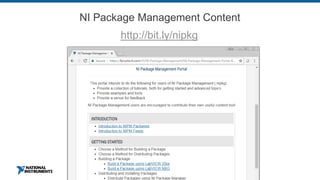
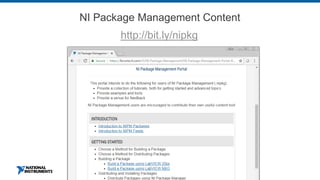
NI Package Management Content
http://bit.ly/nipkg
Agenda
I. Would my application benefit from componentization?
II. How do I architect a componentized application?
III. How do I build a componentized application?
IV. How do I distribute a componentized application?
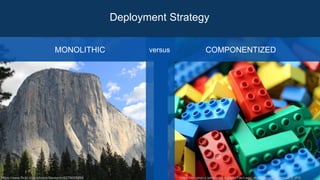
Deployment Strategy
https://www.flickr.com/photos/daveynin/6278005299 https://commons.wikimedia.org/wiki/File:Lego_dublo_arto_alanenpaa_5.JPG
MONOLITHIC COMPONENTIZEDversus
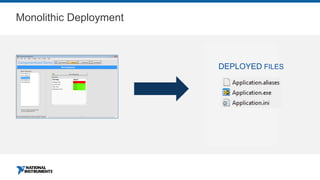
Monolithic Deployment
DEPLOYED FILES
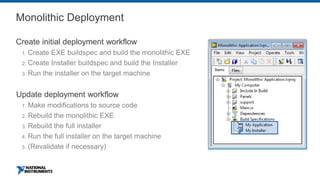
Monolithic Deployment
Create initial deployment workflow
1. Create EXE buildspec and build the monolithic EXE
2. Create Installer buildspec and build the Installer
3. Run the installer on the target machine
Update deployment workflow
1. Make modifications to source code
2. Rebuild the monolithic EXE
3. Rebuild the full installer
4. Run the full installer on the target machine
5. (Revalidate if necessary)
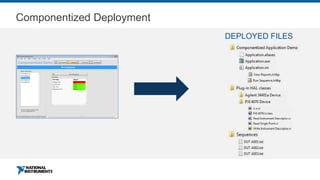
Componentized Deployment
DEPLOYED FILES
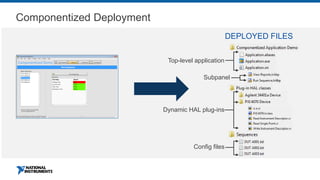
Componentized Deployment
DEPLOYED FILES
Top-level application
Dynamic HAL plug-ins
Subpanel
Config files
ni.com
DEMO: Componentized Application
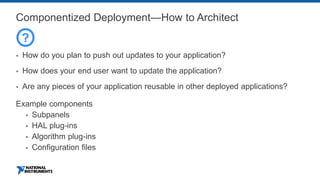
Componentized Deployment—How to Architect
▪ How do you plan to push out updates to your application?
▪ How does your end user want to update the application?
▪ Are any pieces of your application reusable in other deployed applications?
Example components
▪ Subpanels
▪ HAL plug-ins
▪ Algorithm plug-ins
▪ Configuration files
?
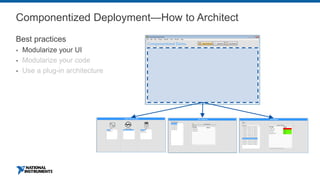
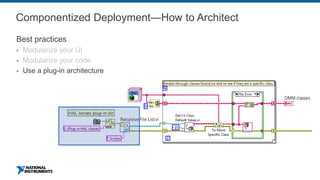
Componentized Deployment—How to Architect
Best practices
▪ Modularize your UI
▪ Modularize your code
▪ Use a plug-in architecture
Componentized Deployment—How to Architect
Best practices
▪ Modularize your UI
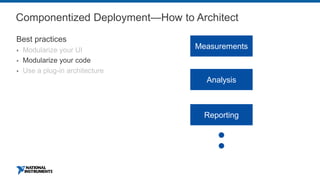
▪ Modularize your code
▪ Use a plug-in architecture
Analysis
Reporting
Measurements
Componentized Deployment—How to Architect
Best practices
▪ Modularize your UI
▪ Modularize your code
▪ Use a plug-in architecture
Building a Componentized Application
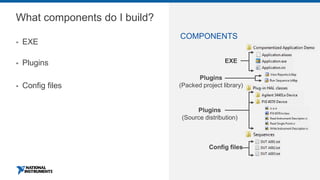
What components do I build?
▪ EXE
▪ Plugins
▪ Config files
COMPONENTS
EXE
Plugins
(Source distribution)
Plugins
(Packed project library)
Config files
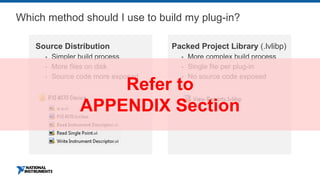
Which method should I use to build my plug-in?
Source Distribution
▪ Simpler build process
▪ More files on disk
▪ Source code more exposed
Packed Project Library (.lvlibp)
▪ More complex build process
▪ Single file per plug-in
▪ No source code exposed
Refer to
APPENDIX Section
ni.com
DEMO: Build Components Into EXEs, PPLs,
and Source Distributions
Follow-Up Content for Deploying Plug-Ins
▪ See Appendix section in this presentation
▪ Recommendations for Deploying LabVIEW Plug-Ins in the Run-Time Engine
https://labviewguru.com/2013/12/07/the-nuances-of-deploying-plugins-in-labview/
▪ Best Practices for Packaging Code in LabVIEW
http://www.ni.com/webcast/3798/en/
▪ Example Plug-in Framework Using Source Distributions
https://forums.ni.com/t5/LabVIEW-Development-Best/Measurement-Utility-Plugin-
Hardware-Abstraction-Layer-Using/ta-p/3531389
▪ Example Plug-In Framework Using PPLs
https://www.studiobods.com/en/niweek2018-ts1043/
https://forums.ni.com/t5/LabVIEW-Development-Best/Plug-in-Architecture-using-Packed-
Project-Libraries-lvlibp/ta-p/3514395
Distributing a Componentized Application
Using NI Package Management
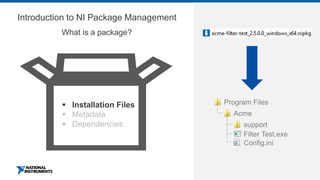
Introduction to NI Package Management
What is a package?
▪ Installation Files
▪ Metadata
▪ Dependencies
Program Files
Acme
support
Filter Test.exe
Config.ini
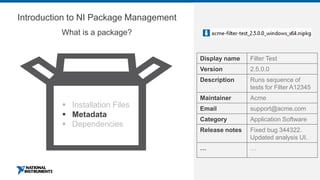
Introduction to NI Package Management
What is a package?
▪ Installation Files
▪ Metadata
▪ Dependencies
Display name Filter Test
Version 2.5.0.0
Description Runs sequence of
tests for Filter A12345
Maintainer Acme
Email support@acme.com
Category Application Software
Release notes Fixed bug 344322.
Updated analysis UI.
… …
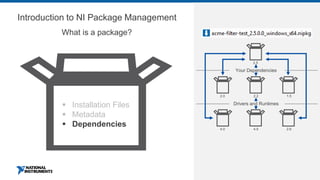
Introduction to NI Package Management
What is a package?
▪ Installation Files
▪ Metadata
▪ Dependencies
2.5
2.0 2.2 1.5
4.0 4.5 2.6
Drivers and Runtimes
Your Dependencies
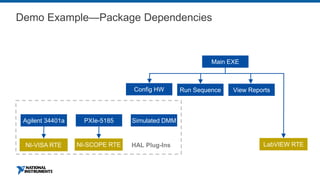
Main EXE
Config HW Run Sequence View Reports
LabVIEW RTENI-SCOPE RTENI-VISA RTE
Agilent 34401a PXIe-5185 Simulated DMM
HAL Plug-Ins
Demo Example—Package Dependencies
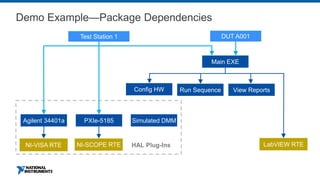
Main EXE
Config HW Run Sequence View Reports
LabVIEW RTENI-SCOPE RTENI-VISA RTE
Agilent 34401a PXIe-5185 Simulated DMM
HAL Plug-Ins
Demo Example—Package Dependencies
DUT A001Test Station 1
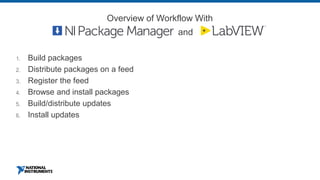
1. Build packages
2. Distribute packages on a feed
3. Register the feed
4. Browse and install packages
5. Build/distribute updates
6. Install updates
Overview of Workflow With
and
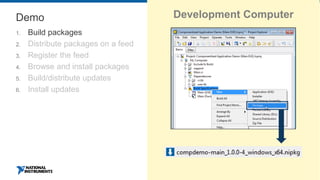
Demo
1. Build packages
2. Distribute packages on a feed
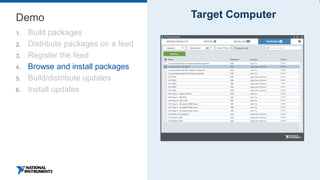
3. Register the feed
4. Browse and install packages
5. Build/distribute updates
6. Install updates
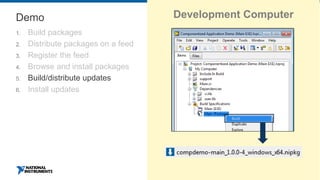
Development Computer
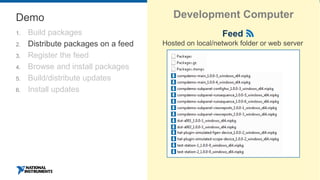
Demo
1. Build packages
2. Distribute packages on a feed
3. Register the feed
4. Browse and install packages
5. Build/distribute updates
6. Install updates
Development Computer
Feed
Hosted on local/network folder or web server
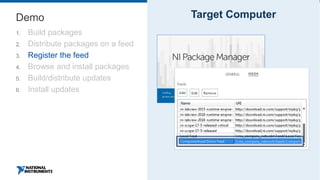
Demo
1. Build packages
2. Distribute packages on a feed
3. Register the feed
4. Browse and install packages
5. Build/distribute updates
6. Install updates
Target Computer
Demo
1. Build packages
2. Distribute packages on a feed
3. Register the feed
4. Browse and install packages
5. Build/distribute updates
6. Install updates
Target Computer
Demo
1. Build packages
2. Distribute packages on a feed
3. Register the feed
4. Browse and install packages
5. Build/distribute updates
6. Install updates
Development Computer
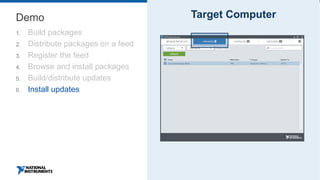
Demo
1. Build packages
2. Distribute packages on a feed
3. Register the feed
4. Browse and install packages
5. Build/distribute updates
6. Install updates
Target Computer
Distributing a Componentized Application
Using Package Installer
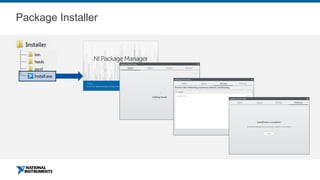
Package Installer
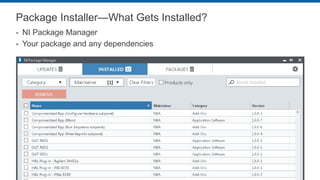
Package Installer—What Gets Installed?
▪ NI Package Manager
▪ Your package and any dependencies
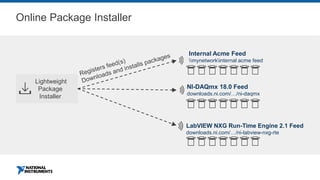
Online Package Installer
Lightweight
Package
Installer
NI-DAQmx 18.0 Feed
downloads.ni.com/…/ni-daqmx
LabVIEW NXG Run-Time Engine 2.1 Feed
downloads.ni.com/…/ni-labview-nxg-rte
Internal Acme Feed
mynetworkinternal acme feed
Distributing a Componentized Application
Using SystemLink™
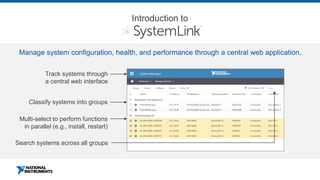
Track systems through
a central web interface
Search systems across all groups
Multi-select to perform functions
in parallel (e.g., install, restart)
Manage system configuration, health, and performance through a central web application.
Classify systems into groups
Introduction to
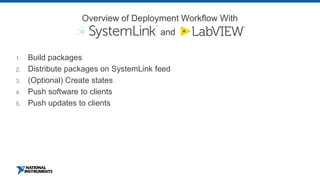
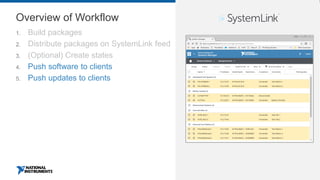
1. Build packages
2. Distribute packages on SystemLink feed
3. (Optional) Create states
4. Push software to clients
5. Push updates to clients
Overview of Deployment Workflow With
and
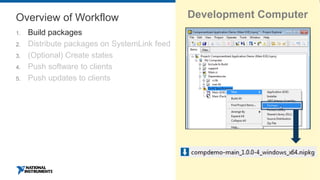
Overview of Workflow
1. Build packages
2. Distribute packages on SystemLink feed
3. (Optional) Create states
4. Push software to clients
5. Push updates to clients
Development Computer
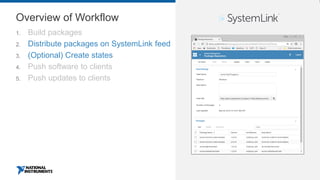
Overview of Workflow
1. Build packages
2. Distribute packages on SystemLink feed
3. (Optional) Create states
4. Push software to clients
5. Push updates to clients
Overview of Workflow
1. Build packages
2. Distribute packages on SystemLink feed
3. (Optional) Create states
4. Push software to clients
5. Push updates to clients
ni.com
ni.com/systemlink
Recap
I. Would my application benefit from componentization?
II. How do I architect a componentized application?
III. How do I build a componentized application?
IV. How do I distribute a componentized application?
Getting Started
Getting Started
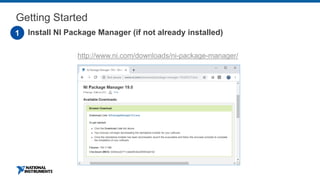
1. Install NI Package Manager (if not already installed)1
http://www.ni.com/downloads/ni-package-manager/
Getting Started
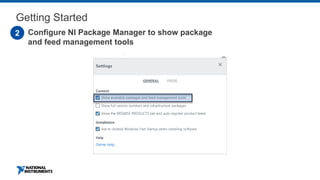
1. Configure NI Package Manager to show package
and feed management tools
2
Getting Started
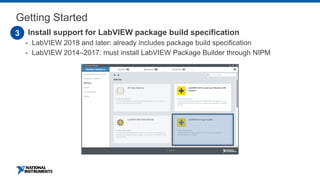
1. Install support for LabVIEW package build specification
▪ LabVIEW 2018 and later: already includes package build specification
▪ LabVIEW 2014–2017: must install LabVIEW Package Builder through NIPM
3
Getting Started
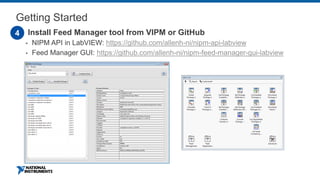
2. Install Feed Manager tool from VIPM or GitHub
▪ NIPM API in LabVIEW: https://github.com/allenh-ni/nipm-api-labview
▪ Feed Manager GUI: https://github.com/allenh-ni/nipm-feed-manager-gui-labview
4
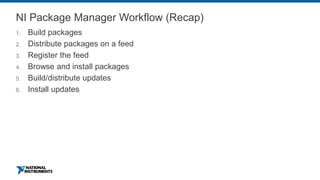
NI Package Manager Workflow (Recap)
1. Build packages
2. Distribute packages on a feed
3. Register the feed
4. Browse and install packages
5. Build/distribute updates
6. Install updates
Additional Resources
Additional Best Practices for Building and
Distributing LabVIEW Applications
▪ NIWeek 2017: 5 Tips to Develop, Deploy, and License a Memorable Application
https://www.studiobods.com/en/niweek2017-ad568/
▪ NIWeek 2017: LabVIEW Application Builder and Continuous Integration
https://www.studiobods.com/en/niweek2017-ts721/
APPENDIX
Building a Componentized Application
What should I build from my components?
▪ EXE
▪ Plug-ins
▪ Source distributions
▪ Packed project libraries (PPLs)
▪ Configuration files
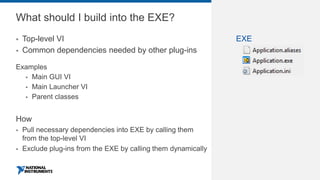
What should I build into the EXE?
▪ Top-level VI
▪ Common dependencies needed by other plug-ins
Examples
▪ Main GUI VI
▪ Main Launcher VI
▪ Parent classes
How
▪ Pull necessary dependencies into EXE by calling them
from the top-level VI
▪ Exclude plug-ins from the EXE by calling them dynamically
EXE
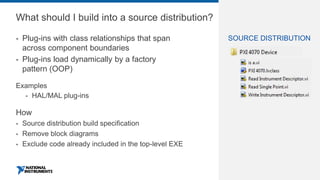
What should I build into a source distribution?
▪ Plug-ins with class relationships that span
across component boundaries
▪ Plug-ins load dynamically by a factory
pattern (OOP)
Examples
▪ HAL/MAL plug-ins
How
▪ Source distribution build specification
▪ Remove block diagrams
▪ Exclude code already included in the top-level EXE
SOURCE DISTRIBUTION
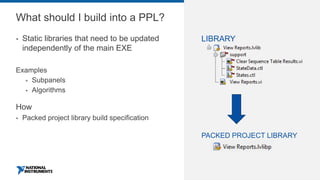
What should I build into a PPL?
▪ Static libraries that need to be updated
independently of the main EXE
Examples
▪ Subpanels
▪ Algorithms
How
▪ Packed project library build specification
PACKED PROJECT LIBRARY
LIBRARY
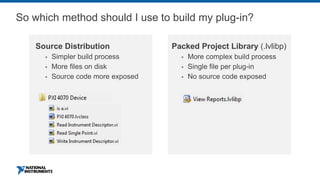
So which method should I use to build my plug-in?
Source Distribution
▪ Simpler build process
▪ More files on disk
▪ Source code more exposed
Packed Project Library (.lvlibp)
▪ More complex build process
▪ Single file per plug-in
▪ No source code exposed
Follow-Up Content for Deploying Plug-Ins
▪ Recommendations for Deploying LabVIEW Plug-Ins in the Run-Time Engine
https://labviewguru.com/2013/12/07/the-nuances-of-deploying-plugins-in-labview/
▪ Best Practices for Packaging Code in LabVIEW
http://www.ni.com/webcast/3798/en/
▪ Example Plug-In Framework Using Source Distributions
https://forums.ni.com/t5/LabVIEW-Development-Best/Measurement-Utility-
Plugin-Hardware-Abstraction-Layer-Using/ta-p/3531389
▪ Example Plug-In Framework Using PPLs
https://www.studiobods.com/en/niweek2018-ts1043/
https://forums.ni.com/t5/LabVIEW-Development-Best/Plug-in-Architecture-
using-Packed-Project-Libraries-lvlibp/ta-p/3514395
NI Package Management Content
http://bit.ly/nipkg
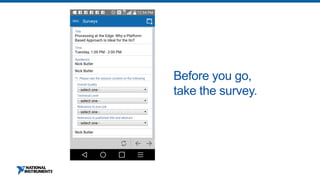
Before you go,
take the survey.
NI Package Manager

NI Package Manager

  • 1.
    Best Practices forDistributing Componentized LabVIEW Applications
  • 2.
    NI Package ManagementContent http://bit.ly/nipkg
  • 3.
    Agenda I. Would myapplication benefit from componentization? II. How do I architect a componentized application? III. How do I build a componentized application? IV. How do I distribute a componentized application?
  • 4.
  • 5.
  • 6.
    Monolithic Deployment Create initialdeployment workflow 1. Create EXE buildspec and build the monolithic EXE 2. Create Installer buildspec and build the Installer 3. Run the installer on the target machine Update deployment workflow 1. Make modifications to source code 2. Rebuild the monolithic EXE 3. Rebuild the full installer 4. Run the full installer on the target machine 5. (Revalidate if necessary)
  • 7.
  • 8.
    Componentized Deployment DEPLOYED FILES Top-levelapplication Dynamic HAL plug-ins Subpanel Config files
  • 9.
  • 10.
    Componentized Deployment—How toArchitect ▪ How do you plan to push out updates to your application? ▪ How does your end user want to update the application? ▪ Are any pieces of your application reusable in other deployed applications? Example components ▪ Subpanels ▪ HAL plug-ins ▪ Algorithm plug-ins ▪ Configuration files ?
  • 11.
    Componentized Deployment—How toArchitect Best practices ▪ Modularize your UI ▪ Modularize your code ▪ Use a plug-in architecture
  • 12.
    Componentized Deployment—How toArchitect Best practices ▪ Modularize your UI ▪ Modularize your code ▪ Use a plug-in architecture Analysis Reporting Measurements
  • 13.
    Componentized Deployment—How toArchitect Best practices ▪ Modularize your UI ▪ Modularize your code ▪ Use a plug-in architecture
  • 14.
  • 15.
    What components doI build? ▪ EXE ▪ Plugins ▪ Config files COMPONENTS EXE Plugins (Source distribution) Plugins (Packed project library) Config files
  • 16.
    Which method shouldI use to build my plug-in? Source Distribution ▪ Simpler build process ▪ More files on disk ▪ Source code more exposed Packed Project Library (.lvlibp) ▪ More complex build process ▪ Single file per plug-in ▪ No source code exposed Refer to APPENDIX Section
  • 17.
    ni.com DEMO: Build ComponentsInto EXEs, PPLs, and Source Distributions
  • 18.
    Follow-Up Content forDeploying Plug-Ins ▪ See Appendix section in this presentation ▪ Recommendations for Deploying LabVIEW Plug-Ins in the Run-Time Engine https://labviewguru.com/2013/12/07/the-nuances-of-deploying-plugins-in-labview/ ▪ Best Practices for Packaging Code in LabVIEW http://www.ni.com/webcast/3798/en/ ▪ Example Plug-in Framework Using Source Distributions https://forums.ni.com/t5/LabVIEW-Development-Best/Measurement-Utility-Plugin- Hardware-Abstraction-Layer-Using/ta-p/3531389 ▪ Example Plug-In Framework Using PPLs https://www.studiobods.com/en/niweek2018-ts1043/ https://forums.ni.com/t5/LabVIEW-Development-Best/Plug-in-Architecture-using-Packed- Project-Libraries-lvlibp/ta-p/3514395
  • 19.
    Distributing a ComponentizedApplication Using NI Package Management
  • 20.
    Introduction to NIPackage Management What is a package? ▪ Installation Files ▪ Metadata ▪ Dependencies Program Files Acme support Filter Test.exe Config.ini
  • 21.
    Introduction to NIPackage Management What is a package? ▪ Installation Files ▪ Metadata ▪ Dependencies Display name Filter Test Version 2.5.0.0 Description Runs sequence of tests for Filter A12345 Maintainer Acme Email support@acme.com Category Application Software Release notes Fixed bug 344322. Updated analysis UI. … …
  • 22.
    Introduction to NIPackage Management What is a package? ▪ Installation Files ▪ Metadata ▪ Dependencies 2.5 2.0 2.2 1.5 4.0 4.5 2.6 Drivers and Runtimes Your Dependencies
  • 23.
    Main EXE Config HWRun Sequence View Reports LabVIEW RTENI-SCOPE RTENI-VISA RTE Agilent 34401a PXIe-5185 Simulated DMM HAL Plug-Ins Demo Example—Package Dependencies
  • 24.
    Main EXE Config HWRun Sequence View Reports LabVIEW RTENI-SCOPE RTENI-VISA RTE Agilent 34401a PXIe-5185 Simulated DMM HAL Plug-Ins Demo Example—Package Dependencies DUT A001Test Station 1
  • 25.
    1. Build packages 2.Distribute packages on a feed 3. Register the feed 4. Browse and install packages 5. Build/distribute updates 6. Install updates Overview of Workflow With and
  • 26.
    Demo 1. Build packages 2.Distribute packages on a feed 3. Register the feed 4. Browse and install packages 5. Build/distribute updates 6. Install updates Development Computer
  • 27.
    Demo 1. Build packages 2.Distribute packages on a feed 3. Register the feed 4. Browse and install packages 5. Build/distribute updates 6. Install updates Development Computer Feed Hosted on local/network folder or web server
  • 28.
    Demo 1. Build packages 2.Distribute packages on a feed 3. Register the feed 4. Browse and install packages 5. Build/distribute updates 6. Install updates Target Computer
  • 29.
    Demo 1. Build packages 2.Distribute packages on a feed 3. Register the feed 4. Browse and install packages 5. Build/distribute updates 6. Install updates Target Computer
  • 30.
    Demo 1. Build packages 2.Distribute packages on a feed 3. Register the feed 4. Browse and install packages 5. Build/distribute updates 6. Install updates Development Computer
  • 31.
    Demo 1. Build packages 2.Distribute packages on a feed 3. Register the feed 4. Browse and install packages 5. Build/distribute updates 6. Install updates Target Computer
  • 32.
    Distributing a ComponentizedApplication Using Package Installer
  • 33.
  • 34.
    Package Installer—What GetsInstalled? ▪ NI Package Manager ▪ Your package and any dependencies
  • 35.
    Online Package Installer Lightweight Package Installer NI-DAQmx18.0 Feed downloads.ni.com/…/ni-daqmx LabVIEW NXG Run-Time Engine 2.1 Feed downloads.ni.com/…/ni-labview-nxg-rte Internal Acme Feed mynetworkinternal acme feed
  • 36.
    Distributing a ComponentizedApplication Using SystemLink™
  • 37.
    Track systems through acentral web interface Search systems across all groups Multi-select to perform functions in parallel (e.g., install, restart) Manage system configuration, health, and performance through a central web application. Classify systems into groups Introduction to
  • 38.
    1. Build packages 2.Distribute packages on SystemLink feed 3. (Optional) Create states 4. Push software to clients 5. Push updates to clients Overview of Deployment Workflow With and
  • 39.
    Overview of Workflow 1.Build packages 2. Distribute packages on SystemLink feed 3. (Optional) Create states 4. Push software to clients 5. Push updates to clients Development Computer
  • 40.
    Overview of Workflow 1.Build packages 2. Distribute packages on SystemLink feed 3. (Optional) Create states 4. Push software to clients 5. Push updates to clients
  • 41.
    Overview of Workflow 1.Build packages 2. Distribute packages on SystemLink feed 3. (Optional) Create states 4. Push software to clients 5. Push updates to clients
  • 42.
  • 43.
    Recap I. Would myapplication benefit from componentization? II. How do I architect a componentized application? III. How do I build a componentized application? IV. How do I distribute a componentized application?
  • 44.
  • 45.
    Getting Started 1. InstallNI Package Manager (if not already installed)1 http://www.ni.com/downloads/ni-package-manager/
  • 46.
    Getting Started 1. ConfigureNI Package Manager to show package and feed management tools 2
  • 47.
    Getting Started 1. Installsupport for LabVIEW package build specification ▪ LabVIEW 2018 and later: already includes package build specification ▪ LabVIEW 2014–2017: must install LabVIEW Package Builder through NIPM 3
  • 48.
    Getting Started 2. InstallFeed Manager tool from VIPM or GitHub ▪ NIPM API in LabVIEW: https://github.com/allenh-ni/nipm-api-labview ▪ Feed Manager GUI: https://github.com/allenh-ni/nipm-feed-manager-gui-labview 4
  • 49.
    NI Package ManagerWorkflow (Recap) 1. Build packages 2. Distribute packages on a feed 3. Register the feed 4. Browse and install packages 5. Build/distribute updates 6. Install updates
  • 50.
  • 51.
    Additional Best Practicesfor Building and Distributing LabVIEW Applications ▪ NIWeek 2017: 5 Tips to Develop, Deploy, and License a Memorable Application https://www.studiobods.com/en/niweek2017-ad568/ ▪ NIWeek 2017: LabVIEW Application Builder and Continuous Integration https://www.studiobods.com/en/niweek2017-ts721/
  • 52.
  • 53.
    What should Ibuild from my components? ▪ EXE ▪ Plug-ins ▪ Source distributions ▪ Packed project libraries (PPLs) ▪ Configuration files
  • 54.
    What should Ibuild into the EXE? ▪ Top-level VI ▪ Common dependencies needed by other plug-ins Examples ▪ Main GUI VI ▪ Main Launcher VI ▪ Parent classes How ▪ Pull necessary dependencies into EXE by calling them from the top-level VI ▪ Exclude plug-ins from the EXE by calling them dynamically EXE
  • 55.
    What should Ibuild into a source distribution? ▪ Plug-ins with class relationships that span across component boundaries ▪ Plug-ins load dynamically by a factory pattern (OOP) Examples ▪ HAL/MAL plug-ins How ▪ Source distribution build specification ▪ Remove block diagrams ▪ Exclude code already included in the top-level EXE SOURCE DISTRIBUTION
  • 56.
    What should Ibuild into a PPL? ▪ Static libraries that need to be updated independently of the main EXE Examples ▪ Subpanels ▪ Algorithms How ▪ Packed project library build specification PACKED PROJECT LIBRARY LIBRARY
  • 57.
    So which methodshould I use to build my plug-in? Source Distribution ▪ Simpler build process ▪ More files on disk ▪ Source code more exposed Packed Project Library (.lvlibp) ▪ More complex build process ▪ Single file per plug-in ▪ No source code exposed
  • 58.
    Follow-Up Content forDeploying Plug-Ins ▪ Recommendations for Deploying LabVIEW Plug-Ins in the Run-Time Engine https://labviewguru.com/2013/12/07/the-nuances-of-deploying-plugins-in-labview/ ▪ Best Practices for Packaging Code in LabVIEW http://www.ni.com/webcast/3798/en/ ▪ Example Plug-In Framework Using Source Distributions https://forums.ni.com/t5/LabVIEW-Development-Best/Measurement-Utility- Plugin-Hardware-Abstraction-Layer-Using/ta-p/3531389 ▪ Example Plug-In Framework Using PPLs https://www.studiobods.com/en/niweek2018-ts1043/ https://forums.ni.com/t5/LabVIEW-Development-Best/Plug-in-Architecture- using-Packed-Project-Libraries-lvlibp/ta-p/3514395
  • 59.
    NI Package ManagementContent http://bit.ly/nipkg
  • 60.