

Auto Code
Generation and
Rapid
Brewery/Distillery
Automation
Ryan Landwehr
Project Director, DMC, Inc.
usa.siemens.com/summitUnrestricted © Siemens 2019
2019 Automation Summit
• Title: Rapid Brewery/Distillery Automation and Success Stories
• Track: PE
• Presenter: Ryan Landwehr
• Company: DMC, Inc.
• Session # (for your survey): 1.2
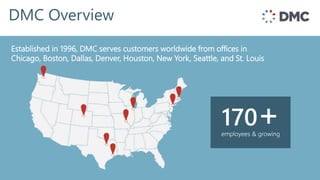
DMC Overview
Established in 1996, offices in Chicago, Boston, &
Denver and customers throughout the world
Established in 1996, DMC serves customers worldwide from offices in
Chicago, Boston, Dallas, Denver, Houston, New York, Seattle, and St. Louis
employees & growing
170+
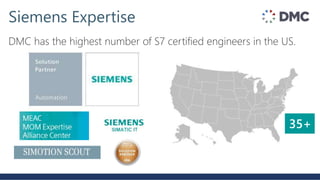
DMC has the highest number of S7 certified engineers in the US.
Siemens Expertise
35+
DMC Customers
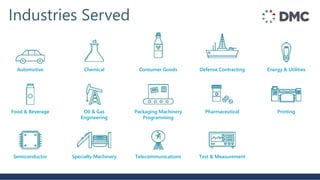
Industries Served
Energy & Utilities
Printing
Automotive
Food & Beverage
Semiconductor
Chemical
Oil & Gas
Engineering
Specialty Machinery
Consumer Goods
Packaging Machinery
Programming
Telecommunications
Defense Contracting
Pharmaceutical
Test & Measurement
Ryan Landwehr
Project Director, DMC Dallas
• BS Electrical Engineering
• Rose-Hulman Institute of Technology
• With DMC since 2014
• Siemens Certified Professional (4 years)
• PLC/HMI/SCADA, Motion, Failsafe Systems
• Dedicated Craft Brewery/Distillery Consumer
Presenter Info
• Who likes craft beer?
• Craft spirits?
• Anybody tried brewing their own beer?
• Distilling their own spirits?
Audience Info
Siemens Brewing Template:
Rapid Brewery/Distillery Automation
1. Siemens Brewing Template Intro
2. Project Layout
3. Creating a Project
4. Case Study: Witherspoon Distillery
5. Other Brewing Template Successes
6. Live Demo!
1. Siemens Brewing Template Intro
2. Project Layout
3. Creating a Project
4. Case Study: Witherspoon Distillery
5. Other Brewing Template Successes
6. Live Demo!
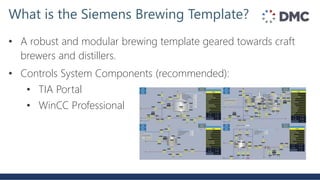
• A robust and modular brewing template geared towards craft
brewers and distillers.
• Controls System Components (recommended):
• TIA Portal
• WinCC Professional
What is the Siemens Brewing Template?
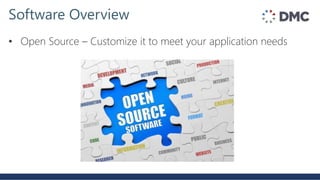
• Open Source – Customize it to meet your application needs
Software Overview
• Based on known Craft Brewery designs and 35+ years of
Brewing Industry Experience
Software Overview
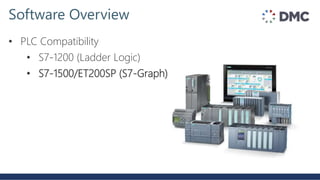
• PLC Compatibility
• S7-1200 (Ladder Logic)
• S7-1500/ET200SP (S7-Graph)
Software Overview
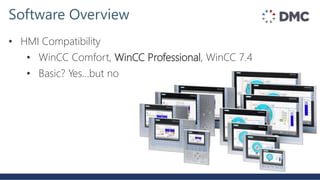
• HMI Compatibility
• WinCC Comfort, WinCC Professional, WinCC 7.4
• Basic? Yes…but no
Software Overview
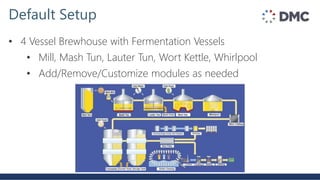
• 4 Vessel Brewhouse with Fermentation Vessels
• Mill, Mash Tun, Lauter Tun, Wort Kettle, Whirlpool
• Add/Remove/Customize modules as needed
Default Setup
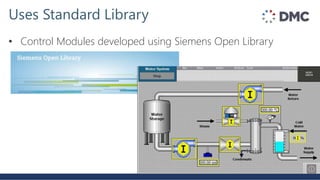
• Control Modules developed using Siemens Open Library
Uses Standard Library
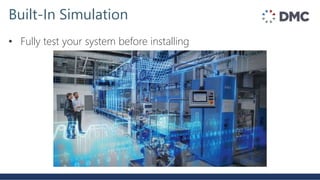
• Fully test your system before installing
Built-In Simulation
• Event Driven Reporting built-in
Built-In Reporting
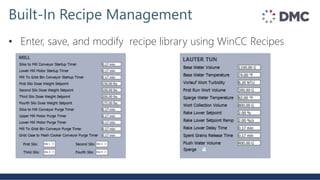
• Enter, save, and modify recipe library using WinCC Recipes
Built-In Recipe Management
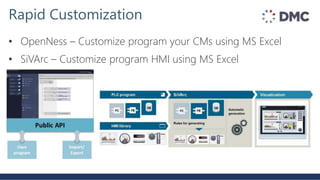
• OpenNess – Customize program your CMs using MS Excel
• SiVArc – Customize program HMI using MS Excel
Rapid Customization
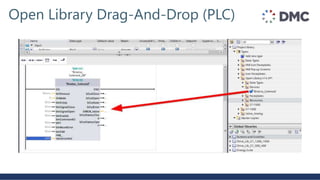
Open Library Drag-And-Drop (PLC)
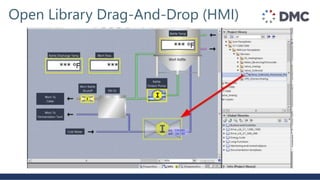
Open Library Drag-And-Drop (HMI)
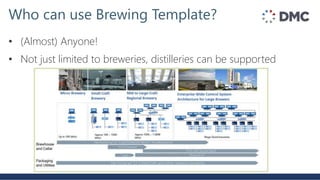
• (Almost) Anyone!
• Not just limited to breweries, distilleries can be supported
Who can use Brewing Template?
• Built-in support for Grain Handling, Brewhouse, and
Fermentation Vessels, but can easily be adapted to control:
• Filtration Systems
• Clean-In-Place (CIP) Systems
• Utilities (Boiler, Cooling Towers, Chillers)
• Bottling/Packaging
Where else can you expand to?
• Easy to use, scale, and customize both hardware and software
• Fully Tested Demo – based on 35+ years of brewing market
experience
• Standard Programming Library – Siemens Open Library
• Support: Siemens, Siemens Partners, and System Integrators
• Training Courses provided regularly by SiTrain
Why use it?
1. Siemens Brewing Template Intro
2. Project Layout
3. Creating a Project
4. Case Study: Witherspoon Distillery
5. Other Brewing Template Successes
6. Live Demo!
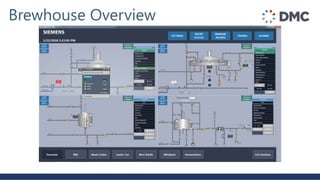
Brewhouse Overview
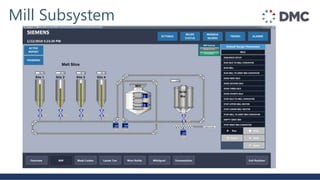
Mill Subsystem
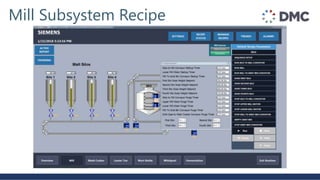
Mill Subsystem Recipe
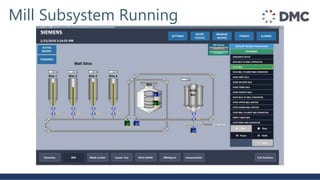
Mill Subsystem Running
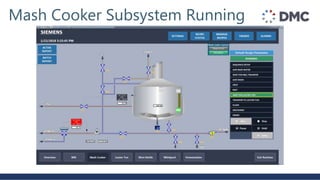
Mash Cooker Subsystem Running
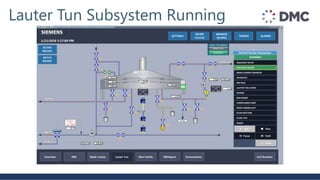
Lauter Tun Subsystem Running
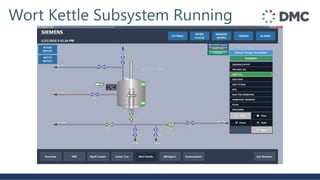
Wort Kettle Subsystem Running
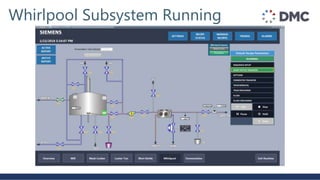
Whirlpool Subsystem Running
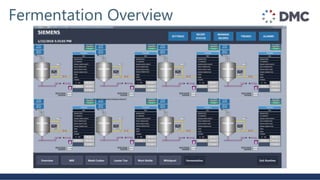
Fermentation Overview
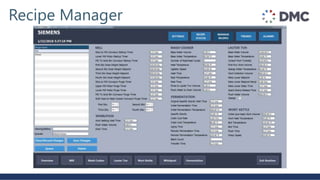
Recipe Manager
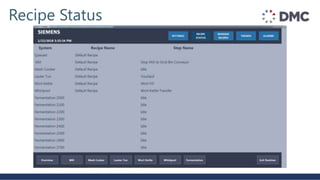
Recipe Status
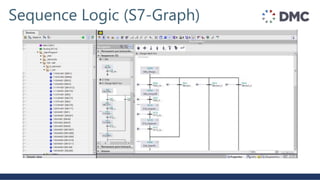
Sequence Logic (S7-Graph)
1. Siemens Brewing Template Intro
2. Project Layout
3. Creating a Project
4. Case Study: Witherspoon Distillery
5. Other Brewing Template Successes
6. Live Demo!
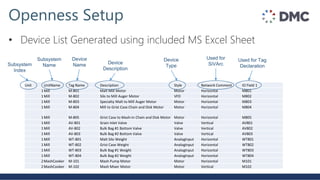
Openness Setup
• Device List Generated using included MS Excel Sheet
Unit UnitName Tag Name Description Style Network Comment IO Field 1
1Mill M-801 Malt Mill Motor Motor Horizontal M801
1Mill M-802 Silo to Mill Auger Motor VFD Horizontal M802
1Mill M-803 Specialty Malt to Mill Auger Motor Motor Horizontal M803
1Mill M-804 Mill to Grist Case Chain and Disk Motor Motor Horizontal M804
1Mill M-805 Grist Case to Mash-in Chain and Disk Motor Motor Horizontal M805
1Mill AV-801 Grain Inlet Valve Valve Vertical AV801
1Mill AV-802 Bulk Bag #1 Bottom Valve Valve Vertical AV802
1Mill AV-803 Bulk Bag #2 Bottom Valve Valve Vertical AV803
1Mill WT-801 Malt Silo Weight AnalogInput Horizontal WT801
1Mill WT-802 Grist Case Weight AnalogInput Horizontal WT802
1Mill WT-803 Bulk Bag #1 Weight AnalogInput Horizontal WT803
1Mill WT-804 Bulk Bag #2 Weight AnalogInput Horizontal WT804
2MashCooker M-101 Mash Pump Motor Motor Horizontal M101
2MashCooker M-102 Mash Mixer Motor Motor Vertical M102
Subsystem
Index
Subsystem
Name
Device
Name Device
Description
Device
Type
Used for
SiVArc
Used for Tag
Declaration
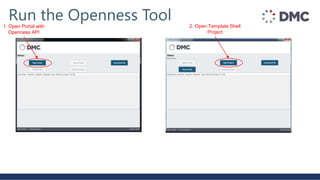
Run the Openness Tool1. Open Portal with
Openness API
2. Open Template Shell
Project
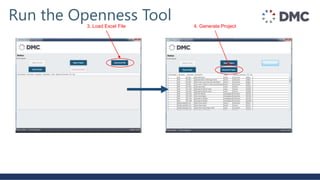
Run the Openness Tool3. Load Excel File 4. Generate Project
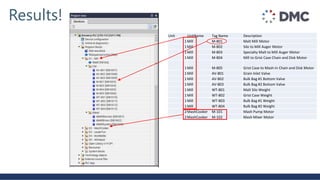
Results!
Unit UnitName Tag Name Description
1Mill M-801 Malt Mill Motor
1Mill M-802 Silo to Mill Auger Motor
1Mill M-803 Specialty Malt to Mill Auger Motor
1Mill M-804 Mill to Grist Case Chain and Disk Motor
1Mill M-805 Grist Case to Mash-in Chain and Disk Motor
1Mill AV-801 Grain Inlet Valve
1Mill AV-802 Bulk Bag #1 Bottom Valve
1Mill AV-803 Bulk Bag #2 Bottom Valve
1Mill WT-801 Malt Silo Weight
1Mill WT-802 Grist Case Weight
1Mill WT-803 Bulk Bag #1 Weight
1Mill WT-804 Bulk Bag #2 Weight
2MashCooker M-101 Mash Pump Motor
2MashCooker M-102 Mash Mixer Motor
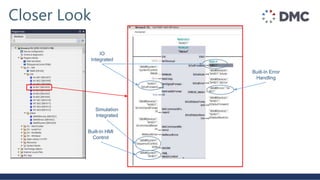
Closer Look
IO
Integrated
Simulation
Integrated
Built-In HMI
Control
Built-In Error
Handling
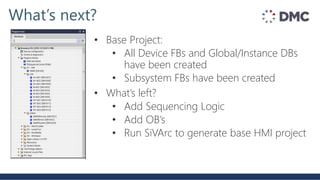
What’s next?
• Base Project:
• All Device FBs and Global/Instance DBs
have been created
• Subsystem FBs have been created
• What’s left?
• Add Sequencing Logic
• Add OB’s
• Run SiVArc to generate base HMI project
Screen Name Device
Mill Valve Horizontal
Mill Valve Vertical
Mill Analog Input
Mill Analog Valve
Mill PID
Mill Flow Totalizer
Mill Flow Indicator
Mill Motor Horizontal
Mill Motor Vertical
Mill Motor Pump Horizontal
Mill Motor Pump Vertical
Mill VFD Motor Horizontal
Mill VFD Motor Vertical
Mill VFD Pump Horizontal
Mill VFD Pump Vertical
Mash Cooker Valve Horizontal
Mash Cooker Valve Vertical
Mash Cooker Analog Input
Mash Cooker Analog Valve
Mash Cooker PID
Mash Cooker Flow Totalizer
Mash Cooker Flow Indicator
Mash Cooker Motor Horizontal
Mash Cooker Motor Vertical
Mash Cooker Motor Pump Horizontal
Mash Cooker Motor Pump Vertical
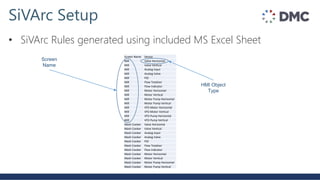
SiVArc Setup
• SiVArc Rules generated using included MS Excel Sheet
HMI Object
Type
Screen
Name
Screen Name Device
Mill Valve Horizontal
Mill Valve Vertical
Mill Analog Input
Mill Analog Valve
Mill PID
Mill Flow Totalizer
Mill Flow Indicator
Mill Motor Horizontal
Mill Motor Vertical
Mill Motor Pump Horizontal
Mill Motor Pump Vertical
Mill VFD Motor Horizontal
Mill VFD Motor Vertical
Mill VFD Pump Horizontal
Mill VFD Pump Vertical
Mash Cooker Valve Horizontal
Mash Cooker Valve Vertical
Mash Cooker Analog Input
Mash Cooker Analog Valve
Mash Cooker PID
Mash Cooker Flow Totalizer
Mash Cooker Flow Indicator
Mash Cooker Motor Horizontal
Mash Cooker Motor Vertical
Mash Cooker Motor Pump Horizontal
Mash Cooker Motor Pump Vertical
SiVArc Setup
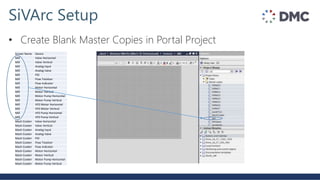
• Create Blank Master Copies in Portal Project
SiVArc Setup
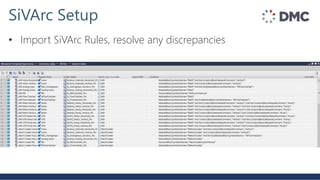
• Import SiVArc Rules, resolve any discrepancies
SiVArc Setup
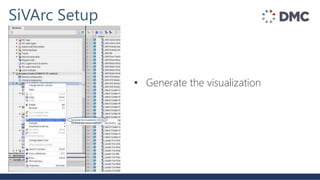
• Generate the visualization
SiVArc Tips
• Before running SiVArc, PLC project must already be generated
and compiled
• Create HMI screens in project before dragging to Master Copies
• Reuse Brewing Template screens (after deleting devices) to
maintain formatting
• Template is based on Siemens Open Library, must have this
downloaded and pulled into Project Library
What did we just create?
• By running Openness and SiVArc, we’ve just generated HMI
manual control of all of our devices in the entire brewery!
• All that is left is to generate automated sequence logic
• Start with default layout from Brewing Template Project and
adapt to your needs
1. Siemens Brewing Template Intro
2. Project Layout
3. Creating a Project
4. Case Study: Witherspoon Distillery
5. Other Brewing Template Successes
6. Live Demo!
Witherspoon Distillery
• Founded in 2011 in Lewisville, TX
• All US raw materials
• Mash, fermentation, distillation, aging, bottling, and packaging
• Primarily whiskey, but distills all spirits for Tasting Hall cocktails
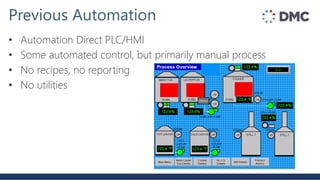
Previous Automation
• Automation Direct PLC/HMI
• Some automated control, but primarily manual process
• No recipes, no reporting
• No utilities
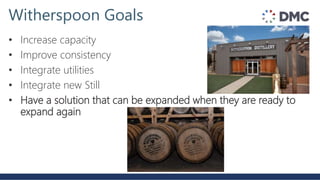
Witherspoon Goals
• Increase capacity
• Improve consistency
• Integrate utilities
• Integrate new Still
• Have a solution that can be expanded when they are ready to
expand again
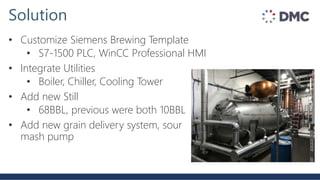
Solution
• Customize Siemens Brewing Template
• S7-1500 PLC, WinCC Professional HMI
• Integrate Utilities
• Boiler, Chiller, Cooling Tower
• Add new Still
• 68BBL, previous were both 10BBL
• Add new grain delivery system, sour
mash pump
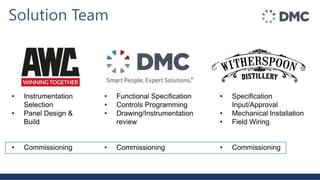
Solution Team
• Functional Specification
• Controls Programming
• Drawing/Instrumentation
review
• Commissioning
• Instrumentation
Selection
• Panel Design &
Build
• Commissioning
• Specification
Input/Approval
• Mechanical Installation
• Field Wiring
• Commissioning
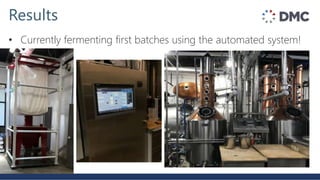
Results
• Currently fermenting first batches using the automated system!
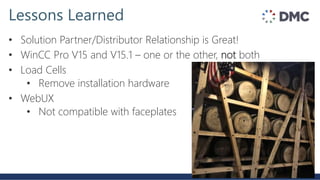
Lessons Learned
• Solution Partner/Distributor Relationship is Great!
• WinCC Pro V15 and V15.1 – one or the other, not both
• Load Cells
• Remove installation hardware
• WebUX
• Not compatible with faceplates
1. Siemens Brewing Template Intro
2. Project Layout
3. Creating a Project
4. Case Study: Witherspoon Distillery
5. Other Brewing Template Successes
6. Live Demo!
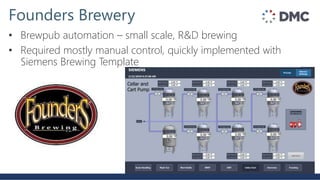
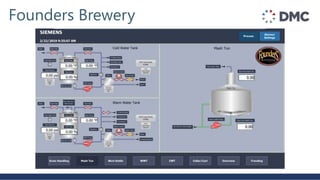
Founders Brewery
• Brewpub automation – small scale, R&D brewing
• Required mostly manual control, quickly implemented with
Siemens Brewing Template
Founders Brewery
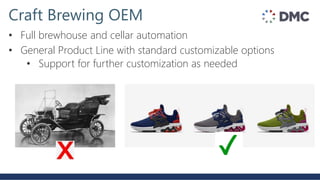
Craft Brewing OEM
• Full brewhouse and cellar automation
• General Product Line with standard customizable options
• Support for further customization as needed
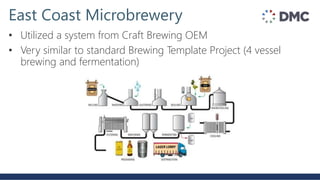
East Coast Microbrewery
• Utilized a system from Craft Brewing OEM
• Very similar to standard Brewing Template Project (4 vessel
brewing and fermentation)
Siemens Brewing Template Recap
• Open Source
• Built on standard libraries, easy to scale
• Built in Reporting, Simulation
• Fully Customizable
1. Siemens Brewing Template Intro
2. Project Layout
3. Creating a Project
4. Case Study: Witherspoon Distillery
5. Other Brewing Template Successes
6. Live Demo!
Live Demo
Rapid Brewery/Distillery Automation
Name: Ryan Landwehr
Company: DMC, Inc.
Email: Ryan.Landwehr@dmcinfo.com
Phone: (972)-432-5536
Session # (for your survey): 1.2

Auto Code Generation and Rapid Brewery/Distillery Automation

  • 1.
    Auto Code Generation and Rapid Brewery/Distillery Automation RyanLandwehr Project Director, DMC, Inc. usa.siemens.com/summitUnrestricted © Siemens 2019
  • 2.
    2019 Automation Summit •Title: Rapid Brewery/Distillery Automation and Success Stories • Track: PE • Presenter: Ryan Landwehr • Company: DMC, Inc. • Session # (for your survey): 1.2
  • 3.
    DMC Overview Established in1996, offices in Chicago, Boston, & Denver and customers throughout the world Established in 1996, DMC serves customers worldwide from offices in Chicago, Boston, Dallas, Denver, Houston, New York, Seattle, and St. Louis employees & growing 170+
  • 4.
    DMC has thehighest number of S7 certified engineers in the US. Siemens Expertise 35+
  • 5.
  • 6.
    Industries Served Energy &Utilities Printing Automotive Food & Beverage Semiconductor Chemical Oil & Gas Engineering Specialty Machinery Consumer Goods Packaging Machinery Programming Telecommunications Defense Contracting Pharmaceutical Test & Measurement
  • 7.
    Ryan Landwehr Project Director,DMC Dallas • BS Electrical Engineering • Rose-Hulman Institute of Technology • With DMC since 2014 • Siemens Certified Professional (4 years) • PLC/HMI/SCADA, Motion, Failsafe Systems • Dedicated Craft Brewery/Distillery Consumer Presenter Info
  • 8.
    • Who likescraft beer? • Craft spirits? • Anybody tried brewing their own beer? • Distilling their own spirits? Audience Info
  • 9.
    Siemens Brewing Template: RapidBrewery/Distillery Automation
  • 10.
    1. Siemens BrewingTemplate Intro 2. Project Layout 3. Creating a Project 4. Case Study: Witherspoon Distillery 5. Other Brewing Template Successes 6. Live Demo!
  • 11.
    1. Siemens BrewingTemplate Intro 2. Project Layout 3. Creating a Project 4. Case Study: Witherspoon Distillery 5. Other Brewing Template Successes 6. Live Demo!
  • 12.
    • A robustand modular brewing template geared towards craft brewers and distillers. • Controls System Components (recommended): • TIA Portal • WinCC Professional What is the Siemens Brewing Template?
  • 13.
    • Open Source– Customize it to meet your application needs Software Overview
  • 14.
    • Based onknown Craft Brewery designs and 35+ years of Brewing Industry Experience Software Overview
  • 15.
    • PLC Compatibility •S7-1200 (Ladder Logic) • S7-1500/ET200SP (S7-Graph) Software Overview
  • 16.
    • HMI Compatibility •WinCC Comfort, WinCC Professional, WinCC 7.4 • Basic? Yes…but no Software Overview
  • 17.
    • 4 VesselBrewhouse with Fermentation Vessels • Mill, Mash Tun, Lauter Tun, Wort Kettle, Whirlpool • Add/Remove/Customize modules as needed Default Setup
  • 18.
    • Control Modulesdeveloped using Siemens Open Library Uses Standard Library
  • 19.
    • Fully testyour system before installing Built-In Simulation
  • 20.
    • Event DrivenReporting built-in Built-In Reporting
  • 21.
    • Enter, save,and modify recipe library using WinCC Recipes Built-In Recipe Management
  • 22.
    • OpenNess –Customize program your CMs using MS Excel • SiVArc – Customize program HMI using MS Excel Rapid Customization
  • 23.
  • 24.
  • 25.
    • (Almost) Anyone! •Not just limited to breweries, distilleries can be supported Who can use Brewing Template?
  • 26.
    • Built-in supportfor Grain Handling, Brewhouse, and Fermentation Vessels, but can easily be adapted to control: • Filtration Systems • Clean-In-Place (CIP) Systems • Utilities (Boiler, Cooling Towers, Chillers) • Bottling/Packaging Where else can you expand to?
  • 27.
    • Easy touse, scale, and customize both hardware and software • Fully Tested Demo – based on 35+ years of brewing market experience • Standard Programming Library – Siemens Open Library • Support: Siemens, Siemens Partners, and System Integrators • Training Courses provided regularly by SiTrain Why use it?
  • 28.
    1. Siemens BrewingTemplate Intro 2. Project Layout 3. Creating a Project 4. Case Study: Witherspoon Distillery 5. Other Brewing Template Successes 6. Live Demo!
  • 29.
  • 30.
  • 31.
  • 32.
  • 33.
  • 34.
  • 35.
  • 36.
  • 37.
  • 38.
  • 39.
  • 40.
  • 41.
    1. Siemens BrewingTemplate Intro 2. Project Layout 3. Creating a Project 4. Case Study: Witherspoon Distillery 5. Other Brewing Template Successes 6. Live Demo!
  • 42.
    Openness Setup • DeviceList Generated using included MS Excel Sheet Unit UnitName Tag Name Description Style Network Comment IO Field 1 1Mill M-801 Malt Mill Motor Motor Horizontal M801 1Mill M-802 Silo to Mill Auger Motor VFD Horizontal M802 1Mill M-803 Specialty Malt to Mill Auger Motor Motor Horizontal M803 1Mill M-804 Mill to Grist Case Chain and Disk Motor Motor Horizontal M804 1Mill M-805 Grist Case to Mash-in Chain and Disk Motor Motor Horizontal M805 1Mill AV-801 Grain Inlet Valve Valve Vertical AV801 1Mill AV-802 Bulk Bag #1 Bottom Valve Valve Vertical AV802 1Mill AV-803 Bulk Bag #2 Bottom Valve Valve Vertical AV803 1Mill WT-801 Malt Silo Weight AnalogInput Horizontal WT801 1Mill WT-802 Grist Case Weight AnalogInput Horizontal WT802 1Mill WT-803 Bulk Bag #1 Weight AnalogInput Horizontal WT803 1Mill WT-804 Bulk Bag #2 Weight AnalogInput Horizontal WT804 2MashCooker M-101 Mash Pump Motor Motor Horizontal M101 2MashCooker M-102 Mash Mixer Motor Motor Vertical M102 Subsystem Index Subsystem Name Device Name Device Description Device Type Used for SiVArc Used for Tag Declaration
  • 43.
    Run the OpennessTool1. Open Portal with Openness API 2. Open Template Shell Project
  • 44.
    Run the OpennessTool3. Load Excel File 4. Generate Project
  • 45.
    Results! Unit UnitName TagName Description 1Mill M-801 Malt Mill Motor 1Mill M-802 Silo to Mill Auger Motor 1Mill M-803 Specialty Malt to Mill Auger Motor 1Mill M-804 Mill to Grist Case Chain and Disk Motor 1Mill M-805 Grist Case to Mash-in Chain and Disk Motor 1Mill AV-801 Grain Inlet Valve 1Mill AV-802 Bulk Bag #1 Bottom Valve 1Mill AV-803 Bulk Bag #2 Bottom Valve 1Mill WT-801 Malt Silo Weight 1Mill WT-802 Grist Case Weight 1Mill WT-803 Bulk Bag #1 Weight 1Mill WT-804 Bulk Bag #2 Weight 2MashCooker M-101 Mash Pump Motor 2MashCooker M-102 Mash Mixer Motor
  • 46.
  • 47.
    What’s next? • BaseProject: • All Device FBs and Global/Instance DBs have been created • Subsystem FBs have been created • What’s left? • Add Sequencing Logic • Add OB’s • Run SiVArc to generate base HMI project
  • 48.
    Screen Name Device MillValve Horizontal Mill Valve Vertical Mill Analog Input Mill Analog Valve Mill PID Mill Flow Totalizer Mill Flow Indicator Mill Motor Horizontal Mill Motor Vertical Mill Motor Pump Horizontal Mill Motor Pump Vertical Mill VFD Motor Horizontal Mill VFD Motor Vertical Mill VFD Pump Horizontal Mill VFD Pump Vertical Mash Cooker Valve Horizontal Mash Cooker Valve Vertical Mash Cooker Analog Input Mash Cooker Analog Valve Mash Cooker PID Mash Cooker Flow Totalizer Mash Cooker Flow Indicator Mash Cooker Motor Horizontal Mash Cooker Motor Vertical Mash Cooker Motor Pump Horizontal Mash Cooker Motor Pump Vertical SiVArc Setup • SiVArc Rules generated using included MS Excel Sheet HMI Object Type Screen Name
  • 49.
    Screen Name Device MillValve Horizontal Mill Valve Vertical Mill Analog Input Mill Analog Valve Mill PID Mill Flow Totalizer Mill Flow Indicator Mill Motor Horizontal Mill Motor Vertical Mill Motor Pump Horizontal Mill Motor Pump Vertical Mill VFD Motor Horizontal Mill VFD Motor Vertical Mill VFD Pump Horizontal Mill VFD Pump Vertical Mash Cooker Valve Horizontal Mash Cooker Valve Vertical Mash Cooker Analog Input Mash Cooker Analog Valve Mash Cooker PID Mash Cooker Flow Totalizer Mash Cooker Flow Indicator Mash Cooker Motor Horizontal Mash Cooker Motor Vertical Mash Cooker Motor Pump Horizontal Mash Cooker Motor Pump Vertical SiVArc Setup • Create Blank Master Copies in Portal Project
  • 50.
    SiVArc Setup • ImportSiVArc Rules, resolve any discrepancies
  • 51.
    SiVArc Setup • Generatethe visualization
  • 52.
    SiVArc Tips • Beforerunning SiVArc, PLC project must already be generated and compiled • Create HMI screens in project before dragging to Master Copies • Reuse Brewing Template screens (after deleting devices) to maintain formatting • Template is based on Siemens Open Library, must have this downloaded and pulled into Project Library
  • 53.
    What did wejust create? • By running Openness and SiVArc, we’ve just generated HMI manual control of all of our devices in the entire brewery! • All that is left is to generate automated sequence logic • Start with default layout from Brewing Template Project and adapt to your needs
  • 54.
    1. Siemens BrewingTemplate Intro 2. Project Layout 3. Creating a Project 4. Case Study: Witherspoon Distillery 5. Other Brewing Template Successes 6. Live Demo!
  • 55.
    Witherspoon Distillery • Foundedin 2011 in Lewisville, TX • All US raw materials • Mash, fermentation, distillation, aging, bottling, and packaging • Primarily whiskey, but distills all spirits for Tasting Hall cocktails
  • 56.
    Previous Automation • AutomationDirect PLC/HMI • Some automated control, but primarily manual process • No recipes, no reporting • No utilities
  • 57.
    Witherspoon Goals • Increasecapacity • Improve consistency • Integrate utilities • Integrate new Still • Have a solution that can be expanded when they are ready to expand again
  • 58.
    Solution • Customize SiemensBrewing Template • S7-1500 PLC, WinCC Professional HMI • Integrate Utilities • Boiler, Chiller, Cooling Tower • Add new Still • 68BBL, previous were both 10BBL • Add new grain delivery system, sour mash pump
  • 59.
    Solution Team • FunctionalSpecification • Controls Programming • Drawing/Instrumentation review • Commissioning • Instrumentation Selection • Panel Design & Build • Commissioning • Specification Input/Approval • Mechanical Installation • Field Wiring • Commissioning
  • 60.
    Results • Currently fermentingfirst batches using the automated system!
  • 61.
    Lessons Learned • SolutionPartner/Distributor Relationship is Great! • WinCC Pro V15 and V15.1 – one or the other, not both • Load Cells • Remove installation hardware • WebUX • Not compatible with faceplates
  • 62.
    1. Siemens BrewingTemplate Intro 2. Project Layout 3. Creating a Project 4. Case Study: Witherspoon Distillery 5. Other Brewing Template Successes 6. Live Demo!
  • 63.
    Founders Brewery • Brewpubautomation – small scale, R&D brewing • Required mostly manual control, quickly implemented with Siemens Brewing Template
  • 64.
  • 65.
    Craft Brewing OEM •Full brewhouse and cellar automation • General Product Line with standard customizable options • Support for further customization as needed
  • 66.
    East Coast Microbrewery •Utilized a system from Craft Brewing OEM • Very similar to standard Brewing Template Project (4 vessel brewing and fermentation)
  • 67.
    Siemens Brewing TemplateRecap • Open Source • Built on standard libraries, easy to scale • Built in Reporting, Simulation • Fully Customizable
  • 68.
    1. Siemens BrewingTemplate Intro 2. Project Layout 3. Creating a Project 4. Case Study: Witherspoon Distillery 5. Other Brewing Template Successes 6. Live Demo!
  • 69.
  • 70.
    Rapid Brewery/Distillery Automation Name:Ryan Landwehr Company: DMC, Inc. Email: Ryan.Landwehr@dmcinfo.com Phone: (972)-432-5536 Session # (for your survey): 1.2