Welcome
Principles of Web 2.0 Design Guidelines
Table of Contents
1. Simplicity of Design
2. Layout
o Central layout & Fewer columns
o Sticky And Simple Navigation
o Separate Top Section
o Bold logos
3. Typography
o Variation of Fonts Sizes or Bigger text
4. Colors
o Strong colors
o Gradients and Reflections
5. Graphics & icons
o Selection of icons
Simplicity of design
Web design is simpler than ever, and that’s a good thing. 2.0 design means
focused, clean and simple. it places a focus on usability, interface, and
readability.
Why simplicity is good
 Web sites have goals and all web pages have purposes.
 Users’ attention is a finite resource.
 It’s the designer’s job to help users to find what they want (or to notice what the
site wants them to notice)
 Stuff on the screen attracts the eye. The more stuff there is, the more different
things there are to notice, and the less likely a user is to notice the important
stuff.
 So we need to enable certain communication, and we also need to minimize.
When & how to make your designs simple
We need to use simplicity in every aspect of our design if we want our
website to be viewable by most of the users
There are two Important aspects to achieving
success with simplicity.
 Remove unnecessary components, without sacrificing effectiveness.
 Try out alternative solutions that achieve the same result more simply.
Example of simplicity
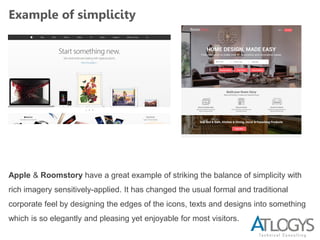
Apple & Roomstory have a great example of striking the balance of simplicity with
rich imagery sensitively-applied. It has changed the usual formal and traditional
corporate feel by designing the edges of the icons, texts and designs into something
which is so elegantly and pleasing yet enjoyable for most visitors.
Layout
The ancient layout of floating left and right pages with numerous columns
has been replaced by the stylistic centered design trend. Designers are able
to present information in a sleeker and self-assured centered orientation. As
fewest numbers of columns is used, the simplicity increases simultaneously.
It's practical as well in the area of viewing because it's much more
compatible with various screen resolutions and sizes.
Central layout & Fewer columns
Why a central layout is good
 This “2.0″ style is simple, bold and honest. Sites that sit straight front & center
feel more simple, bold and honest Try out alternative solutions that achieve the
same result more simply
 More economical with our pixels - we’re not as pressured to cram as much
information as possible above the waterline/fold.
 Use more white space - we can be a bit more free and easy with the amount of
space used, and pad out our content
Layout
Why using fewer columns is good
 Less is more - Fewer columns feels simpler, bolder, and more honest. We’re
communicating less information more clearly.
 There’s also a by-product of the domination of centered layouts.
 Don’t need many columns information - we’re not filling the whole screen so
much, and not trying to get as much on-screen at one time
When & how to use a central layout
 Position your site centrally unless there’s really a good reason
 You may be wanting to get more creative with the space, or get as much
information on-screen as possible
Layout
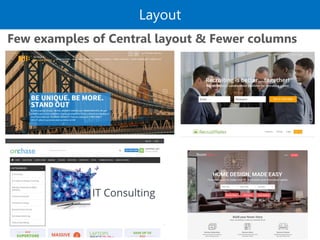
Few examples of Central layout & Fewer columns
Layout
Few examples of Central layout & Fewer
columns
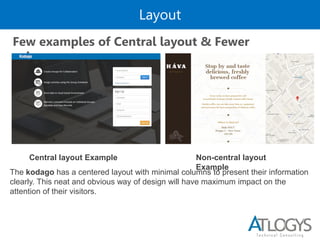
The kodago has a centered layout with minimal columns to present their information
clearly. This neat and obvious way of design will have maximum impact on the
attention of their visitors.
Central layout Example Non-central layout
Example
Layout
Sticky And Simple Navigation
This new trend of navigation set apart from the busyness of the site content
and the body of the page. There are usually a hierarchy of navigation bars
displayed distinctively with each specifically fulfilling their intention. Web
designers has realized the importance of effective navigation so they
have built the navigation into something that is simple and could be found
on every pages without you trying to look for it.
Sticky And Simple Navigation
 Simple navigation will make the user to find himself easily what they required.
 If the navigation will be as simple as possible the users of our site will be more
able to grasp and know the content which is in our site, they need to move into
the inside of our site..
 So we will show them a way to how to get into the site so a simple and clear
navigation is a better way to show the stuff in our site to the users.
Layout
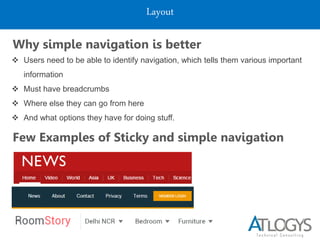
Why simple navigation is better
 Users need to be able to identify navigation, which tells them various important
information
 Must have breadcrumbs
 Where else they can go from here
 And what options they have for doing stuff.
Few Examples of Sticky and simple navigation
Layout
Separate Top Sections
 Separate header section - Always having a head section like a separate header
brings a good look to the visitor and in that main section we have to put the
important content of the website
 Logo - should be there in the head section to a web 2.0 website because the
user will know what exactly the site is about and he can easily find the navigation
and also he can find whether the site has or doesn't have the content which he
required to know about.
 Where the page starts - The top section says “Here’s the top of the page”.
Sounds obvious, but it feels good to know clearly where the page starts. And
what options they have for doing stuff.
 Page experience - It also starts the site/page experience with a strong, bold
statement. This is very “2.0″-spirited. We like strong, simple, bold attitude.
Layout
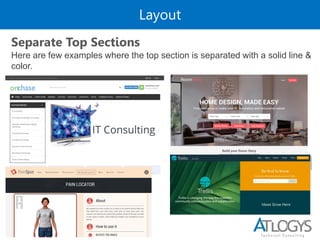
Here are few examples where the top section is separated with a solid line &
color.
Separate Top Sections
Layout
Bold logos
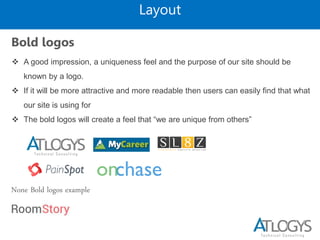
 A good impression, a uniqueness feel and the purpose of our site should be
known by a logo.
 If it will be more attractive and more readable then users can easily find that what
our site is using for
 The bold logos will create a feel that “we are unique from others”
None Bold logos example
Typography
Bold use of large fonts is often used by new websites to point out their key
concepts to visitors, or to convey a focus and clear message about their
website’s main objective or mission. The font sizes of today’s new websites
have increase to improve the readability of the visitors.
Variation of Fonts Sizes or Bigger text
When & how to use variation of fonts sizes or
bigger text
 Big text makes most pages more unable for more people, so it’s a good thing. Of
course, size is relative. You can’t take a normal, busy site, make ALL the text
bigger, and make it more usable. That might not work, that might be worse.
 In order to use big text, you have to make the website by simplifying, removing
unnecessary elements.
 We also need to have a reason to make some text bigger than other text. And the
text must be meaningful and useful.
Typography
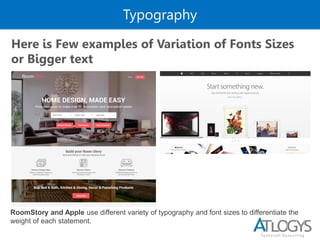
Here is Few examples of Variation of Fonts Sizes
or Bigger text
RoomStory and Apple use different variety of typography and font sizes to differentiate the
weight of each statement.
Colors
Today’s websites used a mixture of strong and complementary colours to
emphasize important concepts as well as creates distinctness between
areas of the site.
Strong colors
When & how to use Strong Colors
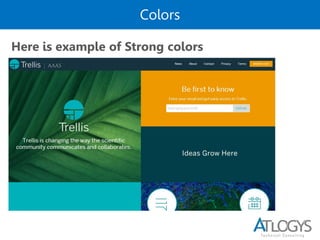
 Bright, strong colors draw the eye. Use them to divide the page into clear
sections, and to highlight important elements.
 The background color makes it clear that this isn’t main content, and large, bold
title text helps you see quickly what’s in each one, so you can decide whether it
interests you.
Colors
Here is example of Strong colors
Colors
Gradients
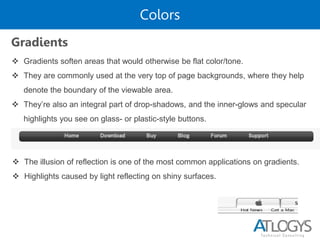
 Gradients soften areas that would otherwise be flat color/tone.
 They are commonly used at the very top of page backgrounds, where they help
denote the boundary of the viewable area.
 They’re also an integral part of drop-shadows, and the inner-glows and specular
highlights you see on glass- or plastic-style buttons.
 The illusion of reflection is one of the most common applications on gradients.
 Highlights caused by light reflecting on shiny surfaces.
Graphics & icons
Selection of icons or Engaging Icons
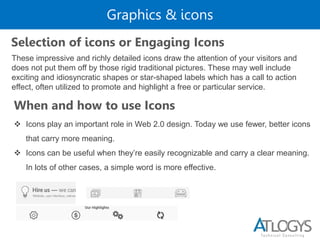
These impressive and richly detailed icons draw the attention of your visitors and
does not put them off by those rigid traditional pictures. These may well include
exciting and idiosyncratic shapes or star-shaped labels which has a call to action
effect, often utilized to promote and highlight a free or particular service.
When and how to use Icons
 Icons play an important role in Web 2.0 design. Today we use fewer, better icons
that carry more meaning.
 Icons can be useful when they’re easily recognizable and carry a clear meaning.
In lots of other cases, a simple word is more effective.
Case Studies
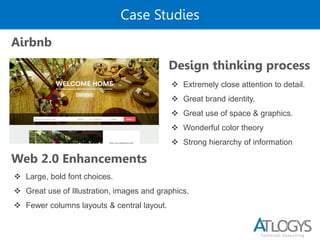
Airbnb
Design thinking process
 Large, bold font choices.
 Great use of Illustration, images and graphics.
 Fewer columns layouts & central layout.
 Extremely close attention to detail.
 Great brand identity.
 Great use of space & graphics.
 Wonderful color theory
 Strong hierarchy of information
Web 2.0 Enhancements
Responsive Design
 Flexible Grid based layout
 Flexible Media
 Media Queries.
When & how to make Responsive Design
Responsive web design aimed at crafting sites to provide an optimal viewing and
interaction experience with a minimum of resizing, panning, and scrolling across a
wide range of devices
Responsive Design
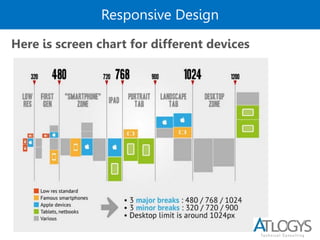
Here is screen chart for different devices
Few Examples
Here are few example links
 Variation of Fonts Sizes :- https://www.curewp.com/
 None-central :- http://www.cubiqdesign.co.uk/
 https://www.verzekeringvergelijk.nl/

Atlogys Tech Talk - Web 2.0 Design Guidelines

  • 1.
    Welcome Principles of Web2.0 Design Guidelines
  • 2.
    Table of Contents 1.Simplicity of Design 2. Layout o Central layout & Fewer columns o Sticky And Simple Navigation o Separate Top Section o Bold logos 3. Typography o Variation of Fonts Sizes or Bigger text 4. Colors o Strong colors o Gradients and Reflections 5. Graphics & icons o Selection of icons
  • 3.
    Simplicity of design Webdesign is simpler than ever, and that’s a good thing. 2.0 design means focused, clean and simple. it places a focus on usability, interface, and readability. Why simplicity is good  Web sites have goals and all web pages have purposes.  Users’ attention is a finite resource.  It’s the designer’s job to help users to find what they want (or to notice what the site wants them to notice)  Stuff on the screen attracts the eye. The more stuff there is, the more different things there are to notice, and the less likely a user is to notice the important stuff.  So we need to enable certain communication, and we also need to minimize.
  • 4.
    When & howto make your designs simple We need to use simplicity in every aspect of our design if we want our website to be viewable by most of the users There are two Important aspects to achieving success with simplicity.  Remove unnecessary components, without sacrificing effectiveness.  Try out alternative solutions that achieve the same result more simply.
  • 5.
    Example of simplicity Apple& Roomstory have a great example of striking the balance of simplicity with rich imagery sensitively-applied. It has changed the usual formal and traditional corporate feel by designing the edges of the icons, texts and designs into something which is so elegantly and pleasing yet enjoyable for most visitors.
  • 6.
    Layout The ancient layoutof floating left and right pages with numerous columns has been replaced by the stylistic centered design trend. Designers are able to present information in a sleeker and self-assured centered orientation. As fewest numbers of columns is used, the simplicity increases simultaneously. It's practical as well in the area of viewing because it's much more compatible with various screen resolutions and sizes. Central layout & Fewer columns Why a central layout is good  This “2.0″ style is simple, bold and honest. Sites that sit straight front & center feel more simple, bold and honest Try out alternative solutions that achieve the same result more simply  More economical with our pixels - we’re not as pressured to cram as much information as possible above the waterline/fold.  Use more white space - we can be a bit more free and easy with the amount of space used, and pad out our content
  • 7.
    Layout Why using fewercolumns is good  Less is more - Fewer columns feels simpler, bolder, and more honest. We’re communicating less information more clearly.  There’s also a by-product of the domination of centered layouts.  Don’t need many columns information - we’re not filling the whole screen so much, and not trying to get as much on-screen at one time When & how to use a central layout  Position your site centrally unless there’s really a good reason  You may be wanting to get more creative with the space, or get as much information on-screen as possible
  • 8.
    Layout Few examples ofCentral layout & Fewer columns
  • 9.
    Layout Few examples ofCentral layout & Fewer columns The kodago has a centered layout with minimal columns to present their information clearly. This neat and obvious way of design will have maximum impact on the attention of their visitors. Central layout Example Non-central layout Example
  • 10.
    Layout Sticky And SimpleNavigation This new trend of navigation set apart from the busyness of the site content and the body of the page. There are usually a hierarchy of navigation bars displayed distinctively with each specifically fulfilling their intention. Web designers has realized the importance of effective navigation so they have built the navigation into something that is simple and could be found on every pages without you trying to look for it. Sticky And Simple Navigation  Simple navigation will make the user to find himself easily what they required.  If the navigation will be as simple as possible the users of our site will be more able to grasp and know the content which is in our site, they need to move into the inside of our site..  So we will show them a way to how to get into the site so a simple and clear navigation is a better way to show the stuff in our site to the users.
  • 11.
    Layout Why simple navigationis better  Users need to be able to identify navigation, which tells them various important information  Must have breadcrumbs  Where else they can go from here  And what options they have for doing stuff. Few Examples of Sticky and simple navigation
  • 12.
    Layout Separate Top Sections Separate header section - Always having a head section like a separate header brings a good look to the visitor and in that main section we have to put the important content of the website  Logo - should be there in the head section to a web 2.0 website because the user will know what exactly the site is about and he can easily find the navigation and also he can find whether the site has or doesn't have the content which he required to know about.  Where the page starts - The top section says “Here’s the top of the page”. Sounds obvious, but it feels good to know clearly where the page starts. And what options they have for doing stuff.  Page experience - It also starts the site/page experience with a strong, bold statement. This is very “2.0″-spirited. We like strong, simple, bold attitude.
  • 13.
    Layout Here are fewexamples where the top section is separated with a solid line & color. Separate Top Sections
  • 14.
    Layout Bold logos  Agood impression, a uniqueness feel and the purpose of our site should be known by a logo.  If it will be more attractive and more readable then users can easily find that what our site is using for  The bold logos will create a feel that “we are unique from others” None Bold logos example
  • 15.
    Typography Bold use oflarge fonts is often used by new websites to point out their key concepts to visitors, or to convey a focus and clear message about their website’s main objective or mission. The font sizes of today’s new websites have increase to improve the readability of the visitors. Variation of Fonts Sizes or Bigger text When & how to use variation of fonts sizes or bigger text  Big text makes most pages more unable for more people, so it’s a good thing. Of course, size is relative. You can’t take a normal, busy site, make ALL the text bigger, and make it more usable. That might not work, that might be worse.  In order to use big text, you have to make the website by simplifying, removing unnecessary elements.  We also need to have a reason to make some text bigger than other text. And the text must be meaningful and useful.
  • 16.
    Typography Here is Fewexamples of Variation of Fonts Sizes or Bigger text RoomStory and Apple use different variety of typography and font sizes to differentiate the weight of each statement.
  • 17.
    Colors Today’s websites useda mixture of strong and complementary colours to emphasize important concepts as well as creates distinctness between areas of the site. Strong colors When & how to use Strong Colors  Bright, strong colors draw the eye. Use them to divide the page into clear sections, and to highlight important elements.  The background color makes it clear that this isn’t main content, and large, bold title text helps you see quickly what’s in each one, so you can decide whether it interests you.
  • 18.
    Colors Here is exampleof Strong colors
  • 19.
    Colors Gradients  Gradients softenareas that would otherwise be flat color/tone.  They are commonly used at the very top of page backgrounds, where they help denote the boundary of the viewable area.  They’re also an integral part of drop-shadows, and the inner-glows and specular highlights you see on glass- or plastic-style buttons.  The illusion of reflection is one of the most common applications on gradients.  Highlights caused by light reflecting on shiny surfaces.
  • 20.
    Graphics & icons Selectionof icons or Engaging Icons These impressive and richly detailed icons draw the attention of your visitors and does not put them off by those rigid traditional pictures. These may well include exciting and idiosyncratic shapes or star-shaped labels which has a call to action effect, often utilized to promote and highlight a free or particular service. When and how to use Icons  Icons play an important role in Web 2.0 design. Today we use fewer, better icons that carry more meaning.  Icons can be useful when they’re easily recognizable and carry a clear meaning. In lots of other cases, a simple word is more effective.
  • 21.
    Case Studies Airbnb Design thinkingprocess  Large, bold font choices.  Great use of Illustration, images and graphics.  Fewer columns layouts & central layout.  Extremely close attention to detail.  Great brand identity.  Great use of space & graphics.  Wonderful color theory  Strong hierarchy of information Web 2.0 Enhancements
  • 22.
    Responsive Design  FlexibleGrid based layout  Flexible Media  Media Queries. When & how to make Responsive Design Responsive web design aimed at crafting sites to provide an optimal viewing and interaction experience with a minimum of resizing, panning, and scrolling across a wide range of devices
  • 23.
    Responsive Design Here isscreen chart for different devices
  • 24.
    Few Examples Here arefew example links  Variation of Fonts Sizes :- https://www.curewp.com/  None-central :- http://www.cubiqdesign.co.uk/  https://www.verzekeringvergelijk.nl/