





Rock Your
Firefox
Meet the World’s Best Browser


     Faisal Aziz
Meet the World’s Best Browser
        With security, stability, speed and more,
     Firefox is made for the way you use the Web.
    It's free, easy to install and created by a global
   community to make the Web better for everyone.
What Makes Firefox the Best?


• Mozilla: A Different Approach
• Personalization
• Security & Privacy
• Performance
• More Features
Mozilla:
A Different
Approach
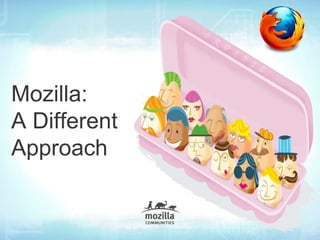
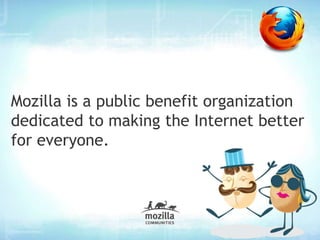
Mozilla is a public benefit organization
dedicated to making the Internet better
for everyone.
We’re a global community of thousands
who believe in the power of technology
to enrich people’s lives.
We’re an open source project whose
code is used for some of the Internet’s
most innovative applications.
Why Does This Matter?


   Our singular goal: making the web better for you.
   • Being open means the next big idea can come
     from anyone across the world, including you!
   • It means a higher-quality, more secure product.
   • It means innovation, freedom and supporting an
     Internet that’s accessible to all.
Personalization
Everybody uses the Web
differently.

Why should your browser look and act
like everyone else's?
Personalization
Add-ons


 •   Firefox Add-ons are applications that let you
     customize your Firefox Web browser.
 •   Whether it’s listening to music, reading the news,
     or shopping, there’s a Firefox Add-on for how you
     want to use the Web.
Personalization
How to find Add-ons?
addons.mozilla.org


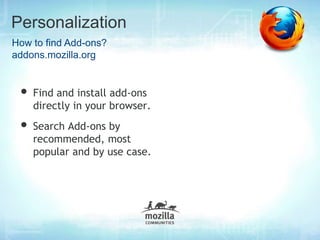
 • Find and install add-ons
    directly in your browser.
 • Search Add-ons by
    recommended, most
    popular and by use case.
Personalization
Collections
addons.mozilla.org

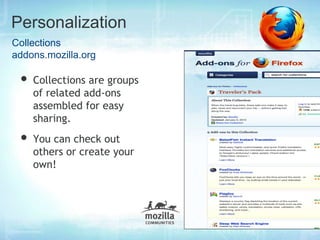
 • Collections are groups
    of related add-ons
    assembled for easy
    sharing.
 • You can check out
    others or create your
    own!
Personalization
Add-ons Manager


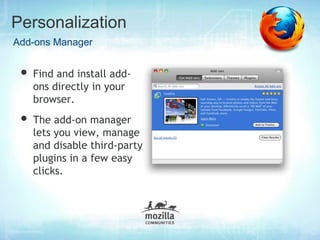
 • Find and install add-
   ons directly in your
   browser.
 • The add-on manager
   lets you view, manage
   and disable third-party
   plugins in a few easy
   clicks.
Personalization
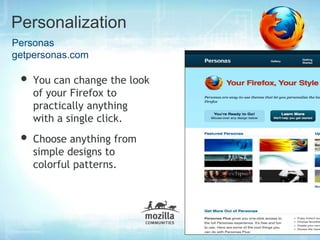
Personas
getpersonas.com

 • You can change the look
    of your Firefox to
    practically anything
    with a single click.
 • Choose anything from
    simple designs to
    colorful patterns.
Personalization
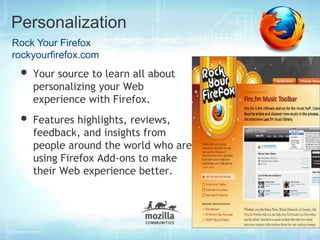
Rock Your Firefox
rockyourfirefox.com
 • Your source to learn all about
    personalizing your Web
    experience with Firefox.
 • Features highlights, reviews,
    feedback, and insights from
    people around the world who are
    using Firefox Add-ons to make
    their Web experience better.
Security & Privacy
Security
Security


We care about your security.
An international community of security experts is working
around the clock to make your web browsing safer. Our
team works right from the start to identify and address
potential problems before a single line of code is written.
Security


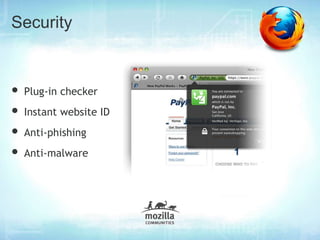
• Plug-in checker
• Instant website ID
• Anti-phishing
• Anti-malware
Privacy
Privacy

The Web browser has become one of the most critical and
trusted relationships of our modern lives – with nearly
perfect knowledge of everything we do.
We take your privacy very seriously and that’s why Firefox
has implemented a number of great features to keep your
private data secure.
Features
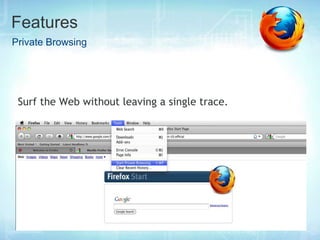
Private Browsing


 Surf the Web without leaving a single trace.
Performance
Performance


We’re constantly optimizing Firefox to be great for the way
you use the web – things like making new tabs open up more
quickly, or having the Awesome Bar provide results even
faster.
In the end, it’s about getting you where you need to go as
quickly and easily as possible.
More Features
Features
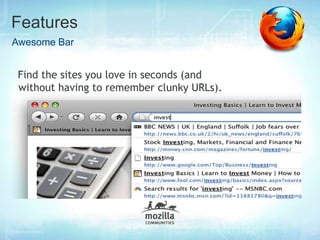
Awesome Bar


 Find the sites you love in seconds (and
 without having to remember clunky URLs).
Features
Stay in Sync

   When you set up Firefox Sync on your computer ,
   all of your data and preferences (such as your
   bookmarks, history, passwords, open tabs and
   installed add-ons) gets stored securely on the
   Mozilla servers. Then you can connect other
   devices (a mobile phone for example) and they
   will be automatically synchronized, giving you
   access to all of your information no matter where
   you are.
Features
Offline Browsing

       Take your computer offline and still have
       your information at your fingertips. Certain
       sites may allow applications—like your
       Web-based email—to stay with you at all
       times.
Features
Do Not track Me
    Most major websites track their visitors' behavior and
    then sell or provide that information to other
    companies (like advertisers). Firefox has a Do-not-
    track feature that lets you tell websites you don't want
    your browsing behavior tracked.

    When you turn on the Do-not-track feature, Firefox
    tells every website you visit (as well as their
    advertisers and other content providers) that you don't
    want your browsing behavior tracked
Features
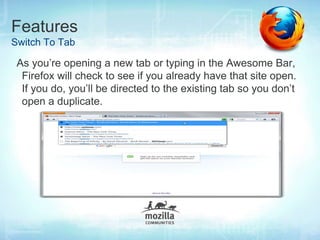
Switch To Tab

 As you’re opening a new tab or typing in the Awesome Bar,
  Firefox will check to see if you already have that site open.
  If you do, you’ll be directed to the existing tab so you don’t
  open a duplicate.
Features
Tags


   Label a site with names or categories that are meaningful
   to you. For example, you can label
   both www.bbc.co.uk and www.nytimes.com with the
   “news” tag. When you enter “news” into the location bar,
   both sites will be shown as results. A single site can have
   multiple tags, and there’s no limit to the number of tags
   you can create. You may not remember the exact name of
   a site, but with a tag, you’ll be able to find it easily.
Try the world’s best web browser.
   www.mozilla.org/firefox

Rock your firefox

  • 1.
    Rock Your Firefox Meet theWorld’s Best Browser Faisal Aziz
  • 2.
    Meet the World’sBest Browser With security, stability, speed and more, Firefox is made for the way you use the Web. It's free, easy to install and created by a global community to make the Web better for everyone.
  • 3.
  • 4.
    What Makes Firefoxthe Best? • Mozilla: A Different Approach • Personalization • Security & Privacy • Performance • More Features
  • 5.
  • 6.
    Mozilla is apublic benefit organization dedicated to making the Internet better for everyone.
  • 7.
    We’re a globalcommunity of thousands who believe in the power of technology to enrich people’s lives.
  • 8.
    We’re an opensource project whose code is used for some of the Internet’s most innovative applications.
  • 9.
    Why Does ThisMatter? Our singular goal: making the web better for you. • Being open means the next big idea can come from anyone across the world, including you! • It means a higher-quality, more secure product. • It means innovation, freedom and supporting an Internet that’s accessible to all.
  • 10.
  • 11.
    Everybody uses theWeb differently. Why should your browser look and act like everyone else's?
  • 12.
    Personalization Add-ons • Firefox Add-ons are applications that let you customize your Firefox Web browser. • Whether it’s listening to music, reading the news, or shopping, there’s a Firefox Add-on for how you want to use the Web.
  • 13.
    Personalization How to findAdd-ons? addons.mozilla.org • Find and install add-ons directly in your browser. • Search Add-ons by recommended, most popular and by use case.
  • 14.
    Personalization Collections addons.mozilla.org • Collectionsare groups of related add-ons assembled for easy sharing. • You can check out others or create your own!
  • 15.
    Personalization Add-ons Manager •Find and install add- ons directly in your browser. • The add-on manager lets you view, manage and disable third-party plugins in a few easy clicks.
  • 16.
    Personalization Personas getpersonas.com • Youcan change the look of your Firefox to practically anything with a single click. • Choose anything from simple designs to colorful patterns.
  • 17.
    Personalization Rock Your Firefox rockyourfirefox.com • Your source to learn all about personalizing your Web experience with Firefox. • Features highlights, reviews, feedback, and insights from people around the world who are using Firefox Add-ons to make their Web experience better.
  • 18.
  • 19.
  • 20.
    Security We care aboutyour security. An international community of security experts is working around the clock to make your web browsing safer. Our team works right from the start to identify and address potential problems before a single line of code is written.
  • 21.
    Security • Plug-in checker •Instant website ID • Anti-phishing • Anti-malware
  • 22.
  • 23.
    Privacy The Web browserhas become one of the most critical and trusted relationships of our modern lives – with nearly perfect knowledge of everything we do. We take your privacy very seriously and that’s why Firefox has implemented a number of great features to keep your private data secure.
  • 24.
    Features Private Browsing Surfthe Web without leaving a single trace.
  • 25.
  • 26.
    Performance We’re constantly optimizingFirefox to be great for the way you use the web – things like making new tabs open up more quickly, or having the Awesome Bar provide results even faster. In the end, it’s about getting you where you need to go as quickly and easily as possible.
  • 27.
  • 28.
    Features Awesome Bar Findthe sites you love in seconds (and without having to remember clunky URLs).
  • 29.
    Features Stay in Sync When you set up Firefox Sync on your computer , all of your data and preferences (such as your bookmarks, history, passwords, open tabs and installed add-ons) gets stored securely on the Mozilla servers. Then you can connect other devices (a mobile phone for example) and they will be automatically synchronized, giving you access to all of your information no matter where you are.
  • 30.
    Features Offline Browsing Take your computer offline and still have your information at your fingertips. Certain sites may allow applications—like your Web-based email—to stay with you at all times.
  • 31.
    Features Do Not trackMe Most major websites track their visitors' behavior and then sell or provide that information to other companies (like advertisers). Firefox has a Do-not- track feature that lets you tell websites you don't want your browsing behavior tracked. When you turn on the Do-not-track feature, Firefox tells every website you visit (as well as their advertisers and other content providers) that you don't want your browsing behavior tracked
  • 32.
    Features Switch To Tab As you’re opening a new tab or typing in the Awesome Bar, Firefox will check to see if you already have that site open. If you do, you’ll be directed to the existing tab so you don’t open a duplicate.
  • 33.
    Features Tags Label a site with names or categories that are meaningful to you. For example, you can label both www.bbc.co.uk and www.nytimes.com with the “news” tag. When you enter “news” into the location bar, both sites will be shown as results. A single site can have multiple tags, and there’s no limit to the number of tags you can create. You may not remember the exact name of a site, but with a tag, you’ll be able to find it easily.
  • 34.
    Try the world’sbest web browser. www.mozilla.org/firefox