

BROWSER
HELPER
OBJECTS
INDEX
 Introduction
 Definition and Function
 Shell Extensions
 Lifecycle, History and Examples
 Process (Execution and Implementation)
 Manage BHOs
 Writing and Registration
 BHO Malwares and Concerns
 Tools to remove BHO
 Determination Of BHO status
 Bibliography
INTRODUCTION
 There are sometimes circumstances in which you need a more or less
specialized version of the browser. In this case, you're free to add
to that browser any new, nonstandard feature you want. But what you
actually have is just a new, nonstandard browser.
 The Web Browser control is just the parsing engine of the browser. This
means there still remains a number of UI-related tasks for you to do:
adding an address bar, toolbar, history, status bar, channels, and
favorites, just to name a few.
 So, to create a custom browser you have to write two types of code: the
code that transforms the Web Browser control into a full-fledged
browser like Microsoft Internet Explorer, and the code that implements
the new features you want it to support.
 And Browser Helper Objects (BHO) do just that.
DEFINITION
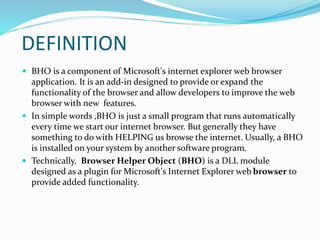
 BHO is a component of Microsoft's internet explorer web browser
application. It is an add-in designed to provide or expand the
functionality of the browser and allow developers to improve the web
browser with new features.
 In simple words ,BHO is just a small program that runs automatically
every time we start our internet browser. But generally they have
something to do with HELPING us browse the internet. Usually, a BHO
is installed on your system by another software program.
 Technically, Browser Helper Object (BHO) is a DLL module
designed as a plugin for Microsoft's Internet Explorer web browser to
provide added functionality.
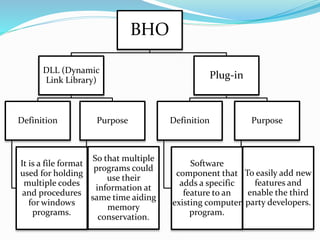
BHO
DLL (Dynamic
Link Library)
Definition
It is a file format
used for holding
multiple codes
and procedures
for windows
programs.
Purpose
So that multiple
programs could
use their
information at
same time aiding
memory
conservation.
Plug-in
Definition
Software
component that
adds a specific
feature to an
existing computer
program.
Purpose
To easily add new
features and
enable the third
party developers.
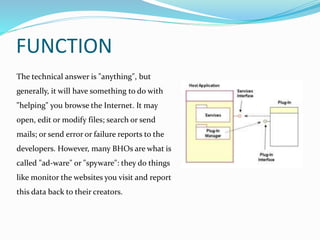
FUNCTION
The technical answer is "anything", but
generally, it will have something to do with
"helping" you browse the Internet. It may
open, edit or modify files; search or send
mails; or send error or failure reports to the
developers. However, many BHOs are what is
called "ad-ware" or "spyware": they do things
like monitor the websites you visit and report
this data back to their creators.
SHELL EXTENSIONS
 Shell extensions are in process COM (component object model) objects
which extend the abilities of windows operating system. Most shell
extensions are automatically installed by the operating system, but
there are also many there applications that install due to additional
shell extension components.
 A BHO follows the same pattern the difference being which interfaces
to implement. Also there is a difference in the trigger that causes a
BHO to be loaded. Despite implementation differences the two share
common nature.
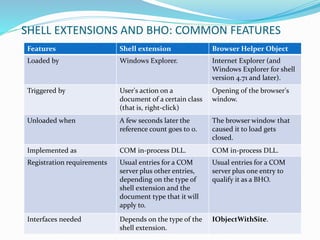
SHELL EXTENSIONS AND BHO: COMMON FEATURES
Features Shell extension Browser Helper Object
Loaded by Windows Explorer. Internet Explorer (and
Windows Explorer for shell
version 4.71 and later).
Triggered by User's action on a
document of a certain class
(that is, right-click)
Opening of the browser's
window.
Unloaded when A few seconds later the
reference count goes to 0.
The browser window that
caused it to load gets
closed.
Implemented as COM in-process DLL. COM in-process DLL.
Registration requirements Usual entries for a COM
server plus other entries,
depending on the type of
shell extension and the
document type that it will
apply to.
Usual entries for a COM
server plus one entry to
qualify it as a BHO.
Interfaces needed Depends on the type of the
shell extension.
IObjectWithSite.
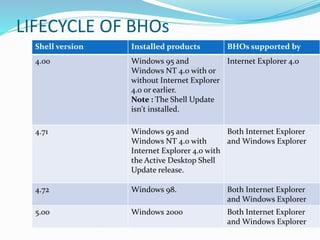
LIFECYCLE OF BHOs
Shell version Installed products BHOs supported by
4.00 Windows 95 and
Windows NT 4.0 with or
without Internet Explorer
4.0 or earlier.
Note : The Shell Update
isn't installed.
Internet Explorer 4.0
4.71 Windows 95 and
Windows NT 4.0 with
Internet Explorer 4.0 with
the Active Desktop Shell
Update release.
Both Internet Explorer
and Windows Explorer
4.72 Windows 98. Both Internet Explorer
and Windows Explorer
5.00 Windows 2000 Both Internet Explorer
and Windows Explorer
HISTORY
 BHO concept was introduced back in 1997 with the release of Internet
Explorer 4.0.
 Applications that install BHO’s are popular because they allow the
application developers to provide features and customizations that
enhance their applications
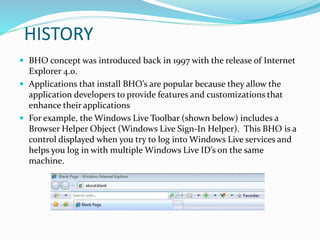
 For example, the Windows Live Toolbar (shown below) includes a
Browser Helper Object (Windows Live Sign-In Helper). This BHO is a
control displayed when you try to log into Windows Live services and
helps you log in with multiple Windows Live ID’s on the same
machine.
EXAMPLES OF BHO
Some BHO modules enable the display of different file formats not
ordinarily interpretable by the browser. The Adobe Acrobat plug-in that
allows Internet Explorer users to read PDF files within their browser is a
BHO. Other modules add toolbars to Internet Explorer, such as
the Alexa Toolbar that provides a list of web sites related to the one
you are currently browsing, or the Google Toolbar that adds a toolbar
with a Google search box to the browser user interface.
The Conduit toolbars are based on a BHO that can be used on Internet
Explorer 7 and up. This BHO provides a search facility that connects to
Microsoft's Bing search.
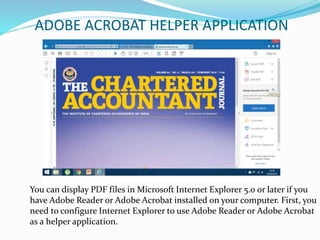
ADOBE ACROBAT HELPER APPLICATION
You can display PDF files in Microsoft Internet Explorer 5.0 or later if you
have Adobe Reader or Adobe Acrobat installed on your computer. First, you
need to configure Internet Explorer to use Adobe Reader or Adobe Acrobat
as a helper application.
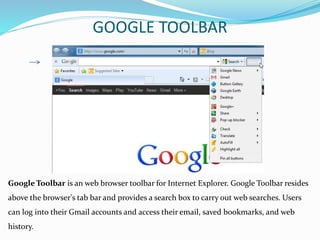
Google Toolbar is an web browser toolbar for Internet Explorer. Google Toolbar resides
above the browser's tab bar and provides a search box to carry out web searches. Users
can log into their Gmail accounts and access their email, saved bookmarks, and web
history.
GOOGLE TOOLBAR
PROCESS
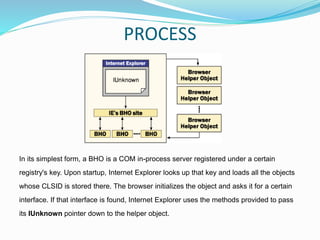
In its simplest form, a BHO is a COM in-process server registered under a certain
registry's key. Upon startup, Internet Explorer looks up that key and loads all the objects
whose CLSID is stored there. The browser initializes the object and asks it for a certain
interface. If that interface is found, Internet Explorer uses the methods provided to pass
its IUnknown pointer down to the helper object.
EXECUTION OF BHOs
 A Browser Helper Object is loaded when the main window of the browser is about
to be displayed and is unloaded when that window is destroyed. If you open more
copies of the browser window, more instances of the BHO will be created. The
BHO is loaded despite the command line that launches the browser. For example,
it gets loaded even if you simply want to see only a specific HTML page or a given
folder.
 The most interesting feature of BHOs is that they are extremely dynamic. Each
time Window Explorer's or Internet Explorer's window is opened, the loader reads
the CLSID of the installed helper objects from the registry and deals with them.
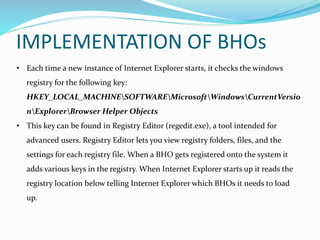
• Each time a new instance of Internet Explorer starts, it checks the windows
registry for the following key:
HKEY_LOCAL_MACHINESOFTWAREMicrosoftWindowsCurrentVersio
nExplorerBrowser Helper Objects
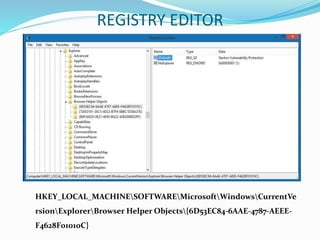
• This key can be found in Registry Editor (regedit.exe), a tool intended for
advanced users. Registry Editor lets you view registry folders, files, and the
settings for each registry file. When a BHO gets registered onto the system it
adds various keys in the registry. When Internet Explorer starts up it reads the
registry location below telling Internet Explorer which BHOs it needs to load
up.
IMPLEMENTATION OF BHOs
REGISTRY EDITOR
HKEY_LOCAL_MACHINESOFTWAREMicrosoftWindowsCurrentVe
rsionExplorerBrowser Helper Objects{6D53EC84-6AAE-4787-AEEE-
F4628F01010C}
• This key location lists 16-byte CLSID strings for the BHOs. Using this string it
then points to another location in the registry telling Internet Explorer which DLL
module to load up.
• If Internet Explorer finds this key in the registry, it looks for a CLSID key listed
below the key. The CLSID keys under Browser Helper Objects tell the browser
which BHOs to load.
• For each CLSID that is listed below the BHO key, Internet Explorer calls
CoCreateInstance to start the instance of the BHO in the same process space as
the browser. If the BHO is started and implements the IObjectWithSite interface ,
it can control and receive events from Internet Explorer.
CLSID
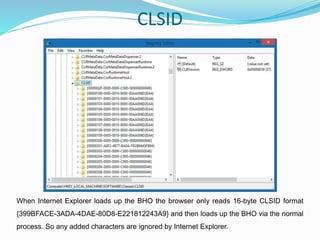
When Internet Explorer loads up the BHO the browser only reads 16-byte CLSID format
{399BFACE-3ADA-4DAE-80D8-E221812243A9} and then loads up the BHO via the normal
process. So any added characters are ignored by Internet Explorer.
MANAGE ADD-ONS
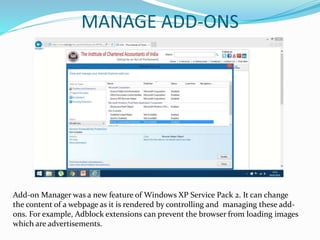
Add-on Manager was a new feature of Windows XP Service Pack 2. It can change
the content of a webpage as it is rendered by controlling and managing these add-
ons. For example, Adblock extensions can prevent the browser from loading images
which are advertisements.
SYSINTERNALS AUTORUNS
• Sysinternals Autoruns is an application software developed and made
available by Microsoft for Windows.
• Autoruns shows you what programs are configured to run during system
bootup or login, and shows you the entries in the order Windows processes
them.
• These programs include ones in your startup folder, Run, RunOnce, and
other Registry keys. You can configure Autoruns to show other locations,
including Explorer shell extensions, toolbars, browser helper objects,
Winlogon notifications, auto-start services, and much more.
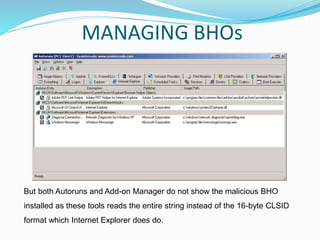
But both Autoruns and Add-on Manager do not show the malicious BHO
installed as these tools reads the entire string instead of the 16-byte CLSID
format which Internet Explorer does do.
MANAGING BHOs
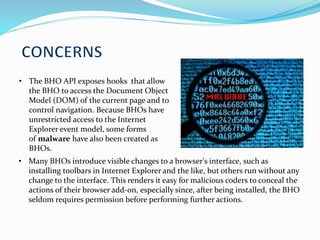
• The BHO API exposes hooks that allow
the BHO to access the Document Object
Model (DOM) of the current page and to
control navigation. Because BHOs have
unrestricted access to the Internet
Explorer event model, some forms
of malware have also been created as
BHOs.
• Many BHOs introduce visible changes to a browser's interface, such as
installing toolbars in Internet Explorer and the like, but others run without any
change to the interface. This renders it easy for malicious coders to conceal the
actions of their browser add-on, especially since, after being installed, the BHO
seldom requires permission before performing further actions.
• The loading speed of the website on the web browser is
affected more by internal forces than external forces.
• Many people unwittingly load “browser helper objects” in
their browser that actually tax the speed of the browser
interface.
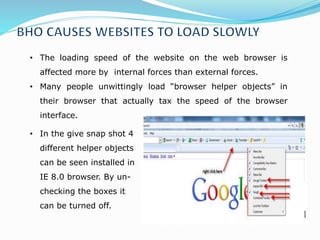
• In the give snap shot 4
different helper objects
can be seen installed in
IE 8.0 browser. By un-
checking the boxes it
can be turned off.
•BHO's can be a type of Spyware, and some abusers like AdBreak frequently
display obscene pornographic pop-up adverts while surfing the net
•Others could potentially do
absolutely anything, they can be
poorly programmed, and as
they tend not to care about the
well-being of your computer.
They're scum - which gives
them the right not to care.
•If it has been noticed that Explorer keeps crashing for unknown reason,
it's quite likely a chance of having BHO('s) running on computer.
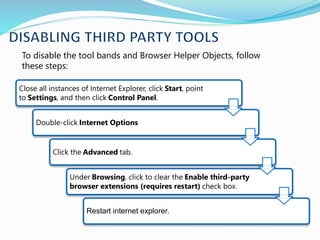
To disable the tool bands and Browser Helper Objects, follow
these steps:
Close all instances of Internet Explorer, click Start, point
to Settings, and then click Control Panel.
Double-click Internet Options
Click the Advanced tab.
Under Browsing, click to clear the Enable third-party
browser extensions (requires restart) check box.
Restart internet explorer.
• Windows doesn't make it easy to detect and remove BHO's manually,
however Bhodemon from Definitive Solutions is a very good program
that can show what BHO's are installed on the system.
• Bhodemon.exe is a type of EXE
file associated with BHODemon
2.0 developed by Definitive
Solutions, Inc. for the Windows
Operating System. The latest
known version of Bhodemon.exe is
2.0.0.23, which was produced for
Windows XP. This EXE file carries a
popularity rating of 1 stars and a
security rating of "UNKNOWN“.
• You can manually see if you have
any BHOs on your PC by searching
the following location using a
registry editor as shown in the
image.
TOOLS TO REMOVE BHOs
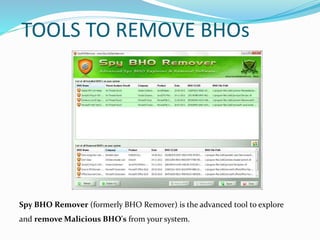
Spy BHO Remover (formerly BHO Remover) is the advanced tool to explore
and remove Malicious BHO's from your system.
• Spy BHO Remover helps in quick identification and removal of such spy BHO's
present in the system. It not only performs heuristic based threat analysis but
also provides Online Threat Verification mechanism which makes it easy to
differentiate between legitimate and malicious BHOs.
• It also presents 'Backup & Restore' feature which makes it easy to remove and
re-install the BHO any number of times. Users no longer have to worry about
accidental removal of BHO as all removed BHOs are automatically backed up
which can then be restored from 'Removed BHO List'. It also comes with a
unique feature to completely enable/disable all installed BHOs at one shot.
• It works on wide range of platforms starting from Windows XP to Windows 8.
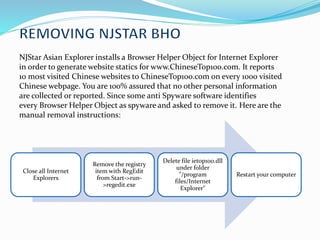
NJStar Asian Explorer installs a Browser Helper Object for Internet Explorer
in order to generate website statics for www.ChineseTop100.com. It reports
10 most visited Chinese websites to ChineseTop100.com on every 1000 visited
Chinese webpage. You are 100% assured that no other personal information
are collected or reported. Since some anti Spyware software identifies
every Browser Helper Object as spyware and asked to remove it. Here are the
manual removal instructions:
Close all Internet
Explorers
Remove the registry
item with RegEdit
from Start->run-
>regedit.exe
Delete file ietop100.dll
under folder
"/program
files/Internet
Explorer"
Restart your computer
Now when the malicious BHO (e.g. flashcpx.dll) gets installed it does something clever to
hide its presence yet still manage to load up. As you can see below the CLSID string is
longer than usual. The added characters cause most tools not to list out the BHO even
though Internet Explorer loads it up.
HKLMSOFTWAREMicrosoftWindowsCurrentVersionExplorerBrowserHelperObj
ects{399BFACE-3ADA-4DAE-80D8-E221812243A9}80D8-E221812243A9}
Since the string is longer than recommended when it goes to find the CLSID key in
[HKEY_LOCAL_MACHINESOFTWAREClassesCLSID] the key is not found and
therefore the DLL module does not get listed. Quite odd that “manage add-ons” is part of
Internet Explorer but does not list it.
MALICIOUS BHO
SOME COMMON BHO MALWARES
• Download.ject malware installs a BHO that would activate upon detecting a
secure HTTP connection to a financial institution, record the user's keystrokes
(intending to capture passwords) and transmit the information to a website
used by Russian computer criminals.
• Other BHOs such as the MyWaySearchbar track users' browsing patterns and
pass the information they record to third parties.
• theClSpringtrojan use BHOs to install scripts to provide a number of
instructions to be performed such as adding and deleting registry values and
downloading additional executable files, all completely transparently to the
user.
• The DyFuCA spyware even replaces Internet Explorer's general error page with
an ad page.
WRITING AND REGISTRATION
 A Browser Helper Object is a COM in-process server, we use the Active
Template Library (ATL) to build one using C++. Another reason for choosing
ATL is that it already provides a default and good enough implementation
of the IObjectWithSite interface.
 A BHO is a COM server and should be registered both as a COM server and
as a BHO. The ATL Wizard provides you with the necessary registrar script
code (RGS) that accomplishes the first task.
 Under the Browser Helper Objects key fall all the installed helper objects.
Such a list is never cached by the browser, so installing and testing BHOs is
really a quick matter.
DETERMINATION OF BHOs STATUS
The CLSID list catalogues a number of different Windows / Internet Explorer components
in form of Browser Helper Objects (BHOs).
SystemLookup hosts a collection of lists that provide information on the components of
legitimate and potentially unwanted programs.
Status Key followed by SystemLookup are:
X = Malware, spyware, adware, or other potentially unwanted items
L = Legitimate items
O = Open to debate
? = Currently unknown status
BIBLIOGRAPHY
 https://msdn.microsoft.com/en-
us/library/bb250436(v=vs.85).aspx
 https://en.wikipedia.org/wiki/Browser_Helper_Object
#/media/File:Am_addon_manager.png
 https://support.microsoft.com/en-us/kb/298931
 http://windows.microsoft.com/en-in/windows/what-
is-registry-editor#1TC=windows-7
 http://sysinternals-autoruns.en.lo4d.com/
THANKS

Browser Helper Object

  • 1.
  • 2.
    INDEX  Introduction  Definitionand Function  Shell Extensions  Lifecycle, History and Examples  Process (Execution and Implementation)  Manage BHOs  Writing and Registration  BHO Malwares and Concerns  Tools to remove BHO  Determination Of BHO status  Bibliography
  • 3.
    INTRODUCTION  There aresometimes circumstances in which you need a more or less specialized version of the browser. In this case, you're free to add to that browser any new, nonstandard feature you want. But what you actually have is just a new, nonstandard browser.  The Web Browser control is just the parsing engine of the browser. This means there still remains a number of UI-related tasks for you to do: adding an address bar, toolbar, history, status bar, channels, and favorites, just to name a few.  So, to create a custom browser you have to write two types of code: the code that transforms the Web Browser control into a full-fledged browser like Microsoft Internet Explorer, and the code that implements the new features you want it to support.  And Browser Helper Objects (BHO) do just that.
  • 4.
    DEFINITION  BHO isa component of Microsoft's internet explorer web browser application. It is an add-in designed to provide or expand the functionality of the browser and allow developers to improve the web browser with new features.  In simple words ,BHO is just a small program that runs automatically every time we start our internet browser. But generally they have something to do with HELPING us browse the internet. Usually, a BHO is installed on your system by another software program.  Technically, Browser Helper Object (BHO) is a DLL module designed as a plugin for Microsoft's Internet Explorer web browser to provide added functionality.
  • 5.
    BHO DLL (Dynamic Link Library) Definition Itis a file format used for holding multiple codes and procedures for windows programs. Purpose So that multiple programs could use their information at same time aiding memory conservation. Plug-in Definition Software component that adds a specific feature to an existing computer program. Purpose To easily add new features and enable the third party developers.
  • 6.
    FUNCTION The technical answeris "anything", but generally, it will have something to do with "helping" you browse the Internet. It may open, edit or modify files; search or send mails; or send error or failure reports to the developers. However, many BHOs are what is called "ad-ware" or "spyware": they do things like monitor the websites you visit and report this data back to their creators.
  • 7.
    SHELL EXTENSIONS  Shellextensions are in process COM (component object model) objects which extend the abilities of windows operating system. Most shell extensions are automatically installed by the operating system, but there are also many there applications that install due to additional shell extension components.  A BHO follows the same pattern the difference being which interfaces to implement. Also there is a difference in the trigger that causes a BHO to be loaded. Despite implementation differences the two share common nature.
  • 8.
    SHELL EXTENSIONS ANDBHO: COMMON FEATURES Features Shell extension Browser Helper Object Loaded by Windows Explorer. Internet Explorer (and Windows Explorer for shell version 4.71 and later). Triggered by User's action on a document of a certain class (that is, right-click) Opening of the browser's window. Unloaded when A few seconds later the reference count goes to 0. The browser window that caused it to load gets closed. Implemented as COM in-process DLL. COM in-process DLL. Registration requirements Usual entries for a COM server plus other entries, depending on the type of shell extension and the document type that it will apply to. Usual entries for a COM server plus one entry to qualify it as a BHO. Interfaces needed Depends on the type of the shell extension. IObjectWithSite.
  • 9.
    LIFECYCLE OF BHOs Shellversion Installed products BHOs supported by 4.00 Windows 95 and Windows NT 4.0 with or without Internet Explorer 4.0 or earlier. Note : The Shell Update isn't installed. Internet Explorer 4.0 4.71 Windows 95 and Windows NT 4.0 with Internet Explorer 4.0 with the Active Desktop Shell Update release. Both Internet Explorer and Windows Explorer 4.72 Windows 98. Both Internet Explorer and Windows Explorer 5.00 Windows 2000 Both Internet Explorer and Windows Explorer
  • 10.
    HISTORY  BHO conceptwas introduced back in 1997 with the release of Internet Explorer 4.0.  Applications that install BHO’s are popular because they allow the application developers to provide features and customizations that enhance their applications  For example, the Windows Live Toolbar (shown below) includes a Browser Helper Object (Windows Live Sign-In Helper). This BHO is a control displayed when you try to log into Windows Live services and helps you log in with multiple Windows Live ID’s on the same machine.
  • 11.
    EXAMPLES OF BHO SomeBHO modules enable the display of different file formats not ordinarily interpretable by the browser. The Adobe Acrobat plug-in that allows Internet Explorer users to read PDF files within their browser is a BHO. Other modules add toolbars to Internet Explorer, such as the Alexa Toolbar that provides a list of web sites related to the one you are currently browsing, or the Google Toolbar that adds a toolbar with a Google search box to the browser user interface. The Conduit toolbars are based on a BHO that can be used on Internet Explorer 7 and up. This BHO provides a search facility that connects to Microsoft's Bing search.
  • 12.
    ADOBE ACROBAT HELPERAPPLICATION You can display PDF files in Microsoft Internet Explorer 5.0 or later if you have Adobe Reader or Adobe Acrobat installed on your computer. First, you need to configure Internet Explorer to use Adobe Reader or Adobe Acrobat as a helper application.
  • 13.
    Google Toolbar isan web browser toolbar for Internet Explorer. Google Toolbar resides above the browser's tab bar and provides a search box to carry out web searches. Users can log into their Gmail accounts and access their email, saved bookmarks, and web history. GOOGLE TOOLBAR
  • 14.
    PROCESS In its simplestform, a BHO is a COM in-process server registered under a certain registry's key. Upon startup, Internet Explorer looks up that key and loads all the objects whose CLSID is stored there. The browser initializes the object and asks it for a certain interface. If that interface is found, Internet Explorer uses the methods provided to pass its IUnknown pointer down to the helper object.
  • 15.
    EXECUTION OF BHOs A Browser Helper Object is loaded when the main window of the browser is about to be displayed and is unloaded when that window is destroyed. If you open more copies of the browser window, more instances of the BHO will be created. The BHO is loaded despite the command line that launches the browser. For example, it gets loaded even if you simply want to see only a specific HTML page or a given folder.  The most interesting feature of BHOs is that they are extremely dynamic. Each time Window Explorer's or Internet Explorer's window is opened, the loader reads the CLSID of the installed helper objects from the registry and deals with them.
  • 16.
    • Each timea new instance of Internet Explorer starts, it checks the windows registry for the following key: HKEY_LOCAL_MACHINESOFTWAREMicrosoftWindowsCurrentVersio nExplorerBrowser Helper Objects • This key can be found in Registry Editor (regedit.exe), a tool intended for advanced users. Registry Editor lets you view registry folders, files, and the settings for each registry file. When a BHO gets registered onto the system it adds various keys in the registry. When Internet Explorer starts up it reads the registry location below telling Internet Explorer which BHOs it needs to load up. IMPLEMENTATION OF BHOs
  • 17.
  • 18.
    • This keylocation lists 16-byte CLSID strings for the BHOs. Using this string it then points to another location in the registry telling Internet Explorer which DLL module to load up. • If Internet Explorer finds this key in the registry, it looks for a CLSID key listed below the key. The CLSID keys under Browser Helper Objects tell the browser which BHOs to load. • For each CLSID that is listed below the BHO key, Internet Explorer calls CoCreateInstance to start the instance of the BHO in the same process space as the browser. If the BHO is started and implements the IObjectWithSite interface , it can control and receive events from Internet Explorer.
  • 19.
    CLSID When Internet Explorerloads up the BHO the browser only reads 16-byte CLSID format {399BFACE-3ADA-4DAE-80D8-E221812243A9} and then loads up the BHO via the normal process. So any added characters are ignored by Internet Explorer.
  • 20.
    MANAGE ADD-ONS Add-on Managerwas a new feature of Windows XP Service Pack 2. It can change the content of a webpage as it is rendered by controlling and managing these add- ons. For example, Adblock extensions can prevent the browser from loading images which are advertisements.
  • 21.
    SYSINTERNALS AUTORUNS • SysinternalsAutoruns is an application software developed and made available by Microsoft for Windows. • Autoruns shows you what programs are configured to run during system bootup or login, and shows you the entries in the order Windows processes them. • These programs include ones in your startup folder, Run, RunOnce, and other Registry keys. You can configure Autoruns to show other locations, including Explorer shell extensions, toolbars, browser helper objects, Winlogon notifications, auto-start services, and much more.
  • 22.
    But both Autorunsand Add-on Manager do not show the malicious BHO installed as these tools reads the entire string instead of the 16-byte CLSID format which Internet Explorer does do. MANAGING BHOs
  • 23.
    • The BHOAPI exposes hooks that allow the BHO to access the Document Object Model (DOM) of the current page and to control navigation. Because BHOs have unrestricted access to the Internet Explorer event model, some forms of malware have also been created as BHOs. • Many BHOs introduce visible changes to a browser's interface, such as installing toolbars in Internet Explorer and the like, but others run without any change to the interface. This renders it easy for malicious coders to conceal the actions of their browser add-on, especially since, after being installed, the BHO seldom requires permission before performing further actions.
  • 24.
    • The loadingspeed of the website on the web browser is affected more by internal forces than external forces. • Many people unwittingly load “browser helper objects” in their browser that actually tax the speed of the browser interface. • In the give snap shot 4 different helper objects can be seen installed in IE 8.0 browser. By un- checking the boxes it can be turned off.
  • 25.
    •BHO's can bea type of Spyware, and some abusers like AdBreak frequently display obscene pornographic pop-up adverts while surfing the net •Others could potentially do absolutely anything, they can be poorly programmed, and as they tend not to care about the well-being of your computer. They're scum - which gives them the right not to care. •If it has been noticed that Explorer keeps crashing for unknown reason, it's quite likely a chance of having BHO('s) running on computer.
  • 26.
    To disable thetool bands and Browser Helper Objects, follow these steps: Close all instances of Internet Explorer, click Start, point to Settings, and then click Control Panel. Double-click Internet Options Click the Advanced tab. Under Browsing, click to clear the Enable third-party browser extensions (requires restart) check box. Restart internet explorer.
  • 27.
    • Windows doesn'tmake it easy to detect and remove BHO's manually, however Bhodemon from Definitive Solutions is a very good program that can show what BHO's are installed on the system. • Bhodemon.exe is a type of EXE file associated with BHODemon 2.0 developed by Definitive Solutions, Inc. for the Windows Operating System. The latest known version of Bhodemon.exe is 2.0.0.23, which was produced for Windows XP. This EXE file carries a popularity rating of 1 stars and a security rating of "UNKNOWN“. • You can manually see if you have any BHOs on your PC by searching the following location using a registry editor as shown in the image.
  • 28.
    TOOLS TO REMOVEBHOs Spy BHO Remover (formerly BHO Remover) is the advanced tool to explore and remove Malicious BHO's from your system.
  • 29.
    • Spy BHORemover helps in quick identification and removal of such spy BHO's present in the system. It not only performs heuristic based threat analysis but also provides Online Threat Verification mechanism which makes it easy to differentiate between legitimate and malicious BHOs. • It also presents 'Backup & Restore' feature which makes it easy to remove and re-install the BHO any number of times. Users no longer have to worry about accidental removal of BHO as all removed BHOs are automatically backed up which can then be restored from 'Removed BHO List'. It also comes with a unique feature to completely enable/disable all installed BHOs at one shot. • It works on wide range of platforms starting from Windows XP to Windows 8.
  • 30.
    NJStar Asian Explorerinstalls a Browser Helper Object for Internet Explorer in order to generate website statics for www.ChineseTop100.com. It reports 10 most visited Chinese websites to ChineseTop100.com on every 1000 visited Chinese webpage. You are 100% assured that no other personal information are collected or reported. Since some anti Spyware software identifies every Browser Helper Object as spyware and asked to remove it. Here are the manual removal instructions: Close all Internet Explorers Remove the registry item with RegEdit from Start->run- >regedit.exe Delete file ietop100.dll under folder "/program files/Internet Explorer" Restart your computer
  • 31.
    Now when themalicious BHO (e.g. flashcpx.dll) gets installed it does something clever to hide its presence yet still manage to load up. As you can see below the CLSID string is longer than usual. The added characters cause most tools not to list out the BHO even though Internet Explorer loads it up. HKLMSOFTWAREMicrosoftWindowsCurrentVersionExplorerBrowserHelperObj ects{399BFACE-3ADA-4DAE-80D8-E221812243A9}80D8-E221812243A9} Since the string is longer than recommended when it goes to find the CLSID key in [HKEY_LOCAL_MACHINESOFTWAREClassesCLSID] the key is not found and therefore the DLL module does not get listed. Quite odd that “manage add-ons” is part of Internet Explorer but does not list it. MALICIOUS BHO
  • 32.
    SOME COMMON BHOMALWARES • Download.ject malware installs a BHO that would activate upon detecting a secure HTTP connection to a financial institution, record the user's keystrokes (intending to capture passwords) and transmit the information to a website used by Russian computer criminals. • Other BHOs such as the MyWaySearchbar track users' browsing patterns and pass the information they record to third parties. • theClSpringtrojan use BHOs to install scripts to provide a number of instructions to be performed such as adding and deleting registry values and downloading additional executable files, all completely transparently to the user. • The DyFuCA spyware even replaces Internet Explorer's general error page with an ad page.
  • 33.
    WRITING AND REGISTRATION A Browser Helper Object is a COM in-process server, we use the Active Template Library (ATL) to build one using C++. Another reason for choosing ATL is that it already provides a default and good enough implementation of the IObjectWithSite interface.  A BHO is a COM server and should be registered both as a COM server and as a BHO. The ATL Wizard provides you with the necessary registrar script code (RGS) that accomplishes the first task.  Under the Browser Helper Objects key fall all the installed helper objects. Such a list is never cached by the browser, so installing and testing BHOs is really a quick matter.
  • 34.
    DETERMINATION OF BHOsSTATUS The CLSID list catalogues a number of different Windows / Internet Explorer components in form of Browser Helper Objects (BHOs). SystemLookup hosts a collection of lists that provide information on the components of legitimate and potentially unwanted programs. Status Key followed by SystemLookup are: X = Malware, spyware, adware, or other potentially unwanted items L = Legitimate items O = Open to debate ? = Currently unknown status
  • 35.
    BIBLIOGRAPHY  https://msdn.microsoft.com/en- us/library/bb250436(v=vs.85).aspx  https://en.wikipedia.org/wiki/Browser_Helper_Object https://en.wikipedia.org/wiki/Browser_Helper_Object #/media/File:Am_addon_manager.png  https://support.microsoft.com/en-us/kb/298931  http://windows.microsoft.com/en-in/windows/what- is-registry-editor#1TC=windows-7  http://sysinternals-autoruns.en.lo4d.com/
  • 36.

Editor's Notes

  • #13 (A helper application opens files that Internet Explorer can't open directly).