Welcome to the Jungle
PENTESTING AWS
1
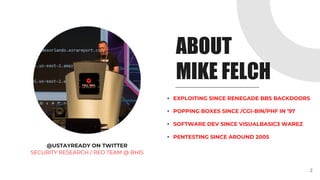
ABOUT
MIKE FELCH
@USTAYREADY ON TWITTER
SECURITY RESEARCH / RED TEAM @ BHIS
• EXPLOITING SINCE RENEGADE BBS BACKDOORS
• POPPING BOXES SINCE /CGI-BIN/PHF IN ’97
• SOFTWARE DEV SINCE VISUALBASIC3 WAREZ
• PENTESTING SINCE AROUND 2005
2
ABOUT
THIS TALK
PENTESTING AWS
IN-DEPTH AND AT SCALE
• NOT A REFLECTION OF AMAZON
• WE RELY A LOT ON USING AWS CLI
• LET’S DIG INTO SERVICES
• SCALE ACROSS MANY ACCOUNTS
• REPORT, REPORT, REPORT!
3
PRESENTATION
AGENDA
HIGH-LEVEL TESTING OVERVIEW
INITIAL ACCESS PROVISIONING
NEW TOOL
CLOSING THOUGHTS
PENTEST PHASES
4
SCALING THE PENTEST
HIGH LEVEL
TESTING OVERVIEW
5
HIGH-LEVEL TESTING OVERVIEW
WHAT ARE WE TESTING?
Organizations
• Consolidated AWS accounts for easy management
AWS Account
• We test one or more AWS accounts, sometimes not all
• Contains resources in different locations (regions)
• Usually used for scoping pentests
*DISCLAIMER*
• Depends on the client, sometimes they want something different
• … like starting as a developer with access to a dev environment
6
HIGH-LEVEL TESTING OVERVIEW
RESOURCES
Resources are “what” you are testing
• EC2: virtual server that comes in different sizes/locations
• S3: object storage with a globally unique name
• RDS: a typical relational database
• Lambda: microservice that runs code without a server
• … over 200 different types of services
*WARNING*
• Usually pieced together like Legos
• Done right, can be hard to break
• Done wrong, has major consequences
• Exploit a resource and interact with different resources
7
HIGH-LEVEL TESTING OVERVIEW
SCOPING
How many AWS accounts are being tested?
• 5-10 accounts? One-week in-depth test
• 100+ accounts? Time boxed wide test
How many different resources in each account?
• Good to know up front, hard to use in scoping
How many regions are being used in each account?
• Great way to reduce reconnaissance time
Be sure to set the client expectations during scoping call!
8
HIGH-LEVEL TESTING OVERVIEW
IAM WHO I AM
We need read-only access to start testing.. but how?
Solution? Identity and Access Management (IAM)!
• Controls access to AWS resources for users
• Typical users, groups, and permissions
• Uses “policies” to apply permissions for resources to users
• Password policies, MFA, and monitoring w/ CloudTrail
• “Principal” is an entity in AWS (user, role, AWS account, etc)
Why is this important?
• Vulnerable policies are the gateway for our exploitation
• Start testing with read-only access, exploit from there
9
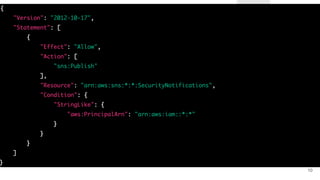
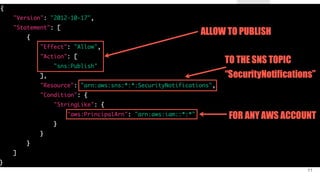
10
11
INITIAL ACCESS
PROVISIONING
12
INITIAL ACCESS PROVISIONING
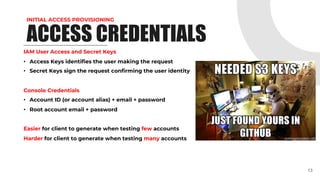
ACCESS CREDENTIALS
IAM User Access and Secret Keys
• Access Keys identifies the user making the request
• Secret Keys sign the request confirming the user identity
Console Credentials
• Account ID (or account alias) + email + password
• Root account email + password
Easier for client to generate when testing few accounts
Harder for client to generate when testing many accounts
13
INITIAL ACCESS PROVISIONING
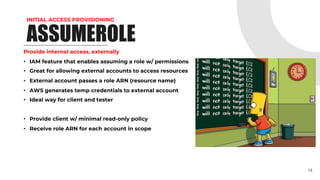
ASSUMEROLE
Provide internal access, externally
• IAM feature that enables assuming a role w/ permissions
• Great for allowing external accounts to access resources
• External account passes a role ARN (resource name)
• AWS generates temp credentials to external account
• Ideal way for client and tester
• Provide client w/ minimal read-only policy
• Receive role ARN for each account in scope
14
INITIAL ACCESS PROVISIONING
TESTING ENVIRONMENT
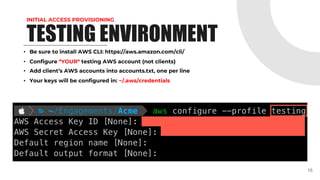
• Be sure to install AWS CLI: https://aws.amazon.com/cli/
• Configure *YOUR* testing AWS account (not clients)
• Add client’s AWS accounts into accounts.txt, one per line
• Your keys will be configured in: ~/.aws/credentials
15
INITIAL ACCESS PROVISIONING
TESTING ENVIRONMENT
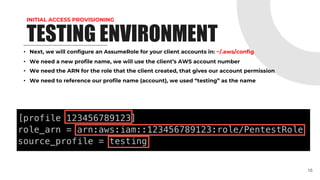
• Next, we will configure an AssumeRole for your client accounts in: ~/.aws/config
• We need a new profile name, we will use the client’s AWS account number
• We need the ARN for the role that the client created, that gives our account permission
• We need to reference our profile name (account), we used “testing” as the name
16
INITIAL ACCESS PROVISIONING
TESTING ENVIRONMENT
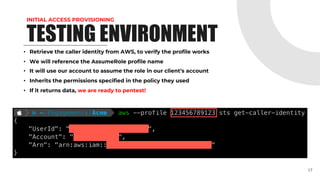
• Retrieve the caller identity from AWS, to verify the profile works
• We will reference the AssumeRole profile name
• It will use our account to assume the role in our client’s account
• Inherits the permissions specified in the policy they used
• If it returns data, we are ready to pentest!
17
RESOURCE
RECONNAISSANCE
18
RESOURCE RECONNAISSANCE
DISCOVERY
• For each AWS account being tested…
In each of the regions…
Retrieve each resource…
• While we are at it, lets pull the policies too
• Is there an easy way to check the policies for issues?
• Indeed… ScoutSuite!
*DISCLAIMER*
• ScoutSuite seems seemed to be dead.
• ScoutSuite doesn’t find everything.
• ScoutSuite doesn’t retrieve all resources.
19
RESOURCE RECONNAISSANCE
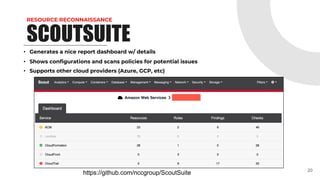
SCOUTSUITE
• Generates a nice report dashboard w/ details
• Shows configurations and scans policies for potential issues
• Supports other cloud providers (Azure, GCP, etc)
20
https://github.com/nccgroup/ScoutSuite
RESOURCE RECONNAISSANCE
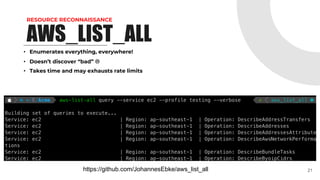
AWS_LIST_ALL
• Enumerates everything, everywhere!
• Doesn’t discover “bad” L
• Takes time and may exhausts rate limits
21
https://github.com/JohannesEbke/aws_list_all
VULNERABILITIES &
EXPLOITATION
22
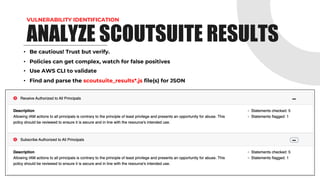
VULNERABILITY IDENTIFICATION
• Be cautious! Trust but verify.

• Policies can get complex, watch for false positives
• Use AWS CLI to validate
• Find and parse the scoutsuite_results*.js file(s) for JSON
23
ANALYZE SCOUTSUITE RESULTS
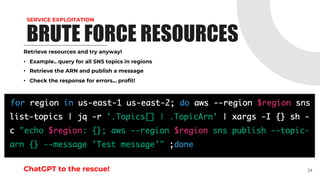
SERVICE EXPLOITATION
Retrieve resources and try anyway!
• Example.. query for all SNS topics in regions
• Retrieve the ARN and publish a message
• Check the response for errors... profit!
ChatGPT to the rescue! 24
BRUTE FORCE RESOURCES
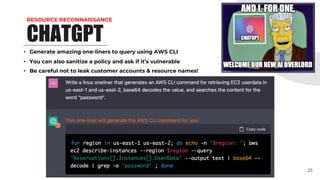
RESOURCE RECONNAISSANCE
CHATGPT
• Generate amazing one-liners to query using AWS CLI
• You can also sanitize a policy and ask if it’s vulnerable
• Be careful not to leak customer accounts & resource names!
25
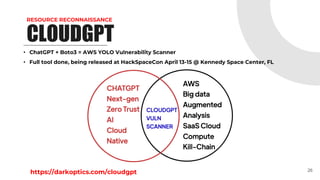
RESOURCE RECONNAISSANCE
CLOUDGPT
• ChatGPT + Boto3 = AWS YOLO Vulnerability Scanner
• Full tool done, being released at HackSpaceCon April 13-15 @ Kennedy Space Center, FL
26
https://darkoptics.com/cloudgpt
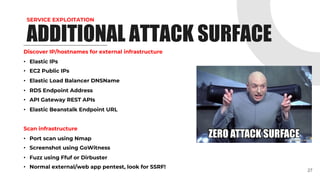
SERVICE EXPLOITATION
Discover IP/hostnames for external infrastructure
• Elastic IPs
• EC2 Public IPs
• Elastic Load Balancer DNSName
• RDS Endpoint Address
• API Gateway REST APIs
• Elastic Beanstalk Endpoint URL
Scan infrastructure
• Port scan using Nmap
• Screenshot using GoWitness
• Fuzz using Ffuf or Dirbuster
• Normal external/web app pentest, look for SSRF!
27
ADDITIONAL ATTACK SURFACE
SERVICE EXPLOITATION
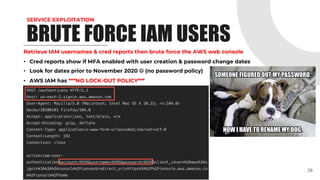
Retrieve IAM usernames & cred reports then brute force the AWS web console
• Cred reports show if MFA enabled with user creation & password change dates
• Look for dates prior to November 2020 J (no password policy)
• AWS IAM has ***NO LOCK-OUT POLICY***
28
BRUTE FORCE IAM USERS
LATERAL MOVEMENT
PRIVILEGE ESCALATION
29
LATERAL MOVEMENT
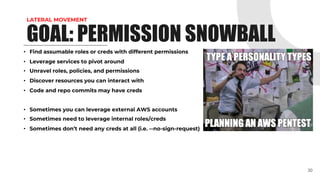
• Find assumable roles or creds with different permissions
• Leverage services to pivot around
• Unravel roles, policies, and permissions
• Discover resources you can interact with
• Code and repo commits may have creds
• Sometimes you can leverage external AWS accounts
• Sometimes need to leverage internal roles/creds
• Sometimes don’t need any creds at all (i.e. --no-sign-request)
30
GOAL: PERMISSION SNOWBALL
LATERAL MOVEMENT
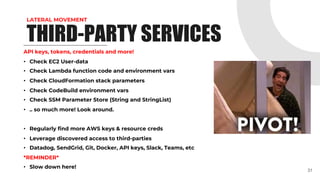
API keys, tokens, credentials and more!
• Check EC2 User-data
• Check Lambda function code and environment vars
• Check CloudFormation stack parameters
• Check CodeBuild environment vars
• Check SSM Parameter Store (String and StringList)
• .. so much more! Look around.
• Regularly find more AWS keys & resource creds
• Leverage discovered access to third-parties
• Datadog, SendGrid, Git, Docker, API keys, Slack, Teams, etc
*REMINDER*
• Slow down here!
31
THIRD-PARTY SERVICES
PRIVILEGE ESCALATION
32
POLICIES
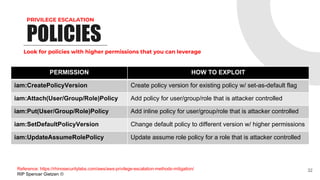
PERMISSION HOW TO EXPLOIT
iam:CreatePolicyVersion Create policy version for existing policy w/ set-as-default flag
iam:Attach(User/Group/Role)Policy Add policy for user/group/role that is attacker controlled
iam:Put(User/Group/Role)Policy Add inline policy for user/group/role that is attacker controlled
iam:SetDefaultPolicyVersion Change default policy to different version w/ higher permissions
iam:UpdateAssumeRolePolicy Update assume role policy for a role that is attacker controlled
Look for policies with higher permissions that you can leverage
Reference: https://rhinosecuritylabs.com/aws/aws-privilege-escalation-methods-mitigation/
RIP Spencer Gietzen L
PRIVILEGE ESCALATION
33
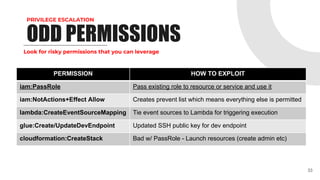
ODD PERMISSIONS
PERMISSION HOW TO EXPLOIT
iam:PassRole Pass existing role to resource or service and use it
iam:NotActions+Effect Allow Creates prevent list which means everything else is permitted
lambda:CreateEventSourceMapping Tie event sources to Lambda for triggering execution
glue:Create/UpdateDevEndpoint Updated SSH public key for dev endpoint
cloudformation:CreateStack Bad w/ PassRole - Launch resources (create admin etc)
Look for risky permissions that you can leverage
PRIVILEGE ESCALATION
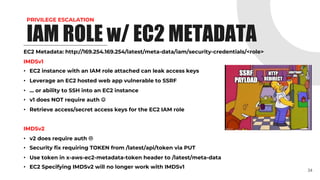
EC2 Metadata: http://169.254.169.254/latest/meta-data/iam/security-credentials/<role>
IMDSv1
• EC2 instance with an IAM role attached can leak access keys
• Leverage an EC2 hosted web app vulnerable to SSRF
• … or ability to SSH into an EC2 instance
• v1 does NOT require auth J
• Retrieve access/secret access keys for the EC2 IAM role
IMDSv2
• v2 does require auth L
• Security fix requiring TOKEN from /latest/api/token via PUT
• Use token in x-aws-ec2-metadata-token header to /latest/meta-data
• EC2 Specifying IMDSv2 will no longer work with IMDSv1
34
IAM ROLE w/ EC2 METADATA
PRIVILEGE ESCALATION
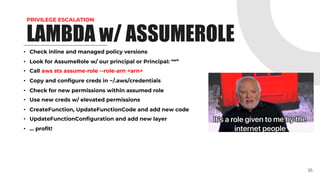
• Check inline and managed policy versions
• Look for AssumeRole w/ our principal or Principal: “*”
• Call aws sts assume-role --role-arn <arn>
• Copy and configure creds in ~/.aws/credentials
• Check for new permissions within assumed role
• Use new creds w/ elevated permissions
• CreateFunction, UpdateFunctionCode and add new code
• UpdateFunctionConfiguration and add new layer
• … profit!
35
LAMBDA w/ ASSUMEROLE
PRIVILEGE ESCALATION
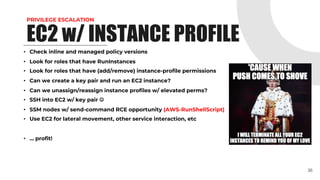
• Check inline and managed policy versions
• Look for roles that have RunInstances
• Look for roles that have (add/remove) instance-profile permissions
• Can we create a key pair and run an EC2 instance?
• Can we unassign/reassign instance profiles w/ elevated perms?
• SSH into EC2 w/ key pair J
• SSM nodes w/ send-command RCE opportunity (AWS-RunShellScript)
• Use EC2 for lateral movement, other service interaction, etc
• … profit!
36
EC2 w/ INSTANCE PROFILE
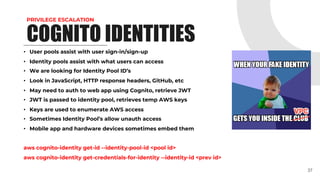
PRIVILEGE ESCALATION
• User pools assist with user sign-in/sign-up
• Identity pools assist with what users can access
• We are looking for Identity Pool ID’s
• Look in JavaScript, HTTP response headers, GitHub, etc
• May need to auth to web app using Cognito, retrieve JWT
• JWT is passed to identity pool, retrieves temp AWS keys
• Keys are used to enumerate AWS access
• Sometimes Identity Pool’s allow unauth access
• Mobile app and hardware devices sometimes embed them
aws cognito-identity get-id --identity-pool-id <pool id>
aws cognito-identity get-credentials-for-identity --identity-id <prev id>
37
COGNITO IDENTITIES
DATA
EXFILTRATION
38
DATA EXFILTRATION
• EC2 -> AMIs -> Public Images filter
aws ec2 describe-images --query ‘Images[*].[Name,Public]’
• Run EC2 instance in your AWS account using public AMI
• Enumerate the filesystem like it’s 1999!
39
PUBLIC AMI
DATA EXFILTRATION
• EC2 -> Snapshots -> Public Snapshots filter
aws ec2 describe-snapshots --query ‘Snapshots[*].[Name,Public]’
• Attach EBS volume to EC2 instance in your AWS account using public snapshot
• Enumerate the filesystem like it’s 1999!
40
PUBLIC EBS
DATA EXFILTRATION
• Share an AMI or snapshot with your external AWS account
• Launch an EC2 instance in your external account, SSH in!
In Customer Account
aws ec2 modify-snapshot-attribute --snapshot-id <snap id> --
attribute createVolumePermission --operation-type add –user-ids
<your account ID>
In Tester Account
aws ec2 create-volume --snapshot-id <snap id>
*DISCLAIMER*
• NEVER MAKE AN AMI OR EBS PUBLIC ON A PENTEST!!!!!
41
PUBLICIZE YOURSELF
DATA EXFILTRATION
• Inspect HTML & JavaScript files
• Resources hosted at <something>.s3.amazonaws.com
• Browse to http://<ip>/ and see if it redirects to AWS S3
• nslookup <ip> = s3-website-<region>.amazonaws.com
• http://<domain>.s3-website-<region>.amazonaws.com
• SSL Certs SAN and brute force
• GitHub searches
• Google searches
• Burp Suite plugin called AWS Extender
aws s3 ls s3://<bucket name>/
42
HACKING S3 BUCKETS
SCALING THE
PENTEST
43
SCALING THE PENTEST
Remember that accounts.txt you created… lets use it!
cat accounts.txt | while read a; do python scout.py aws --profile $a --no-browser --report-dir
./reports/$a/ --report-name $a --logfile ./logs/$a.log; done
• Consider limiting to specific regions
• Generates a report and log file
• Set each account number to the profile name in ~/.aws/config
• I’ve used this for 300+ accounts in one test
*DISCLAIMER*
• Rate limits suck. Scout has --max-rate and --max-workers flags
44
LOOP THROUGH ACCOUNTS
SCALING THE PENTEST
Now that Scout is done, lets parse some data!
• Report data in scoutsuite_results*.js file
• So many more issues we can search for
EC2 Userdata Example
find . -type f -name 'scoutsuite_results*.js' -exec tail -n +2 {} ; | jq
'.services.ec2.regions[].vpcs[].instances[] | select (.user_data != null) | .arn, .user_data’
Lambda Environment Variables Example
for r in $(find . -type f -name 'scoutsuite_results*.js'); do cat "$r" | tail -n +2 | jq
'.services.awslambda.regions[].functions[] | select (.env_variables != []) | .arn, .env_variables'; done
45
QUICK ANALYSIS
SCALING THE PENTEST
Nothing sexy but useful!
• Quickly generate ~/.aws/config using AssumeRole for all accounts
• Prior to pentest, test AWS accounts using profiles from accounts.txt
• Generate findings for Scout vulnerability scans (danger/warning)
• 300+ accounts? No problem. It parses all results and generates findings
• Generates list of finding, affected resources, and vulnerable account
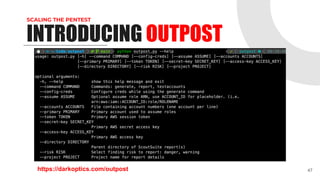
• After scanning with Scout, use Outpost to find quick wins
46
INTRODUCING OUTPOST
SCALING THE PENTEST
47
INTRODUCING OUTPOST
https://darkoptics.com/outpost
CLOSING
THOUGHTS
48
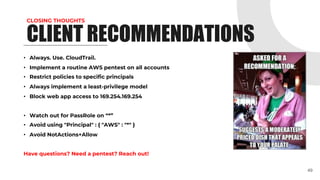
CLOSING THOUGHTS
• Always. Use. CloudTrail.
• Implement a routine AWS pentest on all accounts
• Restrict policies to specific principals
• Always implement a least-privilege model
• Block web app access to 169.254.169.254
• Watch out for PassRole on “*”
• Avoid using "Principal" : { "AWS" : "*" }
• Avoid NotActions+Allow
Have questions? Need a pentest? Reach out!
49
CLIENT RECOMMENDATIONS
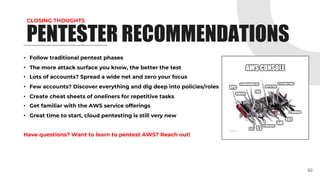
CLOSING THOUGHTS
• Follow traditional pentest phases
• The more attack surface you know, the better the test
• Lots of accounts? Spread a wide net and zero your focus
• Few accounts? Discover everything and dig deep into policies/roles
• Create cheat sheets of oneliners for repetitive tasks
• Get familiar with the AWS service offerings
• Great time to start, cloud pentesting is still very new
Have questions? Want to learn to pentest AWS? Reach out!
50
PENTESTER RECOMMENDATIONS
FOR JOINING!
FOLLOW ME ON TWITTER: @USTAYREADY
THANKS
51

Welcome to the Jungle: Pentesting AWS

  • 1.
    Welcome to theJungle PENTESTING AWS 1
  • 2.
    ABOUT MIKE FELCH @USTAYREADY ONTWITTER SECURITY RESEARCH / RED TEAM @ BHIS • EXPLOITING SINCE RENEGADE BBS BACKDOORS • POPPING BOXES SINCE /CGI-BIN/PHF IN ’97 • SOFTWARE DEV SINCE VISUALBASIC3 WAREZ • PENTESTING SINCE AROUND 2005 2
  • 3.
    ABOUT THIS TALK PENTESTING AWS IN-DEPTHAND AT SCALE • NOT A REFLECTION OF AMAZON • WE RELY A LOT ON USING AWS CLI • LET’S DIG INTO SERVICES • SCALE ACROSS MANY ACCOUNTS • REPORT, REPORT, REPORT! 3
  • 4.
    PRESENTATION AGENDA HIGH-LEVEL TESTING OVERVIEW INITIALACCESS PROVISIONING NEW TOOL CLOSING THOUGHTS PENTEST PHASES 4 SCALING THE PENTEST
  • 5.
  • 6.
    HIGH-LEVEL TESTING OVERVIEW WHATARE WE TESTING? Organizations • Consolidated AWS accounts for easy management AWS Account • We test one or more AWS accounts, sometimes not all • Contains resources in different locations (regions) • Usually used for scoping pentests *DISCLAIMER* • Depends on the client, sometimes they want something different • … like starting as a developer with access to a dev environment 6
  • 7.
    HIGH-LEVEL TESTING OVERVIEW RESOURCES Resourcesare “what” you are testing • EC2: virtual server that comes in different sizes/locations • S3: object storage with a globally unique name • RDS: a typical relational database • Lambda: microservice that runs code without a server • … over 200 different types of services *WARNING* • Usually pieced together like Legos • Done right, can be hard to break • Done wrong, has major consequences • Exploit a resource and interact with different resources 7
  • 8.
    HIGH-LEVEL TESTING OVERVIEW SCOPING Howmany AWS accounts are being tested? • 5-10 accounts? One-week in-depth test • 100+ accounts? Time boxed wide test How many different resources in each account? • Good to know up front, hard to use in scoping How many regions are being used in each account? • Great way to reduce reconnaissance time Be sure to set the client expectations during scoping call! 8
  • 9.
    HIGH-LEVEL TESTING OVERVIEW IAMWHO I AM We need read-only access to start testing.. but how? Solution? Identity and Access Management (IAM)! • Controls access to AWS resources for users • Typical users, groups, and permissions • Uses “policies” to apply permissions for resources to users • Password policies, MFA, and monitoring w/ CloudTrail • “Principal” is an entity in AWS (user, role, AWS account, etc) Why is this important? • Vulnerable policies are the gateway for our exploitation • Start testing with read-only access, exploit from there 9
  • 10.
  • 11.
  • 12.
  • 13.
    INITIAL ACCESS PROVISIONING ACCESSCREDENTIALS IAM User Access and Secret Keys • Access Keys identifies the user making the request • Secret Keys sign the request confirming the user identity Console Credentials • Account ID (or account alias) + email + password • Root account email + password Easier for client to generate when testing few accounts Harder for client to generate when testing many accounts 13
  • 14.
    INITIAL ACCESS PROVISIONING ASSUMEROLE Provideinternal access, externally • IAM feature that enables assuming a role w/ permissions • Great for allowing external accounts to access resources • External account passes a role ARN (resource name) • AWS generates temp credentials to external account • Ideal way for client and tester • Provide client w/ minimal read-only policy • Receive role ARN for each account in scope 14
  • 15.
    INITIAL ACCESS PROVISIONING TESTINGENVIRONMENT • Be sure to install AWS CLI: https://aws.amazon.com/cli/ • Configure *YOUR* testing AWS account (not clients) • Add client’s AWS accounts into accounts.txt, one per line • Your keys will be configured in: ~/.aws/credentials 15
  • 16.
    INITIAL ACCESS PROVISIONING TESTINGENVIRONMENT • Next, we will configure an AssumeRole for your client accounts in: ~/.aws/config • We need a new profile name, we will use the client’s AWS account number • We need the ARN for the role that the client created, that gives our account permission • We need to reference our profile name (account), we used “testing” as the name 16
  • 17.
    INITIAL ACCESS PROVISIONING TESTINGENVIRONMENT • Retrieve the caller identity from AWS, to verify the profile works • We will reference the AssumeRole profile name • It will use our account to assume the role in our client’s account • Inherits the permissions specified in the policy they used • If it returns data, we are ready to pentest! 17
  • 18.
  • 19.
    RESOURCE RECONNAISSANCE DISCOVERY • Foreach AWS account being tested… In each of the regions… Retrieve each resource… • While we are at it, lets pull the policies too • Is there an easy way to check the policies for issues? • Indeed… ScoutSuite! *DISCLAIMER* • ScoutSuite seems seemed to be dead. • ScoutSuite doesn’t find everything. • ScoutSuite doesn’t retrieve all resources. 19
  • 20.
    RESOURCE RECONNAISSANCE SCOUTSUITE • Generatesa nice report dashboard w/ details • Shows configurations and scans policies for potential issues • Supports other cloud providers (Azure, GCP, etc) 20 https://github.com/nccgroup/ScoutSuite
  • 21.
    RESOURCE RECONNAISSANCE AWS_LIST_ALL • Enumerateseverything, everywhere! • Doesn’t discover “bad” L • Takes time and may exhausts rate limits 21 https://github.com/JohannesEbke/aws_list_all
  • 22.
  • 23.
    VULNERABILITY IDENTIFICATION • Becautious! Trust but verify. • Policies can get complex, watch for false positives • Use AWS CLI to validate • Find and parse the scoutsuite_results*.js file(s) for JSON 23 ANALYZE SCOUTSUITE RESULTS
  • 24.
    SERVICE EXPLOITATION Retrieve resourcesand try anyway! • Example.. query for all SNS topics in regions • Retrieve the ARN and publish a message • Check the response for errors... profit! ChatGPT to the rescue! 24 BRUTE FORCE RESOURCES
  • 25.
    RESOURCE RECONNAISSANCE CHATGPT • Generateamazing one-liners to query using AWS CLI • You can also sanitize a policy and ask if it’s vulnerable • Be careful not to leak customer accounts & resource names! 25
  • 26.
    RESOURCE RECONNAISSANCE CLOUDGPT • ChatGPT+ Boto3 = AWS YOLO Vulnerability Scanner • Full tool done, being released at HackSpaceCon April 13-15 @ Kennedy Space Center, FL 26 https://darkoptics.com/cloudgpt
  • 27.
    SERVICE EXPLOITATION Discover IP/hostnamesfor external infrastructure • Elastic IPs • EC2 Public IPs • Elastic Load Balancer DNSName • RDS Endpoint Address • API Gateway REST APIs • Elastic Beanstalk Endpoint URL Scan infrastructure • Port scan using Nmap • Screenshot using GoWitness • Fuzz using Ffuf or Dirbuster • Normal external/web app pentest, look for SSRF! 27 ADDITIONAL ATTACK SURFACE
  • 28.
    SERVICE EXPLOITATION Retrieve IAMusernames & cred reports then brute force the AWS web console • Cred reports show if MFA enabled with user creation & password change dates • Look for dates prior to November 2020 J (no password policy) • AWS IAM has ***NO LOCK-OUT POLICY*** 28 BRUTE FORCE IAM USERS
  • 29.
  • 30.
    LATERAL MOVEMENT • Findassumable roles or creds with different permissions • Leverage services to pivot around • Unravel roles, policies, and permissions • Discover resources you can interact with • Code and repo commits may have creds • Sometimes you can leverage external AWS accounts • Sometimes need to leverage internal roles/creds • Sometimes don’t need any creds at all (i.e. --no-sign-request) 30 GOAL: PERMISSION SNOWBALL
  • 31.
    LATERAL MOVEMENT API keys,tokens, credentials and more! • Check EC2 User-data • Check Lambda function code and environment vars • Check CloudFormation stack parameters • Check CodeBuild environment vars • Check SSM Parameter Store (String and StringList) • .. so much more! Look around. • Regularly find more AWS keys & resource creds • Leverage discovered access to third-parties • Datadog, SendGrid, Git, Docker, API keys, Slack, Teams, etc *REMINDER* • Slow down here! 31 THIRD-PARTY SERVICES
  • 32.
    PRIVILEGE ESCALATION 32 POLICIES PERMISSION HOWTO EXPLOIT iam:CreatePolicyVersion Create policy version for existing policy w/ set-as-default flag iam:Attach(User/Group/Role)Policy Add policy for user/group/role that is attacker controlled iam:Put(User/Group/Role)Policy Add inline policy for user/group/role that is attacker controlled iam:SetDefaultPolicyVersion Change default policy to different version w/ higher permissions iam:UpdateAssumeRolePolicy Update assume role policy for a role that is attacker controlled Look for policies with higher permissions that you can leverage Reference: https://rhinosecuritylabs.com/aws/aws-privilege-escalation-methods-mitigation/ RIP Spencer Gietzen L
  • 33.
    PRIVILEGE ESCALATION 33 ODD PERMISSIONS PERMISSIONHOW TO EXPLOIT iam:PassRole Pass existing role to resource or service and use it iam:NotActions+Effect Allow Creates prevent list which means everything else is permitted lambda:CreateEventSourceMapping Tie event sources to Lambda for triggering execution glue:Create/UpdateDevEndpoint Updated SSH public key for dev endpoint cloudformation:CreateStack Bad w/ PassRole - Launch resources (create admin etc) Look for risky permissions that you can leverage
  • 34.
    PRIVILEGE ESCALATION EC2 Metadata:http://169.254.169.254/latest/meta-data/iam/security-credentials/<role> IMDSv1 • EC2 instance with an IAM role attached can leak access keys • Leverage an EC2 hosted web app vulnerable to SSRF • … or ability to SSH into an EC2 instance • v1 does NOT require auth J • Retrieve access/secret access keys for the EC2 IAM role IMDSv2 • v2 does require auth L • Security fix requiring TOKEN from /latest/api/token via PUT • Use token in x-aws-ec2-metadata-token header to /latest/meta-data • EC2 Specifying IMDSv2 will no longer work with IMDSv1 34 IAM ROLE w/ EC2 METADATA
  • 35.
    PRIVILEGE ESCALATION • Checkinline and managed policy versions • Look for AssumeRole w/ our principal or Principal: “*” • Call aws sts assume-role --role-arn <arn> • Copy and configure creds in ~/.aws/credentials • Check for new permissions within assumed role • Use new creds w/ elevated permissions • CreateFunction, UpdateFunctionCode and add new code • UpdateFunctionConfiguration and add new layer • … profit! 35 LAMBDA w/ ASSUMEROLE
  • 36.
    PRIVILEGE ESCALATION • Checkinline and managed policy versions • Look for roles that have RunInstances • Look for roles that have (add/remove) instance-profile permissions • Can we create a key pair and run an EC2 instance? • Can we unassign/reassign instance profiles w/ elevated perms? • SSH into EC2 w/ key pair J • SSM nodes w/ send-command RCE opportunity (AWS-RunShellScript) • Use EC2 for lateral movement, other service interaction, etc • … profit! 36 EC2 w/ INSTANCE PROFILE
  • 37.
    PRIVILEGE ESCALATION • Userpools assist with user sign-in/sign-up • Identity pools assist with what users can access • We are looking for Identity Pool ID’s • Look in JavaScript, HTTP response headers, GitHub, etc • May need to auth to web app using Cognito, retrieve JWT • JWT is passed to identity pool, retrieves temp AWS keys • Keys are used to enumerate AWS access • Sometimes Identity Pool’s allow unauth access • Mobile app and hardware devices sometimes embed them aws cognito-identity get-id --identity-pool-id <pool id> aws cognito-identity get-credentials-for-identity --identity-id <prev id> 37 COGNITO IDENTITIES
  • 38.
  • 39.
    DATA EXFILTRATION • EC2-> AMIs -> Public Images filter aws ec2 describe-images --query ‘Images[*].[Name,Public]’ • Run EC2 instance in your AWS account using public AMI • Enumerate the filesystem like it’s 1999! 39 PUBLIC AMI
  • 40.
    DATA EXFILTRATION • EC2-> Snapshots -> Public Snapshots filter aws ec2 describe-snapshots --query ‘Snapshots[*].[Name,Public]’ • Attach EBS volume to EC2 instance in your AWS account using public snapshot • Enumerate the filesystem like it’s 1999! 40 PUBLIC EBS
  • 41.
    DATA EXFILTRATION • Sharean AMI or snapshot with your external AWS account • Launch an EC2 instance in your external account, SSH in! In Customer Account aws ec2 modify-snapshot-attribute --snapshot-id <snap id> -- attribute createVolumePermission --operation-type add –user-ids <your account ID> In Tester Account aws ec2 create-volume --snapshot-id <snap id> *DISCLAIMER* • NEVER MAKE AN AMI OR EBS PUBLIC ON A PENTEST!!!!! 41 PUBLICIZE YOURSELF
  • 42.
    DATA EXFILTRATION • InspectHTML & JavaScript files • Resources hosted at <something>.s3.amazonaws.com • Browse to http://<ip>/ and see if it redirects to AWS S3 • nslookup <ip> = s3-website-<region>.amazonaws.com • http://<domain>.s3-website-<region>.amazonaws.com • SSL Certs SAN and brute force • GitHub searches • Google searches • Burp Suite plugin called AWS Extender aws s3 ls s3://<bucket name>/ 42 HACKING S3 BUCKETS
  • 43.
  • 44.
    SCALING THE PENTEST Rememberthat accounts.txt you created… lets use it! cat accounts.txt | while read a; do python scout.py aws --profile $a --no-browser --report-dir ./reports/$a/ --report-name $a --logfile ./logs/$a.log; done • Consider limiting to specific regions • Generates a report and log file • Set each account number to the profile name in ~/.aws/config • I’ve used this for 300+ accounts in one test *DISCLAIMER* • Rate limits suck. Scout has --max-rate and --max-workers flags 44 LOOP THROUGH ACCOUNTS
  • 45.
    SCALING THE PENTEST Nowthat Scout is done, lets parse some data! • Report data in scoutsuite_results*.js file • So many more issues we can search for EC2 Userdata Example find . -type f -name 'scoutsuite_results*.js' -exec tail -n +2 {} ; | jq '.services.ec2.regions[].vpcs[].instances[] | select (.user_data != null) | .arn, .user_data’ Lambda Environment Variables Example for r in $(find . -type f -name 'scoutsuite_results*.js'); do cat "$r" | tail -n +2 | jq '.services.awslambda.regions[].functions[] | select (.env_variables != []) | .arn, .env_variables'; done 45 QUICK ANALYSIS
  • 46.
    SCALING THE PENTEST Nothingsexy but useful! • Quickly generate ~/.aws/config using AssumeRole for all accounts • Prior to pentest, test AWS accounts using profiles from accounts.txt • Generate findings for Scout vulnerability scans (danger/warning) • 300+ accounts? No problem. It parses all results and generates findings • Generates list of finding, affected resources, and vulnerable account • After scanning with Scout, use Outpost to find quick wins 46 INTRODUCING OUTPOST
  • 47.
    SCALING THE PENTEST 47 INTRODUCINGOUTPOST https://darkoptics.com/outpost
  • 48.
  • 49.
    CLOSING THOUGHTS • Always.Use. CloudTrail. • Implement a routine AWS pentest on all accounts • Restrict policies to specific principals • Always implement a least-privilege model • Block web app access to 169.254.169.254 • Watch out for PassRole on “*” • Avoid using "Principal" : { "AWS" : "*" } • Avoid NotActions+Allow Have questions? Need a pentest? Reach out! 49 CLIENT RECOMMENDATIONS
  • 50.
    CLOSING THOUGHTS • Followtraditional pentest phases • The more attack surface you know, the better the test • Lots of accounts? Spread a wide net and zero your focus • Few accounts? Discover everything and dig deep into policies/roles • Create cheat sheets of oneliners for repetitive tasks • Get familiar with the AWS service offerings • Great time to start, cloud pentesting is still very new Have questions? Want to learn to pentest AWS? Reach out! 50 PENTESTER RECOMMENDATIONS
  • 51.
    FOR JOINING! FOLLOW MEON TWITTER: @USTAYREADY THANKS 51