IFI7184.DT – Lesson 5
Review - Lesson 4
2@ Sonia Sousa
Encapsulation
Anatomy of a Method
Anatomy of a Class
Creating Objects
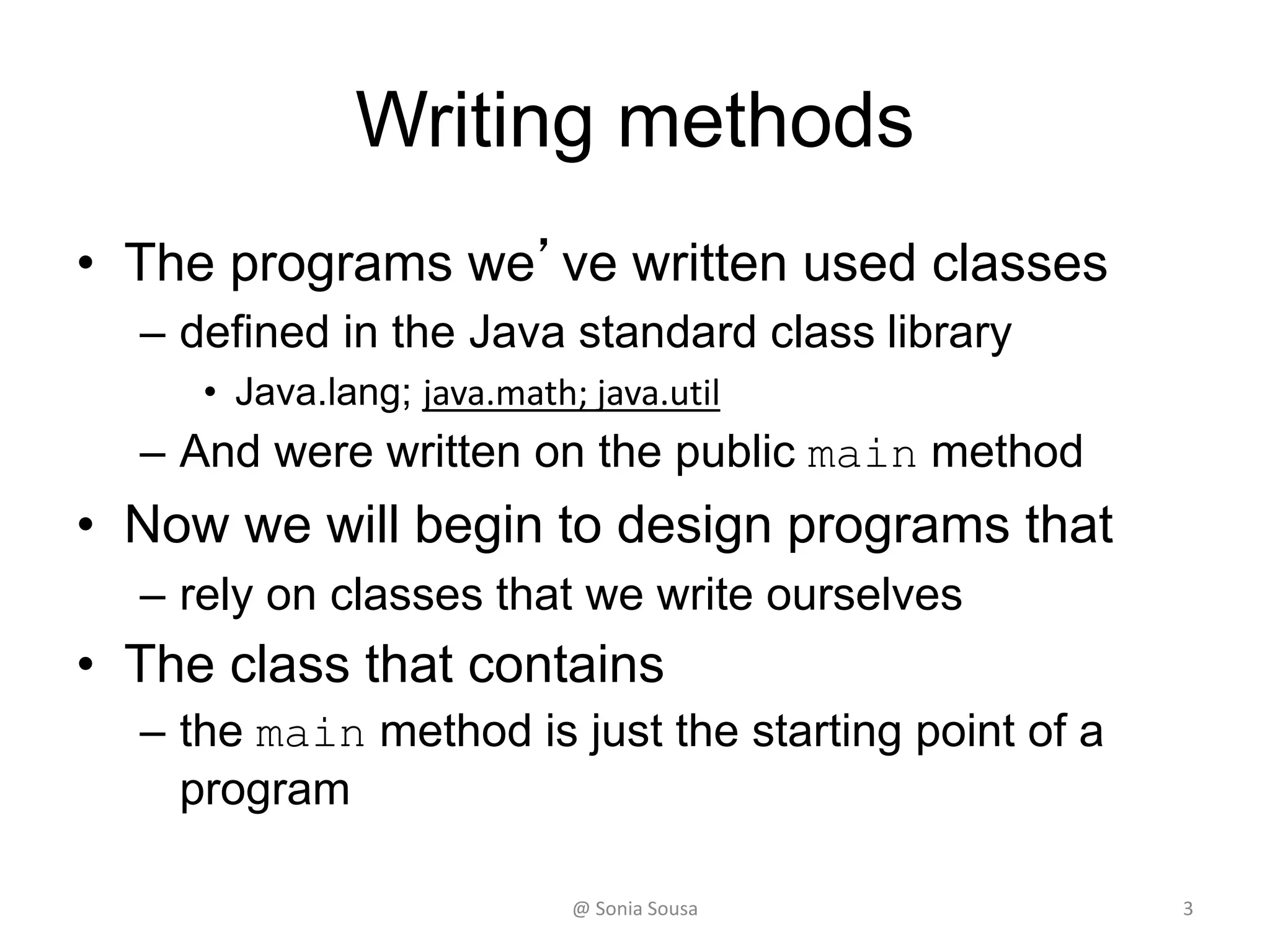
Writing methods
• The programs we’ve written used classes
– defined in the Java standard class library
• Java.lang; java.math; java.util
– And were written on the public main method
• Now we will begin to design programs that
– rely on classes that we write ourselves
• The class that contains
– the main method is just the starting point of a
program
3@ Sonia Sousa
Encapsulation
• But first you need to understand
– The principle of object oriented language concept
depended on a few concepts
• One is Encapsulation
• It means
– Packaging complex functionality into small pieces of
functions
• You can see it as your application functions wrapped in a box
• Why
– Hiding it complexity make it easier to use
• Easier o debug
• Easier to add more code
@ Sonia Sousa 4
Encapsulation
• We’ve learn how to create your program by
putting all your code in the main method
– But when your application get larger It becomes
very difficult to manage
– So instead you need to break your code into
individual classes
• Grouping it functionality for your application
– When you do this you can for instance
• Restrict access to one part of the application
@ Sonia Sousa 5
Java application
• A java application
– consists of more than one class
– The starting class is the main method
– Then,
• you have all sort of supporting classes
• Those are called customize methods
– Can be either encapsulate data or functionality, or both
– to understand better you need to understand
• What is a Method Declaration, control flow
@ Sonia Sousa 6
Method Declarations
• A method declaration Specifies
– the code that will be executed when the method
is invoked (called)
• In object oriented vocabulary
– A method, as you know is a function or
• A piece of code with a given name
– that can be called (invoked) in parts of an application.
• A function in Java is a member of a class.
@ Sonia Sousa 7
Method Control Flow
• When you run an java application
– First thing it looks is for
• The main method
public static void main (String[] args)
– But a java application is grouped with many other
• Customized Methods and classes
– They can be define by you or important from existing libraries
– When you customize your own method.
• You are declaring a method in a class.
@ Sonia Sousa 8
Invoking Methods
• When a method is invoked (called),
– The flow control jumps to the called method or
class and starts executing its code
• When complete,
– The flow returns to the place where the method
was called and continues
• The invocation may or may not return a
value,
– depending on how the method is defined
9@ Sonia Sousa
Method Header
10
private static void calc (int num1, int num2)
method
name
return
type
parameter list
The parameter list specifies the type and name of
each parameter
The name of a parameter in the method declaration
is called a formal parameter
Visibility Modifiers
@ Sonia Sousa
Visibility Modifiers
• In Java, we accomplish encapsulation
through the appropriate use of visibility
modifiers
– A modifier is a Java reserved word that
specifies particular characteristics of a
method or data
• Java has three visibility modifiers:
– public, protected, and private
– But first we need to understand the anatomy
of the method
11@ Sonia Sousa
Visibility Modifiers
• Public methods
– Are methods that are declared with public
visibility
• They are available in the entire application.
• They can be invoked/called by everyone and
everywhere in the application.
– In Object oriented words
• Can be referenced anywhere
• A Public methods are also called service methods
@ Sonia Sousa 12
Visibility Modifiers
• Private methods
– Is the opposite of public. Is only available in that class.
• can be referenced only within that class
– Are method created simply to assist a service
method
• They are not intended to be called by a client,
• So it should not be declared with public visibility
– Private methods are also called is called a
support method
@ Sonia Sousa 13
Visibility Modifiers
• Additional visibility methods
– Without a visibility modifier
• Have default visibility and
• Can be referenced by any class in the same
package
– Protected visibility
• Is an inherence.
• Is available to current class and to any subclasses
• But, we will not we will not cover in this course
@ Sonia Sousa 14
Method Header
• Next characteristics of a method is
– if it is static or not.
• When you wont method to be static.
– This means that
• The method is a class method or an instance of that
class.
– It can be called direct from the class definition
• If you don't know if to add static or not just
– try not to add static and see if you call it in the class or not.
@ Sonia Sousa 15
The return Statement
• The return type.
• A return statement specifies the value that will be
returned
– return expression return result;
!!! The expression must conform to the return type
• The return type of a method
– indicates the type of value that the method sends back to
the calling location
• void: means the method is not returning anything
• int: means the method is returning an integer
• char: means the method is returning a character
@ Sonia Sousa 16
Method Header
• In end of the method Header you should
– open and close parenthesis ()
private static void getInput(){ method body }
– To name your method
• use same rules assigned to variables
– In between parenthesis you add the received
parameters or values
17@ Sonia Sousa
Method Body
18
private static int calc (int num1, int num2)
{
int sum = num1 + num2;
char result = sum;
return result;
}
The return expression
must be consistent with
the return type
sum and result
are local data
They are created each
time the method is
called, and are
destroyed when it
finishes executing
Input
parameters or
arguments
@ Sonia Sousa
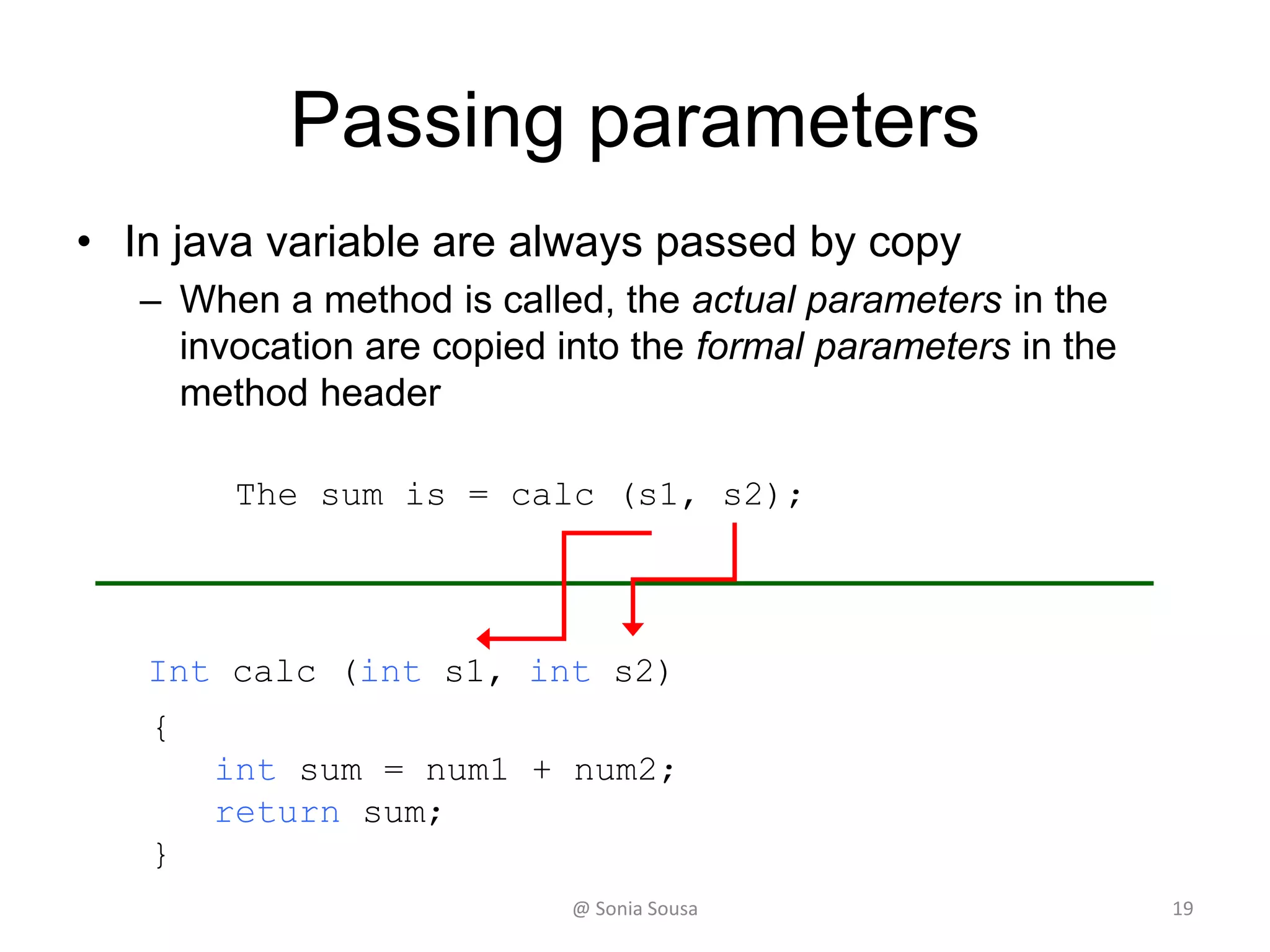
Passing parameters
• In java variable are always passed by copy
– When a method is called, the actual parameters in the
invocation are copied into the formal parameters in the
method header
Int calc (int s1, int s2)
{
int sum = num1 + num2;
return sum;
}
The sum is = calc (s1, s2);
@ Sonia Sousa 19
Local Data
• As we’ve seen, local variables can be declared
inside a method
– The formal parameters of a method create automatic
local variables when the method is invoked
• When the method finishes,
– all local variables are destroyed (including the formal
parameters)
• Keep in mind that instance variables, declared at
the class level, exists as long as the object exists
@ Sonia Sousa 20
Anatomy of a Method
• Creating reusable code with Methods
– Java program Wages
• Declaring Methods with arguments
– Java program Aritemetic
– Java program AddValues
– Java program testMethod
– Java program Calculator2
@ Sonia Sousa 21
Anatomy of a Method
Declaring Methods with arguments
Java program QuarterOfthMonth
• Let’s design two individual methods called
– scanning and condition
• This method should receive a number of the month
(between 1 and 12) and print out which quarter of
the month the number of the month belongs to.
@ Sonia Sousa 23
24
//********************************************************************
// ConditionIf.java Author: Sónia Sousa
//
// Demonstrates the use of if-then-else statement
//********************************************************************
public class ConditionIf {
public static void main(String[] args) {
Scanner scan = new Scanner(System.in);
System.out.print("Enter a number of the month (between 1 and 12)");
int i = scan.nextInt();
// structure of a if-then-else statement and the condition code
if ( i>=1 && i<=3) {
System.out.println("You have enter " + i + ", this month belongs to
the first quarter of the year");
}
else if (i>=4 && i <=6) {
System.out.println("You have enter " + i + ", this month belongs
to the second quarter of the year");
}
else {
System.out.println("You have enter " + i + ", this month does
not belongs to the first half of the year");
}
}
}
@ Sonia Sousa
Java program SquareRoot
• Write a Java program that assign two int
values (num1 and num2) and computes the
square root of the sum of num1 and num2
and prints the result on the screen.
– Customize it in a method called AddValues
• This method should receive the two values
• Compute the square root
• and return the results
– Call the method in the main method and print out
the results
@ Sonia Sousa 25
Lesson 5 - Outline
26@ Sonia Sousa
Encapsulation
Anatomy of a Method
Anatomy of a Class
Creating Objects
Sum up
• So far we’ve learn how to
– build your own method
• We’ve Learn how to
– encapsulate functionality inside of methods
• that are part of classes called from a definition of a class
• That are called inside of the class
– a instance of the class or an object
• We‘ve seen, that
– Parameter and values need to declared; and
– Values can be returned
@ Sonia Sousa 27
Sum up
• Keep in mind, that
– when the method finishes,
• all local variables are destroyed (including the formal
parameters)
– instance variables, are declared at the class level,
– exists as long as the object exists
• Now we are going to address
– The anatomy of a class
@ Sonia Sousa 28
The anatomy of a class
• Complete applications typically consist of
more than one class
– The starting class contains the main void method
– Other code is separated in different classes or
methods
• Encapsulate data or functionality or both
• It is up to you to decide how to separate
• The goal is to create classes that you can reuse it
@ Sonia Sousa 29
The anatomy of a class
• We can take one of two views of an object:
– internal
• the details of the variables and methods of the
class that defines it
– external
• the services that an object provides and how the
object interacts with the rest of the system
@ Sonia Sousa 30
Invoking Methods
• We've seen that once an object has been
instantiated,
– we can use the dot operator to invoke its methods
numChars = title.length()
• A method may return a value,
– which can be used in an assignment or
expression
• A method invocation can be thought of as
asking an object to perform a service
@ Sonia Sousa 31
myMethod();
myMethodcompute
Method Control Flow
• Method called in the same class
– You only need the method name
32@ Sonia Sousa
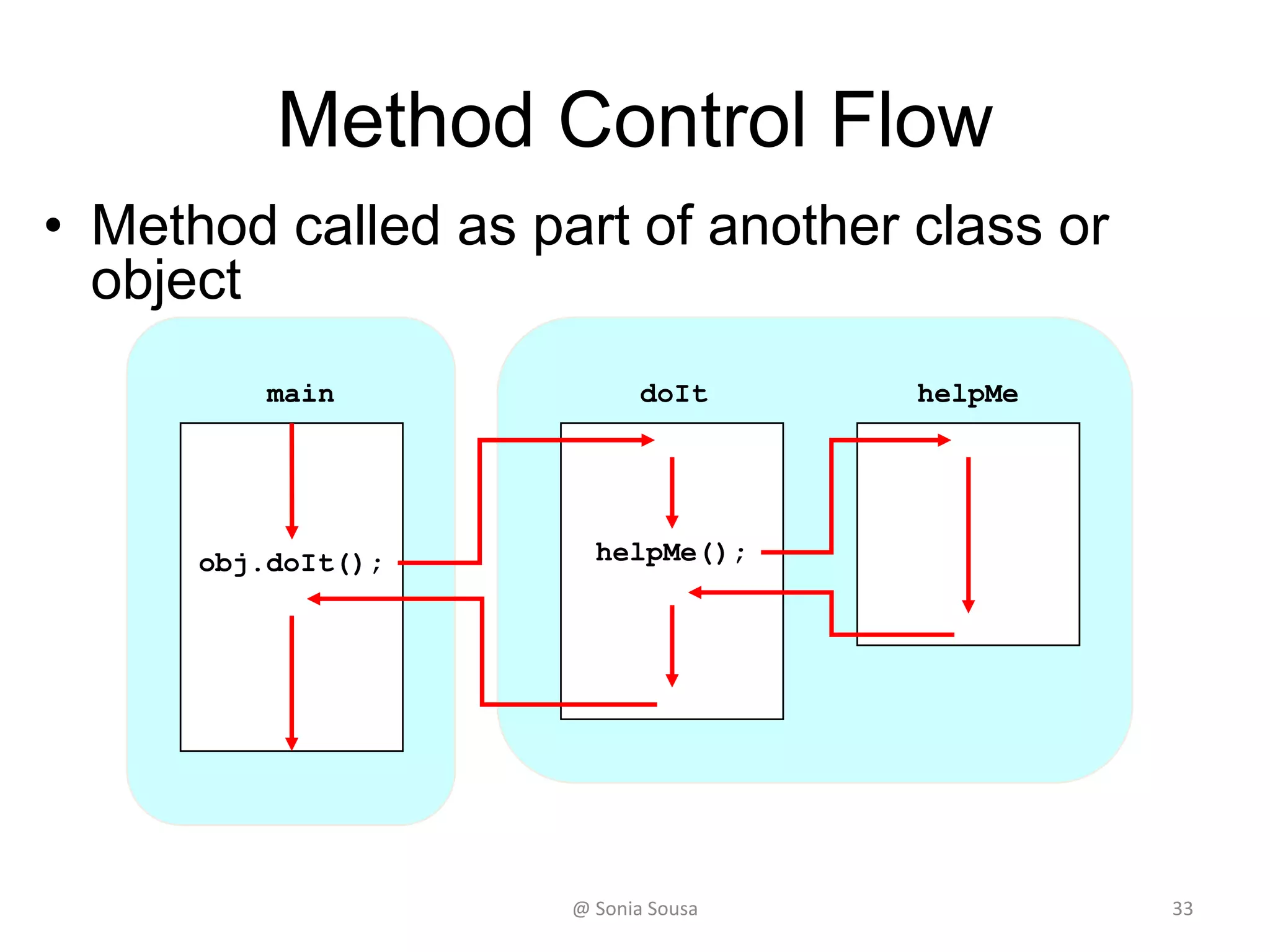
doIt helpMe
helpMe();obj.doIt();
main
Method Control Flow
• Method called as part of another class or
object
33@ Sonia Sousa
Anatomy of a class
How to extract the code into
separate classes
Java program Calculator3
• Start by open the calculator2 application
– Customize 3 more methods calcSub, calcDiv, calcMult
and uses a switch statement to see which case the
user choose and print the results.
• We will separate into
– two main external classes
• One called SimpleMath.java
• Another called scanHelper.java
• Then call them in the main class
– Change the name of SimpleMath class to
MathHelper
• (using Refactor in eclipse)
35@ Sonia Sousa
Anatomy of a class
• How Organize classes into packages
– Until now we add every application in the default
package
• Most classes in java applications are placed in packages or
subfolder of the project
– It is very import to organize your classes into groups
– Create a new package name helpers
• Move helper classes into helper package
– Use refactor -> move
• Declare the new package in the main application
– Import helpers.MathHelper;
– Import helpers.ScanHelper;
@ Sonia Sousa 36
Sum up
• Let’s now examine methods in more detail
• A method declaration specifies the code that will be executed
– when the method is invoked (called)
• When a method is invoked,
– the flow of control jumps to the method and executes its code
• When complete,
– the flow returns to the place where the method was called and
continues
• The invocation may or may not return a value, depending on
how the method is defined
37@ Sonia Sousa
Anatomy of a class
How to organize classes into
packages
Java program positiveNumber
• Write a external class called numbers that
verifies whether a number is positive or not
• Write also a main method class that asks the
user for a number (int) between -10 and 10
and inform the user if the number is positive
or not.
–Use scanHelper.java and
numbers.java classes
@ Sonia Sousa 39
Lesson 5
40@ Sonia Sousa
Encapsulation
Anatomy of a Method
Anatomy of a Class
Creating Objects
Instantiate
• You can declare a method in Java application into
2 ways
– Class method
• Called from the definition of the class
– Instance method
• Called from the instance of the class or an object
• So far we passed the values as arguments
– But to work with objects that has data in it we need to
instantiate
– This is Important when we need to work with more
complex objects
@ Sonia Sousa 41
Instantiate
• Instantiation is creating a object instance
– An object is an instance of a particular class
title = new String (”Let’s learn Java");
This calls the String constructor, which is
a special method that sets up the object
@ Sonia Sousa 42
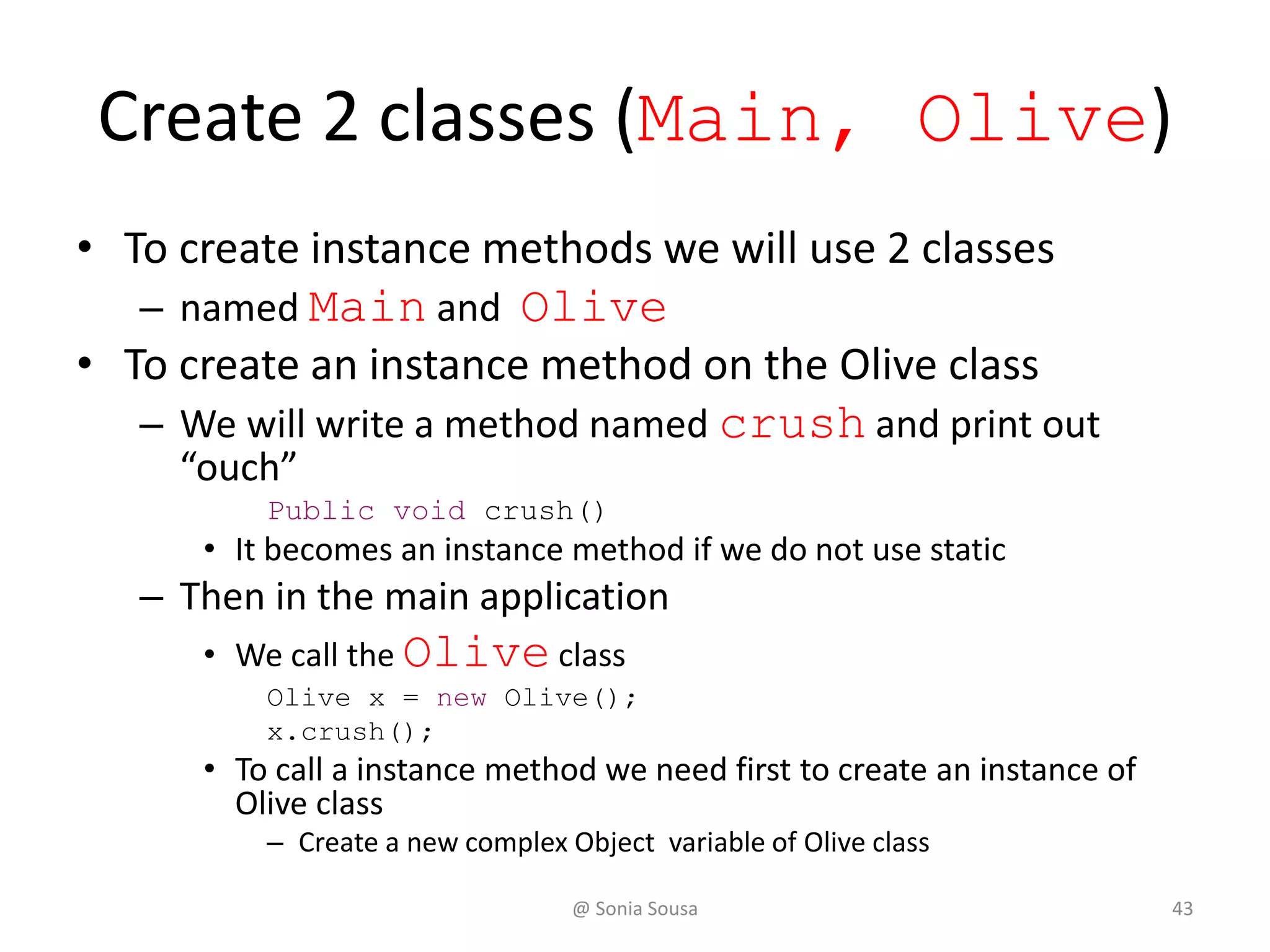
Create 2 classes (Main, Olive)
• To create instance methods we will use 2 classes
– named Main and Olive
• To create an instance method on the Olive class
– We will write a method named crush and print out
“ouch”
Public void crush()
• It becomes an instance method if we do not use static
– Then in the main application
• We call the Olive class
Olive x = new Olive();
x.crush();
• To call a instance method we need first to create an instance of
Olive class
– Create a new complex Object variable of Olive class
@ Sonia Sousa 43
Classes and Objects
• Recall from our overview of objects
– that an object has state and behavior
State
Variables (fields)
behaviour
functions (methods)
that allow to change the state
System.out.println( “ouch!” );
Olive x ;
Class Olive
Class Main
@ Sonia Sousa 44
Recall
• We can define
– Primitive data type or objects data type
• Objects data type is done when we instanciate
– Can be used to represent real-world entities
– For instance, an object
• represent a particular employee in a company
– Each employee object
» handles specific information
• related to that employee
45@ Sonia Sousa
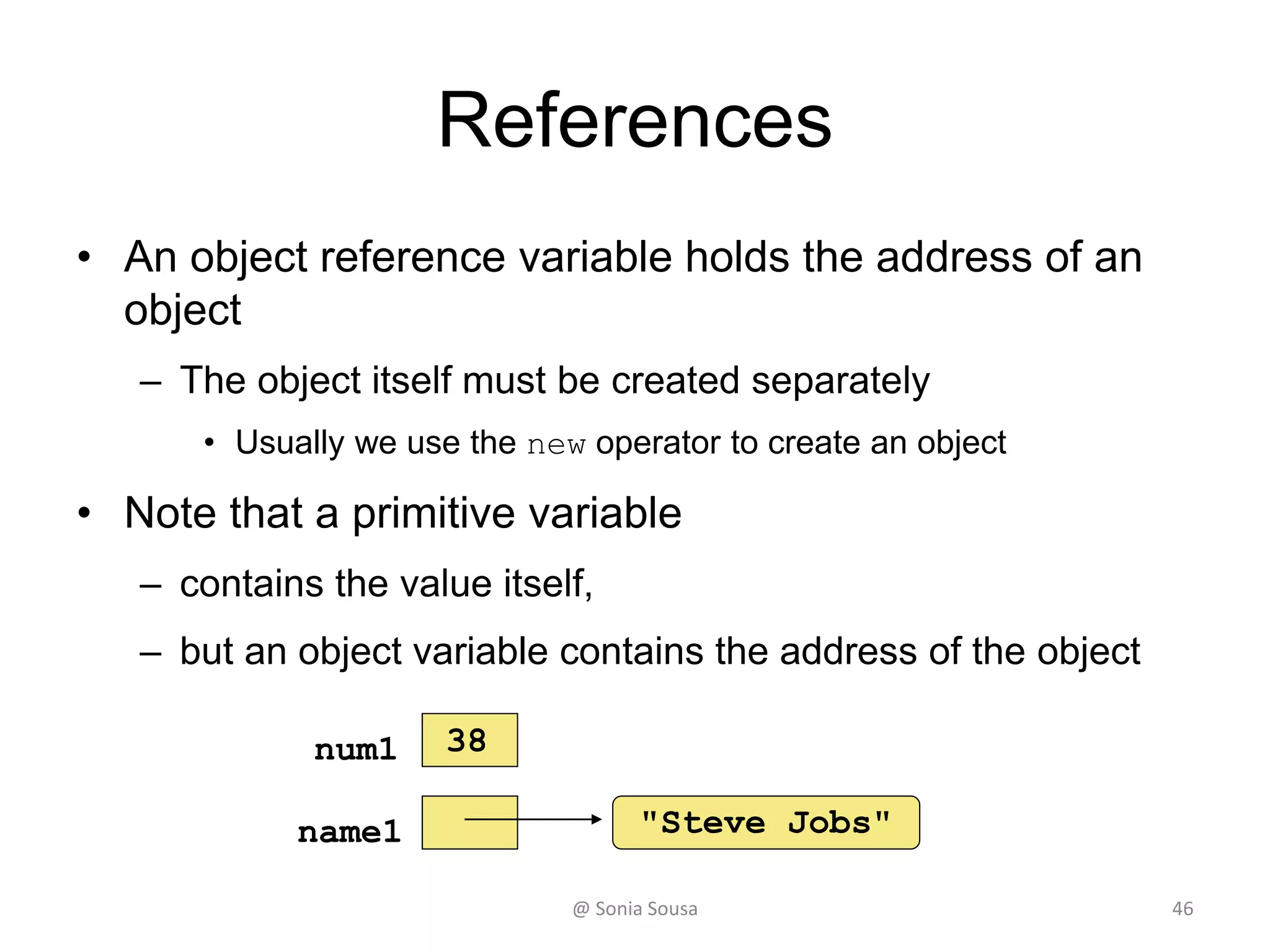
References
• An object reference variable holds the address of an
object
– The object itself must be created separately
• Usually we use the new operator to create an object
• Note that a primitive variable
– contains the value itself,
– but an object variable contains the address of the object
"Steve Jobs"name1
num1 38
@ Sonia Sousa 46
Instance Variables
Storing data in instance Variables
Create a new classe (Olive)
• Declare 3 instance variables on the class Olive
definition
– Variables names are: name, flavor, oil
• When declaring a variable you need to assign a
– Access modifier, data type and an name. You can also assign a value to it
public String name ="Kalamata";
public String flavor ="Grassy";
public int oil = 3;
– Call the method in the main method and print out the
results
Olive name1 = new Olive();
System.out.println(name1.name);
– Instance variables are known as fields and are available in
the entire application
@ Sonia Sousa 48
Creating instance Variables
• An object has:
– state (attributes)
• descriptive characteristics
– behaviors
• what it can do (or what can be done to it)
49
OliveInstance
Name
flavor
oil
Print name
Print flavor
Print oil
State
behaviours
Main
@ Sonia Sousa

Ifi7184 lesson5

  • 1.
  • 2.
    Review - Lesson4 2@ Sonia Sousa Encapsulation Anatomy of a Method Anatomy of a Class Creating Objects
  • 3.
    Writing methods • Theprograms we’ve written used classes – defined in the Java standard class library • Java.lang; java.math; java.util – And were written on the public main method • Now we will begin to design programs that – rely on classes that we write ourselves • The class that contains – the main method is just the starting point of a program 3@ Sonia Sousa
  • 4.
    Encapsulation • But firstyou need to understand – The principle of object oriented language concept depended on a few concepts • One is Encapsulation • It means – Packaging complex functionality into small pieces of functions • You can see it as your application functions wrapped in a box • Why – Hiding it complexity make it easier to use • Easier o debug • Easier to add more code @ Sonia Sousa 4
  • 5.
    Encapsulation • We’ve learnhow to create your program by putting all your code in the main method – But when your application get larger It becomes very difficult to manage – So instead you need to break your code into individual classes • Grouping it functionality for your application – When you do this you can for instance • Restrict access to one part of the application @ Sonia Sousa 5
  • 6.
    Java application • Ajava application – consists of more than one class – The starting class is the main method – Then, • you have all sort of supporting classes • Those are called customize methods – Can be either encapsulate data or functionality, or both – to understand better you need to understand • What is a Method Declaration, control flow @ Sonia Sousa 6
  • 7.
    Method Declarations • Amethod declaration Specifies – the code that will be executed when the method is invoked (called) • In object oriented vocabulary – A method, as you know is a function or • A piece of code with a given name – that can be called (invoked) in parts of an application. • A function in Java is a member of a class. @ Sonia Sousa 7
  • 8.
    Method Control Flow •When you run an java application – First thing it looks is for • The main method public static void main (String[] args) – But a java application is grouped with many other • Customized Methods and classes – They can be define by you or important from existing libraries – When you customize your own method. • You are declaring a method in a class. @ Sonia Sousa 8
  • 9.
    Invoking Methods • Whena method is invoked (called), – The flow control jumps to the called method or class and starts executing its code • When complete, – The flow returns to the place where the method was called and continues • The invocation may or may not return a value, – depending on how the method is defined 9@ Sonia Sousa
  • 10.
    Method Header 10 private staticvoid calc (int num1, int num2) method name return type parameter list The parameter list specifies the type and name of each parameter The name of a parameter in the method declaration is called a formal parameter Visibility Modifiers @ Sonia Sousa
  • 11.
    Visibility Modifiers • InJava, we accomplish encapsulation through the appropriate use of visibility modifiers – A modifier is a Java reserved word that specifies particular characteristics of a method or data • Java has three visibility modifiers: – public, protected, and private – But first we need to understand the anatomy of the method 11@ Sonia Sousa
  • 12.
    Visibility Modifiers • Publicmethods – Are methods that are declared with public visibility • They are available in the entire application. • They can be invoked/called by everyone and everywhere in the application. – In Object oriented words • Can be referenced anywhere • A Public methods are also called service methods @ Sonia Sousa 12
  • 13.
    Visibility Modifiers • Privatemethods – Is the opposite of public. Is only available in that class. • can be referenced only within that class – Are method created simply to assist a service method • They are not intended to be called by a client, • So it should not be declared with public visibility – Private methods are also called is called a support method @ Sonia Sousa 13
  • 14.
    Visibility Modifiers • Additionalvisibility methods – Without a visibility modifier • Have default visibility and • Can be referenced by any class in the same package – Protected visibility • Is an inherence. • Is available to current class and to any subclasses • But, we will not we will not cover in this course @ Sonia Sousa 14
  • 15.
    Method Header • Nextcharacteristics of a method is – if it is static or not. • When you wont method to be static. – This means that • The method is a class method or an instance of that class. – It can be called direct from the class definition • If you don't know if to add static or not just – try not to add static and see if you call it in the class or not. @ Sonia Sousa 15
  • 16.
    The return Statement •The return type. • A return statement specifies the value that will be returned – return expression return result; !!! The expression must conform to the return type • The return type of a method – indicates the type of value that the method sends back to the calling location • void: means the method is not returning anything • int: means the method is returning an integer • char: means the method is returning a character @ Sonia Sousa 16
  • 17.
    Method Header • Inend of the method Header you should – open and close parenthesis () private static void getInput(){ method body } – To name your method • use same rules assigned to variables – In between parenthesis you add the received parameters or values 17@ Sonia Sousa
  • 18.
    Method Body 18 private staticint calc (int num1, int num2) { int sum = num1 + num2; char result = sum; return result; } The return expression must be consistent with the return type sum and result are local data They are created each time the method is called, and are destroyed when it finishes executing Input parameters or arguments @ Sonia Sousa
  • 19.
    Passing parameters • Injava variable are always passed by copy – When a method is called, the actual parameters in the invocation are copied into the formal parameters in the method header Int calc (int s1, int s2) { int sum = num1 + num2; return sum; } The sum is = calc (s1, s2); @ Sonia Sousa 19
  • 20.
    Local Data • Aswe’ve seen, local variables can be declared inside a method – The formal parameters of a method create automatic local variables when the method is invoked • When the method finishes, – all local variables are destroyed (including the formal parameters) • Keep in mind that instance variables, declared at the class level, exists as long as the object exists @ Sonia Sousa 20
  • 21.
    Anatomy of aMethod • Creating reusable code with Methods – Java program Wages • Declaring Methods with arguments – Java program Aritemetic – Java program AddValues – Java program testMethod – Java program Calculator2 @ Sonia Sousa 21
  • 22.
    Anatomy of aMethod Declaring Methods with arguments
  • 23.
    Java program QuarterOfthMonth •Let’s design two individual methods called – scanning and condition • This method should receive a number of the month (between 1 and 12) and print out which quarter of the month the number of the month belongs to. @ Sonia Sousa 23
  • 24.
    24 //******************************************************************** // ConditionIf.java Author:Sónia Sousa // // Demonstrates the use of if-then-else statement //******************************************************************** public class ConditionIf { public static void main(String[] args) { Scanner scan = new Scanner(System.in); System.out.print("Enter a number of the month (between 1 and 12)"); int i = scan.nextInt(); // structure of a if-then-else statement and the condition code if ( i>=1 && i<=3) { System.out.println("You have enter " + i + ", this month belongs to the first quarter of the year"); } else if (i>=4 && i <=6) { System.out.println("You have enter " + i + ", this month belongs to the second quarter of the year"); } else { System.out.println("You have enter " + i + ", this month does not belongs to the first half of the year"); } } } @ Sonia Sousa
  • 25.
    Java program SquareRoot •Write a Java program that assign two int values (num1 and num2) and computes the square root of the sum of num1 and num2 and prints the result on the screen. – Customize it in a method called AddValues • This method should receive the two values • Compute the square root • and return the results – Call the method in the main method and print out the results @ Sonia Sousa 25
  • 26.
    Lesson 5 -Outline 26@ Sonia Sousa Encapsulation Anatomy of a Method Anatomy of a Class Creating Objects
  • 27.
    Sum up • Sofar we’ve learn how to – build your own method • We’ve Learn how to – encapsulate functionality inside of methods • that are part of classes called from a definition of a class • That are called inside of the class – a instance of the class or an object • We‘ve seen, that – Parameter and values need to declared; and – Values can be returned @ Sonia Sousa 27
  • 28.
    Sum up • Keepin mind, that – when the method finishes, • all local variables are destroyed (including the formal parameters) – instance variables, are declared at the class level, – exists as long as the object exists • Now we are going to address – The anatomy of a class @ Sonia Sousa 28
  • 29.
    The anatomy ofa class • Complete applications typically consist of more than one class – The starting class contains the main void method – Other code is separated in different classes or methods • Encapsulate data or functionality or both • It is up to you to decide how to separate • The goal is to create classes that you can reuse it @ Sonia Sousa 29
  • 30.
    The anatomy ofa class • We can take one of two views of an object: – internal • the details of the variables and methods of the class that defines it – external • the services that an object provides and how the object interacts with the rest of the system @ Sonia Sousa 30
  • 31.
    Invoking Methods • We'veseen that once an object has been instantiated, – we can use the dot operator to invoke its methods numChars = title.length() • A method may return a value, – which can be used in an assignment or expression • A method invocation can be thought of as asking an object to perform a service @ Sonia Sousa 31
  • 32.
    myMethod(); myMethodcompute Method Control Flow •Method called in the same class – You only need the method name 32@ Sonia Sousa
  • 33.
    doIt helpMe helpMe();obj.doIt(); main Method ControlFlow • Method called as part of another class or object 33@ Sonia Sousa
  • 34.
    Anatomy of aclass How to extract the code into separate classes
  • 35.
    Java program Calculator3 •Start by open the calculator2 application – Customize 3 more methods calcSub, calcDiv, calcMult and uses a switch statement to see which case the user choose and print the results. • We will separate into – two main external classes • One called SimpleMath.java • Another called scanHelper.java • Then call them in the main class – Change the name of SimpleMath class to MathHelper • (using Refactor in eclipse) 35@ Sonia Sousa
  • 36.
    Anatomy of aclass • How Organize classes into packages – Until now we add every application in the default package • Most classes in java applications are placed in packages or subfolder of the project – It is very import to organize your classes into groups – Create a new package name helpers • Move helper classes into helper package – Use refactor -> move • Declare the new package in the main application – Import helpers.MathHelper; – Import helpers.ScanHelper; @ Sonia Sousa 36
  • 37.
    Sum up • Let’snow examine methods in more detail • A method declaration specifies the code that will be executed – when the method is invoked (called) • When a method is invoked, – the flow of control jumps to the method and executes its code • When complete, – the flow returns to the place where the method was called and continues • The invocation may or may not return a value, depending on how the method is defined 37@ Sonia Sousa
  • 38.
    Anatomy of aclass How to organize classes into packages
  • 39.
    Java program positiveNumber •Write a external class called numbers that verifies whether a number is positive or not • Write also a main method class that asks the user for a number (int) between -10 and 10 and inform the user if the number is positive or not. –Use scanHelper.java and numbers.java classes @ Sonia Sousa 39
  • 40.
    Lesson 5 40@ SoniaSousa Encapsulation Anatomy of a Method Anatomy of a Class Creating Objects
  • 41.
    Instantiate • You candeclare a method in Java application into 2 ways – Class method • Called from the definition of the class – Instance method • Called from the instance of the class or an object • So far we passed the values as arguments – But to work with objects that has data in it we need to instantiate – This is Important when we need to work with more complex objects @ Sonia Sousa 41
  • 42.
    Instantiate • Instantiation iscreating a object instance – An object is an instance of a particular class title = new String (”Let’s learn Java"); This calls the String constructor, which is a special method that sets up the object @ Sonia Sousa 42
  • 43.
    Create 2 classes(Main, Olive) • To create instance methods we will use 2 classes – named Main and Olive • To create an instance method on the Olive class – We will write a method named crush and print out “ouch” Public void crush() • It becomes an instance method if we do not use static – Then in the main application • We call the Olive class Olive x = new Olive(); x.crush(); • To call a instance method we need first to create an instance of Olive class – Create a new complex Object variable of Olive class @ Sonia Sousa 43
  • 44.
    Classes and Objects •Recall from our overview of objects – that an object has state and behavior State Variables (fields) behaviour functions (methods) that allow to change the state System.out.println( “ouch!” ); Olive x ; Class Olive Class Main @ Sonia Sousa 44
  • 45.
    Recall • We candefine – Primitive data type or objects data type • Objects data type is done when we instanciate – Can be used to represent real-world entities – For instance, an object • represent a particular employee in a company – Each employee object » handles specific information • related to that employee 45@ Sonia Sousa
  • 46.
    References • An objectreference variable holds the address of an object – The object itself must be created separately • Usually we use the new operator to create an object • Note that a primitive variable – contains the value itself, – but an object variable contains the address of the object "Steve Jobs"name1 num1 38 @ Sonia Sousa 46
  • 47.
    Instance Variables Storing datain instance Variables
  • 48.
    Create a newclasse (Olive) • Declare 3 instance variables on the class Olive definition – Variables names are: name, flavor, oil • When declaring a variable you need to assign a – Access modifier, data type and an name. You can also assign a value to it public String name ="Kalamata"; public String flavor ="Grassy"; public int oil = 3; – Call the method in the main method and print out the results Olive name1 = new Olive(); System.out.println(name1.name); – Instance variables are known as fields and are available in the entire application @ Sonia Sousa 48
  • 49.
    Creating instance Variables •An object has: – state (attributes) • descriptive characteristics – behaviors • what it can do (or what can be done to it) 49 OliveInstance Name flavor oil Print name Print flavor Print oil State behaviours Main @ Sonia Sousa