1/38
Oracle Database Backup-and-Recovery 
Instructor: 
Dr.Baraani 
Creator: 
Mohammad Sadegh Salehi
Fall 2014 3/38 
<Insert Picture Here> 
Agenda 
■Purpose of Backup and Recovery. 
■ Oracle Data Protection Planning & Solutions 
■ Oracle Backup & Recovery Solutions 
 Physical Data Protection 
• Recovery Manager 
 Logical Data Protection 
• Flashback Technologies 
 Recovery Analysis 
• Data Recovery Advisor 
■Q&A
Fall 2014 4/38 
Purpose of Backup and Recovery 
Data Protection Concerns… 
■ Planning and testing responses to different kinds of failures 
■ Configuring the database environment for backup and recovery 
■ Setting up a backup schedule 
■ Monitoring the backup and recovery environment 
■ Troubleshooting backup problems 
■ Recovering from data loss if the need arises 
 Backup administration tasks include the 
following:
Fall 2014 5/38 
Data Protection 
 A backup is a copy of data of a database that 
you can use to reconstruct data. 
 Physical backup 
Are copies of the physical files used in storing and recovering 
a database. These files include data files, control files, and 
archived redo logs. 
 Logical backups 
Contain logical data such as tables and stored procedures.
Fall 2014 6/38 
Many Types of Data Loss to Protect Against 
User Error 
Management Error 
Forgetfulness 
Malicious Behavior 
Software Error 
Storage Media Error 
Storage System Failure 
Data Center Outage
Fall 2014 7/38 
■A media failure is a physical problem with a disk, 
■ That causes a failure of a read from or write to a disk 
file that is required to run the database. 
Many Types of Data Loss to Protect Against 
 Media Failure 
 User Errors 
■ User errors occur when, either due to an error in 
application logic or a manual mistake, 
■ Data in a database is changed or deleted incorrectly. 
■ User errors are estimated to be the greatest single 
cause of database downtime.
Fall 2014 8/38 
Storage Tools 
Snapshots, Replication, Archive, Analytics 
Database Tools 
Data Guard & Active Data Guard 
Data Recovery Advisor, RMAN 
Operating System Tools 
Built in Backup and Recovery Tools, 
Snapshots, Boot Environments 
Virtualization Tools 
Oracle Virtual Machine, Enterprise Manager 
Software Tools 
Oracle Enterprise Manager, 
Tools for Oracle Database Data Protection 
The Ultimate Integrated Data Protection Solution
Fall 2014 9/38 
Oracle Backup & Recovery Solutions 
“Backup and Recovery on Steroids” 
File System Data 
UNIX Linux 
Windows NAS 
Recovery 
Manager 
(RMAN) 
Oracle Databases 
Physical Data Protection 
Data Recovery Advisor 
Logical Data 
Protection 
Recovery Analysis 
Flashback Technologies
Fall 2014 10/38 
Backup & Recovery Foundation 
Complete Oracle Solution from Disk to Tape 
File System Data 
UNIX Linux 
Windows NAS 
Oracle Databases 
Oracle Recovery 
Manager (RMAN) Fast Recovery Area 
Tape Backup 
Amazon S3 
Cloud Storage 
Oracle Secure Backup 
(OSB) 
Oracle Secure Backup 
(OSB) Cloud Module
11/38 
Oracle Recovery Manager (RMAN) 
Oracle-integrated Backup & Recovery Engine 
Oracle Enterprise 
Manager 
RMAN 
Database 
Fast Recovery 
Area 
Tape Drive 
Oracle Secure 
Backup 
• Intrinsic knowledge of database 
file formats and recovery 
procedures 
• Block validation 
• Online block-level recovery 
• Tablespace/data file recovery 
• Online, multi-streamed backup 
• Unused block compression 
• Native encryption 
• Integrated disk, tape & cloud 
backup leveraging the Fast 
Recovery Area and Oracle 
Cloud Secure Backup
Fall 2014 12/38 
Oracle Backup and Recovery Solutions 
 Recovery Manager (RMAN) 
 User-managed backup and recovery 
 Recovery Manager is fully integrated with the Oracle database to 
perform a range of backup and recovery activities. 
 You can access RMAN through the command line or through Oracle 
Enterprise Manager. 
 In this solution, you perform backup and recovery with a mixture 
of host operating system commands and SQL*Plus recovery 
commands. 
 You are responsible for determining all aspects of when and how 
backups and recovery are done.
Fall 2014 13/38 
Feature Comparison of Backup Techniques 
Feature Recovery 
Manager 
User-managed Data Pump Export 
Closed database 
backups 
Supported. Supported Not supported. 
Open database 
backups 
Supported. Supported. Requires rollback 
or undo segments 
to generate 
consistent backups. 
Incremental 
backups 
Supported Not supported. Not supported. 
Corrupt block 
detection 
Supported. Not supported. Supported. 
Automatic 
specification of files 
to include in a 
backup 
Supported Not supported. Not applicable. 
Backup repository Supported Not supported. Not supported.
Fall 2014 14/38 
Feature Comparison of Backup Techniques 
Feature Recovery 
Manager 
User-managed Data Pump Export 
Backups to a media 
manager 
Supported. Supported. Not supported. 
Backup of 
initialization 
parameter file 
Supported. Supported. Not supported. 
Backup of 
password and 
networking files 
Not supported. Supported. Not supported. 
Platform-independent 
language for 
backups 
Supported. Not supported. Supported.
Fall 2014 15/38 
Start RMAN
Fall 2014 16/38 
Change RMAN Backup Configuration 
RMAN> CONFIGURE CHANNEL DEVICE TYPE DISK FORMAT '/backup/rman/full_%u_%s_%p’; 
RMAN> CONFIGURE RETENTION POLICY TO RECOVERY WINDOW OF 7 DAYS; 
 %U, which generates a unique name. 
 Others include %d for the DB_NAME, 
 %t for the backup set time stamp, 
 %s for the backup set number, 
 And %p for the backup piece number.
Fall 2014 17/38 
Change RMAN Backup Configuration
Fall 2014 18/38 
Incremental backup 
■ Stores only blocks changed since a previous backup. 
■Thus, they provide more compact backups and faster 
recovery, 
■ thereby reducing the need to apply redo during data 
file media recovery.
Fall 2014 19/38 
Incremental backup 
BACKUP INCREMENTAL LEVEL 0 DATABASE; 
BACKUP INCREMENTAL LEVEL 1 CUMULATIVE DATABASE; 
BACKUP INCREMENTAL LEVEL 1 DATABASE; 
 Creates a level 0 incremental backup to serve as a base for an 
incremental backup strategy: 
 Creates a level 1 cumulative incremental backup: 
 Creates a level 1 differential incremental backup:
Fall 2014 20/38 
Incremental backup
Fall 2014 21/38 
Validating & Cross-checking Database Files 
and Backups 
BACKUP VALIDATE CHECK LOGICAL DATABASE ARCHIVELOG 
ALL; 
VALIDATE DATAFILE 4 BLOCK 10 TO 13; 
VALIDATE BACKUPSET 3; 
 Validate all database files and archived redo log files for physical 
and logical corruption: 
 Check individual data blocks, as shown in the following example: 
 Validate backup sets, as shown in the following example: 
CROSSCHECK BACKUP; 
CROSSCHECK COPY; 
 The CROSSCHECK, synchronizes the logical records of 
RMAN backups and copies with the files on storage media.
Fall 2014 22/38 
Validating & Cross-checking Database Files 
and Backups
Fall 2014 23/38 
Recover Databae - RMAN 
 Automatic Recovery with the RECOVER Command:
Fall 2014 24/38 
■RMAN Step-by-Step Performance Tuning (NEW) 
 http://www.oracle.com/technology/deploy/availability/pdf/rman_tuning_mm 
_bp.pdf 
■Very Large Database Backup & Recovery Best Practices 
 http://www.oracle.com/technology/deploy/availability/pdf/vldb_br.pdf 
■Best Practices using Recovery Manager with Oracle Data 
Guard and Oracle Streams 
 http://www.oracle.com/technology/deploy/availability/pdf/oracle-openworld- 
2008/298772.pdf 
Additional Resources
Fall 2014 25/38 
Logical Data Protection 
Fast ‘Rewind’ of Logical Errors 
File System Data 
UNIX Linux 
Windows NAS 
Recovery 
Manager 
(RMAN) 
Oracle Databases 
Physical Data Protection 
Data Recovery Advisor 
Logical Data 
Protection 
Recovery Analysis 
Flashback Technologies
Fall 2014 26/38 
Flashback Technologies 
Error Detection & Correction 
■ Flashback revolutionizes error recovery 
 View ‘good’ data as of a past point-in-time 
 Simply rewind data changes 
 Time to correct error equals time to make error 
Correction Time = Error Time + f(DB_SIZE) 
• Low impact 
• Excellent tool for configuring QA, Dev and Training 
databases 
• Flashback is easy – simple commands, no complex 
procedure 
0 
20 
40 
60 
80 
Recovery Time 
Traditional 
Recovery 
Flashback
27/38 
Error Investigation with Flashback 
• Flashback Query 
– Query all data at point in time 
Tx 1 
Tx 2 
Tx 3 
select * from Salary AS OF ‘12:00 P.M.’ where … 
select * from Salary VERSIONS BETWEEN 
‘12:00 PM’ and ‘2:00 PM’ where … 
select * from FLASHBACK_TRANSACTION_QUERY 
where xid = HEXTORAW(‘000200030000002D’); 
 Flashback Transaction Query 
– See all changes made by a transaction 
 Flashback Version Query 
– See all versions of a row between times 
– See transactions that changed the row 
• All above are based on available UNDO
Fall 2014 28/38 
Rewinding a Database with Flashback 
Database 
 You can use the Oracle Flashback Database to rewind the 
whole database to a past time. 
 Unlike media recovery, you do not need to restore data files to 
return the database to a past state. 
 To use the RMAN FLASHBACK DATABASE command, 
 Your database must have been previously configured to generate flashback 
logs.
Fall 2014 29/38 
Rewinding a Database with Flashback 
Database
Fall 2014 30/38 
Using Normal and Guaranteed Restore 
Points
Fall 2014 31/38 
Flashback Example
32/38 
• Flashback Database – restore 
database to any point in time 
• Flashback Table – restore contents 
of tables to any point in time (undo-based) 
• Flashback Drop – restore 
accidentally dropped tables (based 
on free space in tablespace) 
• Flashback Transaction – back out 
transaction and all subsequent 
conflicting transactions (redo-based) 
Order 
Database 
Customer 
Error Correction with Flashback
Fall 2014 33/38 
Recovery Analysis 
Intelligent, Guided Recovery 
File System Data 
UNIX Linux 
Windows NAS 
Recovery 
Manager 
(RMAN) 
Oracle Databases 
Physical Data Protection 
Data Recovery Advisor 
Logical Data 
Protection 
Recovery Analysis 
Flashback Technologies
Fall 2014 34/38 
Time to Repair 
Data Recovery Advisor 
The Motivation 
■ Oracle provides robust tools for data 
repair: 
RMAN – physical media loss or corruptions 
 Flashback – logical errors 
Data Guard – physical problems 
■However, problem diagnosis and 
choosing the right solution can be error 
prone and time consuming 
 Errors more likely during emergencies 
Recovery 
Investigation 
& Planning
Fall 2014 35/38 
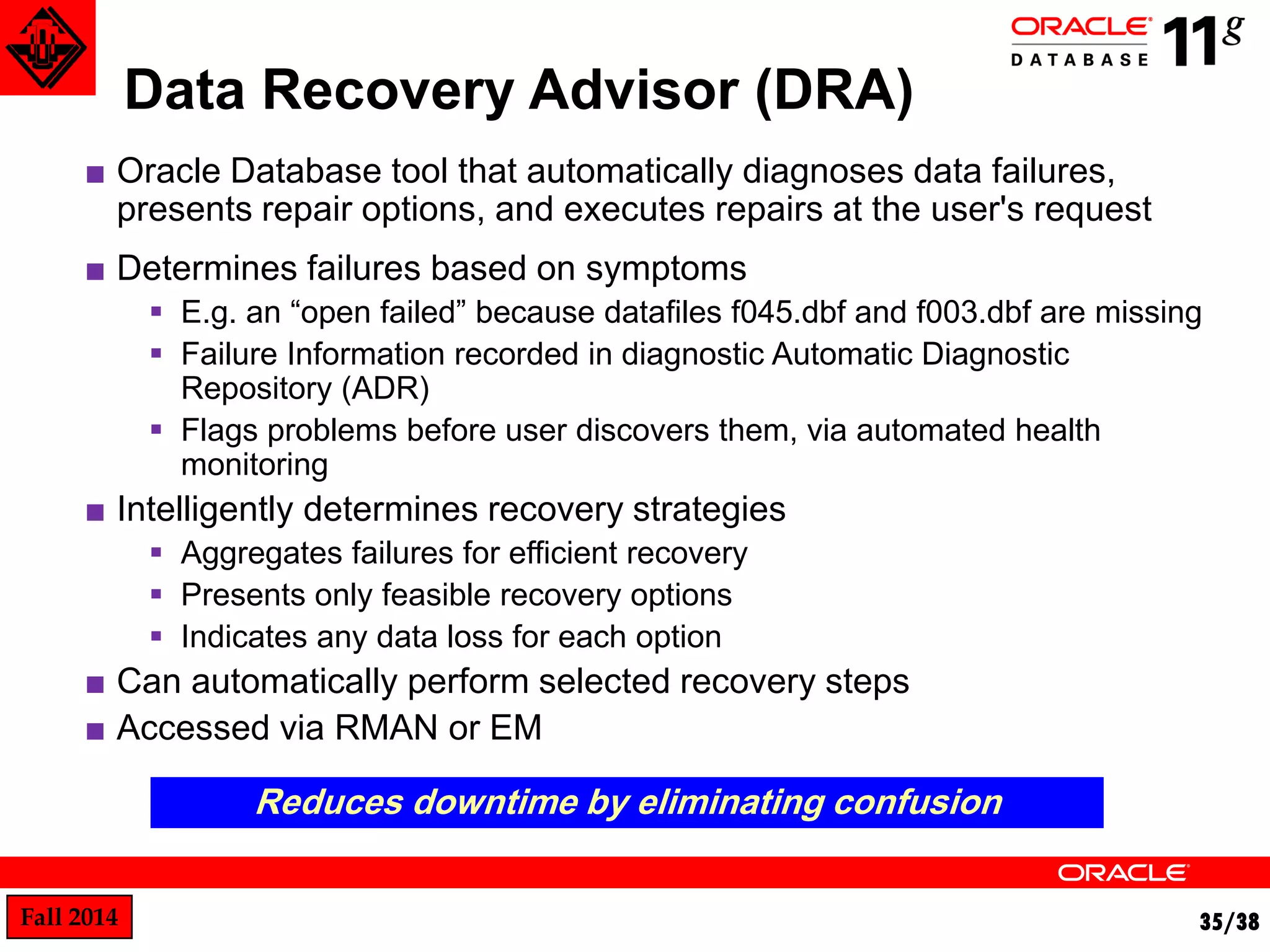
Data Recovery Advisor (DRA) 
■ Oracle Database tool that automatically diagnoses data failures, 
presents repair options, and executes repairs at the user's request 
■ Determines failures based on symptoms 
 E.g. an “open failed” because datafiles f045.dbf and f003.dbf are missing 
 Failure Information recorded in diagnostic Automatic Diagnostic 
Repository (ADR) 
 Flags problems before user discovers them, via automated health 
monitoring 
■ Intelligently determines recovery strategies 
 Aggregates failures for efficient recovery 
 Presents only feasible recovery options 
 Indicates any data loss for each option 
■ Can automatically perform selected recovery steps 
■ Accessed via RMAN or EM 
Reduces downtime by eliminating confusion
36/38 
Data Recovery Advisor Wizard
37/38 
Data Recovery Advisor – View Failures
38/38 
Data Recovery Advisor – Manual Repair
39/38

Backup and recovery in oracle

  • 1.
  • 2.
    Oracle Database Backup-and-Recovery Instructor: Dr.Baraani Creator: Mohammad Sadegh Salehi
  • 3.
    Fall 2014 3/38 <Insert Picture Here> Agenda ■Purpose of Backup and Recovery. ■ Oracle Data Protection Planning & Solutions ■ Oracle Backup & Recovery Solutions  Physical Data Protection • Recovery Manager  Logical Data Protection • Flashback Technologies  Recovery Analysis • Data Recovery Advisor ■Q&A
  • 4.
    Fall 2014 4/38 Purpose of Backup and Recovery Data Protection Concerns… ■ Planning and testing responses to different kinds of failures ■ Configuring the database environment for backup and recovery ■ Setting up a backup schedule ■ Monitoring the backup and recovery environment ■ Troubleshooting backup problems ■ Recovering from data loss if the need arises  Backup administration tasks include the following:
  • 5.
    Fall 2014 5/38 Data Protection  A backup is a copy of data of a database that you can use to reconstruct data.  Physical backup Are copies of the physical files used in storing and recovering a database. These files include data files, control files, and archived redo logs.  Logical backups Contain logical data such as tables and stored procedures.
  • 6.
    Fall 2014 6/38 Many Types of Data Loss to Protect Against User Error Management Error Forgetfulness Malicious Behavior Software Error Storage Media Error Storage System Failure Data Center Outage
  • 7.
    Fall 2014 7/38 ■A media failure is a physical problem with a disk, ■ That causes a failure of a read from or write to a disk file that is required to run the database. Many Types of Data Loss to Protect Against  Media Failure  User Errors ■ User errors occur when, either due to an error in application logic or a manual mistake, ■ Data in a database is changed or deleted incorrectly. ■ User errors are estimated to be the greatest single cause of database downtime.
  • 8.
    Fall 2014 8/38 Storage Tools Snapshots, Replication, Archive, Analytics Database Tools Data Guard & Active Data Guard Data Recovery Advisor, RMAN Operating System Tools Built in Backup and Recovery Tools, Snapshots, Boot Environments Virtualization Tools Oracle Virtual Machine, Enterprise Manager Software Tools Oracle Enterprise Manager, Tools for Oracle Database Data Protection The Ultimate Integrated Data Protection Solution
  • 9.
    Fall 2014 9/38 Oracle Backup & Recovery Solutions “Backup and Recovery on Steroids” File System Data UNIX Linux Windows NAS Recovery Manager (RMAN) Oracle Databases Physical Data Protection Data Recovery Advisor Logical Data Protection Recovery Analysis Flashback Technologies
  • 10.
    Fall 2014 10/38 Backup & Recovery Foundation Complete Oracle Solution from Disk to Tape File System Data UNIX Linux Windows NAS Oracle Databases Oracle Recovery Manager (RMAN) Fast Recovery Area Tape Backup Amazon S3 Cloud Storage Oracle Secure Backup (OSB) Oracle Secure Backup (OSB) Cloud Module
  • 11.
    11/38 Oracle RecoveryManager (RMAN) Oracle-integrated Backup & Recovery Engine Oracle Enterprise Manager RMAN Database Fast Recovery Area Tape Drive Oracle Secure Backup • Intrinsic knowledge of database file formats and recovery procedures • Block validation • Online block-level recovery • Tablespace/data file recovery • Online, multi-streamed backup • Unused block compression • Native encryption • Integrated disk, tape & cloud backup leveraging the Fast Recovery Area and Oracle Cloud Secure Backup
  • 12.
    Fall 2014 12/38 Oracle Backup and Recovery Solutions  Recovery Manager (RMAN)  User-managed backup and recovery  Recovery Manager is fully integrated with the Oracle database to perform a range of backup and recovery activities.  You can access RMAN through the command line or through Oracle Enterprise Manager.  In this solution, you perform backup and recovery with a mixture of host operating system commands and SQL*Plus recovery commands.  You are responsible for determining all aspects of when and how backups and recovery are done.
  • 13.
    Fall 2014 13/38 Feature Comparison of Backup Techniques Feature Recovery Manager User-managed Data Pump Export Closed database backups Supported. Supported Not supported. Open database backups Supported. Supported. Requires rollback or undo segments to generate consistent backups. Incremental backups Supported Not supported. Not supported. Corrupt block detection Supported. Not supported. Supported. Automatic specification of files to include in a backup Supported Not supported. Not applicable. Backup repository Supported Not supported. Not supported.
  • 14.
    Fall 2014 14/38 Feature Comparison of Backup Techniques Feature Recovery Manager User-managed Data Pump Export Backups to a media manager Supported. Supported. Not supported. Backup of initialization parameter file Supported. Supported. Not supported. Backup of password and networking files Not supported. Supported. Not supported. Platform-independent language for backups Supported. Not supported. Supported.
  • 15.
    Fall 2014 15/38 Start RMAN
  • 16.
    Fall 2014 16/38 Change RMAN Backup Configuration RMAN> CONFIGURE CHANNEL DEVICE TYPE DISK FORMAT '/backup/rman/full_%u_%s_%p’; RMAN> CONFIGURE RETENTION POLICY TO RECOVERY WINDOW OF 7 DAYS;  %U, which generates a unique name.  Others include %d for the DB_NAME,  %t for the backup set time stamp,  %s for the backup set number,  And %p for the backup piece number.
  • 17.
    Fall 2014 17/38 Change RMAN Backup Configuration
  • 18.
    Fall 2014 18/38 Incremental backup ■ Stores only blocks changed since a previous backup. ■Thus, they provide more compact backups and faster recovery, ■ thereby reducing the need to apply redo during data file media recovery.
  • 19.
    Fall 2014 19/38 Incremental backup BACKUP INCREMENTAL LEVEL 0 DATABASE; BACKUP INCREMENTAL LEVEL 1 CUMULATIVE DATABASE; BACKUP INCREMENTAL LEVEL 1 DATABASE;  Creates a level 0 incremental backup to serve as a base for an incremental backup strategy:  Creates a level 1 cumulative incremental backup:  Creates a level 1 differential incremental backup:
  • 20.
    Fall 2014 20/38 Incremental backup
  • 21.
    Fall 2014 21/38 Validating & Cross-checking Database Files and Backups BACKUP VALIDATE CHECK LOGICAL DATABASE ARCHIVELOG ALL; VALIDATE DATAFILE 4 BLOCK 10 TO 13; VALIDATE BACKUPSET 3;  Validate all database files and archived redo log files for physical and logical corruption:  Check individual data blocks, as shown in the following example:  Validate backup sets, as shown in the following example: CROSSCHECK BACKUP; CROSSCHECK COPY;  The CROSSCHECK, synchronizes the logical records of RMAN backups and copies with the files on storage media.
  • 22.
    Fall 2014 22/38 Validating & Cross-checking Database Files and Backups
  • 23.
    Fall 2014 23/38 Recover Databae - RMAN  Automatic Recovery with the RECOVER Command:
  • 24.
    Fall 2014 24/38 ■RMAN Step-by-Step Performance Tuning (NEW)  http://www.oracle.com/technology/deploy/availability/pdf/rman_tuning_mm _bp.pdf ■Very Large Database Backup & Recovery Best Practices  http://www.oracle.com/technology/deploy/availability/pdf/vldb_br.pdf ■Best Practices using Recovery Manager with Oracle Data Guard and Oracle Streams  http://www.oracle.com/technology/deploy/availability/pdf/oracle-openworld- 2008/298772.pdf Additional Resources
  • 25.
    Fall 2014 25/38 Logical Data Protection Fast ‘Rewind’ of Logical Errors File System Data UNIX Linux Windows NAS Recovery Manager (RMAN) Oracle Databases Physical Data Protection Data Recovery Advisor Logical Data Protection Recovery Analysis Flashback Technologies
  • 26.
    Fall 2014 26/38 Flashback Technologies Error Detection & Correction ■ Flashback revolutionizes error recovery  View ‘good’ data as of a past point-in-time  Simply rewind data changes  Time to correct error equals time to make error Correction Time = Error Time + f(DB_SIZE) • Low impact • Excellent tool for configuring QA, Dev and Training databases • Flashback is easy – simple commands, no complex procedure 0 20 40 60 80 Recovery Time Traditional Recovery Flashback
  • 27.
    27/38 Error Investigationwith Flashback • Flashback Query – Query all data at point in time Tx 1 Tx 2 Tx 3 select * from Salary AS OF ‘12:00 P.M.’ where … select * from Salary VERSIONS BETWEEN ‘12:00 PM’ and ‘2:00 PM’ where … select * from FLASHBACK_TRANSACTION_QUERY where xid = HEXTORAW(‘000200030000002D’);  Flashback Transaction Query – See all changes made by a transaction  Flashback Version Query – See all versions of a row between times – See transactions that changed the row • All above are based on available UNDO
  • 28.
    Fall 2014 28/38 Rewinding a Database with Flashback Database  You can use the Oracle Flashback Database to rewind the whole database to a past time.  Unlike media recovery, you do not need to restore data files to return the database to a past state.  To use the RMAN FLASHBACK DATABASE command,  Your database must have been previously configured to generate flashback logs.
  • 29.
    Fall 2014 29/38 Rewinding a Database with Flashback Database
  • 30.
    Fall 2014 30/38 Using Normal and Guaranteed Restore Points
  • 31.
    Fall 2014 31/38 Flashback Example
  • 32.
    32/38 • FlashbackDatabase – restore database to any point in time • Flashback Table – restore contents of tables to any point in time (undo-based) • Flashback Drop – restore accidentally dropped tables (based on free space in tablespace) • Flashback Transaction – back out transaction and all subsequent conflicting transactions (redo-based) Order Database Customer Error Correction with Flashback
  • 33.
    Fall 2014 33/38 Recovery Analysis Intelligent, Guided Recovery File System Data UNIX Linux Windows NAS Recovery Manager (RMAN) Oracle Databases Physical Data Protection Data Recovery Advisor Logical Data Protection Recovery Analysis Flashback Technologies
  • 34.
    Fall 2014 34/38 Time to Repair Data Recovery Advisor The Motivation ■ Oracle provides robust tools for data repair: RMAN – physical media loss or corruptions  Flashback – logical errors Data Guard – physical problems ■However, problem diagnosis and choosing the right solution can be error prone and time consuming  Errors more likely during emergencies Recovery Investigation & Planning
  • 35.
    Fall 2014 35/38 Data Recovery Advisor (DRA) ■ Oracle Database tool that automatically diagnoses data failures, presents repair options, and executes repairs at the user's request ■ Determines failures based on symptoms  E.g. an “open failed” because datafiles f045.dbf and f003.dbf are missing  Failure Information recorded in diagnostic Automatic Diagnostic Repository (ADR)  Flags problems before user discovers them, via automated health monitoring ■ Intelligently determines recovery strategies  Aggregates failures for efficient recovery  Presents only feasible recovery options  Indicates any data loss for each option ■ Can automatically perform selected recovery steps ■ Accessed via RMAN or EM Reduces downtime by eliminating confusion
  • 36.
    36/38 Data RecoveryAdvisor Wizard
  • 37.
    37/38 Data RecoveryAdvisor – View Failures
  • 38.
    38/38 Data RecoveryAdvisor – Manual Repair
  • 39.