ORACLE資料庫管理 II 
申建忠 Frank 
Oracle OCM 9i/10g/11g
大綱 
‧Backup/Recovery相關知識 
‧Backup簡介 
‧Recovery簡介 
‧Media Recovery 
‧Flashback Technology 
‧Q&A
Backup/Recovery相關知識 
‧Write Ahead Log 
‧Log Type 
‧DML與Datafile/Logfile的關係 
‧Backup/Restore/Recovery與Datafile/ 
Logfile的關係 
‧設定Archivelog Mode
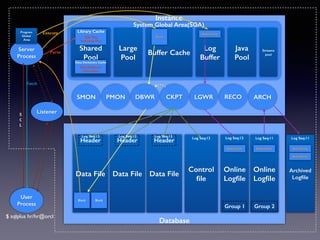
Library Cache 
Shared 
Pool 
Instance 
Buffer Cache Log 
Buffer 
Large 
Pool 
Java 
Pool 
Streams 
pool 
Data Dictionary Cache 
SMON PMON DBWR CKPT LGWR RECO ARCH 
Log Seq:12 Log Seq:12 Log Seq:12 Log Seq:12 Log Seq:12 Log Seq:11 Log Seq:11 
Data File Data File Data File Online 
Control 
file 
Logfile 
Online 
Logfile 
Header Header Header 
Group 1 Group 2 
Server 
Process 
User 
Process 
Archived 
Logfile 
System Global Area(SGA) 
Database 
Program 
Global 
Area 
Block Block 
Block 
S 
Q 
L 
Redo Entry 
Parse 
! 
SQL Text 
Execution Plan 
Execute 
Fetch 
Redo Entry Redo Entry Redo Entry 
Redo Entry 
Listener 
! 
Data Dictionary 
Information 
$ sqlplus hr/hr@orcl
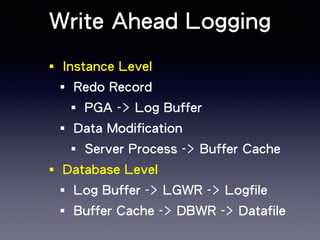
Write Ahead Logging 
‧Instance Level 
‧Redo Record 
‧PGA -> Log Buffer 
‧Data Modification 
‧Server Process -> Buffer Cache 
‧Database Level 
‧Log Buffer -> LGWR -> Logfile 
‧Buffer Cache -> DBWR -> Datafile
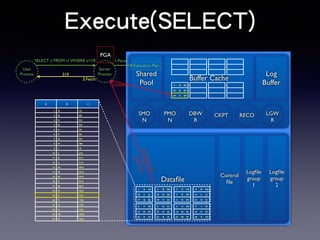
Execute(SELECT) 
Log 
Buffer 
Datafile Control 
file 
Logfile 
group 
1 
Logfile 
group 
2 
DBW 
R 
LGW 
R 
Server 
Process 
PMO 
N 
SMO 
N 
CKPT RECO 
1 A A1 
10 J J1 
0 
17 Q Q 
17 
2 B B2 
18 R R1 
8 
19 S S1 
9 
3 C C3 
7 G G7 
11 K K1 
1 
4 D D4 
12 L L1 
2 
21 U U 
21 
6 F F6 
13 M M1 
3 
22 V V2 
2 
8 H H8 
15 O O 
15 
24 X X 
24 
5 E E5 
14 N N 
14 
23 W W 
23 
9 I I9 
16 P P1 
6 
20 T T2 
0 
A B C 
1 A A1 
2 B B2 
3 C C3 
4 D D4 
5 E F5 
6 F E6 
7 G G7 
8 H H8 
9 I I9 
10 J J10 
11 K K11 
12 L L12 
13 M M13 
14 N N14 
15 O O15 
16 P P16 
17 Q Q17 
18 R R18 
19 S S19 
20 T T20 
21 U U21 
22 V V22 
23 W W23 
24 X X24 
User 
Process 
SELECT c FROM t1 WHERE a=19; 1.Parse 
2.Execute 
S19 
3.Fetch 
Shared 
Pool 
Buffer Cache 
Execution Plan 
2 B B2 
18 R R1 
8 
19 S S9 
1 
PGA 
Full Table Scan 
or 
Index Scan
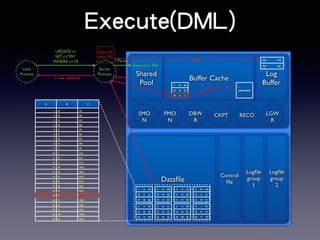
Execute(DML) 
Shared 
Pool 
Buffer Cache 
Log 
Buffer 
Datafile Control 
file 
Logfile 
group 
1 
Logfile 
group 
2 
DBW 
R 
LGW 
R 
Server 
Process 
PMO 
N 
SMO 
N 
CKPT RECO 
1 A A1 
10 J J1 
0 
17 Q Q 
17 
2 B B2 
18 R R1 
8 
19 S S1 
9 
3 C C3 
7 G G7 
11 K K1 
1 
4 D D4 
12 L L1 
2 
21 U U 
21 
6 F F6 
13 M M 
13 
22 V V2 
2 
8 H H8 
15 O O 
15 
24 X X 
24 
5 E E5 
14 N N 
14 
23 W W 
23 
9 I I9 
16 P P1 
6 
20 T T2 
0 
A B C 
1 A A1 
2 B B2 
3 C C3 
4 D D4 
5 E F5 
6 F E6 
7 G G7 
8 H H8 
9 I I9 
10 J J10 
11 K K11 
12 L L12 
13 M M13 
14 N N14 
15 O O15 
16 P P16 
17 Q Q17 
18 R R18 
19 S S91 
20 T T20 
21 U U21 
22 V V22 
23 W W23 
24 X X24 
User 
Process 
UPDATE t1 
SET c=‘S91’ 
WHERE a=19; 1.Parse 
Execution Plan 
2.Execute 
2 B B2 
18 R R1 
8 
19 S S9 
1 
S1 
undo block 
undo 
undo S19 
data S91 
und 
o 
S19 
dat 
a 
S91 
1 row updated 
redo
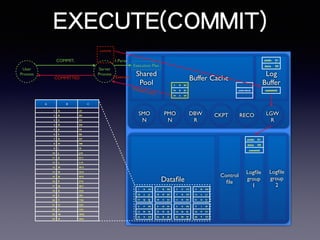
EXECUTE(COMMIT) 
Shared 
Pool 
Buffer Cache 
Log 
Buffer 
Datafile 
DBW 
R 
LGW 
R 
Server 
Process 
PMO 
N 
SMO 
N 
CKPT RECO 
1 A A1 
10 J J1 
0 
17 Q Q 
17 
2 B B2 
18 R R1 
8 
19 S S1 
9 
3 C C3 
7 G G7 
11 K K1 
1 
4 D D4 
12 L L1 
2 
21 U U 
21 
6 F F6 
13 M M 
13 
22 V V2 
2 
8 H H8 
15 O O 
15 
24 X X 
24 
5 E E5 
14 N N 
14 
23 W W 
23 
9 I I9 
16 P P1 
6 
20 T T2 
0 
A B C 
1 A A1 
2 B B2 
3 C C3 
4 D D4 
5 E F5 
6 F E6 
7 G G7 
8 H H8 
9 I I9 
10 J J10 
11 K K11 
12 L L12 
13 M M13 
14 N N14 
15 O O15 
16 P P16 
17 Q Q17 
18 R R18 
19 S S91 
20 T T20 
21 U U21 
22 V V22 
23 W W23 
24 X X24 
User 
Process 
COMMIT; 1.Parse 
Execution Plan 
2.Execute 
2 B B2 
18 R R1 
8 
19 S S9 
1 
S1 
undo block 
undo S1 
9 
data S9 
1 
commit 
commit 
Logfile 
group 
1 
Control 
file 
Logfile 
group 
2 
undo S1 
9 
data S9 
1 
commit 
COMMITTED 
Release Lock
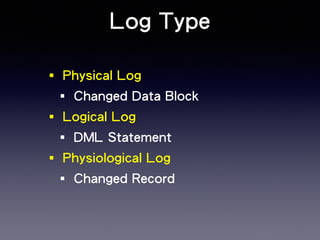
Log Type 
‧Physical Log 
‧Changed Data Block 
‧Logical Log 
‧DML Statement 
‧Physiological Log 
‧Changed Record
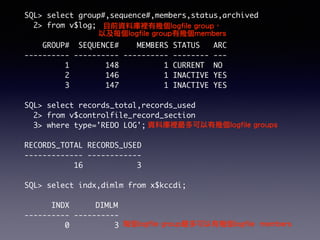
SQL> select group#,sequence#,members,status,archived 
2> from v$log; 
目前資料庫裡有幾個logfile group, 
! 
以及每個logfile group有幾個members 
GROUP# SEQUENCE# MEMBERS STATUS ARC 
---------- ---------- ---------- -------- --- 
1 148 1 CURRENT NO 
2 146 1 INACTIVE YES 
3 147 1 INACTIVE YES 
! 
SQL> select records_total,records_used 
2> from v$controlfile_record_section 
3> where type='REDO LOG'; 
! 
RECORDS_TOTAL RECORDS_USED 
------------- ------------ 
16 3 
! 
SQL> select indx,dimlm from x$kccdi; 
! 
INDX DIMLM 
---------- ---------- 
0 3 
資料庫裡最多可以有幾個logfile groups 
每個logfile group最多可以有幾個logfile members
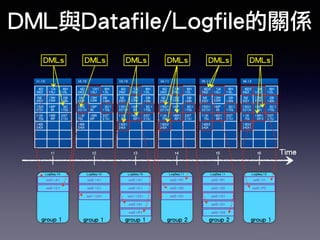
DML與Datafile/Logfile的關係 
DMLs DMLs DMLs DMLs DMLs DMLs 
t1:10 t2:10 t3:10 t4:11 t5:11 t6:12 
4|D 
26|Z 
1|A 
10|J 
8|H 
12|L 
5|E 
25|Y 
13|M 
23|W 
2|B 
14|N 
15|O 
22|V 
16|P 
9|I 
3|C 
17|Q 
11|K 
7|G 
18|R 
6|F 
20|T 
21|U 
19|S 
24|X 
t1 t2 t3 t4 t5 t6 Time 
LogSeq:10 LogSeq:10 LogSeq:10 LogSeq:11 
col2->A1 
col2->C1 
4|D 
26|Z 
1|A1 
10|J 
8|H 
12|L 
5|E 
25|Y 
13|M 
23|W 
2|B 
14|N 
15|O 
221|V 
16|P 
9|I 
3|C1 
17|Q 
11|K 
7|G 
18|R 
6|F 
20|T 
21|U 
19|S 
24|X 
4|D 
26|Z 
1|A 
10|J 
8|H 
12|L 
5|E 
25|Y 
13|M 
23|W 
2|B 
14|N 
15|O 
221|V 
16|P 
9|I 
3|C1 
17|Q 
11|K 
7|G 
18|R 
6|F1 
20|T 
21|U 
19|S1 
24|X 
col2->A1 
col2->C1 
col1->221 
col2->A1 
col2->C1 
col1->221 
col2->S1 
col2->F1 
4|D 
26|Z 
1|A 
10|J 
8|H 
12|L 
5|E 
25|Y 
13|M 
23|W 
2|B 
14|N 
15|O1 
221|V 
16|P 
9|I 
3|C1 
17|Q 
11|K 
7|G 
18|R1 
6|F1 
20|T 
21|U 
19|S2 
24|X 
col2->R1 
col2->S2 
col2->O1 
4|D2 
26|Z 
1|A 
10|J 
8|H 
12|L 
5|E 
25|Y 
13|M 
23|W 
2|B 
14|N 
15|O1 
221|V 
16|P 
9|I 
3|C1 
17|Q 
11|K 
7|G 
18|R1 
6|F1 
20|T 
21|U 
19|S2 
24|X 
LogSeq:11 
col2->R1 
col2->S2 
col2->O1 
col2->D1 
col2->D2 
4|D2 
26|Z 
1|A 
10|J 
8|H 
12|L 
5|E 
25|Y 
13|M 
23|W 
2|B 
14|N 
15|O1 
221|V 
16|P 
9|I1 
3|C1 
17|Q 
11|K 
7|G 
18|R1 
6|F2 
20|T 
21|U 
19|S2 
24|X1 
LogSeq:12 
col2->I1 
col2->F2 
group 1 group 1 group 1 group 2 group 2 group 1
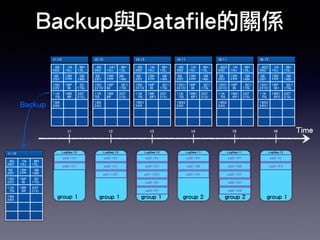
Backup與Datafile的關係 
t1:10 t2:10 t3:10 t4:11 t5:11 t6:12 
4|D 
26|Z 
1|A 
10|J 
8|H 
12|L 
5|E 
25|Y 
13|M 
23|W 
2|B 
14|N 
15|O 
22|V 
16|P 
9|I 
3|C 
17|Q 
11|K 
7|G 
18|R 
6|F 
20|T 
21|U 
19|S 
24|X 
t1 t2 t3 t4 t5 t6 Time 
LogSeq:10 LogSeq:10 LogSeq:10 LogSeq:11 
col2->A1 
col2->C1 
4|D 
26|Z 
1|A1 
10|J 
8|H 
12|L 
5|E 
25|Y 
13|M 
23|W 
2|B 
14|N 
15|O 
221|V 
16|P 
9|I 
3|C1 
17|Q 
11|K 
7|G 
18|R 
6|F 
20|T 
21|U 
19|S 
24|X 
4|D 
26|Z 
1|A 
10|J 
8|H 
12|L 
5|E 
25|Y 
13|M 
23|W 
2|B 
14|N 
15|O 
221|V 
16|P 
9|I 
3|C1 
17|Q 
11|K 
7|G 
18|R 
6|F1 
20|T 
21|U 
19|S1 
24|X 
col2->A1 
col2->C1 
col1->221 
col2->A1 
col2->C1 
col1->221 
col2->S1 
col2->F1 
4|D 
26|Z 
1|A 
10|J 
8|H 
12|L 
5|E 
25|Y 
13|M 
23|W 
2|B 
14|N 
15|O1 
221|V 
16|P 
9|I 
3|C1 
17|Q 
11|K 
7|G 
18|R1 
6|F1 
20|T 
21|U 
19|S2 
24|X 
col2->R1 
col2->S2 
col2->O1 
4|D2 
26|Z 
1|A 
10|J 
8|H 
12|L 
5|E 
25|Y 
13|M 
23|W 
2|B 
14|N 
15|O1 
221|V 
16|P 
9|I 
3|C1 
17|Q 
11|K 
7|G 
18|R1 
6|F1 
20|T 
21|U 
19|S2 
24|X 
LogSeq:11 
col2->R1 
col2->S2 
col2->O1 
col2->D1 
col2->D2 
4|D2 
26|Z 
1|A 
10|J 
8|H 
12|L 
5|E 
25|Y 
13|M 
23|W 
2|B 
14|N 
15|O1 
221|V 
16|P 
9|I1 
3|C1 
17|Q 
11|K 
7|G 
18|R1 
6|F2 
20|T 
21|U 
19|S2 
24|X1 
LogSeq:12 
col2->I1 
col2->F2 
t1:10 
4|D 
26|Z 
1|A 
10|J 
8|H 
12|L 
5|E 
25|Y 
13|M 
23|W 
2|B 
14|N 
15|O 
22|V 
16|P 
9|I 
3|C 
17|Q 
11|K 
7|G 
18|R 
6|F 
20|T 
21|U 
19|S 
24|X 
Backup 
group 1 group 1 group 1 group 2 group 2 group 1
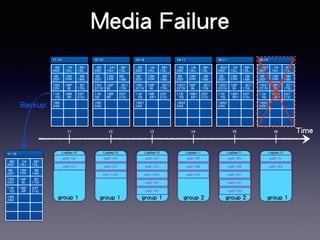
Media Failure 
t1:10 t2:10 t3:10 t4:11 t5:11 t6:12 
4|D 
26|Z 
1|A 
10|J 
8|H 
12|L 
5|E 
25|Y 
13|M 
23|W 
2|B 
14|N 
15|O 
22|V 
16|P 
9|I 
3|C 
17|Q 
11|K 
7|G 
18|R 
6|F 
20|T 
21|U 
19|S 
24|X 
t1 t2 t3 t4 t5 t6 Time 
LogSeq:10 LogSeq:10 LogSeq:10 LogSeq:11 
col2->A1 
col2->C1 
4|D 
26|Z 
1|A1 
10|J 
8|H 
12|L 
5|E 
25|Y 
13|M 
23|W 
2|B 
14|N 
15|O 
221|V 
16|P 
9|I 
3|C1 
17|Q 
11|K 
7|G 
18|R 
6|F 
20|T 
21|U 
19|S 
24|X 
4|D 
26|Z 
1|A 
10|J 
8|H 
12|L 
5|E 
25|Y 
13|M 
23|W 
2|B 
14|N 
15|O 
221|V 
16|P 
9|I 
3|C1 
17|Q 
11|K 
7|G 
18|R 
6|F1 
20|T 
21|U 
19|S1 
24|X 
col2->A1 
col2->C1 
col1->221 
col2->A1 
col2->C1 
col1->221 
col2->S1 
col2->F1 
4|D 
26|Z 
1|A 
10|J 
8|H 
12|L 
5|E 
25|Y 
13|M 
23|W 
2|B 
14|N 
15|O1 
221|V 
16|P 
9|I 
3|C1 
17|Q 
11|K 
7|G 
18|R1 
6|F1 
20|T 
21|U 
19|S2 
24|X 
col2->R1 
col2->S2 
col2->O1 
4|D2 
26|Z 
1|A 
10|J 
8|H 
12|L 
5|E 
25|Y 
13|M 
23|W 
2|B 
14|N 
15|O1 
221|V 
16|P 
9|I 
3|C1 
17|Q 
11|K 
7|G 
18|R1 
6|F1 
20|T 
21|U 
19|S2 
24|X 
LogSeq:11 
col2->R1 
col2->S2 
col2->O1 
col2->D1 
col2->D2 
4|D2 
26|Z 
1|A 
10|J 
8|H 
12|L 
5|E 
25|Y 
13|M 
23|W 
2|B 
14|N 
15|O1 
221|V 
16|P 
9|I1 
3|C1 
17|Q 
11|K 
7|G 
18|R1 
6|F2 
20|T 
21|U 
19|S2 
24|X1 
LogSeq:12 
col2->I1 
col2->F2 
t1:10 
4|D 
26|Z 
1|A 
10|J 
8|H 
12|L 
5|E 
25|Y 
13|M 
23|W 
2|B 
14|N 
15|O 
22|V 
16|P 
9|I 
3|C 
17|Q 
11|K 
7|G 
18|R 
6|F 
20|T 
21|U 
19|S 
24|X 
Backup 
group 1 group 1 group 1 group 2 group 2 group 1
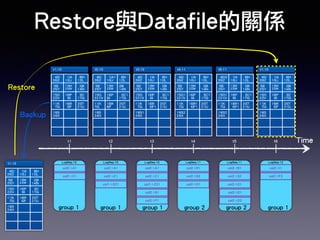
Restore與Datafile的關係 
t1:10 t2:10 t3:10 t4:11 t5:11 
4|D 
26|Z 
1|A 
10|J 
8|H 
12|L 
5|E 
25|Y 
13|M 
23|W 
2|B 
14|N 
15|O 
22|V 
16|P 
9|I 
3|C 
17|Q 
11|K 
7|G 
18|R 
6|F 
20|T 
21|U 
Backup 19|S 
24|X 
24|X 
t1 t2 t3 t4 t5 t6 Time 
LogSeq:10 LogSeq:10 LogSeq:10 LogSeq:11 
col2->A1 
col2->C1 
4|D 
26|Z 
1|A1 
10|J 
8|H 
12|L 
5|E 
25|Y 
13|M 
23|W 
2|B 
14|N 
15|O 
221|V 
16|P 
9|I 
3|C1 
17|Q 
11|K 
7|G 
18|R 
6|F 
20|T 
21|U 
19|S 
24|X 
4|D 
26|Z 
1|A 
10|J 
8|H 
12|L 
5|E 
25|Y 
13|M 
23|W 
2|B 
14|N 
15|O 
221|V 
16|P 
9|I 
3|C1 
17|Q 
11|K 
7|G 
18|R 
6|F1 
20|T 
21|U 
19|S1 
24|X 
col2->A1 
col2->C1 
col1->221 
col2->A1 
col2->C1 
col1->221 
col2->S1 
col2->F1 
4|D 
26|Z 
1|A 
10|J 
8|H 
12|L 
5|E 
25|Y 
13|M 
23|W 
2|B 
14|N 
15|O1 
221|V 
16|P 
9|I 
3|C1 
17|Q 
11|K 
7|G 
18|R1 
6|F1 
20|T 
21|U 
19|S2 
24|X 
col2->R1 
col2->S2 
col2->O1 
4|D2 
26|Z 
1|A 
10|J 
8|H 
12|L 
5|E 
25|Y 
13|M 
23|W 
2|B 
14|N 
15|O1 
221|V 
16|P 
9|I 
3|C1 
17|Q 
11|K 
7|G 
18|R1 
6|F1 
20|T 
21|U 
19|S2 
24|X 
LogSeq:11 
col2->R1 
col2->S2 
col2->O1 
col2->D1 
col2->D2 
LogSeq:12 
col2->I1 
col2->F2 
t1:10 
4|D 
26|Z 
1|A 
10|J 
8|H 
12|L 
5|E 
25|Y 
13|M 
23|W 
2|B 
14|N 
15|O 
22|V 
16|P 
9|I 
3|C 
17|Q 
11|K 
7|G 
18|R 
6|F 
20|T 
21|U 
19|S 
24|X 
t1:10 
4|D 
26|Z 
1|A 
10|J 
8|H 
12|L 
5|E 
25|Y 
13|M 
23|W 
2|B 
14|N 
15|O 
22|V 
16|P 
9|I 
3|C 
17|Q 
11|K 
7|G 
18|R 
6|F 
20|T 
21|U 
19|S 
Restore 
group 1 group 1 group 1 group 2 group 2 group 1
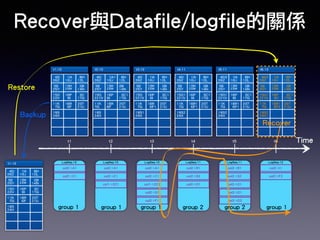
Recover與Datafile/logfile的關係 
4|D 
26|Z 
1|A 
10|J 
8|H 
12|L 
5|E 
25|Y 
13|M 
23|W 
2|B 
14|N 
15|O 
22|V 
16|P 
9|I 
3|C 
17|Q 
11|K 
7|G 
18|R 
6|F 
20|T 
21|U 
19|S 
24|X 
Recover 
t1 t2 t3 t4 t5 t6 Time 
LogSeq:10 LogSeq:10 LogSeq:10 LogSeq:11 
col2->A1 
col2->C1 
4|D 
26|Z 
1|A1 
10|J 
8|H 
12|L 
5|E 
25|Y 
13|M 
23|W 
2|B 
14|N 
15|O 
221|V 
16|P 
9|I 
3|C1 
17|Q 
11|K 
7|G 
18|R 
6|F 
20|T 
21|U 
19|S 
24|X 
4|D 
26|Z 
1|A 
10|J 
8|H 
12|L 
5|E 
25|Y 
13|M 
23|W 
2|B 
14|N 
15|O 
221|V 
16|P 
9|I 
3|C1 
17|Q 
11|K 
7|G 
18|R 
6|F1 
20|T 
21|U 
19|S1 
24|X 
col2->A1 
col2->C1 
col1->221 
col2->A1 
col2->C1 
col1->221 
col2->S1 
col2->F1 
4|D 
26|Z 
1|A 
10|J 
8|H 
12|L 
5|E 
25|Y 
13|M 
23|W 
2|B 
14|N 
15|O1 
221|V 
16|P 
9|I 
3|C1 
17|Q 
11|K 
7|G 
18|R1 
6|F1 
20|T 
21|U 
19|S2 
24|X 
col2->R1 
col2->S2 
col2->O1 
4|D2 
26|Z 
1|A 
10|J 
8|H 
12|L 
5|E 
25|Y 
13|M 
23|W 
2|B 
14|N 
15|O1 
221|V 
16|P 
9|I 
3|C1 
17|Q 
11|K 
7|G 
18|R1 
6|F1 
20|T 
21|U 
19|S2 
24|X 
LogSeq:11 
col2->R1 
col2->S2 
col2->O1 
col2->D1 
col2->D2 
LogSeq:12 
col2->I1 
col2->F2 
Restore 
t1:10 
4|D 
26|Z 
1|A 
10|J 
8|H 
12|L 
5|E 
25|Y 
13|M 
23|W 
2|B 
14|N 
15|O 
22|V 
16|P 
9|I 
3|C 
17|Q 
11|K 
7|G 
18|R 
6|F 
20|T 
21|U 
19|S 
24|X 
t6:12 
Backup 
t1:10 t2:10 t3:10 t4:11 t5:11 
4|D2 
26|Z 
1|A 
10|J 
8|H 
12|L 
5|E 
25|Y 
13|M 
23|W 
2|B 
14|N 
15|O1 
221|V 
16|P 
9|I1 
3|C1 
17|Q 
11|K 
7|G 
18|R1 
6|F2 
20|T 
21|U 
19|S2 
24|X1 
group 1 group 1 group 1 group 2 group 2 group 1
Log Switch 
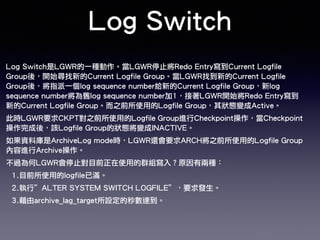
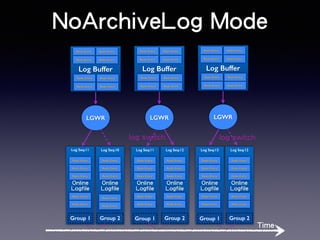
Log Switch是LGWR的一種動作。當LGWR停止將Redo Entry寫到Current Logfile 
Group後,開始尋找新的Current Logfile Group。當LGWR找到新的Current Logfile 
Group後,將指派一個log sequence number給新的Current Logfile Group,新log 
sequence number將為舊log sequence number加1,接著LGWR開始將Redo Entry寫到 
新的Current Logfile Group。而之前所使用的Logfile Group,其狀態變成Active。 
此時LGWR要求CKPT對之前所使用的Logfile Group進行Checkpoint操作,當Checkpoint 
操作完成後,該Logfile Group的狀態將變成INACTIVE。 
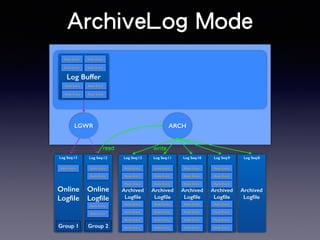
如果資料庫是ArchiveLog mode時,LGWR還會要求ARCH將之前所使用的Logfile Group 
內容進行Archive操作。 
不過為何LGWR會停止對目前正在使用的群組寫入?原因有兩種: 
1.目前所使用的logfile已滿。 
2.執行”ALTER SYSTEM SWITCH LOGFILE”,要求發生。 
3.藉由archive_lag_target所設定的秒數達到。
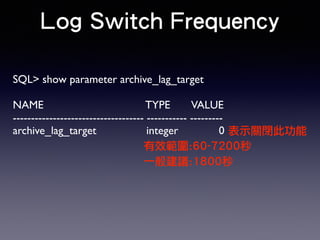
Log Switch Frequency 
SQL> show parameter archive_lag_target 
! 
NAME TYPE 
VALUE 
------------------------------------ ----------- --------- 
archive_lag_target integer 0 
表示關閉此功能 
有效範圍:60-7200秒 
一般建議:1800秒
NoArchiveLog Mode 
Redo Entry Redo Entry 
Log Buffer 
Redo Entry 
Redo Entry 
Redo Entry Redo Entry 
LGWR 
Log Seq:11 Log Seq:10 
Redo Entry Redo Entry 
Redo Entry 
Redo Entry 
Online 
Logfile 
Redo Entry 
Redo Entry 
Online 
Logfile 
Redo Entry 
Redo Entry 
Redo Entry 
Redo Entry 
Group 1 Group 2 
Redo Entry Redo Entry 
Log Buffer 
Redo Entry 
LGWR 
Log Seq:11 
Redo Entry 
Redo Entry 
Redo Entry 
Online 
Logfile 
Redo Entry 
Redo Entry 
Log Seq:12 
Redo Entry 
Redo Entry 
Redo Entry 
Online 
Logfile 
Redo Entry 
Redo Entry 
Redo Entry 
Redo Entry Redo Entry 
Group 1 Group 2 
Redo Entry Redo Entry 
Log Buffer 
Redo Entry 
LGWR 
Log Seq:13 
Redo Entry 
Redo Entry 
Redo Entry 
Online 
Logfile 
Redo Entry 
Redo Entry 
Log Seq:12 
Redo Entry 
Redo Entry 
Redo Entry 
Online 
Logfile 
Redo Entry 
Redo Entry 
Redo Entry 
Redo Entry Redo Entry 
Group 1 Group 2 
Time 
log switch log switch
ArchiveLog Mode 
Redo Entry Redo Entry 
Redo Entry 
LGWR ARCH 
Log Seq:13 Log Seq:12 Log Seq:12 
Redo Entry Redo Entry Redo Entry 
Online 
Logfile 
Online 
Logfile 
Group 1 Group 2 
Redo Entry 
Redo Entry 
Archived 
Logfile 
Redo Entry 
Redo Entry 
Redo Entry 
Redo Entry 
Redo Entry 
Redo Entry 
Redo Entry 
Log Seq:11 
Redo Entry 
Redo Entry 
Redo Entry 
Archived 
Logfile 
Redo Entry 
Redo Entry 
Redo Entry 
Redo Entry 
Log Seq:10 
Redo Entry 
Redo Entry 
Redo Entry 
Archived 
Logfile 
Redo Entry 
Redo Entry 
Redo Entry 
Redo Entry 
Log Seq:9 
Redo Entry 
Redo Entry 
Redo Entry 
Archived 
Logfile 
Redo Entry 
Redo Entry 
Redo Entry 
Redo Entry 
Log Buffer 
Redo Entry 
Redo Entry Redo Entry 
Log Seq:8 
Archived 
Logfile 
read write
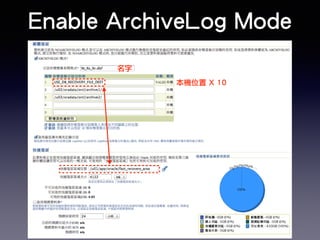
Enable ArchiveLog Mode 
名字 
本機位置 X 10
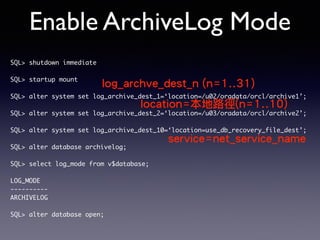
Enable ArchiveLog Mode 
SQL> shutdown immediate 
! 
SQL> startup mount 
log_archve_dest_n (n=1..31) 
! 
SQL> alter system set log_archive_dest_1=‘location=/u02/oradata/orcl/archive1’; 
! 
location=本地路徑(n=1..10) 
SQL> alter system set log_archive_dest_2=‘location=/u03/oradata/orcl/archive2’; 
! 
SQL> alter system set log_archive_dest_10=‘location=use_db_recovery_file_dest’; 
! 
service=net_service_name 
SQL> alter database archivelog; 
! 
SQL> select log_mode from v$database; 
! 
LOG_MODE 
---------- 
ARCHIVELOG 
! 
SQL> alter database open;
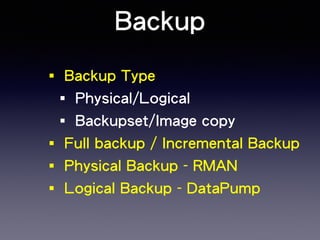
Backup 
‧Backup Type 
‧Physical/Logical 
‧Backupset/Image copy 
‧Full backup / Incremental Backup 
‧Physical Backup - RMAN 
‧Logical Backup - DataPump
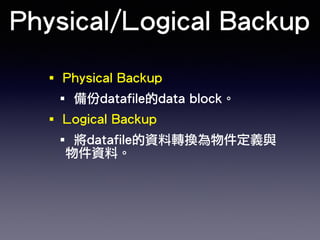
Physical/Logical Backup 
‧Physical Backup 
‧備份datafile的data block。 
‧Logical Backup 
‧將datafile的資料轉換為物件定義與 
物件資料。
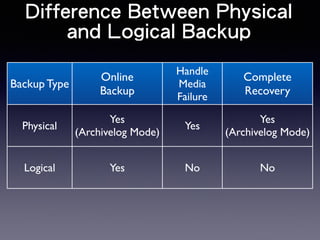
Difference Between Physical 
and Logical Backup 
Backup Type 
Online 
Backup 
Handle 
Media 
Failure 
Complete 
Recovery 
Physical 
Yes 
(Archivelog Mode) Yes 
Yes 
(Archivelog Mode) 
Logical Yes No No
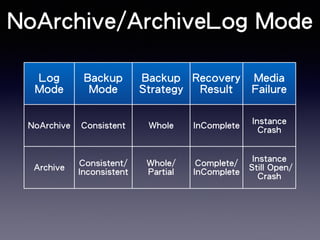
NoArchive/ArchiveLog Mode 
Log 
Mode 
Backup 
Mode 
Backup 
Strategy 
Recovery 
Result 
Media 
Failure 
NoArchive Consistent Whole InComplete Instance 
Crash 
Archive Consistent/ 
Inconsistent 
Whole/ 
Partial 
Complete/ 
InComplete 
Instance 
Still Open/ 
Crash
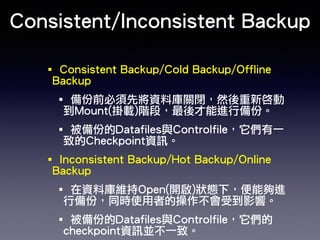
Consistent/Inconsistent Backup 
‧Consistent Backup/Cold Backup/Offline 
Backup 
‧備份前必須先將資料庫關閉,然後重新啓動 
到Mount(掛載)階段,最後才能進行備份。 
‧被備份的Datafiles與Controlfile,它們有一 
致的Checkpoint資訊。 
‧Inconsistent Backup/Hot Backup/Online 
Backup 
‧在資料庫維持Open(開啟)狀態下,便能夠進 
行備份,同時使用者的操作不會受到影響。 
‧被備份的Datafiles與Controlfile,它們的 
checkpoint資訊並不一致。
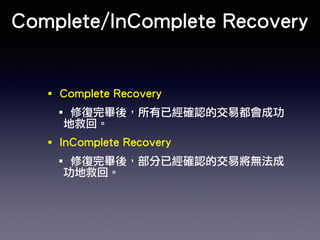
Complete/InComplete Recovery 
‧Complete Recovery 
‧修復完畢後,所有已經確認的交易都會成功 
地救回。 
‧InComplete Recovery 
‧修復完畢後,部分已經確認的交易將無法成 
功地救回。
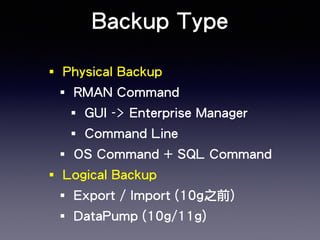
Backup Type 
‧Physical Backup 
‧RMAN Command 
‧GUI -> Enterprise Manager 
‧Command Line 
‧OS Command + SQL Command 
‧Logical Backup 
‧Export / Import (10g之前) 
‧DataPump (10g/11g)
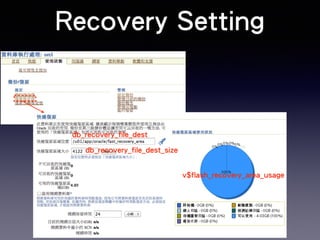
Recovery Setting 
db_recovery_file_dest 
db_recovery_file_dest_size 
v$flash_recovery_area_usage
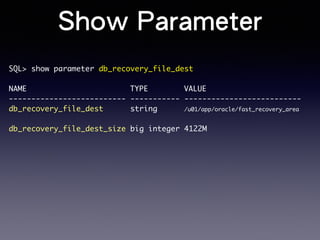
Show Parameter 
SQL> show parameter db_recovery_file_dest 
! 
NAME TYPE VALUE 
-------------------------- ----------- -------------------------- 
db_recovery_file_dest string /u01/app/oracle/fast_recovery_area 
! 
db_recovery_file_dest_size big integer 4122M
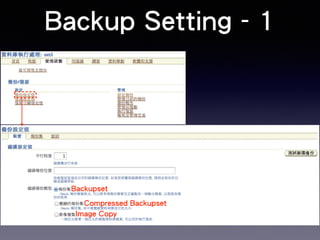
Backup Setting - 1 
Backupset 
Compressed Backupset 
Image Copy
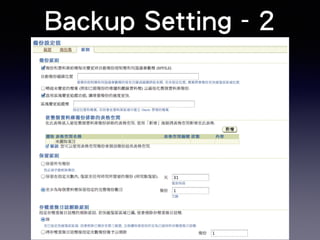
Backup Setting - 2
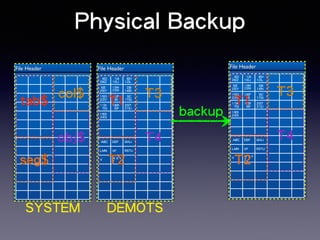
Physical Backup 
File Header 
File Header 
T1 
obj$ ABC DEF GHIJ 
ABC DEF GHIJ 
LMN OP RSTU 
V W X Y 
Z 
4|D 
26|Z 
1|A 
10|J 
8|H 
12|L 
5|E 
25|Y 
13|M 
23|W 
2|B 
14|N 
15|O 
22|V 
16|P 
9|I 
3|C 
17|Q 
11|K 
7|G 
18|R 
6|F 
20|T 
21|U 
19|S 
24|X 
T1 
T2 
T3 
T4 
DEMOTS 
File Header 
tab$ 
seg$ 
col$ 
SYSTEM 
LMN OP RSTU 
V W X Y 
Z 
4|D 
26|Z 
1|A 
10|J 
8|H 
12|L 
5|E 
25|Y 
13|M 
23|W 
2|B 
14|N 
15|O 
22|V 
16|P 
9|I 
3|C 
17|Q 
11|K 
7|G 
18|R 
6|F 
20|T 
21|U 
19|S 
24|X 
T2 
T3 
T4 
backup
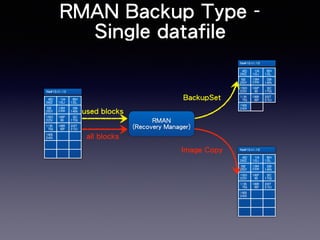
RMAN Backup Type - 
Single datafile 
file#10:t1:10 
4|D 
26|Z 
1|A 
10|J 
8|H 
12|L 
5|E 
25|Y 
13|M 
23|W 
2|B 
14|N 
15|O 
22|V 
16|P 
9|I 
3|C 
17|Q 
11|K 
7|G 
18|R 
6|F 
20|T 
21|U 
19|S 
24|X 
file#10:t1:10 
4|D 
26|Z 
1|A 
10|J 
8|H 
12|L 
5|E 
25|Y 
13|M 
23|W 
2|B 
14|N 
15|O 
22|V 
16|P 
9|I 
3|C 
17|Q 
11|K 
7|G 
18|R 
6|F 
20|T 
21|U 
19|S 
24|X 
file#10:t1:10 
4|D 
26|Z 
1|A 
10|J 
8|H 
12|L 
5|E 
25|Y 
13|M 
23|W 
2|B 
14|N 
15|O 
22|V 
16|P 
9|I 
3|C 
17|Q 
11|K 
7|G 
18|R 
6|F 
20|T 
21|U 
19|S 
24|X 
RMAN 
BackupSet 
(Recovery Manager) 
Image Copy 
used blocks 
all blocks
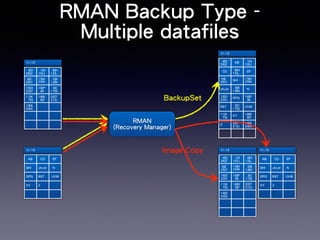
RMAN Backup Type - 
Multiple datafiles 
t1:10 4|D 
4|D 
26|Z 
1|A 
10|J 
8|H 
12|L 
5|E 
25|Y 
13|M 
23|W 
2|B 
14|N 
15|O 
22|V 
16|P 
9|I 
3|C 
17|Q 
11|K 
7|G 
18|R 
6|F 
20|T 
21|U 
19|S 
24|X 
26|Z 
AB 1|A 
10|J 
CD 8|H 
12|L 
EF 
5|E 
25|Y 
GHI 13|M 
23|W 
JKLM 2|B 
14|N 
N 
15|O 
22|V 
OPQ 16|P 
9|I 
RST 3|C 
17|Q 
UVW 
11|K 
7|G 
XY 18|R 
6|F 
Z 20|T 
21|U 
19|S 
24|X 
t1:10 
t1:10 
4|D 
26|Z 
1|A 
10|J 
8|H 
12|L 
5|E 
25|Y 
13|M 
23|W 
2|B 
14|N 
15|O 
22|V 
16|P 
9|I 
3|C 
17|Q 
11|K 
7|G 
18|R 
6|F 
20|T 
21|U 
19|S 
24|X 
RMAN 
BackupSet 
(Recovery Manager) 
Image Copy 
t1:10 
AB CD EF 
GHI JKLM N 
OPQ RST UVW 
XY Z 
t1:10 
AB CD EF 
GHI JKLM N 
OPQ RST UVW 
XY Z
RMAN Command 
‧RMAN> backup as backupset database; 
! 
‧RMAN> backup as copy database;
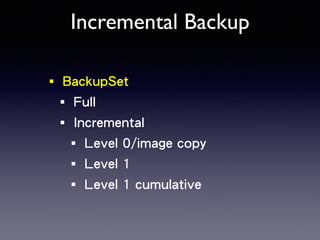
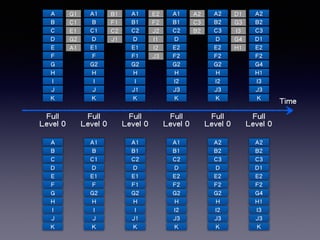
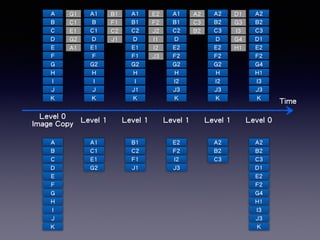
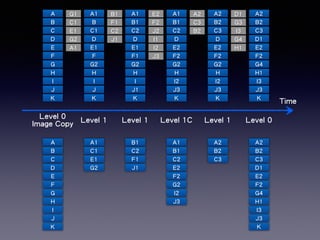
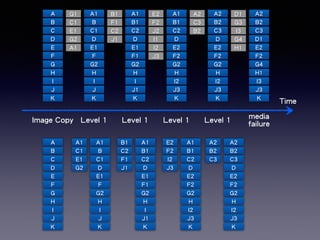
Incremental Backup 
‧BackupSet 
‧Full 
‧Incremental 
‧Level 0/image copy 
‧Level 1 
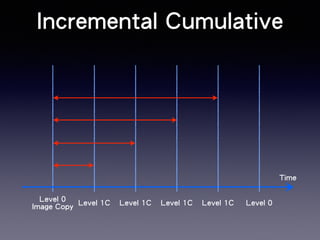
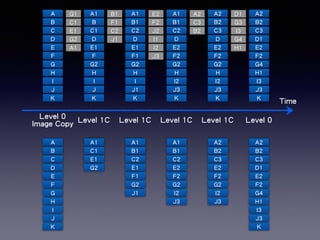
‧Level 1 cumulative
Time 
A 
B 
C 
D 
E 
F 
G 
H 
I 
J 
K 
Full 
Level 0 
A 
B 
C 
D 
E 
F 
G 
H 
I 
J 
K 
G1 A1 
A1 
B 
C1 
D 
E1 
F 
G2 
H 
I 
J 
K 
C1 
E1 
G2 
A1 
B1 A1 
B1 
C2 
D 
E1 
F1 
G2 
H 
I 
J1 
K 
F1 
C2 
J1 
B1 
C2 
D 
E2 
F2 
G2 
H 
I2 
J3 
K 
E2 
F2 
J2 
I1 
I2 
J3 
A2 A2 
A2 
B2 
C3 
D 
E2 
F2 
G2 
H 
I2 
J3 
K 
C3 
B2 
B2 
C3 
D1 
E2 
F2 
G4 
H1 
I3 
J3 
K 
D1 
G3 
I3 
G4 
H1 
A2 
B2 
C3 
D1 
E2 
F2 
G4 
H1 
I3 
J3 
K 
A1 
B 
C1 
D 
E1 
F 
G2 
H 
I 
J 
K 
A1 
B1 
C2 
D 
E1 
F1 
G2 
H 
I 
J1 
K 
A1 
B1 
C2 
D 
E2 
F2 
G2 
H 
I2 
J3 
K 
A2 
B2 
C3 
D 
E2 
F2 
G2 
H 
I2 
J3 
K 
Full 
Level 0 
Full 
Level 0 
Full 
Level 0 
Full 
Level 0 
Full 
Level 0
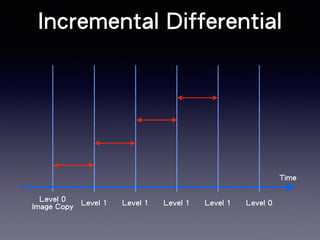
Incremental Differential 
Time 
Level 0 
Image Copy Level 1 Level 1 Level 1 Level 1 Level 0
Time 
A 
B 
C 
D 
E 
F 
G 
H 
I 
J 
K 
G1 A1 
B1 E2 
A1 
A2 D1 
A2 
Level 0 
Image Copy Level 1 Level 1 Level 1 Level 1 Level 0 
A 
B 
C 
D 
E 
F 
G 
H 
I 
J 
K 
A1 
B 
C1 
D 
E1 
F 
G2 
H 
I 
J 
K 
A1 
C1 
E1 
G2 
C1 
E1 
G2 
A1 
B1 
C2 
D 
E1 
F1 
G2 
H 
I 
J1 
K 
F1 
C2 
J1 
B1 
C2 
D 
E2 
F2 
G2 
H 
I2 
J3 
K 
F2 
J2 
I1 
I2 
J3 
A2 
B2 
C3 
D 
E2 
F2 
G2 
H 
I2 
J3 
K 
C3 
B2 
B2 
C3 
D1 
E2 
F2 
G4 
H1 
I3 
J3 
K 
G3 
I3 
G4 
H1 
B1 
C2 
F1 
J1 
E2 
F2 
I2 
J3 
A2 
B2 
C3 
A2 
B2 
C3 
D1 
E2 
F2 
G4 
H1 
I3 
J3 
K
Incremental Cumulative 
Time 
Level 0 
Image Copy Level 1C Level 1C Level 1C Level 1C Level 0
Time 
A 
B 
C 
D 
E 
F 
G 
H 
I 
J 
K 
G1 A1 
B1 E2 
A1 
A2 D1 
A2 
Level 0 
Image Copy Level 1C Level 1C Level 1C Level 1C Level 0 
A 
B 
C 
D 
E 
F 
G 
H 
I 
J 
K 
A1 
B 
C1 
D 
E1 
F 
G2 
H 
I 
J 
K 
A1 
C1 
E1 
G2 
C1 
E1 
G2 
A1 
B1 
C2 
D 
E1 
F1 
G2 
H 
I 
J1 
K 
F1 
C2 
J1 
B1 
C2 
D 
E2 
F2 
G2 
H 
I2 
J3 
K 
F2 
J2 
I1 
I2 
J3 
A2 
B2 
C3 
D 
E2 
F2 
G2 
H 
I2 
J3 
K 
C3 
B2 
B2 
C3 
D1 
E2 
F2 
G4 
H1 
I3 
J3 
K 
G3 
I3 
G4 
H1 
A2 
B2 
C3 
D1 
E2 
F2 
G4 
H1 
I3 
J3 
K 
A1 
B1 
C2 
E1 
F1 
G2 
J1 
A1 
B1 
C2 
E2 
F2 
G2 
I2 
J3 
A2 
B2 
C3 
E2 
F2 
G2 
I2 
J3
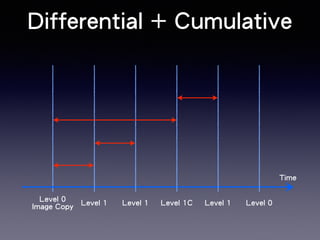
Differential + Cumulative 
Time 
Level 0 
Image Copy Level 1 Level 1 Level 1C Level 1 Level 0
Time 
A 
B 
C 
D 
E 
F 
G 
H 
I 
J 
K 
G1 A1 
B1 E2 
A1 
A2 D1 
A2 
Level 0 
Image Copy Level 1 Level 1 Level 1C Level 1 Level 0 
A 
B 
C 
D 
E 
F 
G 
H 
I 
J 
K 
A1 
B 
C1 
D 
E1 
F 
G2 
H 
I 
J 
K 
A1 
C1 
E1 
G2 
C1 
E1 
G2 
A1 
B1 
C2 
D 
E1 
F1 
G2 
H 
I 
J1 
K 
F1 
C2 
J1 
B1 
C2 
D 
E2 
F2 
G2 
H 
I2 
J3 
K 
F2 
J2 
I1 
I2 
J3 
A2 
B2 
C3 
D 
E2 
F2 
G2 
H 
I2 
J3 
K 
C3 
B2 
B2 
C3 
D1 
E2 
F2 
G4 
H1 
I3 
J3 
K 
G3 
I3 
G4 
H1 
B1 
C2 
F1 
J1 
A2 
B2 
C3 
A2 
B2 
C3 
D1 
E2 
F2 
G4 
H1 
I3 
J3 
K 
A1 
B1 
C2 
E2 
F2 
G2 
I2 
J3
Time 
G1 A1 
C1 
E1 
G2 
A1 
B1 E2 
A1 
A2 D1 
A2 
Image Copy Level 1 Level 1 Level 1 Level 1 media 
failure 
A 
B 
C 
D 
E 
F 
G 
H 
I 
J 
K 
A 
B 
C 
D 
E 
F 
G 
H 
I 
J 
K 
A1 
B 
C1 
D 
E1 
F 
G2 
H 
I 
J 
K 
A1 
C1 
E1 
G2 
B1 
C2 
D 
E1 
F1 
G2 
H 
I 
J1 
K 
F1 
C2 
J1 
B1 
C2 
D 
E2 
F2 
G2 
H 
I2 
J3 
K 
F2 
J2 
I1 
I2 
J3 
A2 
B2 
C3 
D 
E2 
F2 
G2 
H 
I2 
J3 
K 
C3 
B2 
B2 
C3 
D1 
E2 
F2 
G4 
H1 
I3 
J3 
K 
G3 
I3 
G4 
H1 
B1 
C2 
F1 
J1 
E2 
F2 
I2 
J3 
A2 
B2 
C3 
A1 
B 
C1 
D 
E1 
F 
G2 
H 
I 
J 
K 
A1 
B1 
C2 
D 
E1 
F1 
G2 
H 
I 
J1 
K 
A1 
B1 
C2 
D 
E2 
F2 
G2 
H 
I2 
J3 
K 
A2 
B2 
C3 
D 
E2 
F2 
G2 
H 
I2 
J3 
K
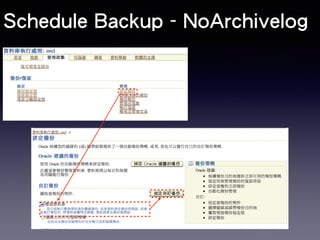
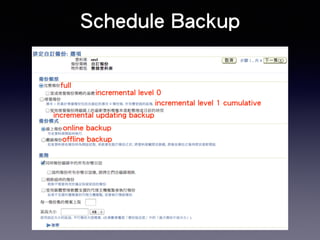
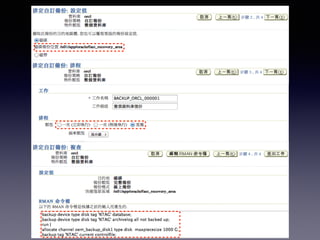
Schedule Backup - NoArchivelog
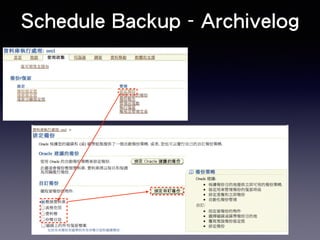
Schedule Backup - Archivelog
full 
Schedule Backup 
incremental level 0 
incremental level 1 cumulative 
incremental updating backup 
online backup 
offline backup
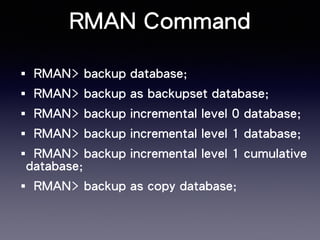
RMAN Command 
‧RMAN> backup database; 
‧RMAN> backup as backupset database; 
‧RMAN> backup incremental level 0 database; 
‧RMAN> backup incremental level 1 database; 
‧RMAN> backup incremental level 1 cumulative 
database; 
‧RMAN> backup as copy database;
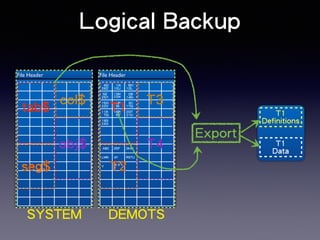
Logical Backup 
File Header 
ABC DEF GHIJ 
LMN OP RSTU 
V W X Y 
Z 
4|D 
26|Z 
1|A 
10|J 
8|H 
12|L 
5|E 
25|Y 
13|M 
23|W 
2|B 
14|N 
15|O 
22|V 
16|P 
9|I 
3|C 
17|Q 
11|K 
7|G 
18|R 
6|F 
20|T 
21|U 
19|S 
24|X 
T1 
T2 
T3 
T4 
DEMOTS 
File Header 
tab$ 
seg$ 
col$ 
obj$ 
SYSTEM 
T1 
Definitions 
T1 
Data 
Export
DataPump 
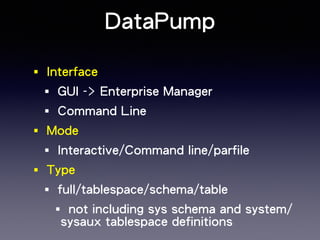
‧Interface 
‧GUI -> Enterprise Manager 
‧Command Line 
‧Mode 
‧Interactive/Command line/parfile 
‧Type 
‧full/tablespace/schema/table 
‧not including sys schema and system/ 
sysaux tablespace definitions
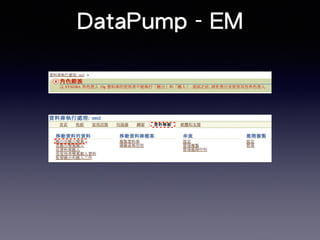
DataPump - EM
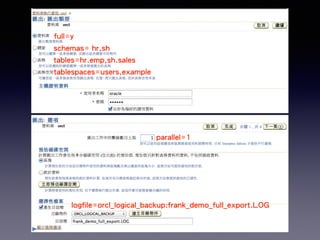
full=y 
schemas= hr,sh 
tables=hr.emp,sh.sales 
tablespaces=users,example 
parallel=1 
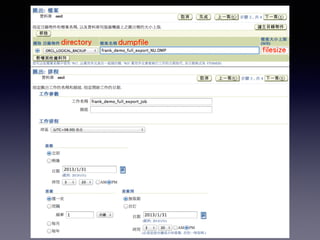
logfile=orcl_logical_backup:frank_demo_full_export.LOG
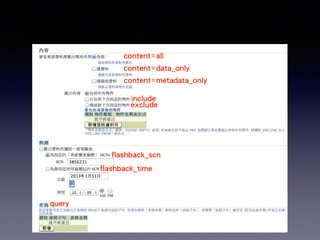
content=all 
content=data_only 
content=metadata_only 
include 
exclude 
flashback_scn 
flashback_time 
query
directory dumpfile 
filesize
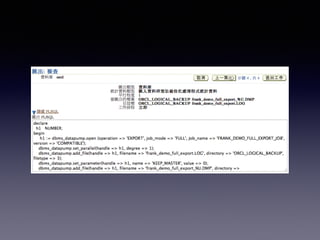
[oracle@oraDB ~]$ expdp system/oracle directory=orcl_logical_backup 
dumpfile=frank_demo_full_export_%U.dmp full=y 
! 
Starting "SYSTEM"."SYS_EXPORT_FULL_01": system/******** 
directory=orcl_logical_backup dumpfile=frank_demo_full_export_%U.dmp full=y 
Estimate in progress using BLOCKS method... 
Processing object type DATABASE_EXPORT/SCHEMA/TABLE/TABLE_DATA 
Total estimation using BLOCKS method: 478.0 MB 
Processing object type DATABASE_EXPORT/TABLESPACE 
Processing object type DATABASE_EXPORT/PROFILE 
Processing object type DATABASE_EXPORT/SYS_USER/USER 
object definition 
Processing object type DATABASE_EXPORT/SCHEMA/USER 
.....中間省略 
. . exported "HR"."COUNTRIES" 6.367 KB 25 rows 
. . exported "HR"."DEPARTMENTS" 7.007 KB 27 rows 
. . exported "HR"."DEPT" 7.007 KB 27 rows 
. . exported "HR"."EMP" 16.80 KB 107 rows 
. . exported "HR"."EMPLOYEES" object data 
16.81 KB 107 rows 
. . exported "HR"."JOBS" 6.992 KB 19 rows 
. . exported "HR"."JOB_HISTORY" 7.054 KB 10 rows 
. . exported "HR"."LOCATIONS" 8.273 KB 23 rows 
. . exported "HR"."REGIONS" 5.484 KB 4 rows 
Master table "SYSTEM"."SYS_EXPORT_FULL_01" successfully loaded/unloaded 
****************************************************************************** 
Dump file set for SYSTEM.SYS_EXPORT_FULL_01 is: 
/home/oracle/orcl_logical_backup/frank_demo_full_export_01.dmp 
Job "SYSTEM"."SYS_EXPORT_FULL_01" successfully completed at 16:20:46
Recovery 
‧Failure Type 
‧Media Recovery 
‧Complete 
‧InComplete 
‧Logical Recovery
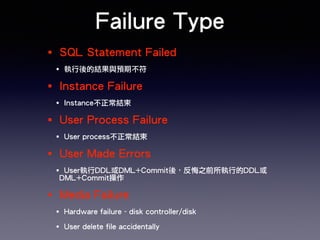
Failure Type 
‧SQL Statement Failed 
‧執行後的結果與預期不符 
‧Instance Failure 
‧Instance不正常結束 
‧User Process Failure 
‧User process不正常結束 
‧User Made Errors 
‧User執行DDL或DML+Commit後,反悔之前所執行的DDL或 
DML+Commit操作 
‧Media Failure 
‧Hardware failure - disk controller/disk 
‧User delete file accidentally
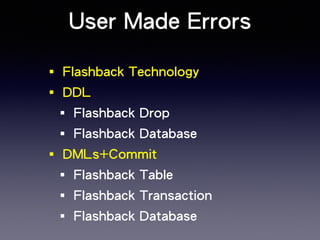
User Made Errors 
‧Flashback Technology 
‧DDL 
‧Flashback Drop 
‧Flashback Database 
‧DMLs+Commit 
‧Flashback Table 
‧Flashback Transaction 
‧Flashback Database
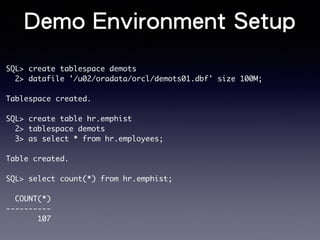
Demo Environment Setup 
SQL> create tablespace demots 
2> datafile '/u02/oradata/orcl/demots01.dbf' size 100M; 
! 
Tablespace created. 
! 
SQL> create table hr.emphist 
2> tablespace demots 
3> as select * from hr.employees; 
! 
Table created. 
! 
SQL> select count(*) from hr.emphist; 
! 
COUNT(*) 
---------- 
107
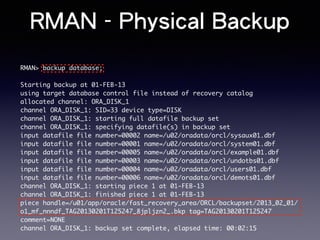
RMAN - Physical Backup 
RMAN> backup database; 
! 
Starting backup at 01-FEB-13 
using target database control file instead of recovery catalog 
allocated channel: ORA_DISK_1 
channel ORA_DISK_1: SID=33 device type=DISK 
channel ORA_DISK_1: starting full datafile backup set 
channel ORA_DISK_1: specifying datafile(s) in backup set 
input datafile file number=00002 name=/u02/oradata/orcl/sysaux01.dbf 
input datafile file number=00001 name=/u02/oradata/orcl/system01.dbf 
input datafile file number=00005 name=/u02/oradata/orcl/example01.dbf 
input datafile file number=00003 name=/u02/oradata/orcl/undotbs01.dbf 
input datafile file number=00004 name=/u02/oradata/orcl/users01.dbf 
input datafile file number=00006 name=/u02/oradata/orcl/demots01.dbf 
channel ORA_DISK_1: starting piece 1 at 01-FEB-13 
channel ORA_DISK_1: finished piece 1 at 01-FEB-13 
piece handle=/u01/app/oracle/fast_recovery_area/ORCL/backupset/2013_02_01/ 
o1_mf_nnndf_TAG20130201T125247_8jpljzn2_.bkp tag=TAG20130201T125247 
comment=NONE 
channel ORA_DISK_1: backup set complete, elapsed time: 00:02:15
Logical Backup - Datapump 
[oracle@oraDB ~]$ expdp system/oracle directory=orcl_logical_backup dumpfile=orcl_full.dmp 
full=y 
! 
Export: Release 11.2.0.3.0 - Production on Fri Feb 1 13:22:48 2013 
Starting "SYSTEM"."SYS_EXPORT_FULL_01": system/******** directory=orcl_logical_backup 
dumpfile=orcl_full.dmp full=y 
Estimate in progress using BLOCKS method... 
Processing object type DATABASE_EXPORT/SCHEMA/TABLE/TABLE_DATA 
Total estimation using BLOCKS method: 478.2 MB 
Processing object type DATABASE_EXPORT/TABLESPACE 
Processing object type DATABASE_EXPORT/PROFILE 
Processing object type DATABASE_EXPORT/SYS_USER/USER 
. . exported "HR"."COUNTRIES" 6.367 KB 25 rows 
. . exported "HR"."DEPARTMENTS" 7.007 KB 27 rows 
. . exported "HR"."DEPT" 7.007 KB 27 rows 
. . exported "HR"."EMP" 16.80 KB 107 rows 
. . exported "HR"."EMPHIST" 16.81 KB 107 rows 
. . exported "HR"."EMPLOYEES" 16.81 KB 107 rows 
! 
Master table "SYSTEM"."SYS_EXPORT_FULL_01" successfully loaded/unloaded 
****************************************************************************** 
Dump file set for SYSTEM.SYS_EXPORT_FULL_01 is: 
/home/oracle/orcl_logical_backup/orcl_full.dmp 
Job "SYSTEM"."SYS_EXPORT_FULL_01" successfully completed at 13:29:55
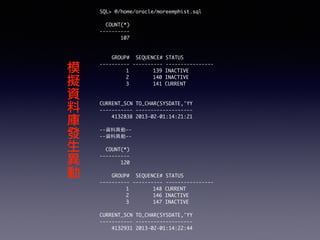
SQL> @/home/oracle/moreemphist.sql 
! 
COUNT(*) 
---------- 
107 
!! 
GROUP# SEQUENCE# STATUS 
---------- ---------- ---------------- 
1 139 INACTIVE 
2 140 INACTIVE 
3 141 CURRENT 
!! 
CURRENT_SCN TO_CHAR(SYSDATE,'YY 
----------- ------------------- 
4132838 2013-02-01:14:21:21 
! 
--資料異動-- 
--資料異動-- 
! 
COUNT(*) 
---------- 
120 
! 
GROUP# SEQUENCE# STATUS 
---------- ---------- ---------------- 
1 148 CURRENT 
2 146 INACTIVE 
3 147 INACTIVE 
! 
CURRENT_SCN TO_CHAR(SYSDATE,'YY 
----------- ------------------- 
4132931 2013-02-01:14:22:44 
模擬資料庫發生異動
發生Media Failure 
[oracle@oraDB ~]$ rm /u02/oradata/orcl/demots01.dbf 
[oracle@oraDB ~]$ ll /u02/oradata/orcl/demots01.dbf 
ls: /u02/oradata/orcl/demots01.dbf: 沒有此⼀一檔案或⺫⽬目錄 
! 
! 
(不屬於system/active undo tablespace) 
SQL> select count(*) from hr.emphist; 
select count(*) from hr.emphist 
* 
non-critical datafile 
ERROR at line 1: 
ORA-01116: error in opening database file 6 
ORA-01110: data file 6: '/u02/oradata/orcl/demots01.dbf' 
ORA-27041: unable to open file 
Linux-x86_64 Error: 2: No such file or directory 
Additional information: 3
Complete Recovery - 事前檢查 
SQL> select status from v$instance; 
! 
STATUS 
------------ 
OPEN 
檢查資料庫是否 
維持開啓狀態? 
! 
[oracle@oraDB ~]$ ps -ef | grep smon 
oracle 13446 5759 0 15:52 pts/2 00:00:00 grep smon 
oracle 22017 1 0 Jan31 ? 00:00:16 ora_smon_orcl 
! 
! 
SQL> select name 
2 from v$tablespace 
3 where ts#=(select ts# from v$datafile where file#=6); 
! 
NAME 
------------------------------ 
DEMOTS 
發生media failure的datafile 
屬於哪個tablespace?
controlfile 
SYSTEM 
USERS 
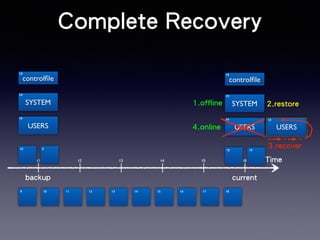
Complete Recovery 
controlfile 
1.offline 2.restore 
SYSTEM 
10 
19 
10 17 19 
t1 t2 t3 t4 t5 t6 Time 
10 
10 
10 
10 9 
backup 
USERS 
19 
19 
19 
18 19 
9 10 11 12 13 14 15 16 17 18 
current 
10 
USERS 
3.recover 
4.online
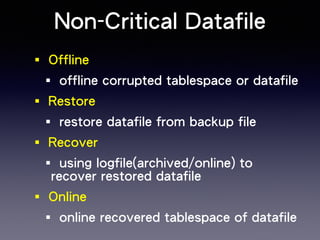
Non-Critical Datafile 
‧Offline 
‧offline corrupted tablespace or datafile 
‧Restore 
‧restore datafile from backup file 
‧Recover 
‧using logfile(archived/online) to 
recover restored datafile 
‧Online 
‧online recovered tablespace of datafile
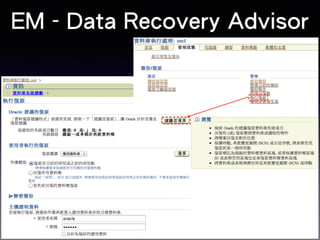
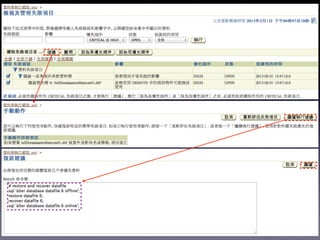
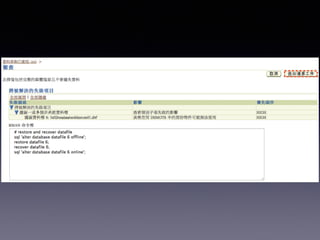
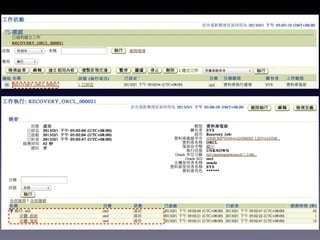
EM - Data Recovery Advisor
RMAN Command 
[oracle@oraDB ~]$ . oraenv 
ORACLE_SID = [orcl] ? orcl 
The Oracle base remains unchanged with value /u01/app/oracle 
! 
[oracle@oraDB ~]$ rman target / 
! 
connected to target database: ORCL (DBID=1299552376) 
! 
RMAN> run { 
2> sql ‘alter database datafile 6 offline’; 
3> restore datafile 6; 
4> recover datafile 6; 
5> sql ‘alter database datafile 6 online’}; 
! 
2選1 
RMAN> run { 
2> sql ‘alter tablespace demots offline temporary’; 
3> restore tablespace demots; 
4> recover tablespace demots; 
5> sql ‘alter tablespace demots online’};
Data Recovery Advisor - 
list failure 
[oracle@oraDB ~]$ rman target / 
! 
Recovery Manager: Release 11.2.0.3.0 - Production on Fri Feb 1 16:37:22 2013 
! 
connected to target database: ORCL (DBID=1299552376) 
! 
RMAN> list failure detail; 
! 
using target database control file instead of recovery catalog 
List of Database Failures 
========================= 
! 
Failure ID Priority Status Time Detected Summary 
---------- -------- --------- ------------- ------- 
102 HIGH OPEN 01-FEB-13 One or more non-system datafiles are missing 
Impact: See impact for individual child failures 
List of child failures for parent failure ID 102 
Failure ID Priority Status Time Detected Summary 
---------- -------- --------- ------------- ------- 
105 HIGH OPEN 01-FEB-13 Datafile 6: '/u02/oradata/orcl/demots01.dbf' 
is missing 
Impact: Some objects in tablespace DEMOTS might be unavailable
Data Recovery Advisor - 
advise failure 
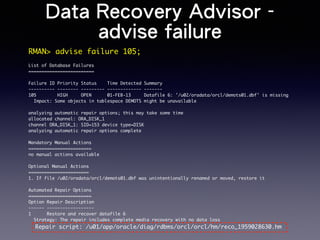
RMAN> advise failure 105; 
! 
List of Database Failures 
========================= 
! 
Failure ID Priority Status Time Detected Summary 
---------- -------- --------- ------------- ------- 
105 HIGH OPEN 01-FEB-13 Datafile 6: '/u02/oradata/orcl/demots01.dbf' is missing 
Impact: Some objects in tablespace DEMOTS might be unavailable 
! 
analyzing automatic repair options; this may take some time 
allocated channel: ORA_DISK_1 
channel ORA_DISK_1: SID=153 device type=DISK 
analyzing automatic repair options complete 
! 
Mandatory Manual Actions 
======================== 
no manual actions available 
! 
Optional Manual Actions 
======================= 
1. If file /u02/oradata/orcl/demots01.dbf was unintentionally renamed or moved, restore it 
! 
Automated Repair Options 
======================== 
Option Repair Description 
------ ------------------ 
1 Restore and recover datafile 6 
Strategy: The repair includes complete media recovery with no data loss 
Repair script: /u01/app/oracle/diag/rdbms/orcl/orcl/hm/reco_1959028630.hm
Data Recovery Advisor - 
repair failure 
[oracle@oraDB ~]$ cat /u01/app/oracle/diag/rdbms/orcl/orcl/hm/reco_1959028630.hm 
# restore and recover datafile 
sql 'alter database datafile 6 offline'; 
restore datafile 6; 
recover datafile 6; 
sql 'alter database datafile 6 online'; 
! 
RMAN> repair failure; 
! 
Strategy: The repair includes complete media recovery with no data loss 
Repair script: /u01/app/oracle/diag/rdbms/orcl/orcl/hm/reco_1959028630.hm 
! 
contents of repair script: 
# restore and recover datafile 
sql 'alter database datafile 6 offline'; 
restore datafile 6; 
recover datafile 6; 
sql 'alter database datafile 6 online'; 
! 
Do you really want to execute the above repair (enter YES or NO)? YES 
executing repair script
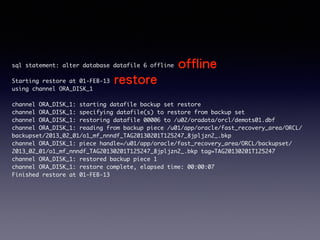
offline 
sql statement: alter database datafile 6 offline 
! 
Starting restore at 01-FEB-13 
restore 
using channel ORA_DISK_1 
! 
channel ORA_DISK_1: starting datafile backup set restore 
channel ORA_DISK_1: specifying datafile(s) to restore from backup set 
channel ORA_DISK_1: restoring datafile 00006 to /u02/oradata/orcl/demots01.dbf 
channel ORA_DISK_1: reading from backup piece /u01/app/oracle/fast_recovery_area/ORCL/ 
backupset/2013_02_01/o1_mf_nnndf_TAG20130201T125247_8jpljzn2_.bkp 
channel ORA_DISK_1: piece handle=/u01/app/oracle/fast_recovery_area/ORCL/backupset/ 
2013_02_01/o1_mf_nnndf_TAG20130201T125247_8jpljzn2_.bkp tag=TAG20130201T125247 
channel ORA_DISK_1: restored backup piece 1 
channel ORA_DISK_1: restore complete, elapsed time: 00:00:07 
Finished restore at 01-FEB-13
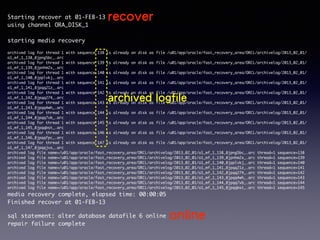
recover 
Starting recover at 01-FEB-13 
using channel ORA_DISK_1 
! 
starting media recovery 
! 
archived log for thread 1 with sequence 138 is already on disk as file /u01/app/oracle/fast_recovery_area/ORCL/archivelog/2013_02_01/ 
o1_mf_1_138_8jpng5bc_.arc 
archived log for thread 1 with sequence 139 is already on disk as file /u01/app/oracle/fast_recovery_area/ORCL/archivelog/2013_02_01/ 
o1_mf_1_139_8jpnhm2x_.arc 
archived log for thread 1 with sequence 140 is already on disk as file /u01/app/oracle/fast_recovery_area/ORCL/archivelog/2013_02_01/ 
o1_mf_1_140_8jpplvkj_.arc 
archived log for thread 1 with sequence 141 is already on disk as file /u01/app/oracle/fast_recovery_area/ORCL/archivelog/2013_02_01/ 
o1_mf_1_141_8jpqq21z_.arc 
archived log for thread 1 with sequence 142 is o1_mf_1_142_8jpqq274_.arc 
archived already on disk as logfile 
file /u01/app/oracle/fast_recovery_area/ORCL/archivelog/2013_02_01/ 
archived log for thread 1 with sequence 143 is already on disk as file /u01/app/oracle/fast_recovery_area/ORCL/archivelog/2013_02_01/ 
o1_mf_1_143_8jpqq4wh_.arc 
archived log for thread 1 with sequence 144 is already on disk as file /u01/app/oracle/fast_recovery_area/ORCL/archivelog/2013_02_01/ 
o1_mf_1_144_8jpqq7vb_.arc 
archived log for thread 1 with sequence 145 is already on disk as file /u01/app/oracle/fast_recovery_area/ORCL/archivelog/2013_02_01/ 
o1_mf_1_145_8jpqqbst_.arc 
archived log for thread 1 with sequence 146 is already on disk as file /u01/app/oracle/fast_recovery_area/ORCL/archivelog/2013_02_01/ 
o1_mf_1_146_8jpqqfpc_.arc 
archived log for thread 1 with sequence 147 is already on disk as file /u01/app/oracle/fast_recovery_area/ORCL/archivelog/2013_02_01/ 
o1_mf_1_147_8jpqqjvx_.arc 
archived log file name=/u01/app/oracle/fast_recovery_area/ORCL/archivelog/2013_02_01/o1_mf_1_138_8jpng5bc_.arc thread=1 sequence=138 
archived log file name=/u01/app/oracle/fast_recovery_area/ORCL/archivelog/2013_02_01/o1_mf_1_139_8jpnhm2x_.arc thread=1 sequence=139 
archived log file name=/u01/app/oracle/fast_recovery_area/ORCL/archivelog/2013_02_01/o1_mf_1_140_8jpplvkj_.arc thread=1 sequence=140 
archived log file name=/u01/app/oracle/fast_recovery_area/ORCL/archivelog/2013_02_01/o1_mf_1_141_8jpqq21z_.arc thread=1 sequence=141 
archived log file name=/u01/app/oracle/fast_recovery_area/ORCL/archivelog/2013_02_01/o1_mf_1_142_8jpqq274_.arc thread=1 sequence=142 
archived log file name=/u01/app/oracle/fast_recovery_area/ORCL/archivelog/2013_02_01/o1_mf_1_143_8jpqq4wh_.arc thread=1 sequence=143 
archived log file name=/u01/app/oracle/fast_recovery_area/ORCL/archivelog/2013_02_01/o1_mf_1_144_8jpqq7vb_.arc thread=1 sequence=144 
archived log file name=/u01/app/oracle/fast_recovery_area/ORCL/archivelog/2013_02_01/o1_mf_1_145_8jpqqbst_.arc thread=1 sequence=145 
media recovery complete, elapsed time: 00:00:05 
Finished recover at 01-FEB-13 
! 
sql statement: alter database datafile 6 online 
online 
repair failure complete
發生Media Failure 
[oracle@oraDB ~]$ rm /u02/oradata/orcl/system01.dbf 
[oracle@oraDB ~]$ ll /u02/oradata/orcl/system01.dbf 
ls: /u02/oradata/orcl/system01.dbf: 沒有此⼀一檔案或⺫⽬目錄 
! 
critical datafile(屬於system/active undo tablespace) 
! 
SQL> select count(*) from hr.emphist; 
select count(*) from hr.emphist 
crash 
* 
ERROR at line 1: 
ORA-01034: ORACLE not Instance available 
Process ID: 0 
Session ID: 0 Serial number: 0 
! 
[oracle@oraDB ~]$ ps -ef | grep smon 
oracle 21884 5759 0 17:25 pts/2 00:00:00 grep smon
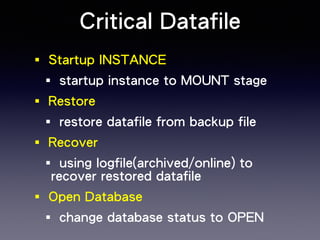
Critical Datafile 
‧Startup INSTANCE 
‧startup instance to MOUNT stage 
‧Restore 
‧restore datafile from backup file 
‧Recover 
‧using logfile(archived/online) to 
recover restored datafile 
‧Open Database 
‧change database status to OPEN
Startup MOUNT 
[oracle@oraDB ~]$ sqlplus / as sysdba 
! 
Connected to an idle instance. 
! 
SQL> startup mount 
ORACLE instance started. 
! 
Total System Global Area 521936896 bytes 
Fixed Size 2229944 bytes 
Variable Size 377489736 bytes 
Database Buffers 134217728 bytes 
Redo Buffers 7999488 bytes 
Database mounted. 
! 
SQL> select * from v$recover_file; 
! 
FILE# ONLINE ONLINE_ ERROR CHANGE# TIME 
---------- ------- ------- -------------------- ---------- --------- 
1 ONLINE ONLINE FILE NOT FOUND 0
[oracle@oraDB ~]$ rman target / 
! 
connected to target database: ORCL (DBID=1299552376, not open) 
! 
RMAN> run { 
2> restore datafile 1; 
3> recover datafile 1; 
4> alter database open;} 
! 
Starting restore at 01-FEB-13 
using target database control file instead of recovery catalog 
allocated channel: ORA_DISK_1 
channel ORA_DISK_1: SID=133 device type=DISK 
--中間省略 
Starting recover at 01-FEB-13 
using channel ORA_DISK_1 
! 
starting media recovery 
--中間省略 
media recovery complete, elapsed time: 00:00:15 
Finished recover at 01-FEB-13 
! 
database opened
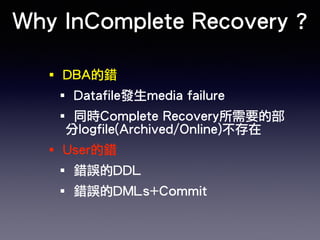
Why InComplete Recovery ? 
‧DBA的錯 
‧Datafile發生media failure 
‧同時Complete Recovery所需要的部 
分logfile(Archived/Online)不存在 
‧User的錯 
‧錯誤的DDL 
‧錯誤的DMLs+Commit
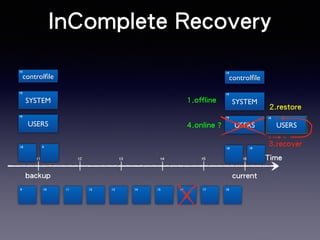
InComplete Recovery 
controlfile 
SYSTEM 
USERS 
controlfile 
SYSTEM 
10 
15 
10 15 
t1 t2 t3 t4 t5 t6 Time 
10 
10 
10 
10 9 
backup 
USERS 
19 
19 
19 
18 19 
9 10 11 12 13 14 15 16 17 18 
current 
1.offline 
2.restore 
10 
USERS 
3.recover 
4.online ?
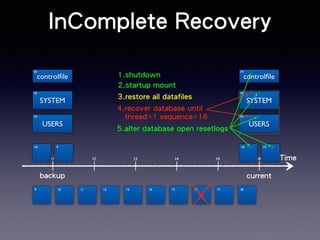
InComplete Recovery 
controlfile 
SYSTEM 
USERS 
3.restore all datafiles 
thread=1 sequence=16 
1 
controlfile 
15 
1 
SYSTEM 
15 
1 
t1 t2 t3 t4 t5 t6 Time 
10 
10 
10 
10 9 
backup 
9 10 11 12 13 14 15 16 17 18 
current 
1.shutdown 
2.startup mount 
4.recover database until 
5.alter database open resetlogs 
USERS 
19 
10 
10 
18 19 
1 0
InComplete Recovery 
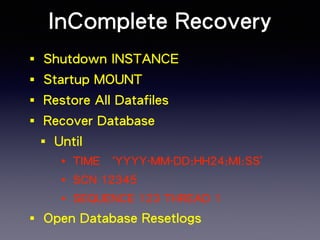
‧Shutdown INSTANCE 
‧Startup MOUNT 
‧Restore All Datafiles 
‧Recover Database 
‧Until 
‧TIME `YYYY-MM-DD:HH24:MI:SS’ 
‧SCN 12345 
‧SEQUENCE 123 THREAD 1 
‧Open Database Resetlogs
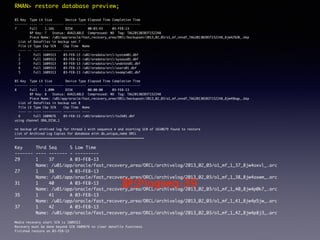
RMAN> restore database preview; 
! 
BS Key Type LV Size Device Type Elapsed Time Completion Time 
------- ---- -- ---------- ----------- ------------ --------------- 
7 Full 1.16G DISK 00:03:43 03-FEB-13 
BP Key: 7 Status: AVAILABLE Compressed: NO Tag: TAG20130203T152248 
Piece Name: /u01/app/oracle/fast_recovery_area/ORCL/backupset/2013_02_03/o1_mf_nnndf_TAG20130203T152248_8jw42920_.bkp 
List of Datafiles in backup set 7 
File LV Type Ckp SCN Ckp Time Name 
---- -- ---- ---------- --------- ---- 
1 Full 1609313 03-FEB-13 /u02/oradata/orcl/system01.dbf 
2 Full 1609313 03-FEB-13 /u02/oradata/orcl/sysaux01.dbf 
3 Full 1609313 03-FEB-13 /u02/oradata/orcl/undotbs01.dbf 
4 Full 1609313 03-FEB-13 /u02/oradata/orcl/users01.dbf 
5 Full 1609313 03-FEB-13 /u02/oradata/orcl/example01.dbf ! 
BS Key Type LV Size Device Type Elapsed Time Completion Time 
------- ---- -- ---------- ----------- ------------ --------------- 
8 Full 1.09M DISK 00:00:00 03-FEB-13 
BP Key: 8 Status: AVAILABLE Compressed: NO Tag: TAG20130203T152248 
Piece Name: /u01/app/oracle/fast_recovery_area/ORCL/backupset/2013_02_03/o1_mf_nnndf_TAG20130203T152248_8jw49bqp_.bkp 
List of Datafiles in backup set 8 
File LV Type Ckp SCN Ckp Time Name 
---- -- ---- ---------- --------- ---- 
6 Full 1609676 03-FEB-13 /u02/oradata/orcl/ts2k01.dbf 
using channel ORA_DISK_1 ! 
no backup of archived log for thread 1 with sequence 4 and starting SCN of 1610679 found to restore 
List of Archived Log Copies for database with db_unique_name ORCL 
===================================================================== ! 
Key Thrd Seq S Low Time 
------- ---- ------- - --------- 
29 1 37 A 03-FEB-13 
Name: /u01/app/oracle/fast_recovery_area/ORCL/archivelog/2013_02_03/o1_mf_1_37_8jw4oxvl_.arc 
27 1 38 A 03-FEB-13 
Name: /u01/app/oracle/fast_recovery_area/ORCL/archivelog/2013_02_03/o1_mf_1_38_8jw4oxwm_.arc 
31 1 40 A 03-FEB-13 
缺少logseq:39 
Name: /u01/app/oracle/fast_recovery_area/ORCL/archivelog/2013_02_03/o1_mf_1_40_8jw4p0k7_.arc 
35 1 41 A 03-FEB-13 
Name: /u01/app/oracle/fast_recovery_area/ORCL/archivelog/2013_02_03/o1_mf_1_41_8jw4p5jw_.arc 
37 1 42 A 03-FEB-13 
Name: /u01/app/oracle/fast_recovery_area/ORCL/archivelog/2013_02_03/o1_mf_1_42_8jw4p8j3_.arc 
! 
Media recovery start SCN is 1609313 
Recovery must be done beyond SCN 1609676 to clear datafile fuzziness 
Finished restore at 03-FEB-13
[oracle@oraDB ~]$ rman target / 
RMAN> shutdown abort 
! 
Oracle instance shut down 
! 
RMAN> startup mount 
! 
connected to target database (not started) 
Oracle instance started 
database mounted 
! 
Total System Global Area 521936896 bytes 
! 
Fixed Size 2229944 bytes 
Variable Size 369101128 bytes 
Database Buffers 142606336 bytes 
Redo Buffers 7999488 bytes 
! 
RMAN> restore database; 
channel ORA_DISK_1: starting datafile backup set restore 
channel ORA_DISK_1: specifying datafile(s) to restore from backup set 
channel ORA_DISK_1: restoring datafile 00001 to /u02/oradata/orcl/system01.dbf 
channel ORA_DISK_1: restoring datafile 00002 to /u02/oradata/orcl/sysaux01.dbf 
channel ORA_DISK_1: restoring datafile 00003 to /u02/oradata/orcl/undotbs01.dbf 
channel ORA_DISK_1: restoring datafile 00004 to /u02/oradata/orcl/users01.dbf 
channel ORA_DISK_1: restoring datafile 00005 to /u02/oradata/orcl/example01.dbf
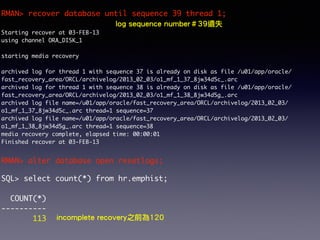
RMAN> recover database until sequence 39 thread 1; 
! 
log sequence number#39遺失 
Starting recover at 03-FEB-13 
using channel ORA_DISK_1 
! 
starting media recovery 
! 
archived log for thread 1 with sequence 37 is already on disk as file /u01/app/oracle/ 
fast_recovery_area/ORCL/archivelog/2013_02_03/o1_mf_1_37_8jw34d5c_.arc 
archived log for thread 1 with sequence 38 is already on disk as file /u01/app/oracle/ 
fast_recovery_area/ORCL/archivelog/2013_02_03/o1_mf_1_38_8jw34d5g_.arc 
archived log file name=/u01/app/oracle/fast_recovery_area/ORCL/archivelog/2013_02_03/ 
o1_mf_1_37_8jw34d5c_.arc thread=1 sequence=37 
archived log file name=/u01/app/oracle/fast_recovery_area/ORCL/archivelog/2013_02_03/ 
o1_mf_1_38_8jw34d5g_.arc thread=1 sequence=38 
media recovery complete, elapsed time: 00:00:01 
Finished recover at 03-FEB-13 
! 
RMAN> alter database open resetlogs; 
! 
SQL> select count(*) from hr.emphist; 
! 
COUNT(*) 
---------- 
113 incomplete recovery之前為120
Media Recovery using 
logical backup 
[oracle@oraDB ~]$ impdp system/oracle directory=orcl_logical_backup 
dumpfile=orcl_full.dmp tablespaces=! 
Import: Release 11.2.0.3.0 - Production on ! 
Way 
demots 
Fri Feb 1 17:12:56 2013 
Copyright (c) 1982, 2011, Oracle and/or its affiliates. All rights reserved. 
! 
Connected to: Oracle Database 11g No Enterprise Edition Release 11.2.0.3.0 - 64bit Production 
With the Partitioning, OLAP, Data Mining and Real Application Testing options 
Master table "SYSTEM"."SYS_IMPORT_TABLESPACE_01" successfully loaded/unloaded 
Starting "SYSTEM"."SYS_IMPORT_TABLESPACE_01": system/******** directory=orcl_logical_backup 
dumpfile=orcl_full.dmp tablespaces=demots 
Processing object type DATABASE_EXPORT/SCHEMA/TABLE/TABLE 
ORA-39151: Table "HR"."EMPHIST" exists. All dependent metadata and data will be skipped due 
to table_exists_action of skip 
Processing object type DATABASE_EXPORT/SCHEMA/TABLE/TABLE_DATA 
Job "SYSTEM"."SYS_IMPORT_TABLESPACE_01" completed with 1 error(s) at 17:13:21 
! 
[oracle@oraDB ~]$ oerr ora 39151 
39151, 00000, "Table %s exists. All dependent metadata and data will be skipped due to 
table_exists_action of skip" 
// *Document: NO
SQL> select count(*) from hr.emphist; 
! 
COUNT(*) 
---------- 
120 
! 
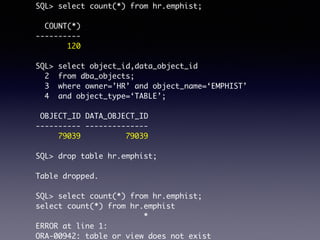
SQL> select object_id,data_object_id 
2 from dba_objects; 
3 where owner=’HR’ and object_name=‘EMPHIST’ 
4 and object_type=‘TABLE’; 
! 
OBJECT_ID DATA_OBJECT_ID 
---------- -------------- 
79039 79039 
! 
SQL> drop table hr.emphist; 
! 
Table dropped. 
! 
SQL> select count(*) from hr.emphist; 
select count(*) from hr.emphist 
* 
ERROR at line 1: 
ORA-00942: table or view does not exist
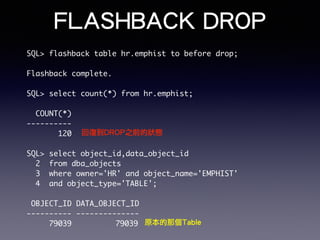
FLASHBACK DROP 
SQL> flashback table hr.emphist to before drop; 
! 
Flashback complete. 
! 
SQL> select count(*) from hr.emphist; 
! 
COUNT(*) 
---------- 
120 
回復到DROP之前的狀態 
! 
SQL> select object_id,data_object_id 
2 from dba_objects 
3 where owner='HR' and object_name='EMPHIST' 
4 and object_type='TABLE'; 
! 
OBJECT_ID DATA_OBJECT_ID 
---------- -------------- 
79039 79039 
原本的那個Table
Logical Backup - IMPORT 
[oracle@oraDB ~]$ impdp system/oracle directory=orcl_logical_backup 
dumpfile=orcl_full.dmp tables=hr.emphist 
! 
Import: Release 11.2.0.3.0 - Production on Fri Feb 1 17:42:18 2013 
Processing object type DATABASE_EXPORT/SCHEMA/TABLE/TABLE 
Processing object type DATABASE_EXPORT/SCHEMA/TABLE/TABLE_DATA 
. . imported "HR"."EMPHIST" 16.81 KB 107 rows 
! 
SQL> select count(*) from hr.emphist; 
! 
COUNT(*) 
---------- 
107 
回復到logical backup時的狀態 
並不是DROP之前的狀態 
! 
SQL> select object_id,data_object_id 
2 from dba_objects 
3 where owner='HR' and object_name='EMPHIST' 
4 and object_type='TABLE'; 
! 
OBJECT_ID DATA_OBJECT_ID 
---------- -------------- 
79168 79168 
新建Table
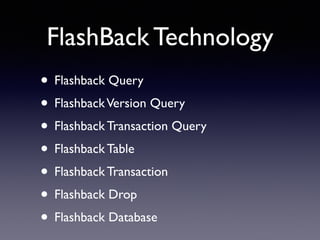
FlashBack Technology 
• Flashback Query 
• Flashback Version Query 
• Flashback Transaction Query 
• Flashback Table 
• Flashback Transaction 
• Flashback Drop 
• Flashback Database
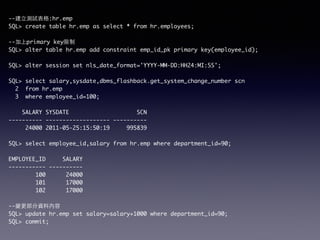
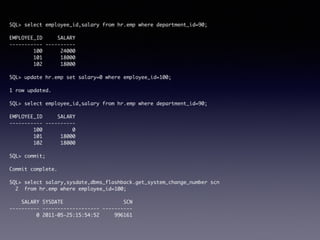
--建⽴立測試表格:hr.emp 
SQL> create table hr.emp as select * from hr.employees; 
! 
--加上primary key限制 
SQL> alter table hr.emp add constraint emp_id_pk primary key(employee_id); 
! 
SQL> alter session set nls_date_format='YYYY-MM-DD:HH24:MI:SS'; 
! 
SQL> select salary,sysdate,dbms_flashback.get_system_change_number scn 
2 from hr.emp 
3 where employee_id=100; 
! 
SALARY SYSDATE SCN 
---------- ------------------- ---------- 
24000 2011-05-25:15:50:19 995839 
! 
SQL> select employee_id,salary from hr.emp where department_id=90; 
! 
EMPLOYEE_ID SALARY 
----------- ---------- 
100 24000 
101 17000 
102 17000 
! 
--變更部分資料內容 
SQL> update hr.emp set salary=salary+1000 where department_id=90; 
SQL> commit;
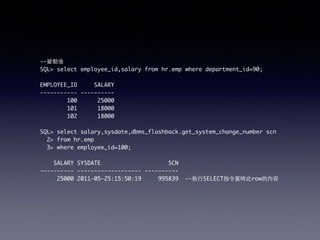
--變動後 
SQL> select employee_id,salary from hr.emp where department_id=90; 
! 
EMPLOYEE_ID SALARY 
----------- ---------- 
100 25000 
101 18000 
102 18000 
! 
SQL> select salary,sysdate,dbms_flashback.get_system_change_number scn 
2> from hr.emp 
3> where employee_id=100; 
! 
SALARY SYSDATE SCN 
---------- ------------------- ---------- 
25000 2011-05-25:15:50:19 995839 --執⾏行SELECT指令當時此row的內容
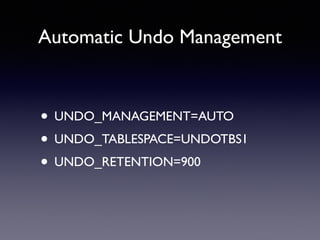
Automatic Undo Management 
• UNDO_MANAGEMENT=AUTO 
• UNDO_TABLESPACE=UNDOTBS1 
• UNDO_RETENTION=900
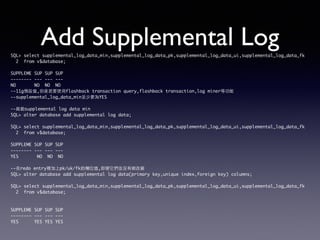
Add Supplemental Log 
SQL> select supplemental_log_data_min,supplemental_log_data_pk,supplemental_log_data_ui,supplemental_log_data_fk 
2 from v$database; 
! 
SUPPLEME SUP SUP SUP 
-------- --- --- --- 
NO NO NO NO 
--11g預設值,但是若要使⽤用flashback transaction query,flashback transaction,log miner等功能 
--supplemental_log_data_min⾄至少要為YES 
! 
--啟動supplemental log data min 
SQL> alter database add supplemental log data; 
! 
SQL> select supplemental_log_data_min,supplemental_log_data_pk,supplemental_log_data_ui,supplemental_log_data_fk 
2 from v$database; 
! 
SUPPLEME SUP SUP SUP 
-------- --- --- --- 
YES NO NO NO 
! 
--在redo entry裡加上pk/uk/fk的欄位值,即便它們並沒有被改變 
SQL> alter database add supplemental log data(primary key,unique index,foreign key) columns; 
! 
SQL> select supplemental_log_data_min,supplemental_log_data_pk,supplemental_log_data_ui,supplemental_log_data_fk 
2 from v$database; 
!! 
SUPPLEME SUP SUP SUP 
-------- --- --- --- 
YES YES YES YES
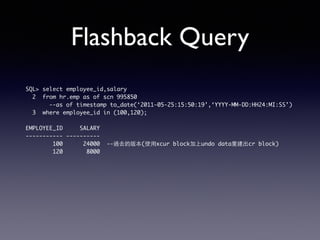
Flashback Query 
SQL> select employee_id,salary 
2 from hr.emp as of scn 995850 
--as of timestamp to_date(‘2011-05-25:15:50:19’,‘YYYY-MM-DD:HH24:MI:SS’) 
3 where employee_id in (100,120); 
! 
EMPLOYEE_ID SALARY 
----------- ---------- 
100 24000 --過去的版本(使⽤用xcur block加上undo data重建出cr block) 
120 8000
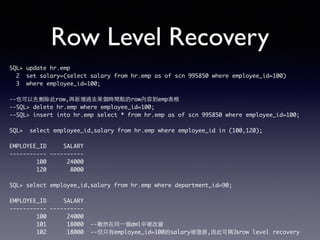
Row Level Recovery 
SQL> update hr.emp 
2 set salary=(select salary from hr.emp as of scn 995850 where employee_id=100) 
3 where employee_id=100; 
! 
--也可以先刪除此row,再新增過去某個時間點的row內容到emp表格 
--SQL> delete hr.emp where employee_id=100; 
--SQL> insert into hr.emp select * from hr.emp as of scn 995850 where employee_id=100; 
! 
SQL> select employee_id,salary from hr.emp where employee_id in (100,120); 
! 
EMPLOYEE_ID SALARY 
----------- ---------- 
100 24000 
120 8000 
! 
SQL> select employee_id,salary from hr.emp where department_id=90; 
! 
EMPLOYEE_ID SALARY 
----------- ---------- 
100 24000 
101 18000 --雖然在同⼀一個dml中被改變 
102 18000 --但只有employee_id=100的salary被復原,因此可稱為row level recovery
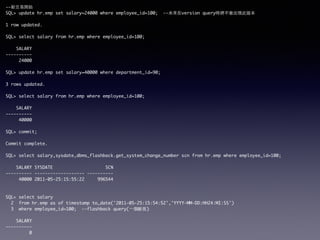
SQL> select employee_id,salary from hr.emp where department_id=90; 
! 
EMPLOYEE_ID SALARY 
----------- ---------- 
100 24000 
101 18000 
102 18000 
! 
SQL> update hr.emp set salary=0 where employee_id=100; 
! 
1 row updated. 
! 
SQL> select employee_id,salary from hr.emp where department_id=90; 
! 
EMPLOYEE_ID SALARY 
----------- ---------- 
100 0 
101 18000 
102 18000 
! 
SQL> commit; 
! 
Commit complete. 
! 
SQL> select salary,sysdate,dbms_flashback.get_system_change_number scn 
2 from hr.emp where employee_id=100; 
! 
SALARY SYSDATE SCN 
---------- ------------------- ---------- 
0 2011-05-25:15:54:52 996161
--新交易開始 
SQL> update hr.emp set salary=24000 where employee_id=100; --未來在version query時將不會出現此版本 
! 
1 row updated. 
! 
SQL> select salary from hr.emp where employee_id=100; 
! 
SALARY 
---------- 
24000 
! 
SQL> update hr.emp set salary=40000 where department_id=90; 
! 
3 rows updated. 
! 
SQL> select salary from hr.emp where employee_id=100; 
! 
SALARY 
---------- 
40000 
SQL> commit; 
! 
Commit complete. 
! 
SQL> select salary,sysdate,dbms_flashback.get_system_change_number scn from hr.emp where employee_id=100; 
! 
SALARY SYSDATE SCN 
---------- ------------------- ---------- 
40000 2011-05-25:15:55:22 996544 
!! 
SQL> select salary 
2 from hr.emp as of timestamp to_date('2011-05-25:15:54:52','YYYY-MM-DD:HH24:MI:SS') 
3 where employee_id=100; --flashback query(⼀一個斷⾯面) 
! 
SALARY 
---------- 
0
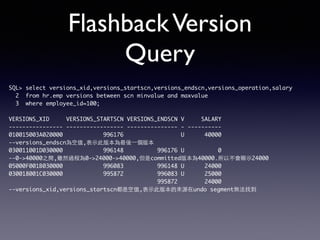
Flashback Version 
Query 
SQL> select versions_xid,versions_startscn,versions_endscn,versions_operation,salary 
2 from hr.emp versions between scn minvalue and maxvalue 
3 where employee_id=100; 
! 
VERSIONS_XID VERSIONS_STARTSCN VERSIONS_ENDSCN V SALARY 
---------------- ----------------- --------------- - ---------- 
010015003A020000 996176 U 40000 
--versions_endscn為空值,表⽰示此版本為最後⼀一個版本 
030011001D030000 996148 996176 U 0 
--0->40000之間,雖然過程為0->24000->40000,但是committed版本為40000.所以不會顯⽰示24000 
05000F001B030000 996083 996148 U 24000 
030018001C030000 995872 996083 U 25000 
995872 24000 
--versions_xid,versions_startscn都是空值,表⽰示此版本的來源在undo segment無法找到
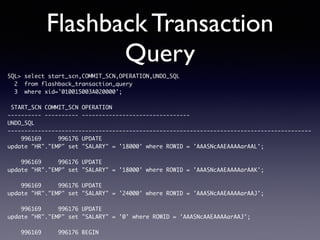
Flashback Transaction 
Query 
SQL> select start_scn,COMMIT_SCN,OPERATION,UNDO_SQL 
2 from flashback_transaction_query 
3 where xid='010015003A020000'; 
! 
START_SCN COMMIT_SCN OPERATION 
---------- ---------- -------------------------------- 
UNDO_SQL 
------------------------------------------------------------------------------------------ 
996169 996176 UPDATE 
update "HR"."EMP" set "SALARY" = '18000' where ROWID = 'AAASNcAAEAAAAarAAL'; 
! 
996169 996176 UPDATE 
update "HR"."EMP" set "SALARY" = '18000' where ROWID = 'AAASNcAAEAAAAarAAK'; 
! 
996169 996176 UPDATE 
update "HR"."EMP" set "SALARY" = '24000' where ROWID = 'AAASNcAAEAAAAarAAJ'; 
! 
996169 996176 UPDATE 
update "HR"."EMP" set "SALARY" = '0' where ROWID = 'AAASNcAAEAAAAarAAJ'; 
! 
996169 996176 BEGIN
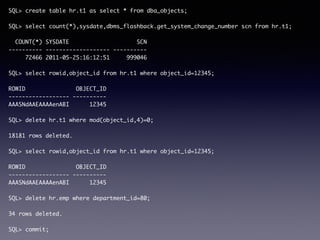
SQL> create table hr.t1 as select * from dba_objects; 
! 
SQL> select count(*),sysdate,dbms_flashback.get_system_change_number scn from hr.t1; 
! 
COUNT(*) SYSDATE SCN 
---------- ------------------- ---------- 
72466 2011-05-25:16:12:51 999046 
! 
SQL> select rowid,object_id from hr.t1 where object_id=12345; 
! 
ROWID OBJECT_ID 
------------------ ---------- 
AAASNdAAEAAAAenABI 12345 
! 
SQL> delete hr.t1 where mod(object_id,4)=0; 
! 
18181 rows deleted. 
! 
SQL> select rowid,object_id from hr.t1 where object_id=12345; 
! 
ROWID OBJECT_ID 
------------------ ---------- 
AAASNdAAEAAAAenABI 12345 
! 
SQL> delete hr.emp where department_id=80; 
! 
34 rows deleted. 
! 
SQL> commit;
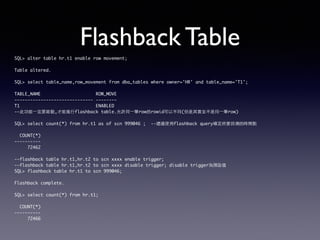
Flashback Table 
SQL> alter table hr.t1 enable row movement; 
! 
Table altered. 
! 
SQL> select table_name,row_movement from dba_tables where owner='HR' and table_name='T1'; 
! 
TABLE_NAME ROW_MOVE 
------------------------------ -------- 
T1 ENABLED 
--此功能⼀一定要啟動,才能進⾏行flashback table.允許同⼀一筆row的rowid可以不同(但是其實並不是同⼀一筆row) 
! 
SQL> select count(*) from hr.t1 as of scn 999046 ; --建議使⽤用flashback query確定所要回溯的時間點 
! 
COUNT(*) 
---------- 
72462 
! 
--flashback table hr.t1,hr.t2 to scn xxxx enable trigger; 
--flashback table hr.t1,hr.t2 to scn xxxx disable trigger; disable trigger為預設值 
SQL> flashback table hr.t1 to scn 999046; 
! 
Flashback complete. 
! 
SQL> select count(*) from hr.t1; 
! 
COUNT(*) 
---------- 
72466
Q&A

Oracle Database Management - Backup/Recovery

  • 1.
    ORACLE資料庫管理 II 申建忠Frank Oracle OCM 9i/10g/11g
  • 2.
    大綱 ‧Backup/Recovery相關知識 ‧Backup簡介 ‧Recovery簡介 ‧Media Recovery ‧Flashback Technology ‧Q&A
  • 3.
    Backup/Recovery相關知識 ‧Write AheadLog ‧Log Type ‧DML與Datafile/Logfile的關係 ‧Backup/Restore/Recovery與Datafile/ Logfile的關係 ‧設定Archivelog Mode
  • 4.
    Library Cache Shared Pool Instance Buffer Cache Log Buffer Large Pool Java Pool Streams pool Data Dictionary Cache SMON PMON DBWR CKPT LGWR RECO ARCH Log Seq:12 Log Seq:12 Log Seq:12 Log Seq:12 Log Seq:12 Log Seq:11 Log Seq:11 Data File Data File Data File Online Control file Logfile Online Logfile Header Header Header Group 1 Group 2 Server Process User Process Archived Logfile System Global Area(SGA) Database Program Global Area Block Block Block S Q L Redo Entry Parse ! SQL Text Execution Plan Execute Fetch Redo Entry Redo Entry Redo Entry Redo Entry Listener ! Data Dictionary Information $ sqlplus hr/hr@orcl
  • 5.
    Write Ahead Logging ‧Instance Level ‧Redo Record ‧PGA -> Log Buffer ‧Data Modification ‧Server Process -> Buffer Cache ‧Database Level ‧Log Buffer -> LGWR -> Logfile ‧Buffer Cache -> DBWR -> Datafile
  • 6.
    Execute(SELECT) Log Buffer Datafile Control file Logfile group 1 Logfile group 2 DBW R LGW R Server Process PMO N SMO N CKPT RECO 1 A A1 10 J J1 0 17 Q Q 17 2 B B2 18 R R1 8 19 S S1 9 3 C C3 7 G G7 11 K K1 1 4 D D4 12 L L1 2 21 U U 21 6 F F6 13 M M1 3 22 V V2 2 8 H H8 15 O O 15 24 X X 24 5 E E5 14 N N 14 23 W W 23 9 I I9 16 P P1 6 20 T T2 0 A B C 1 A A1 2 B B2 3 C C3 4 D D4 5 E F5 6 F E6 7 G G7 8 H H8 9 I I9 10 J J10 11 K K11 12 L L12 13 M M13 14 N N14 15 O O15 16 P P16 17 Q Q17 18 R R18 19 S S19 20 T T20 21 U U21 22 V V22 23 W W23 24 X X24 User Process SELECT c FROM t1 WHERE a=19; 1.Parse 2.Execute S19 3.Fetch Shared Pool Buffer Cache Execution Plan 2 B B2 18 R R1 8 19 S S9 1 PGA Full Table Scan or Index Scan
  • 7.
    Execute(DML) Shared Pool Buffer Cache Log Buffer Datafile Control file Logfile group 1 Logfile group 2 DBW R LGW R Server Process PMO N SMO N CKPT RECO 1 A A1 10 J J1 0 17 Q Q 17 2 B B2 18 R R1 8 19 S S1 9 3 C C3 7 G G7 11 K K1 1 4 D D4 12 L L1 2 21 U U 21 6 F F6 13 M M 13 22 V V2 2 8 H H8 15 O O 15 24 X X 24 5 E E5 14 N N 14 23 W W 23 9 I I9 16 P P1 6 20 T T2 0 A B C 1 A A1 2 B B2 3 C C3 4 D D4 5 E F5 6 F E6 7 G G7 8 H H8 9 I I9 10 J J10 11 K K11 12 L L12 13 M M13 14 N N14 15 O O15 16 P P16 17 Q Q17 18 R R18 19 S S91 20 T T20 21 U U21 22 V V22 23 W W23 24 X X24 User Process UPDATE t1 SET c=‘S91’ WHERE a=19; 1.Parse Execution Plan 2.Execute 2 B B2 18 R R1 8 19 S S9 1 S1 undo block undo undo S19 data S91 und o S19 dat a S91 1 row updated redo
  • 8.
    EXECUTE(COMMIT) Shared Pool Buffer Cache Log Buffer Datafile DBW R LGW R Server Process PMO N SMO N CKPT RECO 1 A A1 10 J J1 0 17 Q Q 17 2 B B2 18 R R1 8 19 S S1 9 3 C C3 7 G G7 11 K K1 1 4 D D4 12 L L1 2 21 U U 21 6 F F6 13 M M 13 22 V V2 2 8 H H8 15 O O 15 24 X X 24 5 E E5 14 N N 14 23 W W 23 9 I I9 16 P P1 6 20 T T2 0 A B C 1 A A1 2 B B2 3 C C3 4 D D4 5 E F5 6 F E6 7 G G7 8 H H8 9 I I9 10 J J10 11 K K11 12 L L12 13 M M13 14 N N14 15 O O15 16 P P16 17 Q Q17 18 R R18 19 S S91 20 T T20 21 U U21 22 V V22 23 W W23 24 X X24 User Process COMMIT; 1.Parse Execution Plan 2.Execute 2 B B2 18 R R1 8 19 S S9 1 S1 undo block undo S1 9 data S9 1 commit commit Logfile group 1 Control file Logfile group 2 undo S1 9 data S9 1 commit COMMITTED Release Lock
  • 9.
    Log Type ‧PhysicalLog ‧Changed Data Block ‧Logical Log ‧DML Statement ‧Physiological Log ‧Changed Record
  • 10.
    SQL> select group#,sequence#,members,status,archived 2> from v$log; 目前資料庫裡有幾個logfile group, ! 以及每個logfile group有幾個members GROUP# SEQUENCE# MEMBERS STATUS ARC ---------- ---------- ---------- -------- --- 1 148 1 CURRENT NO 2 146 1 INACTIVE YES 3 147 1 INACTIVE YES ! SQL> select records_total,records_used 2> from v$controlfile_record_section 3> where type='REDO LOG'; ! RECORDS_TOTAL RECORDS_USED ------------- ------------ 16 3 ! SQL> select indx,dimlm from x$kccdi; ! INDX DIMLM ---------- ---------- 0 3 資料庫裡最多可以有幾個logfile groups 每個logfile group最多可以有幾個logfile members
  • 11.
    DML與Datafile/Logfile的關係 DMLs DMLsDMLs DMLs DMLs DMLs t1:10 t2:10 t3:10 t4:11 t5:11 t6:12 4|D 26|Z 1|A 10|J 8|H 12|L 5|E 25|Y 13|M 23|W 2|B 14|N 15|O 22|V 16|P 9|I 3|C 17|Q 11|K 7|G 18|R 6|F 20|T 21|U 19|S 24|X t1 t2 t3 t4 t5 t6 Time LogSeq:10 LogSeq:10 LogSeq:10 LogSeq:11 col2->A1 col2->C1 4|D 26|Z 1|A1 10|J 8|H 12|L 5|E 25|Y 13|M 23|W 2|B 14|N 15|O 221|V 16|P 9|I 3|C1 17|Q 11|K 7|G 18|R 6|F 20|T 21|U 19|S 24|X 4|D 26|Z 1|A 10|J 8|H 12|L 5|E 25|Y 13|M 23|W 2|B 14|N 15|O 221|V 16|P 9|I 3|C1 17|Q 11|K 7|G 18|R 6|F1 20|T 21|U 19|S1 24|X col2->A1 col2->C1 col1->221 col2->A1 col2->C1 col1->221 col2->S1 col2->F1 4|D 26|Z 1|A 10|J 8|H 12|L 5|E 25|Y 13|M 23|W 2|B 14|N 15|O1 221|V 16|P 9|I 3|C1 17|Q 11|K 7|G 18|R1 6|F1 20|T 21|U 19|S2 24|X col2->R1 col2->S2 col2->O1 4|D2 26|Z 1|A 10|J 8|H 12|L 5|E 25|Y 13|M 23|W 2|B 14|N 15|O1 221|V 16|P 9|I 3|C1 17|Q 11|K 7|G 18|R1 6|F1 20|T 21|U 19|S2 24|X LogSeq:11 col2->R1 col2->S2 col2->O1 col2->D1 col2->D2 4|D2 26|Z 1|A 10|J 8|H 12|L 5|E 25|Y 13|M 23|W 2|B 14|N 15|O1 221|V 16|P 9|I1 3|C1 17|Q 11|K 7|G 18|R1 6|F2 20|T 21|U 19|S2 24|X1 LogSeq:12 col2->I1 col2->F2 group 1 group 1 group 1 group 2 group 2 group 1
  • 12.
    Backup與Datafile的關係 t1:10 t2:10t3:10 t4:11 t5:11 t6:12 4|D 26|Z 1|A 10|J 8|H 12|L 5|E 25|Y 13|M 23|W 2|B 14|N 15|O 22|V 16|P 9|I 3|C 17|Q 11|K 7|G 18|R 6|F 20|T 21|U 19|S 24|X t1 t2 t3 t4 t5 t6 Time LogSeq:10 LogSeq:10 LogSeq:10 LogSeq:11 col2->A1 col2->C1 4|D 26|Z 1|A1 10|J 8|H 12|L 5|E 25|Y 13|M 23|W 2|B 14|N 15|O 221|V 16|P 9|I 3|C1 17|Q 11|K 7|G 18|R 6|F 20|T 21|U 19|S 24|X 4|D 26|Z 1|A 10|J 8|H 12|L 5|E 25|Y 13|M 23|W 2|B 14|N 15|O 221|V 16|P 9|I 3|C1 17|Q 11|K 7|G 18|R 6|F1 20|T 21|U 19|S1 24|X col2->A1 col2->C1 col1->221 col2->A1 col2->C1 col1->221 col2->S1 col2->F1 4|D 26|Z 1|A 10|J 8|H 12|L 5|E 25|Y 13|M 23|W 2|B 14|N 15|O1 221|V 16|P 9|I 3|C1 17|Q 11|K 7|G 18|R1 6|F1 20|T 21|U 19|S2 24|X col2->R1 col2->S2 col2->O1 4|D2 26|Z 1|A 10|J 8|H 12|L 5|E 25|Y 13|M 23|W 2|B 14|N 15|O1 221|V 16|P 9|I 3|C1 17|Q 11|K 7|G 18|R1 6|F1 20|T 21|U 19|S2 24|X LogSeq:11 col2->R1 col2->S2 col2->O1 col2->D1 col2->D2 4|D2 26|Z 1|A 10|J 8|H 12|L 5|E 25|Y 13|M 23|W 2|B 14|N 15|O1 221|V 16|P 9|I1 3|C1 17|Q 11|K 7|G 18|R1 6|F2 20|T 21|U 19|S2 24|X1 LogSeq:12 col2->I1 col2->F2 t1:10 4|D 26|Z 1|A 10|J 8|H 12|L 5|E 25|Y 13|M 23|W 2|B 14|N 15|O 22|V 16|P 9|I 3|C 17|Q 11|K 7|G 18|R 6|F 20|T 21|U 19|S 24|X Backup group 1 group 1 group 1 group 2 group 2 group 1
  • 13.
    Media Failure t1:10t2:10 t3:10 t4:11 t5:11 t6:12 4|D 26|Z 1|A 10|J 8|H 12|L 5|E 25|Y 13|M 23|W 2|B 14|N 15|O 22|V 16|P 9|I 3|C 17|Q 11|K 7|G 18|R 6|F 20|T 21|U 19|S 24|X t1 t2 t3 t4 t5 t6 Time LogSeq:10 LogSeq:10 LogSeq:10 LogSeq:11 col2->A1 col2->C1 4|D 26|Z 1|A1 10|J 8|H 12|L 5|E 25|Y 13|M 23|W 2|B 14|N 15|O 221|V 16|P 9|I 3|C1 17|Q 11|K 7|G 18|R 6|F 20|T 21|U 19|S 24|X 4|D 26|Z 1|A 10|J 8|H 12|L 5|E 25|Y 13|M 23|W 2|B 14|N 15|O 221|V 16|P 9|I 3|C1 17|Q 11|K 7|G 18|R 6|F1 20|T 21|U 19|S1 24|X col2->A1 col2->C1 col1->221 col2->A1 col2->C1 col1->221 col2->S1 col2->F1 4|D 26|Z 1|A 10|J 8|H 12|L 5|E 25|Y 13|M 23|W 2|B 14|N 15|O1 221|V 16|P 9|I 3|C1 17|Q 11|K 7|G 18|R1 6|F1 20|T 21|U 19|S2 24|X col2->R1 col2->S2 col2->O1 4|D2 26|Z 1|A 10|J 8|H 12|L 5|E 25|Y 13|M 23|W 2|B 14|N 15|O1 221|V 16|P 9|I 3|C1 17|Q 11|K 7|G 18|R1 6|F1 20|T 21|U 19|S2 24|X LogSeq:11 col2->R1 col2->S2 col2->O1 col2->D1 col2->D2 4|D2 26|Z 1|A 10|J 8|H 12|L 5|E 25|Y 13|M 23|W 2|B 14|N 15|O1 221|V 16|P 9|I1 3|C1 17|Q 11|K 7|G 18|R1 6|F2 20|T 21|U 19|S2 24|X1 LogSeq:12 col2->I1 col2->F2 t1:10 4|D 26|Z 1|A 10|J 8|H 12|L 5|E 25|Y 13|M 23|W 2|B 14|N 15|O 22|V 16|P 9|I 3|C 17|Q 11|K 7|G 18|R 6|F 20|T 21|U 19|S 24|X Backup group 1 group 1 group 1 group 2 group 2 group 1
  • 14.
    Restore與Datafile的關係 t1:10 t2:10t3:10 t4:11 t5:11 4|D 26|Z 1|A 10|J 8|H 12|L 5|E 25|Y 13|M 23|W 2|B 14|N 15|O 22|V 16|P 9|I 3|C 17|Q 11|K 7|G 18|R 6|F 20|T 21|U Backup 19|S 24|X 24|X t1 t2 t3 t4 t5 t6 Time LogSeq:10 LogSeq:10 LogSeq:10 LogSeq:11 col2->A1 col2->C1 4|D 26|Z 1|A1 10|J 8|H 12|L 5|E 25|Y 13|M 23|W 2|B 14|N 15|O 221|V 16|P 9|I 3|C1 17|Q 11|K 7|G 18|R 6|F 20|T 21|U 19|S 24|X 4|D 26|Z 1|A 10|J 8|H 12|L 5|E 25|Y 13|M 23|W 2|B 14|N 15|O 221|V 16|P 9|I 3|C1 17|Q 11|K 7|G 18|R 6|F1 20|T 21|U 19|S1 24|X col2->A1 col2->C1 col1->221 col2->A1 col2->C1 col1->221 col2->S1 col2->F1 4|D 26|Z 1|A 10|J 8|H 12|L 5|E 25|Y 13|M 23|W 2|B 14|N 15|O1 221|V 16|P 9|I 3|C1 17|Q 11|K 7|G 18|R1 6|F1 20|T 21|U 19|S2 24|X col2->R1 col2->S2 col2->O1 4|D2 26|Z 1|A 10|J 8|H 12|L 5|E 25|Y 13|M 23|W 2|B 14|N 15|O1 221|V 16|P 9|I 3|C1 17|Q 11|K 7|G 18|R1 6|F1 20|T 21|U 19|S2 24|X LogSeq:11 col2->R1 col2->S2 col2->O1 col2->D1 col2->D2 LogSeq:12 col2->I1 col2->F2 t1:10 4|D 26|Z 1|A 10|J 8|H 12|L 5|E 25|Y 13|M 23|W 2|B 14|N 15|O 22|V 16|P 9|I 3|C 17|Q 11|K 7|G 18|R 6|F 20|T 21|U 19|S 24|X t1:10 4|D 26|Z 1|A 10|J 8|H 12|L 5|E 25|Y 13|M 23|W 2|B 14|N 15|O 22|V 16|P 9|I 3|C 17|Q 11|K 7|G 18|R 6|F 20|T 21|U 19|S Restore group 1 group 1 group 1 group 2 group 2 group 1
  • 15.
    Recover與Datafile/logfile的關係 4|D 26|Z 1|A 10|J 8|H 12|L 5|E 25|Y 13|M 23|W 2|B 14|N 15|O 22|V 16|P 9|I 3|C 17|Q 11|K 7|G 18|R 6|F 20|T 21|U 19|S 24|X Recover t1 t2 t3 t4 t5 t6 Time LogSeq:10 LogSeq:10 LogSeq:10 LogSeq:11 col2->A1 col2->C1 4|D 26|Z 1|A1 10|J 8|H 12|L 5|E 25|Y 13|M 23|W 2|B 14|N 15|O 221|V 16|P 9|I 3|C1 17|Q 11|K 7|G 18|R 6|F 20|T 21|U 19|S 24|X 4|D 26|Z 1|A 10|J 8|H 12|L 5|E 25|Y 13|M 23|W 2|B 14|N 15|O 221|V 16|P 9|I 3|C1 17|Q 11|K 7|G 18|R 6|F1 20|T 21|U 19|S1 24|X col2->A1 col2->C1 col1->221 col2->A1 col2->C1 col1->221 col2->S1 col2->F1 4|D 26|Z 1|A 10|J 8|H 12|L 5|E 25|Y 13|M 23|W 2|B 14|N 15|O1 221|V 16|P 9|I 3|C1 17|Q 11|K 7|G 18|R1 6|F1 20|T 21|U 19|S2 24|X col2->R1 col2->S2 col2->O1 4|D2 26|Z 1|A 10|J 8|H 12|L 5|E 25|Y 13|M 23|W 2|B 14|N 15|O1 221|V 16|P 9|I 3|C1 17|Q 11|K 7|G 18|R1 6|F1 20|T 21|U 19|S2 24|X LogSeq:11 col2->R1 col2->S2 col2->O1 col2->D1 col2->D2 LogSeq:12 col2->I1 col2->F2 Restore t1:10 4|D 26|Z 1|A 10|J 8|H 12|L 5|E 25|Y 13|M 23|W 2|B 14|N 15|O 22|V 16|P 9|I 3|C 17|Q 11|K 7|G 18|R 6|F 20|T 21|U 19|S 24|X t6:12 Backup t1:10 t2:10 t3:10 t4:11 t5:11 4|D2 26|Z 1|A 10|J 8|H 12|L 5|E 25|Y 13|M 23|W 2|B 14|N 15|O1 221|V 16|P 9|I1 3|C1 17|Q 11|K 7|G 18|R1 6|F2 20|T 21|U 19|S2 24|X1 group 1 group 1 group 1 group 2 group 2 group 1
  • 16.
    Log Switch LogSwitch是LGWR的一種動作。當LGWR停止將Redo Entry寫到Current Logfile Group後,開始尋找新的Current Logfile Group。當LGWR找到新的Current Logfile Group後,將指派一個log sequence number給新的Current Logfile Group,新log sequence number將為舊log sequence number加1,接著LGWR開始將Redo Entry寫到 新的Current Logfile Group。而之前所使用的Logfile Group,其狀態變成Active。 此時LGWR要求CKPT對之前所使用的Logfile Group進行Checkpoint操作,當Checkpoint 操作完成後,該Logfile Group的狀態將變成INACTIVE。 如果資料庫是ArchiveLog mode時,LGWR還會要求ARCH將之前所使用的Logfile Group 內容進行Archive操作。 不過為何LGWR會停止對目前正在使用的群組寫入?原因有兩種: 1.目前所使用的logfile已滿。 2.執行”ALTER SYSTEM SWITCH LOGFILE”,要求發生。 3.藉由archive_lag_target所設定的秒數達到。
  • 17.
    Log Switch Frequency SQL> show parameter archive_lag_target ! NAME TYPE VALUE ------------------------------------ ----------- --------- archive_lag_target integer 0 表示關閉此功能 有效範圍:60-7200秒 一般建議:1800秒
  • 18.
    NoArchiveLog Mode RedoEntry Redo Entry Redo Entry Redo Entry Log Buffer Redo Entry Redo Entry Redo Entry Redo Entry LGWR Log Seq:11 Log Seq:10 Redo Entry Redo Entry Redo Entry Redo Entry Online Logfile Redo Entry Redo Entry Online Logfile Redo Entry Redo Entry Redo Entry Redo Entry Group 1 Group 2 Redo Entry Redo Entry Redo Entry Redo Entry Log Buffer Redo Entry LGWR Log Seq:11 Redo Entry Redo Entry Redo Entry Online Logfile Redo Entry Redo Entry Log Seq:12 Redo Entry Redo Entry Redo Entry Online Logfile Redo Entry Redo Entry Redo Entry Redo Entry Redo Entry Group 1 Group 2 Redo Entry Redo Entry Redo Entry Redo Entry Log Buffer Redo Entry LGWR Log Seq:13 Redo Entry Redo Entry Redo Entry Online Logfile Redo Entry Redo Entry Log Seq:12 Redo Entry Redo Entry Redo Entry Online Logfile Redo Entry Redo Entry Redo Entry Redo Entry Redo Entry Group 1 Group 2 Time log switch log switch
  • 19.
    ArchiveLog Mode RedoEntry Redo Entry Redo Entry Redo Entry Redo Entry LGWR ARCH Log Seq:13 Log Seq:12 Log Seq:12 Redo Entry Redo Entry Redo Entry Online Logfile Online Logfile Group 1 Group 2 Redo Entry Redo Entry Archived Logfile Redo Entry Redo Entry Redo Entry Redo Entry Redo Entry Redo Entry Redo Entry Log Seq:11 Redo Entry Redo Entry Redo Entry Archived Logfile Redo Entry Redo Entry Redo Entry Redo Entry Log Seq:10 Redo Entry Redo Entry Redo Entry Archived Logfile Redo Entry Redo Entry Redo Entry Redo Entry Log Seq:9 Redo Entry Redo Entry Redo Entry Archived Logfile Redo Entry Redo Entry Redo Entry Redo Entry Log Buffer Redo Entry Redo Entry Redo Entry Log Seq:8 Archived Logfile read write
  • 20.
    Enable ArchiveLog Mode 名字 本機位置 X 10
  • 21.
    Enable ArchiveLog Mode SQL> shutdown immediate ! SQL> startup mount log_archve_dest_n (n=1..31) ! SQL> alter system set log_archive_dest_1=‘location=/u02/oradata/orcl/archive1’; ! location=本地路徑(n=1..10) SQL> alter system set log_archive_dest_2=‘location=/u03/oradata/orcl/archive2’; ! SQL> alter system set log_archive_dest_10=‘location=use_db_recovery_file_dest’; ! service=net_service_name SQL> alter database archivelog; ! SQL> select log_mode from v$database; ! LOG_MODE ---------- ARCHIVELOG ! SQL> alter database open;
  • 22.
    Backup ‧Backup Type ‧Physical/Logical ‧Backupset/Image copy ‧Full backup / Incremental Backup ‧Physical Backup - RMAN ‧Logical Backup - DataPump
  • 23.
    Physical/Logical Backup ‧PhysicalBackup ‧備份datafile的data block。 ‧Logical Backup ‧將datafile的資料轉換為物件定義與 物件資料。
  • 24.
    Difference Between Physical and Logical Backup Backup Type Online Backup Handle Media Failure Complete Recovery Physical Yes (Archivelog Mode) Yes Yes (Archivelog Mode) Logical Yes No No
  • 25.
    NoArchive/ArchiveLog Mode Log Mode Backup Mode Backup Strategy Recovery Result Media Failure NoArchive Consistent Whole InComplete Instance Crash Archive Consistent/ Inconsistent Whole/ Partial Complete/ InComplete Instance Still Open/ Crash
  • 26.
    Consistent/Inconsistent Backup ‧ConsistentBackup/Cold Backup/Offline Backup ‧備份前必須先將資料庫關閉,然後重新啓動 到Mount(掛載)階段,最後才能進行備份。 ‧被備份的Datafiles與Controlfile,它們有一 致的Checkpoint資訊。 ‧Inconsistent Backup/Hot Backup/Online Backup ‧在資料庫維持Open(開啟)狀態下,便能夠進 行備份,同時使用者的操作不會受到影響。 ‧被備份的Datafiles與Controlfile,它們的 checkpoint資訊並不一致。
  • 27.
    Complete/InComplete Recovery ‧CompleteRecovery ‧修復完畢後,所有已經確認的交易都會成功 地救回。 ‧InComplete Recovery ‧修復完畢後,部分已經確認的交易將無法成 功地救回。
  • 28.
    Backup Type ‧PhysicalBackup ‧RMAN Command ‧GUI -> Enterprise Manager ‧Command Line ‧OS Command + SQL Command ‧Logical Backup ‧Export / Import (10g之前) ‧DataPump (10g/11g)
  • 29.
    Recovery Setting db_recovery_file_dest db_recovery_file_dest_size v$flash_recovery_area_usage
  • 30.
    Show Parameter SQL>show parameter db_recovery_file_dest ! NAME TYPE VALUE -------------------------- ----------- -------------------------- db_recovery_file_dest string /u01/app/oracle/fast_recovery_area ! db_recovery_file_dest_size big integer 4122M
  • 31.
    Backup Setting -1 Backupset Compressed Backupset Image Copy
  • 32.
  • 33.
    Physical Backup FileHeader File Header T1 obj$ ABC DEF GHIJ ABC DEF GHIJ LMN OP RSTU V W X Y Z 4|D 26|Z 1|A 10|J 8|H 12|L 5|E 25|Y 13|M 23|W 2|B 14|N 15|O 22|V 16|P 9|I 3|C 17|Q 11|K 7|G 18|R 6|F 20|T 21|U 19|S 24|X T1 T2 T3 T4 DEMOTS File Header tab$ seg$ col$ SYSTEM LMN OP RSTU V W X Y Z 4|D 26|Z 1|A 10|J 8|H 12|L 5|E 25|Y 13|M 23|W 2|B 14|N 15|O 22|V 16|P 9|I 3|C 17|Q 11|K 7|G 18|R 6|F 20|T 21|U 19|S 24|X T2 T3 T4 backup
  • 34.
    RMAN Backup Type- Single datafile file#10:t1:10 4|D 26|Z 1|A 10|J 8|H 12|L 5|E 25|Y 13|M 23|W 2|B 14|N 15|O 22|V 16|P 9|I 3|C 17|Q 11|K 7|G 18|R 6|F 20|T 21|U 19|S 24|X file#10:t1:10 4|D 26|Z 1|A 10|J 8|H 12|L 5|E 25|Y 13|M 23|W 2|B 14|N 15|O 22|V 16|P 9|I 3|C 17|Q 11|K 7|G 18|R 6|F 20|T 21|U 19|S 24|X file#10:t1:10 4|D 26|Z 1|A 10|J 8|H 12|L 5|E 25|Y 13|M 23|W 2|B 14|N 15|O 22|V 16|P 9|I 3|C 17|Q 11|K 7|G 18|R 6|F 20|T 21|U 19|S 24|X RMAN BackupSet (Recovery Manager) Image Copy used blocks all blocks
  • 35.
    RMAN Backup Type- Multiple datafiles t1:10 4|D 4|D 26|Z 1|A 10|J 8|H 12|L 5|E 25|Y 13|M 23|W 2|B 14|N 15|O 22|V 16|P 9|I 3|C 17|Q 11|K 7|G 18|R 6|F 20|T 21|U 19|S 24|X 26|Z AB 1|A 10|J CD 8|H 12|L EF 5|E 25|Y GHI 13|M 23|W JKLM 2|B 14|N N 15|O 22|V OPQ 16|P 9|I RST 3|C 17|Q UVW 11|K 7|G XY 18|R 6|F Z 20|T 21|U 19|S 24|X t1:10 t1:10 4|D 26|Z 1|A 10|J 8|H 12|L 5|E 25|Y 13|M 23|W 2|B 14|N 15|O 22|V 16|P 9|I 3|C 17|Q 11|K 7|G 18|R 6|F 20|T 21|U 19|S 24|X RMAN BackupSet (Recovery Manager) Image Copy t1:10 AB CD EF GHI JKLM N OPQ RST UVW XY Z t1:10 AB CD EF GHI JKLM N OPQ RST UVW XY Z
  • 36.
    RMAN Command ‧RMAN>backup as backupset database; ! ‧RMAN> backup as copy database;
  • 37.
    Incremental Backup ‧BackupSet ‧Full ‧Incremental ‧Level 0/image copy ‧Level 1 ‧Level 1 cumulative
  • 38.
    Time A B C D E F G H I J K Full Level 0 A B C D E F G H I J K G1 A1 A1 B C1 D E1 F G2 H I J K C1 E1 G2 A1 B1 A1 B1 C2 D E1 F1 G2 H I J1 K F1 C2 J1 B1 C2 D E2 F2 G2 H I2 J3 K E2 F2 J2 I1 I2 J3 A2 A2 A2 B2 C3 D E2 F2 G2 H I2 J3 K C3 B2 B2 C3 D1 E2 F2 G4 H1 I3 J3 K D1 G3 I3 G4 H1 A2 B2 C3 D1 E2 F2 G4 H1 I3 J3 K A1 B C1 D E1 F G2 H I J K A1 B1 C2 D E1 F1 G2 H I J1 K A1 B1 C2 D E2 F2 G2 H I2 J3 K A2 B2 C3 D E2 F2 G2 H I2 J3 K Full Level 0 Full Level 0 Full Level 0 Full Level 0 Full Level 0
  • 39.
    Incremental Differential Time Level 0 Image Copy Level 1 Level 1 Level 1 Level 1 Level 0
  • 40.
    Time A B C D E F G H I J K G1 A1 B1 E2 A1 A2 D1 A2 Level 0 Image Copy Level 1 Level 1 Level 1 Level 1 Level 0 A B C D E F G H I J K A1 B C1 D E1 F G2 H I J K A1 C1 E1 G2 C1 E1 G2 A1 B1 C2 D E1 F1 G2 H I J1 K F1 C2 J1 B1 C2 D E2 F2 G2 H I2 J3 K F2 J2 I1 I2 J3 A2 B2 C3 D E2 F2 G2 H I2 J3 K C3 B2 B2 C3 D1 E2 F2 G4 H1 I3 J3 K G3 I3 G4 H1 B1 C2 F1 J1 E2 F2 I2 J3 A2 B2 C3 A2 B2 C3 D1 E2 F2 G4 H1 I3 J3 K
  • 41.
    Incremental Cumulative Time Level 0 Image Copy Level 1C Level 1C Level 1C Level 1C Level 0
  • 42.
    Time A B C D E F G H I J K G1 A1 B1 E2 A1 A2 D1 A2 Level 0 Image Copy Level 1C Level 1C Level 1C Level 1C Level 0 A B C D E F G H I J K A1 B C1 D E1 F G2 H I J K A1 C1 E1 G2 C1 E1 G2 A1 B1 C2 D E1 F1 G2 H I J1 K F1 C2 J1 B1 C2 D E2 F2 G2 H I2 J3 K F2 J2 I1 I2 J3 A2 B2 C3 D E2 F2 G2 H I2 J3 K C3 B2 B2 C3 D1 E2 F2 G4 H1 I3 J3 K G3 I3 G4 H1 A2 B2 C3 D1 E2 F2 G4 H1 I3 J3 K A1 B1 C2 E1 F1 G2 J1 A1 B1 C2 E2 F2 G2 I2 J3 A2 B2 C3 E2 F2 G2 I2 J3
  • 43.
    Differential + Cumulative Time Level 0 Image Copy Level 1 Level 1 Level 1C Level 1 Level 0
  • 44.
    Time A B C D E F G H I J K G1 A1 B1 E2 A1 A2 D1 A2 Level 0 Image Copy Level 1 Level 1 Level 1C Level 1 Level 0 A B C D E F G H I J K A1 B C1 D E1 F G2 H I J K A1 C1 E1 G2 C1 E1 G2 A1 B1 C2 D E1 F1 G2 H I J1 K F1 C2 J1 B1 C2 D E2 F2 G2 H I2 J3 K F2 J2 I1 I2 J3 A2 B2 C3 D E2 F2 G2 H I2 J3 K C3 B2 B2 C3 D1 E2 F2 G4 H1 I3 J3 K G3 I3 G4 H1 B1 C2 F1 J1 A2 B2 C3 A2 B2 C3 D1 E2 F2 G4 H1 I3 J3 K A1 B1 C2 E2 F2 G2 I2 J3
  • 45.
    Time G1 A1 C1 E1 G2 A1 B1 E2 A1 A2 D1 A2 Image Copy Level 1 Level 1 Level 1 Level 1 media failure A B C D E F G H I J K A B C D E F G H I J K A1 B C1 D E1 F G2 H I J K A1 C1 E1 G2 B1 C2 D E1 F1 G2 H I J1 K F1 C2 J1 B1 C2 D E2 F2 G2 H I2 J3 K F2 J2 I1 I2 J3 A2 B2 C3 D E2 F2 G2 H I2 J3 K C3 B2 B2 C3 D1 E2 F2 G4 H1 I3 J3 K G3 I3 G4 H1 B1 C2 F1 J1 E2 F2 I2 J3 A2 B2 C3 A1 B C1 D E1 F G2 H I J K A1 B1 C2 D E1 F1 G2 H I J1 K A1 B1 C2 D E2 F2 G2 H I2 J3 K A2 B2 C3 D E2 F2 G2 H I2 J3 K
  • 46.
    Schedule Backup -NoArchivelog
  • 47.
  • 48.
    full Schedule Backup incremental level 0 incremental level 1 cumulative incremental updating backup online backup offline backup
  • 50.
    RMAN Command ‧RMAN>backup database; ‧RMAN> backup as backupset database; ‧RMAN> backup incremental level 0 database; ‧RMAN> backup incremental level 1 database; ‧RMAN> backup incremental level 1 cumulative database; ‧RMAN> backup as copy database;
  • 51.
    Logical Backup FileHeader ABC DEF GHIJ LMN OP RSTU V W X Y Z 4|D 26|Z 1|A 10|J 8|H 12|L 5|E 25|Y 13|M 23|W 2|B 14|N 15|O 22|V 16|P 9|I 3|C 17|Q 11|K 7|G 18|R 6|F 20|T 21|U 19|S 24|X T1 T2 T3 T4 DEMOTS File Header tab$ seg$ col$ obj$ SYSTEM T1 Definitions T1 Data Export
  • 52.
    DataPump ‧Interface ‧GUI-> Enterprise Manager ‧Command Line ‧Mode ‧Interactive/Command line/parfile ‧Type ‧full/tablespace/schema/table ‧not including sys schema and system/ sysaux tablespace definitions
  • 53.
  • 54.
    full=y schemas= hr,sh tables=hr.emp,sh.sales tablespaces=users,example parallel=1 logfile=orcl_logical_backup:frank_demo_full_export.LOG
  • 55.
    content=all content=data_only content=metadata_only include exclude flashback_scn flashback_time query
  • 56.
  • 58.
    [oracle@oraDB ~]$ expdpsystem/oracle directory=orcl_logical_backup dumpfile=frank_demo_full_export_%U.dmp full=y ! Starting "SYSTEM"."SYS_EXPORT_FULL_01": system/******** directory=orcl_logical_backup dumpfile=frank_demo_full_export_%U.dmp full=y Estimate in progress using BLOCKS method... Processing object type DATABASE_EXPORT/SCHEMA/TABLE/TABLE_DATA Total estimation using BLOCKS method: 478.0 MB Processing object type DATABASE_EXPORT/TABLESPACE Processing object type DATABASE_EXPORT/PROFILE Processing object type DATABASE_EXPORT/SYS_USER/USER object definition Processing object type DATABASE_EXPORT/SCHEMA/USER .....中間省略 . . exported "HR"."COUNTRIES" 6.367 KB 25 rows . . exported "HR"."DEPARTMENTS" 7.007 KB 27 rows . . exported "HR"."DEPT" 7.007 KB 27 rows . . exported "HR"."EMP" 16.80 KB 107 rows . . exported "HR"."EMPLOYEES" object data 16.81 KB 107 rows . . exported "HR"."JOBS" 6.992 KB 19 rows . . exported "HR"."JOB_HISTORY" 7.054 KB 10 rows . . exported "HR"."LOCATIONS" 8.273 KB 23 rows . . exported "HR"."REGIONS" 5.484 KB 4 rows Master table "SYSTEM"."SYS_EXPORT_FULL_01" successfully loaded/unloaded ****************************************************************************** Dump file set for SYSTEM.SYS_EXPORT_FULL_01 is: /home/oracle/orcl_logical_backup/frank_demo_full_export_01.dmp Job "SYSTEM"."SYS_EXPORT_FULL_01" successfully completed at 16:20:46
  • 59.
    Recovery ‧Failure Type ‧Media Recovery ‧Complete ‧InComplete ‧Logical Recovery
  • 60.
    Failure Type ‧SQLStatement Failed ‧執行後的結果與預期不符 ‧Instance Failure ‧Instance不正常結束 ‧User Process Failure ‧User process不正常結束 ‧User Made Errors ‧User執行DDL或DML+Commit後,反悔之前所執行的DDL或 DML+Commit操作 ‧Media Failure ‧Hardware failure - disk controller/disk ‧User delete file accidentally
  • 61.
    User Made Errors ‧Flashback Technology ‧DDL ‧Flashback Drop ‧Flashback Database ‧DMLs+Commit ‧Flashback Table ‧Flashback Transaction ‧Flashback Database
  • 62.
    Demo Environment Setup SQL> create tablespace demots 2> datafile '/u02/oradata/orcl/demots01.dbf' size 100M; ! Tablespace created. ! SQL> create table hr.emphist 2> tablespace demots 3> as select * from hr.employees; ! Table created. ! SQL> select count(*) from hr.emphist; ! COUNT(*) ---------- 107
  • 63.
    RMAN - PhysicalBackup RMAN> backup database; ! Starting backup at 01-FEB-13 using target database control file instead of recovery catalog allocated channel: ORA_DISK_1 channel ORA_DISK_1: SID=33 device type=DISK channel ORA_DISK_1: starting full datafile backup set channel ORA_DISK_1: specifying datafile(s) in backup set input datafile file number=00002 name=/u02/oradata/orcl/sysaux01.dbf input datafile file number=00001 name=/u02/oradata/orcl/system01.dbf input datafile file number=00005 name=/u02/oradata/orcl/example01.dbf input datafile file number=00003 name=/u02/oradata/orcl/undotbs01.dbf input datafile file number=00004 name=/u02/oradata/orcl/users01.dbf input datafile file number=00006 name=/u02/oradata/orcl/demots01.dbf channel ORA_DISK_1: starting piece 1 at 01-FEB-13 channel ORA_DISK_1: finished piece 1 at 01-FEB-13 piece handle=/u01/app/oracle/fast_recovery_area/ORCL/backupset/2013_02_01/ o1_mf_nnndf_TAG20130201T125247_8jpljzn2_.bkp tag=TAG20130201T125247 comment=NONE channel ORA_DISK_1: backup set complete, elapsed time: 00:02:15
  • 64.
    Logical Backup -Datapump [oracle@oraDB ~]$ expdp system/oracle directory=orcl_logical_backup dumpfile=orcl_full.dmp full=y ! Export: Release 11.2.0.3.0 - Production on Fri Feb 1 13:22:48 2013 Starting "SYSTEM"."SYS_EXPORT_FULL_01": system/******** directory=orcl_logical_backup dumpfile=orcl_full.dmp full=y Estimate in progress using BLOCKS method... Processing object type DATABASE_EXPORT/SCHEMA/TABLE/TABLE_DATA Total estimation using BLOCKS method: 478.2 MB Processing object type DATABASE_EXPORT/TABLESPACE Processing object type DATABASE_EXPORT/PROFILE Processing object type DATABASE_EXPORT/SYS_USER/USER . . exported "HR"."COUNTRIES" 6.367 KB 25 rows . . exported "HR"."DEPARTMENTS" 7.007 KB 27 rows . . exported "HR"."DEPT" 7.007 KB 27 rows . . exported "HR"."EMP" 16.80 KB 107 rows . . exported "HR"."EMPHIST" 16.81 KB 107 rows . . exported "HR"."EMPLOYEES" 16.81 KB 107 rows ! Master table "SYSTEM"."SYS_EXPORT_FULL_01" successfully loaded/unloaded ****************************************************************************** Dump file set for SYSTEM.SYS_EXPORT_FULL_01 is: /home/oracle/orcl_logical_backup/orcl_full.dmp Job "SYSTEM"."SYS_EXPORT_FULL_01" successfully completed at 13:29:55
  • 65.
    SQL> @/home/oracle/moreemphist.sql ! COUNT(*) ---------- 107 !! GROUP# SEQUENCE# STATUS ---------- ---------- ---------------- 1 139 INACTIVE 2 140 INACTIVE 3 141 CURRENT !! CURRENT_SCN TO_CHAR(SYSDATE,'YY ----------- ------------------- 4132838 2013-02-01:14:21:21 ! --資料異動-- --資料異動-- ! COUNT(*) ---------- 120 ! GROUP# SEQUENCE# STATUS ---------- ---------- ---------------- 1 148 CURRENT 2 146 INACTIVE 3 147 INACTIVE ! CURRENT_SCN TO_CHAR(SYSDATE,'YY ----------- ------------------- 4132931 2013-02-01:14:22:44 模擬資料庫發生異動
  • 66.
    發生Media Failure [oracle@oraDB~]$ rm /u02/oradata/orcl/demots01.dbf [oracle@oraDB ~]$ ll /u02/oradata/orcl/demots01.dbf ls: /u02/oradata/orcl/demots01.dbf: 沒有此⼀一檔案或⺫⽬目錄 ! ! (不屬於system/active undo tablespace) SQL> select count(*) from hr.emphist; select count(*) from hr.emphist * non-critical datafile ERROR at line 1: ORA-01116: error in opening database file 6 ORA-01110: data file 6: '/u02/oradata/orcl/demots01.dbf' ORA-27041: unable to open file Linux-x86_64 Error: 2: No such file or directory Additional information: 3
  • 67.
    Complete Recovery -事前檢查 SQL> select status from v$instance; ! STATUS ------------ OPEN 檢查資料庫是否 維持開啓狀態? ! [oracle@oraDB ~]$ ps -ef | grep smon oracle 13446 5759 0 15:52 pts/2 00:00:00 grep smon oracle 22017 1 0 Jan31 ? 00:00:16 ora_smon_orcl ! ! SQL> select name 2 from v$tablespace 3 where ts#=(select ts# from v$datafile where file#=6); ! NAME ------------------------------ DEMOTS 發生media failure的datafile 屬於哪個tablespace?
  • 68.
    controlfile SYSTEM USERS Complete Recovery controlfile 1.offline 2.restore SYSTEM 10 19 10 17 19 t1 t2 t3 t4 t5 t6 Time 10 10 10 10 9 backup USERS 19 19 19 18 19 9 10 11 12 13 14 15 16 17 18 current 10 USERS 3.recover 4.online
  • 69.
    Non-Critical Datafile ‧Offline ‧offline corrupted tablespace or datafile ‧Restore ‧restore datafile from backup file ‧Recover ‧using logfile(archived/online) to recover restored datafile ‧Online ‧online recovered tablespace of datafile
  • 70.
    EM - DataRecovery Advisor
  • 75.
    RMAN Command [oracle@oraDB~]$ . oraenv ORACLE_SID = [orcl] ? orcl The Oracle base remains unchanged with value /u01/app/oracle ! [oracle@oraDB ~]$ rman target / ! connected to target database: ORCL (DBID=1299552376) ! RMAN> run { 2> sql ‘alter database datafile 6 offline’; 3> restore datafile 6; 4> recover datafile 6; 5> sql ‘alter database datafile 6 online’}; ! 2選1 RMAN> run { 2> sql ‘alter tablespace demots offline temporary’; 3> restore tablespace demots; 4> recover tablespace demots; 5> sql ‘alter tablespace demots online’};
  • 76.
    Data Recovery Advisor- list failure [oracle@oraDB ~]$ rman target / ! Recovery Manager: Release 11.2.0.3.0 - Production on Fri Feb 1 16:37:22 2013 ! connected to target database: ORCL (DBID=1299552376) ! RMAN> list failure detail; ! using target database control file instead of recovery catalog List of Database Failures ========================= ! Failure ID Priority Status Time Detected Summary ---------- -------- --------- ------------- ------- 102 HIGH OPEN 01-FEB-13 One or more non-system datafiles are missing Impact: See impact for individual child failures List of child failures for parent failure ID 102 Failure ID Priority Status Time Detected Summary ---------- -------- --------- ------------- ------- 105 HIGH OPEN 01-FEB-13 Datafile 6: '/u02/oradata/orcl/demots01.dbf' is missing Impact: Some objects in tablespace DEMOTS might be unavailable
  • 77.
    Data Recovery Advisor- advise failure RMAN> advise failure 105; ! List of Database Failures ========================= ! Failure ID Priority Status Time Detected Summary ---------- -------- --------- ------------- ------- 105 HIGH OPEN 01-FEB-13 Datafile 6: '/u02/oradata/orcl/demots01.dbf' is missing Impact: Some objects in tablespace DEMOTS might be unavailable ! analyzing automatic repair options; this may take some time allocated channel: ORA_DISK_1 channel ORA_DISK_1: SID=153 device type=DISK analyzing automatic repair options complete ! Mandatory Manual Actions ======================== no manual actions available ! Optional Manual Actions ======================= 1. If file /u02/oradata/orcl/demots01.dbf was unintentionally renamed or moved, restore it ! Automated Repair Options ======================== Option Repair Description ------ ------------------ 1 Restore and recover datafile 6 Strategy: The repair includes complete media recovery with no data loss Repair script: /u01/app/oracle/diag/rdbms/orcl/orcl/hm/reco_1959028630.hm
  • 78.
    Data Recovery Advisor- repair failure [oracle@oraDB ~]$ cat /u01/app/oracle/diag/rdbms/orcl/orcl/hm/reco_1959028630.hm # restore and recover datafile sql 'alter database datafile 6 offline'; restore datafile 6; recover datafile 6; sql 'alter database datafile 6 online'; ! RMAN> repair failure; ! Strategy: The repair includes complete media recovery with no data loss Repair script: /u01/app/oracle/diag/rdbms/orcl/orcl/hm/reco_1959028630.hm ! contents of repair script: # restore and recover datafile sql 'alter database datafile 6 offline'; restore datafile 6; recover datafile 6; sql 'alter database datafile 6 online'; ! Do you really want to execute the above repair (enter YES or NO)? YES executing repair script
  • 79.
    offline sql statement:alter database datafile 6 offline ! Starting restore at 01-FEB-13 restore using channel ORA_DISK_1 ! channel ORA_DISK_1: starting datafile backup set restore channel ORA_DISK_1: specifying datafile(s) to restore from backup set channel ORA_DISK_1: restoring datafile 00006 to /u02/oradata/orcl/demots01.dbf channel ORA_DISK_1: reading from backup piece /u01/app/oracle/fast_recovery_area/ORCL/ backupset/2013_02_01/o1_mf_nnndf_TAG20130201T125247_8jpljzn2_.bkp channel ORA_DISK_1: piece handle=/u01/app/oracle/fast_recovery_area/ORCL/backupset/ 2013_02_01/o1_mf_nnndf_TAG20130201T125247_8jpljzn2_.bkp tag=TAG20130201T125247 channel ORA_DISK_1: restored backup piece 1 channel ORA_DISK_1: restore complete, elapsed time: 00:00:07 Finished restore at 01-FEB-13
  • 80.
    recover Starting recoverat 01-FEB-13 using channel ORA_DISK_1 ! starting media recovery ! archived log for thread 1 with sequence 138 is already on disk as file /u01/app/oracle/fast_recovery_area/ORCL/archivelog/2013_02_01/ o1_mf_1_138_8jpng5bc_.arc archived log for thread 1 with sequence 139 is already on disk as file /u01/app/oracle/fast_recovery_area/ORCL/archivelog/2013_02_01/ o1_mf_1_139_8jpnhm2x_.arc archived log for thread 1 with sequence 140 is already on disk as file /u01/app/oracle/fast_recovery_area/ORCL/archivelog/2013_02_01/ o1_mf_1_140_8jpplvkj_.arc archived log for thread 1 with sequence 141 is already on disk as file /u01/app/oracle/fast_recovery_area/ORCL/archivelog/2013_02_01/ o1_mf_1_141_8jpqq21z_.arc archived log for thread 1 with sequence 142 is o1_mf_1_142_8jpqq274_.arc archived already on disk as logfile file /u01/app/oracle/fast_recovery_area/ORCL/archivelog/2013_02_01/ archived log for thread 1 with sequence 143 is already on disk as file /u01/app/oracle/fast_recovery_area/ORCL/archivelog/2013_02_01/ o1_mf_1_143_8jpqq4wh_.arc archived log for thread 1 with sequence 144 is already on disk as file /u01/app/oracle/fast_recovery_area/ORCL/archivelog/2013_02_01/ o1_mf_1_144_8jpqq7vb_.arc archived log for thread 1 with sequence 145 is already on disk as file /u01/app/oracle/fast_recovery_area/ORCL/archivelog/2013_02_01/ o1_mf_1_145_8jpqqbst_.arc archived log for thread 1 with sequence 146 is already on disk as file /u01/app/oracle/fast_recovery_area/ORCL/archivelog/2013_02_01/ o1_mf_1_146_8jpqqfpc_.arc archived log for thread 1 with sequence 147 is already on disk as file /u01/app/oracle/fast_recovery_area/ORCL/archivelog/2013_02_01/ o1_mf_1_147_8jpqqjvx_.arc archived log file name=/u01/app/oracle/fast_recovery_area/ORCL/archivelog/2013_02_01/o1_mf_1_138_8jpng5bc_.arc thread=1 sequence=138 archived log file name=/u01/app/oracle/fast_recovery_area/ORCL/archivelog/2013_02_01/o1_mf_1_139_8jpnhm2x_.arc thread=1 sequence=139 archived log file name=/u01/app/oracle/fast_recovery_area/ORCL/archivelog/2013_02_01/o1_mf_1_140_8jpplvkj_.arc thread=1 sequence=140 archived log file name=/u01/app/oracle/fast_recovery_area/ORCL/archivelog/2013_02_01/o1_mf_1_141_8jpqq21z_.arc thread=1 sequence=141 archived log file name=/u01/app/oracle/fast_recovery_area/ORCL/archivelog/2013_02_01/o1_mf_1_142_8jpqq274_.arc thread=1 sequence=142 archived log file name=/u01/app/oracle/fast_recovery_area/ORCL/archivelog/2013_02_01/o1_mf_1_143_8jpqq4wh_.arc thread=1 sequence=143 archived log file name=/u01/app/oracle/fast_recovery_area/ORCL/archivelog/2013_02_01/o1_mf_1_144_8jpqq7vb_.arc thread=1 sequence=144 archived log file name=/u01/app/oracle/fast_recovery_area/ORCL/archivelog/2013_02_01/o1_mf_1_145_8jpqqbst_.arc thread=1 sequence=145 media recovery complete, elapsed time: 00:00:05 Finished recover at 01-FEB-13 ! sql statement: alter database datafile 6 online online repair failure complete
  • 81.
    發生Media Failure [oracle@oraDB~]$ rm /u02/oradata/orcl/system01.dbf [oracle@oraDB ~]$ ll /u02/oradata/orcl/system01.dbf ls: /u02/oradata/orcl/system01.dbf: 沒有此⼀一檔案或⺫⽬目錄 ! critical datafile(屬於system/active undo tablespace) ! SQL> select count(*) from hr.emphist; select count(*) from hr.emphist crash * ERROR at line 1: ORA-01034: ORACLE not Instance available Process ID: 0 Session ID: 0 Serial number: 0 ! [oracle@oraDB ~]$ ps -ef | grep smon oracle 21884 5759 0 17:25 pts/2 00:00:00 grep smon
  • 82.
    Critical Datafile ‧StartupINSTANCE ‧startup instance to MOUNT stage ‧Restore ‧restore datafile from backup file ‧Recover ‧using logfile(archived/online) to recover restored datafile ‧Open Database ‧change database status to OPEN
  • 83.
    Startup MOUNT [oracle@oraDB~]$ sqlplus / as sysdba ! Connected to an idle instance. ! SQL> startup mount ORACLE instance started. ! Total System Global Area 521936896 bytes Fixed Size 2229944 bytes Variable Size 377489736 bytes Database Buffers 134217728 bytes Redo Buffers 7999488 bytes Database mounted. ! SQL> select * from v$recover_file; ! FILE# ONLINE ONLINE_ ERROR CHANGE# TIME ---------- ------- ------- -------------------- ---------- --------- 1 ONLINE ONLINE FILE NOT FOUND 0
  • 84.
    [oracle@oraDB ~]$ rmantarget / ! connected to target database: ORCL (DBID=1299552376, not open) ! RMAN> run { 2> restore datafile 1; 3> recover datafile 1; 4> alter database open;} ! Starting restore at 01-FEB-13 using target database control file instead of recovery catalog allocated channel: ORA_DISK_1 channel ORA_DISK_1: SID=133 device type=DISK --中間省略 Starting recover at 01-FEB-13 using channel ORA_DISK_1 ! starting media recovery --中間省略 media recovery complete, elapsed time: 00:00:15 Finished recover at 01-FEB-13 ! database opened
  • 85.
    Why InComplete Recovery? ‧DBA的錯 ‧Datafile發生media failure ‧同時Complete Recovery所需要的部 分logfile(Archived/Online)不存在 ‧User的錯 ‧錯誤的DDL ‧錯誤的DMLs+Commit
  • 86.
    InComplete Recovery controlfile SYSTEM USERS controlfile SYSTEM 10 15 10 15 t1 t2 t3 t4 t5 t6 Time 10 10 10 10 9 backup USERS 19 19 19 18 19 9 10 11 12 13 14 15 16 17 18 current 1.offline 2.restore 10 USERS 3.recover 4.online ?
  • 87.
    InComplete Recovery controlfile SYSTEM USERS 3.restore all datafiles thread=1 sequence=16 1 controlfile 15 1 SYSTEM 15 1 t1 t2 t3 t4 t5 t6 Time 10 10 10 10 9 backup 9 10 11 12 13 14 15 16 17 18 current 1.shutdown 2.startup mount 4.recover database until 5.alter database open resetlogs USERS 19 10 10 18 19 1 0
  • 88.
    InComplete Recovery ‧ShutdownINSTANCE ‧Startup MOUNT ‧Restore All Datafiles ‧Recover Database ‧Until ‧TIME `YYYY-MM-DD:HH24:MI:SS’ ‧SCN 12345 ‧SEQUENCE 123 THREAD 1 ‧Open Database Resetlogs
  • 89.
    RMAN> restore databasepreview; ! BS Key Type LV Size Device Type Elapsed Time Completion Time ------- ---- -- ---------- ----------- ------------ --------------- 7 Full 1.16G DISK 00:03:43 03-FEB-13 BP Key: 7 Status: AVAILABLE Compressed: NO Tag: TAG20130203T152248 Piece Name: /u01/app/oracle/fast_recovery_area/ORCL/backupset/2013_02_03/o1_mf_nnndf_TAG20130203T152248_8jw42920_.bkp List of Datafiles in backup set 7 File LV Type Ckp SCN Ckp Time Name ---- -- ---- ---------- --------- ---- 1 Full 1609313 03-FEB-13 /u02/oradata/orcl/system01.dbf 2 Full 1609313 03-FEB-13 /u02/oradata/orcl/sysaux01.dbf 3 Full 1609313 03-FEB-13 /u02/oradata/orcl/undotbs01.dbf 4 Full 1609313 03-FEB-13 /u02/oradata/orcl/users01.dbf 5 Full 1609313 03-FEB-13 /u02/oradata/orcl/example01.dbf ! BS Key Type LV Size Device Type Elapsed Time Completion Time ------- ---- -- ---------- ----------- ------------ --------------- 8 Full 1.09M DISK 00:00:00 03-FEB-13 BP Key: 8 Status: AVAILABLE Compressed: NO Tag: TAG20130203T152248 Piece Name: /u01/app/oracle/fast_recovery_area/ORCL/backupset/2013_02_03/o1_mf_nnndf_TAG20130203T152248_8jw49bqp_.bkp List of Datafiles in backup set 8 File LV Type Ckp SCN Ckp Time Name ---- -- ---- ---------- --------- ---- 6 Full 1609676 03-FEB-13 /u02/oradata/orcl/ts2k01.dbf using channel ORA_DISK_1 ! no backup of archived log for thread 1 with sequence 4 and starting SCN of 1610679 found to restore List of Archived Log Copies for database with db_unique_name ORCL ===================================================================== ! Key Thrd Seq S Low Time ------- ---- ------- - --------- 29 1 37 A 03-FEB-13 Name: /u01/app/oracle/fast_recovery_area/ORCL/archivelog/2013_02_03/o1_mf_1_37_8jw4oxvl_.arc 27 1 38 A 03-FEB-13 Name: /u01/app/oracle/fast_recovery_area/ORCL/archivelog/2013_02_03/o1_mf_1_38_8jw4oxwm_.arc 31 1 40 A 03-FEB-13 缺少logseq:39 Name: /u01/app/oracle/fast_recovery_area/ORCL/archivelog/2013_02_03/o1_mf_1_40_8jw4p0k7_.arc 35 1 41 A 03-FEB-13 Name: /u01/app/oracle/fast_recovery_area/ORCL/archivelog/2013_02_03/o1_mf_1_41_8jw4p5jw_.arc 37 1 42 A 03-FEB-13 Name: /u01/app/oracle/fast_recovery_area/ORCL/archivelog/2013_02_03/o1_mf_1_42_8jw4p8j3_.arc ! Media recovery start SCN is 1609313 Recovery must be done beyond SCN 1609676 to clear datafile fuzziness Finished restore at 03-FEB-13
  • 90.
    [oracle@oraDB ~]$ rmantarget / RMAN> shutdown abort ! Oracle instance shut down ! RMAN> startup mount ! connected to target database (not started) Oracle instance started database mounted ! Total System Global Area 521936896 bytes ! Fixed Size 2229944 bytes Variable Size 369101128 bytes Database Buffers 142606336 bytes Redo Buffers 7999488 bytes ! RMAN> restore database; channel ORA_DISK_1: starting datafile backup set restore channel ORA_DISK_1: specifying datafile(s) to restore from backup set channel ORA_DISK_1: restoring datafile 00001 to /u02/oradata/orcl/system01.dbf channel ORA_DISK_1: restoring datafile 00002 to /u02/oradata/orcl/sysaux01.dbf channel ORA_DISK_1: restoring datafile 00003 to /u02/oradata/orcl/undotbs01.dbf channel ORA_DISK_1: restoring datafile 00004 to /u02/oradata/orcl/users01.dbf channel ORA_DISK_1: restoring datafile 00005 to /u02/oradata/orcl/example01.dbf
  • 91.
    RMAN> recover databaseuntil sequence 39 thread 1; ! log sequence number#39遺失 Starting recover at 03-FEB-13 using channel ORA_DISK_1 ! starting media recovery ! archived log for thread 1 with sequence 37 is already on disk as file /u01/app/oracle/ fast_recovery_area/ORCL/archivelog/2013_02_03/o1_mf_1_37_8jw34d5c_.arc archived log for thread 1 with sequence 38 is already on disk as file /u01/app/oracle/ fast_recovery_area/ORCL/archivelog/2013_02_03/o1_mf_1_38_8jw34d5g_.arc archived log file name=/u01/app/oracle/fast_recovery_area/ORCL/archivelog/2013_02_03/ o1_mf_1_37_8jw34d5c_.arc thread=1 sequence=37 archived log file name=/u01/app/oracle/fast_recovery_area/ORCL/archivelog/2013_02_03/ o1_mf_1_38_8jw34d5g_.arc thread=1 sequence=38 media recovery complete, elapsed time: 00:00:01 Finished recover at 03-FEB-13 ! RMAN> alter database open resetlogs; ! SQL> select count(*) from hr.emphist; ! COUNT(*) ---------- 113 incomplete recovery之前為120
  • 92.
    Media Recovery using logical backup [oracle@oraDB ~]$ impdp system/oracle directory=orcl_logical_backup dumpfile=orcl_full.dmp tablespaces=! Import: Release 11.2.0.3.0 - Production on ! Way demots Fri Feb 1 17:12:56 2013 Copyright (c) 1982, 2011, Oracle and/or its affiliates. All rights reserved. ! Connected to: Oracle Database 11g No Enterprise Edition Release 11.2.0.3.0 - 64bit Production With the Partitioning, OLAP, Data Mining and Real Application Testing options Master table "SYSTEM"."SYS_IMPORT_TABLESPACE_01" successfully loaded/unloaded Starting "SYSTEM"."SYS_IMPORT_TABLESPACE_01": system/******** directory=orcl_logical_backup dumpfile=orcl_full.dmp tablespaces=demots Processing object type DATABASE_EXPORT/SCHEMA/TABLE/TABLE ORA-39151: Table "HR"."EMPHIST" exists. All dependent metadata and data will be skipped due to table_exists_action of skip Processing object type DATABASE_EXPORT/SCHEMA/TABLE/TABLE_DATA Job "SYSTEM"."SYS_IMPORT_TABLESPACE_01" completed with 1 error(s) at 17:13:21 ! [oracle@oraDB ~]$ oerr ora 39151 39151, 00000, "Table %s exists. All dependent metadata and data will be skipped due to table_exists_action of skip" // *Document: NO
  • 93.
    SQL> select count(*)from hr.emphist; ! COUNT(*) ---------- 120 ! SQL> select object_id,data_object_id 2 from dba_objects; 3 where owner=’HR’ and object_name=‘EMPHIST’ 4 and object_type=‘TABLE’; ! OBJECT_ID DATA_OBJECT_ID ---------- -------------- 79039 79039 ! SQL> drop table hr.emphist; ! Table dropped. ! SQL> select count(*) from hr.emphist; select count(*) from hr.emphist * ERROR at line 1: ORA-00942: table or view does not exist
  • 94.
    FLASHBACK DROP SQL>flashback table hr.emphist to before drop; ! Flashback complete. ! SQL> select count(*) from hr.emphist; ! COUNT(*) ---------- 120 回復到DROP之前的狀態 ! SQL> select object_id,data_object_id 2 from dba_objects 3 where owner='HR' and object_name='EMPHIST' 4 and object_type='TABLE'; ! OBJECT_ID DATA_OBJECT_ID ---------- -------------- 79039 79039 原本的那個Table
  • 95.
    Logical Backup -IMPORT [oracle@oraDB ~]$ impdp system/oracle directory=orcl_logical_backup dumpfile=orcl_full.dmp tables=hr.emphist ! Import: Release 11.2.0.3.0 - Production on Fri Feb 1 17:42:18 2013 Processing object type DATABASE_EXPORT/SCHEMA/TABLE/TABLE Processing object type DATABASE_EXPORT/SCHEMA/TABLE/TABLE_DATA . . imported "HR"."EMPHIST" 16.81 KB 107 rows ! SQL> select count(*) from hr.emphist; ! COUNT(*) ---------- 107 回復到logical backup時的狀態 並不是DROP之前的狀態 ! SQL> select object_id,data_object_id 2 from dba_objects 3 where owner='HR' and object_name='EMPHIST' 4 and object_type='TABLE'; ! OBJECT_ID DATA_OBJECT_ID ---------- -------------- 79168 79168 新建Table
  • 96.
    FlashBack Technology •Flashback Query • Flashback Version Query • Flashback Transaction Query • Flashback Table • Flashback Transaction • Flashback Drop • Flashback Database
  • 97.
    --建⽴立測試表格:hr.emp SQL> createtable hr.emp as select * from hr.employees; ! --加上primary key限制 SQL> alter table hr.emp add constraint emp_id_pk primary key(employee_id); ! SQL> alter session set nls_date_format='YYYY-MM-DD:HH24:MI:SS'; ! SQL> select salary,sysdate,dbms_flashback.get_system_change_number scn 2 from hr.emp 3 where employee_id=100; ! SALARY SYSDATE SCN ---------- ------------------- ---------- 24000 2011-05-25:15:50:19 995839 ! SQL> select employee_id,salary from hr.emp where department_id=90; ! EMPLOYEE_ID SALARY ----------- ---------- 100 24000 101 17000 102 17000 ! --變更部分資料內容 SQL> update hr.emp set salary=salary+1000 where department_id=90; SQL> commit;
  • 98.
    --變動後 SQL> selectemployee_id,salary from hr.emp where department_id=90; ! EMPLOYEE_ID SALARY ----------- ---------- 100 25000 101 18000 102 18000 ! SQL> select salary,sysdate,dbms_flashback.get_system_change_number scn 2> from hr.emp 3> where employee_id=100; ! SALARY SYSDATE SCN ---------- ------------------- ---------- 25000 2011-05-25:15:50:19 995839 --執⾏行SELECT指令當時此row的內容
  • 99.
    Automatic Undo Management • UNDO_MANAGEMENT=AUTO • UNDO_TABLESPACE=UNDOTBS1 • UNDO_RETENTION=900
  • 100.
    Add Supplemental Log SQL> select supplemental_log_data_min,supplemental_log_data_pk,supplemental_log_data_ui,supplemental_log_data_fk 2 from v$database; ! SUPPLEME SUP SUP SUP -------- --- --- --- NO NO NO NO --11g預設值,但是若要使⽤用flashback transaction query,flashback transaction,log miner等功能 --supplemental_log_data_min⾄至少要為YES ! --啟動supplemental log data min SQL> alter database add supplemental log data; ! SQL> select supplemental_log_data_min,supplemental_log_data_pk,supplemental_log_data_ui,supplemental_log_data_fk 2 from v$database; ! SUPPLEME SUP SUP SUP -------- --- --- --- YES NO NO NO ! --在redo entry裡加上pk/uk/fk的欄位值,即便它們並沒有被改變 SQL> alter database add supplemental log data(primary key,unique index,foreign key) columns; ! SQL> select supplemental_log_data_min,supplemental_log_data_pk,supplemental_log_data_ui,supplemental_log_data_fk 2 from v$database; !! SUPPLEME SUP SUP SUP -------- --- --- --- YES YES YES YES
  • 101.
    Flashback Query SQL>select employee_id,salary 2 from hr.emp as of scn 995850 --as of timestamp to_date(‘2011-05-25:15:50:19’,‘YYYY-MM-DD:HH24:MI:SS’) 3 where employee_id in (100,120); ! EMPLOYEE_ID SALARY ----------- ---------- 100 24000 --過去的版本(使⽤用xcur block加上undo data重建出cr block) 120 8000
  • 102.
    Row Level Recovery SQL> update hr.emp 2 set salary=(select salary from hr.emp as of scn 995850 where employee_id=100) 3 where employee_id=100; ! --也可以先刪除此row,再新增過去某個時間點的row內容到emp表格 --SQL> delete hr.emp where employee_id=100; --SQL> insert into hr.emp select * from hr.emp as of scn 995850 where employee_id=100; ! SQL> select employee_id,salary from hr.emp where employee_id in (100,120); ! EMPLOYEE_ID SALARY ----------- ---------- 100 24000 120 8000 ! SQL> select employee_id,salary from hr.emp where department_id=90; ! EMPLOYEE_ID SALARY ----------- ---------- 100 24000 101 18000 --雖然在同⼀一個dml中被改變 102 18000 --但只有employee_id=100的salary被復原,因此可稱為row level recovery
  • 103.
    SQL> select employee_id,salaryfrom hr.emp where department_id=90; ! EMPLOYEE_ID SALARY ----------- ---------- 100 24000 101 18000 102 18000 ! SQL> update hr.emp set salary=0 where employee_id=100; ! 1 row updated. ! SQL> select employee_id,salary from hr.emp where department_id=90; ! EMPLOYEE_ID SALARY ----------- ---------- 100 0 101 18000 102 18000 ! SQL> commit; ! Commit complete. ! SQL> select salary,sysdate,dbms_flashback.get_system_change_number scn 2 from hr.emp where employee_id=100; ! SALARY SYSDATE SCN ---------- ------------------- ---------- 0 2011-05-25:15:54:52 996161
  • 104.
    --新交易開始 SQL> updatehr.emp set salary=24000 where employee_id=100; --未來在version query時將不會出現此版本 ! 1 row updated. ! SQL> select salary from hr.emp where employee_id=100; ! SALARY ---------- 24000 ! SQL> update hr.emp set salary=40000 where department_id=90; ! 3 rows updated. ! SQL> select salary from hr.emp where employee_id=100; ! SALARY ---------- 40000 SQL> commit; ! Commit complete. ! SQL> select salary,sysdate,dbms_flashback.get_system_change_number scn from hr.emp where employee_id=100; ! SALARY SYSDATE SCN ---------- ------------------- ---------- 40000 2011-05-25:15:55:22 996544 !! SQL> select salary 2 from hr.emp as of timestamp to_date('2011-05-25:15:54:52','YYYY-MM-DD:HH24:MI:SS') 3 where employee_id=100; --flashback query(⼀一個斷⾯面) ! SALARY ---------- 0
  • 105.
    Flashback Version Query SQL> select versions_xid,versions_startscn,versions_endscn,versions_operation,salary 2 from hr.emp versions between scn minvalue and maxvalue 3 where employee_id=100; ! VERSIONS_XID VERSIONS_STARTSCN VERSIONS_ENDSCN V SALARY ---------------- ----------------- --------------- - ---------- 010015003A020000 996176 U 40000 --versions_endscn為空值,表⽰示此版本為最後⼀一個版本 030011001D030000 996148 996176 U 0 --0->40000之間,雖然過程為0->24000->40000,但是committed版本為40000.所以不會顯⽰示24000 05000F001B030000 996083 996148 U 24000 030018001C030000 995872 996083 U 25000 995872 24000 --versions_xid,versions_startscn都是空值,表⽰示此版本的來源在undo segment無法找到
  • 106.
    Flashback Transaction Query SQL> select start_scn,COMMIT_SCN,OPERATION,UNDO_SQL 2 from flashback_transaction_query 3 where xid='010015003A020000'; ! START_SCN COMMIT_SCN OPERATION ---------- ---------- -------------------------------- UNDO_SQL ------------------------------------------------------------------------------------------ 996169 996176 UPDATE update "HR"."EMP" set "SALARY" = '18000' where ROWID = 'AAASNcAAEAAAAarAAL'; ! 996169 996176 UPDATE update "HR"."EMP" set "SALARY" = '18000' where ROWID = 'AAASNcAAEAAAAarAAK'; ! 996169 996176 UPDATE update "HR"."EMP" set "SALARY" = '24000' where ROWID = 'AAASNcAAEAAAAarAAJ'; ! 996169 996176 UPDATE update "HR"."EMP" set "SALARY" = '0' where ROWID = 'AAASNcAAEAAAAarAAJ'; ! 996169 996176 BEGIN
  • 107.
    SQL> create tablehr.t1 as select * from dba_objects; ! SQL> select count(*),sysdate,dbms_flashback.get_system_change_number scn from hr.t1; ! COUNT(*) SYSDATE SCN ---------- ------------------- ---------- 72466 2011-05-25:16:12:51 999046 ! SQL> select rowid,object_id from hr.t1 where object_id=12345; ! ROWID OBJECT_ID ------------------ ---------- AAASNdAAEAAAAenABI 12345 ! SQL> delete hr.t1 where mod(object_id,4)=0; ! 18181 rows deleted. ! SQL> select rowid,object_id from hr.t1 where object_id=12345; ! ROWID OBJECT_ID ------------------ ---------- AAASNdAAEAAAAenABI 12345 ! SQL> delete hr.emp where department_id=80; ! 34 rows deleted. ! SQL> commit;
  • 108.
    Flashback Table SQL>alter table hr.t1 enable row movement; ! Table altered. ! SQL> select table_name,row_movement from dba_tables where owner='HR' and table_name='T1'; ! TABLE_NAME ROW_MOVE ------------------------------ -------- T1 ENABLED --此功能⼀一定要啟動,才能進⾏行flashback table.允許同⼀一筆row的rowid可以不同(但是其實並不是同⼀一筆row) ! SQL> select count(*) from hr.t1 as of scn 999046 ; --建議使⽤用flashback query確定所要回溯的時間點 ! COUNT(*) ---------- 72462 ! --flashback table hr.t1,hr.t2 to scn xxxx enable trigger; --flashback table hr.t1,hr.t2 to scn xxxx disable trigger; disable trigger為預設值 SQL> flashback table hr.t1 to scn 999046; ! Flashback complete. ! SQL> select count(*) from hr.t1; ! COUNT(*) ---------- 72466
  • 109.