Konstantine Krutiy
Principal Engineer, Crew Lead
PATH TO EXTRA PERFORMANCE
Eliminate unneeded work
§ Choose data types wisely
Eliminate unneeded waits
§ Reduce number of locks
Make system operate in more efficient way
§ Optimize BIOS settings
§ Stay in same “technology slice”
§ Make sure you have enough RAM
ART OF CHOOSING DATATYPES
WHY DATA TYPE MATTERS ?
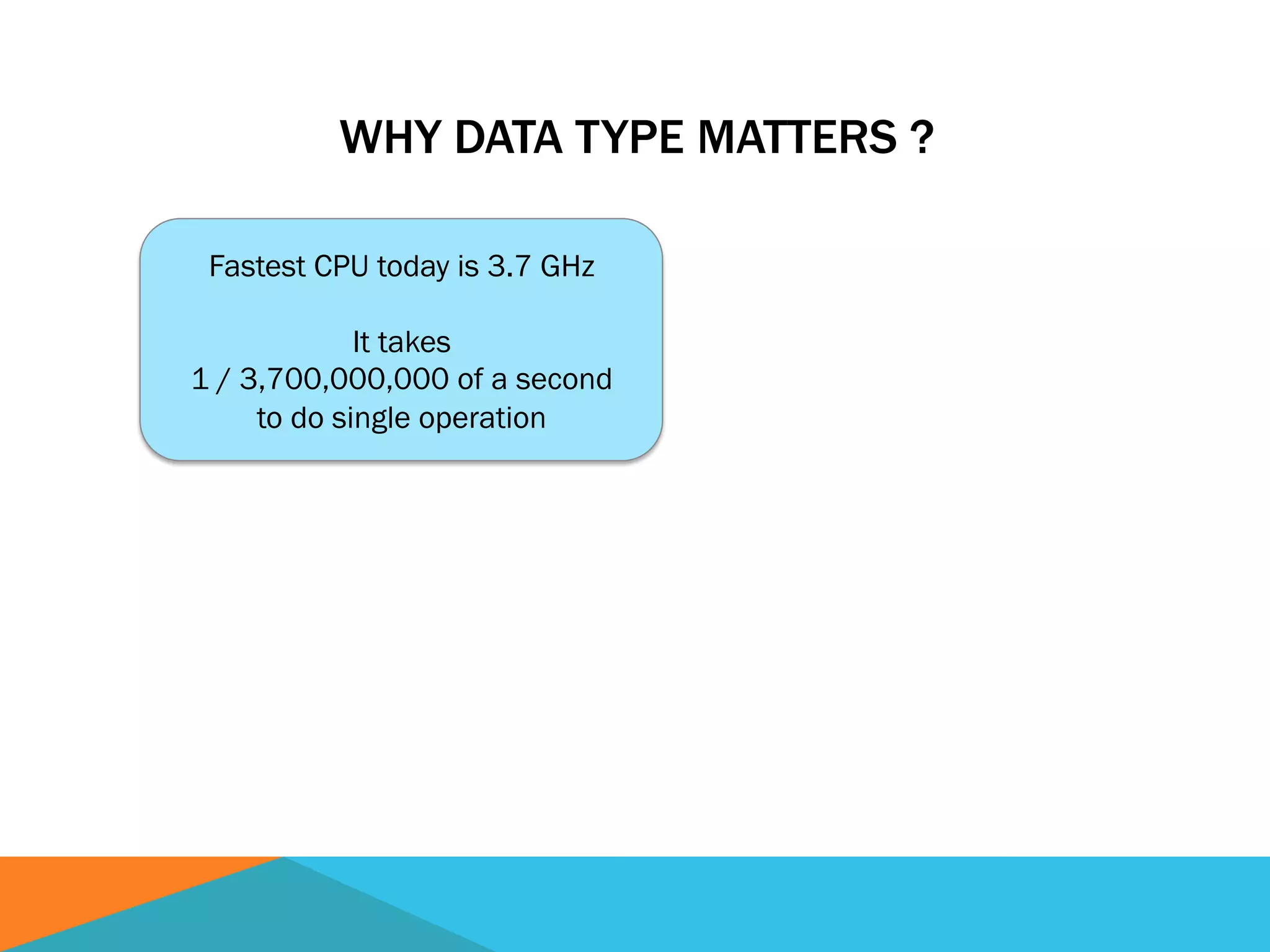
Fastest CPU today is 3.7 GHz
It takes
1 / 3,700,000,000 of a second
to do single operation
WHY DATA TYPE MATTERS ?
Fastest CPU today is 3.7 GHz
It takes
1 / 3,700,000,000 of a second
to do single operation
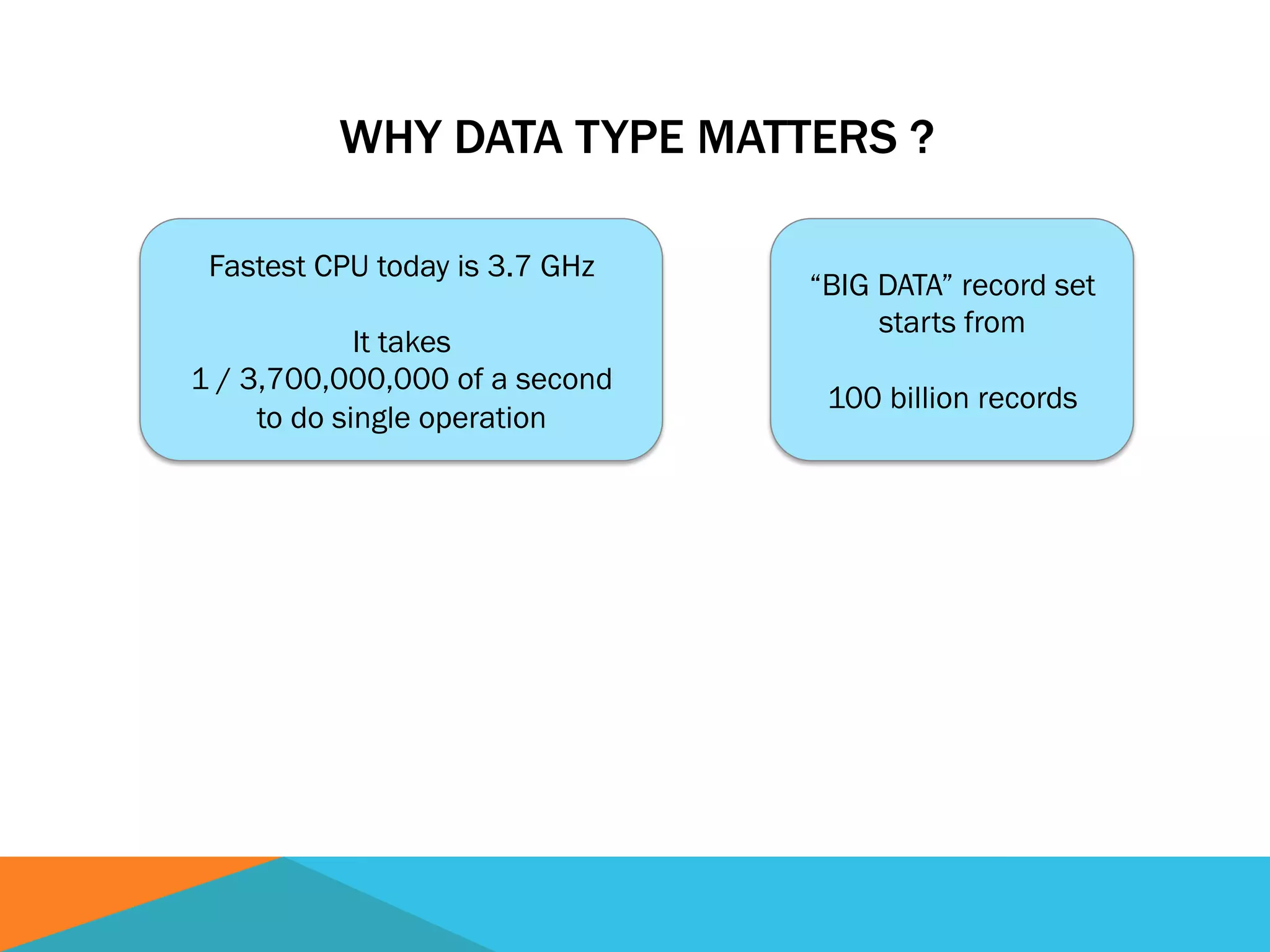
“BIG DATA” record set
starts from
100 billion records
WHY DATA TYPE MATTERS ?
Fastest CPU today is 3.7 GHz
It takes
1 / 3,700,000,000 of a second
to do single operation
“BIG DATA” record set
starts from
100 billion records
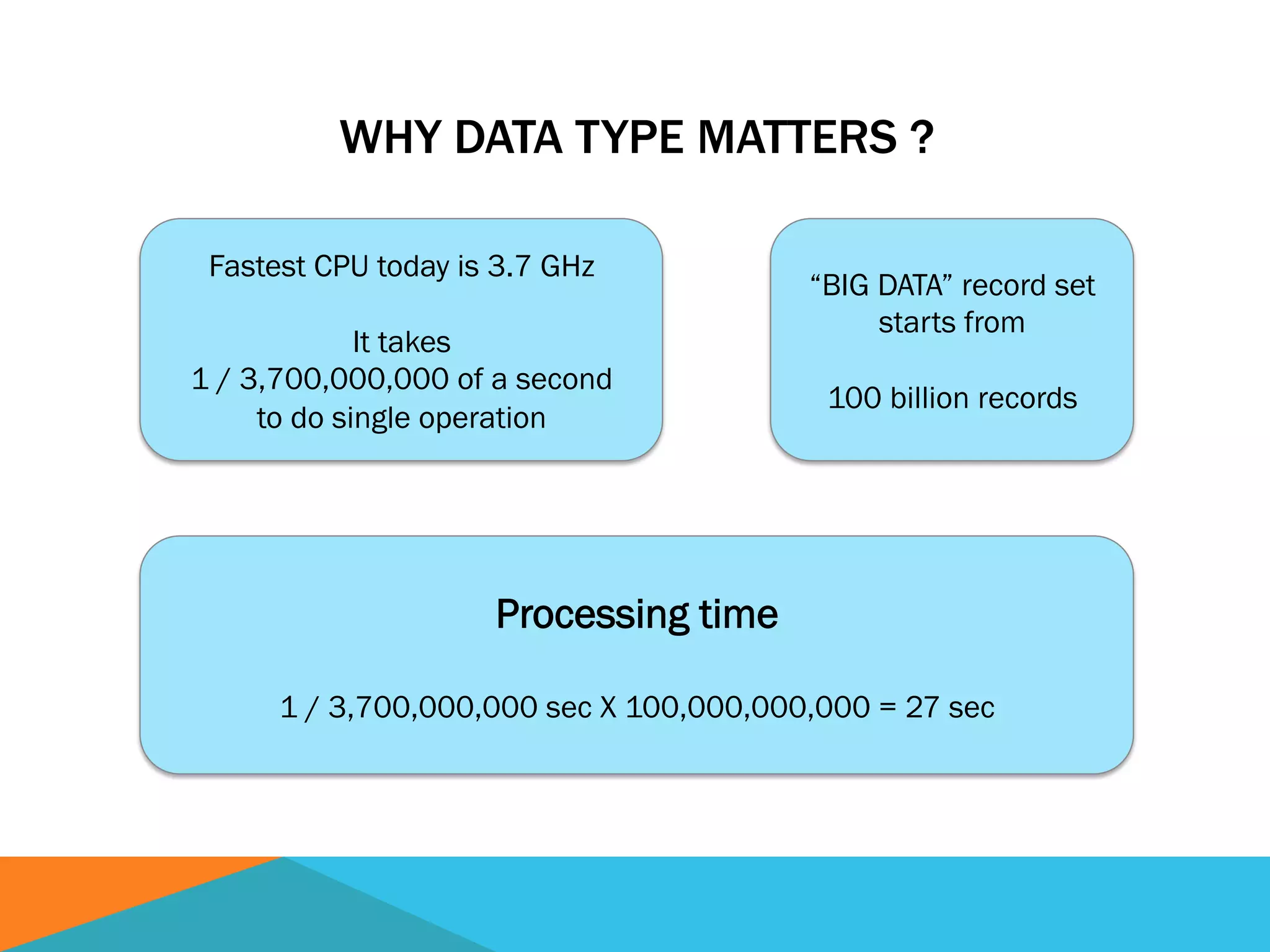
Processing time
1 / 3,700,000,000 sec X 100,000,000,000 = 27 sec
DO YOU NEED TO STORE DATA SAME
WAY IT IS PRESENTED ?
DO YOU NEED TO STORE DATA SAME
WAY IT IS PRESENTED ?
Presentation: $395.17
DO YOU NEED TO STORE DATA SAME
WAY IT IS PRESENTED ?
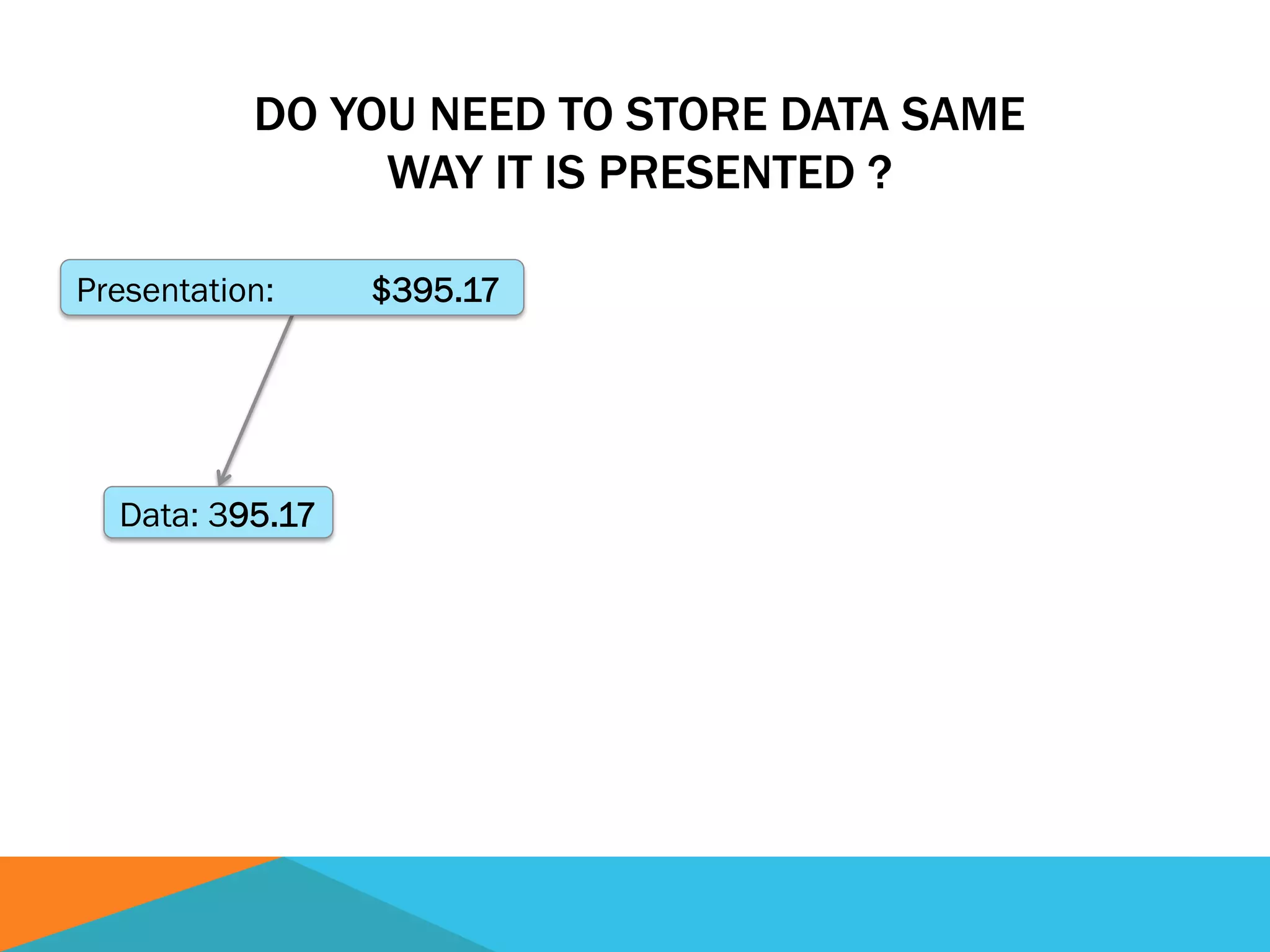
Presentation: $395.17
Data: 395.17
DO YOU NEED TO STORE DATA SAME
WAY IT IS PRESENTED ?
Presentation: $395.17
Data: 395.17
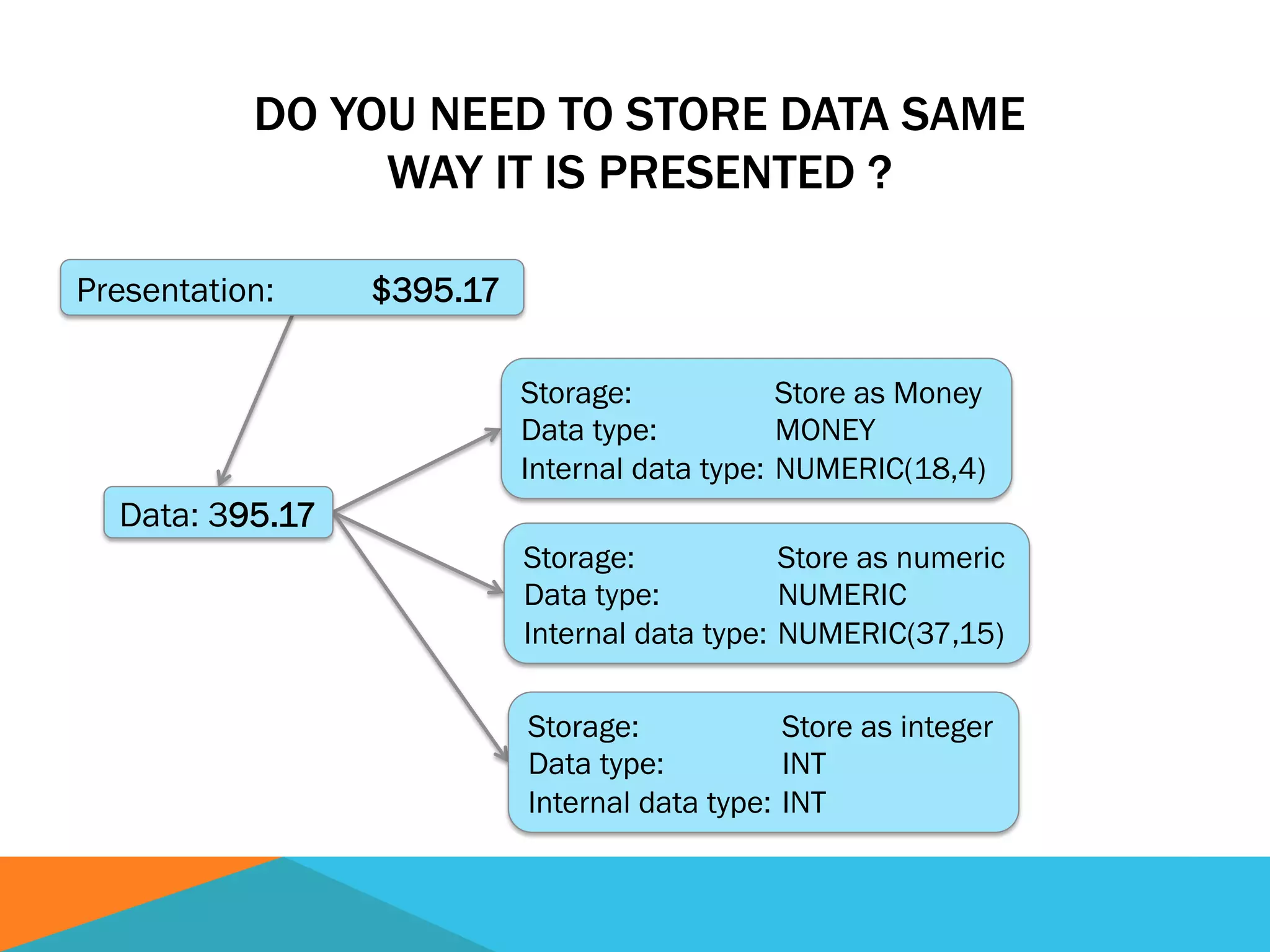
Storage: Store as Money
Data type: MONEY
Internal data type: NUMERIC(18,4)
Storage: Store as numeric
Data type: NUMERIC
Internal data type: NUMERIC(37,15)
Storage: Store as integer
Data type: INT
Internal data type: INT
DO YOU NEED TO STORE DATA SAME
WAY IT IS PRESENTED ?
Presentation: $395.17
Data: 395.17
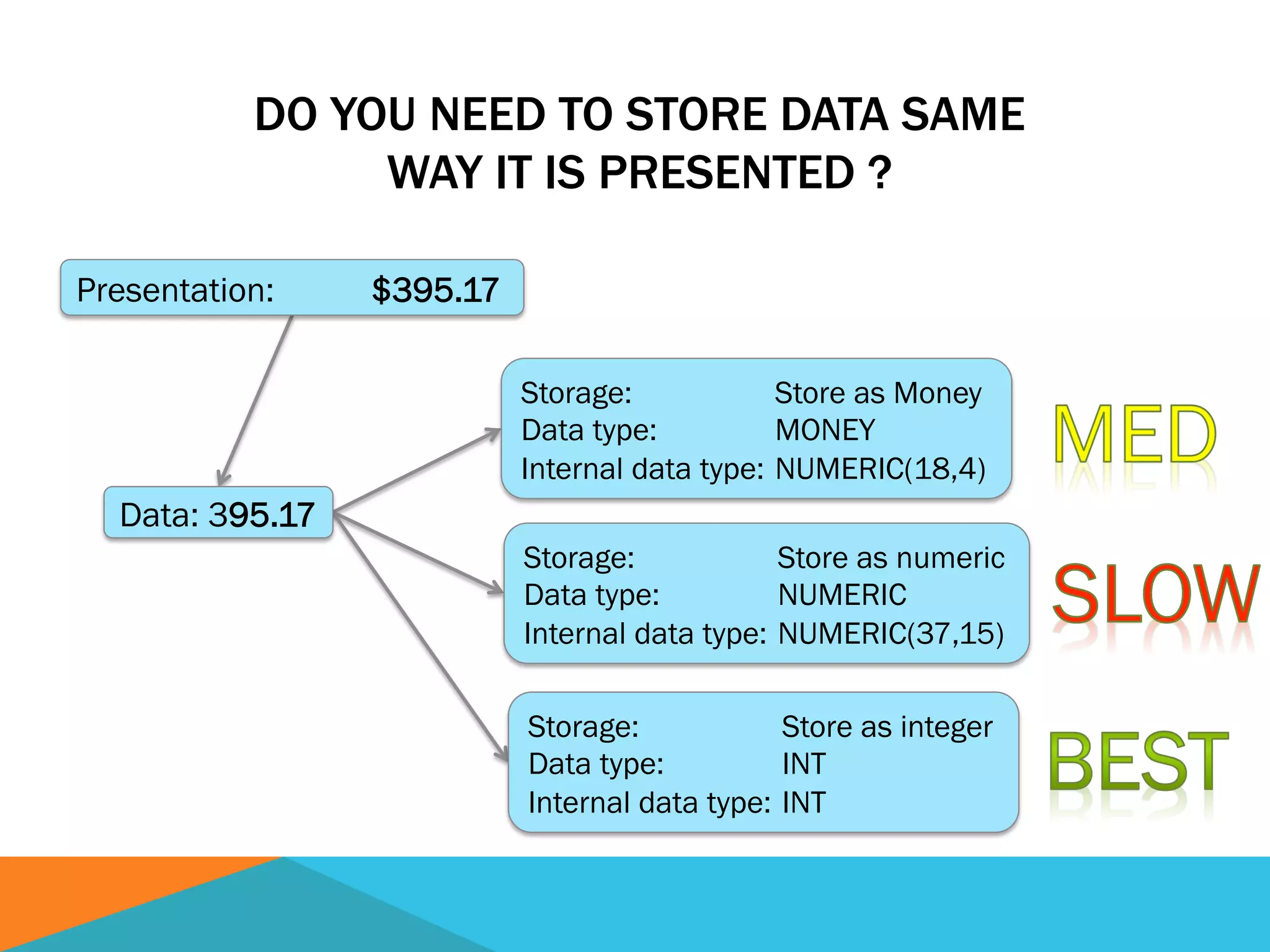
Storage: Store as Money
Data type: MONEY
Internal data type: NUMERIC(18,4)
Storage: Store as numeric
Data type: NUMERIC
Internal data type: NUMERIC(37,15)
Storage: Store as integer
Data type: INT
Internal data type: INT
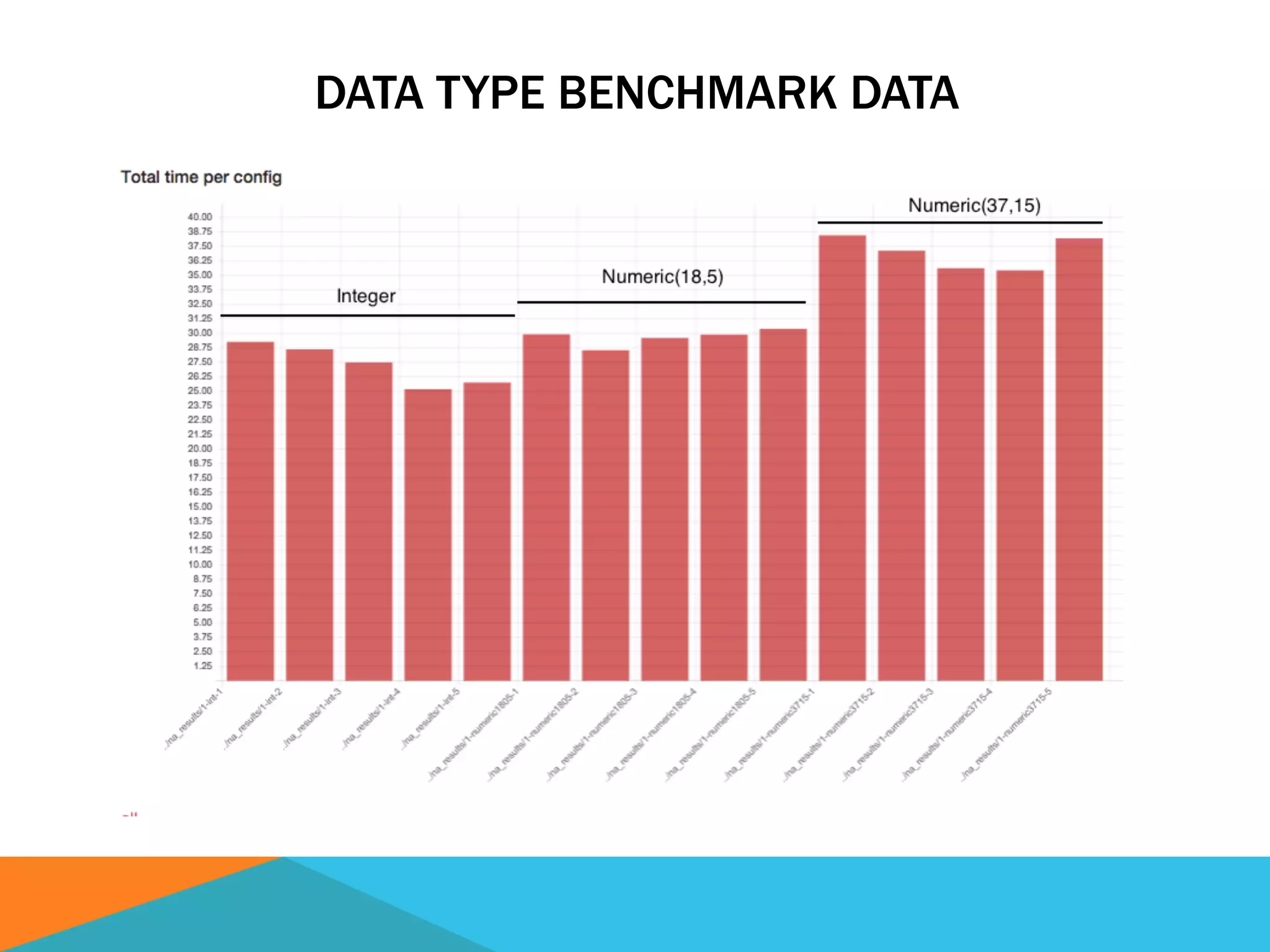
DATA TYPE BENCHMARK DATA
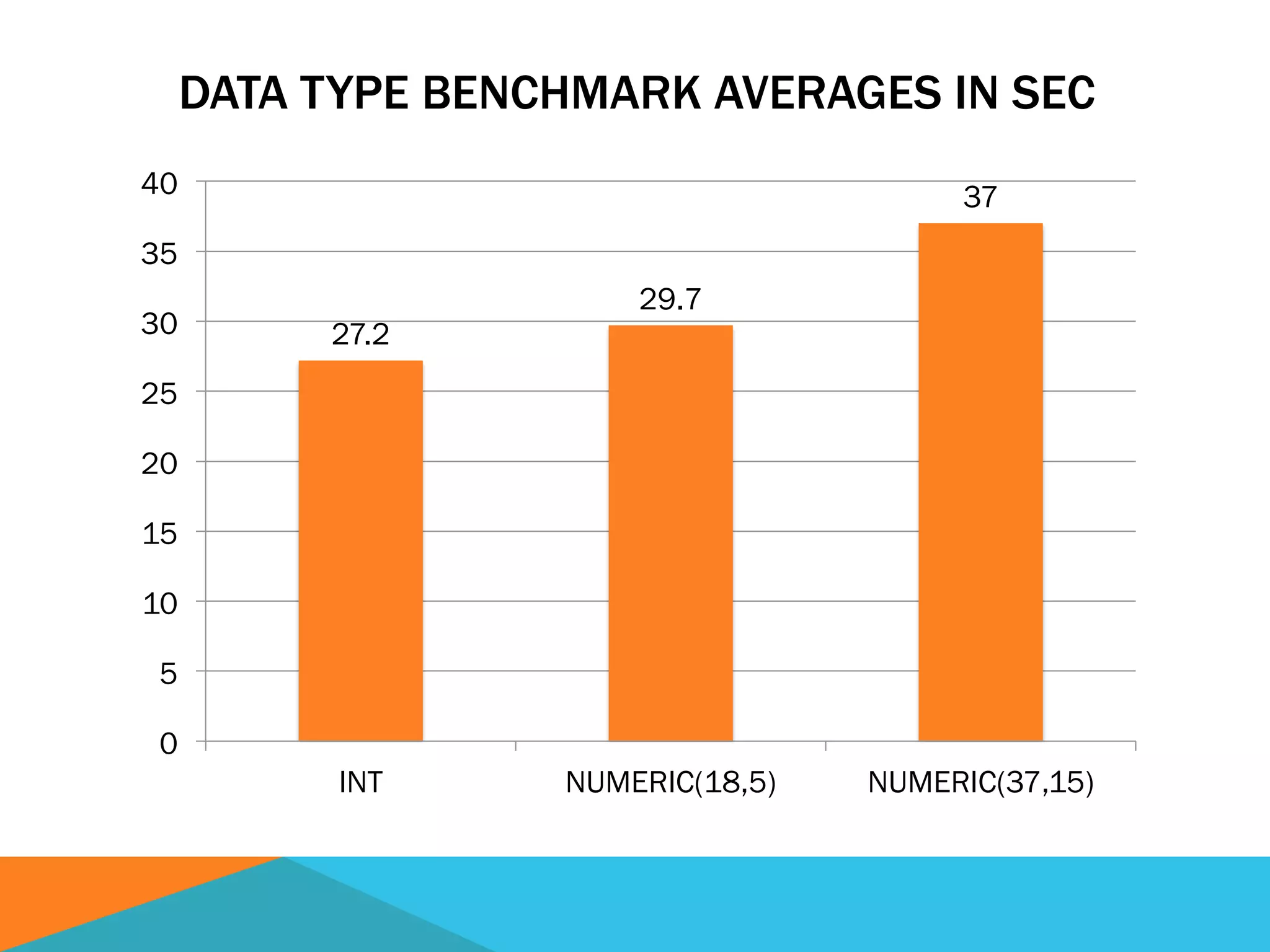
DATA TYPE BENCHMARK AVERAGES IN SEC
27.2
29.7
37
0
5
10
15
20
25
30
35
40
INT NUMERIC(18,5) NUMERIC(37,15)
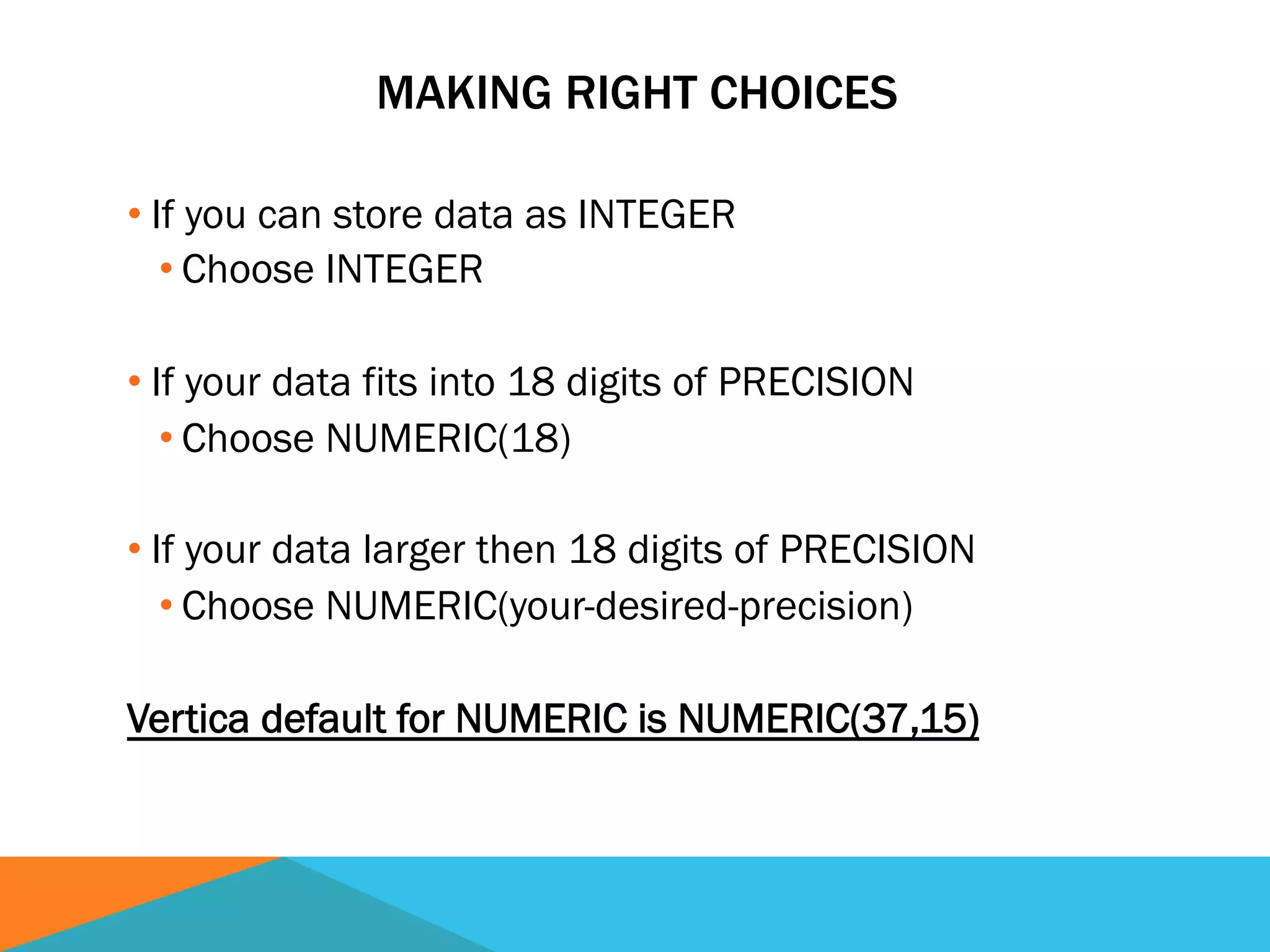
MAKING RIGHT CHOICES
• If you can store data as INTEGER
• Choose INTEGER
• If your data fits into 18 digits of PRECISION
• Choose NUMERIC(18)
• If your data larger then 18 digits of PRECISION
• Choose NUMERIC(your-desired-precision)
Vertica default for NUMERIC is NUMERIC(37,15)
ELIMINATING UNNECESSARY LOCKING
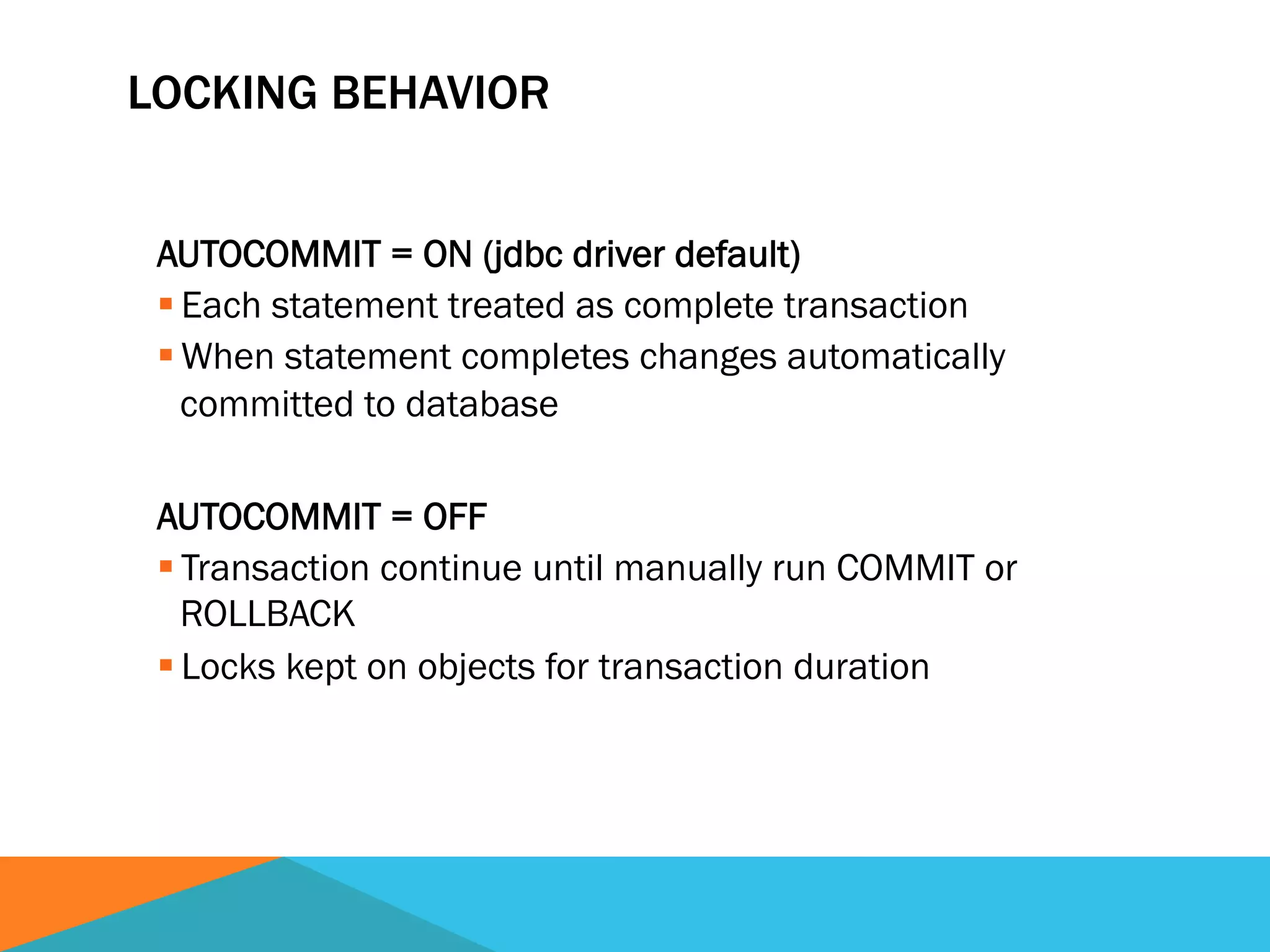
LOCKING BEHAVIOR
AUTOCOMMIT = ON (jdbc driver default)
§ Each statement treated as complete transaction
§ When statement completes changes automatically
committed to database
AUTOCOMMIT = OFF
§ Transaction continue until manually run COMMIT or
ROLLBACK
§ Locks kept on objects for transaction duration
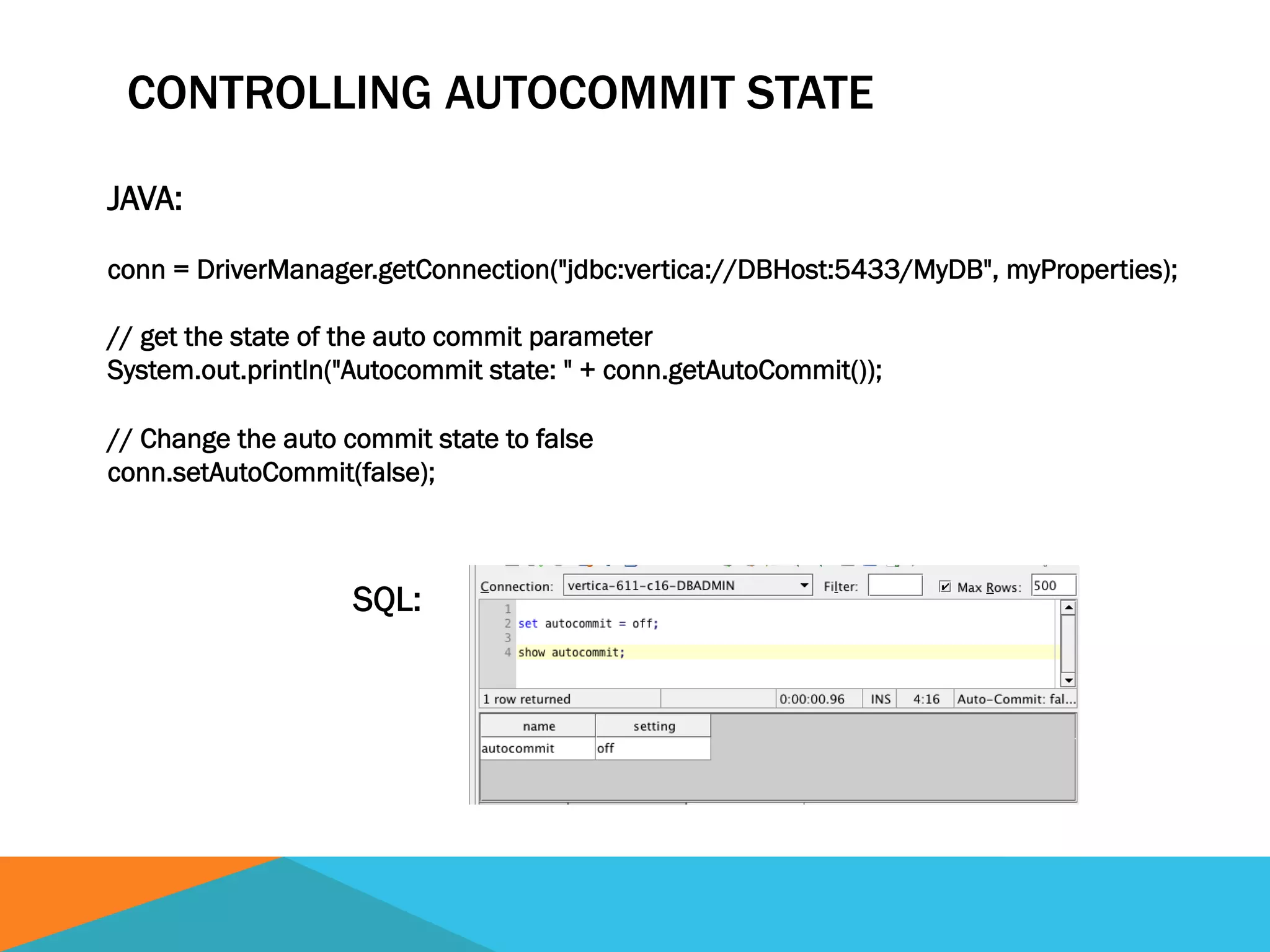
CONTROLLING AUTOCOMMIT STATE
JAVA:
conn = DriverManager.getConnection("jdbc:vertica://DBHost:5433/MyDB", myProperties);
// get the state of the auto commit parameter
System.out.println("Autocommit state: " + conn.getAutoCommit());
// Change the auto commit state to false
conn.setAutoCommit(false);
SQL:
IMPACT ON LOCK COUNTS BY CHANGING
AUTOCOMMIT SETTING TO OFF
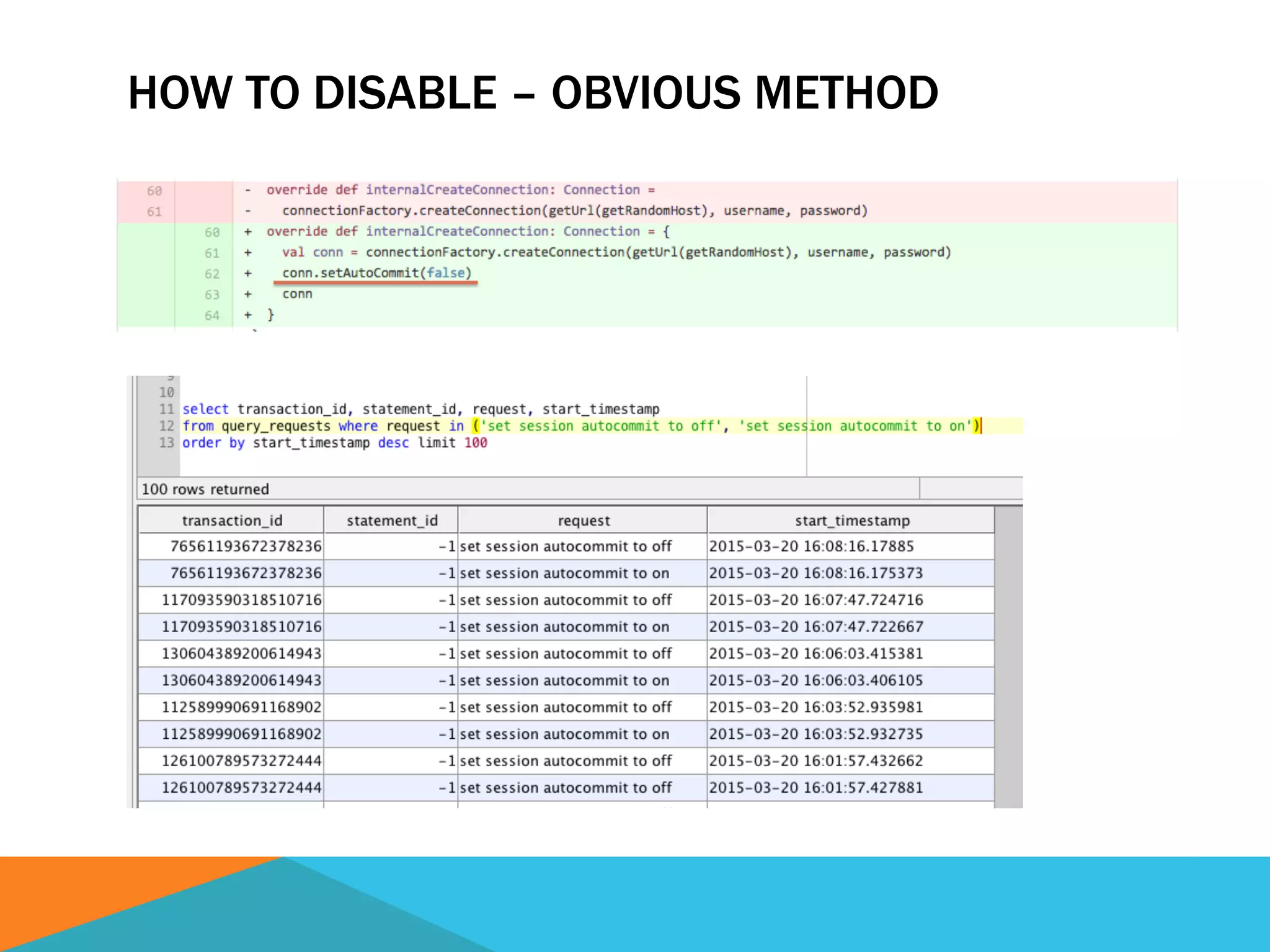
HOW TO DISABLE – OBVIOUS METHOD
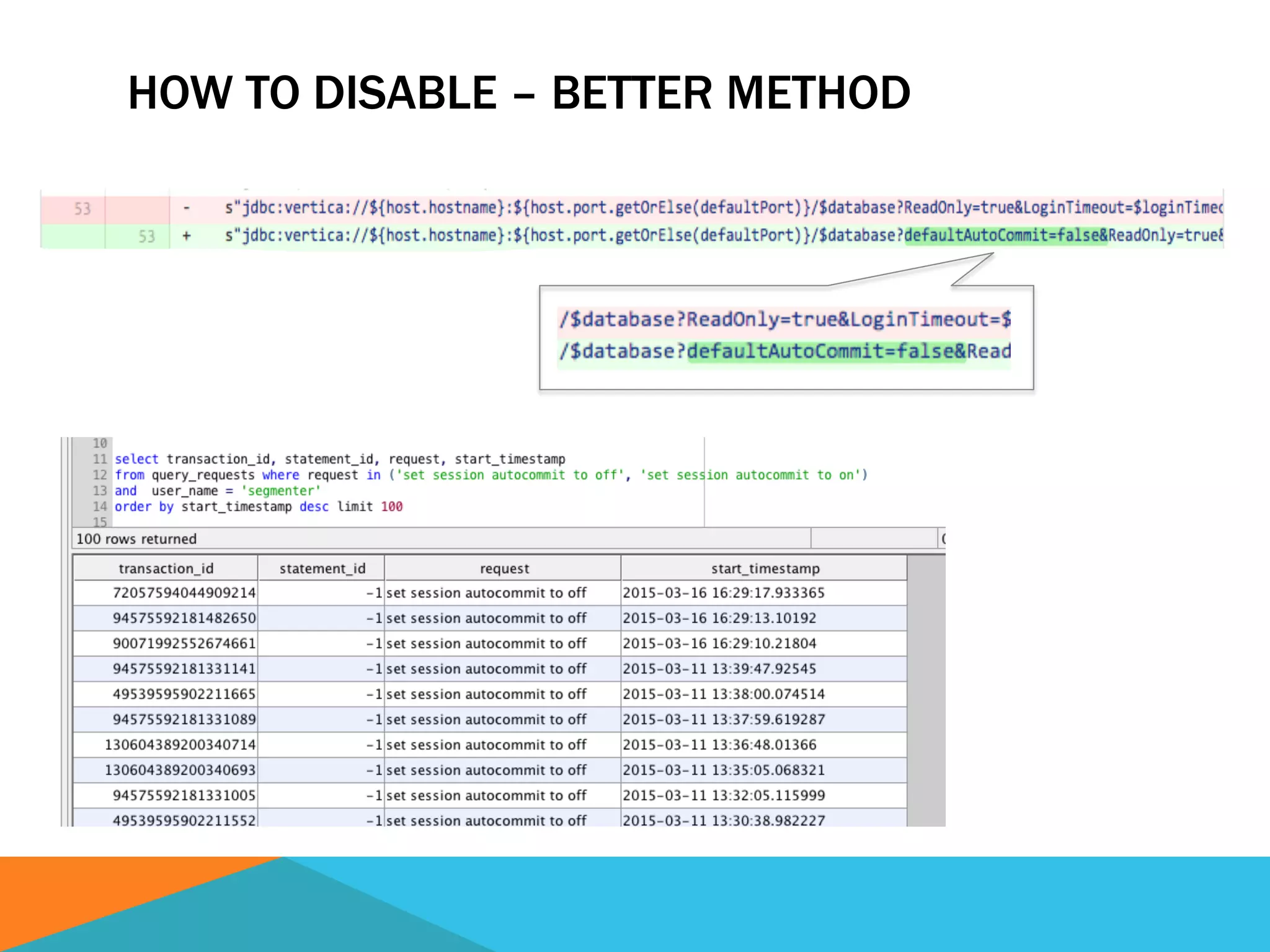
HOW TO DISABLE – BETTER METHOD
BIOS SETTINGS OPTIMIZATIONS
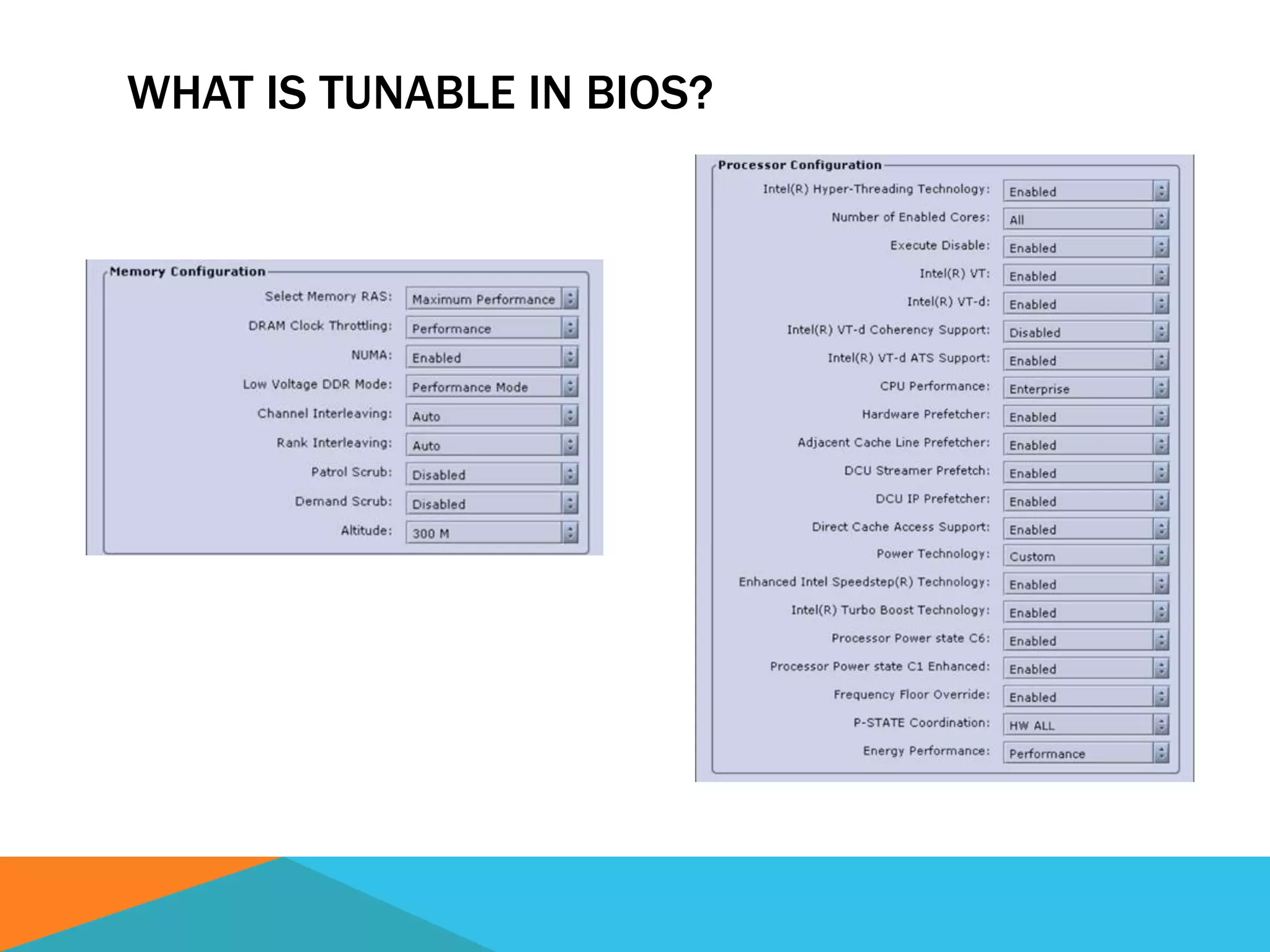
WHAT IS TUNABLE IN BIOS?
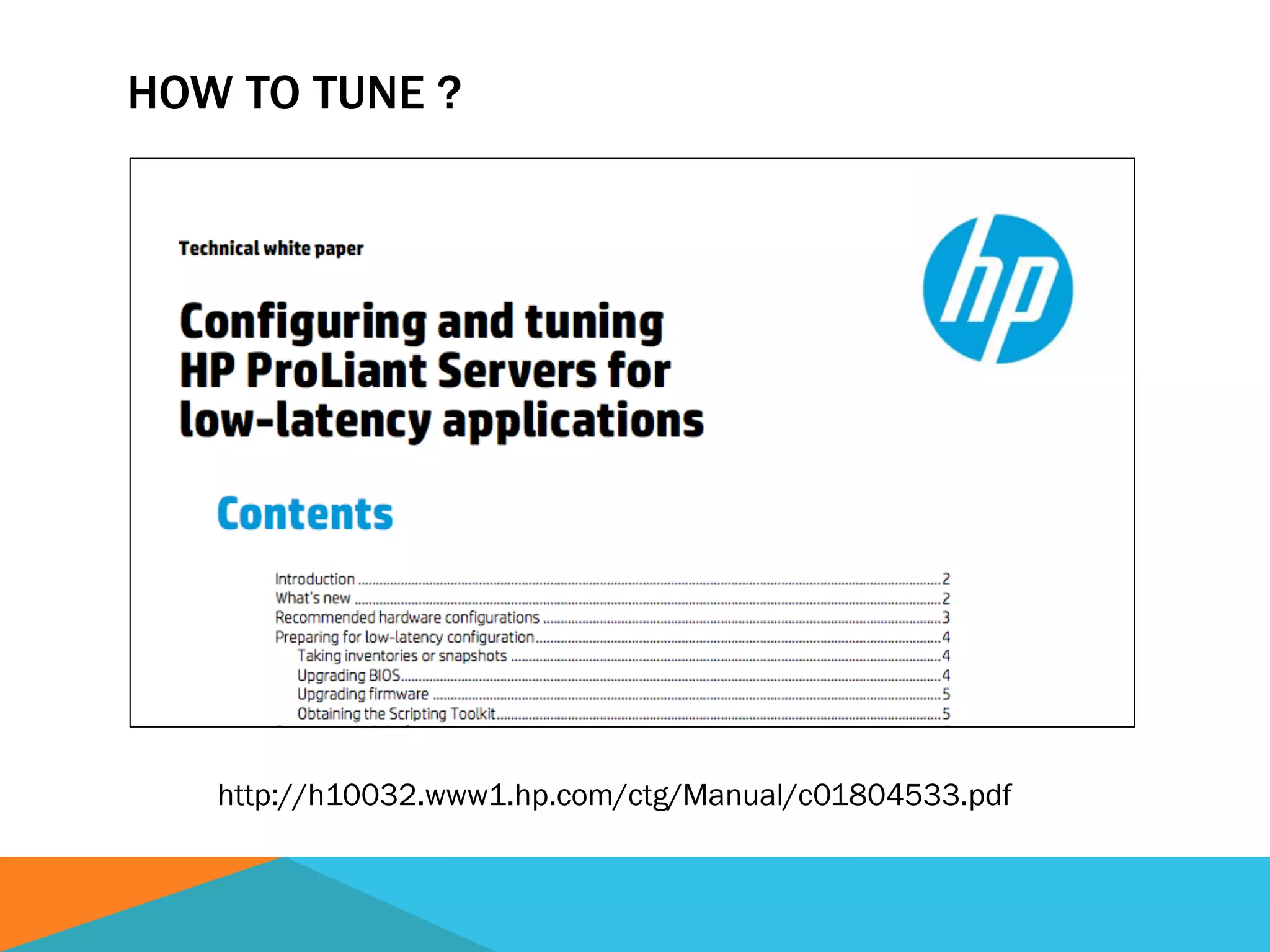
HOW TO TUNE ?
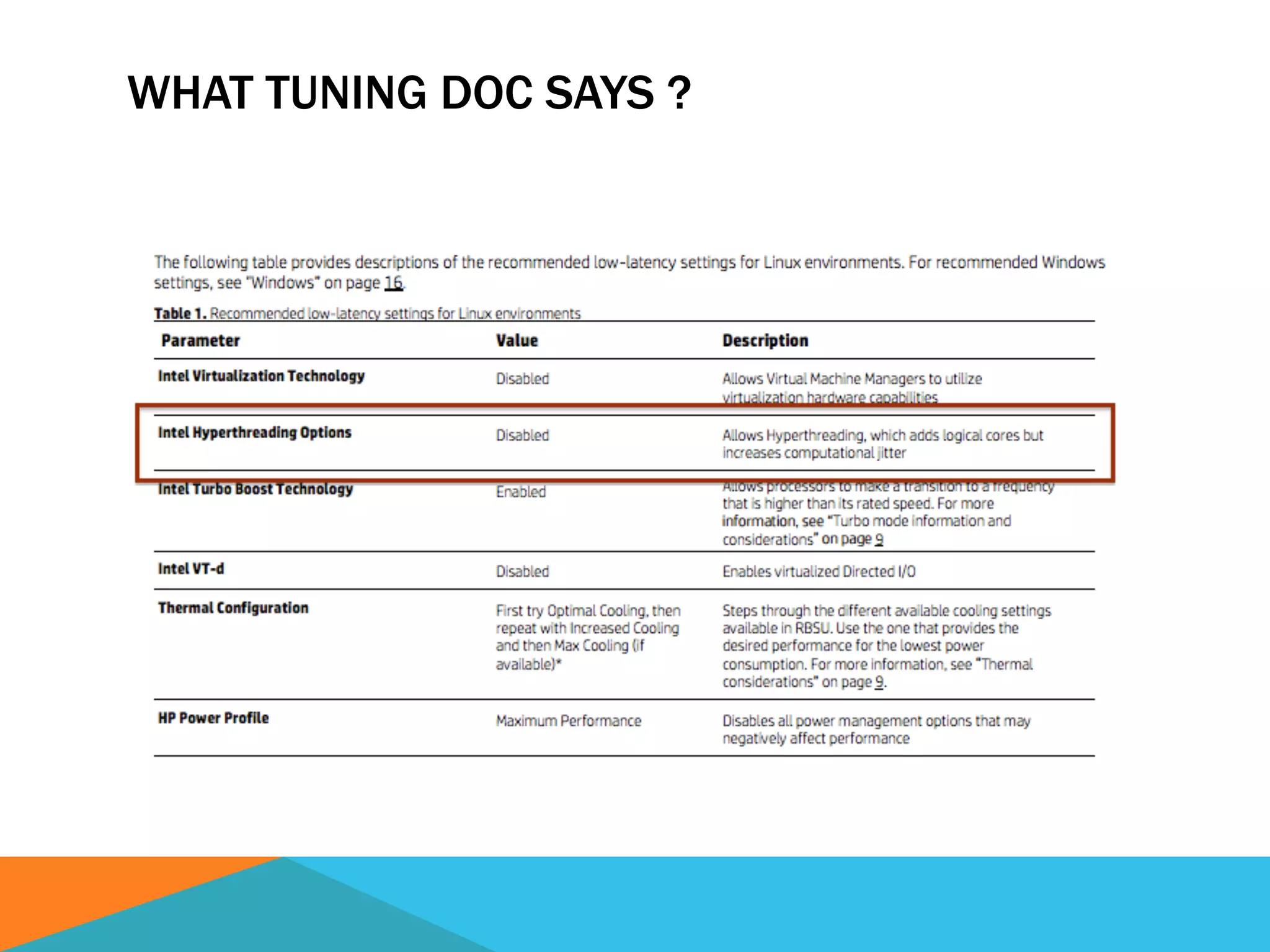
http://h10032.www1.hp.com/ctg/Manual/c01804533.pdf
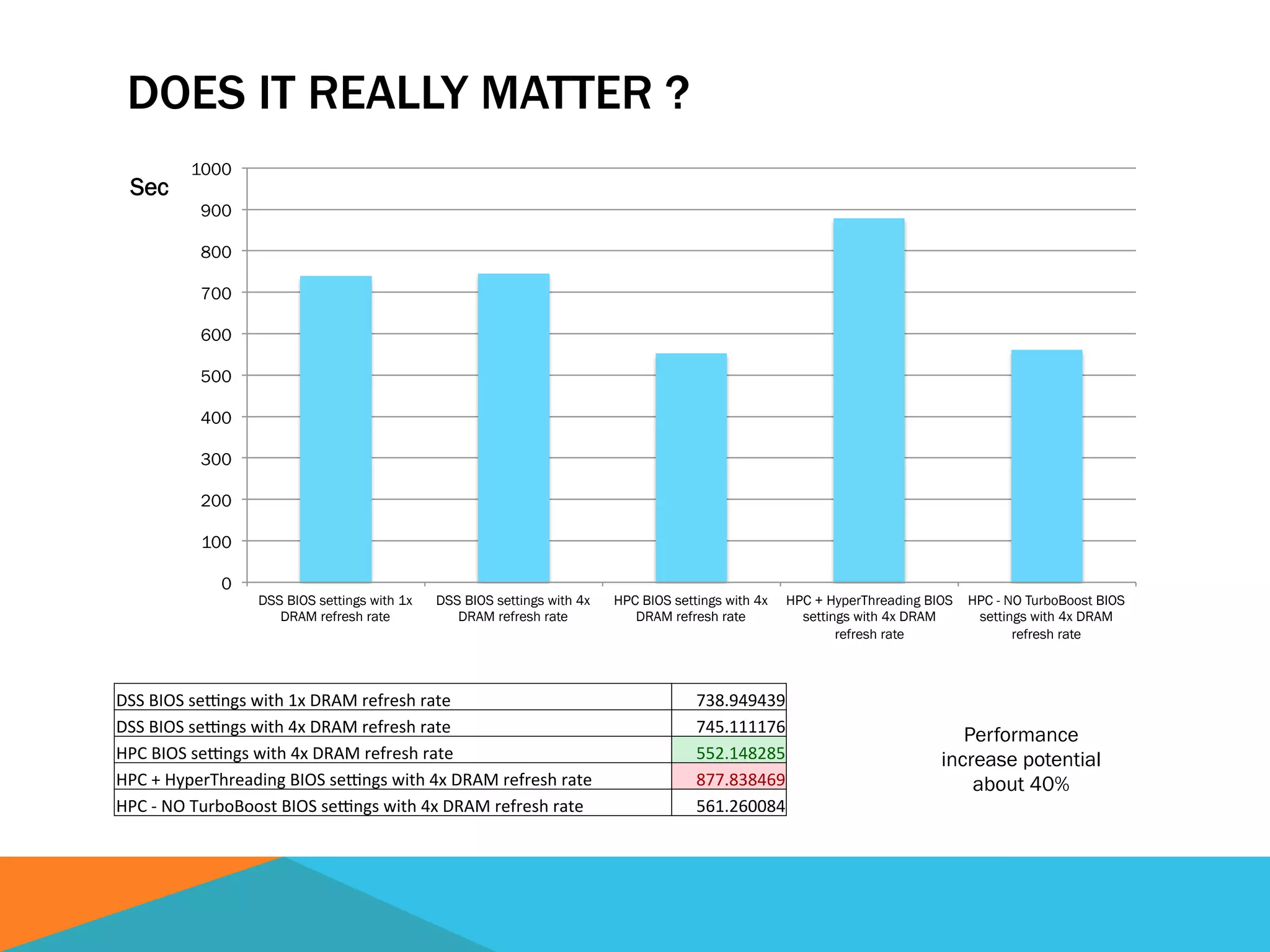
DOES IT REALLY MATTER ?
0
100
200
300
400
500
600
700
800
900
1000
DSS BIOS settings with 1x
DRAM refresh rate
DSS BIOS settings with 4x
DRAM refresh rate
HPC BIOS settings with 4x
DRAM refresh rate
HPC + HyperThreading BIOS
settings with 4x DRAM
refresh rate
HPC - NO TurboBoost BIOS
settings with 4x DRAM
refresh rate
Sec
DSS	
  BIOS	
  se)ngs	
  with	
  1x	
  DRAM	
  refresh	
  rate	
   738.949439	
  
DSS	
  BIOS	
  se)ngs	
  with	
  4x	
  DRAM	
  refresh	
  rate	
   745.111176	
  
HPC	
  BIOS	
  se)ngs	
  with	
  4x	
  DRAM	
  refresh	
  rate	
   552.148285	
  
HPC	
  +	
  HyperThreading	
  BIOS	
  se)ngs	
  with	
  4x	
  DRAM	
  refresh	
  rate	
   877.838469	
  
HPC	
  -­‐	
  NO	
  TurboBoost	
  BIOS	
  se)ngs	
  with	
  4x	
  DRAM	
  refresh	
  rate	
   561.260084	
  
Performance
increase potential
about 40%
WHAT TUNING DOC SAYS ?
STAYING IN THE SAME “TECHNOLOGY SLICE”
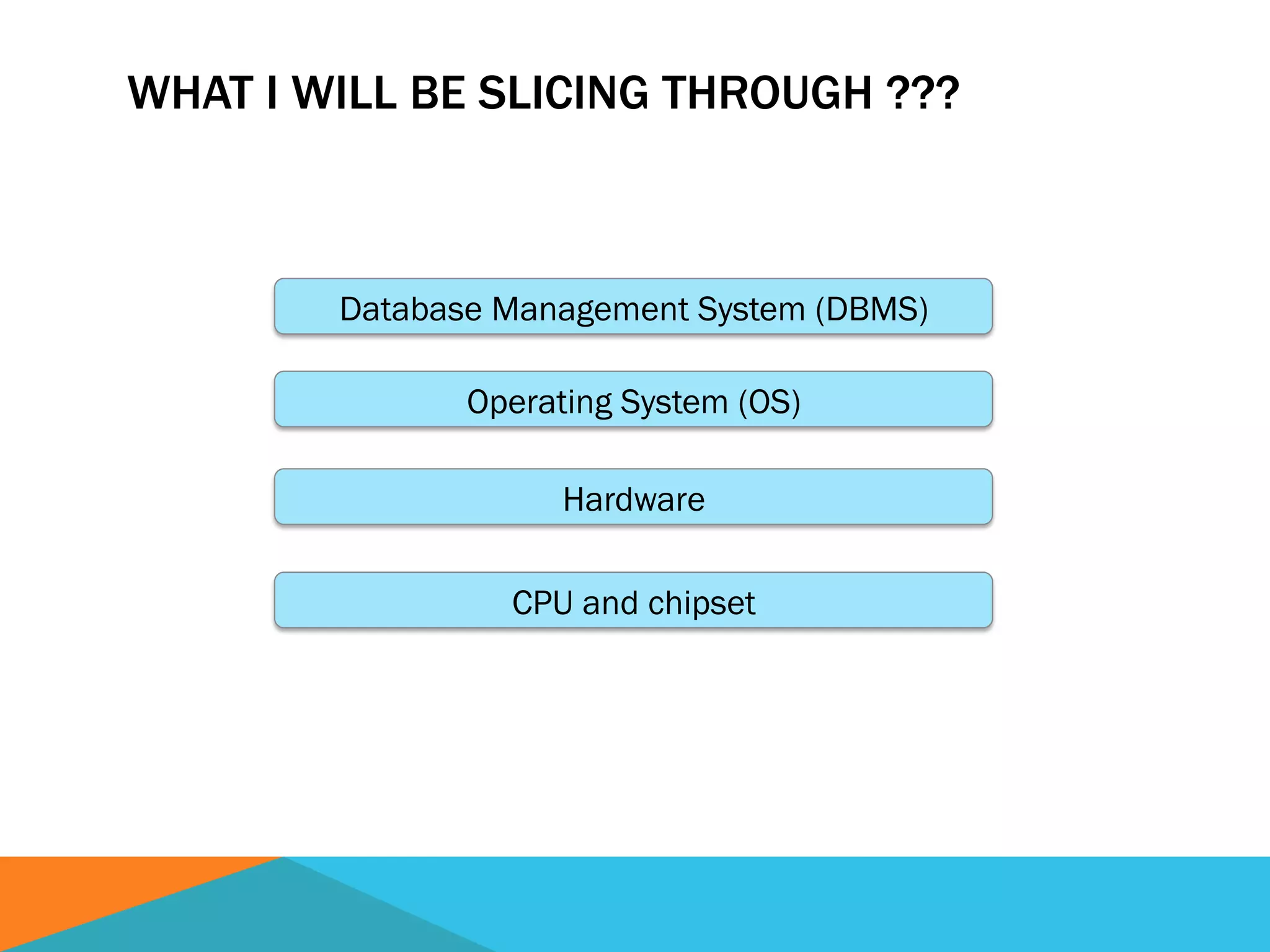
WHAT I WILL BE SLICING THROUGH ???
CPU and chipset
Hardware
Operating System (OS)
Database Management System (DBMS)
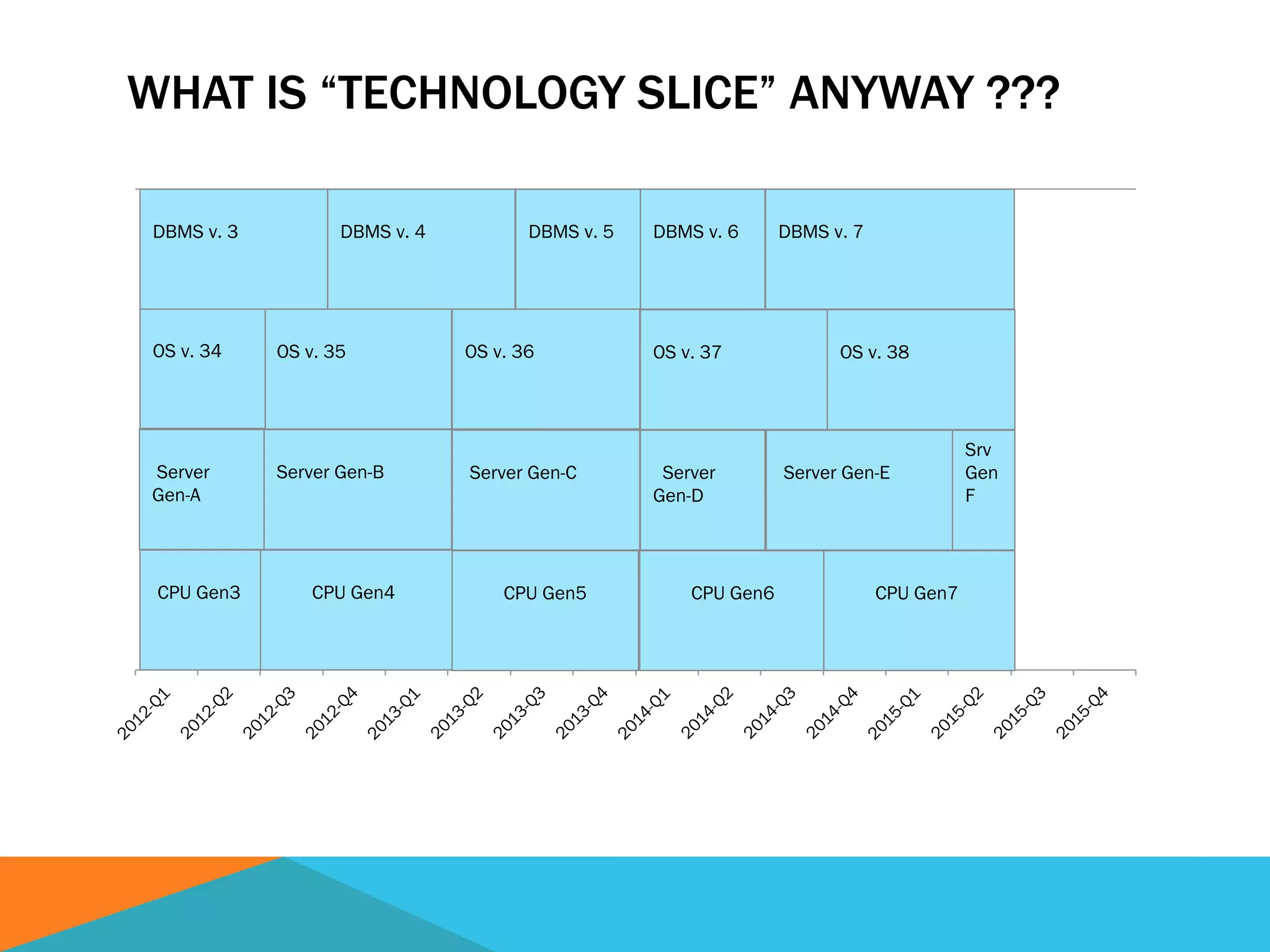
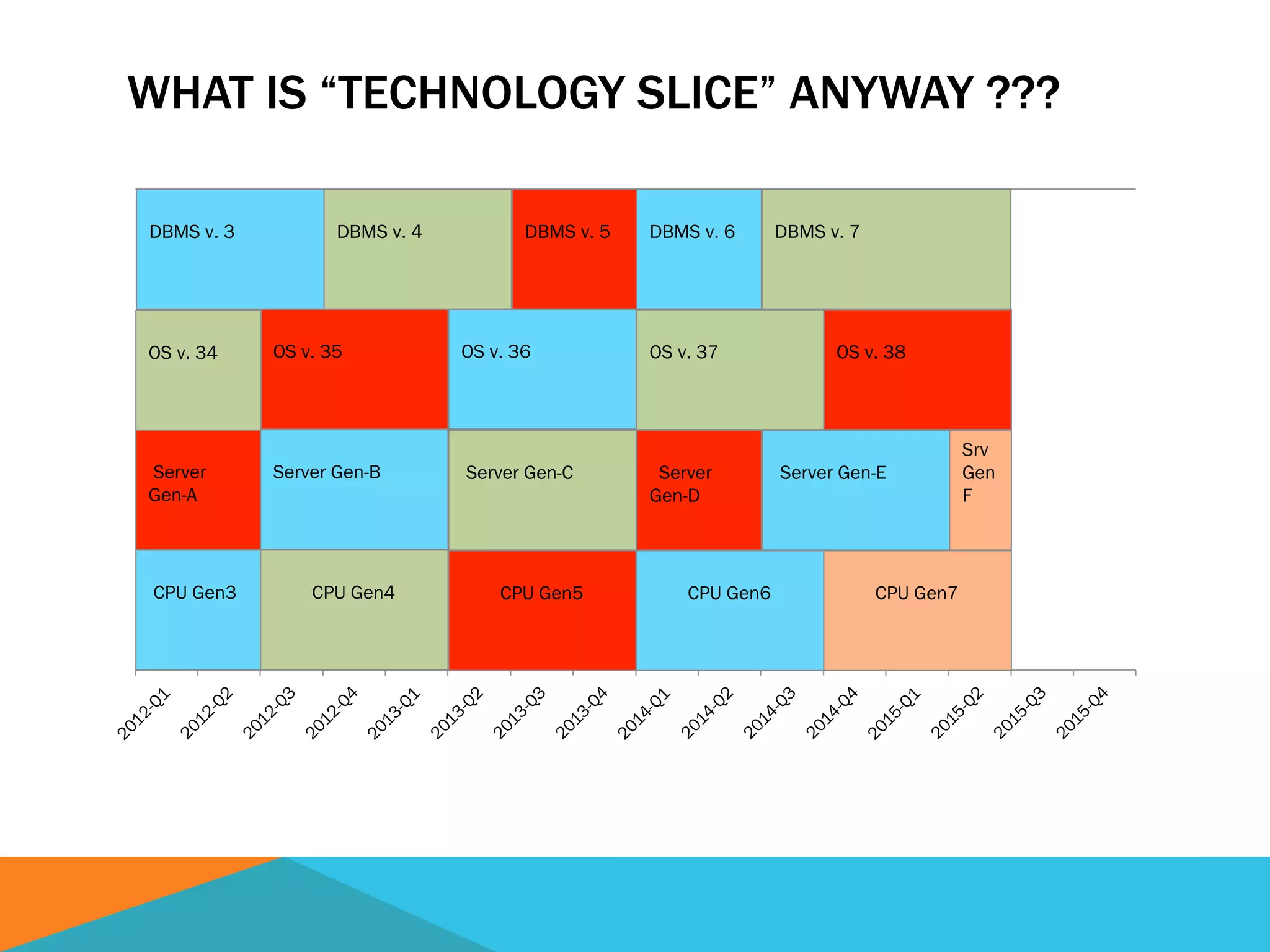
WHAT IS “TECHNOLOGY SLICE” ANYWAY ???
CPU Gen3 CPU Gen4
Server Gen-B
OS v. 36
DBMS v. 6
Server Gen-C
OS v. 37
DBMS v. 7
CPU Gen5
Server
Gen-D
CPU Gen6 CPU Gen7
Server Gen-E
Srv
Gen
F
OS v. 38
Server
Gen-A
OS v. 35OS v. 34
DBMS v. 5DBMS v. 4DBMS v. 3
WHAT IS “TECHNOLOGY SLICE” ANYWAY ???
CPU Gen3 CPU Gen4
Server Gen-B
OS v. 36
DBMS v. 6
Server Gen-C
OS v. 37
DBMS v. 7
CPU Gen5
Server
Gen-D
CPU Gen6 CPU Gen7
Server Gen-E
Srv
Gen
F
OS v. 38
Server
Gen-A
OS v. 35OS v. 34
DBMS v. 5DBMS v. 4DBMS v. 3
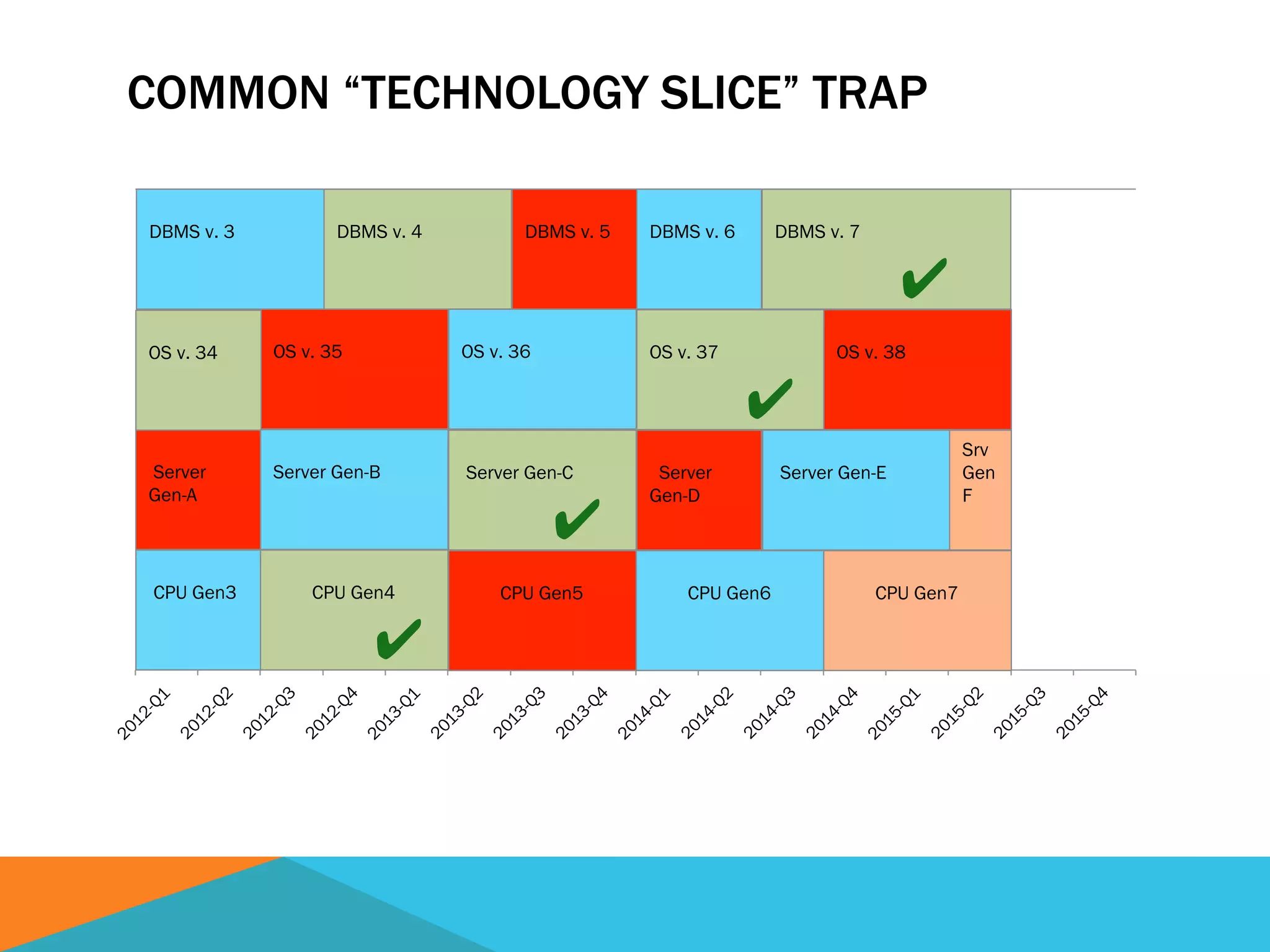
COMMON “TECHNOLOGY SLICE” TRAP
CPU Gen3 CPU Gen4
✔
Server Gen-B
OS v. 36
DBMS v. 6
Server Gen-C
✔
OS v. 37
✔
DBMS v. 7
✔
CPU Gen5
Server
Gen-D
CPU Gen6 CPU Gen7
Server Gen-E
Srv
Gen
F
OS v. 38
Server
Gen-A
OS v. 35OS v. 34
DBMS v. 5DBMS v. 4DBMS v. 3
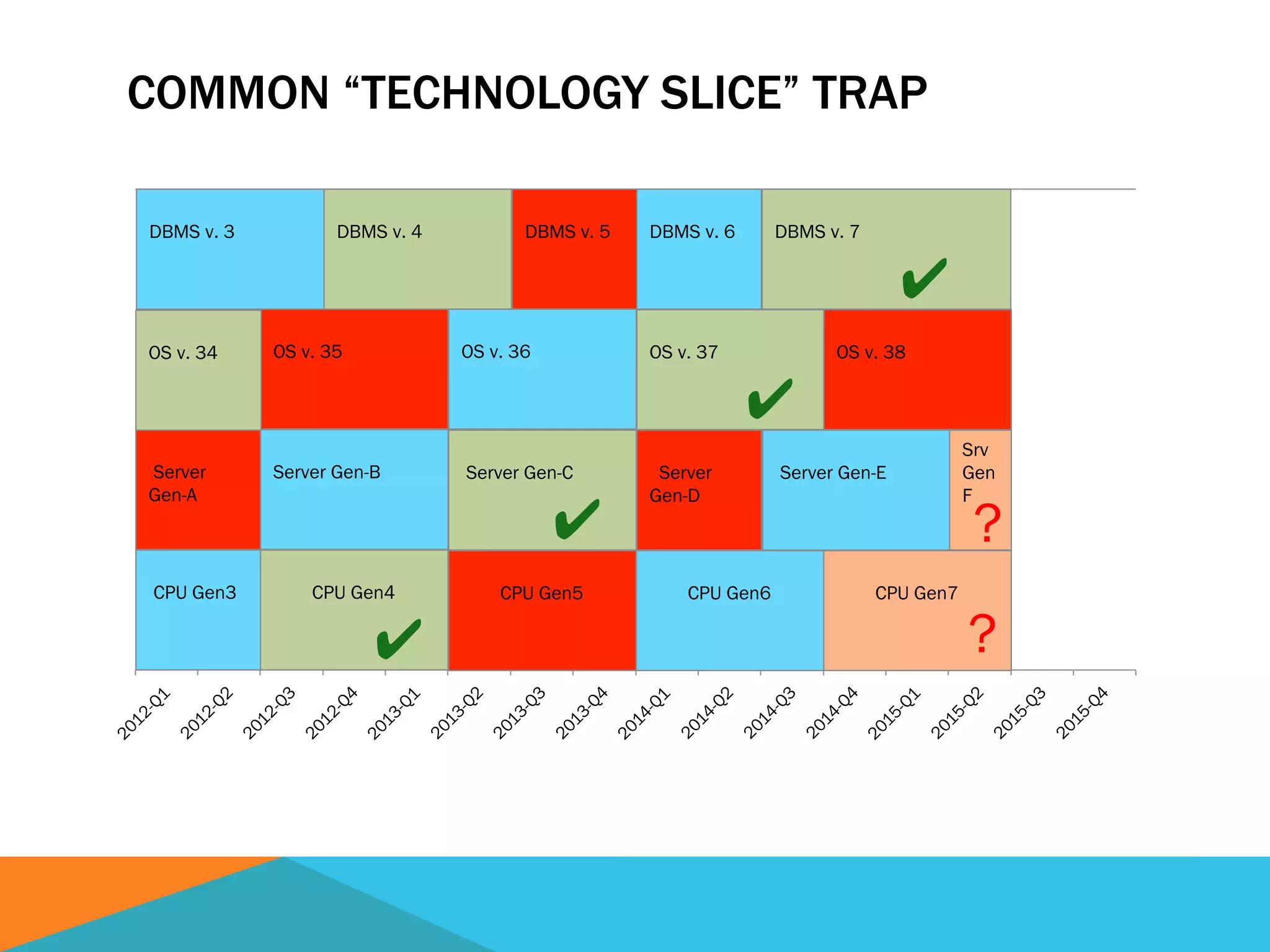
COMMON “TECHNOLOGY SLICE” TRAP
CPU Gen3 CPU Gen4
✔
Server Gen-B
OS v. 36
DBMS v. 6
Server Gen-C
✔
OS v. 37
✔
DBMS v. 7
✔
CPU Gen5
Server
Gen-D
CPU Gen6 CPU Gen7
Server Gen-E
Srv
Gen
F
OS v. 38
Server
Gen-A
OS v. 35OS v. 34
DBMS v. 5DBMS v. 4DBMS v. 3
?
?
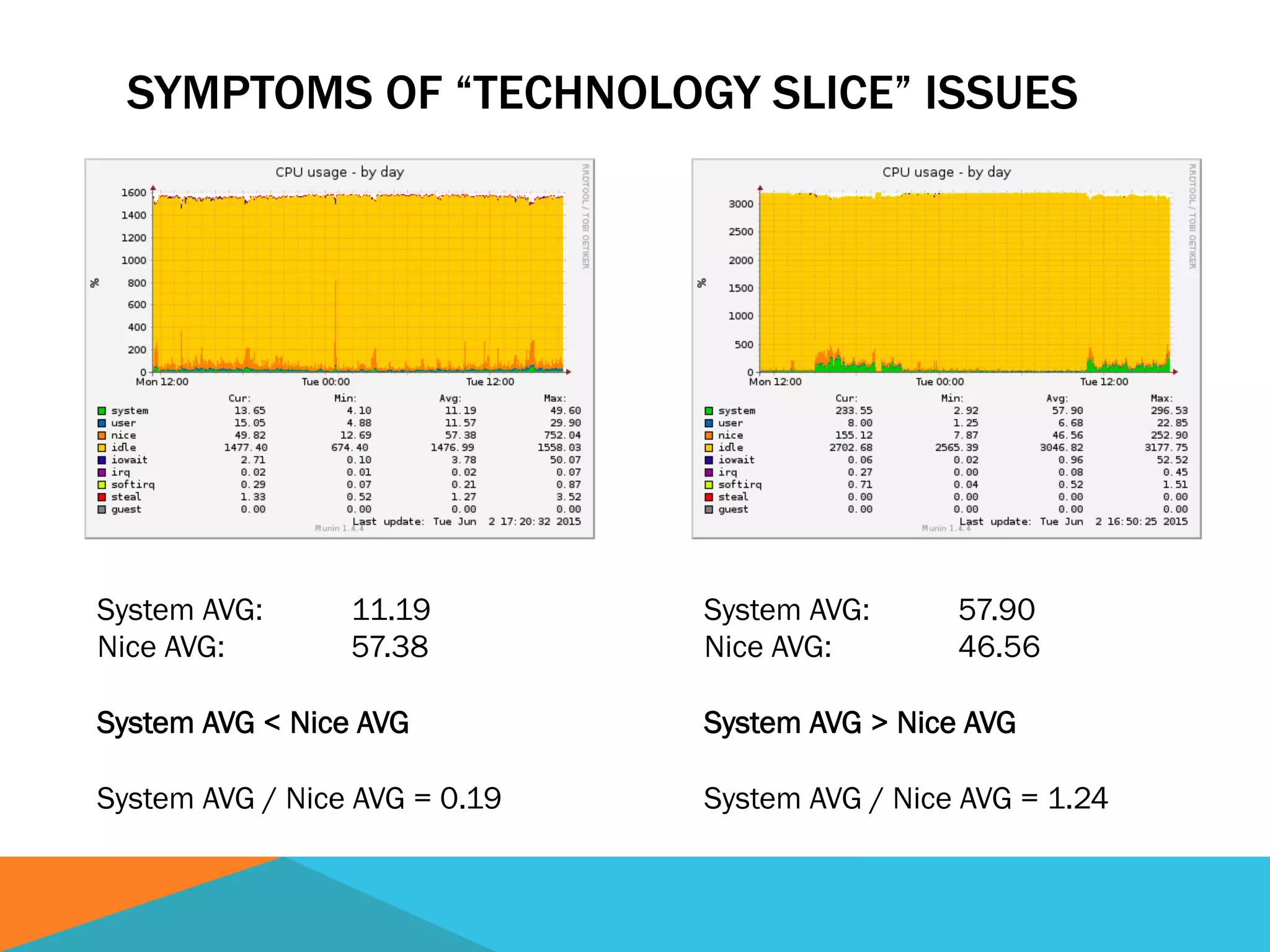
SYMPTOMS OF “TECHNOLOGY SLICE” ISSUES
System AVG: 57.90
Nice AVG: 46.56
System AVG > Nice AVG
System AVG / Nice AVG = 1.24
System AVG: 11.19
Nice AVG: 57.38
System AVG < Nice AVG
System AVG / Nice AVG = 0.19
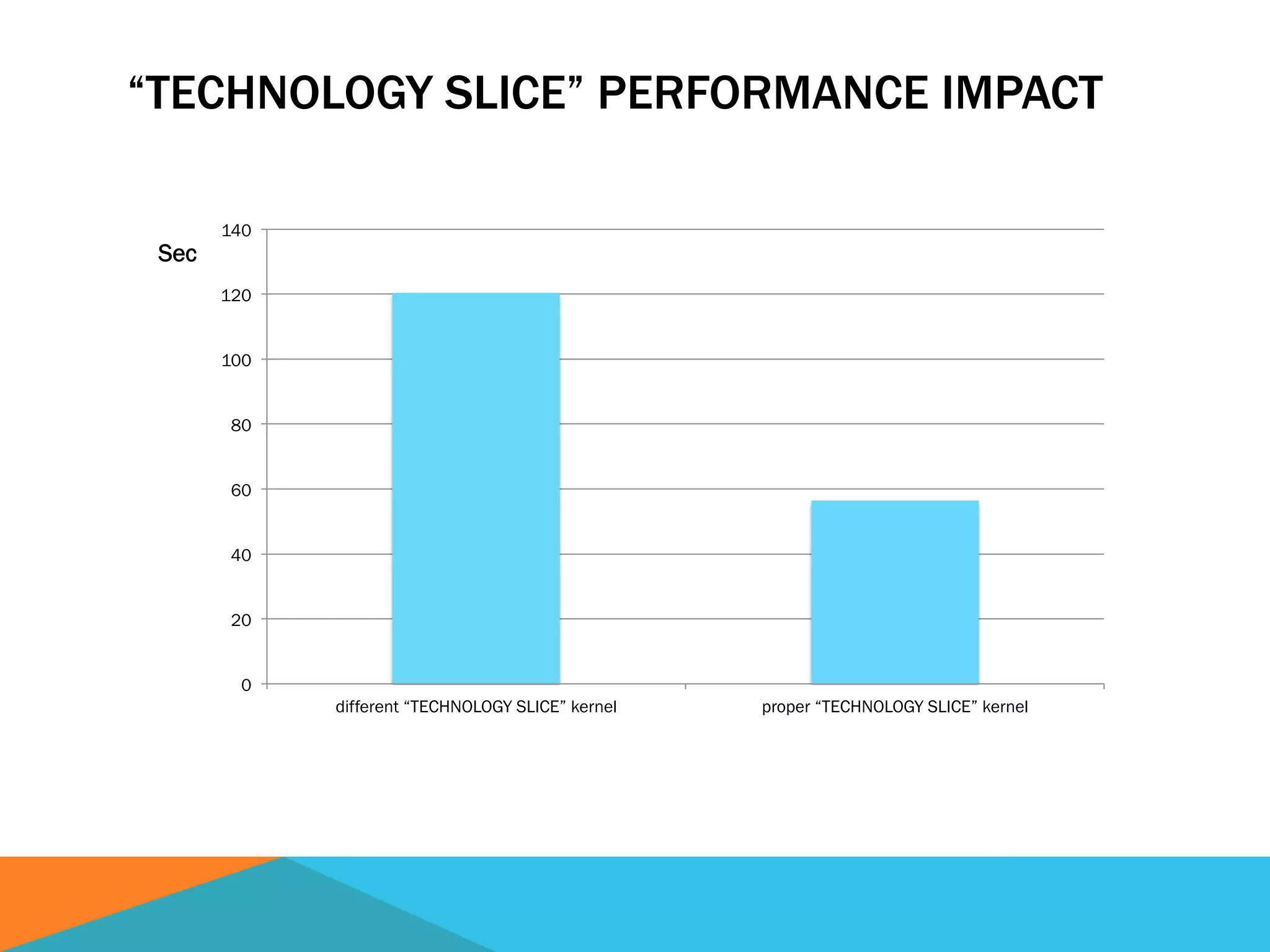
“TECHNOLOGY SLICE” PERFORMANCE IMPACT
0
20
40
60
80
100
120
140
different “TECHNOLOGY SLICE” kernel proper “TECHNOLOGY SLICE” kernel
Sec
SUFFICIENT RAM CALCULATIONS
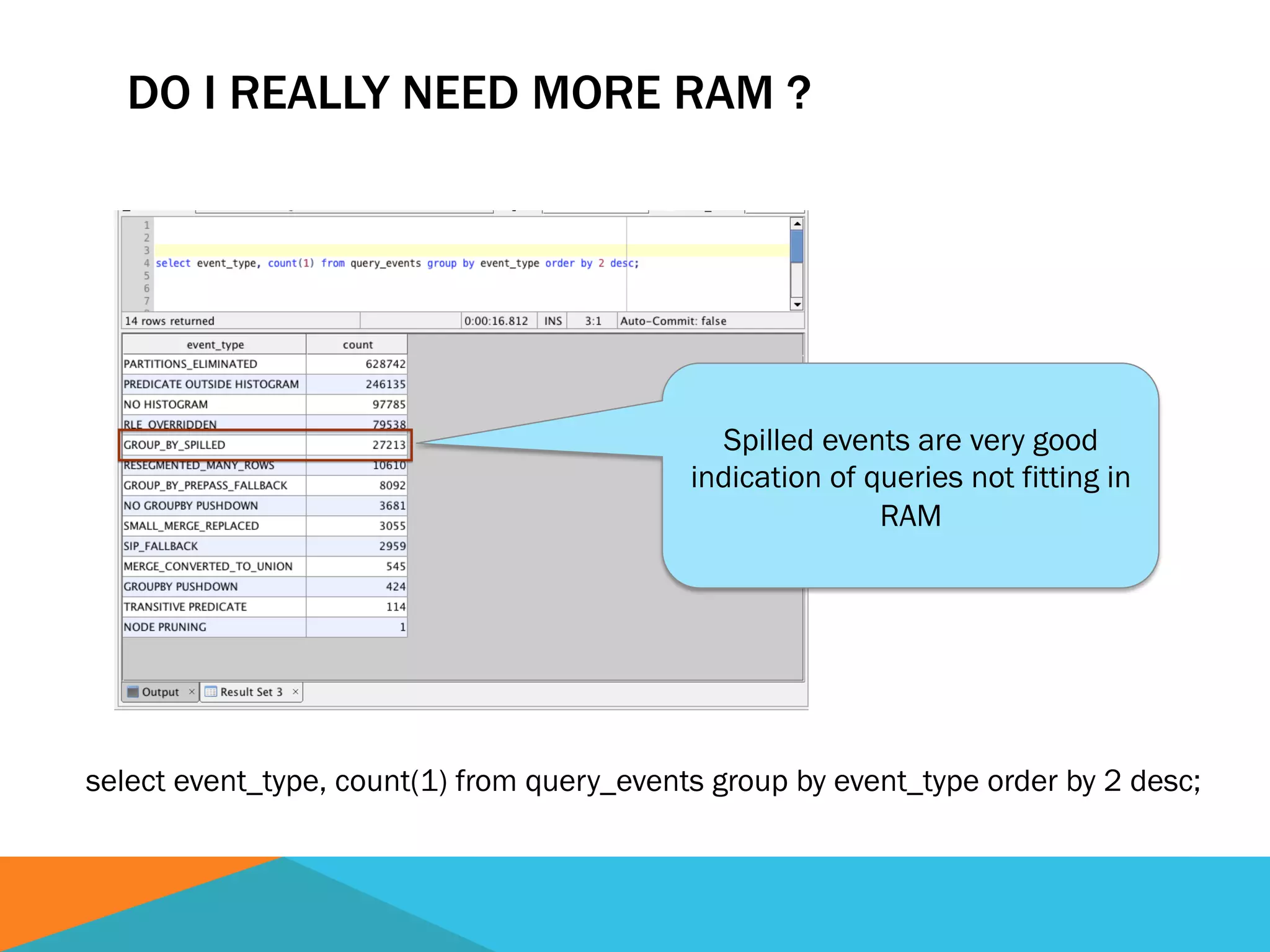
DO I REALLY NEED MORE RAM ?
select event_type, count(1) from query_events group by event_type order by 2 desc;
Spilled events are very good
indication of queries not fitting in
RAM
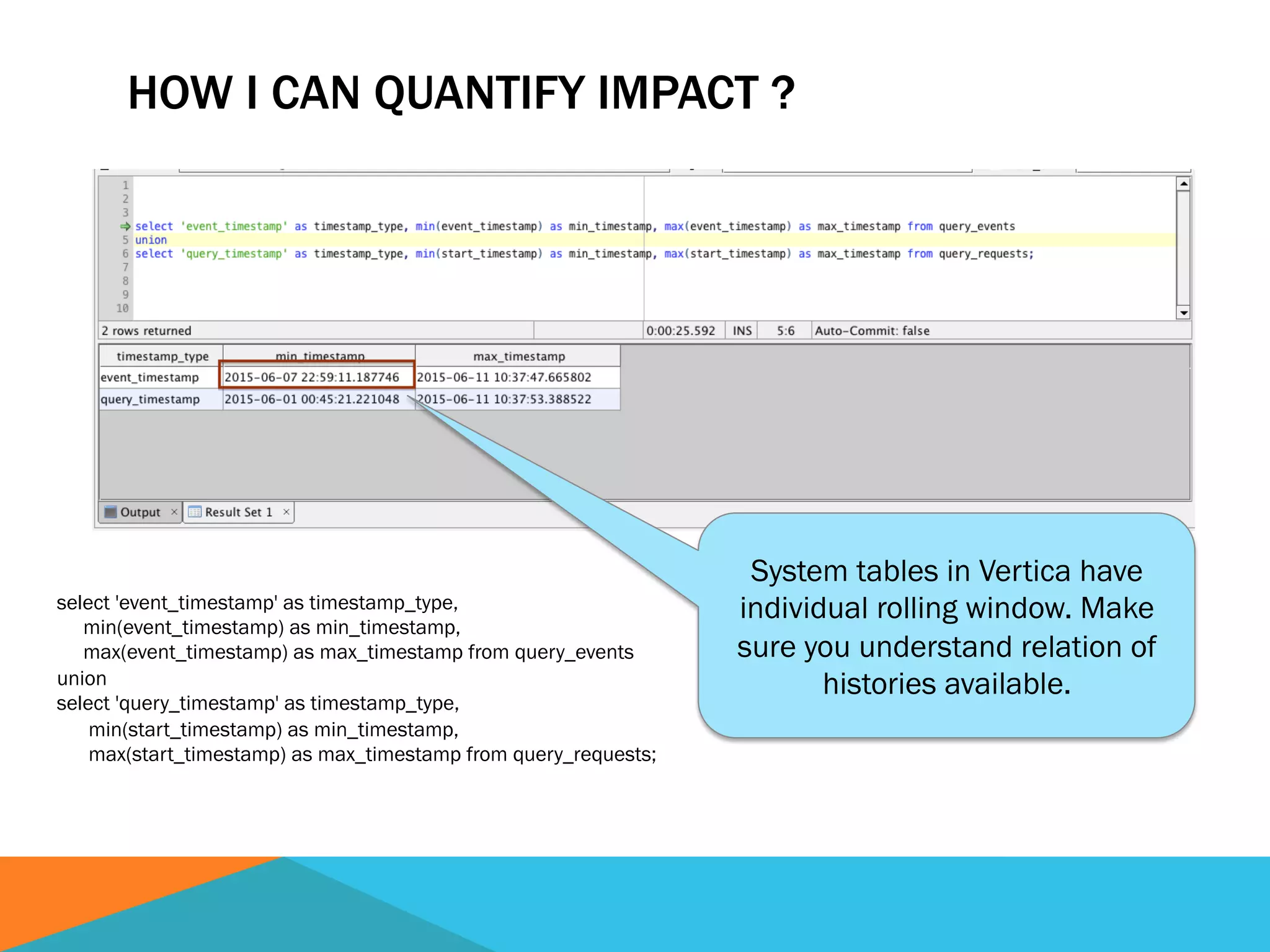
HOW I CAN QUANTIFY IMPACT ?
select 'event_timestamp' as timestamp_type,
min(event_timestamp) as min_timestamp,
max(event_timestamp) as max_timestamp from query_events
union
select 'query_timestamp' as timestamp_type,
min(start_timestamp) as min_timestamp,
max(start_timestamp) as max_timestamp from query_requests;
System tables in Vertica have
individual rolling window. Make
sure you understand relation of
histories available.
HOW I CAN QUANTIFY IMPACT ? CONT.
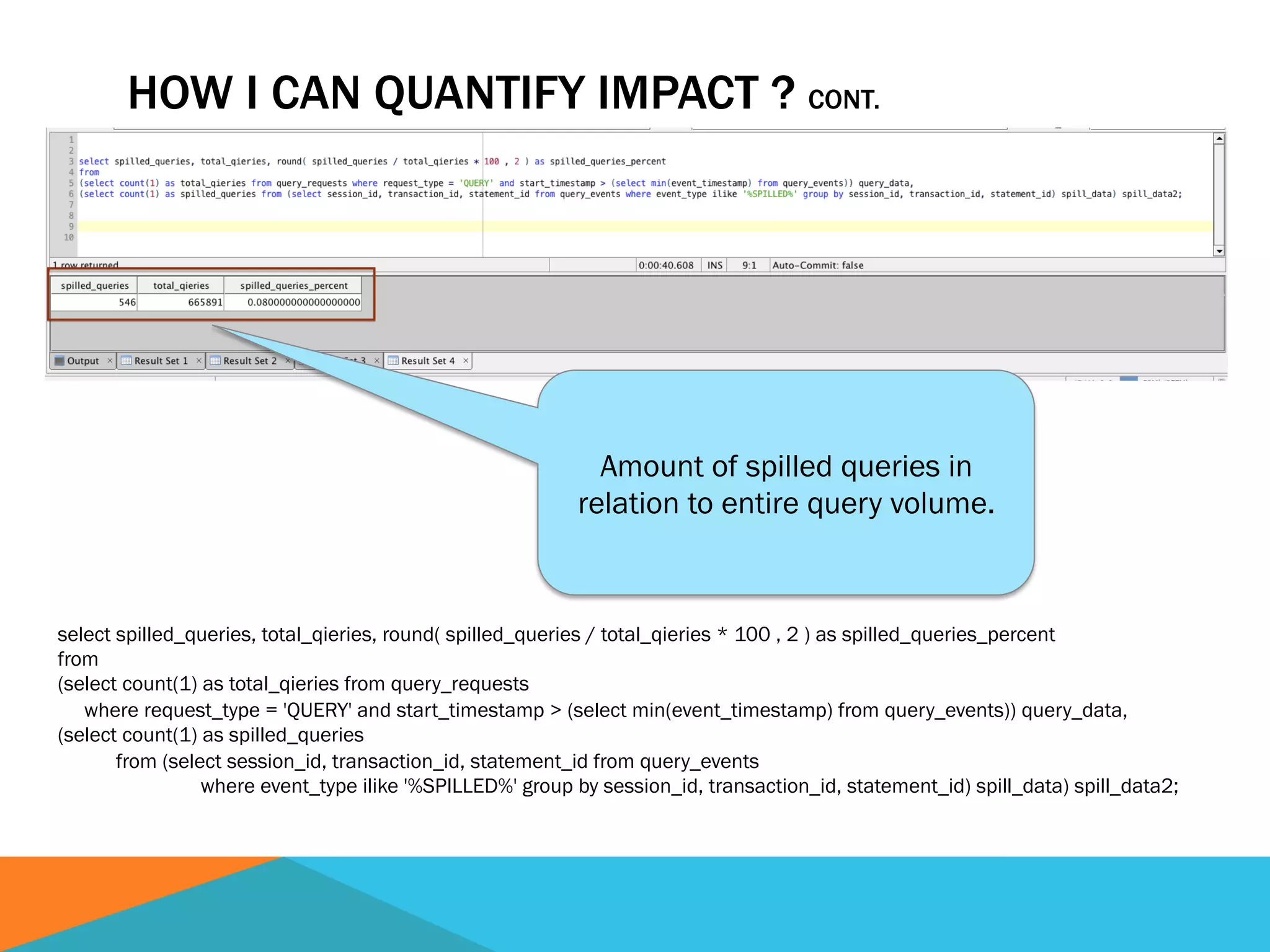
select spilled_queries, total_qieries, round( spilled_queries / total_qieries * 100 , 2 ) as spilled_queries_percent
from
(select count(1) as total_qieries from query_requests
where request_type = 'QUERY' and start_timestamp > (select min(event_timestamp) from query_events)) query_data,
(select count(1) as spilled_queries
from (select session_id, transaction_id, statement_id from query_events
where event_type ilike '%SPILLED%' group by session_id, transaction_id, statement_id) spill_data) spill_data2;
Amount of spilled queries in
relation to entire query volume.
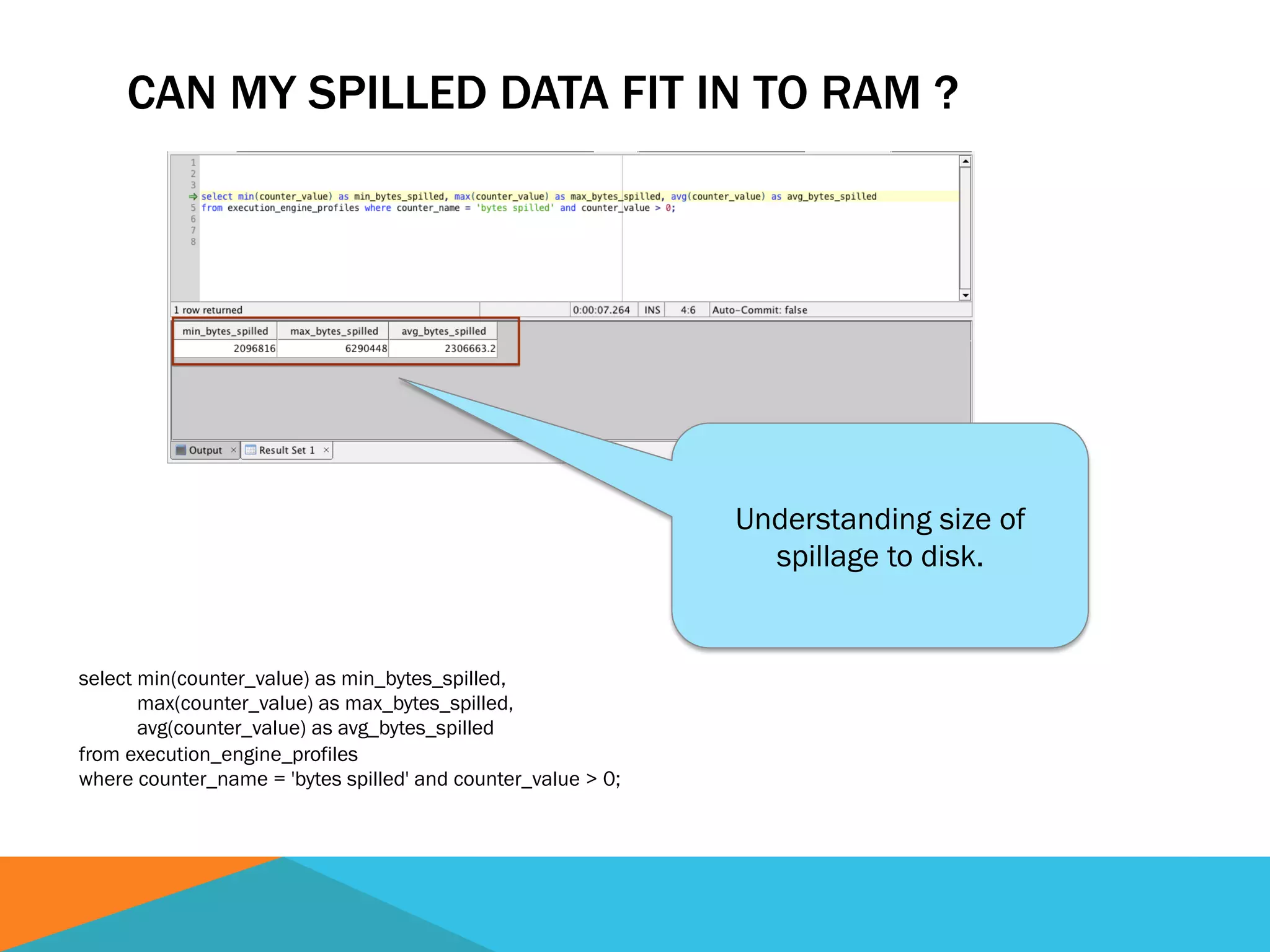
CAN MY SPILLED DATA FIT IN TO RAM ?
select min(counter_value) as min_bytes_spilled,
max(counter_value) as max_bytes_spilled,
avg(counter_value) as avg_bytes_spilled
from execution_engine_profiles
where counter_name = 'bytes spilled' and counter_value > 0;
Understanding size of
spillage to disk.
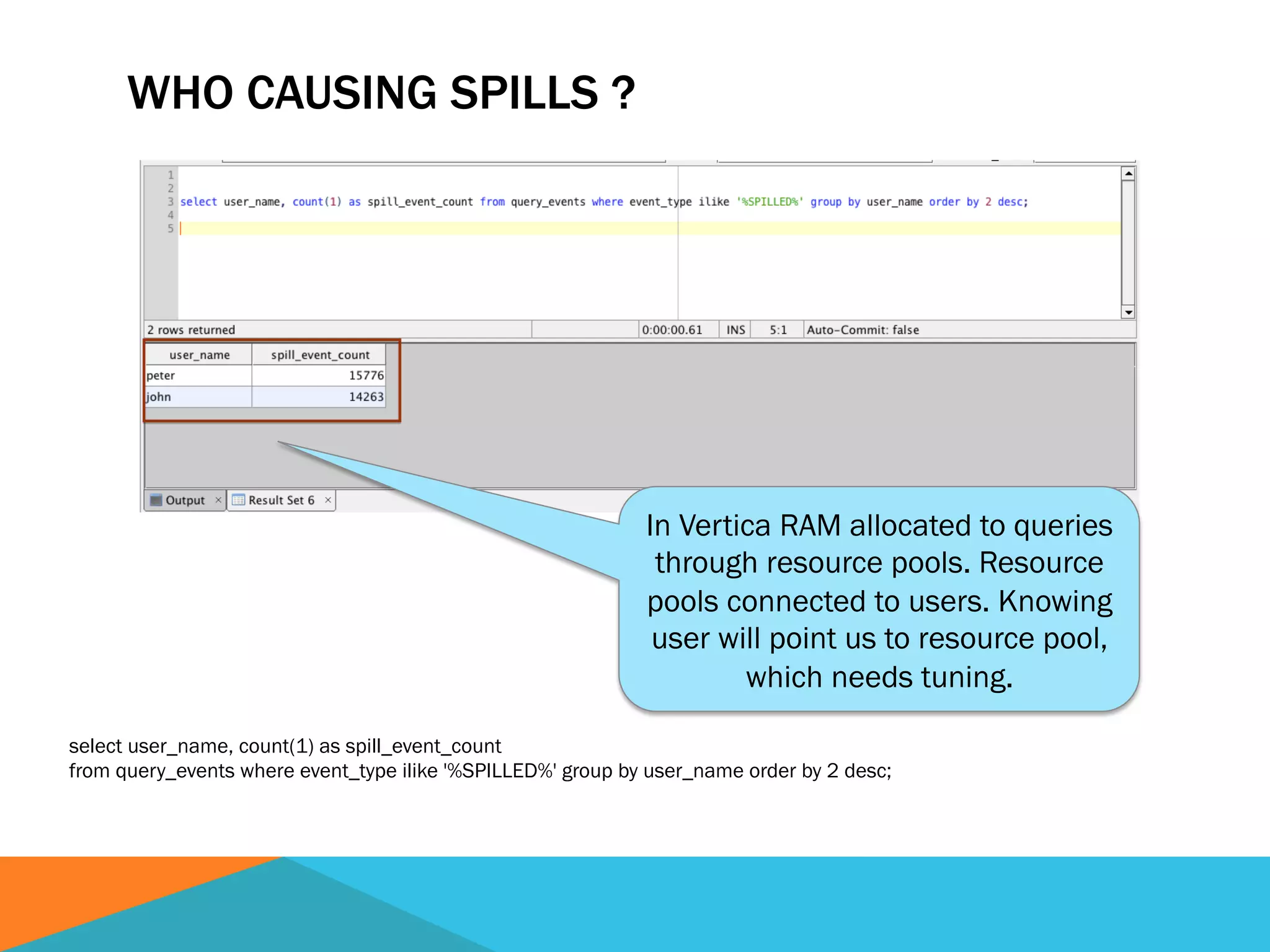
WHO CAUSING SPILLS ?
select user_name, count(1) as spill_event_count
from query_events where event_type ilike '%SPILLED%' group by user_name order by 2 desc;
In Vertica RAM allocated to queries
through resource pools. Resource
pools connected to users. Knowing
user will point us to resource pool,
which needs tuning.
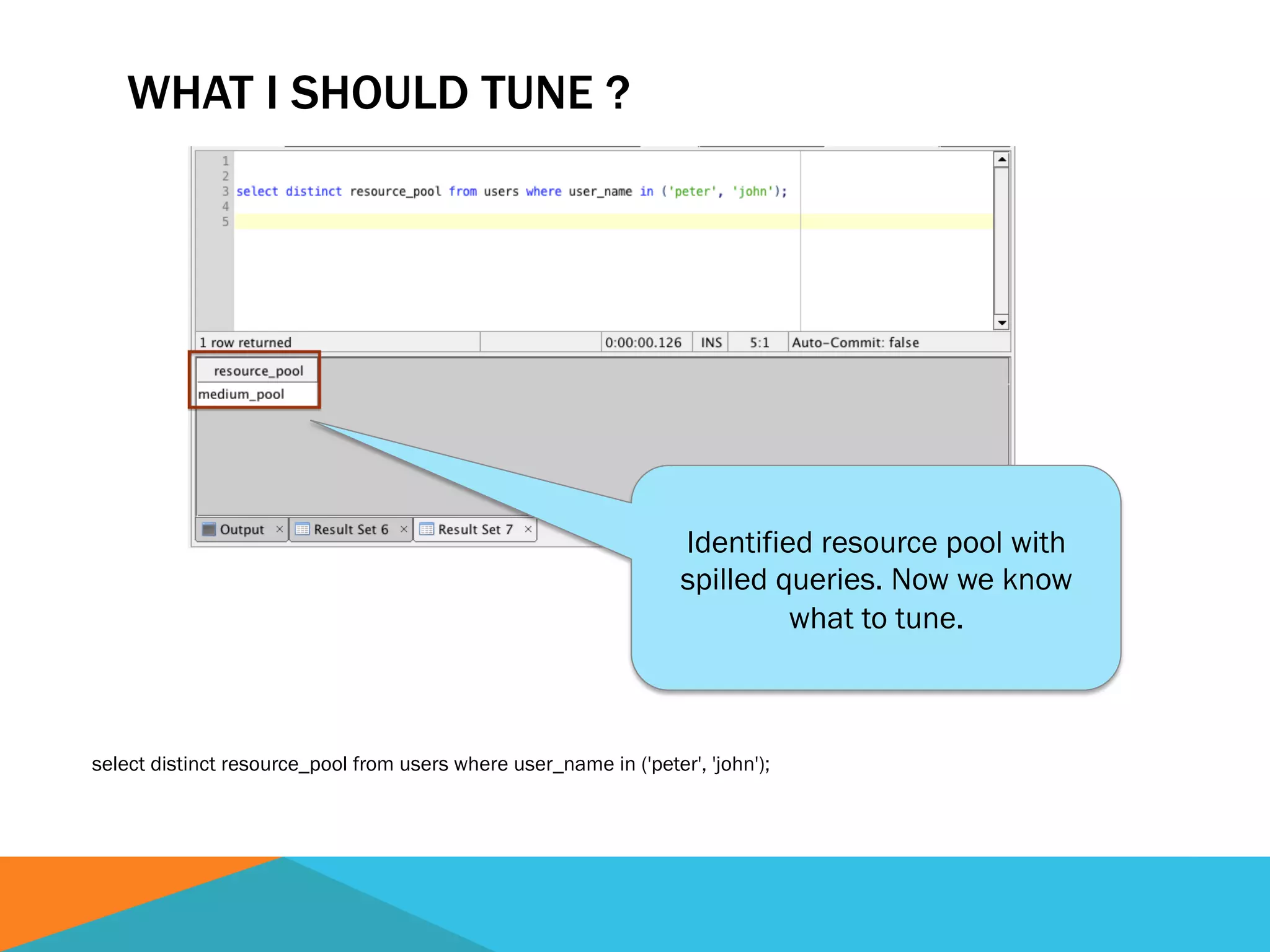
WHAT I SHOULD TUNE ?
select distinct resource_pool from users where user_name in ('peter', 'john');
Identified resource pool with
spilled queries. Now we know
what to tune.
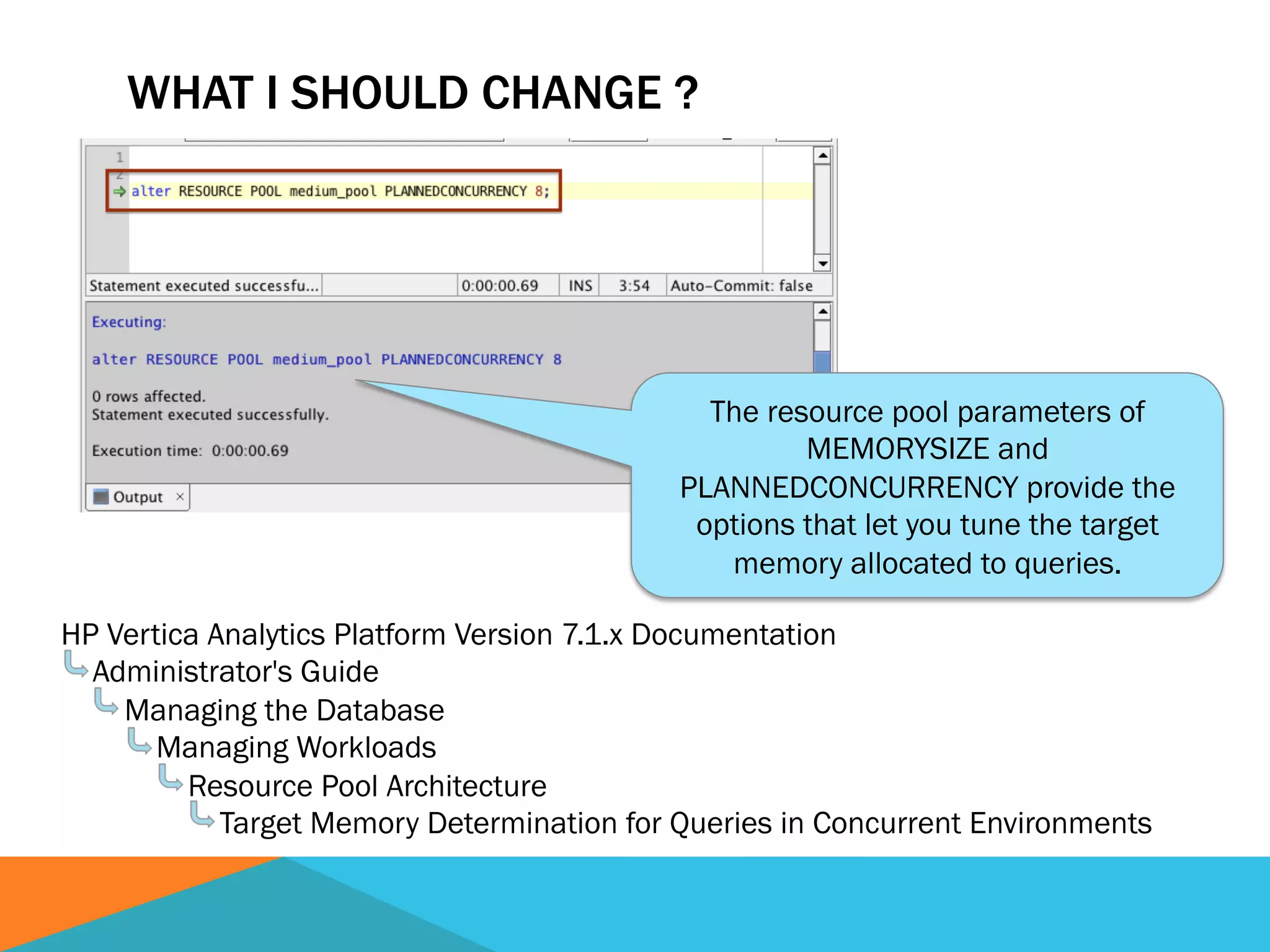
The resource pool parameters of
MEMORYSIZE and
PLANNEDCONCURRENCY provide the
options that let you tune the target
memory allocated to queries.
WHAT I SHOULD CHANGE ?
HP Vertica Analytics Platform Version 7.1.x Documentation
Administrator's Guide
Managing the Database
Managing Workloads
Resource Pool Architecture
Target Memory Determination for Queries in Concurrent Environments
Q & A

Extra performance out of thin air

  • 1.
  • 2.
    PATH TO EXTRAPERFORMANCE Eliminate unneeded work § Choose data types wisely Eliminate unneeded waits § Reduce number of locks Make system operate in more efficient way § Optimize BIOS settings § Stay in same “technology slice” § Make sure you have enough RAM
  • 3.
    ART OF CHOOSINGDATATYPES
  • 4.
    WHY DATA TYPEMATTERS ?
  • 5.
    WHY DATA TYPEMATTERS ? Fastest CPU today is 3.7 GHz It takes 1 / 3,700,000,000 of a second to do single operation
  • 6.
    WHY DATA TYPEMATTERS ? Fastest CPU today is 3.7 GHz It takes 1 / 3,700,000,000 of a second to do single operation “BIG DATA” record set starts from 100 billion records
  • 7.
    WHY DATA TYPEMATTERS ? Fastest CPU today is 3.7 GHz It takes 1 / 3,700,000,000 of a second to do single operation “BIG DATA” record set starts from 100 billion records Processing time 1 / 3,700,000,000 sec X 100,000,000,000 = 27 sec
  • 8.
    DO YOU NEEDTO STORE DATA SAME WAY IT IS PRESENTED ?
  • 9.
    DO YOU NEEDTO STORE DATA SAME WAY IT IS PRESENTED ? Presentation: $395.17
  • 10.
    DO YOU NEEDTO STORE DATA SAME WAY IT IS PRESENTED ? Presentation: $395.17 Data: 395.17
  • 11.
    DO YOU NEEDTO STORE DATA SAME WAY IT IS PRESENTED ? Presentation: $395.17 Data: 395.17 Storage: Store as Money Data type: MONEY Internal data type: NUMERIC(18,4) Storage: Store as numeric Data type: NUMERIC Internal data type: NUMERIC(37,15) Storage: Store as integer Data type: INT Internal data type: INT
  • 12.
    DO YOU NEEDTO STORE DATA SAME WAY IT IS PRESENTED ? Presentation: $395.17 Data: 395.17 Storage: Store as Money Data type: MONEY Internal data type: NUMERIC(18,4) Storage: Store as numeric Data type: NUMERIC Internal data type: NUMERIC(37,15) Storage: Store as integer Data type: INT Internal data type: INT
  • 13.
  • 14.
    DATA TYPE BENCHMARKAVERAGES IN SEC 27.2 29.7 37 0 5 10 15 20 25 30 35 40 INT NUMERIC(18,5) NUMERIC(37,15)
  • 15.
    MAKING RIGHT CHOICES • Ifyou can store data as INTEGER • Choose INTEGER • If your data fits into 18 digits of PRECISION • Choose NUMERIC(18) • If your data larger then 18 digits of PRECISION • Choose NUMERIC(your-desired-precision) Vertica default for NUMERIC is NUMERIC(37,15)
  • 16.
  • 17.
    LOCKING BEHAVIOR AUTOCOMMIT =ON (jdbc driver default) § Each statement treated as complete transaction § When statement completes changes automatically committed to database AUTOCOMMIT = OFF § Transaction continue until manually run COMMIT or ROLLBACK § Locks kept on objects for transaction duration
  • 18.
    CONTROLLING AUTOCOMMIT STATE JAVA: conn= DriverManager.getConnection("jdbc:vertica://DBHost:5433/MyDB", myProperties); // get the state of the auto commit parameter System.out.println("Autocommit state: " + conn.getAutoCommit()); // Change the auto commit state to false conn.setAutoCommit(false); SQL:
  • 19.
    IMPACT ON LOCKCOUNTS BY CHANGING AUTOCOMMIT SETTING TO OFF
  • 20.
    HOW TO DISABLE– OBVIOUS METHOD
  • 21.
    HOW TO DISABLE– BETTER METHOD
  • 22.
  • 23.
  • 24.
    HOW TO TUNE? http://h10032.www1.hp.com/ctg/Manual/c01804533.pdf
  • 25.
    DOES IT REALLYMATTER ? 0 100 200 300 400 500 600 700 800 900 1000 DSS BIOS settings with 1x DRAM refresh rate DSS BIOS settings with 4x DRAM refresh rate HPC BIOS settings with 4x DRAM refresh rate HPC + HyperThreading BIOS settings with 4x DRAM refresh rate HPC - NO TurboBoost BIOS settings with 4x DRAM refresh rate Sec DSS  BIOS  se)ngs  with  1x  DRAM  refresh  rate   738.949439   DSS  BIOS  se)ngs  with  4x  DRAM  refresh  rate   745.111176   HPC  BIOS  se)ngs  with  4x  DRAM  refresh  rate   552.148285   HPC  +  HyperThreading  BIOS  se)ngs  with  4x  DRAM  refresh  rate   877.838469   HPC  -­‐  NO  TurboBoost  BIOS  se)ngs  with  4x  DRAM  refresh  rate   561.260084   Performance increase potential about 40%
  • 26.
  • 27.
    STAYING IN THESAME “TECHNOLOGY SLICE”
  • 28.
    WHAT I WILLBE SLICING THROUGH ??? CPU and chipset Hardware Operating System (OS) Database Management System (DBMS)
  • 29.
    WHAT IS “TECHNOLOGYSLICE” ANYWAY ??? CPU Gen3 CPU Gen4 Server Gen-B OS v. 36 DBMS v. 6 Server Gen-C OS v. 37 DBMS v. 7 CPU Gen5 Server Gen-D CPU Gen6 CPU Gen7 Server Gen-E Srv Gen F OS v. 38 Server Gen-A OS v. 35OS v. 34 DBMS v. 5DBMS v. 4DBMS v. 3
  • 30.
    WHAT IS “TECHNOLOGYSLICE” ANYWAY ??? CPU Gen3 CPU Gen4 Server Gen-B OS v. 36 DBMS v. 6 Server Gen-C OS v. 37 DBMS v. 7 CPU Gen5 Server Gen-D CPU Gen6 CPU Gen7 Server Gen-E Srv Gen F OS v. 38 Server Gen-A OS v. 35OS v. 34 DBMS v. 5DBMS v. 4DBMS v. 3
  • 31.
    COMMON “TECHNOLOGY SLICE”TRAP CPU Gen3 CPU Gen4 ✔ Server Gen-B OS v. 36 DBMS v. 6 Server Gen-C ✔ OS v. 37 ✔ DBMS v. 7 ✔ CPU Gen5 Server Gen-D CPU Gen6 CPU Gen7 Server Gen-E Srv Gen F OS v. 38 Server Gen-A OS v. 35OS v. 34 DBMS v. 5DBMS v. 4DBMS v. 3
  • 32.
    COMMON “TECHNOLOGY SLICE”TRAP CPU Gen3 CPU Gen4 ✔ Server Gen-B OS v. 36 DBMS v. 6 Server Gen-C ✔ OS v. 37 ✔ DBMS v. 7 ✔ CPU Gen5 Server Gen-D CPU Gen6 CPU Gen7 Server Gen-E Srv Gen F OS v. 38 Server Gen-A OS v. 35OS v. 34 DBMS v. 5DBMS v. 4DBMS v. 3 ? ?
  • 33.
    SYMPTOMS OF “TECHNOLOGYSLICE” ISSUES System AVG: 57.90 Nice AVG: 46.56 System AVG > Nice AVG System AVG / Nice AVG = 1.24 System AVG: 11.19 Nice AVG: 57.38 System AVG < Nice AVG System AVG / Nice AVG = 0.19
  • 34.
    “TECHNOLOGY SLICE” PERFORMANCEIMPACT 0 20 40 60 80 100 120 140 different “TECHNOLOGY SLICE” kernel proper “TECHNOLOGY SLICE” kernel Sec
  • 35.
  • 36.
    DO I REALLYNEED MORE RAM ? select event_type, count(1) from query_events group by event_type order by 2 desc; Spilled events are very good indication of queries not fitting in RAM
  • 37.
    HOW I CANQUANTIFY IMPACT ? select 'event_timestamp' as timestamp_type, min(event_timestamp) as min_timestamp, max(event_timestamp) as max_timestamp from query_events union select 'query_timestamp' as timestamp_type, min(start_timestamp) as min_timestamp, max(start_timestamp) as max_timestamp from query_requests; System tables in Vertica have individual rolling window. Make sure you understand relation of histories available.
  • 38.
    HOW I CANQUANTIFY IMPACT ? CONT. select spilled_queries, total_qieries, round( spilled_queries / total_qieries * 100 , 2 ) as spilled_queries_percent from (select count(1) as total_qieries from query_requests where request_type = 'QUERY' and start_timestamp > (select min(event_timestamp) from query_events)) query_data, (select count(1) as spilled_queries from (select session_id, transaction_id, statement_id from query_events where event_type ilike '%SPILLED%' group by session_id, transaction_id, statement_id) spill_data) spill_data2; Amount of spilled queries in relation to entire query volume.
  • 39.
    CAN MY SPILLEDDATA FIT IN TO RAM ? select min(counter_value) as min_bytes_spilled, max(counter_value) as max_bytes_spilled, avg(counter_value) as avg_bytes_spilled from execution_engine_profiles where counter_name = 'bytes spilled' and counter_value > 0; Understanding size of spillage to disk.
  • 40.
    WHO CAUSING SPILLS? select user_name, count(1) as spill_event_count from query_events where event_type ilike '%SPILLED%' group by user_name order by 2 desc; In Vertica RAM allocated to queries through resource pools. Resource pools connected to users. Knowing user will point us to resource pool, which needs tuning.
  • 41.
    WHAT I SHOULDTUNE ? select distinct resource_pool from users where user_name in ('peter', 'john'); Identified resource pool with spilled queries. Now we know what to tune.
  • 42.
    The resource poolparameters of MEMORYSIZE and PLANNEDCONCURRENCY provide the options that let you tune the target memory allocated to queries. WHAT I SHOULD CHANGE ? HP Vertica Analytics Platform Version 7.1.x Documentation Administrator's Guide Managing the Database Managing Workloads Resource Pool Architecture Target Memory Determination for Queries in Concurrent Environments
  • 43.