© 2018 Arm Limited
• Kentaro Yoshida
Improve data engineering work
with Digdag and Presto UDF
• 2018/10/17
at Plazma TD TechTalk 2018 Fall
© 2018 Arm Limited2
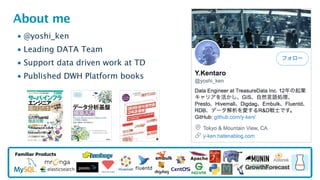
About me
• @yoshi_ken
• Leading DATA Team
• Support data driven work at TD
• Published DWH Platform books
Familiar Products
© 2018 Arm Limited3
What is DATA Team?
• Management for internal data ETL & Analysis Platform on TreasureData
• As historical reason, using Luigi, Airflow(with embulk) and Digdag
• Management data visualizing and reporting workflow for business
• Not only for engineers but also sales, marketing and operation
• Make simple solution insight from complexed data ocean
• Kind of data science(analysis) solution
• A rare team who use TreasureData internally as daily basis
• We can tell feedback as user mind for new improvements
© 2018 Arm Limited4
Technical Challenge of DATA Team
• Make scalable&robust data pipeline
• ex) 1 query generates numerous metrics logs from each components
• Improve fact data for supporting data-driven business/engineering
• ex) make easier to use data beforehand enrich/pre-processing
• Seek performance tuning insights for presto/hive at the platform side
• ex) root cause of making table fragmentation
• Change semi-realtime data processing from daily jobs
• ex) fresh/quick stat data make good insight for engineer/support
© 2018 Arm Limited
Introduce nice improvements
For Presto UDF and digdag
© 2018 Arm Limited6
Introduced nice improvements in Digdag and Presto
• New feature of Digdag
1. Added ${td.last_job.num_records}
• Which has number of records for job results
2. Added “_else_do” after if> operator since digdag v0.9.31
3. Added param_set> and param_get>
• For parameter sharing between workflow (not available in TD workflow)
• New feature of Presto
1. Added TD_TIME_STRING() UDF
• In SELECT clause, Make easier to format date string
2. Added TD_INTERVAL() UDF
• In WHERE clause, Make easier to specify time range extraction
© 2018 Arm Limited
New Feature of Digdag
© 2018 Arm Limited8
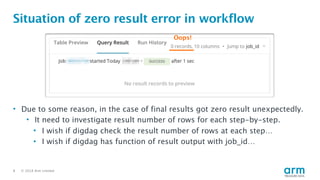
Situation of zero result error in workflow
• Due to some reason, in the case of final results got zero result unexpectedly.
• It need to investigate result number of rows for each step-by-step.
• I wish if digdag check the result number of rows at each step…
• I wish if digdag has function of result output with job_id…
Oops!
© 2018 Arm Limited9
Situation of zero result error in workflow
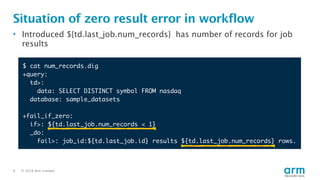
• Introduced ${td.last_job.num_records} has number of records for job
results
$ cat num_records.dig
+query:
td>:
data: SELECT DISTINCT symbol FROM nasdaq
database: sample_datasets
+fail_if_zero:
if>: ${td.last_job.num_records < 1}
_do:
fail>: job_id:${td.last_job.id} results ${td.last_job.num_records} rows.
© 2018 Arm Limited10
Situation of zero result error in workflow
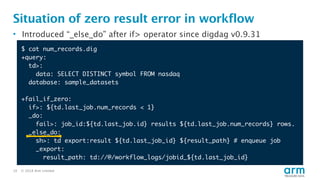
• Introduced “_else_do” after if> operator since digdag v0.9.31
$ cat num_records.dig
+query:
td>:
data: SELECT DISTINCT symbol FROM nasdaq
database: sample_datasets
+fail_if_zero:
if>: ${td.last_job.num_records < 1}
_do:
fail>: job_id:${td.last_job.id} results ${td.last_job.num_records} rows.
_else_do:
sh>: td export:result ${td.last_job_id} ${result_path} # enqueue job
_export:
result_path: td://@/workflow_logs/jobid_${td.last_job_id}
© 2018 Arm Limited
New Feature of Presto
TD_TIME_STRING() UDF
© 2018 Arm Limited12
Efficient way to format date string in SELECT
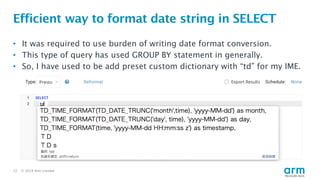
• It was required to use burden of writing date format conversion.
• This type of query has used GROUP BY statement in generally.
• So, I have used to be add preset custom dictionary with “td” for my IME.
© 2018 Arm Limited13
Efficient way to format date string in SELECT
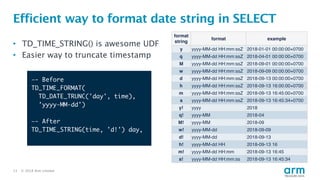
• TD_TIME_STRING() is awesome UDF
• Easier way to truncate timestamp
format
string
format example
y yyyy-MM-dd HH:mm:ssZ 2018-01-01 00:00:00+0700
q yyyy-MM-dd HH:mm:ssZ 2018-04-01 00:00:00+0700
M yyyy-MM-dd HH:mm:ssZ 2018-09-01 00:00:00+0700
w yyyy-MM-dd HH:mm:ssZ 2018-09-09 00:00:00+0700
d yyyy-MM-dd HH:mm:ssZ 2018-09-13 00:00:00+0700
h yyyy-MM-dd HH:mm:ssZ 2018-09-13 16:00:00+0700
m yyyy-MM-dd HH:mm:ssZ 2018-09-13 16:45:00+0700
s yyyy-MM-dd HH:mm:ssZ 2018-09-13 16:45:34+0700
y! yyyy 2018
q! yyyy-MM 2018-04
M! yyyy-MM 2018-09
w! yyyy-MM-dd 2018-09-09
d! yyyy-MM-dd 2018-09-13
h! yyyy-MM-dd HH 2018-09-13 16
m! yyyy-MM-dd HH:mm 2018-09-13 16:45
s! yyyy-MM-dd HH:mm:ss 2018-09-13 16:45:34
—- Before
TD_TIME_FORMAT(
TD_DATE_TRUNC('day', time),
'yyyy-MM-dd')
—- After
TD_TIME_STRING(time, 'd!') day,
© 2018 Arm Limited
New Feature of Presto
TD_INTERVAL() UDF
© 2018 Arm Limited15
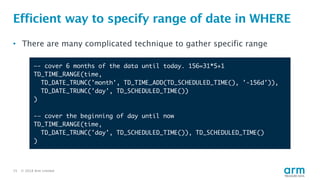
Efficient way to specify range of date in WHERE
• There are many complicated technique to gather specific range
—- cover 6 months of the data until today. 156=31*5+1
TD_TIME_RANGE(time,
TD_DATE_TRUNC('month', TD_TIME_ADD(TD_SCHEDULED_TIME(), '-156d')),
TD_DATE_TRUNC('day', TD_SCHEDULED_TIME())
)
-— cover the beginning of day until now
TD_TIME_RANGE(time,
TD_DATE_TRUNC('day', TD_SCHEDULED_TIME()), TD_SCHEDULED_TIME()
)
© 2018 Arm Limited16
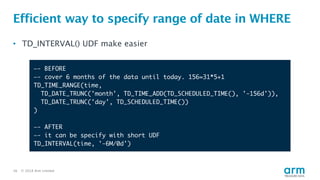
Efficient way to specify range of date in WHERE
• TD_INTERVAL() UDF make easier
—- BEFORE
—- cover 6 months of the data until today. 156=31*5+1
TD_TIME_RANGE(time,
TD_DATE_TRUNC('month', TD_TIME_ADD(TD_SCHEDULED_TIME(), '-156d')),
TD_DATE_TRUNC('day', TD_SCHEDULED_TIME())
)
—- AFTER
—- it can be specify with short UDF
TD_INTERVAL(time, '-6M/0d')
© 2018 Arm Limited17
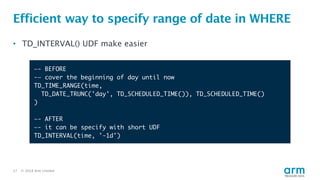
Efficient way to specify range of date in WHERE
• TD_INTERVAL() UDF make easier
—- BEFORE
-— cover the beginning of day until now
TD_TIME_RANGE(time,
TD_DATE_TRUNC('day', TD_SCHEDULED_TIME()), TD_SCHEDULED_TIME()
)
—- AFTER
—- it can be specify with short UDF
TD_INTERVAL(time, '-1d')
© 2018 Arm Limited18
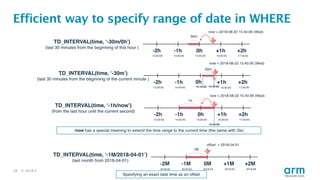
Efficient way to specify range of date in WHERE
© 2018 Arm Limited19
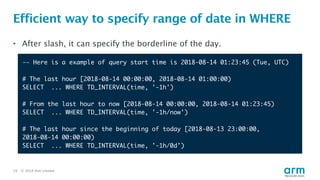
Efficient way to specify range of date in WHERE
-— Here is a example of query start time is 2018-08-14 01:23:45 (Tue, UTC)
# The last hour [2018-08-14 00:00:00, 2018-08-14 01:00:00)
SELECT ... WHERE TD_INTERVAL(time, '-1h')
# From the last hour to now [2018-08-14 00:00:00, 2018-08-14 01:23:45)
SELECT ... WHERE TD_INTERVAL(time, '-1h/now')
# The last hour since the beginning of today [2018-08-13 23:00:00,
2018-08-14 00:00:00)
SELECT ... WHERE TD_INTERVAL(time, '-1h/0d')
• After slash, it can specify the borderline of the day.
© 2018 Arm Limited20
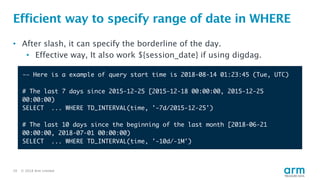
Efficient way to specify range of date in WHERE
-— Here is a example of query start time is 2018-08-14 01:23:45 (Tue, UTC)
# The last 7 days since 2015-12-25 [2015-12-18 00:00:00, 2015-12-25
00:00:00)
SELECT ... WHERE TD_INTERVAL(time, '-7d/2015-12-25')
# The last 10 days since the beginning of the last month [2018-06-21
00:00:00, 2018-07-01 00:00:00)
SELECT ... WHERE TD_INTERVAL(time, '-10d/-1M')
• After slash, it can specify the borderline of the day.
• Effective way, It also work ${session_date} if using digdag.
© 2018 Arm Limited21
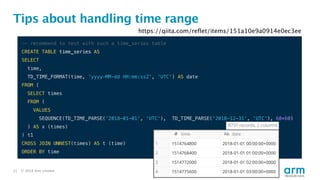
Tips about handling time range
-- recommend to test with such a time_series table
CREATE TABLE time_series AS
SELECT
time,
TD_TIME_FORMAT(time, 'yyyy-MM-dd HH:mm:ssZ', 'UTC') AS date
FROM (
SELECT times
FROM (
VALUES
SEQUENCE(TD_TIME_PARSE('2018-01-01', 'UTC'), TD_TIME_PARSE('2018-12-31', 'UTC'), 60*60)
) AS x (times)
) t1
CROSS JOIN UNNEST(times) AS t (time)
ORDER BY time
https://qiita.com/reflet/items/151a10e9a0914e0ec3ee
© 2018 Arm Limited22
Let’s enjoy data engineering work with digdag!
And also feel free to talk to me
Thank You
Danke
Merci
谢谢
ありがとう
Gracias
Kiitos
감사합니다
धन्यवाद
‫תודה‬© 2018 Arm Limited23

Improve data engineering work with Digdag and Presto UDF

  • 1.
    © 2018 ArmLimited • Kentaro Yoshida Improve data engineering work with Digdag and Presto UDF • 2018/10/17 at Plazma TD TechTalk 2018 Fall
  • 2.
    © 2018 ArmLimited2 About me • @yoshi_ken • Leading DATA Team • Support data driven work at TD • Published DWH Platform books Familiar Products
  • 3.
    © 2018 ArmLimited3 What is DATA Team? • Management for internal data ETL & Analysis Platform on TreasureData • As historical reason, using Luigi, Airflow(with embulk) and Digdag • Management data visualizing and reporting workflow for business • Not only for engineers but also sales, marketing and operation • Make simple solution insight from complexed data ocean • Kind of data science(analysis) solution • A rare team who use TreasureData internally as daily basis • We can tell feedback as user mind for new improvements
  • 4.
    © 2018 ArmLimited4 Technical Challenge of DATA Team • Make scalable&robust data pipeline • ex) 1 query generates numerous metrics logs from each components • Improve fact data for supporting data-driven business/engineering • ex) make easier to use data beforehand enrich/pre-processing • Seek performance tuning insights for presto/hive at the platform side • ex) root cause of making table fragmentation • Change semi-realtime data processing from daily jobs • ex) fresh/quick stat data make good insight for engineer/support
  • 5.
    © 2018 ArmLimited Introduce nice improvements For Presto UDF and digdag
  • 6.
    © 2018 ArmLimited6 Introduced nice improvements in Digdag and Presto • New feature of Digdag 1. Added ${td.last_job.num_records} • Which has number of records for job results 2. Added “_else_do” after if> operator since digdag v0.9.31 3. Added param_set> and param_get> • For parameter sharing between workflow (not available in TD workflow) • New feature of Presto 1. Added TD_TIME_STRING() UDF • In SELECT clause, Make easier to format date string 2. Added TD_INTERVAL() UDF • In WHERE clause, Make easier to specify time range extraction
  • 7.
    © 2018 ArmLimited New Feature of Digdag
  • 8.
    © 2018 ArmLimited8 Situation of zero result error in workflow • Due to some reason, in the case of final results got zero result unexpectedly. • It need to investigate result number of rows for each step-by-step. • I wish if digdag check the result number of rows at each step… • I wish if digdag has function of result output with job_id… Oops!
  • 9.
    © 2018 ArmLimited9 Situation of zero result error in workflow • Introduced ${td.last_job.num_records} has number of records for job results $ cat num_records.dig +query: td>: data: SELECT DISTINCT symbol FROM nasdaq database: sample_datasets +fail_if_zero: if>: ${td.last_job.num_records < 1} _do: fail>: job_id:${td.last_job.id} results ${td.last_job.num_records} rows.
  • 10.
    © 2018 ArmLimited10 Situation of zero result error in workflow • Introduced “_else_do” after if> operator since digdag v0.9.31 $ cat num_records.dig +query: td>: data: SELECT DISTINCT symbol FROM nasdaq database: sample_datasets +fail_if_zero: if>: ${td.last_job.num_records < 1} _do: fail>: job_id:${td.last_job.id} results ${td.last_job.num_records} rows. _else_do: sh>: td export:result ${td.last_job_id} ${result_path} # enqueue job _export: result_path: td://@/workflow_logs/jobid_${td.last_job_id}
  • 11.
    © 2018 ArmLimited New Feature of Presto TD_TIME_STRING() UDF
  • 12.
    © 2018 ArmLimited12 Efficient way to format date string in SELECT • It was required to use burden of writing date format conversion. • This type of query has used GROUP BY statement in generally. • So, I have used to be add preset custom dictionary with “td” for my IME.
  • 13.
    © 2018 ArmLimited13 Efficient way to format date string in SELECT • TD_TIME_STRING() is awesome UDF • Easier way to truncate timestamp format string format example y yyyy-MM-dd HH:mm:ssZ 2018-01-01 00:00:00+0700 q yyyy-MM-dd HH:mm:ssZ 2018-04-01 00:00:00+0700 M yyyy-MM-dd HH:mm:ssZ 2018-09-01 00:00:00+0700 w yyyy-MM-dd HH:mm:ssZ 2018-09-09 00:00:00+0700 d yyyy-MM-dd HH:mm:ssZ 2018-09-13 00:00:00+0700 h yyyy-MM-dd HH:mm:ssZ 2018-09-13 16:00:00+0700 m yyyy-MM-dd HH:mm:ssZ 2018-09-13 16:45:00+0700 s yyyy-MM-dd HH:mm:ssZ 2018-09-13 16:45:34+0700 y! yyyy 2018 q! yyyy-MM 2018-04 M! yyyy-MM 2018-09 w! yyyy-MM-dd 2018-09-09 d! yyyy-MM-dd 2018-09-13 h! yyyy-MM-dd HH 2018-09-13 16 m! yyyy-MM-dd HH:mm 2018-09-13 16:45 s! yyyy-MM-dd HH:mm:ss 2018-09-13 16:45:34 —- Before TD_TIME_FORMAT( TD_DATE_TRUNC('day', time), 'yyyy-MM-dd') —- After TD_TIME_STRING(time, 'd!') day,
  • 14.
    © 2018 ArmLimited New Feature of Presto TD_INTERVAL() UDF
  • 15.
    © 2018 ArmLimited15 Efficient way to specify range of date in WHERE • There are many complicated technique to gather specific range —- cover 6 months of the data until today. 156=31*5+1 TD_TIME_RANGE(time, TD_DATE_TRUNC('month', TD_TIME_ADD(TD_SCHEDULED_TIME(), '-156d')), TD_DATE_TRUNC('day', TD_SCHEDULED_TIME()) ) -— cover the beginning of day until now TD_TIME_RANGE(time, TD_DATE_TRUNC('day', TD_SCHEDULED_TIME()), TD_SCHEDULED_TIME() )
  • 16.
    © 2018 ArmLimited16 Efficient way to specify range of date in WHERE • TD_INTERVAL() UDF make easier —- BEFORE —- cover 6 months of the data until today. 156=31*5+1 TD_TIME_RANGE(time, TD_DATE_TRUNC('month', TD_TIME_ADD(TD_SCHEDULED_TIME(), '-156d')), TD_DATE_TRUNC('day', TD_SCHEDULED_TIME()) ) —- AFTER —- it can be specify with short UDF TD_INTERVAL(time, '-6M/0d')
  • 17.
    © 2018 ArmLimited17 Efficient way to specify range of date in WHERE • TD_INTERVAL() UDF make easier —- BEFORE -— cover the beginning of day until now TD_TIME_RANGE(time, TD_DATE_TRUNC('day', TD_SCHEDULED_TIME()), TD_SCHEDULED_TIME() ) —- AFTER —- it can be specify with short UDF TD_INTERVAL(time, '-1d')
  • 18.
    © 2018 ArmLimited18 Efficient way to specify range of date in WHERE
  • 19.
    © 2018 ArmLimited19 Efficient way to specify range of date in WHERE -— Here is a example of query start time is 2018-08-14 01:23:45 (Tue, UTC) # The last hour [2018-08-14 00:00:00, 2018-08-14 01:00:00) SELECT ... WHERE TD_INTERVAL(time, '-1h') # From the last hour to now [2018-08-14 00:00:00, 2018-08-14 01:23:45) SELECT ... WHERE TD_INTERVAL(time, '-1h/now') # The last hour since the beginning of today [2018-08-13 23:00:00, 2018-08-14 00:00:00) SELECT ... WHERE TD_INTERVAL(time, '-1h/0d') • After slash, it can specify the borderline of the day.
  • 20.
    © 2018 ArmLimited20 Efficient way to specify range of date in WHERE -— Here is a example of query start time is 2018-08-14 01:23:45 (Tue, UTC) # The last 7 days since 2015-12-25 [2015-12-18 00:00:00, 2015-12-25 00:00:00) SELECT ... WHERE TD_INTERVAL(time, '-7d/2015-12-25') # The last 10 days since the beginning of the last month [2018-06-21 00:00:00, 2018-07-01 00:00:00) SELECT ... WHERE TD_INTERVAL(time, '-10d/-1M') • After slash, it can specify the borderline of the day. • Effective way, It also work ${session_date} if using digdag.
  • 21.
    © 2018 ArmLimited21 Tips about handling time range -- recommend to test with such a time_series table CREATE TABLE time_series AS SELECT time, TD_TIME_FORMAT(time, 'yyyy-MM-dd HH:mm:ssZ', 'UTC') AS date FROM ( SELECT times FROM ( VALUES SEQUENCE(TD_TIME_PARSE('2018-01-01', 'UTC'), TD_TIME_PARSE('2018-12-31', 'UTC'), 60*60) ) AS x (times) ) t1 CROSS JOIN UNNEST(times) AS t (time) ORDER BY time https://qiita.com/reflet/items/151a10e9a0914e0ec3ee
  • 22.
    © 2018 ArmLimited22 Let’s enjoy data engineering work with digdag! And also feel free to talk to me
  • 23.