1© Cloudera, Inc. All rights reserved.
Apache Impala 2.5 (Incubating)
Performance improvements overview
2© Cloudera, Inc. All rights reserved.
Agenda
• What is Impala?
• Impala at Apache
• What is new in Impala 2.5 (CDH 5.7)
• Impala performance update
• Roadmap
• Q&A
3© Cloudera, Inc. All rights reserved.
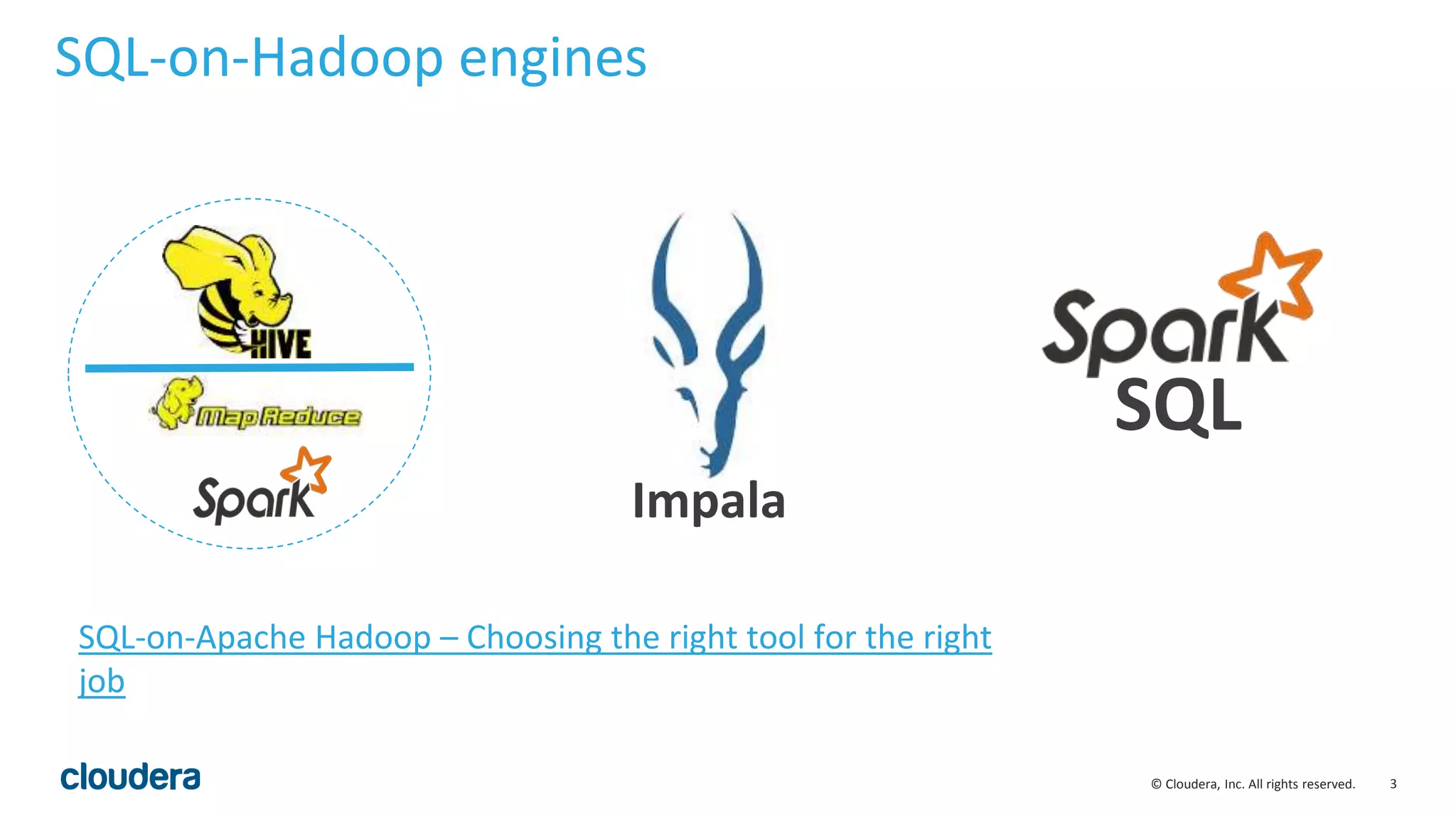
SQL-on-Hadoop engines
SQL
Impala
SQL-on-Apache Hadoop – Choosing the right tool for the right
job
4© Cloudera, Inc. All rights reserved.
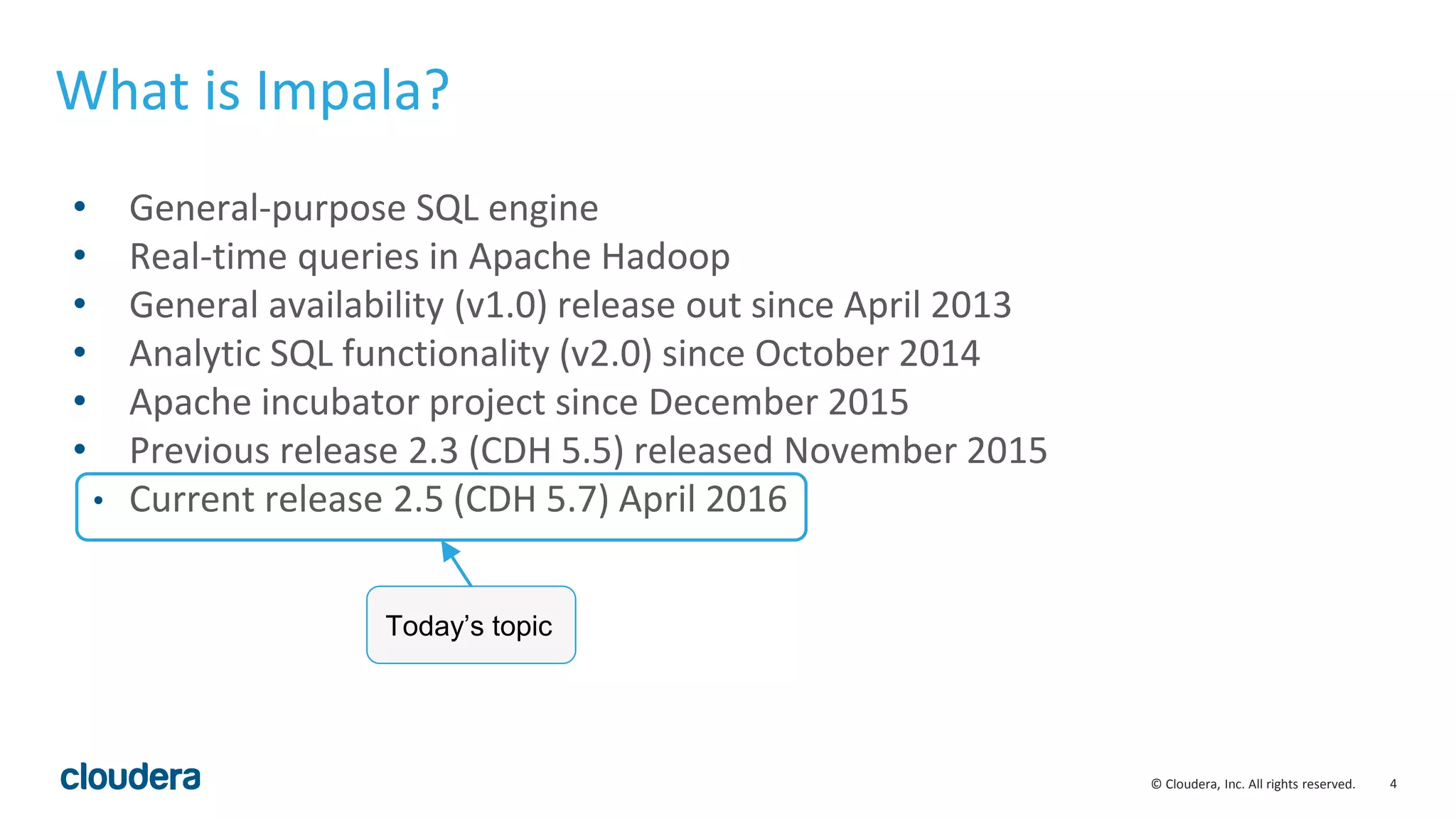
• General-purpose SQL engine
• Real-time queries in Apache Hadoop
• General availability (v1.0) release out since April 2013
• Analytic SQL functionality (v2.0) since October 2014
• Apache incubator project since December 2015
• Previous release 2.3 (CDH 5.5) released November 2015
• Current release 2.5 (CDH 5.7) April 2016
What is Impala?
Today’s topic
5© Cloudera, Inc. All rights reserved.
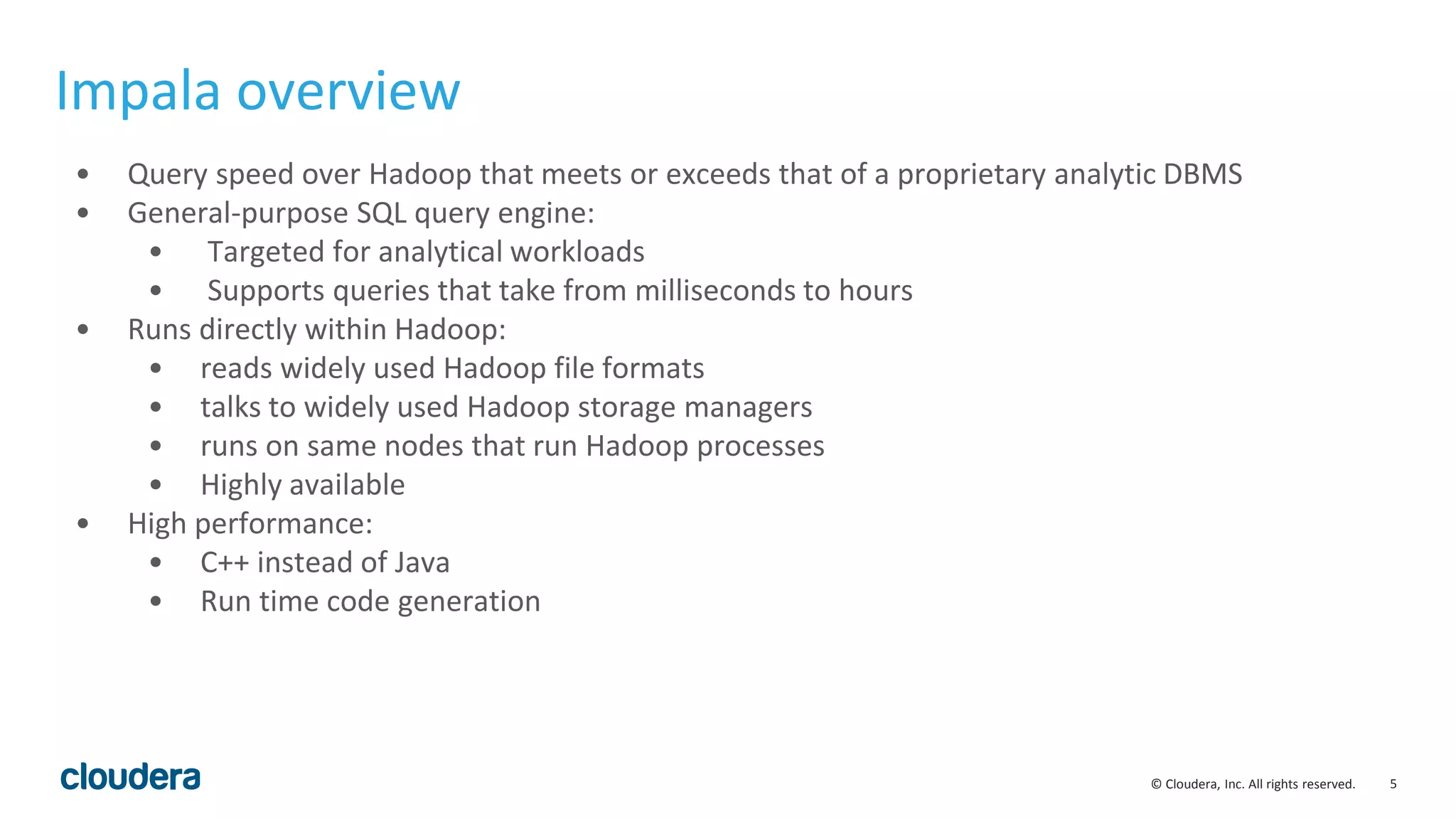
• Query speed over Hadoop that meets or exceeds that of a proprietary analytic DBMS
• General-purpose SQL query engine:
• Targeted for analytical workloads
• Supports queries that take from milliseconds to hours
• Runs directly within Hadoop:
• reads widely used Hadoop file formats
• talks to widely used Hadoop storage managers
• runs on same nodes that run Hadoop processes
• Highly available
• High performance:
• C++ instead of Java
• Run time code generation
Impala overview
6© Cloudera, Inc. All rights reserved.
Impala Use Cases
•Interactive BI/analytics on more data
•Asking new questions – exploration, ML (Ibis)
•Data processing with tight SLAs
•Query-able archive w/full fidelity
7© Cloudera, Inc. All rights reserved.
• Incubator project since
December 2015
• Development process slowly
moving to ASF infrastructure (see
IMPALA-3221)
• Help wanted!
Where to find the Impala community:
dev@impala.incubator.apache.org
user@impala.incubator.apache.org
http://impala.io
@apacheimpala
Impala at Apache
8© Cloudera, Inc. All rights reserved.
New in Impala 2.5
Usability Enhancements
• Admission Control Improvements
• Null-safe join/equals
Performance and Scalability
• Runtime filters
• Improved Cardinality Estimation and Join
Ordering
• Query start-up improvements
• Additional codegen and code
optimizations
• Decimal arithmetic improvements
• Fast min/max values on partition
columns(with query option)
Integrations
•Support for EMC DSSD
9© Cloudera, Inc. All rights reserved.
New in Impala 2.5
Performance and Scalability
• Runtime filters
• Improved Cardinality Estimation and Join
Ordering
• Query start-up improvements
• Additional codegen and code
optimizations
• Decimal arithmetic improvements
• Incremental metadata updates (DDL)
• Fast min/max values on partition
columns(with query option)
Covered today
10© Cloudera, Inc. All rights reserved.
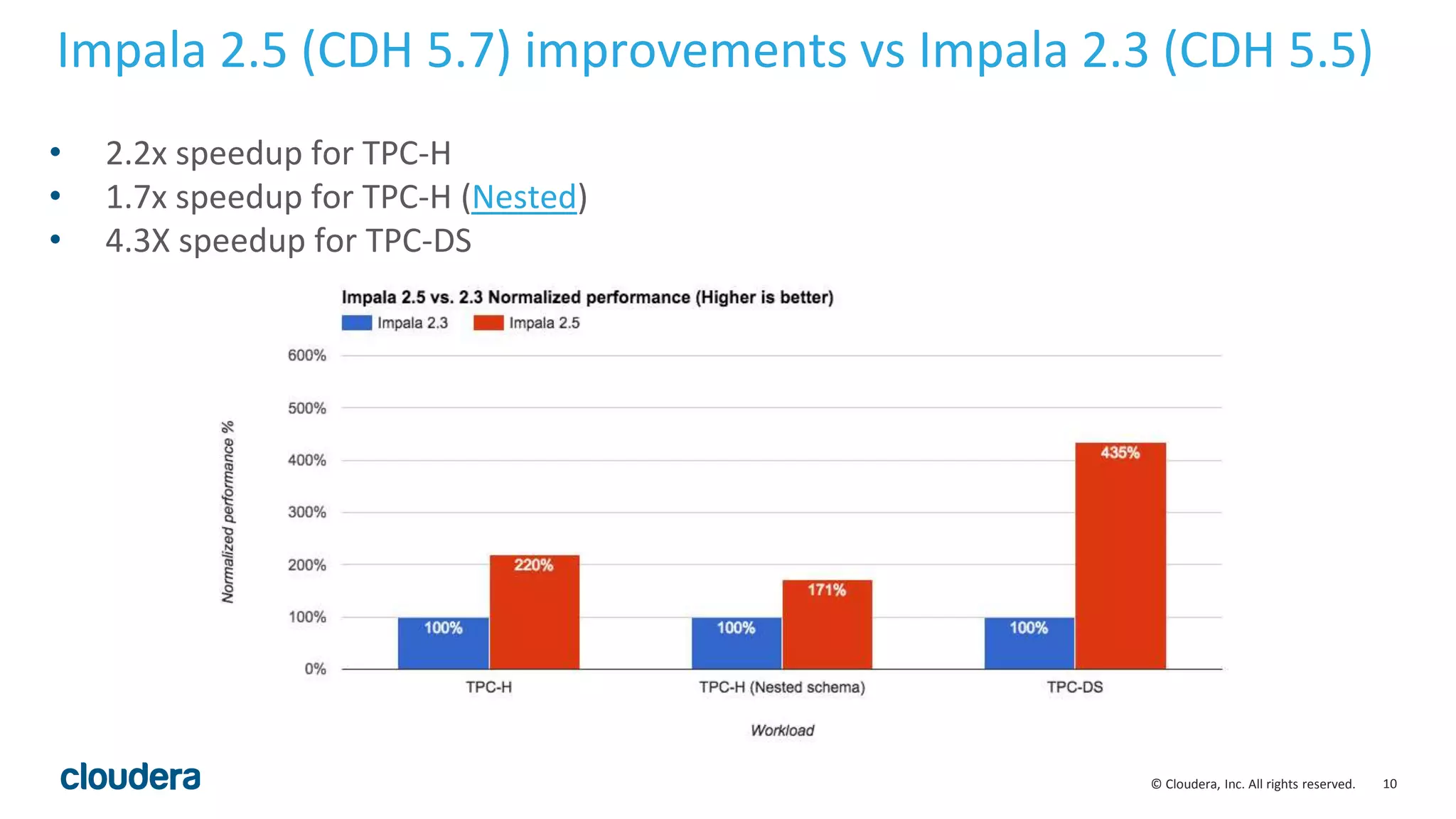
Impala 2.5 (CDH 5.7) improvements vs Impala 2.3 (CDH 5.5)
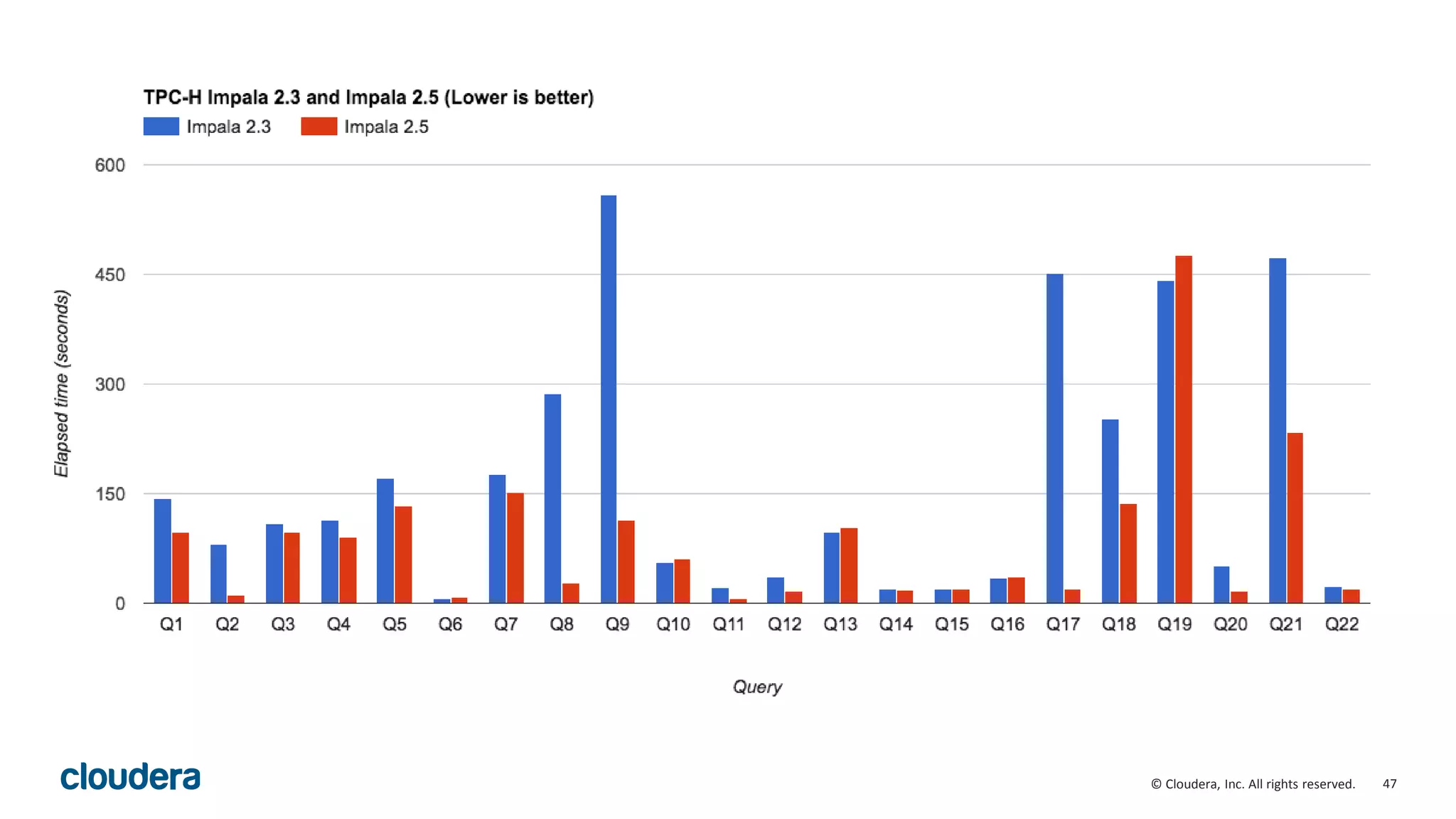
• 2.2x speedup for TPC-H
• 1.7x speedup for TPC-H (Nested)
• 4.3X speedup for TPC-DS
11© Cloudera, Inc. All rights reserved.
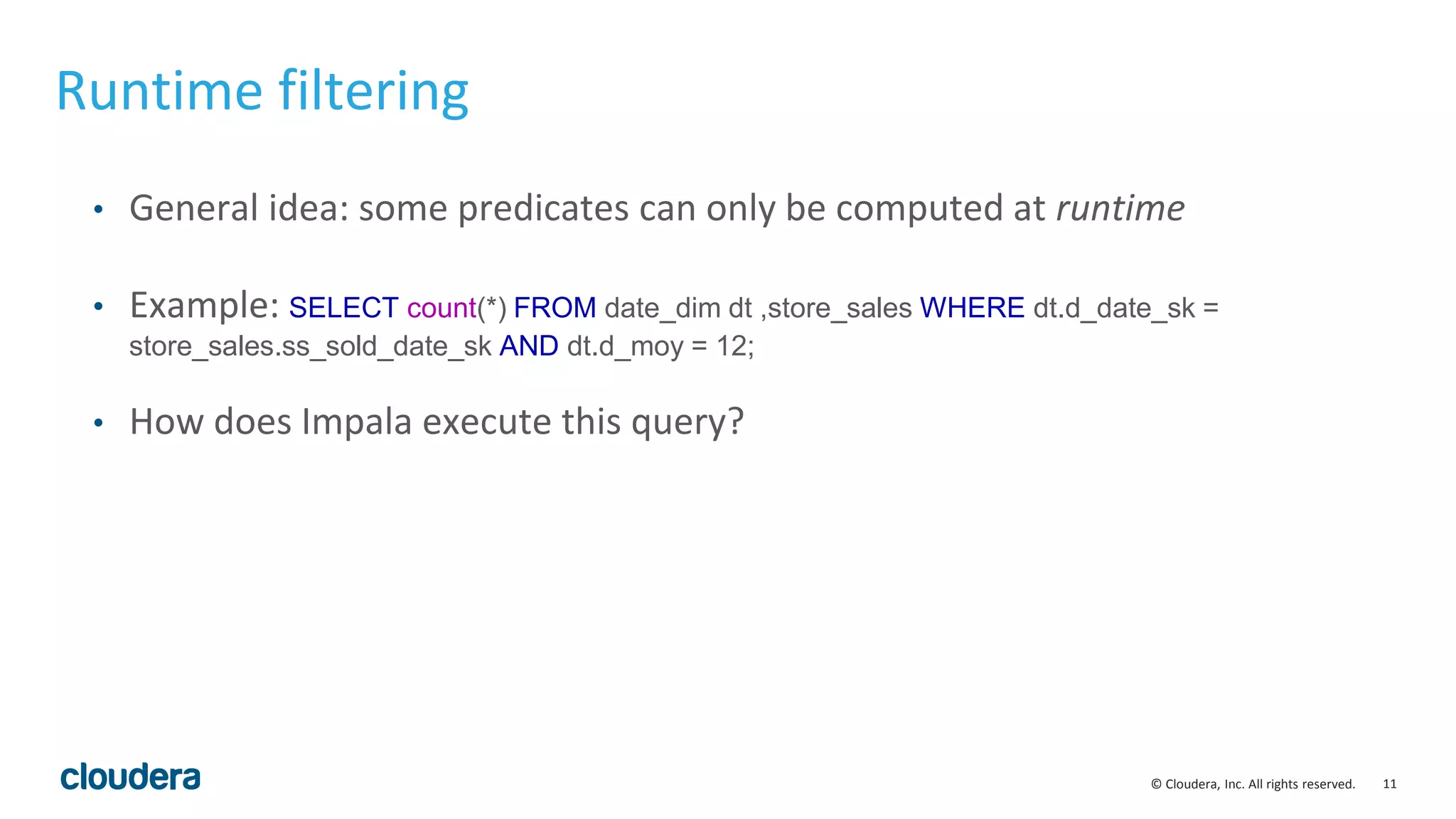
Runtime filtering
• General idea: some predicates can only be computed at runtime
• Example: SELECT count(*) FROM date_dim dt ,store_sales WHERE dt.d_date_sk =
store_sales.ss_sold_date_sk AND dt.d_moy = 12;
• How does Impala execute this query?
12© Cloudera, Inc. All rights reserved.
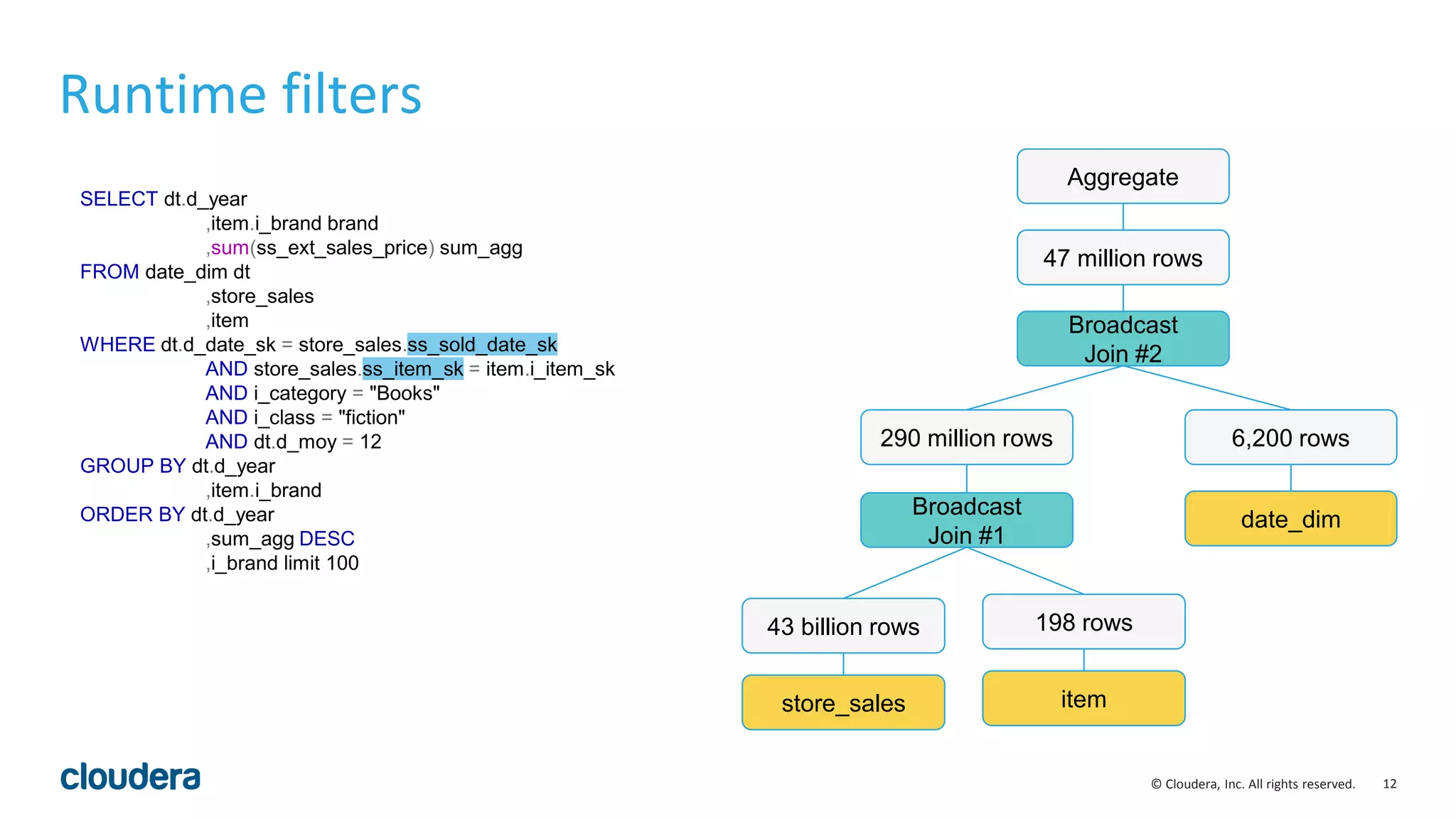
SELECT dt.d_year
,item.i_brand brand
,sum(ss_ext_sales_price) sum_agg
FROM date_dim dt
,store_sales
,item
WHERE dt.d_date_sk = store_sales.ss_sold_date_sk
AND store_sales.ss_item_sk = item.i_item_sk
AND i_category = "Books"
AND i_class = "fiction"
AND dt.d_moy = 12
GROUP BY dt.d_year
,item.i_brand
ORDER BY dt.d_year
,sum_agg DESC
,i_brand limit 100
Runtime filters
store_sales
43 billion rows
item
198 rows
Broadcast
Join #1
290 million rows
date_dim
6,200 rows
Broadcast
Join #2
Aggregate
47 million rows
13© Cloudera, Inc. All rights reserved.
SELECT dt.d_year
,item.i_brand brand
,sum(ss_ext_sales_price) sum_agg
FROM date_dim dt
,store_sales
,item
WHERE dt.d_date_sk = store_sales.ss_sold_date_sk
AND store_sales.ss_item_sk = item.i_item_sk
AND i_category = "Books"
AND i_class = "fiction"
AND dt.d_moy = 12
GROUP BY dt.d_year
,item.i_brand
ORDER BY dt.d_year
,sum_agg DESC
,i_brand limit 100
Runtime filters
store_sales
43 billion rows
item
198 rows
Broadcast
Join #1
290 million rows
date_dim
6,200 rows
Broadcast
Join #2
Aggregate
47 million rows
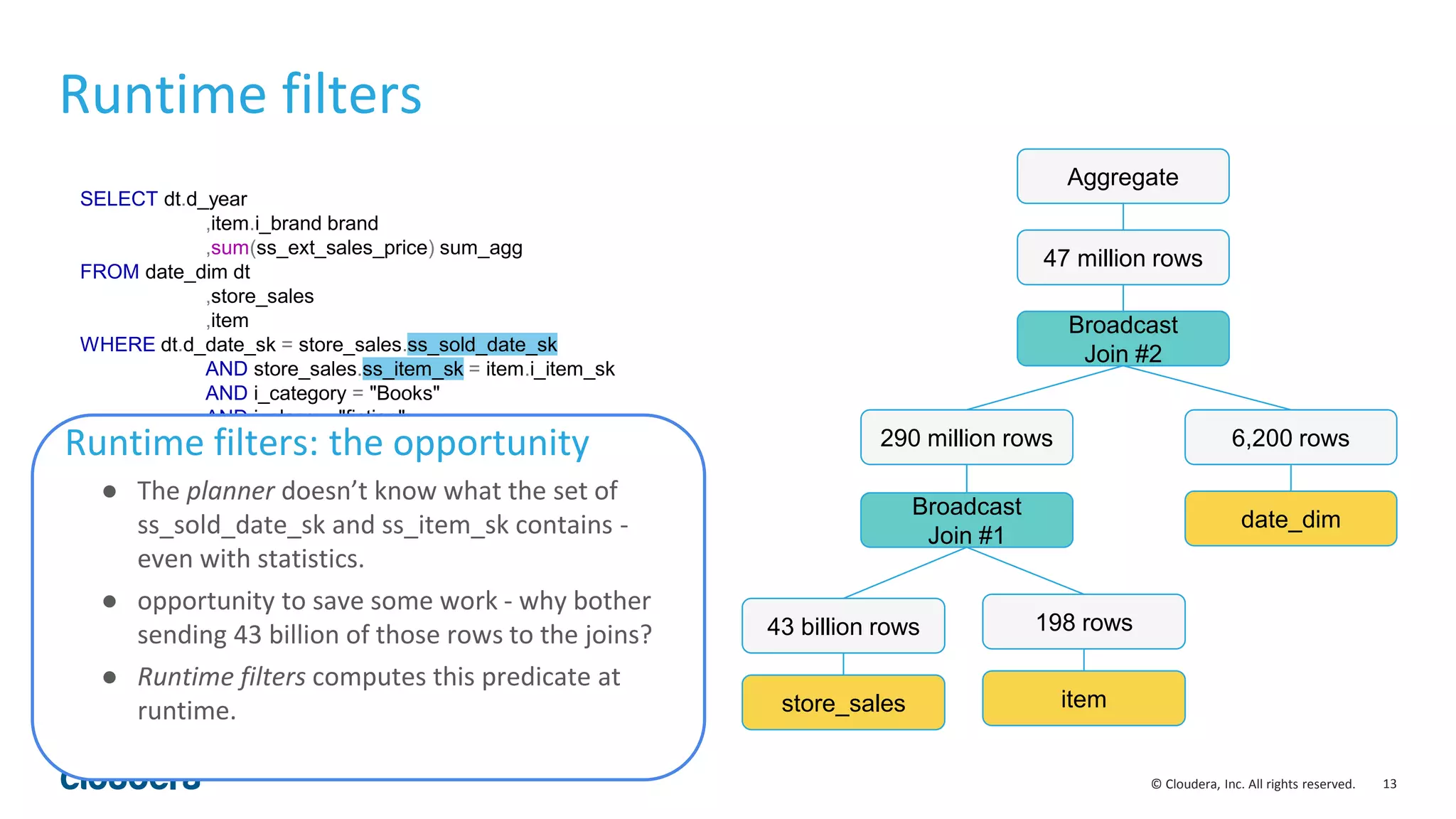
Runtime filters: the opportunity
● The planner doesn’t know what the set of
ss_sold_date_sk and ss_item_sk contains -
even with statistics.
● opportunity to save some work - why bother
sending 43 billion of those rows to the joins?
● Runtime filters computes this predicate at
runtime.
14© Cloudera, Inc. All rights reserved.
SELECT dt.d_year
,item.i_brand brand
,sum(ss_ext_sales_price) sum_agg
FROM date_dim dt
,store_sales
,item
WHERE dt.d_date_sk = store_sales.ss_sold_date_sk
AND store_sales.ss_item_sk = item.i_item_sk
AND i_category = "Books"
AND i_class = "fiction"
AND dt.d_moy = 12
GROUP BY dt.d_year
,item.i_brand
ORDER BY dt.d_year
,sum_agg DESC
,i_brand limit 100
Runtime filters
store_sales
43 billion rows
item
198 rows
Broadcast
Join #1
290 million rows
date_dim
6,200 rows
Broadcast
Join #2
Aggregate
47 million rows
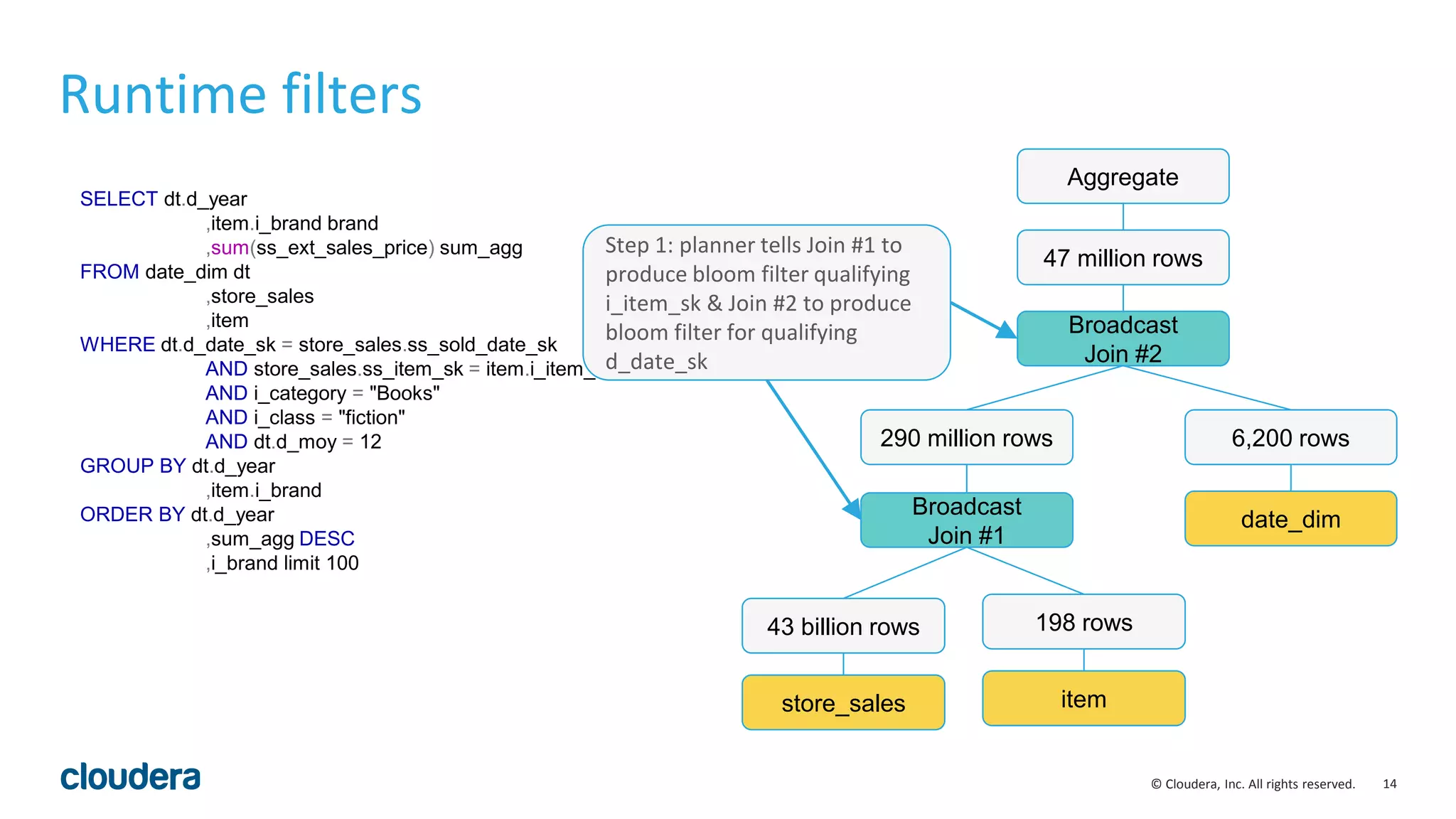
Step 1: planner tells Join #1 to
produce bloom filter qualifying
i_item_sk & Join #2 to produce
bloom filter for qualifying
d_date_sk
15© Cloudera, Inc. All rights reserved.
SELECT dt.d_year
,item.i_brand brand
,sum(ss_ext_sales_price) sum_agg
FROM date_dim dt
,store_sales
,item
WHERE dt.d_date_sk = store_sales.ss_sold_date_sk
AND store_sales.ss_item_sk = item.i_item_sk
AND i_category = "Books"
AND i_class = "fiction"
AND dt.d_moy = 12
GROUP BY dt.d_year
,item.i_brand
ORDER BY dt.d_year
,sum_agg DESC
,i_brand limit 100
Runtime filters
store_sales
43 billion rows
item
198 rows
Broadcast
Join #1
290 million rows
date_dim
6,200 rows
Broadcast
Join #2
Aggregate
47 million rows
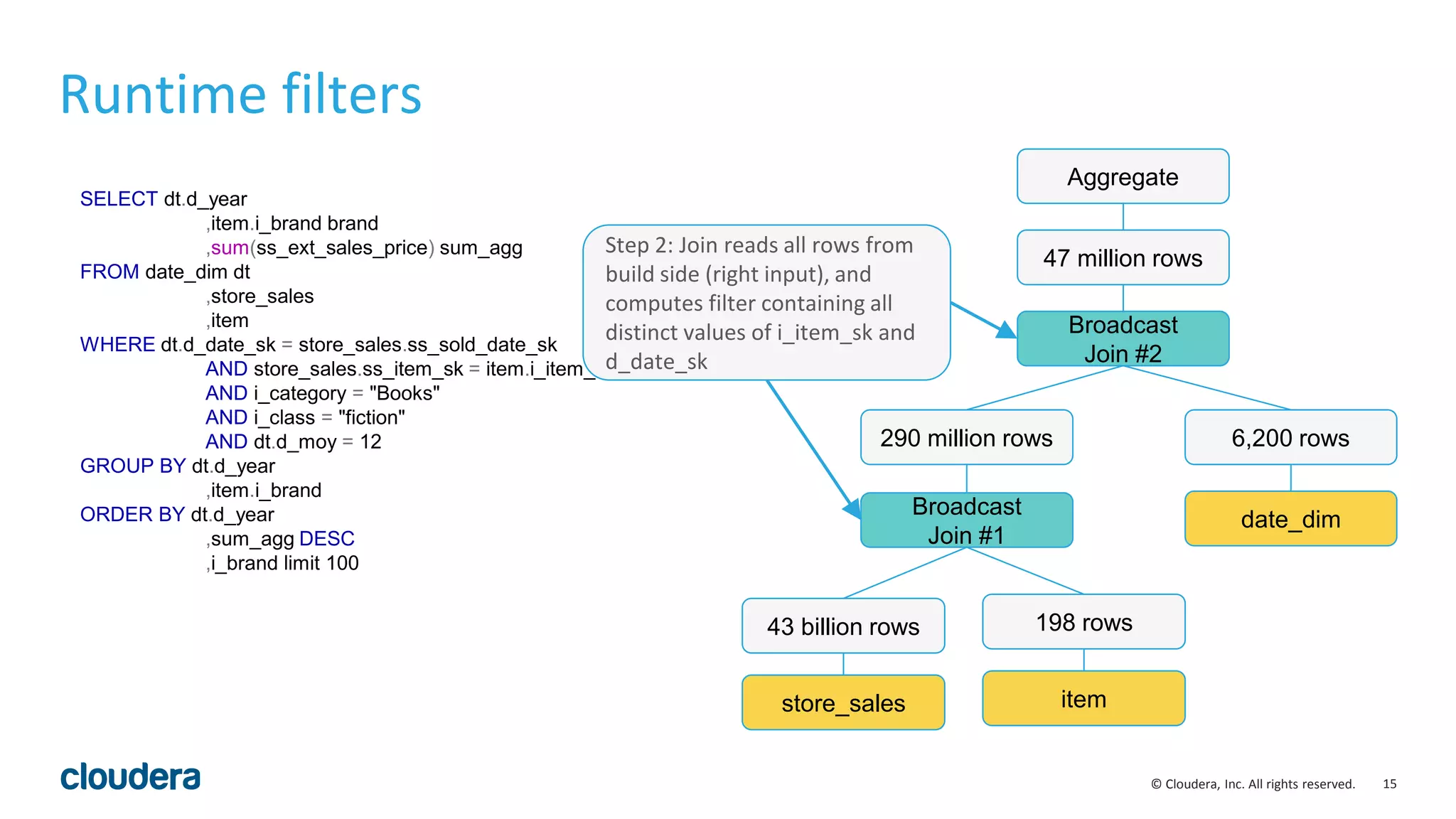
Step 2: Join reads all rows from
build side (right input), and
computes filter containing all
distinct values of i_item_sk and
d_date_sk
16© Cloudera, Inc. All rights reserved.
SELECT dt.d_year
,item.i_brand brand
,sum(ss_ext_sales_price) sum_agg
FROM date_dim dt
,store_sales
,item
WHERE dt.d_date_sk = store_sales.ss_sold_date_sk
AND store_sales.ss_item_sk = item.i_item_sk
AND i_category = "Books"
AND i_class = "fiction"
AND dt.d_moy = 12
GROUP BY dt.d_year
,item.i_brand
ORDER BY dt.d_year
,sum_agg DESC
,i_brand limit 100
Runtime filters
store_sales
43 billion rows
item
198 rows
Broadcast
Join #1
290 million rows
date_dim
6,200 rows
Broadcast
Join #2
Aggregate
47 million rows
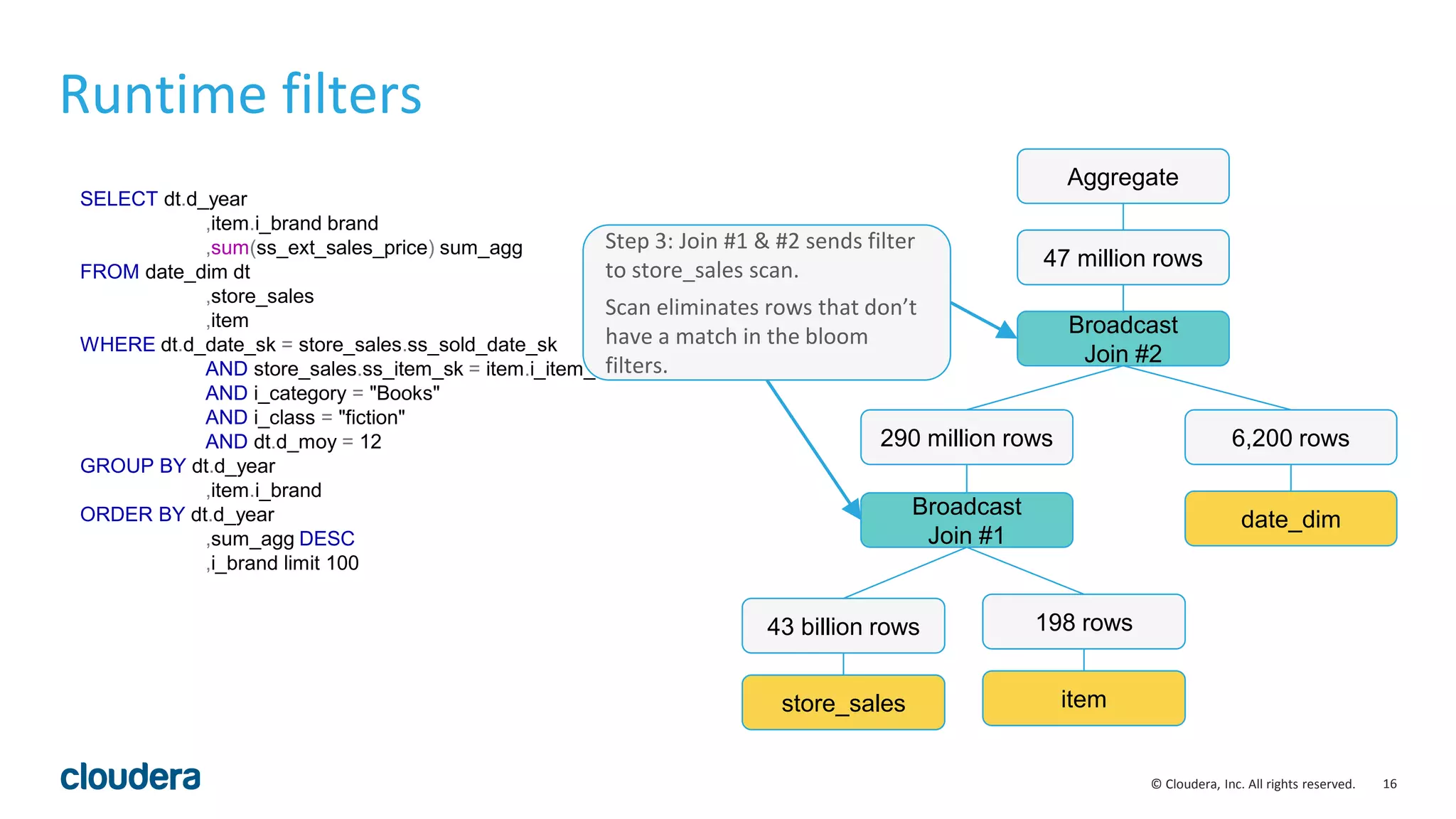
Step 3: Join #1 & #2 sends filter
to store_sales scan.
Scan eliminates rows that don’t
have a match in the bloom
filters.
17© Cloudera, Inc. All rights reserved.
SELECT dt.d_year
,item.i_brand brand
,sum(ss_ext_sales_price) sum_agg
FROM date_dim dt
,store_sales
,item
WHERE dt.d_date_sk = store_sales.ss_sold_date_sk
AND store_sales.ss_item_sk = item.i_item_sk
AND i_category = "Books"
AND i_class = "fiction"
AND dt.d_moy = 12
GROUP BY dt.d_year
,item.i_brand
ORDER BY dt.d_year
,sum_agg DESC
,i_brand limit 100
Runtime filters
store_sales
47 million rows
item
198 rows
Broadcast
Join #1
47 million rows
date_dim
6,200 rows
Broadcast
Join #2
Aggregate
47 million rows
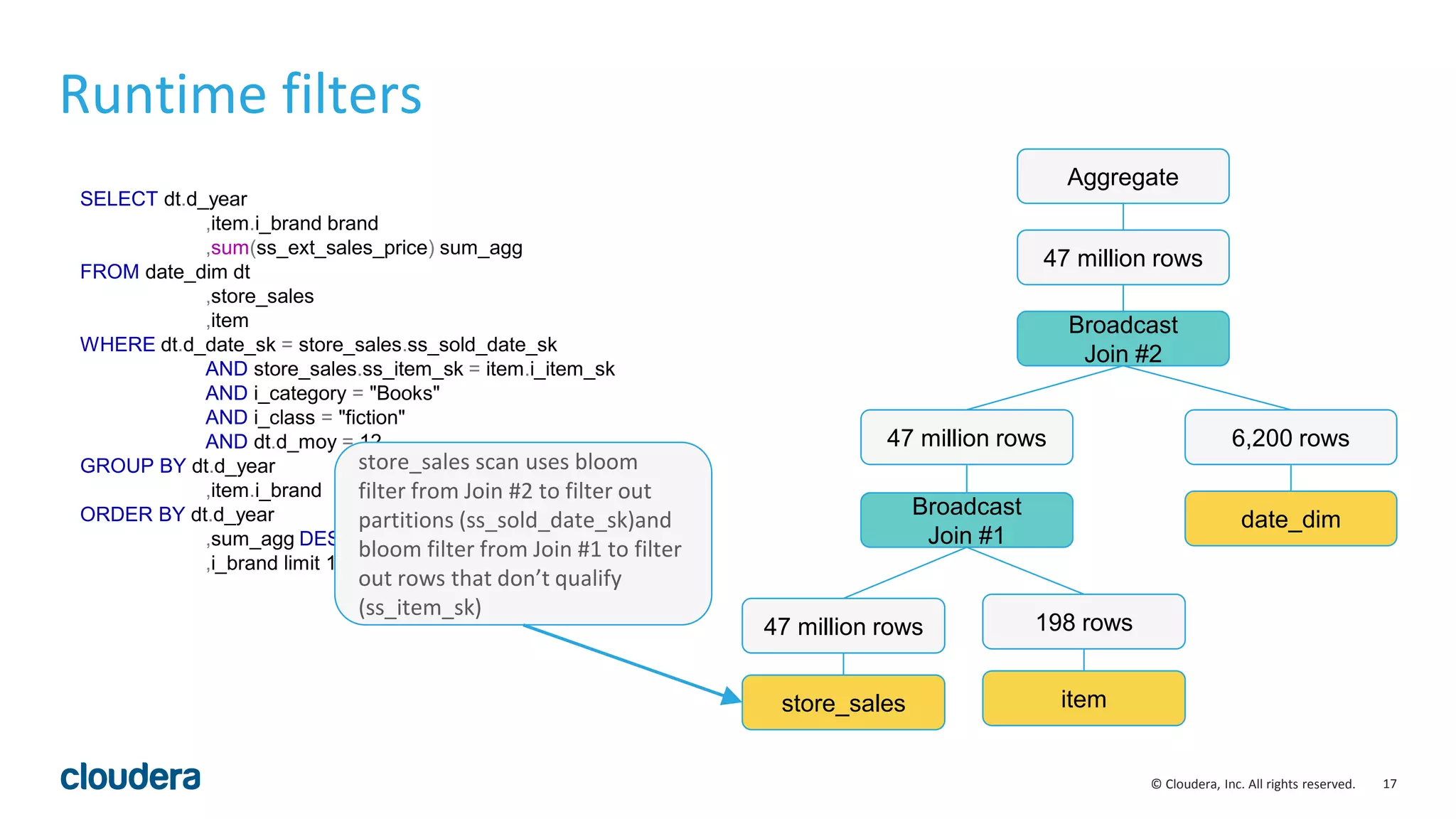
store_sales scan uses bloom
filter from Join #2 to filter out
partitions (ss_sold_date_sk)and
bloom filter from Join #1 to filter
out rows that don’t qualify
(ss_item_sk)
18© Cloudera, Inc. All rights reserved.
SELECT dt.d_year
,item.i_brand brand
,sum(ss_ext_sales_price) sum_agg
FROM date_dim dt
,store_sales
,item
WHERE dt.d_date_sk = store_sales.ss_sold_date_sk
AND store_sales.ss_item_sk = item.i_item_sk
AND i_category = "Books"
AND i_class = "fiction"
AND dt.d_moy = 12
GROUP BY dt.d_year
,item.i_brand
ORDER BY dt.d_year
,sum_agg DESC
,i_brand limit 100
Runtime filters
store_sales
47 million rows
item
198 rows
Broadcast
Join #1
47 million rows
date_dim
6,200 rows
Broadcast
Join #2
Aggregate
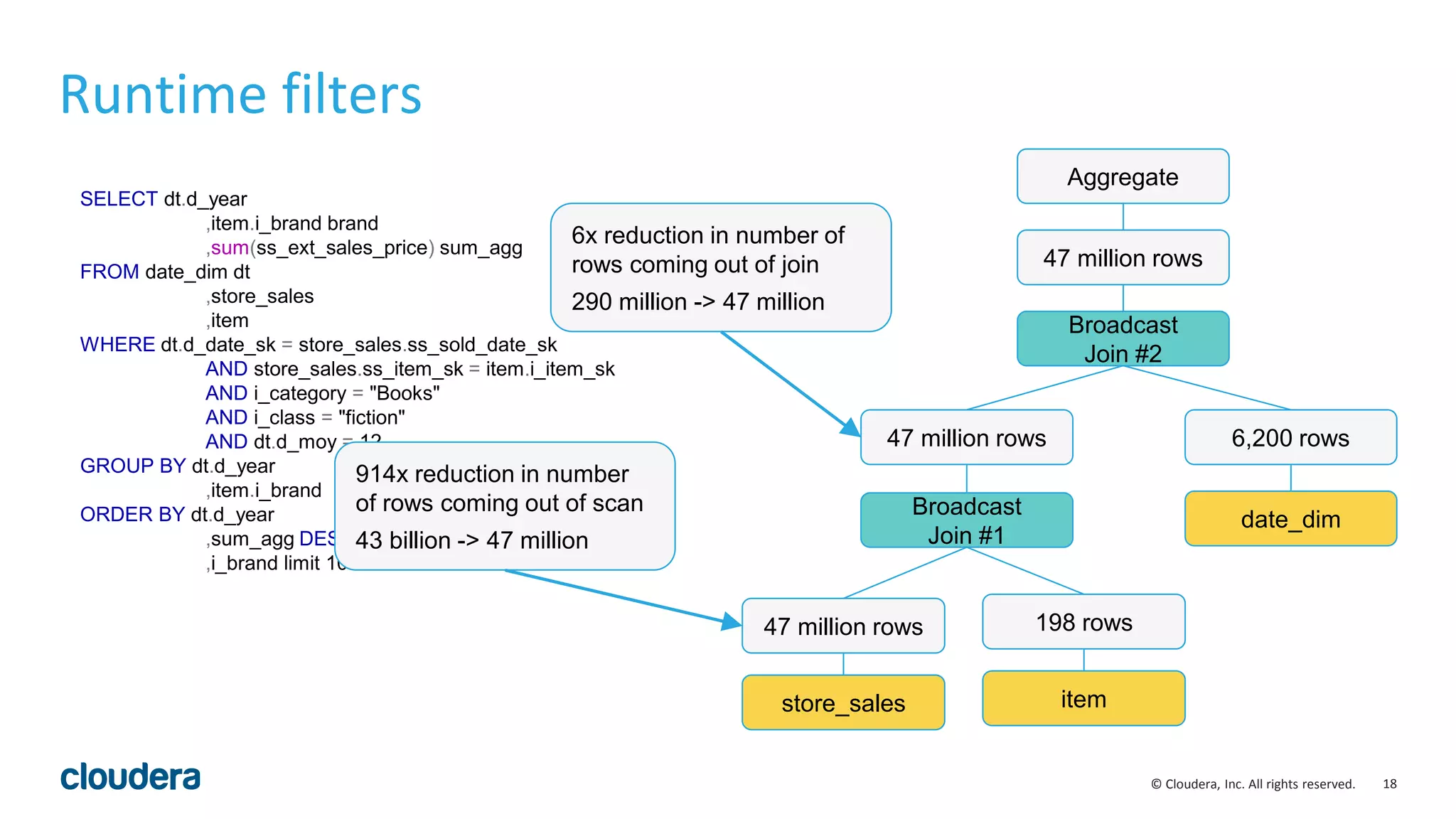
47 million rows
914x reduction in number
of rows coming out of scan
43 billion -> 47 million
6x reduction in number of
rows coming out of join
290 million -> 47 million
19© Cloudera, Inc. All rights reserved.
SELECT c_email_address
,sum(ss_ext_sales_price) sum_agg
FROM store_sales
,customer
,customer_demographics
WHERE ss_customer_sk = c_customer_sk
AND cd_demo_sk = c_current_cdemo_sk
AND cd_gender = ‘M’
AND cd_purchase_estimate = 10000
AND cd_credit_reting = ‘Low Risk’
GROUP BY c_email_address
ORDER BY sum_agg DESC
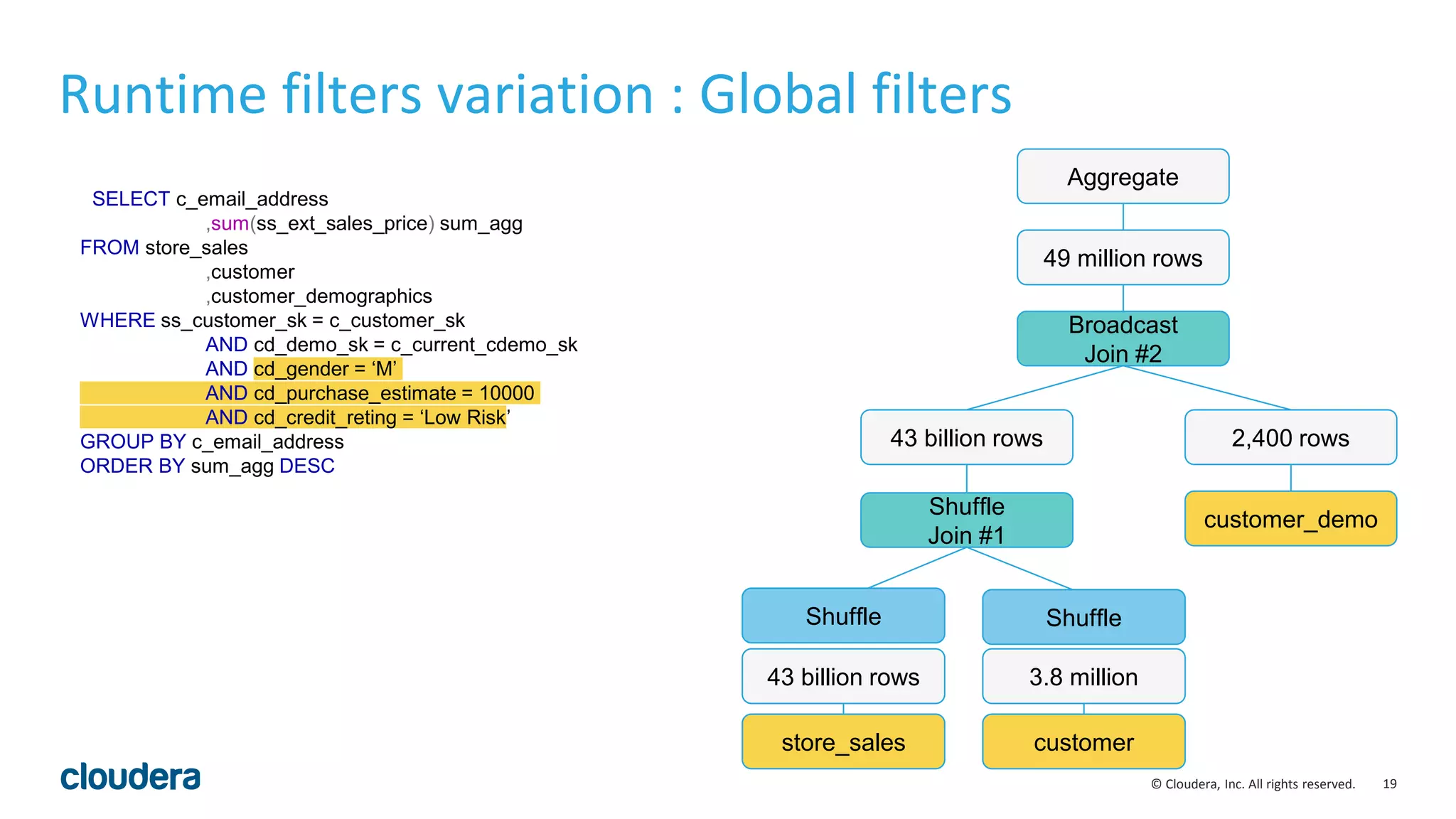
Runtime filters variation : Global filters
Shuffle
Join #1
43 billion rows
customer_demo
2,400 rows
Broadcast
Join #2
Aggregate
49 million rows
store_sales
43 billion rows
customer
3.8 million
Shuffle Shuffle
20© Cloudera, Inc. All rights reserved.
SELECT c_email_address
,sum(ss_ext_sales_price) sum_agg
FROM store_sales
,customer
,customer_demographics
WHERE ss_customer_sk = c_customer_sk
AND cd_demo_sk = c_current_cdemo_sk
AND cd_gender = ‘M’
AND cd_purchase_estimate = 10000
AND cd_credit_reting = ‘Low Risk’
GROUP BY c_email_address
ORDER BY sum_agg DESC
Runtime filters variation : Global filters
Shuffle
Join #1
43 billion rows
customer_demo
2,400 rows
Broadcast
Join #2
Aggregate
49 million rows
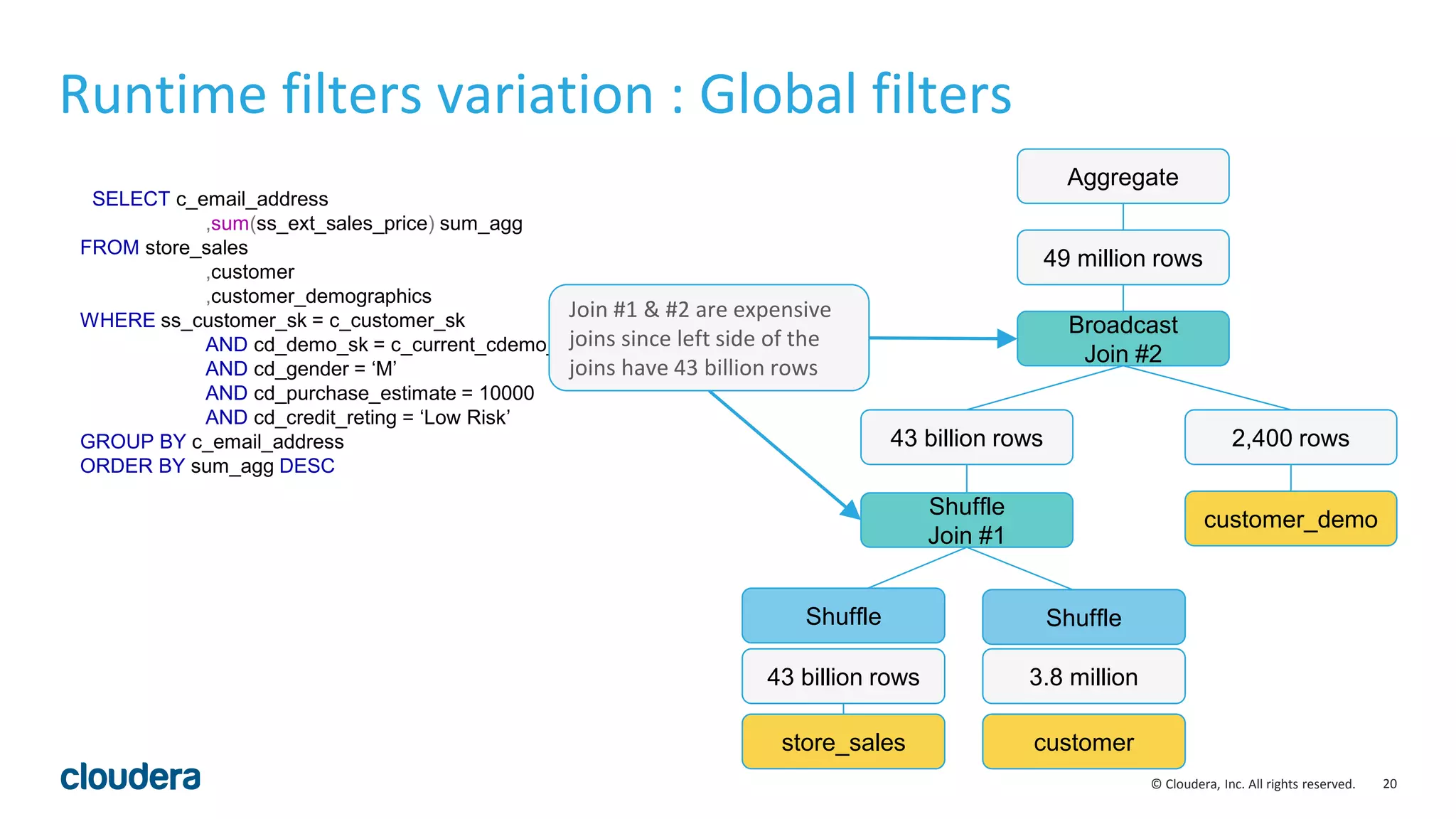
Join #1 & #2 are expensive
joins since left side of the
joins have 43 billion rows
store_sales
43 billion rows
customer
3.8 million
Shuffle Shuffle
21© Cloudera, Inc. All rights reserved.
SELECT c_email_address
,sum(ss_ext_sales_price) sum_agg
FROM store_sales
,customer
,customer_demographics
WHERE ss_customer_sk = c_customer_sk
AND cd_demo_sk = c_current_cdemo_sk
AND cd_gender = ‘M’
AND cd_purchase_estimate = 10000
AND cd_credit_reting = ‘Low Risk’
GROUP BY c_email_address
ORDER BY sum_agg DESC
Runtime filters variation : Global filters
Shuffle
Join #1
43 billion rows
customer_demo
2,400 rows
Broadcast
Join #2
Aggregate
49 million rows
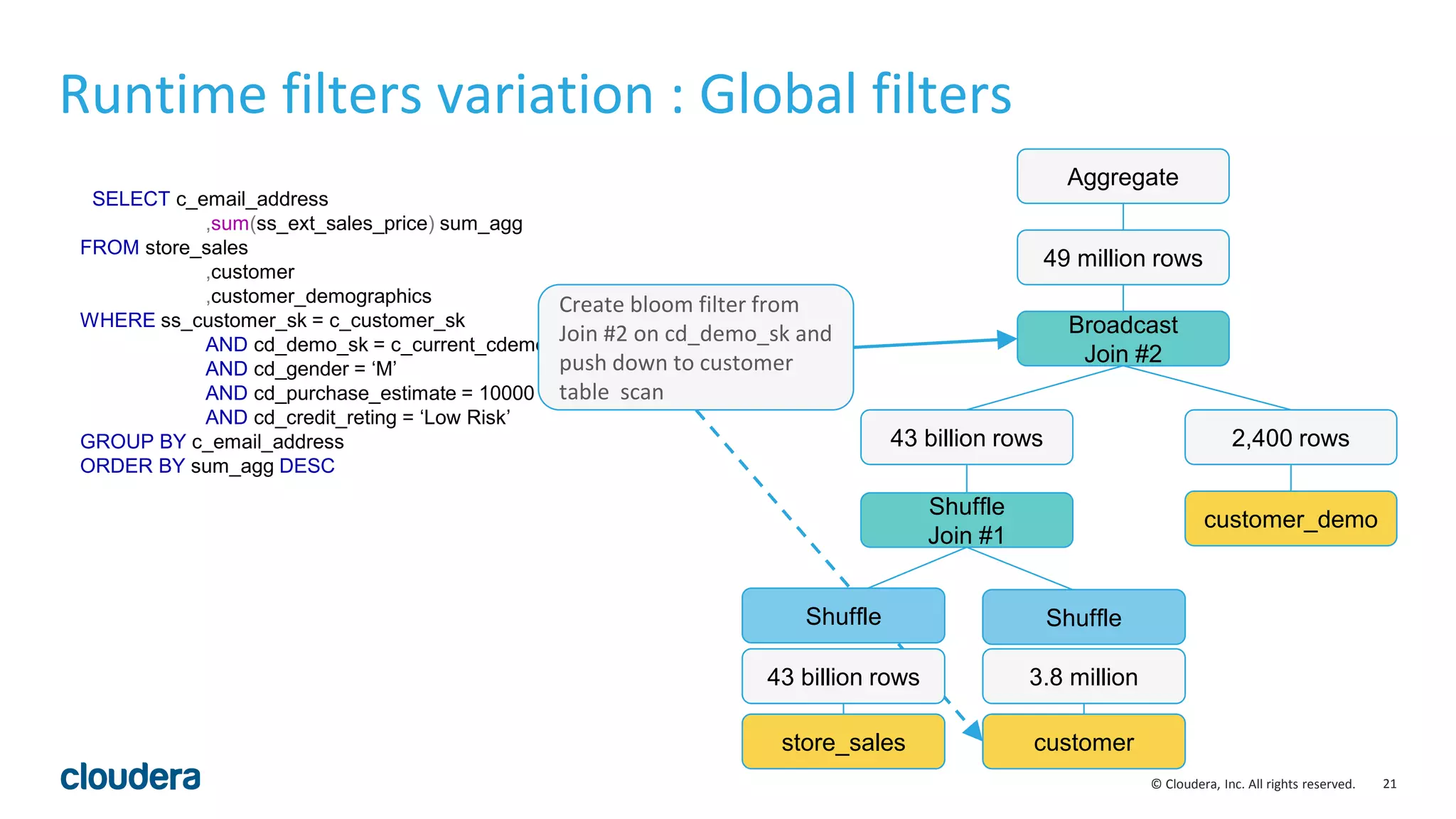
Create bloom filter from
Join #2 on cd_demo_sk and
push down to customer
table scan
store_sales
43 billion rows
customer
3.8 million
Shuffle Shuffle
22© Cloudera, Inc. All rights reserved.
SELECT c_email_address
,sum(ss_ext_sales_price) sum_agg
FROM store_sales
,customer
,customer_demographics
WHERE ss_customer_sk = c_customer_sk
AND cd_demo_sk = c_current_cdemo_sk
AND cd_gender = ‘M’
AND cd_purchase_estimate = 10000
AND cd_credit_reting = ‘Low Risk’
GROUP BY c_email_address
ORDER BY sum_agg DESC
Runtime filters variation : Global filters
Shuffle
Join #1
43 billion rows
customer_demo
2,400 rows
Broadcast
Join #2
Aggregate
49 million rows
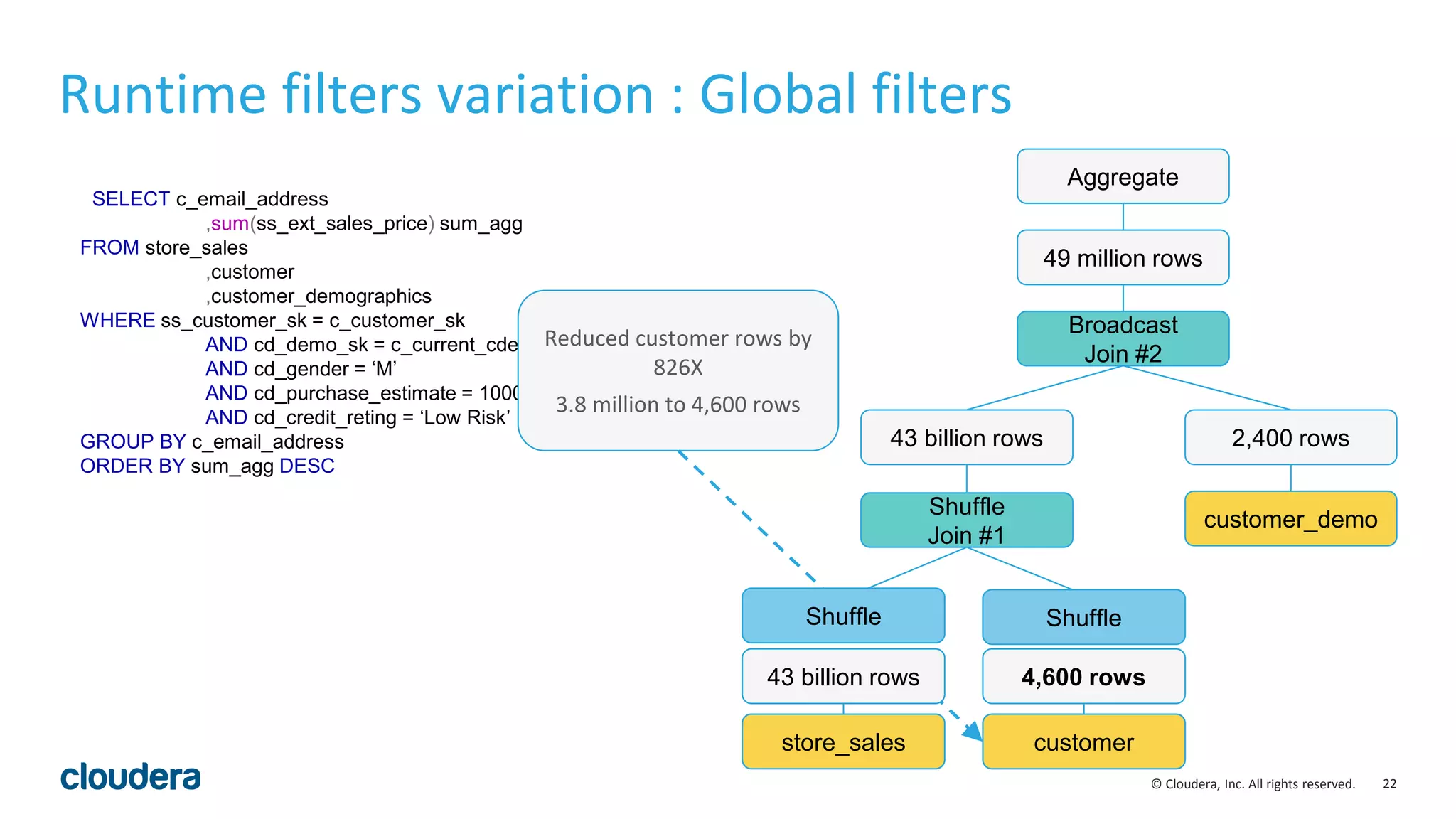
Reduced customer rows by
826X
3.8 million to 4,600 rows
store_sales
43 billion rows
customer
4,600 rows
Shuffle Shuffle
23© Cloudera, Inc. All rights reserved.
SELECT c_email_address
,sum(ss_ext_sales_price) sum_agg
FROM store_sales
,customer
,customer_demographics
WHERE ss_customer_sk = c_customer_sk
AND cd_demo_sk = c_current_cdemo_sk
AND cd_gender = ‘M’
AND cd_purchase_estimate = 10000
AND cd_credit_reting = ‘Low Risk’
GROUP BY c_email_address
ORDER BY sum_agg DESC
Runtime filters variation : Global filters
Shuffle
Join #1
43 billion rows
customer_demo
2,400 rows
Broadcast
Join #2
Aggregate
49 million rows
store_sales
43 billion rows
customer
4,600 rows
Shuffle Shuffle
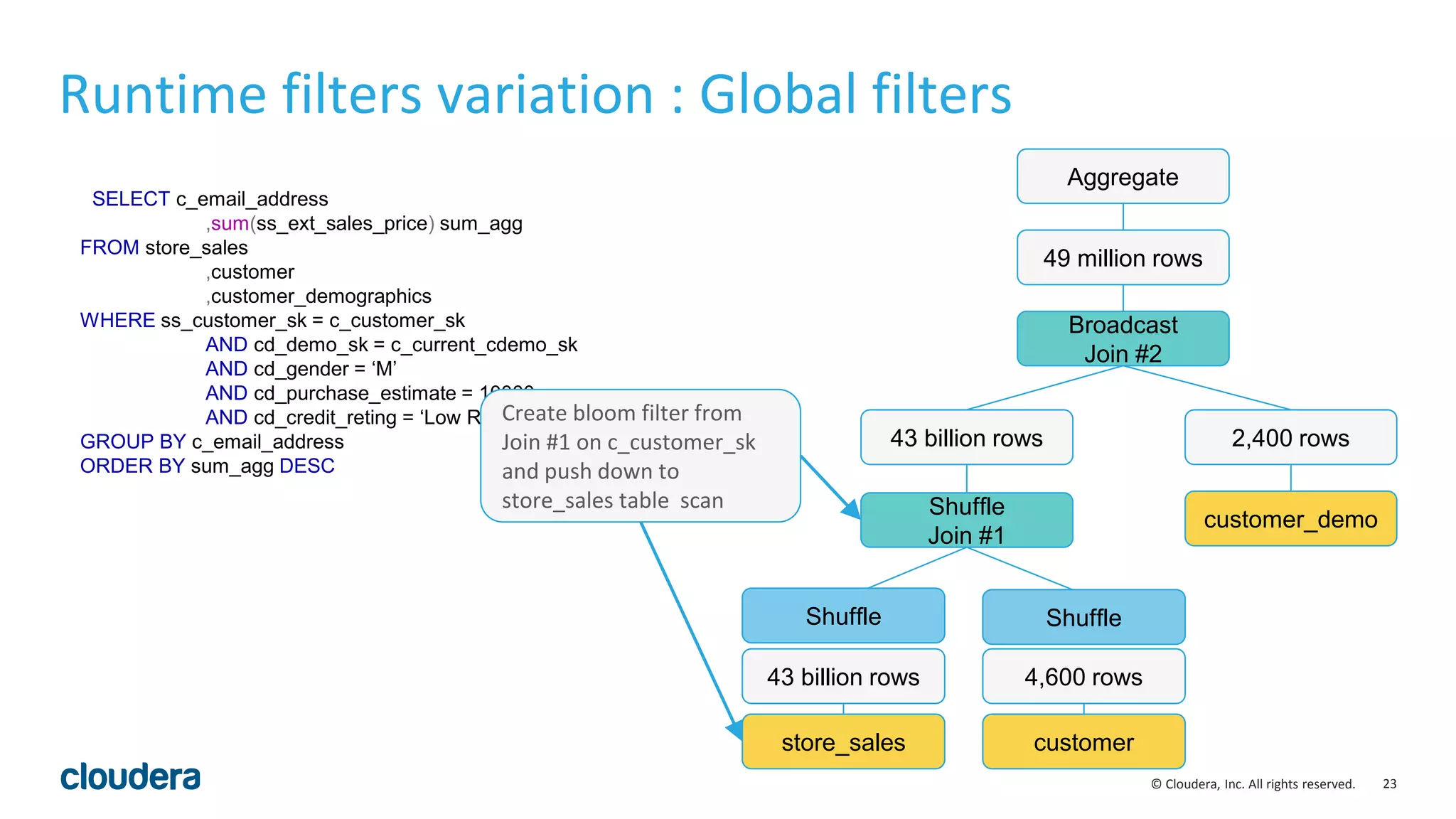
Create bloom filter from
Join #1 on c_customer_sk
and push down to
store_sales table scan
24© Cloudera, Inc. All rights reserved.
SELECT c_email_address
,sum(ss_ext_sales_price) sum_agg
FROM store_sales
,customer
,customer_demographics
WHERE ss_customer_sk = c_customer_sk
AND cd_demo_sk = c_current_cdemo_sk
AND cd_gender = ‘M’
AND cd_purchase_estimate = 10000
AND cd_credit_reting = ‘Low Risk’
GROUP BY c_email_address
ORDER BY sum_agg DESC
Runtime filters variation : Global filters
Shuffle
Join #1
49 million rows
customer_demo
2,400 rows
Broadcast
Join #2
Aggregate
49 million rows
store_sales
49 million rows
customer
4,600 rows
Shuffle Shuffle
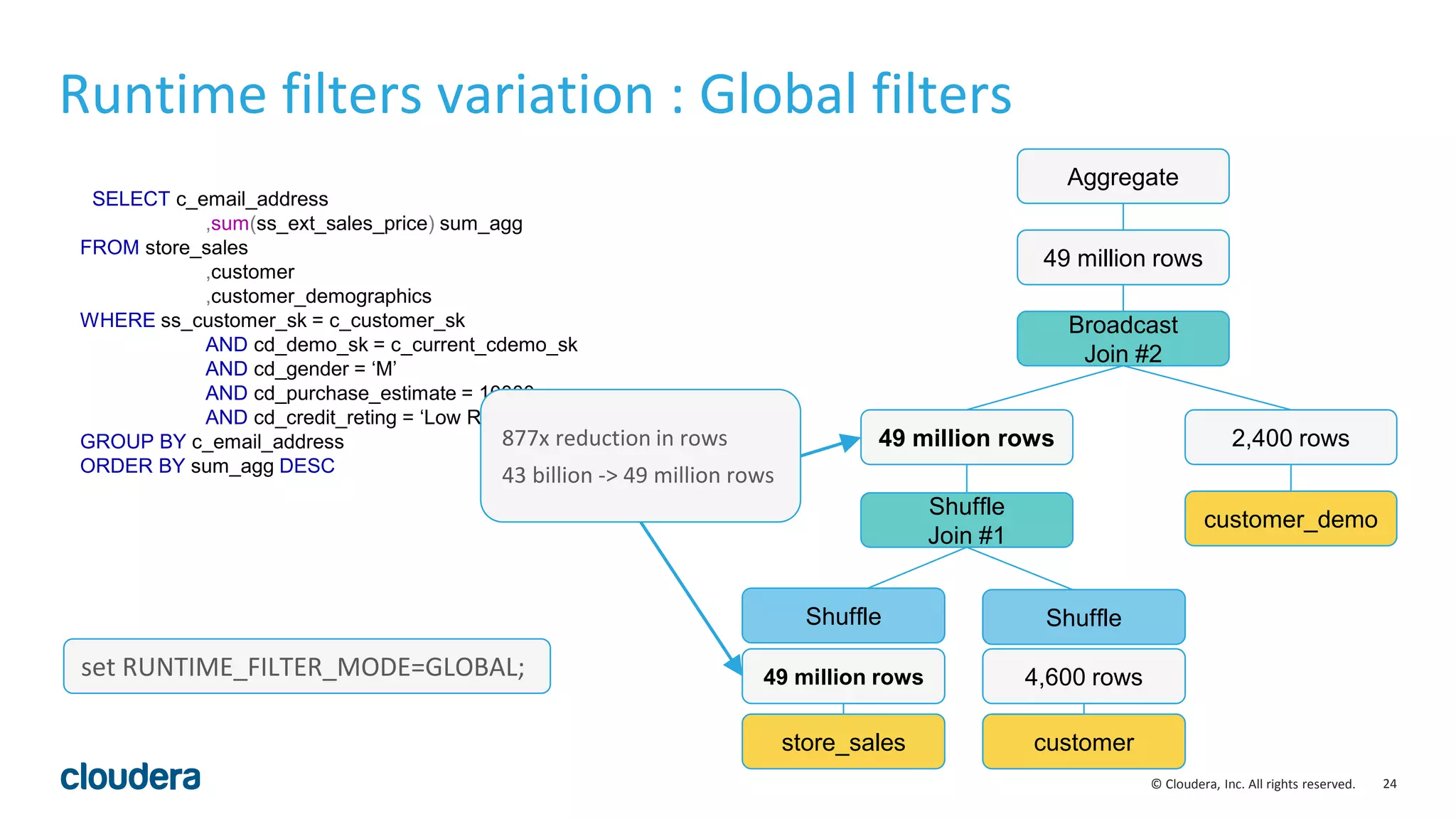
877x reduction in rows
43 billion -> 49 million rows
set RUNTIME_FILTER_MODE=GLOBAL;
25© Cloudera, Inc. All rights reserved.
Runtime filters: real-world results
• Runtime filters can be highly effective. Some benchmark queries are more than 30
times faster in Impala 2.5.0.
• As always, depends on your queries, your schemas and your cluster environment.
• By default, runtime filters are enabled in limited ‘local’ mode in Impala 2.5.0. They
can be enabled fully by setting RUNTIME_FILTER_MODE=GLOBAL.
• Other runtime filter parameters include :
• RUNTIME_BLOOM_FILTER_SIZE: [1048576]
• RUNTIME_FILTER_WAIT_TIME_MS: [0]
26© Cloudera, Inc. All rights reserved.
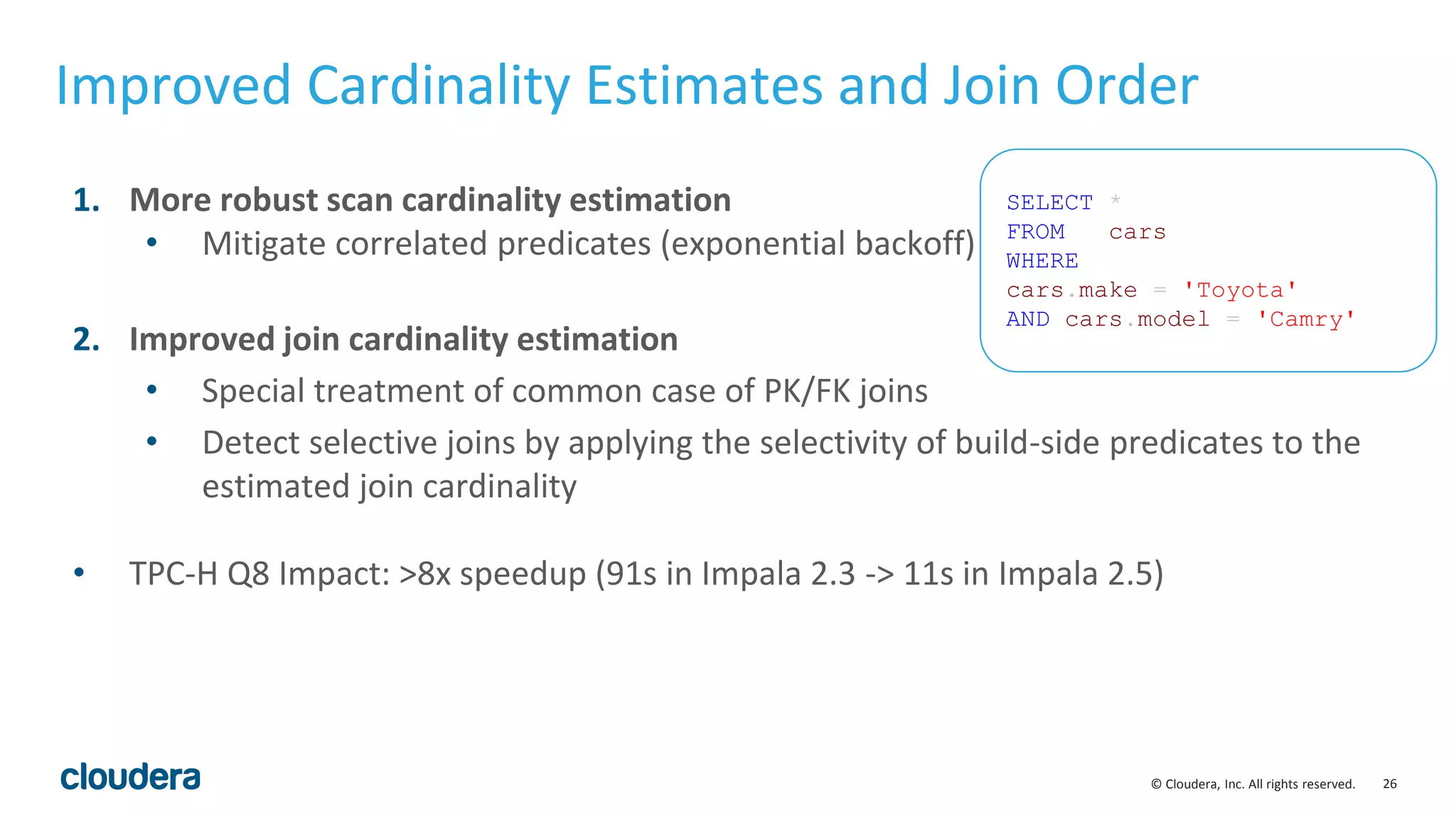
Improved Cardinality Estimates and Join Order
1. More robust scan cardinality estimation
• Mitigate correlated predicates (exponential backoff)
2. Improved join cardinality estimation
• Special treatment of common case of PK/FK joins
• Detect selective joins by applying the selectivity of build-side predicates to the
estimated join cardinality
• TPC-H Q8 Impact: >8x speedup (91s in Impala 2.3 -> 11s in Impala 2.5)
SELECT *
FROM cars
WHERE
cars.make = 'Toyota'
AND cars.model = 'Camry'
27© Cloudera, Inc. All rights reserved.
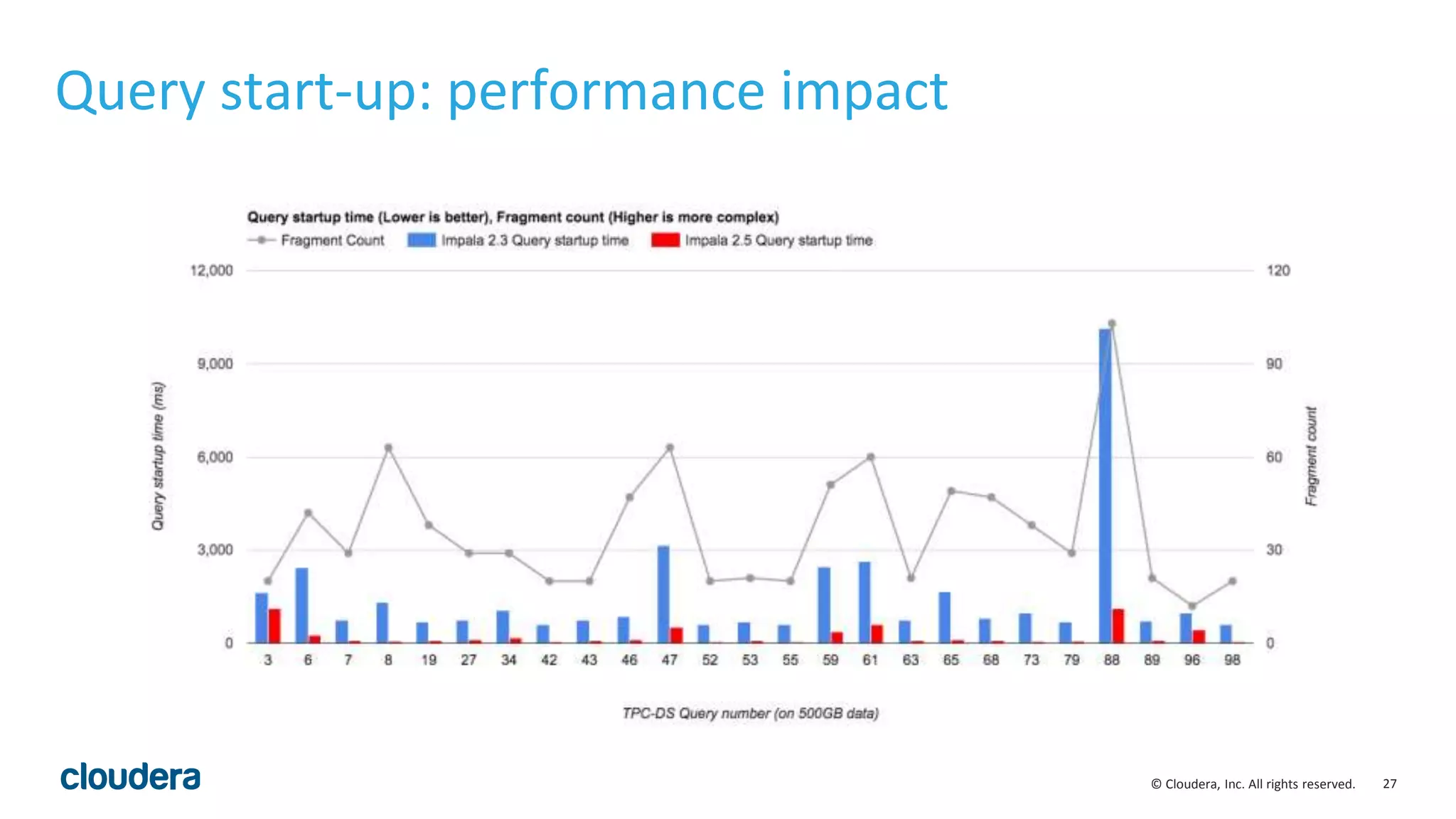
Query start-up: performance impact
28© Cloudera, Inc. All rights reserved.
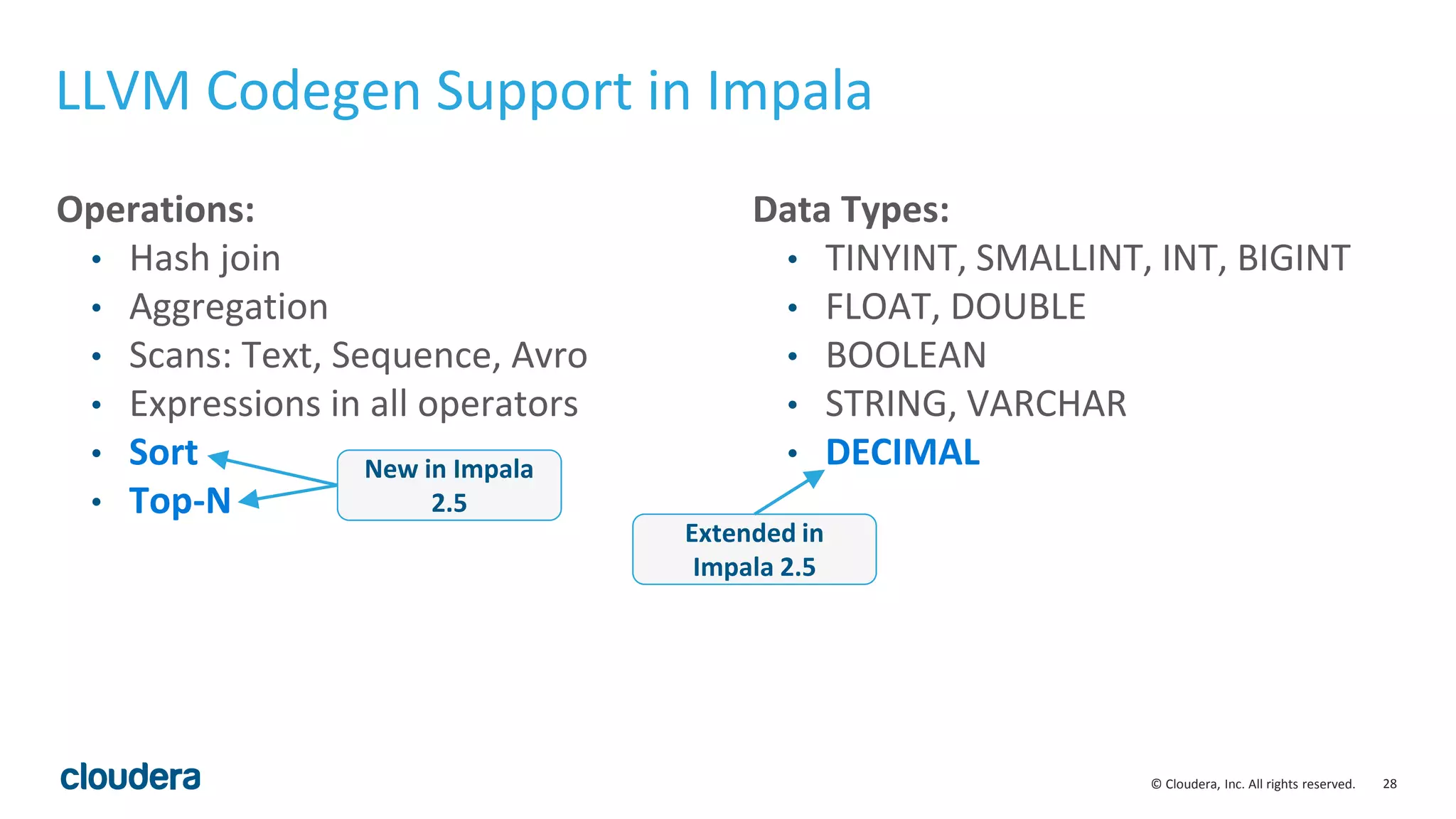
LLVM Codegen Support in Impala
Operations:
• Hash join
• Aggregation
• Scans: Text, Sequence, Avro
• Expressions in all operators
• Sort
• Top-N
Data Types:
• TINYINT, SMALLINT, INT, BIGINT
• FLOAT, DOUBLE
• BOOLEAN
• STRING, VARCHAR
• DECIMALNew in Impala
2.5
Extended in
Impala 2.5
29© Cloudera, Inc. All rights reserved.
Codegen for Order by & Top-N
void* ExprContext::GetValue(Expr* e, TupleRow* row) {
switch (e->type_.type) {
case TYPE_BOOLEAN: {
..
..
}
case TYPE_TINYINT: {
..
..
}
case TYPE_INT: {
..
.
int Compare(TupleRow* lhs, TupleRow* rhs) const {
for (int i = 0; i < sort_cols_lhs_.size(); ++i) {
void* lhs_value = sort_cols_lhs_[i]->GetValue(lhs);
void* rhs_value = sort_cols_rhs_[i]->GetValue(rhs);
if (lhs_value == NULL && rhs_value != NULL) return nulls_first_[i];
if (lhs_value != NULL && rhs_value == NULL) return -nulls_first_[i];
int result = RawValue::Compare(lhs_value, rhs_value,
sort_cols_lhs_[i]->root()->type());
if (!is_asc_[i]) result = -result;
if (result != 0) return result;
// Otherwise, try the next Expr
}
return 0; // fully equivalent key
}
30© Cloudera, Inc. All rights reserved.
Codegen for Order by & Top-N
int CompareCodgened(TupleRow* lhs, TupleRow* rhs) const {
int64_t lhs_value = sort_columns[i]->GetBigIntVal(lhs); // i = 0
int64_t rhs_value = sort_columns[i]->GetBigIntVal(rhs); // i = 1
int result = lhs_value > rhs_value ? 1 :
(lhs_value < rhs_value ? -1 : 0);
if (result != 0) return result;
// Otherwise, try the next Expr
return 0; // fully equivalent key
}
Codegen code
• Perfectly unrolls “for each grouping column” loop
• No switching on input type(s)
• Removes branching on ASCENDING/DESCENDING,
NULLS FIRST/LAST
Original code
int Compare(TupleRow* lhs, TupleRow* rhs) const {
for (int i = 0; i < sort_cols_lhs_.size(); ++i) {
void* lhs_value = sort_cols_lhs_[i]->GetValue(lhs);
void* rhs_value = sort_cols_rhs_[i]->GetValue(rhs);
if (lhs_value == NULL && rhs_value != NULL) return nulls_first_[i];
if (lhs_value != NULL && rhs_value == NULL) return -nulls_first_[i];
int result = RawValue::Compare(lhs_value, rhs_value,
sort_cols_lhs_[i]->root()->type());
if (!is_asc_[i]) result = -result;
if (result != 0) return result;
// Otherwise, try the next Expr
}
return 0; // fully equivalent key
}
31© Cloudera, Inc. All rights reserved.
Codegen for Order by & Top-N
int CompareCodgened(TupleRow* lhs, TupleRow* rhs) const {
int64_t lhs_value = sort_columns[i]->GetBigIntVal(lhs); // i = 0
int64_t rhs_value = sort_columns[i]->GetBigIntVal(rhs); // i = 1
int result = lhs_value > rhs_value ? 1 :
(lhs_value < rhs_value ? -1 : 0);
if (result != 0) return result;
// Otherwise, try the next Expr
return 0; // fully equivalent key
}
Codegen code
• Perfectly unrolls “for each grouping column” loop
• No switching on input type(s)
• Removes branching on ASCENDING/DESCENDING,
NULLS FIRST/LAST
Original code
int Compare(TupleRow* lhs, TupleRow* rhs) const {
for (int i = 0; i < sort_cols_lhs_.size(); ++i) {
void* lhs_value = sort_cols_lhs_[i]->GetValue(lhs);
void* rhs_value = sort_cols_rhs_[i]->GetValue(rhs);
if (lhs_value == NULL && rhs_value != NULL) return nulls_first_[i];
if (lhs_value != NULL && rhs_value == NULL) return -nulls_first_[i];
int result = RawValue::Compare(lhs_value, rhs_value,
sort_cols_lhs_[i]->root()->type());
if (!is_asc_[i]) result = -result;
if (result != 0) return result;
// Otherwise, try the next Expr
}
return 0; // fully equivalent key
}
10x more efficient
code
32© Cloudera, Inc. All rights reserved.
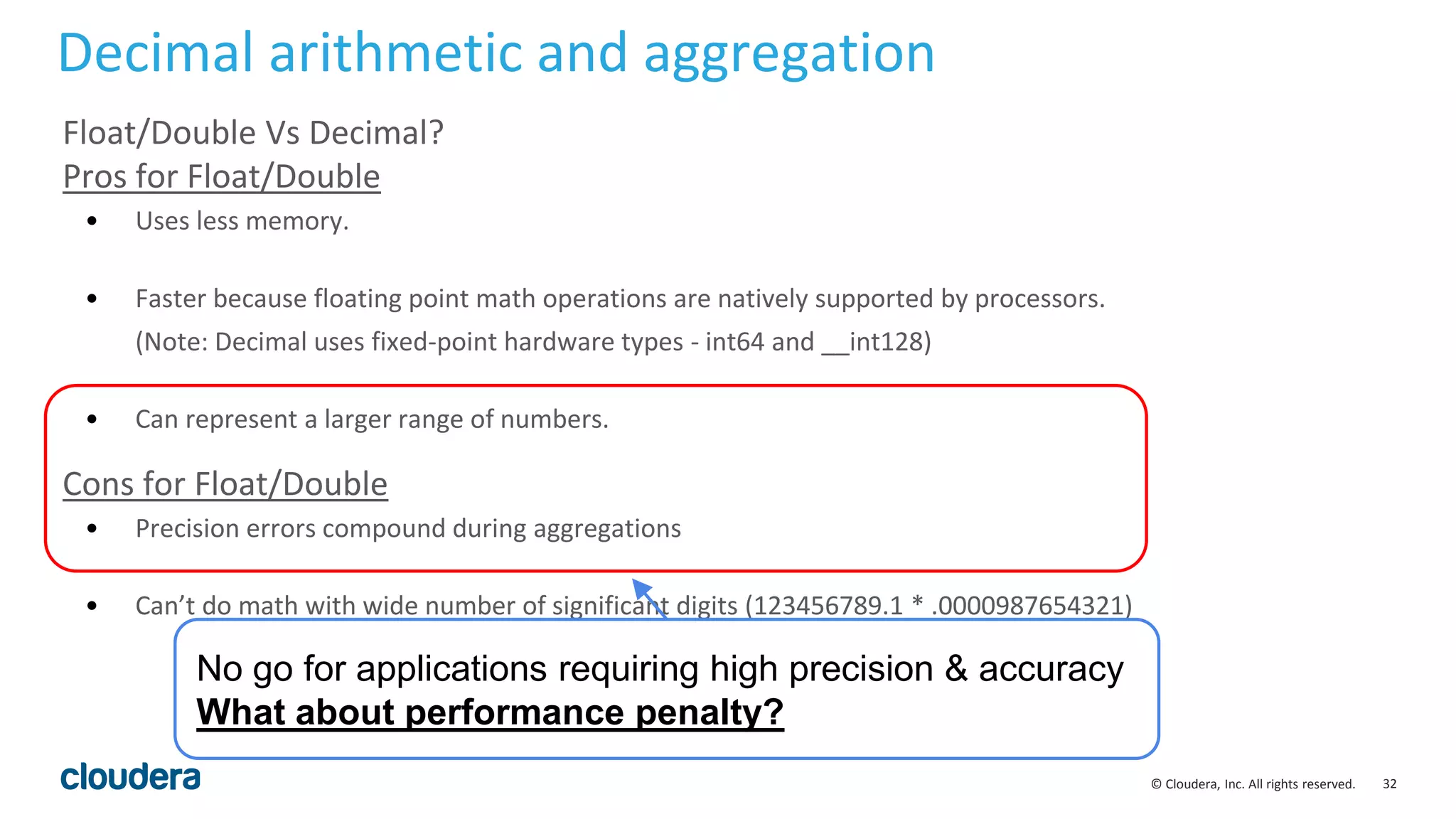
Float/Double Vs Decimal?
Pros for Float/Double
• Uses less memory.
• Faster because floating point math operations are natively supported by processors.
(Note: Decimal uses fixed-point hardware types - int64 and __int128)
• Can represent a larger range of numbers.
Cons for Float/Double
• Precision errors compound during aggregations
• Can’t do math with wide number of significant digits (123456789.1 * .0000987654321)
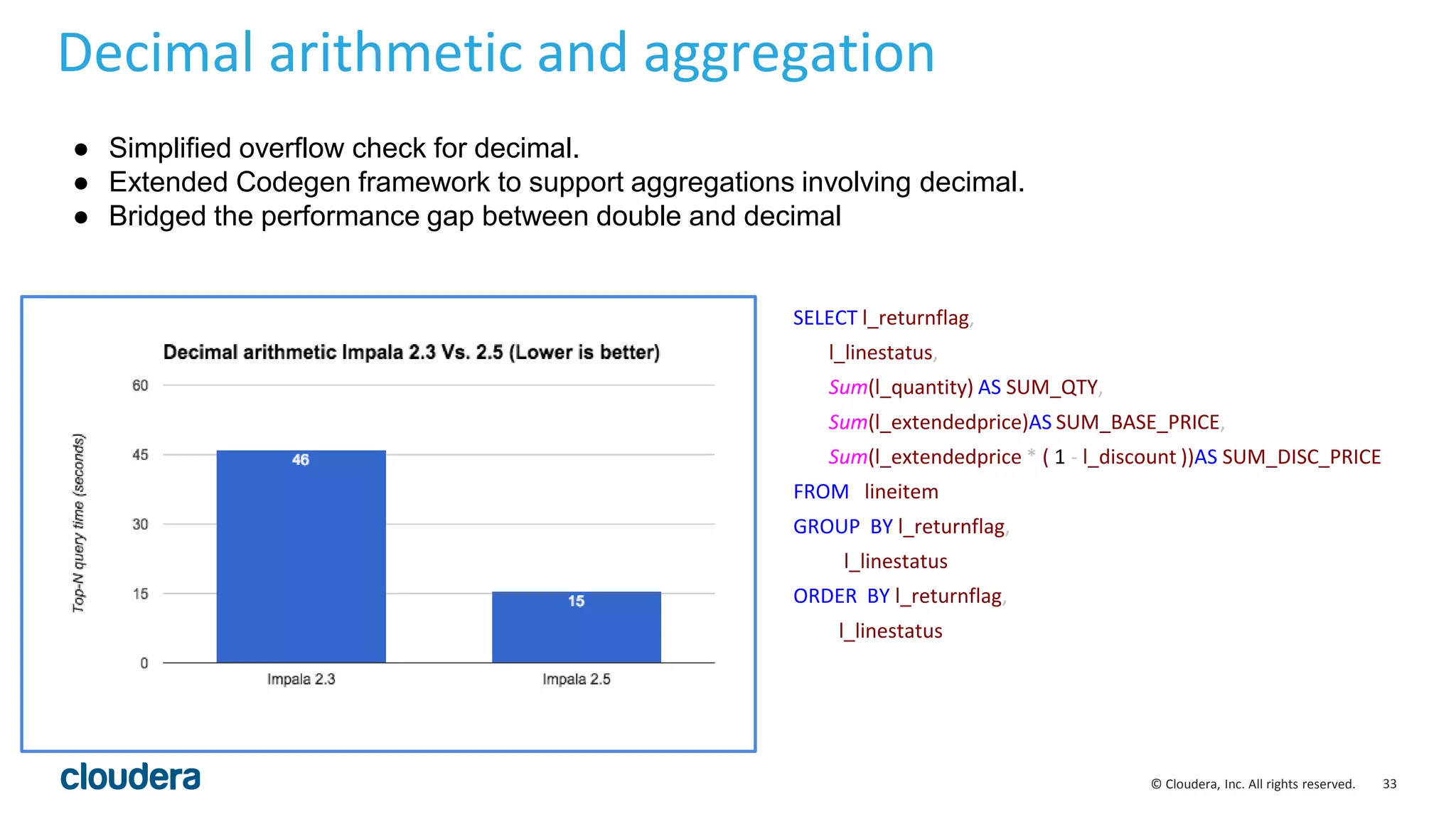
Decimal arithmetic and aggregation
No go for applications requiring high precision & accuracy
What about performance penalty?
33© Cloudera, Inc. All rights reserved.
Decimal arithmetic and aggregation
SELECT l_returnflag,
l_linestatus,
Sum(l_quantity) AS SUM_QTY,
Sum(l_extendedprice)AS SUM_BASE_PRICE,
Sum(l_extendedprice * ( 1 - l_discount ))AS SUM_DISC_PRICE
FROM lineitem
GROUP BY l_returnflag,
l_linestatus
ORDER BY l_returnflag,
l_linestatus
3x speedup
● Simplified overflow check for decimal.
● Extended Codegen framework to support aggregations involving decimal.
● Bridged the performance gap between double and decimal
34© Cloudera, Inc. All rights reserved.
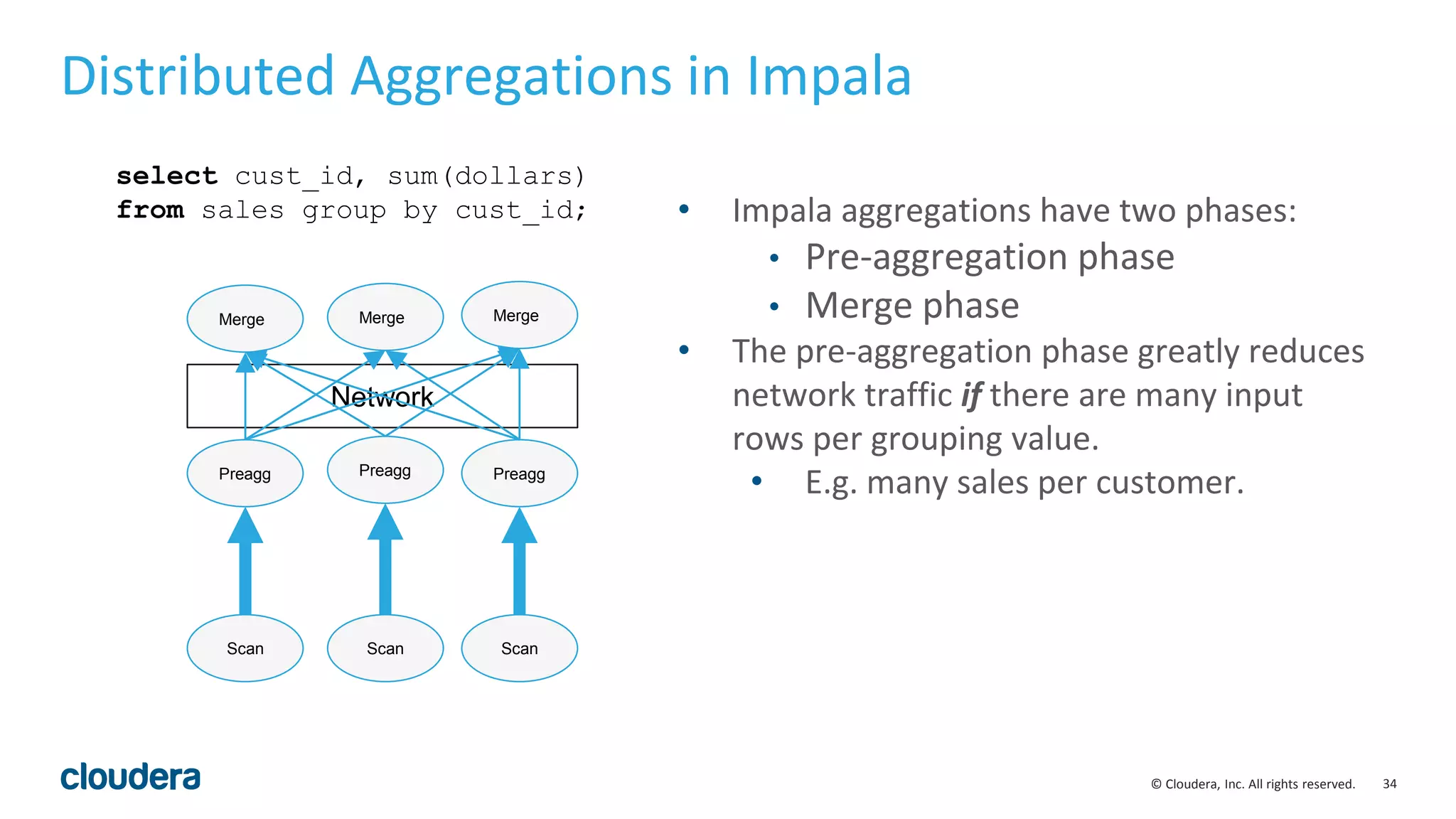
Network
Distributed Aggregations in Impala
Preagg Preagg Preagg
Merge Merge Merge
select cust_id, sum(dollars)
from sales group by cust_id;
Scan ScanScan
• Impala aggregations have two phases:
• Pre-aggregation phase
• Merge phase
• The pre-aggregation phase greatly reduces
network traffic if there are many input
rows per grouping value.
• E.g. many sales per customer.
35© Cloudera, Inc. All rights reserved.
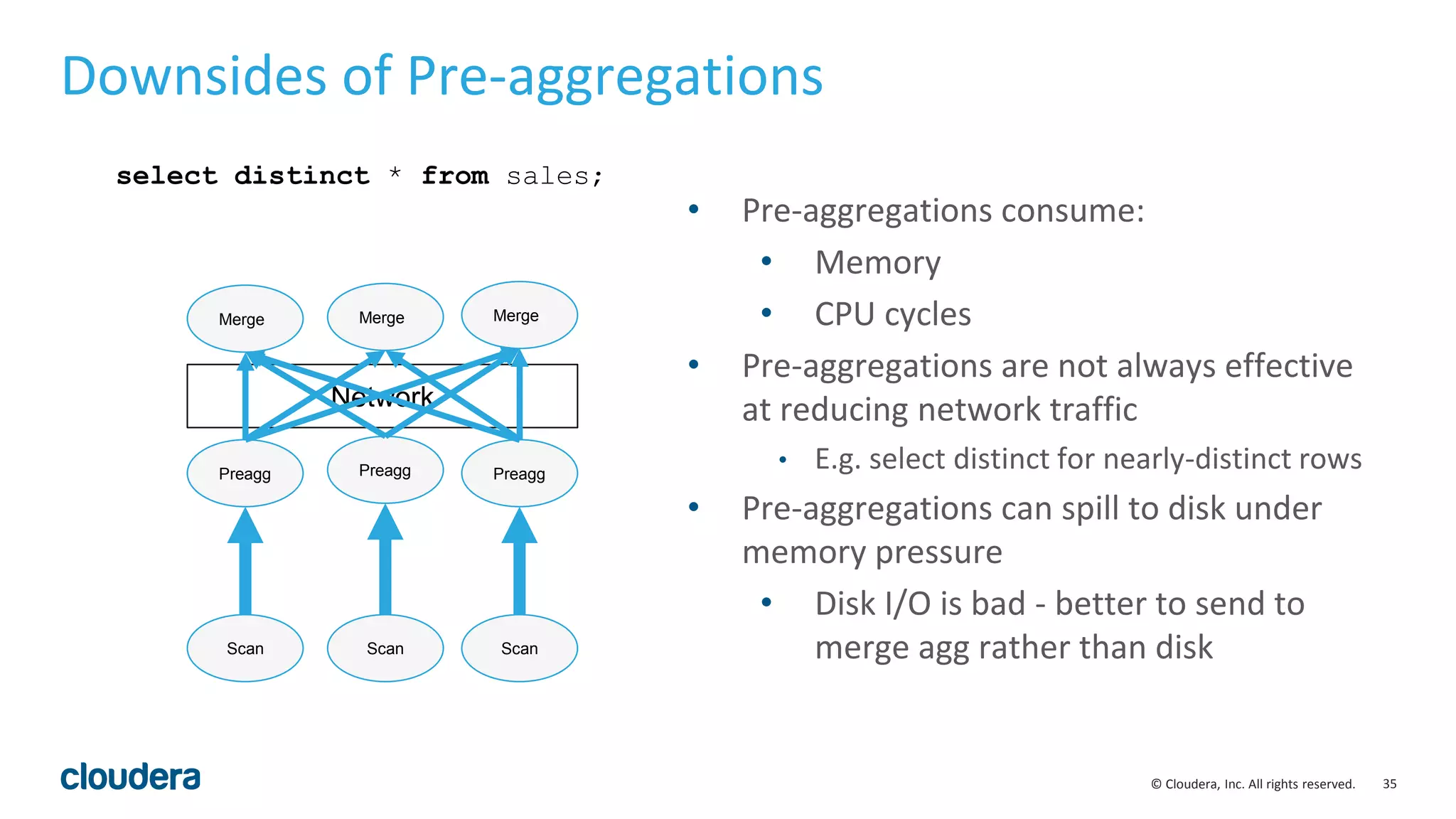
Network
Downsides of Pre-aggregations
Preagg Preagg Preagg
Merge Merge Merge
select distinct * from sales;
Scan ScanScan
• Pre-aggregations consume:
• Memory
• CPU cycles
• Pre-aggregations are not always effective
at reducing network traffic
• E.g. select distinct for nearly-distinct rows
• Pre-aggregations can spill to disk under
memory pressure
• Disk I/O is bad - better to send to
merge agg rather than disk
36© Cloudera, Inc. All rights reserved.
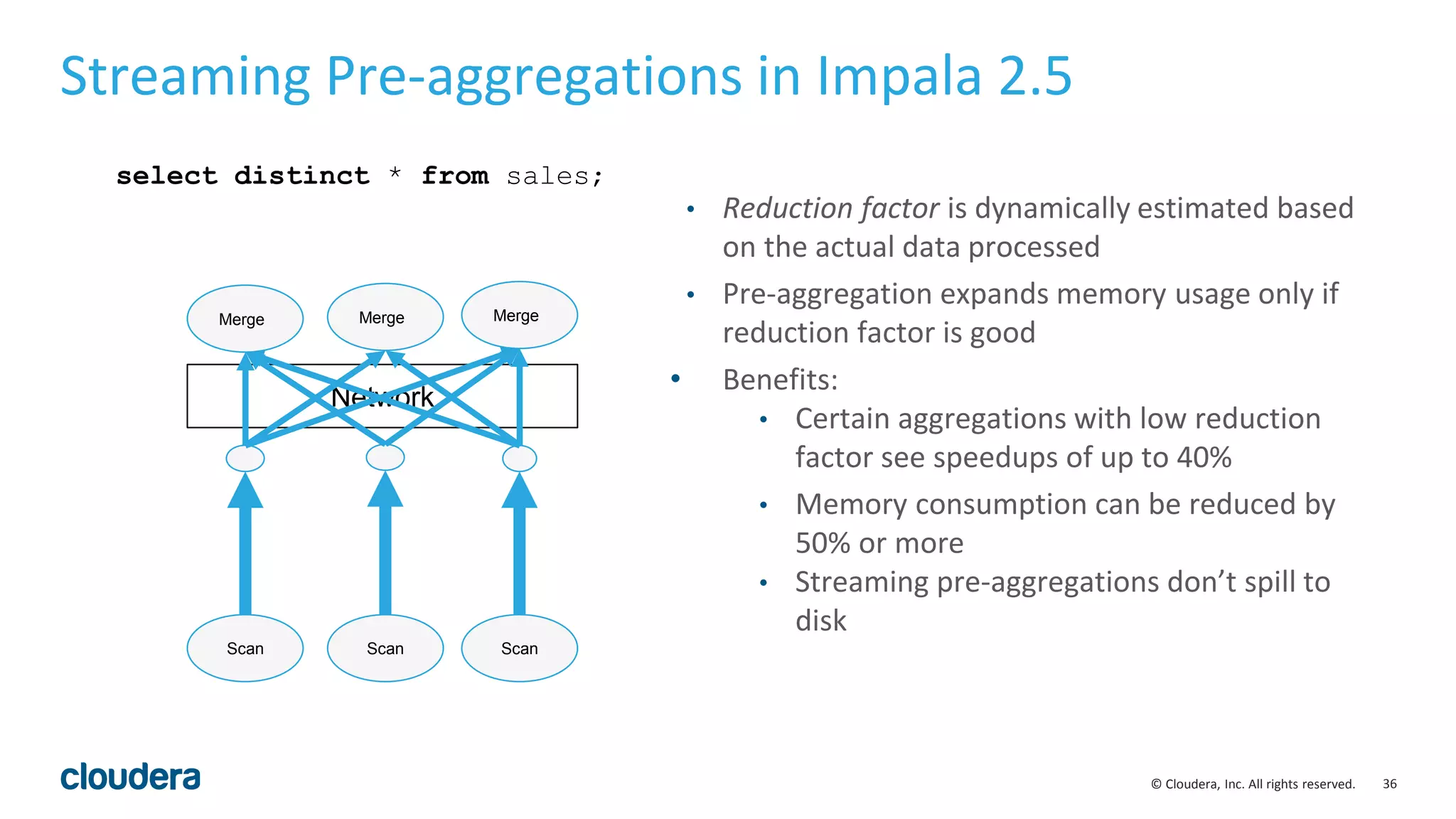
Network
Streaming Pre-aggregations in Impala 2.5
Merge Merge Merge
select distinct * from sales;
Scan ScanScan
• Reduction factor is dynamically estimated based
on the actual data processed
• Pre-aggregation expands memory usage only if
reduction factor is good
• Benefits:
• Certain aggregations with low reduction
factor see speedups of up to 40%
• Memory consumption can be reduced by
50% or more
• Streaming pre-aggregations don’t spill to
disk
37© Cloudera, Inc. All rights reserved.
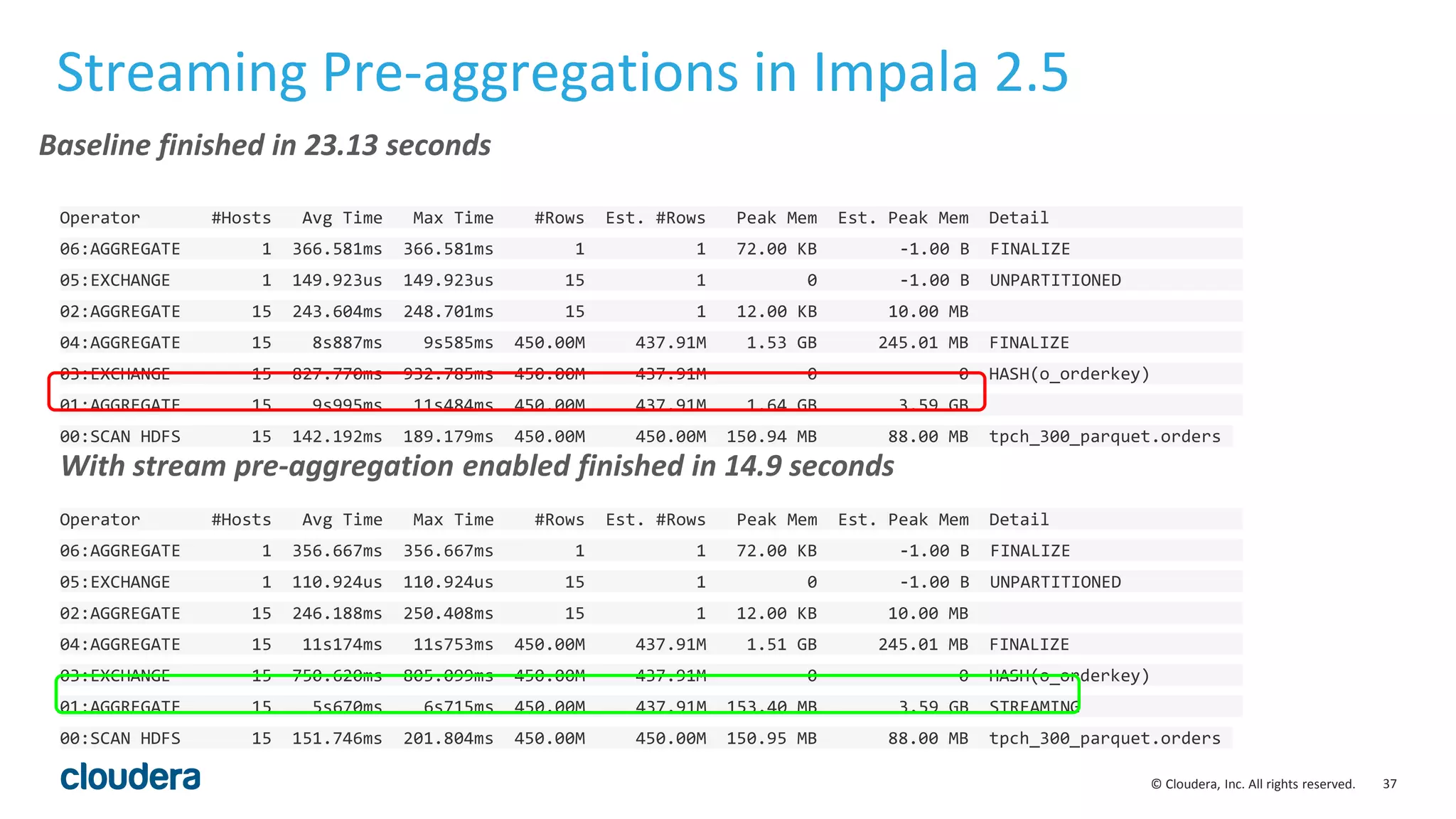
Streaming Pre-aggregations in Impala 2.5
Operator #Hosts Avg Time Max Time #Rows Est. #Rows Peak Mem Est. Peak Mem Detail
06:AGGREGATE 1 366.581ms 366.581ms 1 1 72.00 KB -1.00 B FINALIZE
05:EXCHANGE 1 149.923us 149.923us 15 1 0 -1.00 B UNPARTITIONED
02:AGGREGATE 15 243.604ms 248.701ms 15 1 12.00 KB 10.00 MB
04:AGGREGATE 15 8s887ms 9s585ms 450.00M 437.91M 1.53 GB 245.01 MB FINALIZE
03:EXCHANGE 15 827.770ms 932.785ms 450.00M 437.91M 0 0 HASH(o_orderkey)
01:AGGREGATE 15 9s995ms 11s484ms 450.00M 437.91M 1.64 GB 3.59 GB
00:SCAN HDFS 15 142.192ms 189.179ms 450.00M 450.00M 150.94 MB 88.00 MB tpch_300_parquet.orders
Operator #Hosts Avg Time Max Time #Rows Est. #Rows Peak Mem Est. Peak Mem Detail
06:AGGREGATE 1 356.667ms 356.667ms 1 1 72.00 KB -1.00 B FINALIZE
05:EXCHANGE 1 110.924us 110.924us 15 1 0 -1.00 B UNPARTITIONED
02:AGGREGATE 15 246.188ms 250.408ms 15 1 12.00 KB 10.00 MB
04:AGGREGATE 15 11s174ms 11s753ms 450.00M 437.91M 1.51 GB 245.01 MB FINALIZE
03:EXCHANGE 15 750.620ms 805.099ms 450.00M 437.91M 0 0 HASH(o_orderkey)
01:AGGREGATE 15 5s670ms 6s715ms 450.00M 437.91M 153.40 MB 3.59 GB STREAMING
00:SCAN HDFS 15 151.746ms 201.804ms 450.00M 450.00M 150.95 MB 88.00 MB tpch_300_parquet.orders
Baseline finished in 23.13 seconds
With stream pre-aggregation enabled finished in 14.9 seconds
38© Cloudera, Inc. All rights reserved.
Optimization for partition keys scan
• Use metadata to avoid table accesses for partition key scans:
• select min(month), max(year) from functional.alltypes;
• month, year are partition keys of the table
• Enabled by query option OPTIMIZE_PARTITION_KEY_SCANS
• Applicable:
• min(), max(), ndv() and aggregate functions with distinct keyword
• partition keys only
01:AGGREGATE [FINALIZE]
| output: min(month),max(year)
|
00:UNION
constant-operands=24
03:AGGREGATE [FINALIZE]
| output: min:merge(month), max:merge(year)
|
02:EXCHANGE [UNPARTITIONED]
|
01:AGGREGATE
| output: min(month), max(year)
|
00:SCAN HDFS [functional.alltypes]
partitions=24/24 files=24 size=478.45KB
Plan without optimization Plan with optimization
39© Cloudera, Inc. All rights reserved.
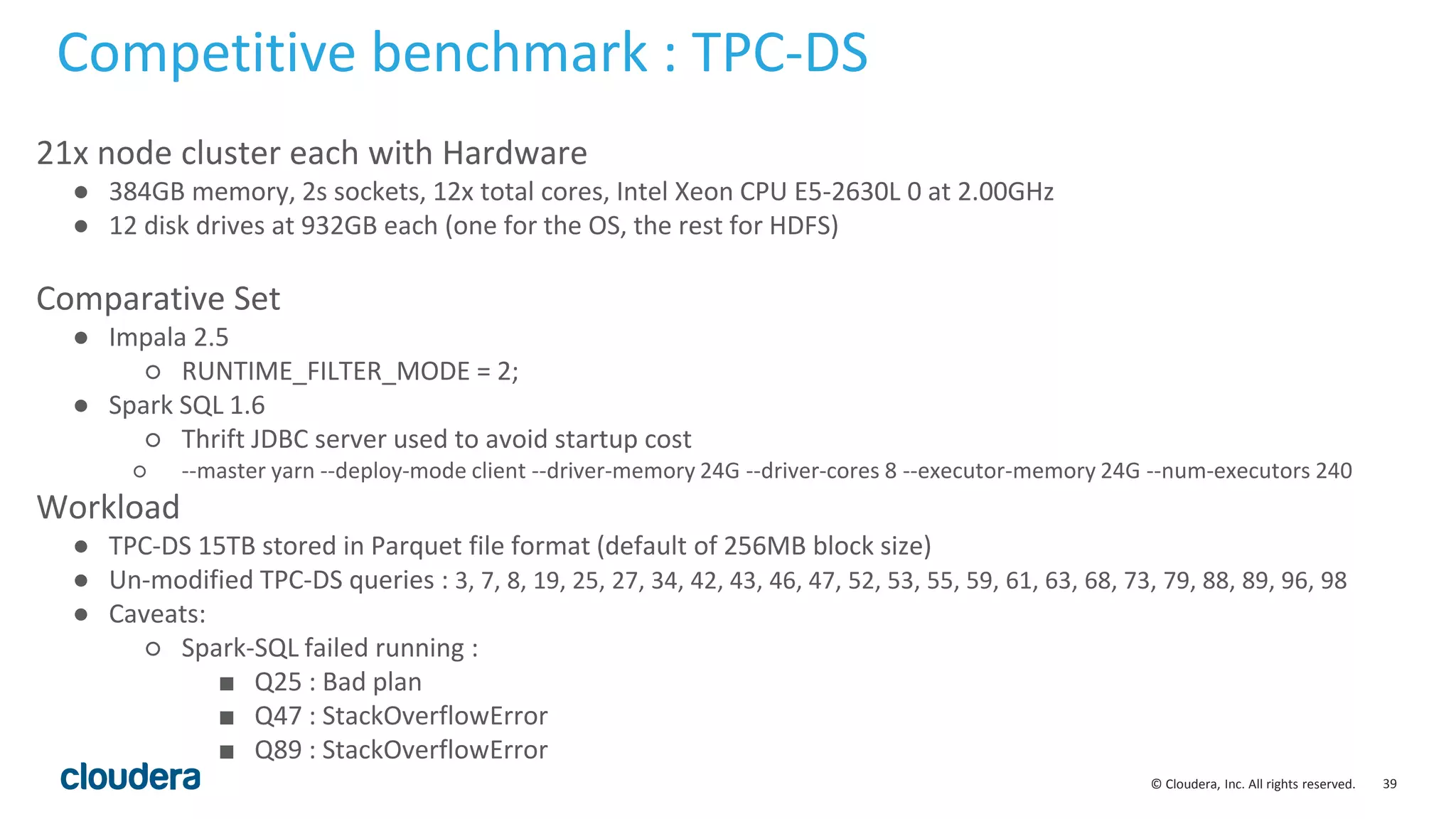
21x node cluster each with Hardware
● 384GB memory, 2s sockets, 12x total cores, Intel Xeon CPU E5-2630L 0 at 2.00GHz
● 12 disk drives at 932GB each (one for the OS, the rest for HDFS)
Comparative Set
● Impala 2.5
○ RUNTIME_FILTER_MODE = 2;
● Spark SQL 1.6
○ Thrift JDBC server used to avoid startup cost
○ --master yarn --deploy-mode client --driver-memory 24G --driver-cores 8 --executor-memory 24G --num-executors 240
Workload
● TPC-DS 15TB stored in Parquet file format (default of 256MB block size)
● Un-modified TPC-DS queries : 3, 7, 8, 19, 25, 27, 34, 42, 43, 46, 47, 52, 53, 55, 59, 61, 63, 68, 73, 79, 88, 89, 96, 98
● Caveats:
○ Spark-SQL failed running :
■ Q25 : Bad plan
■ Q47 : StackOverflowError
■ Q89 : StackOverflowError
Competitive benchmark : TPC-DS
40© Cloudera, Inc. All rights reserved.
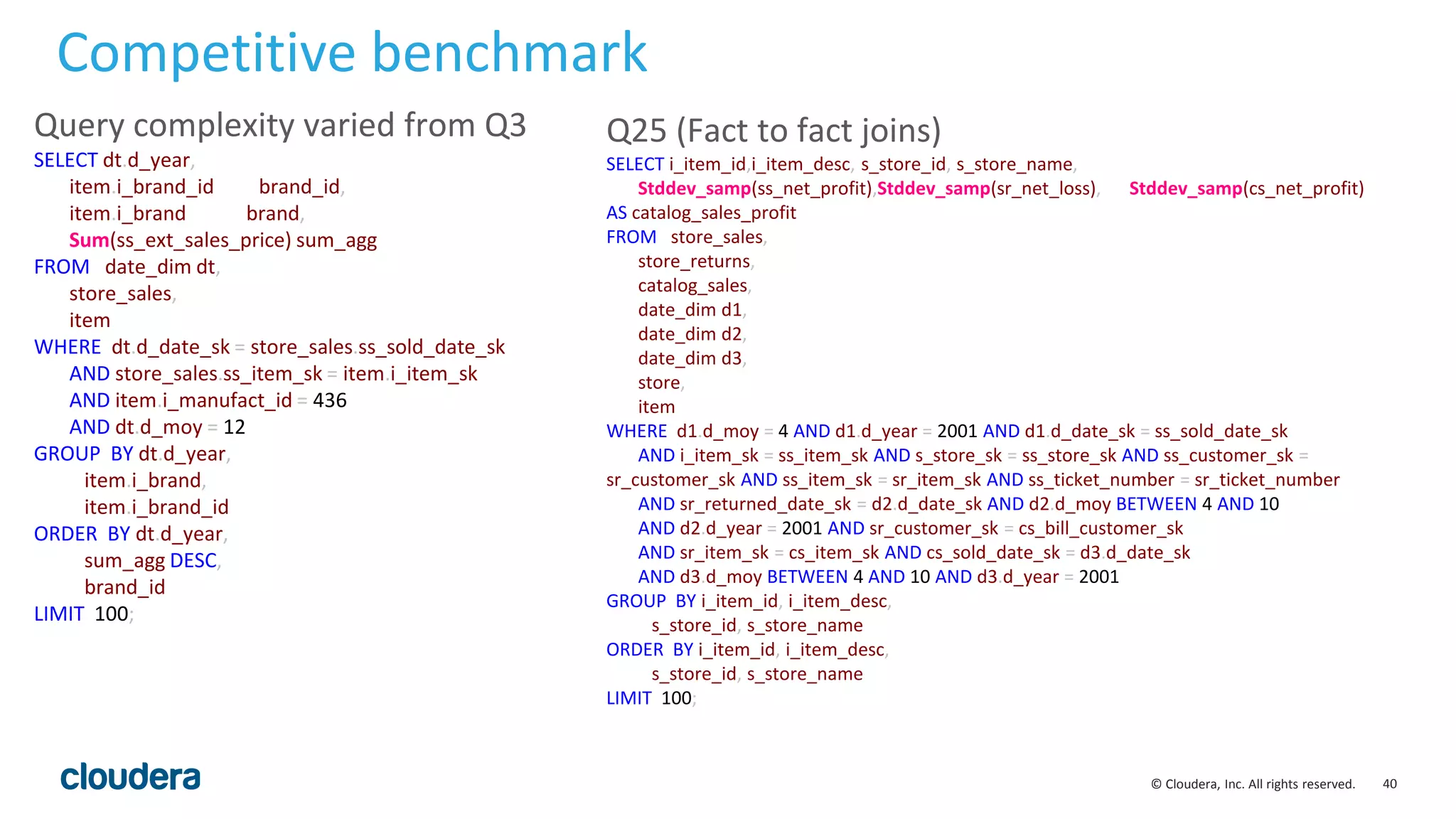
Q25 (Fact to fact joins)
SELECT i_item_id,i_item_desc, s_store_id, s_store_name,
Stddev_samp(ss_net_profit),Stddev_samp(sr_net_loss), Stddev_samp(cs_net_profit)
AS catalog_sales_profit
FROM store_sales,
store_returns,
catalog_sales,
date_dim d1,
date_dim d2,
date_dim d3,
store,
item
WHERE d1.d_moy = 4 AND d1.d_year = 2001 AND d1.d_date_sk = ss_sold_date_sk
AND i_item_sk = ss_item_sk AND s_store_sk = ss_store_sk AND ss_customer_sk =
sr_customer_sk AND ss_item_sk = sr_item_sk AND ss_ticket_number = sr_ticket_number
AND sr_returned_date_sk = d2.d_date_sk AND d2.d_moy BETWEEN 4 AND 10
AND d2.d_year = 2001 AND sr_customer_sk = cs_bill_customer_sk
AND sr_item_sk = cs_item_sk AND cs_sold_date_sk = d3.d_date_sk
AND d3.d_moy BETWEEN 4 AND 10 AND d3.d_year = 2001
GROUP BY i_item_id, i_item_desc,
s_store_id, s_store_name
ORDER BY i_item_id, i_item_desc,
s_store_id, s_store_name
LIMIT 100;
Competitive benchmark
Query complexity varied from Q3
SELECT dt.d_year,
item.i_brand_id brand_id,
item.i_brand brand,
Sum(ss_ext_sales_price) sum_agg
FROM date_dim dt,
store_sales,
item
WHERE dt.d_date_sk = store_sales.ss_sold_date_sk
AND store_sales.ss_item_sk = item.i_item_sk
AND item.i_manufact_id = 436
AND dt.d_moy = 12
GROUP BY dt.d_year,
item.i_brand,
item.i_brand_id
ORDER BY dt.d_year,
sum_agg DESC,
brand_id
LIMIT 100;
41© Cloudera, Inc. All rights reserved.
Competitive benchmark
42© Cloudera, Inc. All rights reserved.
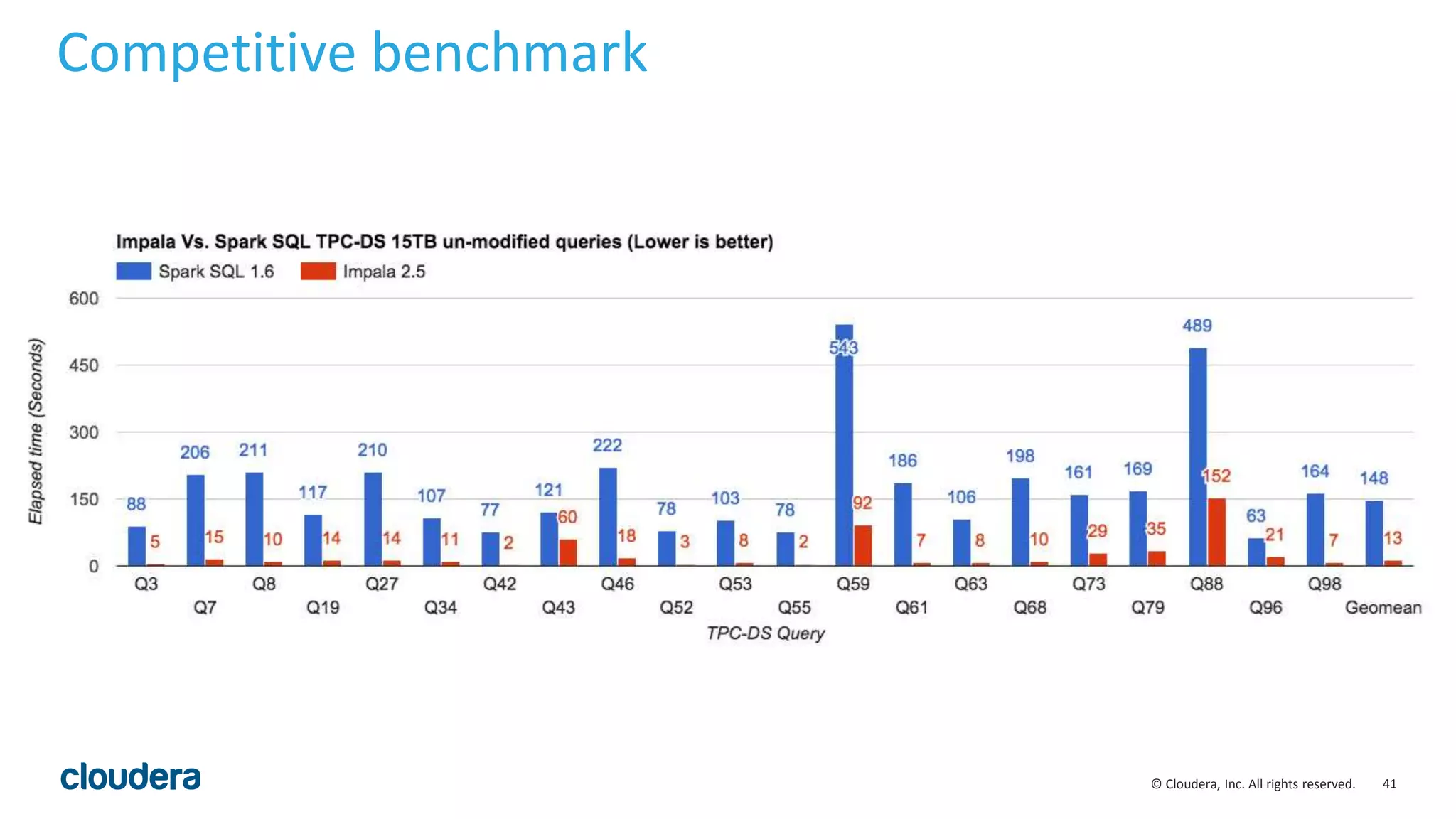
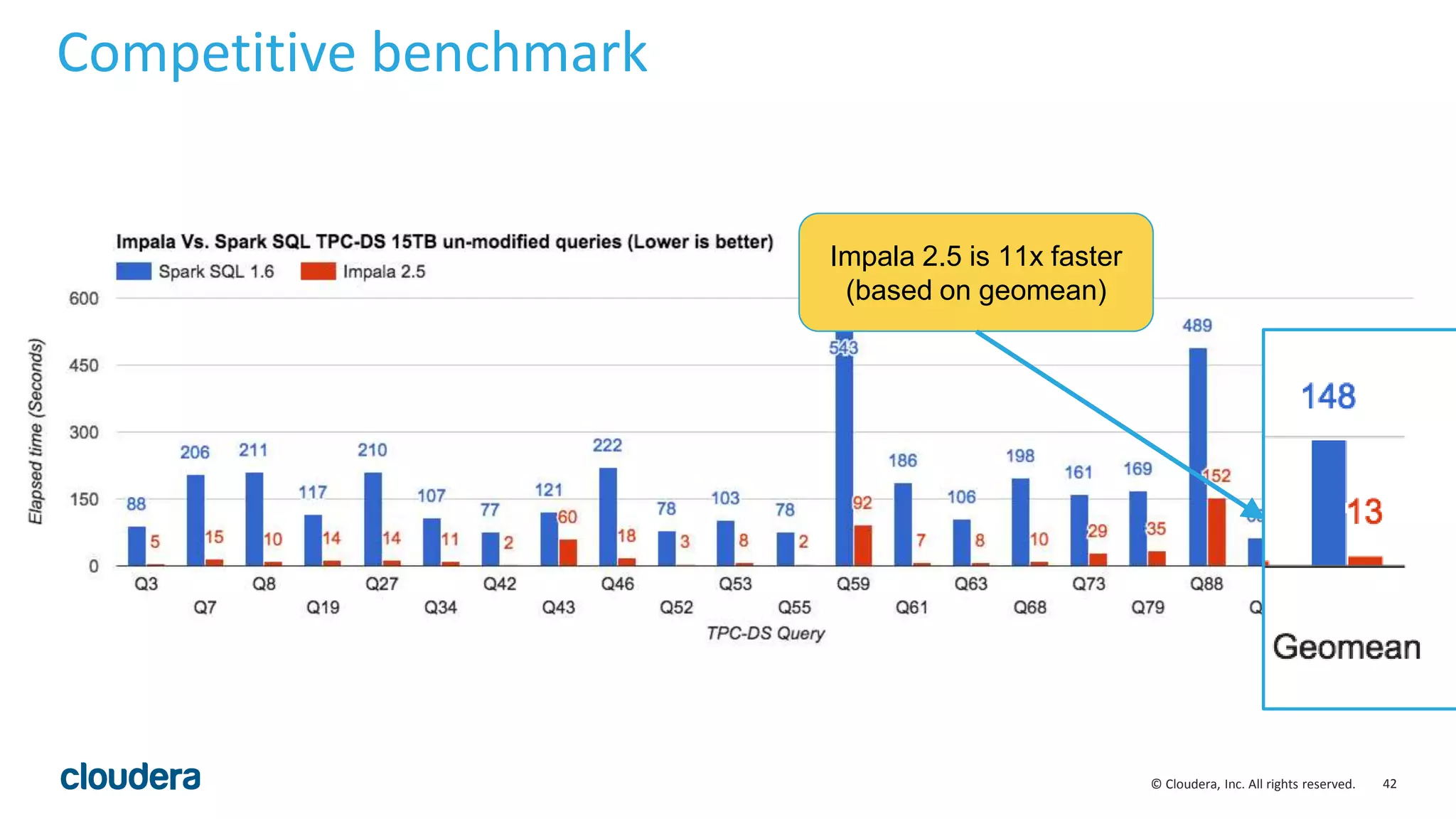
Competitive benchmark
Impala 2.5 is 11x faster
(based on geomean)
43© Cloudera, Inc. All rights reserved.
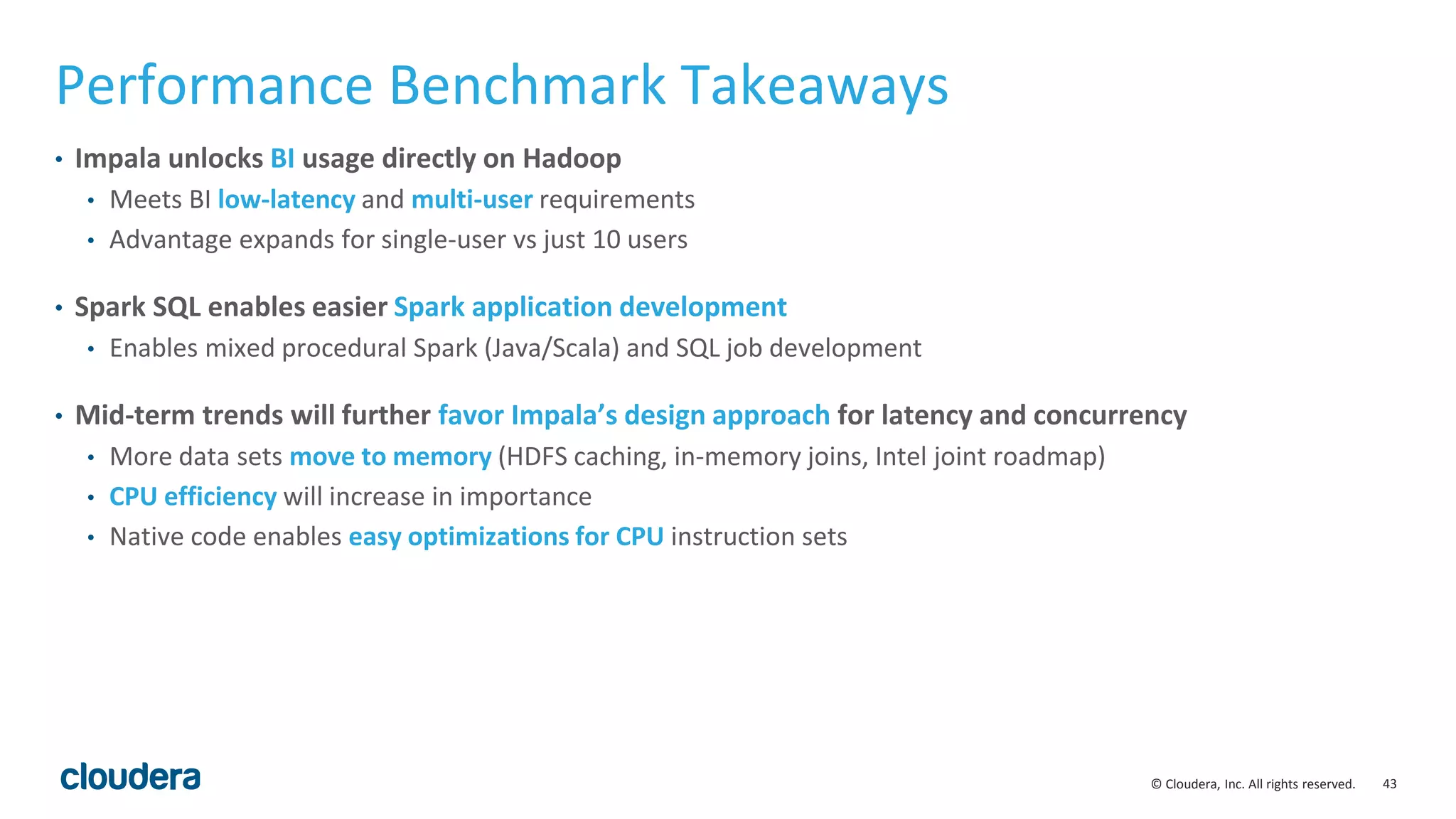
Performance Benchmark Takeaways
• Impala unlocks BI usage directly on Hadoop
• Meets BI low-latency and multi-user requirements
• Advantage expands for single-user vs just 10 users
• Spark SQL enables easier Spark application development
• Enables mixed procedural Spark (Java/Scala) and SQL job development
• Mid-term trends will further favor Impala’s design approach for latency and concurrency
• More data sets move to memory (HDFS caching, in-memory joins, Intel joint roadmap)
• CPU efficiency will increase in importance
• Native code enables easy optimizations for CPU instruction sets
44© Cloudera, Inc. All rights reserved.
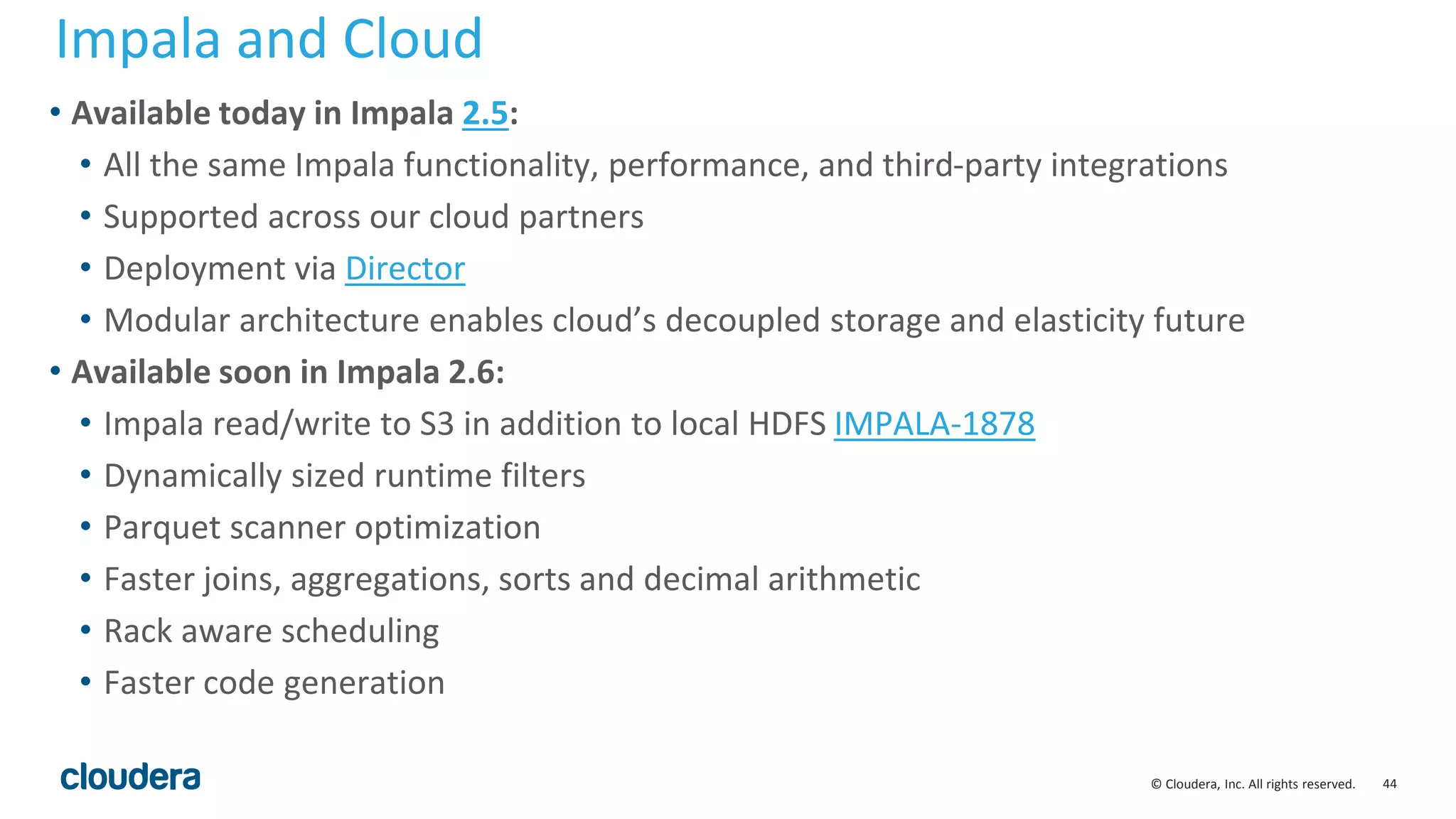
• Available today in Impala 2.5:
• All the same Impala functionality, performance, and third-party integrations
• Supported across our cloud partners
• Deployment via Director
• Modular architecture enables cloud’s decoupled storage and elasticity future
• Available soon in Impala 2.6:
• Impala read/write to S3 in addition to local HDFS IMPALA-1878
• Dynamically sized runtime filters
• Parquet scanner optimization
• Faster joins, aggregations, sorts and decimal arithmetic
• Rack aware scheduling
• Faster code generation
Impala and Cloud
45© Cloudera, Inc. All rights reserved.
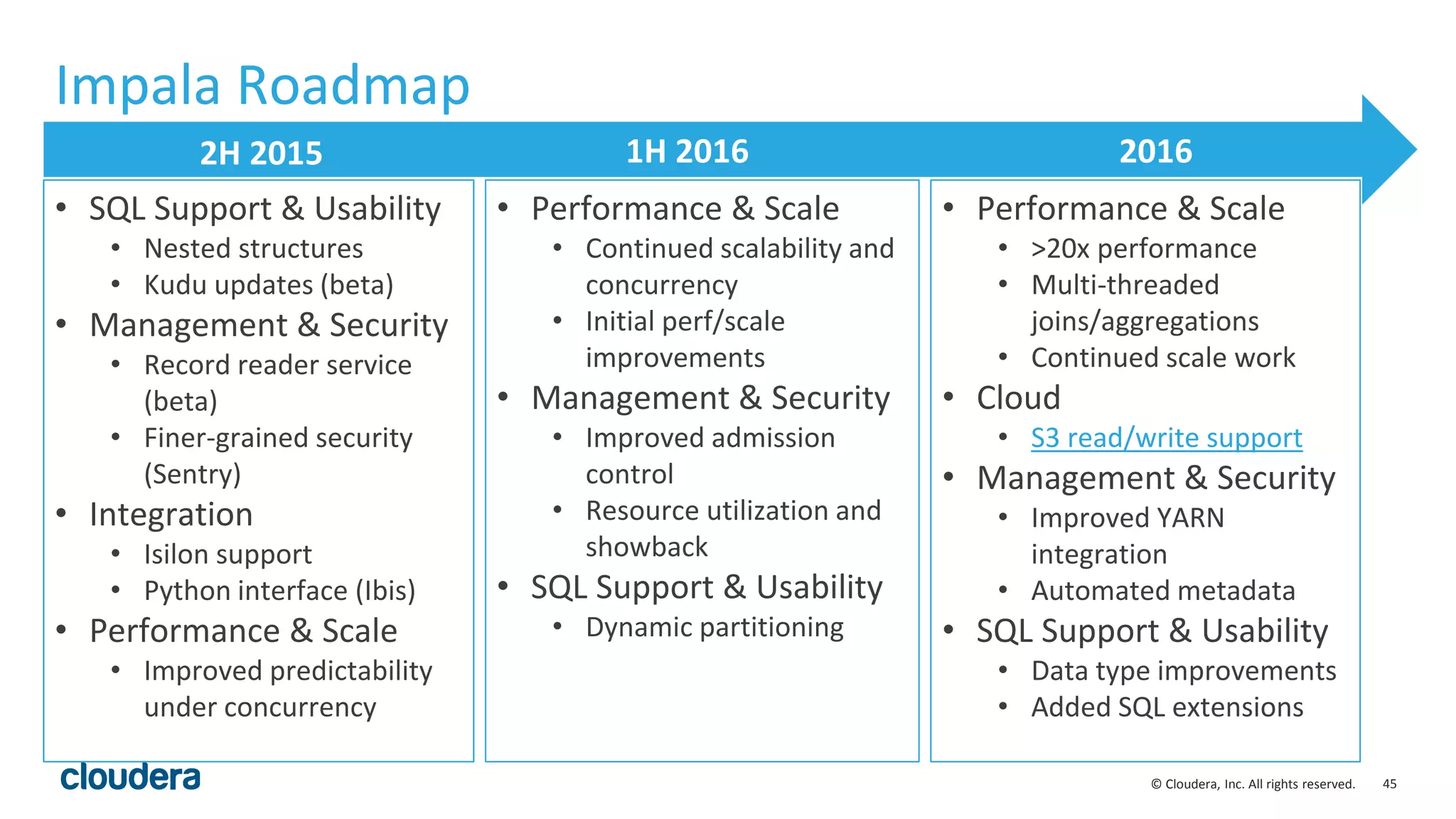
Impala Roadmap
2H 2015 1H 2016 2016
• SQL Support & Usability
• Nested structures
• Kudu updates (beta)
• Management & Security
• Record reader service
(beta)
• Finer-grained security
(Sentry)
• Integration
• Isilon support
• Python interface (Ibis)
• Performance & Scale
• Improved predictability
under concurrency
• Performance & Scale
• Continued scalability and
concurrency
• Initial perf/scale
improvements
• Management & Security
• Improved admission
control
• Resource utilization and
showback
• SQL Support & Usability
• Dynamic partitioning
• Performance & Scale
• >20x performance
• Multi-threaded
joins/aggregations
• Continued scale work
• Cloud
• S3 read/write support
• Management & Security
• Improved YARN
integration
• Automated metadata
• SQL Support & Usability
• Data type improvements
• Added SQL extensions
46© Cloudera, Inc. All rights reserved.
Appendix.
47© Cloudera, Inc. All rights reserved.
48© Cloudera, Inc. All rights reserved.
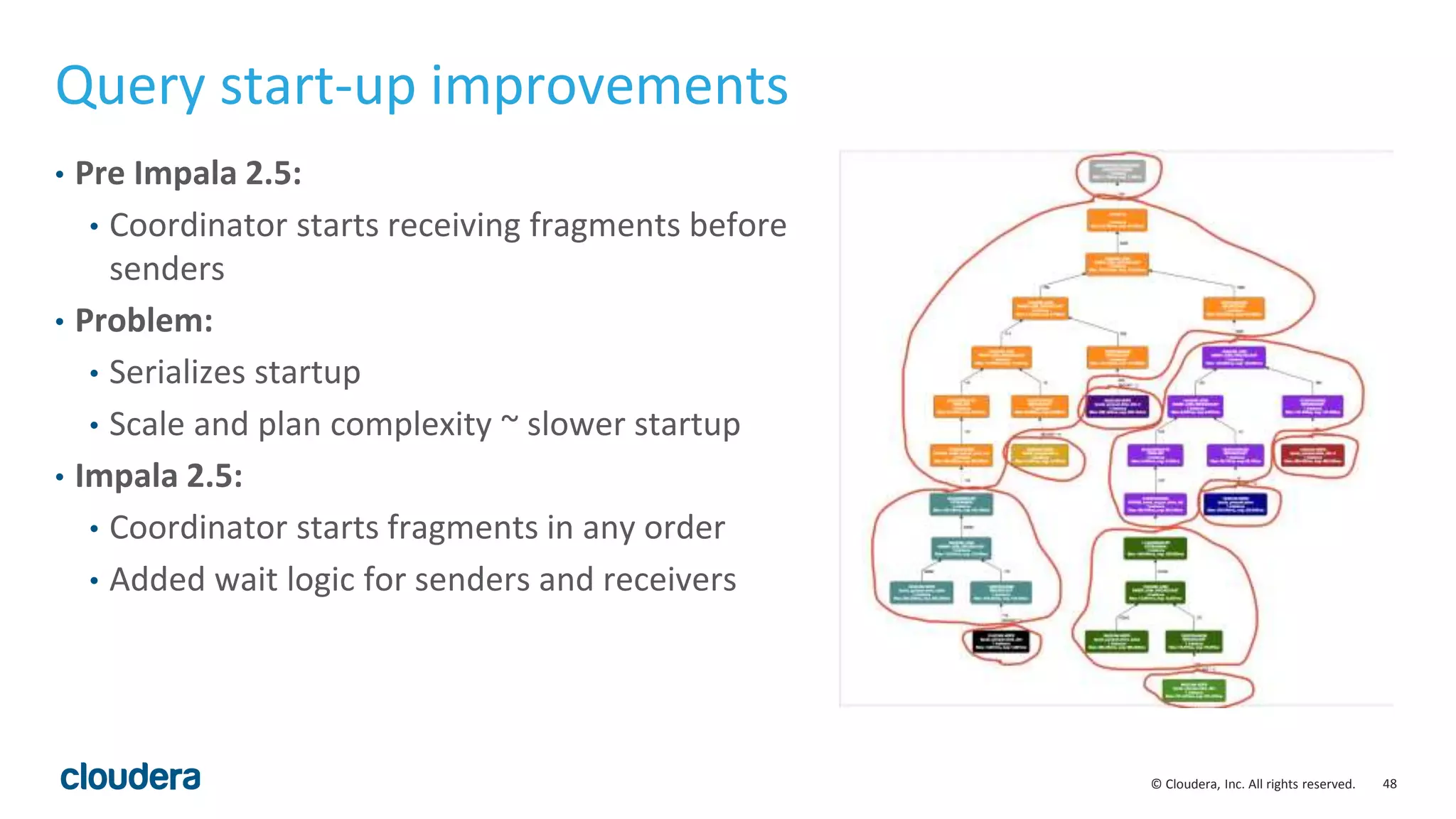
• Pre Impala 2.5:
• Coordinator starts receiving fragments before
senders
• Problem:
• Serializes startup
• Scale and plan complexity ~ slower startup
• Impala 2.5:
• Coordinator starts fragments in any order
• Added wait logic for senders and receivers
Query start-up improvements
49© Cloudera, Inc. All rights reserved.
Scheduling Small Queries
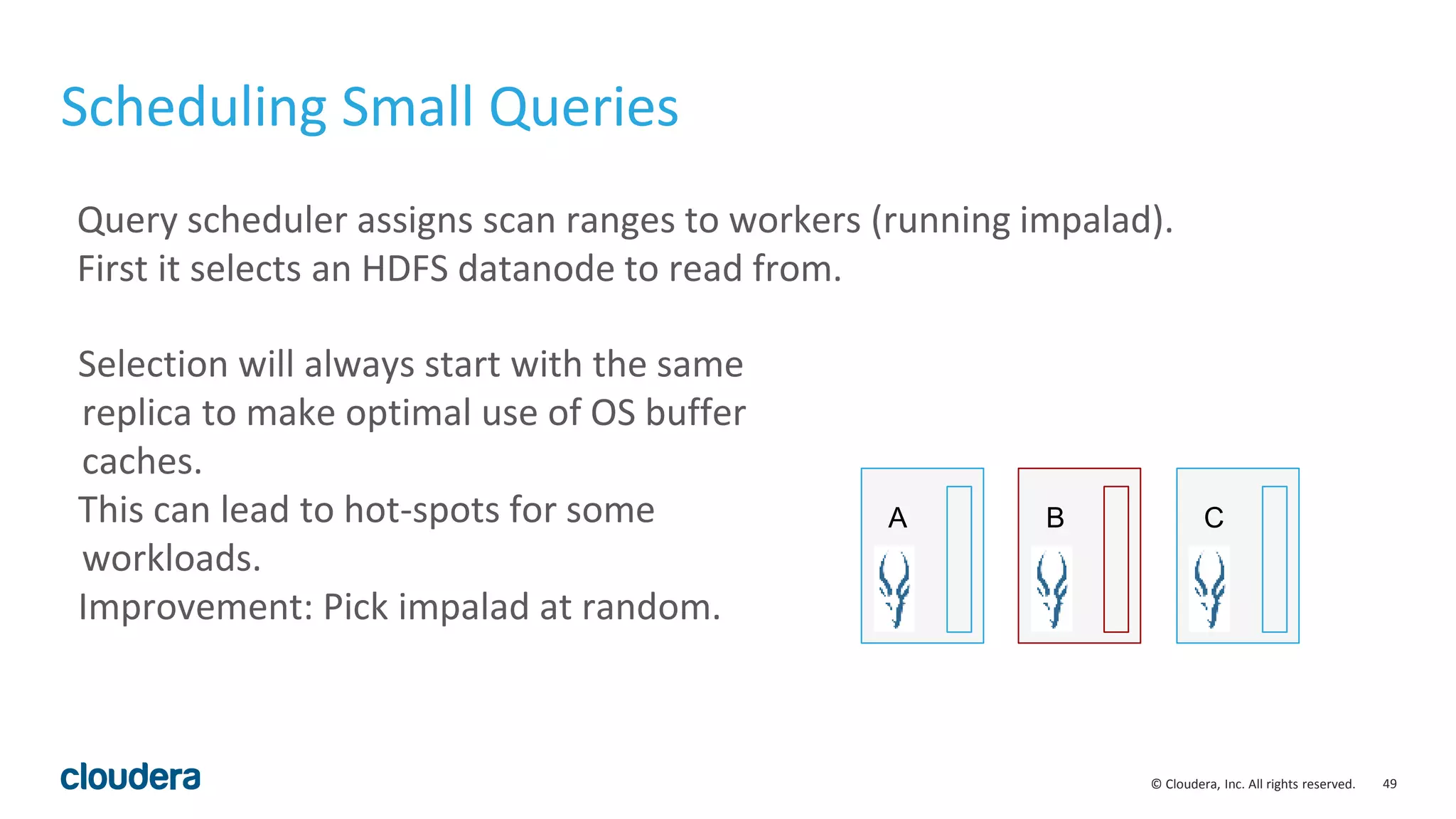
Query scheduler assigns scan ranges to workers (running impalad).
First it selects an HDFS datanode to read from.
A B C
Selection will always start with the same
replica to make optimal use of OS buffer
caches.
This can lead to hot-spots for some
workloads.
Improvement: Pick impalad at random.
50© Cloudera, Inc. All rights reserved.
New Query Option: random_replica
Disabled by default.
set random_replica = 1;
Also has a corresponding query hint:
SELECT AVG(c1) FROM t /* +SCHEDULE_RANDOM_REPLICA */;
51© Cloudera, Inc. All rights reserved.
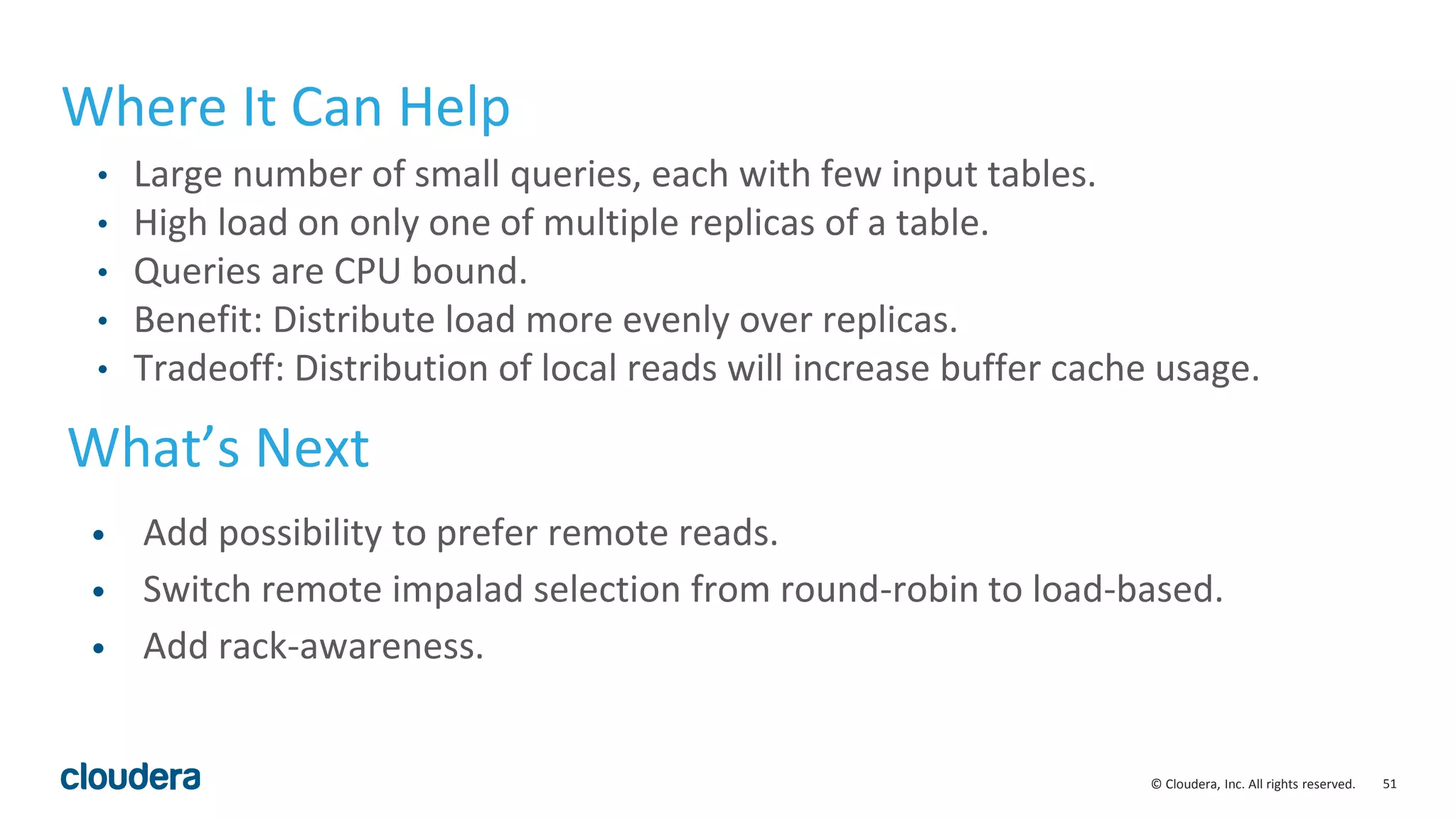
Where It Can Help
• Large number of small queries, each with few input tables.
• High load on only one of multiple replicas of a table.
• Queries are CPU bound.
• Benefit: Distribute load more evenly over replicas.
• Tradeoff: Distribution of local reads will increase buffer cache usage.
What’s Next
• Add possibility to prefer remote reads.
• Switch remote impalad selection from round-robin to load-based.
• Add rack-awareness.
52© Cloudera, Inc. All rights reserved.
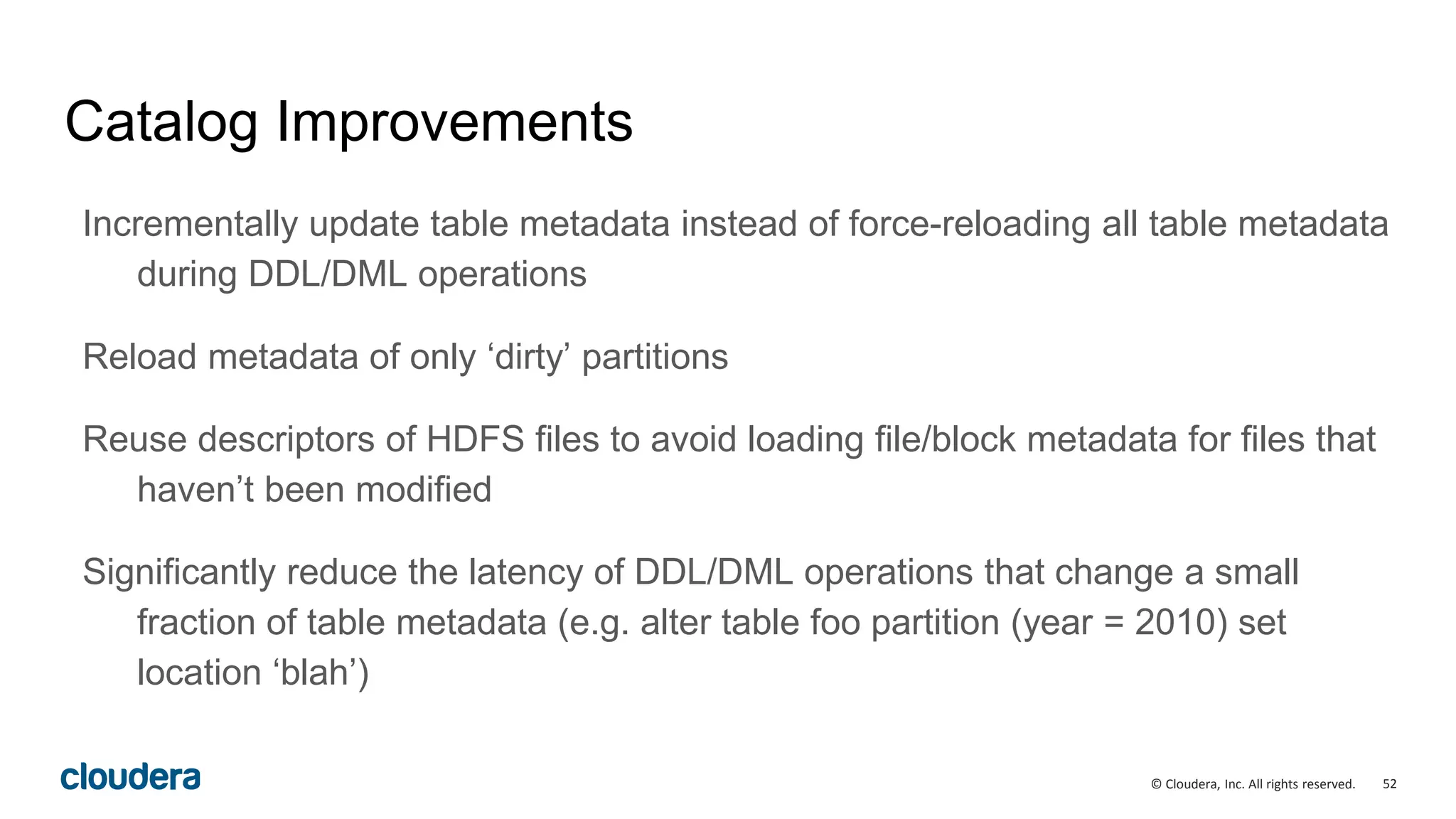
Catalog Improvements
Incrementally update table metadata instead of force-reloading all table metadata
during DDL/DML operations
Reload metadata of only ‘dirty’ partitions
Reuse descriptors of HDFS files to avoid loading file/block metadata for files that
haven’t been modified
Significantly reduce the latency of DDL/DML operations that change a small
fraction of table metadata (e.g. alter table foo partition (year = 2010) set
location ‘blah’)
53© Cloudera, Inc. All rights reserved.
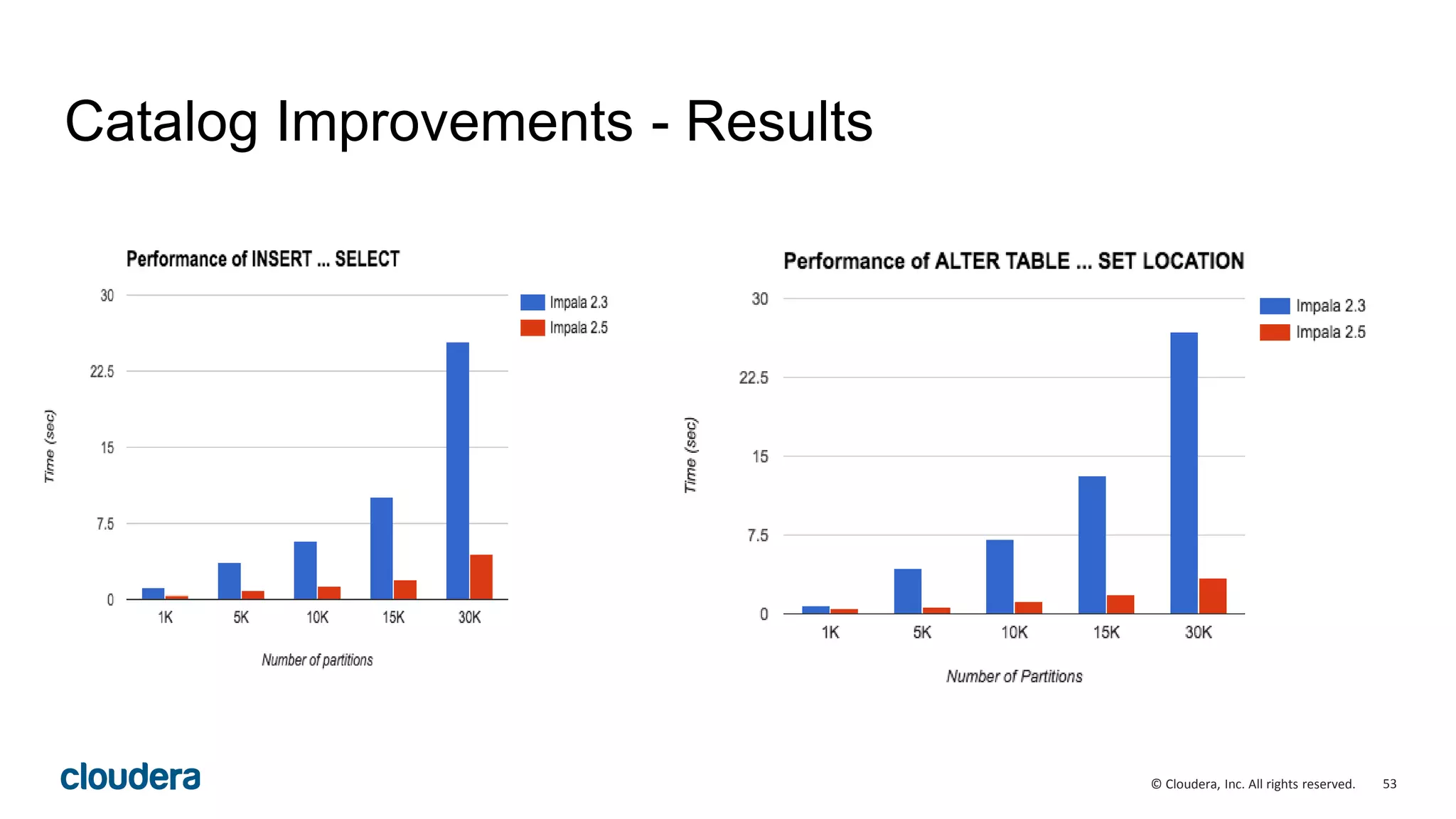
Catalog Improvements - Results

Apache Impala (incubating) 2.5 Performance Update

  • 1.
    1© Cloudera, Inc.All rights reserved. Apache Impala 2.5 (Incubating) Performance improvements overview
  • 2.
    2© Cloudera, Inc.All rights reserved. Agenda • What is Impala? • Impala at Apache • What is new in Impala 2.5 (CDH 5.7) • Impala performance update • Roadmap • Q&A
  • 3.
    3© Cloudera, Inc.All rights reserved. SQL-on-Hadoop engines SQL Impala SQL-on-Apache Hadoop – Choosing the right tool for the right job
  • 4.
    4© Cloudera, Inc.All rights reserved. • General-purpose SQL engine • Real-time queries in Apache Hadoop • General availability (v1.0) release out since April 2013 • Analytic SQL functionality (v2.0) since October 2014 • Apache incubator project since December 2015 • Previous release 2.3 (CDH 5.5) released November 2015 • Current release 2.5 (CDH 5.7) April 2016 What is Impala? Today’s topic
  • 5.
    5© Cloudera, Inc.All rights reserved. • Query speed over Hadoop that meets or exceeds that of a proprietary analytic DBMS • General-purpose SQL query engine: • Targeted for analytical workloads • Supports queries that take from milliseconds to hours • Runs directly within Hadoop: • reads widely used Hadoop file formats • talks to widely used Hadoop storage managers • runs on same nodes that run Hadoop processes • Highly available • High performance: • C++ instead of Java • Run time code generation Impala overview
  • 6.
    6© Cloudera, Inc.All rights reserved. Impala Use Cases •Interactive BI/analytics on more data •Asking new questions – exploration, ML (Ibis) •Data processing with tight SLAs •Query-able archive w/full fidelity
  • 7.
    7© Cloudera, Inc.All rights reserved. • Incubator project since December 2015 • Development process slowly moving to ASF infrastructure (see IMPALA-3221) • Help wanted! Where to find the Impala community: dev@impala.incubator.apache.org user@impala.incubator.apache.org http://impala.io @apacheimpala Impala at Apache
  • 8.
    8© Cloudera, Inc.All rights reserved. New in Impala 2.5 Usability Enhancements • Admission Control Improvements • Null-safe join/equals Performance and Scalability • Runtime filters • Improved Cardinality Estimation and Join Ordering • Query start-up improvements • Additional codegen and code optimizations • Decimal arithmetic improvements • Fast min/max values on partition columns(with query option) Integrations •Support for EMC DSSD
  • 9.
    9© Cloudera, Inc.All rights reserved. New in Impala 2.5 Performance and Scalability • Runtime filters • Improved Cardinality Estimation and Join Ordering • Query start-up improvements • Additional codegen and code optimizations • Decimal arithmetic improvements • Incremental metadata updates (DDL) • Fast min/max values on partition columns(with query option) Covered today
  • 10.
    10© Cloudera, Inc.All rights reserved. Impala 2.5 (CDH 5.7) improvements vs Impala 2.3 (CDH 5.5) • 2.2x speedup for TPC-H • 1.7x speedup for TPC-H (Nested) • 4.3X speedup for TPC-DS
  • 11.
    11© Cloudera, Inc.All rights reserved. Runtime filtering • General idea: some predicates can only be computed at runtime • Example: SELECT count(*) FROM date_dim dt ,store_sales WHERE dt.d_date_sk = store_sales.ss_sold_date_sk AND dt.d_moy = 12; • How does Impala execute this query?
  • 12.
    12© Cloudera, Inc.All rights reserved. SELECT dt.d_year ,item.i_brand brand ,sum(ss_ext_sales_price) sum_agg FROM date_dim dt ,store_sales ,item WHERE dt.d_date_sk = store_sales.ss_sold_date_sk AND store_sales.ss_item_sk = item.i_item_sk AND i_category = "Books" AND i_class = "fiction" AND dt.d_moy = 12 GROUP BY dt.d_year ,item.i_brand ORDER BY dt.d_year ,sum_agg DESC ,i_brand limit 100 Runtime filters store_sales 43 billion rows item 198 rows Broadcast Join #1 290 million rows date_dim 6,200 rows Broadcast Join #2 Aggregate 47 million rows
  • 13.
    13© Cloudera, Inc.All rights reserved. SELECT dt.d_year ,item.i_brand brand ,sum(ss_ext_sales_price) sum_agg FROM date_dim dt ,store_sales ,item WHERE dt.d_date_sk = store_sales.ss_sold_date_sk AND store_sales.ss_item_sk = item.i_item_sk AND i_category = "Books" AND i_class = "fiction" AND dt.d_moy = 12 GROUP BY dt.d_year ,item.i_brand ORDER BY dt.d_year ,sum_agg DESC ,i_brand limit 100 Runtime filters store_sales 43 billion rows item 198 rows Broadcast Join #1 290 million rows date_dim 6,200 rows Broadcast Join #2 Aggregate 47 million rows Runtime filters: the opportunity ● The planner doesn’t know what the set of ss_sold_date_sk and ss_item_sk contains - even with statistics. ● opportunity to save some work - why bother sending 43 billion of those rows to the joins? ● Runtime filters computes this predicate at runtime.
  • 14.
    14© Cloudera, Inc.All rights reserved. SELECT dt.d_year ,item.i_brand brand ,sum(ss_ext_sales_price) sum_agg FROM date_dim dt ,store_sales ,item WHERE dt.d_date_sk = store_sales.ss_sold_date_sk AND store_sales.ss_item_sk = item.i_item_sk AND i_category = "Books" AND i_class = "fiction" AND dt.d_moy = 12 GROUP BY dt.d_year ,item.i_brand ORDER BY dt.d_year ,sum_agg DESC ,i_brand limit 100 Runtime filters store_sales 43 billion rows item 198 rows Broadcast Join #1 290 million rows date_dim 6,200 rows Broadcast Join #2 Aggregate 47 million rows Step 1: planner tells Join #1 to produce bloom filter qualifying i_item_sk & Join #2 to produce bloom filter for qualifying d_date_sk
  • 15.
    15© Cloudera, Inc.All rights reserved. SELECT dt.d_year ,item.i_brand brand ,sum(ss_ext_sales_price) sum_agg FROM date_dim dt ,store_sales ,item WHERE dt.d_date_sk = store_sales.ss_sold_date_sk AND store_sales.ss_item_sk = item.i_item_sk AND i_category = "Books" AND i_class = "fiction" AND dt.d_moy = 12 GROUP BY dt.d_year ,item.i_brand ORDER BY dt.d_year ,sum_agg DESC ,i_brand limit 100 Runtime filters store_sales 43 billion rows item 198 rows Broadcast Join #1 290 million rows date_dim 6,200 rows Broadcast Join #2 Aggregate 47 million rows Step 2: Join reads all rows from build side (right input), and computes filter containing all distinct values of i_item_sk and d_date_sk
  • 16.
    16© Cloudera, Inc.All rights reserved. SELECT dt.d_year ,item.i_brand brand ,sum(ss_ext_sales_price) sum_agg FROM date_dim dt ,store_sales ,item WHERE dt.d_date_sk = store_sales.ss_sold_date_sk AND store_sales.ss_item_sk = item.i_item_sk AND i_category = "Books" AND i_class = "fiction" AND dt.d_moy = 12 GROUP BY dt.d_year ,item.i_brand ORDER BY dt.d_year ,sum_agg DESC ,i_brand limit 100 Runtime filters store_sales 43 billion rows item 198 rows Broadcast Join #1 290 million rows date_dim 6,200 rows Broadcast Join #2 Aggregate 47 million rows Step 3: Join #1 & #2 sends filter to store_sales scan. Scan eliminates rows that don’t have a match in the bloom filters.
  • 17.
    17© Cloudera, Inc.All rights reserved. SELECT dt.d_year ,item.i_brand brand ,sum(ss_ext_sales_price) sum_agg FROM date_dim dt ,store_sales ,item WHERE dt.d_date_sk = store_sales.ss_sold_date_sk AND store_sales.ss_item_sk = item.i_item_sk AND i_category = "Books" AND i_class = "fiction" AND dt.d_moy = 12 GROUP BY dt.d_year ,item.i_brand ORDER BY dt.d_year ,sum_agg DESC ,i_brand limit 100 Runtime filters store_sales 47 million rows item 198 rows Broadcast Join #1 47 million rows date_dim 6,200 rows Broadcast Join #2 Aggregate 47 million rows store_sales scan uses bloom filter from Join #2 to filter out partitions (ss_sold_date_sk)and bloom filter from Join #1 to filter out rows that don’t qualify (ss_item_sk)
  • 18.
    18© Cloudera, Inc.All rights reserved. SELECT dt.d_year ,item.i_brand brand ,sum(ss_ext_sales_price) sum_agg FROM date_dim dt ,store_sales ,item WHERE dt.d_date_sk = store_sales.ss_sold_date_sk AND store_sales.ss_item_sk = item.i_item_sk AND i_category = "Books" AND i_class = "fiction" AND dt.d_moy = 12 GROUP BY dt.d_year ,item.i_brand ORDER BY dt.d_year ,sum_agg DESC ,i_brand limit 100 Runtime filters store_sales 47 million rows item 198 rows Broadcast Join #1 47 million rows date_dim 6,200 rows Broadcast Join #2 Aggregate 47 million rows 914x reduction in number of rows coming out of scan 43 billion -> 47 million 6x reduction in number of rows coming out of join 290 million -> 47 million
  • 19.
    19© Cloudera, Inc.All rights reserved. SELECT c_email_address ,sum(ss_ext_sales_price) sum_agg FROM store_sales ,customer ,customer_demographics WHERE ss_customer_sk = c_customer_sk AND cd_demo_sk = c_current_cdemo_sk AND cd_gender = ‘M’ AND cd_purchase_estimate = 10000 AND cd_credit_reting = ‘Low Risk’ GROUP BY c_email_address ORDER BY sum_agg DESC Runtime filters variation : Global filters Shuffle Join #1 43 billion rows customer_demo 2,400 rows Broadcast Join #2 Aggregate 49 million rows store_sales 43 billion rows customer 3.8 million Shuffle Shuffle
  • 20.
    20© Cloudera, Inc.All rights reserved. SELECT c_email_address ,sum(ss_ext_sales_price) sum_agg FROM store_sales ,customer ,customer_demographics WHERE ss_customer_sk = c_customer_sk AND cd_demo_sk = c_current_cdemo_sk AND cd_gender = ‘M’ AND cd_purchase_estimate = 10000 AND cd_credit_reting = ‘Low Risk’ GROUP BY c_email_address ORDER BY sum_agg DESC Runtime filters variation : Global filters Shuffle Join #1 43 billion rows customer_demo 2,400 rows Broadcast Join #2 Aggregate 49 million rows Join #1 & #2 are expensive joins since left side of the joins have 43 billion rows store_sales 43 billion rows customer 3.8 million Shuffle Shuffle
  • 21.
    21© Cloudera, Inc.All rights reserved. SELECT c_email_address ,sum(ss_ext_sales_price) sum_agg FROM store_sales ,customer ,customer_demographics WHERE ss_customer_sk = c_customer_sk AND cd_demo_sk = c_current_cdemo_sk AND cd_gender = ‘M’ AND cd_purchase_estimate = 10000 AND cd_credit_reting = ‘Low Risk’ GROUP BY c_email_address ORDER BY sum_agg DESC Runtime filters variation : Global filters Shuffle Join #1 43 billion rows customer_demo 2,400 rows Broadcast Join #2 Aggregate 49 million rows Create bloom filter from Join #2 on cd_demo_sk and push down to customer table scan store_sales 43 billion rows customer 3.8 million Shuffle Shuffle
  • 22.
    22© Cloudera, Inc.All rights reserved. SELECT c_email_address ,sum(ss_ext_sales_price) sum_agg FROM store_sales ,customer ,customer_demographics WHERE ss_customer_sk = c_customer_sk AND cd_demo_sk = c_current_cdemo_sk AND cd_gender = ‘M’ AND cd_purchase_estimate = 10000 AND cd_credit_reting = ‘Low Risk’ GROUP BY c_email_address ORDER BY sum_agg DESC Runtime filters variation : Global filters Shuffle Join #1 43 billion rows customer_demo 2,400 rows Broadcast Join #2 Aggregate 49 million rows Reduced customer rows by 826X 3.8 million to 4,600 rows store_sales 43 billion rows customer 4,600 rows Shuffle Shuffle
  • 23.
    23© Cloudera, Inc.All rights reserved. SELECT c_email_address ,sum(ss_ext_sales_price) sum_agg FROM store_sales ,customer ,customer_demographics WHERE ss_customer_sk = c_customer_sk AND cd_demo_sk = c_current_cdemo_sk AND cd_gender = ‘M’ AND cd_purchase_estimate = 10000 AND cd_credit_reting = ‘Low Risk’ GROUP BY c_email_address ORDER BY sum_agg DESC Runtime filters variation : Global filters Shuffle Join #1 43 billion rows customer_demo 2,400 rows Broadcast Join #2 Aggregate 49 million rows store_sales 43 billion rows customer 4,600 rows Shuffle Shuffle Create bloom filter from Join #1 on c_customer_sk and push down to store_sales table scan
  • 24.
    24© Cloudera, Inc.All rights reserved. SELECT c_email_address ,sum(ss_ext_sales_price) sum_agg FROM store_sales ,customer ,customer_demographics WHERE ss_customer_sk = c_customer_sk AND cd_demo_sk = c_current_cdemo_sk AND cd_gender = ‘M’ AND cd_purchase_estimate = 10000 AND cd_credit_reting = ‘Low Risk’ GROUP BY c_email_address ORDER BY sum_agg DESC Runtime filters variation : Global filters Shuffle Join #1 49 million rows customer_demo 2,400 rows Broadcast Join #2 Aggregate 49 million rows store_sales 49 million rows customer 4,600 rows Shuffle Shuffle 877x reduction in rows 43 billion -> 49 million rows set RUNTIME_FILTER_MODE=GLOBAL;
  • 25.
    25© Cloudera, Inc.All rights reserved. Runtime filters: real-world results • Runtime filters can be highly effective. Some benchmark queries are more than 30 times faster in Impala 2.5.0. • As always, depends on your queries, your schemas and your cluster environment. • By default, runtime filters are enabled in limited ‘local’ mode in Impala 2.5.0. They can be enabled fully by setting RUNTIME_FILTER_MODE=GLOBAL. • Other runtime filter parameters include : • RUNTIME_BLOOM_FILTER_SIZE: [1048576] • RUNTIME_FILTER_WAIT_TIME_MS: [0]
  • 26.
    26© Cloudera, Inc.All rights reserved. Improved Cardinality Estimates and Join Order 1. More robust scan cardinality estimation • Mitigate correlated predicates (exponential backoff) 2. Improved join cardinality estimation • Special treatment of common case of PK/FK joins • Detect selective joins by applying the selectivity of build-side predicates to the estimated join cardinality • TPC-H Q8 Impact: >8x speedup (91s in Impala 2.3 -> 11s in Impala 2.5) SELECT * FROM cars WHERE cars.make = 'Toyota' AND cars.model = 'Camry'
  • 27.
    27© Cloudera, Inc.All rights reserved. Query start-up: performance impact
  • 28.
    28© Cloudera, Inc.All rights reserved. LLVM Codegen Support in Impala Operations: • Hash join • Aggregation • Scans: Text, Sequence, Avro • Expressions in all operators • Sort • Top-N Data Types: • TINYINT, SMALLINT, INT, BIGINT • FLOAT, DOUBLE • BOOLEAN • STRING, VARCHAR • DECIMALNew in Impala 2.5 Extended in Impala 2.5
  • 29.
    29© Cloudera, Inc.All rights reserved. Codegen for Order by & Top-N void* ExprContext::GetValue(Expr* e, TupleRow* row) { switch (e->type_.type) { case TYPE_BOOLEAN: { .. .. } case TYPE_TINYINT: { .. .. } case TYPE_INT: { .. . int Compare(TupleRow* lhs, TupleRow* rhs) const { for (int i = 0; i < sort_cols_lhs_.size(); ++i) { void* lhs_value = sort_cols_lhs_[i]->GetValue(lhs); void* rhs_value = sort_cols_rhs_[i]->GetValue(rhs); if (lhs_value == NULL && rhs_value != NULL) return nulls_first_[i]; if (lhs_value != NULL && rhs_value == NULL) return -nulls_first_[i]; int result = RawValue::Compare(lhs_value, rhs_value, sort_cols_lhs_[i]->root()->type()); if (!is_asc_[i]) result = -result; if (result != 0) return result; // Otherwise, try the next Expr } return 0; // fully equivalent key }
  • 30.
    30© Cloudera, Inc.All rights reserved. Codegen for Order by & Top-N int CompareCodgened(TupleRow* lhs, TupleRow* rhs) const { int64_t lhs_value = sort_columns[i]->GetBigIntVal(lhs); // i = 0 int64_t rhs_value = sort_columns[i]->GetBigIntVal(rhs); // i = 1 int result = lhs_value > rhs_value ? 1 : (lhs_value < rhs_value ? -1 : 0); if (result != 0) return result; // Otherwise, try the next Expr return 0; // fully equivalent key } Codegen code • Perfectly unrolls “for each grouping column” loop • No switching on input type(s) • Removes branching on ASCENDING/DESCENDING, NULLS FIRST/LAST Original code int Compare(TupleRow* lhs, TupleRow* rhs) const { for (int i = 0; i < sort_cols_lhs_.size(); ++i) { void* lhs_value = sort_cols_lhs_[i]->GetValue(lhs); void* rhs_value = sort_cols_rhs_[i]->GetValue(rhs); if (lhs_value == NULL && rhs_value != NULL) return nulls_first_[i]; if (lhs_value != NULL && rhs_value == NULL) return -nulls_first_[i]; int result = RawValue::Compare(lhs_value, rhs_value, sort_cols_lhs_[i]->root()->type()); if (!is_asc_[i]) result = -result; if (result != 0) return result; // Otherwise, try the next Expr } return 0; // fully equivalent key }
  • 31.
    31© Cloudera, Inc.All rights reserved. Codegen for Order by & Top-N int CompareCodgened(TupleRow* lhs, TupleRow* rhs) const { int64_t lhs_value = sort_columns[i]->GetBigIntVal(lhs); // i = 0 int64_t rhs_value = sort_columns[i]->GetBigIntVal(rhs); // i = 1 int result = lhs_value > rhs_value ? 1 : (lhs_value < rhs_value ? -1 : 0); if (result != 0) return result; // Otherwise, try the next Expr return 0; // fully equivalent key } Codegen code • Perfectly unrolls “for each grouping column” loop • No switching on input type(s) • Removes branching on ASCENDING/DESCENDING, NULLS FIRST/LAST Original code int Compare(TupleRow* lhs, TupleRow* rhs) const { for (int i = 0; i < sort_cols_lhs_.size(); ++i) { void* lhs_value = sort_cols_lhs_[i]->GetValue(lhs); void* rhs_value = sort_cols_rhs_[i]->GetValue(rhs); if (lhs_value == NULL && rhs_value != NULL) return nulls_first_[i]; if (lhs_value != NULL && rhs_value == NULL) return -nulls_first_[i]; int result = RawValue::Compare(lhs_value, rhs_value, sort_cols_lhs_[i]->root()->type()); if (!is_asc_[i]) result = -result; if (result != 0) return result; // Otherwise, try the next Expr } return 0; // fully equivalent key } 10x more efficient code
  • 32.
    32© Cloudera, Inc.All rights reserved. Float/Double Vs Decimal? Pros for Float/Double • Uses less memory. • Faster because floating point math operations are natively supported by processors. (Note: Decimal uses fixed-point hardware types - int64 and __int128) • Can represent a larger range of numbers. Cons for Float/Double • Precision errors compound during aggregations • Can’t do math with wide number of significant digits (123456789.1 * .0000987654321) Decimal arithmetic and aggregation No go for applications requiring high precision & accuracy What about performance penalty?
  • 33.
    33© Cloudera, Inc.All rights reserved. Decimal arithmetic and aggregation SELECT l_returnflag, l_linestatus, Sum(l_quantity) AS SUM_QTY, Sum(l_extendedprice)AS SUM_BASE_PRICE, Sum(l_extendedprice * ( 1 - l_discount ))AS SUM_DISC_PRICE FROM lineitem GROUP BY l_returnflag, l_linestatus ORDER BY l_returnflag, l_linestatus 3x speedup ● Simplified overflow check for decimal. ● Extended Codegen framework to support aggregations involving decimal. ● Bridged the performance gap between double and decimal
  • 34.
    34© Cloudera, Inc.All rights reserved. Network Distributed Aggregations in Impala Preagg Preagg Preagg Merge Merge Merge select cust_id, sum(dollars) from sales group by cust_id; Scan ScanScan • Impala aggregations have two phases: • Pre-aggregation phase • Merge phase • The pre-aggregation phase greatly reduces network traffic if there are many input rows per grouping value. • E.g. many sales per customer.
  • 35.
    35© Cloudera, Inc.All rights reserved. Network Downsides of Pre-aggregations Preagg Preagg Preagg Merge Merge Merge select distinct * from sales; Scan ScanScan • Pre-aggregations consume: • Memory • CPU cycles • Pre-aggregations are not always effective at reducing network traffic • E.g. select distinct for nearly-distinct rows • Pre-aggregations can spill to disk under memory pressure • Disk I/O is bad - better to send to merge agg rather than disk
  • 36.
    36© Cloudera, Inc.All rights reserved. Network Streaming Pre-aggregations in Impala 2.5 Merge Merge Merge select distinct * from sales; Scan ScanScan • Reduction factor is dynamically estimated based on the actual data processed • Pre-aggregation expands memory usage only if reduction factor is good • Benefits: • Certain aggregations with low reduction factor see speedups of up to 40% • Memory consumption can be reduced by 50% or more • Streaming pre-aggregations don’t spill to disk
  • 37.
    37© Cloudera, Inc.All rights reserved. Streaming Pre-aggregations in Impala 2.5 Operator #Hosts Avg Time Max Time #Rows Est. #Rows Peak Mem Est. Peak Mem Detail 06:AGGREGATE 1 366.581ms 366.581ms 1 1 72.00 KB -1.00 B FINALIZE 05:EXCHANGE 1 149.923us 149.923us 15 1 0 -1.00 B UNPARTITIONED 02:AGGREGATE 15 243.604ms 248.701ms 15 1 12.00 KB 10.00 MB 04:AGGREGATE 15 8s887ms 9s585ms 450.00M 437.91M 1.53 GB 245.01 MB FINALIZE 03:EXCHANGE 15 827.770ms 932.785ms 450.00M 437.91M 0 0 HASH(o_orderkey) 01:AGGREGATE 15 9s995ms 11s484ms 450.00M 437.91M 1.64 GB 3.59 GB 00:SCAN HDFS 15 142.192ms 189.179ms 450.00M 450.00M 150.94 MB 88.00 MB tpch_300_parquet.orders Operator #Hosts Avg Time Max Time #Rows Est. #Rows Peak Mem Est. Peak Mem Detail 06:AGGREGATE 1 356.667ms 356.667ms 1 1 72.00 KB -1.00 B FINALIZE 05:EXCHANGE 1 110.924us 110.924us 15 1 0 -1.00 B UNPARTITIONED 02:AGGREGATE 15 246.188ms 250.408ms 15 1 12.00 KB 10.00 MB 04:AGGREGATE 15 11s174ms 11s753ms 450.00M 437.91M 1.51 GB 245.01 MB FINALIZE 03:EXCHANGE 15 750.620ms 805.099ms 450.00M 437.91M 0 0 HASH(o_orderkey) 01:AGGREGATE 15 5s670ms 6s715ms 450.00M 437.91M 153.40 MB 3.59 GB STREAMING 00:SCAN HDFS 15 151.746ms 201.804ms 450.00M 450.00M 150.95 MB 88.00 MB tpch_300_parquet.orders Baseline finished in 23.13 seconds With stream pre-aggregation enabled finished in 14.9 seconds
  • 38.
    38© Cloudera, Inc.All rights reserved. Optimization for partition keys scan • Use metadata to avoid table accesses for partition key scans: • select min(month), max(year) from functional.alltypes; • month, year are partition keys of the table • Enabled by query option OPTIMIZE_PARTITION_KEY_SCANS • Applicable: • min(), max(), ndv() and aggregate functions with distinct keyword • partition keys only 01:AGGREGATE [FINALIZE] | output: min(month),max(year) | 00:UNION constant-operands=24 03:AGGREGATE [FINALIZE] | output: min:merge(month), max:merge(year) | 02:EXCHANGE [UNPARTITIONED] | 01:AGGREGATE | output: min(month), max(year) | 00:SCAN HDFS [functional.alltypes] partitions=24/24 files=24 size=478.45KB Plan without optimization Plan with optimization
  • 39.
    39© Cloudera, Inc.All rights reserved. 21x node cluster each with Hardware ● 384GB memory, 2s sockets, 12x total cores, Intel Xeon CPU E5-2630L 0 at 2.00GHz ● 12 disk drives at 932GB each (one for the OS, the rest for HDFS) Comparative Set ● Impala 2.5 ○ RUNTIME_FILTER_MODE = 2; ● Spark SQL 1.6 ○ Thrift JDBC server used to avoid startup cost ○ --master yarn --deploy-mode client --driver-memory 24G --driver-cores 8 --executor-memory 24G --num-executors 240 Workload ● TPC-DS 15TB stored in Parquet file format (default of 256MB block size) ● Un-modified TPC-DS queries : 3, 7, 8, 19, 25, 27, 34, 42, 43, 46, 47, 52, 53, 55, 59, 61, 63, 68, 73, 79, 88, 89, 96, 98 ● Caveats: ○ Spark-SQL failed running : ■ Q25 : Bad plan ■ Q47 : StackOverflowError ■ Q89 : StackOverflowError Competitive benchmark : TPC-DS
  • 40.
    40© Cloudera, Inc.All rights reserved. Q25 (Fact to fact joins) SELECT i_item_id,i_item_desc, s_store_id, s_store_name, Stddev_samp(ss_net_profit),Stddev_samp(sr_net_loss), Stddev_samp(cs_net_profit) AS catalog_sales_profit FROM store_sales, store_returns, catalog_sales, date_dim d1, date_dim d2, date_dim d3, store, item WHERE d1.d_moy = 4 AND d1.d_year = 2001 AND d1.d_date_sk = ss_sold_date_sk AND i_item_sk = ss_item_sk AND s_store_sk = ss_store_sk AND ss_customer_sk = sr_customer_sk AND ss_item_sk = sr_item_sk AND ss_ticket_number = sr_ticket_number AND sr_returned_date_sk = d2.d_date_sk AND d2.d_moy BETWEEN 4 AND 10 AND d2.d_year = 2001 AND sr_customer_sk = cs_bill_customer_sk AND sr_item_sk = cs_item_sk AND cs_sold_date_sk = d3.d_date_sk AND d3.d_moy BETWEEN 4 AND 10 AND d3.d_year = 2001 GROUP BY i_item_id, i_item_desc, s_store_id, s_store_name ORDER BY i_item_id, i_item_desc, s_store_id, s_store_name LIMIT 100; Competitive benchmark Query complexity varied from Q3 SELECT dt.d_year, item.i_brand_id brand_id, item.i_brand brand, Sum(ss_ext_sales_price) sum_agg FROM date_dim dt, store_sales, item WHERE dt.d_date_sk = store_sales.ss_sold_date_sk AND store_sales.ss_item_sk = item.i_item_sk AND item.i_manufact_id = 436 AND dt.d_moy = 12 GROUP BY dt.d_year, item.i_brand, item.i_brand_id ORDER BY dt.d_year, sum_agg DESC, brand_id LIMIT 100;
  • 41.
    41© Cloudera, Inc.All rights reserved. Competitive benchmark
  • 42.
    42© Cloudera, Inc.All rights reserved. Competitive benchmark Impala 2.5 is 11x faster (based on geomean)
  • 43.
    43© Cloudera, Inc.All rights reserved. Performance Benchmark Takeaways • Impala unlocks BI usage directly on Hadoop • Meets BI low-latency and multi-user requirements • Advantage expands for single-user vs just 10 users • Spark SQL enables easier Spark application development • Enables mixed procedural Spark (Java/Scala) and SQL job development • Mid-term trends will further favor Impala’s design approach for latency and concurrency • More data sets move to memory (HDFS caching, in-memory joins, Intel joint roadmap) • CPU efficiency will increase in importance • Native code enables easy optimizations for CPU instruction sets
  • 44.
    44© Cloudera, Inc.All rights reserved. • Available today in Impala 2.5: • All the same Impala functionality, performance, and third-party integrations • Supported across our cloud partners • Deployment via Director • Modular architecture enables cloud’s decoupled storage and elasticity future • Available soon in Impala 2.6: • Impala read/write to S3 in addition to local HDFS IMPALA-1878 • Dynamically sized runtime filters • Parquet scanner optimization • Faster joins, aggregations, sorts and decimal arithmetic • Rack aware scheduling • Faster code generation Impala and Cloud
  • 45.
    45© Cloudera, Inc.All rights reserved. Impala Roadmap 2H 2015 1H 2016 2016 • SQL Support & Usability • Nested structures • Kudu updates (beta) • Management & Security • Record reader service (beta) • Finer-grained security (Sentry) • Integration • Isilon support • Python interface (Ibis) • Performance & Scale • Improved predictability under concurrency • Performance & Scale • Continued scalability and concurrency • Initial perf/scale improvements • Management & Security • Improved admission control • Resource utilization and showback • SQL Support & Usability • Dynamic partitioning • Performance & Scale • >20x performance • Multi-threaded joins/aggregations • Continued scale work • Cloud • S3 read/write support • Management & Security • Improved YARN integration • Automated metadata • SQL Support & Usability • Data type improvements • Added SQL extensions
  • 46.
    46© Cloudera, Inc.All rights reserved. Appendix.
  • 47.
    47© Cloudera, Inc.All rights reserved.
  • 48.
    48© Cloudera, Inc.All rights reserved. • Pre Impala 2.5: • Coordinator starts receiving fragments before senders • Problem: • Serializes startup • Scale and plan complexity ~ slower startup • Impala 2.5: • Coordinator starts fragments in any order • Added wait logic for senders and receivers Query start-up improvements
  • 49.
    49© Cloudera, Inc.All rights reserved. Scheduling Small Queries Query scheduler assigns scan ranges to workers (running impalad). First it selects an HDFS datanode to read from. A B C Selection will always start with the same replica to make optimal use of OS buffer caches. This can lead to hot-spots for some workloads. Improvement: Pick impalad at random.
  • 50.
    50© Cloudera, Inc.All rights reserved. New Query Option: random_replica Disabled by default. set random_replica = 1; Also has a corresponding query hint: SELECT AVG(c1) FROM t /* +SCHEDULE_RANDOM_REPLICA */;
  • 51.
    51© Cloudera, Inc.All rights reserved. Where It Can Help • Large number of small queries, each with few input tables. • High load on only one of multiple replicas of a table. • Queries are CPU bound. • Benefit: Distribute load more evenly over replicas. • Tradeoff: Distribution of local reads will increase buffer cache usage. What’s Next • Add possibility to prefer remote reads. • Switch remote impalad selection from round-robin to load-based. • Add rack-awareness.
  • 52.
    52© Cloudera, Inc.All rights reserved. Catalog Improvements Incrementally update table metadata instead of force-reloading all table metadata during DDL/DML operations Reload metadata of only ‘dirty’ partitions Reuse descriptors of HDFS files to avoid loading file/block metadata for files that haven’t been modified Significantly reduce the latency of DDL/DML operations that change a small fraction of table metadata (e.g. alter table foo partition (year = 2010) set location ‘blah’)
  • 53.
    53© Cloudera, Inc.All rights reserved. Catalog Improvements - Results