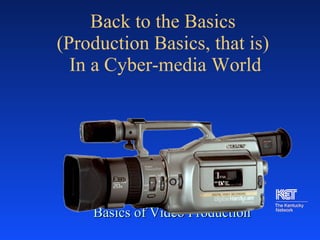
Back to the Basics  (Production Basics, that is)  In a Cyber-media World Basics of Video Production
“ Those who tell stories hold the power in society.  Today television tells  most of the stories to  most of the people,  most of the time.” George Gerbner 1992
Phases of Production Pre-production : Planning, scheduling, and writing,…and  storyboards Production: Shooting, recording,…  Post-production: Editing
What is the objective? Inform Entertain
Who is your audience? Background Age Motivation
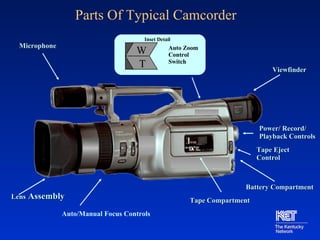
Parts Of Typical Camcorder Microphone Viewfinder Lens  Assembly Tape   Compartment Power /  Record/ Playback Controls Tape Eject Control W Auto Zoom Control Switch W T Inset Detail Auto/Manual Focus Controls Battery Compartment
Production Tools An introduction to types of camera shots and techniques
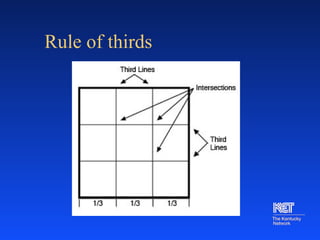
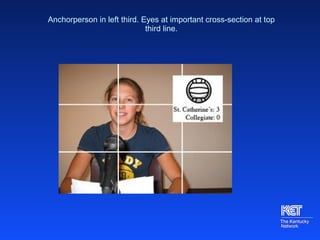
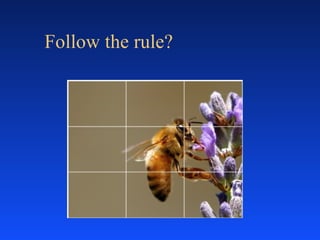
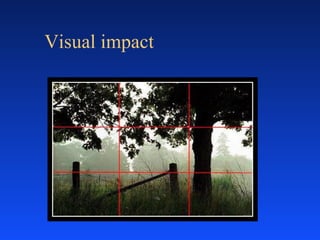
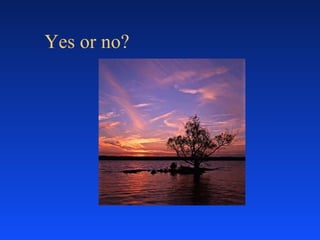
Rule of thirds
Anchorperson in left third. Eyes at important cross-section at top third line.
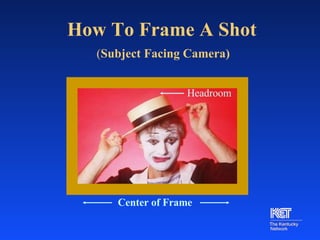
How To Frame A Shot   ( Subject Facing Camera) Center of Frame Headroom
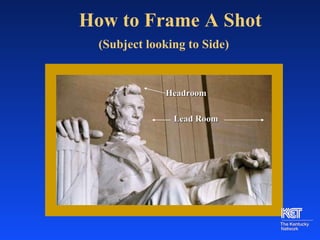
How to Frame A Shot   (Subject looking to Side) Headroom Lead Room
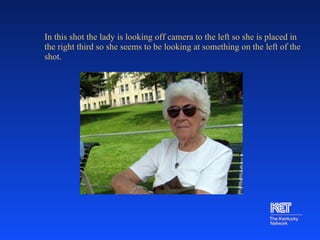
In this shot the lady is looking off camera to the left so she is placed in the right third so she seems to be looking at something on the left of the shot.    
Follow the rule?
Visual impact
Yes or no?
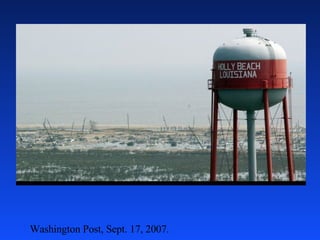
Washington Post, Sept. 17, 2007.
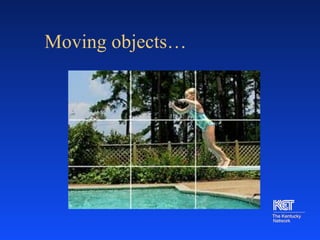
Moving objects…
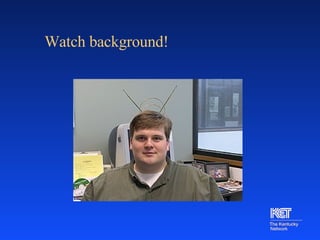
Watch background!
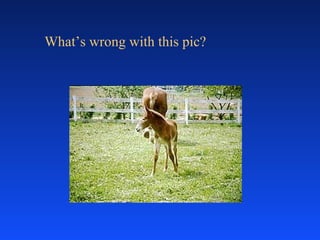
What’s wrong with this pic?
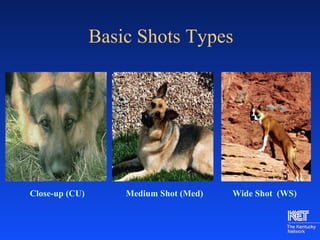
Shot Glossary (ECU) Extreme Close-up Shot (CU)  Close-up Shot (Med) Medium Shot (WS)  Wide Shot (POV) Point of View Shot (OSS) Over the Shoulder Shot (Noddy) Interview nods attentively
Basic Shots Types Close-up (CU) Wide Shot  (WS) Medium Shot (Med)
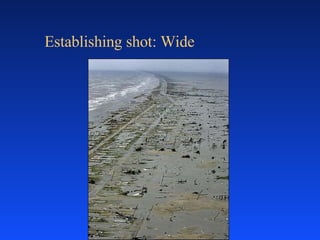
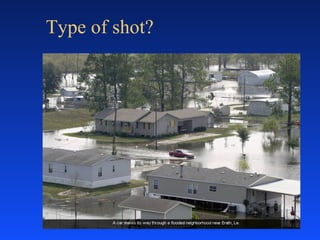
Establishing shot: Wide
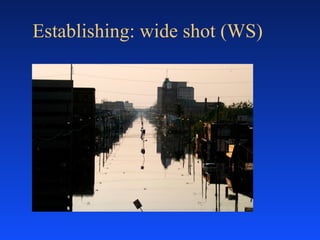
Establishing: wide shot (WS)
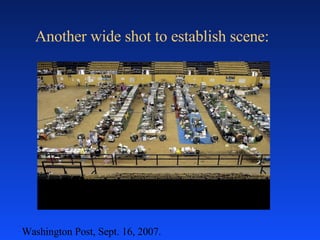
Another wide shot to establish scene: Washington Post, Sept. 16, 2007.
Type of shot?
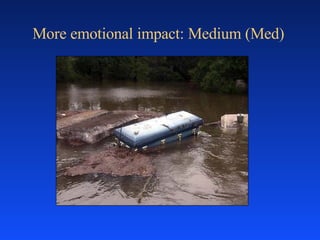
More emotional impact: Medium (Med)
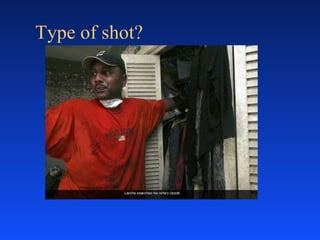
Type of shot?
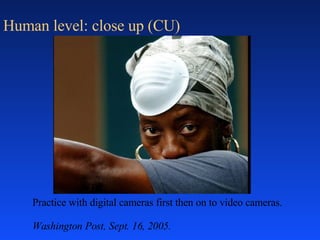
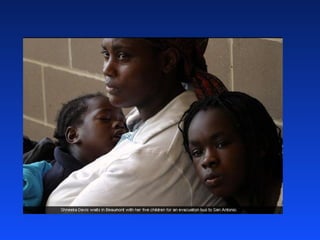
Human level: close up (CU) Practice with digital cameras first then on to video cameras.  Washington Post, Sept. 16, 2005.
 
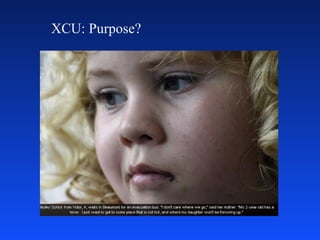
XCU: Purpose?
Camera Techniques Pan Tilt Focus Fade High or low angle Zoom Point of view Shot variation- Wide, Med., CU
Camera Tips Use a tripod Position camera so greatest light  is at videographer’s back Use focus and white balance controls Practice camera moves  Frame shots and moves with purpose
Video Clip : Let’s review! Watch the following clip for various camera shots.  Use the terms we learned!  What was the effect/purpose of the shots?  Raise your hand!
Camera Tips (continued) Vary shots Don’t overuse zoom  Be sure to lay down pre and post-roll Correct roll-back
Basic editing In camera editing Assemble editing ‘ A’ Roll ‘ A/B’ Roll Insert editing
Disappearing Act   ( In Camera Edit) Record (Push red button.) Establish subject, subject freezes Pause (Push red button.) Change scene. Record (Push red button.)
Activity Make something disappear or animate an object through in-camera editing. Keep background constant and camera position constant for best effect Establish cues so crew knows what to expect
Options for Transitions Close-up of object Fade-out of one scene, fade-in to next Full screen text of  poster or graphic See someone walk out of room, walk in to next room Create a walk-through effect
Audio techniques Voice-over narration  Sound effects Music Natural sound
Audio Tips Use music and natural sound Use headphones Select microphones based on project needs Place microphone right distance from source Listen for distracting background noises
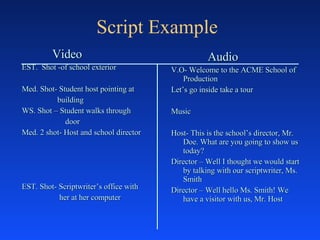
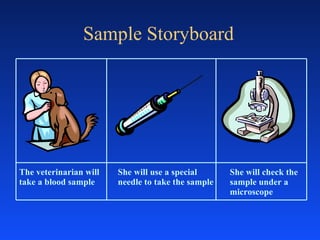
Planning Your Production Two main ways of planning are scripts and storyboards Scripts take many forms but should have a place for describing both audio and video  Storyboards are really comic strip versions of production where shots are drawn with audio written as captions underneath
Script Example Video EST.  Shot -of school exterior Med. Shot- Student host pointing at  building WS. Shot – Student walks through  door Med. 2 shot- Host and school director EST. Shot- Scriptwriter’s office with  her at her computer Audio V.O- Welcome to the ACME School of Production Let’s go inside take a tour Music  Host- This is the school’s director, Mr. Doe. What are you going to show us today? Director – Well I thought we would start by talking with our scriptwriter, Ms. Smith Director – Well hello Ms. Smith! We  have a visitor with us, Mr. Host
Sample Storyboard The veterinarian will take a blood sample She will use a special needle to take the sample She will check the sample under a microscope
Common Video Mistakes….. Too much headroom - bad frame Subject in front of bright backlight Shaky camera - no tripod No shot variation - wide shot Insufficient planning - no script lack of pre and post roll
Common Audio Mistakes….. using only cam mike mike too far from sound source not monitoring audio
Resources for Video Production On KET EncycloMedia: “ Lights, Camera, Action”  series On KET-ED Channel: KET  Newsquiz —streamed or live airings Making of  Grimm’s Fairy Tales (9/4@11am) Hollywood Homeroom  series (9/4 @10am)
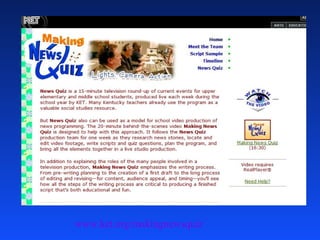
       www.ket.org/makingnewsquiz
Interview Tips Research the subject thoroughly Consider the knowledge and interest of the audience Prepare a comprehensive list of questions Group related questions and consider the order of importance and interest Describe the purpose beforehand to the subject
Interview No-No’s Yes and no questions “ I see” and “Uh-huh” Two-part questions Obvious questions Questions in poor taste Questions that have already been answered
Interview Tips Avoid interviewing the subject without the camera before the camera interview LISTEN Ask appropriate follow-up questions Be polite and professional
Dressing for Television Choose clothes with simple, clean lines Wear solid colors (blues and teals) Women should apply foundation and wear make-up that emphasizes eyes and lips Avoid white, black, shiny jewelry, and distracting patterns
Video Assessment Checklists Storyboards Rubrics Scripts Shot sheets Peer and self-evaluation
Roles in Production Executive Producer - Oversees production (Teacher) Producer - Guides idea Director - Guides technical production Associate Producer - Handles details Talent - On-camera host or actor Videographer - Operates camera
Everybody is important
Missi Baker [email_address] 606.836.0474 KET conducts workshops  in video production  for Kentucky teachers and students.

Basic Video Production

  • 1.
    Back to theBasics (Production Basics, that is) In a Cyber-media World Basics of Video Production
  • 2.
    “ Those whotell stories hold the power in society. Today television tells most of the stories to most of the people, most of the time.” George Gerbner 1992
  • 3.
    Phases of ProductionPre-production : Planning, scheduling, and writing,…and storyboards Production: Shooting, recording,… Post-production: Editing
  • 4.
    What is theobjective? Inform Entertain
  • 5.
    Who is youraudience? Background Age Motivation
  • 6.
    Parts Of TypicalCamcorder Microphone Viewfinder Lens Assembly Tape Compartment Power / Record/ Playback Controls Tape Eject Control W Auto Zoom Control Switch W T Inset Detail Auto/Manual Focus Controls Battery Compartment
  • 7.
    Production Tools Anintroduction to types of camera shots and techniques
  • 8.
  • 9.
    Anchorperson in leftthird. Eyes at important cross-section at top third line.
  • 10.
    How To FrameA Shot ( Subject Facing Camera) Center of Frame Headroom
  • 11.
    How to FrameA Shot (Subject looking to Side) Headroom Lead Room
  • 12.
    In this shotthe lady is looking off camera to the left so she is placed in the right third so she seems to be looking at something on the left of the shot.    
  • 13.
  • 14.
  • 15.
  • 16.
  • 17.
  • 18.
  • 19.
  • 20.
    Shot Glossary (ECU)Extreme Close-up Shot (CU) Close-up Shot (Med) Medium Shot (WS) Wide Shot (POV) Point of View Shot (OSS) Over the Shoulder Shot (Noddy) Interview nods attentively
  • 21.
    Basic Shots TypesClose-up (CU) Wide Shot (WS) Medium Shot (Med)
  • 22.
  • 23.
  • 24.
    Another wide shotto establish scene: Washington Post, Sept. 16, 2007.
  • 25.
  • 26.
  • 27.
  • 28.
    Human level: closeup (CU) Practice with digital cameras first then on to video cameras. Washington Post, Sept. 16, 2005.
  • 29.
  • 30.
  • 31.
    Camera Techniques PanTilt Focus Fade High or low angle Zoom Point of view Shot variation- Wide, Med., CU
  • 32.
    Camera Tips Usea tripod Position camera so greatest light is at videographer’s back Use focus and white balance controls Practice camera moves Frame shots and moves with purpose
  • 33.
    Video Clip :Let’s review! Watch the following clip for various camera shots. Use the terms we learned! What was the effect/purpose of the shots? Raise your hand!
  • 34.
    Camera Tips (continued)Vary shots Don’t overuse zoom Be sure to lay down pre and post-roll Correct roll-back
  • 35.
    Basic editing Incamera editing Assemble editing ‘ A’ Roll ‘ A/B’ Roll Insert editing
  • 36.
    Disappearing Act ( In Camera Edit) Record (Push red button.) Establish subject, subject freezes Pause (Push red button.) Change scene. Record (Push red button.)
  • 37.
    Activity Make somethingdisappear or animate an object through in-camera editing. Keep background constant and camera position constant for best effect Establish cues so crew knows what to expect
  • 38.
    Options for TransitionsClose-up of object Fade-out of one scene, fade-in to next Full screen text of poster or graphic See someone walk out of room, walk in to next room Create a walk-through effect
  • 39.
    Audio techniques Voice-overnarration Sound effects Music Natural sound
  • 40.
    Audio Tips Usemusic and natural sound Use headphones Select microphones based on project needs Place microphone right distance from source Listen for distracting background noises
  • 41.
    Planning Your ProductionTwo main ways of planning are scripts and storyboards Scripts take many forms but should have a place for describing both audio and video Storyboards are really comic strip versions of production where shots are drawn with audio written as captions underneath
  • 42.
    Script Example VideoEST. Shot -of school exterior Med. Shot- Student host pointing at building WS. Shot – Student walks through door Med. 2 shot- Host and school director EST. Shot- Scriptwriter’s office with her at her computer Audio V.O- Welcome to the ACME School of Production Let’s go inside take a tour Music Host- This is the school’s director, Mr. Doe. What are you going to show us today? Director – Well I thought we would start by talking with our scriptwriter, Ms. Smith Director – Well hello Ms. Smith! We have a visitor with us, Mr. Host
  • 43.
    Sample Storyboard Theveterinarian will take a blood sample She will use a special needle to take the sample She will check the sample under a microscope
  • 44.
    Common Video Mistakes…..Too much headroom - bad frame Subject in front of bright backlight Shaky camera - no tripod No shot variation - wide shot Insufficient planning - no script lack of pre and post roll
  • 45.
    Common Audio Mistakes…..using only cam mike mike too far from sound source not monitoring audio
  • 46.
    Resources for VideoProduction On KET EncycloMedia: “ Lights, Camera, Action” series On KET-ED Channel: KET Newsquiz —streamed or live airings Making of Grimm’s Fairy Tales (9/4@11am) Hollywood Homeroom series (9/4 @10am)
  • 47.
    www.ket.org/makingnewsquiz
  • 48.
    Interview Tips Researchthe subject thoroughly Consider the knowledge and interest of the audience Prepare a comprehensive list of questions Group related questions and consider the order of importance and interest Describe the purpose beforehand to the subject
  • 49.
    Interview No-No’s Yesand no questions “ I see” and “Uh-huh” Two-part questions Obvious questions Questions in poor taste Questions that have already been answered
  • 50.
    Interview Tips Avoidinterviewing the subject without the camera before the camera interview LISTEN Ask appropriate follow-up questions Be polite and professional
  • 51.
    Dressing for TelevisionChoose clothes with simple, clean lines Wear solid colors (blues and teals) Women should apply foundation and wear make-up that emphasizes eyes and lips Avoid white, black, shiny jewelry, and distracting patterns
  • 52.
    Video Assessment ChecklistsStoryboards Rubrics Scripts Shot sheets Peer and self-evaluation
  • 53.
    Roles in ProductionExecutive Producer - Oversees production (Teacher) Producer - Guides idea Director - Guides technical production Associate Producer - Handles details Talent - On-camera host or actor Videographer - Operates camera
  • 54.
  • 55.
    Missi Baker [email_address]606.836.0474 KET conducts workshops in video production for Kentucky teachers and students.