Project approach when migrating
Exchange to Zarafa
Milo Oostergo (milo@zarafa.com)
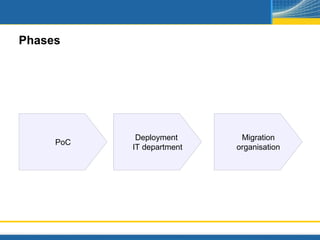
Phases


            Deployment      Migration
     PoC
           IT department   organisation
Question at Proof of Concept
What's the impact?

Who are involved in the Poc?

How do we evaluate?
 Can i still use existing functionality?
 What is different?


How can we migrate the data back from the PoC?
Zarafa in an easy Proof of Concept setup
Zarafa on a virtual machine

Zarafa coupled to local ADS to have Global Addressbook with all
  existing users/groups

All outgoing emails from Zarafa are relayed to the existing
   Exchange server

Incoming emails are forwarded from existing environment to
   dummy address <username>@zarafa.example.com
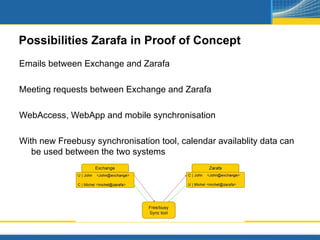
Possibilities Zarafa in Proof of Concept
Emails between Exchange and Zarafa

Meeting requests between Exchange and Zarafa

WebAccess, WebApp and mobile synchronisation

With new Freebusy synchronisation tool, calendar availablity data can
   be used between the two systems
Impossibilities Zarafa in Proof of Concept
Shared folders and public folders can be accessed between the 2
  systems

Synchronous replication between Exchange and Zarafa for it's mailbox
  data
From Proof of Concept to production
Scaling of PoC virtual machine to production

Further deployment of infrastructure (firewall, antispam, SMTP, 3rd party
   apps)

Setup of migration and deployment plan

Testing of plan for IT department

Production usage for IT department

Finetuning of environment after feedback of IT department
From Proof of Concept to production (2)
Communication to end users via intranet or email about changes in
  new environment. Training of power users.

Migration of all data

Migration of most recent data and deployment of Zarafa client +
   including new OL profiles

Recoupling of mobile devices

Support and help of users after migration
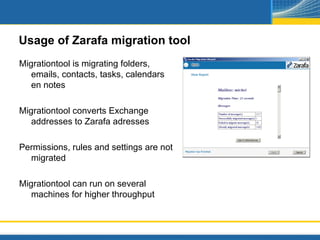
Usage of Zarafa migration tool
Migrationtool is migrating folders,
   emails, contacts, tasks, calendars
   en notes

Migrationtool converts Exchange
   addresses to Zarafa adresses

Permissions, rules and settings are not
  migrated

Migrationtool can run on several
   machines for higher throughput
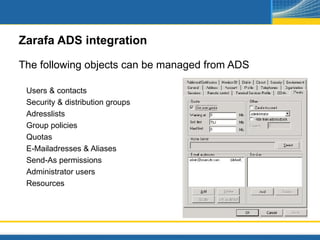
Zarafa ADS integration

The following objects can be managed from ADS

 Users & contacts
 Security & distribution groups
 Adresslists
 Group policies
 Quotas
 E-Mailadresses & Aliases
 Send-As permissions
 Administrator users
 Resources
Conclusion
Training of end users is under estimated during migrations, but is key
   factor for a successful migration

Clear communication about changes in the solution

Make very clear migration and deployment guide and test it upfront!

Train helpdesk and administrators upfront, to solve questions and
   issues faster

Zarafa SummerCamp 2012 - Project approach when migrating to Zarafa

  • 1.
    Project approach whenmigrating Exchange to Zarafa Milo Oostergo (milo@zarafa.com)
  • 2.
    Phases Deployment Migration PoC IT department organisation
  • 3.
    Question at Proofof Concept What's the impact? Who are involved in the Poc? How do we evaluate? Can i still use existing functionality? What is different? How can we migrate the data back from the PoC?
  • 4.
    Zarafa in aneasy Proof of Concept setup Zarafa on a virtual machine Zarafa coupled to local ADS to have Global Addressbook with all existing users/groups All outgoing emails from Zarafa are relayed to the existing Exchange server Incoming emails are forwarded from existing environment to dummy address <username>@zarafa.example.com
  • 5.
    Possibilities Zarafa inProof of Concept Emails between Exchange and Zarafa Meeting requests between Exchange and Zarafa WebAccess, WebApp and mobile synchronisation With new Freebusy synchronisation tool, calendar availablity data can be used between the two systems
  • 6.
    Impossibilities Zarafa inProof of Concept Shared folders and public folders can be accessed between the 2 systems Synchronous replication between Exchange and Zarafa for it's mailbox data
  • 7.
    From Proof ofConcept to production Scaling of PoC virtual machine to production Further deployment of infrastructure (firewall, antispam, SMTP, 3rd party apps) Setup of migration and deployment plan Testing of plan for IT department Production usage for IT department Finetuning of environment after feedback of IT department
  • 8.
    From Proof ofConcept to production (2) Communication to end users via intranet or email about changes in new environment. Training of power users. Migration of all data Migration of most recent data and deployment of Zarafa client + including new OL profiles Recoupling of mobile devices Support and help of users after migration
  • 9.
    Usage of Zarafamigration tool Migrationtool is migrating folders, emails, contacts, tasks, calendars en notes Migrationtool converts Exchange addresses to Zarafa adresses Permissions, rules and settings are not migrated Migrationtool can run on several machines for higher throughput
  • 10.
    Zarafa ADS integration Thefollowing objects can be managed from ADS Users & contacts Security & distribution groups Adresslists Group policies Quotas E-Mailadresses & Aliases Send-As permissions Administrator users Resources
  • 11.
    Conclusion Training of endusers is under estimated during migrations, but is key factor for a successful migration Clear communication about changes in the solution Make very clear migration and deployment guide and test it upfront! Train helpdesk and administrators upfront, to solve questions and issues faster

Editor's Notes

  • #4 - wie bij betrokken - impact - wat moet er aangepast worden - hoe terug te schakelen - hoe te evaulerern - wat zijn de andere dingen