Cutting Edge in Adaptive Learning
and Assessment
Malloc Inc. YouTestMe | Classroom 2020
Agenda
About us
Starting Premises
Key Uses of Classroom 2020
Features
Key Benefits
Potential Issues and Solutions
Conclusion
About Us
Malloc Inc. YouTestMe | Classroom 2020
98 Pembroke Street
Toronto
Canada
YouTestMe Team
Products: DB Analyzer, Test Daemon, YouTestMe
Clients: Oracle, Citibank, Royal Bank, Scotia Bank, Prudential,
Nesbit Burns, London Life, Standard Life, General Electric.
Experience: Over 20 years
Starting Premises
Malloc Inc. YouTestMe | Classroom 2020
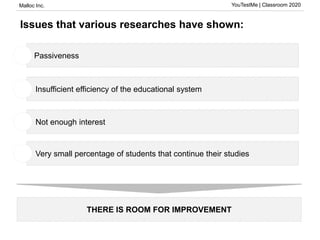
Issues that various researches have shown:
THERE IS ROOM FOR IMPROVEMENT
Passiveness1
• Insufficient efficiency of the educational system1
• Not enough interest1
• Very small percentage of students that continue their studies1
Malloc Inc. YouTestMe | Classroom 2020
Our starting hypothesis:
Each student has their own preference when it comes to education
The goal of education is to acquire permanent and practical knowledge
which can be used and connected to other areas
Professors and teachers don't have enough time to dedicate themselves to
individual students
Workshops and classes could be much more efficient by introducing
technology into them
Technology is seeping into classrooms and the education process
1
2
3
4
5
Malloc Inc. YouTestMe | Classroom 2020
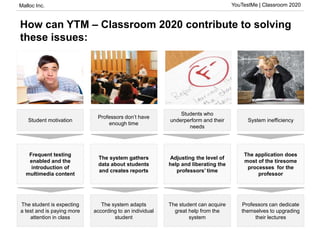
How can YTM – Classroom 2020 contribute to solving
these issues:
Student motivation
Professors don’t have
enough time
Students who
underperform and their
needs
System inefficiency
Frequent testing
enabled and the
introduction of
multimedia content
The system gathers
data about students
and creates reports
Adjusting the level of
help and liberating the
professors’ time
The application does
most of the tiresome
processes for the
professor
The student is expecting
a test and is paying more
attention in class
The system adapts
according to an individual
student
The student can acquire
great help from the
system
Professors can dedicate
themselves to upgrading
their lectures
Slicica
studenta koji
se smara
Slicica
profesora i
puno ljudi
Slicica loše
ocene
Sličica
profesora u
haosu
Malloc Inc. YouTestMe | Classroom 2020
What is Classroom 2020?
Classroom 2020 is software intended to help in the
education process, specialized for knowledge testing with
the help of various learning modules and tools. It
automatizes the tedious processes educators need to
perform when it comes to creating, assigning, grading
tests, holding lessons.
Malloc Inc. YouTestMe | Classroom 2020
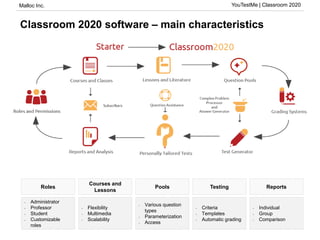
Classroom 2020 software – main characteristics
• Administrator
• Professor
• Student
• Customizable
roles
• Flexibility
• Multimedia
• Scalability
• Various question
types
• Parameterization
• Access
• Individual
• Group
• Comparison
• Criteria
• Templates
• Automatic grading
Roles
Courses and
Lessons
Pools ReportsTesting
Malloc Inc. YouTestMe | Classroom 2020
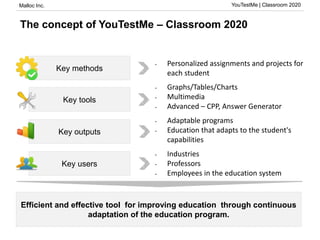
The concept of YouTestMe – Classroom 2020
• Personalized assignments and projects for
each student
Key methods
Key tools
• Graphs/Tables/Charts
• Multimedia
• Advanced – CPP, Answer Generator
Key outputs
• Adaptable programs
• Education that adapts to the student's
capabilities
Key users
• Industries
• Professors
• Employees in the education system
Efficient and effective tool for improving education through continuous
adaptation of the education program.
Malloc Inc. YouTestMe | Classroom 2020
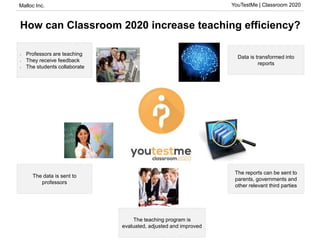
How can Classroom 2020 increase teaching efficiency?
Data is transformed into
reports
The reports can be sent to
parents, governments and
other relevant third parties
The teaching program is
evaluated, adjusted and improved
The data is sent to
professors
• Professors are teaching
• They receive feedback
• The students collaborate
Malloc Inc. YouTestMe | Classroom 2020
Key Uses of Classroom 2020
Malloc Inc. YouTestMe | Classroom 2020
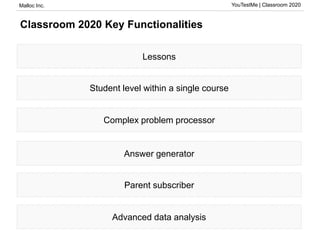
Classroom 2020 Key Functionalities
Lessons
Student level within a single course
Complex problem processor
Answer generator
Parent subscriber
Advanced data analysis
Malloc Inc. YouTestMe | Classroom 2020
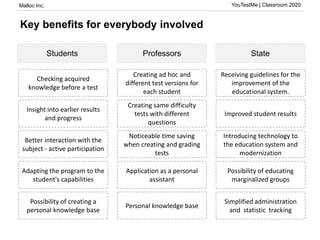
Key benefits for everybody involved
Students StateProfessors
Creating ad hoc and
different test versions for
each student
Creating same difficulty
tests with different
questions
Noticeable time saving
when creating and grading
tests
Application as a personal
assistant
Personal knowledge base
Checking acquired
knowledge before a test
Insight into earlier results
and progress
Better interaction with the
subject - active participation
Adapting the program to the
student's capabilities
Possibility of creating a
personal knowledge base
Receiving guidelines for the
improvement of the
educational system.
Improved student results
Introducing technology to
the education system and
modernization
Possibility of educating
marginalized groups
Simplified administration
and statistic tracking
Malloc Inc. YouTestMe | Classroom 2020
Features
Malloc Inc. YouTestMe | Classroom 2020
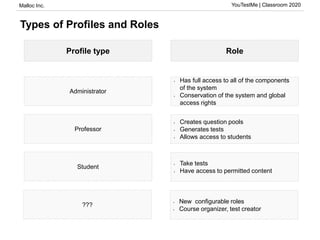
Types of Profiles and Roles
Profile type Role
Administrator
Professor
Student
• Has full access to all of the components
of the system
• Conservation of the system and global
access rights
• Creates question pools
• Generates tests
• Allows access to students
• Take tests
• Have access to permitted content
???
• New configurable roles
• Course organizer, test creator
Malloc Inc. YouTestMe | Classroom 2020
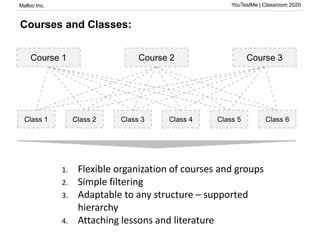
Courses and Classes:
Course 1 Course 2 Course 3
Class 1 Class 2 Class 3 Class 4 Class 5 Class 6
1. Flexible organization of courses and groups
2. Simple filtering
3. Adaptable to any structure – supported
hierarchy
4. Attaching lessons and literature
Malloc Inc. YouTestMe | Classroom 2020
Literature and Attachments
Google Docs Images
Malloc Inc. YouTestMe | Classroom 2020
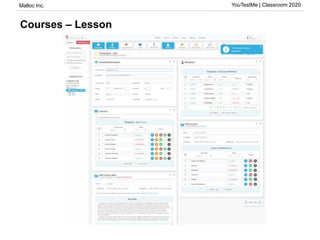
Courses – Lesson
Malloc Inc. YouTestMe | Classroom 2020
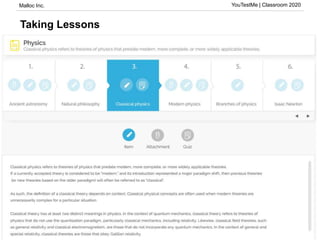
Taking Lessons
Malloc Inc. YouTestMe | Classroom 2020
User Skill Level within a Course
Automatic updating
Tests adapt to user skill level
Descriptive grades for better student supervision
Malloc Inc. YouTestMe | Classroom 2020
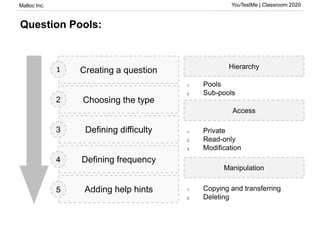
Question Pools:
Creating a question
Choosing the type
Defining difficulty
Defining frequency
Adding help hints
1
2
3
4
5
Hierarchy
Access
1. Pools
2. Sub-pools
1. Private
2. Read-only
3. Modification
Manipulation
1. Copying and transferring
2. Deleting
Malloc Inc. YouTestMe | Classroom 2020
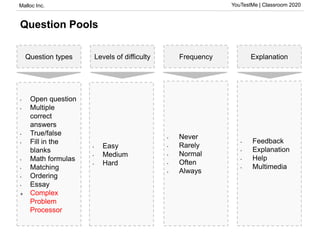
Question Pools
Question types Levels of difficulty ExplanationFrequency
• Feedback
• Explanation
• Help
• Multimedia
• Never
• Rarely
• Normal
• Often
• Always
• Easy
• Medium
• Hard
• Open question
• Multiple
correct
answers
• True/false
• Fill in the
blanks
• Math formulas
• Matching
• Ordering
• Essay
 Complex
Problem
Processor
Malloc Inc. YouTestMe | Classroom 2020
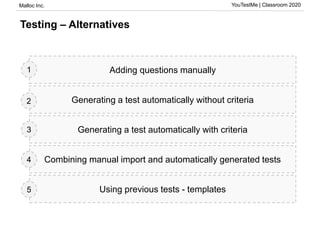
Testing – Alternatives
Adding questions manually
Generating a test automatically without criteria
Generating a test automatically with criteria
Combining manual import and automatically generated tests
Using previous tests - templates
1
2
3
4
5
Malloc Inc. YouTestMe | Classroom 2020
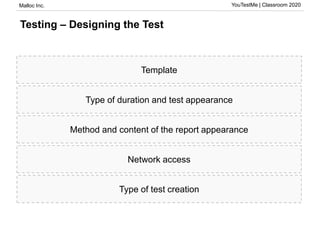
Testing – Designing the Test
Template
Type of duration and test appearance
Method and content of the report appearance
Network access
Type of test creation
Malloc Inc. YouTestMe | Classroom 2020
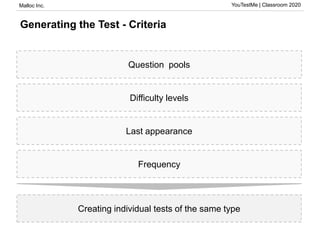
Generating the Test - Criteria
Question pools
Difficulty levels
Last appearance
Frequency
Creating individual tests of the same type
Malloc Inc. YouTestMe | Classroom 2020
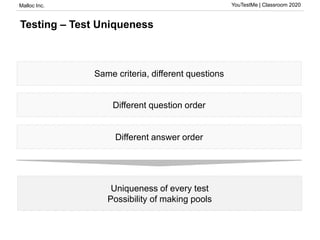
Testing – Test Uniqueness
Same criteria, different questions
Different question order
Different answer order
Uniqueness of every test
Possibility of making pools
Malloc Inc. YouTestMe | Classroom 2020
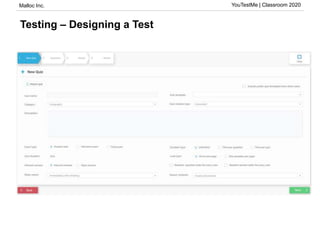
Testing – Designing a Test
Malloc Inc. YouTestMe | Classroom 2020
Testing – Grading
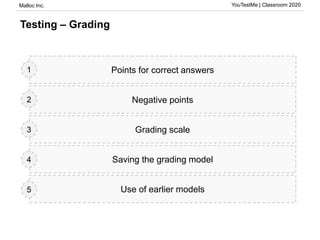
Points for correct answers
Negative points
Grading scale
Saving the grading model
Use of earlier models
1
2
3
4
5
Malloc Inc. YouTestMe | Classroom 2020
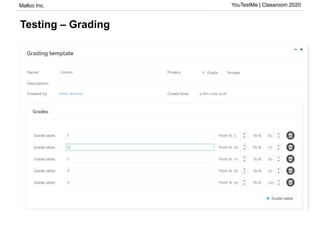
Testing – Grading
Malloc Inc. YouTestMe | Classroom 2020
Testing – Taking a Test
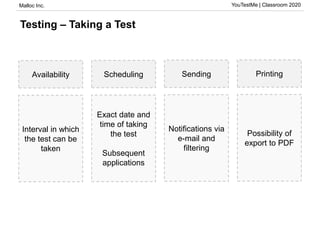
Availability Scheduling Sending Printing
Interval in which
the test can be
taken
Exact date and
time of taking
the test
Subsequent
applications
Notifications via
e-mail and
filtering
Possibility of
export to PDF
Malloc Inc. YouTestMe | Classroom 2020
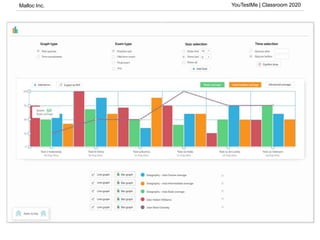
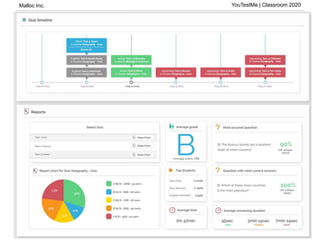
Grading and charts
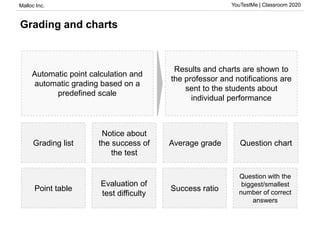
Grading list
Notice about
the success of
the test
Average grade Question chart
Point table
Evaluation of
test difficulty
Success ratio
Question with the
biggest/smallest
number of correct
answers
Automatic point calculation and
automatic grading based on a
predefined scale
Results and charts are shown to
the professor and notifications are
sent to the students about
individual performance
Malloc Inc. YouTestMe | Classroom 2020
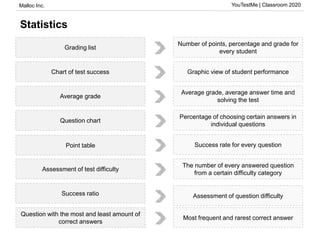
Statistics
Grading list
Chart of test success
Average grade
Question chart
Point table
Assessment of test difficulty
Question with the most and least amount of
correct answers
Number of points, percentage and grade for
every student
Graphic view of student performance
Average grade, average answer time and
solving the test
Percentage of choosing certain answers in
individual questions
The number of every answered question
from a certain difficulty category
Assessment of question difficulty
Most frequent and rarest correct answer
Success rate for every question
Success ratio
Malloc Inc. YouTestMe | Classroom 2020
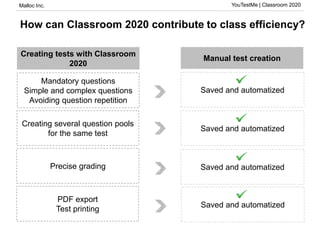
How can Classroom 2020 contribute to class efficiency?
Mandatory questions
Simple and complex questions
Avoiding question repetition
Creating several question pools
for the same test
Precise grading
Saved and automatized
Manual test creation
Creating tests with Classroom
2020
Saved and automatized
PDF export
Test printing
Malloc Inc. YouTestMe | Classroom 2020
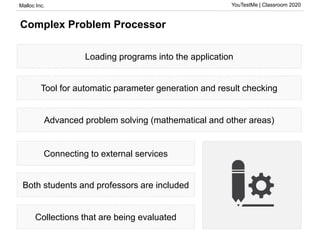
Complex Problem Processor
Loading programs into the application
Tool for automatic parameter generation and result checking
Advanced problem solving (mathematical and other areas)
Connecting to external services
Both students and professors are included
Collections that are being evaluated
Malloc Inc. YouTestMe | Classroom 2020
Answer generator
Based on course level
Different number of correct answers and distractors
Can be used in different question types
Malloc Inc. YouTestMe | Classroom 2020
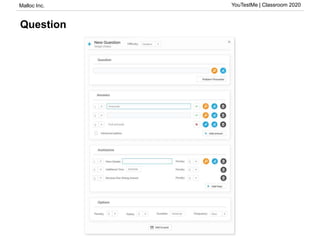
Question
Malloc Inc. YouTestMe | Classroom 2020
Subscriber
Tracking performance on tests
Tracking class attendance
Conjoined periodical charts
Malloc Inc. YouTestMe | Classroom 2020
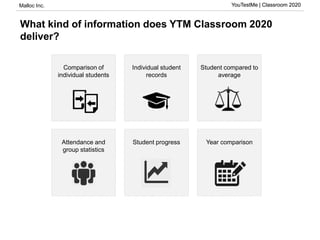
What kind of information does YTM Classroom 2020
deliver?
YouTestMe | Classroom 2020
Comparison of
individual students
Attendance and
group statistics
Student progress Year comparison
Individual student
records
Student compared to
average
Malloc Inc. YouTestMe | Classroom 2020
How can YTM Classroom 2020 functionalities be used -
individual student comparison
YouTestMe | Classroom 2020
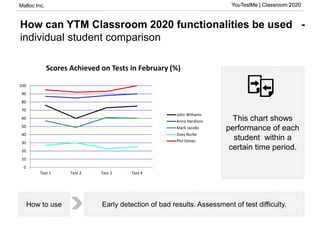
This chart shows
performance of each
student within a
certain time period.
Early detection of bad results. Assessment of test difficulty.How to use
0
10
20
30
40
50
60
70
80
90
100
Test 1 Test 2 Test 3 Test 4
Scores Achieved on Tests in February (%)
John Williams
Anna Hardison
Mark Jacobs
Zoey Burke
Phil Dimes
Malloc Inc. YouTestMe | Classroom 2020
How can YTM Classroom 2020 functionalities be used -
individual student report
YouTestMe | Classroom 2020
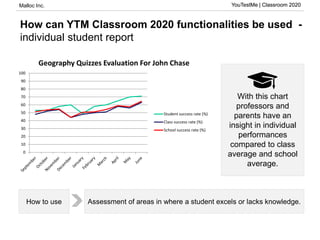
With this chart
professors and
parents have an
insight in individual
performances
compared to class
average and school
average.
Assessment of areas in where a student excels or lacks knowledge.How to use
0
10
20
30
40
50
60
70
80
90
100
Geography Quizzes Evaluation For John Chase
Student success rate (%)
Class success rate (%)
School success rate (%)
Malloc Inc. YouTestMe | Classroom 2020
How can YTM Classroom 2020 functionalities be used –
student according to average
YouTestMe | Classroom 2020
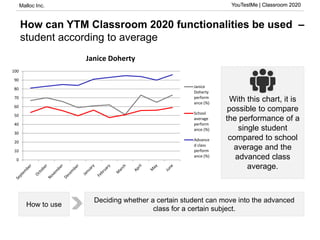
With this chart, it is
possible to compare
the performance of a
single student
compared to school
average and the
advanced class
average.
Deciding whether a certain student can move into the advanced
class for a certain subject.
How to use
0
10
20
30
40
50
60
70
80
90
100
Janice Doherty
Janice
Doherty
perform
ance (%)
School
average
perform
ance (%)
Advance
d class
perform
ance (%)
Malloc Inc. YouTestMe | Classroom 2020
How can YTM Classroom 2020 functionalities be used -
student progress
YouTestMe | Classroom 2020
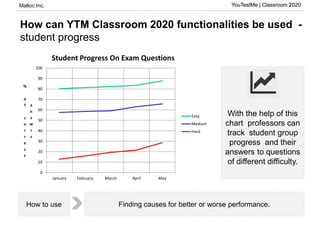
With the help of this
chart professors can
track student group
progress and their
answers to questions
of different difficulty.
Finding causes for better or worse performance.How to use
0
10
20
30
40
50
60
70
80
90
100
January February March April May
%
o
f
c
o
r
r
e
c
t
a
n
s
w
r
s
Student Progress On Exam Questions
Easy
Medium
Hard
Malloc Inc. YouTestMe | Classroom 2020
How can YTM Classroom 2020 functionalities be used –
year comparison
YouTestMe | Classroom 2020
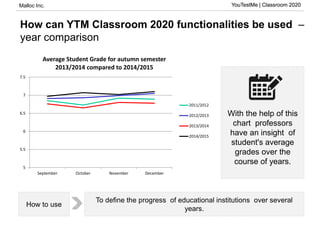
With the help of this
chart professors
have an insight of
student's average
grades over the
course of years.
To define the progress of educational institutions over several
years.
How to use
5
5.5
6
6.5
7
7.5
September October November December
Average Student Grade for autumn semester
2013/2014 compared to 2014/2015
2011/2012
2012/2013
2013/2014
2014/2015
Malloc Inc. YouTestMe | Classroom 2020
100%
90%
80%
70%
60%
50%
40%
30%
20%
10%
0%
How can YTM Classroom 2020 functionalities be used -
appearance and success of charts
YouTestMe | Classroom 2020
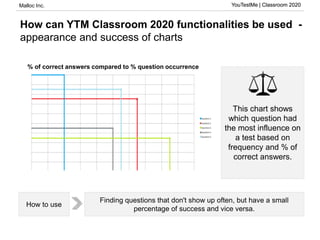
This chart shows
which question had
the most influence on
a test based on
frequency and % of
correct answers.
Finding questions that don't show up often, but have a small
percentage of success and vice versa.
How to use
0% 10% 20% 30% 40% 50% 60% 70% 80% 90% 100%
Zastupljenost pitanja %
% of correct answers compared to % question occurrence
Potential Issues and Solutions
Malloc Inc. YouTestMe | Classroom 2020
Potential Issues and Suggested Solutions
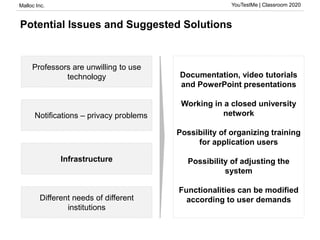
Professors are unwilling to use
technology
Notifications – privacy problems
Infrastructure
Different needs of different
institutions
Documentation, video tutorials
and PowerPoint presentations
Working in a closed university
network
Possibility of organizing training
for application users
Possibility of adjusting the
system
Functionalities can be modified
according to user demands
Malloc Inc. YouTestMe | Classroom 2020
Conclusion
Malloc Inc. YouTestMe | Classroom 2020
How We See the Future of Education
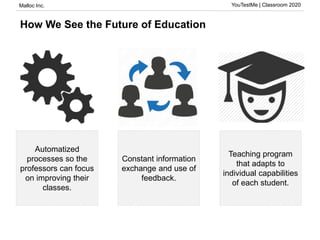
Automatized
processes so the
professors can focus
on improving their
classes.
Constant information
exchange and use of
feedback.
Teaching program
that adapts to
individual capabilities
of each student.
Malloc Inc. YouTestMe | Classroom 2020
Future upgrades
Essay grading
SP “SEKA”
Ideas from new collaborations
Thank you for Your time
www.youtestme.com www.mallocinc.com

YouTestMe Classroom 2020 Presentation

  • 1.
    Cutting Edge inAdaptive Learning and Assessment
  • 2.
    Malloc Inc. YouTestMe| Classroom 2020 Agenda About us Starting Premises Key Uses of Classroom 2020 Features Key Benefits Potential Issues and Solutions Conclusion
  • 3.
  • 4.
    Malloc Inc. YouTestMe| Classroom 2020 98 Pembroke Street Toronto Canada YouTestMe Team Products: DB Analyzer, Test Daemon, YouTestMe Clients: Oracle, Citibank, Royal Bank, Scotia Bank, Prudential, Nesbit Burns, London Life, Standard Life, General Electric. Experience: Over 20 years
  • 5.
  • 6.
    Malloc Inc. YouTestMe| Classroom 2020 Issues that various researches have shown: THERE IS ROOM FOR IMPROVEMENT Passiveness1 • Insufficient efficiency of the educational system1 • Not enough interest1 • Very small percentage of students that continue their studies1
  • 7.
    Malloc Inc. YouTestMe| Classroom 2020 Our starting hypothesis: Each student has their own preference when it comes to education The goal of education is to acquire permanent and practical knowledge which can be used and connected to other areas Professors and teachers don't have enough time to dedicate themselves to individual students Workshops and classes could be much more efficient by introducing technology into them Technology is seeping into classrooms and the education process 1 2 3 4 5
  • 8.
    Malloc Inc. YouTestMe| Classroom 2020 How can YTM – Classroom 2020 contribute to solving these issues: Student motivation Professors don’t have enough time Students who underperform and their needs System inefficiency Frequent testing enabled and the introduction of multimedia content The system gathers data about students and creates reports Adjusting the level of help and liberating the professors’ time The application does most of the tiresome processes for the professor The student is expecting a test and is paying more attention in class The system adapts according to an individual student The student can acquire great help from the system Professors can dedicate themselves to upgrading their lectures Slicica studenta koji se smara Slicica profesora i puno ljudi Slicica loše ocene Sličica profesora u haosu
  • 9.
    Malloc Inc. YouTestMe| Classroom 2020 What is Classroom 2020? Classroom 2020 is software intended to help in the education process, specialized for knowledge testing with the help of various learning modules and tools. It automatizes the tedious processes educators need to perform when it comes to creating, assigning, grading tests, holding lessons.
  • 10.
    Malloc Inc. YouTestMe| Classroom 2020 Classroom 2020 software – main characteristics • Administrator • Professor • Student • Customizable roles • Flexibility • Multimedia • Scalability • Various question types • Parameterization • Access • Individual • Group • Comparison • Criteria • Templates • Automatic grading Roles Courses and Lessons Pools ReportsTesting
  • 11.
    Malloc Inc. YouTestMe| Classroom 2020 The concept of YouTestMe – Classroom 2020 • Personalized assignments and projects for each student Key methods Key tools • Graphs/Tables/Charts • Multimedia • Advanced – CPP, Answer Generator Key outputs • Adaptable programs • Education that adapts to the student's capabilities Key users • Industries • Professors • Employees in the education system Efficient and effective tool for improving education through continuous adaptation of the education program.
  • 12.
    Malloc Inc. YouTestMe| Classroom 2020 How can Classroom 2020 increase teaching efficiency? Data is transformed into reports The reports can be sent to parents, governments and other relevant third parties The teaching program is evaluated, adjusted and improved The data is sent to professors • Professors are teaching • They receive feedback • The students collaborate
  • 13.
    Malloc Inc. YouTestMe| Classroom 2020 Key Uses of Classroom 2020
  • 14.
    Malloc Inc. YouTestMe| Classroom 2020 Classroom 2020 Key Functionalities Lessons Student level within a single course Complex problem processor Answer generator Parent subscriber Advanced data analysis
  • 15.
    Malloc Inc. YouTestMe| Classroom 2020 Key benefits for everybody involved Students StateProfessors Creating ad hoc and different test versions for each student Creating same difficulty tests with different questions Noticeable time saving when creating and grading tests Application as a personal assistant Personal knowledge base Checking acquired knowledge before a test Insight into earlier results and progress Better interaction with the subject - active participation Adapting the program to the student's capabilities Possibility of creating a personal knowledge base Receiving guidelines for the improvement of the educational system. Improved student results Introducing technology to the education system and modernization Possibility of educating marginalized groups Simplified administration and statistic tracking
  • 16.
    Malloc Inc. YouTestMe| Classroom 2020 Features
  • 17.
    Malloc Inc. YouTestMe| Classroom 2020 Types of Profiles and Roles Profile type Role Administrator Professor Student • Has full access to all of the components of the system • Conservation of the system and global access rights • Creates question pools • Generates tests • Allows access to students • Take tests • Have access to permitted content ??? • New configurable roles • Course organizer, test creator
  • 18.
    Malloc Inc. YouTestMe| Classroom 2020 Courses and Classes: Course 1 Course 2 Course 3 Class 1 Class 2 Class 3 Class 4 Class 5 Class 6 1. Flexible organization of courses and groups 2. Simple filtering 3. Adaptable to any structure – supported hierarchy 4. Attaching lessons and literature
  • 19.
    Malloc Inc. YouTestMe| Classroom 2020 Literature and Attachments Google Docs Images
  • 20.
    Malloc Inc. YouTestMe| Classroom 2020 Courses – Lesson
  • 21.
    Malloc Inc. YouTestMe| Classroom 2020 Taking Lessons
  • 22.
    Malloc Inc. YouTestMe| Classroom 2020 User Skill Level within a Course Automatic updating Tests adapt to user skill level Descriptive grades for better student supervision
  • 23.
    Malloc Inc. YouTestMe| Classroom 2020
  • 24.
    Malloc Inc. YouTestMe| Classroom 2020 Question Pools: Creating a question Choosing the type Defining difficulty Defining frequency Adding help hints 1 2 3 4 5 Hierarchy Access 1. Pools 2. Sub-pools 1. Private 2. Read-only 3. Modification Manipulation 1. Copying and transferring 2. Deleting
  • 25.
    Malloc Inc. YouTestMe| Classroom 2020 Question Pools Question types Levels of difficulty ExplanationFrequency • Feedback • Explanation • Help • Multimedia • Never • Rarely • Normal • Often • Always • Easy • Medium • Hard • Open question • Multiple correct answers • True/false • Fill in the blanks • Math formulas • Matching • Ordering • Essay  Complex Problem Processor
  • 26.
    Malloc Inc. YouTestMe| Classroom 2020 Testing – Alternatives Adding questions manually Generating a test automatically without criteria Generating a test automatically with criteria Combining manual import and automatically generated tests Using previous tests - templates 1 2 3 4 5
  • 27.
    Malloc Inc. YouTestMe| Classroom 2020 Testing – Designing the Test Template Type of duration and test appearance Method and content of the report appearance Network access Type of test creation
  • 28.
    Malloc Inc. YouTestMe| Classroom 2020 Generating the Test - Criteria Question pools Difficulty levels Last appearance Frequency Creating individual tests of the same type
  • 29.
    Malloc Inc. YouTestMe| Classroom 2020 Testing – Test Uniqueness Same criteria, different questions Different question order Different answer order Uniqueness of every test Possibility of making pools
  • 30.
    Malloc Inc. YouTestMe| Classroom 2020 Testing – Designing a Test
  • 31.
    Malloc Inc. YouTestMe| Classroom 2020 Testing – Grading Points for correct answers Negative points Grading scale Saving the grading model Use of earlier models 1 2 3 4 5
  • 32.
    Malloc Inc. YouTestMe| Classroom 2020 Testing – Grading
  • 33.
    Malloc Inc. YouTestMe| Classroom 2020 Testing – Taking a Test Availability Scheduling Sending Printing Interval in which the test can be taken Exact date and time of taking the test Subsequent applications Notifications via e-mail and filtering Possibility of export to PDF
  • 34.
    Malloc Inc. YouTestMe| Classroom 2020 Grading and charts Grading list Notice about the success of the test Average grade Question chart Point table Evaluation of test difficulty Success ratio Question with the biggest/smallest number of correct answers Automatic point calculation and automatic grading based on a predefined scale Results and charts are shown to the professor and notifications are sent to the students about individual performance
  • 35.
    Malloc Inc. YouTestMe| Classroom 2020 Statistics Grading list Chart of test success Average grade Question chart Point table Assessment of test difficulty Question with the most and least amount of correct answers Number of points, percentage and grade for every student Graphic view of student performance Average grade, average answer time and solving the test Percentage of choosing certain answers in individual questions The number of every answered question from a certain difficulty category Assessment of question difficulty Most frequent and rarest correct answer Success rate for every question Success ratio
  • 36.
    Malloc Inc. YouTestMe| Classroom 2020
  • 37.
    Malloc Inc. YouTestMe| Classroom 2020 How can Classroom 2020 contribute to class efficiency? Mandatory questions Simple and complex questions Avoiding question repetition Creating several question pools for the same test Precise grading Saved and automatized Saved and automatized Saved and automatized Manual test creation Creating tests with Classroom 2020 Saved and automatized PDF export Test printing
  • 38.
    Malloc Inc. YouTestMe| Classroom 2020 Complex Problem Processor Loading programs into the application Tool for automatic parameter generation and result checking Advanced problem solving (mathematical and other areas) Connecting to external services Both students and professors are included Collections that are being evaluated
  • 39.
    Malloc Inc. YouTestMe| Classroom 2020 Answer generator Based on course level Different number of correct answers and distractors Can be used in different question types
  • 40.
    Malloc Inc. YouTestMe| Classroom 2020 Question
  • 41.
    Malloc Inc. YouTestMe| Classroom 2020 Subscriber Tracking performance on tests Tracking class attendance Conjoined periodical charts
  • 42.
    Malloc Inc. YouTestMe| Classroom 2020 What kind of information does YTM Classroom 2020 deliver? YouTestMe | Classroom 2020 Comparison of individual students Attendance and group statistics Student progress Year comparison Individual student records Student compared to average
  • 43.
    Malloc Inc. YouTestMe| Classroom 2020 How can YTM Classroom 2020 functionalities be used - individual student comparison YouTestMe | Classroom 2020 This chart shows performance of each student within a certain time period. Early detection of bad results. Assessment of test difficulty.How to use 0 10 20 30 40 50 60 70 80 90 100 Test 1 Test 2 Test 3 Test 4 Scores Achieved on Tests in February (%) John Williams Anna Hardison Mark Jacobs Zoey Burke Phil Dimes
  • 44.
    Malloc Inc. YouTestMe| Classroom 2020 How can YTM Classroom 2020 functionalities be used - individual student report YouTestMe | Classroom 2020 With this chart professors and parents have an insight in individual performances compared to class average and school average. Assessment of areas in where a student excels or lacks knowledge.How to use 0 10 20 30 40 50 60 70 80 90 100 Geography Quizzes Evaluation For John Chase Student success rate (%) Class success rate (%) School success rate (%)
  • 45.
    Malloc Inc. YouTestMe| Classroom 2020 How can YTM Classroom 2020 functionalities be used – student according to average YouTestMe | Classroom 2020 With this chart, it is possible to compare the performance of a single student compared to school average and the advanced class average. Deciding whether a certain student can move into the advanced class for a certain subject. How to use 0 10 20 30 40 50 60 70 80 90 100 Janice Doherty Janice Doherty perform ance (%) School average perform ance (%) Advance d class perform ance (%)
  • 46.
    Malloc Inc. YouTestMe| Classroom 2020 How can YTM Classroom 2020 functionalities be used - student progress YouTestMe | Classroom 2020 With the help of this chart professors can track student group progress and their answers to questions of different difficulty. Finding causes for better or worse performance.How to use 0 10 20 30 40 50 60 70 80 90 100 January February March April May % o f c o r r e c t a n s w r s Student Progress On Exam Questions Easy Medium Hard
  • 47.
    Malloc Inc. YouTestMe| Classroom 2020 How can YTM Classroom 2020 functionalities be used – year comparison YouTestMe | Classroom 2020 With the help of this chart professors have an insight of student's average grades over the course of years. To define the progress of educational institutions over several years. How to use 5 5.5 6 6.5 7 7.5 September October November December Average Student Grade for autumn semester 2013/2014 compared to 2014/2015 2011/2012 2012/2013 2013/2014 2014/2015
  • 48.
    Malloc Inc. YouTestMe| Classroom 2020 100% 90% 80% 70% 60% 50% 40% 30% 20% 10% 0% How can YTM Classroom 2020 functionalities be used - appearance and success of charts YouTestMe | Classroom 2020 This chart shows which question had the most influence on a test based on frequency and % of correct answers. Finding questions that don't show up often, but have a small percentage of success and vice versa. How to use 0% 10% 20% 30% 40% 50% 60% 70% 80% 90% 100% Zastupljenost pitanja % % of correct answers compared to % question occurrence
  • 49.
  • 50.
    Malloc Inc. YouTestMe| Classroom 2020 Potential Issues and Suggested Solutions Professors are unwilling to use technology Notifications – privacy problems Infrastructure Different needs of different institutions Documentation, video tutorials and PowerPoint presentations Working in a closed university network Possibility of organizing training for application users Possibility of adjusting the system Functionalities can be modified according to user demands
  • 51.
    Malloc Inc. YouTestMe| Classroom 2020 Conclusion
  • 52.
    Malloc Inc. YouTestMe| Classroom 2020 How We See the Future of Education Automatized processes so the professors can focus on improving their classes. Constant information exchange and use of feedback. Teaching program that adapts to individual capabilities of each student.
  • 53.
    Malloc Inc. YouTestMe| Classroom 2020 Future upgrades Essay grading SP “SEKA” Ideas from new collaborations
  • 54.
    Thank you forYour time www.youtestme.com www.mallocinc.com