Expanding XPages With Bootstrap Plugins For
Ultimate Usability
June 16, 2016
This webinar is brought to you as part of the
free monthly webinar series from:
Howard Greenberg
@TLCC
Paul Della-Nebbia
@PaulDN
Courtney Carter
@Teamstudio
Teamstudio provides products that help
organizations with customized business
applications implement best practices, work
more efficiently, and prepare for the future.
AboutTeamstudio
Get detailed insight into the true business
usage of your IBM Notes apps.
Spotlight on: Usage Auditor
Teamstudio Usage Auditor
Databases by counts view in Usage Auditor
https://www.teamstudio.com/
• Spring into Savings on courses for:
– Administrators
– Developers
– XPages
– Java and JavaScript
• For example
– get both of TLCC’s Java for XPages courses
• Usually $1,400, on sale for $999!
The Spring Sale now extended to June 30th
http://www.tlcc.com/springsale
Course Spotlight
Rapid XPages Development using Application Layout and Dojo UI Controls
• Covers many of the important controls
– Application Layout
– Form Table
– Switch and Dynamic Content
– Dynamic View Panel
– Multi-Image
– Dojo input controls
– Tooltips and dialog
– Data View
– Navigator and Tag Cloud
– Widget Container
• Over 20 hours of training, all self paced with instructor support
• Special deal for attendees, $399, save $500!
• Go to http://www.tlcc.com/admin/tlccsite.nsf/pages/rapid-offer to get this
deal!
TLCC Application Development Services
• Let us help with your development
needs
– Bootstrap
– Java
• Convert Notes Apps to mobile and the
web!
• Modernize old Domino web
applications
• Interface with backend data systems
• Skills transfer
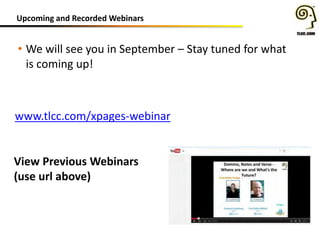
Upcoming and Recorded Webinars
• We will see you in September – Stay tuned for what
is coming up!
www.tlcc.com/xpages-webinar
View Previous Webinars
(use url above)
New Extension Library Release
• Release 17 Now Available at OpenNTF
• Includes:
– New Bluemix environmental variables (security and debug related)
– New Dash Node property – displayNodeAsLink (for Dashboard)
– New Blank Bootstrap3 theme
– Form Table More Responsive (for Bootstrap)
– A number of SPR Fixes (see readme.pdf file for list)
New Notes and Domino Fix Pack 6
• Includes important security and other fixes
– JVM updated to 1.6 SR16 FP20 to address security vulnerabilities
– Support for IBM iSeries 7.3
– Complete list of fixes:
• http://www-10.lotus.com/ldd/fixlist.nsf?OpenDatabase&Start=1&Count=30&Expand=2
• Custom Response Headers in notes.ini (when not using internet
sites)
• Fixes Java Console issue introduced in a previous interim fix
• Also includes everything from:
– Notes: 9.0.1 FP5 IF1, IF2, IF3
– Domino: 9.0.1 FP5 IF1, IF2,
– JVM Patch: 1.6 SR16FP15
• Download at:
– http://www-01.ibm.com/support/docview.wss?uid=swg24037141
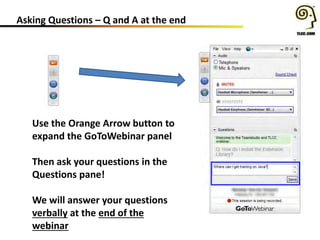
Asking Questions – Q and A at the end
Use the Orange Arrow button to
expand the GoToWebinar panel
Then ask your questions in the
Questions pane!
We will answer your questions
verbally at the end of the
webinar
#XPages
Expanding XPages with Bootstrap Plugins
for Ultimate Usability
Johnny Oldenburger
Kranendonk Smart Robotics
@JOldenburger
Develop highly user friendly responsive web (XPages) applications by making use of
Bootstrap and JQuery Plugins as Select2, DateTimePickers, Multiselect,
Confirmation, Modals, Popovers and Notifications for ultimate usability based on the
latest versions of these plugins, including solutions for the AMD problem. Expect more
of XPages Applications and go beyond the
Johnny Oldenburger
Twitter: @Joldenburger
Blog: XPages and more
IBM Champion 2016 for Social
Business
Moderator XPages Google+
Community
Curator OpenNTF Collaboration
Today
Currently working at Kranendonk
Smart Robotics as a Notes
Domino / Xpages /Web Developer
Engage UG 2016
Top Resources for XPages and Bootstrap
1. NotesIn9 – David Leedy
2. Collaboration Today
3. Planet Lotus
4. Google+ XPages Community
5. XPages.info
6. Stackoverflow
7. Notes Domino XPages development forum
8. OpenNTF
9. XPages Knowlegde Base
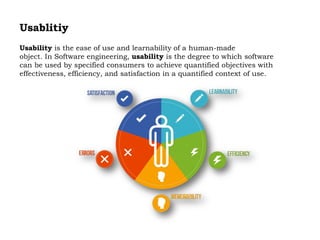
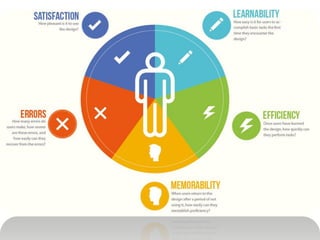
Usablitiy
Usability is the ease of use and learnability of a human-made
object. In Software engineering, usability is the degree to which software
can be used by specified consumers to achieve quantified objectives with
effectiveness, efficiency, and satisfaction in a quantified context of use.
Implementation External Bootstrap Plugins
1. Download CSS & JS Files
2. Unzip downloaded File
3. What do we need ? min.js or js files, css files ?
4. WebContent Folder Package Explorer in DDE
5. Include CSS & JS on XPages / Custom Control
6. Include x$ jQuery Selector for Xpages (optional)
7. AMD Fix needed for the plugin ?
8. Setup Plugin (Options) and design elements
Implementation External Bootstrap
Plugins
Demo Select2 4.0
Download CSS &JS files GitHub
UnZip downloaded Zipfile
What do we need (dist Folder)
Add CSS & JS files to
the WebContent Folder in the
Package Explorer
Implementation External Bootstrap
Plugins
Demo Select2 4.0
Include CSS & JS files on XPage / Custom control
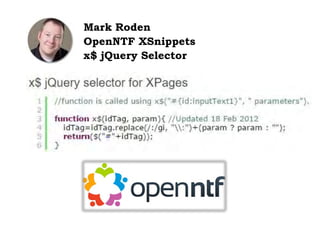
Mark Roden
OpenNTF XSnippets
x$ jQuery Selector
AMD (Asynchronous Module Definition)
AMD (Asynchronous Module Definition) in Dojo causes issues with
jQuery plugins and other JavaScript libraries, in that it prevents them
from loading correctly.
Solution by Ferry Kranenburg
AMD (Asynchronous Module
Definition)
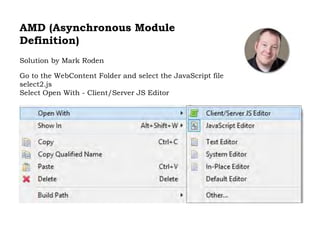
Solution by Mark Roden
Go to the WebContent Folder and select the JavaScript file
select2.js
Select Open With - Client/Server JS Editor
AMD (Asynchronous Module
Definition)
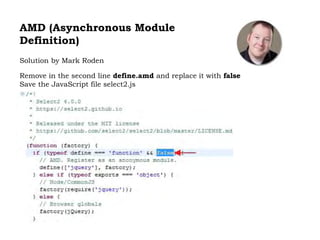
Solution by Mark Roden
Remove in the second line define.amd and replace it with false
Save the JavaScript file select2.js
Implementation External Bootstrap Plugins
Demo Select2 4.0
Setup Plugin using x$ jQuery Selector for XPages
Implementation External Bootstrap Plugins
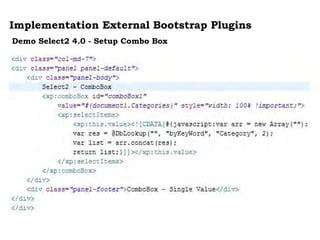
Demo Select2 4.0 - Setup Combo Box
Implementation External Bootstrap Plugins
Demo Select2 4.0 - Setup List Box
Implementation External Bootstrap Plugins
Demo Select2 4.0 – Final Remarks
When a placeholder is used for a non-multi-value select box such as a Combo Box, an
Empty tag is required as a first option. One possibility is to generate computed items,
including an empty tag, as values for the Combo Box.
Implementation External Bootstrap
Plugins
Demo Select2 4.0 – Final Remarks
Responsive design - Percent width
Select2's width can be set to a percentage of its parent to support responsive design.
The best way to ensure that Select2 is using a percent based width is to inline the
Style declaration into the tag. In the All Properties of the Combo Box set the Property
style to the desired percentage.
I always use: style="width: 100% !important;"
Implementation External Bootstrap
Plugins
David Leedy
NotesIn9
159 Introduction Select2
Bootstrap Modals
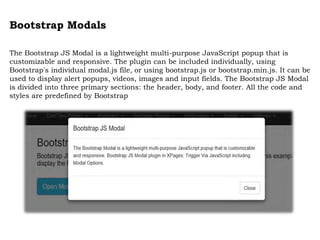
The Bootstrap JS Modal is a lightweight multi-purpose JavaScript popup that is
customizable and responsive. The plugin can be included individually, using
Bootstrap's individual modal.js file, or using bootstrap.js or bootstrap.min.js. It can be
used to display alert popups, videos, images and input fields. The Bootstrap JS Modal
is divided into three primary sections: the header, body, and footer. All the code and
styles are predefined by Bootstrap
Lightbox for Bootstrap
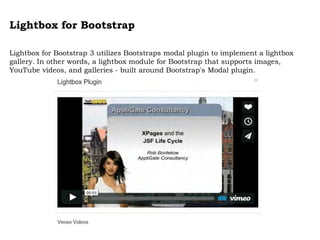
Lightbox for Bootstrap 3 utilizes Bootstraps modal plugin to implement a lightbox
gallery. In other words, a lightbox module for Bootstrap that supports images,
YouTube videos, and galleries - built around Bootstrap's Modal plugin.
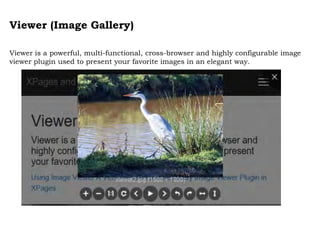
Viewer (Image Gallery)
Viewer is a powerful, multi-functional, cross-browser and highly configurable image
viewer plugin used to present your favorite images in an elegant way.
Unite Gallery
The Unite Gallery is multipurpose javascript gallery based on jquery library. It's
built with a modular technique with a lot of accent of ease of use and customization.
It's very easy to customize the gallery, changing it's skin via css, and even writing
your own theme. Yet this gallery is very powerfull, fast and has the most of nowdays
must have features like responsiveness, touch enabled and even zoom feature, it's
unique effect.
Bower for XPages
Bower for XPages
• Bower requires node, npm (Node Package Manager) and Git
• Step 1 - Install Node.js
• Step 2 - Install Git
• Step 3 - Install SourceTree
• Step 4 - Install Bower (npm install -g bower)
• Step 5 - Create Bower files
To be able to run Bower there are two files required, bower.json and
.bowerrc.
Bower for XPages
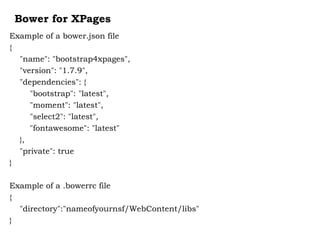
Example of a bower.json file
{
"name": "bootstrap4xpages",
"version": "1.7.9",
"dependencies": {
"bootstrap": "latest",
"moment": "latest",
"select2": "latest",
"fontawesome": "latest"
},
"private": true
}
Example of a .bowerrc file
{
"directory":"nameofyournsf/WebContent/libs"
}
Bower for XPages
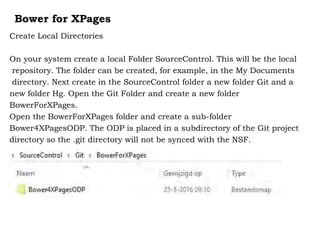
Create Local Directories
On your system create a local Folder SourceControl. This will be the local
repository. The folder can be created, for example, in the My Documents
directory. Next create in the SourceControl folder a new folder Git and a
new folder Hg. Open the Git Folder and create a new folder
BowerForXPages.
Open the BowerForXPages folder and create a sub-folder
Bower4XPagesODP. The ODP is placed in a subdirectory of the Git project
directory so the .git directory will not be synced with the NSF.
Bower for XPages
Setup Source Control DDE
Bower for XPages
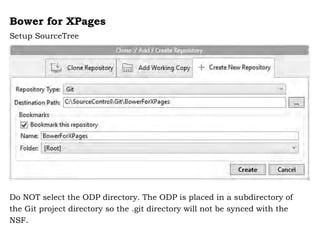
Setup SourceTree
Do NOT select the ODP directory. The ODP is placed in a subdirectory of
the Git project directory so the .git directory will not be synced with the
NSF.
Bower for XPages
Placing the Bower Files (bower.json - .bowerrc)
To install the Packages (Bootstrap Plugins) start the Node.js command
prompt. Next go to the directory where the Bower files are placed. Enter
'bower install' to install the Packages.
The last step is to refesh the ODP (right click ODP - Refresh) in the DDE
(Package Explorer) and next select the option Synch with NSF (right click
on ODP in the Package Explorer - Team Development - Synch with NSF).
Questions????
Use the Orange Arrow button to
expand the GoToWebinar panel
Then ask your questions in the
Questions panel!
Remember, we will answer your
questions verbally
#XPages
@JOldenburger
@TLCCLtd
@Teamstudio
@PaulDN
Upcoming Events:
 MWLUG, Austin, TX – August 17 to 19
 ICON UK, London – Sept. 15th and 16th
 Connect 2017 in San Francisco, CA – Feb. 20th to 23rd
Question and Answer Time!
Teamstudio Questions?
contactus@teamstudio.com
978-712-0924
TLCC Questions?
howardg@tlcc.com paul@tlcc.com
888-241-8522 or 561-953-0095
Howard Greenberg
Courtney Carter
Johnny Oldenburger Paul Della-Nebbia
Save on TLCC Training with the Spring Sale!

Expanding XPages with Bootstrap Plugins for Ultimate Usability

  • 1.
    Expanding XPages WithBootstrap Plugins For Ultimate Usability June 16, 2016
  • 2.
    This webinar isbrought to you as part of the free monthly webinar series from:
  • 3.
  • 4.
    Teamstudio provides productsthat help organizations with customized business applications implement best practices, work more efficiently, and prepare for the future. AboutTeamstudio
  • 5.
    Get detailed insightinto the true business usage of your IBM Notes apps. Spotlight on: Usage Auditor
  • 6.
    Teamstudio Usage Auditor Databasesby counts view in Usage Auditor
  • 7.
  • 8.
    • Spring intoSavings on courses for: – Administrators – Developers – XPages – Java and JavaScript • For example – get both of TLCC’s Java for XPages courses • Usually $1,400, on sale for $999! The Spring Sale now extended to June 30th http://www.tlcc.com/springsale
  • 9.
    Course Spotlight Rapid XPagesDevelopment using Application Layout and Dojo UI Controls • Covers many of the important controls – Application Layout – Form Table – Switch and Dynamic Content – Dynamic View Panel – Multi-Image – Dojo input controls – Tooltips and dialog – Data View – Navigator and Tag Cloud – Widget Container • Over 20 hours of training, all self paced with instructor support • Special deal for attendees, $399, save $500! • Go to http://www.tlcc.com/admin/tlccsite.nsf/pages/rapid-offer to get this deal!
  • 10.
    TLCC Application DevelopmentServices • Let us help with your development needs – Bootstrap – Java • Convert Notes Apps to mobile and the web! • Modernize old Domino web applications • Interface with backend data systems • Skills transfer
  • 11.
    Upcoming and RecordedWebinars • We will see you in September – Stay tuned for what is coming up! www.tlcc.com/xpages-webinar View Previous Webinars (use url above)
  • 12.
    New Extension LibraryRelease • Release 17 Now Available at OpenNTF • Includes: – New Bluemix environmental variables (security and debug related) – New Dash Node property – displayNodeAsLink (for Dashboard) – New Blank Bootstrap3 theme – Form Table More Responsive (for Bootstrap) – A number of SPR Fixes (see readme.pdf file for list)
  • 13.
    New Notes andDomino Fix Pack 6 • Includes important security and other fixes – JVM updated to 1.6 SR16 FP20 to address security vulnerabilities – Support for IBM iSeries 7.3 – Complete list of fixes: • http://www-10.lotus.com/ldd/fixlist.nsf?OpenDatabase&Start=1&Count=30&Expand=2 • Custom Response Headers in notes.ini (when not using internet sites) • Fixes Java Console issue introduced in a previous interim fix • Also includes everything from: – Notes: 9.0.1 FP5 IF1, IF2, IF3 – Domino: 9.0.1 FP5 IF1, IF2, – JVM Patch: 1.6 SR16FP15 • Download at: – http://www-01.ibm.com/support/docview.wss?uid=swg24037141
  • 14.
    Asking Questions –Q and A at the end Use the Orange Arrow button to expand the GoToWebinar panel Then ask your questions in the Questions pane! We will answer your questions verbally at the end of the webinar
  • 15.
    #XPages Expanding XPages withBootstrap Plugins for Ultimate Usability Johnny Oldenburger Kranendonk Smart Robotics @JOldenburger
  • 16.
    Develop highly userfriendly responsive web (XPages) applications by making use of Bootstrap and JQuery Plugins as Select2, DateTimePickers, Multiselect, Confirmation, Modals, Popovers and Notifications for ultimate usability based on the latest versions of these plugins, including solutions for the AMD problem. Expect more of XPages Applications and go beyond the
  • 17.
    Johnny Oldenburger Twitter: @Joldenburger Blog:XPages and more IBM Champion 2016 for Social Business Moderator XPages Google+ Community Curator OpenNTF Collaboration Today Currently working at Kranendonk Smart Robotics as a Notes Domino / Xpages /Web Developer Engage UG 2016
  • 18.
    Top Resources forXPages and Bootstrap 1. NotesIn9 – David Leedy 2. Collaboration Today 3. Planet Lotus 4. Google+ XPages Community 5. XPages.info 6. Stackoverflow 7. Notes Domino XPages development forum 8. OpenNTF 9. XPages Knowlegde Base
  • 19.
    Usablitiy Usability is theease of use and learnability of a human-made object. In Software engineering, usability is the degree to which software can be used by specified consumers to achieve quantified objectives with effectiveness, efficiency, and satisfaction in a quantified context of use.
  • 21.
    Implementation External BootstrapPlugins 1. Download CSS & JS Files 2. Unzip downloaded File 3. What do we need ? min.js or js files, css files ? 4. WebContent Folder Package Explorer in DDE 5. Include CSS & JS on XPages / Custom Control 6. Include x$ jQuery Selector for Xpages (optional) 7. AMD Fix needed for the plugin ? 8. Setup Plugin (Options) and design elements
  • 22.
    Implementation External Bootstrap Plugins DemoSelect2 4.0 Download CSS &JS files GitHub UnZip downloaded Zipfile What do we need (dist Folder) Add CSS & JS files to the WebContent Folder in the Package Explorer
  • 23.
    Implementation External Bootstrap Plugins DemoSelect2 4.0 Include CSS & JS files on XPage / Custom control
  • 24.
  • 25.
    AMD (Asynchronous ModuleDefinition) AMD (Asynchronous Module Definition) in Dojo causes issues with jQuery plugins and other JavaScript libraries, in that it prevents them from loading correctly. Solution by Ferry Kranenburg
  • 26.
    AMD (Asynchronous Module Definition) Solutionby Mark Roden Go to the WebContent Folder and select the JavaScript file select2.js Select Open With - Client/Server JS Editor
  • 27.
    AMD (Asynchronous Module Definition) Solutionby Mark Roden Remove in the second line define.amd and replace it with false Save the JavaScript file select2.js
  • 28.
    Implementation External BootstrapPlugins Demo Select2 4.0 Setup Plugin using x$ jQuery Selector for XPages
  • 29.
    Implementation External BootstrapPlugins Demo Select2 4.0 - Setup Combo Box
  • 30.
    Implementation External BootstrapPlugins Demo Select2 4.0 - Setup List Box
  • 31.
    Implementation External BootstrapPlugins Demo Select2 4.0 – Final Remarks When a placeholder is used for a non-multi-value select box such as a Combo Box, an Empty tag is required as a first option. One possibility is to generate computed items, including an empty tag, as values for the Combo Box.
  • 32.
    Implementation External Bootstrap Plugins DemoSelect2 4.0 – Final Remarks Responsive design - Percent width Select2's width can be set to a percentage of its parent to support responsive design. The best way to ensure that Select2 is using a percent based width is to inline the Style declaration into the tag. In the All Properties of the Combo Box set the Property style to the desired percentage. I always use: style="width: 100% !important;"
  • 33.
  • 34.
  • 36.
    Bootstrap Modals The BootstrapJS Modal is a lightweight multi-purpose JavaScript popup that is customizable and responsive. The plugin can be included individually, using Bootstrap's individual modal.js file, or using bootstrap.js or bootstrap.min.js. It can be used to display alert popups, videos, images and input fields. The Bootstrap JS Modal is divided into three primary sections: the header, body, and footer. All the code and styles are predefined by Bootstrap
  • 37.
    Lightbox for Bootstrap Lightboxfor Bootstrap 3 utilizes Bootstraps modal plugin to implement a lightbox gallery. In other words, a lightbox module for Bootstrap that supports images, YouTube videos, and galleries - built around Bootstrap's Modal plugin.
  • 38.
    Viewer (Image Gallery) Vieweris a powerful, multi-functional, cross-browser and highly configurable image viewer plugin used to present your favorite images in an elegant way.
  • 39.
    Unite Gallery The UniteGallery is multipurpose javascript gallery based on jquery library. It's built with a modular technique with a lot of accent of ease of use and customization. It's very easy to customize the gallery, changing it's skin via css, and even writing your own theme. Yet this gallery is very powerfull, fast and has the most of nowdays must have features like responsiveness, touch enabled and even zoom feature, it's unique effect.
  • 40.
  • 41.
    Bower for XPages •Bower requires node, npm (Node Package Manager) and Git • Step 1 - Install Node.js • Step 2 - Install Git • Step 3 - Install SourceTree • Step 4 - Install Bower (npm install -g bower) • Step 5 - Create Bower files To be able to run Bower there are two files required, bower.json and .bowerrc.
  • 42.
    Bower for XPages Exampleof a bower.json file { "name": "bootstrap4xpages", "version": "1.7.9", "dependencies": { "bootstrap": "latest", "moment": "latest", "select2": "latest", "fontawesome": "latest" }, "private": true } Example of a .bowerrc file { "directory":"nameofyournsf/WebContent/libs" }
  • 43.
    Bower for XPages CreateLocal Directories On your system create a local Folder SourceControl. This will be the local repository. The folder can be created, for example, in the My Documents directory. Next create in the SourceControl folder a new folder Git and a new folder Hg. Open the Git Folder and create a new folder BowerForXPages. Open the BowerForXPages folder and create a sub-folder Bower4XPagesODP. The ODP is placed in a subdirectory of the Git project directory so the .git directory will not be synced with the NSF.
  • 44.
    Bower for XPages SetupSource Control DDE
  • 45.
    Bower for XPages SetupSourceTree Do NOT select the ODP directory. The ODP is placed in a subdirectory of the Git project directory so the .git directory will not be synced with the NSF.
  • 46.
    Bower for XPages Placingthe Bower Files (bower.json - .bowerrc) To install the Packages (Bootstrap Plugins) start the Node.js command prompt. Next go to the directory where the Bower files are placed. Enter 'bower install' to install the Packages. The last step is to refesh the ODP (right click ODP - Refresh) in the DDE (Package Explorer) and next select the option Synch with NSF (right click on ODP in the Package Explorer - Team Development - Synch with NSF).
  • 50.
    Questions???? Use the OrangeArrow button to expand the GoToWebinar panel Then ask your questions in the Questions panel! Remember, we will answer your questions verbally
  • 51.
    #XPages @JOldenburger @TLCCLtd @Teamstudio @PaulDN Upcoming Events:  MWLUG,Austin, TX – August 17 to 19  ICON UK, London – Sept. 15th and 16th  Connect 2017 in San Francisco, CA – Feb. 20th to 23rd Question and Answer Time! Teamstudio Questions? contactus@teamstudio.com 978-712-0924 TLCC Questions? howardg@tlcc.com paul@tlcc.com 888-241-8522 or 561-953-0095 Howard Greenberg Courtney Carter Johnny Oldenburger Paul Della-Nebbia Save on TLCC Training with the Spring Sale!