18-Mar-22 www.aboutoracleapps.com 1
Oracle XML
Publisher
© www.aboutoracleapps.com
18-Mar-22 www.aboutoracleapps.com 2
Classic Reporting Tool Issue
18-Mar-22 www.aboutoracleapps.com 3
Classic Reporting Tools
Issue
Data logic Layout
Translation
Report file
• Less flexibility
• High Development Cost
• High Customization Cost
• Difficult Upgrade
18-Mar-22 www.aboutoracleapps.com 4
XML Publisher Concept
Separate data / layout / translation
Report
output
More flexibility
Reduced maintenance
Data Logic
Layout
Translation
XML Publisher
18-Mar-22 www.aboutoracleapps.com 5
XML Publisher Modules
Delivery
Server
Data
SQL
XML
Web
Services
Service
Beans
Template
Translation
XLIFF
XSL
XML
Translation
Catalogs
Data
Handler
Template Manager
Translation Handler
PDF Word Excel More…
XML
EFT
Email
Printer
Fax
WebDAV
e-Comm
FSG
18-Mar-22 www.aboutoracleapps.com 6
Extract Once – Publish
Multiple Times
18-Mar-22 www.aboutoracleapps.com 7
Batch Processing – XML
APIs
18-Mar-22 www.aboutoracleapps.com 8
Release 4.5 Features (May
04)
• Templates
• PDF Forms (Download Government Forms)
• RTF
• XSL (XML to XML mapping)
• Outputs
• PDF
• XML
• XML APIs (Batch Processing)
• Template Manager
• XML Report Publisher
18-Mar-22 www.aboutoracleapps.com 9
Release 5.0 Features (Dec 04)
• RTF Templates
– Charts
– Sorting, Regrouping, Page Totals ….
• E-Text Template
– XML to EDI / EFT mapping
• Output
– PDF, HTML, RTF, Excel
– XML, EFT, EDI
• Delivery Manager
– Email, FAX, Print, WebDAV, FTP, HTTP Protocols
• XML API integration with Delivery Manager
• Concurrent Manager Integration – single step reporting
18-Mar-22 www.aboutoracleapps.com 10
11i10 Apps Products
Utilizing XML Publisher
• HRMS
• DBI/PMV
• Purchasing
• Contracts
• Sourcing
• Quoting
• FSG
• eRecords
• Loans
 Order Management
 iStore
 Project Contracts
 Marketing
 Student Services
 Discrete Manufacturing
 Process Manufacturing
 Bill Presentment
 Internal Control Manager
Post 11i -
 General Ledger
 Accounts Payable
 Accounts Receivable
 Global Financials
 Sub Ledger Accounting
 Fixed Assets
18-Mar-22 www.aboutoracleapps.com 11
Quick Start Agenda
1. Setup Environment
2. Generate XML Output
3. Design Template
4. Map Template
5. Register Data Definition and
Template
6. Print Report
18-Mar-22 www.aboutoracleapps.com 12
Setup Environment
18-Mar-22 www.aboutoracleapps.com 13
Add Responsibility
18-Mar-22 www.aboutoracleapps.com 14
Create Concurrent Program
Copy To…
IMPORTANT
The Concurrent Program “Short
Name” must match the “Source
Code” of the Data Definition
18-Mar-22 www.aboutoracleapps.com 15
Add Reports to Request
Group
18-Mar-22 www.aboutoracleapps.com 16
Generate XML
Output
18-Mar-22 www.aboutoracleapps.com 17
Generate XML Output
18-Mar-22 www.aboutoracleapps.com 18
Generate XML Output
18-Mar-22 www.aboutoracleapps.com 19
Design Template
18-Mar-22 www.aboutoracleapps.com 20
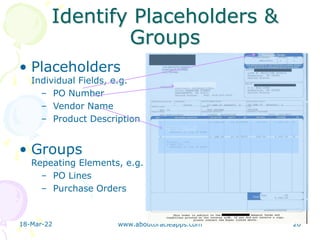
Identify Placeholders &
Groups
• Placeholders
Individual Fields, e.g.
– PO Number
– Vendor Name
– Product Description
• Groups
Repeating Elements, e.g.
– PO Lines
– Purchase Orders
18-Mar-22 www.aboutoracleapps.com 21
Layout Template
18-Mar-22 www.aboutoracleapps.com 22
Map Template
18-Mar-22 www.aboutoracleapps.com 23
Basic RTF
18-Mar-22 www.aboutoracleapps.com 24
Form Field Method
18-Mar-22 www.aboutoracleapps.com 25
Register Data
Definition and
Template
18-Mar-22 www.aboutoracleapps.com 26
Register Data Definition
1. The Application must
match that of the
report
2. The “Status Code”
must match the
“Short Name” of the
report
3. Attach a sample of
your XML output to
preview and test your
template
18-Mar-22 www.aboutoracleapps.com 27
Register Template
1. The Application must
match that of the
report
2. The Type must match
the file type of your
design
3. A Data Definition is
“Required”, but it may
simply be a place-
holder
4. However, by loading
sample XML, you can
preview the template
5. You can add different
templates for each
language and region
18-Mar-22 www.aboutoracleapps.com 28
Print Report
18-Mar-22 www.aboutoracleapps.com 29
Run Concurrent Program
18-Mar-22 www.aboutoracleapps.com 30
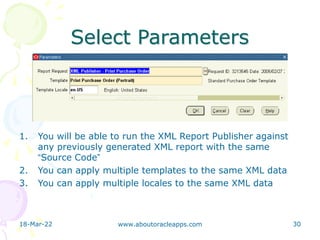
Select Parameters
1. You will be able to run the XML Report Publisher against
any previously generated XML report with the same
“Source Code”
2. You can apply multiple templates to the same XML data
3. You can apply multiple locales to the same XML data
18-Mar-22 www.aboutoracleapps.com 31
View Output
18-Mar-22 www.aboutoracleapps.com 32
Finished Result

XML Publisher (www.aboutoracleapps.com)