
Oracle Apps Technical
Training
www.click4learning.com
ERP Overview
www.click4learning.com
What is an ERP?
www.click4learning.com
 ERP stands for Enterprise Resource Planning.
 ERP is a software solution that takes the process view to meet
organizational goals, tightly integrating all functions of the
enterprise.
Why ERP?
www.click4learning.com
 ERP facilitates integration of company-wide information
systems with the potential to go across companies.
 It enables decision-makers to have an enterprise-wide view
of the information they need in a timely, reliable and
consistent fashion.
 It facilitates information sharing across organizational units
and geographical locations.
Major ERP Products
www.click4learning.com
 Below are some of the major ERPs available in the market.
 Oracle Applications.
 SAP
 JD Edwards
 Baan
 Peoplesoft
 Mapics
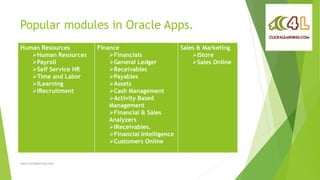
Popular modules in Oracle Apps.
www.click4learning.com
Human Resources
Human Resources
Payroll
Self Service HR
Time and Labor
ILearning
IRecruitment
Finance
Financials
General Ledger
Receivables
Payables
Assets
Cash Management
Activity Based
Management
Financial & Sales
Analyzers
IReceivables.
Financial Intelligence
Customers Online
Sales & Marketing
IStore
Sales Online
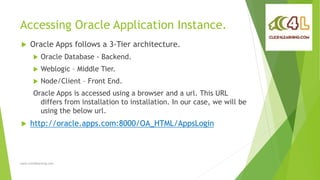
Accessing Oracle Application Instance.
www.click4learning.com
 Oracle Apps follows a 3-Tier architecture.
 Oracle Database - Backend.
 Weblogic – Middle Tier.
 Node/Client – Front End.
Oracle Apps is accessed using a browser and a url. This URL
differs from installation to installation. In our case, we will be
using the below url.
 http://oracle.apps.com:8000/OA_HTML/AppsLogin
Accessing Oracle Application Instance.
www.click4learning.com
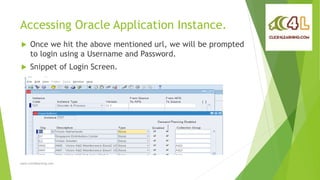
 Once we hit the above mentioned url, we will be prompted
to login using a Username and Password.
 Snippet of Login Screen.
Accessing Oracle Application Instance.
www.click4learning.com
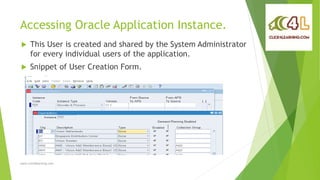
 This User is created and shared by the System Administrator
for every individual users of the application.
 Snippet of User Creation Form.
Assigning Responsibilities.
www.click4learning.com
 Once logged into the application, User ability to work is
decided by the Responsibilities assigned to the user.
Responsibilities are assigned to the user by System
Administrator.
 Snippet of User Responsibilities assignment form.
Some Oracle Apps Constructs.
www.click4learning.com
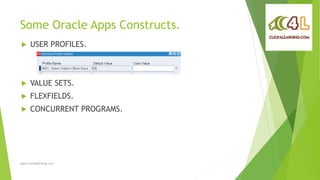
 USER PROFILES.
 VALUE SETS.
 FLEXFIELDS.
 CONCURRENT PROGRAMS.
RICE Components
www.click4learning.com
 REPORTS.
 INTERFACES.
 CONVERSIONS.
 ENHANCEMENTS.
REPORTS
www.click4learning.com
 Oracle Apps comes with a variety of reports by default. It
provides a lot of generic reports which can be useful in most
of the cases by NOT ALL.
 Every organization needs reporting as per their own
requirements and standards. This is where Oracle Apps
Technical resource comes into play. There are a couple of
popular and widely used Oracle Reporting Tools used in
Oracle Apps.
 Oracle Reports.
 BI Publisher.
INTERFACES
www.click4learning.com
 What is an Interface?
 Integrating one application with other application.
 It involves data file, insertion scripts, loader scripts, temp tables.
 Data file is a flat file having contents with delimiter.
 Insertion scripts are used to insert data into product tables from
temp tables.
 Loader scripts are also called as control files which are used to insert
data from data file to temp table.
 Temp tables are used to transfer data from one module to another or
application.
INTERFACES
www.click4learning.com
 Why Interface?
 Transfer data from one module/application to another.
 There are 2 types of Interfaces. Inbound and Outbound
 Outbound Example: Oracle HRMS maintains employees information of
the organization. But their salary is processed in a third party tool.
Oracle HRMS has to send data to the third party tool on a regular
basis.
 Inbound Example: Third party tool processes Payroll. After the salary
is processed and salary disbursed, this information needs to flow to
Oracle Payables.
CONVERSIONS
www.click4learning.com
 What is Conversion?
 Data Conversion is receiving data from a legacy system or
receiving data from another module ( e.g. PA), validating
it and converting it to your target module using the
standard import program.
 What is the need of Conversion?
 When Oracle Apps is implemented, invariably you will find
them using some other system to maintain data and processes.
This data needs to be brought into Oracle Apps for various
reasons. This requires conversion.
ENHANCEMENTS/EXTENSIONS
www.click4learning.com
 Enhancements (or extensions) to the existing system to add
additional functionality to existing system without
disturbing the core software functionality of the system.
 This may need creation a new OAF page or a new Oracle
Form along with new menu option. There is also a facility to
personalize the seeded form using the Forms Personalization
facility provided by Oracle Apps.
 Snippet of Oracle Forms Personalization Form window.
www.click4learning.com
Thank you
www.click4learning.com

Introduction to Oracle Apps Technical

  • 1.
  • 2.
  • 3.
    What is anERP? www.click4learning.com  ERP stands for Enterprise Resource Planning.  ERP is a software solution that takes the process view to meet organizational goals, tightly integrating all functions of the enterprise.
  • 4.
    Why ERP? www.click4learning.com  ERPfacilitates integration of company-wide information systems with the potential to go across companies.  It enables decision-makers to have an enterprise-wide view of the information they need in a timely, reliable and consistent fashion.  It facilitates information sharing across organizational units and geographical locations.
  • 5.
    Major ERP Products www.click4learning.com Below are some of the major ERPs available in the market.  Oracle Applications.  SAP  JD Edwards  Baan  Peoplesoft  Mapics
  • 6.
    Popular modules inOracle Apps. www.click4learning.com Human Resources Human Resources Payroll Self Service HR Time and Labor ILearning IRecruitment Finance Financials General Ledger Receivables Payables Assets Cash Management Activity Based Management Financial & Sales Analyzers IReceivables. Financial Intelligence Customers Online Sales & Marketing IStore Sales Online
  • 7.
    Accessing Oracle ApplicationInstance. www.click4learning.com  Oracle Apps follows a 3-Tier architecture.  Oracle Database - Backend.  Weblogic – Middle Tier.  Node/Client – Front End. Oracle Apps is accessed using a browser and a url. This URL differs from installation to installation. In our case, we will be using the below url.  http://oracle.apps.com:8000/OA_HTML/AppsLogin
  • 8.
    Accessing Oracle ApplicationInstance. www.click4learning.com  Once we hit the above mentioned url, we will be prompted to login using a Username and Password.  Snippet of Login Screen.
  • 9.
    Accessing Oracle ApplicationInstance. www.click4learning.com  This User is created and shared by the System Administrator for every individual users of the application.  Snippet of User Creation Form.
  • 10.
    Assigning Responsibilities. www.click4learning.com  Oncelogged into the application, User ability to work is decided by the Responsibilities assigned to the user. Responsibilities are assigned to the user by System Administrator.  Snippet of User Responsibilities assignment form.
  • 11.
    Some Oracle AppsConstructs. www.click4learning.com  USER PROFILES.  VALUE SETS.  FLEXFIELDS.  CONCURRENT PROGRAMS.
  • 12.
    RICE Components www.click4learning.com  REPORTS. INTERFACES.  CONVERSIONS.  ENHANCEMENTS.
  • 13.
    REPORTS www.click4learning.com  Oracle Appscomes with a variety of reports by default. It provides a lot of generic reports which can be useful in most of the cases by NOT ALL.  Every organization needs reporting as per their own requirements and standards. This is where Oracle Apps Technical resource comes into play. There are a couple of popular and widely used Oracle Reporting Tools used in Oracle Apps.  Oracle Reports.  BI Publisher.
  • 14.
    INTERFACES www.click4learning.com  What isan Interface?  Integrating one application with other application.  It involves data file, insertion scripts, loader scripts, temp tables.  Data file is a flat file having contents with delimiter.  Insertion scripts are used to insert data into product tables from temp tables.  Loader scripts are also called as control files which are used to insert data from data file to temp table.  Temp tables are used to transfer data from one module to another or application.
  • 15.
    INTERFACES www.click4learning.com  Why Interface? Transfer data from one module/application to another.  There are 2 types of Interfaces. Inbound and Outbound  Outbound Example: Oracle HRMS maintains employees information of the organization. But their salary is processed in a third party tool. Oracle HRMS has to send data to the third party tool on a regular basis.  Inbound Example: Third party tool processes Payroll. After the salary is processed and salary disbursed, this information needs to flow to Oracle Payables.
  • 16.
    CONVERSIONS www.click4learning.com  What isConversion?  Data Conversion is receiving data from a legacy system or receiving data from another module ( e.g. PA), validating it and converting it to your target module using the standard import program.  What is the need of Conversion?  When Oracle Apps is implemented, invariably you will find them using some other system to maintain data and processes. This data needs to be brought into Oracle Apps for various reasons. This requires conversion.
  • 17.
    ENHANCEMENTS/EXTENSIONS www.click4learning.com  Enhancements (orextensions) to the existing system to add additional functionality to existing system without disturbing the core software functionality of the system.  This may need creation a new OAF page or a new Oracle Form along with new menu option. There is also a facility to personalize the seeded form using the Forms Personalization facility provided by Oracle Apps.  Snippet of Oracle Forms Personalization Form window.
  • 18.
  • 19.