WRITTEN
COMMUNICATION
Vasim Shaikh and Team
WRITING IN COMMUNICATION PROCESS
Sender
Encode
Decode
Decode
Encode
Message
Feedback
CHANNEL Receiver
NoiseNoise
NoiseNoise
WRITING
Words, Phrases and Sentences
• Writing can be a skill that can be learnt and
practiced
• Choose right words and phrases
• A sentence is a group of words that expresses
a single complete thought.
• Construct grammatical and logical sentences
• Use acronyms carefully
DRAFT
• 1st rule of writing: The first draft is only the “first”
draft
• Most experienced and effusive of writers cannot
tell their story “right” the first time
• Prepare a scratch outline, i.e. a one-sentence
summary for each of your paragraphs
• For example:
Da Vinci Code: A Harvard symbologist and a female French cryptographer
solve the puzzle of the Holy Grail in a race against death across Europe
ADVANTAGES OF WRITTEN COMMUNICATION
• Wider reach than oral communication
• No effect of accent, colloquial pronunciation.
• Reviewed and revised
• Maintain records
• Can be reproduced exactly
• Supporting or additional data
DISADVANTAGES OF WRITTEN COMMUNICATION
• Impersonal in nature
• May or may not read
• Slower than oral communication
• Require storage –time consuming and expensive
• Requires reading and writing abilities
• Can become public
• Not environment friendly
Do’s and Don’ts
• Mind the tone
• Use active voice
• Old to new, familiar to unfamiliar
• Write in an affirmative
• Avoid Fillers
• Omit empty words
• Avoid awkward phrasing
• Thismaystrainyoureyes
10 COMMANDMENTS
1. Use one-syllable word in place of two-
syllable word; two-syllable word in place of
three-syllable word; and so on
2. Use concrete words in place of abstract
words
3. Use active voice in place of passive voice
4. Use more of verbs and nouns; and less of
adjectives and adverbs
5. Make each word count
10 COMMANDMENTS…Contd
6. Keep it short and simple
7. Concentrate on paragraph development and
develop only one idea in one paragraph
8. Relate the experience to the reader
9. Write to express, not to impress
10. Maintain the “feel” and “rhythm” in language
TYPES OF WRITTEN COMMUNICATION
• E-Mail
• Letters
• Reports
• Cover letter
• Resume / Curriculum vitea
• Manuals, Procedures
• Memo’s
• Minutes
EMAIL WRITING
• Electronic mail is a method of exchanging
digital messages between computer users
• Most commonly used in offices as means to
communicate and share ideas and
documents.
• Around 40% of the world population has an
internet connection today. In 1995, it was less
than 1%.
Effective Email writing
• Proper Subject line
• Attachments – double check
• Proper Page Layout
• KISS
• Appropriate language
• Proof read
• Proper use of “To” and “CC”
Death Email
• ALL CAPITAL WORDS
• Blank or wrong subject line
• Emoticons or abbreviations
• Unnecessary words
• Delay of 24 hours
• Email good for everything
LETTER WRITING
A letter is a written message from one party to
another containing information.
Three Basic format
1. Full block
2. Modified block
3. Simplified block
Two Extensions
1. Semi block
2. Modified semi block
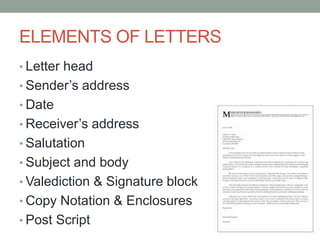
ELEMENTS OF LETTERS
• Letter head
• Sender’s address
• Date
• Receiver’s address
• Salutation
• Subject and body
• Valediction & Signature block
• Copy Notation & Enclosures
• Post Script
TYPES OF LETTERS
• Compliant letters
• Request letters
• Sales and Marketing letters
• Get-well-soon letters
• Recommendation letters
• Selection / Acceptance letters
• Rejection / Reject letters
Why letters are used
• Professional, official and means business
• Physical record and Keepsake
• No requirement of additional devices
• One sender, one address
• Inclusion of visual information
Why it’s usage is diminishing
• Not completely secure
• Long winded process
• Time consuming
• Lost and not found
• Bad for environment
10 Commandments of Letter writing
1. Write original letters; reduce use of “form”
letters
2. Address the letter to a specific person
3. Spell the recipient’s name right, “every single
time”
4. Use appropriate titles
5. Limit the letter to a single page
10 Commandments… (Contd)
6. Use appropriate language (receiver &
objective)
7. Proofread the letter
8. Send neatly typed/written letters
9. Use positive and courteous language
10.NEVER send poison-pen letters to poor,
unsuspecting recipients
REPORT WRITING
Report is any informational work, made with the
specific intention of relaying information in a
widely presentable form.
Purpose:
• To Inform
• To Analyze
• To Compare
• To Request
• To Impress
TYPES OF REPORT
• Technical reports
• Annual reports
• Recommendation reports
• Progress reports
• Budget reports
• Credit reports
• Appraisal reports
Report Writing Stages
• Stage 1: Define the objective and audience
• Stage 2: Gather the necessary information
• Stage 3: Analyze the information
• Stage 4: Organize the information
• Stage 5: Write the report
Report Layout
• Cover page
• Title page
• Preface
• Acknowledgement
• Table of contents
• Executive summary
• Body
• References/Bibliography
Do’s and Don’ts of Report Writing
• Keep heading simple and short
• Good quality paper
• Use adequate white space
• Use template to save time
• No more than five fonts
• No more than five colors
• No double emphasis
• No weird fonts
• Not too much of clipart
Instructions, Manuals & Process Description
• The goal of written Instruction is to completely
simplify a procedure with no room for doubt in the
mind of the reader.
• Procedural guides help the people assemble,
install, and operate product
• It varies in length depending on the complexity of
the procedure
• Troubleshooting guides help users isolate
problems and determine the resources they need
to make repairs
Curriculum Vitae
• A written overview of a person's experience and
other qualifications for a job opportunity.
• CV’s may also be requested for applicants to
postsecondary programs, scholarships, grants
and bursaries.
• Curriculum vitae is a Latin expression which can
be loosely translated as [the] course of [my] life.
Resumes
• A written document used to present,
backgrounds and skills
• Mostly used for new employment
• A "summary" of relevant job experience and
education, as its French origin implies
• Used to screen applications, followed by
interviews
Resume Do’s and Don’ts
• Be honest
• List only significant and/or relevant details
• Back your claim with evidence
• Use good-quality paper
• Proofread your resume
• Do not exaggerate or brag
• Do not begin sentences with “I”
• Do not use technical jargons
• Do not overdo the use of capitals and boldface
Resume Format: Chronological
• Traditional format of resume
• Events in reverse chronological order
• Preferred by conservative and traditional
companies
• Focus on work experience; if any
• Applicable skillset are not in clear format
Resume Format: Functional
• Highlights functional (applicable) skills,
achievements, and responsibilities
• Focus on skills and abilities and to be used
• Advantage: Highlights relevant strengths and
skills, which will help the candidate do the job
better
• Disadvantage: Lacks detailed work history
Resume Format: Achievement
• Most powerful of all formats
• There are no headings
• Only 4 or 5 achievement statements, which will
“hard-sell” you to your prospective employer
• Attach a one- or two-page achievement
addendum
• Achievement addendum – allows you to
showcase the most powerful parts of your
personal story with more detail and excitement
Resume Format: Hybrid
• Combination of chronological and functional
format
• Combines experience with skill-set
• Use hybrid format when:
• you have varied and unrelated work
experience
• you have short work history
• you want to highlight relevant internships and
other assignments
RESUMES THAT ROCK
• One size does not fit all!
• AIDA principle: Attention, Interest, Desire, and
Action
• Freedom allowed when applying for creative fields
• Saying “Less” is Saying “More” – One Pager Profile
• Professional sounding email address
Cover Letter
• Resume is the ‘product manual’ and cover
letter is the ‘sales pitch’
• It introduces you to the prospective employer
and compels him/her to “buy” your services
• An “elevator pitch” in written form
• Use paragraph format
Why Cover Letters
• When your cover letter attracts interest,
employers read your resume to confirm
positive first impression
• Strong personalization
• High energy
• Relevant information
• Moderately informal
• Interesting to read
Cover Letter Styles
• Style 1: “I-You-We”
• Three paragraphs
• Logical formula: Given-Since-Therefore
• 1st Para: Talk about yourself
• 2nd Para: Talk about the company
• 3rd Para: Talk about the ‘fitment’
• Style 2: “Skill City”
• Highlights skills in paragraph point
10 Commandments of Cover Letter
1. ALWAYS send a cover letter with the resume
2. Customize the cover letter
3. Restrict cover letter to one page
4. Do not make spelling or grammatical
mistakes
5. Include appropriate “keywords”
10 Commandments …(Contd)
6. Do NOT use the cover letter as an excuse to
brag
7. Use concrete language and provide
evidence
8. Do NOT use unnecessary humor
9. Use a suitable format and structure
10.NEVER send the same cover letter to two
recruiters
MEMO’s
• Memo (or memorandum) – note regarding something for
future
• "to mention, call to mind, recount, relate“ - It must be
remembered (that)...
• Plural – memoranda or memorandums
• May be short (half-a-page) or long (several pages)
• E-memo is less formal and is shorter in length
Purpose of Memo
• To record information
• To motivate for action
• To issue a directive
• To convey an idea
• To reprimand
Memo’s Format and Tips
• To
• From
• Date
• Subject
• Body
• When writing a Memo; remember APPLE
• A - Audience
• P - Purpose
• P - Point
• L - Limit
• E - Emphasis
Research Paper
• Organized analysis of a subject
• Documented prose work incorporating the
findings
• scientific paper / investigative paper /
• library paper / term paper
• Important to access observations
• To repeat experiments
PROPOSAL
• Written offer to solve a technical problem or to
undertake a project of practical or theoretical
in nature
• Solicited – request for quotation, invitation for
bid etc.
• Unsolicited – Marketing brochures, one for all.
Proposal Structure
• Prefatory
• Title page
• Draft contract
• Executive summary etc.
• Main Body
• Introduction
• Technical and Management section
• Cost estimate etc.
• Supplementary parts
• Appendix
• Sources and refrences
Minutes of Meeting
• MOM - reiterate or recapitulate the proceedings
of a meeting. i.e. – “Recap the meeting”
• Should contain
• Points discussed in the meeting
• Arguments presented
• Decision reached
• Responsibilities assigned
• Should not contains
• Descriptive adjectives
MOM Formats
No fixed format; but contains
• Preliminary items
• Name of the group
• Name of the document
• Type of meeting
• Date of meeting
• Time of meeting etc
• Body items
• Meeting announcements
• Old items
• New items etc
• Closing items
• Next meet announcement
• Closing time
• Sribe initials
WHY IS WRITING SO
IMPORTANT
All holy books, either Geeta, Koran or
Bible, they were written 1000’s of year ago
but are still widely followed and read!
That’s the power of written communication!
THANK YOU

Written communication

  • 1.
  • 2.
    WRITING IN COMMUNICATIONPROCESS Sender Encode Decode Decode Encode Message Feedback CHANNEL Receiver NoiseNoise NoiseNoise WRITING
  • 3.
    Words, Phrases andSentences • Writing can be a skill that can be learnt and practiced • Choose right words and phrases • A sentence is a group of words that expresses a single complete thought. • Construct grammatical and logical sentences • Use acronyms carefully
  • 4.
    DRAFT • 1st ruleof writing: The first draft is only the “first” draft • Most experienced and effusive of writers cannot tell their story “right” the first time • Prepare a scratch outline, i.e. a one-sentence summary for each of your paragraphs • For example: Da Vinci Code: A Harvard symbologist and a female French cryptographer solve the puzzle of the Holy Grail in a race against death across Europe
  • 5.
    ADVANTAGES OF WRITTENCOMMUNICATION • Wider reach than oral communication • No effect of accent, colloquial pronunciation. • Reviewed and revised • Maintain records • Can be reproduced exactly • Supporting or additional data
  • 6.
    DISADVANTAGES OF WRITTENCOMMUNICATION • Impersonal in nature • May or may not read • Slower than oral communication • Require storage –time consuming and expensive • Requires reading and writing abilities • Can become public • Not environment friendly
  • 7.
    Do’s and Don’ts •Mind the tone • Use active voice • Old to new, familiar to unfamiliar • Write in an affirmative • Avoid Fillers • Omit empty words • Avoid awkward phrasing • Thismaystrainyoureyes
  • 8.
    10 COMMANDMENTS 1. Useone-syllable word in place of two- syllable word; two-syllable word in place of three-syllable word; and so on 2. Use concrete words in place of abstract words 3. Use active voice in place of passive voice 4. Use more of verbs and nouns; and less of adjectives and adverbs 5. Make each word count
  • 9.
    10 COMMANDMENTS…Contd 6. Keepit short and simple 7. Concentrate on paragraph development and develop only one idea in one paragraph 8. Relate the experience to the reader 9. Write to express, not to impress 10. Maintain the “feel” and “rhythm” in language
  • 10.
    TYPES OF WRITTENCOMMUNICATION • E-Mail • Letters • Reports • Cover letter • Resume / Curriculum vitea • Manuals, Procedures • Memo’s • Minutes
  • 11.
    EMAIL WRITING • Electronicmail is a method of exchanging digital messages between computer users • Most commonly used in offices as means to communicate and share ideas and documents. • Around 40% of the world population has an internet connection today. In 1995, it was less than 1%.
  • 12.
    Effective Email writing •Proper Subject line • Attachments – double check • Proper Page Layout • KISS • Appropriate language • Proof read • Proper use of “To” and “CC”
  • 13.
    Death Email • ALLCAPITAL WORDS • Blank or wrong subject line • Emoticons or abbreviations • Unnecessary words • Delay of 24 hours • Email good for everything
  • 14.
    LETTER WRITING A letteris a written message from one party to another containing information. Three Basic format 1. Full block 2. Modified block 3. Simplified block Two Extensions 1. Semi block 2. Modified semi block
  • 15.
    ELEMENTS OF LETTERS •Letter head • Sender’s address • Date • Receiver’s address • Salutation • Subject and body • Valediction & Signature block • Copy Notation & Enclosures • Post Script
  • 16.
    TYPES OF LETTERS •Compliant letters • Request letters • Sales and Marketing letters • Get-well-soon letters • Recommendation letters • Selection / Acceptance letters • Rejection / Reject letters
  • 17.
    Why letters areused • Professional, official and means business • Physical record and Keepsake • No requirement of additional devices • One sender, one address • Inclusion of visual information
  • 18.
    Why it’s usageis diminishing • Not completely secure • Long winded process • Time consuming • Lost and not found • Bad for environment
  • 19.
    10 Commandments ofLetter writing 1. Write original letters; reduce use of “form” letters 2. Address the letter to a specific person 3. Spell the recipient’s name right, “every single time” 4. Use appropriate titles 5. Limit the letter to a single page
  • 20.
    10 Commandments… (Contd) 6.Use appropriate language (receiver & objective) 7. Proofread the letter 8. Send neatly typed/written letters 9. Use positive and courteous language 10.NEVER send poison-pen letters to poor, unsuspecting recipients
  • 21.
    REPORT WRITING Report isany informational work, made with the specific intention of relaying information in a widely presentable form. Purpose: • To Inform • To Analyze • To Compare • To Request • To Impress
  • 22.
    TYPES OF REPORT •Technical reports • Annual reports • Recommendation reports • Progress reports • Budget reports • Credit reports • Appraisal reports
  • 23.
    Report Writing Stages •Stage 1: Define the objective and audience • Stage 2: Gather the necessary information • Stage 3: Analyze the information • Stage 4: Organize the information • Stage 5: Write the report
  • 24.
    Report Layout • Coverpage • Title page • Preface • Acknowledgement • Table of contents • Executive summary • Body • References/Bibliography
  • 25.
    Do’s and Don’tsof Report Writing • Keep heading simple and short • Good quality paper • Use adequate white space • Use template to save time • No more than five fonts • No more than five colors • No double emphasis • No weird fonts • Not too much of clipart
  • 26.
    Instructions, Manuals &Process Description • The goal of written Instruction is to completely simplify a procedure with no room for doubt in the mind of the reader. • Procedural guides help the people assemble, install, and operate product • It varies in length depending on the complexity of the procedure • Troubleshooting guides help users isolate problems and determine the resources they need to make repairs
  • 27.
    Curriculum Vitae • Awritten overview of a person's experience and other qualifications for a job opportunity. • CV’s may also be requested for applicants to postsecondary programs, scholarships, grants and bursaries. • Curriculum vitae is a Latin expression which can be loosely translated as [the] course of [my] life.
  • 28.
    Resumes • A writtendocument used to present, backgrounds and skills • Mostly used for new employment • A "summary" of relevant job experience and education, as its French origin implies • Used to screen applications, followed by interviews
  • 29.
    Resume Do’s andDon’ts • Be honest • List only significant and/or relevant details • Back your claim with evidence • Use good-quality paper • Proofread your resume • Do not exaggerate or brag • Do not begin sentences with “I” • Do not use technical jargons • Do not overdo the use of capitals and boldface
  • 30.
    Resume Format: Chronological •Traditional format of resume • Events in reverse chronological order • Preferred by conservative and traditional companies • Focus on work experience; if any • Applicable skillset are not in clear format
  • 31.
    Resume Format: Functional •Highlights functional (applicable) skills, achievements, and responsibilities • Focus on skills and abilities and to be used • Advantage: Highlights relevant strengths and skills, which will help the candidate do the job better • Disadvantage: Lacks detailed work history
  • 32.
    Resume Format: Achievement •Most powerful of all formats • There are no headings • Only 4 or 5 achievement statements, which will “hard-sell” you to your prospective employer • Attach a one- or two-page achievement addendum • Achievement addendum – allows you to showcase the most powerful parts of your personal story with more detail and excitement
  • 33.
    Resume Format: Hybrid •Combination of chronological and functional format • Combines experience with skill-set • Use hybrid format when: • you have varied and unrelated work experience • you have short work history • you want to highlight relevant internships and other assignments
  • 34.
    RESUMES THAT ROCK •One size does not fit all! • AIDA principle: Attention, Interest, Desire, and Action • Freedom allowed when applying for creative fields • Saying “Less” is Saying “More” – One Pager Profile • Professional sounding email address
  • 35.
    Cover Letter • Resumeis the ‘product manual’ and cover letter is the ‘sales pitch’ • It introduces you to the prospective employer and compels him/her to “buy” your services • An “elevator pitch” in written form • Use paragraph format
  • 36.
    Why Cover Letters •When your cover letter attracts interest, employers read your resume to confirm positive first impression • Strong personalization • High energy • Relevant information • Moderately informal • Interesting to read
  • 37.
    Cover Letter Styles •Style 1: “I-You-We” • Three paragraphs • Logical formula: Given-Since-Therefore • 1st Para: Talk about yourself • 2nd Para: Talk about the company • 3rd Para: Talk about the ‘fitment’ • Style 2: “Skill City” • Highlights skills in paragraph point
  • 38.
    10 Commandments ofCover Letter 1. ALWAYS send a cover letter with the resume 2. Customize the cover letter 3. Restrict cover letter to one page 4. Do not make spelling or grammatical mistakes 5. Include appropriate “keywords”
  • 39.
    10 Commandments …(Contd) 6.Do NOT use the cover letter as an excuse to brag 7. Use concrete language and provide evidence 8. Do NOT use unnecessary humor 9. Use a suitable format and structure 10.NEVER send the same cover letter to two recruiters
  • 40.
    MEMO’s • Memo (ormemorandum) – note regarding something for future • "to mention, call to mind, recount, relate“ - It must be remembered (that)... • Plural – memoranda or memorandums • May be short (half-a-page) or long (several pages) • E-memo is less formal and is shorter in length
  • 41.
    Purpose of Memo •To record information • To motivate for action • To issue a directive • To convey an idea • To reprimand
  • 42.
    Memo’s Format andTips • To • From • Date • Subject • Body • When writing a Memo; remember APPLE • A - Audience • P - Purpose • P - Point • L - Limit • E - Emphasis
  • 43.
    Research Paper • Organizedanalysis of a subject • Documented prose work incorporating the findings • scientific paper / investigative paper / • library paper / term paper • Important to access observations • To repeat experiments
  • 44.
    PROPOSAL • Written offerto solve a technical problem or to undertake a project of practical or theoretical in nature • Solicited – request for quotation, invitation for bid etc. • Unsolicited – Marketing brochures, one for all.
  • 45.
    Proposal Structure • Prefatory •Title page • Draft contract • Executive summary etc. • Main Body • Introduction • Technical and Management section • Cost estimate etc. • Supplementary parts • Appendix • Sources and refrences
  • 46.
    Minutes of Meeting •MOM - reiterate or recapitulate the proceedings of a meeting. i.e. – “Recap the meeting” • Should contain • Points discussed in the meeting • Arguments presented • Decision reached • Responsibilities assigned • Should not contains • Descriptive adjectives
  • 47.
    MOM Formats No fixedformat; but contains • Preliminary items • Name of the group • Name of the document • Type of meeting • Date of meeting • Time of meeting etc • Body items • Meeting announcements • Old items • New items etc • Closing items • Next meet announcement • Closing time • Sribe initials
  • 48.
    WHY IS WRITINGSO IMPORTANT All holy books, either Geeta, Koran or Bible, they were written 1000’s of year ago but are still widely followed and read! That’s the power of written communication!
  • 49.

Editor's Notes

  • #3 Lets first understand where in the communication process writing falls? (Animation) . Here it is! Writing…………
  • #4 The difference between the right word and almost right word is the difference between lighting and the lighting bug – Mark Twain.
  • #5 All points can be told as one single story. Quote- The wastebasket is a writer’s best friend.
  • #15 In today’s world of great inventions and technology, letters have somehow become redundant. But they still can communicate a lot more than all other modes of communication. Organizations and various government departments still bank on letters as a strong medium of communication. Letters now commonly known as “hard copy documents” are considered more relevant and important than email copies of text messages as proof or evidence of some sort.
  • #28 Bursaries (meaning) - A scholarship to attend a college or university.
  • #45 Unsolicited proposal - with no direct connection between customer needs or specified requirements. Vendors use them to introduce a product or service to a prospective customer. They are often used as "leave-behinds" at the end of initial meetings with or customers or "give-aways" at trade shows or other public meetings. They are not designed to close a sale, just introduce the possibility of a sale
  • #48 Next Slide – Why writing is important