1
Agenda
what are pipes?
why use pipes?
what are the different types of pipes?
combining operations with pipes
case studies
•
•
•
•
•
2
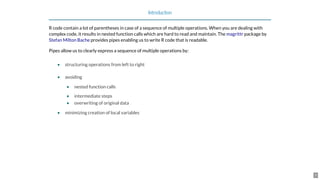
Introduction
R code contain a lot of parentheses in case of a sequence of multiple operations. When you are dealing with
complex code, it results in nested function calls which are hard to read and maintain. The package by
provides pipes enabling us to write R code that is readable.
Pipes allow us to clearly express a sequence of multiple operations by:
structuring operations from left to right
avoiding
nested function calls
intermediate steps
overwriting of original data
minimizing creation of local variables
magrittr
Stefan Milton Bache
•
•
•
•
•
•
3
Pipes
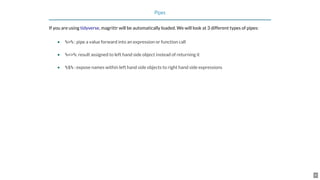
If you are using , magrittr will be automatically loaded. We will look at 3 different types of pipes:
%>% : pipe a value forward into an expression or function call
%<>%: result assigned to left hand side object instead of returning it
%$% : expose names within left hand side objects to right hand side expressions
tidyverse
•
•
•
4
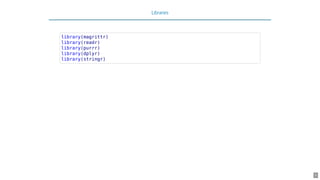
Libraries
library(magrittr)
library(readr)
library(purrr)
library(dplyr)
library(stringr)
5
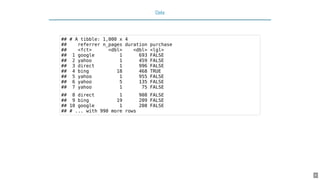
Data
## # A tibble: 1,000 x 4
## referrer n_pages duration purchase
## <fct> <dbl> <dbl> <lgl>
## 1 google 1 693 FALSE
## 2 yahoo 1 459 FALSE
## 3 direct 1 996 FALSE
## 4 bing 18 468 TRUE
## 5 yahoo 1 955 FALSE
## 6 yahoo 5 135 FALSE
## 7 yahoo 1 75 FALSE
## 8 direct 1 908 FALSE
## 9 bing 19 209 FALSE
## 10 google 1 208 FALSE
## # ... with 990 more rows
6
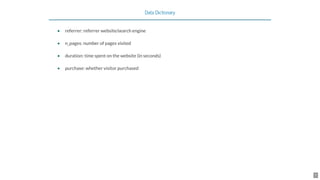
Data Dictionary
referrer: referrer website/search engine
n_pages: number of pages visited
duration: time spent on the website (in seconds)
purchase: whether visitor purchased
•
•
•
•
7
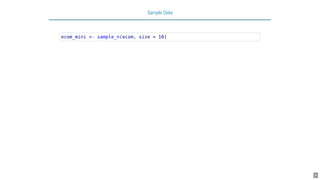
Sample Data
ecom_mini <- sample_n(ecom, size = 10)
8
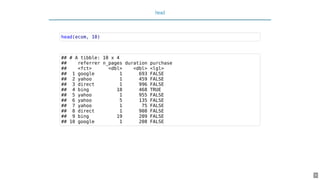
head
head(ecom, 10)
## # A tibble: 10 x 4
## referrer n_pages duration purchase
## <fct> <dbl> <dbl> <lgl>
## 1 google 1 693 FALSE
## 2 yahoo 1 459 FALSE
## 3 direct 1 996 FALSE
## 4 bing 18 468 TRUE
## 5 yahoo 1 955 FALSE
## 6 yahoo 5 135 FALSE
## 7 yahoo 1 75 FALSE
## 8 direct 1 908 FALSE
## 9 bing 19 209 FALSE
## 10 google 1 208 FALSE
9
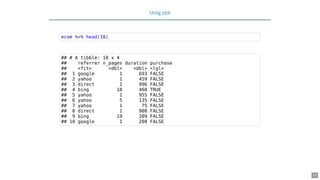
Using pipe
ecom %>% head(10)
## # A tibble: 10 x 4
## referrer n_pages duration purchase
## <fct> <dbl> <dbl> <lgl>
## 1 google 1 693 FALSE
## 2 yahoo 1 459 FALSE
## 3 direct 1 996 FALSE
## 4 bing 18 468 TRUE
## 5 yahoo 1 955 FALSE
## 6 yahoo 5 135 FALSE
## 7 yahoo 1 75 FALSE
## 8 direct 1 908 FALSE
## 9 bing 19 209 FALSE
## 10 google 1 208 FALSE
10
Square Root
y <- ecom_mini$n_pages
y <- sqrt(y)
# combine above steps
sqrt(ecom_mini$n_pages)
## [1] 2.236068 4.123106 4.242641 2.236068 4.000000 2.449490 3.605551
## [8] 3.162278 3.741657 1.000000
11
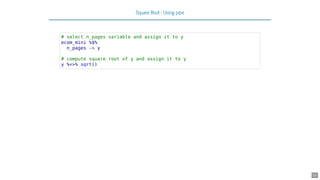
Square Root - Using pipe
# select n_pages variable and assign it to y
ecom_mini %$%
n_pages -> y
# compute square root of y and assign it to y
y %<>% sqrt()
12
13
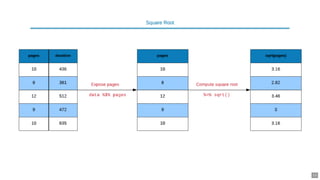
Square Root - Using pipe
ecom_mini %$%
n_pages %>%
sqrt() -> y
y
## [1] 2.236068 4.123106 4.242641 2.236068 4.000000 2.449490 3.605551
## [8] 3.162278 3.741657 1.000000
14
15
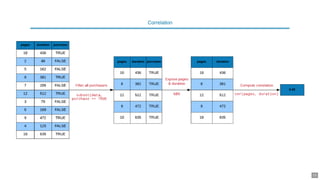
Correlation
# without pipe
ecom1 <- subset(ecom, purchase)
cor(ecom1$n_pages, ecom1$duration)
## [1] 0.4290905
16
Correlation - Using pipe
# with pipe
ecom %>%
subset(purchase) %$%
cor(n_pages, duration)
## [1] 0.4290905
# using filter from dplyr and pipe
ecom %>%
filter(purchase) %$%
cor(n_pages, duration)
## [1] 0.4290905
17
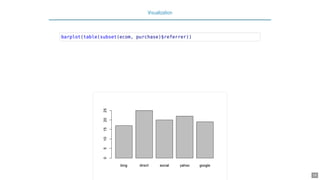
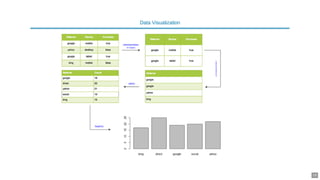
Visualization
barplot(table(subset(ecom, purchase)$referrer))
18
19
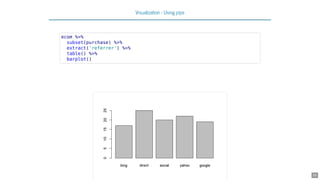
Visualization - Using pipe
ecom %>%
subset(purchase) %>%
extract('referrer') %>%
table() %>%
barplot()
20
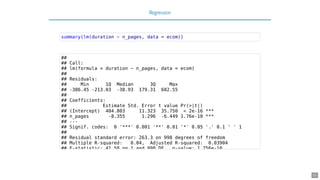
Regression
summary(lm(duration ~ n_pages, data = ecom))
##
## Call:
## lm(formula = duration ~ n_pages, data = ecom)
##
## Residuals:
## Min 1Q Median 3Q Max
## -386.45 -213.03 -38.93 179.31 602.55
##
## Coefficients:
## Estimate Std. Error t value Pr(>|t|)
## (Intercept) 404.803 11.323 35.750 < 2e-16 ***
## n_pages -8.355 1.296 -6.449 1.76e-10 ***
## ---
## Signif. codes: 0 '***' 0.001 '**' 0.01 '*' 0.05 '.' 0.1 ' ' 1
##
## Residual standard error: 263.3 on 998 degrees of freedom
## Multiple R-squared: 0.04, Adjusted R-squared: 0.03904
## F-statistic: 41 58 on 1 and 998 DF p-value: 1 756e-10
21
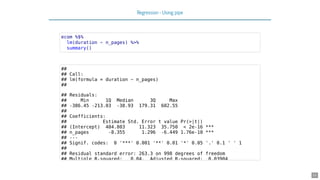
Regression - Using pipe
ecom %$%
lm(duration ~ n_pages) %>%
summary()
##
## Call:
## lm(formula = duration ~ n_pages)
##
## Residuals:
## Min 1Q Median 3Q Max
## -386.45 -213.03 -38.93 179.31 602.55
##
## Coefficients:
## Estimate Std. Error t value Pr(>|t|)
## (Intercept) 404.803 11.323 35.750 < 2e-16 ***
## n_pages -8.355 1.296 -6.449 1.76e-10 ***
## ---
## Signif. codes: 0 '***' 0.001 '**' 0.01 '*' 0.05 '.' 0.1 ' ' 1
##
## Residual standard error: 263.3 on 998 degrees of freedom
## Multiple R-squared: 0.04, Adjusted R-squared: 0.03904
22
String Manipulation
email <- 'jovialcann@anymail.com'
# without pipe
str_to_upper(str_sub(str_split(email, '@')[[1]][1], start = 1, end = 6))
## [1] "JOVIAL"
23
String Manipulation - Using Pipe
# with pipe
email %>%
str_split(pattern = '@') %>%
extract2(1) %>%
extract(1) %>%
str_sub(start = 1, end = 6) %>%
str_to_upper()
## [1] "JOVIAL"
24
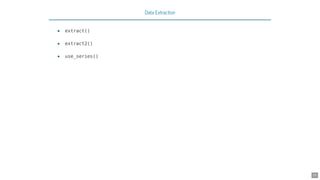
Data Extraction
extract()
extract2()
use_series()
•
•
•
25
Extract Column By Name
ecom_mini['n_pages']
## # A tibble: 10 x 1
## n_pages
## <dbl>
## 1 5
## 2 17
## 3 18
## 4 5
## 5 16
## 6 6
## 7 13
## 8 10
## 9 14
## 10 1
extract(ecom_mini, 'n_pages')
## # A tibble: 10 x 1
## n_pages
## <dbl> 26
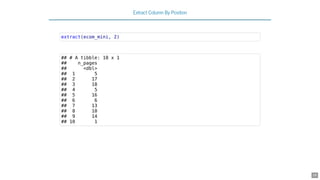
Extract Column By Position
ecom_mini[2]
## # A tibble: 10 x 1
## n_pages
## <dbl>
## 1 5
## 2 17
## 3 18
## 4 5
## 5 16
## 6 6
## 7 13
## 8 10
## 9 14
## 10 1
27
Extract Column By Position
extract(ecom_mini, 2)
## # A tibble: 10 x 1
## n_pages
## <dbl>
## 1 5
## 2 17
## 3 18
## 4 5
## 5 16
## 6 6
## 7 13
## 8 10
## 9 14
## 10 1
28
Extract Column (as vector)
ecom_mini$n_pages
## [1] 5 17 18 5 16 6 13 10 14 1
29
Extract Column (as vector)
use_series(ecom_mini, 'n_pages')
## [1] 5 17 18 5 16 6 13 10 14 1
30
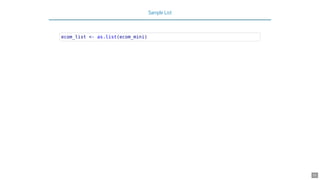
Sample List
ecom_list <- as.list(ecom_mini)
31
Extract List Element By Name
# base
ecom_list[['n_pages']]
## [1] 5 17 18 5 16 6 13 10 14 1
ecom_list$n_pages
## [1] 5 17 18 5 16 6 13 10 14 1
32
Extract List Element By Name
# magrittr
extract2(ecom_list, 'n_pages')
## [1] 5 17 18 5 16 6 13 10 14 1
use_series(ecom_list, n_pages)
## [1] 5 17 18 5 16 6 13 10 14 1
33
Extract List Element By Position
# base
ecom_list[[1]]
## [1] direct social yahoo direct yahoo bing direct social direct g
## Levels: bing direct social yahoo google
# magrittr
extract2(ecom_list, 1)
## [1] direct social yahoo direct yahoo bing direct social direct g
## Levels: bing direct social yahoo google
34
Extract List Element (as vector)
# base
ecom_list$n_pages
## [1] 5 17 18 5 16 6 13 10 14 1
# magrittr
use_series(ecom_list, n_pages)
## [1] 5 17 18 5 16 6 13 10 14 1
35
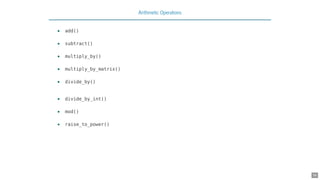
Arithmetic Operations
add()
subtract()
multiply_by()
multiply_by_matrix()
divide_by()
divide_by_int()
mod()
raise_to_power()
•
•
•
•
•
•
•
•
36
Addition
1:10 + 1
## [1] 2 3 4 5 6 7 8 9 10 11
add(1:10, 1)
## [1] 2 3 4 5 6 7 8 9 10 11
`+`(1:10, 1)
## [1] 2 3 4 5 6 7 8 9 10 11
37
Multiplication
1:10 * 3
## [1] 3 6 9 12 15 18 21 24 27 30
multiply_by(1:10, 3)
## [1] 3 6 9 12 15 18 21 24 27 30
`*`(1:10, 3)
## [1] 3 6 9 12 15 18 21 24 27 30
38
Division
1:10 / 2
## [1] 0.5 1.0 1.5 2.0 2.5 3.0 3.5 4.0 4.5 5.0
divide_by(1:10, 2)
## [1] 0.5 1.0 1.5 2.0 2.5 3.0 3.5 4.0 4.5 5.0
`/`(1:10, 2)
## [1] 0.5 1.0 1.5 2.0 2.5 3.0 3.5 4.0 4.5 5.0
39
Power
1:10 ^ 2
## [1] 1 2 3 4 5 6 7 8 9 10 11 12 13 14 15 16
## [18] 18 19 20 21 22 23 24 25 26 27 28 29 30 31 32 33
## [35] 35 36 37 38 39 40 41 42 43 44 45 46 47 48 49 50
## [52] 52 53 54 55 56 57 58 59 60 61 62 63 64 65 66 67
## [69] 69 70 71 72 73 74 75 76 77 78 79 80 81 82 83 84
## [86] 86 87 88 89 90 91 92 93 94 95 96 97 98 99 100
raise_to_power(1:10, 2)
## [1] 1 4 9 16 25 36 49 64 81 100
`^`(1:10, 2)
## [1] 1 4 9 16 25 36 49 64 81 100
40
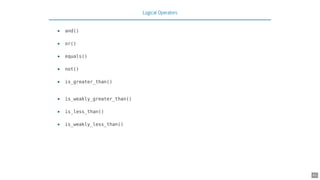
Logical Operators
and()
or()
equals()
not()
is_greater_than()
is_weakly_greater_than()
is_less_than()
is_weakly_less_than()
•
•
•
•
•
•
•
•
41
Greater Than
1:10 > 5
## [1] FALSE FALSE FALSE FALSE FALSE TRUE TRUE TRUE TRUE TRUE
is_greater_than(1:10, 5)
## [1] FALSE FALSE FALSE FALSE FALSE TRUE TRUE TRUE TRUE TRUE
`>`(1:10, 5)
## [1] FALSE FALSE FALSE FALSE FALSE TRUE TRUE TRUE TRUE TRUE
42
Weakly Greater Than
1:10 >= 5
## [1] FALSE FALSE FALSE FALSE TRUE TRUE TRUE TRUE TRUE TRUE
is_weakly_greater_than(1:10, 5)
## [1] FALSE FALSE FALSE FALSE TRUE TRUE TRUE TRUE TRUE TRUE
`>=`(1:10, 5)
## [1] FALSE FALSE FALSE FALSE TRUE TRUE TRUE TRUE TRUE TRUE
43
44

Writing Readable Code with Pipes

  • 1.
  • 2.
    Agenda what are pipes? whyuse pipes? what are the different types of pipes? combining operations with pipes case studies • • • • • 2
  • 3.
    Introduction R code containa lot of parentheses in case of a sequence of multiple operations. When you are dealing with complex code, it results in nested function calls which are hard to read and maintain. The package by provides pipes enabling us to write R code that is readable. Pipes allow us to clearly express a sequence of multiple operations by: structuring operations from left to right avoiding nested function calls intermediate steps overwriting of original data minimizing creation of local variables magrittr Stefan Milton Bache • • • • • • 3
  • 4.
    Pipes If you areusing , magrittr will be automatically loaded. We will look at 3 different types of pipes: %>% : pipe a value forward into an expression or function call %<>%: result assigned to left hand side object instead of returning it %$% : expose names within left hand side objects to right hand side expressions tidyverse • • • 4
  • 5.
  • 6.
    Data ## # Atibble: 1,000 x 4 ## referrer n_pages duration purchase ## <fct> <dbl> <dbl> <lgl> ## 1 google 1 693 FALSE ## 2 yahoo 1 459 FALSE ## 3 direct 1 996 FALSE ## 4 bing 18 468 TRUE ## 5 yahoo 1 955 FALSE ## 6 yahoo 5 135 FALSE ## 7 yahoo 1 75 FALSE ## 8 direct 1 908 FALSE ## 9 bing 19 209 FALSE ## 10 google 1 208 FALSE ## # ... with 990 more rows 6
  • 7.
    Data Dictionary referrer: referrerwebsite/search engine n_pages: number of pages visited duration: time spent on the website (in seconds) purchase: whether visitor purchased • • • • 7
  • 8.
    Sample Data ecom_mini <-sample_n(ecom, size = 10) 8
  • 9.
    head head(ecom, 10) ## #A tibble: 10 x 4 ## referrer n_pages duration purchase ## <fct> <dbl> <dbl> <lgl> ## 1 google 1 693 FALSE ## 2 yahoo 1 459 FALSE ## 3 direct 1 996 FALSE ## 4 bing 18 468 TRUE ## 5 yahoo 1 955 FALSE ## 6 yahoo 5 135 FALSE ## 7 yahoo 1 75 FALSE ## 8 direct 1 908 FALSE ## 9 bing 19 209 FALSE ## 10 google 1 208 FALSE 9
  • 10.
    Using pipe ecom %>%head(10) ## # A tibble: 10 x 4 ## referrer n_pages duration purchase ## <fct> <dbl> <dbl> <lgl> ## 1 google 1 693 FALSE ## 2 yahoo 1 459 FALSE ## 3 direct 1 996 FALSE ## 4 bing 18 468 TRUE ## 5 yahoo 1 955 FALSE ## 6 yahoo 5 135 FALSE ## 7 yahoo 1 75 FALSE ## 8 direct 1 908 FALSE ## 9 bing 19 209 FALSE ## 10 google 1 208 FALSE 10
  • 11.
    Square Root y <-ecom_mini$n_pages y <- sqrt(y) # combine above steps sqrt(ecom_mini$n_pages) ## [1] 2.236068 4.123106 4.242641 2.236068 4.000000 2.449490 3.605551 ## [8] 3.162278 3.741657 1.000000 11
  • 12.
    Square Root -Using pipe # select n_pages variable and assign it to y ecom_mini %$% n_pages -> y # compute square root of y and assign it to y y %<>% sqrt() 12
  • 13.
  • 14.
    Square Root -Using pipe ecom_mini %$% n_pages %>% sqrt() -> y y ## [1] 2.236068 4.123106 4.242641 2.236068 4.000000 2.449490 3.605551 ## [8] 3.162278 3.741657 1.000000 14
  • 15.
  • 16.
    Correlation # without pipe ecom1<- subset(ecom, purchase) cor(ecom1$n_pages, ecom1$duration) ## [1] 0.4290905 16
  • 17.
    Correlation - Usingpipe # with pipe ecom %>% subset(purchase) %$% cor(n_pages, duration) ## [1] 0.4290905 # using filter from dplyr and pipe ecom %>% filter(purchase) %$% cor(n_pages, duration) ## [1] 0.4290905 17
  • 18.
  • 19.
  • 20.
    Visualization - Usingpipe ecom %>% subset(purchase) %>% extract('referrer') %>% table() %>% barplot() 20
  • 21.
    Regression summary(lm(duration ~ n_pages,data = ecom)) ## ## Call: ## lm(formula = duration ~ n_pages, data = ecom) ## ## Residuals: ## Min 1Q Median 3Q Max ## -386.45 -213.03 -38.93 179.31 602.55 ## ## Coefficients: ## Estimate Std. Error t value Pr(>|t|) ## (Intercept) 404.803 11.323 35.750 < 2e-16 *** ## n_pages -8.355 1.296 -6.449 1.76e-10 *** ## --- ## Signif. codes: 0 '***' 0.001 '**' 0.01 '*' 0.05 '.' 0.1 ' ' 1 ## ## Residual standard error: 263.3 on 998 degrees of freedom ## Multiple R-squared: 0.04, Adjusted R-squared: 0.03904 ## F-statistic: 41 58 on 1 and 998 DF p-value: 1 756e-10 21
  • 22.
    Regression - Usingpipe ecom %$% lm(duration ~ n_pages) %>% summary() ## ## Call: ## lm(formula = duration ~ n_pages) ## ## Residuals: ## Min 1Q Median 3Q Max ## -386.45 -213.03 -38.93 179.31 602.55 ## ## Coefficients: ## Estimate Std. Error t value Pr(>|t|) ## (Intercept) 404.803 11.323 35.750 < 2e-16 *** ## n_pages -8.355 1.296 -6.449 1.76e-10 *** ## --- ## Signif. codes: 0 '***' 0.001 '**' 0.01 '*' 0.05 '.' 0.1 ' ' 1 ## ## Residual standard error: 263.3 on 998 degrees of freedom ## Multiple R-squared: 0.04, Adjusted R-squared: 0.03904 22
  • 23.
    String Manipulation email <-'jovialcann@anymail.com' # without pipe str_to_upper(str_sub(str_split(email, '@')[[1]][1], start = 1, end = 6)) ## [1] "JOVIAL" 23
  • 24.
    String Manipulation -Using Pipe # with pipe email %>% str_split(pattern = '@') %>% extract2(1) %>% extract(1) %>% str_sub(start = 1, end = 6) %>% str_to_upper() ## [1] "JOVIAL" 24
  • 25.
  • 26.
    Extract Column ByName ecom_mini['n_pages'] ## # A tibble: 10 x 1 ## n_pages ## <dbl> ## 1 5 ## 2 17 ## 3 18 ## 4 5 ## 5 16 ## 6 6 ## 7 13 ## 8 10 ## 9 14 ## 10 1 extract(ecom_mini, 'n_pages') ## # A tibble: 10 x 1 ## n_pages ## <dbl> 26
  • 27.
    Extract Column ByPosition ecom_mini[2] ## # A tibble: 10 x 1 ## n_pages ## <dbl> ## 1 5 ## 2 17 ## 3 18 ## 4 5 ## 5 16 ## 6 6 ## 7 13 ## 8 10 ## 9 14 ## 10 1 27
  • 28.
    Extract Column ByPosition extract(ecom_mini, 2) ## # A tibble: 10 x 1 ## n_pages ## <dbl> ## 1 5 ## 2 17 ## 3 18 ## 4 5 ## 5 16 ## 6 6 ## 7 13 ## 8 10 ## 9 14 ## 10 1 28
  • 29.
    Extract Column (asvector) ecom_mini$n_pages ## [1] 5 17 18 5 16 6 13 10 14 1 29
  • 30.
    Extract Column (asvector) use_series(ecom_mini, 'n_pages') ## [1] 5 17 18 5 16 6 13 10 14 1 30
  • 31.
    Sample List ecom_list <-as.list(ecom_mini) 31
  • 32.
    Extract List ElementBy Name # base ecom_list[['n_pages']] ## [1] 5 17 18 5 16 6 13 10 14 1 ecom_list$n_pages ## [1] 5 17 18 5 16 6 13 10 14 1 32
  • 33.
    Extract List ElementBy Name # magrittr extract2(ecom_list, 'n_pages') ## [1] 5 17 18 5 16 6 13 10 14 1 use_series(ecom_list, n_pages) ## [1] 5 17 18 5 16 6 13 10 14 1 33
  • 34.
    Extract List ElementBy Position # base ecom_list[[1]] ## [1] direct social yahoo direct yahoo bing direct social direct g ## Levels: bing direct social yahoo google # magrittr extract2(ecom_list, 1) ## [1] direct social yahoo direct yahoo bing direct social direct g ## Levels: bing direct social yahoo google 34
  • 35.
    Extract List Element(as vector) # base ecom_list$n_pages ## [1] 5 17 18 5 16 6 13 10 14 1 # magrittr use_series(ecom_list, n_pages) ## [1] 5 17 18 5 16 6 13 10 14 1 35
  • 36.
  • 37.
    Addition 1:10 + 1 ##[1] 2 3 4 5 6 7 8 9 10 11 add(1:10, 1) ## [1] 2 3 4 5 6 7 8 9 10 11 `+`(1:10, 1) ## [1] 2 3 4 5 6 7 8 9 10 11 37
  • 38.
    Multiplication 1:10 * 3 ##[1] 3 6 9 12 15 18 21 24 27 30 multiply_by(1:10, 3) ## [1] 3 6 9 12 15 18 21 24 27 30 `*`(1:10, 3) ## [1] 3 6 9 12 15 18 21 24 27 30 38
  • 39.
    Division 1:10 / 2 ##[1] 0.5 1.0 1.5 2.0 2.5 3.0 3.5 4.0 4.5 5.0 divide_by(1:10, 2) ## [1] 0.5 1.0 1.5 2.0 2.5 3.0 3.5 4.0 4.5 5.0 `/`(1:10, 2) ## [1] 0.5 1.0 1.5 2.0 2.5 3.0 3.5 4.0 4.5 5.0 39
  • 40.
    Power 1:10 ^ 2 ##[1] 1 2 3 4 5 6 7 8 9 10 11 12 13 14 15 16 ## [18] 18 19 20 21 22 23 24 25 26 27 28 29 30 31 32 33 ## [35] 35 36 37 38 39 40 41 42 43 44 45 46 47 48 49 50 ## [52] 52 53 54 55 56 57 58 59 60 61 62 63 64 65 66 67 ## [69] 69 70 71 72 73 74 75 76 77 78 79 80 81 82 83 84 ## [86] 86 87 88 89 90 91 92 93 94 95 96 97 98 99 100 raise_to_power(1:10, 2) ## [1] 1 4 9 16 25 36 49 64 81 100 `^`(1:10, 2) ## [1] 1 4 9 16 25 36 49 64 81 100 40
  • 41.
  • 42.
    Greater Than 1:10 >5 ## [1] FALSE FALSE FALSE FALSE FALSE TRUE TRUE TRUE TRUE TRUE is_greater_than(1:10, 5) ## [1] FALSE FALSE FALSE FALSE FALSE TRUE TRUE TRUE TRUE TRUE `>`(1:10, 5) ## [1] FALSE FALSE FALSE FALSE FALSE TRUE TRUE TRUE TRUE TRUE 42
  • 43.
    Weakly Greater Than 1:10>= 5 ## [1] FALSE FALSE FALSE FALSE TRUE TRUE TRUE TRUE TRUE TRUE is_weakly_greater_than(1:10, 5) ## [1] FALSE FALSE FALSE FALSE TRUE TRUE TRUE TRUE TRUE TRUE `>=`(1:10, 5) ## [1] FALSE FALSE FALSE FALSE TRUE TRUE TRUE TRUE TRUE TRUE 43
  • 44.