www.r-squared.in/git-hub
R2
Academy R Programming: Vectors
R2
AcademyCourse Material
Slide 2
All the material related to this course are available on our website
Scripts can be downloaded from GitHub
Videos can be viewed on our Youtube Channel
R2
AcademyObjectives
Slide 3
➢ Understand the concept of vectors
➢ Learn to create vectors of different data types
➢ Coercion of different data types in vectors
➢ Perform simple operations on vectors
➢ Handling missing data in vectors
➢ Learn to index/subset vectors
R2
AcademyIntroduction
Slide 4
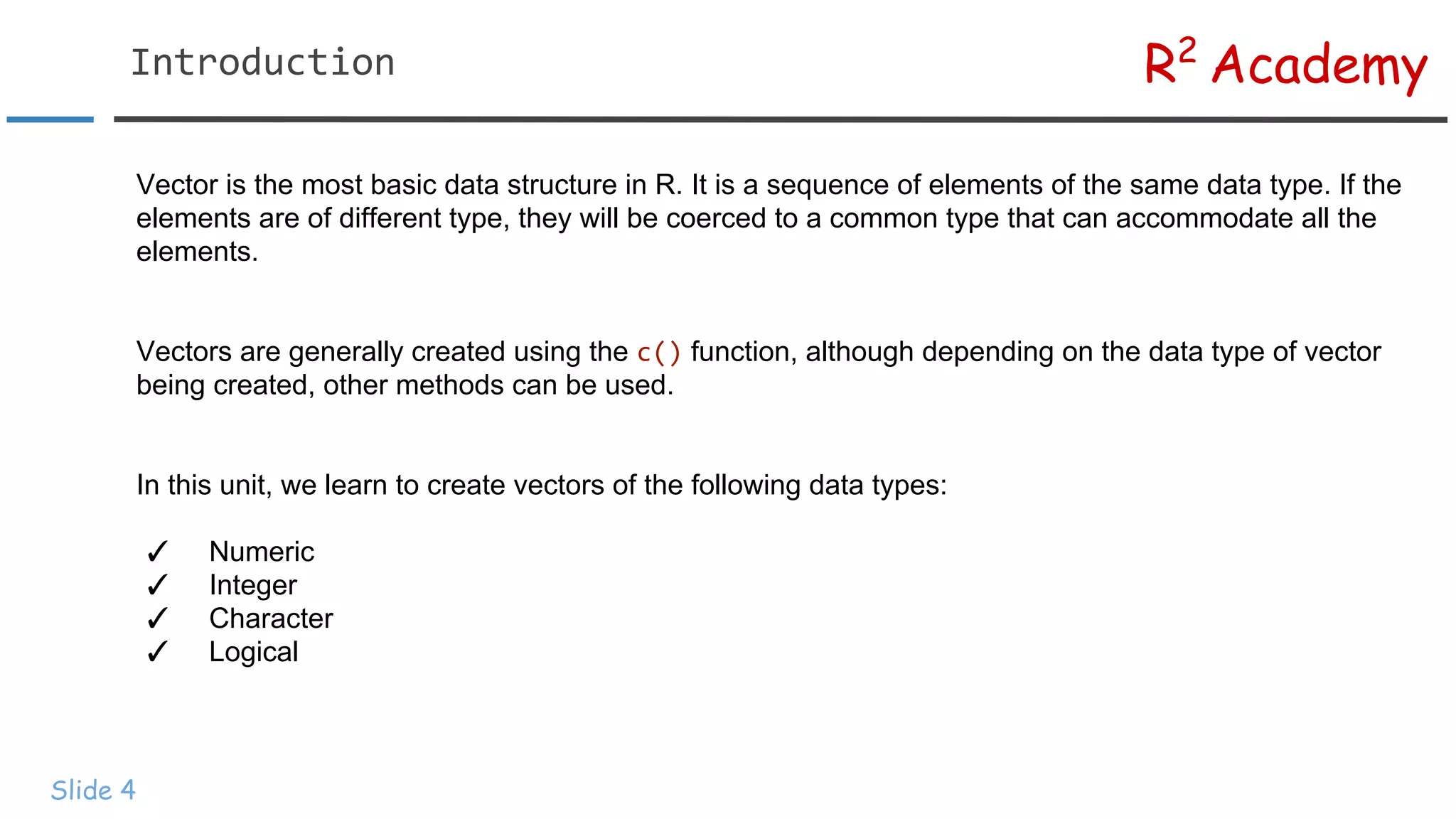
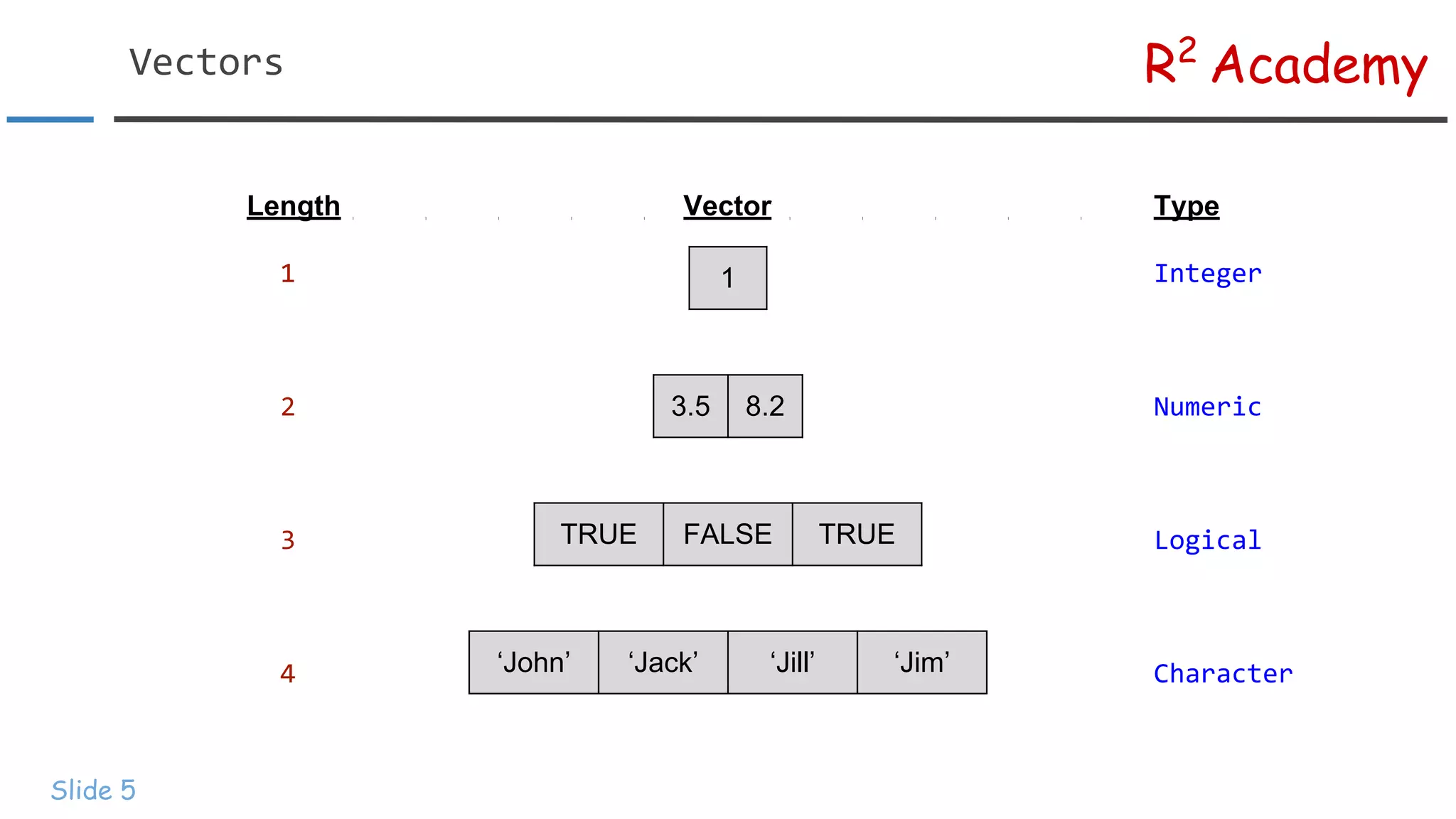
Vector is the most basic data structure in R. It is a sequence of elements of the same data type. If the
elements are of different type, they will be coerced to a common type that can accommodate all the
elements.
Vectors are generally created using the c() function, although depending on the data type of vector
being created, other methods can be used.
In this unit, we learn to create vectors of the following data types:
✓ Numeric
✓ Integer
✓ Character
✓ Logical
Length Vector Type
1 Integer
2 Numeric
3 Logical
4 Character
R2
AcademyVectors
Slide 5
1
3.5 8.2
TRUE FALSE TRUE
‘John’ ‘Jack’ ‘Jill’ ‘Jim’
R2
AcademyNumeric Vector
Slide 6
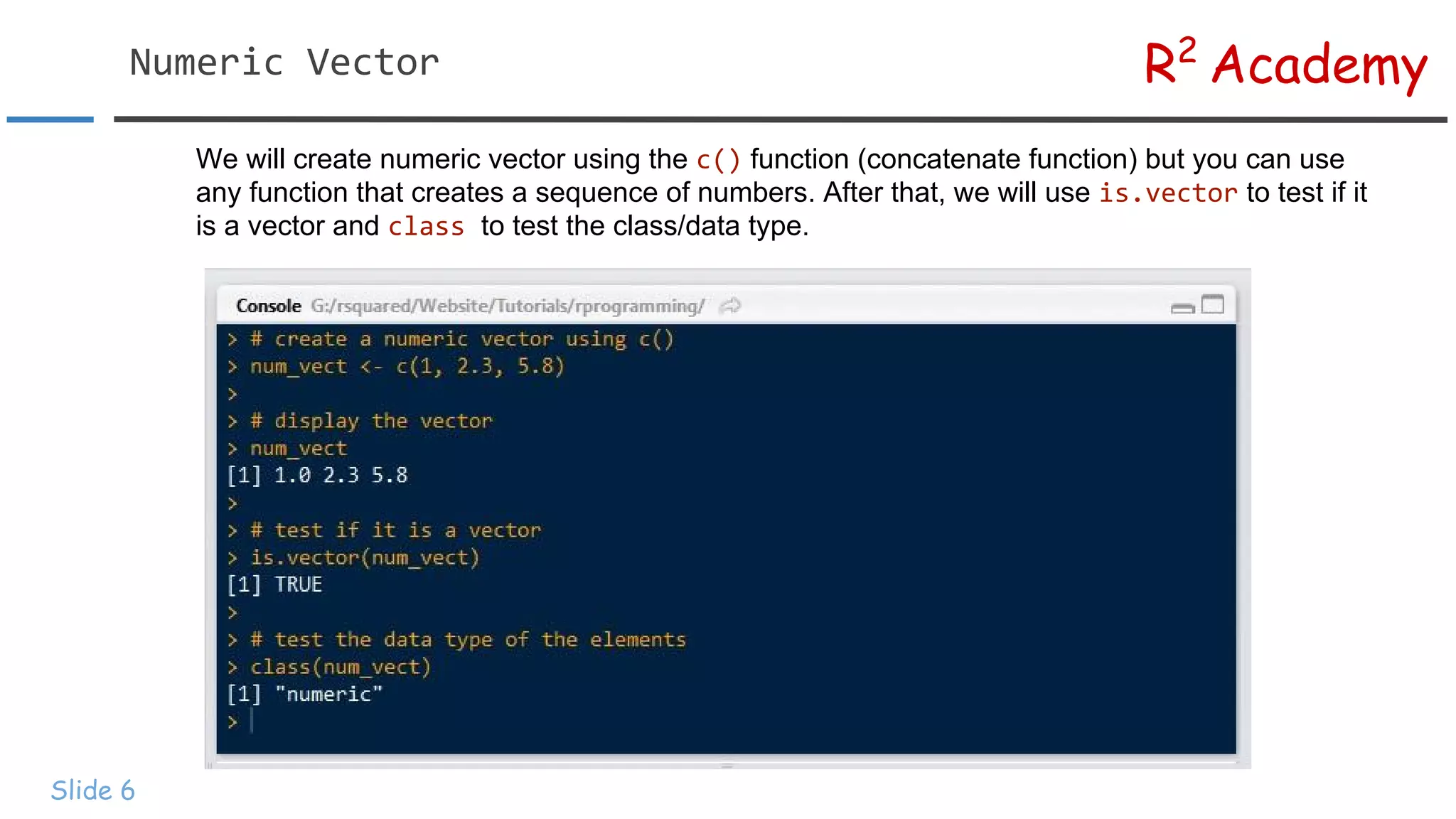
We will create numeric vector using the c() function (concatenate function) but you can use
any function that creates a sequence of numbers. After that, we will use is.vector to test if it
is a vector and class to test the class/data type.
R2
AcademyNumeric Vector
Slide 7
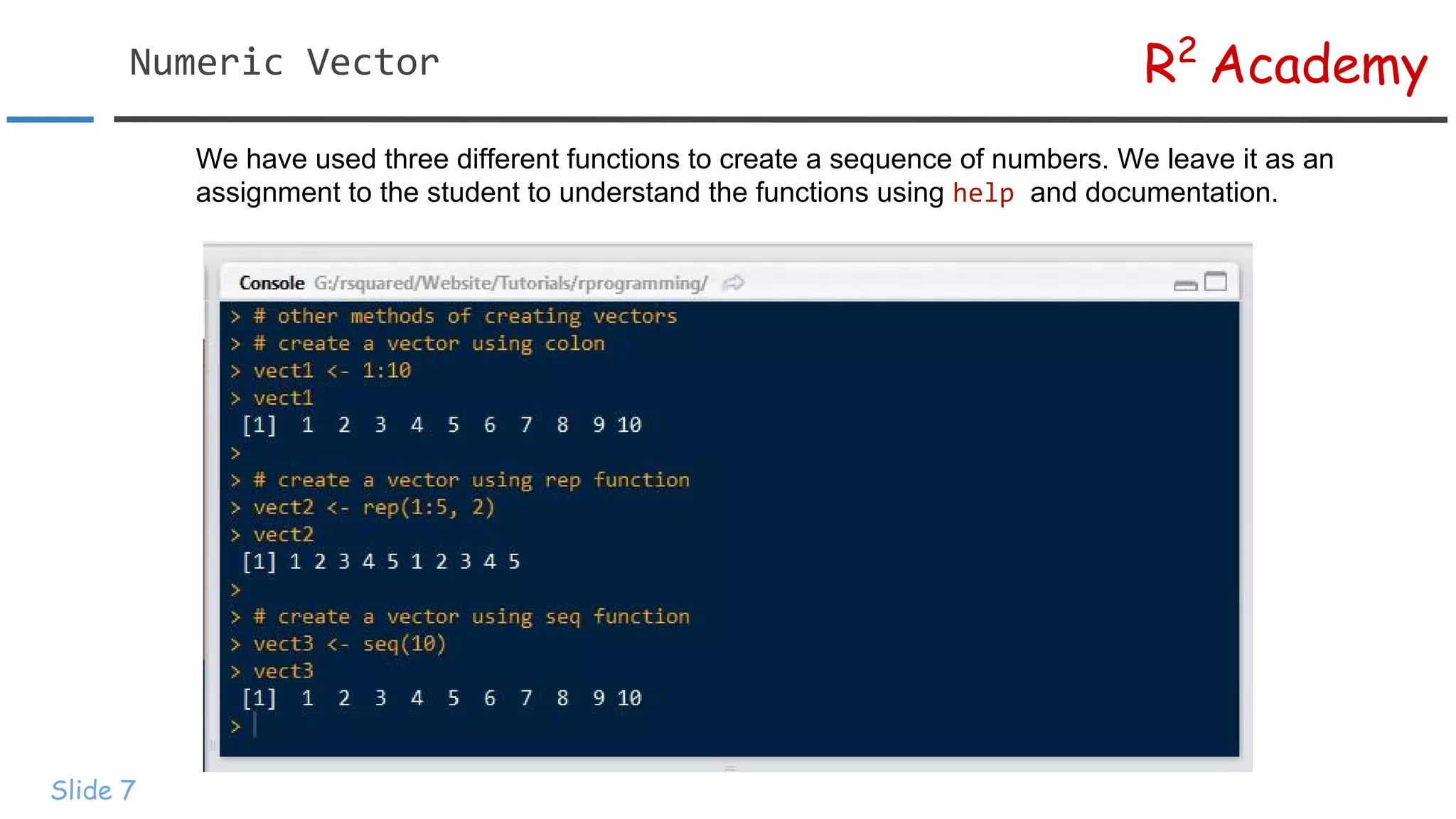
We have used three different functions to create a sequence of numbers. We leave it as an
assignment to the student to understand the functions using help and documentation.
R2
AcademyInteger Vector
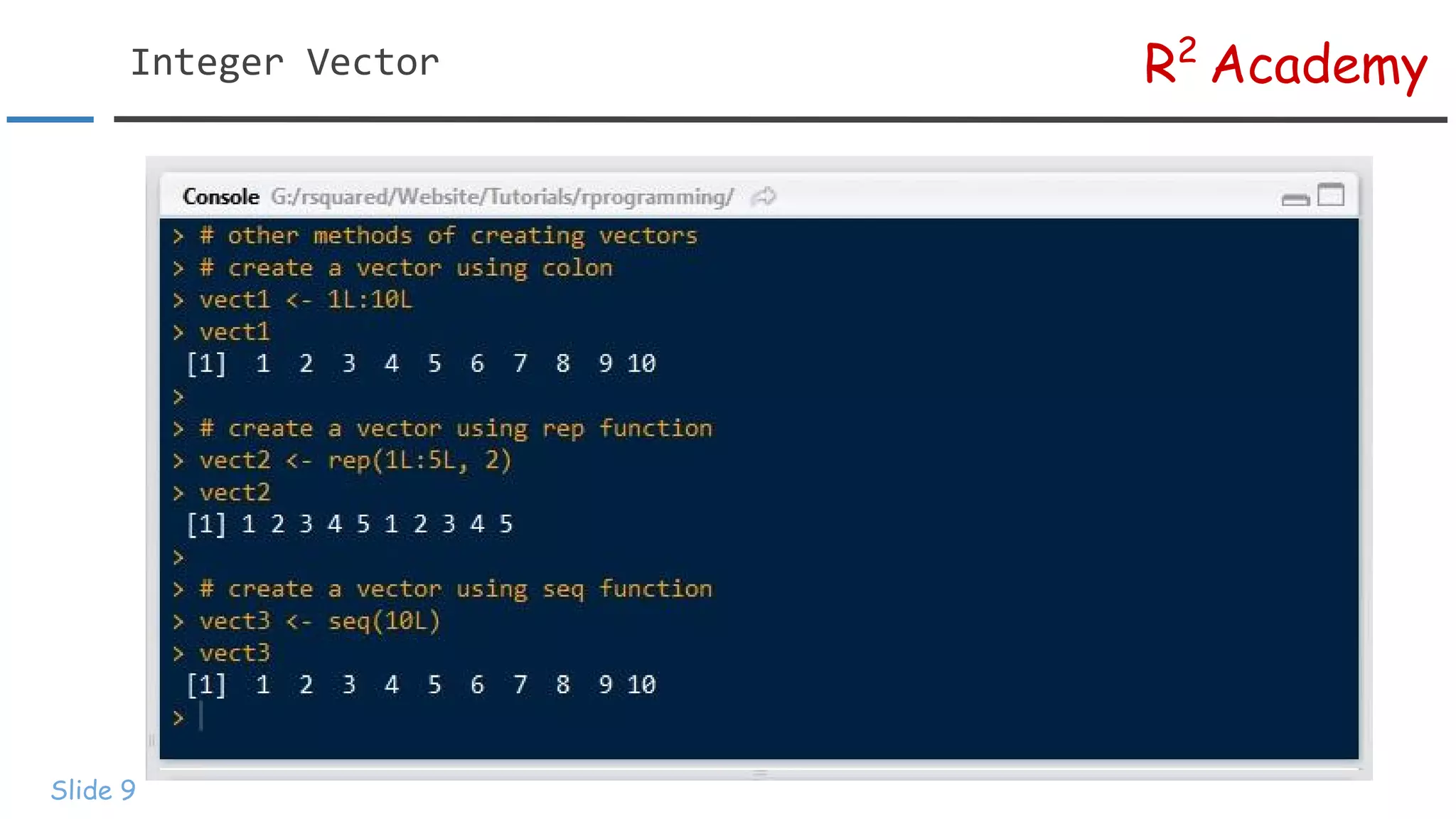
Slide 8
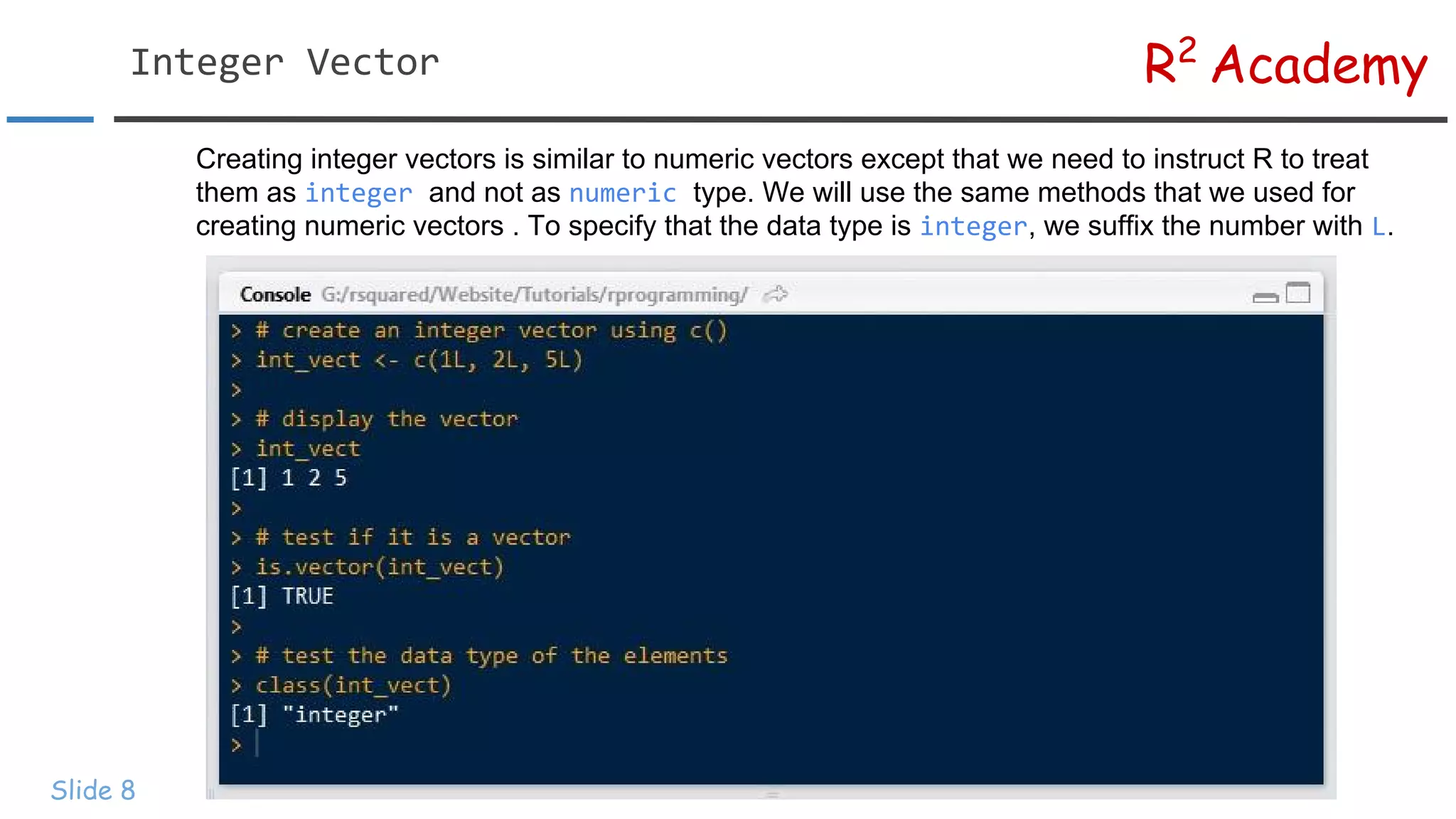
Creating integer vectors is similar to numeric vectors except that we need to instruct R to treat
them as integer and not as numeric type. We will use the same methods that we used for
creating numeric vectors . To specify that the data type is integer, we suffix the number with L.
R2
AcademyInteger Vector
Slide 9
R2
AcademyCharacter Vector
Slide 10
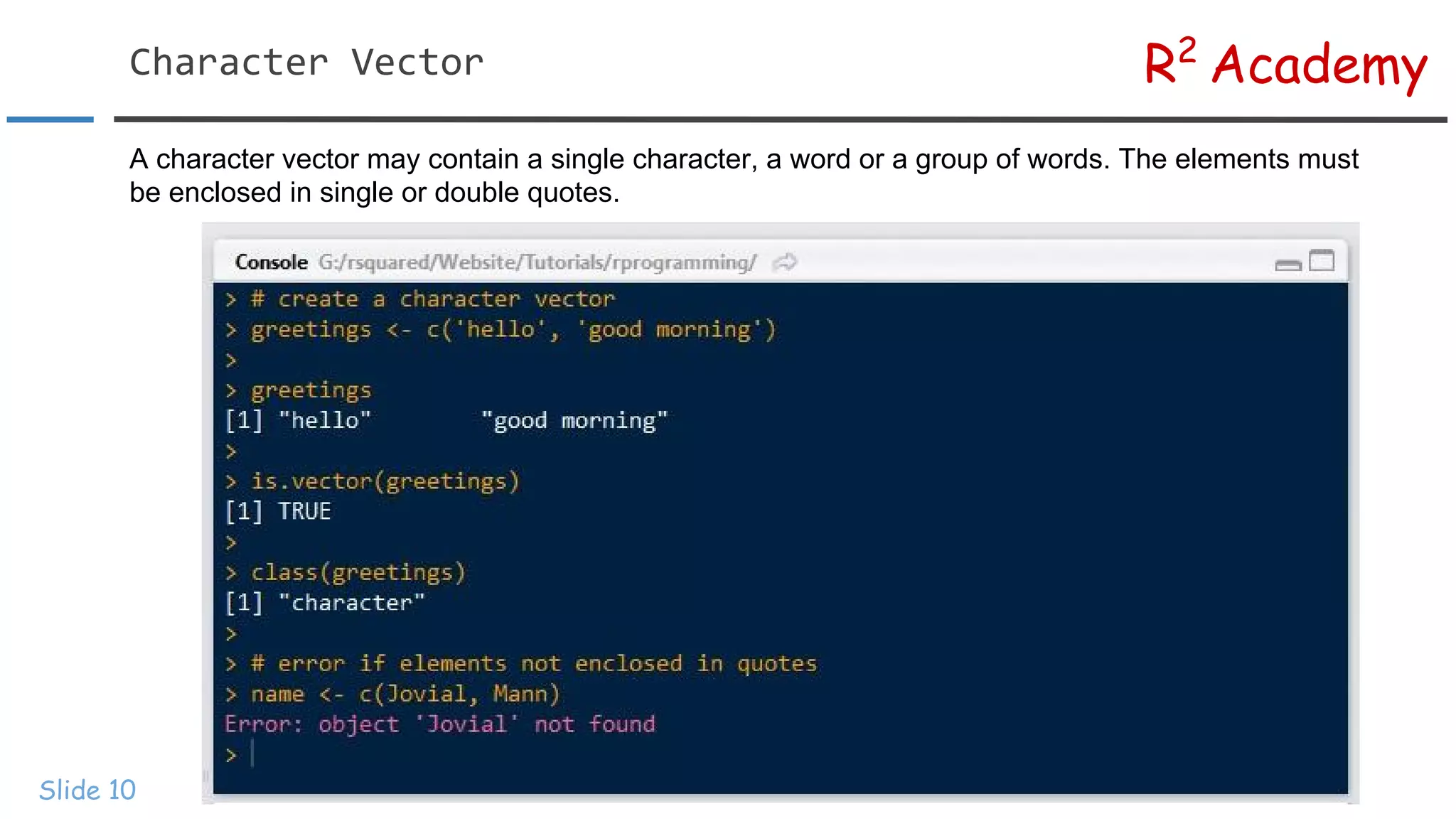
A character vector may contain a single character, a word or a group of words. The elements must
be enclosed in single or double quotes.
R2
AcademyLogical Vector
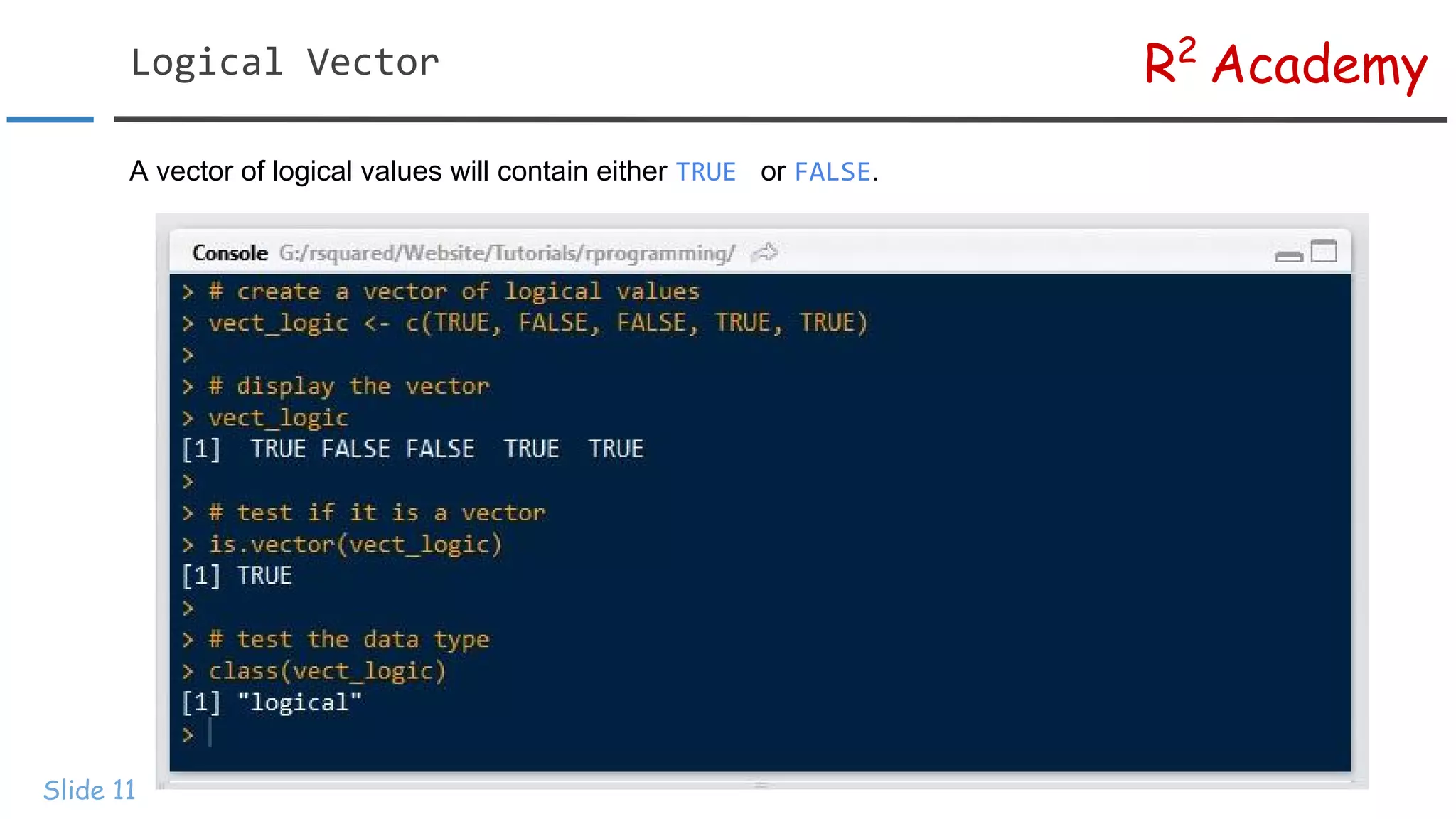
Slide 11
A vector of logical values will contain either TRUE or FALSE.
R2
AcademyLogical Vector
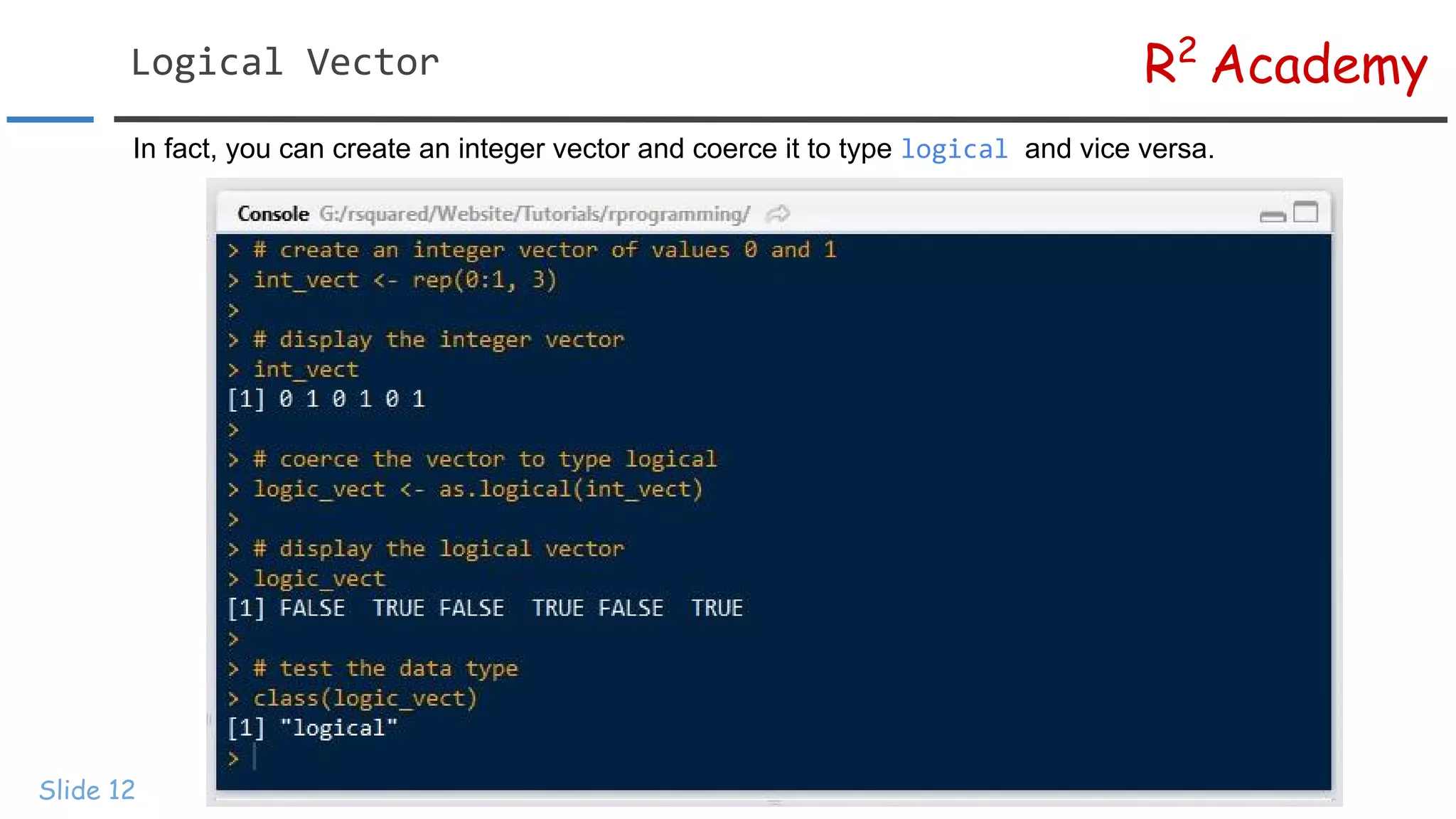
Slide 12
In fact, you can create an integer vector and coerce it to type logical and vice versa.
R2
AcademyNaming Vector Elements
Slide 13
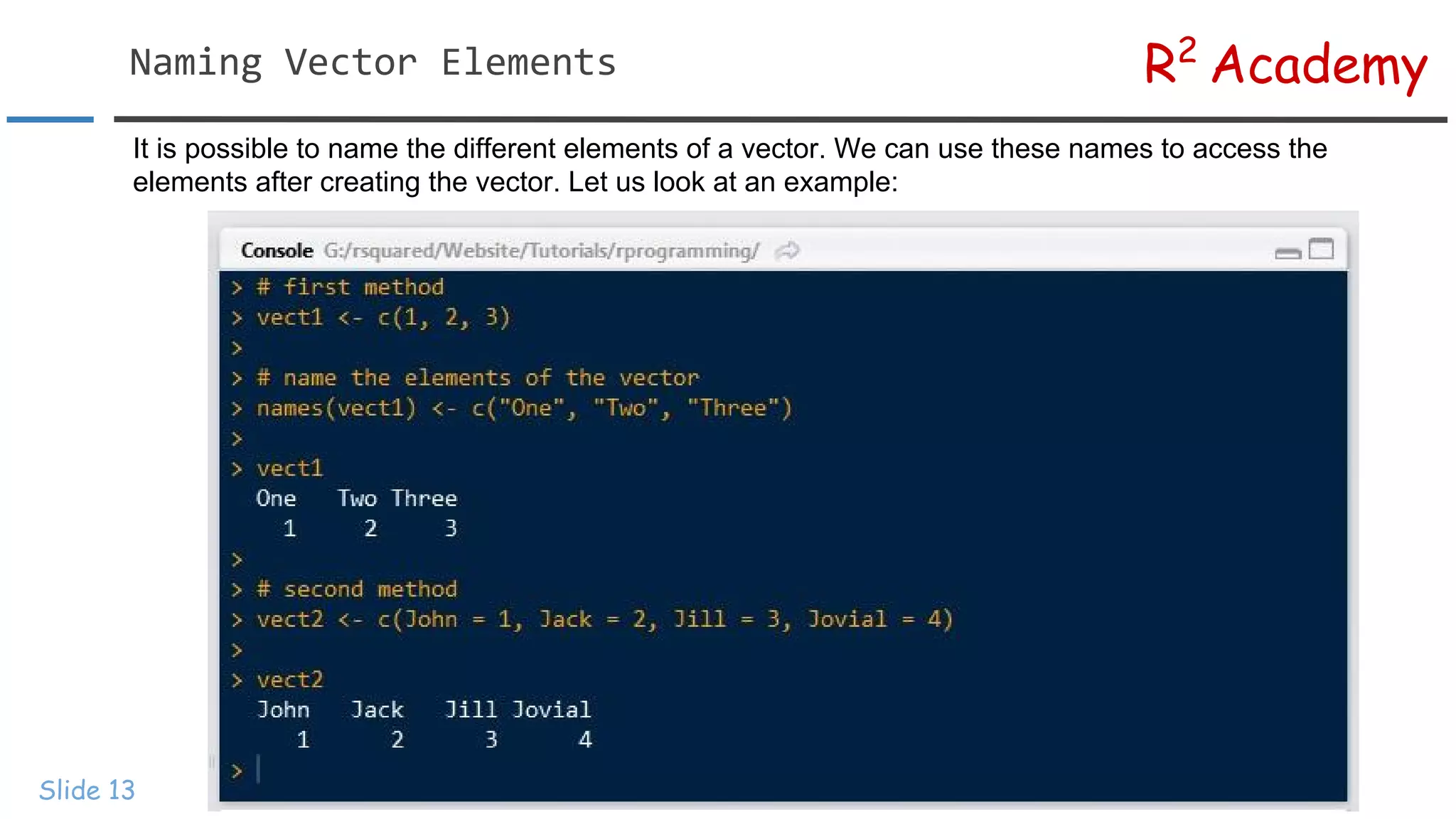
It is possible to name the different elements of a vector. We can use these names to access the
elements after creating the vector. Let us look at an example:
R2
AcademyVector Coercion
Slide 14
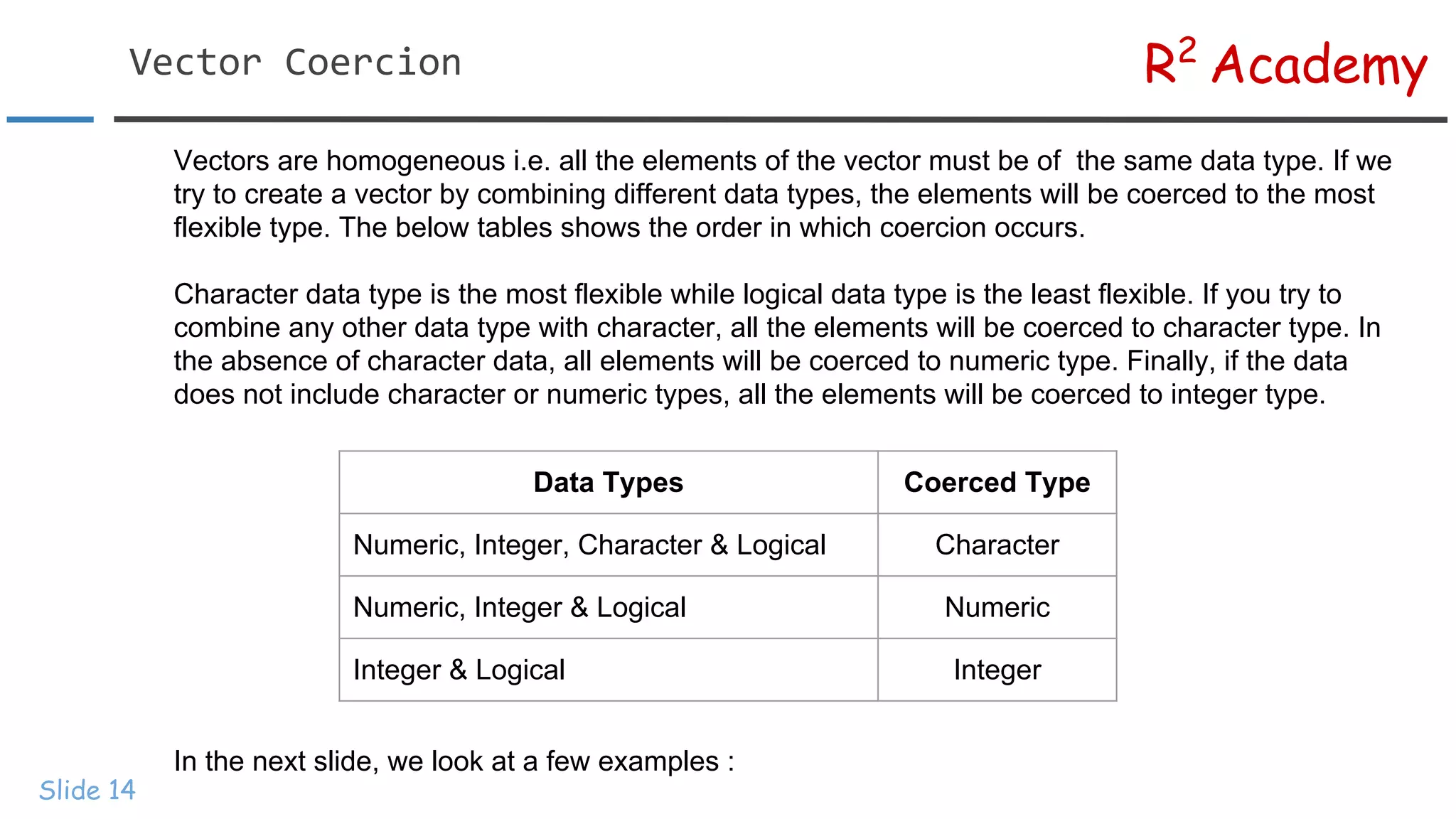
Vectors are homogeneous i.e. all the elements of the vector must be of the same data type. If we
try to create a vector by combining different data types, the elements will be coerced to the most
flexible type. The below tables shows the order in which coercion occurs.
Character data type is the most flexible while logical data type is the least flexible. If you try to
combine any other data type with character, all the elements will be coerced to character type. In
the absence of character data, all elements will be coerced to numeric type. Finally, if the data
does not include character or numeric types, all the elements will be coerced to integer type.
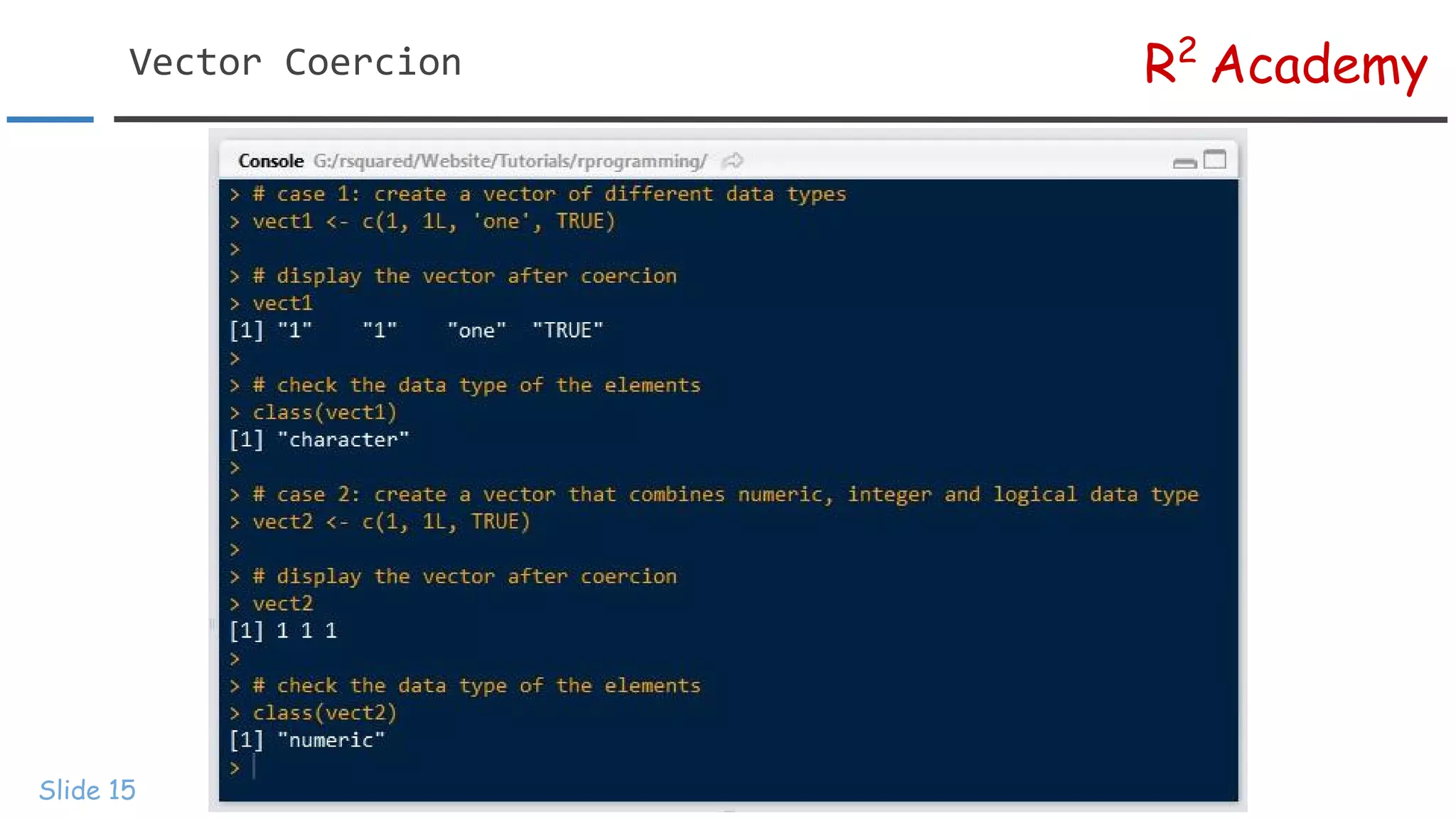
In the next slide, we look at a few examples :
Data Types Coerced Type
Numeric, Integer, Character & Logical Character
Numeric, Integer & Logical Numeric
Integer & Logical Integer
R2
AcademyVector Coercion
Slide 15
R2
AcademyVector Coercion
Slide 16
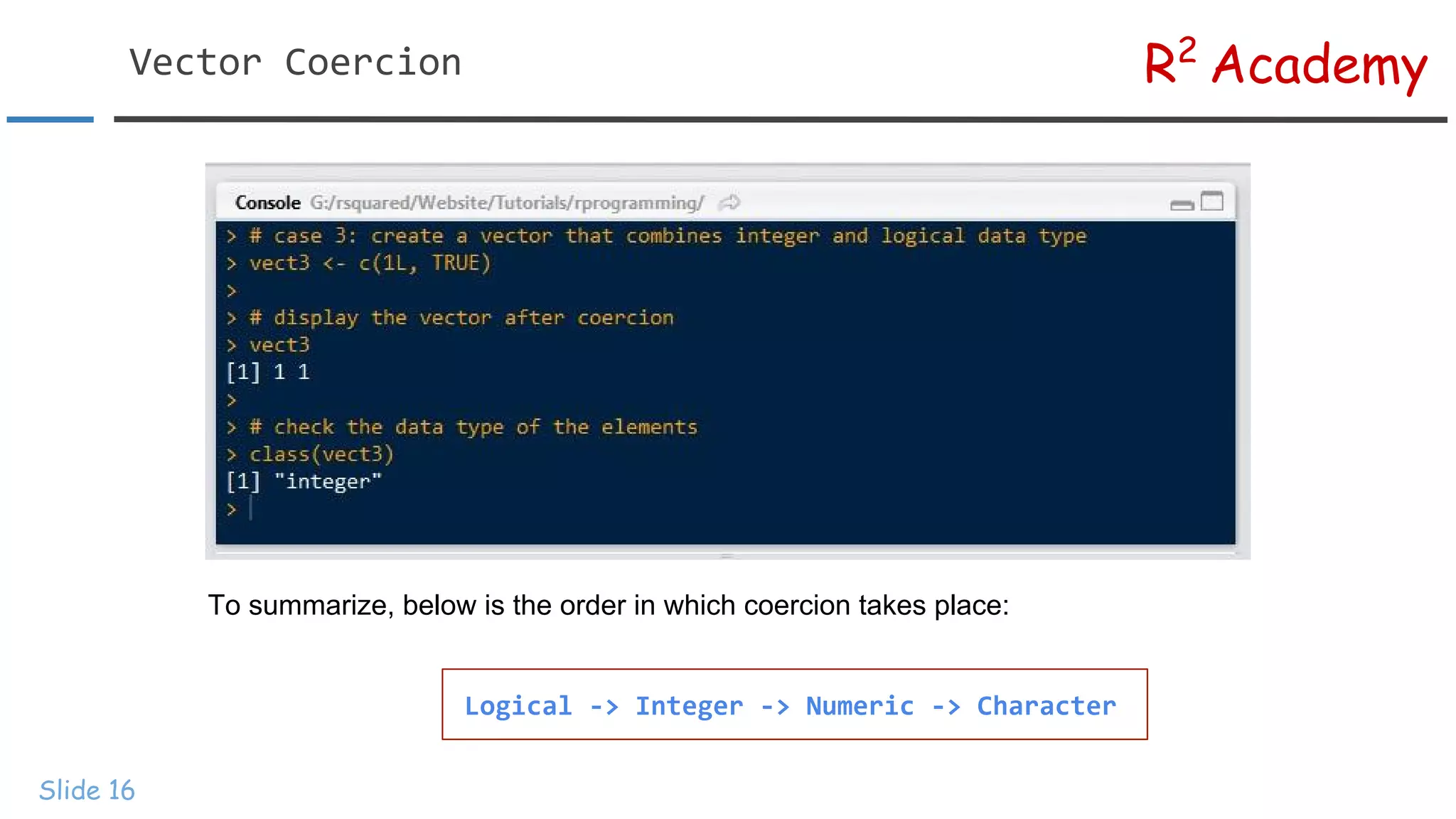
To summarize, below is the order in which coercion takes place:
Logical -> Integer -> Numeric -> Character
R2
AcademyVector Operations
Slide 17
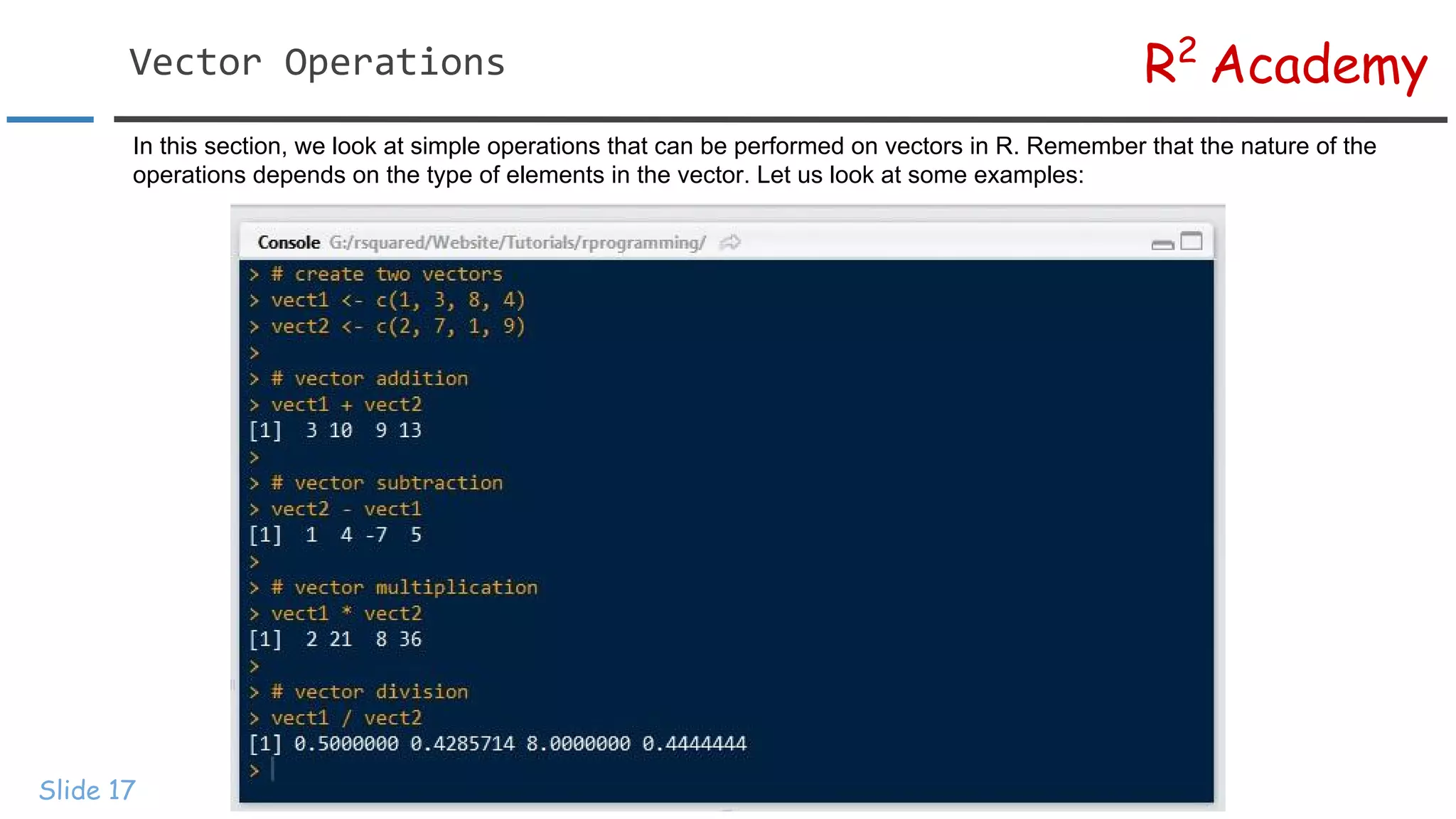
In this section, we look at simple operations that can be performed on vectors in R. Remember that the nature of the
operations depends on the type of elements in the vector. Let us look at some examples:
R2
AcademyVector Operations
Slide 18
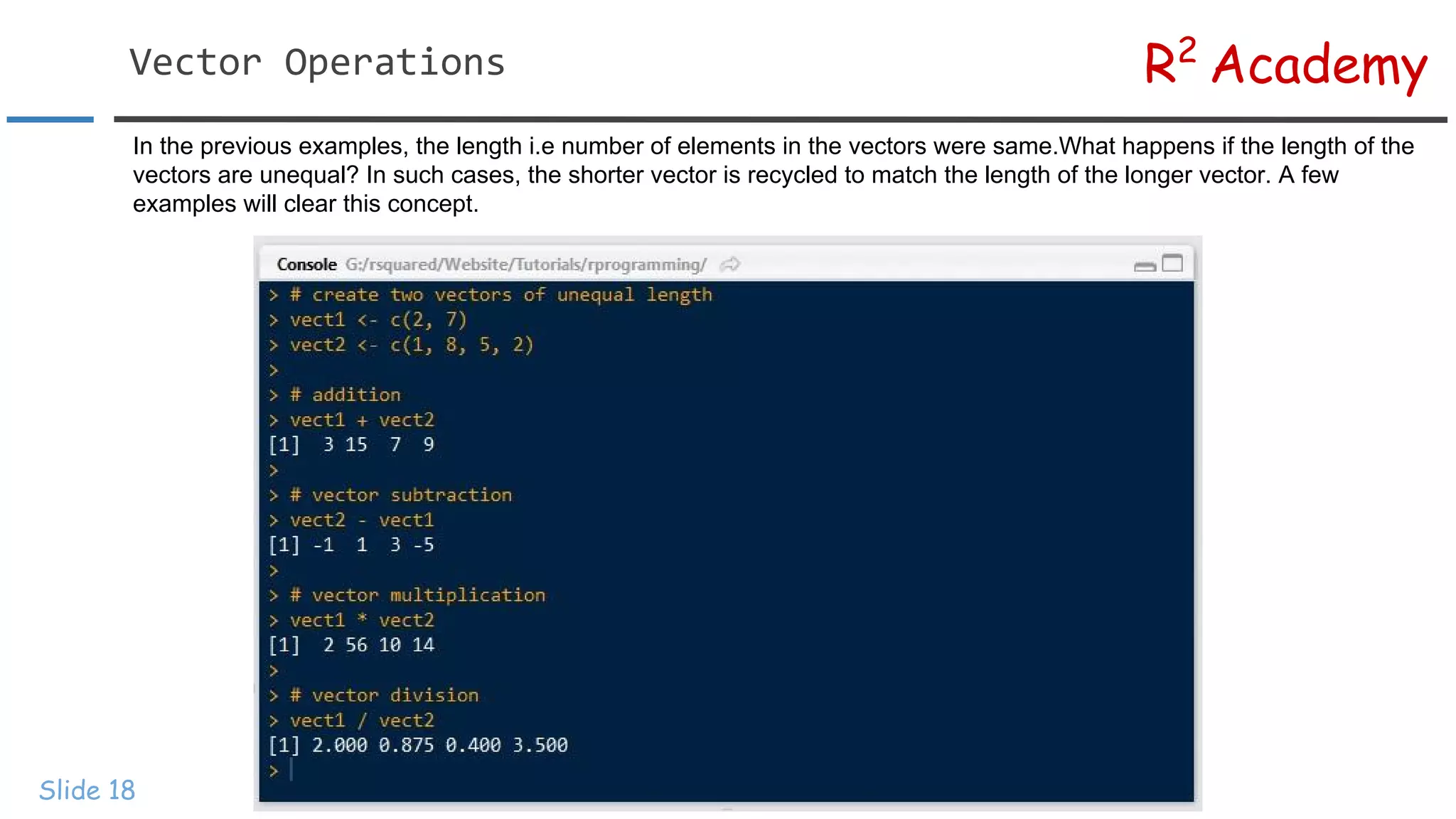
In the previous examples, the length i.e number of elements in the vectors were same.What happens if the length of the
vectors are unequal? In such cases, the shorter vector is recycled to match the length of the longer vector. A few
examples will clear this concept.
R2
AcademyMissing Data
Slide 19
Missing data is a reality. No matter how careful you are in collecting data for your
analysis, chances are always high that you end up with some missing data. In R,
missing values are represented by NA (not available). NA is neither a string nor
numeric but it just indicates that the data is missing. In this section, we will focus on
the following:
● Test for missing data
● Remove missing data
● Exclude missing data from analysis
R2
AcademyMissing Data
Slide 20
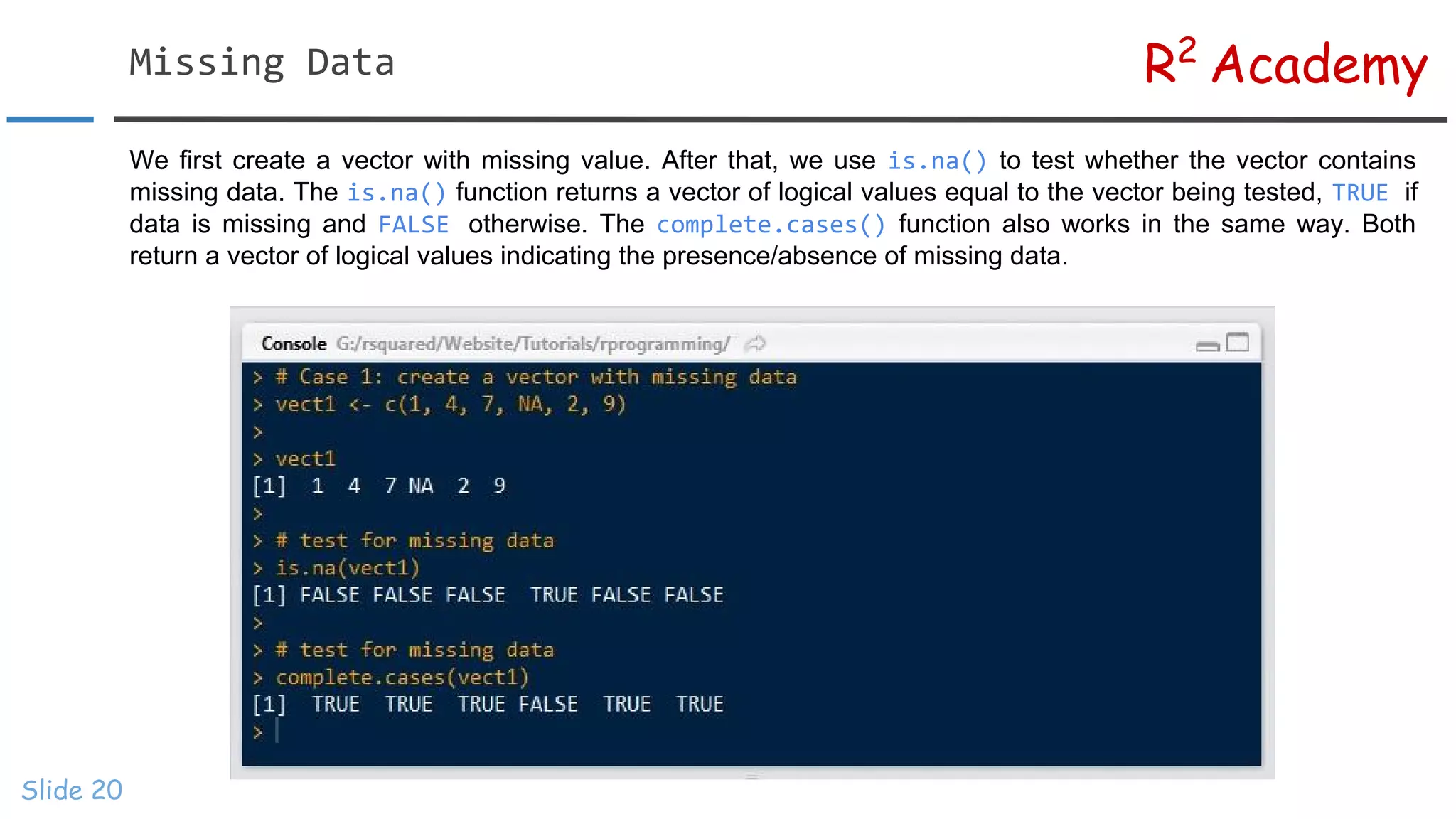
We first create a vector with missing value. After that, we use is.na() to test whether the vector contains
missing data. The is.na() function returns a vector of logical values equal to the vector being tested, TRUE if
data is missing and FALSE otherwise. The complete.cases() function also works in the same way. Both
return a vector of logical values indicating the presence/absence of missing data.
R2
AcademyOmit Missing Data
Slide 21
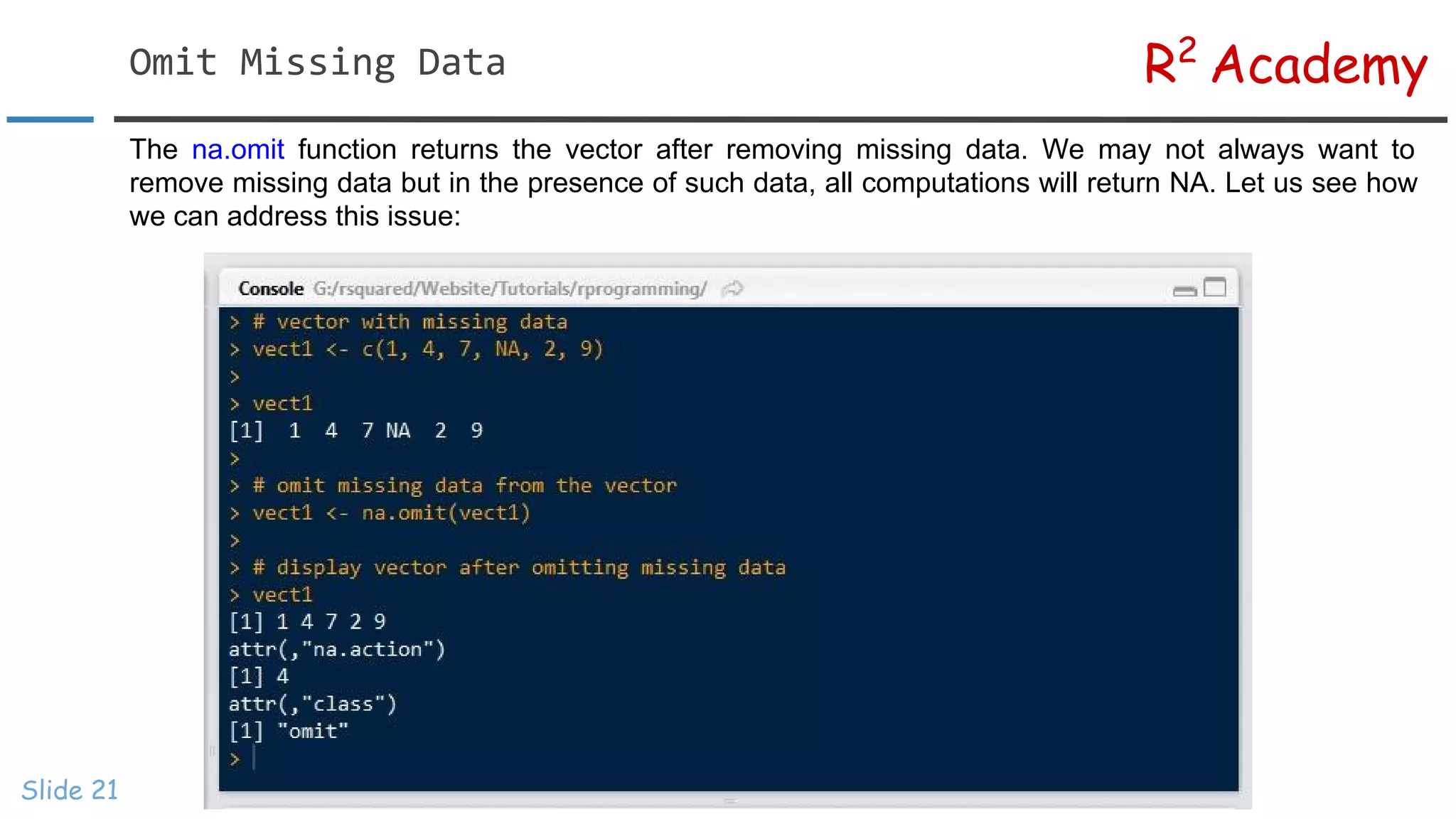
The na.omit function returns the vector after removing missing data. We may not always want to
remove missing data but in the presence of such data, all computations will return NA. Let us see how
we can address this issue:
R2
AcademyExclude Missing Data
Slide 22
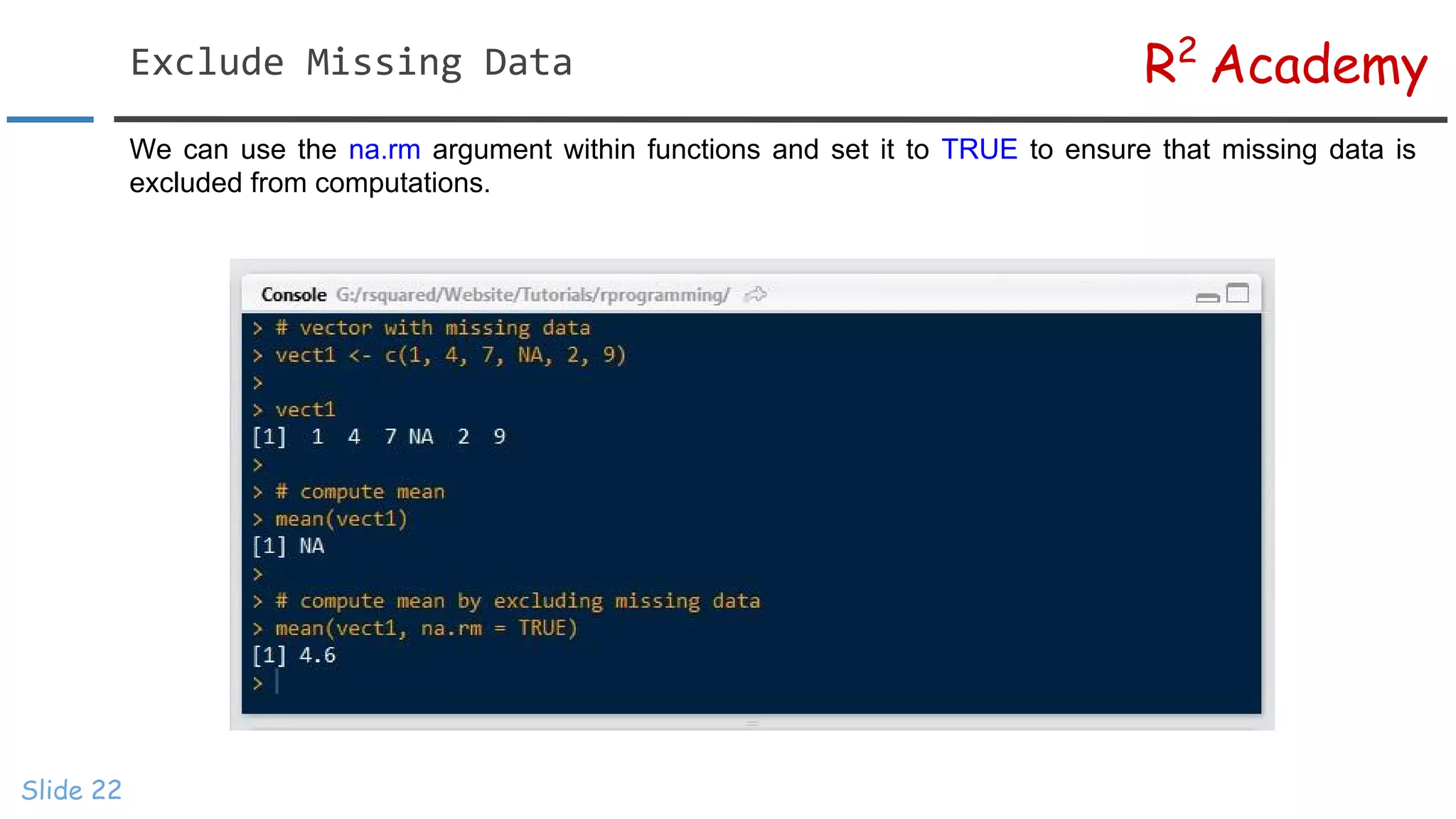
We can use the na.rm argument within functions and set it to TRUE to ensure that missing data is
excluded from computations.
R2
AcademyIndex/Subset Vectors
Slide 23
One of the most important steps in data analysis is selecting a subset of data
from a bigger dataset. Indexing helps in retrieving values individually or a set
of values that meet a specific criteria. In this section, we look at various ways
of indexing/subsetting a vector.
R2
AcademyIndex Operator
Slide 24
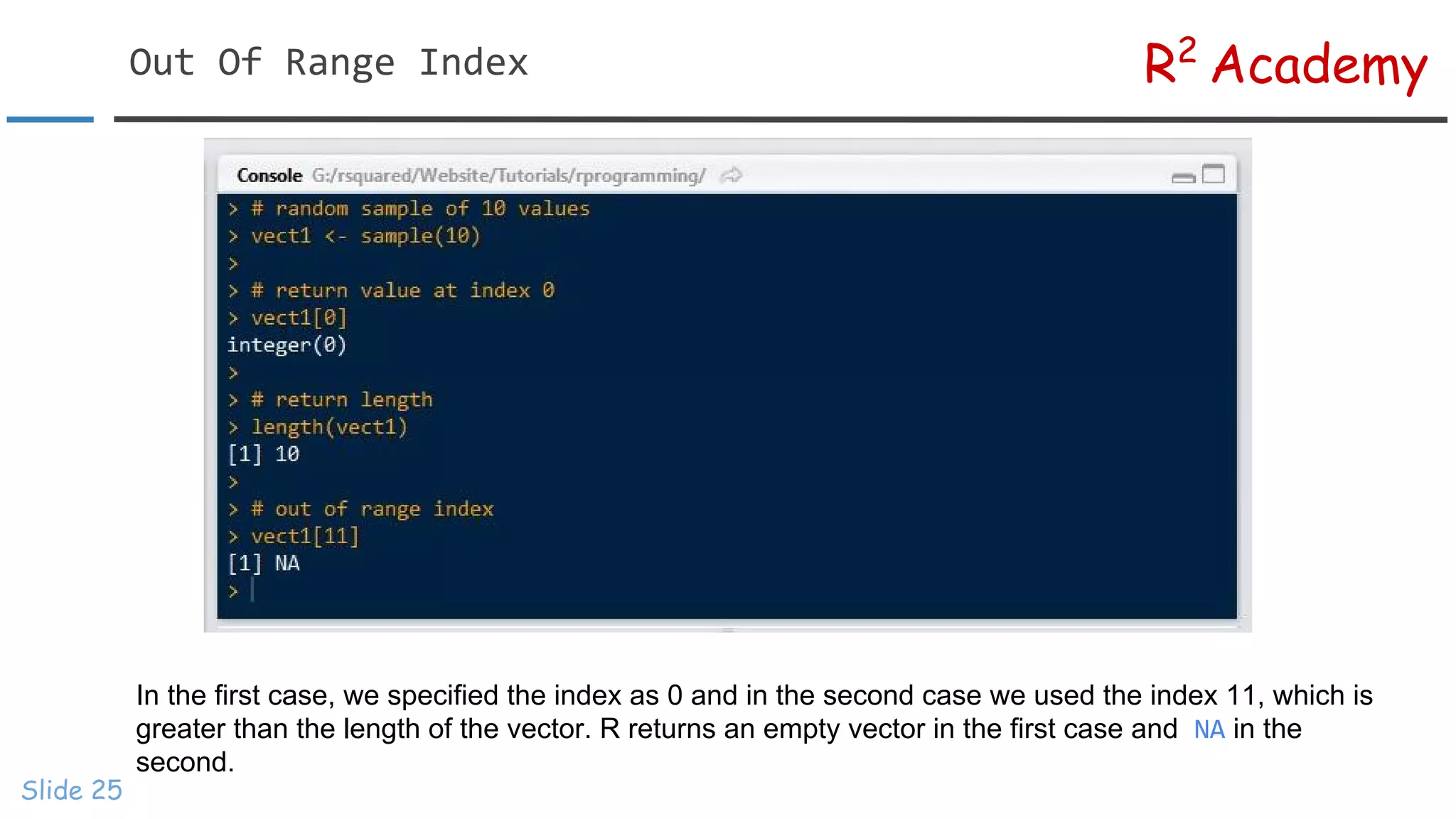
[] is the index operator in R. We can use various expressions within [] to subset data. In R, index
positions begin at 1 and not 0. To begin with, let us look at values in different index positions.
The index operator is then used to access values at index positions 3 and 7. In the next example, we see
what happens when we specify an out of range index.
R2
AcademyOut Of Range Index
Slide 25
In the first case, we specified the index as 0 and in the second case we used the index 11, which is
greater than the length of the vector. R returns an empty vector in the first case and NA in the
second.
R2
AcademyNegative Index
Slide 26
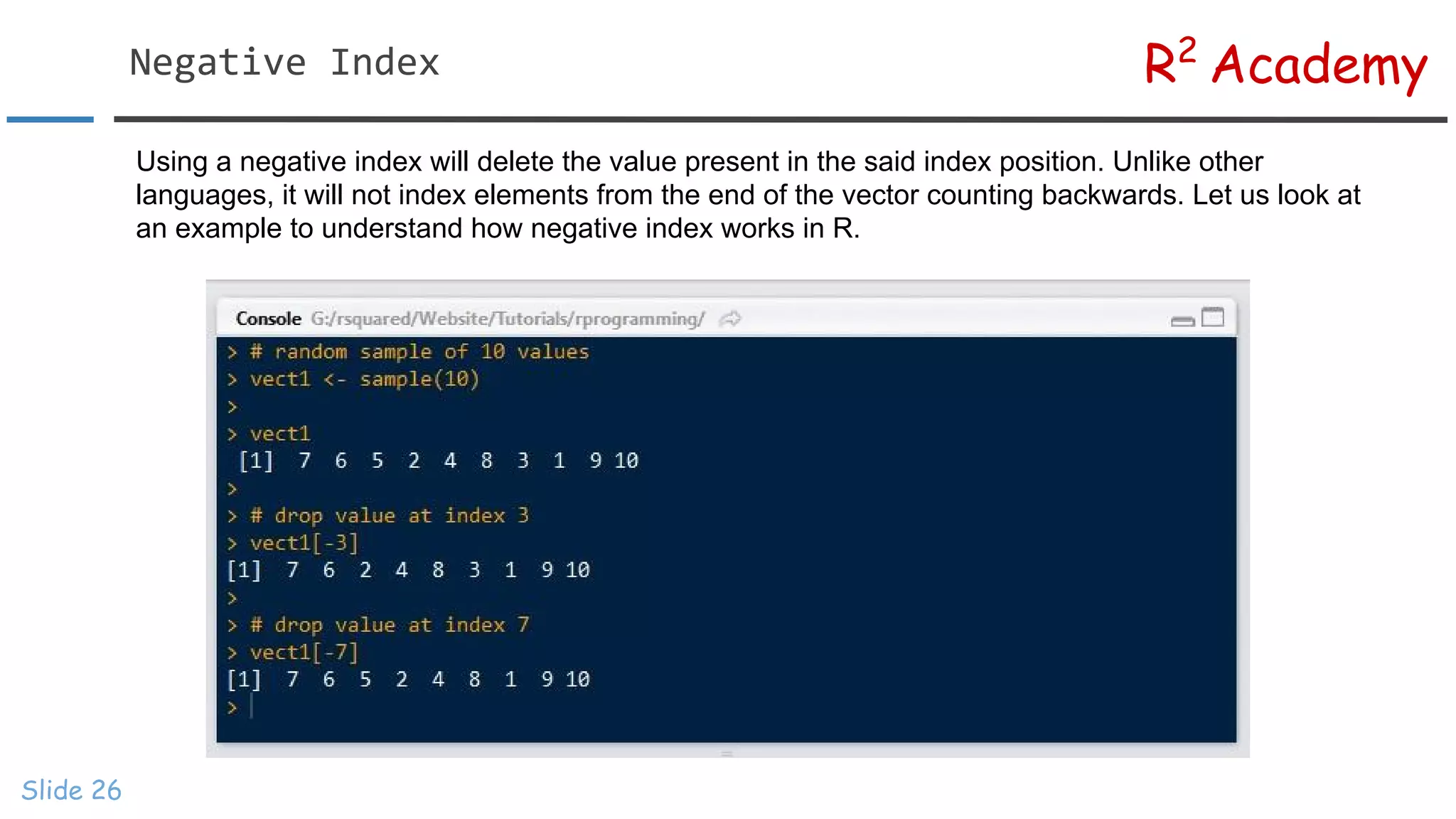
Using a negative index will delete the value present in the said index position. Unlike other
languages, it will not index elements from the end of the vector counting backwards. Let us look at
an example to understand how negative index works in R.
R2
AcademySubset Multiple Elements
Slide 27
If we do not specify anything within [], all the elements in the vector will be returned. We can specify the
index of elements using any expression that generates a sequence as seen in the second example. In the
last case, we subset elements from position 5 to end using the length of the vector.
R2
AcademySubset Multiple Elements
Slide 28
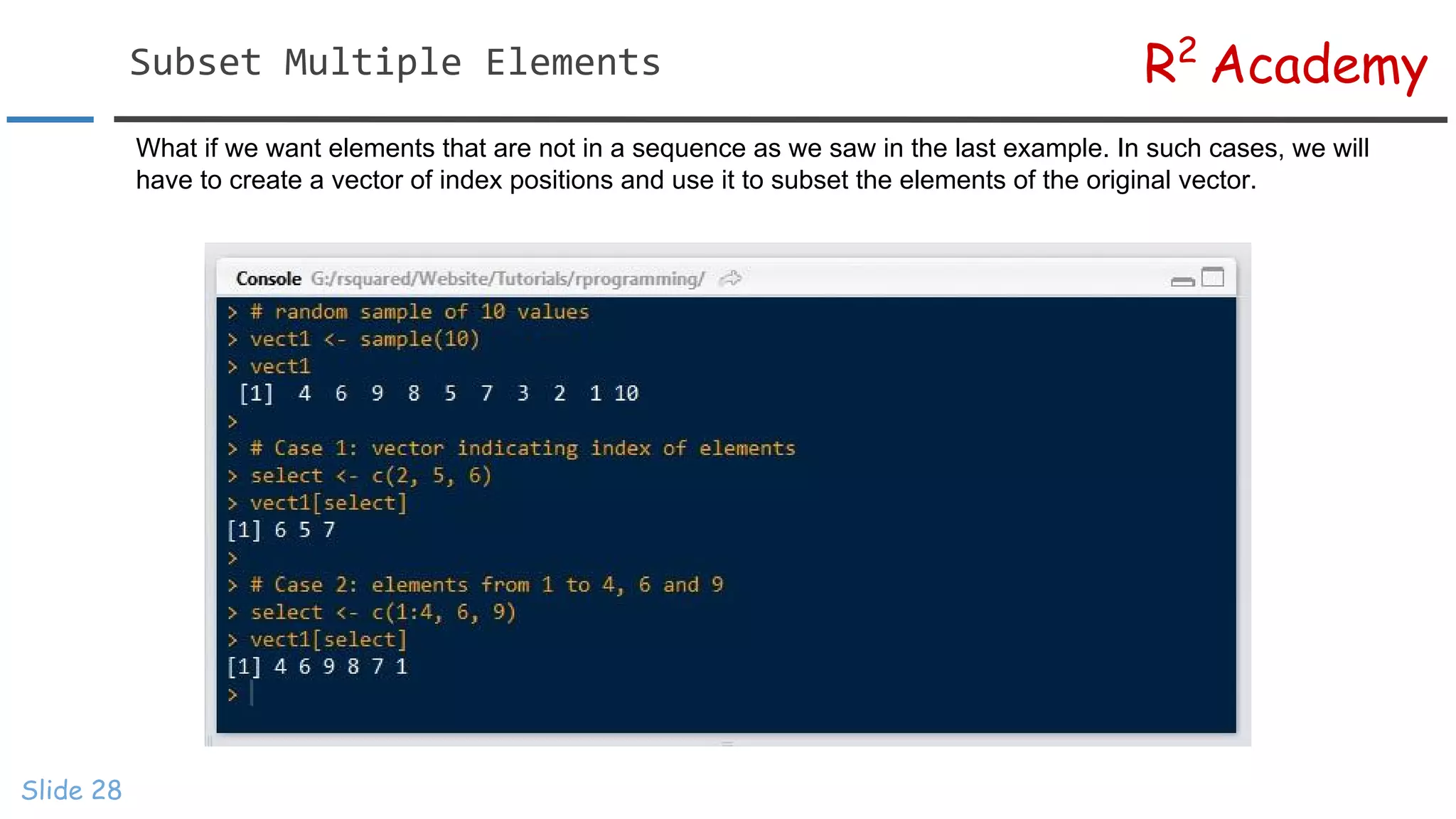
What if we want elements that are not in a sequence as we saw in the last example. In such cases, we will
have to create a vector of index positions and use it to subset the elements of the original vector.
R2
AcademySubset Named Vectors
Slide 29
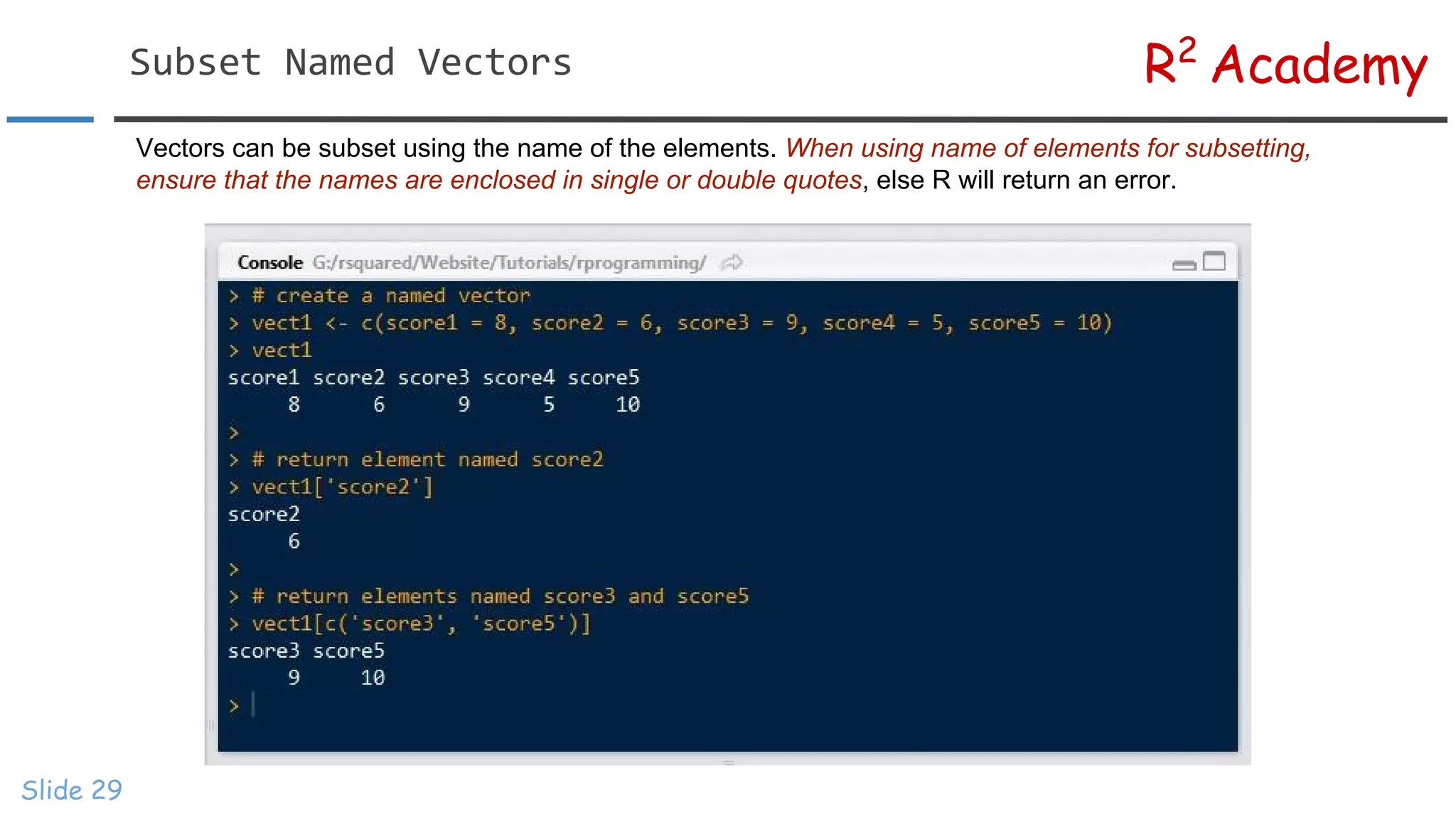
Vectors can be subset using the name of the elements. When using name of elements for subsetting,
ensure that the names are enclosed in single or double quotes, else R will return an error.
R2
AcademySubset Using Logical Values
Slide 30
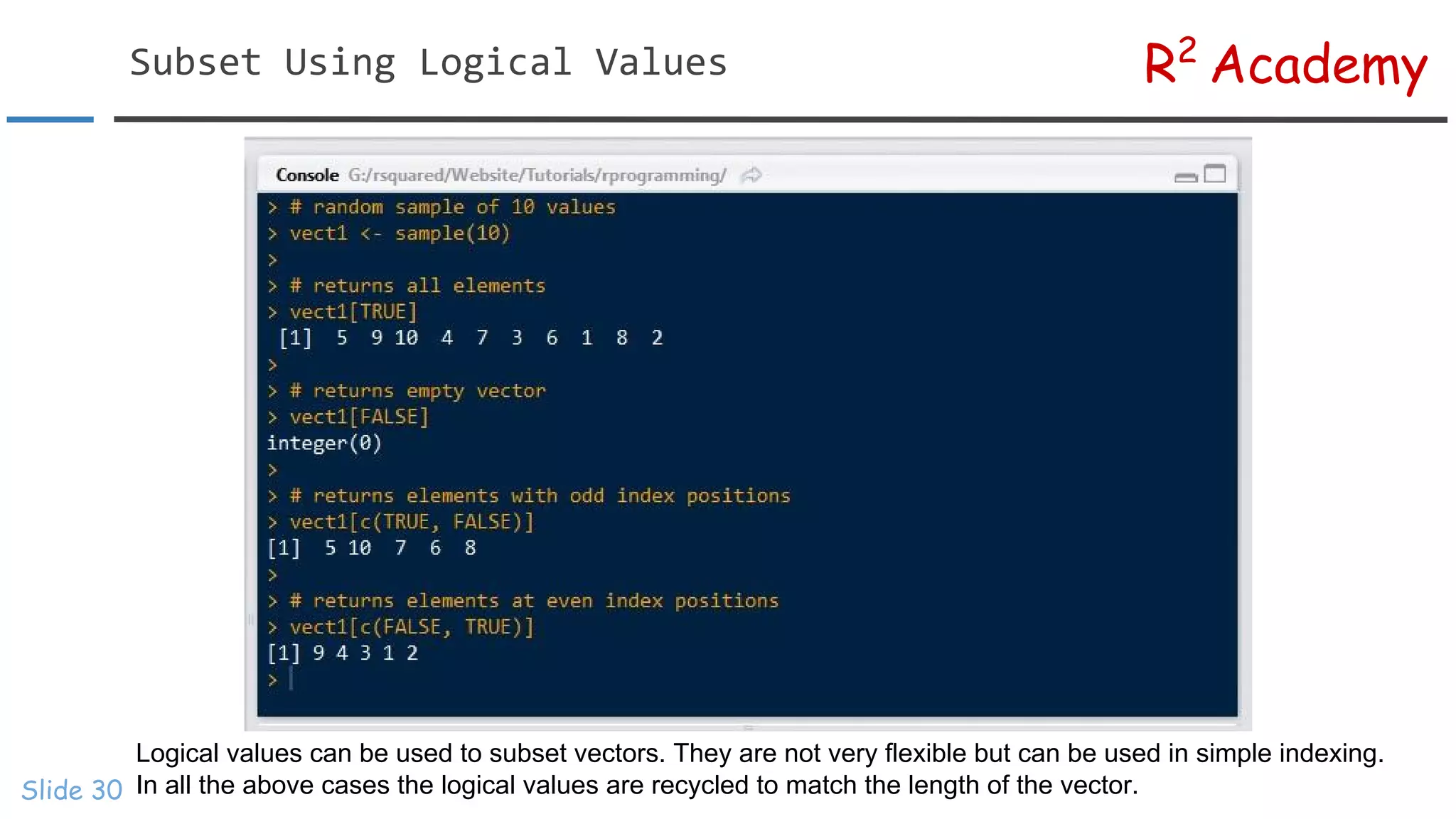
Logical values can be used to subset vectors. They are not very flexible but can be used in simple indexing.
In all the above cases the logical values are recycled to match the length of the vector.
R2
AcademyIndex Using Logical Expressions
Slide 31
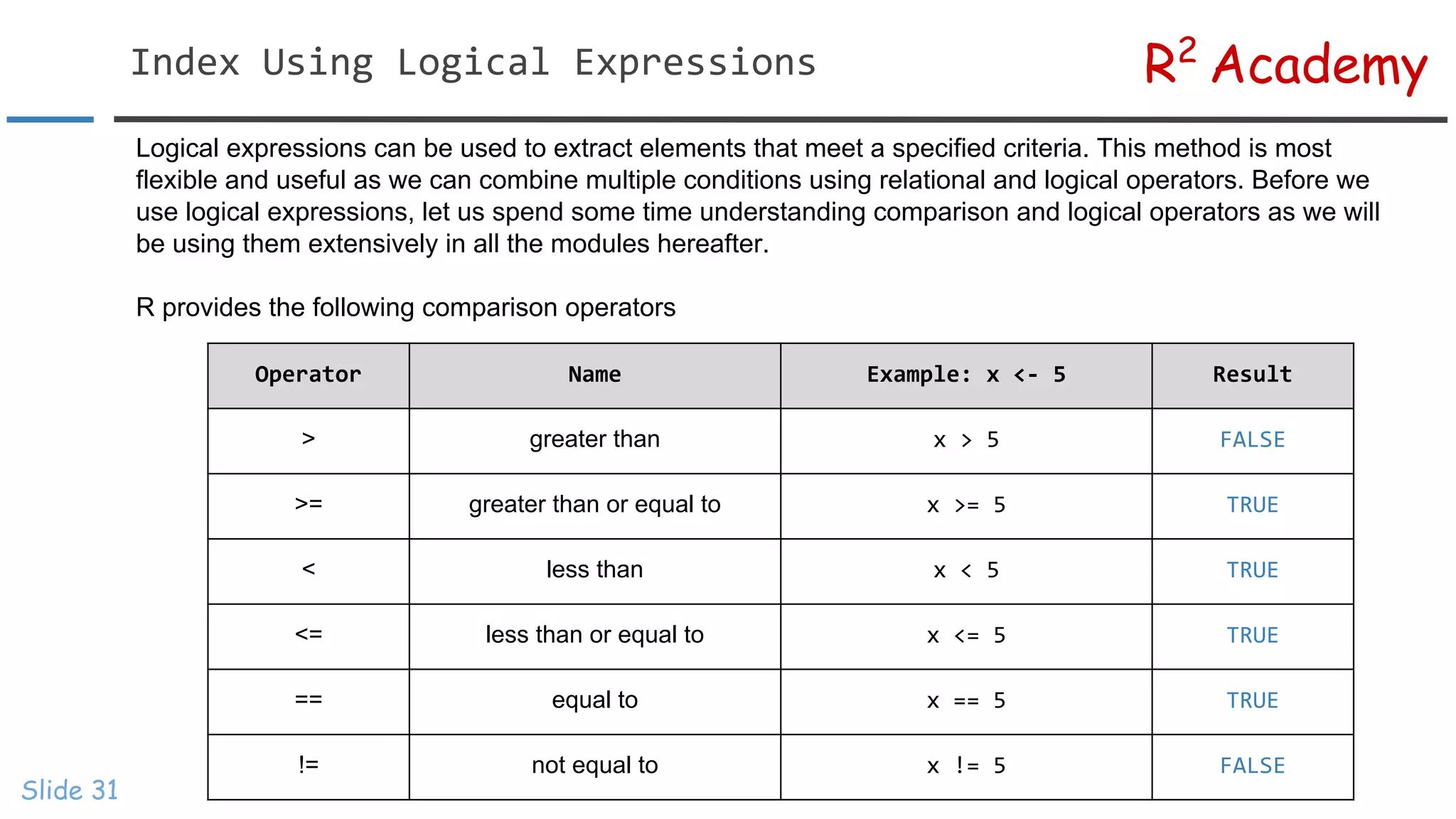
Logical expressions can be used to extract elements that meet a specified criteria. This method is most
flexible and useful as we can combine multiple conditions using relational and logical operators. Before we
use logical expressions, let us spend some time understanding comparison and logical operators as we will
be using them extensively in all the modules hereafter.
R provides the following comparison operators
Operator Name Example: x <- 5 Result
> greater than x > 5 FALSE
>= greater than or equal to x >= 5 TRUE
< less than x < 5 TRUE
<= less than or equal to x <= 5 TRUE
== equal to x == 5 TRUE
!= not equal to x != 5 FALSE
R2
AcademyComparison Operators
Slide 32
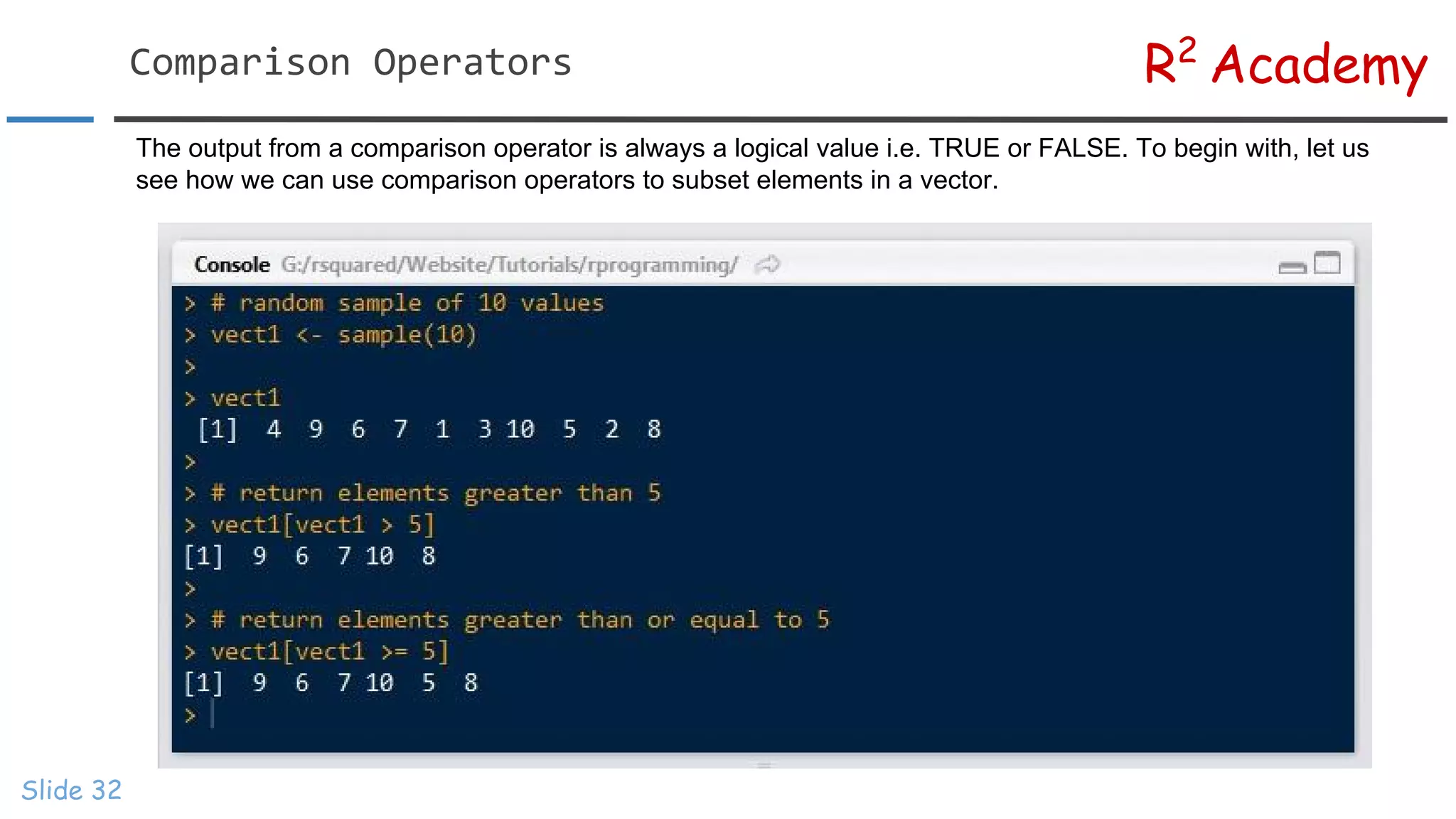
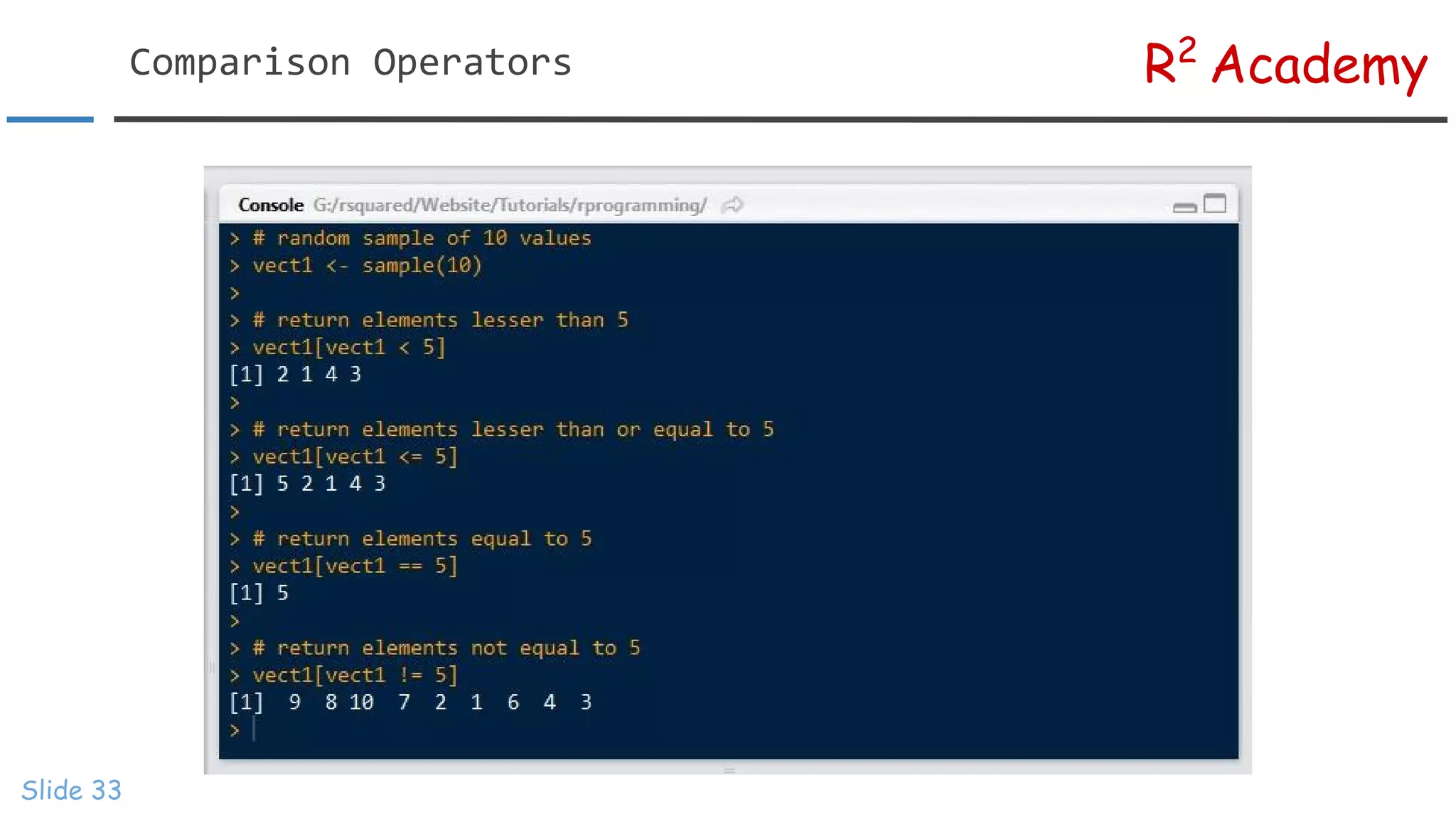
The output from a comparison operator is always a logical value i.e. TRUE or FALSE. To begin with, let us
see how we can use comparison operators to subset elements in a vector.
R2
AcademyComparison Operators
Slide 33
R2
AcademyLogical Operators
Slide 34
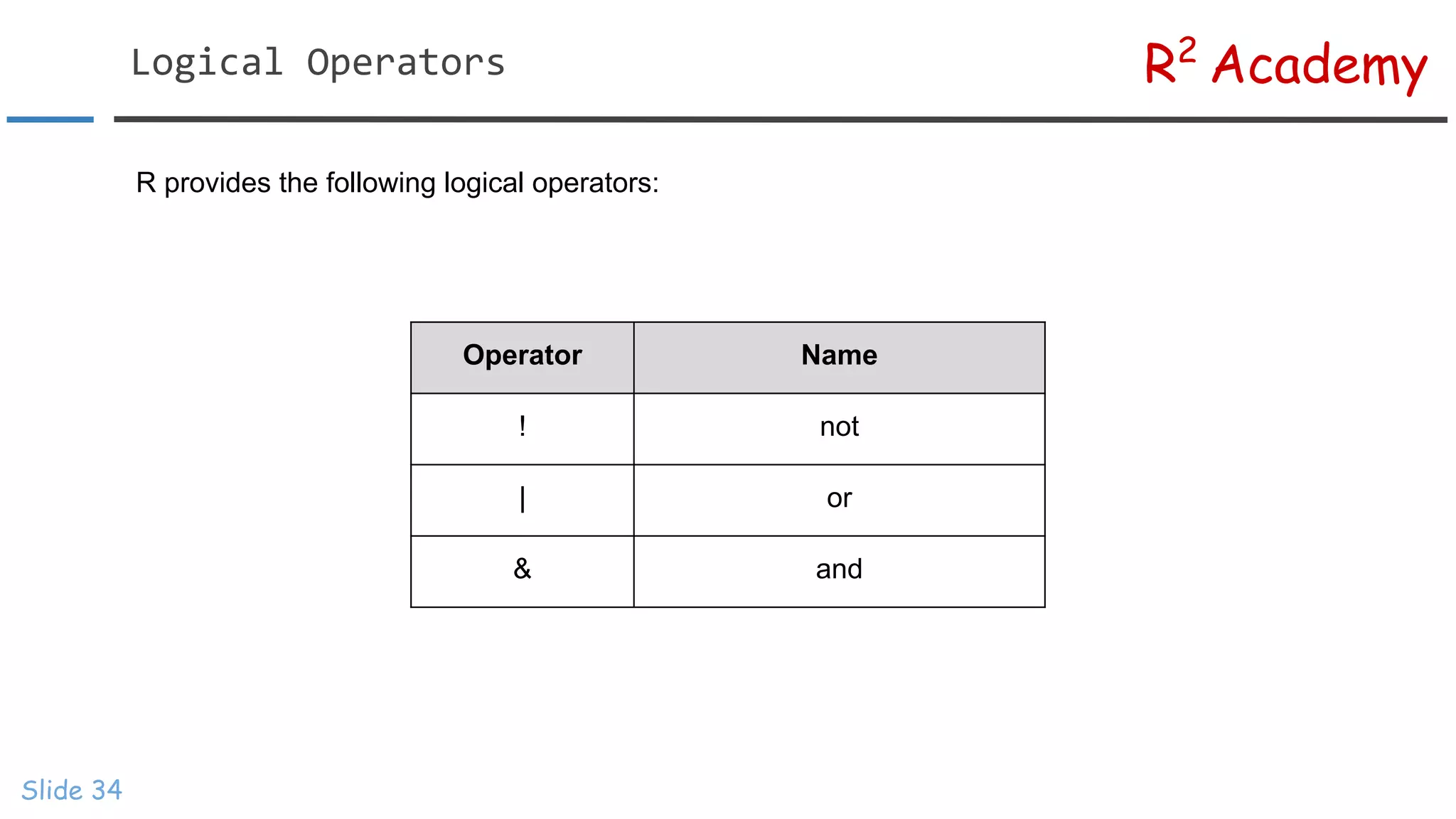
R provides the following logical operators:
Operator Name
! not
| or
& and
R2
AcademyTruth Table - ! (NOT)
Slide 35
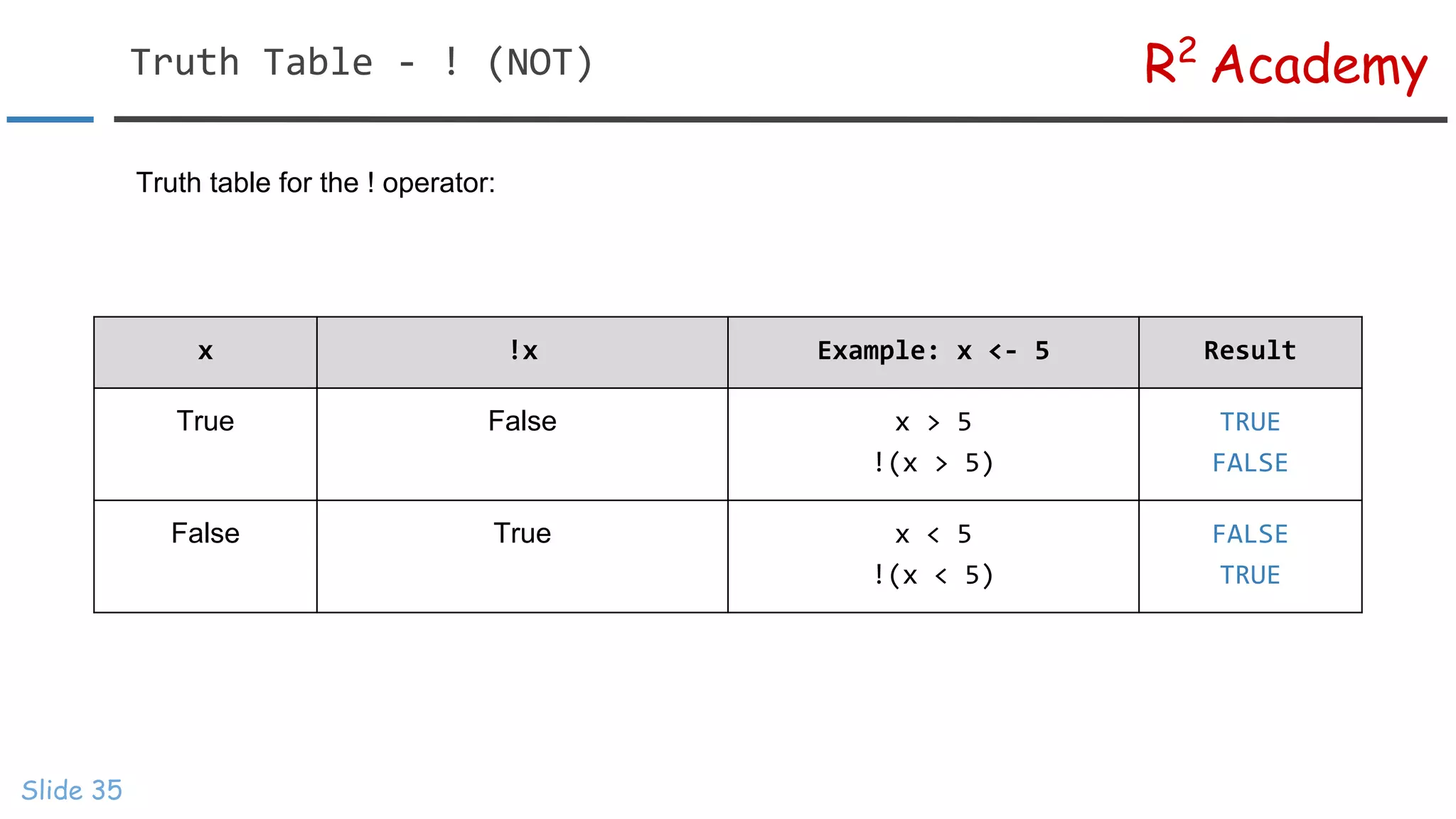
Truth table for the ! operator:
x !x Example: x <- 5 Result
True False x > 5
!(x > 5)
TRUE
FALSE
False True x < 5
!(x < 5)
FALSE
TRUE
R2
AcademyTruth Table - & (AND)
Slide 36
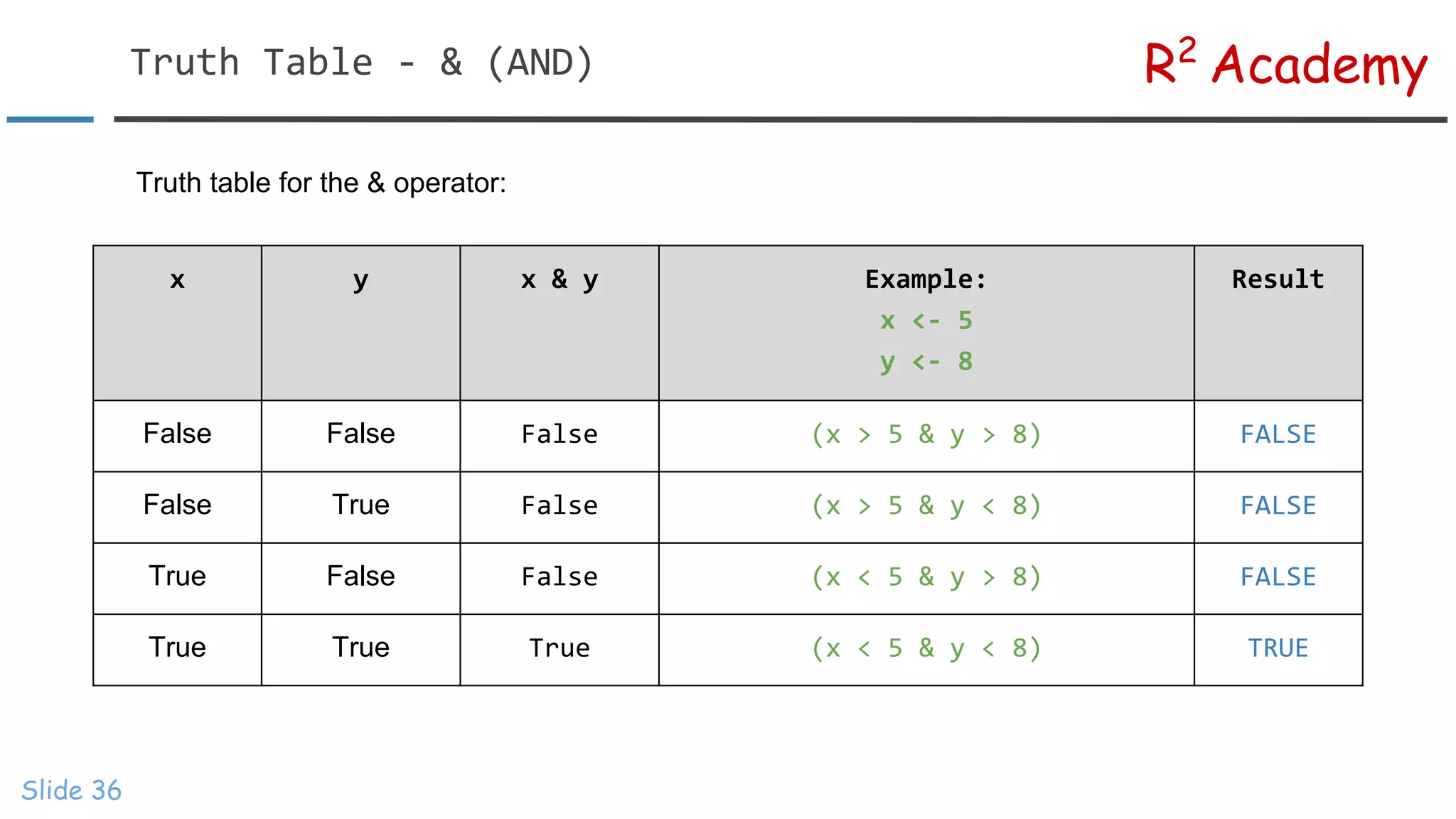
Truth table for the & operator:
x y x & y Example:
x <- 5
y <- 8
Result
False False False (x > 5 & y > 8) FALSE
False True False (x > 5 & y < 8) FALSE
True False False (x < 5 & y > 8) FALSE
True True True (x < 5 & y < 8) TRUE
R2
AcademyTruth Table - |(OR)
Slide 37
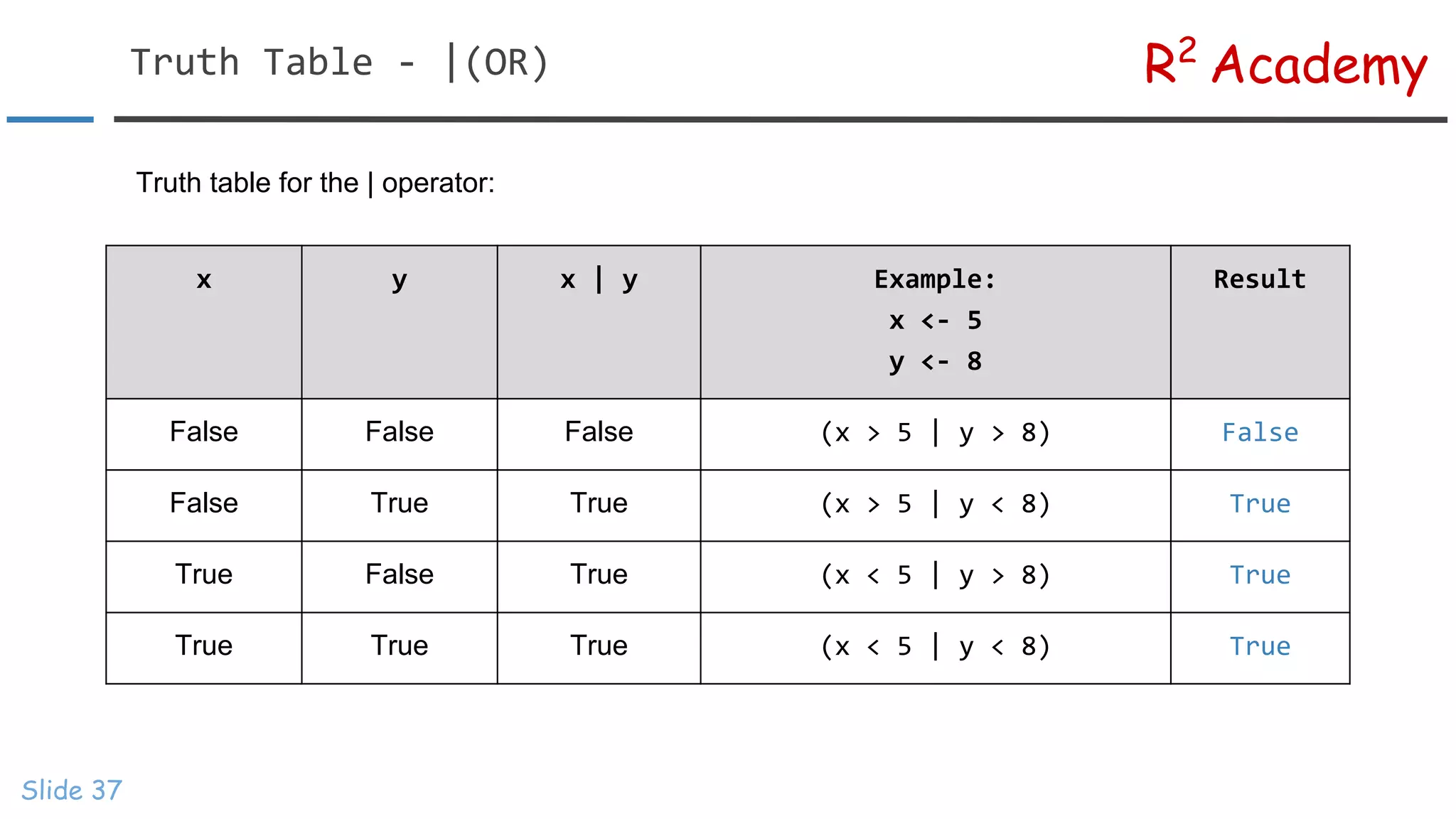
Truth table for the | operator:
x y x | y Example:
x <- 5
y <- 8
Result
False False False (x > 5 | y > 8) False
False True True (x > 5 | y < 8) True
True False True (x < 5 | y > 8) True
True True True (x < 5 | y < 8) True
R2
AcademyLogical Operators
Slide 38
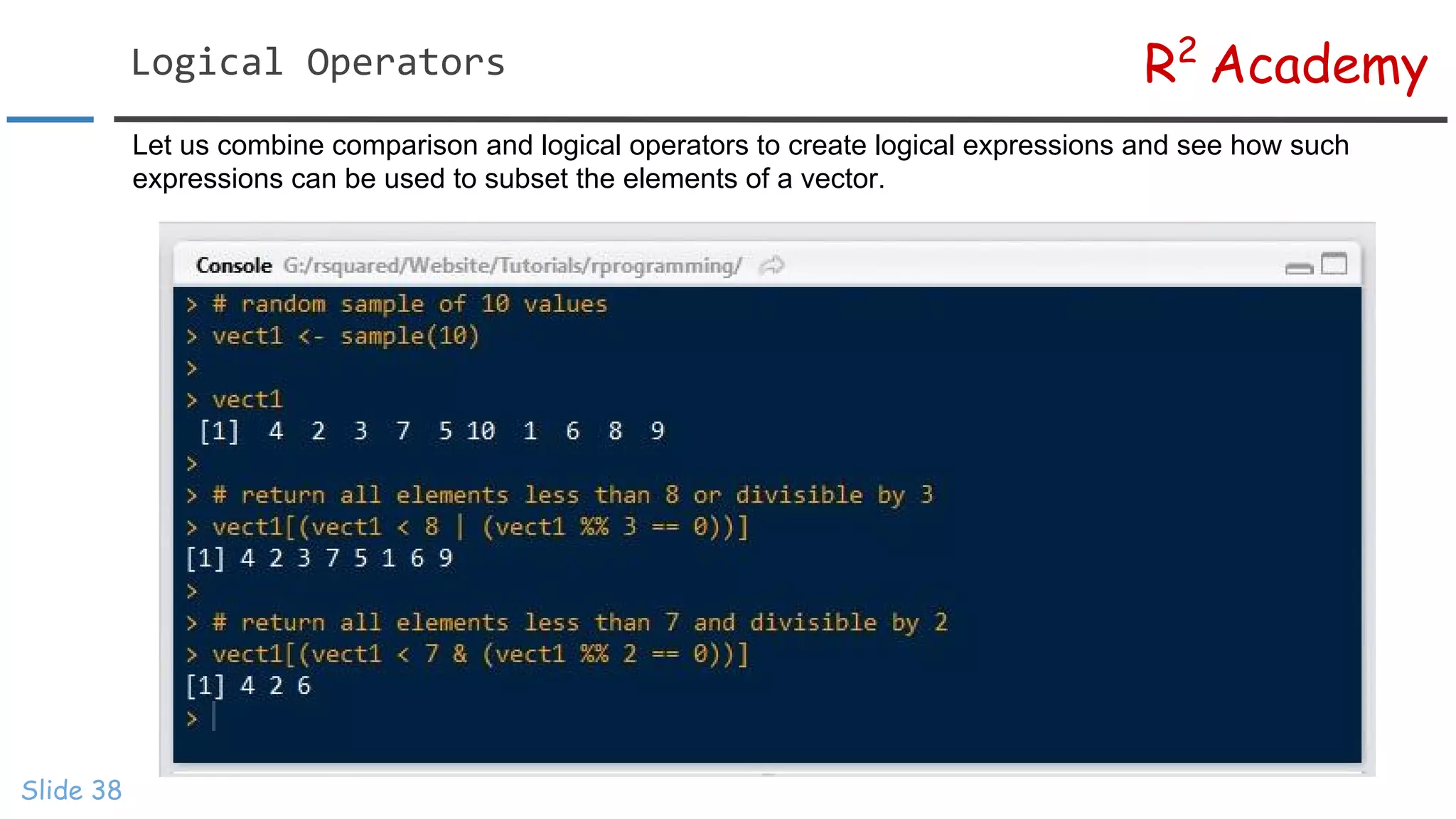
Let us combine comparison and logical operators to create logical expressions and see how such
expressions can be used to subset the elements of a vector.
R2
Academy
Slide 39
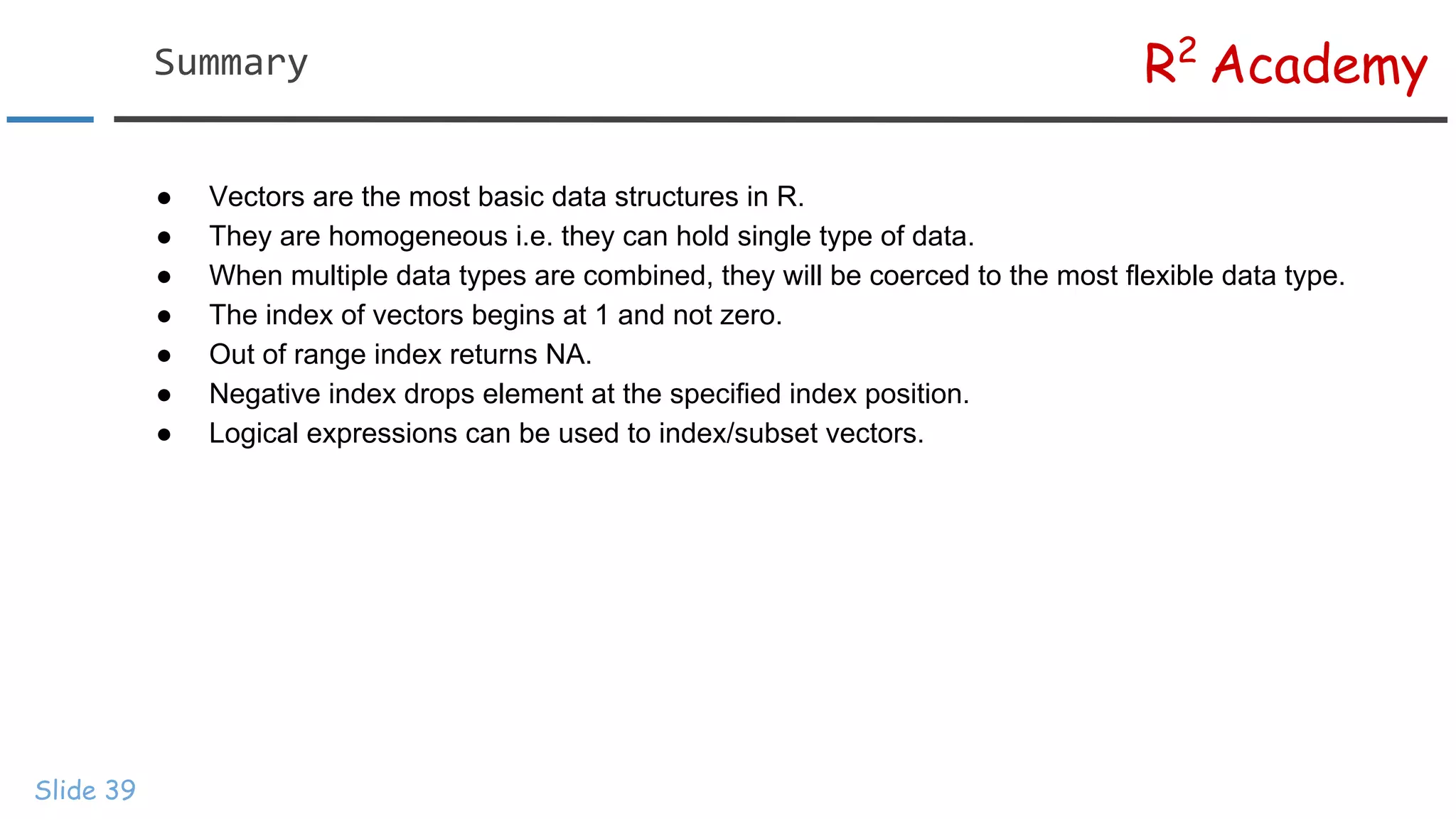
● Vectors are the most basic data structures in R.
● They are homogeneous i.e. they can hold single type of data.
● When multiple data types are combined, they will be coerced to the most flexible data type.
● The index of vectors begins at 1 and not zero.
● Out of range index returns NA.
● Negative index drops element at the specified index position.
● Logical expressions can be used to index/subset vectors.
Summary
R2
AcademyNext Steps...
Slide 40
In the next module:
✓ Create matrix
✓ Matrix Operations
✓ Combine matrices
✓ Index/Subset matrix
✓ Dissolve matrix
R2
Academy
Slide 41
Visit Rsquared Academy
for tutorials on:
→ R Programming
→ Business Analytics
→ Data Visualization
→ Web Applications
→ Package Development
→ Git & GitHub

R Programming: Introduction to Vectors

  • 1.
  • 2.
    R2 AcademyCourse Material Slide 2 Allthe material related to this course are available on our website Scripts can be downloaded from GitHub Videos can be viewed on our Youtube Channel
  • 3.
    R2 AcademyObjectives Slide 3 ➢ Understandthe concept of vectors ➢ Learn to create vectors of different data types ➢ Coercion of different data types in vectors ➢ Perform simple operations on vectors ➢ Handling missing data in vectors ➢ Learn to index/subset vectors
  • 4.
    R2 AcademyIntroduction Slide 4 Vector isthe most basic data structure in R. It is a sequence of elements of the same data type. If the elements are of different type, they will be coerced to a common type that can accommodate all the elements. Vectors are generally created using the c() function, although depending on the data type of vector being created, other methods can be used. In this unit, we learn to create vectors of the following data types: ✓ Numeric ✓ Integer ✓ Character ✓ Logical
  • 5.
    Length Vector Type 1Integer 2 Numeric 3 Logical 4 Character R2 AcademyVectors Slide 5 1 3.5 8.2 TRUE FALSE TRUE ‘John’ ‘Jack’ ‘Jill’ ‘Jim’
  • 6.
    R2 AcademyNumeric Vector Slide 6 Wewill create numeric vector using the c() function (concatenate function) but you can use any function that creates a sequence of numbers. After that, we will use is.vector to test if it is a vector and class to test the class/data type.
  • 7.
    R2 AcademyNumeric Vector Slide 7 Wehave used three different functions to create a sequence of numbers. We leave it as an assignment to the student to understand the functions using help and documentation.
  • 8.
    R2 AcademyInteger Vector Slide 8 Creatinginteger vectors is similar to numeric vectors except that we need to instruct R to treat them as integer and not as numeric type. We will use the same methods that we used for creating numeric vectors . To specify that the data type is integer, we suffix the number with L.
  • 9.
  • 10.
    R2 AcademyCharacter Vector Slide 10 Acharacter vector may contain a single character, a word or a group of words. The elements must be enclosed in single or double quotes.
  • 11.
    R2 AcademyLogical Vector Slide 11 Avector of logical values will contain either TRUE or FALSE.
  • 12.
    R2 AcademyLogical Vector Slide 12 Infact, you can create an integer vector and coerce it to type logical and vice versa.
  • 13.
    R2 AcademyNaming Vector Elements Slide13 It is possible to name the different elements of a vector. We can use these names to access the elements after creating the vector. Let us look at an example:
  • 14.
    R2 AcademyVector Coercion Slide 14 Vectorsare homogeneous i.e. all the elements of the vector must be of the same data type. If we try to create a vector by combining different data types, the elements will be coerced to the most flexible type. The below tables shows the order in which coercion occurs. Character data type is the most flexible while logical data type is the least flexible. If you try to combine any other data type with character, all the elements will be coerced to character type. In the absence of character data, all elements will be coerced to numeric type. Finally, if the data does not include character or numeric types, all the elements will be coerced to integer type. In the next slide, we look at a few examples : Data Types Coerced Type Numeric, Integer, Character & Logical Character Numeric, Integer & Logical Numeric Integer & Logical Integer
  • 15.
  • 16.
    R2 AcademyVector Coercion Slide 16 Tosummarize, below is the order in which coercion takes place: Logical -> Integer -> Numeric -> Character
  • 17.
    R2 AcademyVector Operations Slide 17 Inthis section, we look at simple operations that can be performed on vectors in R. Remember that the nature of the operations depends on the type of elements in the vector. Let us look at some examples:
  • 18.
    R2 AcademyVector Operations Slide 18 Inthe previous examples, the length i.e number of elements in the vectors were same.What happens if the length of the vectors are unequal? In such cases, the shorter vector is recycled to match the length of the longer vector. A few examples will clear this concept.
  • 19.
    R2 AcademyMissing Data Slide 19 Missingdata is a reality. No matter how careful you are in collecting data for your analysis, chances are always high that you end up with some missing data. In R, missing values are represented by NA (not available). NA is neither a string nor numeric but it just indicates that the data is missing. In this section, we will focus on the following: ● Test for missing data ● Remove missing data ● Exclude missing data from analysis
  • 20.
    R2 AcademyMissing Data Slide 20 Wefirst create a vector with missing value. After that, we use is.na() to test whether the vector contains missing data. The is.na() function returns a vector of logical values equal to the vector being tested, TRUE if data is missing and FALSE otherwise. The complete.cases() function also works in the same way. Both return a vector of logical values indicating the presence/absence of missing data.
  • 21.
    R2 AcademyOmit Missing Data Slide21 The na.omit function returns the vector after removing missing data. We may not always want to remove missing data but in the presence of such data, all computations will return NA. Let us see how we can address this issue:
  • 22.
    R2 AcademyExclude Missing Data Slide22 We can use the na.rm argument within functions and set it to TRUE to ensure that missing data is excluded from computations.
  • 23.
    R2 AcademyIndex/Subset Vectors Slide 23 Oneof the most important steps in data analysis is selecting a subset of data from a bigger dataset. Indexing helps in retrieving values individually or a set of values that meet a specific criteria. In this section, we look at various ways of indexing/subsetting a vector.
  • 24.
    R2 AcademyIndex Operator Slide 24 []is the index operator in R. We can use various expressions within [] to subset data. In R, index positions begin at 1 and not 0. To begin with, let us look at values in different index positions. The index operator is then used to access values at index positions 3 and 7. In the next example, we see what happens when we specify an out of range index.
  • 25.
    R2 AcademyOut Of RangeIndex Slide 25 In the first case, we specified the index as 0 and in the second case we used the index 11, which is greater than the length of the vector. R returns an empty vector in the first case and NA in the second.
  • 26.
    R2 AcademyNegative Index Slide 26 Usinga negative index will delete the value present in the said index position. Unlike other languages, it will not index elements from the end of the vector counting backwards. Let us look at an example to understand how negative index works in R.
  • 27.
    R2 AcademySubset Multiple Elements Slide27 If we do not specify anything within [], all the elements in the vector will be returned. We can specify the index of elements using any expression that generates a sequence as seen in the second example. In the last case, we subset elements from position 5 to end using the length of the vector.
  • 28.
    R2 AcademySubset Multiple Elements Slide28 What if we want elements that are not in a sequence as we saw in the last example. In such cases, we will have to create a vector of index positions and use it to subset the elements of the original vector.
  • 29.
    R2 AcademySubset Named Vectors Slide29 Vectors can be subset using the name of the elements. When using name of elements for subsetting, ensure that the names are enclosed in single or double quotes, else R will return an error.
  • 30.
    R2 AcademySubset Using LogicalValues Slide 30 Logical values can be used to subset vectors. They are not very flexible but can be used in simple indexing. In all the above cases the logical values are recycled to match the length of the vector.
  • 31.
    R2 AcademyIndex Using LogicalExpressions Slide 31 Logical expressions can be used to extract elements that meet a specified criteria. This method is most flexible and useful as we can combine multiple conditions using relational and logical operators. Before we use logical expressions, let us spend some time understanding comparison and logical operators as we will be using them extensively in all the modules hereafter. R provides the following comparison operators Operator Name Example: x <- 5 Result > greater than x > 5 FALSE >= greater than or equal to x >= 5 TRUE < less than x < 5 TRUE <= less than or equal to x <= 5 TRUE == equal to x == 5 TRUE != not equal to x != 5 FALSE
  • 32.
    R2 AcademyComparison Operators Slide 32 Theoutput from a comparison operator is always a logical value i.e. TRUE or FALSE. To begin with, let us see how we can use comparison operators to subset elements in a vector.
  • 33.
  • 34.
    R2 AcademyLogical Operators Slide 34 Rprovides the following logical operators: Operator Name ! not | or & and
  • 35.
    R2 AcademyTruth Table -! (NOT) Slide 35 Truth table for the ! operator: x !x Example: x <- 5 Result True False x > 5 !(x > 5) TRUE FALSE False True x < 5 !(x < 5) FALSE TRUE
  • 36.
    R2 AcademyTruth Table -& (AND) Slide 36 Truth table for the & operator: x y x & y Example: x <- 5 y <- 8 Result False False False (x > 5 & y > 8) FALSE False True False (x > 5 & y < 8) FALSE True False False (x < 5 & y > 8) FALSE True True True (x < 5 & y < 8) TRUE
  • 37.
    R2 AcademyTruth Table -|(OR) Slide 37 Truth table for the | operator: x y x | y Example: x <- 5 y <- 8 Result False False False (x > 5 | y > 8) False False True True (x > 5 | y < 8) True True False True (x < 5 | y > 8) True True True True (x < 5 | y < 8) True
  • 38.
    R2 AcademyLogical Operators Slide 38 Letus combine comparison and logical operators to create logical expressions and see how such expressions can be used to subset the elements of a vector.
  • 39.
    R2 Academy Slide 39 ● Vectorsare the most basic data structures in R. ● They are homogeneous i.e. they can hold single type of data. ● When multiple data types are combined, they will be coerced to the most flexible data type. ● The index of vectors begins at 1 and not zero. ● Out of range index returns NA. ● Negative index drops element at the specified index position. ● Logical expressions can be used to index/subset vectors. Summary
  • 40.
    R2 AcademyNext Steps... Slide 40 Inthe next module: ✓ Create matrix ✓ Matrix Operations ✓ Combine matrices ✓ Index/Subset matrix ✓ Dissolve matrix
  • 41.
    R2 Academy Slide 41 Visit RsquaredAcademy for tutorials on: → R Programming → Business Analytics → Data Visualization → Web Applications → Package Development → Git & GitHub