Presented by:
Farah Hirani
Writing for web accessibility
How to create understandable content
1 4
2
3
5
6
Background
Benefits
Writing	for	accessibility
How-to:	Organization
How-to:	Writing
Next	steps	&	wrap-up
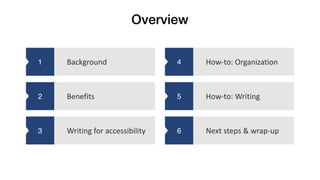
Overview
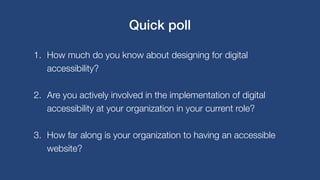
1. How much do you know about designing for digital
accessibility?
2. Are you actively involved in the implementation of digital
accessibility at your organization in your current role?
3. How far along is your organization to having an accessible
website?
Quick poll
1
2
3
4
5
6
Background
Definitions and context
Background
Benefits
Writing	for	accessibility
How-to:	Organization
How-to:	Writing
Next	steps	&	wrap-up
1
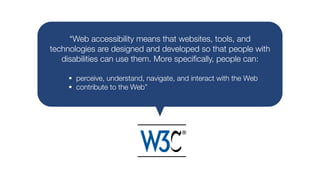
“Web accessibility means that websites, tools, and
technologies are designed and developed so that people with
disabilities can use them. More specifically, people can:
• perceive, understand, navigate, and interact with the Web
• contribute to the Web”
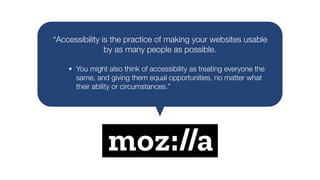
“Accessibility is the practice of making your websites usable
by as many people as possible.
• You might also think of accessibility as treating everyone the
same, and giving them equal opportunities, no matter what
their ability or circumstances.”
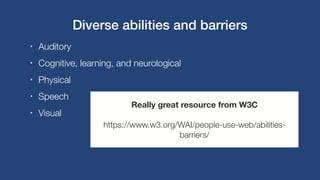
• Auditory
• Cognitive, learning, and neurological
• Physical
• Speech
• Visual
Really great resource from W3C
https://www.w3.org/WAI/people-use-web/abilities-
barriers/
Diverse abilities and barriers
1
2
3
4
5
6
Background
Benefits
Writing	for	accessibility
How-to:	Organization
How-to:	Writing
Next	steps	&	wrap-up
Benefits
Why make your content accessible?
2
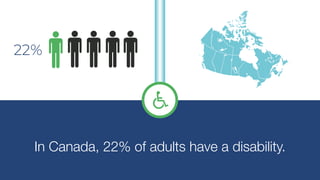
In Canada, 22% of adults have a disability.
22%
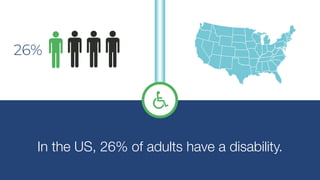
In the US, 26% of adults have a disability.
26%
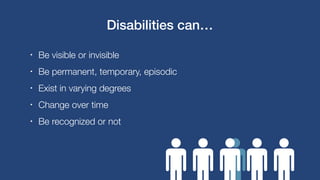
• Be visible or invisible
• Be permanent, temporary, episodic
• Exist in varying degrees
• Change over time
• Be recognized or not
Disabilities can…
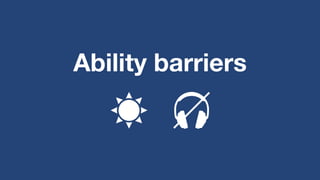
Ability barriers
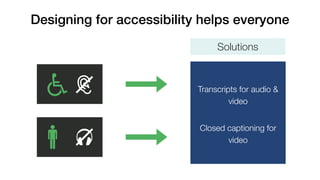
Designing for accessibility helps everyone
Solutions
Transcripts for audio &
video
Closed captioning for
video
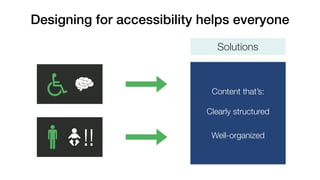
Designing for accessibility helps everyone
!!
Content that’s:
Clearly structured
Well-organized
Solutions
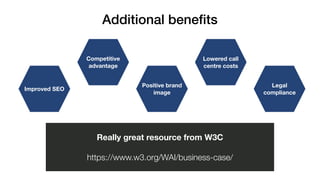
Legal
compliance
Lowered call
centre costs
Positive brand
image
Competitive
advantage
Improved SEO
Additional benefits
Really great resource from W3C
https://www.w3.org/WAI/business-case/
1
2
3
4
5
6
Background
Benefits
Writing	for	accessibility
How-to:	Organization
How-to:	Writing
Next	steps	&	wrap-up
Writing for accessibility
Techniques for writing understandable content
3
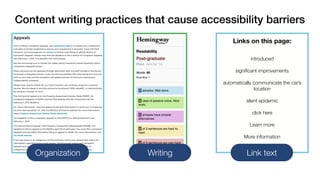
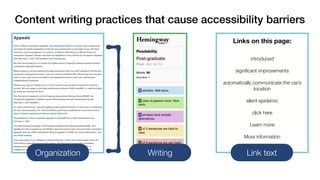
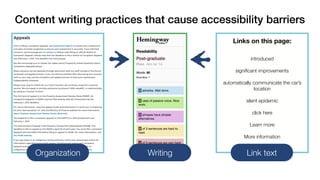
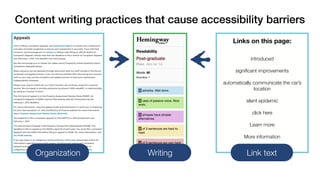
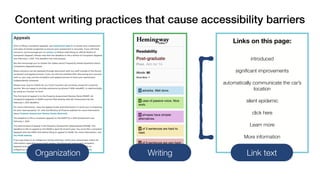
Content writing practices that cause accessibility barriers
Organization Writing Link text
Links on this page:
introduced
significant improvements
automatically communicate the car’s
location
silent epidemic
click here
Learn more
More information
Content writing practices that cause accessibility barriers
Organization Writing Link text
Links on this page:
introduced
significant improvements
automatically communicate the car’s
location
silent epidemic
click here
Learn more
More information
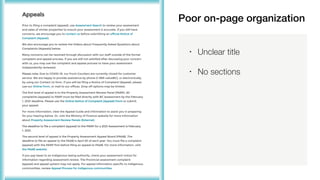
Poor on-page organization
• Unclear title
• No sections
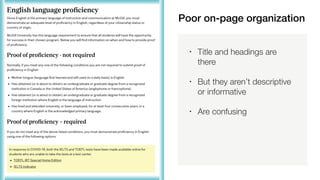
Poor on-page organization
• Title and headings are
there
• But they aren’t descriptive
or informative
• Are confusing
• People using screenreader’s must tediously read every word.
• Users with cognitive or learning disabilities may not find and
understand content.
• Users with limited short-term memory may need descriptive
headings.
Impact of poor content organization
Content writing practices that cause accessibility barriers
Organization Writing Link text
Links on this page:
introduced
significant improvements
automatically communicate the car’s
location
silent epidemic
click here
Learn more
More information
Content writing practices that cause accessibility barriers
Organization Writing Link text
Links on this page:
introduced
significant improvements
automatically communicate the car’s
location
silent epidemic
click here
Learn more
More information
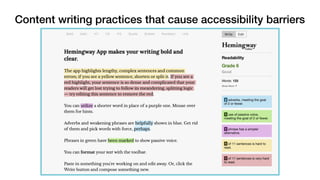
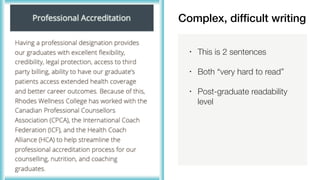
• This is 2 sentences
• Both “very hard to read”
• Post-graduate readability
level
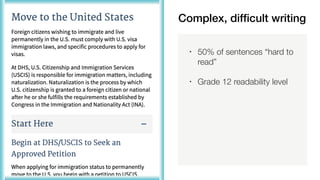
Complex, difficult writing
• 50% of sentences “hard to
read”
• Grade 12 readability level
• Users with cognitive or learning disabilities may not understand
content and context.
• Complex language can be a source of frustration, wasted time,
and energy for these users.
• Some won’t be able to overcome these barriers.
Impact of complex writing
Content writing practices that cause accessibility barriers
Organization Writing Link text
Links on this page:
introduced
significant improvements
automatically communicate the car’s
location
silent epidemic
click here
Learn more
More information
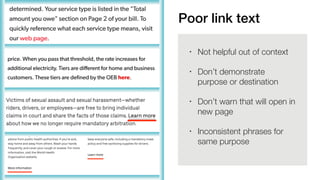
Poor link text
• Not helpful out of context
• Don’t demonstrate
purpose or destination
• Don’t warn that will open in
new page
• Inconsistent phrases for
same purpose
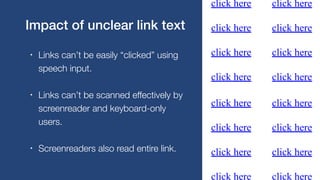
• Links can’t be easily “clicked” using
speech input.
• Links can’t be scanned effectively by
screenreader and keyboard-only
users.
• Screenreaders also read entire link.
Impact of unclear link text
1
2
3
4
5
6
Background
Benefits
Writing	for	accessibility
How-to:	Organization
How-to:	Writing
Next	steps	&	wrap-up
How to write for accessibility
Working through examples
4
5
Two
Examples
1. On-page structure
2. Understandable writing
Create clear, on-page structure
1
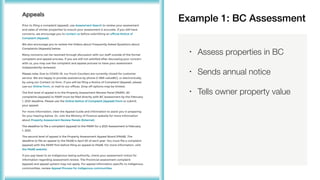
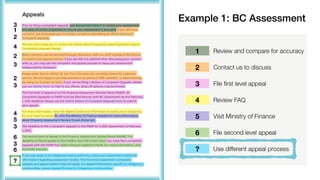
• Assess properties in BC
• Sends annual notice
• Tells owner property value
Example 1: BC Assessment
3
1
2
4
2
3
2
3
4
5
3
6
3
?
6
1
2
3
4
5
6
?
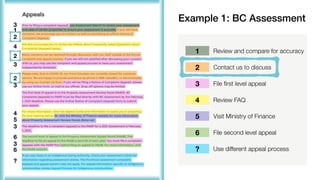
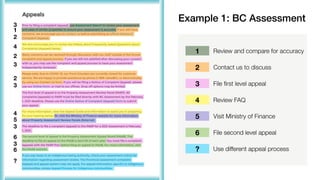
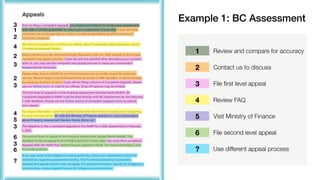
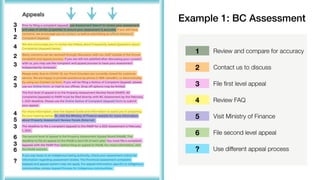
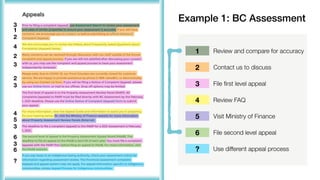
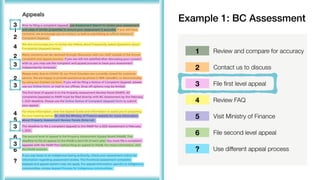
Review and compare for accuracy
Contact us to discuss
File first level appeal
Review FAQ
Visit Ministry of Finance
File second level appeal
Use different appeal process
Example 1: BC Assessment
3
1
2
4
2
3
2
3
4
5
3
6
3
?
6
1
2
3
4
5
6
?
Review and compare for accuracy
Contact us to discuss
File first level appeal
Review FAQ
Visit Ministry of Finance
File second level appeal
Use different appeal process
Example 1: BC Assessment
3
1
2
4
2
3
2
3
4
5
3
6
3
?
6
1
2
3
4
5
6
?
Review and compare for accuracy
Contact us to discuss
File first level appeal
Review FAQ
Visit Ministry of Finance
File second level appeal
Use different appeal process
Example 1: BC Assessment
3
1
2
4
2
3
2
3
4
5
3
6
3
?
6
1
2
3
4
5
6
?
Review and compare for accuracy
Contact us to discuss
File first level appeal
Review FAQ
Visit Ministry of Finance
File second level appeal
Use different appeal process
Example 1: BC Assessment
3
1
2
4
2
3
2
3
4
5
3
6
3
?
6
1
2
3
4
5
6
?
Review and compare for accuracy
Contact us to discuss
File first level appeal
Review FAQ
Visit Ministry of Finance
File second level appeal
Use different appeal process
Example 1: BC Assessment
3
1
2
4
2
3
2
3
4
5
3
6
3
?
6
1
2
3
4
5
6
?
Review and compare for accuracy
Contact us to discuss
File first level appeal
Review FAQ
Visit Ministry of Finance
File second level appeal
Use different appeal process
Example 1: BC Assessment
3
1
2
4
2
3
2
3
4
5
3
6
3
?
6
1
2
3
4
5
6
?
Review and compare for accuracy
Contact us to discuss
File first level appeal
Review FAQ
Visit Ministry of Finance
File second level appeal
Use different appeal process
Example 1: BC Assessment
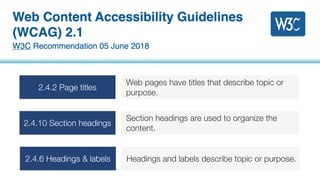
2.4.2 Page titles
Web pages have titles that describe topic or
purpose.
2.4.10 Section headings
Section headings are used to organize the
content.
2.4.6 Headings & labels Headings and labels describe topic or purpose.
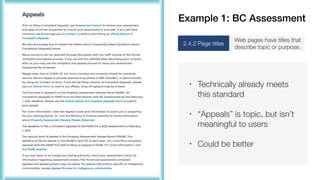
• Technically already meets
this standard
• “Appeals” is topic, but isn’t
meaningful to users
• Could be better
2.4.2 Page titles
Web pages have titles that
describe topic or purpose.
Example 1: BC Assessment
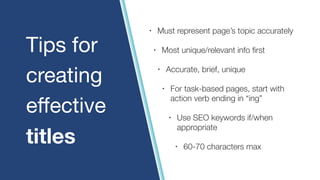
• Must represent page’s topic accurately
• Most unique/relevant info first
• Accurate, brief, unique
• For task-based pages, start with
action verb ending in “ing”
• Use SEO keywords if/when
appropriate
• 60-70 characters max
Tips for

creating

effective

titles
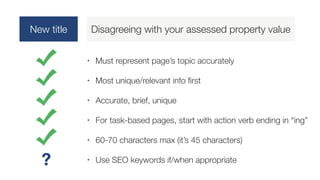
New title Disagreeing with your assessed property value
• Must represent page’s topic accurately
• Most unique/relevant info first
• Accurate, brief, unique
• For task-based pages, start with action verb ending in “ing”
• 60-70 characters max (it’s 45 characters)
• Use SEO keywords if/when appropriate
?
Example 1: BC Assessment
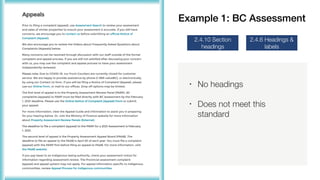
• No headings
• Does not meet this
standard
2.4.10 Section
headings
2.4.6 Headings &
labels
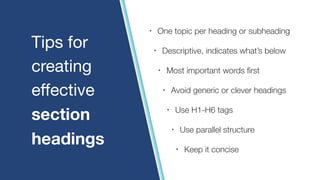
Tips for

creating

effective

section
headings
• One topic per heading or subheading
• Descriptive, indicates what’s below
• Most important words first
• Avoid generic or clever headings
• Use H1-H6 tags
• Use parallel structure
• Keep it concise
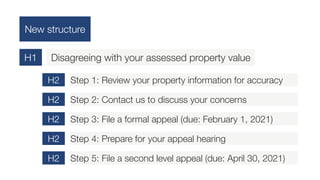
New structure
Disagreeing with your assessed property value
H1
Step 1: Review your property information for accuracy
H2
Step 2: Contact us to discuss your concerns
H2
Step 3: File a formal appeal (due: February 1, 2021)
H2
Step 4: Prepare for your appeal hearing
H2
Step 5: File a second level appeal (due: April 30, 2021)
H2
Example 1: BC Assessment
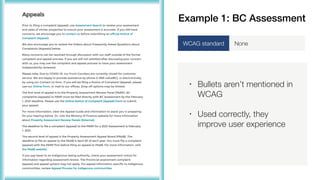
• Bullets aren’t mentioned in
WCAG
• Used correctly, they
improve user experience
WCAG standard None
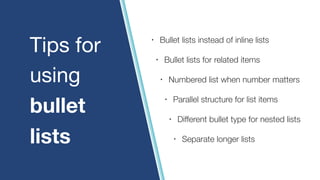
• Bullet lists instead of inline lists
• Bullet lists for related items
• Numbered list when number matters
• Parallel structure for list items
• Different bullet type for nested lists
• Separate longer lists
Tips for

using
bullet
lists
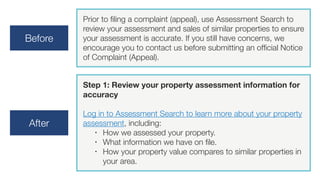
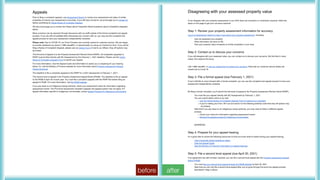
Before
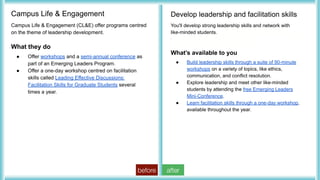
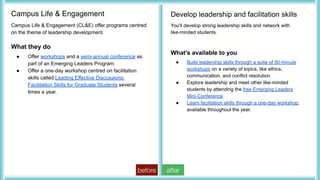
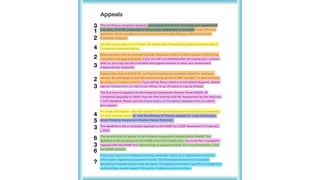
Prior to filing a complaint (appeal), use Assessment Search to
review your assessment and sales of similar properties to ensure
your assessment is accurate. If you still have concerns, we
encourage you to contact us before submitting an official Notice
of Complaint (Appeal). 
After
Step 1: Review your property assessment information for
accuracy
Log in to Assessment Search to learn more about your property
assessment, including:
• How we assessed your property.
• What information we have on file.
• How your property value compares to similar properties in
your area.
before after
Write in a way that’s easy to understand
2
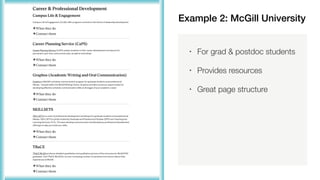
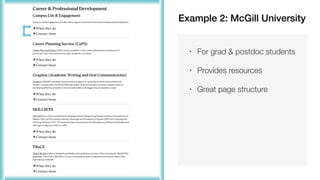
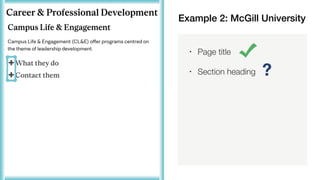
Example 2: McGill University
• For grad & postdoc students
• Provides resources
• Great page structure
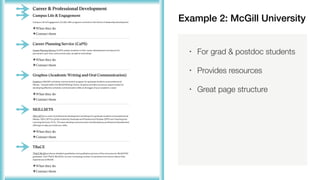
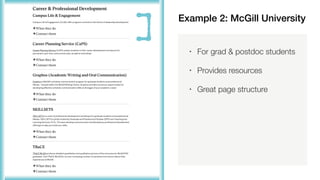
Example 2: McGill University
• For grad & postdoc students
• Provides resources
• Great page structure
Example 2: McGill University
• For grad & postdoc students
• Provides resources
• Great page structure
Example 2: McGill University
• For grad & postdoc students
• Provides resources
• Great page structure
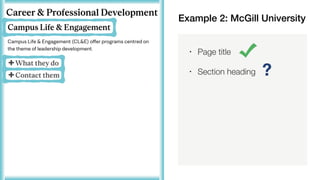
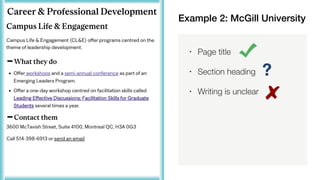
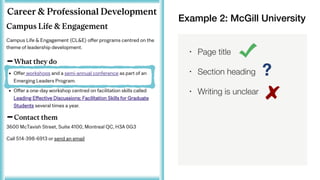
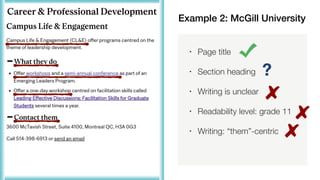
• Page title
• Section heading ?
Example 2: McGill University
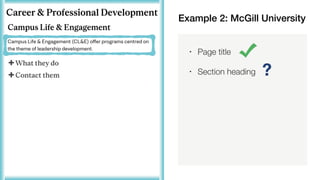
• Page title
• Section heading ?
Example 2: McGill University
• Page title
• Section heading ?
Example 2: McGill University
?
• Page title
• Section heading
• Writing is unclear
Example 2: McGill University
?
• Page title
• Section heading
• Writing is unclear
Example 2: McGill University
?
• Page title
• Section heading
• Writing is unclear
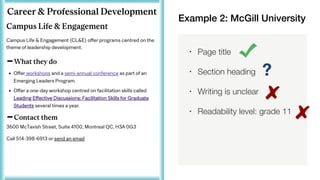
• Readability level: grade 11
Example 2: McGill University
?
• Page title
• Section heading
• Writing is unclear
• Readability level: grade 11
• Writing: “them”-centric
Example 2: McGill University
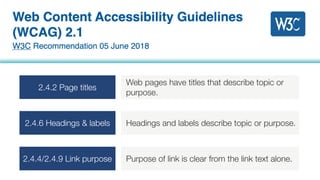
2.4.2 Page titles
Web pages have titles that describe topic or
purpose.
2.4.6 Headings & labels Headings and labels describe topic or purpose.
2.4.4/2.4.9 Link purpose Purpose of link is clear from the link text alone.
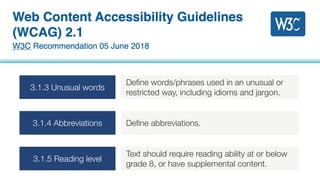
3.1.3 Unusual words
Define words/phrases used in an unusual or
restricted way, including idioms and jargon.
3.1.4 Abbreviations Define abbreviations.
3.1.5 Reading level
Text should require reading ability at or below
grade 8, or have supplemental content.
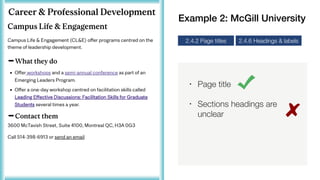
• Page title
• Sections headings are
unclear
2.4.2 Page titles 2.4.6 Headings & labels
Example 2: McGill University
before after
before after
before after
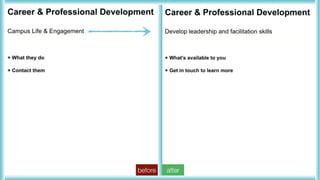
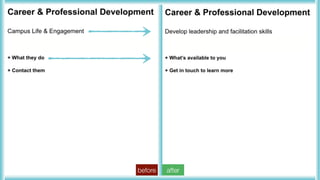
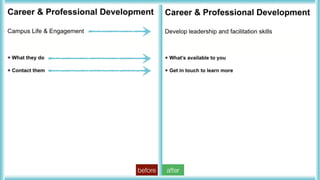
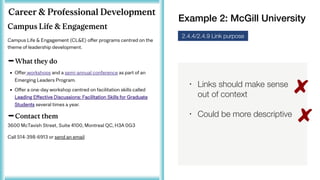
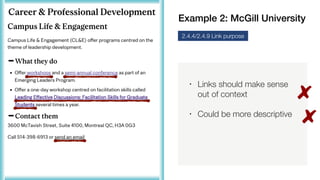
• Links should make sense
out of context
• Could be more descriptive
2.4.4/2.4.9 Link purpose
Example 2: McGill University
• Links should make sense
out of context
• Could be more descriptive
2.4.4/2.4.9 Link purpose
Example 2: McGill University
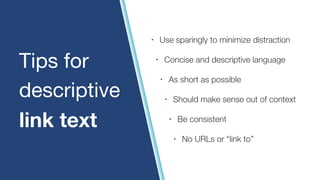
• Use sparingly to minimize distraction
• Concise and descriptive language
• As short as possible
• Should make sense out of context
• Be consistent
• No URLs or “link to”
Tips for
descriptive
link text
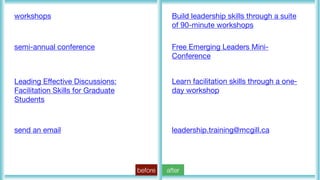
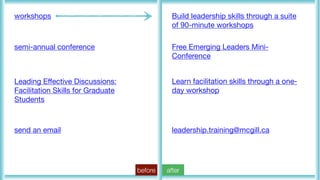
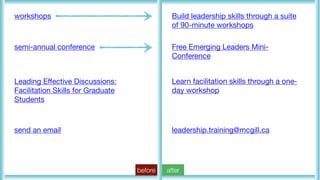
workshops
semi-annual conference
Leading Effective Discussions:
Facilitation Skills for Graduate
Students
send an email
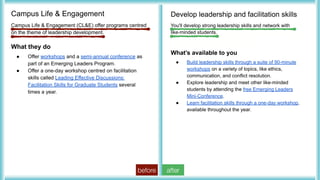
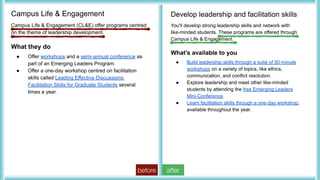
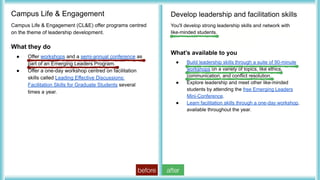
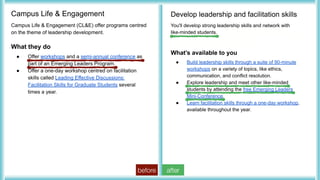
Build leadership skills through a suite
of 90-minute workshops
Free Emerging Leaders Mini-
Conference
Learn facilitation skills through a one-
day workshop
leadership.training@mcgill.ca
before after
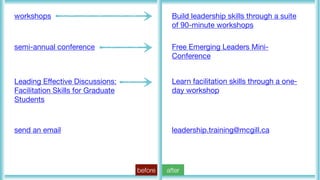
workshops
semi-annual conference
Leading Effective Discussions:
Facilitation Skills for Graduate
Students
send an email
Build leadership skills through a suite
of 90-minute workshops
Free Emerging Leaders Mini-
Conference
Learn facilitation skills through a one-
day workshop
leadership.training@mcgill.ca
before after
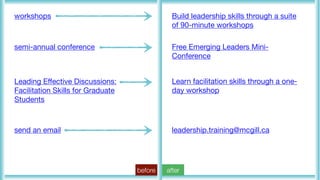
workshops
semi-annual conference
Leading Effective Discussions:
Facilitation Skills for Graduate
Students
send an email
Build leadership skills through a suite
of 90-minute workshops
Free Emerging Leaders Mini-
Conference
Learn facilitation skills through a one-
day workshop
leadership.training@mcgill.ca
before after
workshops
semi-annual conference
Leading Effective Discussions:
Facilitation Skills for Graduate
Students
send an email
Build leadership skills through a suite
of 90-minute workshops
Free Emerging Leaders Mini-
Conference
Learn facilitation skills through a one-
day workshop
leadership.training@mcgill.ca
before after
workshops
semi-annual conference
Leading Effective Discussions:
Facilitation Skills for Graduate
Students
send an email
Build leadership skills through a suite
of 90-minute workshops
Free Emerging Leaders Mini-
Conference
Learn facilitation skills through a one-
day workshop
leadership.training@mcgill.ca
before after
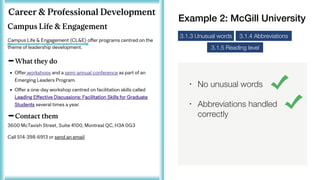
• No unusual words
3.1.3 Unusual words
3.1.5 Reading level
3.1.4 Abbreviations
Example 2: McGill University
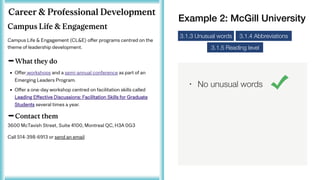
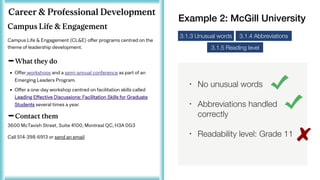
• No unusual words
• Abbreviations handled
correctly
3.1.3 Unusual words
3.1.5 Reading level
3.1.4 Abbreviations
Example 2: McGill University
• No unusual words
• Abbreviations handled
correctly
• Readability level: Grade 11
3.1.3 Unusual words
3.1.5 Reading level
3.1.4 Abbreviations
Example 2: McGill University
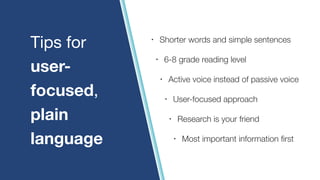
• Shorter words and simple sentences
• 6-8 grade reading level
• Active voice instead of passive voice
• User-focused approach
• Research is your friend
• Most important information first
Tips for
user-
focused,
plain
language
before after
before after
before after
before after
before after
before after
1
2
3
4
5
6
Background
Benefits
Writing	for	accessibility
How-to:	Organization
How-to:	Writing
Next	steps	&	wrap-up
Next steps & wrap-up
Where to go from here
6
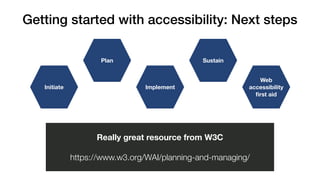
Getting started with accessibility: Next steps
Web
accessibility
first aid
Sustain
Implement
Plan
Initiate
Really great resource from W3C
https://www.w3.org/WAI/planning-and-managing/
• Designing for accessibility is about designing content to be
flexible.
• Lowers barriers for the 1 in 5 people with disabilities.
• Also allows access for people experiencing ability barriers.
Re-cap
Make your content easier to understand by:
• Organizing it with effective titles, headings, and bullet lists.
• Writing it using user-focused plain language.
• Making sure link text is descriptive and makes sense out of
context.
Re-cap
3
1
2
4
2
3
2
3
4
5
3
6
3
?
6
“The one argument for accessibility that doesn’t get made
nearly often enough is how extraordinarily better it makes
some people’s lives.
How many opportunities do we have to dramatically
improve people’s lives just by doing our job a little better?”
― Steve Krug
Author of Don’t Make Me Think:
A Common Sense Approach to
Web Usability
Get in touch.
farah@contentstrategyinc.com
content-strategy-incorporated
team_cs_inc

Writing for web accessibility - May 2021

  • 1.
    Presented by: Farah Hirani Writingfor web accessibility How to create understandable content
  • 2.
  • 3.
    1. How muchdo you know about designing for digital accessibility? 2. Are you actively involved in the implementation of digital accessibility at your organization in your current role? 3. How far along is your organization to having an accessible website? Quick poll
  • 4.
  • 5.
    “Web accessibility meansthat websites, tools, and technologies are designed and developed so that people with disabilities can use them. More specifically, people can: • perceive, understand, navigate, and interact with the Web • contribute to the Web”
  • 6.
    “Accessibility is thepractice of making your websites usable by as many people as possible. • You might also think of accessibility as treating everyone the same, and giving them equal opportunities, no matter what their ability or circumstances.”
  • 7.
    • Auditory • Cognitive,learning, and neurological • Physical • Speech • Visual Really great resource from W3C https://www.w3.org/WAI/people-use-web/abilities- barriers/ Diverse abilities and barriers
  • 8.
  • 9.
    In Canada, 22%of adults have a disability. 22%
  • 10.
    In the US,26% of adults have a disability. 26%
  • 11.
    • Be visibleor invisible • Be permanent, temporary, episodic • Exist in varying degrees • Change over time • Be recognized or not Disabilities can…
  • 12.
  • 13.
    Designing for accessibilityhelps everyone Solutions Transcripts for audio & video Closed captioning for video
  • 14.
    Designing for accessibilityhelps everyone !! Content that’s: Clearly structured Well-organized Solutions
  • 15.
    Legal compliance Lowered call centre costs Positivebrand image Competitive advantage Improved SEO Additional benefits Really great resource from W3C https://www.w3.org/WAI/business-case/
  • 16.
  • 17.
    Content writing practicesthat cause accessibility barriers Organization Writing Link text Links on this page: introduced significant improvements automatically communicate the car’s location silent epidemic click here Learn more More information
  • 18.
    Content writing practicesthat cause accessibility barriers Organization Writing Link text Links on this page: introduced significant improvements automatically communicate the car’s location silent epidemic click here Learn more More information
  • 19.
    Poor on-page organization •Unclear title • No sections
  • 20.
    Poor on-page organization •Title and headings are there • But they aren’t descriptive or informative • Are confusing
  • 21.
    • People usingscreenreader’s must tediously read every word. • Users with cognitive or learning disabilities may not find and understand content. • Users with limited short-term memory may need descriptive headings. Impact of poor content organization
  • 22.
    Content writing practicesthat cause accessibility barriers Organization Writing Link text Links on this page: introduced significant improvements automatically communicate the car’s location silent epidemic click here Learn more More information
  • 23.
    Content writing practicesthat cause accessibility barriers
  • 24.
    Content writing practicesthat cause accessibility barriers Organization Writing Link text Links on this page: introduced significant improvements automatically communicate the car’s location silent epidemic click here Learn more More information
  • 25.
    • This is2 sentences • Both “very hard to read” • Post-graduate readability level Complex, difficult writing
  • 26.
    Complex, difficult writing •50% of sentences “hard to read” • Grade 12 readability level
  • 27.
    • Users withcognitive or learning disabilities may not understand content and context. • Complex language can be a source of frustration, wasted time, and energy for these users. • Some won’t be able to overcome these barriers. Impact of complex writing
  • 28.
    Content writing practicesthat cause accessibility barriers Organization Writing Link text Links on this page: introduced significant improvements automatically communicate the car’s location silent epidemic click here Learn more More information
  • 29.
    Poor link text •Not helpful out of context • Don’t demonstrate purpose or destination • Don’t warn that will open in new page • Inconsistent phrases for same purpose
  • 30.
    • Links can’tbe easily “clicked” using speech input. • Links can’t be scanned effectively by screenreader and keyboard-only users. • Screenreaders also read entire link. Impact of unclear link text
  • 31.
  • 32.
  • 33.
  • 34.
    • Assess propertiesin BC • Sends annual notice • Tells owner property value Example 1: BC Assessment
  • 35.
    3 1 2 4 2 3 2 3 4 5 3 6 3 ? 6 1 2 3 4 5 6 ? Review and comparefor accuracy Contact us to discuss File first level appeal Review FAQ Visit Ministry of Finance File second level appeal Use different appeal process Example 1: BC Assessment
  • 36.
    3 1 2 4 2 3 2 3 4 5 3 6 3 ? 6 1 2 3 4 5 6 ? Review and comparefor accuracy Contact us to discuss File first level appeal Review FAQ Visit Ministry of Finance File second level appeal Use different appeal process Example 1: BC Assessment
  • 37.
    3 1 2 4 2 3 2 3 4 5 3 6 3 ? 6 1 2 3 4 5 6 ? Review and comparefor accuracy Contact us to discuss File first level appeal Review FAQ Visit Ministry of Finance File second level appeal Use different appeal process Example 1: BC Assessment
  • 38.
    3 1 2 4 2 3 2 3 4 5 3 6 3 ? 6 1 2 3 4 5 6 ? Review and comparefor accuracy Contact us to discuss File first level appeal Review FAQ Visit Ministry of Finance File second level appeal Use different appeal process Example 1: BC Assessment
  • 39.
    3 1 2 4 2 3 2 3 4 5 3 6 3 ? 6 1 2 3 4 5 6 ? Review and comparefor accuracy Contact us to discuss File first level appeal Review FAQ Visit Ministry of Finance File second level appeal Use different appeal process Example 1: BC Assessment
  • 40.
    3 1 2 4 2 3 2 3 4 5 3 6 3 ? 6 1 2 3 4 5 6 ? Review and comparefor accuracy Contact us to discuss File first level appeal Review FAQ Visit Ministry of Finance File second level appeal Use different appeal process Example 1: BC Assessment
  • 41.
    3 1 2 4 2 3 2 3 4 5 3 6 3 ? 6 1 2 3 4 5 6 ? Review and comparefor accuracy Contact us to discuss File first level appeal Review FAQ Visit Ministry of Finance File second level appeal Use different appeal process Example 1: BC Assessment
  • 42.
    2.4.2 Page titles Webpages have titles that describe topic or purpose. 2.4.10 Section headings Section headings are used to organize the content. 2.4.6 Headings & labels Headings and labels describe topic or purpose.
  • 43.
    • Technically alreadymeets this standard • “Appeals” is topic, but isn’t meaningful to users • Could be better 2.4.2 Page titles Web pages have titles that describe topic or purpose. Example 1: BC Assessment
  • 44.
    • Must representpage’s topic accurately • Most unique/relevant info first • Accurate, brief, unique • For task-based pages, start with action verb ending in “ing” • Use SEO keywords if/when appropriate • 60-70 characters max Tips for creating effective titles
  • 45.
    New title Disagreeingwith your assessed property value • Must represent page’s topic accurately • Most unique/relevant info first • Accurate, brief, unique • For task-based pages, start with action verb ending in “ing” • 60-70 characters max (it’s 45 characters) • Use SEO keywords if/when appropriate ?
  • 46.
    Example 1: BCAssessment • No headings • Does not meet this standard 2.4.10 Section headings 2.4.6 Headings & labels
  • 47.
    Tips for creating effective section headings • Onetopic per heading or subheading • Descriptive, indicates what’s below • Most important words first • Avoid generic or clever headings • Use H1-H6 tags • Use parallel structure • Keep it concise
  • 48.
    New structure Disagreeing withyour assessed property value H1 Step 1: Review your property information for accuracy H2 Step 2: Contact us to discuss your concerns H2 Step 3: File a formal appeal (due: February 1, 2021) H2 Step 4: Prepare for your appeal hearing H2 Step 5: File a second level appeal (due: April 30, 2021) H2
  • 49.
    Example 1: BCAssessment • Bullets aren’t mentioned in WCAG • Used correctly, they improve user experience WCAG standard None
  • 50.
    • Bullet listsinstead of inline lists • Bullet lists for related items • Numbered list when number matters • Parallel structure for list items • Different bullet type for nested lists • Separate longer lists Tips for using bullet lists
  • 51.
    Before Prior to filinga complaint (appeal), use Assessment Search to review your assessment and sales of similar properties to ensure your assessment is accurate. If you still have concerns, we encourage you to contact us before submitting an official Notice of Complaint (Appeal).  After Step 1: Review your property assessment information for accuracy Log in to Assessment Search to learn more about your property assessment, including: • How we assessed your property. • What information we have on file. • How your property value compares to similar properties in your area.
  • 52.
  • 53.
    Write in away that’s easy to understand 2
  • 54.
    Example 2: McGillUniversity • For grad & postdoc students • Provides resources • Great page structure
  • 55.
    Example 2: McGillUniversity • For grad & postdoc students • Provides resources • Great page structure
  • 56.
    Example 2: McGillUniversity • For grad & postdoc students • Provides resources • Great page structure
  • 57.
    Example 2: McGillUniversity • For grad & postdoc students • Provides resources • Great page structure
  • 58.
    • Page title •Section heading ? Example 2: McGill University
  • 59.
    • Page title •Section heading ? Example 2: McGill University
  • 60.
    • Page title •Section heading ? Example 2: McGill University
  • 61.
    ? • Page title •Section heading • Writing is unclear Example 2: McGill University
  • 62.
    ? • Page title •Section heading • Writing is unclear Example 2: McGill University
  • 63.
    ? • Page title •Section heading • Writing is unclear • Readability level: grade 11 Example 2: McGill University
  • 64.
    ? • Page title •Section heading • Writing is unclear • Readability level: grade 11 • Writing: “them”-centric Example 2: McGill University
  • 65.
    2.4.2 Page titles Webpages have titles that describe topic or purpose. 2.4.6 Headings & labels Headings and labels describe topic or purpose. 2.4.4/2.4.9 Link purpose Purpose of link is clear from the link text alone.
  • 66.
    3.1.3 Unusual words Definewords/phrases used in an unusual or restricted way, including idioms and jargon. 3.1.4 Abbreviations Define abbreviations. 3.1.5 Reading level Text should require reading ability at or below grade 8, or have supplemental content.
  • 67.
    • Page title •Sections headings are unclear 2.4.2 Page titles 2.4.6 Headings & labels Example 2: McGill University
  • 68.
  • 69.
  • 70.
  • 71.
    • Links shouldmake sense out of context • Could be more descriptive 2.4.4/2.4.9 Link purpose Example 2: McGill University
  • 72.
    • Links shouldmake sense out of context • Could be more descriptive 2.4.4/2.4.9 Link purpose Example 2: McGill University
  • 73.
    • Use sparinglyto minimize distraction • Concise and descriptive language • As short as possible • Should make sense out of context • Be consistent • No URLs or “link to” Tips for descriptive link text
  • 74.
    workshops semi-annual conference Leading EffectiveDiscussions: Facilitation Skills for Graduate Students send an email Build leadership skills through a suite of 90-minute workshops Free Emerging Leaders Mini- Conference Learn facilitation skills through a one- day workshop leadership.training@mcgill.ca before after
  • 75.
    workshops semi-annual conference Leading EffectiveDiscussions: Facilitation Skills for Graduate Students send an email Build leadership skills through a suite of 90-minute workshops Free Emerging Leaders Mini- Conference Learn facilitation skills through a one- day workshop leadership.training@mcgill.ca before after
  • 76.
    workshops semi-annual conference Leading EffectiveDiscussions: Facilitation Skills for Graduate Students send an email Build leadership skills through a suite of 90-minute workshops Free Emerging Leaders Mini- Conference Learn facilitation skills through a one- day workshop leadership.training@mcgill.ca before after
  • 77.
    workshops semi-annual conference Leading EffectiveDiscussions: Facilitation Skills for Graduate Students send an email Build leadership skills through a suite of 90-minute workshops Free Emerging Leaders Mini- Conference Learn facilitation skills through a one- day workshop leadership.training@mcgill.ca before after
  • 78.
    workshops semi-annual conference Leading EffectiveDiscussions: Facilitation Skills for Graduate Students send an email Build leadership skills through a suite of 90-minute workshops Free Emerging Leaders Mini- Conference Learn facilitation skills through a one- day workshop leadership.training@mcgill.ca before after
  • 79.
    • No unusualwords 3.1.3 Unusual words 3.1.5 Reading level 3.1.4 Abbreviations Example 2: McGill University
  • 80.
    • No unusualwords • Abbreviations handled correctly 3.1.3 Unusual words 3.1.5 Reading level 3.1.4 Abbreviations Example 2: McGill University
  • 81.
    • No unusualwords • Abbreviations handled correctly • Readability level: Grade 11 3.1.3 Unusual words 3.1.5 Reading level 3.1.4 Abbreviations Example 2: McGill University
  • 82.
    • Shorter wordsand simple sentences • 6-8 grade reading level • Active voice instead of passive voice • User-focused approach • Research is your friend • Most important information first Tips for user- focused, plain language
  • 83.
  • 84.
  • 85.
  • 86.
  • 87.
  • 88.
  • 89.
  • 90.
    Getting started withaccessibility: Next steps Web accessibility first aid Sustain Implement Plan Initiate Really great resource from W3C https://www.w3.org/WAI/planning-and-managing/
  • 91.
    • Designing foraccessibility is about designing content to be flexible. • Lowers barriers for the 1 in 5 people with disabilities. • Also allows access for people experiencing ability barriers. Re-cap
  • 92.
    Make your contenteasier to understand by: • Organizing it with effective titles, headings, and bullet lists. • Writing it using user-focused plain language. • Making sure link text is descriptive and makes sense out of context. Re-cap
  • 93.
  • 94.
    “The one argumentfor accessibility that doesn’t get made nearly often enough is how extraordinarily better it makes some people’s lives. How many opportunities do we have to dramatically improve people’s lives just by doing our job a little better?” ― Steve Krug Author of Don’t Make Me Think: A Common Sense Approach to Web Usability
  • 95.