WQusability.com
Whitney Quesenbery
whitneyq@wqusability.com
A Web For
Everyone
6 Awesomely Practical Tips
Making content better
for everyone
Whitney Quesenbery
From 31 Awesomely Practical UX Tips
http://rosenfeldmedia.com/events/practical-ux-tips/
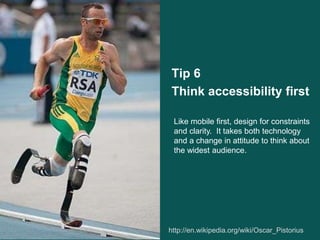
Tip 6
Think accessibility first
http://en.wikipedia.org/wiki/Oscar_Pistorius2
Like mobile first, design for constraints
and clarity. It takes both technology
and a change in attitude to think about
the widest audience.
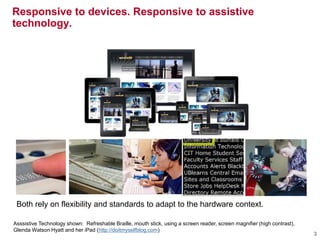
Asssistive Technology shown: Refreshable Braille, mouth stick, using a screen reader, screen magnifier (high contrast),
Glenda Watson Hyatt and her iPad (http://doitmyselfblog.com)
Responsive to devices. Responsive to assistive
technology.
3
Both rely on flexibility and standards to adapt to the hardware context.
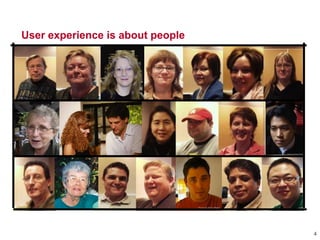
User experience is about people
4
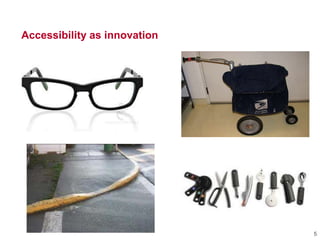
Accessibility as innovation
5
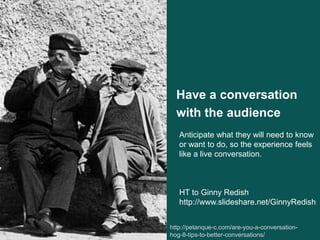
Have a conversation
with the audience
http://petanque-c.com/are-you-a-conversation-
hog-8-tips-to-better-conversations/6
Anticipate what they will need to know
or want to do, so the experience feels
like a live conversation.
HT to Ginny Redish
http://www.slideshare.net/GinnyRedish
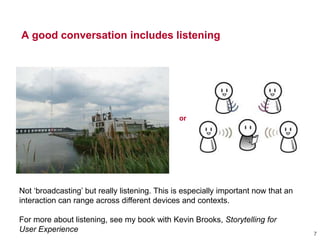
A good conversation includes listening
or
7
Not ‗broadcasting‘ but really listening. This is especially important now that an
interaction can range across different devices and contexts.
For more about listening, see my book with Kevin Brooks, Storytelling for
User Experience
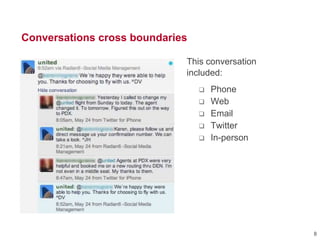
Conversations cross boundaries
This conversation
included:
 Phone
 Web
 Email
 Twitter
 In-person
8
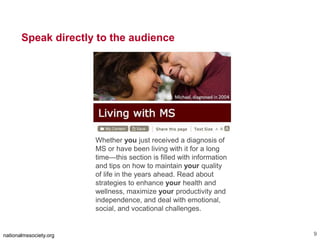
The text in the image says:
Living with MS.
Michael, diagnosed in 2004 (shown with his wife)
Speak directly to the audience
nationalmssociety.org 9
Whether you just received a diagnosis of
MS or have been living with it for a long
time—this section is filled with information
and tips on how to maintain your quality
of life in the years ahead. Read about
strategies to enhance your health and
wellness, maximize your productivity and
independence, and deal with emotional,
social, and vocational challenges.
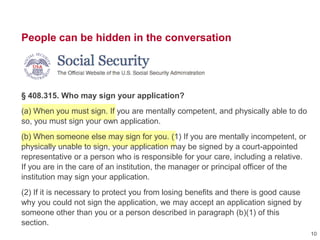
People can be hidden in the conversation
§ 408.315. Who may sign your application?
(a) When you must sign. If you are mentally competent, and physically able to do
so, you must sign your own application.
(b) When someone else may sign for you. (1) If you are mentally incompetent, or
physically unable to sign, your application may be signed by a court-appointed
representative or a person who is responsible for your care, including a relative.
If you are in the care of an institution, the manager or principal officer of the
institution may sign your application.
(2) If it is necessary to protect you from losing benefits and there is good cause
why you could not sign the application, we may accept an application signed by
someone other than you or a person described in paragraph (b)(1) of this
section.
10
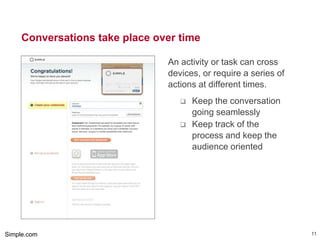
Conversations take place over time
An activity or task can cross
devices, or require a series of
actions at different times.
 Keep the conversation
going seamlessly
 Keep track of the
process and keep the
audience oriented
Simple.com 11
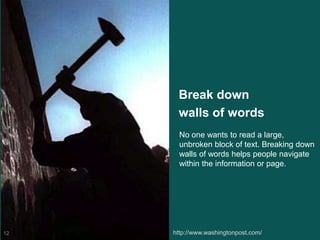
Break down
walls of words
http://www.washingtonpost.com/12
No one wants to read a large,
unbroken block of text. Breaking down
walls of words helps people navigate
within the information or page.
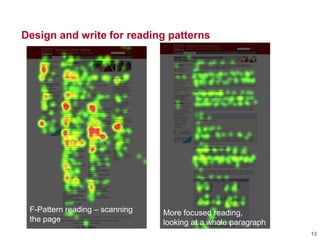
Design and write for reading patterns
13
F-Pattern reading – scanning
the page
More focused reading,
looking at a whole paragraph
Design and write for reading patterns
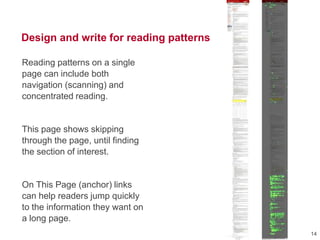
Reading patterns on a single
page can include both
navigation (scanning) and
concentrated reading.
This page shows skipping
through the page, until finding
the section of interest.
On This Page (anchor) links
can help readers jump quickly
to the information they want on
a long page.
14
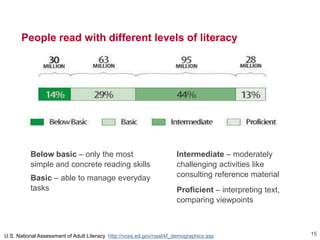
People read with different levels of literacy
Below basic – only the most
simple and concrete reading skills
Basic – able to manage everyday
tasks
Intermediate – moderately
challenging activities like
consulting reference material
Proficient – interpreting text,
comparing viewpoints
U.S. National Assessment of Adult Literacy http://nces.ed.gov/naal/kf_demographics.asp 15
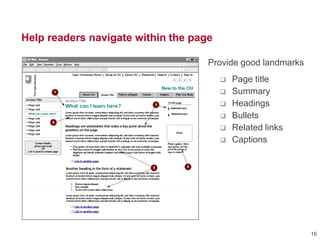
Help readers navigate within the page
Provide good landmarks
 Page title
 Summary
 Headings
 Bullets
 Related links
 Captions
16
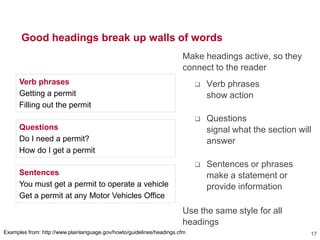
Good headings break up walls of words
Make headings active, so they
connect to the reader
 Verb phrases
show action
 Questions
signal what the section will
answer
 Sentences or phrases
make a statement or
provide information
Use the same style for all
headings
17Examples from: http://www.plainlanguage.gov/howto/guidelines/headings.cfm
Verb phrases
Getting a permit
Filling out the permit
Questions
Do I need a permit?
How do I get a permit
Sentences
You must get a permit to operate a vehicle
Get a permit at any Motor Vehicles Office
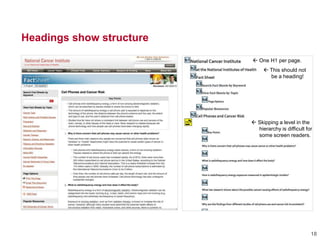
Headings show structure
18
 Skipping a level in the
hierarchy is difficult for
some screen readers.
 One H1 per page.
 This should not
be a heading!
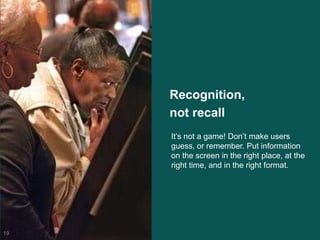
Recognition,
not recall
19
It‘s not a game! Don‘t make users
guess, or remember. Put information
on the screen in the right place, at the
right time, and in the right format.
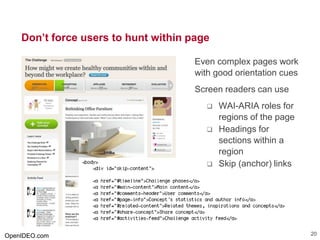
Don’t force users to hunt within page
Even complex pages work
with good orientation cues
Screen readers can use
 WAI-ARIA roles for
regions of the page
 Headings for
sections within a
region
 Skip (anchor) links
OpenIDEO.com 20
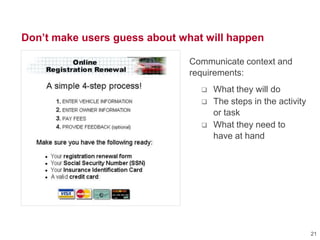
Don’t make users guess about what will happen
Communicate context and
requirements:
 What they will do
 The steps in the activity
or task
 What they need to
have at hand
21
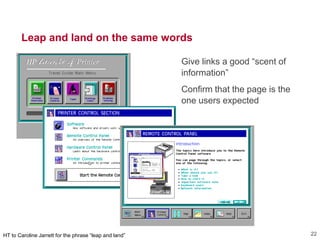
Leap and land on the same words
Give links a good ―scent of
information‖
Confirm that the page is the
one users expected
HT to Caroline Jarrett for the phrase ―leap and land‖ 22
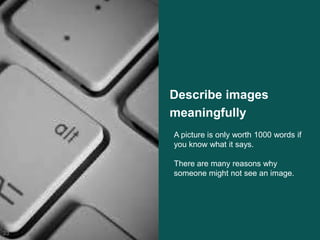
Describe images
meaningfully
23
A picture is only worth 1000 words if
you know what it says.
There are many reasons why
someone might not see an image.
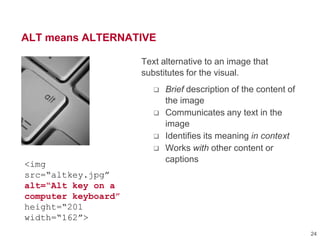
ALT means ALTERNATIVE
Text alternative to an image that
substitutes for the visual.
 Brief description of the content of
the image
 Communicates any text in the
image
 Identifies its meaning in context
 Works with other content or
captions
<img
src=“altkey.jpg”
alt=“Alt key on a
computer keyboard”
height=“201
width=“162”>
24
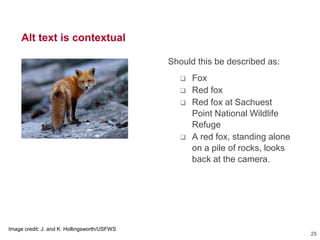
Alt text is contextual
Image credit: J. and K. Hollingsworth/USFWS
Should this be described as:
 Fox
 Red fox
 Red fox at Sachuest
Point National Wildlife
Refuge
 A red fox, standing alone
on a pile of rocks, looks
back at the camera.
25
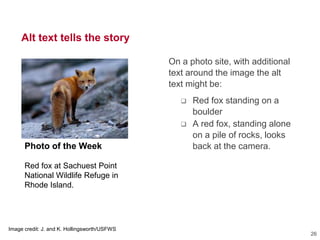
Alt text tells the story
Photo of the Week
Red fox at Sachuest Point
National Wildlife Refuge in
Rhode Island.
Image credit: J. and K. Hollingsworth/USFWS
On a photo site, with additional
text around the image the alt
text might be:
 Red fox standing on a
boulder
 A red fox, standing alone
on a pile of rocks, looks
back at the camera.
26
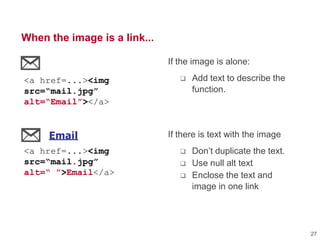
When the image is a link...
If the image is alone:
 Add text to describe the
function.
If there is text with the image
 Don‘t duplicate the text.
 Use null alt text
 Enclose the text and
image in one link
Email
Print
Save
<a href...><img src="icons/email.gi
<a href...><img src="icons/print.gi
<a href...><img src="icons/save.gif
Email
Print
Save
<a href...><img src="icons/email.gif
<a href...><img src="icons/print.gif
<a href...><img src="icons/save.gif
<a href=...><img
src=“mail.jpg”
alt=“Email”></a>
<a href=...><img
src=“mail.jpg”
alt=“ ”>Email</a>
27
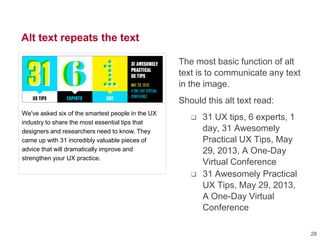
Alt text repeats the text
The most basic function of alt
text is to communicate any text
in the image.
Should this alt text read:
 31 UX tips, 6 experts, 1
day, 31 Awesomely
Practical UX Tips, May
29, 2013, A One-Day
Virtual Conference
 31 Awesomely Practical
UX Tips, May 29, 2013,
A One-Day Virtual
Conference
We've asked six of the smartest people in the UX
industry to share the most essential tips that
designers and researchers need to know. They
came up with 31 incredibly valuable pieces of
advice that will dramatically improve and
strengthen your UX practice.
28
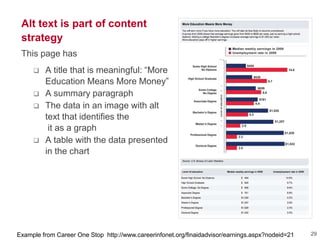
Alt text is part of content
strategy
This page has
 A title that is meaningful: ―More
Education Means More Money‖
 A summary paragraph
 The data in an image with alt
text that identifies the
it as a graph
 A table with the data presented
in the chart
Example from Career One Stop http://www.careerinfonet.org/finaidadvisor/earnings.aspx?nodeid=21 29
Tips for writing alt text
 If there is text in the image, repeat it in the alt text.
 Make the descrition meaningful in context.
 Don‘t duplicate information in the page content or a caption.
 If the image is purely decorative or duplicates information on the
page, use a null alt text (alt=― ―).
 If the image is a link, it must have a brief description of the link
function or target page.
 If the image needs a longer description, include it on the page, or
by providing a link to another page.
 Keep it short. (Aim for 5-15 words.)
 Don‘t repeat the word ‗image‘ or list technical details like the file
name or image size.
Remember: every image must include an alt attribute.
30
Design for all senses:
design for everyone
31
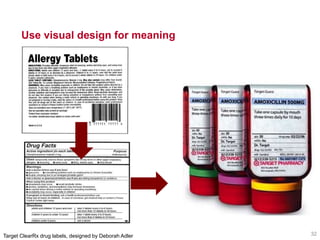
Use visual design for meaning
32Target ClearRx drug labels, designed by Deborah Adler
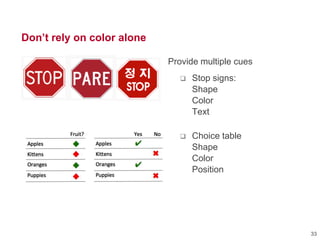
Don’t rely on color alone
Provide multiple cues
 Stop signs:
Shape
Color
Text
 Choice table
Shape
Color
Position
33
Make it keyboard accessible
Make the keyboad
experience good, too
 Don‘t jump
around in the
content
 Make sure
everything
interactive is in
the [Tab] order
34
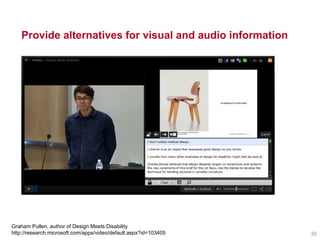
Provide alternatives for visual and audio information
Graham Pullen, author of Design Meets Disability
http://research.microsoft.com/apps/video/default.aspx?id=103405 35
Design for all senses, because people...
Read with different degrees of literacy
Read in a hurry or without full attention
Or in poor reading conditions
May not know (or read) the language well
May have a cognitive or learning disability
Or a visual disability that can affect reading
Or a physical disability that affects interaction
Or may just prefer their own way to work
36
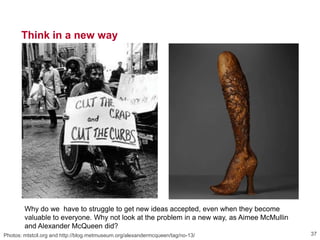
Think in a new way
Photos: mtstcil.org and http://blog.metmuseum.org/alexandermcqueen/tag/no-13/ 37
Why do we have to struggle to get new ideas accepted, even when they become
valuable to everyone. Why not look at the problem in a new way, as Aimee McMullin
and Alexander McQueen did?
Storytelling for User Experience
with Kevin Brooks
Global UX
with Daniel Szuc
A Web for Everyone
with Sarah Horton
A Web for
Everyone
Whitney Quesenbery
WQusability.com
whitney@wqusability.com
usabilityinciviclife.org
Twitter @whitneyq
Slideshare: whitney and StorytellingUX

6 Awesomely Practical Tips: Making content better for everyone

  • 1.
    WQusability.com Whitney Quesenbery whitneyq@wqusability.com A WebFor Everyone 6 Awesomely Practical Tips Making content better for everyone Whitney Quesenbery From 31 Awesomely Practical UX Tips http://rosenfeldmedia.com/events/practical-ux-tips/
  • 2.
    Tip 6 Think accessibilityfirst http://en.wikipedia.org/wiki/Oscar_Pistorius2 Like mobile first, design for constraints and clarity. It takes both technology and a change in attitude to think about the widest audience.
  • 3.
    Asssistive Technology shown:Refreshable Braille, mouth stick, using a screen reader, screen magnifier (high contrast), Glenda Watson Hyatt and her iPad (http://doitmyselfblog.com) Responsive to devices. Responsive to assistive technology. 3 Both rely on flexibility and standards to adapt to the hardware context.
  • 4.
    User experience isabout people 4
  • 5.
  • 6.
    Have a conversation withthe audience http://petanque-c.com/are-you-a-conversation- hog-8-tips-to-better-conversations/6 Anticipate what they will need to know or want to do, so the experience feels like a live conversation. HT to Ginny Redish http://www.slideshare.net/GinnyRedish
  • 7.
    A good conversationincludes listening or 7 Not ‗broadcasting‘ but really listening. This is especially important now that an interaction can range across different devices and contexts. For more about listening, see my book with Kevin Brooks, Storytelling for User Experience
  • 8.
    Conversations cross boundaries Thisconversation included:  Phone  Web  Email  Twitter  In-person 8
  • 9.
    The text inthe image says: Living with MS. Michael, diagnosed in 2004 (shown with his wife) Speak directly to the audience nationalmssociety.org 9 Whether you just received a diagnosis of MS or have been living with it for a long time—this section is filled with information and tips on how to maintain your quality of life in the years ahead. Read about strategies to enhance your health and wellness, maximize your productivity and independence, and deal with emotional, social, and vocational challenges.
  • 10.
    People can behidden in the conversation § 408.315. Who may sign your application? (a) When you must sign. If you are mentally competent, and physically able to do so, you must sign your own application. (b) When someone else may sign for you. (1) If you are mentally incompetent, or physically unable to sign, your application may be signed by a court-appointed representative or a person who is responsible for your care, including a relative. If you are in the care of an institution, the manager or principal officer of the institution may sign your application. (2) If it is necessary to protect you from losing benefits and there is good cause why you could not sign the application, we may accept an application signed by someone other than you or a person described in paragraph (b)(1) of this section. 10
  • 11.
    Conversations take placeover time An activity or task can cross devices, or require a series of actions at different times.  Keep the conversation going seamlessly  Keep track of the process and keep the audience oriented Simple.com 11
  • 12.
    Break down walls ofwords http://www.washingtonpost.com/12 No one wants to read a large, unbroken block of text. Breaking down walls of words helps people navigate within the information or page.
  • 13.
    Design and writefor reading patterns 13 F-Pattern reading – scanning the page More focused reading, looking at a whole paragraph
  • 14.
    Design and writefor reading patterns Reading patterns on a single page can include both navigation (scanning) and concentrated reading. This page shows skipping through the page, until finding the section of interest. On This Page (anchor) links can help readers jump quickly to the information they want on a long page. 14
  • 15.
    People read withdifferent levels of literacy Below basic – only the most simple and concrete reading skills Basic – able to manage everyday tasks Intermediate – moderately challenging activities like consulting reference material Proficient – interpreting text, comparing viewpoints U.S. National Assessment of Adult Literacy http://nces.ed.gov/naal/kf_demographics.asp 15
  • 16.
    Help readers navigatewithin the page Provide good landmarks  Page title  Summary  Headings  Bullets  Related links  Captions 16
  • 17.
    Good headings breakup walls of words Make headings active, so they connect to the reader  Verb phrases show action  Questions signal what the section will answer  Sentences or phrases make a statement or provide information Use the same style for all headings 17Examples from: http://www.plainlanguage.gov/howto/guidelines/headings.cfm Verb phrases Getting a permit Filling out the permit Questions Do I need a permit? How do I get a permit Sentences You must get a permit to operate a vehicle Get a permit at any Motor Vehicles Office
  • 18.
    Headings show structure 18 Skipping a level in the hierarchy is difficult for some screen readers.  One H1 per page.  This should not be a heading!
  • 19.
    Recognition, not recall 19 It‘s nota game! Don‘t make users guess, or remember. Put information on the screen in the right place, at the right time, and in the right format.
  • 20.
    Don’t force usersto hunt within page Even complex pages work with good orientation cues Screen readers can use  WAI-ARIA roles for regions of the page  Headings for sections within a region  Skip (anchor) links OpenIDEO.com 20
  • 21.
    Don’t make usersguess about what will happen Communicate context and requirements:  What they will do  The steps in the activity or task  What they need to have at hand 21
  • 22.
    Leap and landon the same words Give links a good ―scent of information‖ Confirm that the page is the one users expected HT to Caroline Jarrett for the phrase ―leap and land‖ 22
  • 23.
    Describe images meaningfully 23 A pictureis only worth 1000 words if you know what it says. There are many reasons why someone might not see an image.
  • 24.
    ALT means ALTERNATIVE Textalternative to an image that substitutes for the visual.  Brief description of the content of the image  Communicates any text in the image  Identifies its meaning in context  Works with other content or captions <img src=“altkey.jpg” alt=“Alt key on a computer keyboard” height=“201 width=“162”> 24
  • 25.
    Alt text iscontextual Image credit: J. and K. Hollingsworth/USFWS Should this be described as:  Fox  Red fox  Red fox at Sachuest Point National Wildlife Refuge  A red fox, standing alone on a pile of rocks, looks back at the camera. 25
  • 26.
    Alt text tellsthe story Photo of the Week Red fox at Sachuest Point National Wildlife Refuge in Rhode Island. Image credit: J. and K. Hollingsworth/USFWS On a photo site, with additional text around the image the alt text might be:  Red fox standing on a boulder  A red fox, standing alone on a pile of rocks, looks back at the camera. 26
  • 27.
    When the imageis a link... If the image is alone:  Add text to describe the function. If there is text with the image  Don‘t duplicate the text.  Use null alt text  Enclose the text and image in one link Email Print Save <a href...><img src="icons/email.gi <a href...><img src="icons/print.gi <a href...><img src="icons/save.gif Email Print Save <a href...><img src="icons/email.gif <a href...><img src="icons/print.gif <a href...><img src="icons/save.gif <a href=...><img src=“mail.jpg” alt=“Email”></a> <a href=...><img src=“mail.jpg” alt=“ ”>Email</a> 27
  • 28.
    Alt text repeatsthe text The most basic function of alt text is to communicate any text in the image. Should this alt text read:  31 UX tips, 6 experts, 1 day, 31 Awesomely Practical UX Tips, May 29, 2013, A One-Day Virtual Conference  31 Awesomely Practical UX Tips, May 29, 2013, A One-Day Virtual Conference We've asked six of the smartest people in the UX industry to share the most essential tips that designers and researchers need to know. They came up with 31 incredibly valuable pieces of advice that will dramatically improve and strengthen your UX practice. 28
  • 29.
    Alt text ispart of content strategy This page has  A title that is meaningful: ―More Education Means More Money‖  A summary paragraph  The data in an image with alt text that identifies the it as a graph  A table with the data presented in the chart Example from Career One Stop http://www.careerinfonet.org/finaidadvisor/earnings.aspx?nodeid=21 29
  • 30.
    Tips for writingalt text  If there is text in the image, repeat it in the alt text.  Make the descrition meaningful in context.  Don‘t duplicate information in the page content or a caption.  If the image is purely decorative or duplicates information on the page, use a null alt text (alt=― ―).  If the image is a link, it must have a brief description of the link function or target page.  If the image needs a longer description, include it on the page, or by providing a link to another page.  Keep it short. (Aim for 5-15 words.)  Don‘t repeat the word ‗image‘ or list technical details like the file name or image size. Remember: every image must include an alt attribute. 30
  • 31.
    Design for allsenses: design for everyone 31
  • 32.
    Use visual designfor meaning 32Target ClearRx drug labels, designed by Deborah Adler
  • 33.
    Don’t rely oncolor alone Provide multiple cues  Stop signs: Shape Color Text  Choice table Shape Color Position 33
  • 34.
    Make it keyboardaccessible Make the keyboad experience good, too  Don‘t jump around in the content  Make sure everything interactive is in the [Tab] order 34
  • 35.
    Provide alternatives forvisual and audio information Graham Pullen, author of Design Meets Disability http://research.microsoft.com/apps/video/default.aspx?id=103405 35
  • 36.
    Design for allsenses, because people... Read with different degrees of literacy Read in a hurry or without full attention Or in poor reading conditions May not know (or read) the language well May have a cognitive or learning disability Or a visual disability that can affect reading Or a physical disability that affects interaction Or may just prefer their own way to work 36
  • 37.
    Think in anew way Photos: mtstcil.org and http://blog.metmuseum.org/alexandermcqueen/tag/no-13/ 37 Why do we have to struggle to get new ideas accepted, even when they become valuable to everyone. Why not look at the problem in a new way, as Aimee McMullin and Alexander McQueen did?
  • 38.
    Storytelling for UserExperience with Kevin Brooks Global UX with Daniel Szuc A Web for Everyone with Sarah Horton A Web for Everyone
  • 39.

Editor's Notes

  • #6 Accessibility first: because innovations for disabilities can easily become innovations for everyoneEyeglasses &gt; fashionPostal carts &gt; women postal carriersCurb cuts: wheelchairs &gt; bikes, carriages, luggage, wheeled cardsOxo grips: arthritis &gt; everyone
  • #11 Hidden users – still works
  • #21 There are many reasons why someone might not see an image. Maybe it didn’t download correctly. They are using a tiny screen and the image is hard to see. They may not be a visual learner, or the image relies on a cultural interpretation that they just don’t get. Or they are listening to the page instead of looking at it, as we head into a better and better voice recognition and text-to-speech. But I’m particularly thinking of people who simpy cannot see the image: they are blind and using a screen reader. They have one of many other visual disabilities and have to adjust their screen – for example to extreme magnification. Or they are color blind and the image doesn’t “read” informatively.
  • #26 Subtitles – language translationCaptions – transcript of the same languageAudio description – adds captions for non-speech audioVideo description – describes action not spoken in the dialotTools getting better and more available
  • #28 Too often we are dragged, kicking and screaming, into a new way of thinking.Aimee Mullin carved leg by Alexander McQueen