Curriculum Design Workshop
[Insert facilitator(s) name here]
[Insert workshop date here]
Session Outline
• Introduction to the Viewpoints curriculum design
resources and processes
• Examples of workshop outputs, photos, findings
• Group work activities
• Conclusions and questions
Workshop Introduction
This workshop uses a series of reflective tools
(timeline and theme cards) to prompt ideas about
creating effective curriculum design.
The tools help staff consider themes such as:
- assessment and feedback
- information skills
- learner engagement
while considering the learner perspective.
Workshop Introduction (cont.)
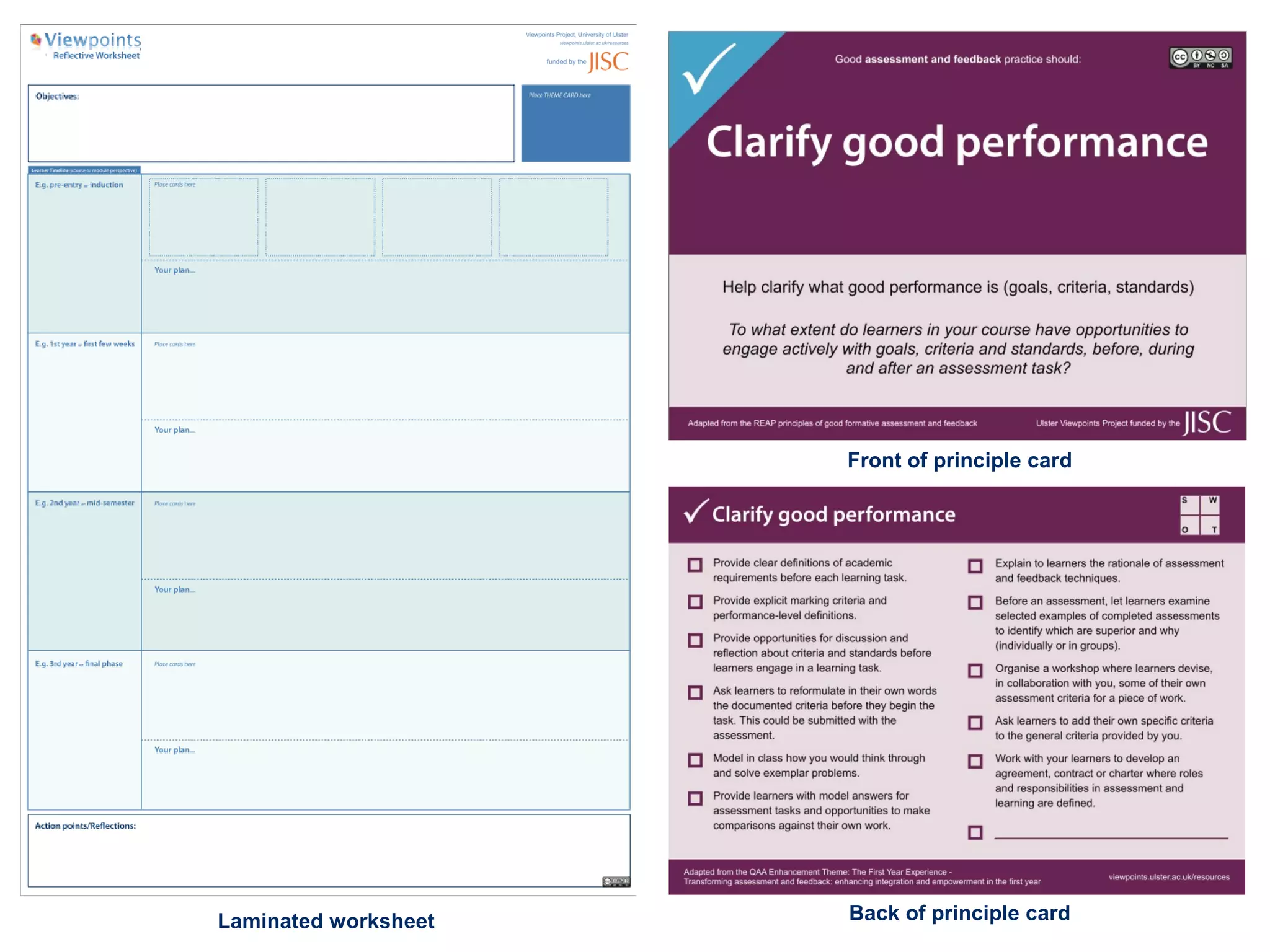
The workshop uses large worksheets (with a student
timeline) and theme cards.
Choose one of the themes to help you consider your
chosen curriculum design objective.
Work together in small groups to plan how to address
agreed objective(s).
Produce visual outputs of key decisions.
Laminated worksheet
Front of principle card
Back of principle card
Workshop output examples…
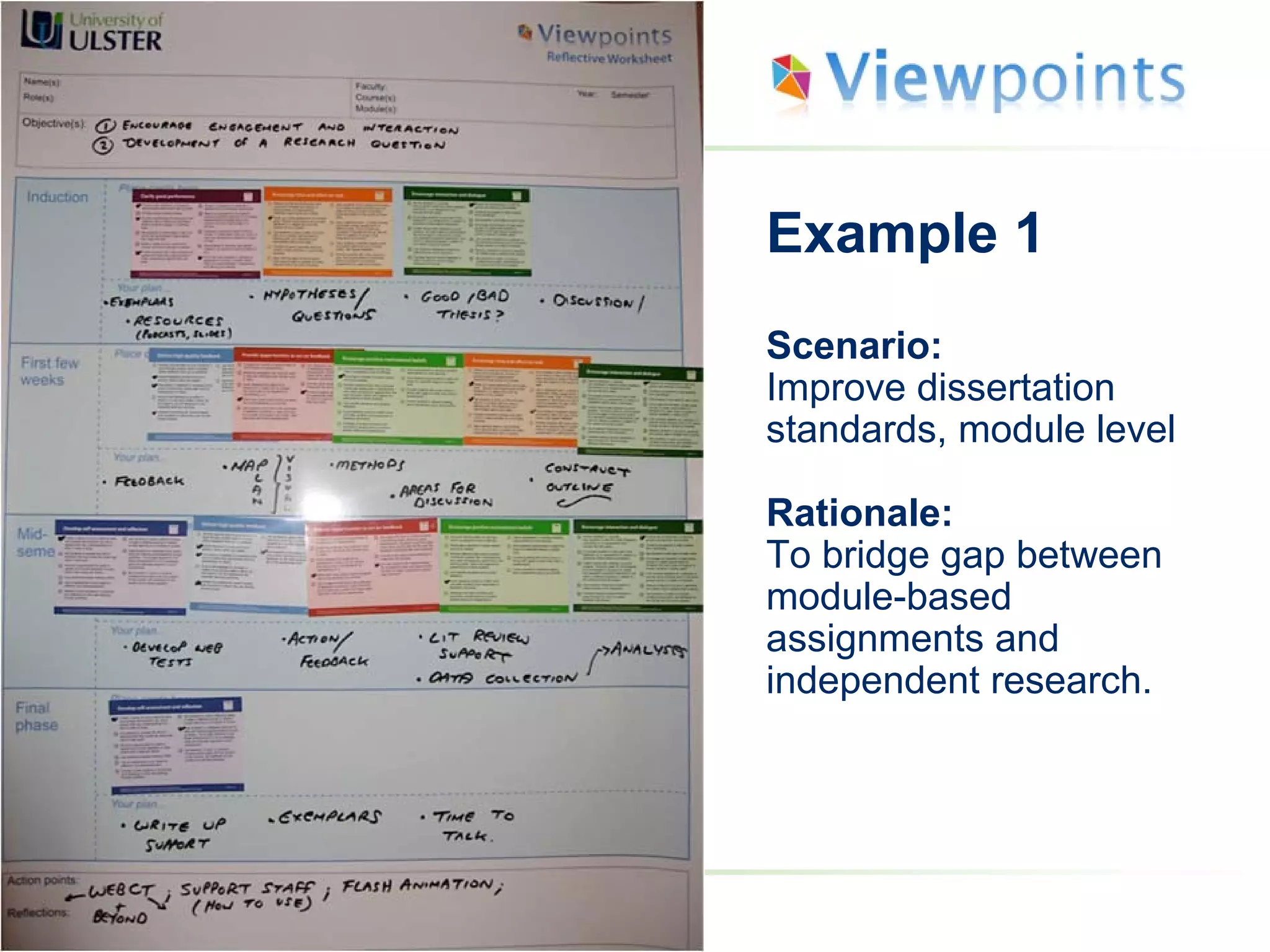
Example 1
Scenario:
Improve dissertation
standards, module level
Rationale:
To bridge gap between
module-based
assignments and
independent research.
Example 2
Scenario:
Improve student engagement
Rationale:
Course up for revalidation –
going to be using a blended
approach (combination of
block face-to-face teaching
and online learning).
Overview of Activities
1. Agree objective (10 minutes)
2. Chose a theme (10 minutes)
3. Select principle (10 minutes)
4. Map principles to timeline (15 minutes)
5. Select examples (15 minutes)
6. Review ideas & formulate plan (10 minutes)
7. Action points & reflections (10 minutes)
8. Share plans (15 minutes)
Activity 1: Agree objective (10 minutes)
 Spend a few minutes discussing/brainstorming -
o Why do you need to redesign your chosen
module/course?
 Briefly record details of your objective in the space
provided on the worksheet.
o E.g. ‘Improve student engagement’, ‘Improve
feedback methods’.
You might also find it useful to note key decisions on the
worksheet using markers or post-its as you go along.
Activity 2: Choose a theme (10 minutes)
 Select one of the three themes (Assessment and
Feedback, Information Skills or Learner Engagement),
which relates to your objective.
 Begin to think about how your chosen theme could help
you meet your objective(s).
You might find it useful to make notes on the worksheet using
markers or post-its as you go along.
Activity 3: Select principles (10 minutes)
 Firstly, only read the front of the cards for your chosen theme.
 Choose any cards/principles that might help you address your
objective(s).
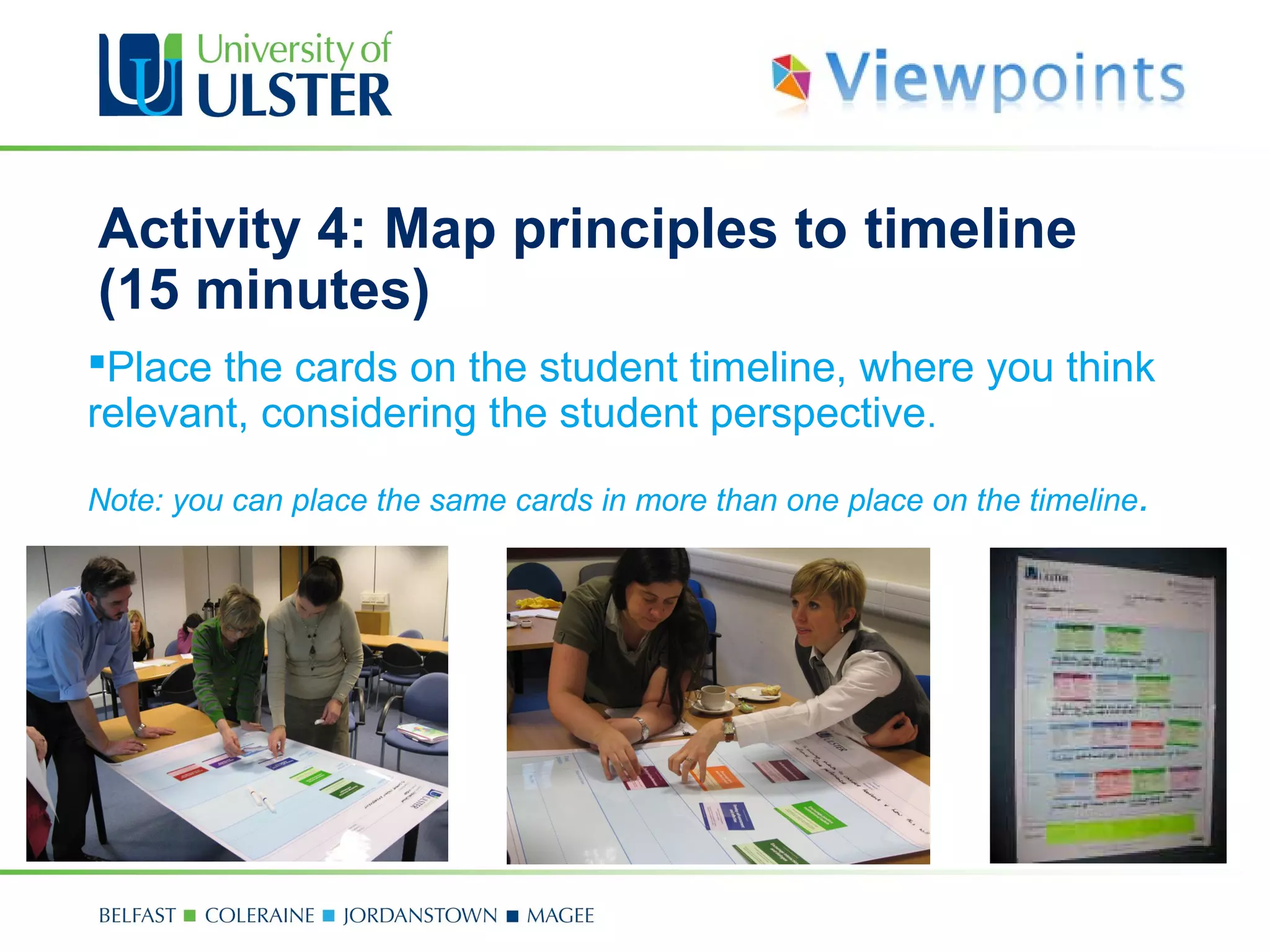
Activity 4: Map principles to timeline
(15 minutes)
Place the cards on the student timeline, where you think
relevant, considering the student perspective.
Note: you can place the same cards in more than one place on the timeline.
Activity 5: Select examples (15 minutes)
 Turn over the selected cards to show the examples on the
back.
 Select any examples that might help achieve your
objectives by ticking them on the cards.
 If time is short, only turn over the most important cards.
Activity 6: Review ideas & formulate plan
(10 minutes)
 Discuss how your ideas could be used in practice.
 Make notes using post-its or markers on worksheet.
 Tailor the examples to your own teaching practice.
Activity 7: Action points & reflections
(10 minutes)
 Agree any final reflections and action points to take forward.
 Record these action points on the timeline.
Activity 8: Share plans (5 mins/group)
 If there is more than one group, one or two members from
each group should present their completed worksheet and
briefly feed back on their conclusions.
Any questions?

Workshop Presentation Template

  • 1.
    Curriculum Design Workshop [Insertfacilitator(s) name here] [Insert workshop date here]
  • 2.
    Session Outline • Introductionto the Viewpoints curriculum design resources and processes • Examples of workshop outputs, photos, findings • Group work activities • Conclusions and questions
  • 3.
    Workshop Introduction This workshopuses a series of reflective tools (timeline and theme cards) to prompt ideas about creating effective curriculum design. The tools help staff consider themes such as: - assessment and feedback - information skills - learner engagement while considering the learner perspective.
  • 4.
    Workshop Introduction (cont.) Theworkshop uses large worksheets (with a student timeline) and theme cards. Choose one of the themes to help you consider your chosen curriculum design objective. Work together in small groups to plan how to address agreed objective(s). Produce visual outputs of key decisions.
  • 5.
    Laminated worksheet Front ofprinciple card Back of principle card
  • 6.
  • 7.
    Example 1 Scenario: Improve dissertation standards,module level Rationale: To bridge gap between module-based assignments and independent research.
  • 8.
    Example 2 Scenario: Improve studentengagement Rationale: Course up for revalidation – going to be using a blended approach (combination of block face-to-face teaching and online learning).
  • 9.
    Overview of Activities 1.Agree objective (10 minutes) 2. Chose a theme (10 minutes) 3. Select principle (10 minutes) 4. Map principles to timeline (15 minutes) 5. Select examples (15 minutes) 6. Review ideas & formulate plan (10 minutes) 7. Action points & reflections (10 minutes) 8. Share plans (15 minutes)
  • 10.
    Activity 1: Agreeobjective (10 minutes)  Spend a few minutes discussing/brainstorming - o Why do you need to redesign your chosen module/course?  Briefly record details of your objective in the space provided on the worksheet. o E.g. ‘Improve student engagement’, ‘Improve feedback methods’. You might also find it useful to note key decisions on the worksheet using markers or post-its as you go along.
  • 11.
    Activity 2: Choosea theme (10 minutes)  Select one of the three themes (Assessment and Feedback, Information Skills or Learner Engagement), which relates to your objective.  Begin to think about how your chosen theme could help you meet your objective(s). You might find it useful to make notes on the worksheet using markers or post-its as you go along.
  • 12.
    Activity 3: Selectprinciples (10 minutes)  Firstly, only read the front of the cards for your chosen theme.  Choose any cards/principles that might help you address your objective(s).
  • 13.
    Activity 4: Mapprinciples to timeline (15 minutes) Place the cards on the student timeline, where you think relevant, considering the student perspective. Note: you can place the same cards in more than one place on the timeline.
  • 14.
    Activity 5: Selectexamples (15 minutes)  Turn over the selected cards to show the examples on the back.  Select any examples that might help achieve your objectives by ticking them on the cards.  If time is short, only turn over the most important cards.
  • 15.
    Activity 6: Reviewideas & formulate plan (10 minutes)  Discuss how your ideas could be used in practice.  Make notes using post-its or markers on worksheet.  Tailor the examples to your own teaching practice.
  • 16.
    Activity 7: Actionpoints & reflections (10 minutes)  Agree any final reflections and action points to take forward.  Record these action points on the timeline.
  • 17.
    Activity 8: Shareplans (5 mins/group)  If there is more than one group, one or two members from each group should present their completed worksheet and briefly feed back on their conclusions.
  • 18.