Viewpoints: Student Representation Workshop Presenters: Dr Alan Masson and Jill Harrison ,  Contributors: Dr Alan Masson, Vilinda Ross, Catherine O’Donnell, Jill Harrison and Karen Virapen. Friday 21 January 2011.
Session Outline Welcome and Introduction  (5 minutes) Some brief examples of past workshop outputs, photos and findings  (5 minutes) Work tasks  (1 hour 45 minutes) Next steps, conclusions and questions  (5 minutes)
Viewpoints Overview Viewpoints has a remit to create a series of user-friendly reflective tools (in workshop and online format) to promote and enhance effective curriculum design. Short video introduction - http://www.youtube.com/watch?v=rV_DE_0fPJ0 The tools will help staff consider areas such as: assessment and feedback,  information skills,  Learner engagement and  creativity and innovation  while considering the learner perspective.
Today’s Workshop  Aims to give you an opportunity to use  the “Viewpoints” process and tools while considering the design and delivery of your programme Uses large laminated worksheets (with a student timeline) and best practice cards as prompts  to assist conversation, debate, creative thinking and problem solving. You will work together to plan how to address your agreed challenge(s). You will produce visual output.
Work tasks You will:  be given resources you can use - a worksheet, prompts, post-its and markers etc. be given set tasks to complete.
Some examples of outputs from previous workshops
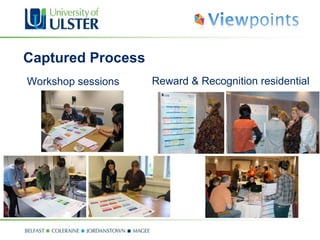
Captured Process Workshop sessions Reward & Recognition residential
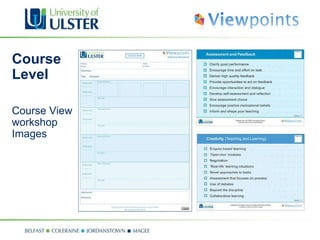
Course  Level Course View workshop Images
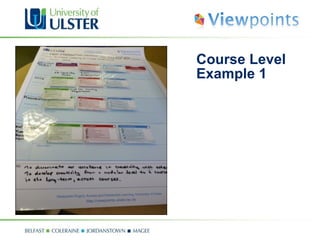
Course Level Example 1
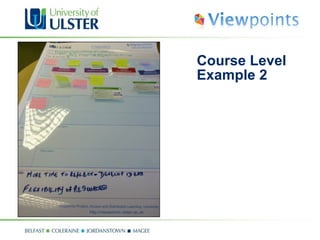
Course Level Example 2
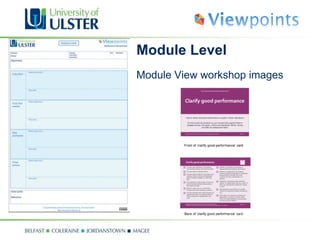
Module Level Module View workshop images
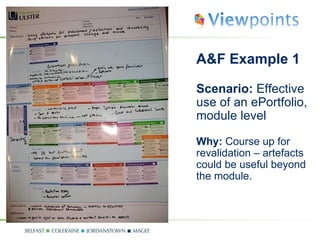
A&F Example 1 Scenario:  Effective use of an ePortfolio, module level Why:  Course up for revalidation – artefacts could be useful beyond the module.
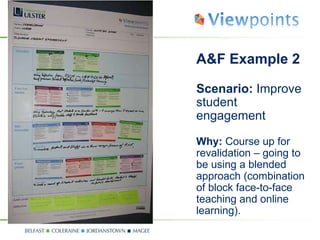
A&F Example 2  Scenario:  Improve student engagement Why:  Course up for revalidation – going to be using a blended approach (combination of block face-to-face teaching and online learning).
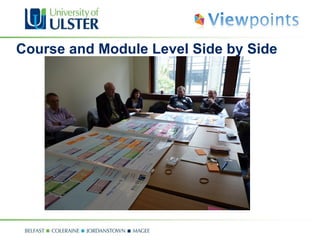
Course and Module Level Side by Side
Some Quotes  “ Thought provoking.” “ Good to see the plan in front of you.” “ Short sessions exploring ideas - very useful. ” “ Enjoyed it – not too time-consuming and time used very well. ” “ Good material supplied to encourage wider consideration.” "Got the team to brainstorm about the way forward in relation to creativity.” “ Better face to face interaction with course team.” “ Look at the holistic approach.” “Group participation/engagement on ideas” “ Being given the time to reflect.” “ Useful prompts and discussion.” From library http://www.youtube.com/watch?v=KuX6b4L_AoA&feature=channel
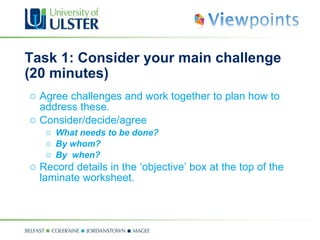
Task 1: Consider your main challenge (20 minutes) Agree challenges and work together to plan how to address these. Consider/decide/agree What needs to be done? By whom? By  when? Record details in the ‘objective’ box at the top of the laminate worksheet.
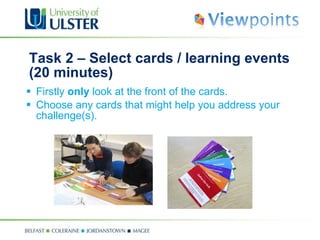
Task 2 – Select cards / learning events (20 minutes) Firstly  only  look at the front of the cards.  Choose any cards that might help you address your challenge(s).
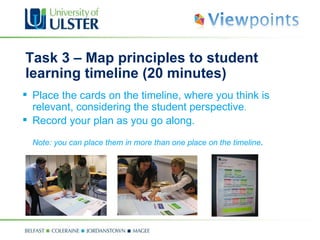
Task 3 –  Map principles to  student learning timeline (20 minutes) Place the cards on the timeline, where you think is relevant, considering the student perspective . Record your plan as you go along. Note: you can place them in more than one place on the timeline .
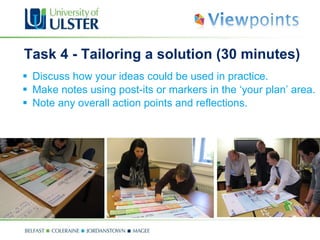
Task 4 - Tailoring a solution (30 minutes) Discuss how your ideas could be used in practice.  Make notes using post-its or markers in the  ‘your plan’  area. Note any overall action points and reflections.
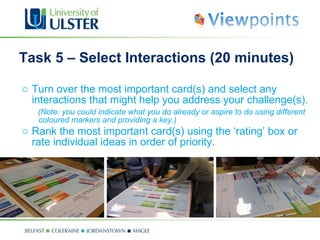
Task 5 – Select Interactions (20 minutes) Turn over the most important card(s) and select any interactions that might help you address your challenge(s).  (Note: you could indicate what you do already or aspire to do using different coloured markers and providing a key.) Rank the most important card(s) using the ‘rating’ box or rate individual ideas in order of priority.
Next steps Refine the workshop format based on feedback. Develop the online version of the tools. Promote and disseminate both versions. Build up examples / case studies / digital stories.
Any Questions? Anything you wish to ask us?
Further information Project blog:  http://viewpoints.ulster.ac.uk CIES R&R Programme:  http://www.cetl.ulster.ac.uk/elearning/rrs/ RLO CETL:  http://www.rlo-cetl.ac.uk Dr Alan Masson, Project Director -  [email_address] Catherine O’Donnell, Academic E-Learning Consultant -  [email_address] Jill Harrison, Instructional Technologist  –   [email_address] Karen Virapen, Instructional Technologist –  [email_address]

Viewpoints: Student Representation

  • 1.
    Viewpoints: Student RepresentationWorkshop Presenters: Dr Alan Masson and Jill Harrison , Contributors: Dr Alan Masson, Vilinda Ross, Catherine O’Donnell, Jill Harrison and Karen Virapen. Friday 21 January 2011.
  • 2.
    Session Outline Welcomeand Introduction (5 minutes) Some brief examples of past workshop outputs, photos and findings (5 minutes) Work tasks (1 hour 45 minutes) Next steps, conclusions and questions (5 minutes)
  • 3.
    Viewpoints Overview Viewpointshas a remit to create a series of user-friendly reflective tools (in workshop and online format) to promote and enhance effective curriculum design. Short video introduction - http://www.youtube.com/watch?v=rV_DE_0fPJ0 The tools will help staff consider areas such as: assessment and feedback, information skills, Learner engagement and creativity and innovation while considering the learner perspective.
  • 4.
    Today’s Workshop Aims to give you an opportunity to use the “Viewpoints” process and tools while considering the design and delivery of your programme Uses large laminated worksheets (with a student timeline) and best practice cards as prompts to assist conversation, debate, creative thinking and problem solving. You will work together to plan how to address your agreed challenge(s). You will produce visual output.
  • 5.
    Work tasks Youwill: be given resources you can use - a worksheet, prompts, post-its and markers etc. be given set tasks to complete.
  • 6.
    Some examples ofoutputs from previous workshops
  • 7.
    Captured Process Workshopsessions Reward & Recognition residential
  • 8.
    Course LevelCourse View workshop Images
  • 9.
  • 10.
  • 11.
    Module Level ModuleView workshop images
  • 12.
    A&F Example 1Scenario: Effective use of an ePortfolio, module level Why: Course up for revalidation – artefacts could be useful beyond the module.
  • 13.
    A&F Example 2 Scenario: Improve student engagement Why: Course up for revalidation – going to be using a blended approach (combination of block face-to-face teaching and online learning).
  • 14.
    Course and ModuleLevel Side by Side
  • 15.
    Some Quotes “ Thought provoking.” “ Good to see the plan in front of you.” “ Short sessions exploring ideas - very useful. ” “ Enjoyed it – not too time-consuming and time used very well. ” “ Good material supplied to encourage wider consideration.” "Got the team to brainstorm about the way forward in relation to creativity.” “ Better face to face interaction with course team.” “ Look at the holistic approach.” “Group participation/engagement on ideas” “ Being given the time to reflect.” “ Useful prompts and discussion.” From library http://www.youtube.com/watch?v=KuX6b4L_AoA&feature=channel
  • 16.
    Task 1: Consideryour main challenge (20 minutes) Agree challenges and work together to plan how to address these. Consider/decide/agree What needs to be done? By whom? By when? Record details in the ‘objective’ box at the top of the laminate worksheet.
  • 17.
    Task 2 –Select cards / learning events (20 minutes) Firstly only look at the front of the cards. Choose any cards that might help you address your challenge(s).
  • 18.
    Task 3 – Map principles to student learning timeline (20 minutes) Place the cards on the timeline, where you think is relevant, considering the student perspective . Record your plan as you go along. Note: you can place them in more than one place on the timeline .
  • 19.
    Task 4 -Tailoring a solution (30 minutes) Discuss how your ideas could be used in practice. Make notes using post-its or markers in the ‘your plan’ area. Note any overall action points and reflections.
  • 20.
    Task 5 –Select Interactions (20 minutes) Turn over the most important card(s) and select any interactions that might help you address your challenge(s). (Note: you could indicate what you do already or aspire to do using different coloured markers and providing a key.) Rank the most important card(s) using the ‘rating’ box or rate individual ideas in order of priority.
  • 21.
    Next steps Refinethe workshop format based on feedback. Develop the online version of the tools. Promote and disseminate both versions. Build up examples / case studies / digital stories.
  • 22.
    Any Questions? Anythingyou wish to ask us?
  • 23.
    Further information Projectblog: http://viewpoints.ulster.ac.uk CIES R&R Programme: http://www.cetl.ulster.ac.uk/elearning/rrs/ RLO CETL: http://www.rlo-cetl.ac.uk Dr Alan Masson, Project Director - [email_address] Catherine O’Donnell, Academic E-Learning Consultant - [email_address] Jill Harrison, Instructional Technologist – [email_address] Karen Virapen, Instructional Technologist – [email_address]

Editor's Notes

  • #3 Welcome and Introduction (5 minutes) Group work task 1: Consider given strand, scenario and record objective(s) (5 minutes) Group work task 2: Select principles (5 minutes) Group work task 3: Map principles to student learning timeline (5 minutes) Group work task 4: Select implementation ideas (15 minutes) Group work task 5: Tailor a solution (5 minutes) Group work task 6: Share outputs and feedback: (15 minutes) Compare and share outputs (15 minutes) Conclusion and questions (5 minutes)
  • #5 -