



Deciphering Copilot:
Unravelling Data Security
and Governance in
Microsoft 365
Nikki Chapple
Principal Cloud Architect at CloudWay
MVP in M365 Apps and Security
About Me
Nikki Chapple
Principal Cloud Architect
nikkichapple
@chapplenikki
www.nikkichapple.com
All Things M365 Compliance
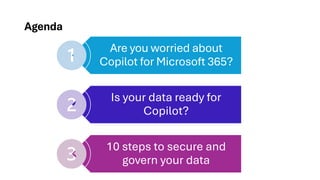
Agenda
Are you worried about
Copilot for Microsoft 365?
Is your data ready for
Copilot?
10 steps to secure and
govern your data
Are you worried
about Copilot for
Microsoft 365?
The issue
Employees want AI
at work - and they
won’t wait for their
organisation to
catch up
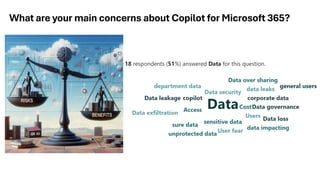
What are your main concerns about Copilot for Microsoft 365?
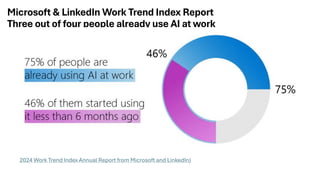
Microsoft & LinkedIn Work Trend Index Report
Three out of four people already use AI at work
2024 Work Trend Index Annual Report from Microsoft and LinkedIn)
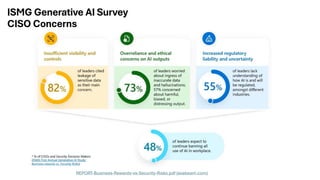
ISMG Generative AI Survey
CISO Concerns
REPORT-Business-Rewards-vs-Security-Risks.pdf (exabeam.com)
Is your data
ready for
Copilot?
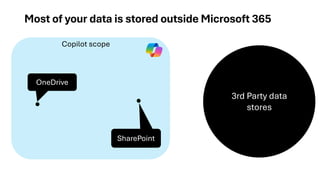
Copilot scope
Most of your data is stored outside Microsoft 365
3rd Party data
stores
SharePoint
OneDrive
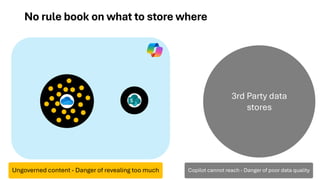
No rule book on what to store where
3rd Party data
stores
Ungoverned content - Danger of revealing too much Copilot cannot reach - Danger of poor data quality
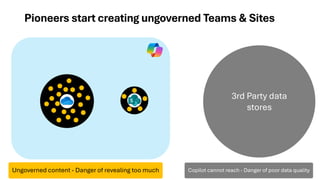
Pioneers start creating ungoverned Teams & Sites
3rd Party data
stores
Ungoverned content - Danger of revealing too much Copilot cannot reach - Danger of poor data quality
3rd Party
data
stores
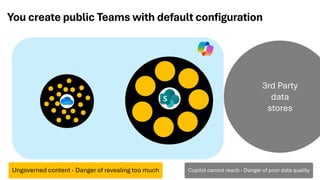
You create public Teams with default configuration
Ungoverned content - Danger of revealing too much Copilot cannot reach - Danger of poor data quality
3rd Party
data
stores
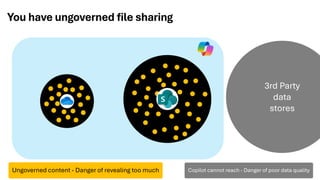
You have ungoverned file sharing
Ungoverned content - Danger of revealing too much Copilot cannot reach - Danger of poor data quality
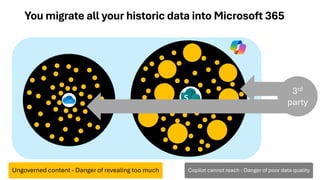
You migrate all your historic data into Microsoft 365
3rd
party
Ungoverned content - Danger of revealing too much Copilot cannot reach - Danger of poor data quality
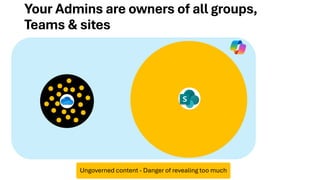
Your Admins are owners of all groups,
Teams & sites
Ungoverned content - Danger of revealing too much
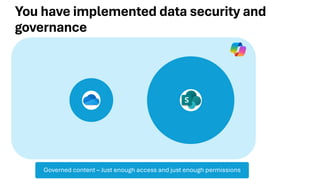
You have implemented data security and
governance
Governed content – Just enough access and just enough permissions
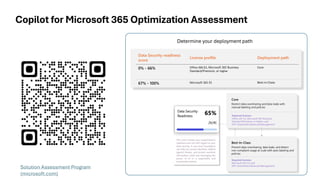
Copilot for Microsoft 365 Optimization Assessment
Data Security readiness
score
License profile Deployment path
0% - 66% Office 365 E3, Microsoft 365 Business
Standard/Premium, or higher
Core
67% - 100% Microsoft 365 E5 Best-in-Class
Determine your deployment path
Solution Assessment Program
(microsoft.com)
10 steps to
secure and
govern your
data
Core
Workspace
Governance
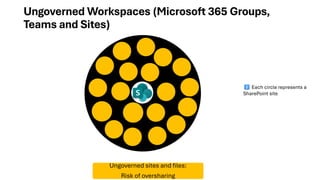
Ungoverned Workspaces (Microsoft 365 Groups,
Teams and Sites)
Ungoverned sites and files:
Risk of oversharing
Each circle represents a
SharePoint site
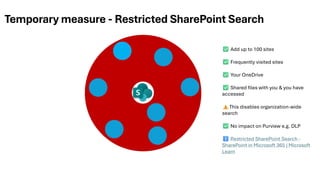
Temporary measure - Restricted SharePoint Search
Add up to 100 sites
Frequently visited sites
Your OneDrive
Shared files with you & you have
accessed
This disables organization-wide
search
No impact on Purview e.g. DLP
Restricted SharePoint Search -
SharePoint in Microsoft 365 | Microsoft
Learn
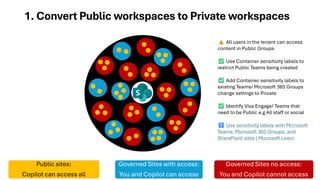
1. Convert Public workspaces to Private workspaces
Public sites:
Copilot can access all
Governed Sites with access:
You and Copilot can access
Governed Sites no access:
You and Copilot cannot access
All users in the tenant can access
content in Public Groups
Use Container sensitivity labels to
restrict Public Teams being created
Add Container sensitivity labels to
existing Teams/ Microsoft 365 Groups
change settings to Private
Identify Viva Engage/ Teams that
need to be Public e.g All staff or social
Use sensitivity labels with Microsoft
Teams, Microsoft 365 Groups, and
SharePoint sites | Microsoft Learn
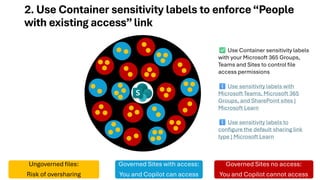
2. Use Container sensitivity labels to enforce“People
with existing access”link
Ungoverned files:
Risk of oversharing
Governed Sites with access:
You and Copilot can access
Governed Sites no access:
You and Copilot cannot access
Use Container sensitivity labels
with your Microsoft 365 Groups,
Teams and Sites to control file
access permissions
Use sensitivity labels with
Microsoft Teams, Microsoft 365
Groups, and SharePoint sites |
Microsoft Learn
Use sensitivity labels to
configure the default sharing link
type | Microsoft Learn
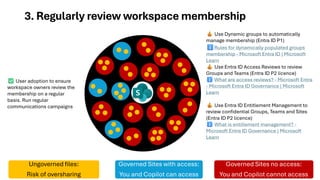
3. Regularly review workspace membership
Ungoverned files:
Risk of oversharing
Governed Sites with access:
You and Copilot can access
Governed Sites no access:
You and Copilot cannot access
Use Dynamic groups to automatically
manage membership (Entra ID P1)
Rules for dynamically populated groups
membership - Microsoft Entra ID | Microsoft
Learn
Use Entra ID Access Reviews to review
Groups and Teams (Entra ID P2 licence)
What are access reviews? - Microsoft Entra
- Microsoft Entra ID Governance | Microsoft
Learn
Use Entra ID Entitlement Management to
review confidential Groups, Teams and Sites
(Entra ID P2 licence)
What is entitlement management? -
Microsoft Entra ID Governance | Microsoft
Learn
User adoption to ensure
workspace owners review the
membership on a regular
basis. Run regular
communications campaigns
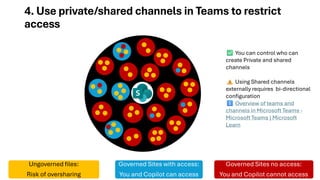
4. Use private/shared channels in Teams to restrict
access
Ungoverned files:
Risk of oversharing
Governed Sites with access:
You and Copilot can access
Governed Sites no access:
You and Copilot cannot access
You can control who can
create Private and shared
channels
Using Shared channels
externally requires bi-directional
configuration
Overview of teams and
channels in Microsoft Teams -
Microsoft Teams | Microsoft
Learn
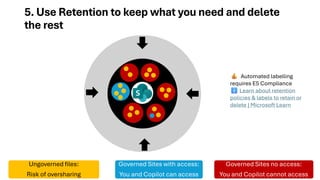
5. Use Retention to keep what you need and delete
the rest
Ungoverned files:
Risk of oversharing
Governed Sites with access:
You and Copilot can access
Governed Sites no access:
You and Copilot cannot access
Automated labelling
requires E5 Compliance
Learn about retention
policies & labels to retain or
delete | Microsoft Learn
Best in Class
Workspace
Governance
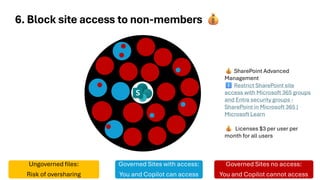
6. Block site access to non-members
Ungoverned files:
Risk of oversharing
Governed Sites with access:
You and Copilot can access
Governed Sites no access:
You and Copilot cannot access
SharePoint Advanced
Management
Restrict SharePoint site
access with Microsoft 365 groups
and Entra security groups -
SharePoint in Microsoft 365 |
Microsoft Learn
Licenses $3 per user per
month for all users
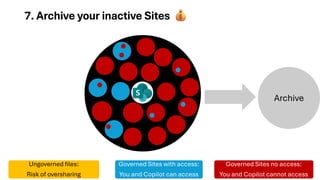
Archive
7. Archive your inactive Sites
Ungoverned files:
Risk of oversharing
Governed Sites with access:
You and Copilot can access
Governed Sites no access:
You and Copilot cannot access
Archive
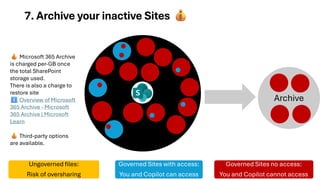
7. Archive your inactive Sites
Ungoverned files:
Risk of oversharing
Governed Sites with access:
You and Copilot can access
Governed Sites no access:
You and Copilot cannot access
Microsoft 365 Archive
is charged per-GB once
the total SharePoint
storage used.
There is also a charge to
restore site
Overview of Microsoft
365 Archive - Microsoft
365 Archive | Microsoft
Learn
Third-party options
are available.
Secure your
files
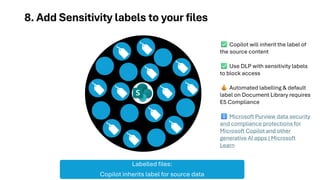
8. Add Sensitivity labels to your files
Labelled files:
Copilot inherits label for source data
Copilot will inherit the label of
the source content
Use DLP with sensitivity labels
to block access
Automated labelling & default
label on Document Library requires
E5 Compliance
Microsoft Purview data security
and compliance protections for
Microsoft Copilot and other
generative AI apps | Microsoft
Learn
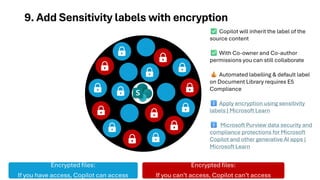
9. Add Sensitivity labels with encryption
Encrypted files:
If you have access, Copilot can access
Encrypted files:
If you can’t access, Copilot can’t access
Copilot will inherit the label of the
source content
With Co-owner and Co-author
permissions you can still collaborate
Automated labelling & default label
on Document Library requires E5
Compliance
Apply encryption using sensitivity
labels | Microsoft Learn
Microsoft Purview data security and
compliance protections for Microsoft
Copilot and other generative AI apps |
Microsoft Learn
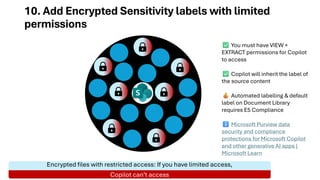
10. Add Encrypted Sensitivity labels with limited
permissions
Encrypted files with restricted access: If you have limited access,
Copilot can’t access
You must have VIEW +
EXTRACT permissions for Copilot
to access
Copilot will inherit the label of
the source content
Automated labelling & default
label on Document Library
requires E5 Compliance
Microsoft Purview data
security and compliance
protections for Microsoft Copilot
and other generative AI apps |
Microsoft Learn
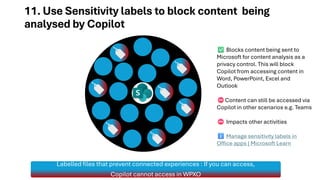
11. Use Sensitivity labels to block content being
analysed by Copilot
Labelled files that prevent connected experiences : If you can access,
Copilot cannot access in WPXO
Blocks content being sent to
Microsoft for content analysis as a
privacy control. This will block
Copilot from accessing content in
Word, PowerPoint, Excel and
Outlook
Content can still be accessed via
Copilot in other scenarios e.g. Teams
Impacts other activities
Manage sensitivity labels in
Office apps | Microsoft Learn
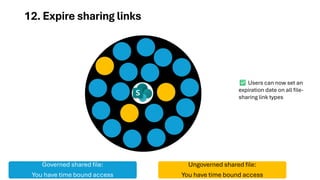
12. Expire sharing links
Governed shared file:
You have time bound access
Ungoverned shared file:
You have time bound access
Users can now set an
expiration date on all file-
sharing link types
Summary
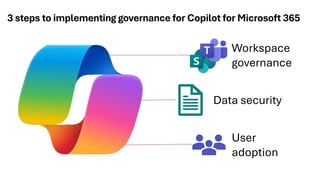
3 steps to implementing governance for Copilot for Microsoft 365
Workspace
governance
Data security
User
adoption
About Me
Nikki Chapple
Principal Cloud Architect
nikkichapple
@chapplenikki
www.nikkichapple.com
All Things M365 Compliance

Copilot for Microsoft 365 data security and governance | Workplace Ninjas Denmark | August 2024

  • 1.
    Deciphering Copilot: Unravelling DataSecurity and Governance in Microsoft 365 Nikki Chapple Principal Cloud Architect at CloudWay MVP in M365 Apps and Security
  • 2.
    About Me Nikki Chapple PrincipalCloud Architect nikkichapple @chapplenikki www.nikkichapple.com All Things M365 Compliance
  • 3.
    Agenda Are you worriedabout Copilot for Microsoft 365? Is your data ready for Copilot? 10 steps to secure and govern your data
  • 4.
    Are you worried aboutCopilot for Microsoft 365?
  • 5.
    The issue Employees wantAI at work - and they won’t wait for their organisation to catch up
  • 6.
    What are yourmain concerns about Copilot for Microsoft 365?
  • 7.
    Microsoft & LinkedInWork Trend Index Report Three out of four people already use AI at work 2024 Work Trend Index Annual Report from Microsoft and LinkedIn)
  • 8.
    ISMG Generative AISurvey CISO Concerns REPORT-Business-Rewards-vs-Security-Risks.pdf (exabeam.com)
  • 9.
    Is your data readyfor Copilot?
  • 10.
    Copilot scope Most ofyour data is stored outside Microsoft 365 3rd Party data stores SharePoint OneDrive
  • 11.
    No rule bookon what to store where 3rd Party data stores Ungoverned content - Danger of revealing too much Copilot cannot reach - Danger of poor data quality
  • 12.
    Pioneers start creatingungoverned Teams & Sites 3rd Party data stores Ungoverned content - Danger of revealing too much Copilot cannot reach - Danger of poor data quality
  • 13.
    3rd Party data stores You createpublic Teams with default configuration Ungoverned content - Danger of revealing too much Copilot cannot reach - Danger of poor data quality
  • 14.
    3rd Party data stores You haveungoverned file sharing Ungoverned content - Danger of revealing too much Copilot cannot reach - Danger of poor data quality
  • 15.
    You migrate allyour historic data into Microsoft 365 3rd party Ungoverned content - Danger of revealing too much Copilot cannot reach - Danger of poor data quality
  • 16.
    Your Admins areowners of all groups, Teams & sites Ungoverned content - Danger of revealing too much
  • 17.
    You have implementeddata security and governance Governed content – Just enough access and just enough permissions
  • 18.
    Copilot for Microsoft365 Optimization Assessment Data Security readiness score License profile Deployment path 0% - 66% Office 365 E3, Microsoft 365 Business Standard/Premium, or higher Core 67% - 100% Microsoft 365 E5 Best-in-Class Determine your deployment path Solution Assessment Program (microsoft.com)
  • 19.
    10 steps to secureand govern your data
  • 20.
  • 21.
    Ungoverned Workspaces (Microsoft365 Groups, Teams and Sites) Ungoverned sites and files: Risk of oversharing Each circle represents a SharePoint site
  • 22.
    Temporary measure -Restricted SharePoint Search Add up to 100 sites Frequently visited sites Your OneDrive Shared files with you & you have accessed This disables organization-wide search No impact on Purview e.g. DLP Restricted SharePoint Search - SharePoint in Microsoft 365 | Microsoft Learn
  • 23.
    1. Convert Publicworkspaces to Private workspaces Public sites: Copilot can access all Governed Sites with access: You and Copilot can access Governed Sites no access: You and Copilot cannot access All users in the tenant can access content in Public Groups Use Container sensitivity labels to restrict Public Teams being created Add Container sensitivity labels to existing Teams/ Microsoft 365 Groups change settings to Private Identify Viva Engage/ Teams that need to be Public e.g All staff or social Use sensitivity labels with Microsoft Teams, Microsoft 365 Groups, and SharePoint sites | Microsoft Learn
  • 24.
    2. Use Containersensitivity labels to enforce“People with existing access”link Ungoverned files: Risk of oversharing Governed Sites with access: You and Copilot can access Governed Sites no access: You and Copilot cannot access Use Container sensitivity labels with your Microsoft 365 Groups, Teams and Sites to control file access permissions Use sensitivity labels with Microsoft Teams, Microsoft 365 Groups, and SharePoint sites | Microsoft Learn Use sensitivity labels to configure the default sharing link type | Microsoft Learn
  • 25.
    3. Regularly reviewworkspace membership Ungoverned files: Risk of oversharing Governed Sites with access: You and Copilot can access Governed Sites no access: You and Copilot cannot access Use Dynamic groups to automatically manage membership (Entra ID P1) Rules for dynamically populated groups membership - Microsoft Entra ID | Microsoft Learn Use Entra ID Access Reviews to review Groups and Teams (Entra ID P2 licence) What are access reviews? - Microsoft Entra - Microsoft Entra ID Governance | Microsoft Learn Use Entra ID Entitlement Management to review confidential Groups, Teams and Sites (Entra ID P2 licence) What is entitlement management? - Microsoft Entra ID Governance | Microsoft Learn User adoption to ensure workspace owners review the membership on a regular basis. Run regular communications campaigns
  • 26.
    4. Use private/sharedchannels in Teams to restrict access Ungoverned files: Risk of oversharing Governed Sites with access: You and Copilot can access Governed Sites no access: You and Copilot cannot access You can control who can create Private and shared channels Using Shared channels externally requires bi-directional configuration Overview of teams and channels in Microsoft Teams - Microsoft Teams | Microsoft Learn
  • 27.
    5. Use Retentionto keep what you need and delete the rest Ungoverned files: Risk of oversharing Governed Sites with access: You and Copilot can access Governed Sites no access: You and Copilot cannot access Automated labelling requires E5 Compliance Learn about retention policies & labels to retain or delete | Microsoft Learn
  • 28.
  • 29.
    6. Block siteaccess to non-members Ungoverned files: Risk of oversharing Governed Sites with access: You and Copilot can access Governed Sites no access: You and Copilot cannot access SharePoint Advanced Management Restrict SharePoint site access with Microsoft 365 groups and Entra security groups - SharePoint in Microsoft 365 | Microsoft Learn Licenses $3 per user per month for all users
  • 30.
    Archive 7. Archive yourinactive Sites Ungoverned files: Risk of oversharing Governed Sites with access: You and Copilot can access Governed Sites no access: You and Copilot cannot access
  • 31.
    Archive 7. Archive yourinactive Sites Ungoverned files: Risk of oversharing Governed Sites with access: You and Copilot can access Governed Sites no access: You and Copilot cannot access Microsoft 365 Archive is charged per-GB once the total SharePoint storage used. There is also a charge to restore site Overview of Microsoft 365 Archive - Microsoft 365 Archive | Microsoft Learn Third-party options are available.
  • 32.
  • 33.
    8. Add Sensitivitylabels to your files Labelled files: Copilot inherits label for source data Copilot will inherit the label of the source content Use DLP with sensitivity labels to block access Automated labelling & default label on Document Library requires E5 Compliance Microsoft Purview data security and compliance protections for Microsoft Copilot and other generative AI apps | Microsoft Learn
  • 34.
    9. Add Sensitivitylabels with encryption Encrypted files: If you have access, Copilot can access Encrypted files: If you can’t access, Copilot can’t access Copilot will inherit the label of the source content With Co-owner and Co-author permissions you can still collaborate Automated labelling & default label on Document Library requires E5 Compliance Apply encryption using sensitivity labels | Microsoft Learn Microsoft Purview data security and compliance protections for Microsoft Copilot and other generative AI apps | Microsoft Learn
  • 35.
    10. Add EncryptedSensitivity labels with limited permissions Encrypted files with restricted access: If you have limited access, Copilot can’t access You must have VIEW + EXTRACT permissions for Copilot to access Copilot will inherit the label of the source content Automated labelling & default label on Document Library requires E5 Compliance Microsoft Purview data security and compliance protections for Microsoft Copilot and other generative AI apps | Microsoft Learn
  • 36.
    11. Use Sensitivitylabels to block content being analysed by Copilot Labelled files that prevent connected experiences : If you can access, Copilot cannot access in WPXO Blocks content being sent to Microsoft for content analysis as a privacy control. This will block Copilot from accessing content in Word, PowerPoint, Excel and Outlook Content can still be accessed via Copilot in other scenarios e.g. Teams Impacts other activities Manage sensitivity labels in Office apps | Microsoft Learn
  • 37.
    12. Expire sharinglinks Governed shared file: You have time bound access Ungoverned shared file: You have time bound access Users can now set an expiration date on all file- sharing link types
  • 38.
  • 39.
    3 steps toimplementing governance for Copilot for Microsoft 365 Workspace governance Data security User adoption
  • 40.
    About Me Nikki Chapple PrincipalCloud Architect nikkichapple @chapplenikki www.nikkichapple.com All Things M365 Compliance