Symposium
November 2010
Virtual Classroom within Philips and Océ
Irene Mikkers-Verhoeven / Eric Vlaanderen
Before we begin…
In case at the end of this session …
there are still questions open which are not answered …
specific topics related to VC have not been discussed…
you like to share your experience with Virtual Classrooms with us …
or any other open point related to VC …
Discussion forum or …
Online workshop (< 4 weeks from now) with Irene and Eric
For registration see handouts
Agenda
Informal Learning Example– Sharing expertise between Philips
and Océ
What is a Virtual Classroom?
Live Virtual Classroom – Working with Wikis
Strengths and Weaknesses
Virtual Classroom – Collaborative learning
Sharing expertise between Philips and Oce
Henk Annema
Agenda
Informal Learning Example– Sharing expertise between Philips
and Océ
What is a Virtual Classroom?
Live Virtual Classroom – Working with Wikis
Strengths and Weaknesses
Virtual Classroom – Collaborative learning
What is a Virtual Classroom?
a Virtual Classroom, often also referred as synchronous e-
learning,
can be defined as a synchronous learning environment, where
teachers and students are physically separated
Live - real time
Students and trainers (synchronous)
Communication via electronic media
Scheduled
Learning oriented interaction
Concurrent learning
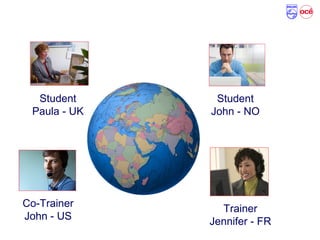
Typical Virtual Classroom setup
Student
Paula - UK
Trainer
Jennifer - FR
Student
John - NO
Co-Trainer
John - US
Agenda
Informal Learning Example– Sharing expertise between Philips
and Océ
What is a Virtual Classroom?
Live Virtual Classroom – Working with Wikis
Strengths and Weaknesses
Virtual Classroom – Collaborative learning
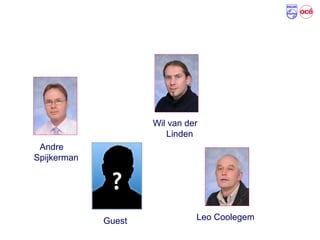
Participants
Andre
Spijkerman
Leo Coolegem
Wil van der
Linden
Guest
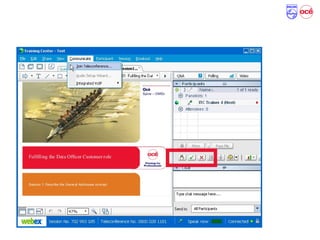
Working with the collaboration application
Course Objectives
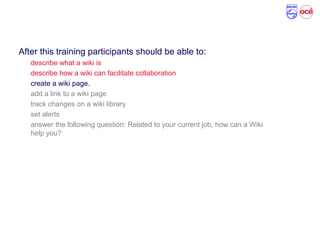
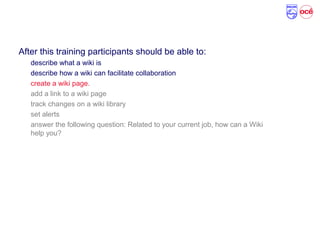
After this training participants should be able to:
describe what a wiki is
describe how a wiki can facilitate collaboration
create a wiki page.
add a link to a wiki page
track changes on a wiki library
set alerts
answer the following question: Related to your current job, how can a Wiki
help you?
Course objectives clear?
Please use the feedback icons
Course Objectives
After this training participants should be able to:
describe what a wiki is
describe how a wiki can facilitate collaboration
create a wiki page.
add a link to a wiki page
track changes on a wiki library
set alerts
answer the following question: Related to your current job, how can a Wiki
help you?
What is a Wiki …
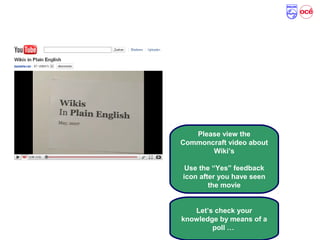
Please view the
Commoncraft video about
Wiki’s
Use the “Yes” feedback
icon after you have seen
the movie
Let’s check your
knowledge by means of a
poll …
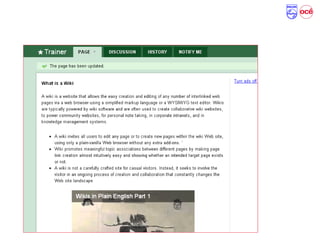
Wiki Definition and Characteristics
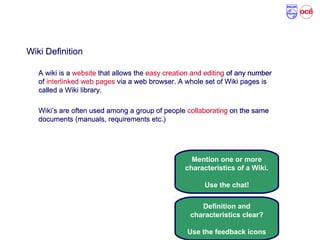
Wiki Definition
A wiki is a website that allows the easy creation and editing of any number
of interlinked web pages via a web browser. A whole set of Wiki pages is
called a Wiki library.
Wiki’s are often used among a group of people collaborating on the same
documents (manuals, requirements etc.)
Mention one or more
characteristics of a Wiki.
Use the chat!
Definition and
characteristics clear?
Use the feedback icons
Wiki Definition
A wiki is a website that allows the easy creation and editing of any number
of interlinked web pages via a web browser. A whole set of Wiki pages is
called a Wiki library.
Wiki’s are often used among a group of people collaborating on the same
documents (manuals, requirements etc.)
Any questions?
Vragen
Ερωτήσεις Fragen
Domande
Preguntas
Perguntas
Questions?
Cwestiwn
Questions
Course Objectives
After this training participants should be able to:
describe what a wiki is
describe how a wiki can facilitate collaboration
create a wiki page.
add a link to a wiki page
track changes on a wiki library
set alerts
answer the following question: Related to your current job, how can a Wiki
help you?
Demonstration – Create a Wiki page
Case 1, Exercise 1: Create your own Wiki page
Your main task:
Go to the Wiki Training site: http://how-wikis-work.wikispaces.com/
Execute the following tasks:
Create your own Wiki page, using the text in the case document
Format the text and embed a Youtube video as described in the case document
Time: 7 minutes
After you have executed above tasks, answer the question in the poll.
Is the assignment clear?
Use the feedback icons
Case 1, Exercise 1: Discussion
Lets view one of the Wiki pages
…
Lets check the poll results …
What was your main learning
point …
Use the chat.
Important things to remember
A wiki library is a collection of web based documents
Easy creation and editing
Website
Interlinked pages
Collaboration
WikiSpaces contains a simple WYSIWYG editor available to
format text.
Various widgets are available to integrate media elements from
other websites
Any questions?
Vragen
Ερωτήσεις Fragen
Domande
Preguntas
Perguntas
Questions?
Cwestiwn
Questions
Agenda
Informal Learning Example– Sharing expertise between Philips
and Océ
What is a Virtual Classroom?
Live Virtual Classroom – Working with Wikis
Strengths and Weaknesses
Virtual Classroom – Collaborative learning
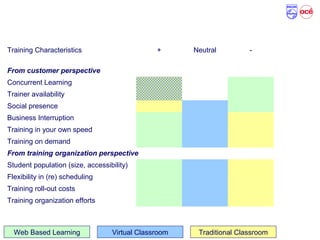
Training Method: Characteristics – Our view
Training Characteristics + Neutral -
From customer perspective
Concurrent Learning
Trainer availability
Social presence
Business Interruption
Training in your own speed
Training on demand
From training organization perspective
Student population (size, accessibility)
Flexibility in (re) scheduling
Training roll-out costs
Training organization efforts
Web Based Learning Virtual Classroom Traditional Classroom
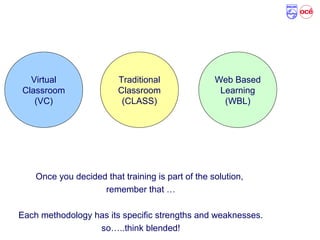
Training Methodologies: Overview
Virtual
Classroom
(VC)
Web Based
Learning
(WBL)
Traditional
Classroom
(CLASS)
Once you decided that training is part of the solution,
remember that …
Each methodology has its specific strengths and weaknesses.
so…..think blended!
Agenda
Informal Learning Example– Sharing expertise between Philips
and Océ
What is a Virtual Classroom?
Live Virtual Classroom – Working with Wikis
Strengths and Weaknesses
Virtual Classroom – Collaborative learning
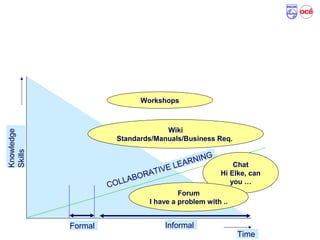
Collaborative Learning - Communities
Time
Knowledge
Skills
Formal
COLLABORATIVE LEARNING
Informal
Wiki
Standards/Manuals/Business Req.
Workshops
Chat
Hi Elke, can
you …
Forum
I have a problem with ..
Reminder!
In case at the end of this session …
there are still questions open which are not answered …
specific topics related to VC have not been discussed…
you like to share your experience with Virtual Classrooms with us …
or any other open point related to VC …
Discussion forum or …
Online workshop (< 4 weeks from now)
For Registration: See handouts

Working with wikis_symposium

  • 1.
    Symposium November 2010 Virtual Classroomwithin Philips and Océ Irene Mikkers-Verhoeven / Eric Vlaanderen
  • 2.
    Before we begin… Incase at the end of this session … there are still questions open which are not answered … specific topics related to VC have not been discussed… you like to share your experience with Virtual Classrooms with us … or any other open point related to VC … Discussion forum or … Online workshop (< 4 weeks from now) with Irene and Eric For registration see handouts
  • 3.
    Agenda Informal Learning Example–Sharing expertise between Philips and Océ What is a Virtual Classroom? Live Virtual Classroom – Working with Wikis Strengths and Weaknesses Virtual Classroom – Collaborative learning
  • 4.
    Sharing expertise betweenPhilips and Oce Henk Annema
  • 5.
    Agenda Informal Learning Example–Sharing expertise between Philips and Océ What is a Virtual Classroom? Live Virtual Classroom – Working with Wikis Strengths and Weaknesses Virtual Classroom – Collaborative learning
  • 6.
    What is aVirtual Classroom? a Virtual Classroom, often also referred as synchronous e- learning, can be defined as a synchronous learning environment, where teachers and students are physically separated Live - real time Students and trainers (synchronous) Communication via electronic media Scheduled Learning oriented interaction Concurrent learning
  • 7.
    Typical Virtual Classroomsetup Student Paula - UK Trainer Jennifer - FR Student John - NO Co-Trainer John - US
  • 8.
    Agenda Informal Learning Example–Sharing expertise between Philips and Océ What is a Virtual Classroom? Live Virtual Classroom – Working with Wikis Strengths and Weaknesses Virtual Classroom – Collaborative learning
  • 9.
  • 10.
    Working with thecollaboration application
  • 11.
    Course Objectives After thistraining participants should be able to: describe what a wiki is describe how a wiki can facilitate collaboration create a wiki page. add a link to a wiki page track changes on a wiki library set alerts answer the following question: Related to your current job, how can a Wiki help you? Course objectives clear? Please use the feedback icons
  • 12.
    Course Objectives After thistraining participants should be able to: describe what a wiki is describe how a wiki can facilitate collaboration create a wiki page. add a link to a wiki page track changes on a wiki library set alerts answer the following question: Related to your current job, how can a Wiki help you?
  • 13.
    What is aWiki … Please view the Commoncraft video about Wiki’s Use the “Yes” feedback icon after you have seen the movie Let’s check your knowledge by means of a poll …
  • 14.
    Wiki Definition andCharacteristics Wiki Definition A wiki is a website that allows the easy creation and editing of any number of interlinked web pages via a web browser. A whole set of Wiki pages is called a Wiki library. Wiki’s are often used among a group of people collaborating on the same documents (manuals, requirements etc.) Mention one or more characteristics of a Wiki. Use the chat! Definition and characteristics clear? Use the feedback icons Wiki Definition A wiki is a website that allows the easy creation and editing of any number of interlinked web pages via a web browser. A whole set of Wiki pages is called a Wiki library. Wiki’s are often used among a group of people collaborating on the same documents (manuals, requirements etc.)
  • 15.
  • 16.
    Course Objectives After thistraining participants should be able to: describe what a wiki is describe how a wiki can facilitate collaboration create a wiki page. add a link to a wiki page track changes on a wiki library set alerts answer the following question: Related to your current job, how can a Wiki help you?
  • 17.
  • 18.
    Case 1, Exercise1: Create your own Wiki page Your main task: Go to the Wiki Training site: http://how-wikis-work.wikispaces.com/ Execute the following tasks: Create your own Wiki page, using the text in the case document Format the text and embed a Youtube video as described in the case document Time: 7 minutes After you have executed above tasks, answer the question in the poll. Is the assignment clear? Use the feedback icons
  • 19.
    Case 1, Exercise1: Discussion Lets view one of the Wiki pages … Lets check the poll results … What was your main learning point … Use the chat.
  • 20.
    Important things toremember A wiki library is a collection of web based documents Easy creation and editing Website Interlinked pages Collaboration WikiSpaces contains a simple WYSIWYG editor available to format text. Various widgets are available to integrate media elements from other websites
  • 21.
  • 22.
    Agenda Informal Learning Example–Sharing expertise between Philips and Océ What is a Virtual Classroom? Live Virtual Classroom – Working with Wikis Strengths and Weaknesses Virtual Classroom – Collaborative learning
  • 23.
    Training Method: Characteristics– Our view Training Characteristics + Neutral - From customer perspective Concurrent Learning Trainer availability Social presence Business Interruption Training in your own speed Training on demand From training organization perspective Student population (size, accessibility) Flexibility in (re) scheduling Training roll-out costs Training organization efforts Web Based Learning Virtual Classroom Traditional Classroom
  • 24.
    Training Methodologies: Overview Virtual Classroom (VC) WebBased Learning (WBL) Traditional Classroom (CLASS) Once you decided that training is part of the solution, remember that … Each methodology has its specific strengths and weaknesses. so…..think blended!
  • 25.
    Agenda Informal Learning Example–Sharing expertise between Philips and Océ What is a Virtual Classroom? Live Virtual Classroom – Working with Wikis Strengths and Weaknesses Virtual Classroom – Collaborative learning
  • 26.
    Collaborative Learning -Communities Time Knowledge Skills Formal COLLABORATIVE LEARNING Informal Wiki Standards/Manuals/Business Req. Workshops Chat Hi Elke, can you … Forum I have a problem with ..
  • 27.
    Reminder! In case atthe end of this session … there are still questions open which are not answered … specific topics related to VC have not been discussed… you like to share your experience with Virtual Classrooms with us … or any other open point related to VC … Discussion forum or … Online workshop (< 4 weeks from now) For Registration: See handouts

Editor's Notes

  • #2 Template usage This template is used as guideline for training the different topics within a course. The template must be used for each new topic. Usage Notes section Use this section to explain all things needed for bulk trainers to conduct the same training as training developers. Explain in short terms the key messages, with if needed explanations, per sheet. Don’t automatically assume everybody knows the same as you know. Use this section also to write down questions you would like to ask, with the correct answers. General guidelines uniformity Header: Times New Roman, 30 , aligned left All topics bullet color red, font Arial 20, Normal All subtopics bullet color blue, font Arial 16, Normal Animation effect: fade in, medium First topic fades in automatically, next topics fade in on mouse click No animation effect between slides. 1: Introduction Page (current page) Right-up”: Spine - &amp;lt;BPA&amp;gt;, font Arial 16, aligned left In Red: Current course, font Times New Roman, 24, aligned left In Yellow: Current case, Arial 18, aligned left 2: Agenda Total agenda of the training. In red the current topic/case 3: Starting points/Conceptual information 4: Introduction to the case 5: Learning Points
  • #3 Explain here the agenda with cases.
  • #4 Objectives/expectations Ask here what the students expects from this course (when is the student satisfied). Ask him to tell something about specific skills needed for this course (entry level). This topic can be partly skipped if students already know each-other. Write down specific objectives or expectations which are not covered by this course, per student. Refer back to these objectives at the end of the course.
  • #5 Objectives/expectations Ask here what the students expects from this course (when is the student satisfied). Ask him to tell something about specific skills needed for this course (entry level). This topic can be partly skipped if students already know each-other. Write down specific objectives or expectations which are not covered by this course, per student. Refer back to these objectives at the end of the course.
  • #6 Objectives/expectations Ask here what the students expects from this course (when is the student satisfied). Ask him to tell something about specific skills needed for this course (entry level). This topic can be partly skipped if students already know each-other. Write down specific objectives or expectations which are not covered by this course, per student. Refer back to these objectives at the end of the course.
  • #7 Objectives/expectations Ask here what the students expects from this course (when is the student satisfied). Ask him to tell something about specific skills needed for this course (entry level). This topic can be partly skipped if students already know each-other. Write down specific objectives or expectations which are not covered by this course, per student. Refer back to these objectives at the end of the course.
  • #8 Objectives/expectations Ask here what the students expects from this course (when is the student satisfied). Ask him to tell something about specific skills needed for this course (entry level). This topic can be partly skipped if students already know each-other. Write down specific objectives or expectations which are not covered by this course, per student. Refer back to these objectives at the end of the course.
  • #9 Objectives/expectations Ask here what the students expects from this course (when is the student satisfied). Ask him to tell something about specific skills needed for this course (entry level). This topic can be partly skipped if students already know each-other. Write down specific objectives or expectations which are not covered by this course, per student. Refer back to these objectives at the end of the course.
  • #14 http://www.youtube.com/watch?v=-dnL00TdmLY (full movie) http://www.youtube.com/watch?v=G8ql5aMWpds (part 1)
  • #19 Wiki training site: http://global.departments.oce.net/itc/virtual-classroom/Working%20with%20Wikis/Home.aspx
  • #23 Objectives/expectations Ask here what the students expects from this course (when is the student satisfied). Ask him to tell something about specific skills needed for this course (entry level). This topic can be partly skipped if students already know each-other. Write down specific objectives or expectations which are not covered by this course, per student. Refer back to these objectives at the end of the course.
  • #24 Explain here the agenda with cases.
  • #25 Explain here the agenda with cases.
  • #26 Explain here the agenda with cases.
  • #27 Objectives/expectations Ask here what the students expects from this course (when is the student satisfied). Ask him to tell something about specific skills needed for this course (entry level). This topic can be partly skipped if students already know each-other. Write down specific objectives or expectations which are not covered by this course, per student. Refer back to these objectives at the end of the course.
  • #28 Does this mean that formal learning events disappear? I already answered that question before. Formal learning events like classroom training will always be required. But formal events should not be the only learning processes we should focus on. Consider the information as presented before in a timeline like presented here, and let’s look how we can apply this to the Business Process Area OMDc Consider the situation were we are implementing OneOce in an Opco. For OMDc we have a training called “Fulfilling the OMDc Data Officer role. It’s a formal learning event for employees working in the OMDc area, and the training prepares them for their role within EurOcé. The training is in fact a basic training, just enough to get you started. After the training, OMDc employees will play a role in conversion and migration activities. Furthermore they have to think how to setup the sales area structure, and finally implement this. This is part of the informal learning. You can imagine that thinking about the sales area structure, an OMDc employee encounters many questions, like .. what naming conventions should I us…how do I have to …. (Roy vult dit aan). On a lot of these questions, his colleagues in existing EurOcé countries can help him. They already went through this process once. Wouldn’t it be nice if those colleagues could support him with the required knowledge and skills to do his job, from behind his desk? Wouldn&amp;apos;t it be nice if those collegueas already created a Wiki in which they shared their best practices, which is accesible from behind his desk? Wouldn&amp;apos;t it be nice this Wiki could be updated with experiences from our new colleague Wouldnt it be nice if he could drop a problem somwhere, hoping that one of his collegues can provide him with a suitable workaround? Wouldn’t it be nice, that based on ongoing discussion on certain topics, even new formal training events could be generated in which employees can be trainer as student at the same time? Wouldn’t we benefit all from this? Something to think about …. We talk now about collaborative learning here, from your own workplace. You have access to all relevant data, you can mainatin and update it. And you have a vast group of experts around you, to help you.
  • #29 Explain here the agenda with cases.