Jane Challinor
School of Social Sciences
jane.challinor@ntu.ac.uk


                              Lost in (wiki)space!
                           adventures with students on the
                                  world wide web
aims
• briefly describe the project
• why online?
• discuss pros and cons of different online
  platforms
• categorise activities on the module wiki
  according to Salmon’s 5 stage model of e-
  moderation
• present examples of students’ final
  projects
the project

• form groups
• select films or TV characters
• analyse using leadership theories
• create a digital presentation via an
  online platform
• reflect on the group process
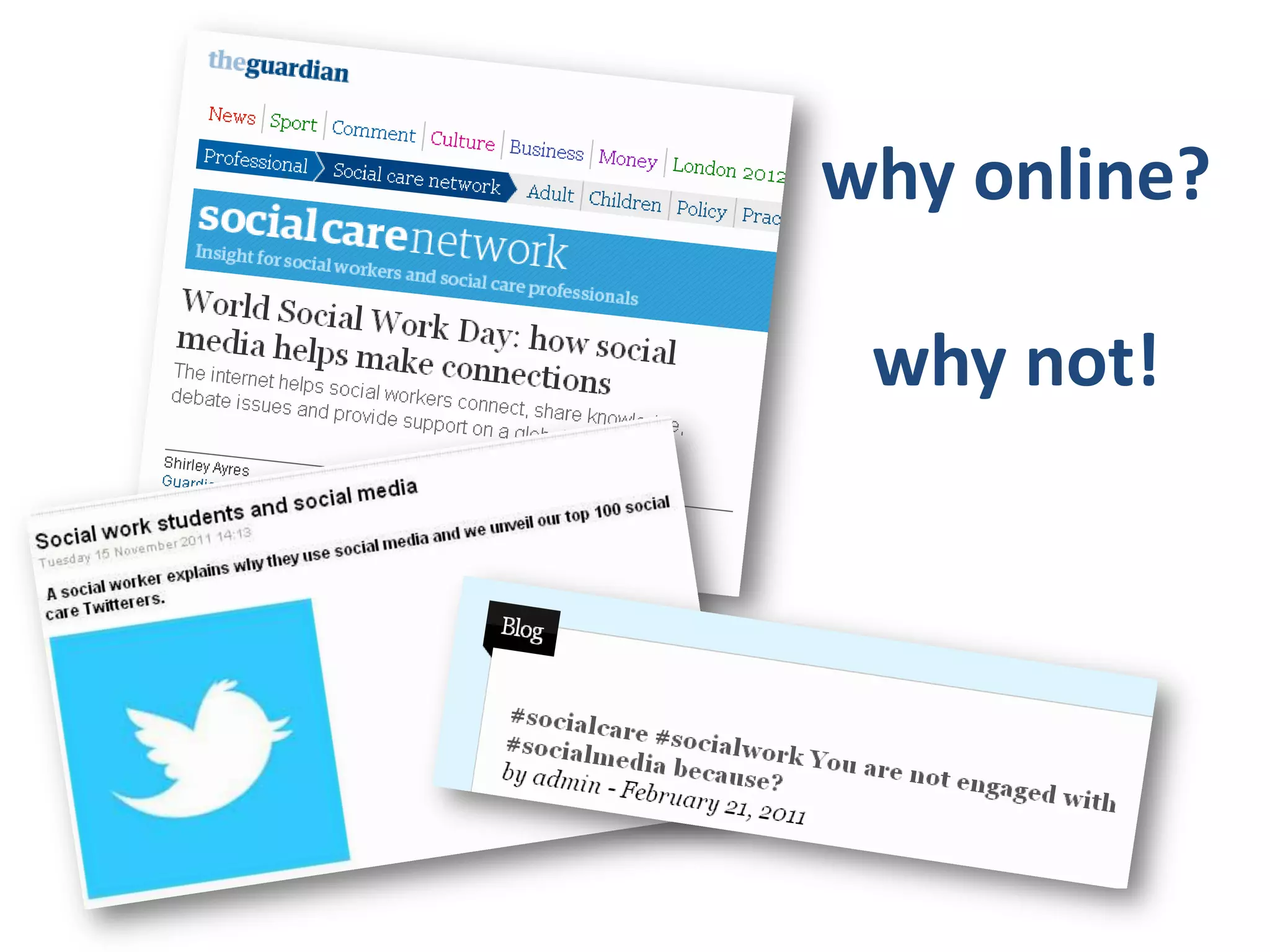
why online?

 why not!
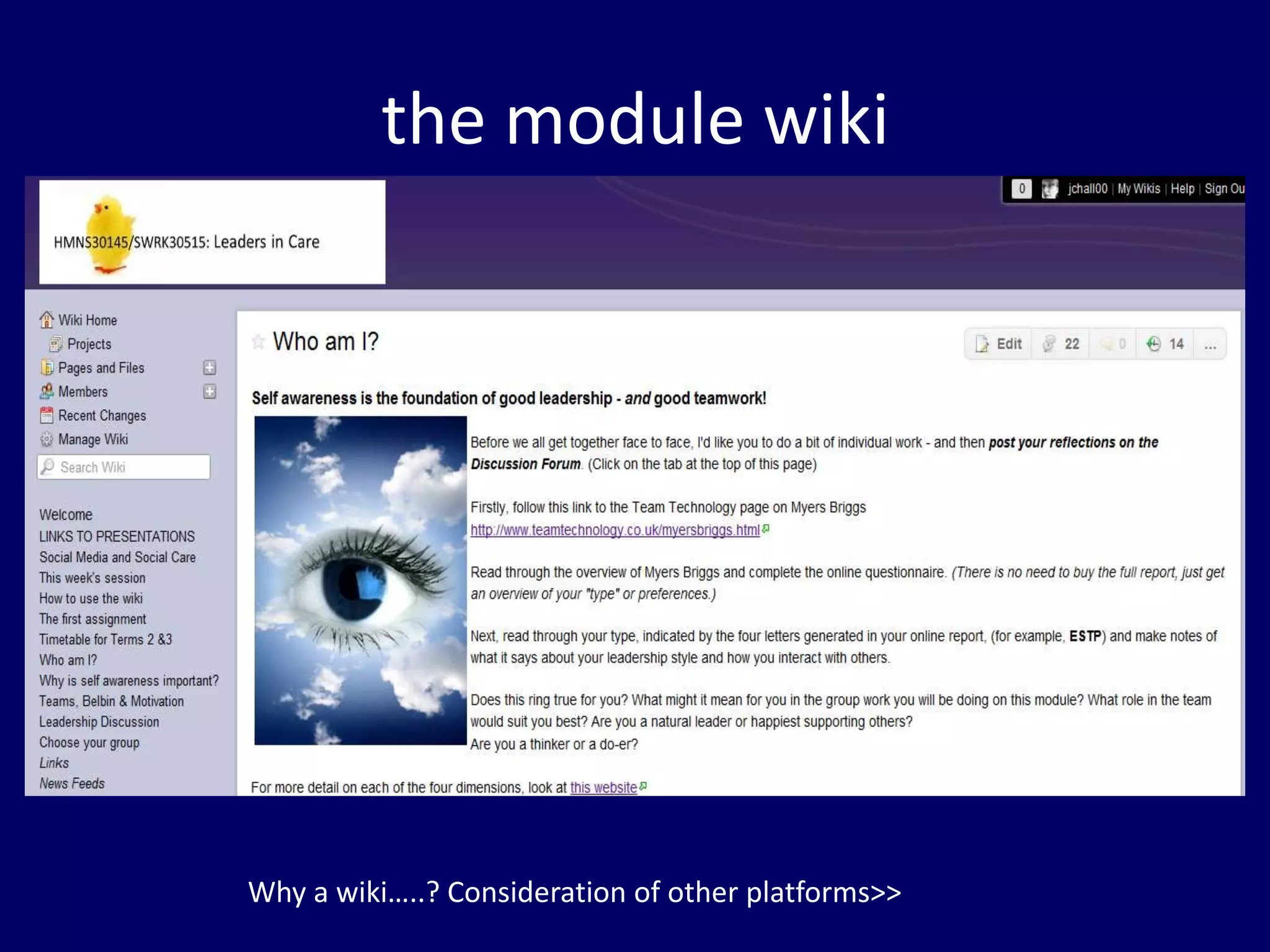
the module wiki


Why a wiki…..? Consideration of other platforms>>
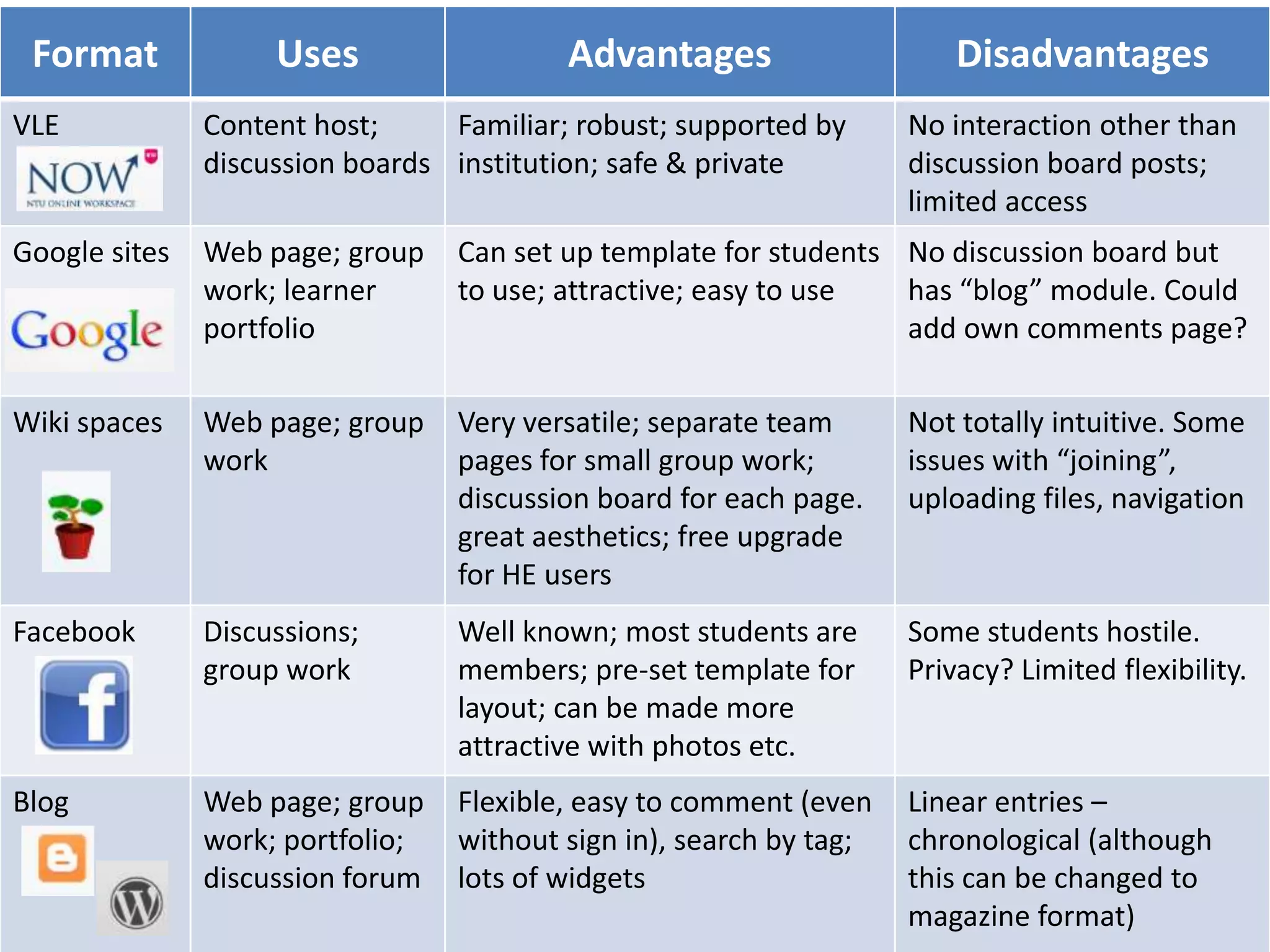
Format             Uses                  Advantages                     Disadvantages
VLE            Content host;     Familiar; robust; supported by      No interaction other than
               discussion boards institution; safe & private         discussion board posts;
                                                                     limited access
Google sites   Web page; group    Can set up template for students No discussion board but
               work; learner      to use; attractive; easy to use  has “blog” module. Could
               portfolio                                           add own comments page?

Wiki spaces    Web page; group    Very versatile; separate team      Not totally intuitive. Some
               work               pages for small group work;        issues with “joining”,
                                  discussion board for each page.    uploading files, navigation
                                  great aesthetics; free upgrade
                                  for HE users
Facebook       Discussions;       Well known; most students are      Some students hostile.
               group work         members; pre-set template for      Privacy? Limited flexibility.
                                  layout; can be made more
                                  attractive with photos etc.
Blog           Web page; group    Flexible, easy to comment (even    Linear entries –
               work; portfolio;   without sign in), search by tag;   chronological (although
               discussion forum   lots of widgets                    this can be changed to
                                                                     magazine format)
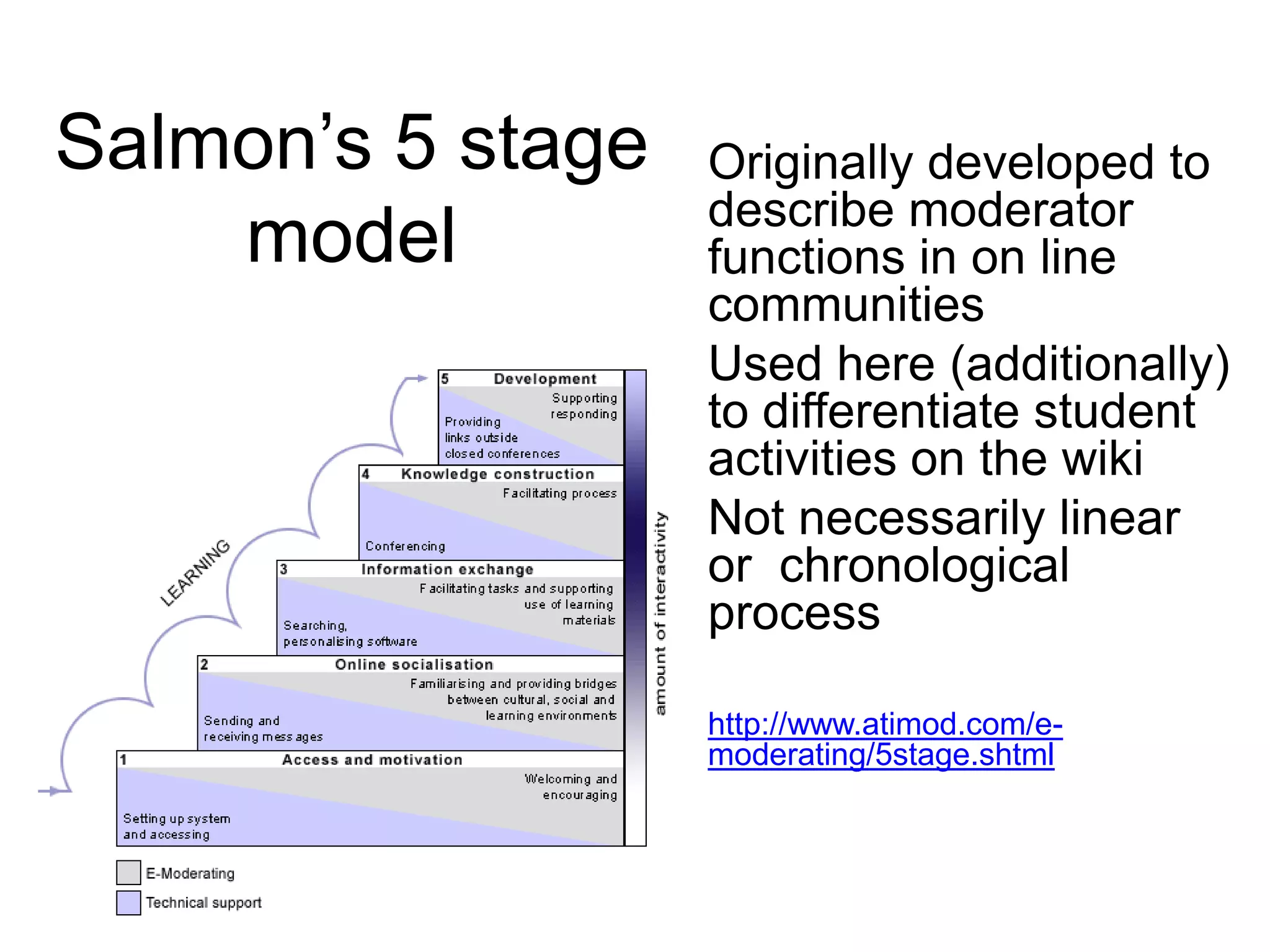
Salmon’s 5 stage   Originally developed to
                   describe moderator
    model          functions in on line
                   communities
                   Used here (additionally)
                   to differentiate student
                   activities on the wiki
                   Not necessarily linear
                   or chronological
                   process

                   http://www.atimod.com/e-
                   moderating/5stage.shtml
stage 1: access

Give instructions
and tips

Support learners
Encourage
practice

Provide structure
access
Facilitator Function                    Student Activity
• Set up wiki & project                 • Using wiki to select teams
  pages                                 • Enrol members in project
  http://leadersincare.wikispaces.co
  m/How+to+use+the+wiki
                                          pages
• Provide audio visual                  • Division of labour
  tutorials
  http://screencast.com/t/HbInO9qXuOg

• ICT suite session
• Pre-loaded pages
• Discussion board topics
introductions
reinforce systematic ways
                        of
working encourage    practice!


                          stage 2:
                        socialisation
socialisation
Facilitator Function         Student Activity
• Initial ice breaker            • Chat and comments
  discussion                     • Humour
• Sandbox page??                 • Meeting times
• Reminder about copyright       • Comments &
• Restoring deleted work!!         compliments
• Notification about             • Apologies & thanks
  meetings
                                 • Encouragement
• Make sure links are
  functioning and material       • Help with uploads
  available
stage 3 information sharing

acknowledge different   learning styles
encourage enjoyment
work constantly to summarise
information being exchanged and clarify
its relevance to the overall learning
programme (weaving)
information sharing
Facilitator Function                     Student Activity
• Responding to questions                • Deciding on the project
• Clarifying the task                    • Sharing ideas
• Posting links to resources             • Finding pages and links
• Providing lecture material             • Feedback
  http://leadersincare.wikispaces.com/
  Teams%2C+Belbin+%26+Motivation
                                         • Notes of meetings
                                         • Clarifying tasks and roles
encourage interaction


               make links with overall
               learning


  stage 4:
 knowledge     allow students to generate
               knowledge without
construction   interference from the tutor
knowledge construction
Facilitator Function     Student Activity
• Modelling use of       • Posting research & links
  video/application of   • Posting video clips
  theory                 • Posting own original work
• Facilitating group     • Responses to tasks,
  discussions              questions, discussion
                           board posts
                         • “Off-wiki” activity!
stage 5 development
“The original development of the 5
stage model demonstrated that, as
learners gradually increased in
confidence, there was generally
less intervention by moderators and
yet, apparently, more learning
occurring from the students groups”
Gilly Salmon
development
Facilitator Function           Student Activity
• Be available for questions   • Final design and content
  and tutorials                  discussions
• Set up peer assessment       • Finish and post
  process (using online          link/document
  poll)                        • Evaluate – (peer
• Evaluate – module              assessment, module
  feedback                       evaluation and individual
                                 reflective assignment)
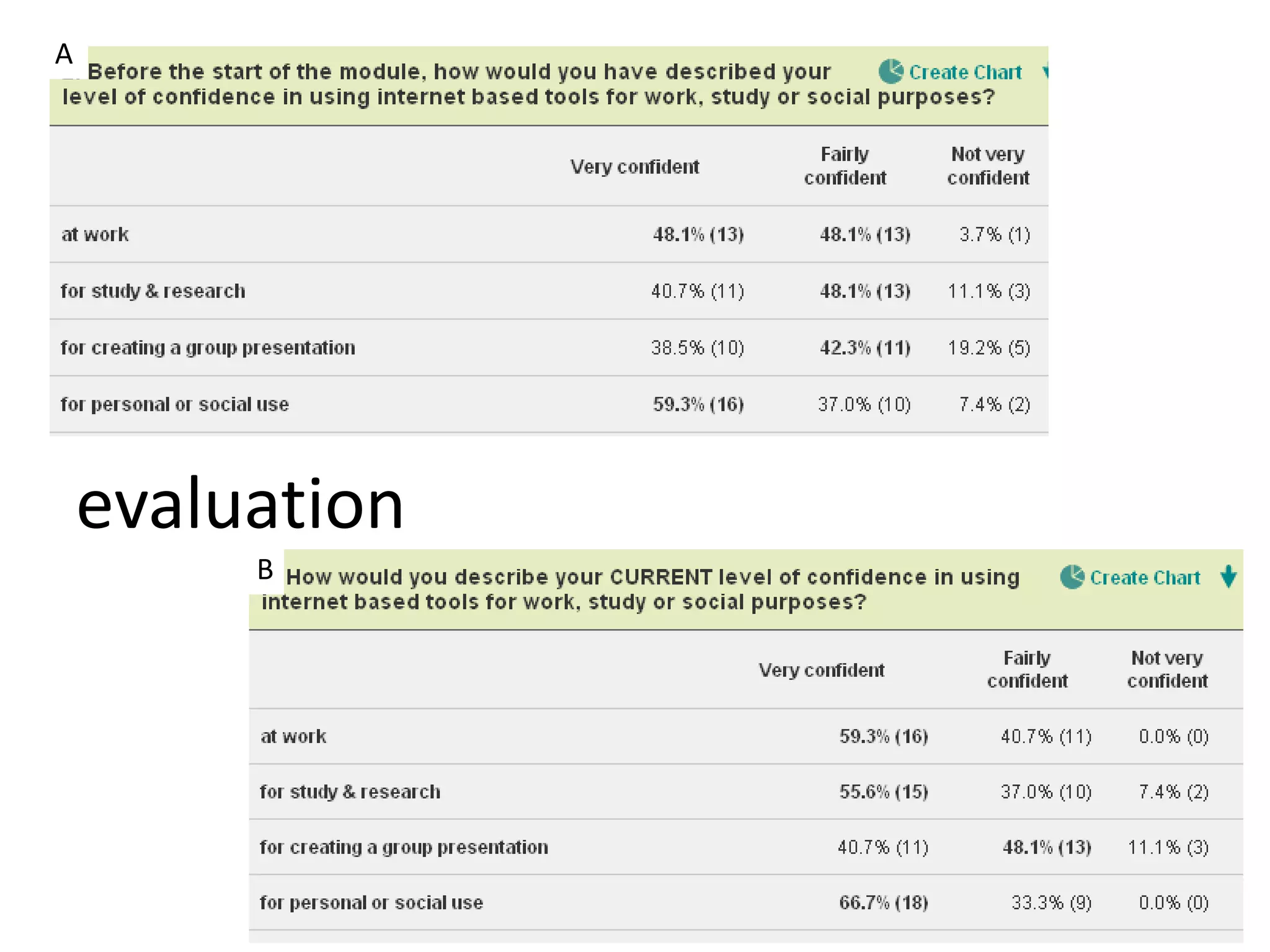
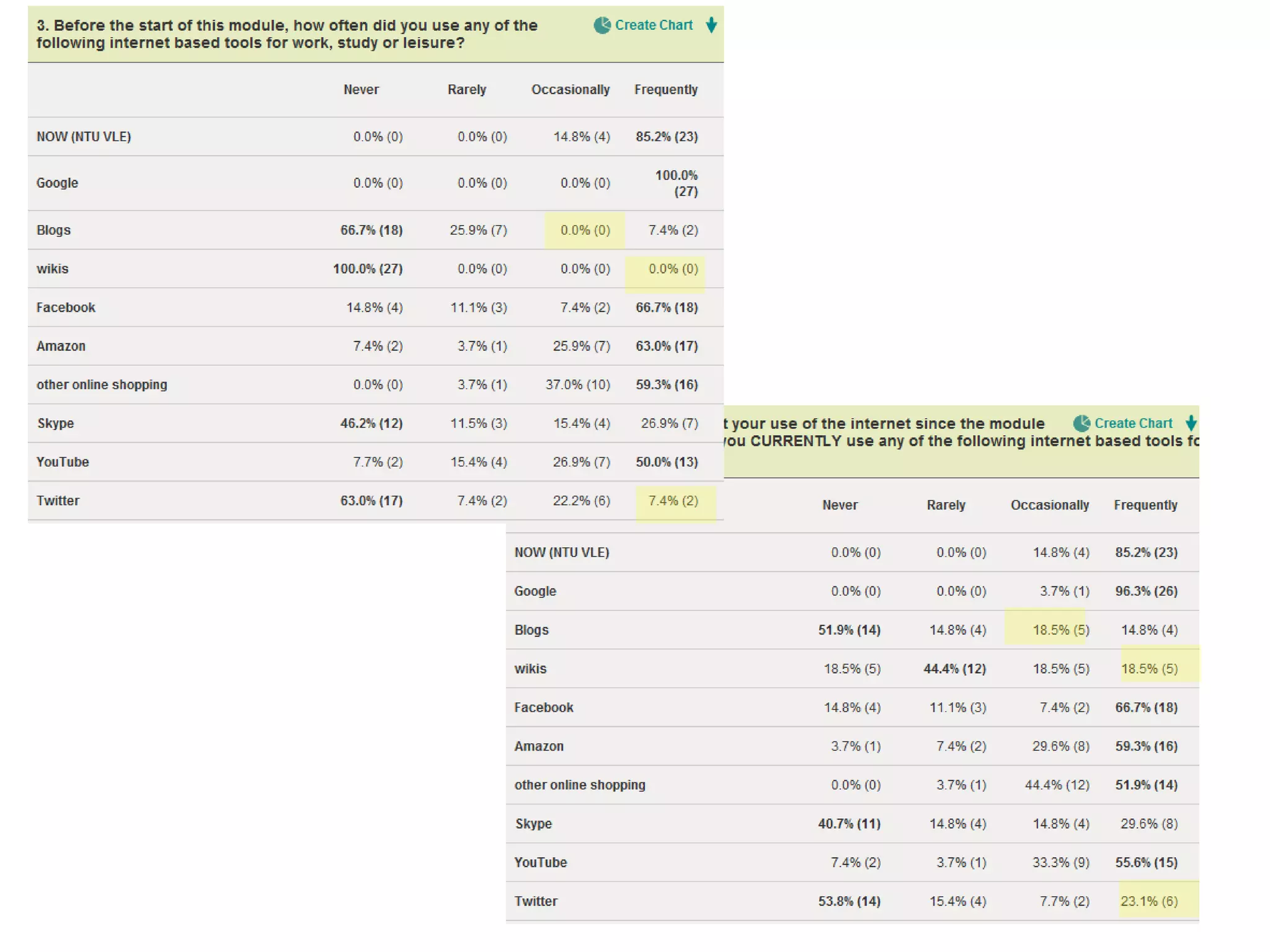
A


    evaluation
         B
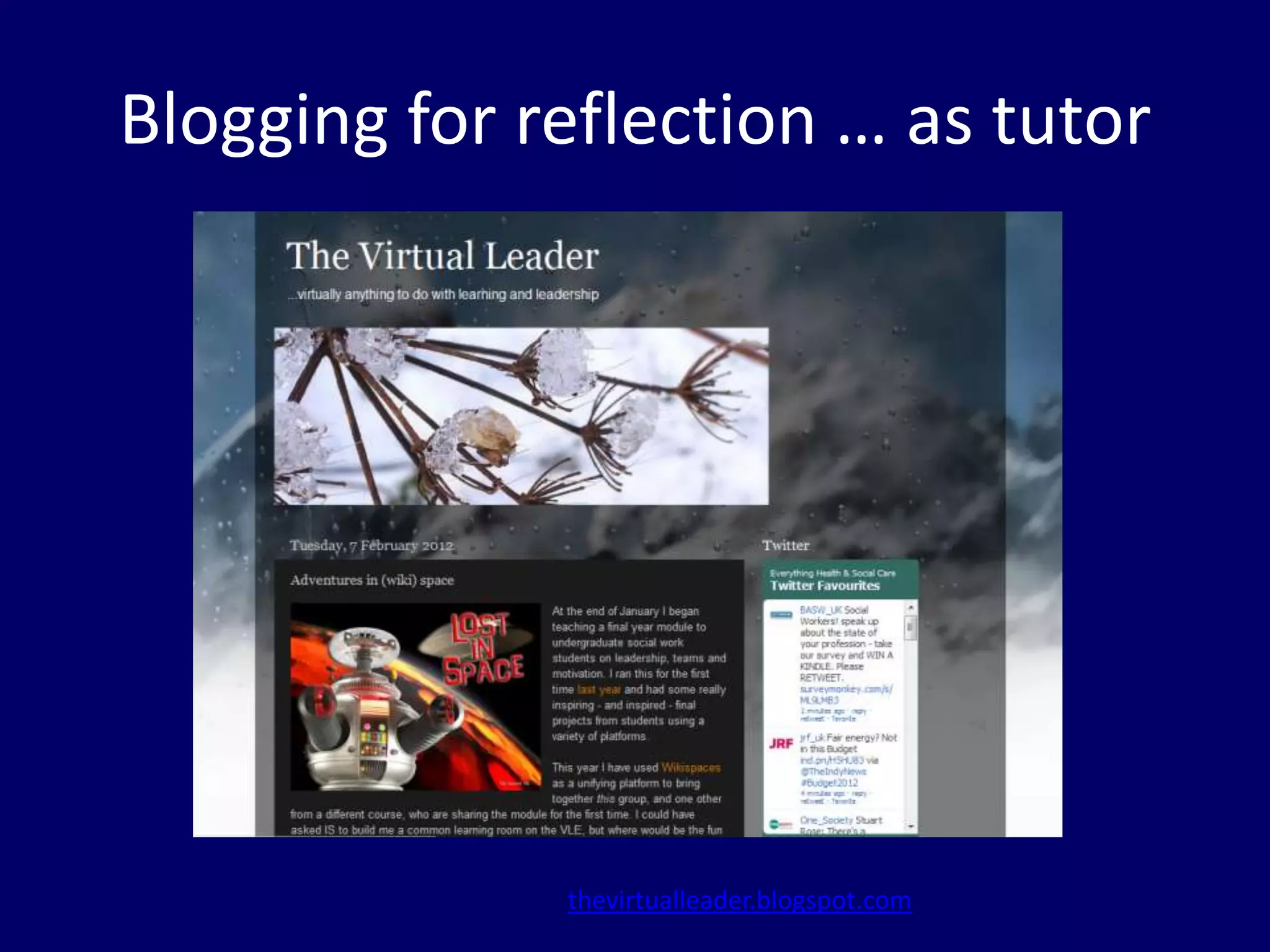
Blogging for reflection … as tutor


              thevirtualleader.blogspot.com
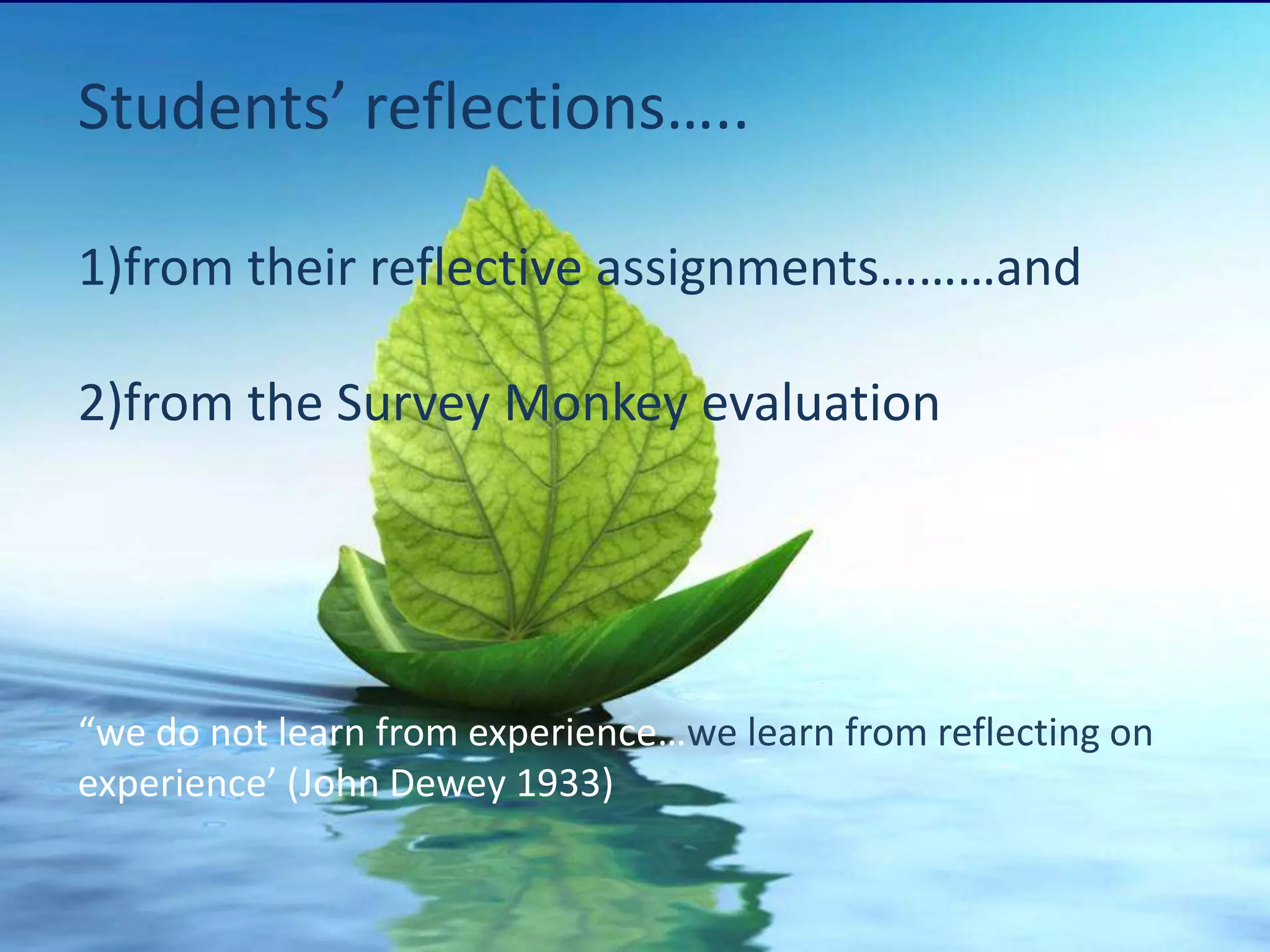
Students’ reflections…..

1)from their reflective assignments………and

2)from the Survey Monkey evaluation


“we do not learn from experience…we learn from reflecting on
experience’ (John Dewey 1933)
Members worked independently on their task; they were able to
[assert] their individuality and competencies of each member became
apparent. The use of technology such as email, telephone, skype and
social networking sites were used to communicate ideas and tasks to
other members of the group. *…+ One member was situated in Australia
for the majority of the group work; I took the role of communicating
with her, keeping her informed of the task and enabling her to
participate .
Brooks (2006) argues that technology influences the pattern of a group’s
operations and behaviour. The use of technology was very significant in
completing the presentation. As the aim was to show how a team could
work together virtually, as well as physically, it sometimes proved to be a
hindrance. Some individuals were unable to access the presentation
website, so time was lost explaining how to utilise it. Nevertheless, I viewed
technology as an advantage as I was able to work independently whilst still
allowing the others the option of accessing the work at all times .
Using the Facebook forum allowed for us to undertake virtual group work. This
was the first time I had undertaken any group work in this way and this by far
proved the best part of the task for me.
Gibson and Cohen (2003) identify three enabling conditions for virtual teams
to work well:
•        Shared Understanding
•        Integration
•        Mutual trust
I feel that once people had settled into their natural roles within the team
and we were working in a cohesive manner we were able to work as a
virtual team effectively.
Working in a virtual team can lead to motivational issues as you do not
have the face to face contact with others that you may need to motivate
yourself.
The decision of a remote blog media platform for the task was essential as
it allowed individuals to work flexibly. Knowledge in individual IT skills did
impact on some members achieving agreed outcomes/tasks by set dates. I
enjoyed learning to administrate a Blog, and can see the potential for
rapid information sharing and feedback.

Charting the progress on my own blog was cathartic due to challenges
and frustration of group interaction.
The use of email and wiki were the main means I used to communicate
with group members in order to give my input to the presentation.

Riggio and Orr (2004) inform [us]that virtual teams will become
increasingly important in all types of non-profit organisations as these
organisations strive for ways to reduce service delivery cost while
simultaneously enhancing flexibility and response time. On reflection, I
understand the need for me to develop my understanding of virtual teams
as McGregor (2011) reports that video conferencing will be used to greater
effect in the coming years for Social workers for example to attend child
protection conferences .
When working in social care it is important to concentrate on the bigger
picture and work collaboratively with others.

[Loughran (2002) believes reflection should] “offer ways of questioning taken-
for-granted assumptions and encouraging one to see his or her practice
through others’ eyes.”

*….+this task has demonstrated having an understanding of people and the
role they play is vital for a successful group effort.
I have learnt from this task that even when you believe it may not
work, being positive, and an active listener allows for opportunities
and success; particularly when working as a group
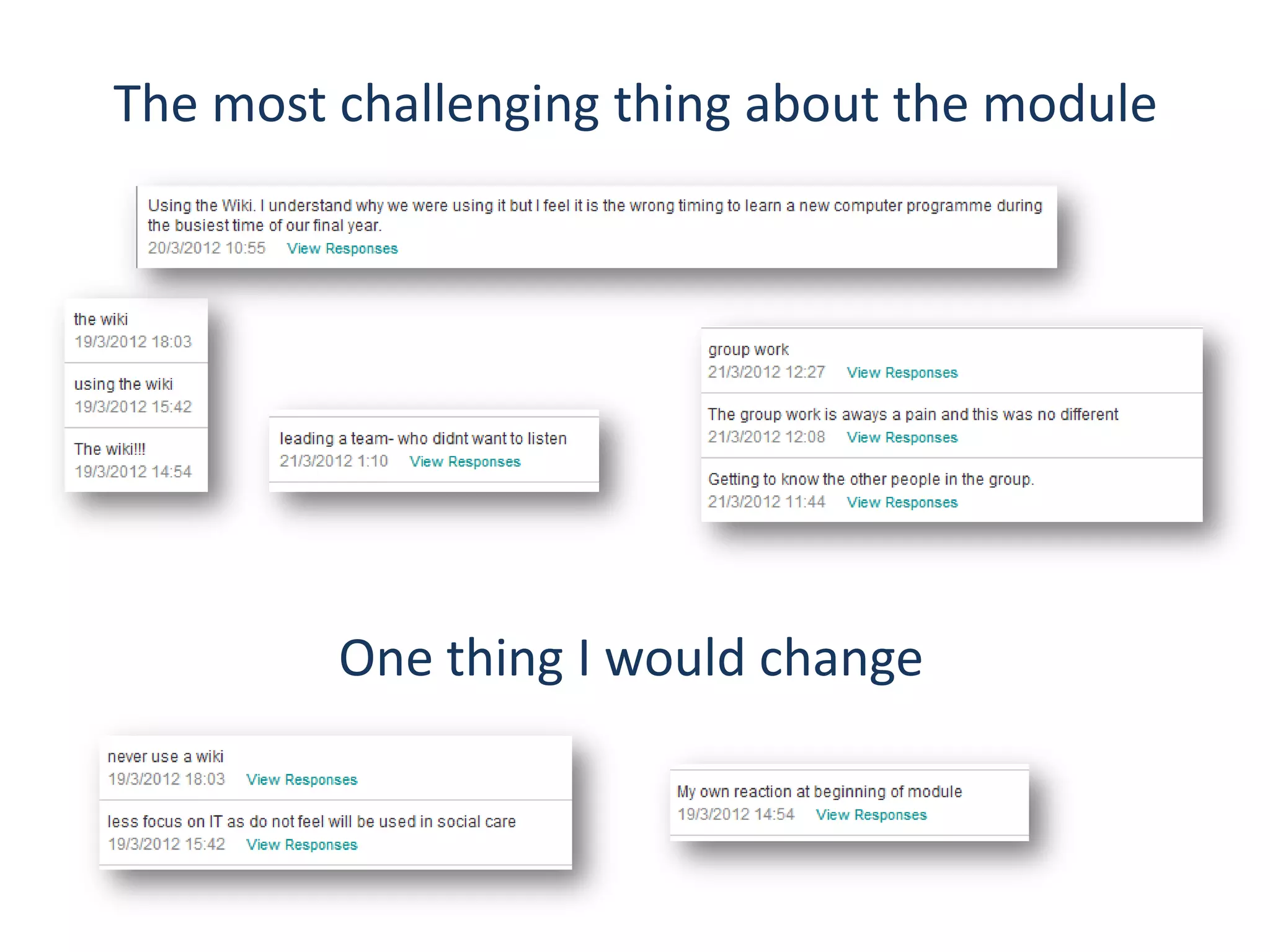
The most challenging thing about the module


         One thing I would change
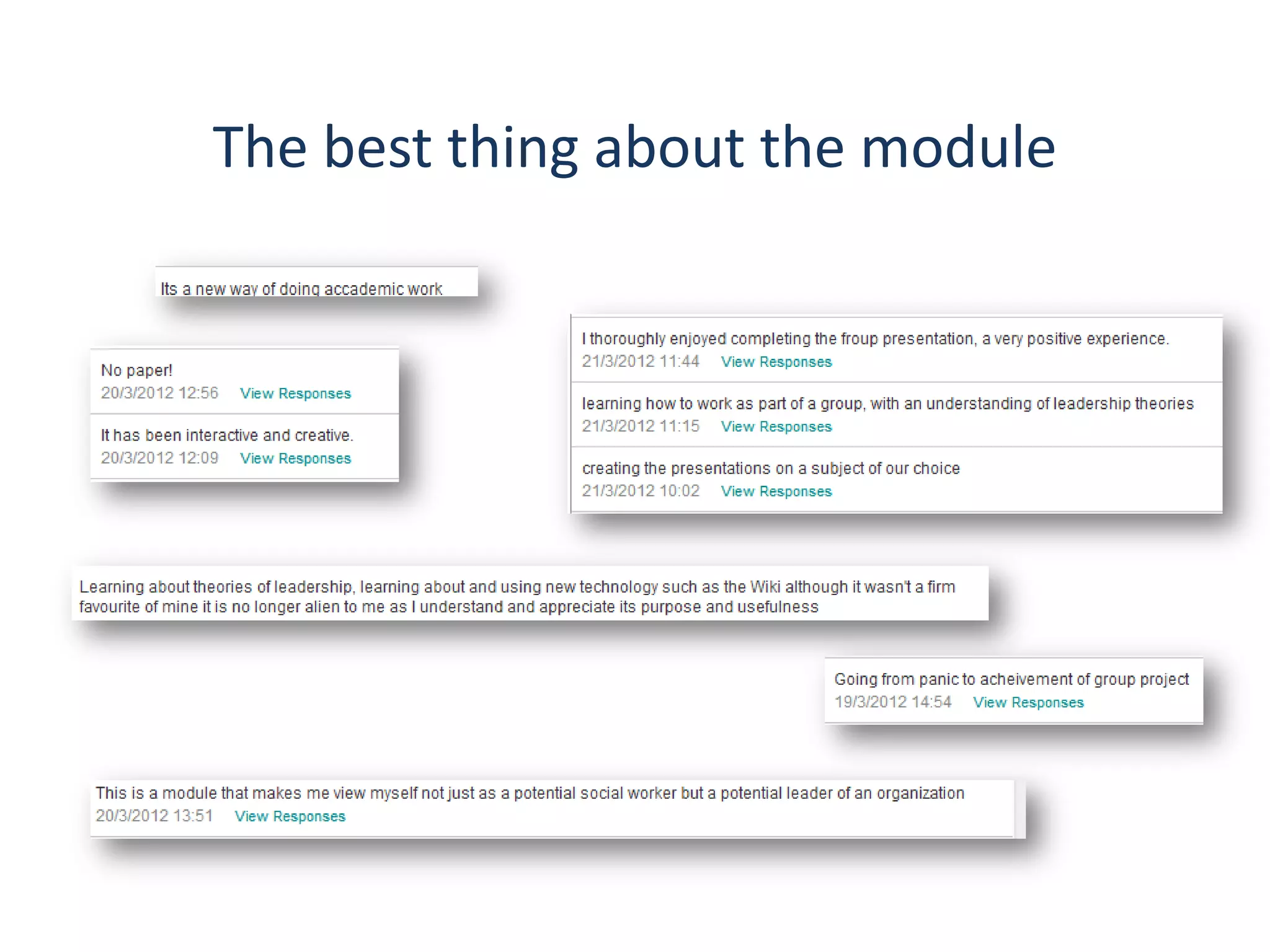
The best thing about the module

Lost in (wiki) space!

  • 1.
    Jane Challinor School ofSocial Sciences jane.challinor@ntu.ac.uk Lost in (wiki)space! adventures with students on the world wide web
  • 2.
    aims • briefly describethe project • why online? • discuss pros and cons of different online platforms • categorise activities on the module wiki according to Salmon’s 5 stage model of e- moderation • present examples of students’ final projects
  • 3.
    the project • formgroups • select films or TV characters • analyse using leadership theories • create a digital presentation via an online platform • reflect on the group process
  • 4.
  • 5.
    the module wiki Whya wiki…..? Consideration of other platforms>>
  • 6.
    Format Uses Advantages Disadvantages VLE Content host; Familiar; robust; supported by No interaction other than discussion boards institution; safe & private discussion board posts; limited access Google sites Web page; group Can set up template for students No discussion board but work; learner to use; attractive; easy to use has “blog” module. Could portfolio add own comments page? Wiki spaces Web page; group Very versatile; separate team Not totally intuitive. Some work pages for small group work; issues with “joining”, discussion board for each page. uploading files, navigation great aesthetics; free upgrade for HE users Facebook Discussions; Well known; most students are Some students hostile. group work members; pre-set template for Privacy? Limited flexibility. layout; can be made more attractive with photos etc. Blog Web page; group Flexible, easy to comment (even Linear entries – work; portfolio; without sign in), search by tag; chronological (although discussion forum lots of widgets this can be changed to magazine format)
  • 7.
    Salmon’s 5 stage Originally developed to describe moderator model functions in on line communities Used here (additionally) to differentiate student activities on the wiki Not necessarily linear or chronological process http://www.atimod.com/e- moderating/5stage.shtml
  • 8.
    stage 1: access Giveinstructions and tips Support learners Encourage practice Provide structure
  • 9.
    access Facilitator Function Student Activity • Set up wiki & project • Using wiki to select teams pages • Enrol members in project http://leadersincare.wikispaces.co m/How+to+use+the+wiki pages • Provide audio visual • Division of labour tutorials http://screencast.com/t/HbInO9qXuOg • ICT suite session • Pre-loaded pages • Discussion board topics
  • 10.
    introductions reinforce systematic ways of working encourage practice! stage 2: socialisation
  • 11.
    socialisation Facilitator Function Student Activity • Initial ice breaker • Chat and comments discussion • Humour • Sandbox page?? • Meeting times • Reminder about copyright • Comments & • Restoring deleted work!! compliments • Notification about • Apologies & thanks meetings • Encouragement • Make sure links are functioning and material • Help with uploads available
  • 12.
    stage 3 informationsharing acknowledge different learning styles encourage enjoyment work constantly to summarise information being exchanged and clarify its relevance to the overall learning programme (weaving)
  • 13.
    information sharing Facilitator Function Student Activity • Responding to questions • Deciding on the project • Clarifying the task • Sharing ideas • Posting links to resources • Finding pages and links • Providing lecture material • Feedback http://leadersincare.wikispaces.com/ Teams%2C+Belbin+%26+Motivation • Notes of meetings • Clarifying tasks and roles
  • 14.
    encourage interaction make links with overall learning stage 4: knowledge allow students to generate knowledge without construction interference from the tutor
  • 15.
    knowledge construction Facilitator Function Student Activity • Modelling use of • Posting research & links video/application of • Posting video clips theory • Posting own original work • Facilitating group • Responses to tasks, discussions questions, discussion board posts • “Off-wiki” activity!
  • 16.
    stage 5 development “Theoriginal development of the 5 stage model demonstrated that, as learners gradually increased in confidence, there was generally less intervention by moderators and yet, apparently, more learning occurring from the students groups” Gilly Salmon
  • 17.
    development Facilitator Function Student Activity • Be available for questions • Final design and content and tutorials discussions • Set up peer assessment • Finish and post process (using online link/document poll) • Evaluate – (peer • Evaluate – module assessment, module feedback evaluation and individual reflective assignment)
  • 18.
    A evaluation B
  • 20.
    Blogging for reflection… as tutor thevirtualleader.blogspot.com
  • 21.
    Students’ reflections….. 1)from theirreflective assignments………and 2)from the Survey Monkey evaluation “we do not learn from experience…we learn from reflecting on experience’ (John Dewey 1933)
  • 22.
    Members worked independentlyon their task; they were able to [assert] their individuality and competencies of each member became apparent. The use of technology such as email, telephone, skype and social networking sites were used to communicate ideas and tasks to other members of the group. *…+ One member was situated in Australia for the majority of the group work; I took the role of communicating with her, keeping her informed of the task and enabling her to participate .
  • 23.
    Brooks (2006) arguesthat technology influences the pattern of a group’s operations and behaviour. The use of technology was very significant in completing the presentation. As the aim was to show how a team could work together virtually, as well as physically, it sometimes proved to be a hindrance. Some individuals were unable to access the presentation website, so time was lost explaining how to utilise it. Nevertheless, I viewed technology as an advantage as I was able to work independently whilst still allowing the others the option of accessing the work at all times .
  • 24.
    Using the Facebookforum allowed for us to undertake virtual group work. This was the first time I had undertaken any group work in this way and this by far proved the best part of the task for me. Gibson and Cohen (2003) identify three enabling conditions for virtual teams to work well: • Shared Understanding • Integration • Mutual trust
  • 25.
    I feel thatonce people had settled into their natural roles within the team and we were working in a cohesive manner we were able to work as a virtual team effectively. Working in a virtual team can lead to motivational issues as you do not have the face to face contact with others that you may need to motivate yourself.
  • 26.
    The decision ofa remote blog media platform for the task was essential as it allowed individuals to work flexibly. Knowledge in individual IT skills did impact on some members achieving agreed outcomes/tasks by set dates. I enjoyed learning to administrate a Blog, and can see the potential for rapid information sharing and feedback. Charting the progress on my own blog was cathartic due to challenges and frustration of group interaction.
  • 27.
    The use ofemail and wiki were the main means I used to communicate with group members in order to give my input to the presentation. Riggio and Orr (2004) inform [us]that virtual teams will become increasingly important in all types of non-profit organisations as these organisations strive for ways to reduce service delivery cost while simultaneously enhancing flexibility and response time. On reflection, I understand the need for me to develop my understanding of virtual teams as McGregor (2011) reports that video conferencing will be used to greater effect in the coming years for Social workers for example to attend child protection conferences .
  • 28.
    When working insocial care it is important to concentrate on the bigger picture and work collaboratively with others. [Loughran (2002) believes reflection should] “offer ways of questioning taken- for-granted assumptions and encouraging one to see his or her practice through others’ eyes.” *….+this task has demonstrated having an understanding of people and the role they play is vital for a successful group effort.
  • 29.
    I have learntfrom this task that even when you believe it may not work, being positive, and an active listener allows for opportunities and success; particularly when working as a group
  • 30.
    The most challengingthing about the module One thing I would change
  • 31.
    The best thingabout the module