Introduction to Wordpress Student ePortfolios
Prepared by: Michael Paskevicius
Learning Technologies Application Developer
Centre for Innovation and Excellence in Learning
Vancouver Island University
ePortfolios defined
• A selective set of online, reflective, integrative, and personal
documents that present how you have developed as a scholar in your
discipline
• Offers evidence of your accomplishments and activities across all
aspects of your academic life and outlines your growth
• Extends your CV and provides future employers with a comprehensive
portrait of your academic training, achievements, and future career
goals
• Elements of scholarship, digital literacy, network formation and
organization
• Your place on the web!!
Bauer, G. (2011) Elements of A Professional Academic E-Portfolio. Center for Teaching and Learning, University of Delaware.
Available online: http://www2.udel.edu/e-portfolios/sites/udel.edu.e-portfolios/files/users/user19/epelements11j.pdf
• 26% of websites on the internet are powered by
Wordpress
• Based on open-source technologies (PHP and
MYSQL)
• Active and vibrant developer community
• Highly flexible and adaptable tool for creating
websites
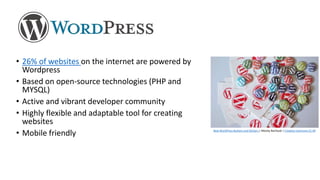
• Mobile friendly New WordPress Buttons and Stickers | Nikolay Bachiyski | Creative Commons CC-BY
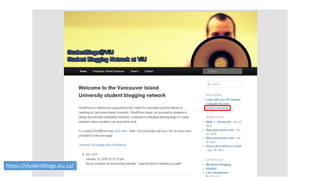
https://studentblogs.viu.ca/
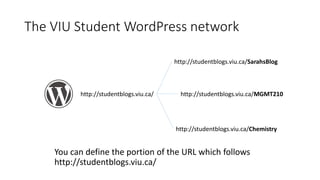
The VIU Student WordPress network
http://studentblogs.viu.ca/
http://studentblogs.viu.ca/Chemistry
http://studentblogs.viu.ca/MGMT210
http://studentblogs.viu.ca/SarahsBlog
You can define the portion of the URL which follows
http://studentblogs.viu.ca/
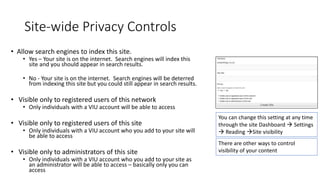
Site-wide Privacy Controls
• Allow search engines to index this site.
• Yes – Your site is on the internet. Search engines will index this
site and you should appear in search results.
• No - Your site is on the internet. Search engines will be deterred
from indexing this site but you could still appear in search results.
• Visible only to registered users of this network
• Only individuals with a VIU account will be able to access
• Visible only to registered users of this site
• Only individuals with a VIU account who you add to your site will
be able to access
• Visible only to administrators of this site
• Only individuals with a VIU account who you add to your site as
an administrator will be able to access – basically only you can
access
You can change this setting at any time
through the site Dashboard  Settings
 Reading Site visibility
There are other ways to control
visibility of your content
Lets create our Wordpress ePortfolio
https://studentblogs.viu.ca/
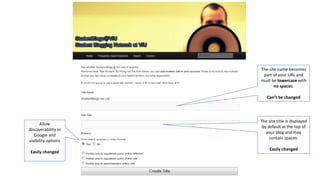
The site name becomes
part of your URL and
must be lowercase with
no spaces.
Can’t be changed
The site title is displayed
by default at the top of
your blog and may
contain spaces.
Easily changed
Allow
discoverability in
Google and
visibility options
Easily changed
Creating content on Wordpress
Posts
• Typically associated with blog
posts, reflections, news stories
• Listed in reverse chronological
order
• Can be tagged, categorized and
archived
• Can form RSS feeds
Pages
• Generally used for static content
or information
• Can be hierarchically structured
• No dates, so no chorological
ordering
• Can’t be tagged, categorized or
archived
• Not included in RSS feeds
Drag and drop media (images, documents)
See this page for more details: https://codex.wordpress.org/Inserting_Media_into_Posts_and_Pages
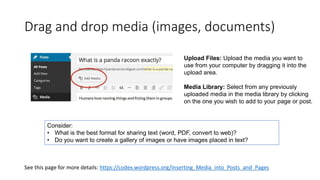
Upload Files: Upload the media you want to
use from your computer by dragging it into the
upload area.
Media Library: Select from any previously
uploaded media in the media library by clicking
on the one you wish to add to your page or post.
Consider:
• What is the best format for sharing text (word, PDF, convert to web)?
• Do you want to create a gallery of images or have images placed in text?
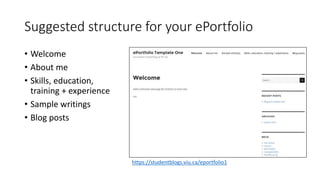
Suggested structure for your ePortfolio
• Welcome
• About me
• Skills, education,
training + experience
• Sample writings
• Blog posts
https://studentblogs.viu.ca/eportfolio1
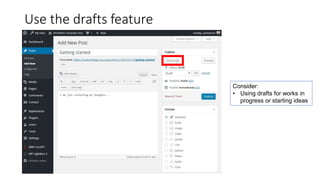
Use the drafts feature
Consider:
• Using drafts for works in
progress or starting ideas
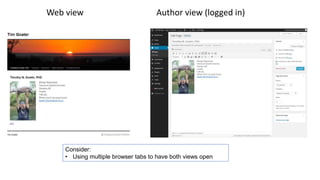
Web view Author view (logged in)
Consider:
• Using multiple browser tabs to have both views open
Lets create our ePortfolio page structure
https://studentblogs.viu.ca/
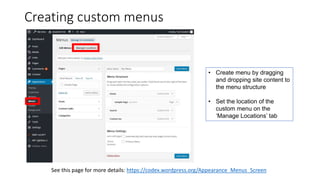
Creating custom menus
See this page for more details: https://codex.wordpress.org/Appearance_Menus_Screen
• Create menu by dragging
and dropping site content to
the menu structure
• Set the location of the
custom menu on the
‘Manage Locations’ tab
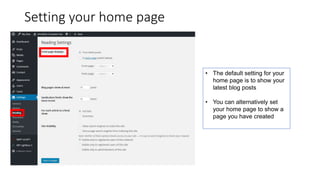
Setting your home page
• The default setting for your
home page is to show your
latest blog posts
• You can alternatively set
your home page to show a
page you have created
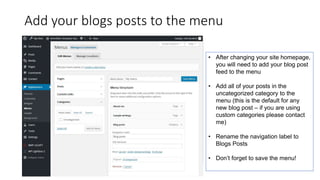
Add your blogs posts to the menu
• After changing your site homepage,
you will need to add your blog post
feed to the menu
• Add all of your posts in the
uncategorized category to the
menu (this is the default for any
new blog post – if you are using
custom categories please contact
me)
• Rename the navigation label to
Blogs Posts
• Don’t forget to save the menu!
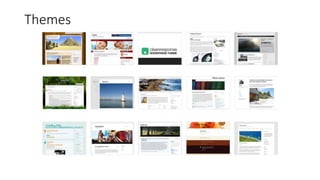
Themes
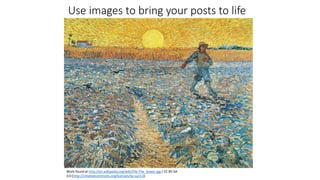
Use images to bring your posts to life
Work found at http://en.wikipedia.org/wiki/File:The_Sower.jpg / CC BY-SA
3.0 (http://creativecommons.org/licenses/by-sa/3.0)
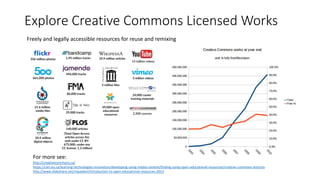
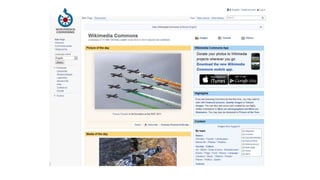
Explore Creative Commons Licensed Works
For more see:
http://creativecommons.ca/
https://ciel.viu.ca/learning-technologies-innovation/developing-using-media-content/finding-using-open-educational-resources/creative-commons-licences
http://www.slideshare.net/mpaskevi/introduction-to-open-educational-resources-2013
Freely and legally accessible resources for reuse and remixing
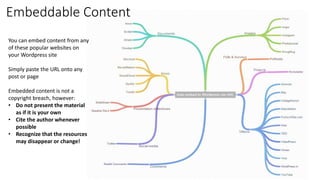
Embeddable Content
You can embed content from any
of these popular websites on
your Wordpress site
Simply paste the URL onto any
post or page
Embedded content is not a
copyright breach, however:
• Do not present the material
as if it is your own
• Cite the author whenever
possible
• Recognize that the resources
may disappear or change!
This work is licensed under the Creative Commons Attribution 4.0
International License. To view a copy of this license, visit
http://creativecommons.org/licenses/by/4.0
Prepared by: Michael Paskevicius
Learning Technologies Application Developer
Centre for Innovation and Excellence in Learning
michael.paskevicus@viu.ca
Follow me: http://twitter.com/mpaskevi
Blog: http://wordpress.viu.ca/ciel
Presentations: http://www.slideshare.net/mpaskevi
References
Bauer, G. (2011) Elements of A Professional Academic E-Portfolio. Center for Teaching and Learning,
University of Delaware. Available online: http://www2.udel.edu/e-portfolios/sites/udel.edu.e-
portfolios/files/users/user19/epelements11j.pdf
Uwaterloo.ca. (2001). ePortfolios: What, Why, and How | Centre for Teaching Excellence. [online]
Retrieved from: https://uwaterloo.ca/centre-for-teaching-excellence/resources/integrative-
learning/eportfolios-what-why-and-how [Accessed: 7 Feb 2014].
USDOE. (2011). Artifacts: Collect, Select, and Connect - Eportfolio Resource Center. [online]
Retrieved from: https://sites.google.com/site/resourcecentereportfolio/artifacts [Accessed: 7 Feb
2014].
Icons: The Noun Project, available under Creative Commons or Public Domain licenses,
http://thenounproject.com/

Introduction to Wordpress Student ePortfolios

  • 1.
    Introduction to WordpressStudent ePortfolios Prepared by: Michael Paskevicius Learning Technologies Application Developer Centre for Innovation and Excellence in Learning Vancouver Island University
  • 2.
    ePortfolios defined • Aselective set of online, reflective, integrative, and personal documents that present how you have developed as a scholar in your discipline • Offers evidence of your accomplishments and activities across all aspects of your academic life and outlines your growth • Extends your CV and provides future employers with a comprehensive portrait of your academic training, achievements, and future career goals • Elements of scholarship, digital literacy, network formation and organization • Your place on the web!! Bauer, G. (2011) Elements of A Professional Academic E-Portfolio. Center for Teaching and Learning, University of Delaware. Available online: http://www2.udel.edu/e-portfolios/sites/udel.edu.e-portfolios/files/users/user19/epelements11j.pdf
  • 3.
    • 26% ofwebsites on the internet are powered by Wordpress • Based on open-source technologies (PHP and MYSQL) • Active and vibrant developer community • Highly flexible and adaptable tool for creating websites • Mobile friendly New WordPress Buttons and Stickers | Nikolay Bachiyski | Creative Commons CC-BY
  • 4.
  • 5.
    The VIU StudentWordPress network http://studentblogs.viu.ca/ http://studentblogs.viu.ca/Chemistry http://studentblogs.viu.ca/MGMT210 http://studentblogs.viu.ca/SarahsBlog You can define the portion of the URL which follows http://studentblogs.viu.ca/
  • 6.
    Site-wide Privacy Controls •Allow search engines to index this site. • Yes – Your site is on the internet. Search engines will index this site and you should appear in search results. • No - Your site is on the internet. Search engines will be deterred from indexing this site but you could still appear in search results. • Visible only to registered users of this network • Only individuals with a VIU account will be able to access • Visible only to registered users of this site • Only individuals with a VIU account who you add to your site will be able to access • Visible only to administrators of this site • Only individuals with a VIU account who you add to your site as an administrator will be able to access – basically only you can access You can change this setting at any time through the site Dashboard  Settings  Reading Site visibility There are other ways to control visibility of your content
  • 7.
    Lets create ourWordpress ePortfolio https://studentblogs.viu.ca/
  • 8.
    The site namebecomes part of your URL and must be lowercase with no spaces. Can’t be changed The site title is displayed by default at the top of your blog and may contain spaces. Easily changed Allow discoverability in Google and visibility options Easily changed
  • 9.
    Creating content onWordpress Posts • Typically associated with blog posts, reflections, news stories • Listed in reverse chronological order • Can be tagged, categorized and archived • Can form RSS feeds Pages • Generally used for static content or information • Can be hierarchically structured • No dates, so no chorological ordering • Can’t be tagged, categorized or archived • Not included in RSS feeds
  • 10.
    Drag and dropmedia (images, documents) See this page for more details: https://codex.wordpress.org/Inserting_Media_into_Posts_and_Pages Upload Files: Upload the media you want to use from your computer by dragging it into the upload area. Media Library: Select from any previously uploaded media in the media library by clicking on the one you wish to add to your page or post. Consider: • What is the best format for sharing text (word, PDF, convert to web)? • Do you want to create a gallery of images or have images placed in text?
  • 11.
    Suggested structure foryour ePortfolio • Welcome • About me • Skills, education, training + experience • Sample writings • Blog posts https://studentblogs.viu.ca/eportfolio1
  • 12.
    Use the draftsfeature Consider: • Using drafts for works in progress or starting ideas
  • 13.
    Web view Authorview (logged in) Consider: • Using multiple browser tabs to have both views open
  • 14.
    Lets create ourePortfolio page structure https://studentblogs.viu.ca/
  • 15.
    Creating custom menus Seethis page for more details: https://codex.wordpress.org/Appearance_Menus_Screen • Create menu by dragging and dropping site content to the menu structure • Set the location of the custom menu on the ‘Manage Locations’ tab
  • 16.
    Setting your homepage • The default setting for your home page is to show your latest blog posts • You can alternatively set your home page to show a page you have created
  • 17.
    Add your blogsposts to the menu • After changing your site homepage, you will need to add your blog post feed to the menu • Add all of your posts in the uncategorized category to the menu (this is the default for any new blog post – if you are using custom categories please contact me) • Rename the navigation label to Blogs Posts • Don’t forget to save the menu!
  • 18.
  • 19.
    Use images tobring your posts to life Work found at http://en.wikipedia.org/wiki/File:The_Sower.jpg / CC BY-SA 3.0 (http://creativecommons.org/licenses/by-sa/3.0)
  • 20.
    Explore Creative CommonsLicensed Works For more see: http://creativecommons.ca/ https://ciel.viu.ca/learning-technologies-innovation/developing-using-media-content/finding-using-open-educational-resources/creative-commons-licences http://www.slideshare.net/mpaskevi/introduction-to-open-educational-resources-2013 Freely and legally accessible resources for reuse and remixing
  • 22.
    Embeddable Content You canembed content from any of these popular websites on your Wordpress site Simply paste the URL onto any post or page Embedded content is not a copyright breach, however: • Do not present the material as if it is your own • Cite the author whenever possible • Recognize that the resources may disappear or change!
  • 23.
    This work islicensed under the Creative Commons Attribution 4.0 International License. To view a copy of this license, visit http://creativecommons.org/licenses/by/4.0 Prepared by: Michael Paskevicius Learning Technologies Application Developer Centre for Innovation and Excellence in Learning michael.paskevicus@viu.ca Follow me: http://twitter.com/mpaskevi Blog: http://wordpress.viu.ca/ciel Presentations: http://www.slideshare.net/mpaskevi
  • 24.
    References Bauer, G. (2011)Elements of A Professional Academic E-Portfolio. Center for Teaching and Learning, University of Delaware. Available online: http://www2.udel.edu/e-portfolios/sites/udel.edu.e- portfolios/files/users/user19/epelements11j.pdf Uwaterloo.ca. (2001). ePortfolios: What, Why, and How | Centre for Teaching Excellence. [online] Retrieved from: https://uwaterloo.ca/centre-for-teaching-excellence/resources/integrative- learning/eportfolios-what-why-and-how [Accessed: 7 Feb 2014]. USDOE. (2011). Artifacts: Collect, Select, and Connect - Eportfolio Resource Center. [online] Retrieved from: https://sites.google.com/site/resourcecentereportfolio/artifacts [Accessed: 7 Feb 2014]. Icons: The Noun Project, available under Creative Commons or Public Domain licenses, http://thenounproject.com/

Editor's Notes