Working alone
                  …..can get you in trouble!!


Presented by:
Tom Smetana, Solutions Director – Technology Support Services
Talking points
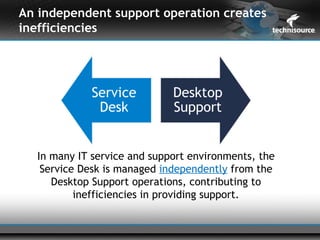
An independent support operation creates
inefficiencies


  In many IT service and support environments, the
   Service Desk is managed independently from the
     Desktop Support operations, contributing to
          inefficiencies in providing support.
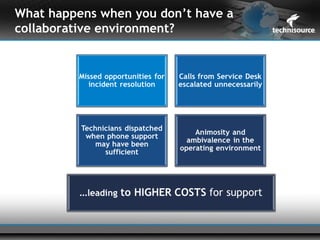
What happens when you don’t have a
collaborative environment?
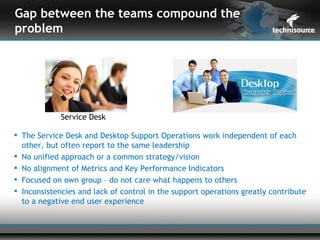
Gap between the teams compound the
problem


             Service Desk

 The Service Desk and Desktop Support Operations work independent of each
  other, but often report to the same leadership
 No unified approach or a common strategy/vision
 No alignment of Metrics and Key Performance Indicators
 Focused on own group – do not care what happens to others
 Inconsistencies and lack of control in the support operations greatly contribute
  to a negative end user experience
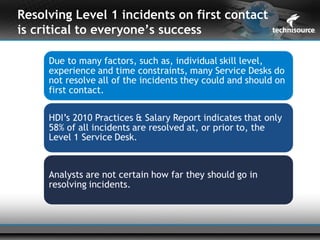
Resolving Level 1 incidents on first contact
is critical to everyone’s success
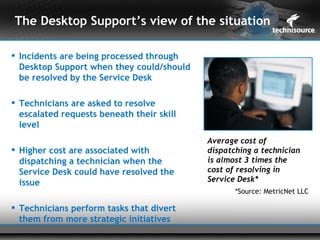
The Desktop Support’s view of the situation

 Incidents are being processed through
  Desktop Support when they could/should
  be resolved by the Service Desk

 Technicians are asked to resolve
  escalated requests beneath their skill
  level
                                           Average cost of
 Higher cost are associated with          dispatching a technician
  dispatching a technician when the        is almost 3 times the
  Service Desk could have resolved the     cost of resolving in
  issue                                    Service Desk*
                                                  *Source: MetricNet LLC

 Technicians perform tasks that divert
  them from more strategic initiatives
The Service Desk’s view of the situation

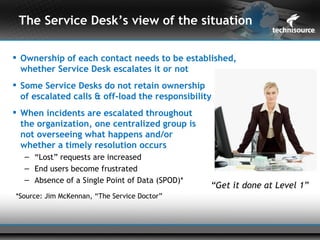
 Ownership of each contact needs to be established,
  whether Service Desk escalates it or not
 Some Service Desks do not retain ownership
  of escalated calls & off-load the responsibility
 When incidents are escalated throughout
  the organization, one centralized group is
  not overseeing what happens and/or
  whether a timely resolution occurs
   – “Lost” requests are increased
   – End users become frustrated
   – Absence of a Single Point of Data (SPOD)*
                                                 “Get it done at Level 1”
*Source: Jim McKennan, “The Service Doctor”
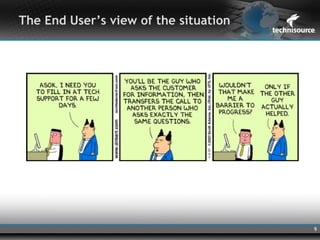
The End User’s view of the situation


                                       9
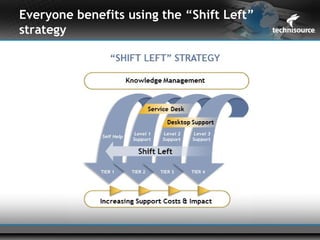
Everyone benefits using the “Shift Left”
strategy
Due to the gaps between teams cross- training
& career opportunities are minimized
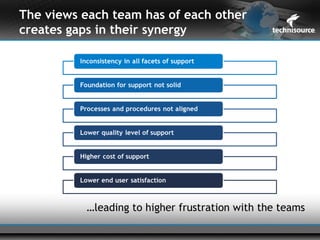
The views each team has of each other
creates gaps in their synergy


          …leading to higher frustration with the teams
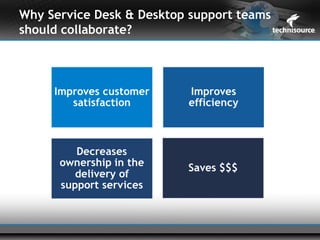
Why Service Desk & Desktop support teams
should collaborate?
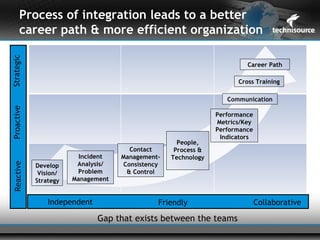
Process of integration leads to a better
       career path & more efficient organization
Strategic


                                                                        Career Path

                                                                     Cross Training

                                                                  Communication
Proactive


                                                               Performance
                                                               Metrics/Key
                                                               Performance
                                                                Indicators
                                                    People,
                                      Contact      Process &
                         Incident   Management-   Technology
                        Analysis/   Consistency
 Reactive


            Develop
             Vision/    Problem      & Control
            Strategy   Management


                Independent                   Friendly                       Collaborative

                              Gap that exists between the teams
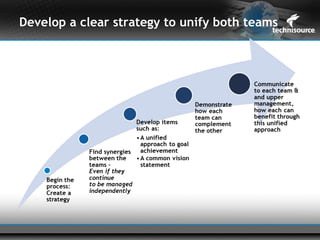
Develop a clear strategy to unify both teams
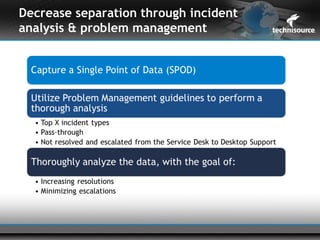
Decrease separation through incident
analysis & problem management
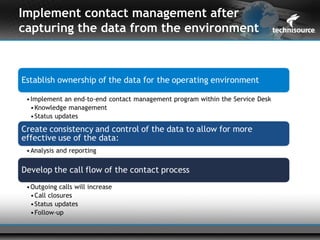
Implement contact management after
capturing the data from the environment
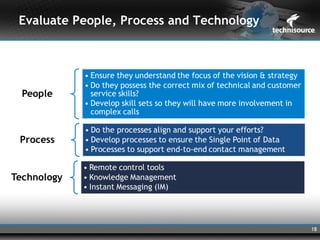
Evaluate People, Process and Technology


                                          18
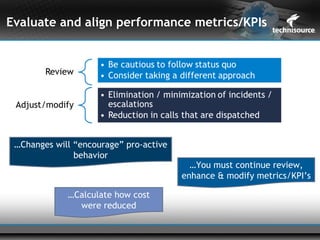
Evaluate and align performance metrics/KPIs


 …Changes will “encourage” pro-active
               behavior
                                          …You must continue review,
                                        enhance & modify metrics/KPI’s

             …Calculate how cost
               were reduced
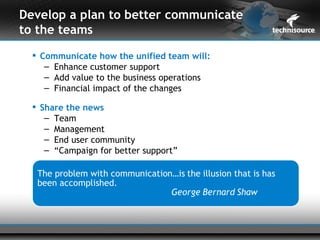
Develop a plan to better communicate
to the teams
   Communicate how the unified team will:
     – Enhance customer support
     – Add value to the business operations
     – Financial impact of the changes

   Share the news
     – Team
     – Management
     – End user community
     – “Campaign for better support”
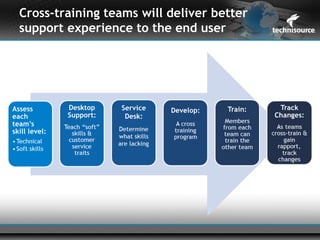
Cross-training teams will deliver better
support experience to the end user
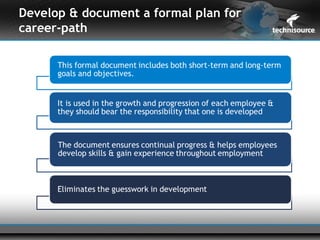
Develop & document a formal plan for
career-path
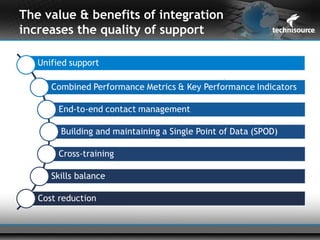
The value & benefits of integration
increases the quality of support


                                  -
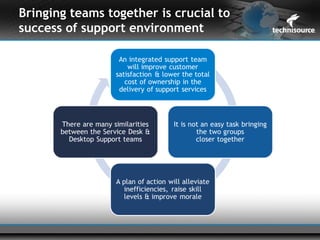
Bringing teams together is crucial to
success of support environment
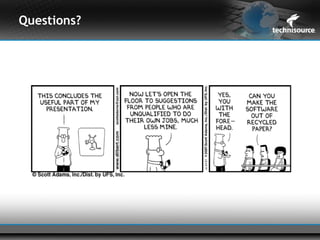
Questions?
Further Information


 Working Along Can Get You in Trouble
  – tomsmetana@technisource.com

  – HDI SupportWorld
     • May/June 2011 Issue
  – http://www.nxtbook.com/nxtbooks/hdi/supportworld_2011050


                                                         26

Working alone can get you in trouble

  • 1.
    Working alone …..can get you in trouble!! Presented by: Tom Smetana, Solutions Director – Technology Support Services
  • 2.
  • 3.
    An independent supportoperation creates inefficiencies In many IT service and support environments, the Service Desk is managed independently from the Desktop Support operations, contributing to inefficiencies in providing support.
  • 4.
    What happens whenyou don’t have a collaborative environment?
  • 5.
    Gap between theteams compound the problem Service Desk  The Service Desk and Desktop Support Operations work independent of each other, but often report to the same leadership  No unified approach or a common strategy/vision  No alignment of Metrics and Key Performance Indicators  Focused on own group – do not care what happens to others  Inconsistencies and lack of control in the support operations greatly contribute to a negative end user experience
  • 6.
    Resolving Level 1incidents on first contact is critical to everyone’s success
  • 7.
    The Desktop Support’sview of the situation  Incidents are being processed through Desktop Support when they could/should be resolved by the Service Desk  Technicians are asked to resolve escalated requests beneath their skill level Average cost of  Higher cost are associated with dispatching a technician dispatching a technician when the is almost 3 times the Service Desk could have resolved the cost of resolving in issue Service Desk* *Source: MetricNet LLC  Technicians perform tasks that divert them from more strategic initiatives
  • 8.
    The Service Desk’sview of the situation  Ownership of each contact needs to be established, whether Service Desk escalates it or not  Some Service Desks do not retain ownership of escalated calls & off-load the responsibility  When incidents are escalated throughout the organization, one centralized group is not overseeing what happens and/or whether a timely resolution occurs – “Lost” requests are increased – End users become frustrated – Absence of a Single Point of Data (SPOD)* “Get it done at Level 1” *Source: Jim McKennan, “The Service Doctor”
  • 9.
    The End User’sview of the situation 9
  • 10.
    Everyone benefits usingthe “Shift Left” strategy
  • 11.
    Due to thegaps between teams cross- training & career opportunities are minimized
  • 12.
    The views eachteam has of each other creates gaps in their synergy …leading to higher frustration with the teams
  • 13.
    Why Service Desk& Desktop support teams should collaborate?
  • 14.
    Process of integrationleads to a better career path & more efficient organization Strategic Career Path Cross Training Communication Proactive Performance Metrics/Key Performance Indicators People, Contact Process & Incident Management- Technology Analysis/ Consistency Reactive Develop Vision/ Problem & Control Strategy Management Independent Friendly Collaborative Gap that exists between the teams
  • 15.
    Develop a clearstrategy to unify both teams
  • 16.
    Decrease separation throughincident analysis & problem management
  • 17.
    Implement contact managementafter capturing the data from the environment
  • 18.
    Evaluate People, Processand Technology 18
  • 19.
    Evaluate and alignperformance metrics/KPIs …Changes will “encourage” pro-active behavior …You must continue review, enhance & modify metrics/KPI’s …Calculate how cost were reduced
  • 20.
    Develop a planto better communicate to the teams  Communicate how the unified team will: – Enhance customer support – Add value to the business operations – Financial impact of the changes  Share the news – Team – Management – End user community – “Campaign for better support”
  • 21.
    Cross-training teams willdeliver better support experience to the end user
  • 22.
    Develop & documenta formal plan for career-path
  • 23.
    The value &benefits of integration increases the quality of support -
  • 24.
    Bringing teams togetheris crucial to success of support environment
  • 25.
  • 26.
    Further Information  WorkingAlong Can Get You in Trouble – tomsmetana@technisource.com – HDI SupportWorld • May/June 2011 Issue – http://www.nxtbook.com/nxtbooks/hdi/supportworld_2011050 26

Editor's Notes

  • #4 Methods of Delivery Spherion has three options for depot support. Each of these options is described below.   Option One: Standard Repair and Return When a hardware failure is determined, the help desk will provide shipping information to the user. Upon receipt of the failed laptop, a certified technician will diagnose and repair the unit within seventy-two (72) hours. The user will receive the SAME laptop back via overnight shipping.   Option Two: Advanced Exchange Upon determination of a hardware failure, the Depot is notified of the service event and the user’s address. If a failed unit is reported to the depot by 3:00 PM EST, a like unit, loaded with the client’s core image, will be delivered to the user anywhere within the continental U.S., on the following business day.   With the laptop, a return air-bill will be included for shipment of the failed unit back to Spherion Mobile Products Service Depot. Upon receipt of the damaged unit, our technician will fulfill all warranty guidelines regarding the repair of the laptop. Following the repair, the system will be re-imaged with the client’s core image and returned to the spare pool.   Option Three: Mission Critical Service This option provides the same support as Option Two, but the re-image of the laptop will include the user’s data files. As with Option Two, the help desk will notify the Depot of the service event and the user’s address. If a failed unit is reported to the depot by 3:00 PM ET, a like unit, loaded with the client’s core image and the end users data, will be delivered on the following business day.
  • #5 Methods of Delivery Spherion has three options for depot support. Each of these options is described below.   Option One: Standard Repair and Return When a hardware failure is determined, the help desk will provide shipping information to the user. Upon receipt of the failed laptop, a certified technician will diagnose and repair the unit within seventy-two (72) hours. The user will receive the SAME laptop back via overnight shipping.   Option Two: Advanced Exchange Upon determination of a hardware failure, the Depot is notified of the service event and the user’s address. If a failed unit is reported to the depot by 3:00 PM EST, a like unit, loaded with the client’s core image, will be delivered to the user anywhere within the continental U.S., on the following business day.   With the laptop, a return air-bill will be included for shipment of the failed unit back to Spherion Mobile Products Service Depot. Upon receipt of the damaged unit, our technician will fulfill all warranty guidelines regarding the repair of the laptop. Following the repair, the system will be re-imaged with the client’s core image and returned to the spare pool.   Option Three: Mission Critical Service This option provides the same support as Option Two, but the re-image of the laptop will include the user’s data files. As with Option Two, the help desk will notify the Depot of the service event and the user’s address. If a failed unit is reported to the depot by 3:00 PM ET, a like unit, loaded with the client’s core image and the end users data, will be delivered on the following business day.
  • #7 Methods of Delivery Spherion has three options for depot support. Each of these options is described below.   Option One: Standard Repair and Return When a hardware failure is determined, the help desk will provide shipping information to the user. Upon receipt of the failed laptop, a certified technician will diagnose and repair the unit within seventy-two (72) hours. The user will receive the SAME laptop back via overnight shipping.   Option Two: Advanced Exchange Upon determination of a hardware failure, the Depot is notified of the service event and the user’s address. If a failed unit is reported to the depot by 3:00 PM EST, a like unit, loaded with the client’s core image, will be delivered to the user anywhere within the continental U.S., on the following business day.   With the laptop, a return air-bill will be included for shipment of the failed unit back to Spherion Mobile Products Service Depot. Upon receipt of the damaged unit, our technician will fulfill all warranty guidelines regarding the repair of the laptop. Following the repair, the system will be re-imaged with the client’s core image and returned to the spare pool.   Option Three: Mission Critical Service This option provides the same support as Option Two, but the re-image of the laptop will include the user’s data files. As with Option Two, the help desk will notify the Depot of the service event and the user’s address. If a failed unit is reported to the depot by 3:00 PM ET, a like unit, loaded with the client’s core image and the end users data, will be delivered on the following business day.
  • #11 If after all of that you still have too big a set or choices – choose FCR There is a lot of power in “Shifting work left” to lower cost resources where it makes sense This must be supported by Knowledge management, documentation, training, culture, systems – but has tremendous value, both hard cost and soft costs Support costs : FCR is an indicator of how efficiently and effectively the service desk operates. If calls are being escalated and resolved by other support groups, the cost of support increases. Business productivity: FCR is also an indicator of business productivity. The more calls that are resolved during the initial contact, the less time it takes to resolve an incident, allowing the end user to get back to work and continue delivering value to the business. Value opportunity: Root cause analysis will identify areas where the service desk can add additional value. This is accomplished by analyzing escalated incidents and identifying those that could have been resolved by the service desk. Depending on the incident type, the service desk may need additional training, skill set enhancement, or access to applications, tools, and/or processes used by other support groups.
  • #15 If after all of that you still have too big a set or choices – choose FCR There is a lot of power in “Shifting work left” to lower cost resources where it makes sense This must be supported by Knowledge management, documentation, training, culture, systems – but has tremendous value, both hard cost and soft costs Support costs : FCR is an indicator of how efficiently and effectively the service desk operates. If calls are being escalated and resolved by other support groups, the cost of support increases. Business productivity: FCR is also an indicator of business productivity. The more calls that are resolved during the initial contact, the less time it takes to resolve an incident, allowing the end user to get back to work and continue delivering value to the business. Value opportunity: Root cause analysis will identify areas where the service desk can add additional value. This is accomplished by analyzing escalated incidents and identifying those that could have been resolved by the service desk. Depending on the incident type, the service desk may need additional training, skill set enhancement, or access to applications, tools, and/or processes used by other support groups.
  • #17 Methods of Delivery Spherion has three options for depot support. Each of these options is described below.   Option One: Standard Repair and Return When a hardware failure is determined, the help desk will provide shipping information to the user. Upon receipt of the failed laptop, a certified technician will diagnose and repair the unit within seventy-two (72) hours. The user will receive the SAME laptop back via overnight shipping.   Option Two: Advanced Exchange Upon determination of a hardware failure, the Depot is notified of the service event and the user’s address. If a failed unit is reported to the depot by 3:00 PM EST, a like unit, loaded with the client’s core image, will be delivered to the user anywhere within the continental U.S., on the following business day.   With the laptop, a return air-bill will be included for shipment of the failed unit back to Spherion Mobile Products Service Depot. Upon receipt of the damaged unit, our technician will fulfill all warranty guidelines regarding the repair of the laptop. Following the repair, the system will be re-imaged with the client’s core image and returned to the spare pool.   Option Three: Mission Critical Service This option provides the same support as Option Two, but the re-image of the laptop will include the user’s data files. As with Option Two, the help desk will notify the Depot of the service event and the user’s address. If a failed unit is reported to the depot by 3:00 PM ET, a like unit, loaded with the client’s core image and the end users data, will be delivered on the following business day.
  • #24 Scalability. Spherion solution can expand and contract based on the unique needs of the customer’s environment. Platform Impartial. Because our solution is vendor-neutral, Spherion can easily provide support in a multi-vendor environment. And because we are a services company, not an equipment manufacturer, we can make recommendations within the environment based on the needs of the customer, not the need to sell more products. Customized Process. Spherion’s proven best practices are used to enhance our customers’ existing processes. Our solution optimizes each clients existing process to improve uptime and productivity over time. Service Levels. Spherion’s solutions are designed to place higher service levels on critical items. This means that the customer determines what parts of their applications and hardware deserves premium support, without paying for unnecessary coverage.