Business Process Management  using the Open-Source Toolset Open Source Series Workshop 2008 KICS, UET Adeel Javed Technical Lead | BPM Practice Techlogix Pakistan (Pvt) Ltd.
Agenda What is BPM? Why BPM Matters? BPM Development Lifecycle Intalio BPMS – Overview Intalio BPMS – Model Intalio BPMS – Design Intalio BPMS – Deploy Intalio BPMS – Execute Intalio BPMS – Manage & Monitor References
What is BPM (Business Process Management)? Business Process: A business process represents a discrete series of activity or task steps that can span people, applications, business events and organizations.  Business Process Management: is the understanding, visibility and control of business processes.
Agenda What is BPM? Why BPM Matters? BPM Development Lifecycle Intalio BPMS – Overview Intalio BPMS – Model Intalio BPMS – Design Intalio BPMS – Deploy Intalio BPMS – Execute Intalio BPMS – Manage & Monitor References
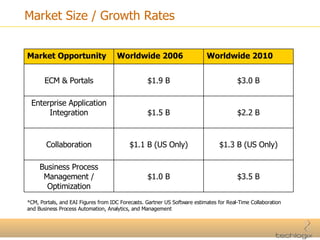
Market Size / Growth Rates *CM, Portals, and EAI Figures from IDC Forecasts. Gartner US Software estimates for Real-Time Collaboration and Business Process Automation, Analytics, and Management Market Opportunity Worldwide 2006 Worldwide 2010 ECM & Portals $1.9 B $3.0 B Enterprise Application Integration $1.5 B $2.2 B Collaboration $1.1 B (US Only) $1.3 B (US Only) Business Process Management / Optimization $1.0 B $3.5 B
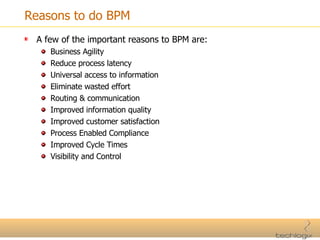
Reasons to do BPM A few of the important reasons to BPM are: Business Agility Reduce process latency Universal access to information Eliminate wasted effort Routing & communication Improved information quality Improved customer satisfaction Process Enabled Compliance Improved Cycle Times Visibility and Control
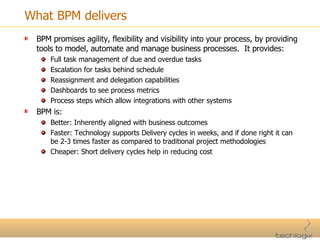
What BPM delivers BPM promises agility, flexibility and visibility into your process, by providing tools to model, automate and manage business processes.  It provides: Full task management of due and overdue tasks Escalation for tasks behind schedule Reassignment and delegation capabilities Dashboards to see process metrics Process steps which allow integrations with other systems BPM is: Better: Inherently aligned with business outcomes Faster: Technology supports Delivery cycles in weeks, and if done right it can be 2-3 times faster as compared to traditional project methodologies Cheaper: Short delivery cycles help in reducing cost
Agenda What is BPM? Why BPM Matters? BPM Development Lifecycle Intalio BPMS – Overview Intalio BPMS – Model Intalio BPMS – Design Intalio BPMS – Deploy Intalio BPMS – Execute Intalio BPMS – Manage & Monitor References
BPM Development Lifecycle Lifecycle of a BPM project is generally common regardless of the platform being used. Therefore each platform has to provide some components that are required in a BPMS (Business Process Management Solution/Suite). It is not necessary that each platform has same sort of architecture or technology stack, the basics only have to be same and the implementations can vary.
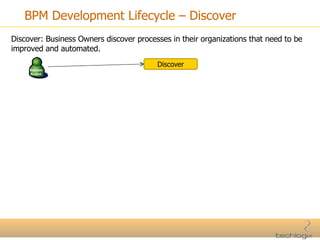
BPM Development Lifecycle – Discover Discover: Business Owners discover processes in their organizations that need to be improved and automated. Discover
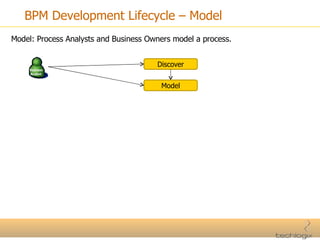
BPM Development Lifecycle – Model Model: Process Analysts and Business Owners model a process. Discover Model
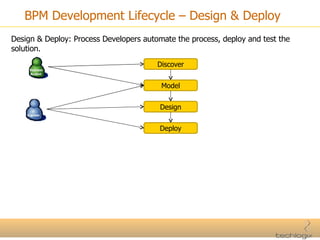
BPM Development Lifecycle – Design & Deploy Design & Deploy: Process Developers automate the process, deploy and test the solution. Discover Model Design Deploy
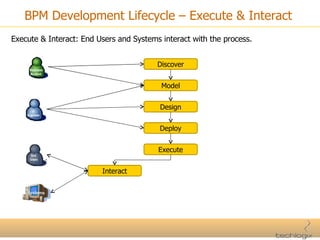
BPM Development Lifecycle – Execute & Interact Execute & Interact: End Users and Systems interact with the process. Discover Model Design Deploy Execute Interact
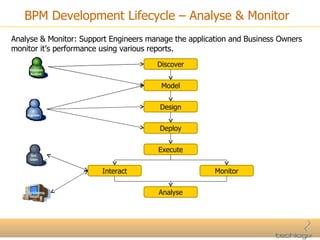
BPM Development Lifecycle – Analyse & Monitor Analyse & Monitor: Support Engineers manage the application and Business Owners monitor it’s performance using various reports. Discover Model Design Deploy Execute Interact Monitor Analyse
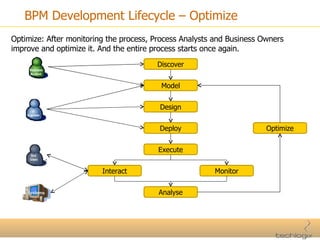
BPM Development Lifecycle – Optimize Optimize: After monitoring the process, Process Analysts and Business Owners improve and optimize it. And the entire process starts once again. Discover Model Design Deploy Execute Interact Monitor Analyse Optimize
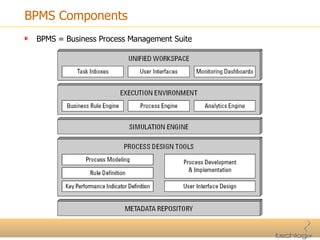
BPMS Components BPMS = Business Process Management Suite
Agenda What is BPM? Why BPM Matters? BPM Development Lifecycle Intalio BPMS – Overview Intalio BPMS – Model Intalio BPMS – Design Intalio BPMS – Deploy Intalio BPMS – Execute Intalio BPMS – Manage & Monitor References
Intalio BPMS – Overview Intalio BPMS is an open-source Business Process Management Suite currently being used by more than 250 organizations worldwide. Intalio BPMS: Is a standards based suite, it uses BPMN, BPEL 2.0, BPEL 4 People, WSDL, XForms, XSD and XPath. It promotes Zero Code by providing a graphical user interface for business process development, the IDE is based on Eclipse framework. Uses BPMN to reduce custom code, 1 BPMN box generates 10 lines of BPEL code which is equal to 100 lines of J2EE code.
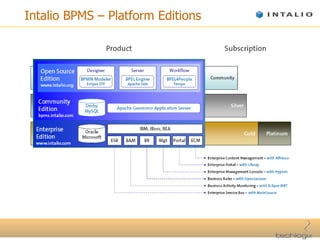
Intalio BPMS – Platform Editions
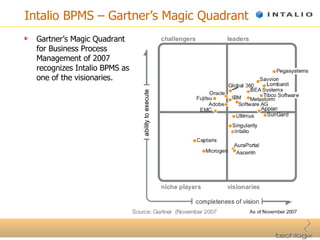
Intalio BPMS – Gartner’s Magic Quadrant Gartner’s Magic Quadrant for Business Process Management of 2007 recognizes Intalio BPMS as one of the visionaries.
Agenda What is BPM? Why BPM Matters? BPM Development Lifecycle Intalio BPMS – Overview Intalio BPMS – Model Intalio BPMS – Design Intalio BPMS – Deploy Intalio BPMS – Execute Intalio BPMS – Manage & Monitor References
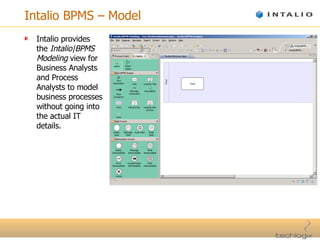
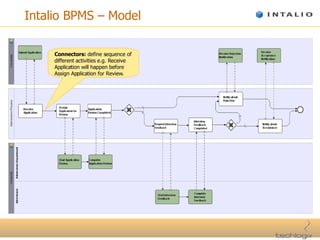
Intalio BPMS – Model Intalio provides the  Intalio|BPMS Modeling  view for Business Analysts and Process Analysts to model business processes without going into the actual IT details.
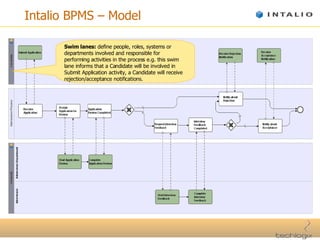
Intalio BPMS – Model Swim lanes:  define people, roles, systems or departments involved and responsible for performing activities in the process e.g. this swim lane informs that a Candidate will be involved in Submit Application activity, a Candidate will receive rejection/acceptance notifications.
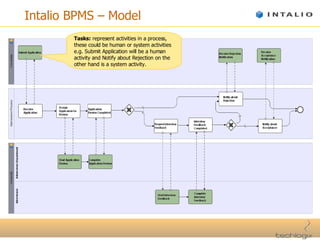
Intalio BPMS – Model Tasks:  represent activities in a process, these could be human or system activities e.g. Submit Application will be a human activity and Notify about Rejection on the other hand is a system activity.
Intalio BPMS – Model Connectors:  define sequence of different activities e.g. Receive Application will happen before Assign Application for Review.
Agenda What is BPM? Why BPM Matters? BPM Development Lifecycle Intalio BPMS – Overview Intalio BPMS – Model Intalio BPMS – Design Intalio BPMS – Deploy Intalio BPMS – Execute Intalio BPMS – Manage & Monitor References
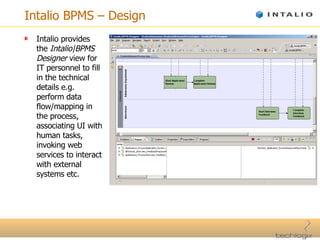
Intalio BPMS – Design Intalio provides the  Intalio|BPMS Designer  view for IT personnel to fill in the technical details e.g. perform data flow/mapping in the process, associating UI with human tasks, invoking web services to interact with external systems etc.
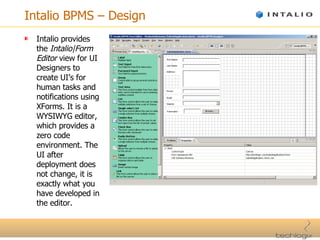
Intalio BPMS – Design Intalio provides the  Intalio|Form Editor  view for UI Designers to create UI’s for human tasks and notifications using XForms. It is a WYSIWYG editor, which provides a zero code environment. The UI after deployment does not change, it is exactly what you have developed in the editor.
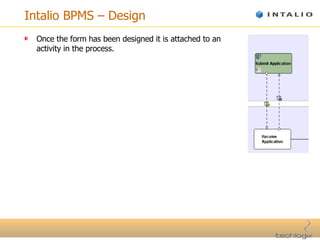
Intalio BPMS – Design Once the form has been designed it is attached to an activity in the process.
Agenda What is BPM? Why BPM Matters? BPM Development Lifecycle Intalio BPMS – Overview Intalio BPMS – Model Intalio BPMS – Design Intalio BPMS – Deploy Intalio BPMS – Execute Intalio BPMS – Manage & Monitor References
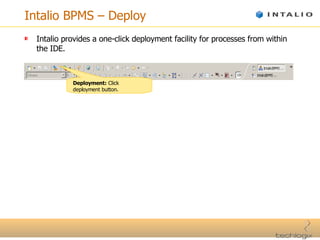
Intalio BPMS – Deploy Intalio provides a one-click deployment facility for processes from within the IDE. Deployment:  Click deployment button.
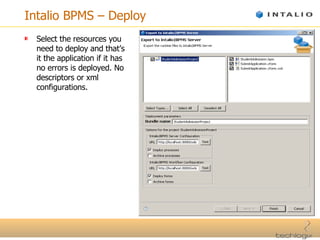
Intalio BPMS – Deploy Select the resources you need to deploy and that’s it the application if it has no errors is deployed. No descriptors or xml configurations.
Agenda What is BPM? Why BPM Matters? BPM Development Lifecycle Intalio BPMS – Overview Intalio BPMS – Model Intalio BPMS – Design Intalio BPMS – Deploy Intalio BPMS – Execute Intalio BPMS – Manage & Monitor References
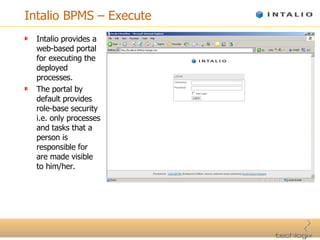
Intalio BPMS – Execute Intalio provides a web-based portal for executing the deployed processes. The portal by default provides role-base security i.e. only processes and tasks that a person is responsible for are made visible to him/her.
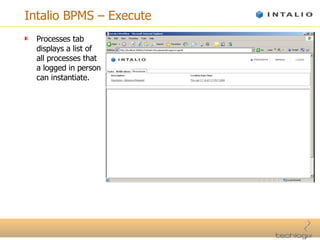
Intalio BPMS – Execute Processes tab displays a list of all processes that a logged in person can instantiate.
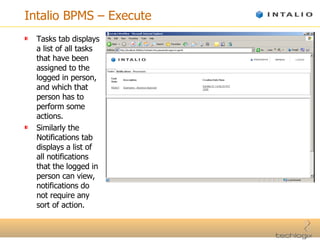
Intalio BPMS – Execute Tasks tab displays a list of all tasks that have been assigned to the logged in person, and which that person has to perform some actions. Similarly the Notifications tab displays a list of all notifications that the logged in person can view, notifications do not require any sort of action.
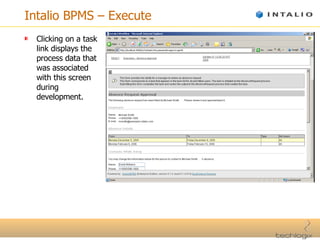
Intalio BPMS – Execute Clicking on a task link displays the process data that was associated with this screen during development.
Agenda What is BPM? Why BPM Matters? BPM Development Lifecycle Intalio BPMS – Overview Intalio BPMS – Model Intalio BPMS – Design Intalio BPMS – Deploy Intalio BPMS – Execute Intalio BPMS – Manage & Monitor References
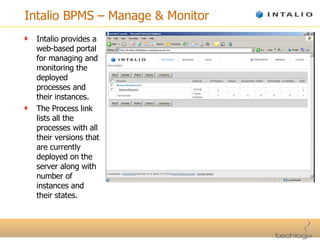
Intalio BPMS – Manage & Monitor Intalio provides a web-based portal for managing and monitoring the deployed processes and their instances. The Process link lists all the processes with all their versions that are currently deployed on the server along with number of instances and their states.
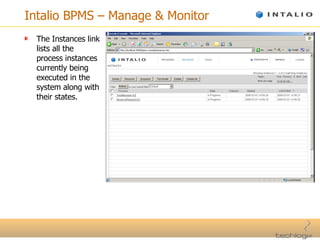
Intalio BPMS – Manage & Monitor The Instances link lists all the process instances currently being executed in the system along with their states.
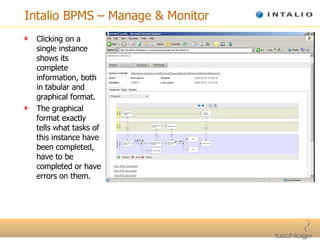
Intalio BPMS – Manage & Monitor Clicking on a single instance shows its complete information, both in tabular and graphical format. The graphical format exactly tells what tasks of this instance have been completed, have to be completed or have errors on them.
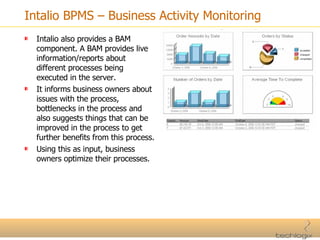
Intalio BPMS – Business Activity Monitoring Intalio also provides a BAM component. A BAM provides live information/reports about different processes being executed in the server. It informs business owners about issues with the process, bottlenecks in the process and also suggests things that can be improved in the process to get further benefits from this process. Using this as input, business owners optimize their processes.
Agenda What is BPM? Why BPM Matters? BPM Development Lifecycle Intalio BPMS – Overview Intalio BPMS – Model Intalio BPMS – Design Intalio BPMS – Deploy Intalio BPMS – Execute Intalio BPMS – Manage & Monitor References
References Getting Started with Business Process Management – webMethods 7.1 Documentation by Software AG BPM Basics for Dummies – Software AG Special Edition by Kiran Garimella, Michael Lees, Bruce Williams Intalio Overview by Intalio  Webinar: Top 10 Reasons to Start BPM by Tony Pasma (Vice President, Sales Engineering, Global 360) Magic Quadrant for Business Process Management Suites, 2007 by Gartner

Business Process Management Using The Open-Source Toolset

  • 1.
    Business Process Management using the Open-Source Toolset Open Source Series Workshop 2008 KICS, UET Adeel Javed Technical Lead | BPM Practice Techlogix Pakistan (Pvt) Ltd.
  • 2.
    Agenda What isBPM? Why BPM Matters? BPM Development Lifecycle Intalio BPMS – Overview Intalio BPMS – Model Intalio BPMS – Design Intalio BPMS – Deploy Intalio BPMS – Execute Intalio BPMS – Manage & Monitor References
  • 3.
    What is BPM(Business Process Management)? Business Process: A business process represents a discrete series of activity or task steps that can span people, applications, business events and organizations. Business Process Management: is the understanding, visibility and control of business processes.
  • 4.
    Agenda What isBPM? Why BPM Matters? BPM Development Lifecycle Intalio BPMS – Overview Intalio BPMS – Model Intalio BPMS – Design Intalio BPMS – Deploy Intalio BPMS – Execute Intalio BPMS – Manage & Monitor References
  • 5.
    Market Size /Growth Rates *CM, Portals, and EAI Figures from IDC Forecasts. Gartner US Software estimates for Real-Time Collaboration and Business Process Automation, Analytics, and Management Market Opportunity Worldwide 2006 Worldwide 2010 ECM & Portals $1.9 B $3.0 B Enterprise Application Integration $1.5 B $2.2 B Collaboration $1.1 B (US Only) $1.3 B (US Only) Business Process Management / Optimization $1.0 B $3.5 B
  • 6.
    Reasons to doBPM A few of the important reasons to BPM are: Business Agility Reduce process latency Universal access to information Eliminate wasted effort Routing & communication Improved information quality Improved customer satisfaction Process Enabled Compliance Improved Cycle Times Visibility and Control
  • 7.
    What BPM deliversBPM promises agility, flexibility and visibility into your process, by providing tools to model, automate and manage business processes. It provides: Full task management of due and overdue tasks Escalation for tasks behind schedule Reassignment and delegation capabilities Dashboards to see process metrics Process steps which allow integrations with other systems BPM is: Better: Inherently aligned with business outcomes Faster: Technology supports Delivery cycles in weeks, and if done right it can be 2-3 times faster as compared to traditional project methodologies Cheaper: Short delivery cycles help in reducing cost
  • 8.
    Agenda What isBPM? Why BPM Matters? BPM Development Lifecycle Intalio BPMS – Overview Intalio BPMS – Model Intalio BPMS – Design Intalio BPMS – Deploy Intalio BPMS – Execute Intalio BPMS – Manage & Monitor References
  • 9.
    BPM Development LifecycleLifecycle of a BPM project is generally common regardless of the platform being used. Therefore each platform has to provide some components that are required in a BPMS (Business Process Management Solution/Suite). It is not necessary that each platform has same sort of architecture or technology stack, the basics only have to be same and the implementations can vary.
  • 10.
    BPM Development Lifecycle– Discover Discover: Business Owners discover processes in their organizations that need to be improved and automated. Discover
  • 11.
    BPM Development Lifecycle– Model Model: Process Analysts and Business Owners model a process. Discover Model
  • 12.
    BPM Development Lifecycle– Design & Deploy Design & Deploy: Process Developers automate the process, deploy and test the solution. Discover Model Design Deploy
  • 13.
    BPM Development Lifecycle– Execute & Interact Execute & Interact: End Users and Systems interact with the process. Discover Model Design Deploy Execute Interact
  • 14.
    BPM Development Lifecycle– Analyse & Monitor Analyse & Monitor: Support Engineers manage the application and Business Owners monitor it’s performance using various reports. Discover Model Design Deploy Execute Interact Monitor Analyse
  • 15.
    BPM Development Lifecycle– Optimize Optimize: After monitoring the process, Process Analysts and Business Owners improve and optimize it. And the entire process starts once again. Discover Model Design Deploy Execute Interact Monitor Analyse Optimize
  • 16.
    BPMS Components BPMS= Business Process Management Suite
  • 17.
    Agenda What isBPM? Why BPM Matters? BPM Development Lifecycle Intalio BPMS – Overview Intalio BPMS – Model Intalio BPMS – Design Intalio BPMS – Deploy Intalio BPMS – Execute Intalio BPMS – Manage & Monitor References
  • 18.
    Intalio BPMS –Overview Intalio BPMS is an open-source Business Process Management Suite currently being used by more than 250 organizations worldwide. Intalio BPMS: Is a standards based suite, it uses BPMN, BPEL 2.0, BPEL 4 People, WSDL, XForms, XSD and XPath. It promotes Zero Code by providing a graphical user interface for business process development, the IDE is based on Eclipse framework. Uses BPMN to reduce custom code, 1 BPMN box generates 10 lines of BPEL code which is equal to 100 lines of J2EE code.
  • 19.
    Intalio BPMS –Platform Editions
  • 20.
    Intalio BPMS –Gartner’s Magic Quadrant Gartner’s Magic Quadrant for Business Process Management of 2007 recognizes Intalio BPMS as one of the visionaries.
  • 21.
    Agenda What isBPM? Why BPM Matters? BPM Development Lifecycle Intalio BPMS – Overview Intalio BPMS – Model Intalio BPMS – Design Intalio BPMS – Deploy Intalio BPMS – Execute Intalio BPMS – Manage & Monitor References
  • 22.
    Intalio BPMS –Model Intalio provides the Intalio|BPMS Modeling view for Business Analysts and Process Analysts to model business processes without going into the actual IT details.
  • 23.
    Intalio BPMS –Model Swim lanes: define people, roles, systems or departments involved and responsible for performing activities in the process e.g. this swim lane informs that a Candidate will be involved in Submit Application activity, a Candidate will receive rejection/acceptance notifications.
  • 24.
    Intalio BPMS –Model Tasks: represent activities in a process, these could be human or system activities e.g. Submit Application will be a human activity and Notify about Rejection on the other hand is a system activity.
  • 25.
    Intalio BPMS –Model Connectors: define sequence of different activities e.g. Receive Application will happen before Assign Application for Review.
  • 26.
    Agenda What isBPM? Why BPM Matters? BPM Development Lifecycle Intalio BPMS – Overview Intalio BPMS – Model Intalio BPMS – Design Intalio BPMS – Deploy Intalio BPMS – Execute Intalio BPMS – Manage & Monitor References
  • 27.
    Intalio BPMS –Design Intalio provides the Intalio|BPMS Designer view for IT personnel to fill in the technical details e.g. perform data flow/mapping in the process, associating UI with human tasks, invoking web services to interact with external systems etc.
  • 28.
    Intalio BPMS –Design Intalio provides the Intalio|Form Editor view for UI Designers to create UI’s for human tasks and notifications using XForms. It is a WYSIWYG editor, which provides a zero code environment. The UI after deployment does not change, it is exactly what you have developed in the editor.
  • 29.
    Intalio BPMS –Design Once the form has been designed it is attached to an activity in the process.
  • 30.
    Agenda What isBPM? Why BPM Matters? BPM Development Lifecycle Intalio BPMS – Overview Intalio BPMS – Model Intalio BPMS – Design Intalio BPMS – Deploy Intalio BPMS – Execute Intalio BPMS – Manage & Monitor References
  • 31.
    Intalio BPMS –Deploy Intalio provides a one-click deployment facility for processes from within the IDE. Deployment: Click deployment button.
  • 32.
    Intalio BPMS –Deploy Select the resources you need to deploy and that’s it the application if it has no errors is deployed. No descriptors or xml configurations.
  • 33.
    Agenda What isBPM? Why BPM Matters? BPM Development Lifecycle Intalio BPMS – Overview Intalio BPMS – Model Intalio BPMS – Design Intalio BPMS – Deploy Intalio BPMS – Execute Intalio BPMS – Manage & Monitor References
  • 34.
    Intalio BPMS –Execute Intalio provides a web-based portal for executing the deployed processes. The portal by default provides role-base security i.e. only processes and tasks that a person is responsible for are made visible to him/her.
  • 35.
    Intalio BPMS –Execute Processes tab displays a list of all processes that a logged in person can instantiate.
  • 36.
    Intalio BPMS –Execute Tasks tab displays a list of all tasks that have been assigned to the logged in person, and which that person has to perform some actions. Similarly the Notifications tab displays a list of all notifications that the logged in person can view, notifications do not require any sort of action.
  • 37.
    Intalio BPMS –Execute Clicking on a task link displays the process data that was associated with this screen during development.
  • 38.
    Agenda What isBPM? Why BPM Matters? BPM Development Lifecycle Intalio BPMS – Overview Intalio BPMS – Model Intalio BPMS – Design Intalio BPMS – Deploy Intalio BPMS – Execute Intalio BPMS – Manage & Monitor References
  • 39.
    Intalio BPMS –Manage & Monitor Intalio provides a web-based portal for managing and monitoring the deployed processes and their instances. The Process link lists all the processes with all their versions that are currently deployed on the server along with number of instances and their states.
  • 40.
    Intalio BPMS –Manage & Monitor The Instances link lists all the process instances currently being executed in the system along with their states.
  • 41.
    Intalio BPMS –Manage & Monitor Clicking on a single instance shows its complete information, both in tabular and graphical format. The graphical format exactly tells what tasks of this instance have been completed, have to be completed or have errors on them.
  • 42.
    Intalio BPMS –Business Activity Monitoring Intalio also provides a BAM component. A BAM provides live information/reports about different processes being executed in the server. It informs business owners about issues with the process, bottlenecks in the process and also suggests things that can be improved in the process to get further benefits from this process. Using this as input, business owners optimize their processes.
  • 43.
    Agenda What isBPM? Why BPM Matters? BPM Development Lifecycle Intalio BPMS – Overview Intalio BPMS – Model Intalio BPMS – Design Intalio BPMS – Deploy Intalio BPMS – Execute Intalio BPMS – Manage & Monitor References
  • 44.
    References Getting Startedwith Business Process Management – webMethods 7.1 Documentation by Software AG BPM Basics for Dummies – Software AG Special Edition by Kiran Garimella, Michael Lees, Bruce Williams Intalio Overview by Intalio Webinar: Top 10 Reasons to Start BPM by Tony Pasma (Vice President, Sales Engineering, Global 360) Magic Quadrant for Business Process Management Suites, 2007 by Gartner