WordPress Performance 101
Bora Yalçın
twitter @borantula
wpbudapest.com
My name is
Bora Yalçın
Tweeting from
@borantula
Developer & Partner
Dion Works
Doing
WordPress sites, Laravel applications
and web consultancy
Who?
Who the Performance?!?
WordPress Performance for:
- Starters
- Site Owners
- Power Users
- Developers
(even experienced ones miss a spot sometimes)
Why the Performance?
Bad performance causes:
- Losing Users
40% of abandon an ecommerce website if it
take more than 3 seconds
- Losing Money
Conversion rate drops around 7% every
second.
- Hurts SEO
High bounce rates,
High abandonment,
Google measures page load times
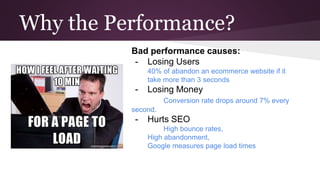
People are Impatient on Web
“Instead of this slow website I’ll watch my watch”
Server Configuration for Performance
Server Setup
Nginx or Apache Configuration
Php Settings
Mysql fine tuning
Memcache setup
…..and some other stuff we won’t cover today
Hosting
Ask before you buy!
Php version: Ask for 5.4+
Php memory limit: > 256M
Tech Support
Panel access (like cPanel etc.)
Ask for WordPress supported
Ask for limited Php functionality
You only
support php
5.2! OMG that’s
so 2006!
Just After the Setup: The Heaven
No plugin
No users
No content
Just a theme,
you
and endless possibilities...
After a while from the setup
- A plugin for this, two plugins for that…
- Some 5000x4000 images right from your
camera.
- heavy frontend stuff (lots of social buttons
etc.)
- Users started visiting to your site
First Step: Diagnosis
Measure current situation:
Measure with:
- Pingdom tool for speed test
- Chrome developer tools for sources and
timeline
- Pagespeed for insights about page
- Blitz.io for load and stress test
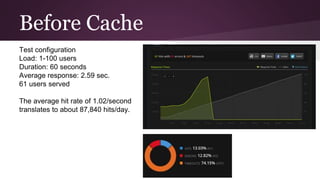
Before Cache
Test configuration
Load: 1-100 users
Duration: 60 seconds
Average response: 2.59 sec.
61 users served
The average hit rate of 1.02/second
translates to about 87,840 hits/day.
Install a Cache Plugin
Popular Cache
Plugins
- W3 Total Cache
- WP Super Cache
- WP Rocket
- Zen Cache
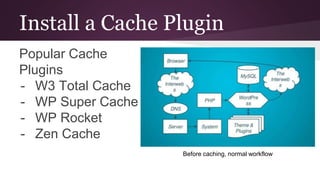
Before caching, normal workflow
W3 Total Cache
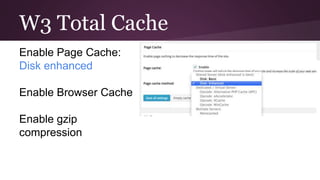
Enable Page Cache:
Disk enhanced
Enable Browser Cache
Enable gzip
compression
Page Cache!
Page Cached
No Mysql
No PHP
No Theme&Plugin
Browser Cache!
Especially for
assets like
images,
javascript and
css files.
Measure Again!
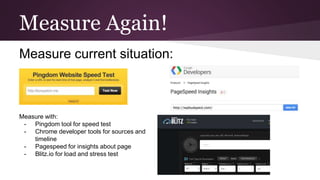
Measure current situation:
Measure with:
- Pingdom tool for speed test
- Chrome developer tools for sources and
timeline
- Pagespeed for insights about page
- Blitz.io for load and stress test
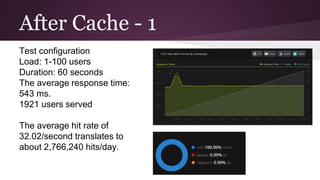
After Cache - 1
Test configuration
Load: 1-100 users
Duration: 60 seconds
The average response time:
543 ms.
1921 users served
The average hit rate of
32.02/second translates to
about 2,766,240 hits/day.
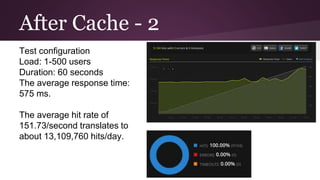
After Cache - 2
Test configuration
Load: 1-500 users
Duration: 60 seconds
The average response time:
575 ms.
The average hit rate of
151.73/second translates to
about 13,109,760 hits/day.
Cloudflare
CDN, Optimizer, SSL, Security, DNS, SPDY etc.
Cloudflare
Makes the site even faster and
reachable.
Takes burden of assets like
images, css, javascript files
from your server.
Protect against attacks
SSL
Great free plan
Other Methods
Profiling
Query Monitoring
Transients
Object Caching (Memcache etc.)
...so we have a lot more to talk about for the
next meetups :)
Thank you everyone for listening

WordPress Performance 101

  • 1.
    WordPress Performance 101 BoraYalçın twitter @borantula wpbudapest.com
  • 2.
    My name is BoraYalçın Tweeting from @borantula Developer & Partner Dion Works Doing WordPress sites, Laravel applications and web consultancy Who?
  • 3.
    Who the Performance?!? WordPressPerformance for: - Starters - Site Owners - Power Users - Developers (even experienced ones miss a spot sometimes)
  • 4.
    Why the Performance? Badperformance causes: - Losing Users 40% of abandon an ecommerce website if it take more than 3 seconds - Losing Money Conversion rate drops around 7% every second. - Hurts SEO High bounce rates, High abandonment, Google measures page load times
  • 5.
    People are Impatienton Web “Instead of this slow website I’ll watch my watch”
  • 6.
    Server Configuration forPerformance Server Setup Nginx or Apache Configuration Php Settings Mysql fine tuning Memcache setup …..and some other stuff we won’t cover today
  • 7.
    Hosting Ask before youbuy! Php version: Ask for 5.4+ Php memory limit: > 256M Tech Support Panel access (like cPanel etc.) Ask for WordPress supported Ask for limited Php functionality You only support php 5.2! OMG that’s so 2006!
  • 8.
    Just After theSetup: The Heaven No plugin No users No content Just a theme, you and endless possibilities...
  • 9.
    After a whilefrom the setup - A plugin for this, two plugins for that… - Some 5000x4000 images right from your camera. - heavy frontend stuff (lots of social buttons etc.) - Users started visiting to your site
  • 10.
    First Step: Diagnosis Measurecurrent situation: Measure with: - Pingdom tool for speed test - Chrome developer tools for sources and timeline - Pagespeed for insights about page - Blitz.io for load and stress test
  • 11.
    Before Cache Test configuration Load:1-100 users Duration: 60 seconds Average response: 2.59 sec. 61 users served The average hit rate of 1.02/second translates to about 87,840 hits/day.
  • 12.
    Install a CachePlugin Popular Cache Plugins - W3 Total Cache - WP Super Cache - WP Rocket - Zen Cache Before caching, normal workflow
  • 13.
    W3 Total Cache EnablePage Cache: Disk enhanced Enable Browser Cache Enable gzip compression
  • 14.
    Page Cache! Page Cached NoMysql No PHP No Theme&Plugin
  • 15.
    Browser Cache! Especially for assetslike images, javascript and css files.
  • 16.
    Measure Again! Measure currentsituation: Measure with: - Pingdom tool for speed test - Chrome developer tools for sources and timeline - Pagespeed for insights about page - Blitz.io for load and stress test
  • 17.
    After Cache -1 Test configuration Load: 1-100 users Duration: 60 seconds The average response time: 543 ms. 1921 users served The average hit rate of 32.02/second translates to about 2,766,240 hits/day.
  • 18.
    After Cache -2 Test configuration Load: 1-500 users Duration: 60 seconds The average response time: 575 ms. The average hit rate of 151.73/second translates to about 13,109,760 hits/day.
  • 19.
    Cloudflare CDN, Optimizer, SSL,Security, DNS, SPDY etc.
  • 20.
    Cloudflare Makes the siteeven faster and reachable. Takes burden of assets like images, css, javascript files from your server. Protect against attacks SSL Great free plan
  • 21.
    Other Methods Profiling Query Monitoring Transients ObjectCaching (Memcache etc.) ...so we have a lot more to talk about for the next meetups :)
  • 22.
    Thank you everyonefor listening