How to Install
Magento on Google
Cloud Engine (GCE) Design by
www.cloudways.com/en
Introduction:
 Google Cloud Engine (GCE) offers reliability
and highly scalable infrastructure for
ecommerce stores. Thanks to its almost
99.99% uptime, it is fast becoming a
popular choice among ecommerce store
owners. After all, GCE is the same
infrastructure that runs Google Search,
Gmail, YouTube and other Google products.
 Though GCE is reliable, but to launch a complex Content
Management System (CMS) like Magento, you should have a vast
experience of system administration. In case you are not familiar
with system administration and you need to deploy your Magento
website on GCE, then you are quite out of luck. It will take a good
amount of effort and time and there is always a chance of error.
 Why you should host on Google Cloud Engine (GCE)?
www.cloudways.com/en
01
Uptime
Google Cloud Engine
was available for more
than 99.9% of the
times.
02
Speed
In terms of speed,
cloud hosting experts
rate GCE amongst the
top tier.
03
Reliability
GCE uses the same
infrastructure as Gmail
and YouTube and we
rarely see these services
go down..
04
Scalability
GCE servers are highly
scalable and able to handle
traffic spikes with ease..
Salient Features of Cloudways Magento Hosting Cloud
Besides the 1-click advantage, Cloudways gives customers an easy-to-use, user-friendly console that
makes it simple to manage the servers.
24×7 tech support and server
management
Ability to clone servers and
applications
Dedicated IPs
1-click installers
Easy UI to control servers and
applications
Real time Billing & server
performance monitoring
Optimized servers with Cloudways’
well-known recipe (Nginx, Varnish,
Apache, Memcache
WP-CLI installed by default for
command line WordPress users
Automated Backups
Multi-SSL installation on the same IP
Integrated Git client
Unlimited staging URLs and unlimited
websites on a single server
How To Launch Your Very First Magento Website on
GOOGLE CLOUD ENGINE (GCE)
>> https://platform.cloudways.com/signup
You can sign up for free and take a Google Cloud
Engine (GCE) for test drive for 3 days. This provides
you a chance to get acquainted with the UI of our
platform and the power and flexibility it provides.
 Sign up for FREE account
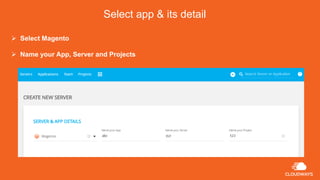
Select app & its detail
 Select Magento
 Name your App, Server and Projects
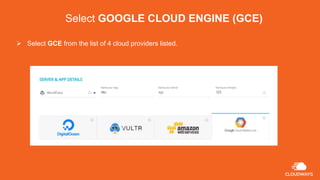
Select GOOGLE CLOUD ENGINE (GCE)
 Select GCE from the list of 4 cloud providers listed.
Select Server Size and Bandwidth
 You can select server size based on the page views on your website
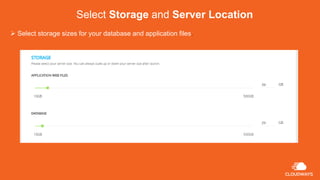
Select Storage and Server Location
 Select storage sizes for your database and application files.
Select Location
Select your desired location and Launch your Server
success
 You’re done!
 Just press Launch to begin
configuring your server.
www.cloudways.com/en

How to Install Magento on Google Cloud Engine (GCE)

  • 1.
    How to Install Magentoon Google Cloud Engine (GCE) Design by www.cloudways.com/en
  • 2.
    Introduction:  Google CloudEngine (GCE) offers reliability and highly scalable infrastructure for ecommerce stores. Thanks to its almost 99.99% uptime, it is fast becoming a popular choice among ecommerce store owners. After all, GCE is the same infrastructure that runs Google Search, Gmail, YouTube and other Google products.
  • 3.
     Though GCEis reliable, but to launch a complex Content Management System (CMS) like Magento, you should have a vast experience of system administration. In case you are not familiar with system administration and you need to deploy your Magento website on GCE, then you are quite out of luck. It will take a good amount of effort and time and there is always a chance of error.
  • 4.
     Why youshould host on Google Cloud Engine (GCE)? www.cloudways.com/en 01 Uptime Google Cloud Engine was available for more than 99.9% of the times. 02 Speed In terms of speed, cloud hosting experts rate GCE amongst the top tier. 03 Reliability GCE uses the same infrastructure as Gmail and YouTube and we rarely see these services go down.. 04 Scalability GCE servers are highly scalable and able to handle traffic spikes with ease..
  • 5.
    Salient Features ofCloudways Magento Hosting Cloud Besides the 1-click advantage, Cloudways gives customers an easy-to-use, user-friendly console that makes it simple to manage the servers. 24×7 tech support and server management Ability to clone servers and applications Dedicated IPs 1-click installers Easy UI to control servers and applications Real time Billing & server performance monitoring Optimized servers with Cloudways’ well-known recipe (Nginx, Varnish, Apache, Memcache WP-CLI installed by default for command line WordPress users Automated Backups Multi-SSL installation on the same IP Integrated Git client Unlimited staging URLs and unlimited websites on a single server
  • 6.
    How To LaunchYour Very First Magento Website on GOOGLE CLOUD ENGINE (GCE) >> https://platform.cloudways.com/signup You can sign up for free and take a Google Cloud Engine (GCE) for test drive for 3 days. This provides you a chance to get acquainted with the UI of our platform and the power and flexibility it provides.  Sign up for FREE account
  • 7.
    Select app &its detail  Select Magento  Name your App, Server and Projects
  • 8.
    Select GOOGLE CLOUDENGINE (GCE)  Select GCE from the list of 4 cloud providers listed.
  • 9.
    Select Server Sizeand Bandwidth  You can select server size based on the page views on your website
  • 10.
    Select Storage andServer Location  Select storage sizes for your database and application files.
  • 11.
    Select Location Select yourdesired location and Launch your Server
  • 12.
    success  You’re done! Just press Launch to begin configuring your server. www.cloudways.com/en