What are some of the ways to
quickly get a WordPress site up and
running with the minimal amount
of effort?
W3 Total Cache
https://wordpress.org/plugins/w3-total-cache/
BackupBuddy BackWPup
https://ithemes.com/purchase/backupbuddy/ https://wordpress.org/plugins/backwpup/
iThemes Security
https://wordpress.org/plugins/better-wp-security/
Yoast SEO
https://wordpress.org/plugins/wordpress-seo/
Google Analytics by MonsterInsights
https://wordpress.org/plugins/google-analytics-for-wordpress/
StatusCake Pingdom
https://www.statuscake.com/wordpress-downtime-monitoring/ https://www.pingdom.com/
• Pricing
• Support
• Uptime
• Features
• Support
• Support
• Support
• Support
• Server maintenance
• Security updates
• Server-related questions
• Custom configurations
• Their job is to know their servers, just as your job is
to know your sites.
• 90% of issues should be resolved at the first level of
support.
• Response times and resolutions should be prompt.
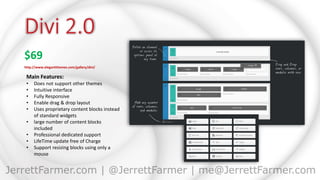
$69
http://www.elegantthemes.com/gallery/divi/
Main Features:
• Does not support other themes
• Intuitive interface
• Fully Responsive
• Enable drag & drop layout
• Uses proprietary content blocks instead
of standard widgets
• large number of content blocks
included
• Professional dedicated support
• LifeTime update free of Charge
• Support resizing blocks using only a
mouse
$69
http://www.elegantthemes.com/gallery/divi/
Main Features:
• Does not support other themes
• Intuitive interface
• Fully Responsive
• Enable drag & drop layout
• Uses proprietary content blocks instead
of standard widgets
• large number of content blocks
included
• Professional dedicated support
• LifeTime update free of Charge
• Support resizing blocks using only a
mouse
$0 - 100
http://www.envato.com/sites
Main Features:
• Houses multiple theme websites
• A theme for all occasions
• Some themes come with Lorem Ipsum
copy to upload
• Respected by Industry

WordPress by a Dummy

  • 1.
    What are someof the ways to quickly get a WordPress site up and running with the minimal amount of effort?
  • 5.
    W3 Total Cache https://wordpress.org/plugins/w3-total-cache/ BackupBuddyBackWPup https://ithemes.com/purchase/backupbuddy/ https://wordpress.org/plugins/backwpup/ iThemes Security https://wordpress.org/plugins/better-wp-security/ Yoast SEO https://wordpress.org/plugins/wordpress-seo/ Google Analytics by MonsterInsights https://wordpress.org/plugins/google-analytics-for-wordpress/ StatusCake Pingdom https://www.statuscake.com/wordpress-downtime-monitoring/ https://www.pingdom.com/
  • 9.
    • Pricing • Support •Uptime • Features
  • 10.
    • Support • Support •Support • Support
  • 11.
    • Server maintenance •Security updates • Server-related questions • Custom configurations
  • 12.
    • Their jobis to know their servers, just as your job is to know your sites. • 90% of issues should be resolved at the first level of support. • Response times and resolutions should be prompt.
  • 14.
    $69 http://www.elegantthemes.com/gallery/divi/ Main Features: • Doesnot support other themes • Intuitive interface • Fully Responsive • Enable drag & drop layout • Uses proprietary content blocks instead of standard widgets • large number of content blocks included • Professional dedicated support • LifeTime update free of Charge • Support resizing blocks using only a mouse
  • 15.
    $69 http://www.elegantthemes.com/gallery/divi/ Main Features: • Doesnot support other themes • Intuitive interface • Fully Responsive • Enable drag & drop layout • Uses proprietary content blocks instead of standard widgets • large number of content blocks included • Professional dedicated support • LifeTime update free of Charge • Support resizing blocks using only a mouse
  • 16.
    $0 - 100 http://www.envato.com/sites MainFeatures: • Houses multiple theme websites • A theme for all occasions • Some themes come with Lorem Ipsum copy to upload • Respected by Industry