Keeping	
  It	
  All	
  Running	
  Smoothly	
  
Kelli	
  Wise	
  
Who	
  Am	
  I?	
  
•  Kelli	
  Wise	
  
•  Website	
  designer	
  
•  Support	
  Moderator	
  @	
  Headway	
  Themes	
  
•  Blogger	
  
Why	
  Bother	
  With	
  Maintenance	
  
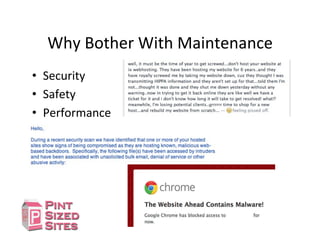
•  Security	
  
•  Safety	
  
•  Performance	
  
CriDcal	
  Maintenance	
  Tasks	
  
•  Backups	
  
•  Clean	
  Ups	
  
•  Updates	
  
First	
  Things	
  First	
  
Back	
  It	
  Up	
  
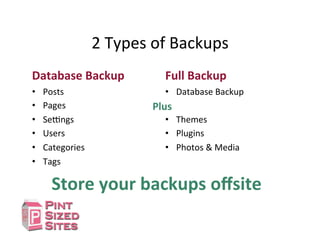
2	
  Types	
  of	
  Backups	
  
Database	
  Backup	
  
•  Posts	
  
•  Pages	
  
•  SeIngs	
  
•  Users	
  
•  Categories	
  
•  Tags	
  
Full	
  Backup	
  
•  Database	
  Backup	
  
•  Themes	
  
•  Plugins	
  
•  Photos	
  &	
  Media	
  
Plus	
  
Store	
  your	
  backups	
  offsite	
  
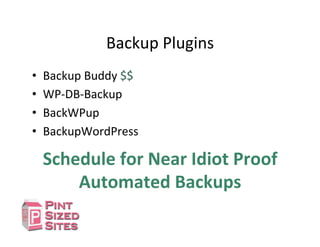
Backup	
  Plugins	
  
•  Backup	
  Buddy	
  $$	
  
•  WP-­‐DB-­‐Backup	
  
•  BackWPup	
  
•  BackupWordPress	
  
Schedule	
  for	
  Near	
  Idiot	
  Proof	
  
Automated	
  Backups	
  
Second	
  Thing	
  
Tidy	
  It	
  Up	
  
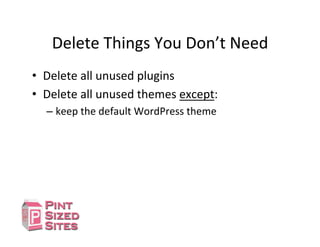
Delete	
  Things	
  You	
  Don’t	
  Need	
  
•  Delete	
  all	
  unused	
  plugins	
  
•  Delete	
  all	
  unused	
  themes	
  except:	
  
– keep	
  the	
  default	
  WordPress	
  theme	
  
Third	
  Thing	
  
Update	
  It	
  
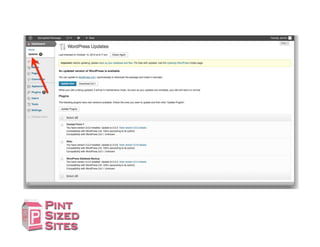
Updates	
  
① Plugins	
  
Ø 1	
  at	
  a	
  Dme	
  
② Themes	
  
③ WordPress	
  	
  
This	
  is	
  my	
  preferred	
  order	
  
Other	
  Maintenance	
  
•  OpDmizing	
  the	
  database	
  
•  Malware	
  scans	
  
How	
  OYen?	
  
It	
  Depends	
  
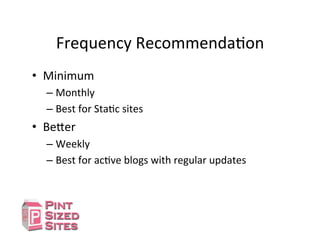
Frequency	
  RecommendaDon	
  
•  Minimum	
  	
  
– Monthly	
  
– Best	
  for	
  StaDc	
  sites	
  
•  Be[er	
  
– Weekly	
  
– Best	
  for	
  acDve	
  blogs	
  with	
  regular	
  updates	
  
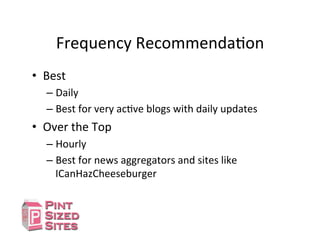
Frequency	
  RecommendaDon	
  
•  Best	
  	
  
– Daily	
  
– Best	
  for	
  very	
  acDve	
  blogs	
  with	
  daily	
  updates	
  
•  Over	
  the	
  Top	
  
– Hourly	
  
– Best	
  for	
  news	
  aggregators	
  and	
  sites	
  like	
  
ICanHazCheeseburger	
  
TroubleshooDng	
  
I	
  updated	
  a	
  plugin	
  
and	
  broke	
  my	
  site	
  
Step	
  1	
  
Don’t	
  Panic	
  
Step	
  2	
  –	
  Flow	
  Chart	
  
Can$you$
access$
WordPress$
Dashboard
?$ Deac3vate$ALL$
plugins$
Does$the$
site$
work?$
Yes$
Ac3vate$1$
plugin$
Do$the$
site$&$
plugin$
work?$
Yes$
Ac3vate$
another$
plugin$
No$$
No$$
Ac3vate$
Default$
Theme$
Delete$
Plugin$
Ac3vate$
another$
plugin$
Does$
the$site$
work?$
Yes$No$$
FTP$into$site,$
rename$plugin$
folder$
Does$the$
site$
work?$
Yes$ No$$
Move$1$
plugin$into$
Plugin$folder$
Do$the$
site$&$
plugin$
work?$
Yes$
Ac3vate$
another$
plugin$
No$$
Delete$
Plugin$
Ac3vate$
another$
plugin$
Contact$
Theme$
Developer$
Reinstall$
WordPress$
No$$ Yes$
If	
  you	
  have	
  access	
  to	
  the	
  Dashboard	
  
DeacDvate	
  ALL	
  
plugins	
  
Does	
  the	
  
site	
  
work?	
   AcDvate	
  1	
  
plugin	
  
Do	
  the	
  
site	
  &	
  
plugin	
  
work?	
  
Yes	
  
AcDvate	
  another	
  
plugin	
  
No	
  	
  
AcDvate	
  
Default	
  
Theme	
  
Delete	
  Plugin	
  
AcDvate	
  
another	
  plugin	
  
Does	
  
the	
  site	
  
work?	
  
Yes	
  No	
  	
  
Contact	
  
Theme	
  
Developer	
  
Reinstall	
  
WordPress	
  
No	
  	
   Yes	
  
If	
  you	
  DON’T	
  have	
  access	
  to	
  the	
  
Dashboard	
  
FTP	
  into	
  site,	
  
rename	
  plugin	
  
folder	
  
Does	
  
the	
  site	
  
work?	
  
Yes	
  No	
  	
  
Move	
  1	
  plugin	
  into	
  
Plugin	
  folder	
  
Do	
  the	
  
site	
  &	
  
plugin	
  
work?	
  
Yes	
  No	
  	
  
Delete	
  Plugin	
  Folder	
  
Do	
  you	
  
know	
  
broken	
  
plugin?	
  
Yes	
  No	
  	
  
FTP	
  into	
  site,	
  
delete	
  plugin	
  
Folder	
  
If	
  you	
  DON’T	
  have	
  access	
  to	
  the	
  
Dashboard	
  
FTP	
  into	
  site,	
  
rename	
  plugin	
  
folder	
  
Does	
  
the	
  site	
  
work?	
  
Yes	
  No	
  	
  
Move	
  1	
  plugin	
  into	
  
Plugin	
  folder	
  
Do	
  the	
  
site	
  &	
  
plugin	
  
work?	
  
Yes	
  
AcDvate	
  another	
  
plugin	
  
No	
  	
  
Delete	
  Plugin	
  
AcDvate	
  another	
  
plugin	
  
Where	
  to	
  find	
  Plugins	
  Directory	
  
Regular	
  Maintenance	
  Tasks	
  
•  Backup	
  
– Store	
  backups	
  offsite	
  
•  Clean	
  Up	
  
– Delete	
  unused	
  plugins	
  &	
  themes	
  
•  Update	
  
– Plugins	
  
– Themes	
  
– WordPress	
  
Where	
  to	
  get	
  this	
  info?	
  
PintSizedSites.com	
  
QuesDons?	
  
Comments?	
  

WordPress maintenance - Keeping it all running smoothly

  • 1.
    Keeping  It  All  Running  Smoothly   Kelli  Wise  
  • 2.
    Who  Am  I?   •  Kelli  Wise   •  Website  designer   •  Support  Moderator  @  Headway  Themes   •  Blogger  
  • 3.
    Why  Bother  With  Maintenance   •  Security   •  Safety   •  Performance  
  • 4.
    CriDcal  Maintenance  Tasks   •  Backups   •  Clean  Ups   •  Updates  
  • 5.
    First  Things  First   Back  It  Up  
  • 6.
    2  Types  of  Backups   Database  Backup   •  Posts   •  Pages   •  SeIngs   •  Users   •  Categories   •  Tags   Full  Backup   •  Database  Backup   •  Themes   •  Plugins   •  Photos  &  Media   Plus   Store  your  backups  offsite  
  • 7.
    Backup  Plugins   • Backup  Buddy  $$   •  WP-­‐DB-­‐Backup   •  BackWPup   •  BackupWordPress   Schedule  for  Near  Idiot  Proof   Automated  Backups  
  • 8.
  • 9.
    Delete  Things  You  Don’t  Need   •  Delete  all  unused  plugins   •  Delete  all  unused  themes  except:   – keep  the  default  WordPress  theme  
  • 10.
  • 12.
    Updates   ① Plugins   Ø 1  at  a  Dme   ② Themes   ③ WordPress     This  is  my  preferred  order  
  • 13.
    Other  Maintenance   • OpDmizing  the  database   •  Malware  scans  
  • 14.
    How  OYen?   It  Depends  
  • 15.
    Frequency  RecommendaDon   • Minimum     – Monthly   – Best  for  StaDc  sites   •  Be[er   – Weekly   – Best  for  acDve  blogs  with  regular  updates  
  • 16.
    Frequency  RecommendaDon   • Best     – Daily   – Best  for  very  acDve  blogs  with  daily  updates   •  Over  the  Top   – Hourly   – Best  for  news  aggregators  and  sites  like   ICanHazCheeseburger  
  • 17.
    TroubleshooDng   I  updated  a  plugin   and  broke  my  site  
  • 18.
  • 19.
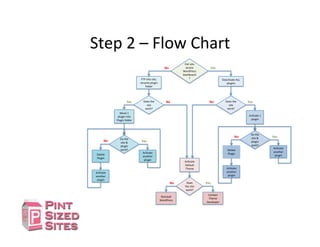
    Step  2  –  Flow  Chart   Can$you$ access$ WordPress$ Dashboard ?$ Deac3vate$ALL$ plugins$ Does$the$ site$ work?$ Yes$ Ac3vate$1$ plugin$ Do$the$ site$&$ plugin$ work?$ Yes$ Ac3vate$ another$ plugin$ No$$ No$$ Ac3vate$ Default$ Theme$ Delete$ Plugin$ Ac3vate$ another$ plugin$ Does$ the$site$ work?$ Yes$No$$ FTP$into$site,$ rename$plugin$ folder$ Does$the$ site$ work?$ Yes$ No$$ Move$1$ plugin$into$ Plugin$folder$ Do$the$ site$&$ plugin$ work?$ Yes$ Ac3vate$ another$ plugin$ No$$ Delete$ Plugin$ Ac3vate$ another$ plugin$ Contact$ Theme$ Developer$ Reinstall$ WordPress$ No$$ Yes$
  • 20.
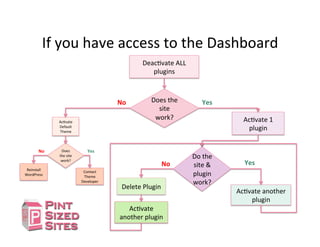
    If  you  have  access  to  the  Dashboard   DeacDvate  ALL   plugins   Does  the   site   work?   AcDvate  1   plugin   Do  the   site  &   plugin   work?   Yes   AcDvate  another   plugin   No     AcDvate   Default   Theme   Delete  Plugin   AcDvate   another  plugin   Does   the  site   work?   Yes  No     Contact   Theme   Developer   Reinstall   WordPress   No     Yes  
  • 21.
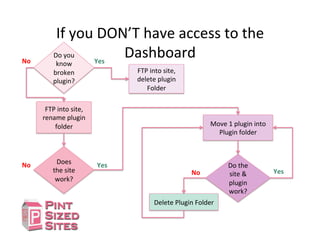
    If  you  DON’T  have  access  to  the   Dashboard   FTP  into  site,   rename  plugin   folder   Does   the  site   work?   Yes  No     Move  1  plugin  into   Plugin  folder   Do  the   site  &   plugin   work?   Yes  No     Delete  Plugin  Folder   Do  you   know   broken   plugin?   Yes  No     FTP  into  site,   delete  plugin   Folder  
  • 22.
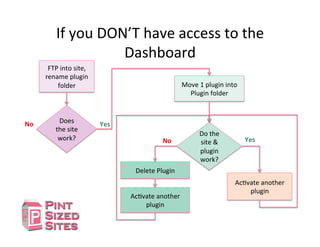
    If  you  DON’T  have  access  to  the   Dashboard   FTP  into  site,   rename  plugin   folder   Does   the  site   work?   Yes  No     Move  1  plugin  into   Plugin  folder   Do  the   site  &   plugin   work?   Yes   AcDvate  another   plugin   No     Delete  Plugin   AcDvate  another   plugin  
  • 23.
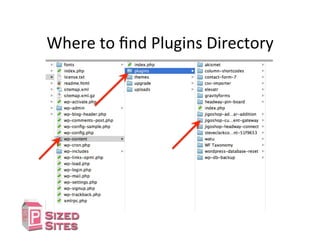
    Where  to  find  Plugins  Directory  
  • 24.
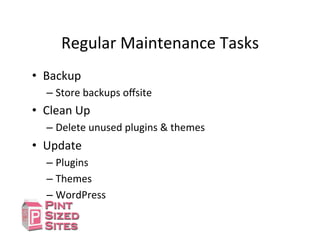
    Regular  Maintenance  Tasks   •  Backup   – Store  backups  offsite   •  Clean  Up   – Delete  unused  plugins  &  themes   •  Update   – Plugins   – Themes   – WordPress  
  • 25.
    Where  to  get  this  info?   PintSizedSites.com   QuesDons?   Comments?