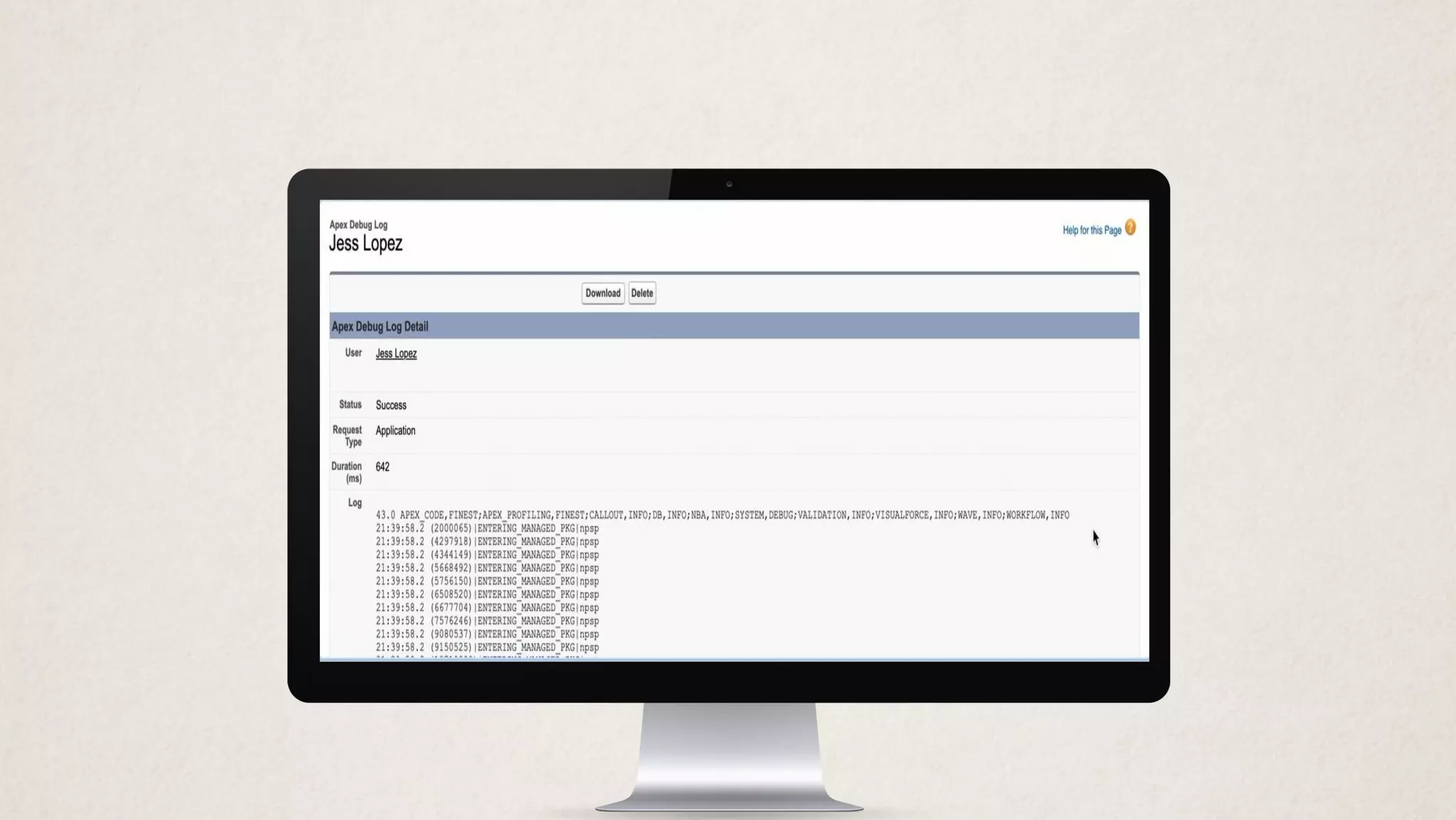
Debug Logs
Finding the Needle
in the Haystack
@jjjlo | jess.lopez@salesforce.com
Jess Lopez
Principal Member of Technical
Staff
Salesforce.org Customer Centric Engineering
This presentation contains forward-looking statements about the Company’s financial and operating results, which may include expected GAAP and
non-GAAP financial and other operating and non-operating results, including revenue, net income, earnings per share, operating cash flow growth, operating
margin improvement, expected revenue growth, expected current remaining performance obligation growth, expected tax rates, stock-based compensation
expenses, amortization of purchased intangibles, shares outstanding, market growth, environmental, social and governance goals, expected capital
allocation, including mergers and acquisitions (such as the proposed acquisition of Slack Technologies, Inc.), capital expenditures and other investments,
expectations regarding closing contemplated acquisitions and contributions from acquired companies. The achievement or success of the matters covered
by such forward-looking statements involves risks, uncertainties and assumptions. If any such risks or uncertainties materialize or if any of the assumptions
prove incorrect, the Company’s results could differ materially from the results expressed or implied by the forward-looking statements it makes.
The risks and uncertainties referred to above include — but are not limited to — risks associated with our ability to consummate the proposed Slack
Technologies, Inc. transaction on a timely basis or at all; the satisfaction of the conditions precedent to consummation of the proposed transaction; our
ability to secure regulatory approvals on the terms expected, in a timely manner or at all; our ability to successfully integrate Slack Technologies, Inc.’s
operations; our ability to implement its plans, forecasts and other expectations with respect to Slack Technologies, Inc.’s business after the completion of the
transaction and realize expected synergies; our ability to realize the anticipated benefits of the proposed transaction, including the possibility that the
expected benefits from the proposed transaction will not be realized or will not be realized within the expected time period; the impact of Slack
Technologies, Inc.’s business model on our ability to forecast revenue results; disruption from the transaction making it more difficult to maintain business
and operational relationships; the negative effects of the announcement or the consummation of the proposed transaction on the market price of our
common stock or on our operating results; significant transaction costs; unknown liabilities; the risk of litigation or regulatory actions related to the
proposed transaction; the effect of the announcement of the merger on the ability of Salesforce or Slack Technologies, Inc. to retain and hire key personnel
and maintain relationships with customers, suppliers and others with whom we or Slack Technologies, Inc. do business, or on our or Slack Technologies,
Inc.’s operating results and business generally; the impact of, and actions we may take in response to, the COVID-19 pandemic, related public health
measures and resulting economic downturn and market volatility; our ability to maintain service performance and security levels meeting the expectations
of our customers, and the resources and costs required to avoid unanticipated downtime and prevent, detect and remediate performance degradation and
security breaches; the expenses associated with our data centers and third-party infrastructure providers; our ability to secure and costs related to additional
data center capacity; our reliance on third-party hardware, software and platform providers; the effect of evolving domestic and foreign government
regulations, including those related to the provision of services on the Internet, those related to accessing the Internet, and those addressing data privacy,
cross-border data transfers and import and export controls; current and potential litigation involving us or our industry, including litigation involving acquired
entities such as Tableau, and the resolution or settlement thereof; regulatory developments and regulatory investigations involving us or affecting our
industry; our ability to successfully introduce new services and product features, including any efforts to expand our services beyond the CRM market;
Forward-Looking Statements
the success of our strategy of acquiring or making investments in complementary businesses, joint ventures, services, technologies and intellectual property
rights; our ability to realize the benefits from strategic partnerships, joint ventures and investments; our ability to successfully integrate acquired businesses
and technologies; our ability to compete in the market in which we participate; the success of our business strategy and our plan to build our business,
including our strategy to be a leading provider of enterprise cloud computing applications and platforms; our ability to execute our business plans; our
ability to continue to grow unearned revenue and remaining performance obligation; the pace of change and innovation in enterprise cloud computing
services; the seasonal nature of our sales cycles; our ability to limit customer attrition and costs related to those efforts; the success of our international
expansion strategy; the demands on our personnel and infrastructure resulting from significant growth in our customer base and operations, including as a
result of acquisitions; our dependency on the development and maintenance of the infrastructure of the Internet; our real estate and office facilities strategy
and related costs and uncertainties; fluctuations in, and our ability to predict, our operating results and cash flows; the variability in our results arising from
the accounting for term license revenue products; the performance and fair value of our investments in complementary businesses through our strategic
investment portfolio; the impact of future gains or losses from our strategic investment portfolio including gains or losses from overall market conditions
that may affect the publicly traded companies within our strategic investment portfolio; our ability to protect our intellectual property rights; our ability to
develop our brands; the impact of foreign currency exchange rate and interest rate fluctuations on our results; the valuation of our deferred tax assets and
the release of related valuation allowances; the potential availability of additional tax assets in the future; the impact of new accounting pronouncements
and tax laws; uncertainties affecting our ability to estimate our tax rate; uncertainties regarding our tax obligations in connection with potential jurisdictional
transfers of intellectual property, including the tax rate, the timing of the transfer and the value of such transferred intellectual property; uncertainties
regarding the effect of general economic and market conditions; the impact of geopolitical events; uncertainties regarding the impact of expensing stock
options and other equity awards; the sufficiency of our capital resources; risks related to our 2023 and 2028 senior notes, revolving credit facility and loan
associated with 50 Fremont; our ability to comply with our debt covenants and lease obligations; and the impact of climate change, natural disasters and
actual or threatened public health emergencies, including the ongoing COVID-19 pandemic.
Further information on these and other factors that could affect the Company’s financial results is included in the reports on Forms 10-K, 10-Q and 8-K and
in other filings it makes with the Securities and Exchange Commission from time to time. These documents are available on the SEC Filings section of the
Investor Information section of the Company’s website at www.salesforce.com/investor.
Forward-Looking Statements (Continued)
Agenda
• What are Debug Logs and how do we set them up?
• What’s in a Debug Log?
• How can we view a Debug Log?
• Dev Console Tips/Tricks
• Limits
• Examples
• Resources
What are Debug
Logs?
And how do we set them up?
Debug Logs
Text-only files that contain all of the events you chose
to capture during a transaction
• Apex Triggers
• Workflow, Flow, Process Builder
• Validation Rules
• ...
Contain rows with some very useful information:
• Queries and total rows returned
• DML type and how many records
• Time elapsed
• Limits
• Errors
“But aren’t debug logs only for developers?”
Absolutely not.
• They’re useful for admins, developers, and architects.
• Though, System.debug() lines are useful for sure...
Also useful for determining exactly what’s happening.
• What happens right before an error?
• Did my Flow actually run?
• I was expecting this, but something else happened…
• Why does it work in my sandbox but not in Production?
• It happened for this User, but not that one.
��🏻
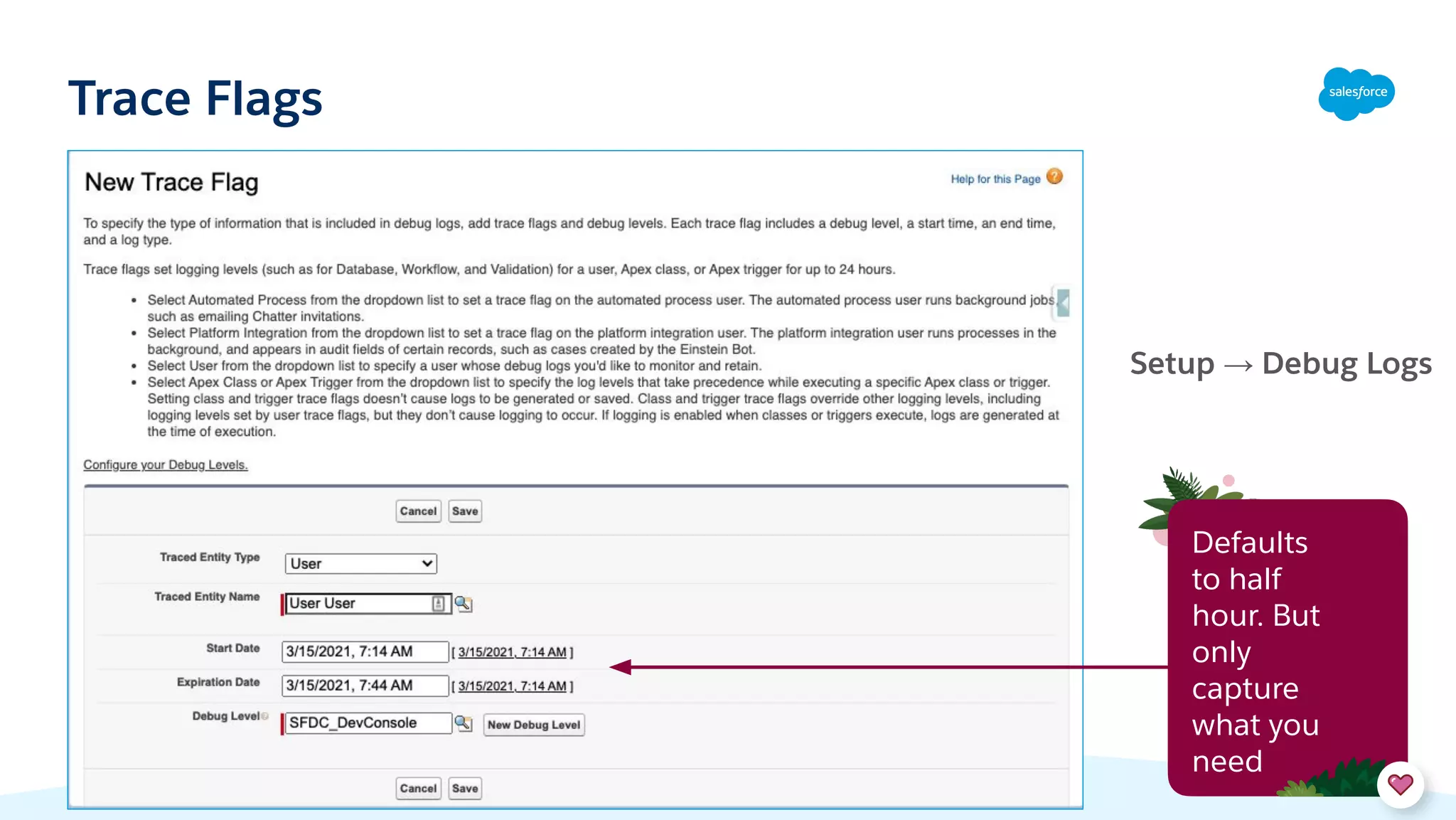
Indicate that you want to capture logs
Trace Flags
Comprised of Start/End Times, Debug Level, and Log Type
• Log Type = what you’re tracing (a User, for example)
Proactively set up a Trace Flag in Setup → Debug Logs
• Can set up for a specific User, the Automated Process User,
or the Platform Integrations User
• Can set up overrides for certain Apex Classes and Triggers
(just creating traces for these alone does not auto-enable
logging)
• Can schedule a Start Date/Time and End Date/Time (can
be now or in the future)
• Set your Debug Level
Can also passively capture logs if your Dev
Console is open
Trace Flags
Setup → Debug Logs
Defaults
to half
hour. But
only
capture
what you
need
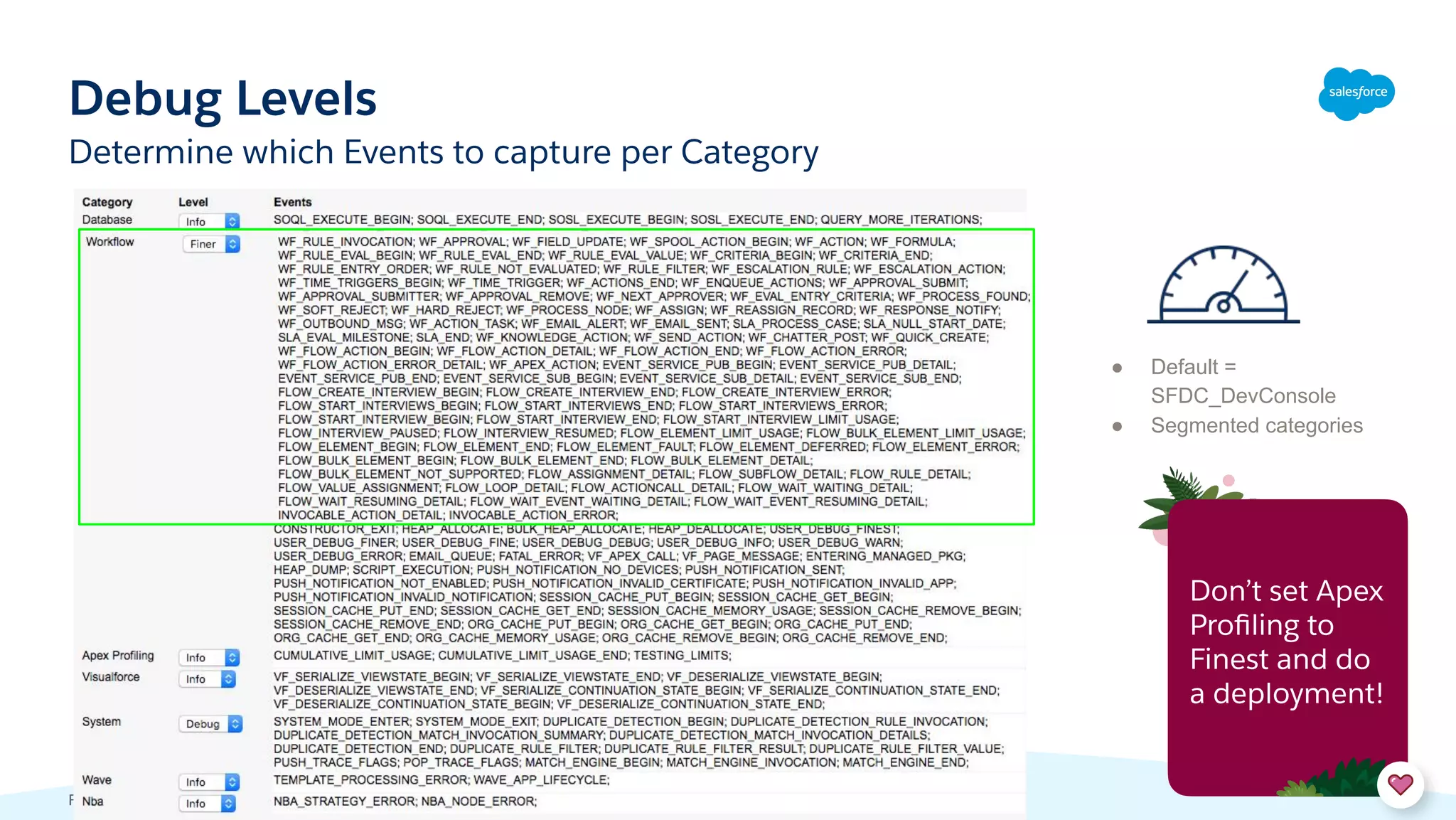
Debug Levels
Footer
● Default =
SFDC_DevConsole
● Segmented categories
Determine which Events to capture per Category
Don’t set Apex
Profiling to
Finest and do
a deployment!
How can we View
a Debug Log?
+ Dev Console Tips/Tricks
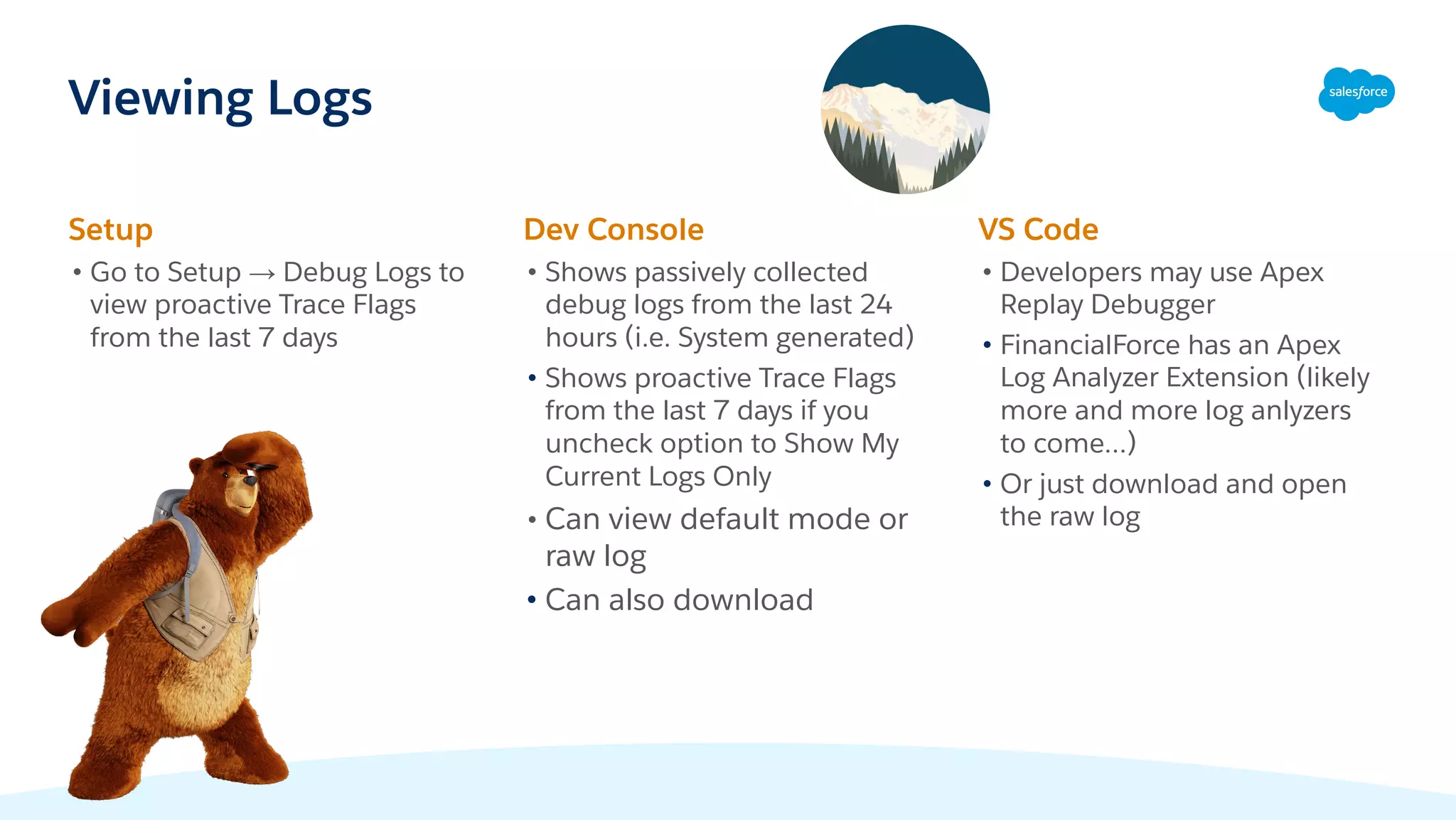
Viewing Logs
Setup
• Go to Setup → Debug Logs to
view proactive Trace Flags
from the last 7 days
Dev Console
• Shows passively collected
debug logs from the last 24
hours (i.e. System generated)
• Shows proactive Trace Flags
from the last 7 days if you
uncheck option to Show My
Current Logs Only
• Can view default mode or
raw log
• Can also download
VS Code
• Developers may use Apex
Replay Debugger
• FinancialForce has an Apex
Log Analyzer Extension (likely
more and more log anlyzers
to come…)
• Or just download and open
the raw log
Debug Log Header
First number = API Version
Then we list out all of the Debug Log Categories, along with their Level
• For example: Validation is set to INFO; Apex is set to FINEST, etc.
40.0
APEX_CODE,FINEST;APEX_PROFILING,INFO;CALLOUT,INFO;DB,INFO;NBA,INFO;SYSTEM,DEB
UG;VALIDATION,INFO;VISUALFORCE,INFO;WAVE,INFO;WORKFLOW,INFO
10:40:37.0
(384010)|USER_INFO|[EXTERNAL]|00554000007IBEQ|test-ljaiawyanc7w@examp
le.com|Pacific Standard Time|GMT-08:00
• Time Stamp, Time Elapsed, User, Time Zone
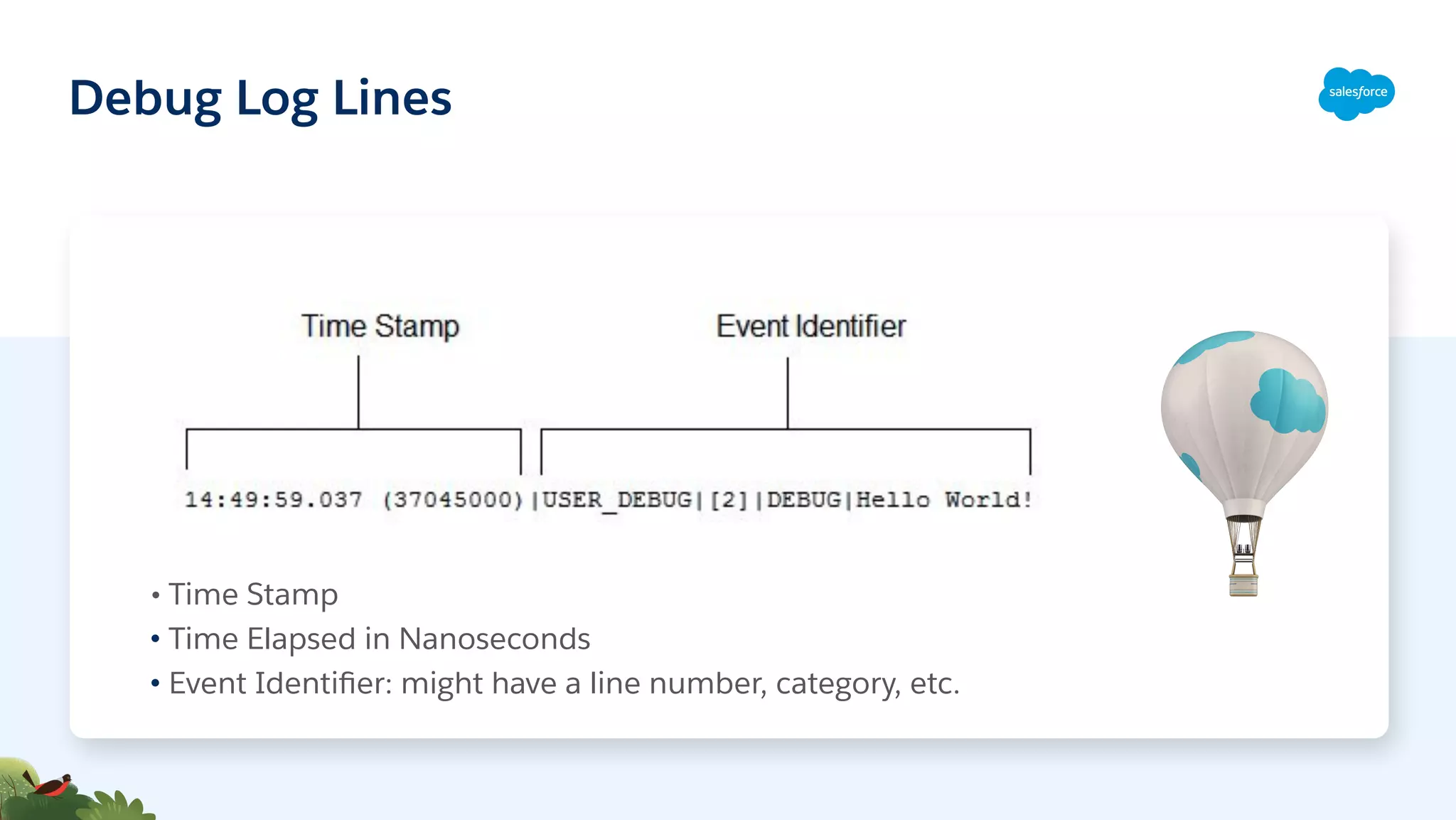
Debug Log Lines
• Time Stamp
• Time Elapsed in Nanoseconds
• Event Identifier: might have a line number, category, etc.
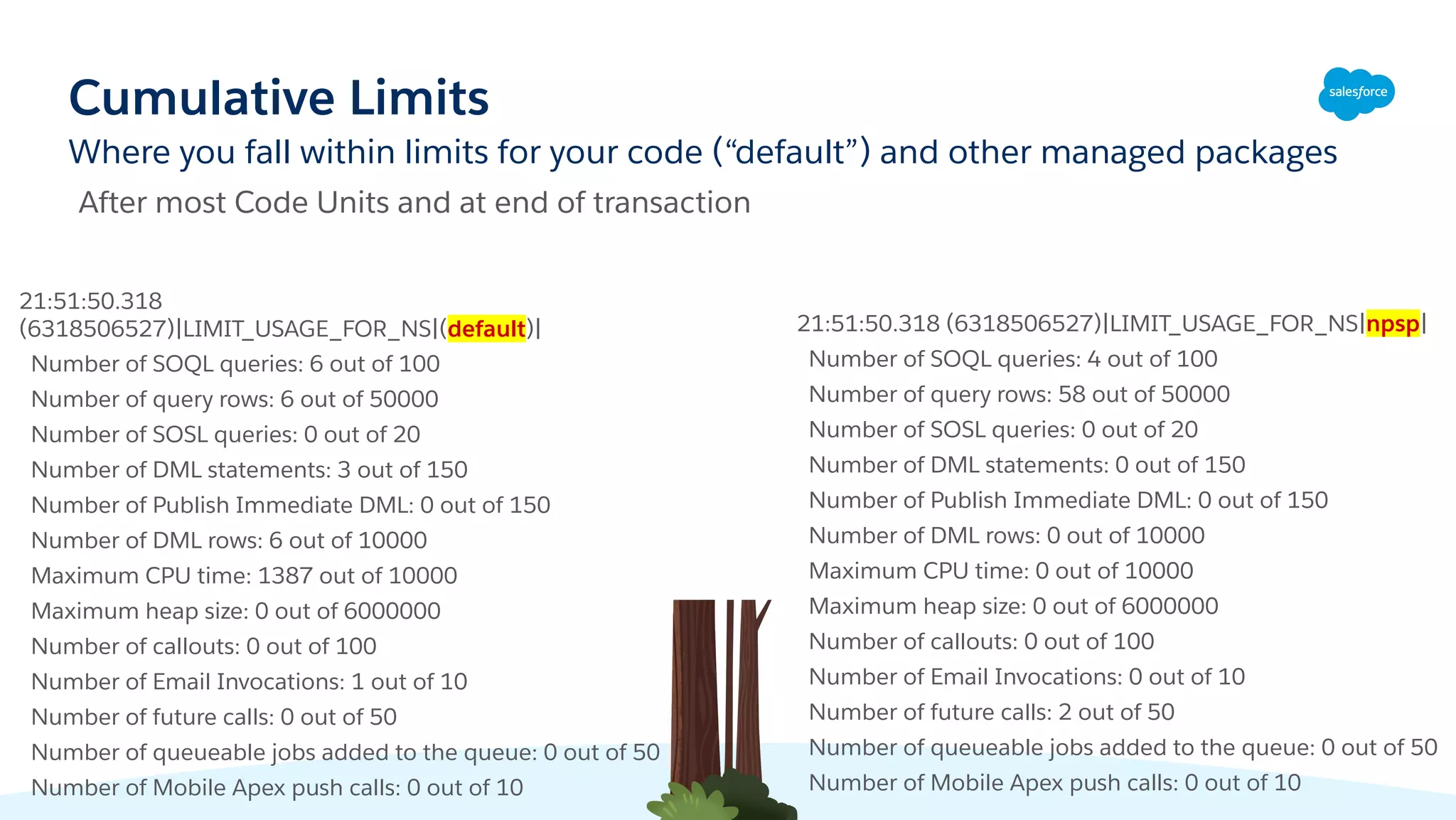
Cumulative Limits
Where you fall within limits for your code (“default”) and other managed packages
21:51:50.318
(6318506527)|LIMIT_USAGE_FOR_NS|(default)|
Number of SOQL queries: 6 out of 100
Number of query rows: 6 out of 50000
Number of SOSL queries: 0 out of 20
Number of DML statements: 3 out of 150
Number of Publish Immediate DML: 0 out of 150
Number of DML rows: 6 out of 10000
Maximum CPU time: 1387 out of 10000
Maximum heap size: 0 out of 6000000
Number of callouts: 0 out of 100
Number of Email Invocations: 1 out of 10
Number of future calls: 0 out of 50
Number of queueable jobs added to the queue: 0 out of 50
Number of Mobile Apex push calls: 0 out of 10
21:51:50.318 (6318506527)|LIMIT_USAGE_FOR_NS|npsp|
Number of SOQL queries: 4 out of 100
Number of query rows: 58 out of 50000
Number of SOSL queries: 0 out of 20
Number of DML statements: 0 out of 150
Number of Publish Immediate DML: 0 out of 150
Number of DML rows: 0 out of 10000
Maximum CPU time: 0 out of 10000
Maximum heap size: 0 out of 6000000
Number of callouts: 0 out of 100
Number of Email Invocations: 0 out of 10
Number of future calls: 2 out of 50
Number of queueable jobs added to the queue: 0 out of 50
Number of Mobile Apex push calls: 0 out of 10
After most Code Units and at end of transaction
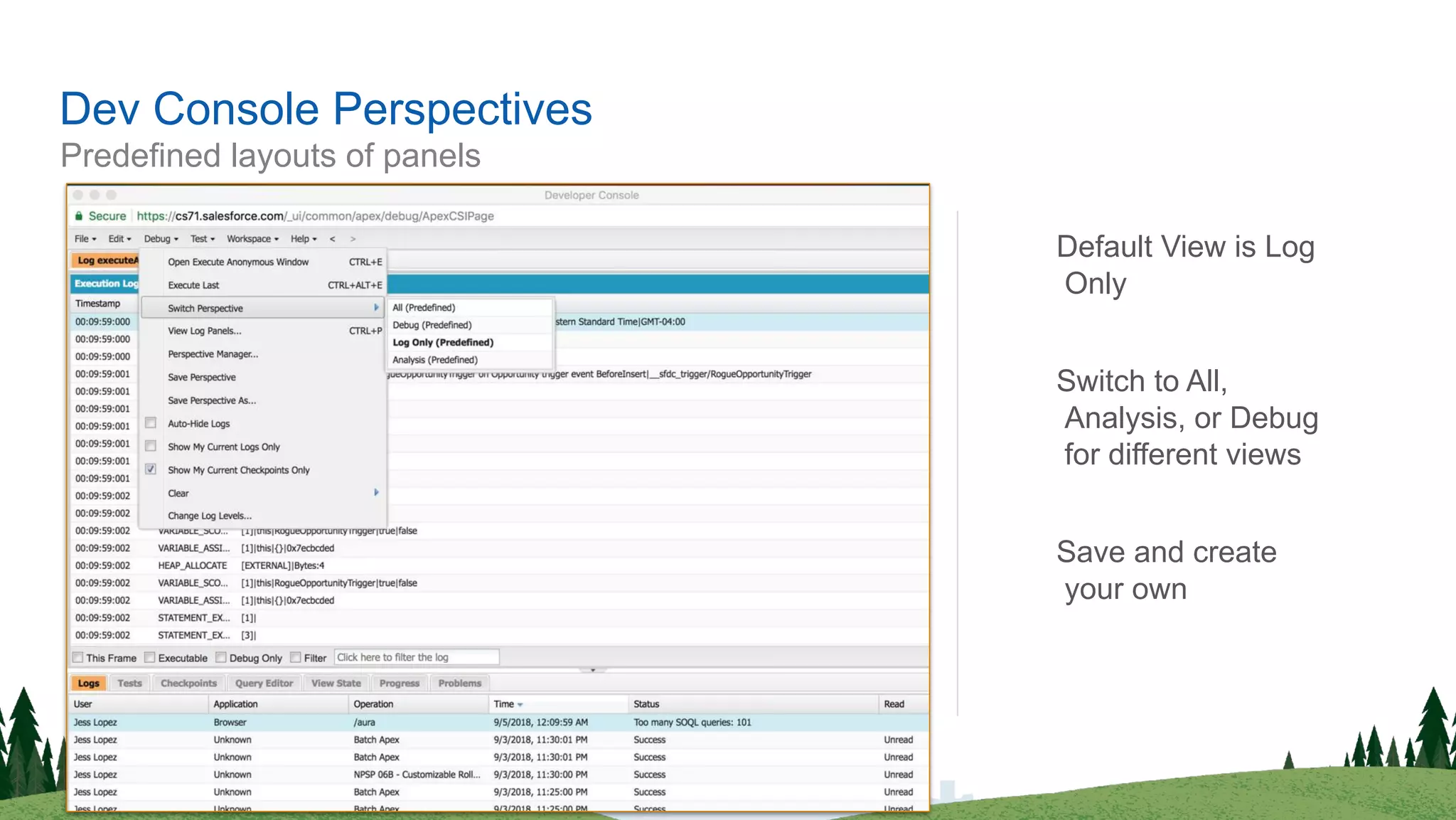
Predefined layouts of panels
Dev Console Perspectives
Default View is Log
Only
Switch to All,
Analysis, or Debug
for different views
Save and create
your own
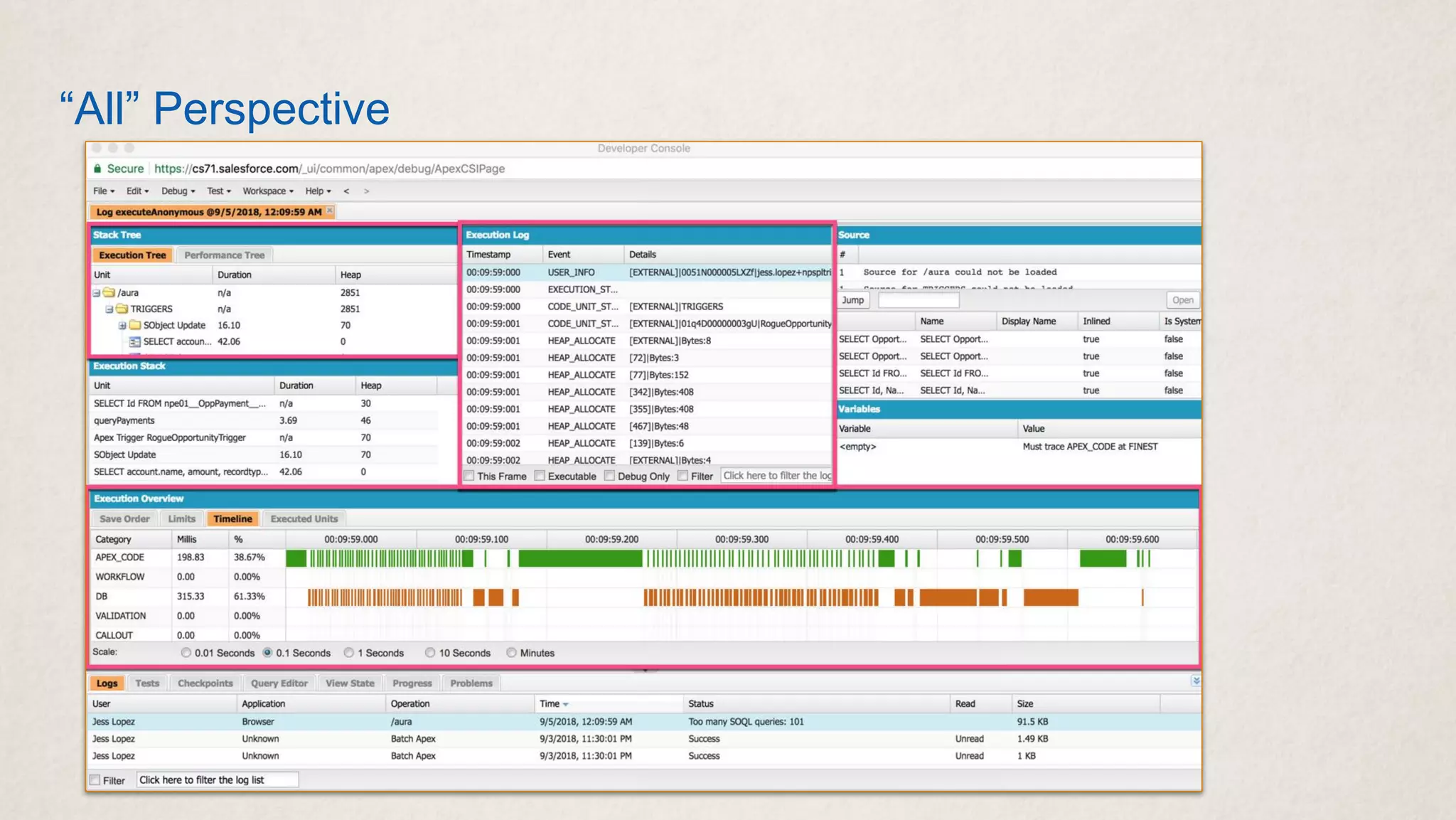
“All” Perspective
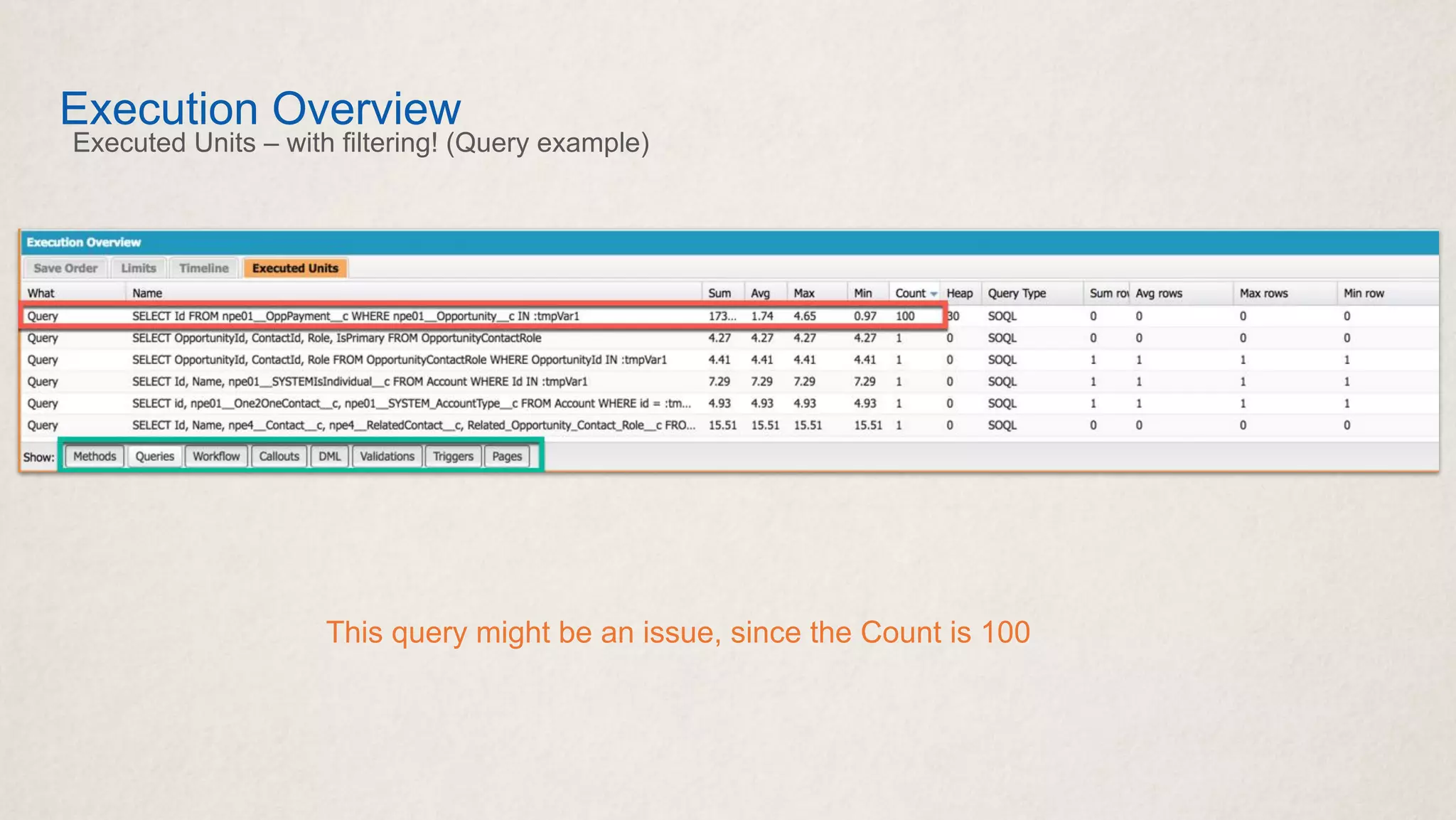
Execution Overview
Executed Units – with filtering! (Query example)
This query might be an issue, since the Count is 100
Limits
Debug Log Limits
20 Megabytes per debug log
• We truncate at that point (more info in Documentation)
Log Retention
• Proactive Traces: 7 days
• Passive via Dev Console: 1 day
Generating > 1000 Megabytes of logs in a 15 minute
window -- temporarily disable
● Also, in general if you have > 1000 Megabytes, need to
delete
Can set a User Trace for 23 hours and 59 minutes… not that
you’d necessarily want to...
Examples
SOQL Queries
Filter for SOQL_EXECUTE_
SOQL_EXECUTE_BEGIN: shows the query that ran, along with the line number.
SOQL_EXECUTE_END: shows how many rows returned.
10:20:37.16 (1157755266)|SOQL_EXECUTE_BEGIN|[81]|Aggregations:0|SELECT Id,
Name, npo02__SYSTEM_CUSTOM_NAMING__c FROM Account WHERE id IN :tmpVar1
10:20:37.16 (1141020558)|SOQL_EXECUTE_END|[158]|Rows:1
When you set the Database Category to “Finest”, you also get Query Plan Information:
10:20:37.16 (1141000221)|SOQL_EXECUTE_EXPLAIN|[158]|TableScan on Contact : [],
cardinality: 1, sobjectCardinality: 1, relativeCost 0.65
DML Information
Filter for DML_
Get information about Inserts, Updates, Deletes, etc.
10:20:37.16 (1180347026)|DML_BEGIN|[168]|Op:Update|Type:SObject|Rows:1
10:20:37.16 (1295906540)|DML_END|[168]
This tells me a few things
• It happened on line 168 of a class or trigger
• The Operation was an Update (Op = Operation)
• Type will be either SObject or the actual API name of the object
• Rows = the number of records we’re updating in this case.
Code Units
Filter for CODE_UNIT_
Discrete units of work (i.e. Triggers, Workflow Rules, Validation Rules, etc.
10:20:37.543 (1543531190)|CODE_UNIT_STARTED|[EXTERNAL]|Workflow:Contact
...
10:20:37.543 (1583780133)|CODE_UNIT_FINISHED|Workflow:Contact
10:43:30.211
(1211122026)|CODE_UNIT_STARTED|[EXTERNAL]|01q170000016Stm|ContactTrigger on
Contact trigger event AfterInsert|__sfdc_trigger/ContactTrigger
…
10:43:30.211 (1212622315)|CODE_UNIT_FINISHED|ContactTrigger on Contact trigger
event AfterInsert|__sfdc_trigger/ContactTrigger
Workflow
Did it meet my criteria?
10:48:01.1 (932229120)|WF_CRITERIA_BEGIN|[Contact: Jess Lopez
0031700001ERCtv]|Contact.Preferred_Email__c|01Q17000000Pc1D|ON_ALL_CHANGES|0
10:48:01.1 (932532371)|WF_FORMULA|Formula:ENCODED:[treatNullAsNull]OR( LEN({!ID:Email})=0,
ISCHANGED({!ID:00N1700000KCr8P}) , ISCHANGED({!ID:00N1700000KCr8V}) ,
ISCHANGED({!ID:00N1700000KCr8K}) , ISCHANGED({!ID:00N1700000KCr8J}) )|Values:Email=null,
npe01__WorkEmail__c=null, npe01__Preferred_Email__c=Personal,
npe01__HomeEmail__c=jess.lopez@salesforce.com, npe01__AlternateEmail__c=null
10:48:01.1 (932542492)|WF_CRITERIA_END|true
...
10:48:01.1 (942587962)|WF_SPOOL_ACTION_BEGIN|Workflow
10:48:01.1 (944138967)|WF_FIELD_UPDATE|[Contact: Jess Lopez 0031700001ERCtv]|Field:Contact:
Email|Value:jess.lopez@salesforce.com|Id=04Y17000000GEUi|CurrentRule:Contact.Preferred_Email__c
(Id=01Q17000000Pc1D)
10:48:01.1 (944309821)|WF_ACTION| Field Update: 2;
Resources
Resources
Salesforce Help Articles
Debug Logs (https://sfdc.co/b69Q3t)
Debug Levels (https://sfdc.co/buEOzB)
• Bookmark this!
Debug Log Details
(https://sfdc.co/brTMuI)
Logs Tab (https://sfdc.co/LlYTP)
Log Inspector (https://sfdc.co/KATBS)
Set up Debug Logging
(https://sfdc.co/bYOHVE)
Examples Using Log Inspector
(https://sfdc.co/DthUr)
Trailhead:
Generate and Analyze Logs
(https://sfdc.co/mGKjy)
My Dreamforce Sessions
• 2019
(https://sfdc.co/bjE2U2)
• 2018
(https://sfdc.co/bgNrxA)
Thank You

Women in Tech - Salesforce Debug Logs Deep Dive with Jess Lopez - March 2021

  • 1.
    Debug Logs Finding theNeedle in the Haystack @jjjlo | jess.lopez@salesforce.com Jess Lopez Principal Member of Technical Staff Salesforce.org Customer Centric Engineering
  • 2.
    This presentation containsforward-looking statements about the Company’s financial and operating results, which may include expected GAAP and non-GAAP financial and other operating and non-operating results, including revenue, net income, earnings per share, operating cash flow growth, operating margin improvement, expected revenue growth, expected current remaining performance obligation growth, expected tax rates, stock-based compensation expenses, amortization of purchased intangibles, shares outstanding, market growth, environmental, social and governance goals, expected capital allocation, including mergers and acquisitions (such as the proposed acquisition of Slack Technologies, Inc.), capital expenditures and other investments, expectations regarding closing contemplated acquisitions and contributions from acquired companies. The achievement or success of the matters covered by such forward-looking statements involves risks, uncertainties and assumptions. If any such risks or uncertainties materialize or if any of the assumptions prove incorrect, the Company’s results could differ materially from the results expressed or implied by the forward-looking statements it makes. The risks and uncertainties referred to above include — but are not limited to — risks associated with our ability to consummate the proposed Slack Technologies, Inc. transaction on a timely basis or at all; the satisfaction of the conditions precedent to consummation of the proposed transaction; our ability to secure regulatory approvals on the terms expected, in a timely manner or at all; our ability to successfully integrate Slack Technologies, Inc.’s operations; our ability to implement its plans, forecasts and other expectations with respect to Slack Technologies, Inc.’s business after the completion of the transaction and realize expected synergies; our ability to realize the anticipated benefits of the proposed transaction, including the possibility that the expected benefits from the proposed transaction will not be realized or will not be realized within the expected time period; the impact of Slack Technologies, Inc.’s business model on our ability to forecast revenue results; disruption from the transaction making it more difficult to maintain business and operational relationships; the negative effects of the announcement or the consummation of the proposed transaction on the market price of our common stock or on our operating results; significant transaction costs; unknown liabilities; the risk of litigation or regulatory actions related to the proposed transaction; the effect of the announcement of the merger on the ability of Salesforce or Slack Technologies, Inc. to retain and hire key personnel and maintain relationships with customers, suppliers and others with whom we or Slack Technologies, Inc. do business, or on our or Slack Technologies, Inc.’s operating results and business generally; the impact of, and actions we may take in response to, the COVID-19 pandemic, related public health measures and resulting economic downturn and market volatility; our ability to maintain service performance and security levels meeting the expectations of our customers, and the resources and costs required to avoid unanticipated downtime and prevent, detect and remediate performance degradation and security breaches; the expenses associated with our data centers and third-party infrastructure providers; our ability to secure and costs related to additional data center capacity; our reliance on third-party hardware, software and platform providers; the effect of evolving domestic and foreign government regulations, including those related to the provision of services on the Internet, those related to accessing the Internet, and those addressing data privacy, cross-border data transfers and import and export controls; current and potential litigation involving us or our industry, including litigation involving acquired entities such as Tableau, and the resolution or settlement thereof; regulatory developments and regulatory investigations involving us or affecting our industry; our ability to successfully introduce new services and product features, including any efforts to expand our services beyond the CRM market; Forward-Looking Statements
  • 3.
    the success ofour strategy of acquiring or making investments in complementary businesses, joint ventures, services, technologies and intellectual property rights; our ability to realize the benefits from strategic partnerships, joint ventures and investments; our ability to successfully integrate acquired businesses and technologies; our ability to compete in the market in which we participate; the success of our business strategy and our plan to build our business, including our strategy to be a leading provider of enterprise cloud computing applications and platforms; our ability to execute our business plans; our ability to continue to grow unearned revenue and remaining performance obligation; the pace of change and innovation in enterprise cloud computing services; the seasonal nature of our sales cycles; our ability to limit customer attrition and costs related to those efforts; the success of our international expansion strategy; the demands on our personnel and infrastructure resulting from significant growth in our customer base and operations, including as a result of acquisitions; our dependency on the development and maintenance of the infrastructure of the Internet; our real estate and office facilities strategy and related costs and uncertainties; fluctuations in, and our ability to predict, our operating results and cash flows; the variability in our results arising from the accounting for term license revenue products; the performance and fair value of our investments in complementary businesses through our strategic investment portfolio; the impact of future gains or losses from our strategic investment portfolio including gains or losses from overall market conditions that may affect the publicly traded companies within our strategic investment portfolio; our ability to protect our intellectual property rights; our ability to develop our brands; the impact of foreign currency exchange rate and interest rate fluctuations on our results; the valuation of our deferred tax assets and the release of related valuation allowances; the potential availability of additional tax assets in the future; the impact of new accounting pronouncements and tax laws; uncertainties affecting our ability to estimate our tax rate; uncertainties regarding our tax obligations in connection with potential jurisdictional transfers of intellectual property, including the tax rate, the timing of the transfer and the value of such transferred intellectual property; uncertainties regarding the effect of general economic and market conditions; the impact of geopolitical events; uncertainties regarding the impact of expensing stock options and other equity awards; the sufficiency of our capital resources; risks related to our 2023 and 2028 senior notes, revolving credit facility and loan associated with 50 Fremont; our ability to comply with our debt covenants and lease obligations; and the impact of climate change, natural disasters and actual or threatened public health emergencies, including the ongoing COVID-19 pandemic. Further information on these and other factors that could affect the Company’s financial results is included in the reports on Forms 10-K, 10-Q and 8-K and in other filings it makes with the Securities and Exchange Commission from time to time. These documents are available on the SEC Filings section of the Investor Information section of the Company’s website at www.salesforce.com/investor. Forward-Looking Statements (Continued)
  • 4.
    Agenda • What areDebug Logs and how do we set them up? • What’s in a Debug Log? • How can we view a Debug Log? • Dev Console Tips/Tricks • Limits • Examples • Resources
  • 5.
    What are Debug Logs? Andhow do we set them up?
  • 7.
    Debug Logs Text-only filesthat contain all of the events you chose to capture during a transaction • Apex Triggers • Workflow, Flow, Process Builder • Validation Rules • ... Contain rows with some very useful information: • Queries and total rows returned • DML type and how many records • Time elapsed • Limits • Errors
  • 8.
    “But aren’t debuglogs only for developers?” Absolutely not. • They’re useful for admins, developers, and architects. • Though, System.debug() lines are useful for sure... Also useful for determining exactly what’s happening. • What happens right before an error? • Did my Flow actually run? • I was expecting this, but something else happened… • Why does it work in my sandbox but not in Production? • It happened for this User, but not that one. ��🏻
  • 9.
    Indicate that youwant to capture logs Trace Flags Comprised of Start/End Times, Debug Level, and Log Type • Log Type = what you’re tracing (a User, for example) Proactively set up a Trace Flag in Setup → Debug Logs • Can set up for a specific User, the Automated Process User, or the Platform Integrations User • Can set up overrides for certain Apex Classes and Triggers (just creating traces for these alone does not auto-enable logging) • Can schedule a Start Date/Time and End Date/Time (can be now or in the future) • Set your Debug Level Can also passively capture logs if your Dev Console is open
  • 10.
    Trace Flags Setup →Debug Logs Defaults to half hour. But only capture what you need
  • 11.
    Debug Levels Footer ● Default= SFDC_DevConsole ● Segmented categories Determine which Events to capture per Category Don’t set Apex Profiling to Finest and do a deployment!
  • 12.
    How can weView a Debug Log? + Dev Console Tips/Tricks
  • 13.
    Viewing Logs Setup • Goto Setup → Debug Logs to view proactive Trace Flags from the last 7 days Dev Console • Shows passively collected debug logs from the last 24 hours (i.e. System generated) • Shows proactive Trace Flags from the last 7 days if you uncheck option to Show My Current Logs Only • Can view default mode or raw log • Can also download VS Code • Developers may use Apex Replay Debugger • FinancialForce has an Apex Log Analyzer Extension (likely more and more log anlyzers to come…) • Or just download and open the raw log
  • 14.
    Debug Log Header Firstnumber = API Version Then we list out all of the Debug Log Categories, along with their Level • For example: Validation is set to INFO; Apex is set to FINEST, etc. 40.0 APEX_CODE,FINEST;APEX_PROFILING,INFO;CALLOUT,INFO;DB,INFO;NBA,INFO;SYSTEM,DEB UG;VALIDATION,INFO;VISUALFORCE,INFO;WAVE,INFO;WORKFLOW,INFO 10:40:37.0 (384010)|USER_INFO|[EXTERNAL]|00554000007IBEQ|test-ljaiawyanc7w@examp le.com|Pacific Standard Time|GMT-08:00 • Time Stamp, Time Elapsed, User, Time Zone
  • 15.
    Debug Log Lines •Time Stamp • Time Elapsed in Nanoseconds • Event Identifier: might have a line number, category, etc.
  • 16.
    Cumulative Limits Where youfall within limits for your code (“default”) and other managed packages 21:51:50.318 (6318506527)|LIMIT_USAGE_FOR_NS|(default)| Number of SOQL queries: 6 out of 100 Number of query rows: 6 out of 50000 Number of SOSL queries: 0 out of 20 Number of DML statements: 3 out of 150 Number of Publish Immediate DML: 0 out of 150 Number of DML rows: 6 out of 10000 Maximum CPU time: 1387 out of 10000 Maximum heap size: 0 out of 6000000 Number of callouts: 0 out of 100 Number of Email Invocations: 1 out of 10 Number of future calls: 0 out of 50 Number of queueable jobs added to the queue: 0 out of 50 Number of Mobile Apex push calls: 0 out of 10 21:51:50.318 (6318506527)|LIMIT_USAGE_FOR_NS|npsp| Number of SOQL queries: 4 out of 100 Number of query rows: 58 out of 50000 Number of SOSL queries: 0 out of 20 Number of DML statements: 0 out of 150 Number of Publish Immediate DML: 0 out of 150 Number of DML rows: 0 out of 10000 Maximum CPU time: 0 out of 10000 Maximum heap size: 0 out of 6000000 Number of callouts: 0 out of 100 Number of Email Invocations: 0 out of 10 Number of future calls: 2 out of 50 Number of queueable jobs added to the queue: 0 out of 50 Number of Mobile Apex push calls: 0 out of 10 After most Code Units and at end of transaction
  • 17.
    Predefined layouts ofpanels Dev Console Perspectives Default View is Log Only Switch to All, Analysis, or Debug for different views Save and create your own
  • 18.
  • 19.
    Execution Overview Executed Units– with filtering! (Query example) This query might be an issue, since the Count is 100
  • 20.
  • 21.
    Debug Log Limits 20Megabytes per debug log • We truncate at that point (more info in Documentation) Log Retention • Proactive Traces: 7 days • Passive via Dev Console: 1 day Generating > 1000 Megabytes of logs in a 15 minute window -- temporarily disable ● Also, in general if you have > 1000 Megabytes, need to delete Can set a User Trace for 23 hours and 59 minutes… not that you’d necessarily want to...
  • 22.
  • 23.
    SOQL Queries Filter forSOQL_EXECUTE_ SOQL_EXECUTE_BEGIN: shows the query that ran, along with the line number. SOQL_EXECUTE_END: shows how many rows returned. 10:20:37.16 (1157755266)|SOQL_EXECUTE_BEGIN|[81]|Aggregations:0|SELECT Id, Name, npo02__SYSTEM_CUSTOM_NAMING__c FROM Account WHERE id IN :tmpVar1 10:20:37.16 (1141020558)|SOQL_EXECUTE_END|[158]|Rows:1 When you set the Database Category to “Finest”, you also get Query Plan Information: 10:20:37.16 (1141000221)|SOQL_EXECUTE_EXPLAIN|[158]|TableScan on Contact : [], cardinality: 1, sobjectCardinality: 1, relativeCost 0.65
  • 24.
    DML Information Filter forDML_ Get information about Inserts, Updates, Deletes, etc. 10:20:37.16 (1180347026)|DML_BEGIN|[168]|Op:Update|Type:SObject|Rows:1 10:20:37.16 (1295906540)|DML_END|[168] This tells me a few things • It happened on line 168 of a class or trigger • The Operation was an Update (Op = Operation) • Type will be either SObject or the actual API name of the object • Rows = the number of records we’re updating in this case.
  • 25.
    Code Units Filter forCODE_UNIT_ Discrete units of work (i.e. Triggers, Workflow Rules, Validation Rules, etc. 10:20:37.543 (1543531190)|CODE_UNIT_STARTED|[EXTERNAL]|Workflow:Contact ... 10:20:37.543 (1583780133)|CODE_UNIT_FINISHED|Workflow:Contact 10:43:30.211 (1211122026)|CODE_UNIT_STARTED|[EXTERNAL]|01q170000016Stm|ContactTrigger on Contact trigger event AfterInsert|__sfdc_trigger/ContactTrigger … 10:43:30.211 (1212622315)|CODE_UNIT_FINISHED|ContactTrigger on Contact trigger event AfterInsert|__sfdc_trigger/ContactTrigger
  • 26.
    Workflow Did it meetmy criteria? 10:48:01.1 (932229120)|WF_CRITERIA_BEGIN|[Contact: Jess Lopez 0031700001ERCtv]|Contact.Preferred_Email__c|01Q17000000Pc1D|ON_ALL_CHANGES|0 10:48:01.1 (932532371)|WF_FORMULA|Formula:ENCODED:[treatNullAsNull]OR( LEN({!ID:Email})=0, ISCHANGED({!ID:00N1700000KCr8P}) , ISCHANGED({!ID:00N1700000KCr8V}) , ISCHANGED({!ID:00N1700000KCr8K}) , ISCHANGED({!ID:00N1700000KCr8J}) )|Values:Email=null, npe01__WorkEmail__c=null, npe01__Preferred_Email__c=Personal, npe01__HomeEmail__c=jess.lopez@salesforce.com, npe01__AlternateEmail__c=null 10:48:01.1 (932542492)|WF_CRITERIA_END|true ... 10:48:01.1 (942587962)|WF_SPOOL_ACTION_BEGIN|Workflow 10:48:01.1 (944138967)|WF_FIELD_UPDATE|[Contact: Jess Lopez 0031700001ERCtv]|Field:Contact: Email|Value:jess.lopez@salesforce.com|Id=04Y17000000GEUi|CurrentRule:Contact.Preferred_Email__c (Id=01Q17000000Pc1D) 10:48:01.1 (944309821)|WF_ACTION| Field Update: 2;
  • 27.
  • 28.
    Resources Salesforce Help Articles DebugLogs (https://sfdc.co/b69Q3t) Debug Levels (https://sfdc.co/buEOzB) • Bookmark this! Debug Log Details (https://sfdc.co/brTMuI) Logs Tab (https://sfdc.co/LlYTP) Log Inspector (https://sfdc.co/KATBS) Set up Debug Logging (https://sfdc.co/bYOHVE) Examples Using Log Inspector (https://sfdc.co/DthUr) Trailhead: Generate and Analyze Logs (https://sfdc.co/mGKjy) My Dreamforce Sessions • 2019 (https://sfdc.co/bjE2U2) • 2018 (https://sfdc.co/bgNrxA)
  • 29.