WIRELESS
STANDARDS AND
TECHNOLOGIES
Y. COLETTE LEMARD
Why have standards?
 Standards allow manufacturers to produce products
that have known physical characteristics. E.g. two
wireless LAN systems could not communicate with each
other unless they use compatible radio frequencies and
modulation methods. The standard specifies such things in
detail.
 Standards are very useful to manufacturers because
they outline a technical specification from which
designs can be made
IEEE
 pronounced I Triple E
 comprised of engineers, scientists and students
 the standard setting body for matters relating to the
electrical, computing and electronic industries. They are
therefore the authors of the international standards for
networking
The IEEE 802.11 standards also
defines protocol messages and
operating algorithms making
them beneficial to both computer
engineers and system
programmers
IEEE STANDARDS
 their standards for networking are all labelled with a
variant of 802 i.e. IEEE802.x
 two of their more popular standards are:
 IEEE 802.3 – Ethernet standards (for cabled networks)
 IEEE 802.11 – Wireless networking standards (e.g. WLANs)
IEEE STANDARDS
 Some of the other networking standards are:
 IEEE 802.4 – for Token bus networks
 IEEE 802.5 – for Token ring networks
 IEEE 802.6 – MAN standards
IEEE 802.11
IEEE 802.11
 this is the family of standards for short range
wireless communication
 has several updates or versions including.
•IEEE 802.11a
•IEEE 802.11b
•IEEE 802.11g
•IEEE 802.11n
The standards differ principally in
 the maximum bandwidth (speed)
 the distance over which the wireless signal can
travel (the range)
They also may differ in
 the broadcast channel used and as a consequence
the amount of electromagnetic interference the
signal encounters
THE
IEEE 802.11A
STANDARD
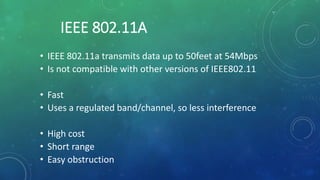
IEEE 802.11A
• IEEE 802.11a transmits data up to 50feet at 54Mbps
• Is not compatible with other versions of IEEE802.11
• Fast
• Uses a regulated band/channel, so less interference
• High cost
• Short range
• Easy obstruction
THE
IEEE 802.11B
STANDARD
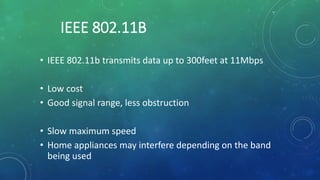
IEEE 802.11B
• IEEE 802.11b transmits data up to 300feet at 11Mbps
• Low cost
• Good signal range, less obstruction
• Slow maximum speed
• Home appliances may interfere depending on the band
being used
THE
IEEE 802.11G
STANDARD
IEEE 802.11G
Aimed at getting the best of 802.11a and 802.11b
• IEEE 802.11g transmits data up to 150feet at 54Mbps
• Fast maximum speed
• Good signal range
• Not easily obstructed
• Cost more than 802.11b
• May suffer electromagnetic interference
THE
IEEE 802.11N
STANDARD
IEEE 802.11N
• IEEE 802.11n transmits data up to 175 feet at speeds
between 100Mbps and 600Mbps
• Uses multiple signals and antennas
• Fast maximum speed
• Best signal range
• More resistant to interference from outside sources
• Costly
• Can itself interfere with other networks
IEEE 802.11 STANDARDS
IEEE Standard Frequency/Medium Speed Transmission Range Access Method
802.11 2.4GHz RF 1 to 2Mbps 20 feet indoors. CSMA/CA
802.11a 5GHz Up to 54Mbps 25 to 75 feet indoors; range
can be affected by building
materials.
CSMA/CA
802.11b 2.4GHz Up to 11Mbps Up to 150 feet indoors;
range can be affected by
building materials.
CSMA/CA
802.11g 2.4GHz Up to 54Mbps Up to 150 feet indoors;
range can be affected by
building materials.
CSMA/CA
802.11n 2.4GHz/5GHz Up to 600Mbps 175+ feet indoors; range
can be affected by building
materials.
CSMA/CA
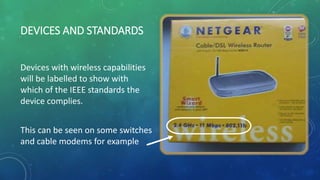
DEVICES AND STANDARDS
Devices with wireless capabilities
will be labelled to show with
which of the IEEE standards the
device complies.
This can be seen on some switches
and cable modems for example
WI-FI
 Despite the best efforts of the standards
body, there are bound to be areas that are
ambiguous or not fully defined
 In the standards themselves, there are also a
number of features that are optional and
different manufacturers might make different
choices in their designs about whether to
include them or not.
So end users, who buy the products
have no guarantee that a product
from vendor A will completely
interoperate with a product from
vendor B.
 To avoid interoperability problems, the Wi-Fi
Alliance was formed by a group of major
manufacturers and the logo ‘Wi-Fi’ was
created.
 The Wi-Fi Alliance then created its own
test plan based on the IEEE 802.11
standards.
To obtain Wi-Fi certification, a manufacturer must
submit its product for testing against a set of ‘gold
standard’ Wi-Fi products.
 Some features of IEEE 802.11 are not required for Wi-Fi certification.
 Conversely, there are some requirements in Wi-Fi that are additional to
the IEEE standard.
 Where there is ambiguity in the standard, the correct behavior is
defined by the way the gold standard products work.
In this way interoperability is ensured.
In summary, Wi-Fi defines a subset of IEEE
802.11 with some extensions, as shown in
this diagram
What this means is that not all
wireless networks are Wi-Fi
networks. The term Wi-Fi should
only be used for those wireless
networks that meet the Wi-Fi gold
standard
WAP /
WIRELESS
ROUTER
Devices which connect to a
network wirelessly contain
a wireless adapter /
wireless network card
But when the laptop or
smart phone sends out a
signal where does it go?
On the other (wired) side of the
network there needs to be an
interfacing device that receives
the radio waves signals
The wireless network card in
the device, communicates
with/via a wireless access
point (WAP)
WIRELESS ACCESS POINT (WAP)
Antennas
o The WAP and the wireless device
communicate using radio waves
o Each WAP is designed to meet
one or more of the IEEE802.11
standards
It may or may not be a Wi-Fi
network, that depends on the
particular devices being used
and whether they meet the Wi-
Fi standard
~~ END ~~

Wireless Standards & Technologies

  • 1.
  • 2.
  • 3.
     Standards allowmanufacturers to produce products that have known physical characteristics. E.g. two wireless LAN systems could not communicate with each other unless they use compatible radio frequencies and modulation methods. The standard specifies such things in detail.  Standards are very useful to manufacturers because they outline a technical specification from which designs can be made
  • 4.
    IEEE  pronounced ITriple E  comprised of engineers, scientists and students  the standard setting body for matters relating to the electrical, computing and electronic industries. They are therefore the authors of the international standards for networking
  • 5.
    The IEEE 802.11standards also defines protocol messages and operating algorithms making them beneficial to both computer engineers and system programmers
  • 6.
    IEEE STANDARDS  theirstandards for networking are all labelled with a variant of 802 i.e. IEEE802.x  two of their more popular standards are:  IEEE 802.3 – Ethernet standards (for cabled networks)  IEEE 802.11 – Wireless networking standards (e.g. WLANs)
  • 7.
    IEEE STANDARDS  Someof the other networking standards are:  IEEE 802.4 – for Token bus networks  IEEE 802.5 – for Token ring networks  IEEE 802.6 – MAN standards
  • 8.
  • 9.
    IEEE 802.11  thisis the family of standards for short range wireless communication  has several updates or versions including. •IEEE 802.11a •IEEE 802.11b •IEEE 802.11g •IEEE 802.11n
  • 10.
    The standards differprincipally in  the maximum bandwidth (speed)  the distance over which the wireless signal can travel (the range) They also may differ in  the broadcast channel used and as a consequence the amount of electromagnetic interference the signal encounters
  • 11.
  • 12.
    IEEE 802.11A • IEEE802.11a transmits data up to 50feet at 54Mbps • Is not compatible with other versions of IEEE802.11 • Fast • Uses a regulated band/channel, so less interference • High cost • Short range • Easy obstruction
  • 13.
  • 14.
    IEEE 802.11B • IEEE802.11b transmits data up to 300feet at 11Mbps • Low cost • Good signal range, less obstruction • Slow maximum speed • Home appliances may interfere depending on the band being used
  • 15.
  • 16.
    IEEE 802.11G Aimed atgetting the best of 802.11a and 802.11b • IEEE 802.11g transmits data up to 150feet at 54Mbps • Fast maximum speed • Good signal range • Not easily obstructed • Cost more than 802.11b • May suffer electromagnetic interference
  • 17.
  • 18.
    IEEE 802.11N • IEEE802.11n transmits data up to 175 feet at speeds between 100Mbps and 600Mbps • Uses multiple signals and antennas • Fast maximum speed • Best signal range • More resistant to interference from outside sources • Costly • Can itself interfere with other networks
  • 19.
    IEEE 802.11 STANDARDS IEEEStandard Frequency/Medium Speed Transmission Range Access Method 802.11 2.4GHz RF 1 to 2Mbps 20 feet indoors. CSMA/CA 802.11a 5GHz Up to 54Mbps 25 to 75 feet indoors; range can be affected by building materials. CSMA/CA 802.11b 2.4GHz Up to 11Mbps Up to 150 feet indoors; range can be affected by building materials. CSMA/CA 802.11g 2.4GHz Up to 54Mbps Up to 150 feet indoors; range can be affected by building materials. CSMA/CA 802.11n 2.4GHz/5GHz Up to 600Mbps 175+ feet indoors; range can be affected by building materials. CSMA/CA
  • 20.
    DEVICES AND STANDARDS Deviceswith wireless capabilities will be labelled to show with which of the IEEE standards the device complies. This can be seen on some switches and cable modems for example
  • 21.
  • 22.
     Despite thebest efforts of the standards body, there are bound to be areas that are ambiguous or not fully defined  In the standards themselves, there are also a number of features that are optional and different manufacturers might make different choices in their designs about whether to include them or not.
  • 23.
    So end users,who buy the products have no guarantee that a product from vendor A will completely interoperate with a product from vendor B.
  • 24.
     To avoidinteroperability problems, the Wi-Fi Alliance was formed by a group of major manufacturers and the logo ‘Wi-Fi’ was created.  The Wi-Fi Alliance then created its own test plan based on the IEEE 802.11 standards.
  • 25.
    To obtain Wi-Ficertification, a manufacturer must submit its product for testing against a set of ‘gold standard’ Wi-Fi products.  Some features of IEEE 802.11 are not required for Wi-Fi certification.  Conversely, there are some requirements in Wi-Fi that are additional to the IEEE standard.  Where there is ambiguity in the standard, the correct behavior is defined by the way the gold standard products work. In this way interoperability is ensured.
  • 26.
    In summary, Wi-Fidefines a subset of IEEE 802.11 with some extensions, as shown in this diagram
  • 27.
    What this meansis that not all wireless networks are Wi-Fi networks. The term Wi-Fi should only be used for those wireless networks that meet the Wi-Fi gold standard
  • 28.
  • 29.
    Devices which connectto a network wirelessly contain a wireless adapter / wireless network card
  • 30.
    But when thelaptop or smart phone sends out a signal where does it go?
  • 31.
    On the other(wired) side of the network there needs to be an interfacing device that receives the radio waves signals
  • 32.
    The wireless networkcard in the device, communicates with/via a wireless access point (WAP)
  • 33.
    WIRELESS ACCESS POINT(WAP) Antennas
  • 34.
    o The WAPand the wireless device communicate using radio waves o Each WAP is designed to meet one or more of the IEEE802.11 standards
  • 35.
    It may ormay not be a Wi-Fi network, that depends on the particular devices being used and whether they meet the Wi- Fi standard
  • 36.