1
Data Migration Introductory Workshop
2
Introduction to data migration
3
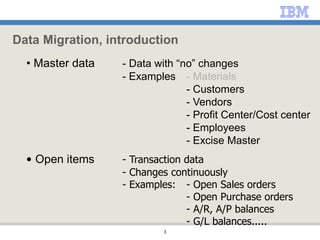
• Master data - Data with “no” changes
- Examples - Materials
- Customers
- Vendors
- Profit Center/Cost center
- Employees
- Excise Master
• Open items - Transaction data
- Changes continuously
- Examples: - Open Sales orders
- Open Purchase orders
- A/R, A/P balances
- G/L balances.....
Data Migration, introduction
4
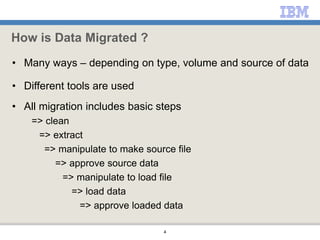
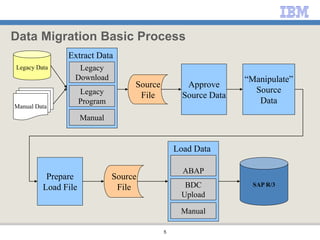
How is Data Migrated ?
• Many ways – depending on type, volume and source of data
• Different tools are used
• All migration includes basic steps
=> clean
=> extract
=> manipulate to make source file
=> approve source data
=> manipulate to load file
=> load data
=> approve loaded data
5
Data Migration Basic Process
Legacy Data
Manual Data
Source
File
“Manipulate”
Source
Data
Approve
Source Data
Prepare
Load File
ABAP
BDC
Upload
Manual
SAP R/3
Source
File
Load Data
Legacy
Download
Legacy
Program
Manual
Extract Data
6
Data migration preparation
7
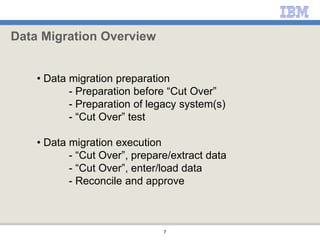
• Data migration preparation
- Preparation before “Cut Over”
- Preparation of legacy system(s)
- “Cut Over” test
• Data migration execution
- “Cut Over”, prepare/extract data
- “Cut Over”, enter/load data
- Reconcile and approve
Data Migration Overview
8
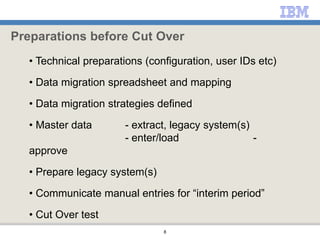
• Technical preparations (configuration, user IDs etc)
• Data migration spreadsheet and mapping
• Data migration strategies defined
• Master data - extract, legacy system(s)
- enter/load -
approve
• Prepare legacy system(s)
• Communicate manual entries for “interim period”
• Cut Over test
Preparations before Cut Over
9
• Purpose: Document, the strategy/approach on how
to migrate the open item objects
->How to migrate different types of an object
(PO can be for a Sales order, Non-business, Project…)
->How to migrate different statuses of an object
(ordered, partly delivered, partly invoiced etc)
->Document pre-requisites/issues/decisions for the data migration)
->Estimated time/resources needed (based on volume/complexity)
Data migration strategies
10
“Delivered and invoiced in in the same month”
“Calculation of moving average price for materials”
“Close existing projects , create new
projects for remaining
“How to handle Purchase orders and Sales Orders”
”How to do purchases before Cut over and Go-Live”
”Detailed financial data migration strategy”
” Detailed migration strategy for CIN ”
Data migration strategies
11
Data migration execution, “Cut Over”
12
• “Cut Over”, prepare/extract data
• “Cut Over”, enter/load data
• Reconcile and approve
Data migration execution, “Cut Over”
13
Data migration planning
14
Lessons Learned
• Start early
• Get business involvement – data is owned by business not
project team
• Clean data properly
– Complete, accurate, obsolete, low-value ….
• Avoid data migration if possible
– Do not migrate historical data…
• Test data migration techniques/strategies early
• Confirm approval procedures early
• Follow-up activities/due dates
15
Data Migration Tracking Sheet
• Data Migration Tracking Sheet.xls
– Shows all data objects, including volume
– Who is responsible for migration of each data object
– Due dates for main migration milestones
16
High Level Time Plan
• Data Migration High Level Time Plan.xls
– Shows main activities
– Shows who is involved
– Shows rough schedule for the work

Data_Migration_Overview.ppt

  • 1.
  • 2.
  • 3.
    3 • Master data- Data with “no” changes - Examples - Materials - Customers - Vendors - Profit Center/Cost center - Employees - Excise Master • Open items - Transaction data - Changes continuously - Examples: - Open Sales orders - Open Purchase orders - A/R, A/P balances - G/L balances..... Data Migration, introduction
  • 4.
    4 How is DataMigrated ? • Many ways – depending on type, volume and source of data • Different tools are used • All migration includes basic steps => clean => extract => manipulate to make source file => approve source data => manipulate to load file => load data => approve loaded data
  • 5.
    5 Data Migration BasicProcess Legacy Data Manual Data Source File “Manipulate” Source Data Approve Source Data Prepare Load File ABAP BDC Upload Manual SAP R/3 Source File Load Data Legacy Download Legacy Program Manual Extract Data
  • 6.
  • 7.
    7 • Data migrationpreparation - Preparation before “Cut Over” - Preparation of legacy system(s) - “Cut Over” test • Data migration execution - “Cut Over”, prepare/extract data - “Cut Over”, enter/load data - Reconcile and approve Data Migration Overview
  • 8.
    8 • Technical preparations(configuration, user IDs etc) • Data migration spreadsheet and mapping • Data migration strategies defined • Master data - extract, legacy system(s) - enter/load - approve • Prepare legacy system(s) • Communicate manual entries for “interim period” • Cut Over test Preparations before Cut Over
  • 9.
    9 • Purpose: Document,the strategy/approach on how to migrate the open item objects ->How to migrate different types of an object (PO can be for a Sales order, Non-business, Project…) ->How to migrate different statuses of an object (ordered, partly delivered, partly invoiced etc) ->Document pre-requisites/issues/decisions for the data migration) ->Estimated time/resources needed (based on volume/complexity) Data migration strategies
  • 10.
    10 “Delivered and invoicedin in the same month” “Calculation of moving average price for materials” “Close existing projects , create new projects for remaining “How to handle Purchase orders and Sales Orders” ”How to do purchases before Cut over and Go-Live” ”Detailed financial data migration strategy” ” Detailed migration strategy for CIN ” Data migration strategies
  • 11.
  • 12.
    12 • “Cut Over”,prepare/extract data • “Cut Over”, enter/load data • Reconcile and approve Data migration execution, “Cut Over”
  • 13.
  • 14.
    14 Lessons Learned • Startearly • Get business involvement – data is owned by business not project team • Clean data properly – Complete, accurate, obsolete, low-value …. • Avoid data migration if possible – Do not migrate historical data… • Test data migration techniques/strategies early • Confirm approval procedures early • Follow-up activities/due dates
  • 15.
    15 Data Migration TrackingSheet • Data Migration Tracking Sheet.xls – Shows all data objects, including volume – Who is responsible for migration of each data object – Due dates for main migration milestones
  • 16.
    16 High Level TimePlan • Data Migration High Level Time Plan.xls – Shows main activities – Shows who is involved – Shows rough schedule for the work

Editor's Notes