


















WHY & HOW TO BLOG.
What You Need to Know to Get Started
with Business Blogging.
Brought to you by
1WHAT’S A BLOG?
2BUSINESS BLOGGING PLATFORMS: AN
OVERVIEW.
3DOES BLOGGING WORK?
4HOW DO YOU WRITE GREAT BLOG POSTS?
5WHERE DO YOU FIND BLOG POST IDEAS?
6ADDITIONAL BLOGGING RESOURCES.
CONTENTS.
WHAT’S A BLOG?
1
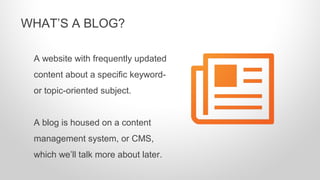
A website with frequently updated
content about a specific keyword-
or topic-oriented subject.
A blog is housed on a content
management system, or CMS,
which we’ll talk more about later.
WHAT’S A BLOG?
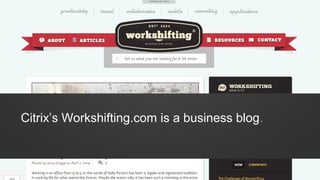
Citrix’s Workshifting.com is a business blog.
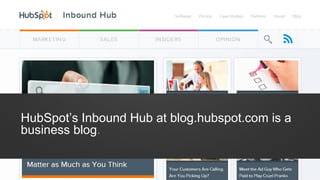
HubSpot’s Inbound Hub at blog.hubspot.com is a
business blog.
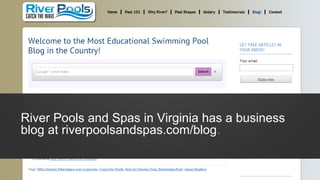
River Pools and Spas in Virginia has a business
blog at riverpoolsandspas.com/blog.
COMPANIES BLOG
BECAUSE IT’S ONE OF
THE MOST EFFECTIVE
WAYS TO ATTRACT
POTENTIAL CUSTOMERS
TO YOUR SITE.
• Search Engines: Reading for
keywords, links, and context.
• Existing and Potential
Customers: Reading for helpful
content.
• Sharers and Influencers: Reading
to add value to their networks.
WHO READS A BLOG?
• Anyone who wants to drive site
traffic.
• Anyone who wants to establish
thought leadership.
Blogging solves for traffic,
authority, and relevancy.
WHO SHOULD BLOG, AND WHY?
BUSINESS BLOGGING
PLATFORMS:
AN OVERVIEW.
2
REMEMBER WHEN WE
MENTIONED BLOGS
WERE HOUSED ON A
CONTENT MANAGEMENT
SYSTEM (CMS)?
A stand-alone content
publishing, editing, and
management platform.
WELL, WHAT’S A CMS?
A CMS is different in that:
•It’s hosted on your domain, so SEO visibility benefits your site
(as opposed to Blogspot.com, WordPress.com, or Tumblr.com);
•It’s more customizable; and
•It has a broader feature set.
HOW IS A CMS DIFFERENT FROM FREE,
HOSTED BLOGS OFFERED BY WORDPRESS,
BLOGGER & TUMBLR?
Hosted Blogs:
•username.Wordpress.com
•username.Blogspot.com
•username.Tumblr.com
Lack robust features ideal for
businesses.
NOT ALL BLOGGING PLATFORMS ARE
CREATED EQUAL.
Self-Hosted CMSs:
•HubSpot
•WordPress (.org)
•Joomla
Can be customized for
company goals and branding.
Blogging is only one tool businesses have
at their disposal to attract strangers to their
site to convert into happy, paying
customers.
That’s why blogging works best when
it’s integrated with other marketing
tools.
WHAT’S EVEN BETTER THAN A BLOGGING
PLATFORM (CMS)?
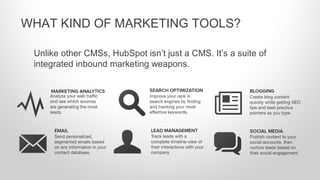
Unlike other CMSs, HubSpot isn’t just a CMS. It’s a suite of
integrated inbound marketing weapons.
WHAT KIND OF MARKETING TOOLS?
1. Built-in Social Publishing and Email: Google+ authorship
support, subscription emails, and social sharing.
2. Built-in SEO: On-page keyword integration and recommendations
as you type.
3. Out-of-the Box Responsive Design: No need for heavy mobile
design investment. Your blog posts are consumable no matter the
device.
4. Integrated Analytics: Understand what content converts.
4 REASONS IT MAKES SENSE TO BLOG ON
HUBSPOT.
NO MATTER WHICH
CMS YOU CHOOSE,
MAKE SURE YOU HAVE
ACCESS TO QUALITY
CUSTOMER SUPPORT.
DOES BLOGGING
WORK?3
Blog
Social
Media
Keywo
rds
Pages
Calls-to-
Action
Landing
Pages
Forms
Contacts
Email
Workflow
s
Lead
Scoring
CRM
Integrati
ons
Social
Media
Smart-
Calls-to-
Action
Email
Workflow
s
Attract Convert Close Delight
Strangers Visitors Leads Customers Promoters
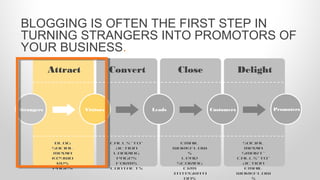
BLOGGING IS OFTEN THE FIRST STEP IN
TURNING STRANGERS INTO PROMOTORS OF
YOUR BUSINESS.
Blog
Social
Media
Keywo
rds
Pages
Calls-to-
Action
Landing
Pages
Forms
Contacts
Email
Workflow
s
Lead
Scoring
CRM
Integrati
ons
Social
Media
Smart-
Calls-to-
Action
Email
Workflow
s
Attract Convert Close Delight
Strangers Visitors Leads Customers Promoters
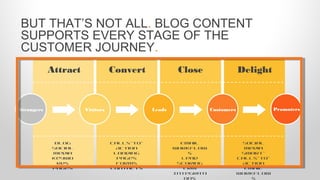
BUT THAT’S NOT ALL. BLOG CONTENT
SUPPORTS EVERY STAGE OF THE
CUSTOMER JOURNEY.
HOW DOES BLOGGING
SUPPORT THE ENTIRE
CUSTOMER JOURNEY,
YOU ASK?
Organic traffic converts:
•5X better than referral traffic.
•2X better than paid traffic.
BLOGGING DRIVES ORGANIC TRAFFIC TO
YOUR WEBSITE.
Source: HubSpot
Once visitors arrive at your blog,
they have calls-to-action, additional
blog posts, site navigation, and
featured offers, products or
services to lure them into exploring
more of your site.
BLOGGING HELPS CONVERT THAT TRAFFIC
INTO LEADS.
Source: HubSpot
Educational, helpful, or otherwise
useful content positions your
company as an industry expert and
engenders trust in your company.
BLOGGING HELPS ESTABLISH AUTHORITY.
Blogging is gift that keeps on
giving.
If the HubSpot marketing team
stopped blogging, we’d still
generate 70-75% of our blog traffic
from old posts!
BLOGGING DRIVES LONG TERM RESULTS.
The average company that blogs
generates:
•55% more website visitors.
•97% more inbound links.
•434% more indexed pages.
SERIOUSLY. IT WORKS.
Source: HubSpot
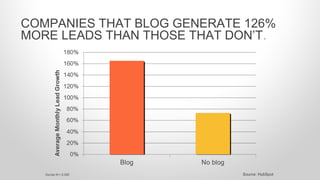
COMPANIES THAT BLOG GENERATE 126%
MORE LEADS THAN THOSE THAT DON’T.
Source: HubSpotSurvey N = 2,300
Source: HubSpotSurvey N = 3,339
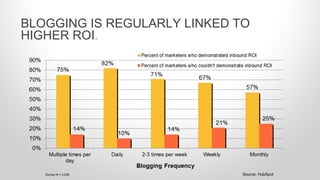
BLOGGING IS REGULARLY LINKED TO
HIGHER ROI.
• 57% of marketers who blog
monthly acquire customers
from their blog.
• 82% of marketers who blog
daily acquire customers from
their blog.
THE MORE YOU BLOG, THE MORE
CUSTOMERS YOU GENERATE.
AS LONG AS YOU BLOG
TO HELP YOUR
AUDIENCE ON A
CONSISTENT BASIS,
YOU’LL SEE RESULTS.
HOW DO YOU WRITE
GREAT BLOG POSTS?4
• Title: Up to 70 characters with
keywords.
• Image: With Alt text.
• Length: Typically between 300-800
words.
• Keyword Density: Natural.
• Calls-to-Action: Primary and
Secondary.
• Social Buttons: Follow and Share.
WHAT ARE THE COMPONENTS OF A BLOG
POST?
EVERY BLOG POST
YOU WRITE SHOULD
HAVE A PURPOSE.
• Drive a ton of traffic?
• Generate better qualified leads?
• Garner social shares?
• Establish yourself as an industry leader?
• Keep your readers engaged in your blog?
WHAT DO YOU WANT YOUR POST TO
ACHIEVE FOR YOUR BUSINESS?
• Learn how to do something.
• Think about something in a new way.
• Be entertained.
• Have their curiosity piqued.
• Advance their skill set.
WHAT DO YOU WANT YOUR READER TO GET
FROM YOUR POST?
1. Keyword alignment.
2. Persona alignment.
3. Good writing.
4. Scannable formatting.
5. Data or research.
THE ANATOMY OF A GREAT BLOG POST.
1. The topics people care about.
2. The keywords people use to
find those topics.
3. The fact that readers scan.
GOOD BLOG POSTS CONSIDER:
Most people only read 60%
of your blog post.
• Writing captivating titles.
• Hooking ‘em in the intro.
• Using proper grammar and spelling.
• Using clear, jargon-free language.
• Being helpful.
• Being accurate.
• Being succinct (edit, edit, edit!).
THAT MEANS YOU NEED TO GET GOOD AT:
• Use humor.
• Get personal.
• Shock them.
• Show empathy.
• Make a promise (then
deliver on it in the rest of
the post).
WRITE INTRODUCTIONS THAT TAP INTO
READERS’ EMOTIONS.
WRITE TITLES THAT DRAW READERS IN.
Preview a content
“offer” associated
with the blog post.
Use specific and
dramatic, yet
accurate descriptors.
Use lists and visuals
[SlideShare] to
convey the content
will be easy to
consume.
1. Write to communicate a message, not for word count.
2. Creating content interesting to your audience.
3. Write posts people will want to link to.
4. Don't be self-promotional.
5. Think like a teacher: Teach your audience something
useful.
6. Use visual differentiators.
6 BLOG POST WRITING TIPS.
• Short paragraphs.
• Headers and sub-headers.
• At least one image.
• Internal links.
• Bullets.
• Numbered lists.
• Bolded or italicized terms and phrases.
BY “VISUAL DIFFERENTIATORS,” WE MEAN:
1. Support and add validity to your points.
2. Help you convey your message more clearly and succinctly.
3. Break up the monotony of written content.
4. Help readers glean your message faster (while scanning).
DATA & VISUALS ARE THE CHERRY ON TOP
OF AN EXCELLENT BLOG POST. THEY CAN:
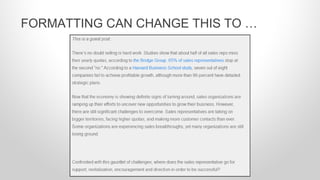
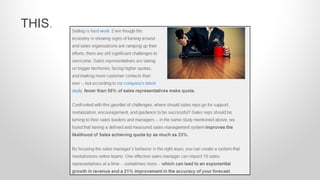
FORMATTING CAN CHANGE THIS TO …
THIS.
IN SHORT, WRITE
BLOG POSTS THAT
ARE HELPFUL TO
YOUR TARGET
AUDIENCE.
WHERE DO YOU FIND
BLOG POST IDEAS?5
CONTENT IDEAS CAN COME FROM
ANYWHERE.
1. Your idea backlog (if you don’t have one, start one).
2. Interviews.
3. Reading the news.
4. Talking to coworkers.
5. Brainstorm meetings.
6. Customer questions.
4 CONTENT ANGLES ALREADY RIGHT UNDER
YOUR NOSE:
1. Write a post for every question a prospect or customer has
ever asked you.
2. Ask your customers and prospects what problems they’re
trying to solve.
3. Take a look at what content your competitors are
publishing.
4. Write about the latest industry news story.
NOT EVERYTHING
YOU BLOG ABOUT
HAS TO BE BRAND
NEW CONTENT.
PULL FROM CONTENT THAT ALREADY
EXISTS.
• Pull from your company collaboration tool (wiki, social
network).
• Excerpt from existing content.
• Reformat written and visual content.
• Transcribe videos.
• Turn presentations into SlideShare presentations.
• Compile compelling data.
INTERVIEW SUBJECT MATTER EXPERTS IN
YOUR FIELD.
• Ask your Sales team what questions they often hear over
the phone.
• Same goes for Customer Service.
• Interview industry pundits and authors.
• Tap guest bloggers in your industry.
You can also use HubSpot’s free Blog Topic
Generator to get more than a handful of ideas.
Click Here to Get IdeasClick Here to Get Ideas
ADDITIONAL BLOGGING
RESOURCES.6
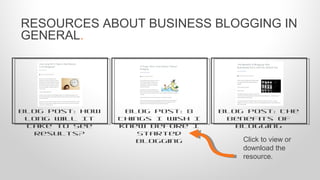
RESOURCES ABOUT BUSINESS BLOGGING IN
GENERAL.
Blog Post: The
Benefits of
Blogging
Blog Post: How
Long Will It
Take to See
Results?
Blog Post: 8
Things I Wish I
Knew Before I
Started
Blogging Click to view or
download the
resource.
RESOURCES TO HELP WITH WRITER’S
BLOCK & GETTING STARTED.
Blog Post: How
to Get Past
Writer's Block
[SlideShare]
The Marketer’s
Pocket Guide
to Writing Good
Blog Post: The
Foolproof
Formula for
Writing a Solid
PostClick to view or
download the
resource.
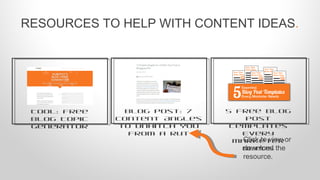
RESOURCES TO HELP WITH CONTENT IDEAS.
Tool: Free
Blog Topic
Generator
5 Free Blog
Post
Templates
Every
Marketer
Needs
Blog Post: 7
Content Angles
to Unhitch You
From a Rut
Click to view or
download the
resource.
RESOURCES TO HELP WITH BLOGGING
EFFICIENCY.
Template:
Blogging
Editorial
Calendar
How HubSpot
Does Inbound:
Creating a
Content
Machine
Blog Post: 100
Tips & Tricks
Professional
Bloggers Use
Click to view or
download the
resource.
QUESTIONS?
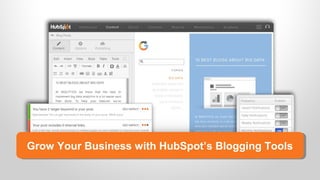
Grow Your Business with HubSpot’s Blogging ToolsGrow Your Business with HubSpot’s Blogging Tools
What is ?
All-in-one inbound marketing software.
Get a DemoGet a Demo Video OverviewVideo Overview
Get a Free Marketing AssessmentGet a Free Marketing Assessment
THANK YOU.

Why & how to blog

  • 1.
    WHY & HOWTO BLOG. What You Need to Know to Get Started with Business Blogging. Brought to you by
  • 2.
    1WHAT’S A BLOG? 2BUSINESSBLOGGING PLATFORMS: AN OVERVIEW. 3DOES BLOGGING WORK? 4HOW DO YOU WRITE GREAT BLOG POSTS? 5WHERE DO YOU FIND BLOG POST IDEAS? 6ADDITIONAL BLOGGING RESOURCES. CONTENTS.
  • 3.
  • 4.
    A website withfrequently updated content about a specific keyword- or topic-oriented subject. A blog is housed on a content management system, or CMS, which we’ll talk more about later. WHAT’S A BLOG?
  • 5.
  • 6.
    HubSpot’s Inbound Hubat blog.hubspot.com is a business blog.
  • 7.
    River Pools andSpas in Virginia has a business blog at riverpoolsandspas.com/blog.
  • 8.
    COMPANIES BLOG BECAUSE IT’SONE OF THE MOST EFFECTIVE WAYS TO ATTRACT POTENTIAL CUSTOMERS TO YOUR SITE.
  • 9.
    • Search Engines:Reading for keywords, links, and context. • Existing and Potential Customers: Reading for helpful content. • Sharers and Influencers: Reading to add value to their networks. WHO READS A BLOG?
  • 10.
    • Anyone whowants to drive site traffic. • Anyone who wants to establish thought leadership. Blogging solves for traffic, authority, and relevancy. WHO SHOULD BLOG, AND WHY?
  • 11.
  • 12.
    REMEMBER WHEN WE MENTIONEDBLOGS WERE HOUSED ON A CONTENT MANAGEMENT SYSTEM (CMS)?
  • 13.
    A stand-alone content publishing,editing, and management platform. WELL, WHAT’S A CMS?
  • 14.
    A CMS isdifferent in that: •It’s hosted on your domain, so SEO visibility benefits your site (as opposed to Blogspot.com, WordPress.com, or Tumblr.com); •It’s more customizable; and •It has a broader feature set. HOW IS A CMS DIFFERENT FROM FREE, HOSTED BLOGS OFFERED BY WORDPRESS, BLOGGER & TUMBLR?
  • 15.
    Hosted Blogs: •username.Wordpress.com •username.Blogspot.com •username.Tumblr.com Lack robustfeatures ideal for businesses. NOT ALL BLOGGING PLATFORMS ARE CREATED EQUAL. Self-Hosted CMSs: •HubSpot •WordPress (.org) •Joomla Can be customized for company goals and branding.
  • 16.
    Blogging is onlyone tool businesses have at their disposal to attract strangers to their site to convert into happy, paying customers. That’s why blogging works best when it’s integrated with other marketing tools. WHAT’S EVEN BETTER THAN A BLOGGING PLATFORM (CMS)?
  • 17.
    Unlike other CMSs,HubSpot isn’t just a CMS. It’s a suite of integrated inbound marketing weapons. WHAT KIND OF MARKETING TOOLS?
  • 18.
    1. Built-in SocialPublishing and Email: Google+ authorship support, subscription emails, and social sharing. 2. Built-in SEO: On-page keyword integration and recommendations as you type. 3. Out-of-the Box Responsive Design: No need for heavy mobile design investment. Your blog posts are consumable no matter the device. 4. Integrated Analytics: Understand what content converts. 4 REASONS IT MAKES SENSE TO BLOG ON HUBSPOT.
  • 19.
    NO MATTER WHICH CMSYOU CHOOSE, MAKE SURE YOU HAVE ACCESS TO QUALITY CUSTOMER SUPPORT.
  • 20.
  • 21.
    Blog Social Media Keywo rds Pages Calls-to- Action Landing Pages Forms Contacts Email Workflow s Lead Scoring CRM Integrati ons Social Media Smart- Calls-to- Action Email Workflow s Attract Convert CloseDelight Strangers Visitors Leads Customers Promoters BLOGGING IS OFTEN THE FIRST STEP IN TURNING STRANGERS INTO PROMOTORS OF YOUR BUSINESS.
  • 22.
  • 23.
    HOW DOES BLOGGING SUPPORTTHE ENTIRE CUSTOMER JOURNEY, YOU ASK?
  • 24.
    Organic traffic converts: •5Xbetter than referral traffic. •2X better than paid traffic. BLOGGING DRIVES ORGANIC TRAFFIC TO YOUR WEBSITE. Source: HubSpot
  • 25.
    Once visitors arriveat your blog, they have calls-to-action, additional blog posts, site navigation, and featured offers, products or services to lure them into exploring more of your site. BLOGGING HELPS CONVERT THAT TRAFFIC INTO LEADS. Source: HubSpot
  • 26.
    Educational, helpful, orotherwise useful content positions your company as an industry expert and engenders trust in your company. BLOGGING HELPS ESTABLISH AUTHORITY.
  • 27.
    Blogging is giftthat keeps on giving. If the HubSpot marketing team stopped blogging, we’d still generate 70-75% of our blog traffic from old posts! BLOGGING DRIVES LONG TERM RESULTS.
  • 28.
    The average companythat blogs generates: •55% more website visitors. •97% more inbound links. •434% more indexed pages. SERIOUSLY. IT WORKS. Source: HubSpot
  • 29.
    COMPANIES THAT BLOGGENERATE 126% MORE LEADS THAN THOSE THAT DON’T. Source: HubSpotSurvey N = 2,300
  • 30.
    Source: HubSpotSurvey N= 3,339 BLOGGING IS REGULARLY LINKED TO HIGHER ROI.
  • 31.
    • 57% ofmarketers who blog monthly acquire customers from their blog. • 82% of marketers who blog daily acquire customers from their blog. THE MORE YOU BLOG, THE MORE CUSTOMERS YOU GENERATE.
  • 32.
    AS LONG ASYOU BLOG TO HELP YOUR AUDIENCE ON A CONSISTENT BASIS, YOU’LL SEE RESULTS.
  • 33.
    HOW DO YOUWRITE GREAT BLOG POSTS?4
  • 34.
    • Title: Upto 70 characters with keywords. • Image: With Alt text. • Length: Typically between 300-800 words. • Keyword Density: Natural. • Calls-to-Action: Primary and Secondary. • Social Buttons: Follow and Share. WHAT ARE THE COMPONENTS OF A BLOG POST?
  • 35.
    EVERY BLOG POST YOUWRITE SHOULD HAVE A PURPOSE.
  • 36.
    • Drive aton of traffic? • Generate better qualified leads? • Garner social shares? • Establish yourself as an industry leader? • Keep your readers engaged in your blog? WHAT DO YOU WANT YOUR POST TO ACHIEVE FOR YOUR BUSINESS?
  • 37.
    • Learn howto do something. • Think about something in a new way. • Be entertained. • Have their curiosity piqued. • Advance their skill set. WHAT DO YOU WANT YOUR READER TO GET FROM YOUR POST?
  • 38.
    1. Keyword alignment. 2.Persona alignment. 3. Good writing. 4. Scannable formatting. 5. Data or research. THE ANATOMY OF A GREAT BLOG POST.
  • 39.
    1. The topicspeople care about. 2. The keywords people use to find those topics. 3. The fact that readers scan. GOOD BLOG POSTS CONSIDER:
  • 40.
    Most people onlyread 60% of your blog post.
  • 41.
    • Writing captivatingtitles. • Hooking ‘em in the intro. • Using proper grammar and spelling. • Using clear, jargon-free language. • Being helpful. • Being accurate. • Being succinct (edit, edit, edit!). THAT MEANS YOU NEED TO GET GOOD AT:
  • 42.
    • Use humor. •Get personal. • Shock them. • Show empathy. • Make a promise (then deliver on it in the rest of the post). WRITE INTRODUCTIONS THAT TAP INTO READERS’ EMOTIONS.
  • 43.
    WRITE TITLES THATDRAW READERS IN. Preview a content “offer” associated with the blog post. Use specific and dramatic, yet accurate descriptors. Use lists and visuals [SlideShare] to convey the content will be easy to consume.
  • 44.
    1. Write tocommunicate a message, not for word count. 2. Creating content interesting to your audience. 3. Write posts people will want to link to. 4. Don't be self-promotional. 5. Think like a teacher: Teach your audience something useful. 6. Use visual differentiators. 6 BLOG POST WRITING TIPS.
  • 45.
    • Short paragraphs. •Headers and sub-headers. • At least one image. • Internal links. • Bullets. • Numbered lists. • Bolded or italicized terms and phrases. BY “VISUAL DIFFERENTIATORS,” WE MEAN:
  • 46.
    1. Support andadd validity to your points. 2. Help you convey your message more clearly and succinctly. 3. Break up the monotony of written content. 4. Help readers glean your message faster (while scanning). DATA & VISUALS ARE THE CHERRY ON TOP OF AN EXCELLENT BLOG POST. THEY CAN:
  • 47.
  • 48.
  • 49.
    IN SHORT, WRITE BLOGPOSTS THAT ARE HELPFUL TO YOUR TARGET AUDIENCE.
  • 50.
    WHERE DO YOUFIND BLOG POST IDEAS?5
  • 51.
    CONTENT IDEAS CANCOME FROM ANYWHERE. 1. Your idea backlog (if you don’t have one, start one). 2. Interviews. 3. Reading the news. 4. Talking to coworkers. 5. Brainstorm meetings. 6. Customer questions.
  • 52.
    4 CONTENT ANGLESALREADY RIGHT UNDER YOUR NOSE: 1. Write a post for every question a prospect or customer has ever asked you. 2. Ask your customers and prospects what problems they’re trying to solve. 3. Take a look at what content your competitors are publishing. 4. Write about the latest industry news story.
  • 53.
    NOT EVERYTHING YOU BLOGABOUT HAS TO BE BRAND NEW CONTENT.
  • 54.
    PULL FROM CONTENTTHAT ALREADY EXISTS. • Pull from your company collaboration tool (wiki, social network). • Excerpt from existing content. • Reformat written and visual content. • Transcribe videos. • Turn presentations into SlideShare presentations. • Compile compelling data.
  • 55.
    INTERVIEW SUBJECT MATTEREXPERTS IN YOUR FIELD. • Ask your Sales team what questions they often hear over the phone. • Same goes for Customer Service. • Interview industry pundits and authors. • Tap guest bloggers in your industry.
  • 56.
    You can alsouse HubSpot’s free Blog Topic Generator to get more than a handful of ideas. Click Here to Get IdeasClick Here to Get Ideas
  • 57.
  • 58.
    RESOURCES ABOUT BUSINESSBLOGGING IN GENERAL. Blog Post: The Benefits of Blogging Blog Post: How Long Will It Take to See Results? Blog Post: 8 Things I Wish I Knew Before I Started Blogging Click to view or download the resource.
  • 59.
    RESOURCES TO HELPWITH WRITER’S BLOCK & GETTING STARTED. Blog Post: How to Get Past Writer's Block [SlideShare] The Marketer’s Pocket Guide to Writing Good Blog Post: The Foolproof Formula for Writing a Solid PostClick to view or download the resource.
  • 60.
    RESOURCES TO HELPWITH CONTENT IDEAS. Tool: Free Blog Topic Generator 5 Free Blog Post Templates Every Marketer Needs Blog Post: 7 Content Angles to Unhitch You From a Rut Click to view or download the resource.
  • 61.
    RESOURCES TO HELPWITH BLOGGING EFFICIENCY. Template: Blogging Editorial Calendar How HubSpot Does Inbound: Creating a Content Machine Blog Post: 100 Tips & Tricks Professional Bloggers Use Click to view or download the resource.
  • 62.
  • 63.
    Grow Your Businesswith HubSpot’s Blogging ToolsGrow Your Business with HubSpot’s Blogging Tools
  • 64.
    What is ? All-in-oneinbound marketing software. Get a DemoGet a Demo Video OverviewVideo Overview Get a Free Marketing AssessmentGet a Free Marketing Assessment
  • 65.

Editor's Notes

  • #2 Teach Your Company Why and How to Blog: Your Essential Training Presentation