What is a connection in a Computer or Computer Network
A connection is a link between two or more devices that allows them to
communicate, share data, or access resources.
In simple words: It’s how devices “talk” to each other.
A link between two or more devices that allows them to communicate and
exchange data.
Examples of Connection
1.Wired Connection
1. Using cables like Ethernet/LAN cable to connect a computer to a router.
2. Example: Your PC is connected to a home router via a LAN cable to access the Internet.
2.Wireless Connection
1. Using Wi-Fi, Bluetooth, or Infrared to connect devices without cables.
2. Example: A Smartphone connected to a Wi-Fi network to browse the Internet.
3.Internet Connection
1. A link that allows a device to access the Internet.
2. Example: Fiber, DSL, or mobile data connection.
Key Point
• A connection enables communication.
• It can be wired (Ethernet, USB) or wireless (Wi-Fi, Bluetooth,
Infrared).
What are the three types of
connections?
These are the three basic data communication connection
types:
A. Wired Connection
Uses physical cables to transmit data.
Examples:
• Ethernet (LAN cable)
• Fiber-optic cable
• Coaxial cable
Cont…
B. Wireless Connection
Transfers data without physical cables.
Examples:
• Wi-Fi
• Bluetooth
• Infrared (IR)
• Satellite communication
Cont…
C. Mobile (Cellular) Connection
Uses telecommunication towers and SIM-based networks.
Examples:
• 3G
• 4G LTE
• 5G
• GSM(Global System for Mobile
Communications)/UMTS(Universal Mobile
Telecommunications System) networks
Cont…
From the above categories, the internet can be provided
through all three types:
• Wired internet Fiber, DSL, Cable internet
→
• Wireless internet Wi-Fi, Satellite internet
→
• Mobile internet 3G/4G/5G data
→
So, the Internet is not a single category—it can use wired,
wireless, or mobile connections depending on the
technology.
3. What are the types of internet connections?
Here are the commonly used internet connection types:
A. Wired Internet Types
• Fiber-optic internet (fastest)
• Cable internet
• DSL (Digital Subscriber Line)
• Ethernet LAN (for local networks)
B. Wireless Internet Types
• Wi-Fi (local wireless access)
• Satellite internet
• Fixed wireless broadband
C. Mobile Internet Types
• 3G
• 4G LTE
• 5G
• Mobile hotspot / Tethering
1. How does Wi-Fi work?
Wi-Fi is a wireless networking technology that uses radio
waves to send and receive data between devices and a router.
How it works (simple explanation):
1.Your router receives internet from your ISP (fiber, DSL, cable, or
mobile).
2.The router converts this internet signal into Wi-Fi radio waves.
3.Your phone/laptop connects to those radio waves using a Wi-Fi
antenna.
4.The router sends your data to the ISP then to the internet
→ →
and back to your device.
✔ Wi-Fi = local wireless network signal
✔ Wi-Fi is NOT the internet
✔ Wi-Fi only distributes the internet inside your
home/office
Does Wi-Fi need a tower?
No — Wi-Fi does NOT use ISP towers.
Wi-Fi uses a router, not a tower.
Important distinction:
• Wi-Fi router Creates a local wireless signal in your home
→
• ISP tower Used only for
→ mobile data (4G/5G) or fixed
wireless broadband
When a Wi-Fi router does need a tower:
Only if the router gets internet through a SIM card using
mobile data (4G/5G router).
Then the internet comes from the tower, but the Wi-Fi signal
is still local.
3. What is the difference between DSL, Cable, and LAN/Ethernet?
A. DSL (Digital Subscriber Line)
• Uses telephone lines (copper twisted-pair).
• The Internet runs simultaneously with telephone service.
• Speeds: slow to medium.
B. Cable Internet
• Uses coaxial TV cables.
• Faster than DSL.
• More stable.
C. LAN / Ethernet
• It is a local wired network connection, usually inside a home or office.
• Uses Ethernet cables (Cat5/6/7).
• Connects devices to the router (PC router).
→
✔ DSL and Cable = Internet connection types
✔ Ethernet = local network connection type
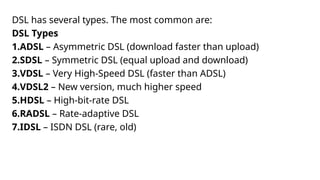
DSL has several types. The most common are:
DSL Types
1.ADSL – Asymmetric DSL (download faster than upload)
2.SDSL – Symmetric DSL (equal upload and download)
3.VDSL – Very High-Speed DSL (faster than ADSL)
4.VDSL2 – New version, much higher speed
5.HDSL – High-bit-rate DSL
6.RADSL – Rate-adaptive DSL
7.IDSL – ISDN DSL (rare, old)
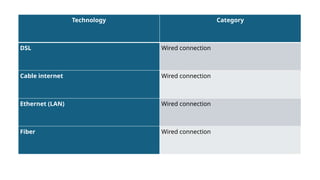
Technology Category
DSL Wired connection
Cable internet Wired connection
Ethernet (LAN) Wired connection
Fiber Wired connection
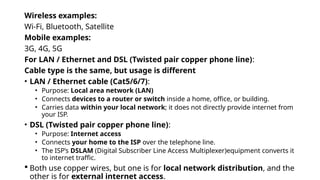
Wireless examples:
Wi-Fi, Bluetooth, Satellite
Mobile examples:
3G, 4G, 5G
For LAN / Ethernet and DSL (Twisted pair copper phone line):
Cable type is the same, but usage is different
• LAN / Ethernet cable (Cat5/6/7):
• Purpose: Local area network (LAN)
• Connects devices to a router or switch inside a home, office, or building.
• Carries data within your local network; it does not directly provide internet from
your ISP.
• DSL (Twisted pair copper phone line):
• Purpose: Internet access
• Connects your home to the ISP over the telephone line.
• The ISP’s DSLAM (Digital Subscriber Line Access Multiplexer)equipment converts it
to internet traffic.
 Both use copper wires, but one is for local network distribution, and the
other is for external internet access.
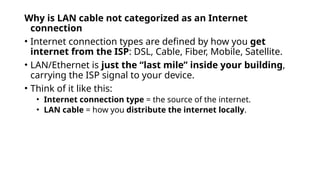
Why is LAN cable not categorized as an Internet
connection
• Internet connection types are defined by how you get
internet from the ISP: DSL, Cable, Fiber, Mobile, Satellite.
• LAN/Ethernet is just the “last mile” inside your building,
carrying the ISP signal to your device.
• Think of it like this:
• Internet connection type = the source of the internet.
• LAN cable = how you distribute the internet locally.
DSL (Digital Subscriber Line) uses telephone lines, which are
made of twisted-pair copper cables.
1.Twisted-Pair Copper Cable
1.Two insulated copper wires twisted together to reduce interference.
2.Same type of cable used for traditional telephone lines.
2.Variants / Categories:
1.Cat3 – Often used for older ADSL connections.
2.Cat5 / Cat5e / Cat6 – Can be used for DSL modems and internal
wiring for better performance.
3.Connections in DSL setup:
1.From ISP to home: Twisted-pair copper telephone line
2.Inside home (modem to computer/router): Usually Ethernet cable
(Cat5/6)
 Key point: DSL itself runs over twisted-pair copper, but
inside your house, you usually use Ethernet cables to connect
devices
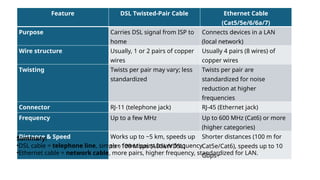
Feature DSL Twisted-Pair Cable Ethernet Cable
(Cat5/5e/6/6a/7)
Purpose Carries DSL signal from ISP to
home
Connects devices in a LAN
(local network)
Wire structure Usually, 1 or 2 pairs of copper
wires
Usually 4 pairs (8 wires) of
copper wires
Twisting Twists per pair may vary; less
standardized
Twists per pair are
standardized for noise
reduction at higher
frequencies
Connector RJ-11 (telephone jack) RJ-45 (Ethernet jack)
Frequency Up to a few MHz Up to 600 MHz (Cat6) or more
(higher categories)
Distance & Speed Works up to ~5 km, speeds up
to ~100 Mbps (ADSL/VDSL)
Shorter distances (100 m for
Cat5e/Cat6), speeds up to 10
Gbps+
Summary:
•DSL cable = telephone line, simpler, fewer pairs, lower frequency.
•Ethernet cable = network cable, more pairs, higher frequency, standardized for LAN.
What is a Dial-Up Connection?
• Dial-up is an older type of internet connection.
• It uses a standard telephone line (twisted-pair copper cable)
to connect your computer to the ISP.
• Connection is made via a modem that dials the ISP’s phone
number.
• Internet speed: very slow, usually up to 56 kbps.
What is a Telephone Network?
A telephone network is a large communication system that allows people
to make voice calls to each other over long distances.
It connects telephones in homes, offices, and mobile devices through a
combination of wired and wireless technologies.
What is VoIP?
VoIP = Voice over Internet Protocol
It is a technology/method of making voice calls over the internet instead
of traditional telephone lines.
An IP Phone is a device (hardware telephone) designed to make VoIP calls.
So VoIP is a service or technology, not a device.
Examples of VoIP services:
• WhatsApp call
• Skype
• Zoom
• Google Meet
• SIP-based office phone systems
Thank You!!

What is a connection in a Computer or Computer Network.pptx

  • 1.
    What is aconnection in a Computer or Computer Network A connection is a link between two or more devices that allows them to communicate, share data, or access resources. In simple words: It’s how devices “talk” to each other. A link between two or more devices that allows them to communicate and exchange data. Examples of Connection 1.Wired Connection 1. Using cables like Ethernet/LAN cable to connect a computer to a router. 2. Example: Your PC is connected to a home router via a LAN cable to access the Internet. 2.Wireless Connection 1. Using Wi-Fi, Bluetooth, or Infrared to connect devices without cables. 2. Example: A Smartphone connected to a Wi-Fi network to browse the Internet. 3.Internet Connection 1. A link that allows a device to access the Internet. 2. Example: Fiber, DSL, or mobile data connection.
  • 2.
    Key Point • Aconnection enables communication. • It can be wired (Ethernet, USB) or wireless (Wi-Fi, Bluetooth, Infrared).
  • 3.
    What are thethree types of connections? These are the three basic data communication connection types: A. Wired Connection Uses physical cables to transmit data. Examples: • Ethernet (LAN cable) • Fiber-optic cable • Coaxial cable
  • 4.
    Cont… B. Wireless Connection Transfersdata without physical cables. Examples: • Wi-Fi • Bluetooth • Infrared (IR) • Satellite communication
  • 5.
    Cont… C. Mobile (Cellular)Connection Uses telecommunication towers and SIM-based networks. Examples: • 3G • 4G LTE • 5G • GSM(Global System for Mobile Communications)/UMTS(Universal Mobile Telecommunications System) networks
  • 6.
    Cont… From the abovecategories, the internet can be provided through all three types: • Wired internet Fiber, DSL, Cable internet → • Wireless internet Wi-Fi, Satellite internet → • Mobile internet 3G/4G/5G data → So, the Internet is not a single category—it can use wired, wireless, or mobile connections depending on the technology.
  • 7.
    3. What arethe types of internet connections? Here are the commonly used internet connection types: A. Wired Internet Types • Fiber-optic internet (fastest) • Cable internet • DSL (Digital Subscriber Line) • Ethernet LAN (for local networks) B. Wireless Internet Types • Wi-Fi (local wireless access) • Satellite internet • Fixed wireless broadband C. Mobile Internet Types • 3G • 4G LTE • 5G • Mobile hotspot / Tethering
  • 8.
    1. How doesWi-Fi work? Wi-Fi is a wireless networking technology that uses radio waves to send and receive data between devices and a router. How it works (simple explanation): 1.Your router receives internet from your ISP (fiber, DSL, cable, or mobile). 2.The router converts this internet signal into Wi-Fi radio waves. 3.Your phone/laptop connects to those radio waves using a Wi-Fi antenna. 4.The router sends your data to the ISP then to the internet → → and back to your device. ✔ Wi-Fi = local wireless network signal ✔ Wi-Fi is NOT the internet ✔ Wi-Fi only distributes the internet inside your home/office
  • 9.
    Does Wi-Fi needa tower? No — Wi-Fi does NOT use ISP towers. Wi-Fi uses a router, not a tower. Important distinction: • Wi-Fi router Creates a local wireless signal in your home → • ISP tower Used only for → mobile data (4G/5G) or fixed wireless broadband When a Wi-Fi router does need a tower: Only if the router gets internet through a SIM card using mobile data (4G/5G router). Then the internet comes from the tower, but the Wi-Fi signal is still local.
  • 10.
    3. What isthe difference between DSL, Cable, and LAN/Ethernet? A. DSL (Digital Subscriber Line) • Uses telephone lines (copper twisted-pair). • The Internet runs simultaneously with telephone service. • Speeds: slow to medium. B. Cable Internet • Uses coaxial TV cables. • Faster than DSL. • More stable. C. LAN / Ethernet • It is a local wired network connection, usually inside a home or office. • Uses Ethernet cables (Cat5/6/7). • Connects devices to the router (PC router). → ✔ DSL and Cable = Internet connection types ✔ Ethernet = local network connection type
  • 11.
    DSL has severaltypes. The most common are: DSL Types 1.ADSL – Asymmetric DSL (download faster than upload) 2.SDSL – Symmetric DSL (equal upload and download) 3.VDSL – Very High-Speed DSL (faster than ADSL) 4.VDSL2 – New version, much higher speed 5.HDSL – High-bit-rate DSL 6.RADSL – Rate-adaptive DSL 7.IDSL – ISDN DSL (rare, old)
  • 12.
    Technology Category DSL Wiredconnection Cable internet Wired connection Ethernet (LAN) Wired connection Fiber Wired connection
  • 13.
    Wireless examples: Wi-Fi, Bluetooth,Satellite Mobile examples: 3G, 4G, 5G For LAN / Ethernet and DSL (Twisted pair copper phone line): Cable type is the same, but usage is different • LAN / Ethernet cable (Cat5/6/7): • Purpose: Local area network (LAN) • Connects devices to a router or switch inside a home, office, or building. • Carries data within your local network; it does not directly provide internet from your ISP. • DSL (Twisted pair copper phone line): • Purpose: Internet access • Connects your home to the ISP over the telephone line. • The ISP’s DSLAM (Digital Subscriber Line Access Multiplexer)equipment converts it to internet traffic.  Both use copper wires, but one is for local network distribution, and the other is for external internet access.
  • 14.
    Why is LANcable not categorized as an Internet connection • Internet connection types are defined by how you get internet from the ISP: DSL, Cable, Fiber, Mobile, Satellite. • LAN/Ethernet is just the “last mile” inside your building, carrying the ISP signal to your device. • Think of it like this: • Internet connection type = the source of the internet. • LAN cable = how you distribute the internet locally.
  • 15.
    DSL (Digital SubscriberLine) uses telephone lines, which are made of twisted-pair copper cables. 1.Twisted-Pair Copper Cable 1.Two insulated copper wires twisted together to reduce interference. 2.Same type of cable used for traditional telephone lines. 2.Variants / Categories: 1.Cat3 – Often used for older ADSL connections. 2.Cat5 / Cat5e / Cat6 – Can be used for DSL modems and internal wiring for better performance. 3.Connections in DSL setup: 1.From ISP to home: Twisted-pair copper telephone line 2.Inside home (modem to computer/router): Usually Ethernet cable (Cat5/6)  Key point: DSL itself runs over twisted-pair copper, but inside your house, you usually use Ethernet cables to connect devices
  • 16.
    Feature DSL Twisted-PairCable Ethernet Cable (Cat5/5e/6/6a/7) Purpose Carries DSL signal from ISP to home Connects devices in a LAN (local network) Wire structure Usually, 1 or 2 pairs of copper wires Usually 4 pairs (8 wires) of copper wires Twisting Twists per pair may vary; less standardized Twists per pair are standardized for noise reduction at higher frequencies Connector RJ-11 (telephone jack) RJ-45 (Ethernet jack) Frequency Up to a few MHz Up to 600 MHz (Cat6) or more (higher categories) Distance & Speed Works up to ~5 km, speeds up to ~100 Mbps (ADSL/VDSL) Shorter distances (100 m for Cat5e/Cat6), speeds up to 10 Gbps+ Summary: •DSL cable = telephone line, simpler, fewer pairs, lower frequency. •Ethernet cable = network cable, more pairs, higher frequency, standardized for LAN.
  • 17.
    What is aDial-Up Connection? • Dial-up is an older type of internet connection. • It uses a standard telephone line (twisted-pair copper cable) to connect your computer to the ISP. • Connection is made via a modem that dials the ISP’s phone number. • Internet speed: very slow, usually up to 56 kbps.
  • 18.
    What is aTelephone Network? A telephone network is a large communication system that allows people to make voice calls to each other over long distances. It connects telephones in homes, offices, and mobile devices through a combination of wired and wireless technologies. What is VoIP? VoIP = Voice over Internet Protocol It is a technology/method of making voice calls over the internet instead of traditional telephone lines. An IP Phone is a device (hardware telephone) designed to make VoIP calls. So VoIP is a service or technology, not a device. Examples of VoIP services: • WhatsApp call • Skype • Zoom • Google Meet • SIP-based office phone systems
  • 19.